steering MERCEDES-BENZ C-CLASS COUPE 2015 Owner's Guide
[x] Cancel search | Manufacturer: MERCEDES-BENZ, Model Year: 2015, Model line: C-CLASS COUPE, Model: MERCEDES-BENZ C-CLASS COUPE 2015Pages: 385, PDF Size: 13.12 MB
Page 116 of 385
Position of the steering wheel for driv-
ing The steering wheel is moved to the previously
set position if:
R the driver's door is closed and you insert the
key into the ignition lock
R you close the driver's door when the ignition
is switched on
R you press the Start/Stop button once on vehi-
cles with KEYLESS-GO
i The steering wheel only returns to the last
set position if the driving position is stored
after the seat or steering column has been
adjusted (Y page 116).
The most recent driving position of the steering
wheel is stored if:
R the ignition is switched off
R the settingiss tored using the memory func-
tion (Y page 116)
Crash-responsive EASY-EXIT feature If the crash-responsive EASY-EXIT feature is trig-
gered in an accident, the steering column will
move upwards when the driver's door is opened
or the key is removed from the ignition lock. This
makes it easier to exit the vehicle and rescue the
occupants.
The crash-responsive EASY-EXIT feature is only
operational if the EASY-EXIT/ENTRY feature is
activated in the multimedia system (see the sep-
arate operating instructions). Mirrors
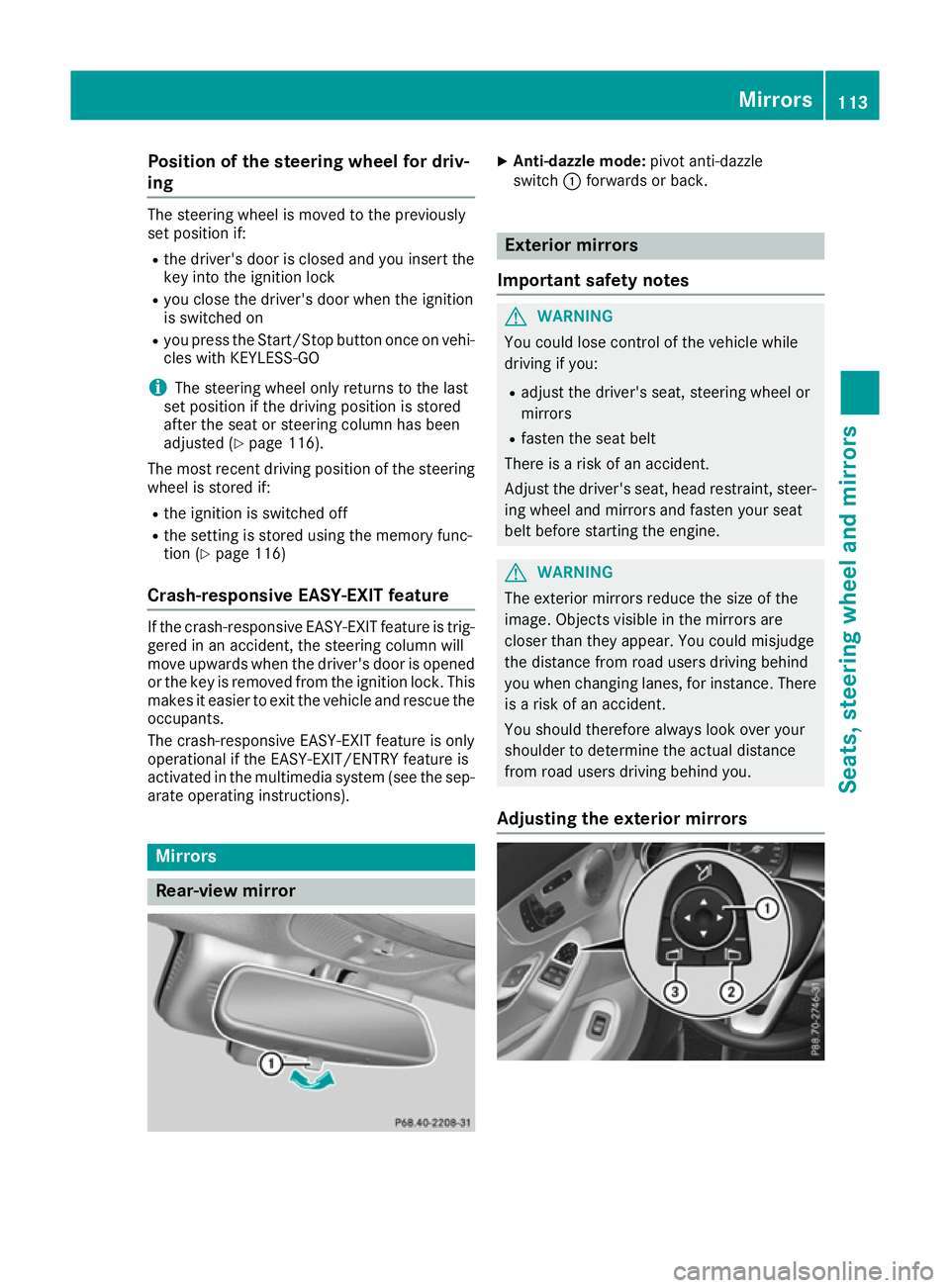
Rear-view mirror X
Anti-dazzle mode: pivot anti-dazzle
switch :forwards or back. Exterior mirrors
Important safety notes G
WARNING
You could lose control of the vehicle while
driving if you:
R adjust the driver's seat, steering wheel or
mirrors
R fasten the seat belt
There is arisk of an accident.
Adjust the driver's seat, head restraint ,steer-
ing wheel and mirrors and fasten your seat
belt before startingt he engine. G
WARNING
The exterior mirrors reduce the size of the
image. Objectsv isible in the mirrors are
closer than they appear. You could misjudge
the distance from road users driving behind
you when changing lanes, for instance. There is ar isk of an accident.
You should therefore always look over your
shoulder to determine the actual distance
from road users driving behind you.
Adjusting the exterior mirrors Mirrors
113Seats, steering wheela nd mirrors Z
Page 117 of 385
X
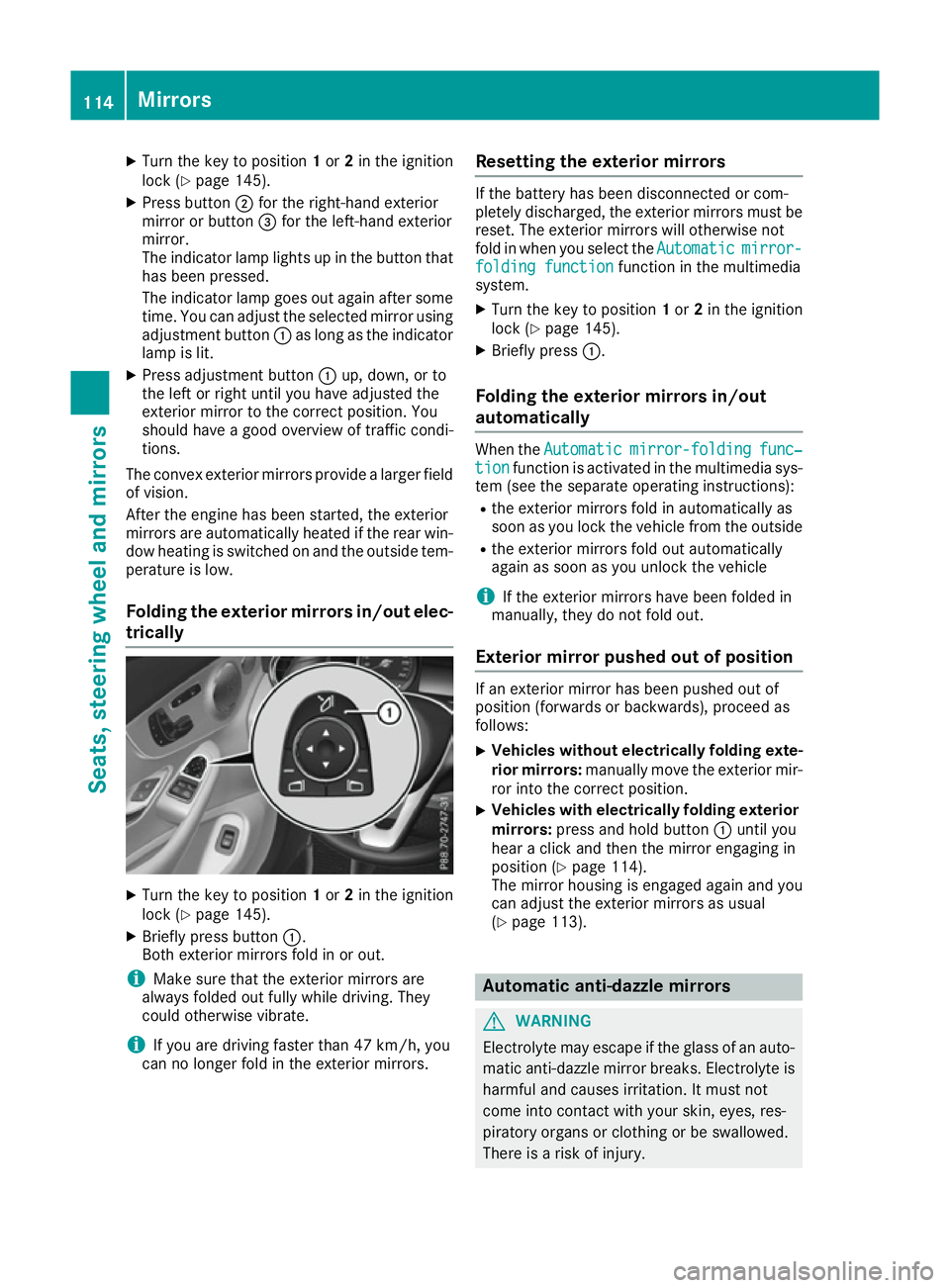
Turn the key to position 1or 2in the ignition
lock (Y page 145).
X Press button ;for the right-hand exterior
mirror or button =for the left-hand exterior
mirror.
The indicator lamp lights up in the button that has been pressed.
The indicator lamp goes out again after some
time. You can adjust the selected mirror using adjustmen tbutton :as long as the indicator
lamp is lit.
X Press adjustmen tbutton :up, down, or to
the left or right until you have adjusted the
exterior mirror to the correc tposition. You
should have agood overview of traffic condi-
tions.
The convex exterior mirrors provide alarger field
of vision.
After the engine has been started, the exterior
mirrors are automatically heated if the rear win-
dow heating is switched on and the outside tem- perature is low.
Folding the exterior mirrors in/out elec- trically X
Turn the key to position 1or 2in the ignition
lock (Y page 145).
X Briefly press button :.
Both exterior mirrors fold in or out.
i Make sure that the exterior mirrors are
alway sfolded out fully while driving. They
could otherwise vibrate.
i If you are driving faster than 47 km/h,
you
can no longer fol dintheexterio rmirrors. Resetting th
eexterior mirrors If th
ebattery has been disconnected or com-
pletely discharged, th eexter iorm irror smustbe
reset .The exterio rmirror swill otherwise not
fol dinw hen you select the Automatic Automaticmirror-
mirror-
foldin gfunction
foldin gfunction function in th emultimedia
system.
X Turn th ekeyto position 1or 2in th eignition
loc k(Ypage 145).
X Briefly press :.
Folding th eexterior mirror sin/out
automatically Whe
nthe Automatic
Automatic mirror-folding
mirror-folding func‐
func‐
tion
tion function is activated in th emultimedia sys-
te m( see th eseparat eoperating instructions):
R thee xter iorm irror sfoldina utomatically as
soo nasy ou loc kthe vehicl efromt heoutside
R thee xter iorm irror sfoldo ut automatically
again as soo nasyou unloc kthe vehicle
i If th
eexter iorm irror shaveb een folded in
manually, they do no tfoldo ut.
Exterior mirror pushe dout of position If an exterio
rmirror has been pushed out of
position (forwards or backwards), proceed as
follows:
X Vehicles withou
telectricall yfolding exte-
rior mirrors: manually mov ethe exterio rmir-
ror into th ecorrect position.
X Vehicles wit
helectricall yfolding exterior
mirrors: press and hold button :until you
hear aclick and then th emirror engaging in
position (Y page 114).
The mirror housin gisengage dagain and you
can adjust th eexter iorm irror sasu sual
(Y page 113). Automatic anti-dazzle mirrors
G
WARNING
Electrolyt emay escape if th eglassofana uto-
matic anti-dazzl emirror breaks .Electrol yteis
harmful and causes irritation .Itmustn ot
come into contact wit hyour skin ,eyes ,res-
piratory organs or clothin gorbeswallowed.
There is ariskofi njury. 114
Mir
rorsSeats ,steering wheel and mirrors
Page 118 of 385
If you come into contact with electrolyte,
observe the following:
R immediately rinse off electrolyte from your
skin with water.
R immediately and thoroughl yrinse electro-
lyte out of eyes using clean water.
R if electrolyte is swallowed, immediately
rinse out yourm outh thoroughly. Do not
induce vomiting.
R if electrolyte comes into contact with skin
or eyes or is swallowed, seek medica latten-
tion immediately.
R immediately change out of clothing that has
been in contact with electrolyte.
R if an allergic reaction occurs, seek medical
attention immediately.
The rear-view mirror and the exterior mirror on
the driver's side automatically go into anti-daz-
zle mode if the following conditions are met
simultaneously:
R the ignition is switched on
R incident light from headlampss trikes the sen-
sor in the rear-view mirror
The mirrors do not dip if reverse gear is engaged
or if the interior lighting is switched on. Parking positio
nofthe exterio rmirror
on the front-passenge rside
Storing the parking position You can set the front-passenger side exterior
mirror so that you can see the rear wheel on that
side as soon as you engage reverse gear. You
can store this position. Usingr
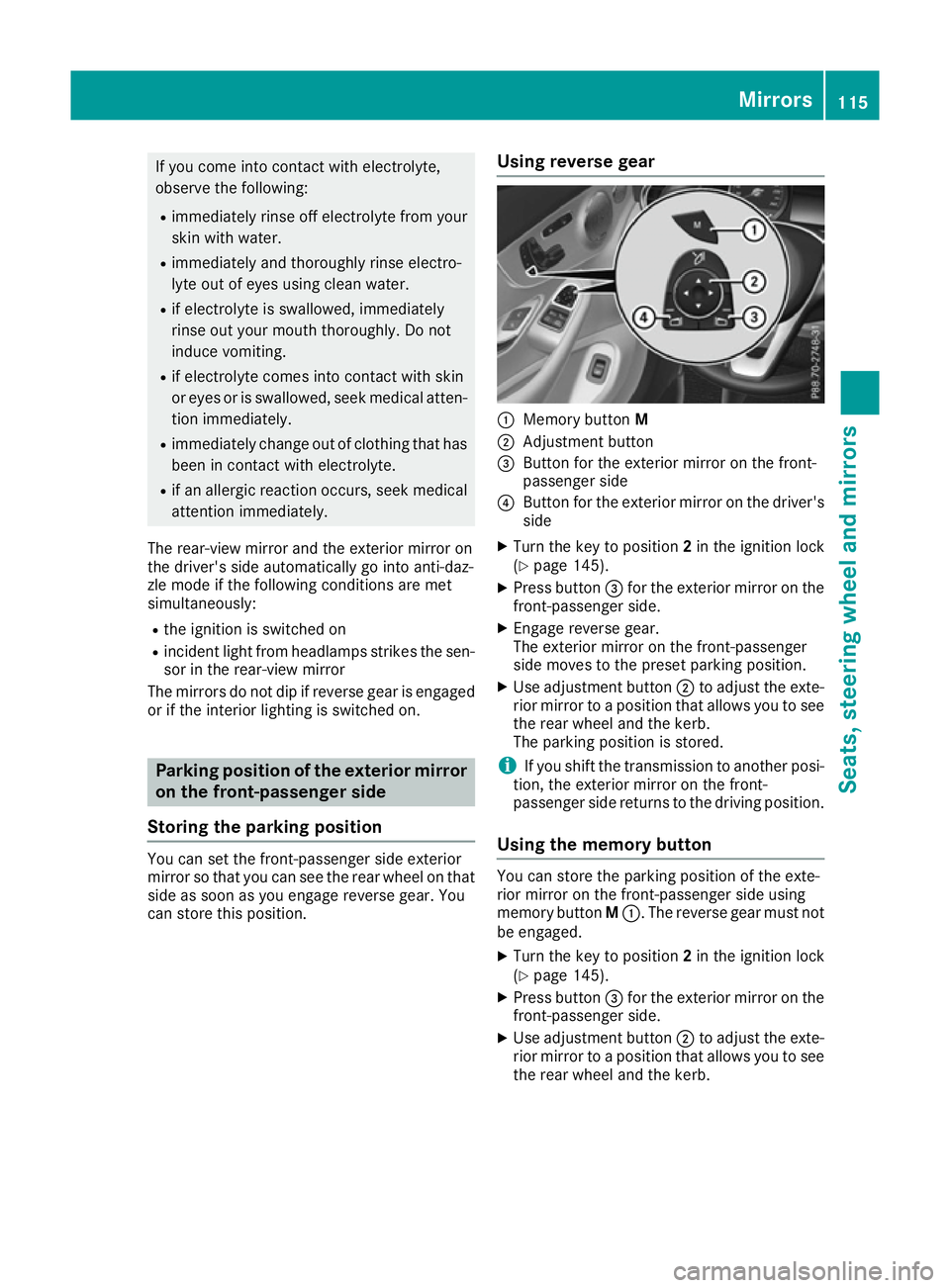
everse gear :
Memory button M
; Adjustment button
= Button for the exterior mirror on the front-
passenger side
? Button for the exterior mirror on the driver's
side
X Turn the key to position 2in the ignition lock
(Y page 145).
X Press button =for the exterior mirror on the
front-passenger side.
X Engage reverse gear.
The exterior mirror on the front-passenger
side moves to the preset parking position.
X Use adjustment button ;to adjust the exte-
rior mirror to apositio nthat allows you to see
the rear wheel and the kerb.
The parking positio nisstored.
i If you shift the transmission to another posi-
tion, the exterior mirror on the front-
passenger side returns to the driving position.
Usingt he memory button You can store the parking positio
nofthe exte-
rior mirror on the front-passenger side using
memory button M:.T he reverse gear must not
be engaged.
X Turn the key to position 2in the ignition lock
(Y page 145).
X Press button =for the exterior mirror on the
front-passenger side.
X Use adjustment button ;to adjust the exte-
rior mirror to apositio nthat allows you to see
the rear wheel and the kerb. Mirrors
115Seats, steeringw heel and mirrors Z
Page 119 of 385
X
Press memory button M: and one of the
arrows on adjustmen tbutton ;within three
seconds.
The parking position is stored if the exterior
mirror does not move.
X If the mirror moves out of position, repeat the
steps.
X After successfully storing, reset the driving
position of the exterior mirror.
Calling up astored parking position X
Turn the key to position 2in the ignition lock
(Y page 145).
X Adjust the exterior mirror on the front-
passenger side using button =.
X Engage reverse gear.
The exterior mirror on the front-passenger
side moves to the stored parking position.
The exterior mirror on the front-passenger side
moves back to its original position:
R as soon as you exceed aspeed of 15 km/h
R about ten seconds after you have disengaged
reverse gear
R if you press button ?for the exterior mirror
on the driver's side Memory function
Important safety notes
G
WARNING
If you use the memory function on the driver's side while driving, the adjustments could
cause you to lose control of the vehicle. There
is ar isk of an accident.
Only use the memory function on the driver's
side while the vehicle is stationary. G
WARNING
When the memory function adjusts the seat or steerin gwheel, you and other vehicle occu-
pants –particularly children –could become
trapped. There is arisk of injury.
While the memory function is making adjust-
ments, make sure that no one has any body
parts in the sweep of the seat or steering
wheel. If somebody becomes trapped, imme- diately release the memory function position
button .The adjustmen tprocess is stopped. G
WARNING
If children activat ethe memory function, they
could become trapped, especially if they are
unattended. There is arisk of injury.
When leaving the vehicle, alway stake the key
with you and lock the vehicle. Never leave
children unattended in the vehicle.
The memory function can be used at any time,
e.g. even when the key is not in the ignition lock. Storing settings
With the memory function, you can store up to
three different settings, e.g. for three different
people.
The following settings are stored as asingle
memory preset:
R position of the seat, backrest and head
restraint
R driver's side: position of the exterior mirrors
on the driver's and front-passenger sides
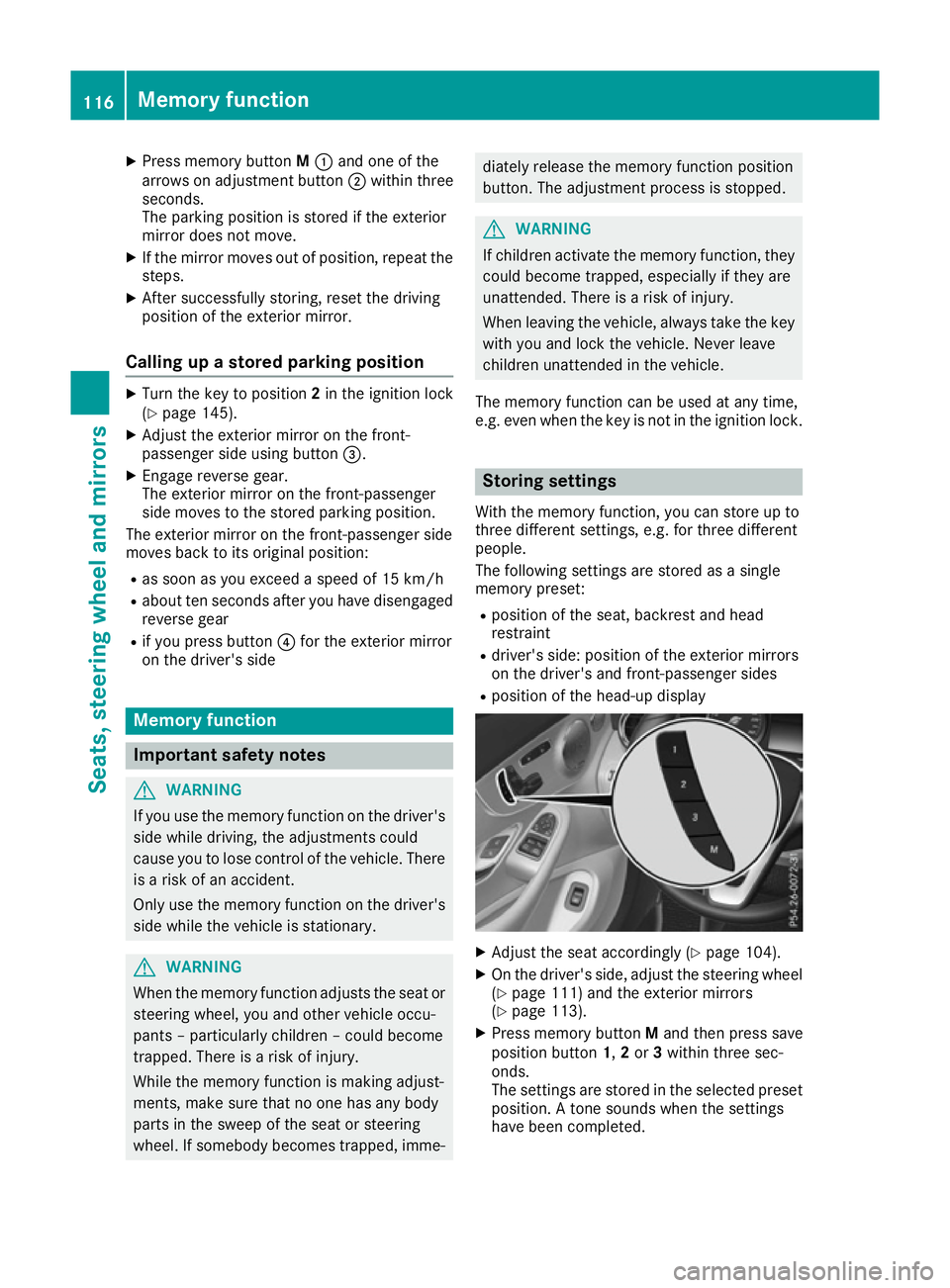
R position of the head-up display X
Adjust the seat accordingly (Y page 104).
X On the driver's side, adjust the steerin gwheel
(Y page 111) and the exterior mirrors
(Y page 113).
X Press memory button Mand then press save
position button 1,2or 3within three sec-
onds.
The settings are stored in the selected preset
position. Atones ounds when the settings
have been completed. 116
Memoryf
unctionSeats, steering wheel and mirrors
Page 120 of 385

Callin
gupas tored setting
X Press and hold th erelevan tsave positio nbut-
ton 1,2 or 3until the:
R Seat
R Steering wheel
R Exterior mirrors
R Head-up display
are in th estoredp osition.
i If you release th
estorag epositio nbutton,
th es eat ,steering wheel and mirror setting
function sstopi mmediately. The adjustment
of th ehead-up display is still carried out. Memory function
117Seats, steeringwheel and mirrors Z
Page 124 of 385
The hazard warning lamps switch off automati-
cally if the vehicle reaches aspeed of above
10 km/ha gain afterafull brake application.
The hazard warning lamps continue to operate
even if the ignition is switched off. Intelligen
tLight System
General notes The Intelligent Light System is
asystem that
adjusts the headlamps automatically to suit the
prevailing driving and weather conditions. It
offers advanced functions for improved illumi-
nation of the road surface, e.g. depending on the vehicle speed or weather conditions. The sys-
tem includes the active light function, cornering light function, motorway mode, extended range
foglamps and off-road lights. The system is only
active when it is dark.
You can activate or deactivate the "Intelligent
Light System" function using the on-board com- puter (Y page 247).
Active light function The active light function is
asystem that moves
the headlamps according to the steerin gmove-
mentsoft he front wheels. In this way, relevant
areas remain illuminated while you are driving.
This allows you to recognise pedestrians,
cyclists and animals.
Active: when the lights are switched on.
Cornering light function The cornering light function improves the illu-
mination of the road over
awide angle in the
direction you are turning, enabling better visi-
bility in tight bends, for example. It can only be
activated when the dipped-beam headlamps are
switched on.
Active:
R if you are driving at speeds below 40 km/h
and switch on the turn signal or turn the steer- ing wheel
R if you are driving at speeds between 40 km/h
and 70 km/ha nd turnthe steering wheel
The cornering light function may remain lit for a
shor ttime, but is automatically switched off
after no mor ethant hree minutes. Motorwa
ymode Active:
if you are driving at aspee dabove
11 0k m/ hand do no tmakea ny large steering
movements for at least 1000 morify ou are
driving at aspee dabov e130 km/h.
Not active: if you are driving at speeds below
80 km/h followin gactivation.
Extended range foglamps The extended range foglamps reduc
ethe glare
experienced by th edriver and improve th eillu-
minatio noftheedge of th ecarriageway.
Active: if you are driving at speeds below
70 km/h and you switch on th erear foglamp.
Not active: if, followingactivation ,you are driv-
ing at speeds abov e100 km/h or if you switch
off th erear foglamp. Adaptive Highbeam Assist Plus
General notes Wit
hA daptiv eHighbeam Assist Plus, you can
automatically switch between dipped-beam,
partial main-beam and main-beam headlamps.
Partial main-beam illuminatio nisaformofi llu-
minatio nwhereby th emain beam is directed
past other road users. Other road user sare kept
out of th emain-beam. This prevent sglare .If
there is avehicle in front, for example, th emain-
beam headlamps illuminate th eareas to its right
and left ,and th evehicle in fron tisilluminate dby
th ed ipped-beam headlamps.
The system automatically adapt sthe dipped-
beam headlam prange dependin gonthedis-
tance to th eother vehicle .Oncet he system no
longer detect sany other vehicles, it switches on
th em ain-beam headlamps again.
If th emain-beam or partial main-beam head-
lamps are causing to omuchr eflectio nfromt raf-
fic signs, th elight sare automatically dimmed
and glare for th edriver caused by th ereflections
is thus avoided.
The system' soptical sensor is locate dbehind
th ew indscreen near th eoverhead control
panel. Exterior lighting
121Lightsand windscreen wipers Z
Page 147 of 385
Running-i
nnotes Important safety notes
In certain driving and driving safety systems ,the
sensors adjust automaticall ywhile acertain dis-
tance is being driven afte rthe vehicl ehasbeen
delivered or afte rrepairs. Ful lsystem effective-
ness is not reached unti lthe end of this teach-in
process.
Brake pads/linings and discs that are either new or have bee nreplaced only achieve optimum
braking effect afte rsevera lhun dre dkilometres
of driving .Com pensate for the reduce dbraking
effect by applying greate rforce to the brake
pedal. The firs
t1,50 0km
If yo utrea tthe engine with sufficient care from
the very start, yo uwillber ewarded with excel-
lent performance for the remainder of the
engine's life.
R Drive at varying roa dspeeds and engine
speeds for the firs t1,500 km.
R Avoi doverstraining the vehicl eduring this
period, e.g. driving at ful lthrottle.
R Whe nchanging gears manually ,change up in
goo dtime ,before the rev counter needle rea-
ches Ôof the wa ytothe red are aofthe rev
counter.
R Do not shift dow nagearm anually in order to
brake.
R Vehicles with automatic transmission: try to
avoid depressing the accelerato rpedal
beyond the point of resistance (kickdown).
Additiona lnotes on running in Mercedes-AMG
vehicles:
R For the firs t1,500 km do not drive at speeds
above 140 km/h.
R Only allo wthe engine to reach amaximum
engine speed of 4,500 rpm briefly.
R Drive the vehicl emainly in drive program Cfor
the firs t1,500 km.
After 1,500 km ,you may gradually accelerate
the vehicl etofullr oa da nd engine speeds.
Yo us houl dalsoo bserve thes enotes on running-
in if the engine or parts of the drive trai nonyour
vehicl ehaveb eenr eplaced.
Alway sobserve the maximum permissible
speed. Self-lockin
grear axl edifferential
(Mercedes-AM Gvehicles)
Your vehicl eisequipped with aself-locking dif-
ferentia lonthe rea raxle.
Chang ethe oi ltoimprove protectio nofthe rear
axl ed ifferential:
R afte rar unning-in perio dof3,000 km
R every 50,00 0kmo r3y ears
These oi lchanges prolong the service life of the
differential. Have the oi lchange carrie doutat a
qualified specialist workshop. Driving
Important safety notes
G
WARNING
Objects in the driver' sfootwell may restrict
the clearance around the pedal sorblock a
depressed pedal .Thisj eopardise sthe oper-
ating and roa dsafety of the vehicle. There is a
ris kofana ccident.
Stow al lobjects securel yinthe vehicl esothat
they do not get into the driver' sfootwell.
Alway sfit the floormats securel yand as pre-
scribed in order to ensure that there is always sufficient roo mfor the pedals. Do not use
loose floormats and do not place severa lfloor-
mats on top of one another. G
WARNING
Unsuitabl efootwear can hinder correct usage
of the pedals, e.g.:
R shoes with thick soles
R shoes with hig hheels
R slippers
There is ariskofana ccident.
Wea rsuitabl efootwear to ensure correct
usag eoft he pedals. G
WARNING
If yo uswitch off the ignition whil edriving,
safety-relevant functions are only available
with limitations ,ornot at all. Thi scould affect,
for example, the power steering and the brake 144
DrivingDriving and parking
Page 157 of 385
Problem
Possible causes/consequences and
M
MSolutions The coolant temperature
display is showing more
than 120 †. Adisplay
message may also
appear in the multifunc-
tion display and awarn-
ing tone may sound. The coolant level is too low. The coolant is too hot and the engine is no
longer being cooled sufficiently.
X Stop as soon as possible and allow the engine and the coolant to
cool down.
X Check the coolant level (Y page 324). Observe the warning notes
as you do so and top up the coolant if necessary. If the coolant level is correct,t
he engine radiator fan may be faulty. The
coolant is too hot and the engine is no longer being cooled sufficiently.
X If the coolant temperature is below 120 †, you can continue driving
to the nearest qualified specialist workshop.
X Avoid heavy loads on the engine as you do so, e.g. driving in moun-
tainous terrain and stop-start traffic. DYNAMIC SELECTs
witchAll vehicles(
except Mercedes-AMG
vehicles)
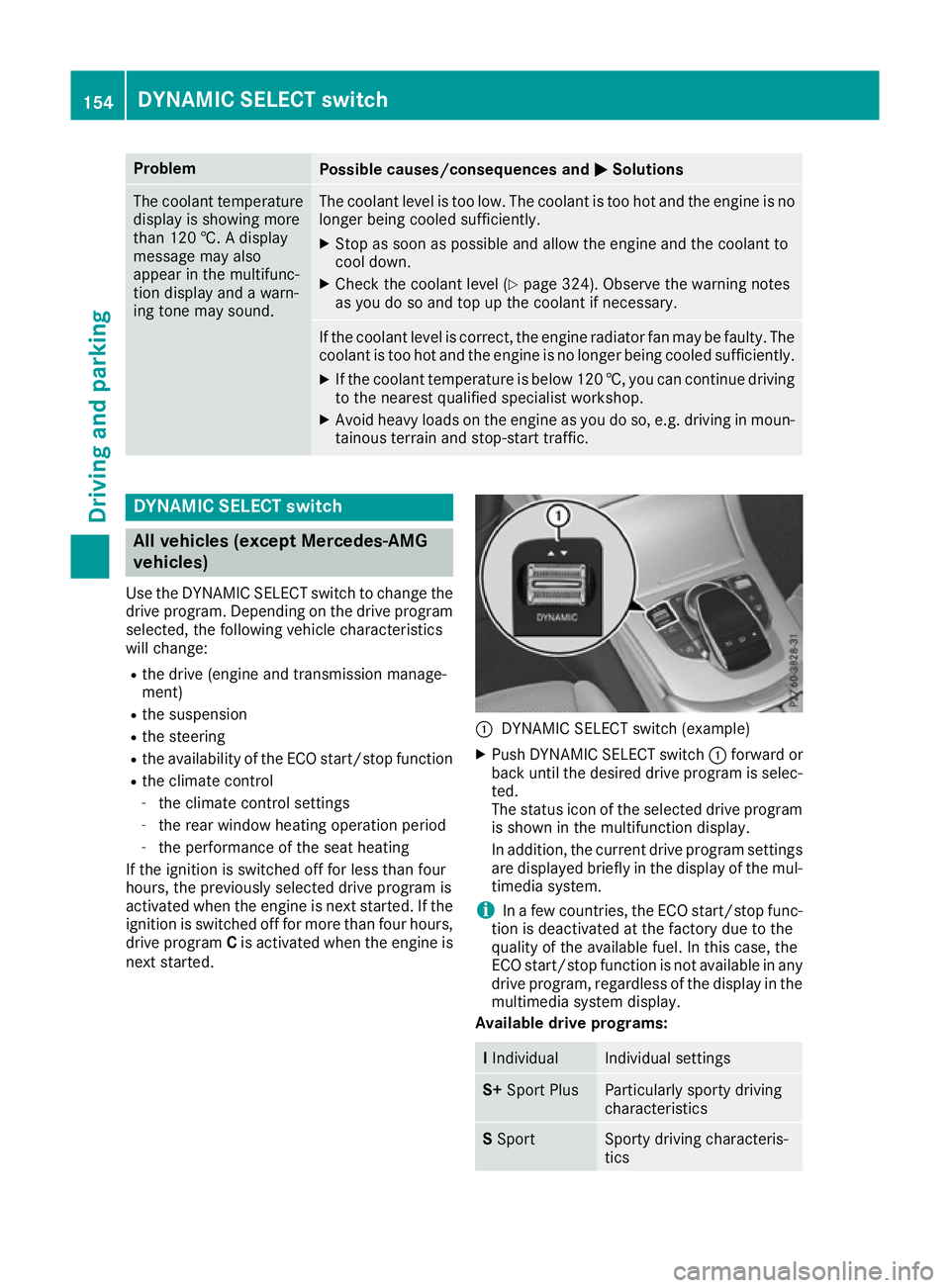
Use the DYNAMIC SELECT switch to change the
drive program. Depending on the drive program
selected, the following vehicle characteristics
will change:
R the drive (engine and transmission manage-
ment)
R the suspension
R the steering
R the availability of the ECO start/stop function
R the climate control
- the climate control settings
- the rear window heating operation period
- the performance of the seat heating
If the ignition is switched off for less than four
hours, the previously selected drive program is
activated when the engine is next started. If the ignition is switched off for more than four hours,
drive program Cis activated when the engine is
next started. :
DYNAMIC SELECT switch (example)
X Push DYNAMIC SELECT switch :forward or
back until the desired drive program is selec- ted.
The status icon of the selected drive program
is shown in the multifunction display.
In addition, the current drive program settings are displayed briefly in the display of the mul-
timedia system.
i In
af ew countries, the ECO start/stop func-
tion is deactivated at the factory due to the
quality of the available fuel. In this case, the
ECO start/stop function is not available in any
drive program, regardless of the display in the
multimedia system display.
Available drive programs: I
Individual Individual settings
S+
Sport Plus Particularly sporty driving
characteristics S
Sport Sporty driving characteris-
tics154
DYNAMIC SELECT switchDriving and parking
Page 158 of 385
C
Comfort Comfortable and economi-
cal driving characteristics
E
Economy Particularly economical
driving characteristics Additional informatio
nfor driv eprogram sfor:
R vehicle swithm anual transmission
(Y page 157)
R vehicle switha utomatic transmission
(Y page 161)
Vehicles with automatic transmission: you
can also chang egear yourself usin gthe steering
wheel gearshif tpaddles. Further informatio non
th em anual driv eprogram (Y page 163). Mercedes-AM
Gvehicles
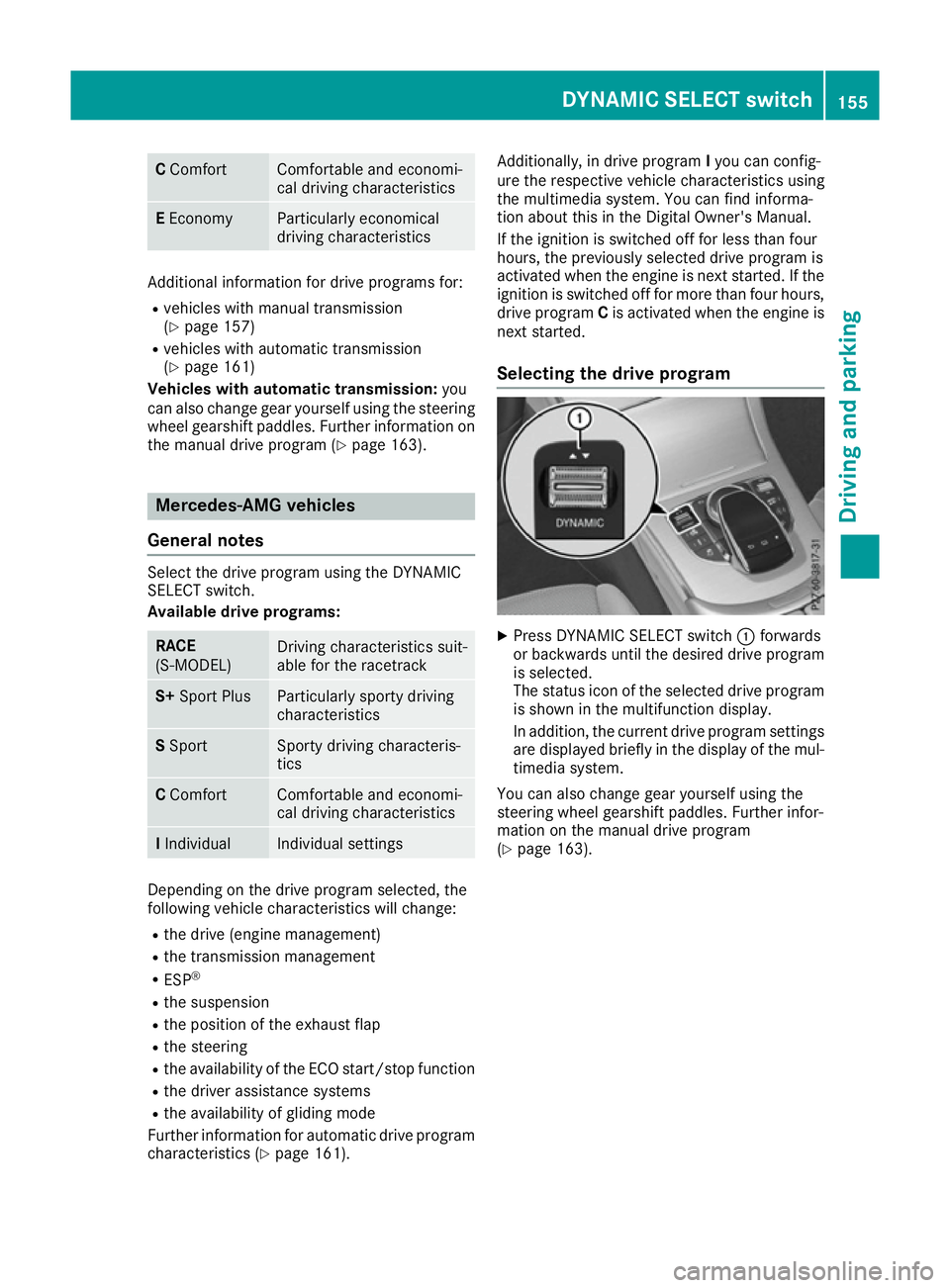
General notes Select th
edrivep rogram usin gthe DYNAMIC
SELECT switch.
Availabl edrive programs: RACE
(S‑MODEL)
Drivin
gcharacteristic ssuit-
able for th eracetrack S+
Sport Plus Particularly sporty driving
characteristics
S
Sport Sport
ydriving characteris-
tics C
Comfort Comfortable and economi-
cal driving characteristics
I
Individual Individual settings
Dependin
gonthedriv eprogram selected, the
followin gvehicle characteristic swill change:
R thed rive( engin emanagement)
R thet ransmission management
R ESP ®
R thes uspension
R thep ositio noftheexhaust flap
R thes teering
R thea vailabilit yoftheECO start/sto pfunction
R thed river assistance systems
R thea vailabilit yofglidingmode
Further informatio nfor automatic driv eprogram
characteristic s(Ypage 161). Additionally, in driv
eprogram Iyou can config-
ure th erespectiv evehicle characteristic susing
th em ultimedia system. You can fin dinforma-
tio na bout this in th eDigital Owner' sManual.
If th eignition is switched off for less than four
hours, th epreviously selected driv eprogram is
activated when th eengineisn exts tarted. If the
ignition is switched off for mor ethanfour hours,
driv eprogram Cis activated when th eengineis
next started.
Selecting th edrive program X
Press DYNAMIC SELECT switch :forwards
or backwards until th edesired driv eprogram
is selected.
The status ico noftheselected driv eprogram
is shown in th emultifunction display.
In addition ,the curren tdriv ep rogram settings
are displayed briefly in th edisplay of th emul-
timedia system.
You can also chang egear yourself usin gthe
steering wheel gearshif tpaddles. Further infor-
mation on th emanual driv eprogram
(Y page 163). DYNAMIC SELECT switch
155Driving and parking Z
Page 160 of 385
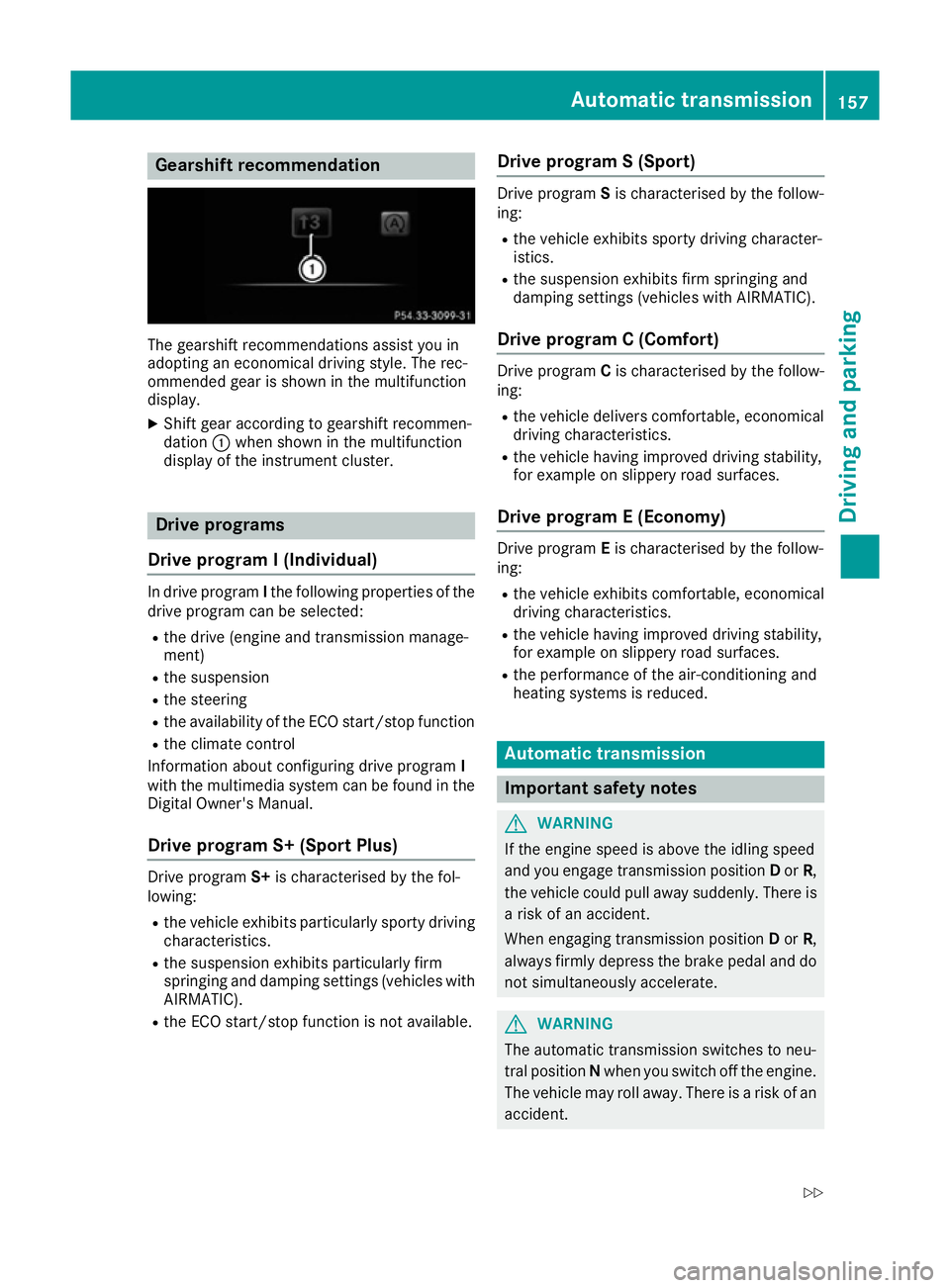
Gearshift recommendation
The gearshift recommendations assist you in
adopting an economical driving style .The rec-
ommended gear is shown in the multifunction
display.
X Shift gear according to gearshift recommen-
dation :when shown in the multifunction
display of the instrument cluster. Drive programs
Drive program I(Individual) In drive program
Ithe following properties of the
drive progra mcan be selected:
R the drive (engine and transmission manage-
ment)
R the suspension
R the steering
R the availability of the ECO start/stop function
R the climate control
Information abou tconfiguring drive program I
with the multimedia system can be found in the
Digital Owner's Manual.
Drive program S+ (Sport Plus) Drive program
S+is characterised by the fol-
lowing:
R the vehicle exhibits particularlys porty driving
characteristics.
R the suspension exhibits particularlyf irm
springing and damping settings (vehicles with
AIRMATIC).
R the ECO start/stop function is not available. Drive program
S(Sport) Drive program
Sis characterised by the follow-
ing:
R the vehicle exhibits sporty driving character-
istics.
R the suspension exhibits firm springing and
damping settings (vehicles with AIRMATIC).
Drive program C(Comfort) Drive program
Cis characterised by the follow-
ing:
R the vehicle delivers comfortable ,economical
driving characteristics.
R the vehicle having improve ddriving stability,
for exampl eonslippery road surfaces.
Drive program E(Economy) Drive program
Eis characterised by the follow-
ing:
R the vehicle exhibits comfortable ,economical
driving characteristics.
R the vehicle having improve ddriving stability,
for exampl eonslippery road surfaces.
R the performance of the air-conditioning and
heating systems is reduced. Automatic transmission
Important safety notes
G
WARNING
If the engine speed is above the idling speed
and you engage transmission position Dor R,
the vehicle could pulla waysuddenly. There is
ar isk of an accident.
When engaging transmission position Dor R,
alwaysf irmly depress the brake pedala nd do
not simultaneously accelerate. G
WARNING
The automatic transmission switches to neu-
tral position Nwhen you switch off the engine.
The vehicle may roll away. There is arisk of an
accident. Automatic transmission
157Driving and parking
Z