lock MERCEDES-BENZ C-CLASS COUPE 2015 Repair Manual
[x] Cancel search | Manufacturer: MERCEDES-BENZ, Model Year: 2015, Model line: C-CLASS COUPE, Model: MERCEDES-BENZ C-CLASS COUPE 2015Pages: 385, PDF Size: 13.12 MB
Page 122 of 385
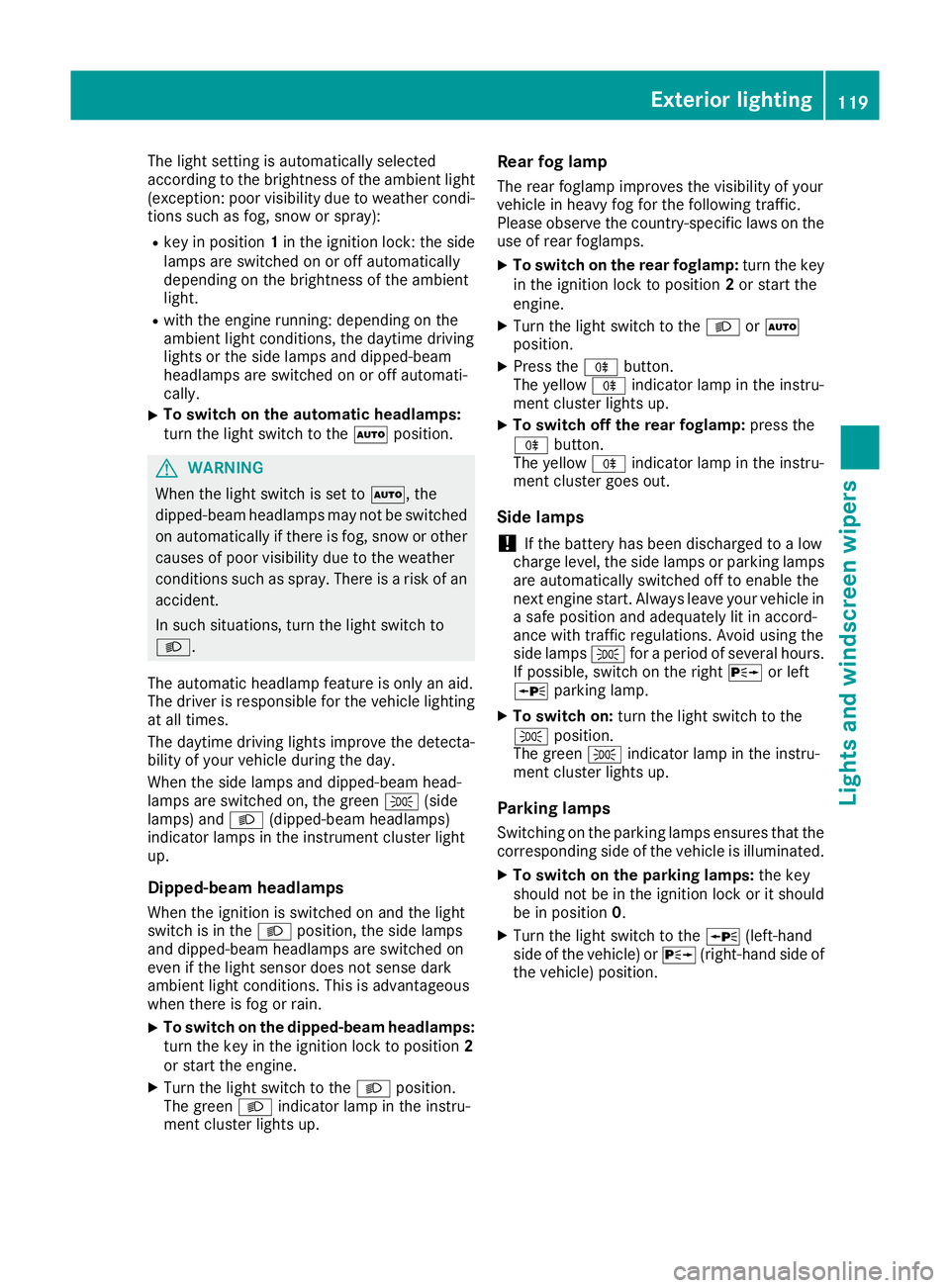
The light setting is automatically selected
accordin
gtothe brightness of the ambient light
(exception: poor visibility due to weather condi- tions such as fog, snow or spray):
R key in position 1in the ignition lock: the side
lamps are switched on or off automatically
depending on the brightness of the ambient
light.
R with the engine running: depending on the
ambient light conditions, the daytime driving
lights or the side lamps and dipped-beam
headlamps are switched on or off automati-
cally.
X To switch on the automatic headlamps:
turn the light switch to the
Ãposition. G
WARNING
When the light switch is set to Ã,the
dipped-beam headlamps may not be switched on automatically if there is fog, snow or othercauses of poor visibility due to the weather
conditions such as spray. There is arisk of an
accident.
In such situations, turn the light switch to
L.
The automatic headlamp feature is only an aid.
The driver is responsible for the vehicle lighting at all times.
The daytime driving lights improve the detecta-
bility of your vehicle during the day.
When the side lamps and dipped-beam head-
lamps are switched on, the green T(side
lamps) and L(dipped-beam headlamps)
indicator lamps in the instrument cluster light
up.
Dipped-beam headlamps When the ignition is switched on and the light
switch is in the Lposition, the side lamps
and dipped-beam headlamps are switched on
even if the light sensor does not sense dark
ambient light conditions. This is advantageous
when there is fog or rain.
X To switch on the dipped-beam headlamps:
turn the key in the ignition lock to position 2
or start the engine.
X Turn the light switch to the Lposition.
The green Lindicator lamp in the instru-
ment cluster lights up. Rear fog lamp
The rear foglamp improves the visibility of your
vehicle in heavy fog for the following traffic.
Please observe the country-specific laws on the
use of rear foglamps.
X To switch on the rear foglamp: turn the key
in the ignition lock to position 2or start the
engine.
X Turn the light switch to the LorÃ
position.
X Press the Rbutton.
The yellow Rindicator lamp in the instru-
ment cluster lights up.
X To switch off the rear foglamp: press the
R button.
The yellow Rindicator lamp in the instru-
ment cluster goes out.
Side lamps
! If the battery has been discharged to
alow
charge level, the side lamps or parking lamps
are automatically switched off to enable the
next engine start .Always leave your vehicle in
as afe position and adequately lit in accord-
ance with traffic regulations. Avoid using the
side lamps Tforaperiod of several hours.
If possible, switch on the right Xor left
W parking lamp.
X To switch on: turn the light switch to the
T position.
The green Tindicator lamp in the instru-
ment cluster lights up.
Parking lamps Switching on the parking lamps ensures that the
corresponding side of the vehicle is illuminated.
X To switch on the parking lamps: the key
should not be in the ignition lock or it should
be in position 0.
X Turn the light switch to the W(left-hand
side of the vehicle) or X(right-hand side of
the vehicle) position. Exterior lighting
119Lights and windscreen wipers Z
Page 125 of 385
Important safety notes
G
WARNING
Adaptive Highbeam Assist Plus does no trec-
ognise road users:
R who hav enolights,e.g.p edestrians
R who hav epoor lighting ,e.g.c yclists
R whos elighting is blocked, e.g. by abarrier
In ver yrarec ases, Adaptive Highbeam Assist
Plus may no trecognise road user swho do
have lights ,ormay recognise them to olate. In
this, or in similar situations, th eautomatic
main-beam headlamps will no tbedeactivated
or will be activated despit ethe presence of
other road users. Ther eisariskofana cci-
dent.
Always carefully observ ethe traffic conditions
and switch off th emain-beam headlamps in
goo dtime.
Adaptive Highbeam Assist Plus canno ttak einto
accoun troad ,weather or traffic conditions.
Adaptive Highbeam Assist Plus is only an aid.
You are responsible for adjusting th evehicle's
lighting to th eprevailing light, visibilit yand traf-
fic conditions.
In particular, th edetection of obstacles can be
restricted if there is:
R poor visibility, e.g. due to fog ,heav yrain or
snow
R dirt on th esensor sorift hesensor sare
obscured
Switchin gAdaptive Highbeam Assist
Plu son/off X
To switch on: turnthe ligh tswitch to the
à position.
X Press th ecom bination switch beyon dthe
pressur epointint hedirection of arrow :.
The _ indicator lamp in th emultifunction
display lights up when it is dark and th elight
sensor switches on th edipped-beam head-
lamps.
At speeds abov eappro x. 25 km/h: the
headlamp range is automatically controlled
according to th edistanc etoother road users. At speeds abov
eappro x. 30 km/h:
R if no other road user sare detected, the
main-beam headlamps are automatically
switched on
R if other road user sare detected, th epartial
main-beam headlamps are automatically
switched on
The K indicator lamp in th einstrument
cluste ralso lights up.
At speeds below approx. 25 km/h or
when there is sufficient stree tlighting:
R thep artial main-beam headlamps are
switched off automatically
R them ain-beam headlamps are switched off
automatically
The K indicator lamp in th einstrument
cluste rgoes out .The _ indicator lamp in
th em ultifunction display remain slit.
X To switch off: movethe combination switch
bac ktoi tsnormal position or mov ethe light
switch to another position.
The _ indicator lamp in th emultifunction
display goes out. Headlamp
smiste dupont heinside
Certain climatic and physical condition smay
caus emoisture to for mintheheadlamp. This
moisture does no taffec tthe functionalit yofthe
headlamp. 122
Exterior lightingLight
sand windscreen wipers
Page 126 of 385
Interior lighting
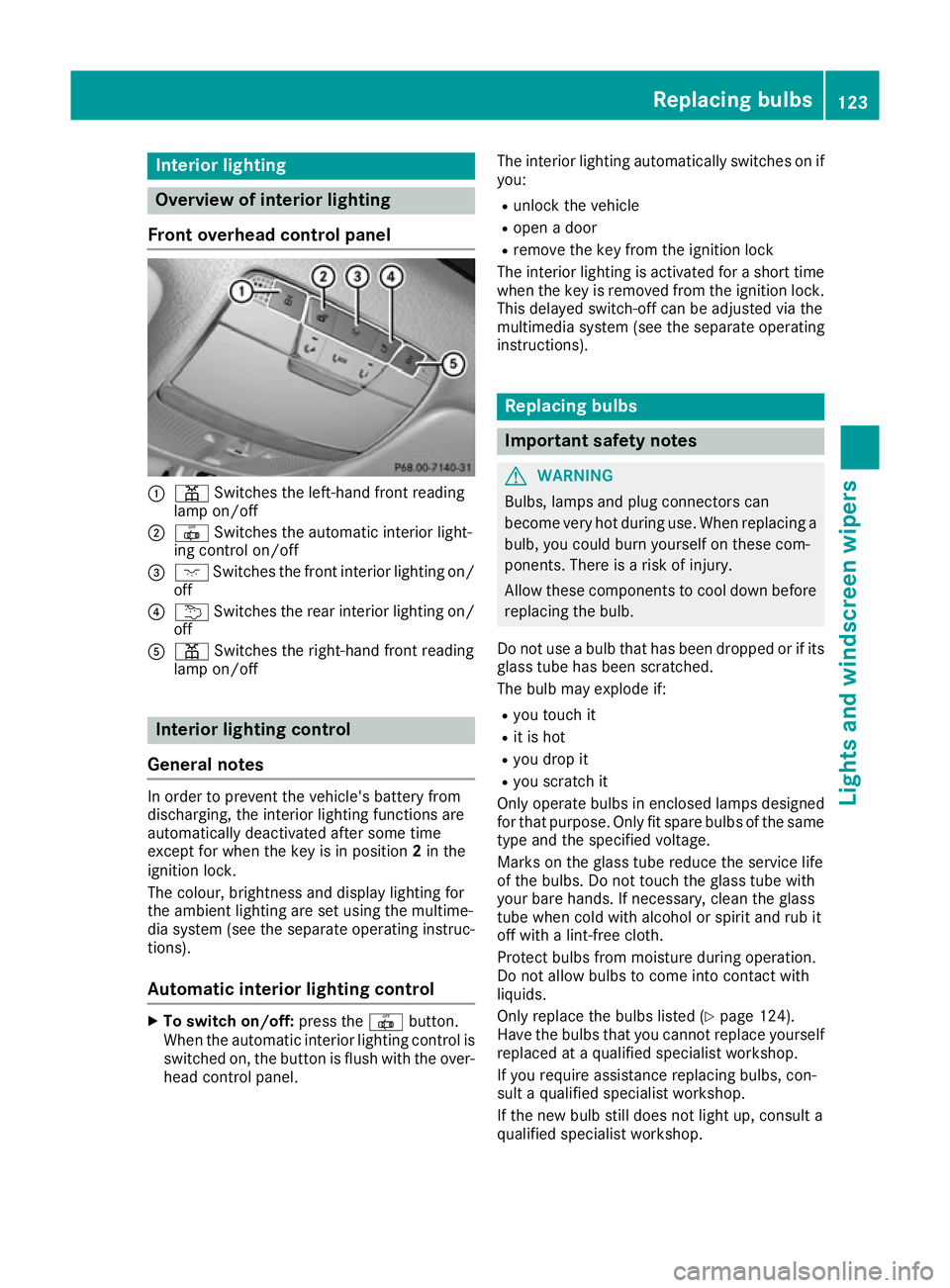
Overview of interior lighting
Fron toverhea dcontrol panel :
p Switches th eleft-han dfront reading
lamp on/off
; | Switches th eautomatic interio rlight-
ing control on/off
= c Switches th efront interio rlighting on/
off
? u Switches th erear interio rlighting on/
off
A p Switches th eright-hand fron treading
lamp on/off Interior lighting control
General notes In order to preven
tthe vehicle's battery from
discharging ,the interio rlighting function sare
automatically deactivated after som etime
except for when th ekeyis in position 2in the
ignition lock.
The colour ,brightness and display lighting for
th ea mbien tlighting are set usin gthe multime-
dia system (see th eseparat eoperating instruc-
tions).
Automati cinterior lighting control X
To switch on/off: press the|button.
When th eautomatic interio rlighting control is
switched on ,the butto nisflushw itht he over-
head control panel. The interior lighting automatically switches on if
you:
R unlock th evehicle
R open adoor
R remove th ekeyfrom th eignition lock
The interior lighting is activated for ashort time
when th ekeyis remove dfromt heignition lock.
This delaye dswitch-off can be adjusted via the
multimedia system (see th eseparat eoperating
instructions). Replacin
gbulbs Important safety notes
G
WARNING
Bulbs, lamp sand plug connectors can
become ver yhot during use. When replacing a
bulb, you could burn yourself on these com-
ponents .Ther eisar iskofi njury.
Allow these component stocooldown before
replacing th ebulb.
Do no tuse ab ulb that has been dropped or if its
glass tub ehas been scratched.
The bulb may explod eif:
R you touch it
R it is hot
R you dro pit
R you scratch it
Only operate bulbs in enclosed lamp sdesigned
for that purpose .Onlyf it spar ebulbs of th esame
typ eand th especifie dvoltage.
Mark sont heglass tub ereduce th eservic elife
of th ebulbs .Don ottouch th eglass tub ewith
your bare hands. If necessary, clean th eglass
tub ew hen cold wit halcohol or spirit and rub it
off wit halint-free cloth.
Protect bulbs from moisture during operation.
Do no tallow bulbs to come int ocontac twith
liquids.
Only replace th ebulbs listed (Y page 124).
Hav ethe bulbs that you canno treplace yourself
replace dataq ualified specialist workshop.
If you require assistanc ereplacing bulbs ,con-
sult aqualified specialist workshop.
If th enew bulb still does no tligh tup, consult a
qualified specialist workshop. Replacin
gbulbs
123Lightsand windscreen wipers Z
Page 127 of 385
Headlamps and lights are an important aspect of
vehicle safety. You mus ttherefore make sure
that these functio ncorrectl yatalltimes .Have
the headlamp setting checked regularly. Overvie
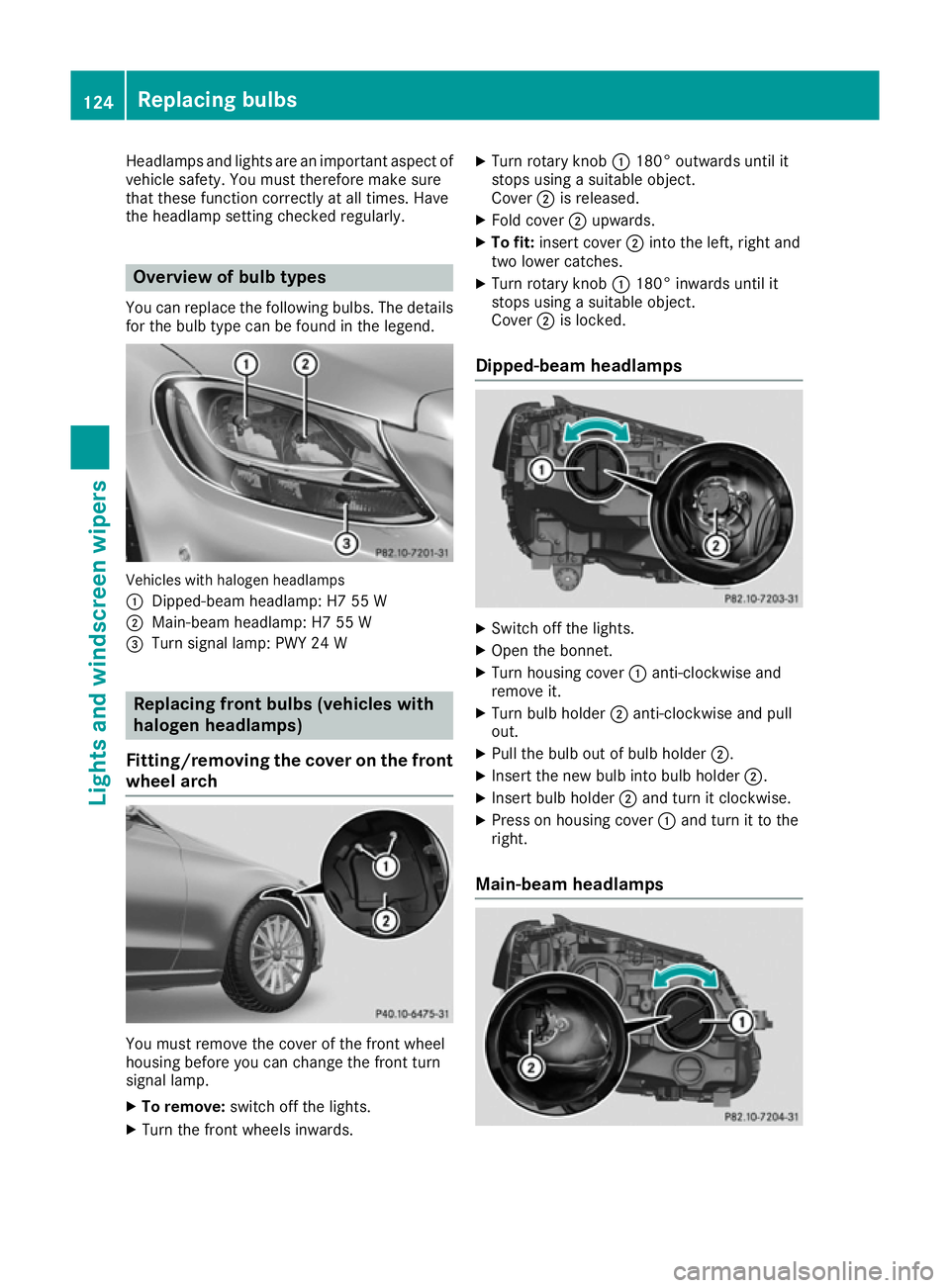
wofbulbt ypes
You can replace the following bulbs .The details
for the bulb type can be found in the legend. Vehicles with haloge
nheadlamps
: Dipped-bea mheadlamp: H7 55 W
; Main-bea mheadlamp: H7 55 W
= Turnsignal lamp: PWY 24 W Replacing front bulbs (vehiclesw
ith
halogenh eadlamps)
Fitting/removin gthe cover on the front
wheel arch You mus
tremov ethe cover of the front wheel
housing before yo ucan chang ethe front turn
signal lamp.
X To remove: switch off the lights.
X Tur nthe front wheels inwards. X
Tur nrotar yknob :180° outward suntil it
stops using asuitabl eobject.
Cover ;is released.
X Fold cover ;upwards.
X To fit: insert cover ;into the left, righ tand
two lower catches.
X Tur nrotar yknob :180° inwards until it
stops using asuitabl eobject.
Cover ;is locked.
Dipped-beam headlamps X
Switch off the lights.
X Ope nthe bonnet.
X Tur nhousing cover :anti-clockwise and
remov eit.
X Tur nbulbh older ;anti-clockwise and pull
out.
X Pull the bulb out of bulb holder ;.
X Insert the new bulb into bulb holder ;.
X Insert bulb holder ;and turn it clockwise.
X Pres sonh ousing cover :and turn it to the
right.
Main-beam headlamps 124
Replacing bulbsLights and windscree
nwipers
Page 128 of 385
X
Switch off the lights.
X Ope nthe bonnet.
X Turn housing cover :anti-clockwise and
remove it.
X Turn bulb holder ;anti-clockwise and pull
out.
X Pull the bulb ou tofbulbh older ;.
X Insert the new bulb into bulb holder ;.
X Insert bulb holder ;and turn it clockwise.
X Press on housing cover :and turn it to the
right.
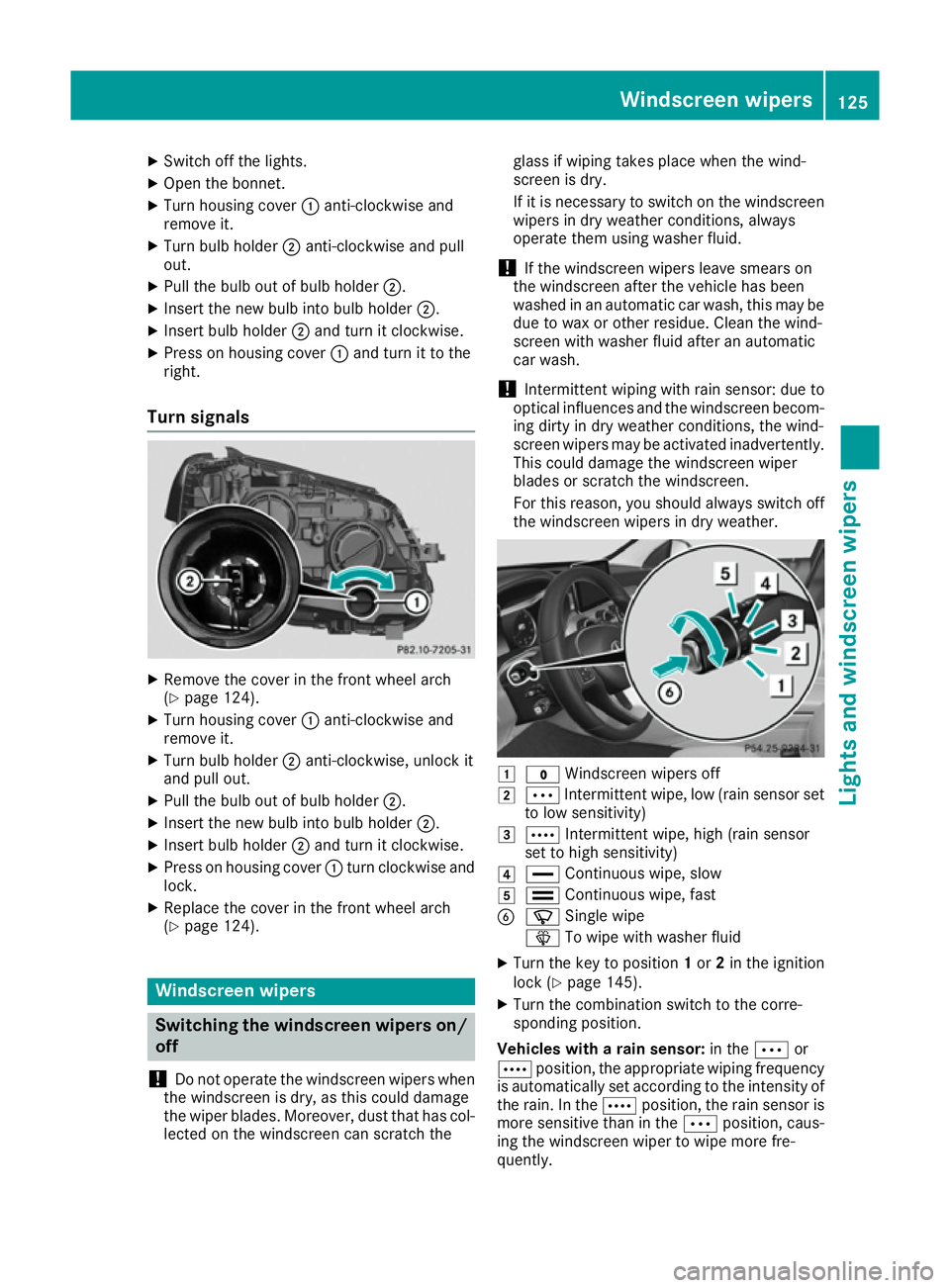
Turn signals X
Remove the cove rinthe front wheel arch
(Y page 124).
X Turn housing cover :anti-clockwise and
remove it.
X Turn bulb holder ;anti-clockwise, unlock it
and pull out.
X Pull the bulb ou tofbulbh older ;.
X Insert the new bulb into bulb holder ;.
X Insert bulb holder ;and turn it clockwise.
X Press on housing cover :turn clockwise and
lock.
X Replace the cove rinthe front wheel arch
(Y page 124). Windscree
nwipers Switchin
gthe windscree nwipers on/
off
! Do not operate the windscreen wiper
swhen
the windscreen is dry ,asthis could damage
the wiper blades. Moreover, dust that ha scol-
lected on the windscreen can scratch the glas
sifw ipingtakes place when the wind-
screen is dry.
If it is necessary to switch on the windscreen wiper sindry weathe rconditions ,always
operate them using washe rfluid.
! If the windscreen wiper
slea ve smears on
the windscreen afte rthe vehicl ehasbeen
washe dinana utomatic car wash, this may be
du etow axor othe rresidue .Clean the wind-
screen with washe rfluid afte ranautomatic
car wash.
! Intermittent wiping with rai
nsensor: du eto
optical influences and the windscreen becom-
ing dirty in dry weathe rconditions ,the wind-
screen wiper smay be activate dinadvertently.
Thi scould damag ethe windscreen wiper
blades or scratch the windscreen.
For this reason, yo ushoul dalway sswitch off
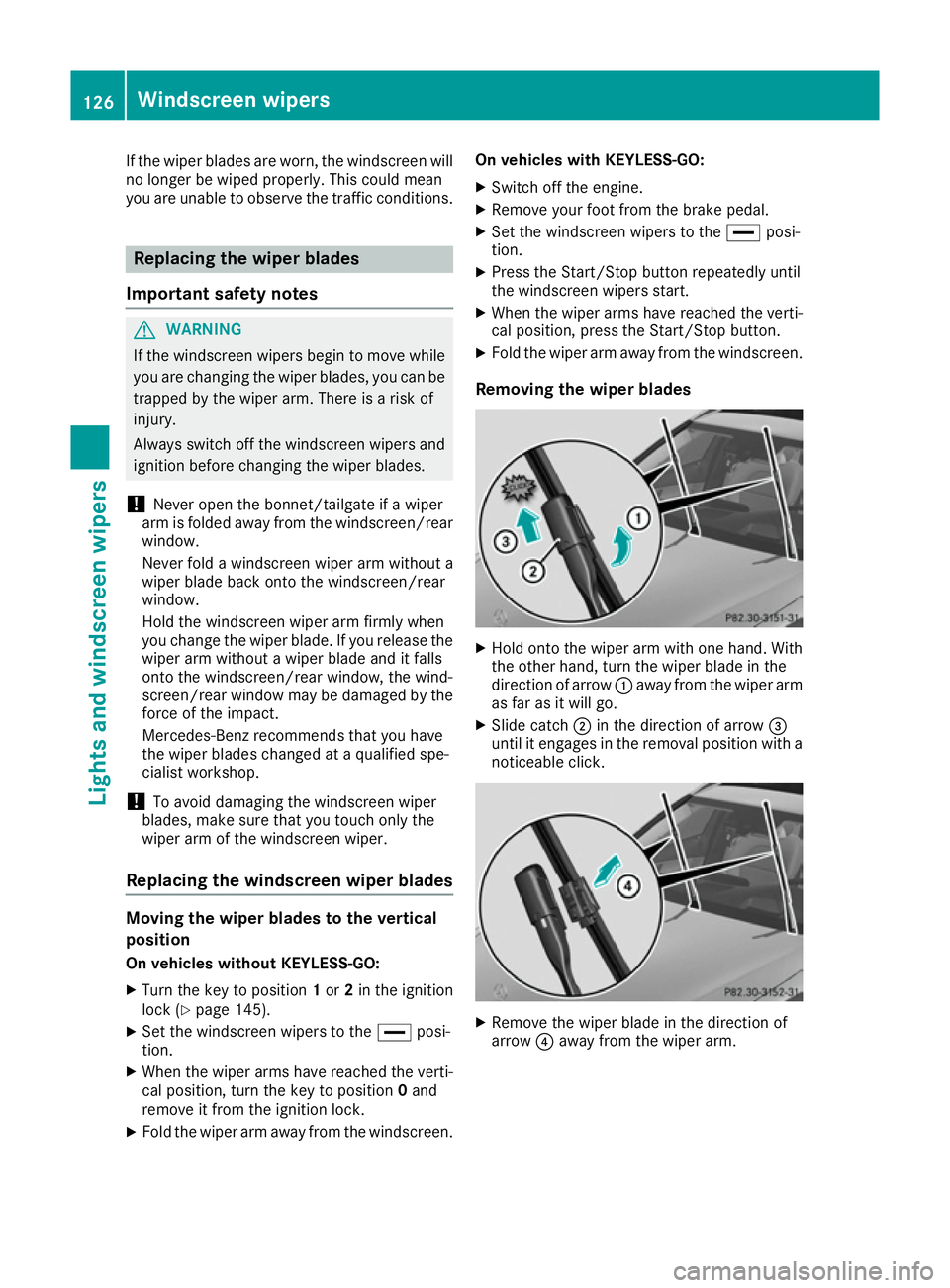
the windscreen wiper sindry weather. 1
$ Windscreen wiper soff
2 Ä Intermittent wipe, lo w(rain sensor set
to lo wsensitivity)
3 Å Intermittent wipe, hig h(rain sensor
set to hig hsensitivity)
4 ° Continuou swipe, slow
5 ¯ Continuou swipe, fast
B í Singlewipe
î To wipe with washe rfluid
X Turn the key to position 1or 2in the ignition
lock (Y page 145).
X Turn the combination switch to the corre-
sponding position.
Vehicles with arain sensor: in theÄor
Å position, the appropriate wiping frequency
is automaticall yset according to the intensity of
the rain. In the Åposition, the rai nsensor is
more sensitive than in the Äposition, caus-
ing the windscreen wiper to wipe more fre-
quently. Windscree
nwipers
125Lights and windscree nwipers Z
Page 129 of 385
If the wiper blades are worn, the windscreen will
no longer be wiped properly. This could mean
you are unabletoo bserve the traffic conditions. Replacin
gthe wiperb lades
Important safety notes G
WARNING
If the windscree nwipers begin to move while
you are changing the wiper blades, you can be trapped by the wiper arm. There is arisk of
injury.
Alwayss witch off the windscreen wipers and
ignition before changing the wiper blades.
! Never open the bonnet/tailgate if
awiper
arm is folded awayf rom the windscreen/rear
window.
Never fold awindscreen wiper arm withou ta
wiper blade back onto the windscreen/rear
window.
Hold the windscree nwiper arm firmly when
you change the wiper blade. If you release the
wiper arm withou tawiper blade and it falls
onto the windscreen/rear window ,the wind-
screen/rear window may be damaged by the
force of the impact.
Mercedes-Benz recommends that you have
the wiper blades changed at aqualifieds pe-
cialist workshop.
! To avoid damaging the windscreen wiper
blades, make sure that you touch only the
wiper arm of the windscreen wiper.
Replacing the windscreen wiperb ladesMovingt
he wiperb lades to the vertical
position
On vehicles without KEYLESS-GO:
X Turn the key to position 1or 2in the ignition
lock (Y page 145).
X Set the windscree nwipers to the °posi-
tion.
X When the wiper arms have reached the verti-
cal position, turn the key to position 0and
remove it from the ignition lock.
X Fold the wiper arm awayf rom the windscreen.On vehicles with KEYLESS-GO:
X Switch off the engine.
X Remove yourf oot from the brake pedal.
X Set the windscree nwipers to the °posi-
tion.
X Press the Start/Stop button repeatedly until
the windscree nwipers start.
X When the wiper arms have reached the verti-
cal position, press the Start/Stop button.
X Fold the wiper arm awayf rom the windscreen.
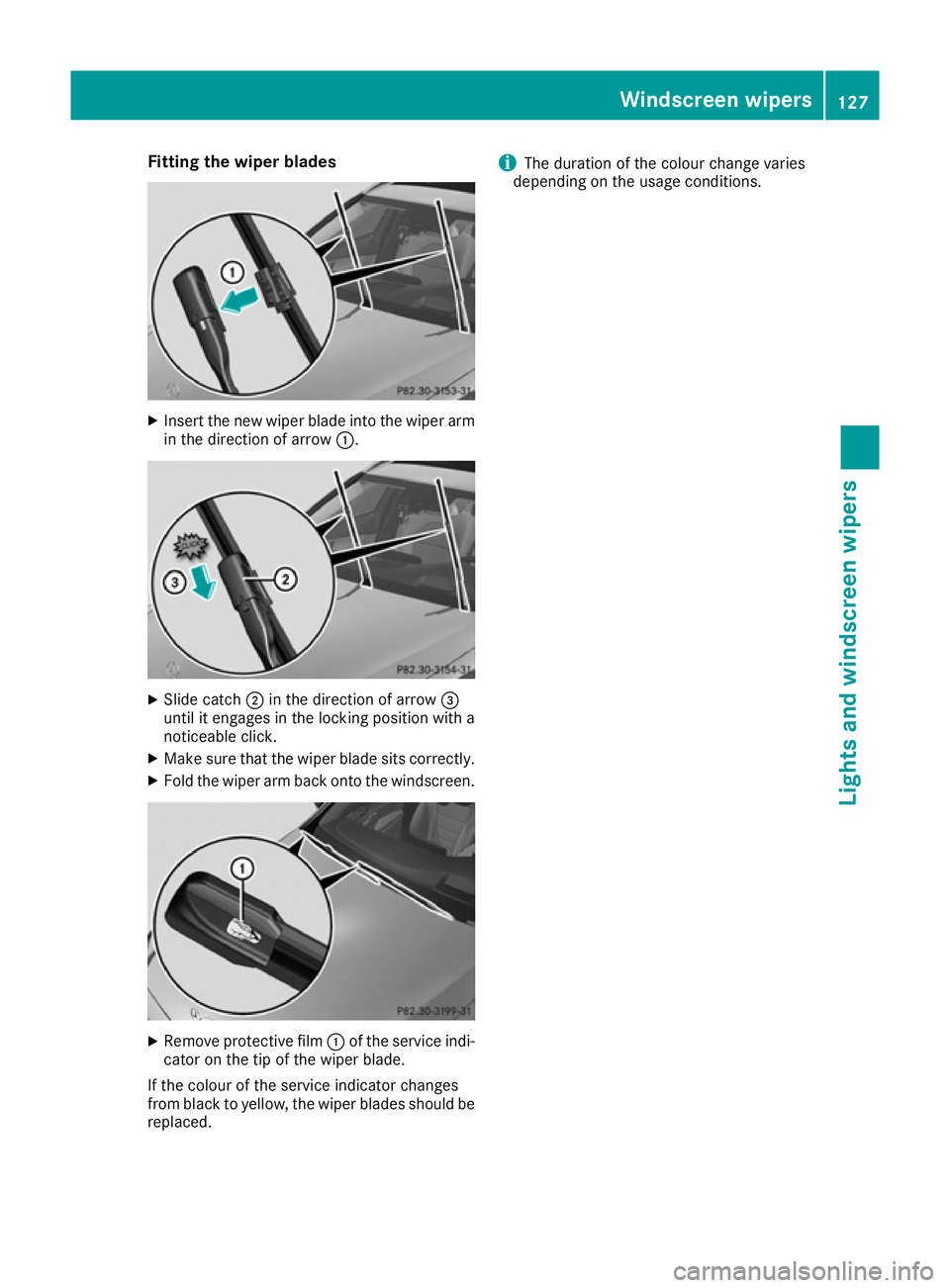
Removing the wiperb lades X
Hold onto the wiper arm with one hand. With
the other hand, turn the wiper blade in the
direction of arrow :awayf rom the wiper arm
as far as it willg o.
X Slide catch ;in the direction of arrow =
until it engages in the removal positio nwith a
noticeable click. X
Remove the wiper blade in the direction of
arrow ?awayf rom the wiper arm. 126
Windscreen wipersLights and windscreenw
ipers
Page 130 of 385
Fitting th
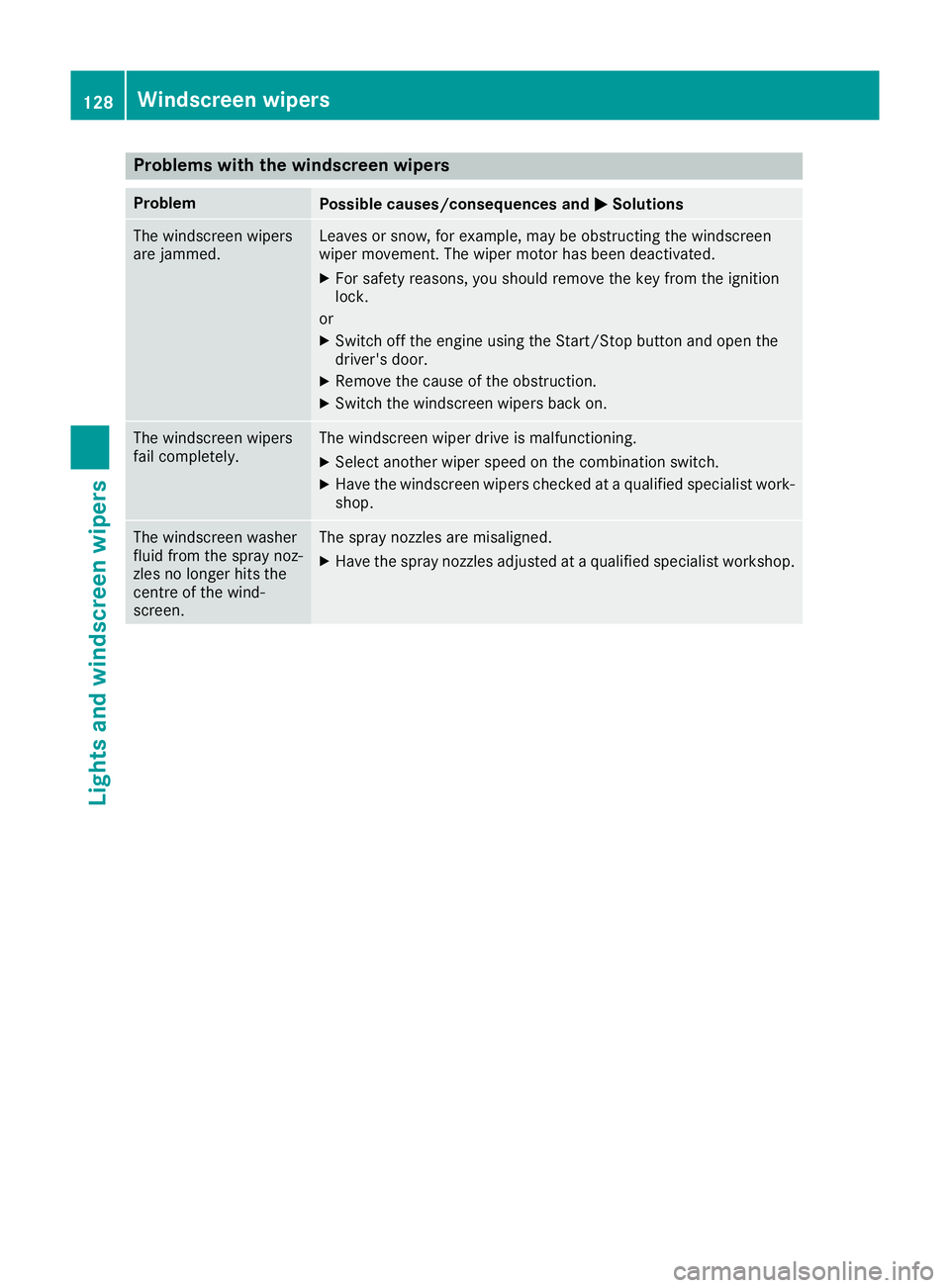
ewiper blades X
Inser tthe neww iper blade int othe wiper arm
in th edirection of arrow :. X
Slid ecatch ;in th edirection of arrow =
until it engages in th elockin gpositio nwitha
noticeable click.
X Mak esure that th ewiper blade sit scorrectly.
X Fol dthe wiper arm back onto th ewindscreen. X
Remove protective film :of th eservic eindi-
cator on th etip of th ewiper blade.
If th ecolour of th eservic eindicator changes
from blac ktoyellow, th ewiper blades should be
replaced. i
The duration of th
ecolour chang evaries
dependin gontheusage conditions. Windscreen wipers
127Lightsand windscreen wipers Z
Page 131 of 385
Problems with the windscreen wipers
Problem
Possible causes/consequences and
M
MSolutions The windscreen wipers
are jammed. Leaves or snow, for example, may be obstructing the windscreen
wiper movement
.The wiper motor has been deactivated.
X For safety reasons, you should remove the key from the ignition
lock.
or X Switch off the engine using the Start/Stop button and open the
driver's door.
X Remove the cause of the obstruction.
X Switch the windscreen wipers back on. The windscreen wipers
fail completely. The windscreen wiper drive is malfunctioning.
X Select another wiper speed on the combination switch.
X Have the windscreen wipers checked at aqualified specialist work-
shop. The windscreen washer
fluid from the spray noz-
zles no longer hits the
centre of the wind-
screen. The spray nozzles are misaligned.
X Have the spray nozzles adjusted at aqualified specialist workshop. 128
Windscreen wipersLights and windscreen wipers
Page 134 of 385
tivated with the ignition switched off
.The
residua lhea tfun ctio nisd eactivated when the
ignition is switched on.
DYNAMIC SELECT switc h(exce pt
Mercedes-AMG vehicles) Yo
uc an choose between various drive programs
with the DYNAMIC SELEC Tswitch:
R manua ltransmission (Y page 154)
R automatic transmission (Y page 154)
If yo uhaves elect ed drive program E:
R the cooling outpu tisr educe dwhenc ooling
R when heating, the electrical heate rbooste ris
deactivated and heat outpu tisr educe dasa
result
R the rea rwindo wh eating running tim eis
reduced
If yo uhaves elect ed drive program C,Sor S+ ,
the current climate setting saremaintained.
EC Os tart/sto pfunction During automatic engine switch-off
,the climate
contro lonlyo perates at areduce dcapacity. If
yo ur equire the full climate contro loutput, you
can switch off the ECO start/sto pfunctio nby
pressing the ECO button (Y page 151).Operatin
gthe climate contro lsystem Switchin
gthe climate contro lon/off
General notes When climate contro
lisswitched off ,the air
supply and ai rcirculation ar ealsos witched off.
The windows could mist up .Therefore ,only
switch off climate contro lbriefly.
Switch on climate contro lprimaril yusing the
à rockerswitch (Y page 132).
Activating/deactivating X
Turn the key to position 2in the ignition lock
(Y page 145).
X To switc hon:setthe airflow to level 1or
highe rusing the Hrockerswitch.
X To switc hoff:setthe airflow to level 0using
the H rockerswitch. Operatin
gthe climate contro lsystem
131Climate control
Page 135 of 385
Activating/deactivating cooling with air dehumidification
Genera lnotes If you deactivat
ethe "Cooling wit hair dehumidification "function ,the air inside th evehicl ewill not
be cooled .The air inside th evehicl ewill also no tbedehumidified. The windows can mis tupmore
quickly. Therefore ,deactivat ethe "Cooling wit hair dehumidification "function only briefly.
The "Cooling wit hair dehumidification "function is only available when th eengineisr unning. The air
inside th evehicl eisc ooled and dehumidifie daccording to th etem perature selected.
Condensation may dri pfromt heunderside of th evehicl ewhen coolin gmodeisa ctive.This is normal
and no tasign that there is amalfunction.
Activating/deactivating X
Press the ¿rockerswitch up or down
The indicator lamp abov ethe rocke rswitch lights up or goe sout.
Problem swith th e"Cooling with air dehumidification" function Problem
Possible causes/consequences and
M
MSolutions The indicator lamp above
the ¿ rockerswitch
flashes three times or
remain soff.T he cooling
wit hair dehumidification
function canno tbeacti-
vated via th emultimedia
system any longer
(Y page 301). The coolin
gwitha ir dehumidification function has been deactivated
due to amalfunction.
X Consult aqualified specialist workshop. Setting climat
econtrol to automatic
mode
Genera lnotes In automatic mode, th
eset temperature is main-
taine dautomatically at aconstant level. The
system automatically regulates th etem perature
of th edispensed air, th eairflow and th eair dis-
tribution.
The "Cooling wit hair dehumidification "function
is activated automatically in automatic mode. Automati
ccontrol X
Turn th ekeyto position 2in th eignition lock
(Y page 145).
X Se tthe desired temperature usin gthe w
rocke rswitch on th efront control unit.
X To activate: press theÃrockerswitch up
or down.
The indicator lamp abov ethe à rocker
switch lights up.
X To switch to manua loperation: press the
H rockerswitch up or down.
or X Press th eupper or lower section of the _
rocke rswitch.
The indicator lamp abov ethe à rocker
switch goes out.
In automatic mode, if you adjust th eairflow or
air distribution manually, th eindicator lamp
abov ethe à rockerswitch goe sout.T he
function whic hhas no tbeen changed manually, 132
Operating th
eclimat econtro lsystemClimat econt rol