light MERCEDES-BENZ CL-Class 2002 C215 Comand Manual
[x] Cancel search | Manufacturer: MERCEDES-BENZ, Model Year: 2002, Model line: CL-Class, Model: MERCEDES-BENZ CL-Class 2002 C215Pages: 251
Page 221 of 251

219 Destination memory
Introduction
Audio Telephone
Navigation
Index Info Services and
system settings Use the rotary/pushbutton
to highlight the desired
entry and press to confirm.
The entry will be deleted from the list, any subsequent
entries move up one position.
The delete function is still active.
If you do not wish to delete any more entries, press
. The main destination input menu will then
reappear on the screen. Deleting a destination in the destination memory
Use the rotary/pushbutton
to highlight the “Delete
Destination...” menu field in the main destination
memory menu and press to confirm.
The first entry is highlighted.
P82.85-2663-26
P82.85-2664-26
11-NAVI3-25-US.pm517.10.2001, 11:01 Uhr 219
Page 222 of 251

220 Destination memory
Audio TelephoneNavigation
Index Info Services and
system settings Introduction
P82.85-2667-26
Entering the vehicle position
It is only necessary to enter the vehicle position when
the system is not able to position itself automatically
with the GPS.
It is only possible to enter the vehicle position in
connection with a crossroad.
Use the rotary/pushbutton
to highlight the menu
field “Settings” in the main destination input menu and
confirm by pressing.
In the “Settings” menu (page 221) use the rotary/
pushbutton
to select the menu field “Location...”.
This activates the menu for entering the location.
Now enter the city/suburb and street in the menu and
select the required entries from the respective lists.
See page 152 for how to enter a destination address.
After you have selected the street, you will see a
prompt for the intersection. Highlight the appropriate
cross street with the rotary/pushbutton
and confirm
by pressing.Set the vehicle’s current position in the following
menu.
Actual position is in front of a junction:
Turn the rotary/pushbutton
to the right.
Actual position is behind a junction:
Turn the rotary/pushbutton to the left.
Press the rotary/pushbutton to accept selected
position. The message “Chosen location accepted” will
be displayed and will automatically disappear in
3 seconds.
Enter the vehicle position11-NAVI3-25-US.pm517.10.2001, 11:01 Uhr 220
Page 223 of 251

221 Destination memory
Introduction
Audio Telephone
Navigation
Index Info Services and
system settings
CalibrationCalibration
In order to ensure an exact fix on position, COMAND
must to calibrated to new tires every time tires are
changed.
Highlight the menu field “Settings” in the main desti-
nation input menu with the rotary/pushbutton
and
confirm. A menu of options will appear.
Highlight the menu field “Calibration” with the rotary/
pushbutton
and confirm by pressing:
1Activates the entry menu “Calibration”
P82.85-3064-26
1
Highlight the desired menu field with the rotary/
pushbutton
and confirm by pressing:
2Enter the tread depth and the tire type, page 222
press the rotary/pushbutton
to start
3Return to the main destination input menu
P82.85-7747-26
3
2
11-NAVI3-25-US.pm517.10.2001, 11:02 Uhr 221
Page 224 of 251

222 Destination memory
Audio TelephoneNavigation
Index Info Services and
system settings Introduction
P82.85-2671-26
Note:
Enter the front axle tire parameters.
Enter the tread depth in the options menu.
For change of front tires:
4tread depth ≥ 4mm (3/16 in.)
5tread depth < 4mm (3/16 in.)
Highlight the proper menu field with the rotary/
pushbutton
and confirm by pressing.Enter the new tire type in the following menu.
Enter the appropriate digits one by one into the entry
line. Mark by turning the rotary/pushbutton
and
confirm your choice by pressing.
Confirm entry by keeping the rotary/pushbutton
depressed for 2 seconds. The main destination input
menu will appear.
Calibration
P82.85-3066-26
45
11-NAVI3-25-US.pm517.10.2001, 11:02 Uhr 222
Page 226 of 251

224 System settings
Audio Telephone Navigation
Index Info Services and
system settings Introduction
Service
Requesting and displaying Info Services
Press
in any menu.
The main service menu will appear.
1New information service is requested from
provider, page 225
Note:
The characters are displayed in light grey during
active request transmission.2Shows date and time of the message,
a list (page one) of all received messages will
appear, move to the next message by pressing the
rotary/pushbutton
Info Services categories include news, weather,
stocks, sports and reminders. Choices can be
selected via www.MBUSA.com or by calling
1-800-FOR-MERCedes.
Note:
If no information is available, the characters are
displayed in light grey.
3The main system settings menu will appear,
page 227
Note:
Before you can use Info Services, TeleAid must be
activated at the Response center and Info Services
selected.
P82.85-6131-26
3
2
1
12-System-25-US.pm517.10.2001, 11:06 Uhr 224
Page 229 of 251
System settings227Introduction
Audio Telephone
Navigation
Index Info Services and
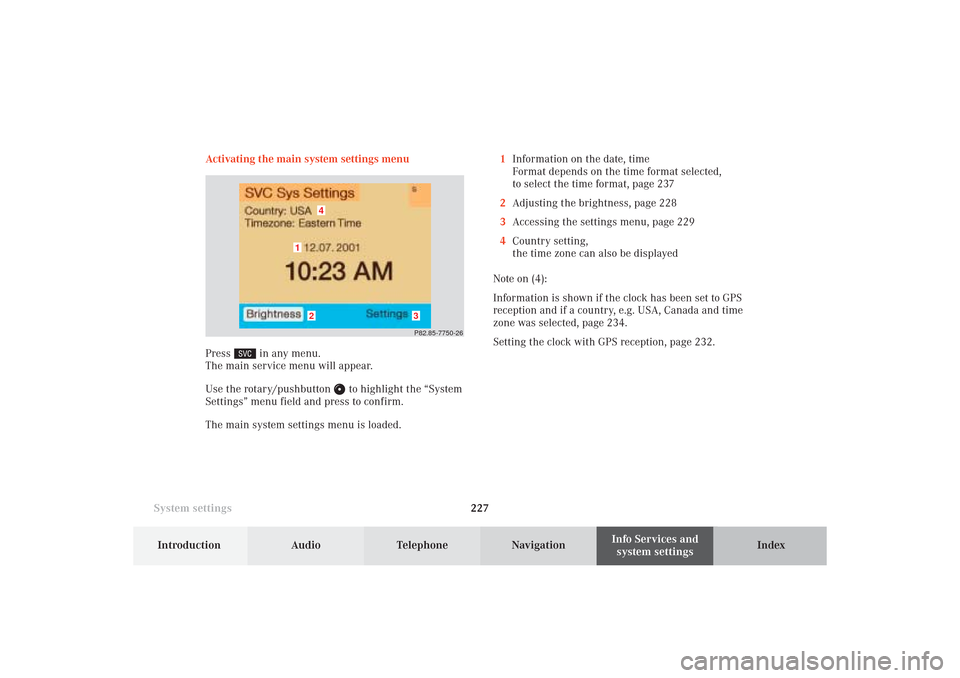
system settings Activating the main system settings menu
Press
in any menu.
The main service menu will appear.
Use the rotary/pushbutton
to highlight the “System
Settings” menu field and press to confirm.
The main system settings menu is loaded.1Information on the date, time
Format depends on the time format selected,
to select the time format, page 237
2Adjusting the brightness, page 228
3Accessing the settings menu, page 229
4Country setting,
the time zone can also be displayed
Note on (4):
Information is shown if the clock has been set to GPS
reception and if a country, e.g. USA, Canada and time
zone was selected, page 234.
Setting the clock with GPS reception, page 232.
P82.85-7750-26
4
3
2
1
12-System-25-US.pm517.10.2001, 11:06 Uhr 227
Page 230 of 251

228 System settings
Audio Telephone Navigation
Index Info Services and
system settings Introduction
Adjusting the brightness
Use the rotary/pushbutton
to highlight the
“Brightness” menu field and press to confirm.
The Brightness menu will appear.
1Previous setting
2Current setting
P82.85-3069-26
1
2
To darken the screen:
Turn the rotary/pushbutton
to the left,
the triangle (2) moves to the left.
To brighten the screen:
Turn the rotary/pushbutton to the right,
the triangle (2) moves to the right.
To confirm the new setting:
Press the rotary/pushbutton .
The main system settings menu will now appear.
12-System-25-US.pm517.10.2001, 11:06 Uhr 228
Page 231 of 251
System settings229Introduction
Audio Telephone
Navigation
Index Info Services and
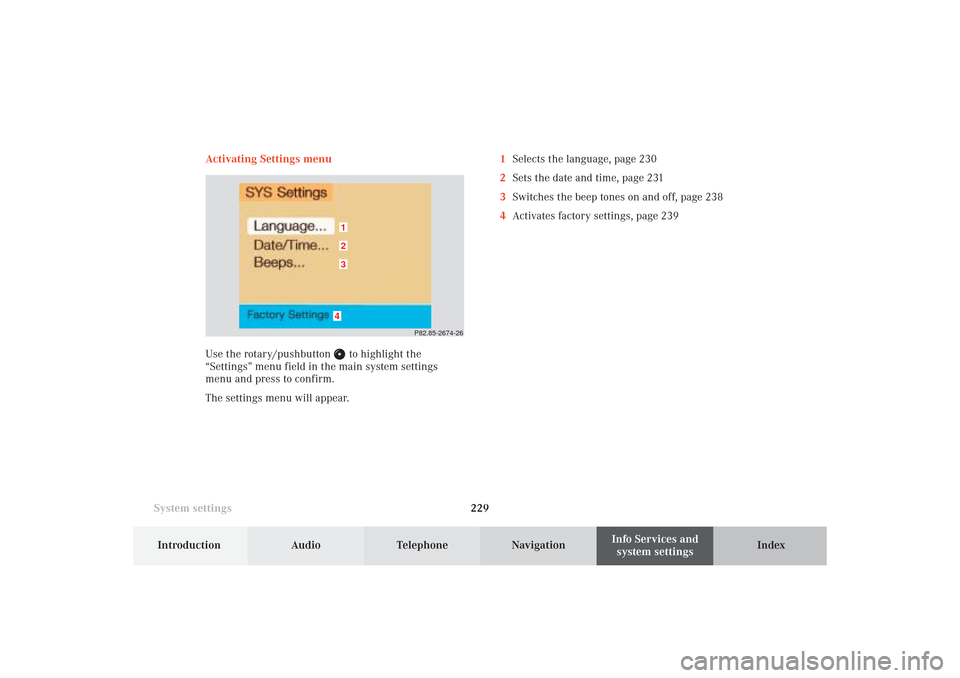
system settings Activating Settings menu
Use the rotary/pushbutton
to highlight the
“Settings” menu field in the main system settings
menu and press to confirm.
The settings menu will appear.1Selects the language, page 230
2Sets the date and time, page 231
3Switches the beep tones on and off, page 238
4Activates factory settings, page 239
P82.85-2674-26
4321
12-System-25-US.pm517.10.2001, 11:06 Uhr 229
Page 232 of 251
230 System settings
Audio Telephone Navigation
Index Info Services and
system settings Introduction
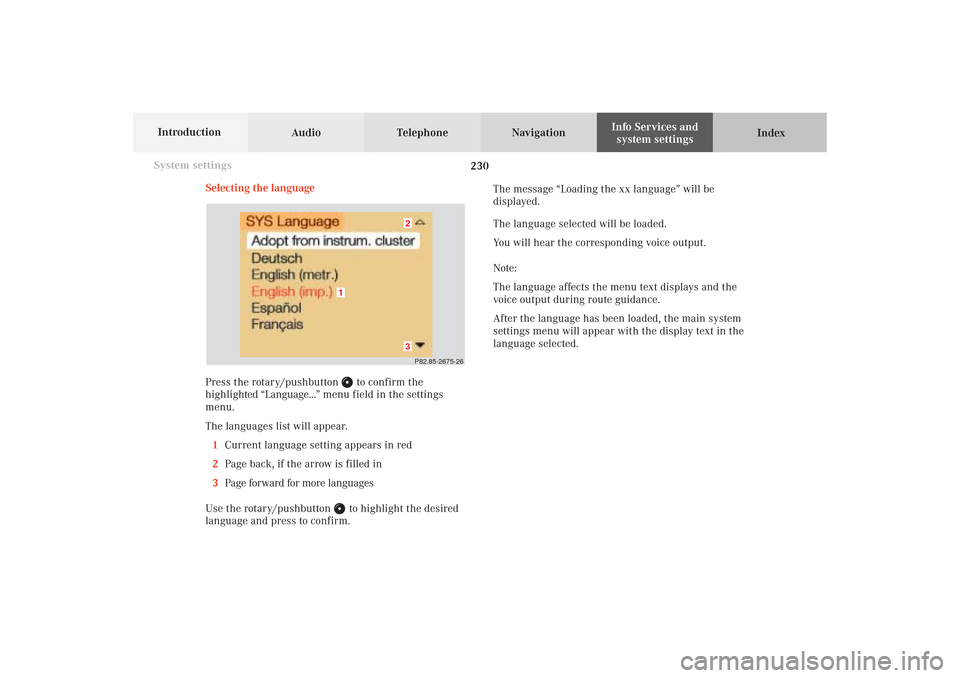
Selecting the language
Press the rotary/pushbutton
to confirm the
highlighted “Language...” menu field in the settings
menu.
The languages list will appear.
1Current language setting appears in red
2Page back, if the arrow is filled in
3Page forward for more languages
Use the rotary/pushbutton to highlight the desired
language and press to confirm.The message “Loading the xx language” will be
displayed.
The language selected will be loaded.
You will hear the corresponding voice output.
Note:
The language affects the menu text displays and the
voice output during route guidance.
After the language has been loaded, the main system
settings menu will appear with the display text in the
language selected.
P82.85-2675-2632
1
12-System-25-US.pm517.10.2001, 11:06 Uhr 230
Page 234 of 251
232 System settings
Audio Telephone Navigation
Index Info Services and
system settings Introduction
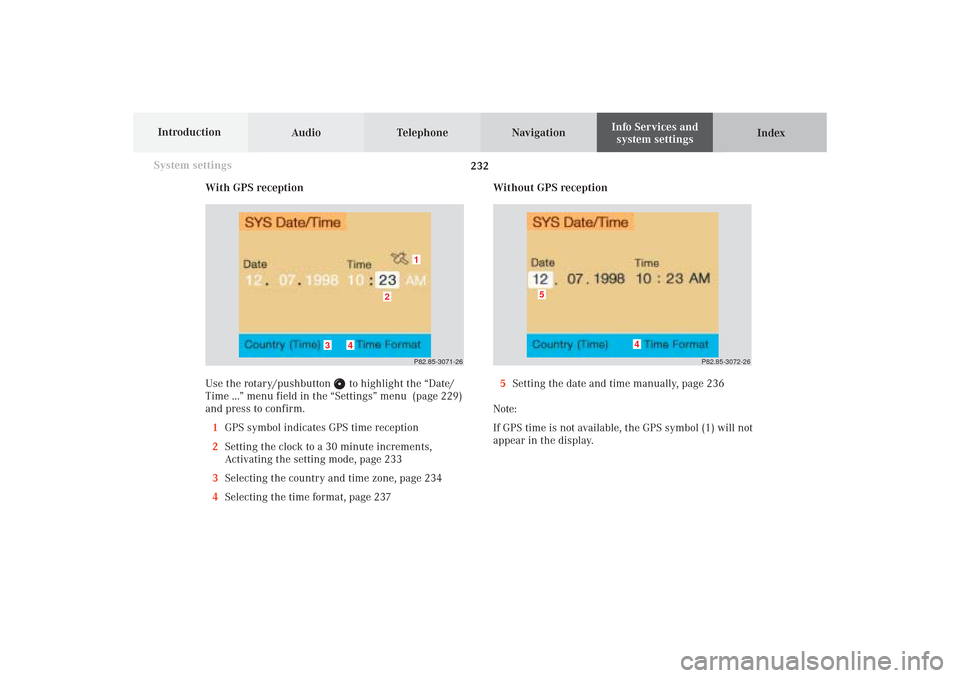
With GPS reception
Use the rotary/pushbutton
to highlight the “Date/
Time ...” menu field in the “Settings” menu (page 229)
and press to confirm.
1GPS symbol indicates GPS time reception
2Setting the clock to a 30 minute increments,
Activating the setting mode, page 233
3Selecting the country and time zone, page 234
4Selecting the time format, page 237Without GPS reception
5Setting the date and time manually, page 236
Note:
If GPS time is not available, the GPS symbol (1) will not
appear in the display.
P82.85-3071-26
2
1
3
4
P82.85-3072-26
4
5
12-System-25-US.pm517.10.2001, 11:06 Uhr 232