light MERCEDES-BENZ CL-Class 2002 C215 Comand Manual
[x] Cancel search | Manufacturer: MERCEDES-BENZ, Model Year: 2002, Model line: CL-Class, Model: MERCEDES-BENZ CL-Class 2002 C215Pages: 251
Page 205 of 251
203
Route guidance
Introduction
Audio Telephone
Navigation
Index Info Services and
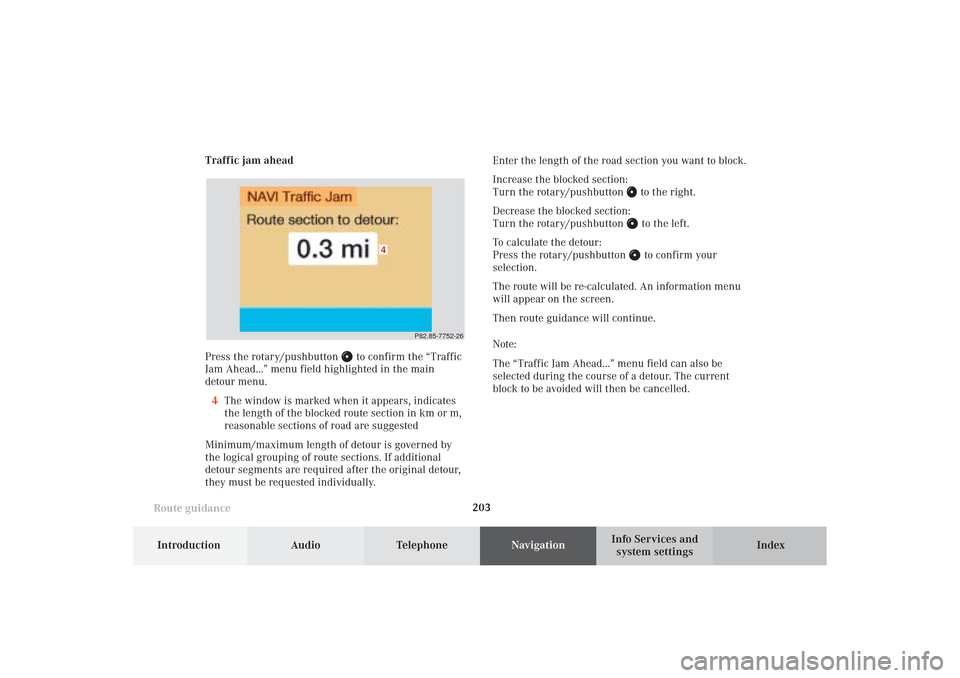
system settings Traffic jam ahead
Press the rotary/pushbutton
to confirm the “Traffic
Jam Ahead...” menu field highlighted in the main
detour menu.
4The window is marked when it appears, indicates
the length of the blocked route section in km or m,
reasonable sections of road are suggested
Minimum/maximum length of detour is governed by
the logical grouping of route sections. If additional
detour segments are required after the original detour,
they must be requested individually.Enter the length of the road section you want to block.
Increase the blocked section:
Turn the rotary/pushbutton
to the right.
Decrease the blocked section:
Turn the rotary/pushbutton to the left.
To calculate the detour:
Press the rotary/pushbutton to confirm your
selection.
The route will be re-calculated. An information menu
will appear on the screen.
Then route guidance will continue.
Note:
The “Traffic Jam Ahead...” menu field can also be
selected during the course of a detour. The current
block to be avoided will then be cancelled.
P82.85-7752-26
4
10-NAVI2-25-US.pm517.10.2001, 10:43 Uhr 203
Page 206 of 251
Audio TelephoneNavigation
Index Info Services and
system settings Introduction
Route guidance
204
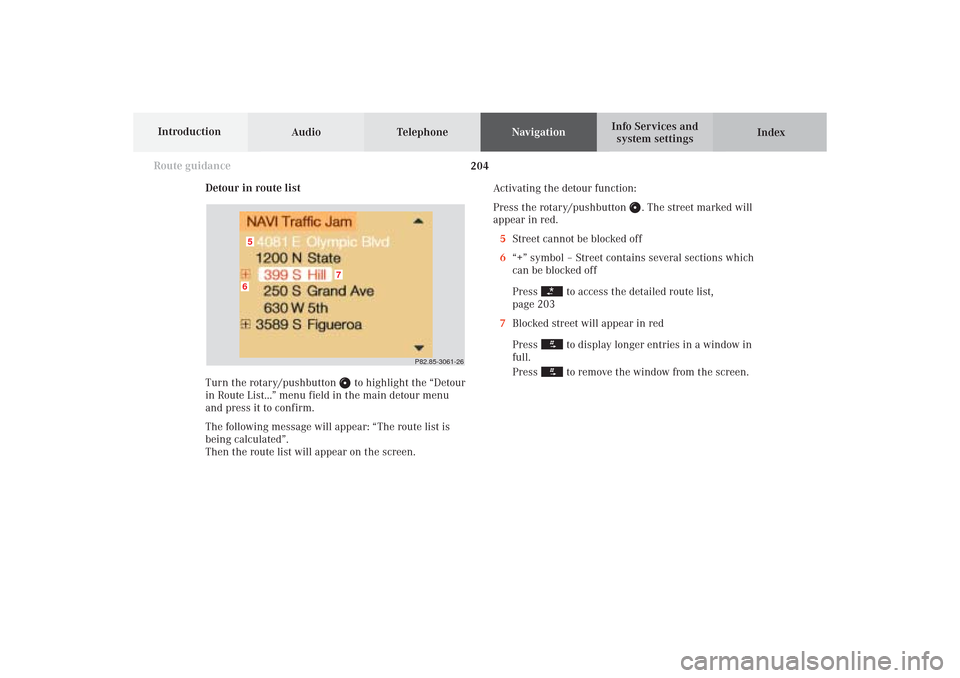
Detour in route list
Turn the rotary/pushbutton
to highlight the “Detour
in Route List...” menu field in the main detour menu
and press it to confirm.
The following message will appear: “The route list is
being calculated”.
Then the route list will appear on the screen.Activating the detour function:
Press the rotary/pushbutton
. The street marked will
appear in red.
5Street cannot be blocked off
6“+” symbol – Street contains several sections which
can be blocked off
Press
to access the detailed route list,
page 203
7Blocked street will appear in red
Press to display longer entries in a window in
full.
Press to remove the window from the screen.
P82.85-3061-26
6
7
5
10-NAVI2-25-US.pm517.10.2001, 10:43 Uhr 204
Page 210 of 251
Audio TelephoneNavigation
Index Info Services and
system settings Introduction
Route guidance
208
Cancel the active route guidance:
Use the rotary/pushbutton
to highlight “No” and
press it to confirm. The destination input menu will
appear.
Notes:
The inquiry menu can also appear if the current
interim destination is entered
If the journey is interrupted for less than 2 hours,
active route guidance will be continued automatically.
You will hear the voice output: “The route is being
recalculated“.If the remaining distance to the route is less than 0.3
miles, route guidance will be canceled and the main
destination input menu will appear.
The message “Manual route exclusions have been
reset“ will appear., if a detour was selected and the
COMAND was switched off for longer than 30 minutes
during active route guidance. Manually entered traffic
jams are deleted.
Press
to remove the message.
10-NAVI2-25-US.pm517.10.2001, 10:43 Uhr 208
Page 214 of 251

Audio TelephoneNavigation
Index Info Services and
system settings Introduction
Route guidance
212
P82.85-3048-26
P82.85-2652-26
Cancelling route guidance
If you want to cancel route guidance press
while
the map or the symbol is being displayed.Press the rotary/pushbutton
if you want to cancel
route guidance.
The main destination input menu will appear.
Continue route guidance:
Press
or turn the rotary/pushbutton
to highlight
the menu field “No” and press to confirm.
The map or the symbol display will be reactivated.
10-NAVI2-25-US.pm517.10.2001, 10:43 Uhr 212
Page 215 of 251

213 Destination memory
Introduction
Audio Telephone
Navigation
Index Info Services and
system settings Activating the main destination memory menu
Use the rotary/pushbutton
to highlight the “Destn
Memory” menu field in the main destination input
menu and press to confirm.1Info/status line
2Activates the destination list, page 214
3Sorting the destinations, page 218
4Deleting a destination in the destination memory,
page 219
5Deleting the last destination
6Saving the current destination, page 215
7Saving the current vehicle location with
a name, page 217
P82.85-6130-264
3
2
15
6
7
11-NAVI3-25-US.pm517.10.2001, 11:01 Uhr 213
Page 216 of 251

214 Destination memory
Audio TelephoneNavigation
Index Info Services and
system settings Introduction
Retrieving a destination from the destination
memory
Turn the rotary/pushbutton
to highlight the “Dis-
play Destinations...” menu field and press to confirm.1Info/status line
2Highlighted entry
3Press the
key – a long entry will display in
full in a window, press
again to remove the
window
4Previous page
An empty triangle marks the start of the list
5Next page
An empty triangle marks the end of the list
Use the rotary/pushbutton to highlight the desired
entry and press to confirm.
Select the route calculation mode and calculate the
route, page 175.
P82.85-2655-26
2
1
435
11-NAVI3-25-US.pm517.10.2001, 11:01 Uhr 214
Page 217 of 251

215 Destination memory
Introduction
Audio Telephone
Navigation
Index Info Services and
system settings Saving the current destination in the destination
memory
Use the rotary/pushbutton
to highlight the “Save
current Destination...” menu field in the main destina-
tion memory menu and press to confirm.
1Name entered
2Saves the destination without entering a nameSave the destination with a name:
Turn the rotary/pushbutton
to highlight the desired
letter in the alphabet and press to confirm, the letter
selected will appear in the input line. Enter the other
letters.
Hold the rotary/pushbutton longer than 2 seconds
to confirm the name entered. This will activate the
destination memory.
Note:
If the destination memory is full, a corresponding
message will appear. Press the rotary/pushbutton
.
This will activate the destination memory.
Deleting a destination in the destination memory,
page 219.
P82.85-2657-26
2
1
11-NAVI3-25-US.pm517.10.2001, 11:01 Uhr 215
Page 218 of 251

216 Destination memory
Audio TelephoneNavigation
Index Info Services and
system settings Introduction
P82.85-2658-26
Save the destination without entering a name:
Turn the rotary/pushbutton
to highlight the “Save
without Names” menu field and press to confirm.
In the user sorted list, the newly input location is high-
lighted and in red. Using the rotary/pushbutton
, the
entry can be located anywhere in the list. Use the
rotary/pushbutton
to move the entry to the desired
point in the list and then confirm by pressing.
Entry will change from red to black.The main destination input menu is activated, the
menu field “Start guidance...” is highlighted.
Note:
The destination can also be saved directly after it is
entered during the selection of the route.
P82.85-2659-26
11-NAVI3-25-US.pm517.10.2001, 11:01 Uhr 216
Page 219 of 251

217 Destination memory
Introduction
Audio Telephone
Navigation
Index Info Services and
system settings Saving the current vehicle location in the
destination memory
Using this function it is possible to save the current
vehicle position in the memory. You will have to name
it to be able to retrieve it at a later date.
Turn the rotary/pushbutton
to highlight the “Save
Current Location...” menu field in the main destination
memory menu and press to confirm.
An input menu will appear.Save the destination with a name, page 215.
Press the rotary/pushbutton
longer than
2 seconds to store the destination.
In the user sorted list, the newly input location is high-
lighted and in red. Using the rotary/pushbutton
, the
entry can be located anywhere in the list. Use the
rotary/pushbutton
to move the entry to the desired
point in the list and then confirm by pressing.
Entry will change from red to black.
Press the rotary/pushbutton
to confirm.
The main destination input menu is activated.
P82.85-2660-26
11-NAVI3-25-US.pm517.10.2001, 11:01 Uhr 217
Page 220 of 251

218 Destination memory
Audio TelephoneNavigation
Index Info Services and
system settings Introduction
Sorting the destination memory
Activate the destination list:
Turn the rotary/pushbutton
to highlight the
“Sort Destinations...” menu field and press to confirm.Use the rotary/pushbutton
to highlight the desired
entry and press to confirm.
The entry is now shown in red.
Use the rotary/pushbutton to move the entry to the
desired position.
Press the rotary/pushbutton to save the entry at
that location. The entry is shown in black, the main
destination memory menu for saving destinations is
reactivated automatically.
P82.85-2661-26
P82.85-2662-26
11-NAVI3-25-US.pm517.10.2001, 11:01 Uhr 218