light MERCEDES-BENZ CL-Class 2002 C215 Comand Manual
[x] Cancel search | Manufacturer: MERCEDES-BENZ, Model Year: 2002, Model line: CL-Class, Model: MERCEDES-BENZ CL-Class 2002 C215Pages: 251
Page 184 of 251
Audio TelephoneNavigation
Index Info Services and
system settings Introduction
Route guidance
182
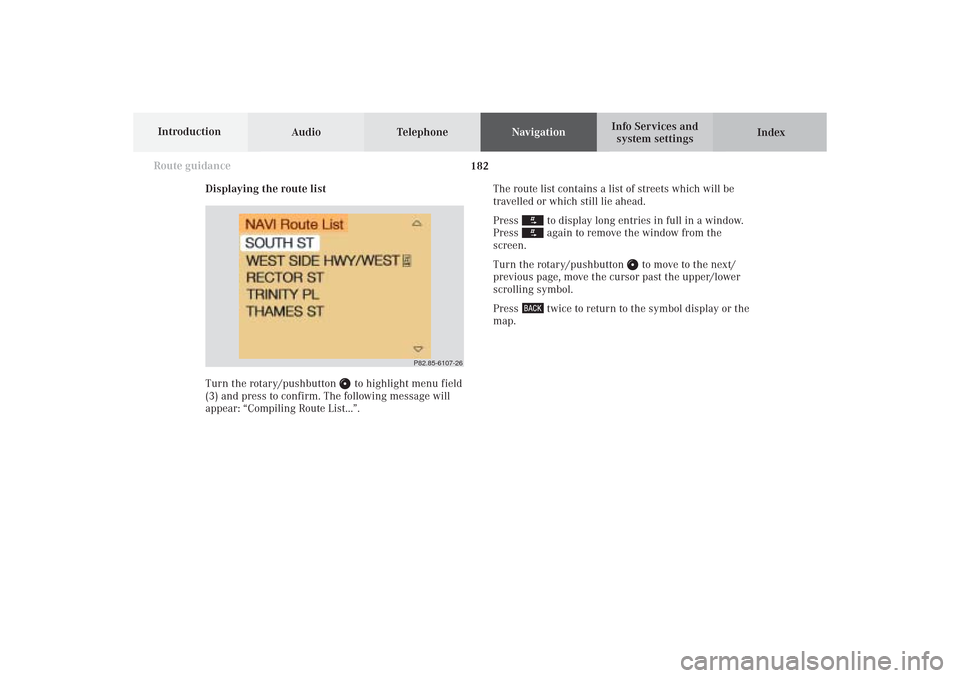
Displaying the route list
Turn the rotary/pushbutton
to highlight menu field
(3) and press to confirm. The following message will
appear: “Compiling Route List...”.The route list contains a list of streets which will be
travelled or which still lie ahead.
Press
to display long entries in full in a window.
Press again to remove the window from the
screen.
Turn the rotary/pushbutton
to move to the next/
previous page, move the cursor past the upper/lower
scrolling symbol.
Press
twice to return to the symbol display or the
map.
P82.85-6107-26
10-NAVI2-25-US.pm517.10.2001, 10:42 Uhr 182
Page 187 of 251

185
Route guidance
Introduction
Audio Telephone
Navigation
Index Info Services and
system settings Displaying the current destination
Use the rotary/pushbutton
to highlight the menu
field “Current destination” in the menu (page 181) and
press it to confirm.Press
to return to symbol display or the map.
P82.85-6109-26
10-NAVI2-25-US.pm517.10.2001, 10:42 Uhr 185
Page 190 of 251

Audio TelephoneNavigation
Index Info Services and
system settings Introduction
Route guidance
188
Displaying a stop-over
Use the rotary/pushbutton
to highlight the menu
field “Stop” in the menu (page 181) and press it to
confirm.18Stop-over
Place, type of stop-over and name
Note:
A stop-over will be displayed if this was previously
selected.
P82.85-6459-26
18
10-NAVI2-25-US.pm517.10.2001, 10:42 Uhr 188
Page 197 of 251
195
Route guidance
Introduction
Audio Telephone
Navigation
Index Info Services and
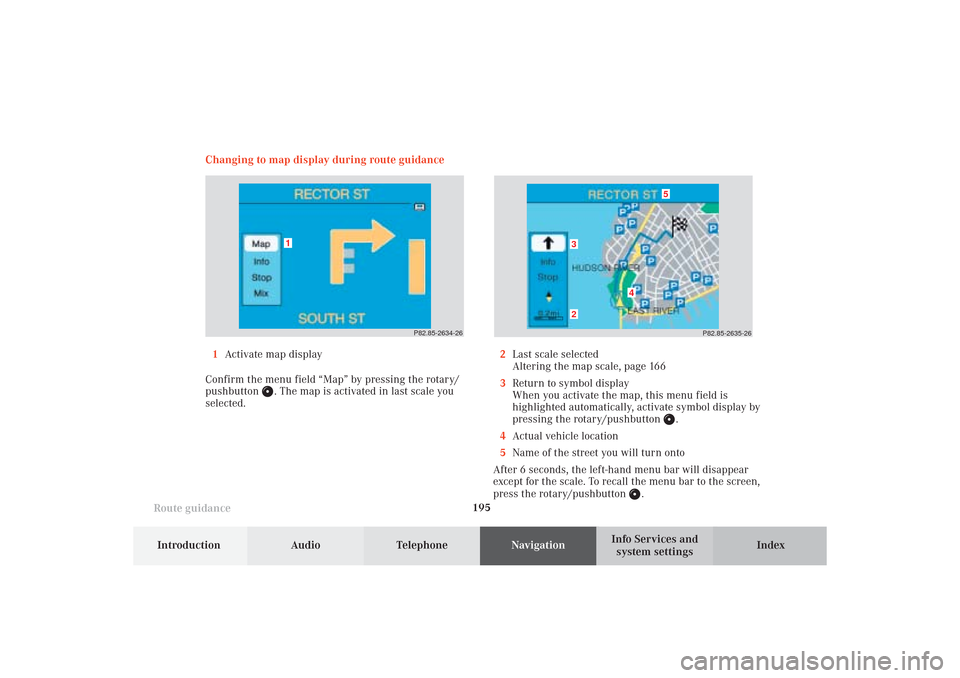
system settings Changing to map display during route guidance
P82.85-2634-26
1
P82.85-2635-26
5
4
32
1Activate map display
Confirm the menu field “Map” by pressing the rotary/
pushbutton
. The map is activated in last scale you
selected.2Last scale selected
Altering the map scale, page 166
3Return to symbol display
When you activate the map, this menu field is
highlighted automatically, activate symbol display by
pressing the rotary/pushbutton
.
4Actual vehicle location
5Name of the street you will turn onto
After 6 seconds, the left-hand menu bar will disappear
except for the scale. To recall the menu bar to the screen,
press the rotary/pushbutton
.
10-NAVI2-25-US.pm517.10.2001, 10:42 Uhr 195
Page 198 of 251
Audio TelephoneNavigation
Index Info Services and
system settings Introduction
Route guidance
196
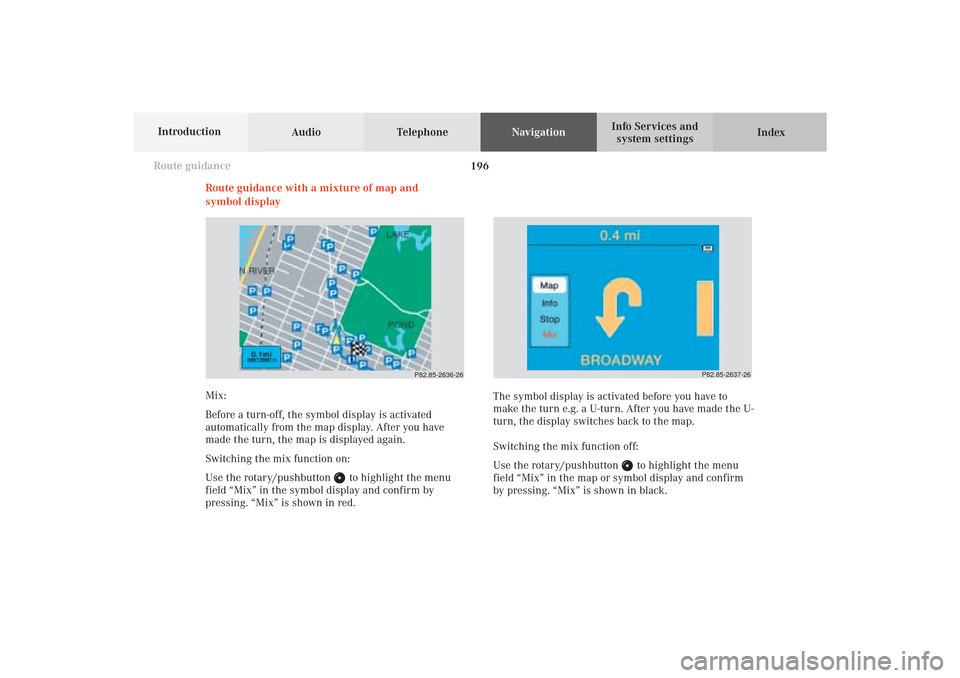
Route guidance with a mixture of map and
symbol display
P82.85-2636-26
P82.85-2637-26
Mix:
Before a turn-off, the symbol display is activated
automatically from the map display. After you have
made the turn, the map is displayed again.
Switching the mix function on:
Use the rotary/pushbutton
to highlight the menu
field “Mix” in the symbol display and confirm by
pressing. “Mix” is shown in red.The symbol display is activated before you have to
make the turn e.g. a U-turn. After you have made the U-
turn, the display switches back to the map.
Switching the mix function off:
Use the rotary/pushbutton
to highlight the menu
field “Mix” in the map or symbol display and confirm
by pressing. “Mix” is shown in black.
10-NAVI2-25-US.pm517.10.2001, 10:42 Uhr 196
Page 199 of 251
197
Route guidance
Introduction
Audio Telephone
Navigation
Index Info Services and
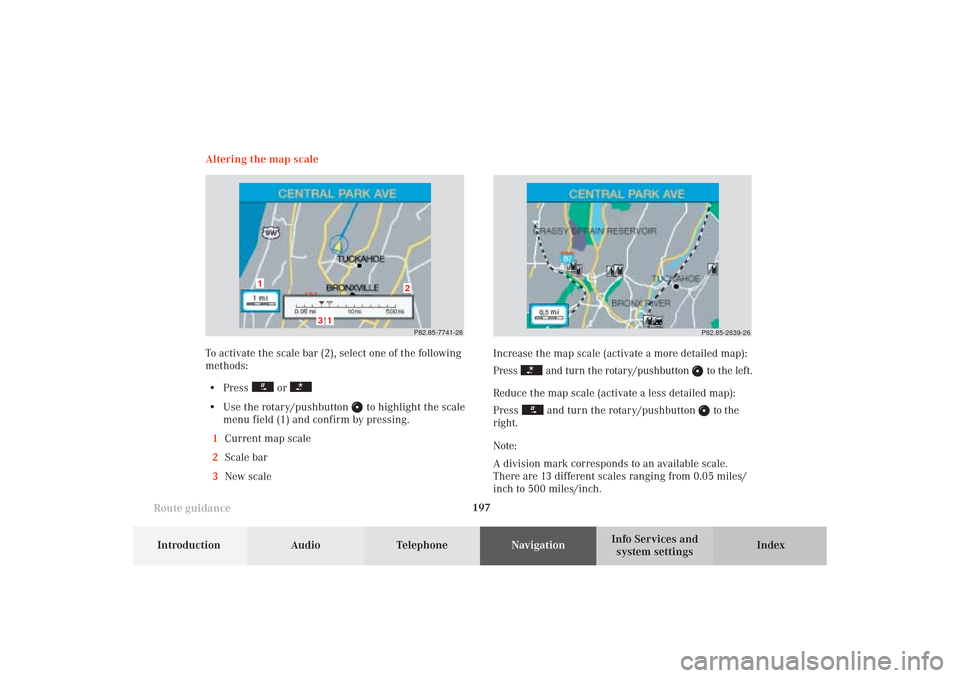
system settings Increase the map scale (activate a more detailed map):
Press
and turn the rotary/pushbutton
to the left.
Reduce the map scale (activate a less detailed map):
Press
and turn the rotary/pushbutton
to the
right.
Note:
A division mark corresponds to an available scale.
There are 13 different scales ranging from 0.05 miles/
inch to 500 miles/inch.P82.85-2639-26
Altering the map scale
To activate the scale bar (2), select one of the following
methods:
• Press
or
• Use the rotary/pushbutton
to highlight the scale
menu field (1) and confirm by pressing.
1Current map scale
2Scale bar
3New scale
P82.85-7741-26
3
2
1
1
10-NAVI2-25-US.pm517.10.2001, 10:42 Uhr 197
Page 200 of 251
Audio TelephoneNavigation
Index Info Services and
system settings Introduction
Route guidance
198
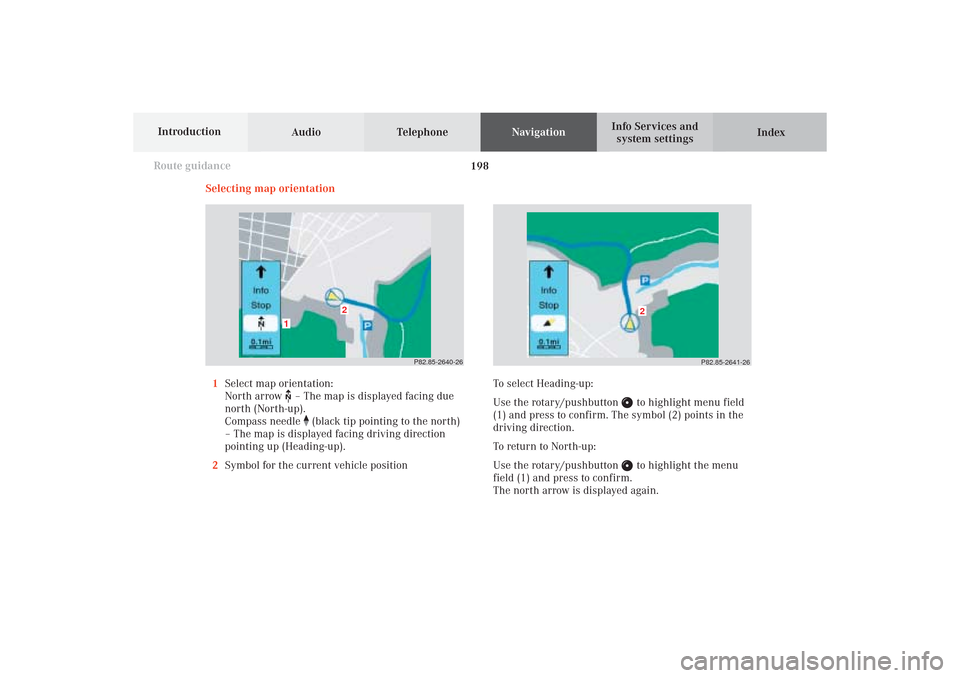
Selecting map orientation
1Select map orientation:
North arrow – The map is displayed facing due
north (North-up).
Compass needle
(black tip pointing to the north)
– The map is displayed facing driving direction
pointing up (Heading-up).
2Symbol for the current vehicle position
P82.85-2640-26
2
1
P82.85-2641-26
2
To select Heading-up:
Use the rotary/pushbutton
to highlight menu field
(1) and press to confirm. The symbol (2) points in the
driving direction.
To return to North-up:
Use the rotary/pushbutton to highlight the menu
field (1) and press to confirm.
The north arrow is displayed again.
10-NAVI2-25-US.pm517.10.2001, 10:43 Uhr 198
Page 201 of 251
199
Route guidance
Introduction
Audio Telephone
Navigation
Index Info Services and
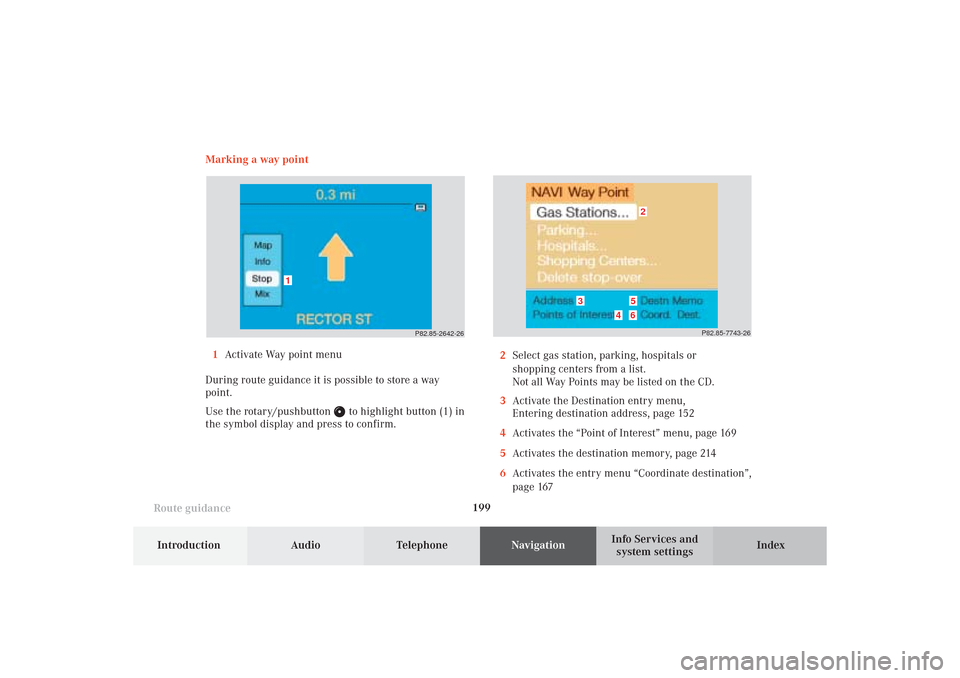
system settings Marking a way point
1Activate Way point menu
During route guidance it is possible to store a way
point.
Use the rotary/pushbutton
to highlight button (1) in
the symbol display and press to confirm.2Select gas station, parking, hospitals or
shopping centers from a list.
Not all Way Points may be listed on the CD.
3Activate the Destination entry menu,
Entering destination address, page 152
4Activates the “Point of Interest” menu, page 169
5Activates the destination memory, page 214
6Activates the entry menu “Coordinate destination”,
page 167
P82.85-2642-26
1
P82.85-7743-26
2
3
4
56
10-NAVI2-25-US.pm517.10.2001, 10:43 Uhr 199
Page 203 of 251
201
Route guidance
Introduction
Audio Telephone
Navigation
Index Info Services and
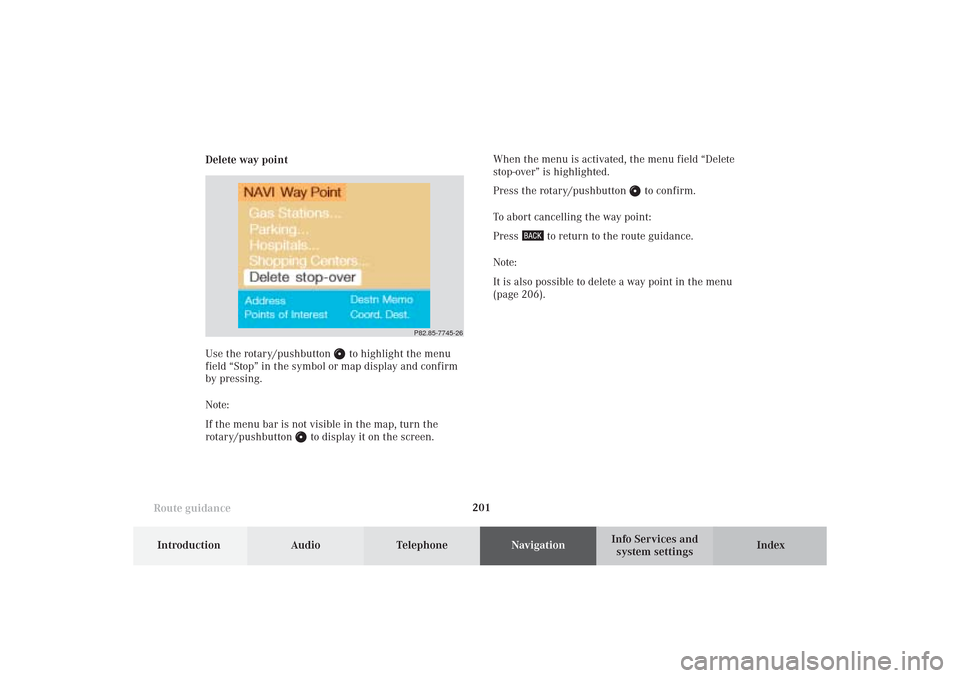
system settings Delete way pointWhen the menu is activated, the menu field “Delete
stop-over” is highlighted.
Press the rotary/pushbutton
to confirm.
To abort cancelling the way point:
Press
to return to the route guidance.
Note:
It is also possible to delete a way point in the menu
(page 206).
Use the rotary/pushbutton
to highlight the menu
field “Stop” in the symbol or map display and confirm
by pressing.
Note:
If the menu bar is not visible in the map, turn the
rotary/pushbutton
to display it on the screen.
P82.85-7745-26
10-NAVI2-25-US.pm517.10.2001, 10:43 Uhr 201
Page 204 of 251
Audio TelephoneNavigation
Index Info Services and
system settings Introduction
Route guidance
202
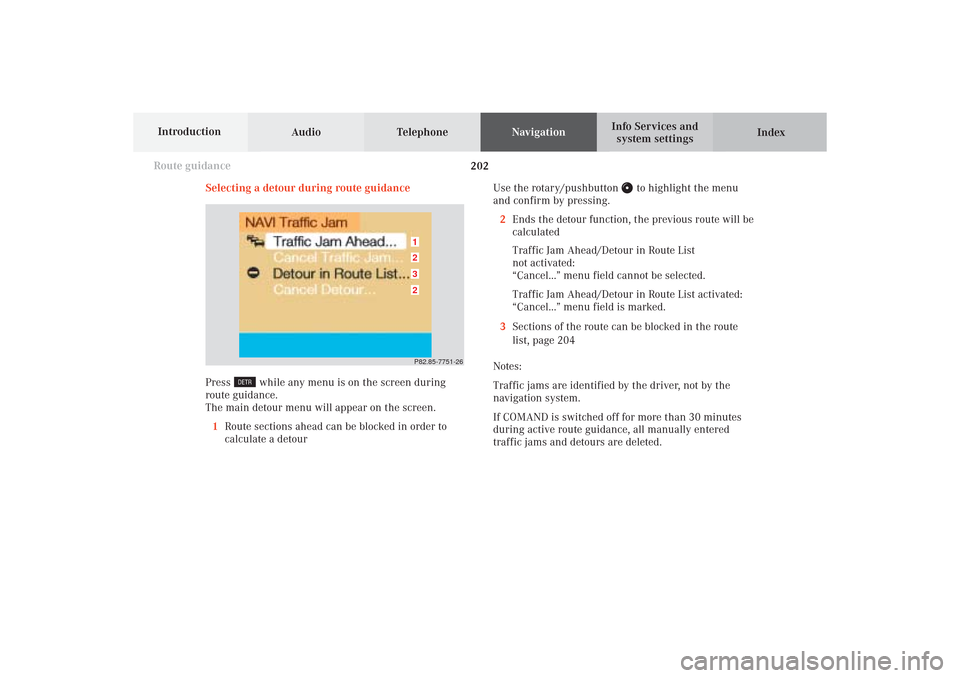
Selecting a detour during route guidance
Press
while any menu is on the screen during
route guidance.
The main detour menu will appear on the screen.
1Route sections ahead can be blocked in order to
calculate a detourUse the rotary/pushbutton
to highlight the menu
and confirm by pressing.
2Ends the detour function, the previous route will be
calculated
Traffic Jam Ahead/Detour in Route List
not activated:
“Cancel...” menu field cannot be selected.
Traffic Jam Ahead/Detour in Route List activated:
“Cancel...” menu field is marked.
3Sections of the route can be blocked in the route
list, page 204
Notes:
Traffic jams are identified by the driver, not by the
navigation system.
If COMAND is switched off for more than 30 minutes
during active route guidance, all manually entered
traffic jams and detours are deleted.
P82.85-7751-263212
10-NAVI2-25-US.pm517.10.2001, 10:43 Uhr 202