tow MERCEDES-BENZ CL COUPE 2009 Owner's Guide
[x] Cancel search | Manufacturer: MERCEDES-BENZ, Model Year: 2009, Model line: CL COUPE, Model: MERCEDES-BENZ CL COUPE 2009Pages: 421, PDF Size: 10.78 MB
Page 207 of 421
i
The vehicle locks centrally once you have
pulled away. The locking knobs in the doors
drop down.
You can open the doors from the inside at
any time.
You can also deactivate the automatic lock-
ing feature (Y page 167).
X Depress the brake pedal and keep it
depressed.
X Move the DIRECT SELECT lever to position
D or R.
X Release the brake pedal.
X Carefully depress the accelerator pedal.
The electric parking brake is automatically
released (Y page 205).
i Upshifts take place at higher engine
speeds after a cold start. This helps the
catalytic converter to reach its operating
temperature more quickly.
Hill start assist Hill start assist helps you when pulling away
on uphill gradients. It holds the vehicle for a
short time after you have removed your foot
from the brake pedal. This gives you time to
move your foot from the brake pedal to the
accelerator pedal and depress it before the
vehicle begins to roll. G
Risk of accident
Never leave the vehicle when it is held by hill
start assist. After approximately one second,
hill start assist will no longer brake your vehi-
cle and it could roll away.
X Take your foot off the brake pedal.
i Once you have taken your foot off the
brake pedal, the vehicle is held for around
one second.
X Pull away. Hill start assist will not function if:
R
you are pulling away on a level road or a
downhill gradient.
R the DIRECT SELECT lever is in position N.
R the vehicle is secured with the electric
parking brake.
R ESP ®
is malfunctioning. Parking
G
Risk of accident
Only remove the key from the ignition lock
when the vehicle is stationary, as you cannot
steer the vehicle with the key removed.
Never leave children unsupervised in the vehi-
cle. They might release the electric parking
brake. This could lead to a serious or fatal
accident. G
Risk of fire
Make sure that the exhaust system does not
under any circumstances come into contact
with flammable materials such as dry grass or
petrol. The material could otherwise ignite
and set the vehicle on fire.
To ensure that the vehicle is secured against
rolling away unintentionally:
R the parking brake must be applied
R move the DIRECT SELECT lever into posi-
tion Pand remove the ignition key
R for steep uphill or downhill gradients, turn
the front wheels towards kerb 204
Driving and parkingControls
216_AKB; 2; 3, en-GB
bjanott,
Version: 2.11.7.7 2009-02-27T14:54:17+01:00 - Seite 204
Dateiname: 6515230602_buchblock.pdf; erzeugt am 04. Mar 2009 11:15:47; WK
Page 232 of 421
X
Briefly pull the cruise control lever towards
you =.
X Remove your foot from the accelerator
pedal.
The first time cruise control is activated, it
stores the current speed or regulates the
speed of the vehicle to the previously
stored speed.
Setting a speed X
Press the cruise control lever to the pres-
sure point, up :for a higher speed or
down ?for a lower speed.
X Keep the cruise control lever pressed until
the desired speed is reached.
X Release the cruise control lever.
The new speed is stored.
i Cruise control is not deactivated if you
depress the accelerator pedal. For exam-
ple, if you accelerate briefly to overtake,
cruise control adjusts the vehicle's speed
to the last speed stored after you have fin-
ished overtaking.
Making fine adjustments in 1 km/h
increments X
Briefly press the cruise control lever to the
pressure point, up :for a higher speed or
down ?for a lower speed.
The last speed stored is increased or
reduced.
Making adjustments in 10 km/h incre-
ments X
Briefly press the cruise control lever
beyond the pressure point, up :for a
higher speed or down ?for a lower speed.
The last speed stored is increased or
reduced. Deactivating cruise control There are several ways to deactivate cruise
control:
X
Briefly press the cruise control lever for-
wards B.
or
X Brake.
or
X Briefly press the cruise control lever in the
direction of arrow A.
Variable Speedtronic is selected. LIM indi-
cator lamp ;in the cruise control lever
lights up.
Cruise control is automatically deactivated if:
R you engage the electric parking brake
R you drive at less than 30 km/h
R ESP ®
intervenes or you deactivate ESP ®
R you shift the automatic transmission to N
while driving
If cruise control is deactivated, you will hear
a warning tone. You will see the Cruise
control off message in the multi-function
display for approximately five seconds.
i The last speed stored is cleared when you
switch off the engine. Distronic*
i Distronic is only available for certain
countries.
Distronic regulates the speed and automati-
cally maintains the distance to the vehicle in
front. It brakes automatically in order to avoid
exceeding the set speed. On long and steep
downhill gradients, especially if the vehicle is
laden, you must select shift range 1,2or 3in
good time. By doing so, you will make use of
the braking effect of the engine, which
relieves the load on the brake system and
prevents the brakes from overheating and
wearing too quickly. Driving systems
229Controls
* optional
216_AKB; 2; 3, en-GB
bjanott,
Version: 2.11.7.7 2009-02-27T14:54:17+01:00 - Seite 229 Z
Dateiname: 6515230602_buchblock.pdf; erzeugt am 04. Mar 2009 11:15:55; WK
Page 235 of 421
Setting a speed
X
Press the cruise control lever to the pres-
sure point, up :for a higher speed or
down Afor a lower speed.
X Keep the cruise control lever pressed until
the desired speed is reached.
X Release the cruise control lever.
The new speed is stored.
i Deceleration of the vehicle by means of
the cruise control lever is assisted by auto-
matic application of the brakes. On long
downhill gradients, the automatic trans-
mission also shifts down.
Making adjustments in 1 km/h incre-
ments X
Briefly press the cruise control lever to the
pressure point, up :for a higher speed or
down Afor a lower speed.
The last speed stored is increased or
reduced.
Making adjustments in 10 km/h incre-
ments X
Briefly press the cruise control lever
beyond the pressure point, up :for a
higher speed or down Afor a lower speed.
The last speed stored is increased or
reduced.
Storing the current speed or calling up
the last stored speed G
Risk of accident
Only select a stored speed if you know what
that speed is and whether it is suitable for the
current situation. Otherwise, sudden acceler-
ation or braking could endanger you or others. X
Briefly pull the cruise control lever towards
you ?.
X Remove your foot from the accelerator
pedal.
Distronic is activated and accepts the cur-
rent speed if it is activated for the first time,
or adjusts the vehicle's speed to the last
speed stored.
Setting the specified minimum dis-
tance for Distronic You can set the specified minimum distance
for Distronic by varying the time span
between one and two seconds. This time span
determines the distance that Distronic should
maintain from the vehicle in front, depending
on the road speed. You can read this distance
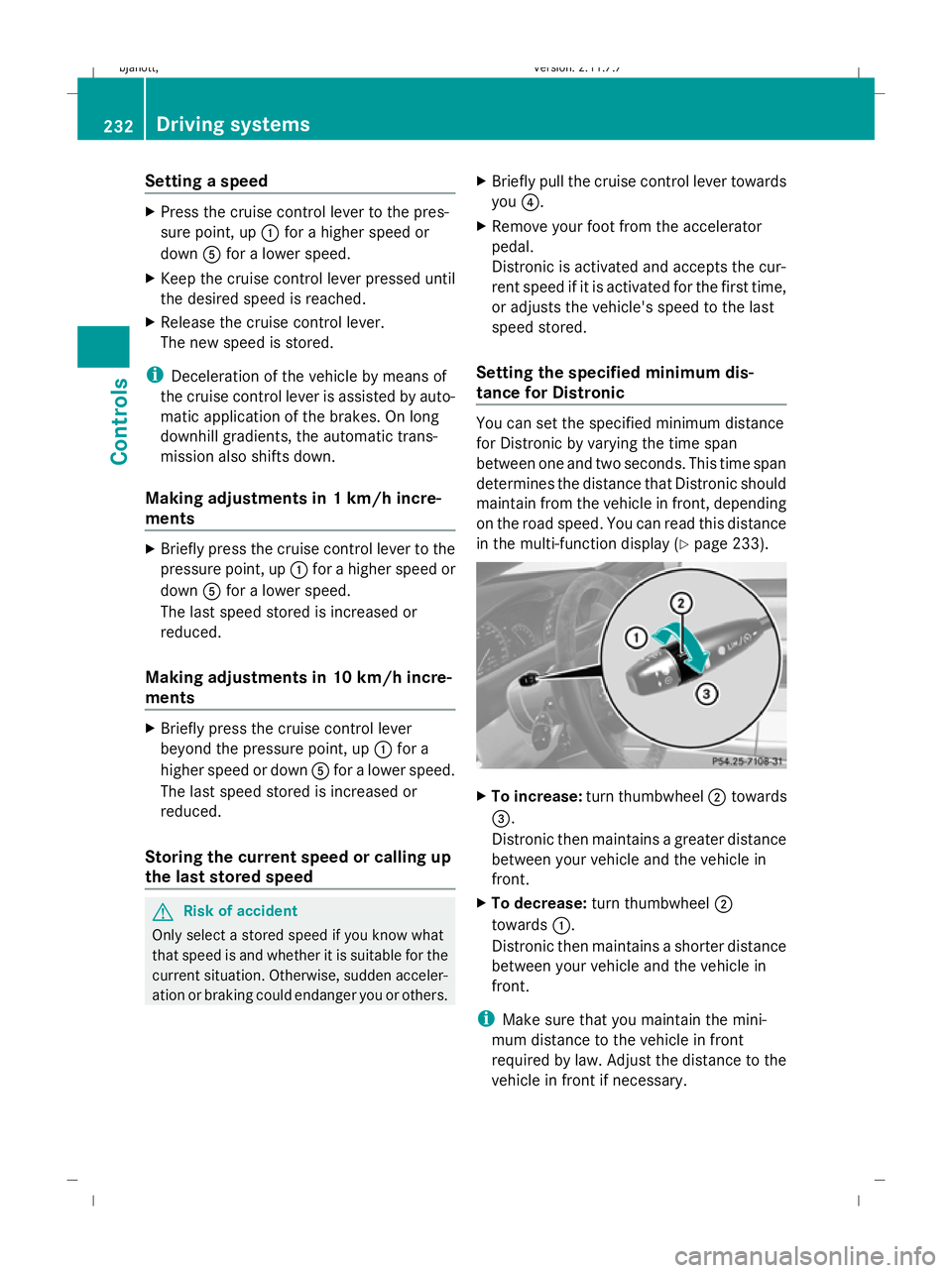
in the multi-function display (Y page 233). X
To increase: turn thumbwheel ;towards
=.
Distronic then maintains a greater distance
between your vehicle and the vehicle in
front.
X To decrease: turn thumbwheel ;
towards :.
Distronic then maintains a shorter distance
between your vehicle and the vehicle in
front.
i Make sure that you maintain the mini-
mum distance to the vehicle in front
required by law. Adjust the distance to the
vehicle in front if necessary. 232
Driving systemsControls
216_AKB; 2; 3, en-GB
bjanott
,V ersion: 2.11.7.7
2009-02-27T14:54:17+01:00 - Seite 232
Dateiname: 6515230602_buchblock.pdf; erzeugt am 04. Mar 2009 11:15:56; WK
Page 240 of 421
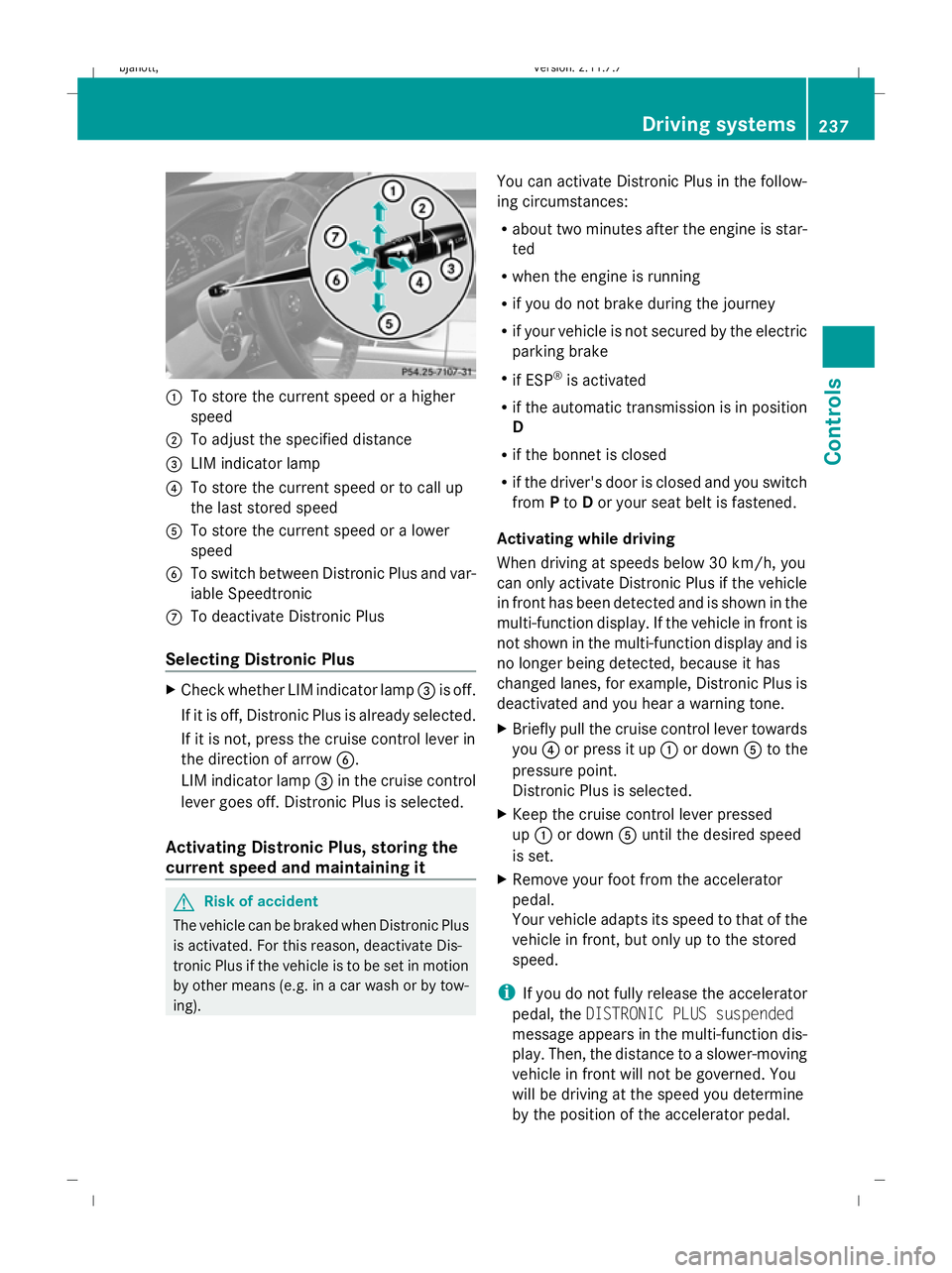
:
To store the current speed or a higher
speed
; To adjust the specified distance
= LIM indicator lamp
? To store the current speed or to call up
the last stored speed
A To store the current speed or a lower
speed
B To switch between Distronic Plus and var-
iable Speedtronic
C To deactivate Distronic Plus
Selecting Distronic Plus X
Check whether LIM indicator lamp =is off.
If it is off, Distronic Plus is already selected.
If it is not, press the cruise control lever in
the direction of arrow B.
LIM indicator lamp =in the cruise control
lever goes off. Distronic Plus is selected.
Activating Distronic Plus, storing the
current speed and maintaining it G
Risk of accident
The vehicle can be braked when Distronic Plus
is activated. For this reason, deactivate Dis-
tronic Plus if the vehicle is to be set in motion
by other means (e.g. in a car wash or by tow-
ing). You can activate Distronic Plus in the follow-
ing circumstances:
R
about two minutes after the engine is star-
ted
R when the engine is running
R if you do not brake during the journey
R if your vehicle is not secured by the electric
parking brake
R if ESP ®
is activated
R if the automatic transmission is in position
D
R if the bonnet is closed
R if the driver's door is closed and you switch
from Pto Dor your seat belt is fastened.
Activating while driving
When driving at speeds below 30 km/h, you
can only activate Distronic Plus if the vehicle
in front has been detected and is shown in the
multi-function display. If the vehicle in front is
not shown in the multi-function display and is
no longer being detected, because it has
changed lanes, for example, Distronic Plus is
deactivated and you hear a warning tone.
X Briefly pull the cruise control lever towards
you ?or press it up :or down Ato the
pressure point.
Distronic Plus is selected.
X Keep the cruise control lever pressed
up : or down Auntil the desired speed
is set.
X Remove your foot from the accelerator
pedal.
Your vehicle adapts its speed to that of the
vehicle in front, but only up to the stored
speed.
i If you do not fully release the accelerator
pedal, the DISTRONIC PLUS suspended
message appears in the multi-function dis-
play. Then, the distance to a slower-moving
vehicle in front will not be governed. You
will be driving at the speed you determine
by the position of the accelerator pedal. Driving systems
237Controls
216_AKB; 2; 3, en-GB
bjanott, Version: 2.11.7.7 2009-02-27T14:54:17+01:00 - Seite 237 Z
Dateiname: 6515230602_buchblock.pdf; erzeugt am 04. Mar 2009 11:15:58; WK
Page 241 of 421
Activating when driving towards a sta-
tionary vehicle
If the vehicle in front of you is stationary, you
can only activate Distronic Plus once your
vehicle is stationary as well.
X Briefly pull the cruise control lever towards
you ?.
Distronic Plus is selected.
i Distronic Plus can only be activated at
under 30 km/h if a vehicle in front has been
detected. Therefore, the Distronic Plus dis-
tance display in the instrument cluster
should be activated.
X Keep the cruise control lever pressed
up : or down Auntil the desired speed
is set.
i You can use the cruise control lever to set
the stored speed and the thumbwheel on
the cruise control lever to set the specified
minimum distance (Y page 239).
Pulling away
X If the vehicle in front pulls away: remove
your foot from the brake pedal.
X Briefly pull the cruise control lever towards
you ?.
or
X Accelerate briefly.
Your vehicle pulls away and adapts its
speed to that of the vehicle in front.
Driving
If there is no vehicle in front, Distronic Plus
operates in the same way as cruise control.
If a slower-moving vehicle is detected in front,
Distronic Plus causes your vehicle to brake
and maintain a preset distance to the vehicle
in front.
If Distronic Plus detects a faster-moving vehi-
cle in front, it increases the driving speed, but
only up to the stored speed. G
Risk of accident
If you depress the brake, Distronic Plus is
deactivated unless your vehicle is stationary.
Distronic Plus then no longer brakes your
vehicle. The driver remains fully responsible
for the vehicle's distance from other vehicles,
its speed and for braking in good time.
Stopping G
Risk of accident
The Distronic Plus braking effect is cancelled
and the vehicle could roll away if:
R Distronic Plus is deactivated using the
cruise control lever.
R you accelerate.
R the system or the power supply is disrup-
ted, e.g. due to battery failure.
R the electrical system in the engine com-
partment or the fuses have been tampered
with.
R the battery is disconnected. G
Risk of accident
Never get out of the vehicle when Distronic
Plus is activated.
Distronic Plus must never be operated or
deactivated by a passenger or from outside
the vehicle.
Distronic Plus does not replace the electric
parking brake and must not be used for park-
ing.
If you wish to leave the vehicle or park it,
deactivate Distronic Plus and secure the vehi-
cle against rolling away.
If Distronic Plus detects that the vehicle in
front is stopping, it brakes your vehicle until
it is stationary.
Once your vehicle is stationary, it remains
stationary and you do not need to depress the
brake.
i After a time, the electric parking brake
secures the vehicle and relieves the service
brake. 238
Driving syste
msControls
216_AKB; 2; 3, en-GB
bjanott, Version: 2.11.7.7 2009-02-27T14:54:17+01:00 - Seite 238
Dateiname: 6515230602_buchblock.pdf; erzeugt am 04. Mar 2009 11:15:58; WK
Page 242 of 421
i
Depending on the specified minimum dis-
tance, your vehicle will come to a standstill
about four metres behind the vehicle in
front. The specified minimum distance is
set using the thumbwheel on the cruise-
control lever.
Setting a speed X
Press the cruise control lever to the pres-
sure point, up :for a higher speed or
down Afor a lower speed.
X Keep the cruise control lever pressed until
the desired speed is reached.
X Release the cruise control lever.
The new speed is stored. Distronic Plus is
activated and adjusts the vehicle's speed
to the new speed stored.
Making adjustments in 1 km/h incre-
ments X
Briefly press the cruise control lever to the
pressure point, up :for a higher speed or
down Afor a lower speed.
The last speed stored is increased or
reduced.
Making adjustments in 10 km/h incre-
ments X
Briefly press the cruise control lever
beyond the pressure point, up :for a
higher speed or down Afor a lower speed.
The last speed stored is increased or
reduced.
Storing the current speed or calling up
the last stored speed G
Risk of accident
Only select a stored speed if you know what
that speed is and whether it is suitable for the
current situation. Otherwise, sudden acceler-
ation or braking could endanger you or others. X
Briefly pull the cruise control lever towards
you ?.
X Remove your foot from the accelerator
pedal.
Distronic Plus is activated. The first time it
is activated, the current speed is stored.
Otherwise, it sets the vehicle cruise speed
to the previously stored value.
Setting the specified minimum dis-
tance for Distronic Plus You can set the specified minimum distance
for Distronic Plus by varying the time span
between one and two seconds. With this func-
tion, you can set the minimum distance that
Distronic Plus keeps to the vehicle in front,
dependent on vehicle speed. You can read
this distance in the multi-function display
(Y
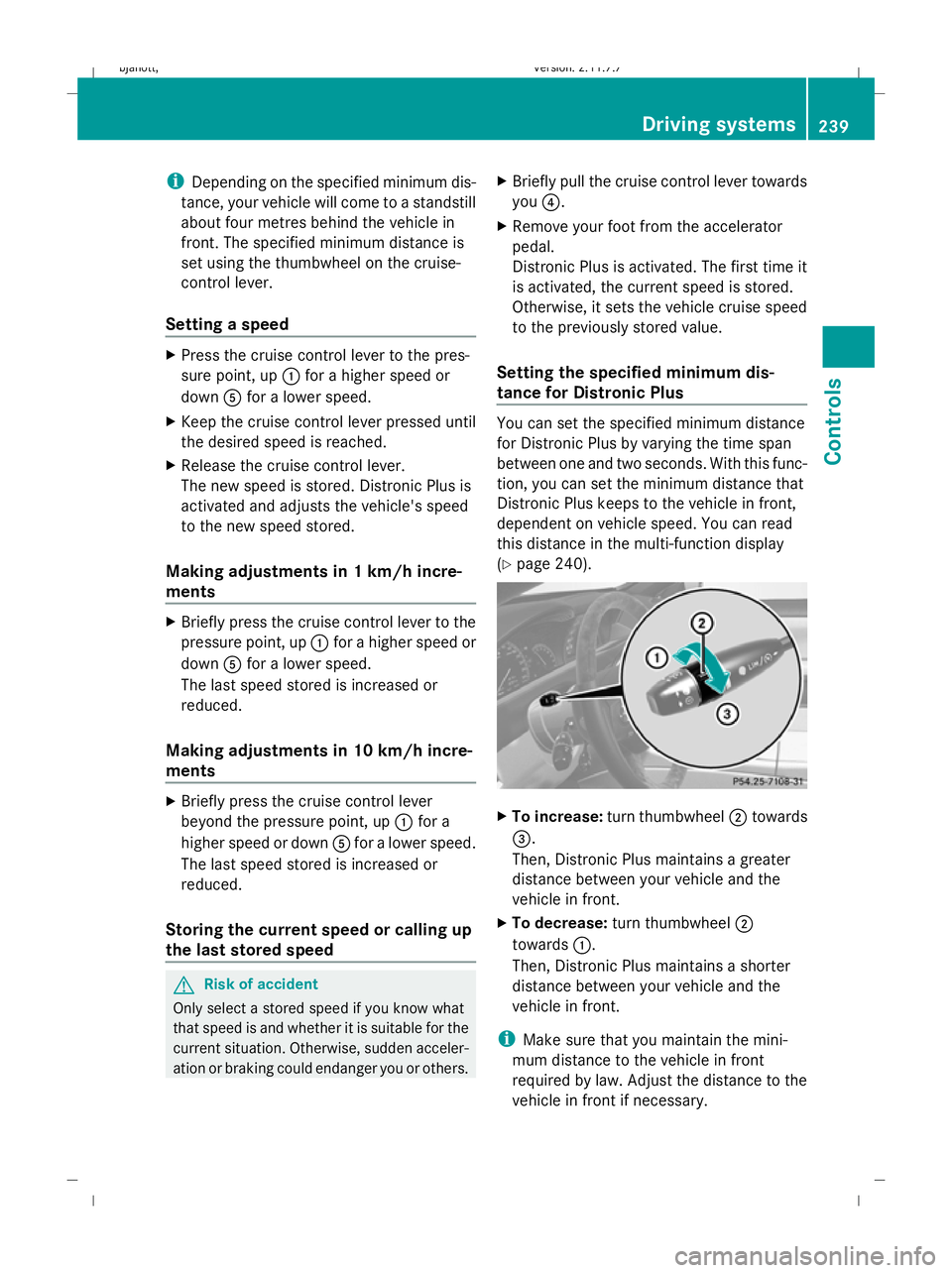
page 240). X
To increase: turn thumbwheel ;towards
=.
Then, Distronic Plus maintains a greater
distance between your vehicle and the
vehicle in front.
X To decrease: turn thumbwheel ;
towards :.
Then, Distronic Plus maintains a shorter
distance between your vehicle and the
vehicle in front.
i Make sure that you maintain the mini-
mum distance to the vehicle in front
required by law. Adjust the distance to the
vehicle in front if necessary. Driving systems
239Controls
216_AKB; 2; 3, en-GB
bjanott, Version: 2.11.7.7 2009-02-27T14:54:17+01:00 - Seite 239 Z
Dateiname: 6515230602_buchblock.pdf; erzeugt am 04. Mar 2009 11:15:59; WK
Page 247 of 421
You can only exceed the limit speed stored if
you deactivate variable Speedtronic:
R using the cruise control lever
R by depressing the accelerator pedal
beyond the pressure point (kickdown)
It is not possible to deactivate variable Speed-
tronic by braking. G
Risk of injury
Variable Speedtronic brakes automatically in
order to avoid exceeding the set speed. As it
does so, the brake pedal is depressed. Do not
place your foot under the brake pedal as it
could become trapped.
Storing the current speed You can use the cruise control lever to limit
the speed to any speed above 30 km/h while
the engine is running.
X Briefly press the cruise control lever
up : or down ?to the pressure point.
The current speed is stored and shown in
the multi-function display.
The speedometer dial lights up between
the start of the scale and the stored speed.
Storing the current speed or calling up
the last stored speed G
Risk of accident
Only select a stored speed if you know what
that speed is and whether it is suitable for the
current driving and traffic situation. Other-
wise, sudden braking could endanger you or
others.
X Briefly pull the cruise control lever towards
you =. Making adjustments in 1 km/h incre-
ments X
Briefly press the cruise control lever to the
pressure point, up :for a higher speed or
down ?for a lower speed.
or
X Keep the cruise control lever pressed to the
pressure point until the desired speed is
set. Press the cruise control lever, up :
for a higher speed or down ?for a lower
speed.
Making adjustments in 10 km/h incre-
ments X
Briefly press the cruise control lever
beyond the pressure point, up :for a
higher speed or down ?for a lower speed.
or
X Keep the cruise control lever pressed
beyond the pressure point until the desired
speed is set. Press the cruise control lever,
up : for a higher speed or down ?for a
lower speed.
Deactivating variable Speedtronic There are several ways to deactivate variable
Speedtronic:
X
Briefly press the cruise control lever for-
wards B.
or
X Briefly press the cruise control lever in the
direction of arrow A.
LIM indicator lamp ;in the cruise control
lever goes out. Variable Speedtronic is
deactivated.
Cruise control or Distronic*/Distronic
Plus* is selected.
Variable Speedtronic is deactivated automat-
ically when you depress the accelerator pedal
beyond the pressure point (kickdown), but
only if your current speed does not differ by 244
Driving systemsControls
* optional
216_AKB; 2; 3, en-GB
bjanott
,V ersion: 2.11.7.7
2009-02-27T14:54:17+01:00 - Seite 244
Dateiname: 6515230602_buchblock.pdf; erzeugt am 04. Mar 2009 11:16:01; WK
Page 249 of 421
X
Rapidly continue to depress the brake until
HOLD :appears in the instrument cluster.
HOLD is activated. You can release the
brake pedal.
i You cannot activate HOLD when Distronic
Plus* is activated.
i The brake pedal does not return com-
pletely to the rest position while HOLD is
activated.
i If HOLD is not activated when you
depress the brake pedal, wait for a short
time and then try again. G
Risk of accident
The vehicle's brakes are applied when HOLD
is activated. For this reason, deactivate HOLD
if the vehicle is to be set in motion by other
means (e.g. in a car wash or by towing).
Deactivating HOLD HOLD is deactivated if:
R
you depress the accelerator pedal with the
transmission in position Dor R.
R you shift the automatic transmission to P.
R you release the brakes fully and apply them
again with a certain amount of pressure
until HOLD goes out in the instrument clus-
ter.
R you secure the vehicle using the electric
parking brake.
R you activate Distronic Plus*.
i After a time, the electric parking brake
secures the vehicle and relieves the service
brake. G
Risk of accident
Never get out of the vehicle when HOLD is
activated.
HOLD must never be operated or deactivated
by a passenger or from outside the vehicle. HOLD does not replace the electric parking
brake and must not be used for parking.
The HOLD braking effect is cancelled and the
vehicle can start moving if:
R HOLD is deactivated by depressing the
accelerator pedal or the brake pedal.
R there is a malfunction in the system or an
interruption in the power supply, e.g. bat-
tery failure.
R the electrical system in the engine com-
partment, the battery or the fuses are tam-
pered with.
R the battery is disconnected. G
Risk of accident
If you wish to leave the vehicle or park it,
deactivate HOLD and secure the vehicle
against rolling away. AIRMATIC*
Vehicle level Your vehicle automatically adjusts its ride
height to reduce petrol consumption and
improve driving safety.
The "Normal" and "Raised" vehicle levels can
be set.
Depending on the vehicle height that has
been set, the vehicle automatically adjusts its
height dependent on the current speed. The
vehicle is lowered by up to 10 mm as the
speed increases. As the speed is reduced, the
vehicle is raised up to the set vehicle height.
Setting the vehicle level manually
Select the "Normal" setting for normal road
surfaces and "Raised" for driving with snow
chains or on particularly poor road surfaces.
G
Risk of injury
Make sure that nobody is in the vicinity of the
wheel housing or under the vehicle while low-
ering the vehicle when it is stationary. Other-
wise, limbs could become trapped. 246
Driving sys
temsControls
* optional
216_AKB; 2; 3, en-GB
bjanott,
Version: 2.11.7.7 2009-02-27T14:54:17+01:00 - Seite 246
Dateiname: 6515230602_buchblock.pdf; erzeugt am 04. Mar 2009 11:16:01; WK
Page 253 of 421
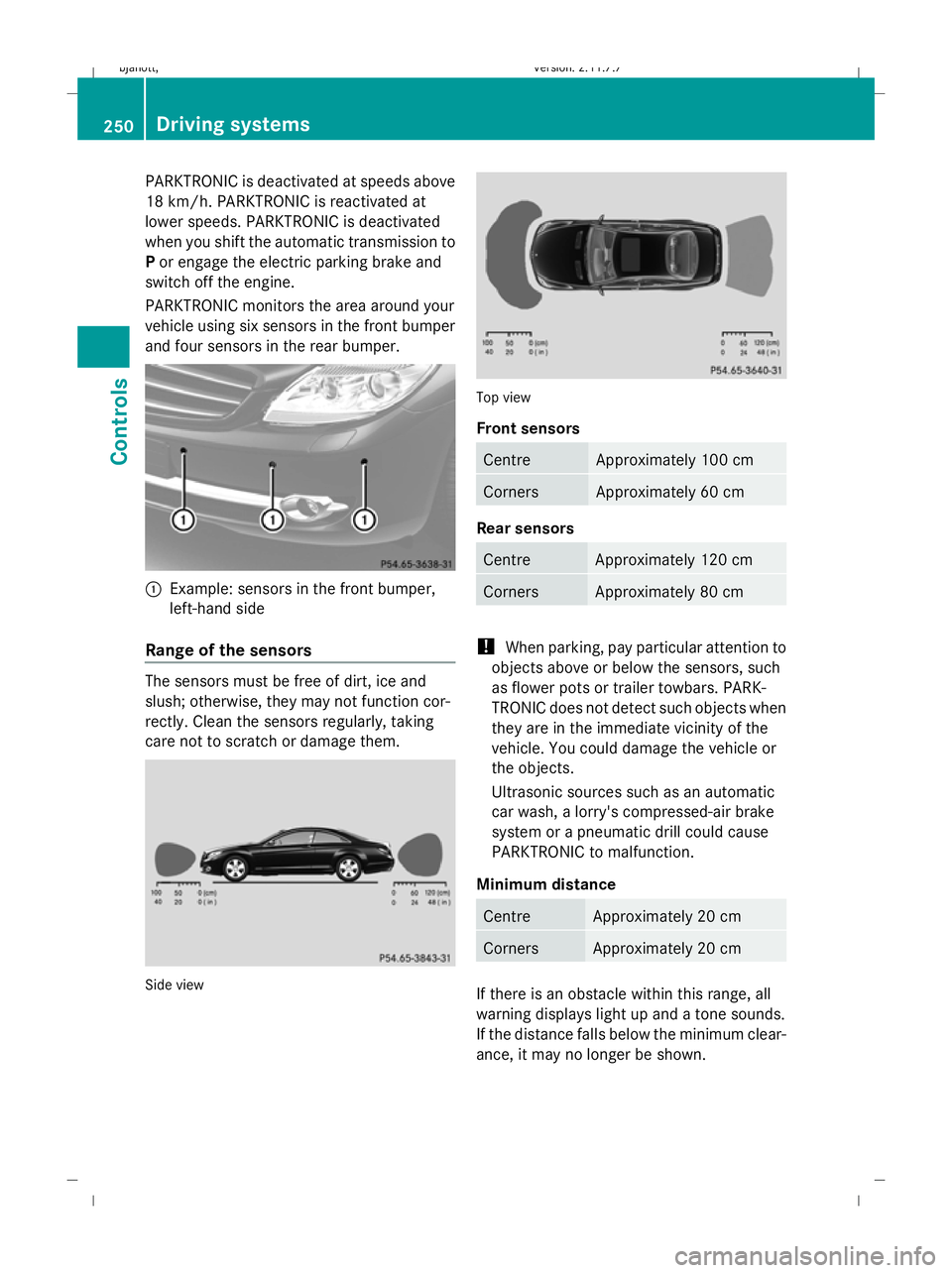
PARKTRONIC is deactivated at speeds above
18 km/h. PARKTRONIC is reactivated at
lower speeds. PARKTRONIC is deactivated
when you shift the automatic transmission to
P or engage the electric parking brake and
switch off the engine.
PARKTRONIC monitors the area around your
vehicle using six sensors in the front bumper
and four sensors in the rear bumper. :
Example: sensors in the front bumper,
left-hand side
Range of the sensors The sensors must be free of dirt, ice and
slush; otherwise, they may not function cor-
rectly. Clean the sensors regularly, taking
care not to scratch or damage them. Side view Top view
Front sensors
Centre Approximately 100 cm
Corners Approximately 60 cm
Rear sensors
Centre Approximately 120 cm
Corners Approximately 80 cm
!
When parking, pay particular attention to
objects above or below the sensors, such
as flower pots or trailer towbars. PARK-
TRONIC does not detect such objects when
they are in the immediate vicinity of the
vehicle. You could damage the vehicle or
the objects.
Ultrasonic sources such as an automatic
car wash, a lorry's compressed-air brake
system or a pneumatic drill could cause
PARKTRONIC to malfunction.
Minimum distance Centre Approximately 20 cm
Corners Approximately 20 cm
If there is an obstacle within this range, all
warning displays light up and a tone sounds.
If the distance falls below the minimum clear-
ance, it may no longer be shown.250
Driving systemsControls
216_AKB; 2; 3, en-GB
bjanott,
Version: 2.11.7.7 2009-02-27T14:54:17+01:00 - Seite 250
Dateiname: 6515230602_buchblock.pdf; erzeugt am 04. Mar 2009 11:16:03; WK
Page 255 of 421
!
You must deactivate the radar sensor sys-
tem in certain countries and near radio
telescope facilities. Further information
can be found in the index under "Radar
sensor system".
Vehicles with COMAND and navigation sys-
tem*: the radar sensor system is automati-
cally deactivated near radio telescope facili-
ties (Y page 411).
If you want Park Assist to assist you, the radar
sensor system must be activated and opera-
tional.
Park Assist is an electronic parking aid with
radar sensors. It assists you when parking by
displaying the distance between your vehicle
and an obstacle, and by emitting a warning
tone when you approach an obstacle.
Park Assist is automatically activated when
you shift the automatic transmission to D,R
or Nwhile the engine is running.
Park Assist is deactivated at speeds above
18 km/h. It is reactivated at lower speeds.
Park Assist is also deactivated when you shift
the automatic transmission to Por switch off
the engine.
Park Assist is deactivated when the transmis-
sion is in position Nif you use the electric
parking brake to secure the vehicle.
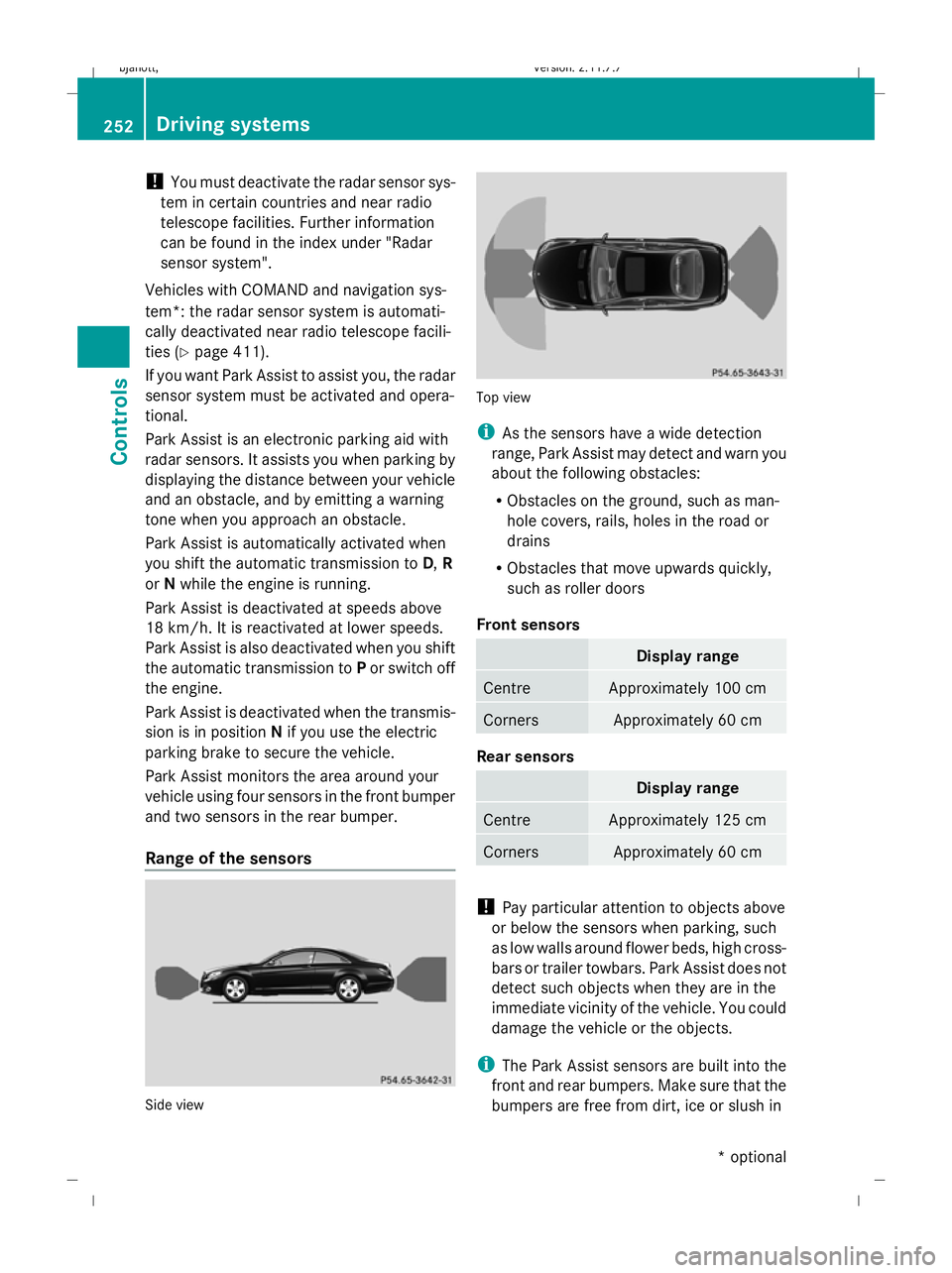
Park Assist monitors the area around your
vehicle using four sensors in the front bumper
and two sensors in the rear bumper.
Range of the sensors Side view Top view
i
As the sensors have a wide detection
range, Park Assist may detect and warn you
about the following obstacles:
R Obstacles on the ground, such as man-
hole covers, rails, holes in the road or
drains
R Obstacles that move upwards quickly,
such as roller doors
Front sensors Display range
Centre Approximately 100 cm
Corners Approximately 60 cm
Rear sensors
Display range
Centre Approximately 125 cm
Corners Approximately 60 cm
!
Pay particular attention to objects above
or below the sensors when parking, such
as low walls around flower beds, high cross-
bars or trailer towbars. Park Assist does not
detect such objects when they are in the
immediate vicinity of the vehicle. You could
damage the vehicle or the objects.
i The Park Assist sensors are built into the
front and rear bumpers. Make sure that the
bumpers are free from dirt, ice or slush in 252
Driving systemsControls
* optional
216_AKB; 2; 3, en-GB
bjanott,
Version: 2.11.7.7 2009-02-27T14:54:17+01:00 - Seite 252
Dateiname: 6515230602_buchblock.pdf; erzeugt am 04. Mar 2009 11:16:04; WK