engine MERCEDES-BENZ CLS-Class 2014 W218 Owners Manual
[x] Cancel search | Manufacturer: MERCEDES-BENZ, Model Year: 2014, Model line: CLS-Class, Model: MERCEDES-BENZ CLS-Class 2014 W218Pages: 382, PDF Size: 5.36 MB
Page 192 of 382
If indicator lamp
0010is not lit:
X Press the 001Abutton.
Indicator lamp 0010lights up. The vehicle
heightisa djusted to raised level.
The Vehicle Rising message appears in
the display.
The "Raised level" setting is canceled if you:
R drive at aspeed over approximately
75 mph (120 km/h)
R drive for approximately three minutes at a
speed over 50 mph (80 km/h)
The "Raised level" remains active when you
are not driving within these speed ranges.
Setting the normal level
X Start the engine.
If indicator lamp 0010is lit:
X Press the 001Abutton.
Indicator lamp 0010goes out. The vehicle is
adjusted to normal level.
Suspension tuning General notes
The electronically controlled damping system
works continuously. This improves driving
safety and ride comfort.
The damping is tuned individually to each
wheel and depends on:
R your driving style, e.g. sporty
R the road surface condition, e.g. bumps
R your individuals election, i.e. sports or
comfort
Your selection remains stored even if you
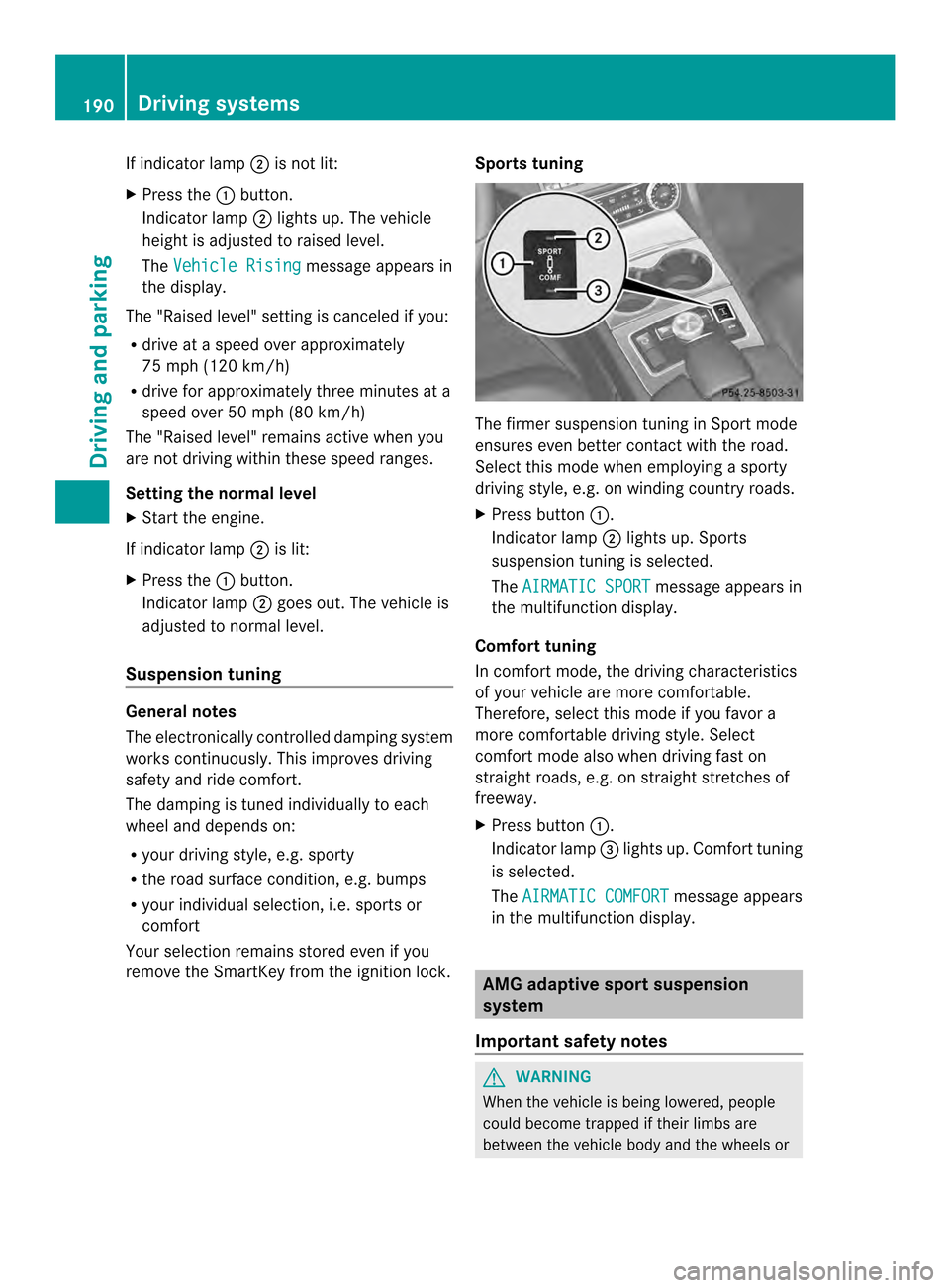
remove the SmartKey from the ignition lock. Sports tuning The firmer suspension tuning in Sport mode
ensures even better contact with the road.
Select this mode when employing
asporty
driving style, e.g. on winding country roads.
X Press button 001A.
Indicator lamp 0010lights up. Sports
suspension tuning is selected.
The AIRMATIC SPORT message appears in
the multifunction display.
Comfort tuning
In comfort mode, the driving characteristics
of your vehicle are more comfortable.
Therefore, select this mode if you favor a
more comfortable driving style. Select
comfort mode also when driving fast on
straight roads, e.g. on straight stretches of
freeway.
X Press button 001A.
Indicator lamp 0024lights up. Comfort tuning
is selected.
The AIRMATIC COMFORT message appears
in the multifunction display. AMG adaptive sport suspension
system
Important safety notes G
WARNING
When the vehicle is being lowered, people
could become trapped if their limbs are
between the vehicle body and the wheels or 190
Driving systemsDriving and parking
Page 193 of 382
underneat
hthe vehicle .There is arisk of
injury.
Make sure no one is underneath the vehicle
or in the immediate vicinity of the wheel
arches when the vehicle is being lowered. G
WARNING
Vehicles with level control:
The vehicle is slightly lowered if:
R you have selected comfort suspension
tuning and
R you lock the vehicle within approximately
60 seconds of switching off the engine
You and people in the vicinity of the wheel
arch or the underbody may thus become
trapped. There is arisk of injury.
Make sure that nobody is in the vicinity of the
wheel arch or the underbody when you lock
the vehicle.
! The vehicle is lowered by about 0.8 in
(20 mm) if:
R you have selected "Comfortable tuning"
R you switch off the engine and then
R you lock the vehicle within approximately
60 seconds
When parking, position your vehicle so that
it does not make contact with the curb as
the vehicle is lowered. Your vehicle could
otherwise be damaged.
Suspension tuning General notes
The electronically controlled damping system
works continuously.T his improves driving
safety and ride comfort.
The damping is tuned individually to each
wheel and depends on:
R your driving style, e.g. sporty
R the road surface condition,e .g. bumps
R your individual selection of Sport, Spor t+
or Comfort Sport mode
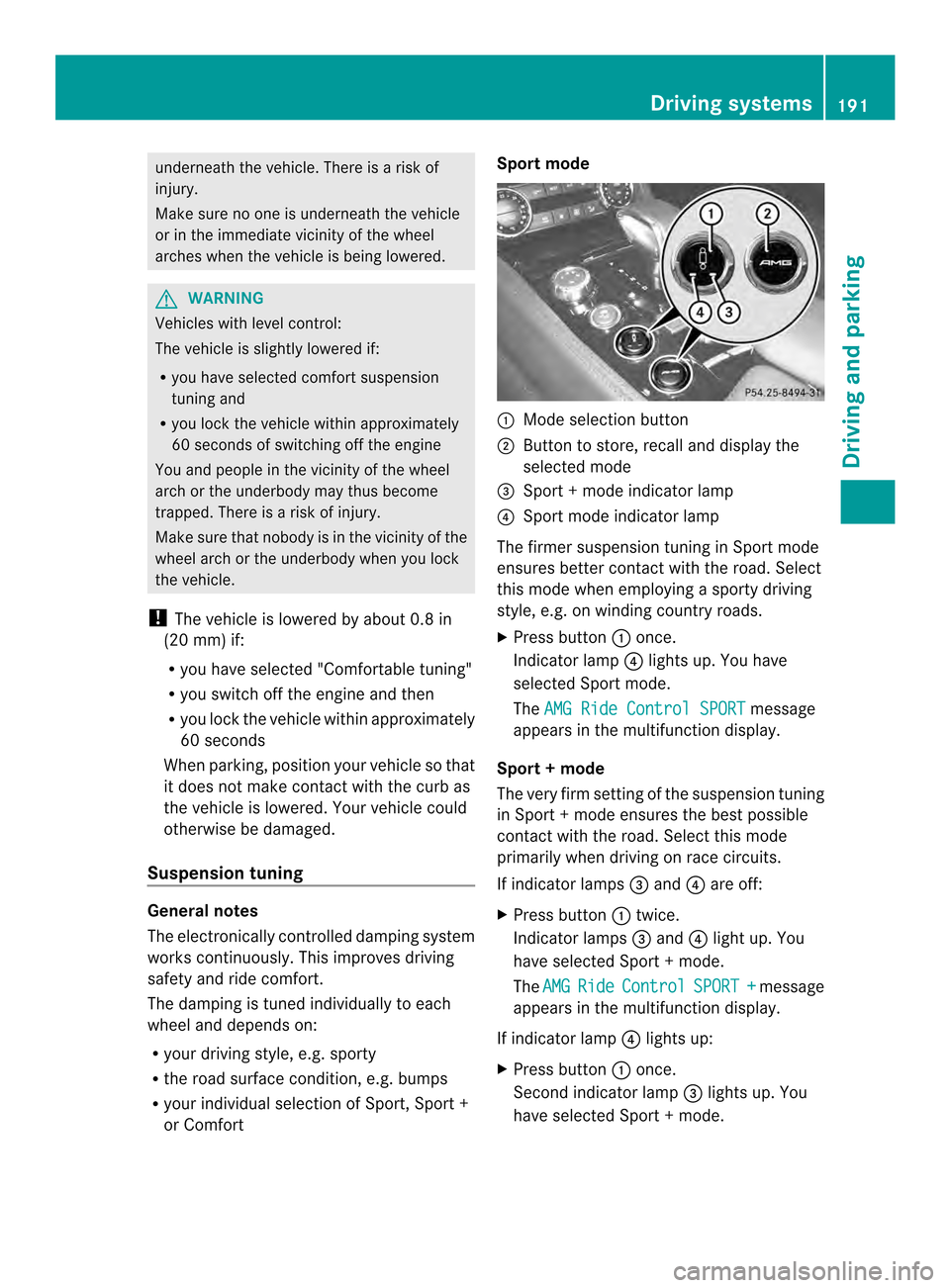
001A
Mode selection button
0010 Button to store, recall and display the
selected mode
0024 Sport +mode indicator lamp
0021 Sport mode indicator lamp
The firmer suspension tuning in Sport mode
ensures better contact with the road. Select
this mode when employing asporty driving
style, e.g. on winding country roads.
X Press button 001Aonce.
Indicator lamp 0021lights up. You have
selected Sport mode.
The AMG Ride Control SPORT message
appears in the multifunction display.
Sport +mode
The very firm setting of the suspension tuning
in Sport +mode ensures the best possible
contact with the road. Select this mode
primarily when driving on race circuits.
If indicator lamps 0024and 0021are off:
X Press button 001Atwice.
Indicator lamps 0024and 0021light up. You
have selected Sport +mode.
The AMG Ride Control SPORT + message
appears in the multifunction display.
If indicator lamp 0021lights up:
X Press button 001Aonce.
Secondi ndicator lamp 0024lights up. You
have selected Sport +mode. Driving systems
191Driving and parking Z
Page 195 of 382
Load compensation
The vehicle can compensat
edifferences in
th ev ehicle level by raisin gorlowering the
rear axle. This is the case, for example, if
people get out or if luggage is being loaded.
Load compensation takes place if:
R ad oor or the trunk lid/tailgate is opened
R the parked vehicle is unlocked
For larger level changes, the engine must be
running. 4MATIC (permanent four-wheel drive)
If you fail to adapt your driving style, 4MATIC
can neither reduce the risk of accident nor
override the laws of physics. 4MATIC cannot
take account of road, weather and traffic
conditions. 4MATIC is only an aid. You are
responsible for the distance to the vehicle in
front,f or vehicle speed, for braking in good
time and for staying in your lane.
If ad rive wheel spins due to insufficien tgrip:
R Only depress the accelerator peda lasfar
as necessary when pulling away.
R Accelerate less when driving.
! Never tow the vehicl ewith one axle
raised. This may damage the transfer case.
Damag eofthis sort is not covered by the
Mercedes-Benz Limited Warranty. All
wheels must remai neithe ront he ground
or be fully raised. Observe the instructions
for towing the vehicle with all wheels in full
contact with the ground.
i In wintry driving conditions, the maximum
effect of 4MATIC can only be achieved if
you use winter tires (M+S tires), with snow
chains if necessary.
4MATIC ensures that allf our wheels are
permanently driven. Together with ESP ®
,it
improves the traction of you rvehicle
whenever adrive wheel spins due to
insufficient grip. PARKTRONIC
Important safet ynotes PARKTRONIC is an electronic parkin
gaid with
ultrasonic sensors. It indicates visually and
audibly the distanc ebetween your vehicle
and an object.
PARKTRONIC is only an aid. It is not a
replacemen tfor your attention to your
immediate surroundings. You are always
responsible for safe maneuvering, parking
and exiting aparkin gspace. When
maneuvering, parkin gorpulling out of a
parkin gspace, make sure that ther eare no
persons, animals or objects in the area in
which you are maneuvering.
! When parking, pay particular attention to
objects above or below the sensors, such
as flower pots or trailer drawbars.
PARKTRONIC does not detec tsuch objects
when they are in th eimmediat evicinity of
th ev ehicle. You could damag ethe vehicle
or the objects.
The sensors may not detect snow and other
objectst hat absorb ultrasonic waves.
Ultrasonic sources such as an automatic
car wash, the compressed-air brakes on a
truck or apneumatic drill could cause
PARKTRONIC to malfunction.
PARKTRONIC may not function correctly on
uneven terrain.
PARKTRONIC is activated automatically when
you:
R switch on the ignition
R shift the transmission to position D,Ror N
R release the parking brake
PARKTRONIC is deactivated at speeds above
11 mph (18 km/h). It is reactivated at lower
speeds.
PARKTRONIC monitors the area around your
vehicle using six sensors in the front bumper
and four sensors in the rear bumper. Driving systems
193Driving and parking Z
Page 206 of 382
Warning and display messages in the
multifunction display X
Activate ATTENTION ASSIST using the on-
board computer (Y page228).
If ATTENTION ASSIST is active, you wil lbe
warned no sooner than 20 minutes after
you rjourney has begun. You then hear an
intermittent warning tonet wice and the
Attention Assist :Drowsiness detected message appears in the
multifunction display.
X If necessary, tak eabreak.
X Pres sthe 000C button to confir mthe
message.
On lon gjou rneys, tak eregular break singood
tim etoa llow yourself to rest properly. If you
do not tak eabreak,you will be warned again
after 15 minutes at th eearliest. The
preconditio nfor this is that
ATTENTION ASSIST still detect stypical
indicators of fatigue or increasing lapses in
concentration.
When ATTENTION ASSIST is deactivated, the
0001 symbol and OFF appear in the
multifunction display in the assistance
graphics display when the engine is running.
ATTENTION ASSIST is reset when you
continue your journey and startsa ssessing
your tiredness again if:
R you switch off the engine.
R you take off your seat belt and open the
driver's door, e.g. for achange of drivers or
to take abreak. Night View Assist Plus
Important safety notes Night View Assist Plus is only an aid and is not
as ubstitute for attentive driving. Do not rely
on the Night View Assist Plus display .You are
responsible for the distance to the vehicle in
front,f or vehicle speed and for braking in
good time. Drive carefully and always adapt your driving style to suit the prevailing road
and traffic conditions.
The system may be impaired or may not
function if:
R
there is poor visibility, e.g. due to snow,
rain, fog or spray
R the windshield is dirty, fogged up or
covered, for instance by asticker, in the
vicinit yofthe camera
R on bends, on uphill gradients or downhill
gradients
Pedestrian recognition may be impaired or
inoperative if:
R pedestrians are partially or entirely
obscured by objects, e.g. parked vehicles
R the silhouette of the pedestrian in the Night
View Assist Plus display is incomplet eor
interrupted, e.g. by powerful light
reflections
R pedestrians do not contrast adequately
from the background
R pedestrians are not in an upright position,
e.g. sitting, squatting or lying In addition to the illumination provided by the
normal headlamps, Night View Assist Plus
uses infrared light to illuminate the road.
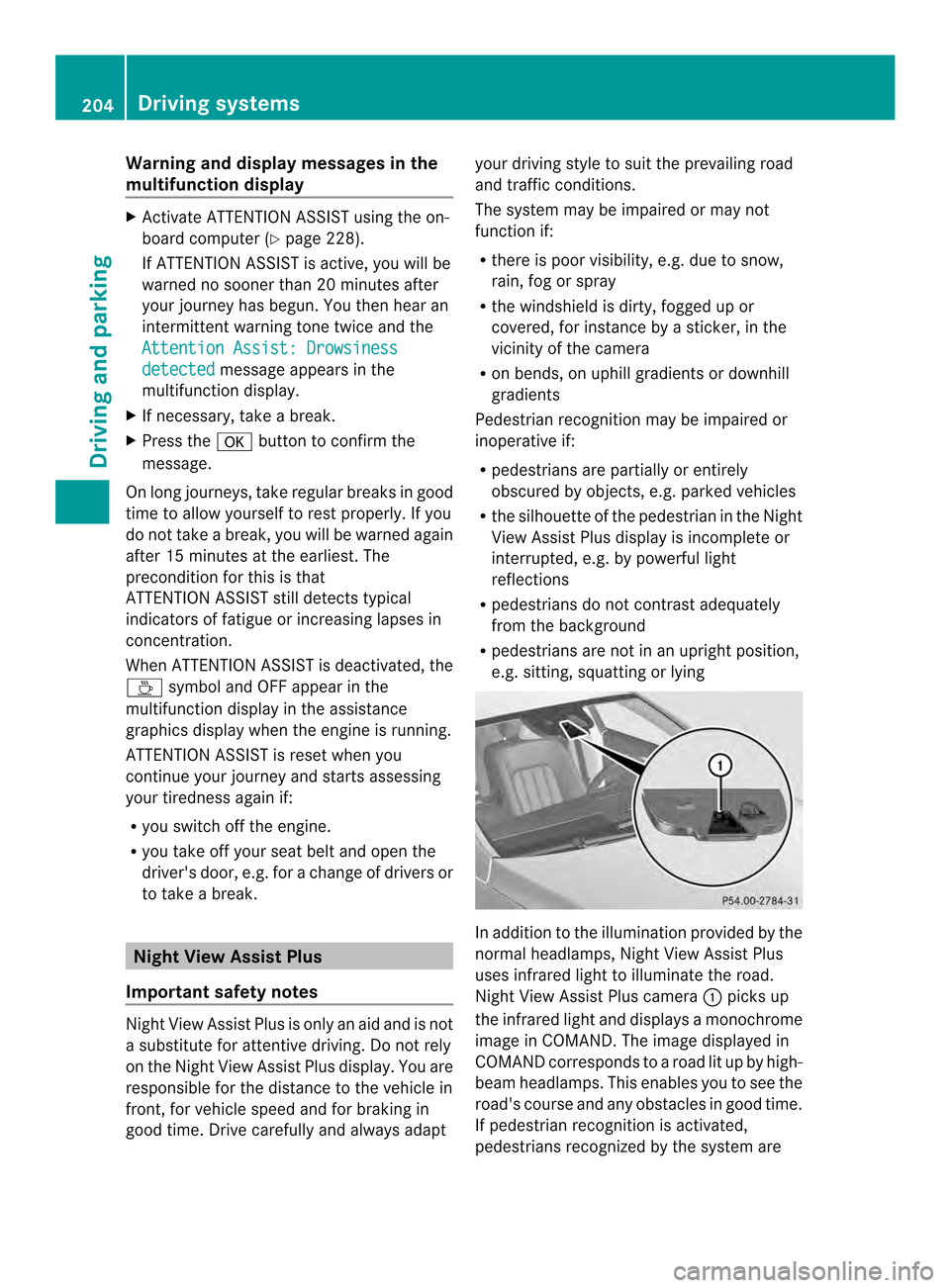
Night View Assist Plus camera
001Apicks up
the infrared light and display samonochrome
image in COMAND. The image displayed in
COMAND corresponds to aroad lit up by high-
beam headlamps. This enables you to see the
road's course and any obstacles in good time.
If pedestrian recognition is activated,
pedestrians recognized by the system are 204
Driving systemsDriving and parking
Page 221 of 382
Display
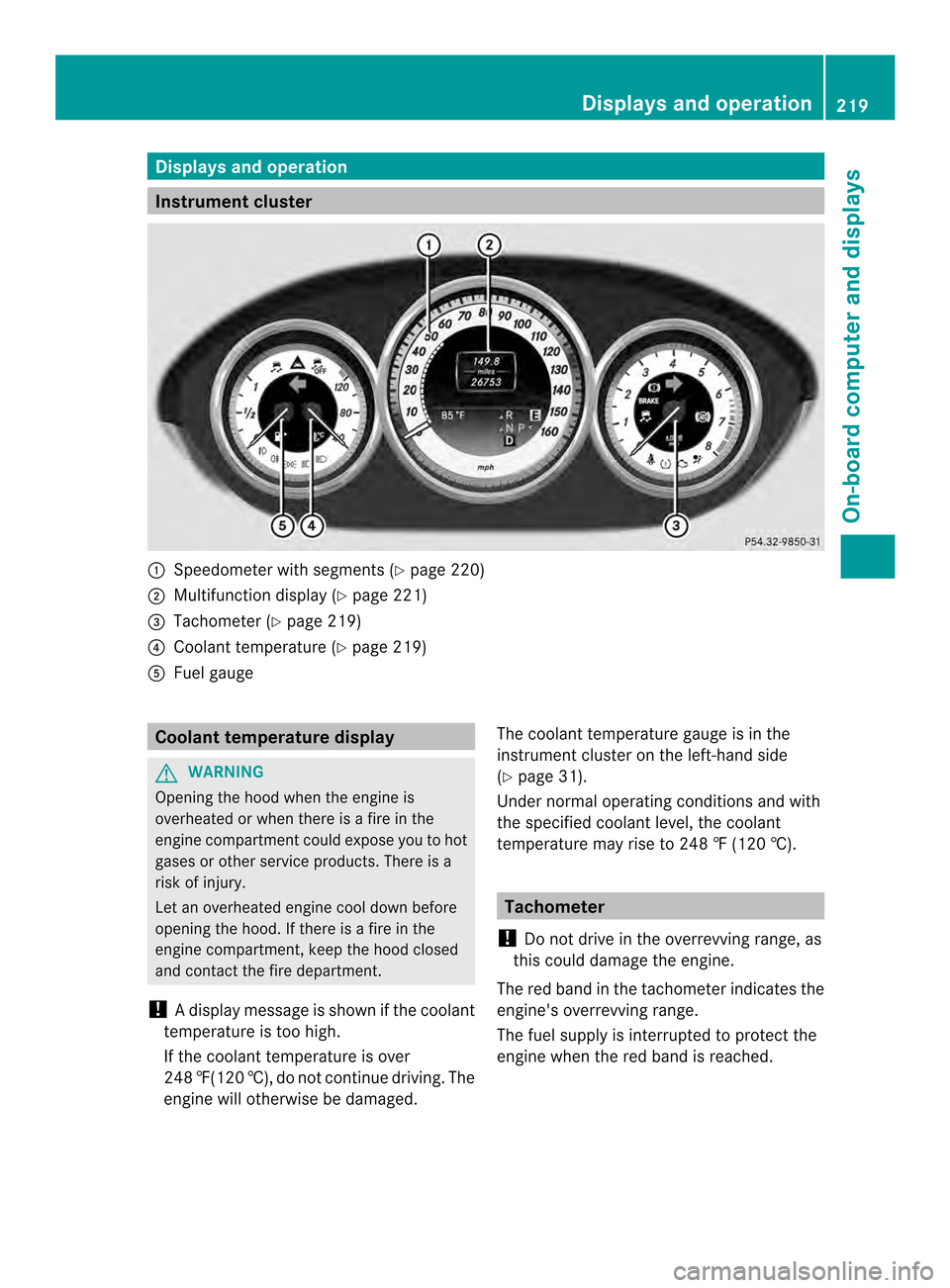
sand operation Instrument cluster
001A
Speedometer wit hsegments (Y page 220)
0010 Multifunction display (Y page 221)
0024 Tachometer (Y page 219)
0021 Coolant temperature ( Ypage 219)
001E Fue lgauge Coolant temperatur
edisplay G
WARNING
Opening th ehoodw hen th eengineis
overheated or when there is afireint he
engin ecom partmen tcould expose you to hot
gases or other service products. There is a
risk of injury.
Let an overheated engine cool down before
opening the hood. If there is afire in the
engine compartment, keep the hood closed
and contact the fire department.
! Adisplay message is shown if the coolant
temperature is too high.
If the coolan ttemperature is over
248 ‡(120 †), do not continue driving. The
engine will otherwise be damaged. The coolan
ttemperature gauge is in the
instrument cluster on the left-hand side
(Y page 31).
Under normal operatin gconditions and with
the specified coolant level, the coolant
temperature may rise to 248 ‡(120 †). Tachometer
! Do not drive in the overrevving range, as
this could damage the engine.
The red band in the tachometer indicates the
engine's overrevving range.
The fuel supply is interrupted to protec tthe
engine when the red band is reached. Displays and operation
219On-board computer and displays Z
Page 230 of 382
G
WARNING
If you deactivate ESP ®
,E SP ®
no longer
stabilizes the vehicle. There is an increased
risk of skidding and an accident.
Only deactivate ESP ®
in the situations
described in the following.
It may be best to deactivate ESP ®
in the
following situations:
R when using snow chains
R in deep snow
R on sand or gravel
Activating/deactivating ESP ®
on AMG
vehicles (Y page70).
For further information about ESP ®
,s ee
(Y page6 8).
X Start the engine.
X Press the 000Aor0004 button on the
steering whee ltoselect the DriveAssist menu.
X Press the 0006or0005 button to select
ESP .
X Press the 000Cbutton.
The current selection is displayed.
X To activate/deactivate: press the000C
button again.
ESP ®
is deactivated if the 0009warning lamp
in the instrument cluster lights up
continuously when the engine is running.
If the 0011 warning lamp and the 0009
warning lamp are lit continuously,E SP®
is not
available due to amalfunction.
Observe the information on warning lamps
(Y page2 69).
Observe the information on display messages
(Y page2 38). Activating/deactivating PRE-SAFE
®
Brake PRE-SAFE
®
Brake is only available in vehicles
with DISTRONIC PLUS.
X Press 000Aor0004 on the steering wheel
to select the DriveAssist menu.
X Press the 0006or0005 button to select
PRE-SAF EBrake .
X Press the 000Cbutton.
The current selection is displayed.
X To activate/deactivate: press the000C
button again.
When PRE-SAFE ®
Brake is deactivated, the
assistance graphic show sthe 0001 symbol in
the multifunction display.
For more information on PRE-SAFE ®
Brake,
see (Y page72).
Activating/deactivating ATTENTION
ASSIST X
Press 000Aor0004 on the steering wheel
to select the DriveAssist menu.
X Press 0006or0005 to select Attention Assist .
X Press the 000Cbutton.
The current selection is displayed.
X To activate/deactivate: press the000C
button again.
When ATTENTION ASSIST is deactivated, the
0001 symbol and OFF appear in the
multifunction display in the assistance
display when the engine is running.
For further information about ATTENTION
ASSIST, see ( Ypage2 03).
Activating/deactivating Blind Spot
Assist X
Press 000Aor0004 on the steering wheel
to select the DriveAssist menu.
X Press the 0006or0005 button to select
Blind Spot Asst .228
Menus and submenusOn-board computer and displays
Page 233 of 382
X
Press 0005or0006 to select the Day Lights: function.
If the Day Lights: have been switched on,
the cone of light and the 0004symbol in
the multifunction display are shown in red.
X Press the 000Cbutton to save the setting.
Further information on daytime running
lamps (Y page 117).
Setting the brightness of the ambient
lighting
X Press the 000Aor0004 button on the
steerin gwheel to select the Sett. menu.
X Press the 0005or0006 button to select the
Lights submenu.
X Press 000Cto confirm.
X Press the 0005or0006 button to select the
Amb. Light +/-. function.
You will see the selected setting.
X Press 000Cto confirm.
X Press the 0005or0006 button to adjust the
brightness to any level from Off to
Level 5 (bright).
X Press the 000Cor0002 button to save the
setting.
Setting the ambient lighting color
X Press the 000Aor0004 button on the
steerin gwheel to select the Sett. menu.
X Press the 0005or0006 button to select the
Lights submenu.
X Press 000Cto confirm.
X Press the 0005or0006 button to select the
Ambient Light Color function.
X Press 000Cto confirm.
X Press the 0005or0006 button to set the
color to SOLAR ,
NEUTRAL or
POLAR .
X Press the 000Cor0002 button to save the
setting. Activating/deactivating surround
lighting and exterior lighting delayed
switch-off
X
Press the 000Aor0004 button on the
steerin gwheel to select the Sett. menu.
X Press the 0005or0006 button to select the
Lights submenu.
X Press 000Cto confirm.
X Press 0005or0006 to select the
Surround Lighting function.
When the Surround Lighting function is
activated, the light cone and the area
around the vehicle are displaye dinred in
the multifunction display.
X Press the 000Cbutton to save the setting.
Deactivating delayed switch-off of the
exterior lighting temporarily:
X Before leaving the vehicle, turn the
SmartKey to position 0in the ignition lock.
X Turn the SmartKey to position 2in the
ignition lock.
The exterior lighting delayed switch-off is
deactivated.
Delayed switch-off of the exterior lighting is
reactivated the next time you start the
engine.
If you have activated the Surround Lighting function and the light switch is set
to 000D,t he following functions are activated
when it is dark:
R Surround lighting: the exterior lighting
remains lit for 40 seconds after unlocking
with the SmartKey. If you start the engine,
the surround lighting is switched off and
the automatic headlamp mode is activated
(Y page 117).
R Exterior lighting delayed switch-off: the
exterior lighting remains lit for 60seconds
after the engine is switched off. If you close
all the doors and the trunkl id, the exterior
lighting goes off after 5seconds.
i Depending on your vehicle's equipment,
when the surround lighting and delayed Menus and submenus
231On-boardcomputer and displays Z
Page 236 of 382
mirrors willn
ot fold out automatically
(Y page1 10).
You can then only fold out the exterior mirrors
using button 001A.
Restorin gthe factory settings X
Press the 000Aor0004 button on the
steering whee ltoselect the Sett. menu.
X Press the 0005or0006 button to select the
Factory Setting submenu.
X Press 000Cto confirm.
The Reset All Settings? message
appears.
X Press the 0005or0006 button to select
No or
Yes .
X Press 000Cto confirm the selection.
If you have selected Yes ,t
he multifunction
display show saconfirmation message.
For safety reasons, the Daytime RunningLights function in the
Lights submenu is
only reset if the vehicl eisstationary. AMG menu in AMG vehicles
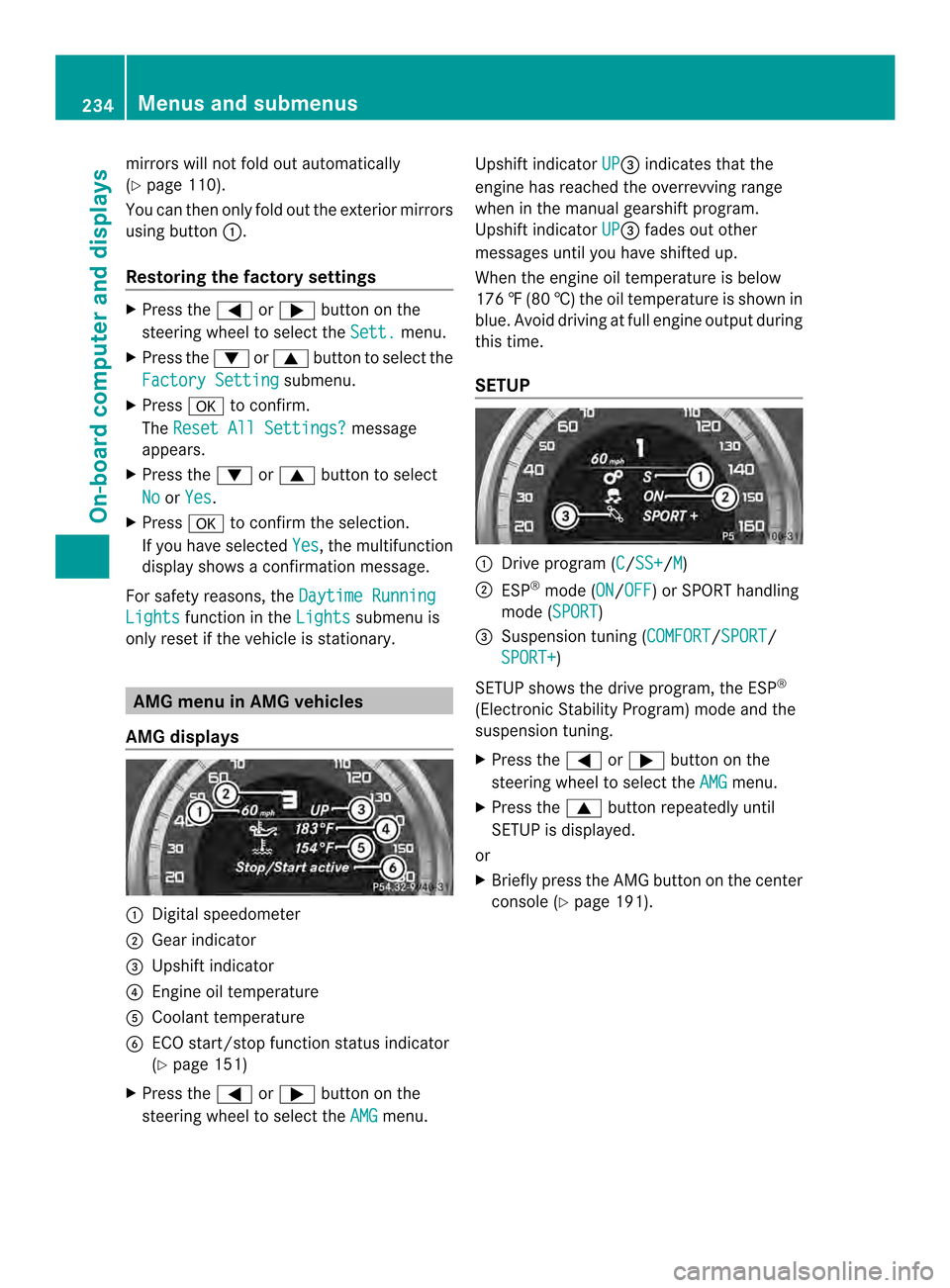
AMG displays 001A
Digital speedometer
0010 Gear indicator
0024 Upshift indicator
0021 Engine oil temperature
001E Coolant temperature
0025 ECO start/stop function status indicator
(Ypage 151)
X Press the 000Aor0004 button on the
steering wheel to select the AMG menu.Upshift indicator
UP 0024
indicates that the
engine has reached the overrevving range
when in the manual gearshift program.
Upshift indicator UP 0024
fades out other
messages until you have shifted up.
When the engine oil temperature is below
176 ‡(80 †) the oil temperature is show nin
blue. Avoid drivin gatfull engin eoutput during
this time.
SETUP 001A
Driv eprogram (C /SS+ /M )
0010 ESP ®
mode (ON /OFF )orS
PORT handling
mode (SPORT )
0024 Suspension tunin g(COMFORT /SPORT /
SPORT+ )
SETUP shows the drive program, the ESP ®
(Electronic Stability Program) mode and the
suspension tuning.
X Press the 000Aor0004 button on the
steering wheel to select the AMG menu.
X Press the 0006button repeatedly until
SETUP is displayed.
or
X Briefly press the AMG button on the center
console (Y page 191).234
Menus and submenusOn-boar
dcomputer and displays
Page 237 of 382
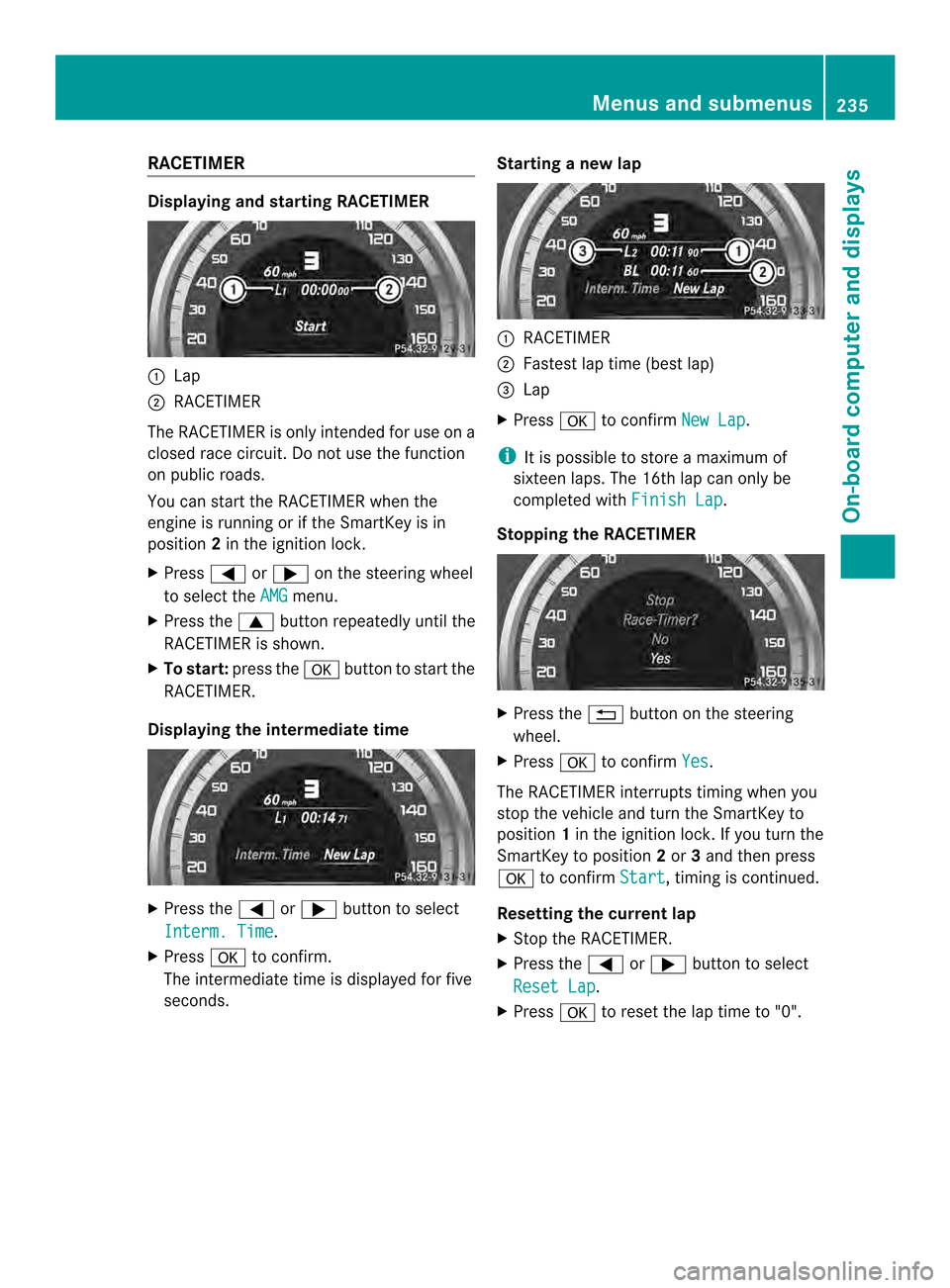
RACETIMER
Displaying and startin
gRACETIMER 001A
Lap
0010 RACETIMER
The RACETIMER is only intended for us eona
closed race circuit. Do not us ethe function
on public roads.
Yo uc an star tthe RACETIMER when the
engine is running or if the SmartKey is in
position 2in the ignition lock.
X Press 000Aor0004 on the steering wheel
to select the AMG menu.
X Press the 0006button repeatedl yuntilthe
RACETIMER is shown.
X To start: press the 000Cbutton to star tthe
RACETIMER.
Displaying the intermediate time X
Press the 000Aor0004 button to select
Interm. Time .
X Press 000Cto confirm.
The intermediate time is displayed for five
seconds. Startin
ganewlap 001A
RACETIMER
0010 Fastest la ptime (best lap)
0024 Lap
X Press 000Cto confirm New Lap .
i It is possible to store amaximum of
sixteen laps. The 16th la pcan only be
completed with Finish Lap .
Stoppin gthe RACETIMER X
Press the 0002button on the steering
wheel.
X Press 000Cto confirm Yes .
The RACETIMER interrupts timing when you
stop the vehicl eand turn the SmartKey to
position 1in the ignition lock. If yo uturn the
SmartKey to position 2or 3and then press
000C to confirm Start ,t
iming is continued.
Resetting the current lap
X Stop the RACETIMER.
X Press the 000Aor0004 button to select
Rese tLap .
X Press 000Cto reset the la ptime to "0". Menus and submenus
235On-board computer and displays Z
Page 238 of 382
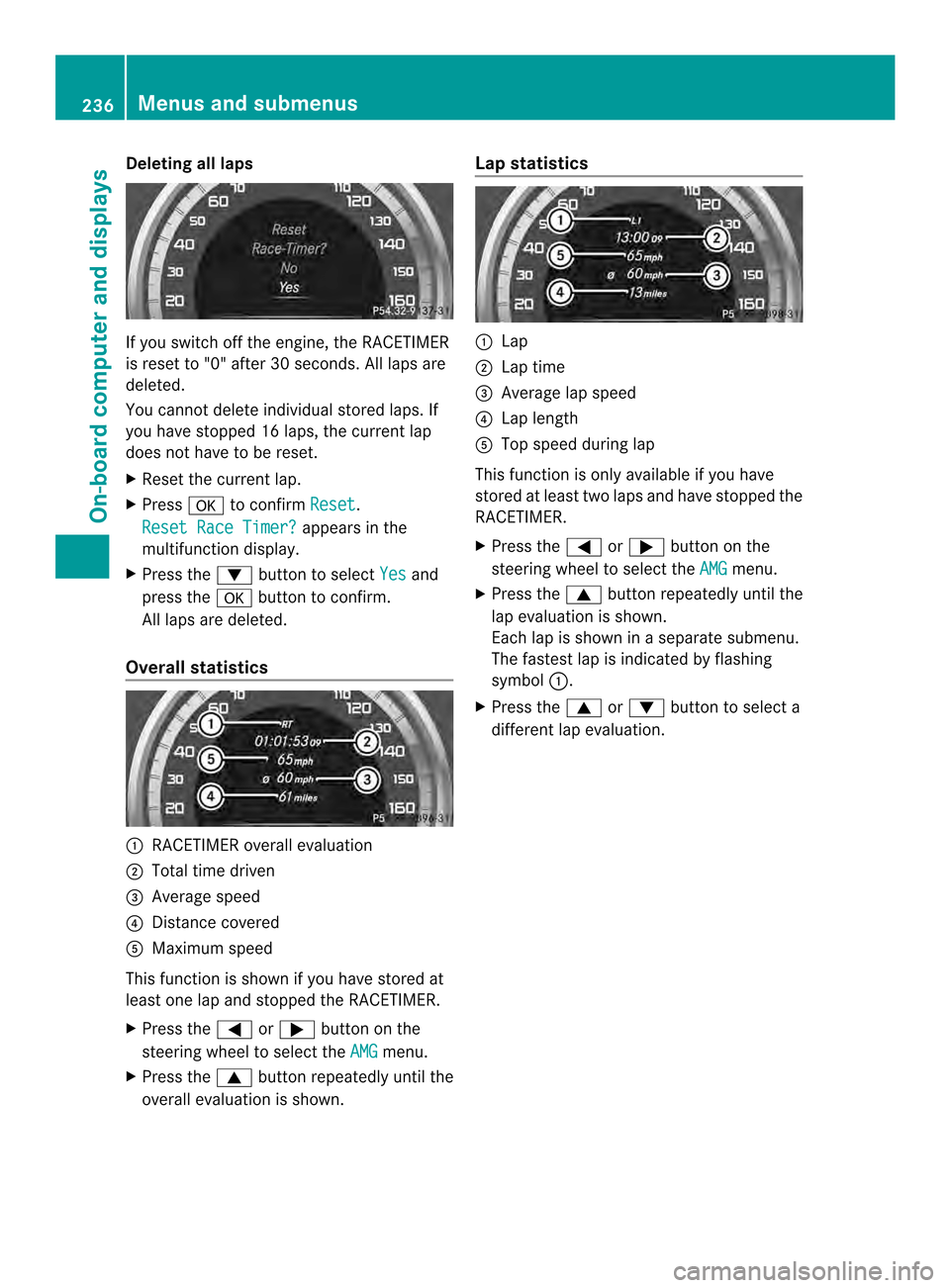
Deleting all laps
If you switch of
fthe engine, the RACETIMER
is reset to "0" after 30 seconds. All laps are
deleted.
You cannot delete individuals tored laps. If
you have stopped 16 laps, the current lap
does not have to be reset.
X Reset the current lap.
X Press 000Cto confirm Reset .
Reset Race Timer? appears in the
multifunction display.
X Press the 0005button to select Yes and
press the 000Cbutton to confirm.
All laps are deleted.
Overall statistics 001A
RACETIMER overall evaluation
0010 Total time driven
0024 Average speed
0021 Distancec overed
001E Maximum speed
This function is shown if you have stored at
least one lap and stopped the RACETIMER.
X Press the 000Aor0004 button on the
steering wheel to select the AMG menu.
X Press the 0006button repeatedly until the
overall evaluation is shown. Lap statistics 001A
Lap
0010 Lap time
0024 Average lap speed
0021 Lap length
001E Top speed during lap
This function is only available if you have
stored at least two laps and have stopped the
RACETIMER.
X Press the 000Aor0004 button on the
steering wheel to select the AMG menu.
X Press the 0006button repeatedly until the
lap evaluation is shown.
Each lap is shown in aseparate submenu.
The fastest lap is indicated by flashing
symbol 001A.
X Press the 0006or0005 button to select a
different lap evaluation. 236
Menus and submenusOn-board computer and displays