display MERCEDES-BENZ CLS COUPE 2012 Service Manual
[x] Cancel search | Manufacturer: MERCEDES-BENZ, Model Year: 2012, Model line: CLS COUPE, Model: MERCEDES-BENZ CLS COUPE 2012Pages: 373, PDF Size: 9.12 MB
Page 152 of 373
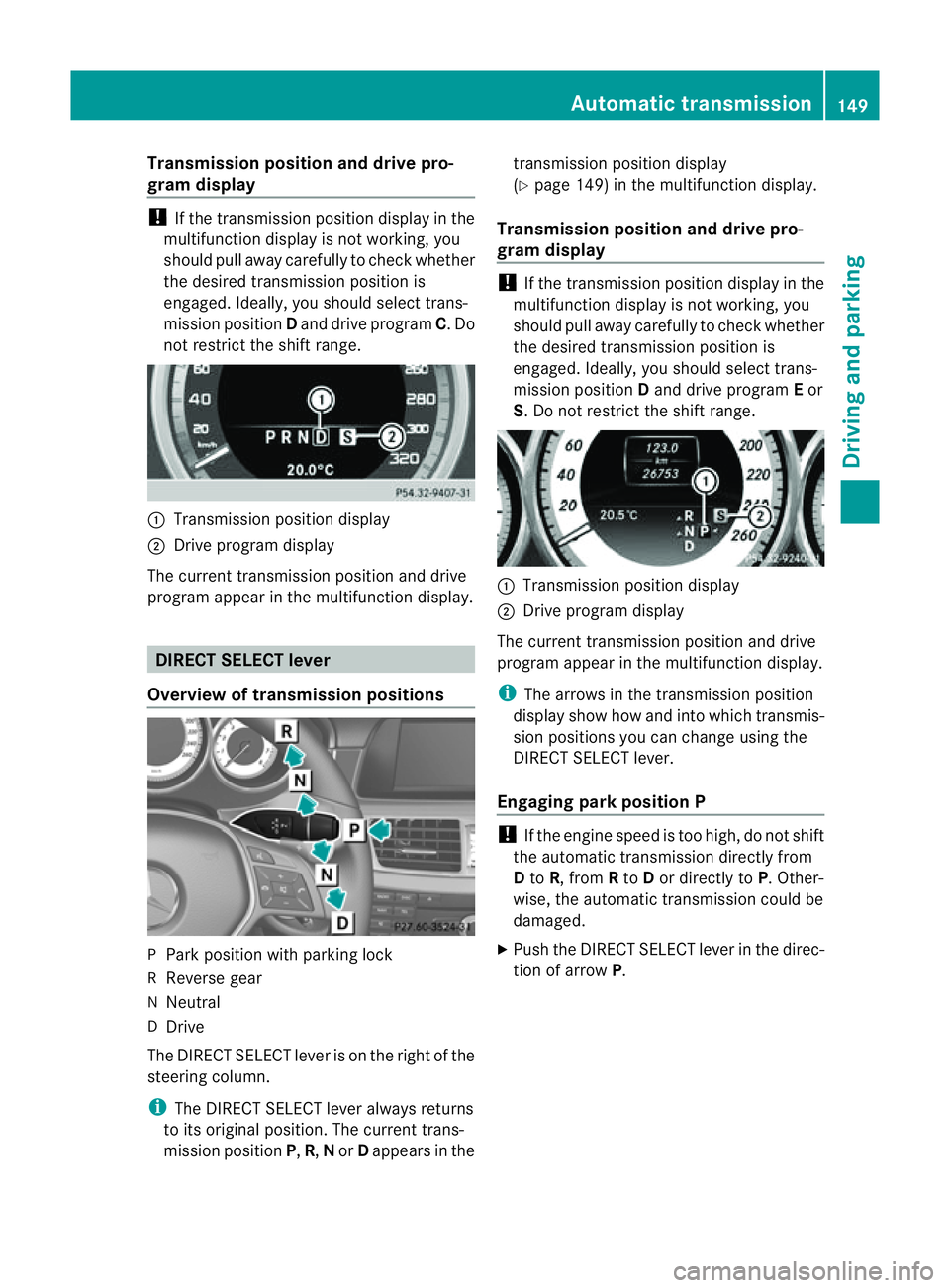
Transmission position and driv
epro-
gram display !
If the transmission positio ndisplay in the
multifunction display is not working, you
should pull away carefully to chec kwhether
the desired transmission position is
engaged. Ideally,y ou should select trans-
mission position Dand drive program C.Do
not restrict the shift range. :
Transmission position display
; Drive program display
The current transmission position and drive
program appearint he multifunction display. DIRECTS
ELECT lever
Overview of transmission positions P
Park position with parking lock
R Reverse gear
N Neutral
D Drive
The DIRECT SELECT leve risonthe right of the
steering column.
i The DIRECT SELECT lever always returns
to its original position. The current trans-
mission position P,R, Nor Dappears in the transmission position display
(Y
page 149) in the multifunction display.
Transmission position and drive pro-
gram display !
If the transmission position displayint he
multifunction displayisn ot working, you
should pull awayc arefully to check whether
the desired transmission position is
engaged. Ideally, you should select trans-
mission position Dand drive program Eor
S.Don ot restrict the shift range. :
Transmission position display
; Drive program display
The current transmission position and drive
program appearint he multifunction display.
i The arrows in the transmission position
displays how how and into which transmis-
sion positions you can change using the
DIRECT SELECT lever.
Engaging parkp osition P !
If th eengine speed is to ohigh, do no tshift
the automatic transmission directly from
D to R,f rom Rto Dor directly to P.Other-
wise, the automatic transmission could be
damaged.
X Push the DIRECT SELECT lever in the direc-
tion of arrow P. Automatic transmission
149Driving and parking Z
Page 155 of 373
E
Economy Comfortable, economical
driving S
Sport Sporty driving style
M
Manual Manua
lgears hifting i
For furthe rinformation on the automatic
drive program, se e(Ypage 152).
i Thea utomatic transmission switches to
automatic drive program Eeach tim ethe
engine is started.
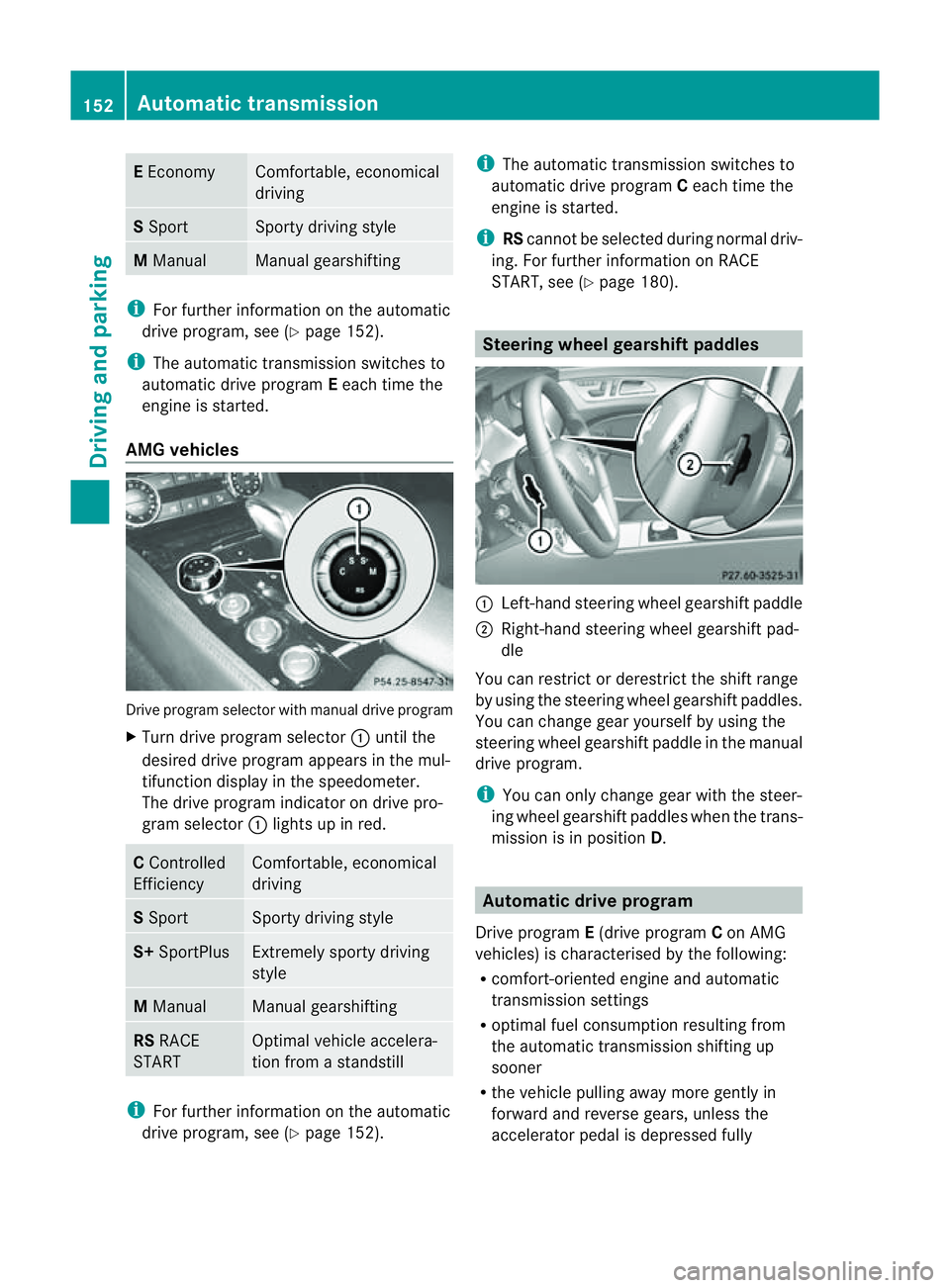
AM Gvehicles Drive program selecto
rwith manual drive program
X Turn drive program selector :until the
desired drive program appears in the mul-
tifunction display in the speedometer.
The drive program indicator on drive pro-
gram selector :light supinr ed. C
Controlled
Efficiency Comfortable, economical
driving
S
Sport Sporty drivin
gstyle S+
SportPlus Extremely sport
ydriving
style M
Manual Manual gearshifting
RS
RACE
START Optimal vehicle accelera-
tion from
astandstill i
For further information on the automatic
drive program, see (Y page 152). i
The automatic transmission switches to
automatic drive program Ceach tim ethe
engin eisstarted.
i RScannot be selected during normal driv-
ing. For further information on RACE
START, see (Y page 180). Steering wheel gearshift paddles
:
Left-han dsteerin gwheel gearshif tpaddle
; Right-hand steering wheel gearshif tpad-
dle
You can restrict or derestric tthe shif trange
by usin gthe steering wheel gearshif tpaddles.
You can chang egear yourself by usin gthe
steering wheel gearshif tpaddle in th emanual
driv eprogram.
i You can only chang egear wit hthe steer-
ing wheel gearshif tpaddles when th etrans-
mission is in position D. Automatic drive program
Drive program E(drive program Con AMG
vehicles) is characterised by th efollowing:
R comfort-oriente denginea nd automatic
transmission settings
R optimal fuel consumption resulting from
th ea utomatic transmission shiftin gup
sooner
R thev ehicle pullin gaway mor egently in
forward and revers egears, unless the
accelerator pedal is depressed fully 152
Automatic transmissionDriving and parking
Page 156 of 373
R
increased sensitivity. This improves driving
stability on slipper yroad surfaces, for
example
R the automatic transmission shifting up
sooner. This result sinthe vehicle being
drive natl ower engine speeds and the
wheels being less likely to spin
Drive program S(or, in the case of AMG vehi-
cles, drive programs Sand S+)isc haracter-
ised by the following:
R sporty engine and automatic transmission
settings
R the vehicle pulling away in first gear
R the automatic transmission shiftin gup
later
R as aresult of the later automatic transmis-
sion shift points, the fuel consumption pos-
sibly being higher. Shift ranges
Introduction i
OnAMG vehicles andvehicles with
steering wheel gearshift paddles,y ou
can restrict or derestric tthe shift range
using the steerin gwheel gearshift paddles.
When the automatic transmission is in posi-
tion D,itisp ossible to restrict or derestrict
the shift range (Y page 153).
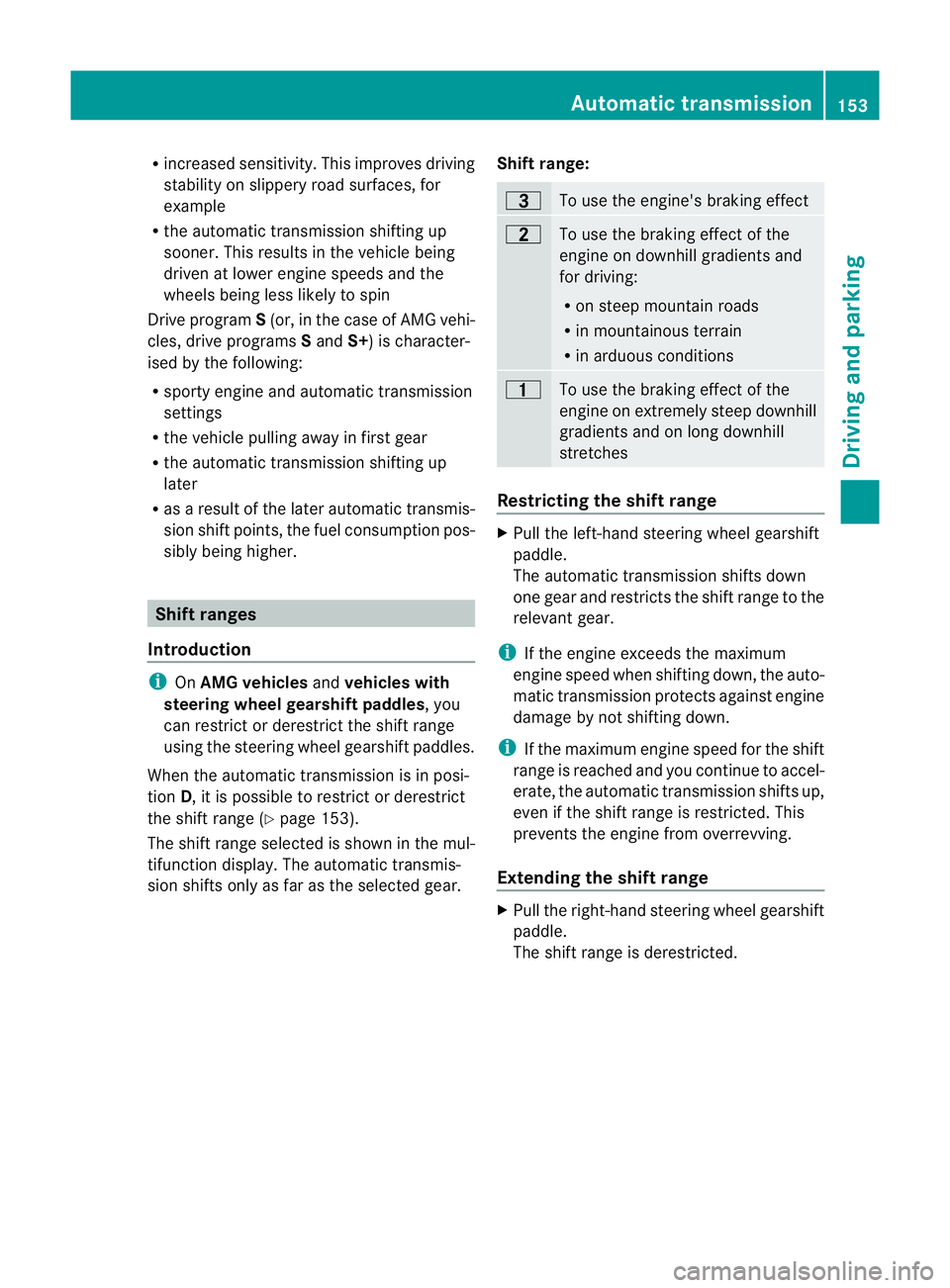
The shift range selected is shown in the mul-
tifunction display .The automatic transmis-
sion shifts only as far as the selected gear. Shift range: =
To use the engine's braking effect
5
To use the braking effect of the
engine on downhill gradients and
for driving:
R
on steep mountain roads
R in mountainous terrain
R in arduousc onditions 4
To use the braking effect of the
engine on extremely steep downhill
gradients and on long downhill
stretches
Restricting the shift range
X
Pull the left-hand steering wheel gearshift
paddle.
The automatic transmission shifts down
one gear and restrictst he shift range to the
relevant gear.
i If the engine exceeds the maximum
engine speed when shifting down, the auto-
matic transmission protectsa gainst engine
damage by not shifting down.
i If the maximum engine speed for the shift
range is reached and you continue to accel-
erate, the automatic transmission shifts up,
even if the shift range is restricted. This
prevents the engine from overrevving.
Extending the shift range X
Pull the right-hand steering wheel gearshift
paddle.
The shift range is derestricted. Automatic transmission
153Driving and parking Z
Page 157 of 373
Clearing th
eshiftrange restriction X
Pul lthe right-hand steering wheel gearshift
paddle until the numbe rfor the gear disap-
pears from the multifunction display.
or
X Shift the transmission to position D.
The automatic transmission shifts from the
current shift range directly to D.
Selecting the ideal shift range X
Pull the left-hand steerin gwheel gearshift
paddle and hold it in position.
The automatic transmission shifts to the
gear which allowso ptimum acceleration
and deceleration. To do this, the automatic
transmission shifts down one or more
gears. Manual drive program
Activating the manuald rive programX
Press the program selector button
(Y page 151) repeatedly until Mappears in
the multifunction display.
X AMG vehicles: turn the drive program
selector (Y page 152) until Mappears in the
multifunction display.
The indicator Mon the drive program selec-
tor lights up in red.
AMG vehiclesa nd vehicleswithaDIRECT
SELECT lever: you can select manual drive
program Musin gthe program selector or the
driv eprogram selector button. In manual
driv eprogram M,you can chang egear using
th es teering wheel gearshif tpaddles if the
transmission is in position D.
Upshifting !
In manual gearshif tprogram M,the auto-
matic transmission does not shift up auto-
matically even when the engine limiting
spee dfor the current gearisr eached.
When the engine limiting speed is reached, the fuel supplyisc
ut to prevent the engine
from overrevving. You must make sure that
the engine speed does not reach the red
area of the rev counter. Otherwise, there is
ar isk of engine damage.
X Pull the right-hand steering wheel gearshift
paddle.
The automatic transmission shifts up to the
next gear.
AMG vehicles
X If the colour in the multifunction displayin
the speedometer changes to red and the
UP displaym
essage is shown, shift up a
gear.
Downshifting X
Pull the left-hand steering wheel gearshift
paddle.
The automatic transmission shifts down to
the next gear.
i If you slow down or stop without shifting
down, the automatic transmission auto-
matically shifts down.
i For maximum acceleration, pull the left-
hand steering wheel gearshift paddleu ntil
the transmission selects the optimum gear
for the current speed.
Kickdown You can also use kickdown for maximum
acceleration in manual drive program
M.
X Depress the accelerator pedal beyond the
pressure point.
The transmission shifts to alower gear
depending on the engine speed.
X Shift back up once the desired speed is
reached.
i AMG vehicles: it is not possible to use
kickdown in manual drive program M.154
Automatic transmissionDriving and parking
Page 158 of 373
Switching off the manuald
rivep rogram X
Allv ehicle s(exce pt AM Gvehicles) with
aD IRECT SELECT lever: press thepro-
gram selector butto n(Ypage 151 )repeat-
edly until Eor Sappears in the multifunc-
tion display.
X AMG vehicles: turn the drive program
selector (Y page 152)until C,Sor S+
appears in the multifunction display. Automatic transmission
155Driving and parking Z
Page 160 of 373
Refuelling
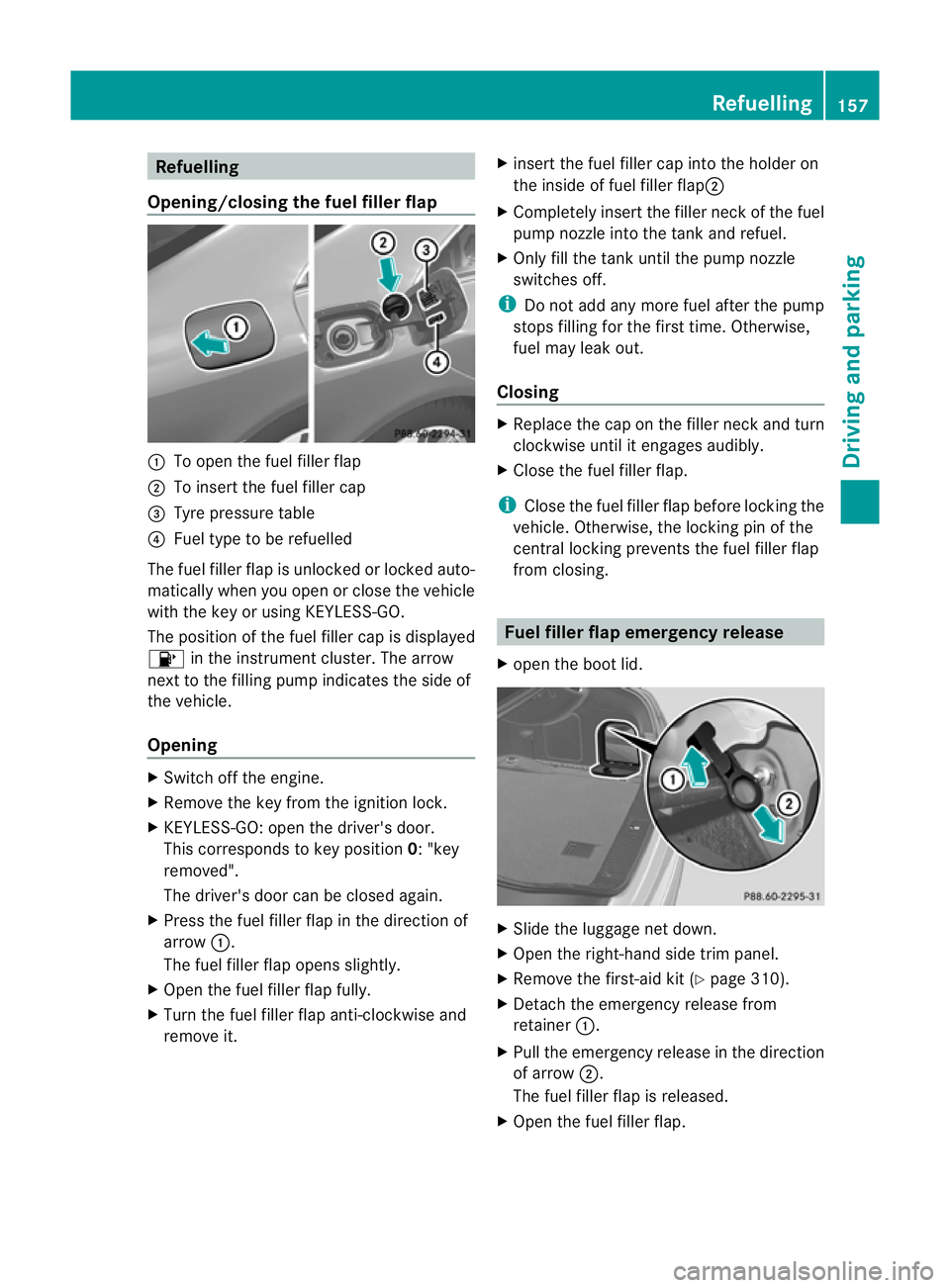
Opening/closing the fue lfille rflap :
To open the fuel filler flap
; To inser tthe fuel filler cap
= Tyre pressure table
? Fuel type to be refuelled
The fuel filler flap is unlocked or locked auto-
matically when you open or close the vehicle
with the key or using KEYLESS-GO.
The position of the fuel filler cap is displayed
8 in the instrumentc luster. The arrow
next to the filling pump indicates the side of
the vehicle.
Opening X
Switch off the engine.
X Remove the key from the ignition lock.
X KEYLESS-GO: open the driver's door.
This corresponds to key position 0:"key
removed".
The driver's door can be closed again.
X Press the fuel filler flap in the direction of
arrow :.
The fuel filler flap opens slightly.
X Open the fuel filler flap fully.
X Turn the fuel filler flap anti-clockwise and
remove it. X
insert the fuel filler cap into the holder on
the inside of fuel filler flap ;
X Completely insert the filler neck of the fuel
pump nozzle into the tank and refuel.
X Only fill the tank until the pump nozzle
switches off.
i Do not add any more fuel after the pump
stops filling for the first time. Otherwise,
fuel may leak out.
Closing X
Replace the cap on the filler neck and turn
clockwise until it engages audibly.
X Close the fuel filler flap.
i Close the fuel filler flap before locking the
vehicle. Otherwise, the locking pin of the
central locking prevents the fuel filler flap
from closing. Fuel filler flap emergency release
X open the boot lid. X
Slide the luggage net down.
X Open the right-hand side trim panel.
X Remove the first-aid kit (Y page 310).
X Detach the emergency release from
retainer :.
X Pull the emergency release in the direction
of arrow ;.
The fuel filler flap is released.
X Open the fuel filler flap. Refuelling
157Driving and parking Z
Page 164 of 373
When you apply the parking brake to brake
the vehicle, the brake lamps do not light up.
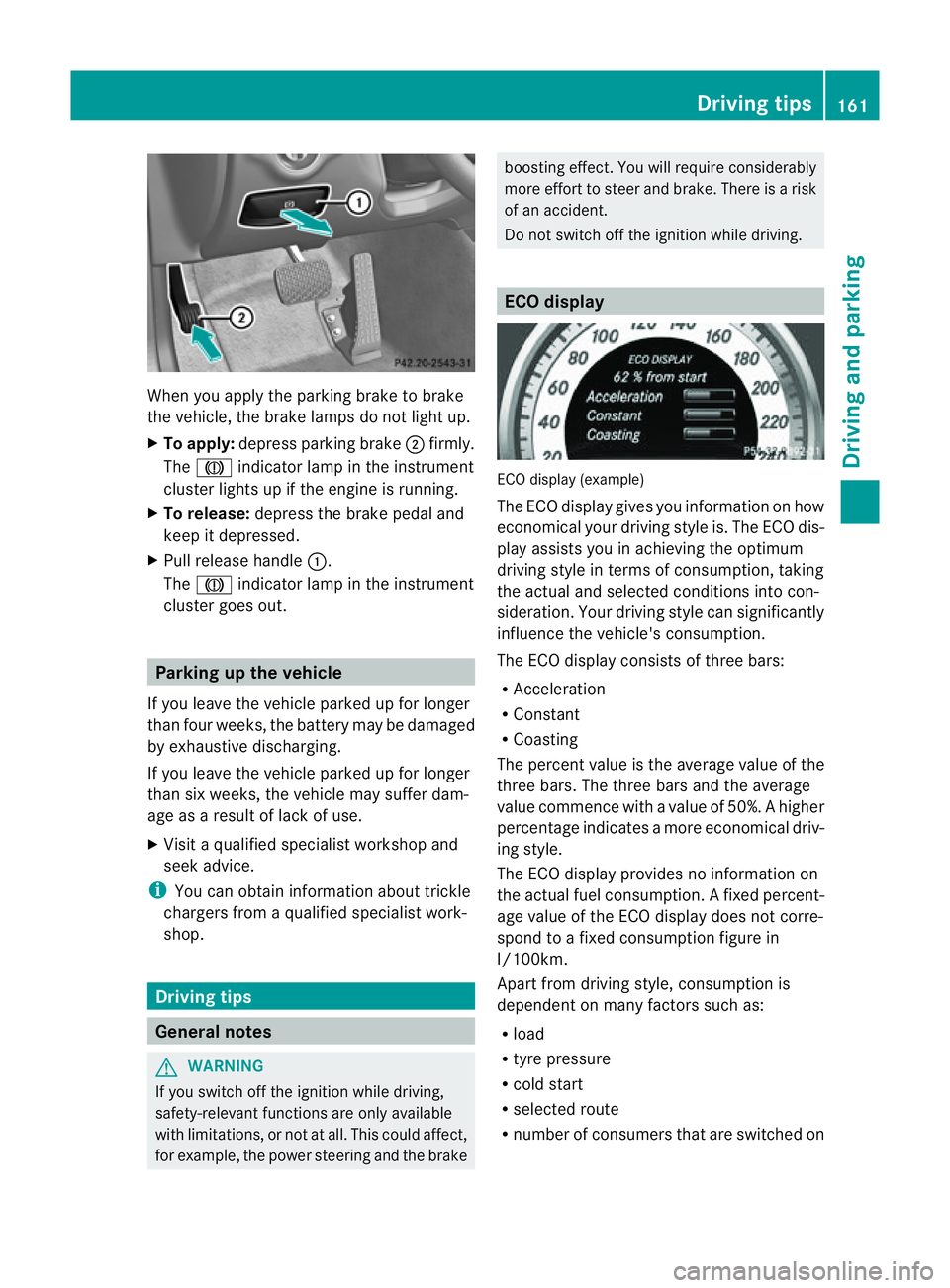
X To apply: depress parking brake ;firmly.
The J indicato rlamp in the instrument
cluster lights up if the engine is running.
X To release: depress the brake pedal and
keep it depressed.
X Pull release handle :.
The J indicato rlamp in the instrument
cluster goes out. Parking up the vehicle
If you leave the vehicle parked up for longer
than four weeks, the batter ymay be damaged
by exhaustive discharging.
If you leave the vehicle parked up for longer
than six weeks, the vehicle may suffer dam-
age as aresult of lack of use.
X Visit aqualified specialist workshop and
seek advice.
i You can obtain information about trickle
chargers from aqualified specialist work-
shop. Driving tips
General notes
G
WARNING
If you switch off the ignition while driving,
safety-relevant functions are only available
with limitations, or not at all. This could affect,
for example, the power steerin gand the brake boostin
geffect. You will require considerably
more effort to steer and brake. There is arisk
of an accident.
Do not switch off the ignition while driving. ECO display
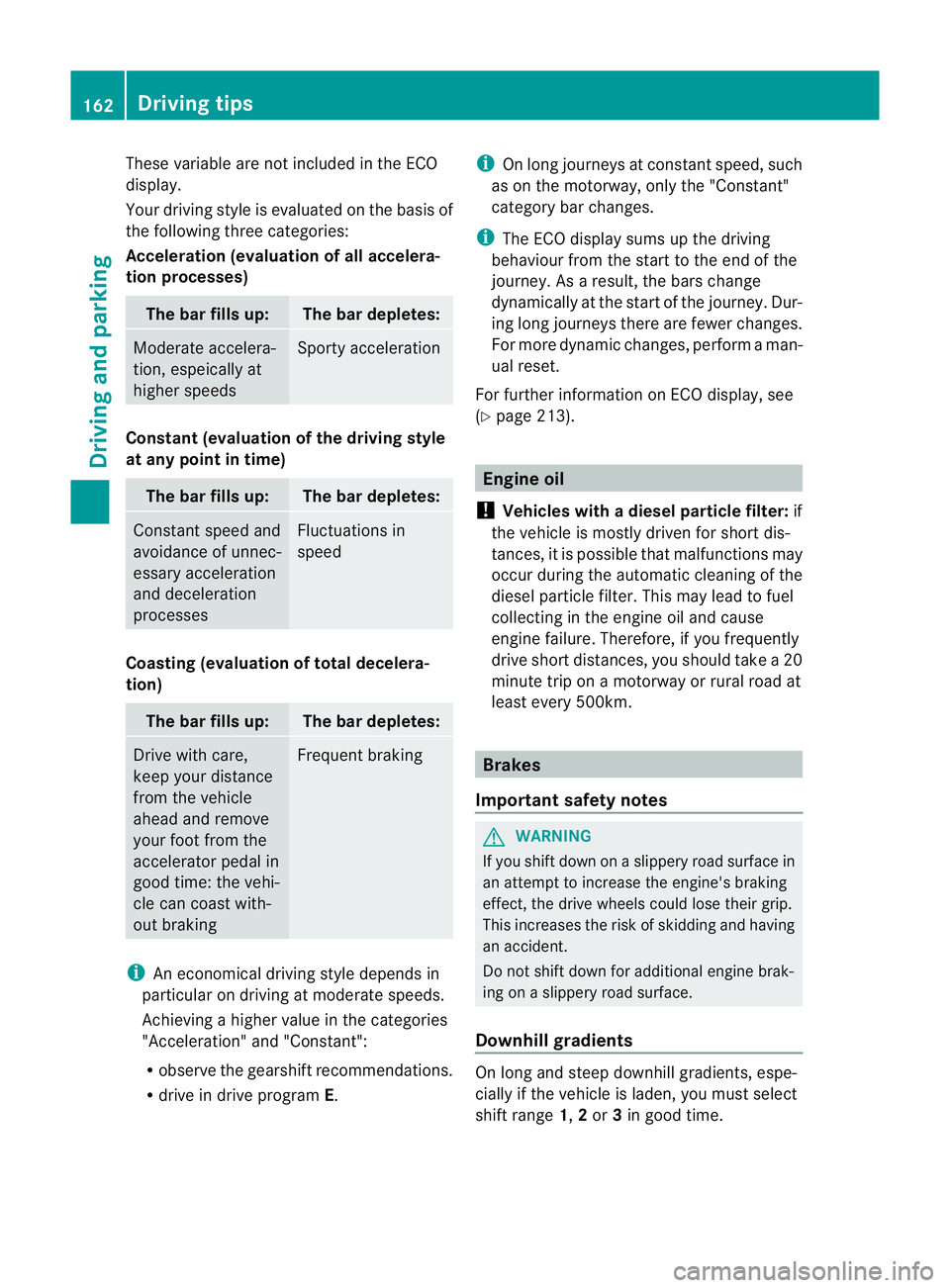
ECO display (example)
The ECO display gives you information on how
economical your driving style is. The ECO dis-
play assists you in achieving the optimum
driving style in term
sofconsumption ,taking
the actual and selected conditions into con-
sideration. Your driving style can significantly
influenc ethe vehicle's consumption.
The ECO display consists of three bars:
R Acceleration
R Constant
R Coasting
The percen tvalue is th eaverage value of the
three bars .The three bars and the average
value commence with avalue of 50%. Ahigher
percentage indicates amoree conomical driv-
ing style.
The ECO display provides no information on
the actual fue lconsumption. Afixed percent-
age value of the ECO display does not corre-
spon dtoaf ixed consumption figure in
l/100km.
Apar tfromd rivin gstyle, consumption is
dependent on many factors such as:
R load
R tyre pressure
R cold start
R selected route
R number of consumer sthat are switched on Driving tips
161Driving and parking Z
Page 165 of 373
These variable are not included in the ECO
display.
Your driving style is evaluated on the basis of
the following three categories:
Acceleration (evaluation of all accelera-
tion processes)
The bar fills up: The bar depletes:
Moderate accelera-
tion, espeically at
higher speeds Sport
yacceleration Constant (evaluation of the driving style
at any point in time) The bar fills up: The bar depletes:
Constan
tspeed and
avoidance of unnec-
essary acceleration
and deceleration
processes Fluctuations in
speed
Coasting (evaluation of tota
ldecelera-
tion) The bar fills up: The bar depletes:
Driv
ewith care,
keep your distance
from the vehicle
ahead and remove
your foot from the
accelerator pedal in
good time: the vehi-
cle can coast with-
out braking Frequen
tbraking i
An economical drivin gstyle depends in
particular on drivin gatmoderat espeeds.
Achieving ahigher value in the categories
"Acceleration "and "Constant":
R observe the gearshift recommendations.
R drive in drive program E.i
On long journeys at constan tspeed, such
as on the motorway, only the "Constant"
category bar changes.
i The ECO display sums up the driving
behaviour from the start to the end of the
journey. As aresult, the bars change
dynamically at the start of the journey. Dur-
ing long journeys ther eare fewer changes.
For more dynamic changes, perfor maman-
ualr eset.
For further informatio nonECO display, see
(Y page 213). Engine oil
! Vehicles with adiesel particle filter: if
the vehicle is mostly driven for short dis-
tances, it is possible that malfunctions may
occur during the automatic cleaning of the
diesel particle filter. This may lead to fuel
collectin ginthe engin eoil and cause
engin efailure. Therefore, if you frequently
drive short distances, you should tak ea20
minut etriponam otorway or rural road at
least every 500km. Brakes
Important safet ynotes G
WARNING
If you shift down on aslippery road surfac ein
an attempt to increase the engine's braking
effect ,the drive wheels could lose their grip.
This increases the risk of skidding and having
an accident.
Do not shift down for additional engin ebrak-
ing on aslippery road surface.
Downhill gradients On long and steep downhill gradients, espe-
cially if the vehicle is laden, you must select
shift range
1,2or 3in good time. 162
Driving tipsDriving and parking
Page 167 of 373
The wear of individual componentsoft
he
brake system, such as the brake pads/linings
or brake discs, depends on the individual driv-
ing style and operating conditions.
For this reason, it is impossible to state a
mileage lifetime that will be valid under all
circumstances. An aggressive driving style
will lead to high wear. You can obtain further
information about this from your Mercedes-
Benz Servic eCentre.
New and replaced brake pads and discs only
reach their optimum braking effect after sev-
eral hundred kilometres of driving. Compen-
sate for this by applying greater force to the
brake pedal. Do not forget this, and adapt
your driving and braking accordingly during
this run-in period.
Excessively heavy braking results in corre-
spondingly high brake wear. Observe the
brake system warning lamp in the instrument
cluster and notea ny brake status messages
in the multifunction display .For high-per-
formanc edriving in particular, it is important
to maintain and have the brake system
checked regularly. Driving on wet roads
Aquaplaning If water has accumulated to
acertain depth
on the road surface, there is adanger of aqua-
planing occurring, even if:
R you are driving at low speeds.
R the tyres have adequate tread depth.
For this reason, do not drive in tyre ruts and
brake carefully.
Driving on flooded roads !
Bear in mind that vehicles travelling in
front or in the opposite direction create
waves. This may cause the maximum per-
missible water depth to be exceeded.
These notes must be observed under all
circumstances. You could otherwise dam- age the engine, the electronics or the trans-
mission.
If you have to drive on stretches of road on
which water has collected, please bear in
mind that:
R the maximum permissible still water depth
is 25 cm.
R you should drive no faster than at walking
pace. Winter driving
Important safety notes G
WARNING
If you shift down on aslippery road surface in
an attempt to increase the engine's braking
effect ,the drive wheels could lose their grip.
This increases the risk of skidding and having
an accident.
Do not shift down for additional engine brak-
ing on aslippery road surface. G
DANGER
If the exhaust pipe is blocked or adequate
ventilation is not possible, poisonous gases
such as carbon monoxide (CO) may enter the
vehicle. This is the case, e.g. if the vehicle
becomes trapped in snow. There is arisk of
fatal injury.
If you leave the engine or the auxiliary heating
running, make sure the exhaust pipe and area
around the vehicle are clear of snow. To
ensure an adequate supply of fresh air, open
aw indow on the side of the vehicle that is not
facing into the wind.
Have your vehicle winterproofed at aqualified
specialist workshop at the onset of winter.
Observe the notes in the "Winter operation"
section (Y page 330).
Driving with summer tyres Observe the notes in the "Winter operation"
section (Y
page 330). 164
Driving tipsDriving and parking
Page 169 of 373
A
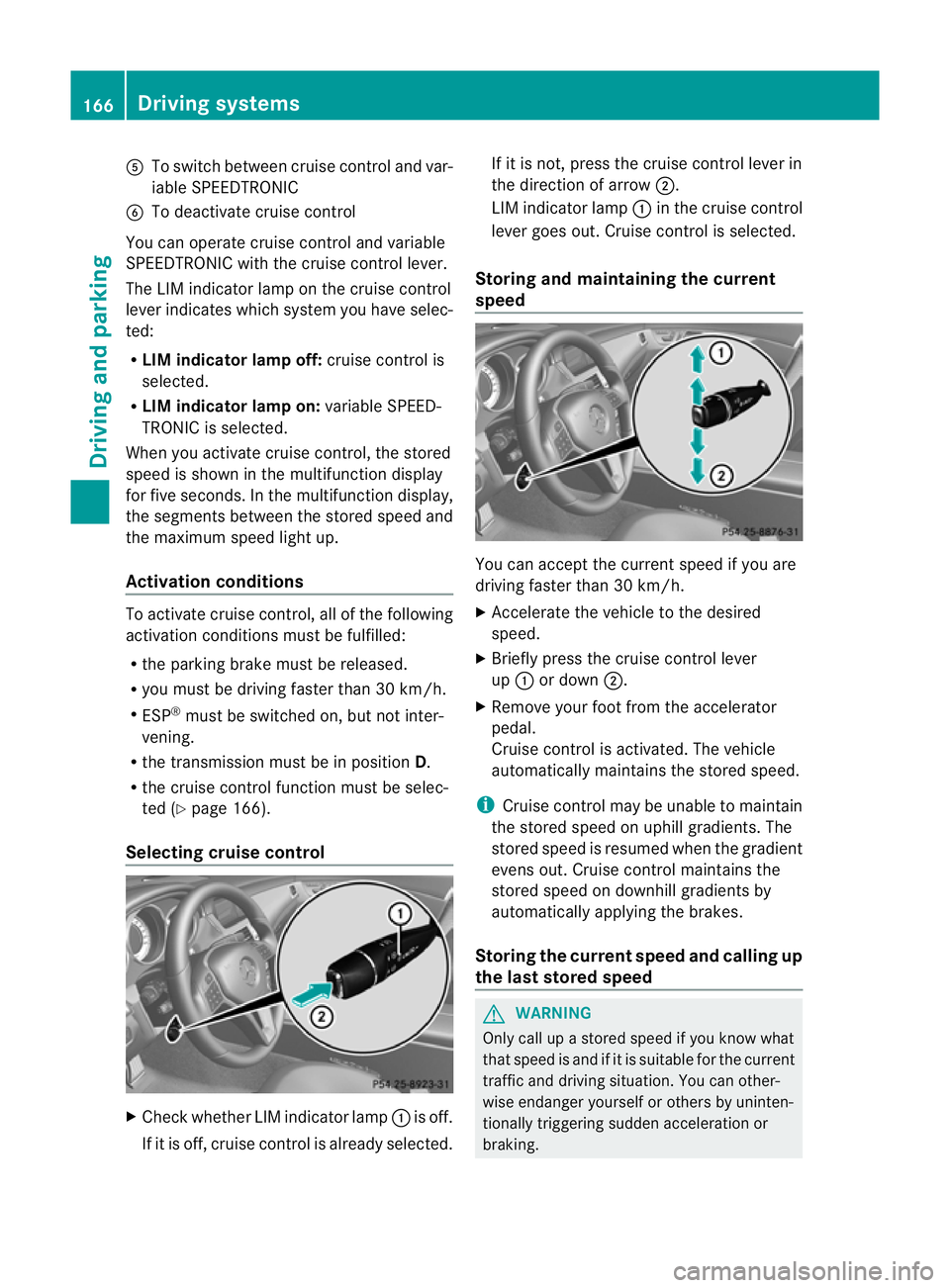
To switch between cruise control and var-
iable SPEEDTRONIC
B To deactivate cruise control
You can operate cruise control and variable
SPEEDTRONIC with the cruise control lever.
The LIM indicator lamp on the cruise control
lever indicates which system you have selec-
ted:
R LIM indicator lamp off: cruise control is
selected.
R LIM indicator lamp on: variable SPEED-
TRONIC is selected.
When you activat ecruise control, the stored
speed is shown in the multifunction display
for five seconds. In the multifunction display,
the segment sbetween the stored speed and
the maximum speed light up.
Activation conditions To activat
ecruise control, all of the following
activation conditions must be fulfilled:
R the parking brake must be released.
R you must be driving faster than 30 km/h.
R ESP ®
must be switched on, but not inter-
vening.
R the transmission must be in position D.
R the cruise control function must be selec-
ted (Y page 166).
Selecting cruise control X
Check whether LIM indicator lamp :is off.
If it is off, cruise control is already selected. If it is not,p
ress the cruise control lever in
the direction of arrow ;.
LIM indicator lamp :in the cruise control
lever goes out. Cruise control is selected.
Storing and maintaining the current
speed You can accept the curren
tspeed if you are
driving faster than 30 km/h.
X Accelerat ethe vehicle to the desired
speed.
X Briefly press the cruise contro llever
up : or down ;.
X Remove your foot from the accelerator
pedal.
Cruise contro lisactivated. The vehicle
automatically maintains the stored speed.
i Cruise contro lmay be unable to maintain
the stored speed on uphill gradients. The
stored speed is resumed when the gradient
evens out. Cruise contro lmaintains the
store dspee dond ownhill gradients by
automaticall yapplyin gthe brakes.
Storing th ecurren tspee dand calling up
the last stored speed G
WARNING
Only call up astored speed if you know what
that speed is and if it is suitable for the current
traffic and driving situation .You can other-
wise endanger yourself or other sbyuninten-
tionally triggering sudden acceleration or
braking. 166
Driving systemsDriving and parking