display MERCEDES-BENZ CLS COUPE 2012 Owner's Manual
[x] Cancel search | Manufacturer: MERCEDES-BENZ, Model Year: 2012, Model line: CLS COUPE, Model: MERCEDES-BENZ CLS COUPE 2012Pages: 373, PDF Size: 9.12 MB
Page 34 of 373
i
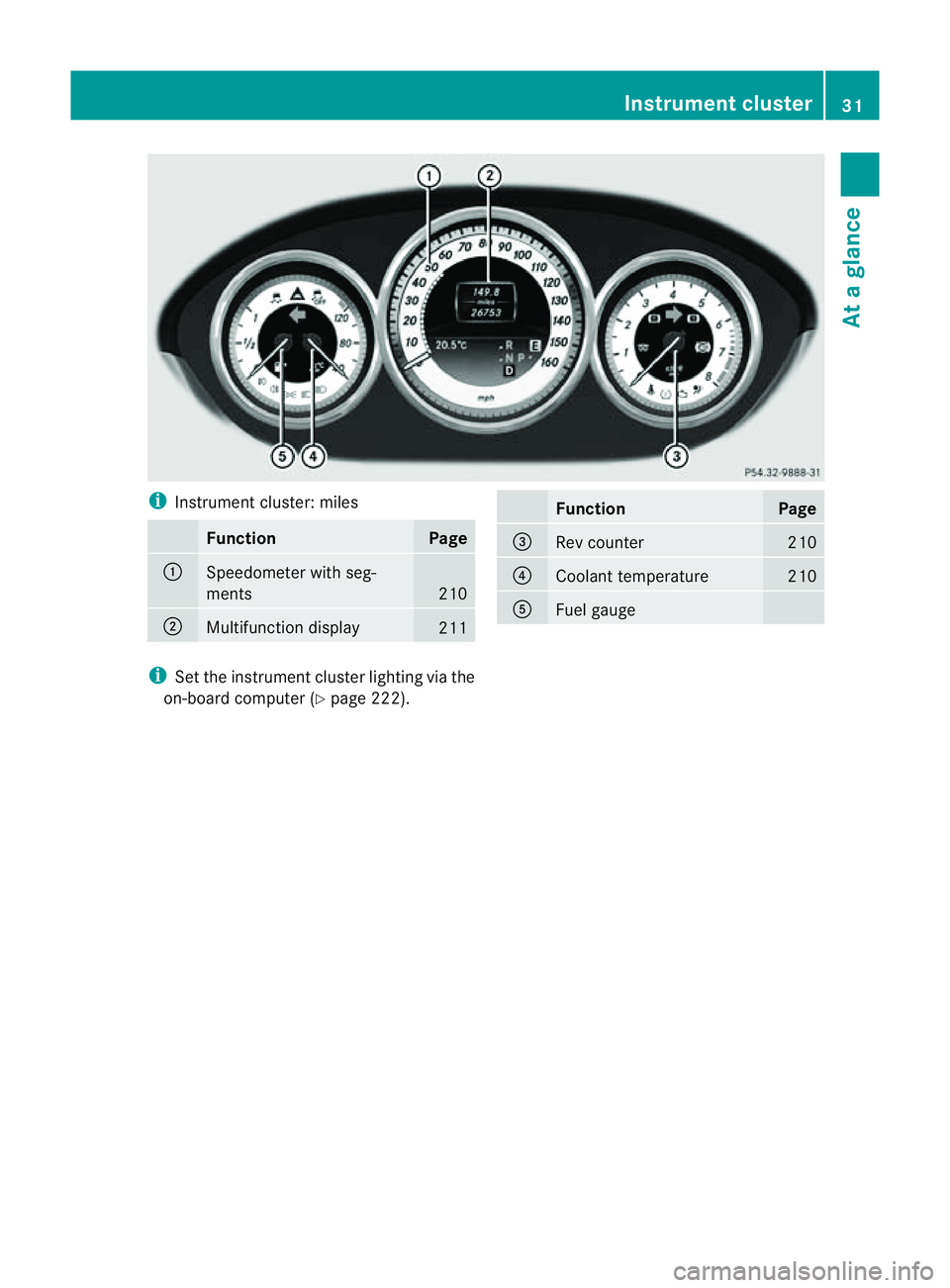
Instrument cluster: miles Function Page
:
Speedometer with seg-
ments
210
;
Multifunction display
211 Function Page
=
Rev counter 210
?
Coolant temperature 210
A
Fuel gauge
i
Set the instrument cluster lighting via the
on-board computer (Y page 222). Instrument cluster
31Atag lance
Page 36 of 373
Multifunction steering wheel
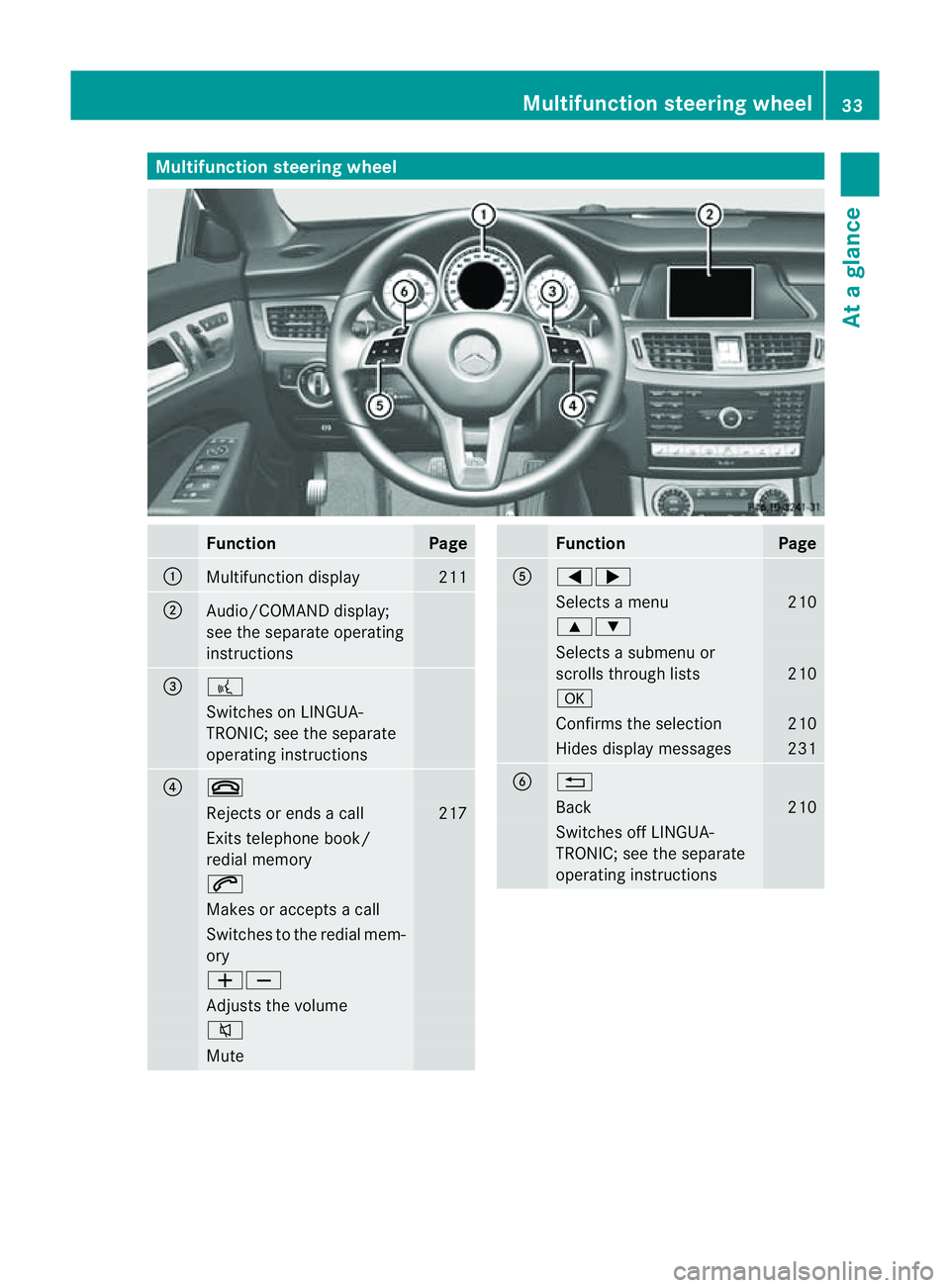
Function Page
:
Multifunction display 211
;
Audio/COMAND display;
see the separate operating
instructions
=
?
Switches on LINGUA-
TRONIC; see the separate
operating instructions
?
~
Rejects or ends
acall 217
Exits telephone book/
redial memory
6
Makes or accepts
acall Switches to the redial mem-
ory
WX
Adjusts the volume
8
Mute Function Page
A
=;
Selects
amenu 210
9:
Selects
asubmenu or
scroll sthrough lists 210
a
Confirm
sthe selection 210
Hides display messages 231
B
%
Back 210
Switches off LINGUA-
TRONIC; see the separate
operating instructionsMultifunction steering wheel
33Atag lance
Page 54 of 373
X
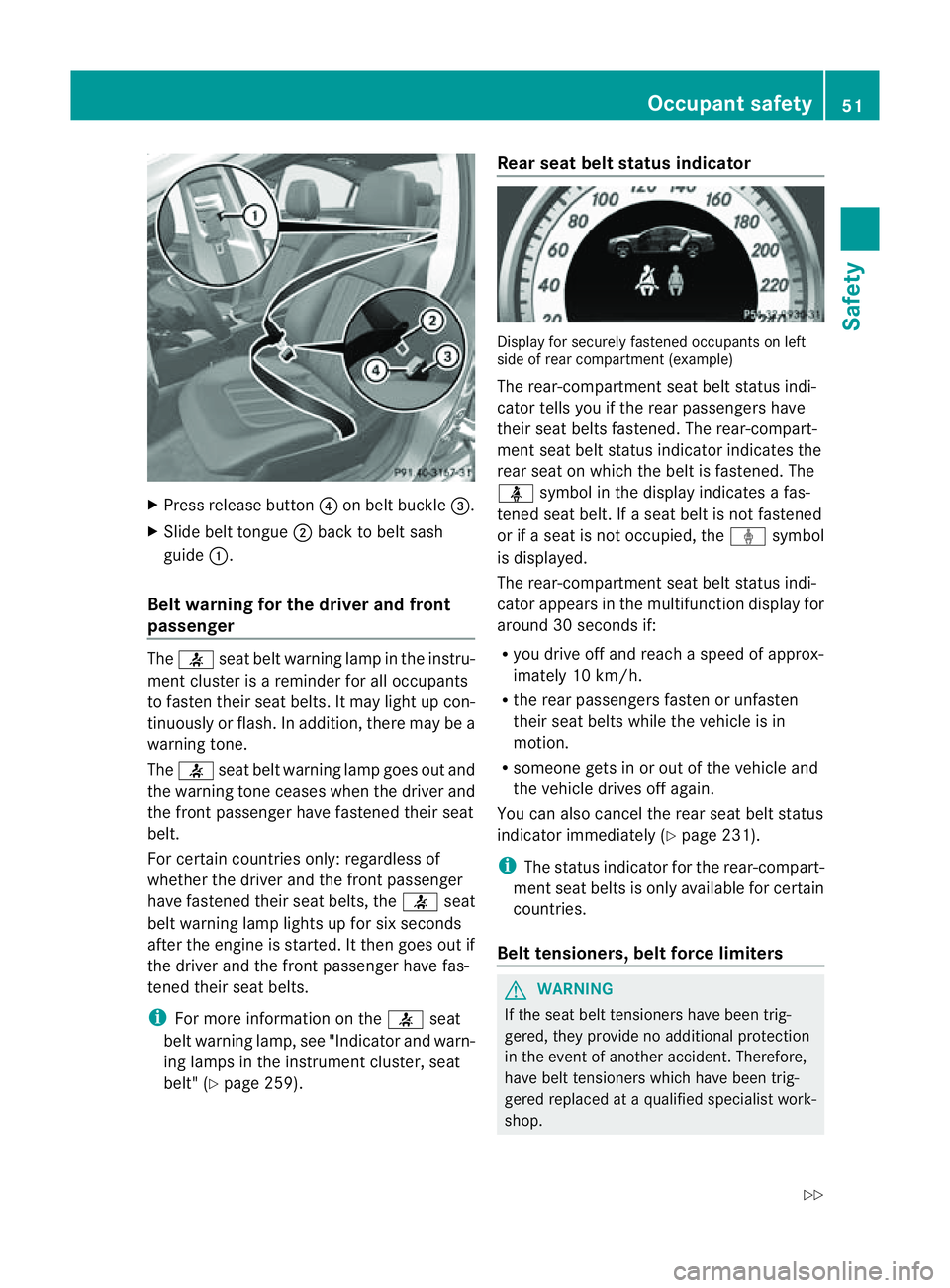
Press release button ?on belt buckle =.
X Slide belt tongue ;back to belt sash
guide :.
Belt warning for the driver and front
passenger The
7 seat belt warning lamp in the instru-
ment cluster is areminder for all occupants
to fasten their seat belts. It may light up con-
tinuously or flash. In addition, there may be a
warning tone.
The 7 seat belt warning lamp goes out and
the warning tonec eases when the driver and
the frontp assenger have fastened their seat
belt.
For certain countries only: regardless of
whether th edriver and th efront passenger
have fastened their seat belts, the 7seat
beltw arning lamp light supfor six seconds
after th eengineiss tarted. It then goes out if
th ed river and th efront pa ssenger have fas-
tene dtheir seat belts.
i For mor einformatio nonthe7 seat
belt warning lamp, see "Indicato rand warn-
ing lamps in the instrument cluster ,seat
belt" (Y page 259). Rea
rseatb elts tatus indicator Display for securel
yfastene doccupants on left
side of rea rcompartmen t(example)
The rear-compartment seat belt status indi-
cator tells you if the rear passengers have
their seat belts fastened. The rear-compart-
ment seat belt status indicato rindicate sthe
rea rseat on which the belt is fastened. The
ü symbol in the display indicates afas-
tened seat belt. If aseat belt is not fastened
or if aseat is not occupied, the ýsymbol
is displayed.
The rear-compartment seat belt status indi-
cator appears in the multifunction display for
around 30 seconds if:
R you drive off and reach aspeed of approx-
imately 10 km/h.
R the rear passengers fasten or unfasten
their seat belts while the vehicle is in
motion.
R someon egets in or out of the vehicle and
the vehicle drives off again.
You can also cancel the rear seat belt status
indicator immediately (Y page 231).
i The status indicator for the rear-compart-
ment seat belts is only available for certain
countries.
Belt tensioners, belt force limiters G
WARNING
If the seat belt tensioners have been trig-
gered, they provide no additional protection
in the event of another accident. Therefore,
have belt tensioners which have been trig-
gered replaced at aqualified specialist work-
shop. Occupant safety
51Safety
Z
Page 66 of 373
neither reduce the ris
kofaccident nor over-
rid ethe laws of physics .Driving safety sys-
tems are merel yaidsd esigned to assist driv-
ing. You are responsible for the distance to
the vehicl einfront, for vehicl espee dand for
braking in good time. Always adapt yourd riv-
ing style to suitt he prevailing road and
weather conditionsa nd maintainasafe dis-
tance from the vehicle in front.D rive care-
fully.
i The driving safety systems described only
work as effectively as possible when there
is adequate contact between the tyres and
the road surface. Please pay special atten-
tion to the notes on tyres, recommended
minimum tyre tread depths, etc.
(Y page 328).
In wintry driving conditions, always use
winter tyres (M+S tyres) and, if necessary,
snow chains. Only in this way will the driv-
ing safety systems described in this section
work as effectively as possible. ABS (Anti-lockB
raking System)
Important safety notes i
Observe the "Important safety notes" sec-
tio n(Ypage 62). G
WARNING
If ABS is faulty, the wheels could lock when
braking .The steerability and braking charac-
teristics may be severely impaired. Addition-
ally,f urther driving safety systems are deac-
tivated. There is an increased danger of skid-
ding and accidents.
Drive on carefully. Have ABS checked imme-
diately at aqualified specialist workshop.
When ABS is malfunctioning, other systems,
including driving safety systems, will also
become inoperative. Observe the information
on the ABS warning lamp (Y page 261) and
displaym essages which may be shown in the
instrumentc luster (Ypage 232). ABS regulates brake pressure in such
away
that the wheels do not lock when you brake.
This allowsy ou to continue steering the vehi-
cle when braking.
ABS works from aspeed of about 8km/h
upwards, regardless of road-surface condi-
tions. ABS works on slippery surfaces, even
when you only brake gently.
The yellow !ABS warning lamp in the
instrumentc lusterlight supw hen the ignition
is switched on. It goes out when the engine is
running.
Brakes X
If ABS intervenes: continue to depressthe
brak epedal with force until the braking sit-
uation is over.
X To make afull brake application:
depres sthe brak epedal with full force.
If AB Sintervene swhenb raking ,you will feel
ap ulsi ng in the brake pedal.
The pulsating brake peda lcan be an indica-
tio nofh azardous road condition sand func-
tions as areminder to tak eextra carew hile
driving. BAS (Brak
eAssist System)
i Observ ethe "Important safety notes" sec-
tio n(Ypage 62). G
WARNING
If BA Sism alfunctioning, the braking distance
in an emergency braking situation is
increased. There is arisk of accident.
In an emergency braking situation, depress
the brake pedal with full force. ABS prevents
the wheels from locking.
BAS operates in emergency braking situa-
tions. If you depress the brake pedal quickly,
BAS automaticallyb oosts the braking force,
thus shortening the stopping distance.
The brakes will function as usualo nce you
release the brake pedal.B AS is deactivated. Dr
ivin gsafety systems
63Safety Z
Page 68 of 373
R
the possibility of strong rada rreflections,
for example, in multi-storey car parks
R an arrow vehicle travellin ginfront, e.g. a
motorcycle
R av ehicle travellin ginfrontonad ifferent
line G
WARNING
BAS PLUS does not react:
R to people or animals
R to oncoming vehicles
R to crossing traffic
R when cornering
As aresult, BAS PLUS may not intervene in all
critical situations. There is arisk of an acci-
dent.
Always pay careful attention to the traffic sit-
uation and be ready to brake.
Following damage to the fron tend of the vehi-
cle ,havet he configuratio nand operatio nof
the rada rsensor schecked at aqualified spe-
cialist workshop. This also applies to colli-
sions at slow speeds where ther eisnovisible
damage to the fron tofthe vehicle. Adaptive brake lamps
If you brake sharply from aspeed of more
than 50 km/h or if braking is assisted by BAS
or BAS PLUS, the brake lamps flash rapidly.
In this way,t raffic travelling behind you is
warned in an even more noticeable manner.
If you brake sharply from aspeed of more
than 70 km/h to astandstill, the hazard warn-
ing lamps are activated automatically .Ifthe
brakes are applied again, the brake lamps
light up continuously.T he hazard warning
lamps switch off automatically if you travel
faster than 10 km/h .You can also switch off
the hazard warning lamps using the hazard
warning button (Y page 114). ESP
®
(Electronic Stability Program)
Important safety notes i
Observe the "Important safety notes" sec-
tion (Y page 62). G
WARNING
If ESP ®
is malfunctioning, ESP ®
is unable to
stabilise the vehicle. In addition, other driving
safety systems are switched off. This increa-
ses the risk of skidding and an accident.
Drive on carefully. Have ESP ®
checked at a
qualified specialist workshop.
! Vehicles with 4MATIC: switch off the igni-
tion when the parking brake is being tested
using adynamometer.
Application of the brakes by ESP ®
may oth-
erwise destroy the brake system.
Vehicles without 4MATIC: observe the notes
on ESP ®
if the vehicle is being towed with the
rear axle raised (Y page 322).
ESP ®
is deactivated if the åwarning lamp
in the instrument cluster lights up continu-
ously when the engine is running.
If the ÷ warning lamp and the åwarn-
ing lamp are lit continuously, ESP ®
is not
available due to amalfunction.
Observe the information on warning lamps
(Y page 263) and display messages which
may be shown in the instrument cluster
(Y page 232).
If ESP ®
detect sthat the vehicle is deviating
from the direction desired by the driver, one
or more wheels are braked to stabilise the
vehicle. The engine output is also modified to
keep the vehicle on the desired course within
physical limits. ESP ®
assists the driver when
pulling away on wet or slippery roads. ESP ®
can also stabilise the vehicle during braking.
If ESP ®
intervenes, the ÷ESP®
warning
lamp flashes in the instrument cluster. Driving safety systems
65Safety Z
Page 70 of 373
X
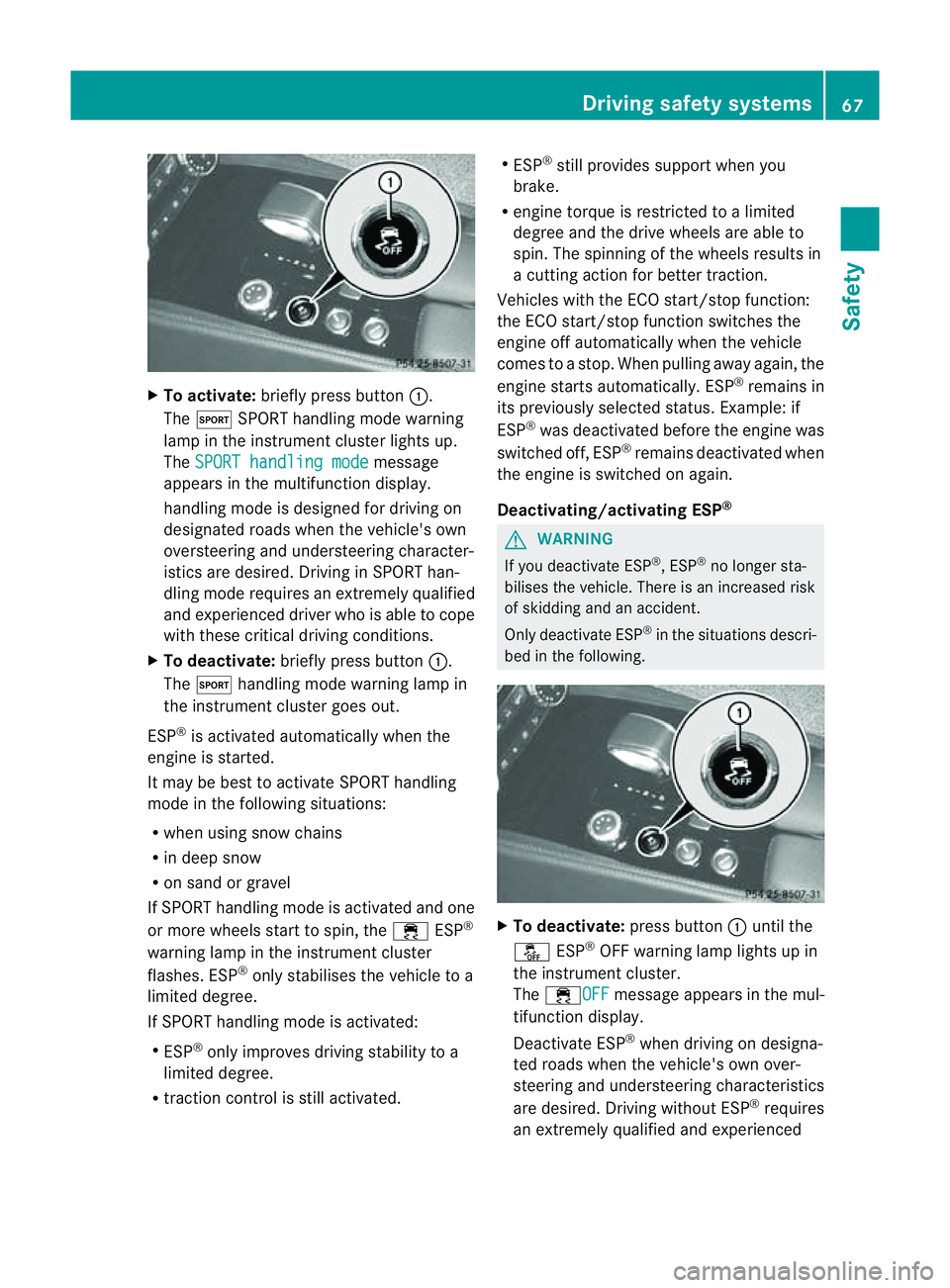
To activate: brieflypress button :.
The M SPORThandling mod ewarning
lamp in the instrument cluster lights up.
The SPORT handling mode message
appear sinthe multifunctio ndisplay.
handlin gmode is designed for drivin gon
designated roads when the vehicle's own
oversteerin gand understeerin gcharacter-
istics are desired. Driving in SPORT han-
dling mode requires an extremely qualified
and experienced driver who is able to cope
with these critical driving conditions.
X To deactivate: briefly press button :.
The M handling mode warning lamp in
the instrumentc luster goes out.
ESP ®
is activated automatically when the
engine is started.
It may be best to activat eSPORT handling
mode in the followin gsituations:
R when using sno wchains
R in deep snow
R on sand or gravel
If SPORT handlin gmode is activated and one
or mor ewheels start to spin ,the ÷ ESP®
warnin glamp in the instrumen tcluster
flashes .ESP ®
onl ystabilise sthe vehicl etoa
limite ddegree.
If SPOR Thandling mod eisactivated:
R ESP ®
onl yimprove sdriving stability to a
limite ddegree.
R traction control is stil lactivated. R
ESP ®
stil lprovides support when you
brake.
R engine torque is restricte dtoalimited
degree and the drive wheels are able to
spin. The spinnin gofthe wheels results in
ac utting action for better traction.
Vehicles with the ECO start/stop function:
the ECO start/stop function switches the
engine off automatically when the vehicle
comes to astop. When pulling away again, the
engine startsa utomatically. ESP ®
remains in
its previously selected status. Example: if
ESP ®
was deactivated before the engine was
switched off, ESP ®
remains deactivated when
the engine is switched on again.
Deactivating/activating ESP ® G
WARNING
If you deactivate ESP ®
,E SP ®
no longer sta-
bilises the vehicle. There is an increased risk
of skidding and an accident.
Only deactivate ESP ®
in the situations descri-
bed in the following. X
To deactivate: press button:until the
å ESP®
OFF warning lamp lights up in
the instrument cluster.
The ÷OFF message appears in the mul-
tifunction display.
Deactivate ESP ®
when driving on designa-
ted roads when the vehicle's own over-
steerin gand understeerin gcharacteristics
are desired. Drivin gwithout ESP ®
requires
an extremely qualified and experienced Driving safety systems
67Safety Z
Page 73 of 373
In particular, the detection of obstacle
scan
be impaired if there is:
R dirt on the sensors or anything else cover-
ing the sensors
R snow or heavy rain
R interference by other radars ources
R the possibility of strongr adar reflections,
for example, in multi-storey car parks
R an arrow vehicle travelling in front,e .g. a
motorcycle
R av ehicle travelling in front on adifferent
line G
WARNING
PRE-SAFE ®
Brake does not react:
R to people or animals
R to oncoming vehicles
R to crossin gtraffic
R when cornering
As aresult, PRE-SAFE ®
Brake may neither
give warnings nor intervene in all critical sit-
uations. There is arisk of an accident.
Always pay careful attention to the traffic sit-
uation and be ready to brake.
In order to maintain the appropriate distance
to the vehicle in front and thus prevent acol-
lision, you must apply the brakes yourself.
X To activate/deactivate: activate or deac-
tivate PRE-SAFE ®
Brake in the on-board
computer (Y page 219).
When PRE-SAFE ®
Brake is activated, the
Ä symbol appears in multifunction dis-
play, as long as the HOLD function is deac-
tivated (Y page 179). On vehicles with the
Active Parking Assist driving system, the
Ä symbol is displayed when position P
is engaged or you are driving faster than
35 km/h.
For PRE-SAFE ®
Brake to assist you when driv-
ing, the radar sensor system must be
switched on (Y page 225) and be opera-
tional. The radar sensor system is switched off auto-
matically in the vicinit
yofradio telescope
facilities in the following vehicles:
R vehicles with COMAND Online and naviga-
tion
R vehicles with Audio 20 and Becker ®
MAP
PILOT
Becker ®
MAP PILOT must be connected;
see the separate operating instructions.
The radar sensor system must be switched off
using the on-board computer in the vicinit yof
radio telescope facilities in the following vehi-
cles:
R vehicles without COMAND Online and nav-
igation
R vehicles without Audio 20 and Becker ®
MAP PILOT
R vehicles for Australia
For information on switching off the radar
sensor system using the on-board computer,
see (Y page 225).
Following damage to the front end of the vehi-
cle, have the configuration and operation of
the radar sensors checked at aqualified spe-
cialist workshop. This also applies to colli-
sions at slow speeds where there is no visible
damage to the front of the vehicle. Anti-theft systems
Immobiliser
X To activat ewith th ekey: remove th ekey
fro mt heignitio nlock.
X To activat ewith KEYLESS-GO: switch the
ignitio noff and open the driver's door.
X To deactivate: switch on the ignition.
The immobiliser prevents you rvehicle from
being started without the correct key.
When leaving the vehicle, alway stake the key
with you and lock the vehicle. Anyone can
start the engin eifavalid key has been left
inside the vehicle. 70
Anti-theft systemsSafety
Page 99 of 373
Useful information
i This Owner's Manual describes all mod-
els, series and optional equipment for your
vehicle that were available at the time of
going to press. National variation sare pos-
sible. Not ethat your vehicle may not be
equipped with all of the function sdescri-
bed. This is also the case for system sand
function srelevan ttosafety.
i Read the information on qualified special-
ist workshops: (Y page 23). Correct driver's seat position
X
Observ ethe safet yguidelines on seat
adjustment (Y page 97).
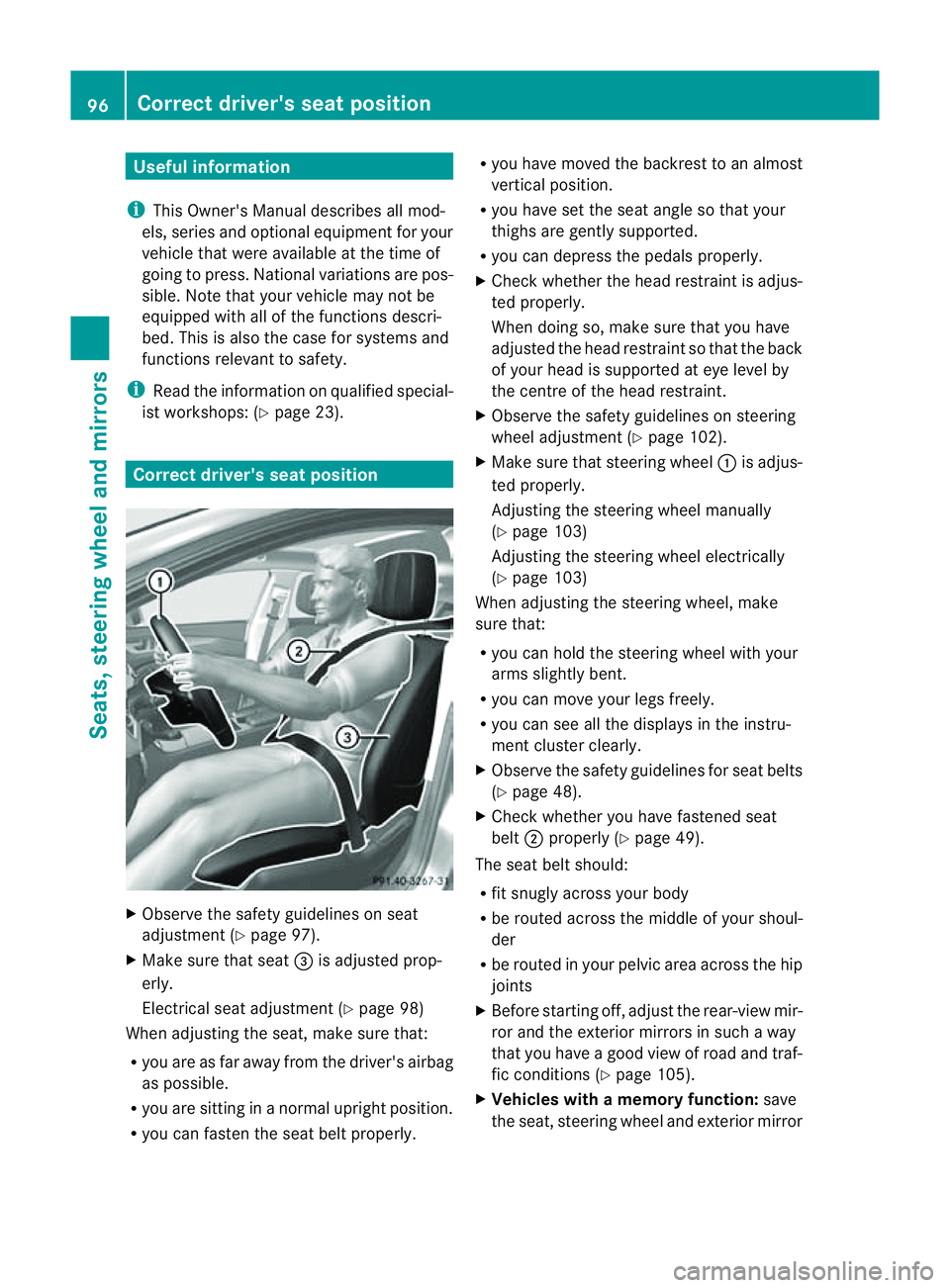
X Make sure that seat =is adjusted prop-
erly.
Electrical seat adjustment (Y page 98)
When adjusting the seat, make sure that:
R you are as far away from the driver' sairbag
as possible.
R you are sitting in anormal upright position.
R you can faste nthe seat belt properly. R
you have moved the backrest to an almost
vertical position.
R you have set the seat angle so that your
thighs are gently supported.
R you can depress the pedals properly.
X Check whether the head restraint is adjus-
ted properly.
When doing so, make sure that you have
adjusted the head restraint so that the back
of your head is supported at eye level by
the centre of the head restraint.
X Observe the safety guidelines on steering
wheel adjustment (Y page 102).
X Make sure that steering wheel :is adjus-
ted properly.
Adjustingt he steering wheel manually
(Y page 103)
Adjustingt he steering wheel electrically
(Y page 103)
When adjusting the steering wheel, make
sure that:
R you can hold the steering wheel with your
arms slightly bent.
R you can move your legs freely.
R you can see all the displays in the instru-
ment cluster clearly.
X Observe the safety guidelines for seat belts
(Y page 48).
X Check whether you have fastened seat
belt ;properly (Y page 49).
The seat belt should:
R fit snugly across your body
R be routed across the middle of your shoul-
der
R be routed in your pelvic area across the hip
joints
X Before startingo ff, adjust the rear-view mir-
ror and the exterior mirrors in such away
that you have agood view of road and traf-
fic conditions( Ypage 105).
X Vehicles with amemory function: save
the seat, steering wheel and exterior mirror 96
Correct driver's seat positionSeats, steering wheela
nd mirrors
Page 120 of 373
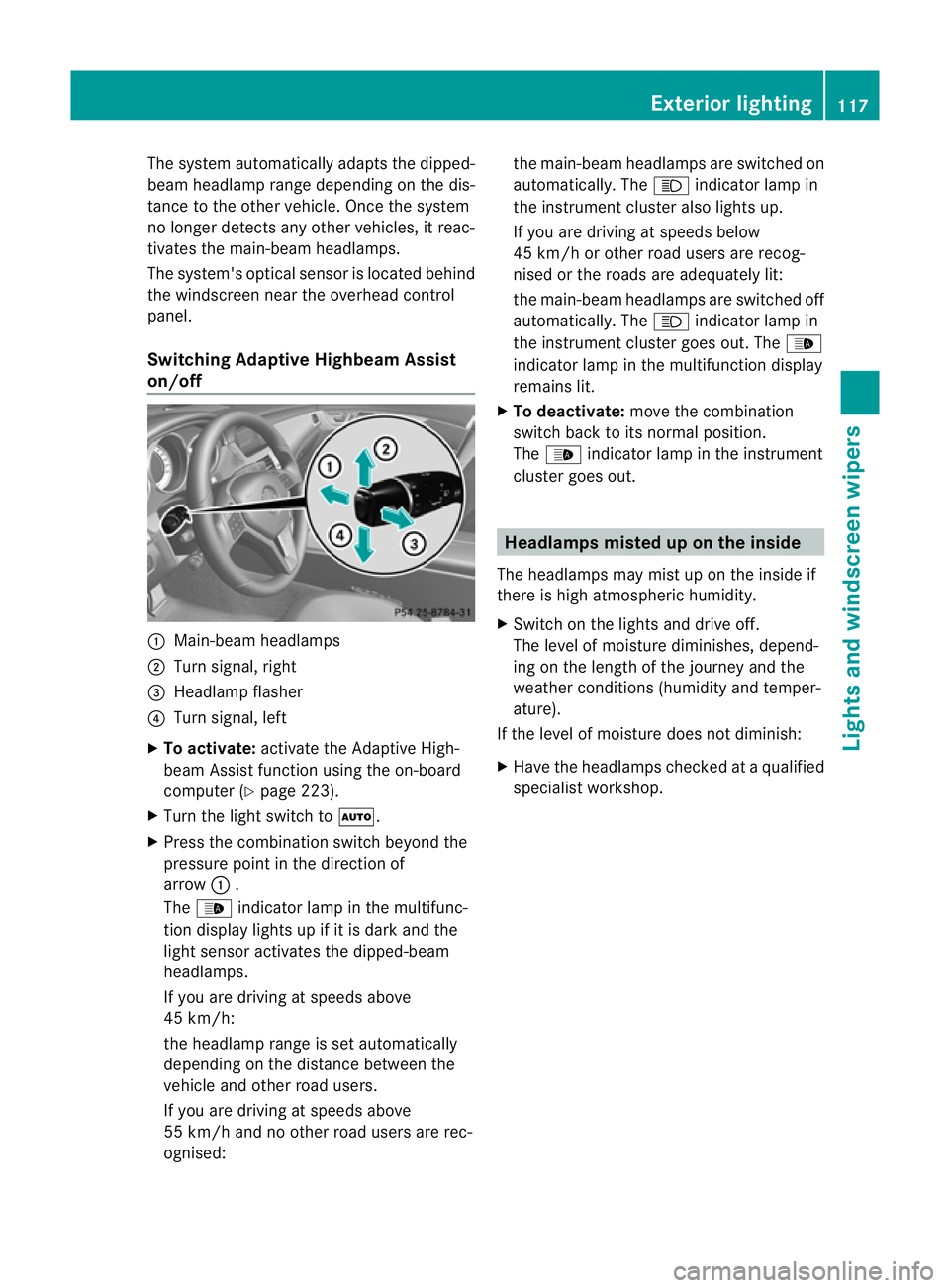
The system automatically adapts the dipped-
beam headlamp range depending on the dis-
tancetot he other vehicle. Oncet he system
no longer detect sany other vehicles, it reac-
tivates the main-beam headlamps.
The system's optical sensor is located behind
the windscreen near the overhead control
panel.
Switching Adaptive Highbeam Assist
on/off :
Main-beam headlamps
; Turn signal, right
= Headlamp flasher
? Turn signal, left
X To activate: activatethe Adaptive High-
beam Assist function using the on-board
computer (Y page 223).
X Turn the light switch to Ã.
X Press the combination switch beyond the
pressure point in the direction of
arrow :.
The _ indicator lamp in the multifunc-
tion display lights up if it is dark and the
light sensor activates the dipped-beam
headlamps.
If you are driving at speeds above
45 km/h:
the headlamp range is set automatically
depending on the distanc ebetween the
vehicle and other road users.
If you are driving at speeds above
55 km/ha nd no other road users are rec-
ognised: the main-beam headlamps are switched on
automatically. The
Kindicator lamp in
the instrument cluster also lights up.
If you are driving at speeds below
45 km/ho rother road users are recog-
nised or the roads are adequately lit:
the main-beam headlamps are switched off
automatically. The Kindicator lamp in
the instrument cluster goes out. The _
indicator lamp in the multifunction display
remains lit.
X To deactivate: move the combination
switch back to its normal position.
The _ indicator lamp in the instrument
cluster goes out. Headlamps misted up on the inside
The headlamps may mist up on the inside if
there is high atmospheric humidity.
X Switc hont he lights and drive off.
The level of moisture diminishes, depend-
ing on the length of the journey and the
weather conditions (humidity and temper-
ature).
If the level of moisture does not diminish:
X Have the headlamps checked at aqualified
specialist workshop. Exterior lighting
117Lights and windscreen wipers Z
Page 129 of 373
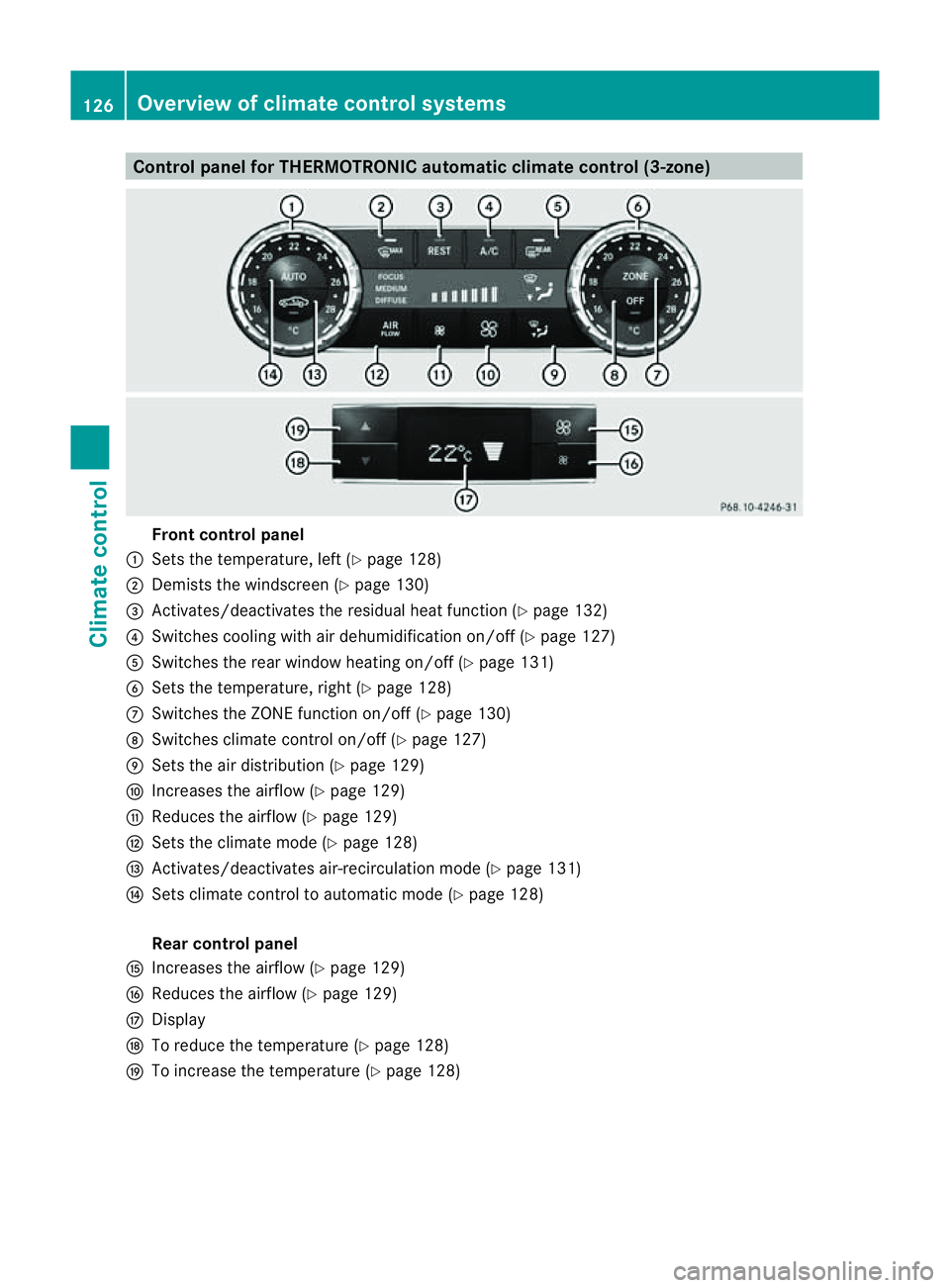
Control panel for THERMOTRONIC automatic climat
econtrol (3-zone) Fron
tcontrol panel
: Setsthe temperature, left (Y page 128)
; Demist sthe windscreen (Y page 130)
= Activates/deactivates th eresidual heat function (Y page 132)
? Switche scooling with air dehumidificatio non/off (Y page 127)
A Switche sthe rea rwindow heatin gon/off (Y page 131)
B Setsthe temperature, right (Y page 128)
C Switches the ZONE function on/off (Y page 130)
D Switches climate control on/off (Y page 127)
E Setsthe air distribution (Y page 129)
F Increases the airflow (Y page 129)
G Reduces the airflow ( Ypage 129)
H Setsthe climate mode (Y page 128)
I Activates/deactivates air-recirculation mode (Y page 131)
J Setsclimate control to automatic mode (Y page 128)
Rea rcontrol panel
K Increases the airflow (Y page 129)
L Reduces the airflow ( Ypage 129)
M Display
N To reduc ethe temperature (Y page 128)
O To increase the temperature (Y page 128)126
Overview of climate control systemsClimate control