display MERCEDES-BENZ CLS COUPE 2012 Workshop Manual
[x] Cancel search | Manufacturer: MERCEDES-BENZ, Model Year: 2012, Model line: CLS COUPE, Model: MERCEDES-BENZ CLS COUPE 2012Pages: 373, PDF Size: 9.12 MB
Page 171 of 373
control off message in the multifunction
displayf or approximately five seconds.
i The last speed stored is cleared when you
switch off the engine. SPEEDTRONIC
Important safety notes G
WARNING
Never depress the brake pedal continuously
while the vehicle is in motion, e.g. never cause
the brakes to rub by applying constant slight
pedal pressure. This causes the brake system
to overheat, increases the braking distance
and can lead to the brakes failing completely. G
WARNING
Do not change down for additional engine
braking on aslippery road surface. This could
cause the drive wheels to lose their grip and
the vehicle could skid. G
WARNING
SPEEDTRONIC is only an aid designed to
assist driving. You are responsible for the
vehicle's speed and for braking in good time.
SPEEDTRONIC brakes automaticallysot hat
you do not exceed the set speed. On long and
steep downhill gradients, especially if the
vehicle is laden, you must select shift range
1, 2or 3in good time. By doing so, you will
make use of the braking effect of the engine.
This relieves the load on the brake system and
prevents the brakes from overheating and
wearing too quickly. If you need additional
braking, depress the brake pedal repeatedly
rather than continuously.
You can set avariableorp ermanent limit
speed:
R variable for speed limits, e.g. in built-up
areas
R permanent for long-term speed restric-
tions, e.g. when driving with winter tyres
fitted (Y page 170) i
The speed indicated in the speedometer
may differ slightly from the limit speed
stored.
Variable SPEEDTRONIC General notes
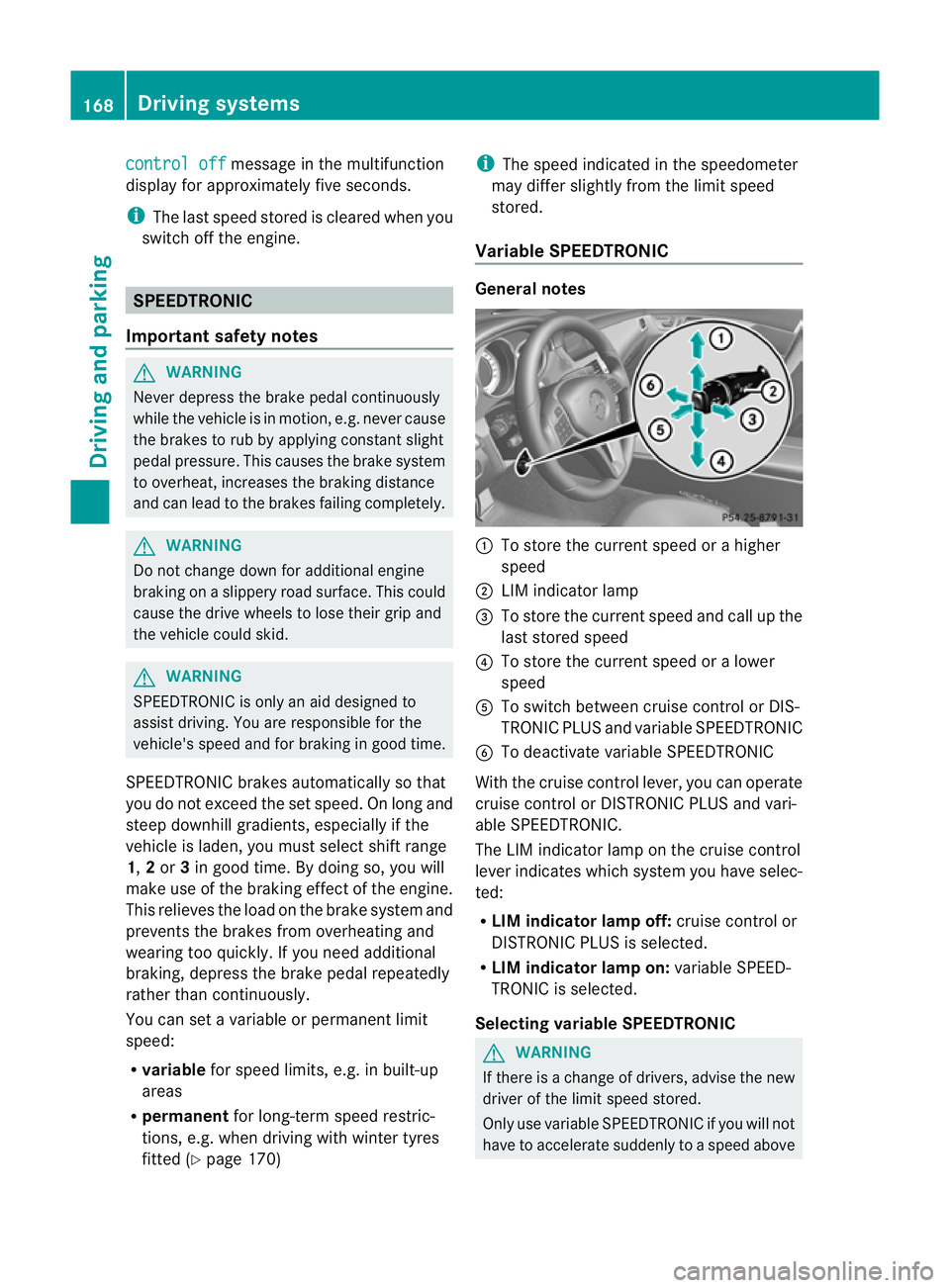
:
To store the current speed or ahigher
speed
; LIM indicator lamp
= To store the current speed and call up the
last stored speed
? To store the current speed or alower
speed
A To switch between cruise control or DIS-
TRONIC PLUS and variableS PEEDTRONIC
B To deactivate variableS PEEDTRONIC
With the cruise control lever, you can operate
cruise control or DISTRONIC PLUS and vari-
able SPEEDTRONIC.
The LIM indicator lamp on the cruise control
lever indicates which system you have selec-
ted:
R LIM indicator lamp off: cruise control or
DISTRONIC PLUS is selected.
R LIM indicator lamp on: variableSPEED-
TRONIC is selected.
Selecting variable SPEEDTRONIC G
WARNING
If there is achange of drivers, advise the new
driver of the limit speed stored.
Only use variableS PEEDTRONIC if you will not
have to accelerate suddenly to aspeed above 168
Driving systemsDriving and parking
Page 172 of 373
tha
tstore dast he limi tspeed. You could oth-
erwise cause an accident.
You can only exceed the limit speed stored if
you deactivate variable SPEEDTRONIC:
R using the cruise control lever
R by depressin gthe accelerator pedal
beyond the pressure point (kickdown)
It is not possible to deactivate variable
SPEEDTRONIC by braking. X
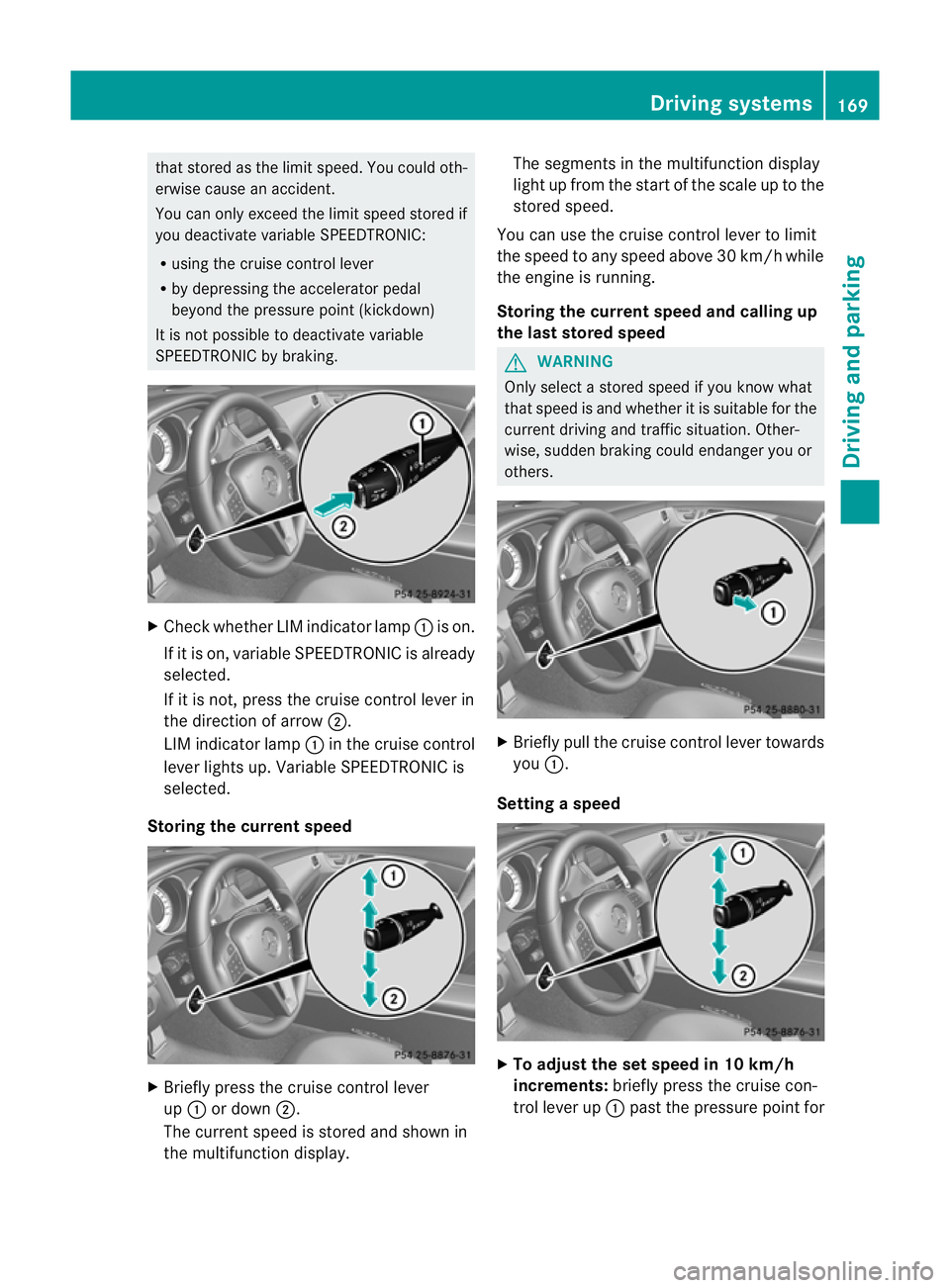
Check whether LIM indicator lamp :is on.
If it is on, variable SPEEDTRONIC is already
selected.
If it is not ,press the cruise contro llever in
the direction of arrow ;.
LIM indicator lamp :in the cruise control
lever lights up. Variable SPEEDTRONIC is
selected.
Storing the current speed X
Briefly press the cruise contro llever
up : or down ;.
The curren tspeed is stored and shown in
the multifunction display. The segments in the multifunction display
light up from the start of the scale up to the
stored speed.
You can use the cruise contro llever to limit
the speed to any speed above 30 km/ hwhile
the engine is running.
Storing the current speed and calling up
the last stored speed G
WARNING
Only select astored speed if you know what
that speed is and whether it is suitable for the
current driving and traffic situation. Other-
wise, sudden braking could endanger you or
others. X
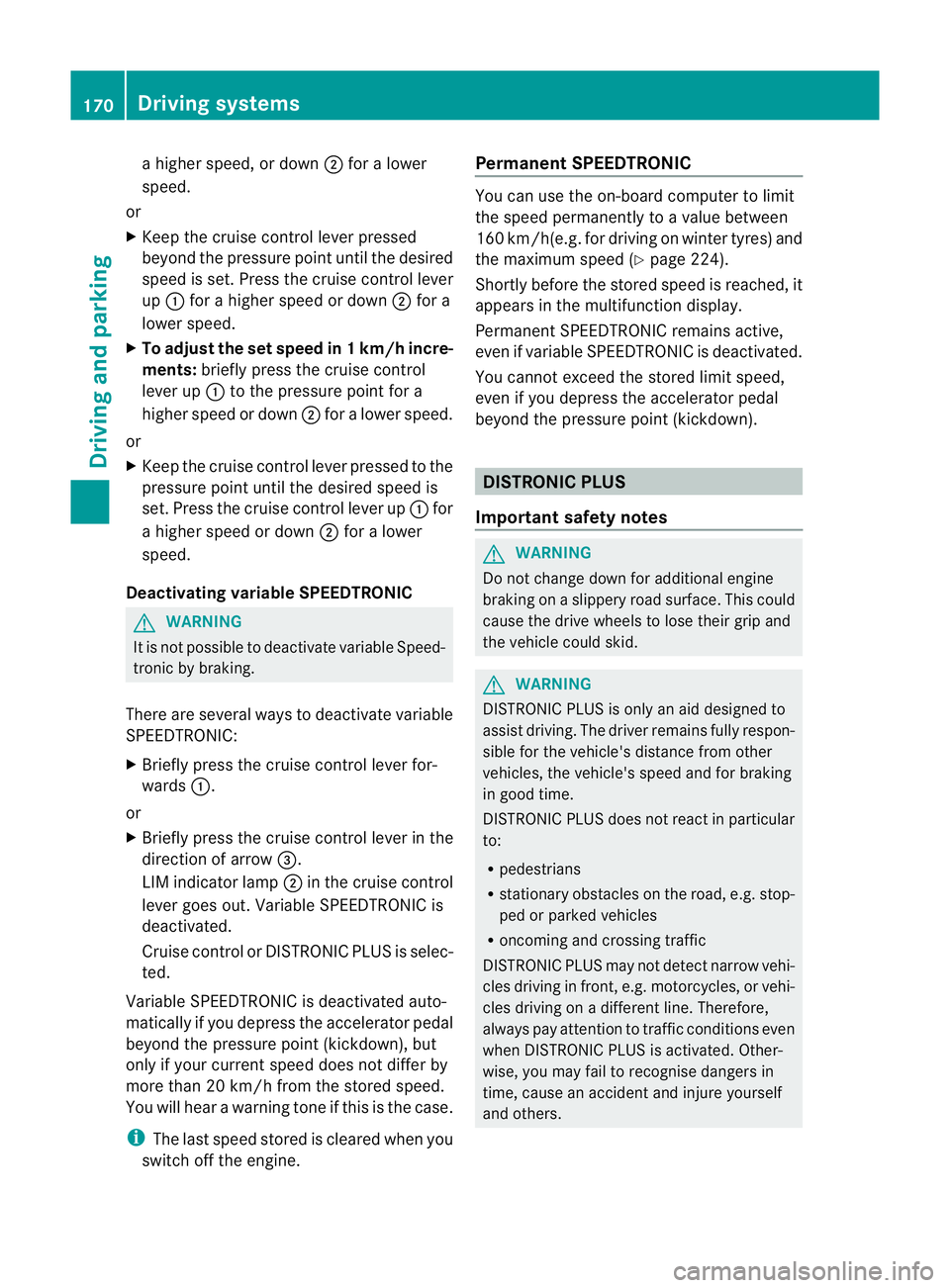
Briefly pull the cruise control lever towards
you :.
Setting aspeed X
To adjust the se tspeed in 10 km/h
increments: brieflypress the cruise con-
trol lever up :past the pressure point for Drivin
gsystems
169Driving and parking Z
Page 173 of 373
ah
igher speed, or down ;for alower
speed.
or
X Keep th ecruise control leve rpressed
beyond the pressure point until the desired
spee diss et. Press the cruise control lever
up : for ahigher spee dordown;for a
lower speed.
X To adjust the set spee din1k m/h incre-
ments: briefly press the cruise control
lever up :to the pressure point for a
higher speed or down ;for alower speed.
or
X Keep the cruise control lever pressed to the
pressure point until the desired speed is
set. Press the cruise control lever up :for
ah igher speed or down ;for alower
speed.
Deactivating variable SPEEDTRONIC G
WARNING
It is not possible to deactivat evariable Speed-
tronic by braking.
There are several ways to deactivat evariable
SPEEDTRONIC:
X Briefly press the cruise control lever for-
wards :.
or
X Briefly press the cruise control lever in the
direction of arrow =.
LIM indicator lamp ;in the cruise control
lever goes out. Variable SPEEDTRONIC is
deactivated.
Cruise control or DISTRONIC PLUS is selec-
ted.
Variable SPEEDTRONIC is deactivated auto-
matically if you depress the accelerator pedal
beyond the pressure point (kickdown), but
only if your curren tspeed does not differ by
more than 20 km/ hfrom the stored speed.
You will hear awarning ton eifthis is the case.
i The last speed stored is cleared when you
switc hoff the engine. Permanent SPEEDTRONIC You can use the on-board computer to limit
the speed permanently to
avalue between
16 0k m/ h(e.g .for driving on winter tyres) and
th em aximum spee d(Ypage 224).
Shortly before th estoreds peed is reached, it
appears in the multifunction display.
Permanent SPEEDTRONIC remains active,
even if variable SPEEDTRONIC is deactivated.
You cannot exceed the stored limit speed,
even if you depress the accelerator pedal
beyond the pressure point (kickdown). DISTRONIC PLUS
Importan tsafet ynotes G
WARNING
Do not chang edown for additional engine
brakin gonas lippery road surface. This could
cause the drive wheels to lose their grip and
the vehicle could skid. G
WARNING
DISTRONIC PLUS is only an aid designed to
assist driving. The driver remains fully respon-
sible for the vehicle's distance from other
vehicles, the vehicle's speed and for braking
in good time.
DISTRONIC PLUS does not react in particular
to:
R pedestrians
R stationary obstacles on the road, e.g. stop-
ped or parked vehicles
R oncoming and crossing traffic
DISTRONIC PLUS may not detec tnarro wvehi-
cles driving in front, e.g. motorcycles, or vehi-
cles driving on adifferen tline. Therefore,
always pay attention to traffic condition seven
when DISTRONIC PLUS is activated. Other-
wise, you may fail to recognise danger sin
time, cause an accident and injure yourself
and others. 170
Driving systemsDriving and parking
Page 175 of 373
Cruise control lever
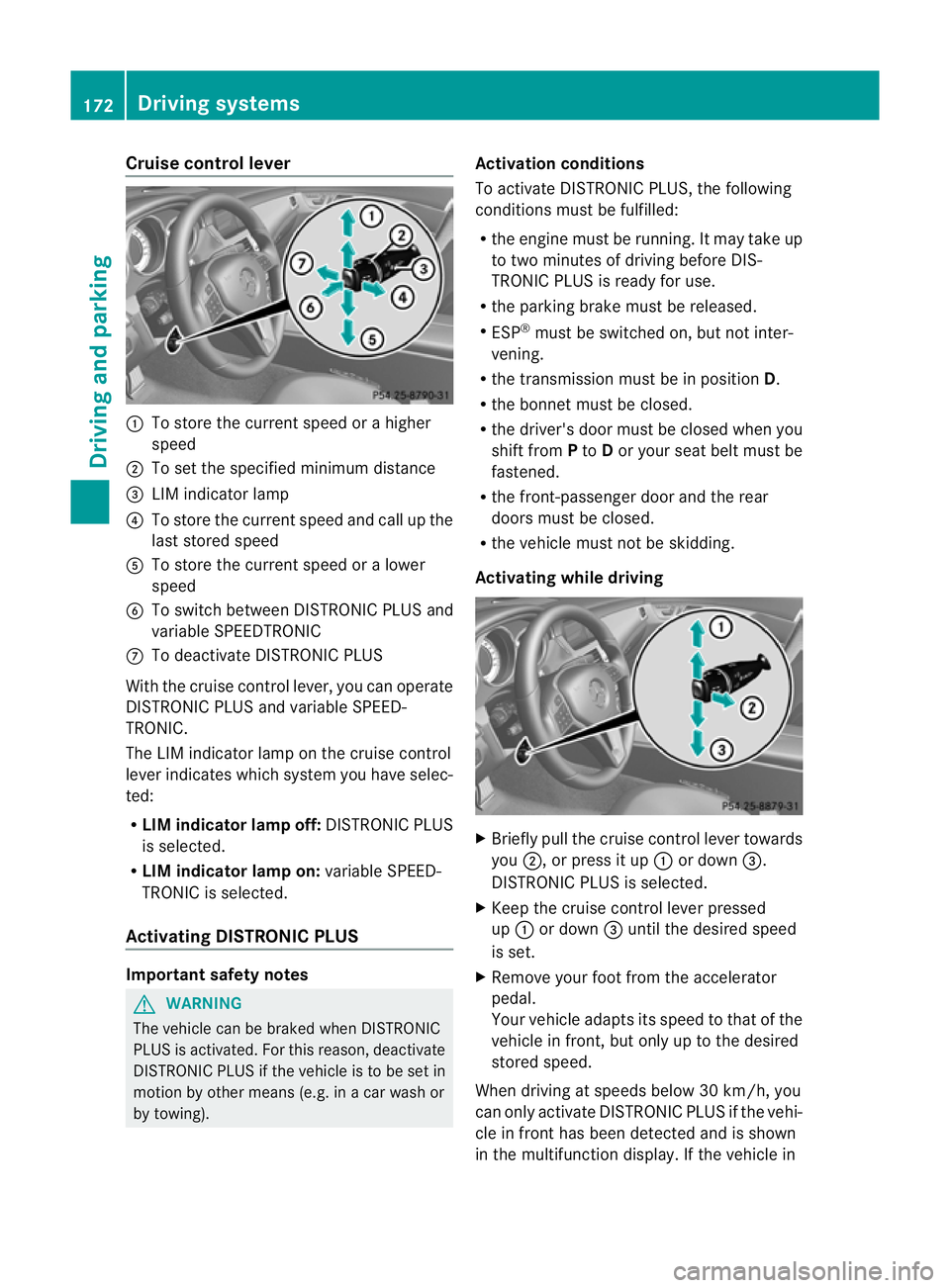
:
To store th ecurren tspeed or ahigher
speed
; To set the specified minimum distance
= LIM indicator lamp
? To stor ethe curren tspeed and call up the
last stored speed
A To stor ethe curren tspeed or alower
speed
B To switc hbetween DISTRONIC PLUS and
variable SPEEDTRONIC
C To deactivate DISTRONIC PLUS
With the cruise contro llever, you can operate
DISTRONIC PLUS and variable SPEED-
TRONIC.
The LIM indicator lamp on the cruise control
lever indicates which system you have selec-
ted:
R LIM indicator lamp off: DISTRONIC PLUS
is selected.
R LIM indicator lamp on: variable SPEED-
TRONIC is selected.
Activating DISTRONIC PLUS Important safet
ynotes G
WARNING
The vehicle can be braked when DISTRONIC
PLUS is activated. For this reason, deactivate
DISTRONIC PLUS if the vehicle is to be set in
motion by other means (e.g. in acar wash or
by towing). Activation conditions
To activate DISTRONIC PLUS
,the following
condition smust be fulfilled:
R the engin emust be running. It may tak eup
to two minutes of drivin gbefore DIS-
TRONIC PLUS is ready for use.
R the parkin gbrake must be released.
R ESP ®
must be switched on, but not inter-
vening.
R the transmission must be in position D.
R the bonnet must be closed.
R the driver' sdoor must be closed when you
shift from Pto Dor your seat belt must be
fastened.
R the front-passenger door and the rear
doors must be closed.
R the vehicle must not be skidding.
Activating while driving X
Briefly pull the cruise contro llever towards
you ;,orp ress it up :or down =.
DISTRONIC PLUS is selected.
X Keep the cruise contro llever pressed
up : or down =until the desired speed
is set.
X Remove your foot from the accelerator
pedal.
Your vehicle adapts its speed to that of the
vehicle in front, but only up to the desired
stored speed.
When drivin gatspeeds below 30 km/h, you
can only activate DISTRONIC PLUS if the vehi-
cle in fron thas been detected and is shown
in th emultifunction display. If th evehicle in 172
Driving systemsDriving and parking
Page 176 of 373
front is no longe
rdetected and displayed,
DISTRONIC PLUS switche soff and you will
hear atone.
i If you do not fully release the accelerator
pedal, the DISTRONIC PLUS suspended message appears in the multifunction dis-
play. The set distanc etoaslower-moving
vehicle in fron twill the nnot be maintained.
You will be driving at the speed you deter-
mine by the position of the accelerator
pedal.
Activating when driving toward sasta-
tionary vehicle
X Briefl ypullt he cruis econtro llev er towards
you ;,orp ress it up :or down =.
DISTRONI CPLUSiss elected.
X Press the cruise control lever repeatedly
up : or down =until the desired speed
is set.
If the vehicle in front of you is stationary, you
can only activate DISTRONIC PLUS once your
vehicle is stationary as well.
i DISTRONIC PLUS can only be activated at
under 30 km/h if avehicle in front has been
detected. Therefore, the DISTRONIC PLUS
distance displayint he instrument cluster
should be activated (Y page 219).
i You can use the cruise control lever to set
the stored speed and the control on the
cruise control lever to set the specified
minimum distance (Y page 176).
Pulling away and driving G
WARNING
If you depress the brake, DISTRONIC PLUS is
deactivated unless your vehicle is stationary.
DISTRONIC PLUS then no longer brakes your
vehicle. In such cases, control the distance
from vehicles travelling in front with the brake
alone. You could otherwise cause an accident
and thereby injure yourselfa nd others. The
driver remains fully responsibl efor the vehi-
cle's distance from othe rvehicles, the speed
being driven and for braking in good time. X
If the vehicle in front pulls away: remove
your foot from the brake pedal.
X Briefly pull the cruise control lever towards
you ;,orp ress it up :or down =.
or
X Accelerate briefly.
Your vehicle pulls away and adapts its
speed to that of the vehicle in front.
If there is no vehicle in front, DISTRONIC
PLUS operates in the same way as cruise
control.
If DISTRONIC PLUS detects that the vehicle
in fron thas slowe ddown ,itb rakes yourv ehi-
cle. In this way, the distanc eyou have selec-
ted is maintained.
If DISTRONIC PLUS detects that the vehicle
in fron tisdriving faster, it accelerates your
vehicle, but only up to the speed you have
stored.
Changing lanes G
WARNING
DISTRONIC PLUS and Active Blind Spot Assist
are only an aid designed to assist driving.
They do not relieve you of the responsibility
of paying attention. The driver remains fully
responsible for the vehicle's distance from
other vehicles, the vehicle's speed and for
braking in good time. Always pay attention to
traffic conditions and your surroundings. Oth-
erwise, you may fail to recognise dangers in
time, cause an accident and injure yourself
and others.
If you change to the overtaking lane, DIS-
TRONIC PLUS supports you if:
R you are driving faster than 60 km/h.
R DISTRONIC PLUS is maintaining the dis-
tance to avehicle in front.
R you switch on the respective turn signals.
R DISTRONIC PLUS does not detect adanger
of collision.
If these conditions are met, your vehicle is
accelerated. Acceleration will be interrupted
if changing lanes takes too long or if the dis- Driving systems
173Driving and parking Z
Page 179 of 373
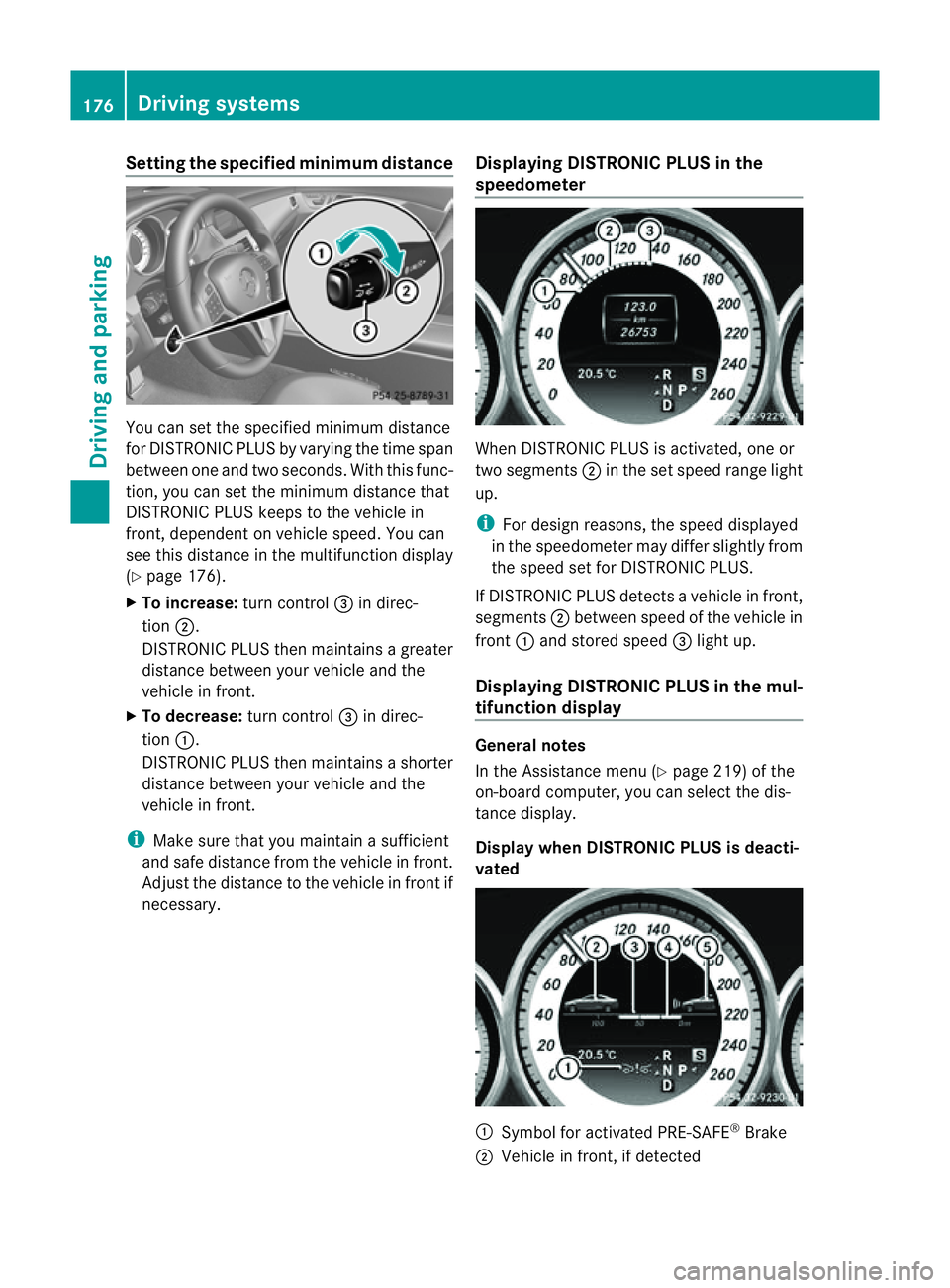
Setting the specified minimum distance
You can set the specified minimum distance
for DISTRONIC PLUS by varying the time span
between one and two seconds. With this func-
tion, you can set the minimum distance that
DISTRONIC PLUS keeps to the vehicle in
front,d ependent on vehicle speed. You can
see this distance in the multifunction display
(Y page 176).
X To increase: turn control=in direc-
tion ;.
DISTRONIC PLUS then maintains agreater
distance between your vehicle and the
vehicle in front.
X To decrease: turn control=in direc-
tion :.
DISTRONIC PLUS then maintains ashorter
distance between your vehicle and the
vehicle in front.
i Make sure that you maintain asufficient
and safe distance from the vehicle in front.
Adjust the distance to the vehicle in front if
necessary. Displaying DISTRONIC PLUS in the
speedometer When DISTRONIC PLUS is activated, one or
two segments
;in the set speed range light
up.
i For design reasons, the speed displayed
in the speedometer may differ slightly from
the speed set for DISTRONIC PLUS.
If DISTRONIC PLUS detectsav ehicle in front,
segments ;between speed of the vehicle in
front :and stored speed =light up.
Displaying DISTRONIC PLUS in the mul-
tifunction display General notes
In the Assistance menu (Y
page 219)ofthe
on-board computer, you can select the dis-
tanc edisplay.
Display when DISTRONIC PLUS is deacti-
vated :
Symbol for activated PRE-SAFE ®
Brake
; Vehicle in front, if detected 176
Driving systemsDriving and parking
Page 180 of 373
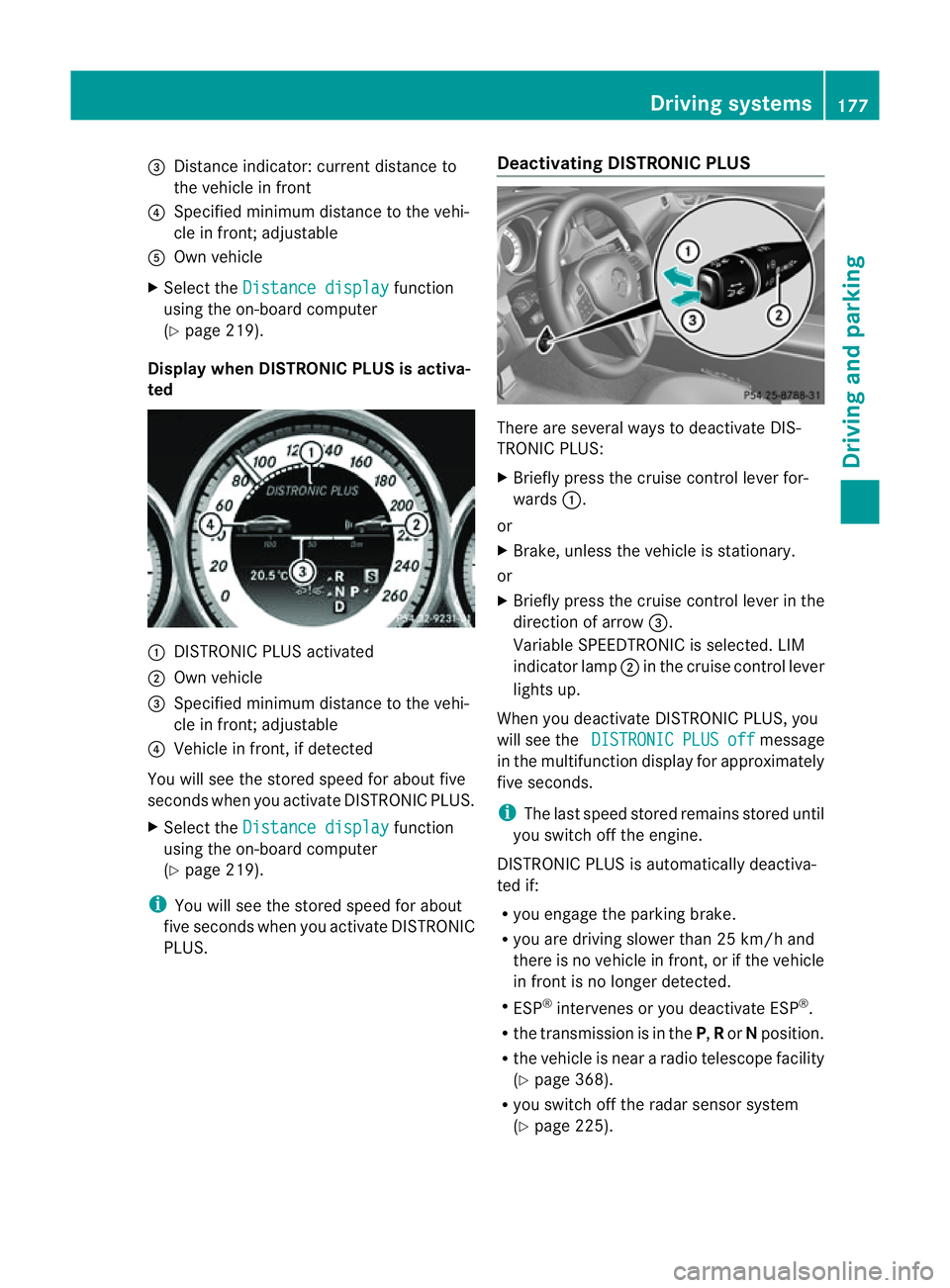
=
Distance indicator: current distance to
the vehicl einfront
? Specifie dminimum distance to the vehi-
cle in front; adjustable
A Ownvehicle
X Select the Distancedisplay function
using the on-board computer
(Y page 219).
Display when DISTRONIC PLUS is activa-
ted :
DISTRONIC PLUS activated
; Own vehicle
= Specified minimum distanc etothe vehi-
cle in front; adjustable
? Vehicle in front, if detected
You will see the stored speed for about five
seconds when you activat eDISTRONIC PLUS.
X Select the Distancedisplay function
using the on-board computer
(Y page 219).
i You will see the stored speed for about
five seconds when you activat eDISTRONIC
PLUS. Deactivating DISTRONIC PLUS There are several ways to deactivat
eDIS-
TRONIC PLUS:
X Briefly press the cruise control lever for-
wards :.
or
X Brake, unless the vehicle is stationary.
or
X Briefly press the cruise control lever in the
direction of arrow =.
Variable SPEEDTRONIC is selected. LIM
indicator lamp ;in the cruise control lever
lights up.
When you deactivat eDISTRONIC PLUS, you
will see the DISTRONIC PLUS off message
in the multifunction display for approximately
five seconds.
i The last speed stored remains stored until
you switch off the engine.
DISTRONIC PLUS is automatically deactiva-
ted if:
R you engage the parkin gbrake.
R you are driving slower than 25 km/ha nd
ther eisnov ehicle in front, or if the vehicle
in fron tisnol onger detected.
R ESP ®
intervenes or you deactivat eESP®
.
R the transmission is in the P,Ror Nposition.
R the vehicle is near aradio telescope facility
(Y page 368).
R you switch off the radar sensor system
(Y page 225). Driving systems
177Driving and parking Z
Page 181 of 373
R
you pull th ecruise control lever towards
you in order to pull away, and th efront-
passenger doo rorone of the rea rdoors is
open.
R the vehicle has skidded.
If DISTRONIC PLUS is deactivated, you will
hear awarning tone. You will see the DIS‐TRONIC PLUS off message in the multifunc-
tion display for approximately five seconds.
Tips for driving with DISTRONIC PLUS General notes
The following contains description
sofcertain
road and traffic conditions in which you must
be particularly attentive. In such situations,
brake if necessary. DISTRONIC PLUS is then
deactivated.
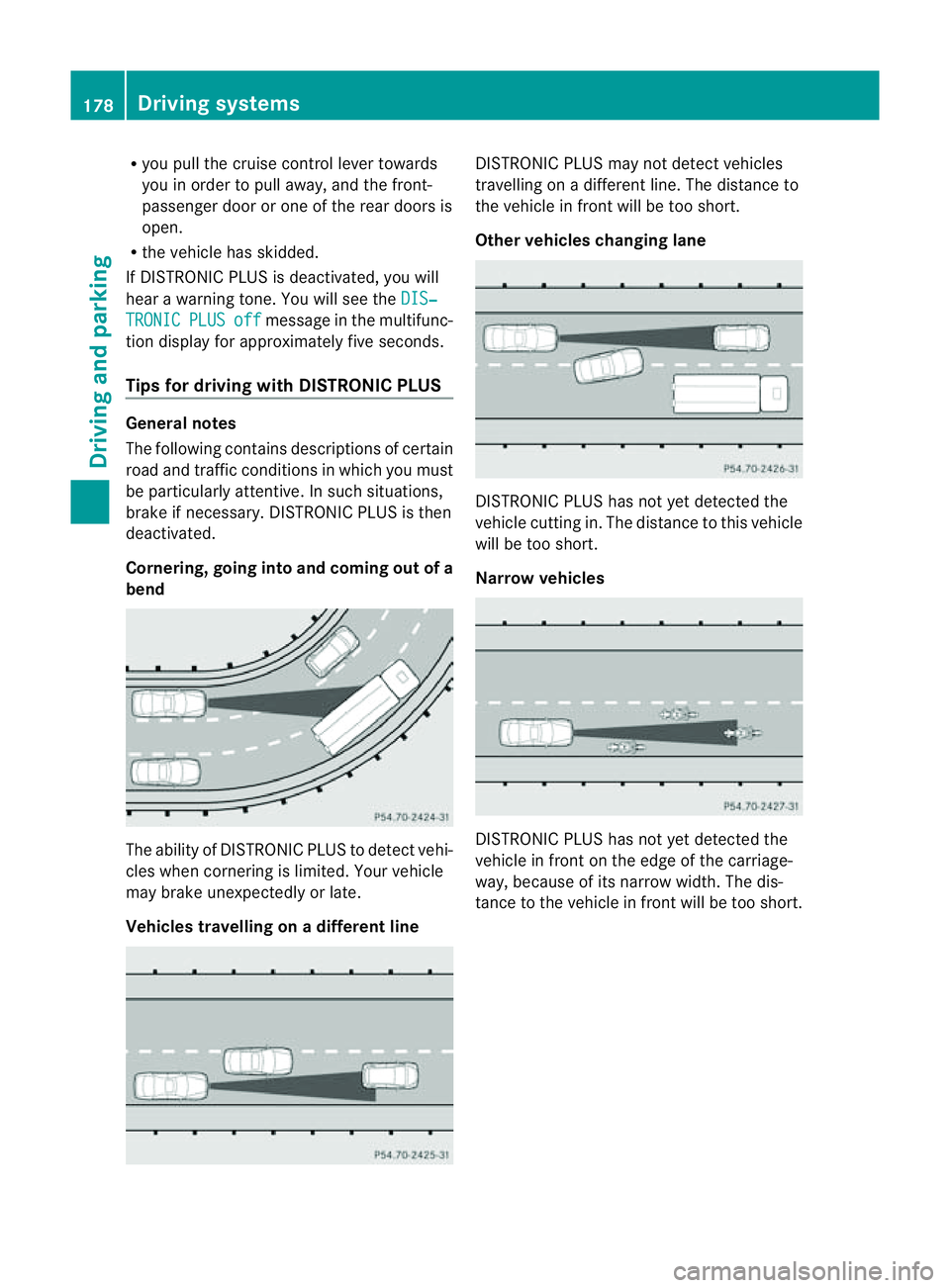
Cornering, going into and coming out of a
bend The ability of DISTRONIC PLUS to detect vehi-
cles when cornering is limited. Your vehicle
may brake unexpectedly or late.
Vehicles travelling on
adifferent line DISTRONIC PLUS may not detec
tvehicles
travelling on adifferent line. The distance to
the vehicle in fron twill be too short.
Other vehicles changing lane DISTRONIC PLUS has not yet detected the
vehicle cuttin
gin. The distanc etothis vehicle
will be too short.
Narrow vehicles DISTRONIC PLUS has not yet detected the
vehicle in front on the edge of the carriage-
way, because of its narrow width
.The dis-
tance to the vehicle in front will be too short. 178
Driving systemsDriving and parking
Page 183 of 373
Deactivating th
eHOLDf unction G
WARNING
Never get out of th evehicle when th eHOLD
function is activated.
The HOLD function mus tnever be operated
or deactivated by apassenger or from outside
th ev ehicle.
The HOLD function doe snot replac ethe park-
ing brake and must not be used for parking.
The braking effec tofthe HOLD function is
cancelled and the vehicle could roll away if:
R the HOLD function is deactivated by
depressing the accelerator pedal or the
brake pedal.
R there is amalfunction in the system or an
interruption in the power supply, e.g. bat-
tery failure.
R the electrical system in the engine com-
partment, the batter yorthe fuses are tam-
pered with.
R the batter yisdisconnected.
If you leave the vehicle or park it, deactivate
the HOLD function and secure the vehicle
against rolling away.
The HOLD function is deactivated automati-
cally if:
R you accelerat eand the transmission is in
position Dor R.
R you shift the transmission to position P.
R you depress the brake pedal again with a
certain amount of pressure until ëdis-
appears from the multifunction display.
R you activat eDISTRONIC PLUS.
When the HOLD function is activated, the
transmission is shifted automatically to posi-
tion Pif:
R the driver's door is open and the driver's
seat belt is unfastened.
R the engine is switched off, unless it is auto-
matically switched off by the ECO start/
stop function.
R the bonnet is opened. R
as ystem fault occurs.
R the power supply is not sufficient. RACE START
Important safety notes G
WARNING
RACE START is only available when SPORT
handling mode is activated. SPORT handling
mode will only be able to stabilise the vehicle
to alimited degree if the vehicle start stoskid
or aw heel start stospin. The vehicle is there-
fore harder to control at the threshold range.
You could lose control of the vehicle and
cause an accident.
RACE START should only be used on closed
off circuits. Always adapt your driving style to
suit the prevailing road and weather condi-
tions.
i RACE START is only available in AMG vehi-
cles.
RACE START enables optimum acceleration
from astanding start .The precondition for
this is asuitable high-grip road surface.
Activation conditions You can activat
eRACE START if:
R the doors are closed.
R the engine is running and it has reached an
operatin gtemperature of approximately
80 †. This is the case when the engine oil
temperature in the multifunction display
stops flashing.
R SPORT handling mode is activated
(Y page 66).
R the steerin gwheel is in the straight-ahead
position.
R the vehicle is stationary and the brake
pedal is depressed (left foot).
R the transmission is in position D.180
Driving systemsDriving and parking
Page 184 of 373
Activating RACE START
X
Depress th ebrak epedal wit hyour left foot
and keep it depressed.
X Turn the drive program selector clockwise
(Y page 151) until the RSlamp lights up.
The RACE START Confirm: Paddle UP Cancel: Paddle DOWN message appears
in the multifunction display.
i If the activation conditions are no longer
fulfilled, RACE START is cancelled. The
RACE START cancelled message
appears in the multifunction display.
X To cancel: pull the left steerin gwheel shift
paddle (Y page 152).
or
X To confirm: pull the right steerin gwheel
shift paddle (Y page 152).
The RACE START available Depress accelerator message appears in the mul-
tifunction display.
i If you do not depress the accelerator
pedal fully within two seconds, RACE
START is cancelled. The RACE START not
possible See Owner's Manual message
appears in the multifunction display.
X Fully depress the accelerator pedal.
The engine speed rises to approximately
3500 rpm.
The RACE START Release brake to start message appears in the multifunc-
tion display.
i If you do not release the brake pedal
within five seconds, RACE START is cancel-
led. The RACE START cancelled mes-
sage appears in the multifunction display.
X Take your foot off the brake, but keep the
accelerator pedal depressed.
The vehicle pulls away at maximum accel-
eration.
The RACE START active message appears
in the multifunction display.
RACE START is deactivated when the vehicle
reaches aspeed of approximately 50 km/h. Drive program
S+is activated. SPORT han-
dling mode remains activated.
RACE START is deactivated immediately if
you release the accelerator pedal during
RACE START or if any of the activation condi-
tions are no longer fulfilled. The RACE START
not possible See Owner's Manual mes-
sage appears in the multifunction display.
i After using it several times in short suc-
cession, RACE START will be unavailable
until acertain distance has been driven. AIRMATIC
Vehicle level Important safety notes
G
WARNING
If you have selected "Comfort tuning", the
vehicle will be lowered if you lock it within
60 seconds of the engine being switched off.
Make sure, therefore, that nobody is in the
vicinit yofthe wheel housing or under the
vehicle when you lock the vehicle. Otherwise,
limbs could become trapped.
! The vehicle is lowered by about 15 mm if:
R you have selected "Comfort tuning"
R you switch off the engine and
R you lock the vehicle within approximately
60 seconds
When parking, position your vehicle so that
it does not make contact with the kerb as
the vehicle is lowered. Your vehicle could
otherwise be damaged.
Your vehicle regulates its height automati-
cally. All-round level control ensures the best
possible suspension and constant ground
clearance, even with aladen vehicle. When
you drive fast, the vehicle is lowered auto-
matically to improve driving safety and to
reduce fuel consumption. Driving systems
181Driving and parking Z