wheel MERCEDES-BENZ E-CLASS CABRIOLET 2010 Service Manual
[x] Cancel search | Manufacturer: MERCEDES-BENZ, Model Year: 2010, Model line: E-CLASS CABRIOLET, Model: MERCEDES-BENZ E-CLASS CABRIOLET 2010Pages: 333, PDF Size: 7.64 MB
Page 157 of 333

Parking up th
evehicle Problem Possible causes/consequences and
M Solutions
The vehicle is to be left
parked up for longer
than four weeks. The battery may be damaged by heavy discharging.
X
Disconnect the battery (Y page 286)orconnect it to abattery
trickle charger.
i You can obtain more information about battery trickle charg-
ers at aqualified specialist workshop, e.g. aMercedes-Benz
Servic eCentre. The vehicle is to be left
parked up for longer
than six weeks. Damage resulting from non-use may occu
rifthe vehicle is parked
up for long periods.
X Visit aqualified specialist worksho pand see kadvice. Driving tips
General driving tips
Rolling with the engine switched off G
Risk of accident
Never switc hthe engin eoff while the vehicle
is in motion.
There is no powe rassistanc efor the steering
and the service brake when the engin eisnot
running.
You will require considerably mor eeffort to
steer and brak eand you could therefore lose
control of the vehicl eand cause an accident. Engine oil
! Vehicle swithadiesel particle filter:
If the vehicle is mostly driven for short dis-
tances, it is possible that malfunctions may
occur durin gthe automa ticc leaning of the
diesel particle filter. This can lead to engine
damage. Therefore, if you frequently drive
short distances, make sure to drive on
motorways or countr yroads for 20 minutes
at least ever y500 km. Appl
ying th ebrakes
Important safet ynotes G
Risk of accident
Do not change down for additional engine
brakin gona slipper yroad surface. This could
cause the driv ewheels to lose their grip and
the vehi clec ould skid. G
Risk of accident
Make sure that other road users are not
endangered by your braking.
Downhill gradients On long and steep downhill gradients, espe-
cially if the vehicle is laden or towin gatrailer,
you must shift to alower gear in good tim eor,
on vehicles wit hautomatic transmission,
select shift range 1,2or 3.
i This also applie sifyou have activated
cruise control, SPEEDTRONIC or DIS-
TRONIC PLU S.
This will use the brakin geffect of th eengine,
so les sbraki ngwill be required to maintain
the speed .This relieves the load on the brake
syste mand prevent sthe brake sfrom ove r-
heati ngand wearing too quickly. If you need
additional braking, depress the brake pedal
repeatedly rather than continuously. 154
Driving tipsDriving and parking
BA 207 ECE ÄJ 2010/1a; 1; 2, en-GB
mkala
fa Version: 3.0.2.11
2010-01-26T13:03:22+01:00
-Seite 154
Page 159 of 333

If ice ha
sformed on the road surface (e.g.
from fog), athin fil mofw ater rapidly forms on
the ice when you brake, considerably reduc-
ing tyre grip. Drive with particular care in such
weather conditions. Drivin
gonw etroads
Aquapla ning If water has accumulated to
acertain depth
on th eroad surface, there is adanger of aqua-
planing occurring, even if:
R you driv eatlow speeds
R thet yres have adequat etread depth
For this reason ,donot drive in tyre ruts ,and
brak ecarefully.
Driving on flooded roads If you have to driv
eonstretches of roadon
whic hwater has collected, please bear in
min dthat:
R the maximu mpermitted dept hins till water
is 25 cm
R you should driv enofaster than at walking
pace.
! Bear in min dthat vehicles travelling in
front or in th eopposite directio ncreate
waves. This ma ycause the maximum per-
missible water depth to be exceeded.
Failure to observe these notes may result
in damage to the engine, electrical systems
and transmission. Winter driving
Important safety notes Have your vehicle winterproofed at
aqualified
specialist workshop, e.g. at aMercedes-Benz
Servic eCentre, at the onset of winter.
Observ ethe notes in the "Changin gawheel"
section (Y page 302). Winter ty
res Us
ew inter tyres at temperatures below
+7 †a nd on sno worice-covered roads .Only
winter tyre sbeari ng the isnowflake sym-
bo lnext to the M+S marking provid ethe best-
possible grip in wintry road conditio ns.O nly
thes etyres will allow the ABS and ESP ®
driv-
ing systems to function optimally in winter, as
thes etyres have been designed specifically
for driving on snow.
Use winter tyres of the same make and tread
on all wheels to maintain safe handling char-
acteristics. G
Risk of accident
Winter tyres with atrea ddepth of less than
4mmm ust be replace dimmediately. They are
no longe rsuitable for winter use and can no
longer provid esufficient grip. This could
cause you to lose control of you rvehicle and
cause an accident.
Alway sobserv ethe maximum permissible
speed specifie dfor the winter tyres you have
fit ted. If you fit winter tyres which have a
lower maximum permissible speed than that
of the vehicle, affix an appropriate warning
sign in the driver' sfield of vision. This can be
obtained at aqualified specialist workshop,
e.g. from aMercedes-Benz Ser vice Centre.
Under these circumstances, you shoul dalso
restrict the maximum speed of the vehicle
using permanen tSPEED-
TRONIC 29
(Y page 17 1)so that it does not
exceed the maximum permissible speed for
the winter tyres.
Onc eyou have fit tedt he winter tyres:
X Chec kthe tyr epressures (Y page 299).
X Restart th etyre pressure los swarning sys-
tem (Y page 301). G
Risk of accident
If you fit the spare wheel when driving with
winter tyres, bear in mind that driving stability
will be impaired due to unstable cornering
29 Only available for certain countries. 156
Driving tipsDriving and parking
BA 207 ECE ÄJ 201
0/1a; 1; 2, en-GB
mkalafa Version: 3.0.2.11 2010-01-26T13:03:22+01:00-Seite 156
Page 160 of 333

characteristics cause
dbythe differ enttyres.
You shoul dtherefor eadapt your drivin gstyle
and drive carefully.
Have the spare whee lreplaced at the nearest
qualified specialist workshop which has the
necessar yspecialist knowledge and tools to
carry out the work required. Mercedes- Benz
recommends that you use aMercedes-Benz
Ser vice Centre for thi spurpose. In particular,
work relevant to safety or on safety-related
systems must be carried out at aqualified
specialist workshop.
Snow chains For safety reasons
,Mercedes-Benz recom-
mends that you only use snow chain swhich
hav ebeen speciall yapproved for your vehicle
by Mercedes-Benz ,ora re of acorresponding
standar dofquality.
If you intend to fit snow chains, pleas ebear
the following point sinmind:
R you may not attac hsnow chains to all
wheel-tyre combinations ;see the "Tyres
and wheels" section in the "Techni caldata"
chapter.
R snow chains must not be fitted to emer-
gency spare wheels ,e.g. a"Minispare"
emergency spar ewheel.
R fit snow chains only in pair sand only to the
rear wheels .Observ ethe manufacturer's
installation instructions.
Do not exceed the maximum permissible
speed of 50 km /h.
i You may wish to deactivat eESP®
when
pulling away with snow chains fitted
(Y page 57). This way you can allow the
wheels to spin in acontrolled manner, ach-
ieving an inc reased driving forc e(cutting
actio n).
Slipper yroad surfaces G
Risk of accident
Do not shift down for additional engine brak-
ing on aslippery road surface. This could cause the drive wheels to lose their grip and
the vehicle could skid.
You should drive particularly carefully on slip-
pery road surfaces. Avoid sudden accelera-
tion ,steering and braking manoeuvres.
If the vehicle threatens to skid or cannot be
stopped when movin gatlow speed:
X Vehicles with manua ltransmission: engage
neutral.
X Vehicles wit hautomatic transmission: shift
the transmission to position N.
X Try to bring the vehicle under control using
corrective steering.
i For more information on driving with
snow chains, see (Y page 157). Drivin
gabroad
General notes An extensiv
eMercedes–Benz Ser vice net-
work is als oavailable in othe rcountries. The
Ser vice Hotline's current telephone numbers
for use whe nyou ar eabroad are to be found
in the "Service24h" section of the Ser vice
Boo klet.
Only low-oc tane fuel is available in certain
countries.
You can find further information about fuel
grade son(Ypage 14 8).
Sym metrical dipped-beam headlamps If your journey takes you to countries where
vehicle
sare driven on th eopposite side of the
road to the country in which the vehicle is
registered, your headlamps must be switched
to symmetrical dipped beam. This prevents
oncomin gtraffic from being dazzled.
Have th eheadlamps conver tedasc lose as
possible to the border before drivin ginthese
countries. When usin gsymmetrical lights, the
edg eoft he carriageway is not lit as widely
and as fa rahead as nor mal. Drivin
gtips
157Driving and parking
BA 207ECE ÄJ 2010/1a; 1; 2, en-GB
mkalafa Version:3.0.2.11
2010-01-26T13:03:22+01:0
0-Seite 157 Z
Page 161 of 333

On vehicle
swith Intelligent Light System the
headlamps can be conver tedint he on-board
compute r(Ypage 206).
Switching over dipped-beam headlamps
on vehicles with halogen headlamps :
Protec tive cap
; Switchover lever
X Turn protectiv ecap : anti-clockwise and
remove it.
X Push switchover lever ;down.
X Insert protective cap :and turn it clock-
wise.
When you are driving back on the same side
of the road as the country where the vehicle
is registered, have the headlamps changed
back to asymmetrical dippe dbeam as soon
as possibl eafter crossing th eborder. Driving systems
Cruise control
Import ants afety notes Cruise control maintain
saconstant road
speed for you. It brakes automatically in order
to avoid exceeding the set speed. On long and
steep downhil lgradients ,especially if the
vehicle is laden or towing atrailer, yo umust
shift to alower gear in good tim eorselect
shift range 1,2or 3on vehicles with auto-
matic transmission. By doing so, you will
mak euse of the brakin geffect of th eengine,
which relieves the load on the brake system and prevents the brakes from overheating
and wearing too quickly. G
Risk of accident
Do not change down for additional engine
braking on aslippery road surface. This could
cause the drive wheels to lose their grip and
the vehicle could skid.
Use cruise control only if road and traffic con-
ditions make it appropriate to maintain a
steady speed for aprolonged period. Yo ucan
store any road spee dabove 30 km/h. G
Risk of accident
Cruise control cannot take account of road
and traffic conditions.
Always pay atten tion to traffic conditions
even when cruise control is activated.
Cruise control is only an aid designed to assist
driving. You are responsible for the vehicle's
speed and for brakin gingood time. G
Risk of accident
Do not use cruise control:
R in road and traffic condition swhich do not
allow you to maintain aconstant speed (e.g.
heavy traffic or winding roads). You could
otherwise cause an accident.
R on slippery roads. Brakin goraccelerating
coul dcause the drive wheels to lose trac-
tion and the vehicle could then skid.
R when there is poor visibility, e.g. due to fog,
heavy rain or snow
Cruise control lever You can operate cruise control and variable
SPEEDTRONIC with the cruise control lever.
The LIM indicator lamp on the cruise control
lever indicates which system you have selec-
ted:
R
LIM indicator lamp off: cruise control is
selected.
R LIM indicator lamp on: variableSPEED-
TRONI Cisselected. 158
Driving systemsDriving and parking
BA 20
7ECE ÄJ 2010/1a; 1; 2, en-GB
mkalafa Version: 3.0.2.11
2010-01-26T13:03:22+01:00
-Seite 158
Page 164 of 333
the brakes from overhe
ating and wearing too
quickly.
If as lower-moving vehicle is detected in front,
DISTRONIC PLU Scauses you rvehicle to
brak eand maintain apreset distance to the
vehicl einfront. G
Ris
kofa ccident
Do not change down for additional engine
brakin gonas lippery road surface. This could
cause the drive wheels to lose their grip and
the vehicle could skid. G
Risk of accident
DISTRONIC PLU Siso nly an aid designe dto
assis tdriving. Th edrive rremain sfully respon-
sible for the vehicle's distance from other
vehicles, the vehicle's spee dand for braking
in goo dtime.
DISTRONIC PLU Sdoes not react in particular
to:
R pedestrians
R stationar yobstacles on the road, e.g. stop-
ped or parked vehicles
R oncoming and crossin gtraffic
DISTRONIC PLUS may not detect narro wvehi-
cles driving in front, e.g. motorcycles, or vehi-
cles driving on adifferen tline. Therefore,
always pay attention to traffic condition seven
when DISTRO NICP LUS is activated. Other-
wise ,you may fai ltorecognise danger sin
time, cause an accident and injure yourself
and others. G
Risk of accident
DISTRONI CPLUS cannot take account of road
and traffi cconditions. If DISTRONI Cdoesn ot
recognise or no longer recognises the vehicle
in front ,donot activate DI STRONIC or, if it is
already active, deactivate it. This is especially
the case:
R before corners
R on filter lanes R
when changing to alane with faster moving
traffic
R in complex driving situations or where lanes
are diverted, e.g. at roadworks on amotor-
way
DI ST RONIC PLUS otherwis emaintains the
current spee dset by you or accelerates up to
the set speed.
DI ST RONIC PLUS cannot take account of
weathe rconditions. Deac tivate, or do not
activate, DISTRONIC PLUS:
R if the roads are slippery, snow-covered or
icy. The wheels could los etheir grip when
brakin goraccelerating .The vehicle could
star ttos kid.
R if the sensors are dirty or there is poo rvis-
ibility, e.g. due to snow, rain or fog. Dis-
tanc econtrol may be impaired.
Always pay attention to traffic conditions
even when DI STRONIC PLUS is activated.
Otherwise, you may fail to recognise dangers
in time, cause an accident and injure yourself
and others.
The radar sensor syste misautomatically
deactivated near radio telescope facilities
(Y page 324).
If you want DISTRONIC PLUS to assis tyou,
the radar sensor system must be activated
(Y page 208) and operational.
If ther eisnov ehicle in front ,DISTRONIC
PLUS operate sinthe sam eway as cruise
control in the spee drange between
30 km/ hand 200 km/h .Ifavehicle is driving
in front of you, DI STRONIC operates in the
speed range betwee n0km/h and
200 km/h.
Do no tuse DISTRONI CPLUS wh iled riving on
roa dswith steep gradients. G
Risk of accident
DISTRONIC PLUS brakes you rvehicle up to a
maximu mof4m /s2
depending on its speed.
This corresponds to approximately 40% of
your vehicle's maximum braking power. You Driving systems
161Driving and parking
BA 207 ECE ÄJ 2010/1a; 1; 2, en-GB
mkalafa Version: 3.0.2.11 2010-01-26T13:03:22+01:00-Seite 161 Z
Page 166 of 333
X
Briefly pull the cruise contro llev er towards
you ?or press it up :or down Ato the
pressure point.
DISTRONIC PLU Sisselected.
X Keep the cruise control lever pressed
up : or down Auntil the desired speed
is set.
X Remove your foot from the acc elerator
pedal.
You rvehicle adapts its speed to that of the
vehicle in front, but only up to the desired
stored speed.
i If you do not fully release the accelera tor
pedal, the DISTRONICP LUS suspen‐
ded message appears in th emultifunction
display. The set distance to aslower-mov-
ing vehicle in fron twill then not be main-
tained. You will be drivin gatthe speed you
deter mine by the positio nofthe accelera-
tor pedal.
Activating when driving towards asta-
tionary vehicle
If the vehicl einfront of yo uisstationary, you
can onl yactivate DISTRONI CPLUSo nce your
vehicl eisstationary as well.
X Briefl ypullt he cruis econtr ollever towards
you ?.
DISTRONIC PLUS is selected.
i DISTRONIC PLUS can onl ybeactivate dat
under 30 km/h if avehicle in front has been
detected. Therefore, the DISTRONIC PLUS
distance display in the instrumen tcluster
should be activated.
X Keep the cruise control lever pressed
up : or down Auntil the desired speed
is set.
i You can use the cruise control lever to set
the stored speed and the thumbwheel on
the cruise control lever to set the specified
minimum distance (Y page 166). Pulling away
X
If the vehicle in front pulls away: remove
your foot from the brake pedal.
X Briefly pull the cruise control lever towards
you ?.
or
X Accelerate briefly.
Your vehicle pull sawaya nd adapts its
speed to that of the vehicl einfront.
Driving
If there is no vehicl einfront, DISTRONIC
PLUS operates in th esame way as cruise
control.
If as lower-moving vehicle is detected in front,
DISTRONIC PLU Scauses your vehicle to
brake and maintain apreset distance to the
vehicl einfront.
If DISTRONIC PLUS detects afaster-moving
vehicle in front ,itincrease sthe drivin gspeed,
but only up to the desired speed you have
stored. G
Risk of accident
If you depress the brake, DISTRONIC PLU Sis
deactivated unless your vehicl eisstationary.
DISTRONIC PLUS then no longe rbrake syour
vehicle. In such cases, control the distance
from vehicles travelling in front with the brake
alone. You coul dotherwis ecause an accident
and thereby injure yoursel fand others. The
driver rema insf ully responsibl efor the vehi-
cle's distance from other vehicles ,the speed
being driven and for brakin gingood time.
Changing lanes
If you wish to change to the passing lane (in
left -hand-drive vehicles, the passing lane is
the left-hand lane), DISTRONIC PLUS sup-
ports you if:
R you are driving faster than 60 km/h
R DISTRONIC PLUS is maintaining the dis-
tanc etoav ehicle in front
R you switc honthe appropriate tur nsignals
R DISTRONIC PLU Sdoes not detec tadanger
of collision Driving systems
163Driving and parking
BA 207 ECE ÄJ 2010/1a; 1; 2, en-GB
mkalafa Version: 3.0.2.11 2010-01-26T13:03:22+01:00-Seite 163 Z
Page 168 of 333
If yo
uwish to leave the vehicle or park it,
deactivate DISTRONIC PLU Sand secure the
vehicl eagainst rolling away.
If DISTRONIC PLU Sdetect sthat the vehicle
in front is stopping, it brakes your vehicle until
it is stationary.
Onc eyour vehicle is stationary, it remains
stationar yand you do not need to depress the
brake.
i Depe nding on the specified minimum dis-
tance, your vehicle will come to astandstill
at as ufficien tdistanc ebehin dthe vehi cle
in fron t.The specifie dminimum distance is
set using the thumbwheel on the cruise-
control lever.
When DISTRONIC PLU Sisa ctivate dand the
vehicl eisatas tandstill, the following warning
message appe arsint he multifunction display
if:
R the driver's door is open and the driver's
seat belt is unfastened
R the engin eisswitched off, unless it is auto-
matically switched off by the ECO start/
stop func tion
R the bonnet is opened
Select Park (P)
X Move the selector leve rtoPto prevent the
vehicle from rolling away.
DISTRONIC PLUS is deactivated .The warn-
ing message in the multifunction display
disappears.
The horn will also sound at regular intervals if
DI ST RONIC PLUS is activated and you:
R switch the engine off, open the driver's
doo rand take off your sea tbelt
R open the bonnet
The soundin gofthe horn alerts you to the fact
that the vehicle has been parked while DI S-
TRONIC PLU Siss till activated. The sound
becomes louder if you attempt to lock the
vehicle .The vehicle is not locked until DI S-
TRONIC PLU Sisd eactivated. i
If the ignition has been switched off ,the
engin ecannot be started again until DIS-
TRONIC PLUS has been deactivated.
If DISTRONIC PLUS is activated and afault
occurs in the system or there is adisruption
in the power supply while the vehicle is sta-
tionary ,the Brak eimmediately message is
show ninthe multifunction display. Immedi-
atel ydepress the brak efirmly until the warn-
ing message in the multifunction displa ygoes
out or mov ethe selector lever to P.DIS-
TRONIC PLUS is then deactivated.
Setting aspeed X
Press the cruise control lever to the pres-
sure point, up :for ahigher speed or
down Afora lower speed.
X Keep the cruise contro llever pressed until
the desired speed is reached.
X Release the cruise control lever.
The new speed is stored. DI STRONIC PLUS
is activated and adjusts the vehicle's speed
to the new speed stored.
Making adjustments in 1km/h incre-
ments X
Briefly press the cruise contro llever to the
pressur epoint ,up :for ahigher speed or
down Afor alower speed.
The last speed stored is inc reased or
reduced.
Making adjustments in 10 km/h incre-
ments X
Briefly press the cruise contro llever
beyond the pressur epoint ,up :for a
higher spee dordownAfor alower speed.
The last speed stored is inc reased or
reduced. Driving systems
165Driving and parking
BA 207 ECE ÄJ 2010/1a; 1; 2, en-GB
mkalafa Version: 3.0.2.11 2010-01-26T13:03:22+01:00-Seite 165 Z
Page 169 of 333
Storing th
ecurrent speed or calling up
the stored speed G
Ris
kofa ccident
Only call up astored speed if you know what
that speed is and if it is suitable for the current
traffic and driving situation. You can other-
wise endanger yoursel forothers by uninten-
tionall ytriggering sudden acceleration or
braking.
X Briefly pull th ecruis econtrol leve rtowards
you ?.
X Remove your foot from the accelerator
pedal.
DIST RONIC PLUS is activated. The first
time it is activated, the current speed is
stored. Otherwise, it sets the vehicle cruise
speed to the previousl ystored value.
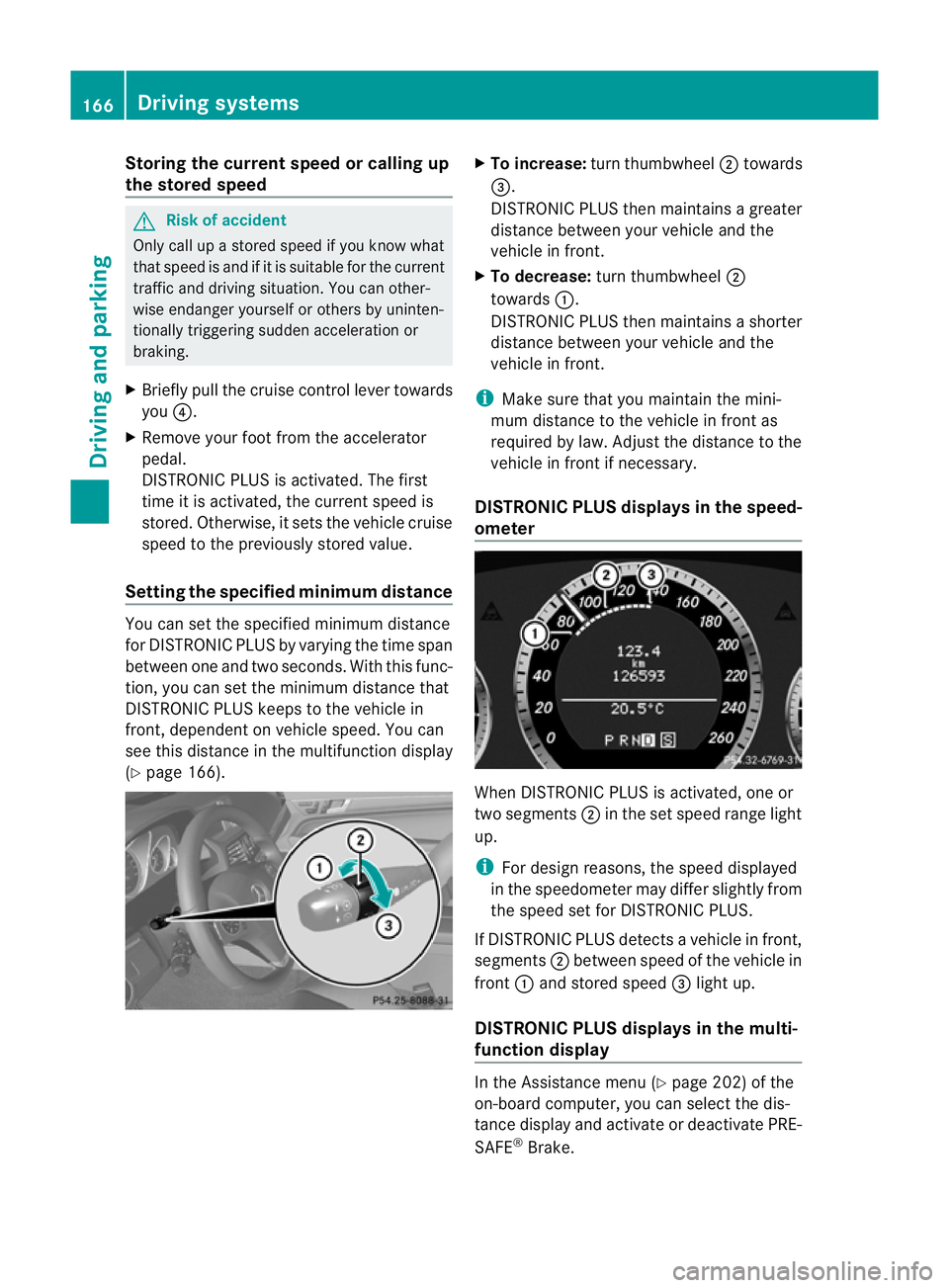
Settin gthe specified minimum distance Yo
uc an set the specified minimum distance
for DISTRONIC PLUS by varying the time span
between one and two seconds .With this func-
tion, you can set the minimum distance that
DISTRONIC PLU Skeeps to the vehicle in
front ,dependent on vehicle speed. You can
see this distance in the multifunc tion display
(Y page 166). X
To increase: turnthumbwheel ;towards
=.
DI ST RONIC PLUS then maintains agreater
distance between your vehicl eand the
vehicl einfront.
X To decrease: turn thumbwheel ;
towards :.
DISTRONIC PLUS then maintains ashorter
distanc ebetween your vehicle and the
vehicle in front.
i Make sure that you maintai nthe mini-
mu md istance to the vehicle in front as
required by law. Adjust the distance to the
vehicle in front if necessary.
DISTRONIC PLUS display sinthe speed-
ometer When DISTRONIC PLUS is activated, one or
two segments
;in th eset speed range light
up.
i For design reasons, the speed displayed
in the speedometer may differ slightly from
the speed set for DI STRONIC PLUS.
If DISTRONIC PLUS detects avehicle in front,
segments ;between speed of the vehicle in
front :and stored speed =light up.
DISTRONIC PLUS displays in the mul ti-
functio ndisplay In the Assistance menu (Y
page 202)of the
on-boar dcompu ter,you can select the dis-
tanc edisplay and activat eordeactivate PRE-
SAFE ®
Brake. 166
Driving systemsDriving and parking
BA 20
7ECE ÄJ 2010/1a; 1; 2, en-GB
mkalafa Version:3.0.2.11
2010-01-26T13:03:22+01:0
0-Seite 166
Page 173 of 333
cause the drive wheel
stoloset heir grip and
the vehicle coul dskid.
You can set avariable or permanent limit
speed:
R Variable for speedlimits, e.g. in built-up
areas
R permanent for long-term speed restric-
tions, e.g. when drivin gwith winter tyres
fitted (Y page 171) G
Risk of accident
Speedtronic is only an aid designed to assist
driving. You are responsible for the vehicle's
speed and for brakin gingood time.
i The speed indicated in the speedometer
may differ slightly from the limi tspeed
stored.
Variable SPEEDTRONIC General notes
With the cruise control lever
,you can operate
cruise con trolorD ISTRONIC PLUS and vari-
able SPEEDTRONIC.
Th eL IM indicato rlamp on the cruise control
lever indicates which system you have selec-
ted:
R LIM indicator lamp off: cruise control or
DISTRONIC PLUS is selected
R LIM indicator lamp on: variable SPEED-
TRONIC is selected.
You can use the cruise control lever to limit
the spee dtoany speed above 30 km/h while
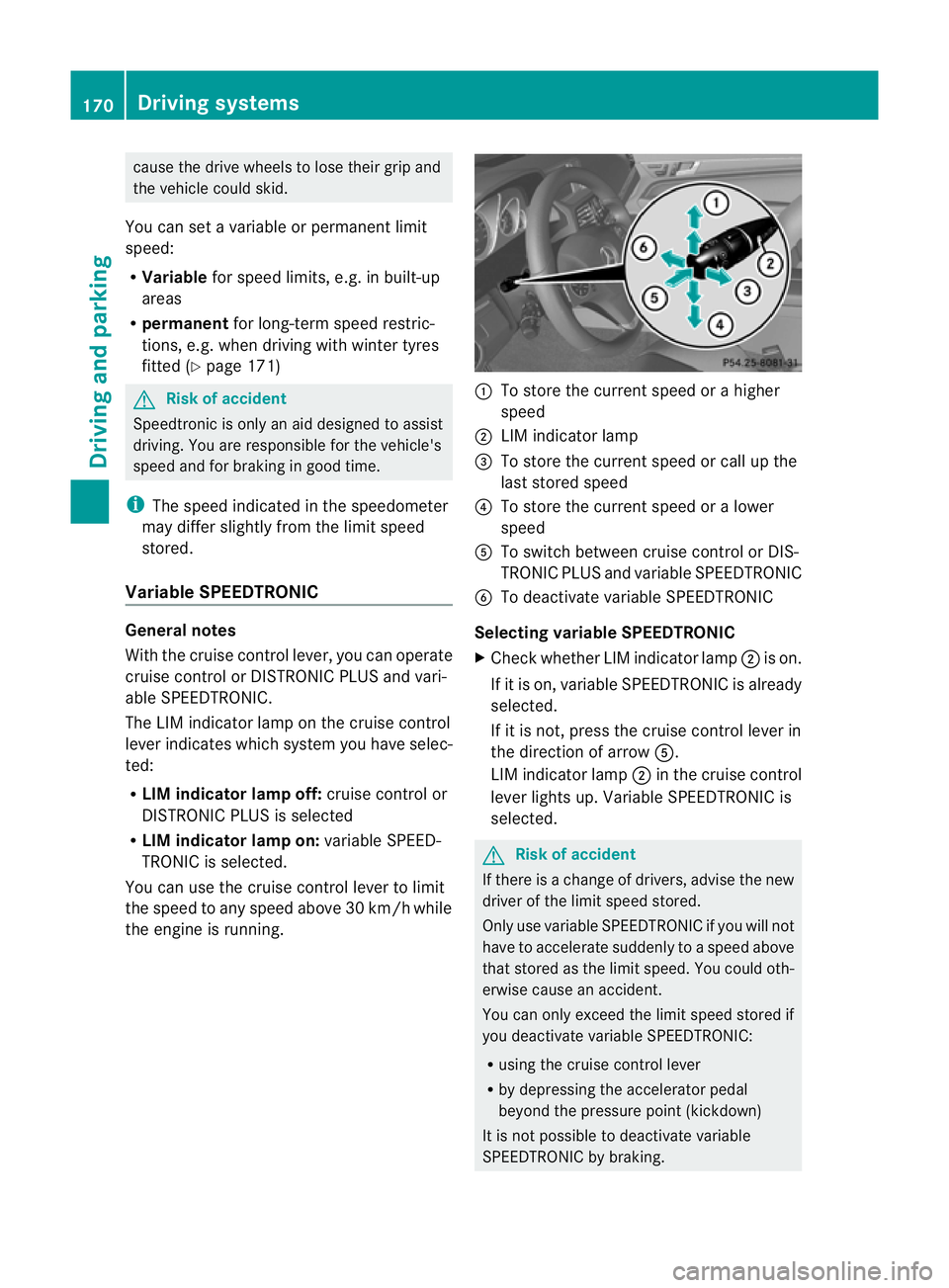
the engine is running. :
To store the current speed or ahigher
speed
; LIMi ndicato rlamp
= To store the current spee dorcall up the
last stored speed
? To store the current spee doral ower
speed
A To switc hbetween cruise control or DI S-
TRONIC PLU Sand variable SPEEDTRONIC
B To deactivate variable SPEEDTRONIC
Selecting variabl eSPEEDTRONIC
X Chec kwhether LI Mindicato rlamp ;is on.
If it is on, variable SPEEDTRONIC is already
selected.
If it is not, press the cruise control lever in
the direction of arrow A.
LIM indicator lamp ;in the cruise control
lever lights up. Variable SPEEDTRONIC is
selected. G
Risk of accident
If there is achange of drivers, advise the new
driver of the limit speed stored.
Only use variable SPE EDTRONI Cifyou will not
have to accelerate suddenl ytoaspeed above
that stored as the limit speed. You could oth-
erwise cause an accident.
You can only exceed the limit speed stored if
you deactivate variable SPE EDTRONIC:
R using the cruise control lever
R by depressin gthe accelerator pedal
beyon dthe pressure point (kickdown)
It is not possible to deactivate variable
SPE EDTRONI Cbybraking. 170
Dri
ving systemsDriving and pa rking
BA 20 7ECE ÄJ 2010/1a; 1; 2, en-GB
mkalafa Version: 3.0.2.11 2010-01-26T13:03:22+01:00 -Seite 170
Page 175 of 333
Permanen
tSPEEDTRONI Cremains active,
even if variable SPEEDTRONI Cisdeactiva ted.
You can note xceed the stored limit speed,
even if you depress the accelerator pedal
beyond the pressure point (kickdown). Dynamic handlin
gpackage with
sports mode
General notes Th
em ost importan tpart of the dynamic han-
dling package with sport smodeist he adjust-
able suspension system. This aut omatically
control sand adap tsthe suspension to the
respectiv edriving si tuation.
The calibration of the suspension depends
on:
R your driving style
R the road surface conditions
R your individual selection ;see th efollowing
descrip tion
If your vehicle is equippe dwitha utomatic
transmission ,the dynamic handlin gpackage
with sport smodea lso includes steering
wheel gearshif tpaddles (Y page 145) with a
manual driv eprogram (Y page 146). X
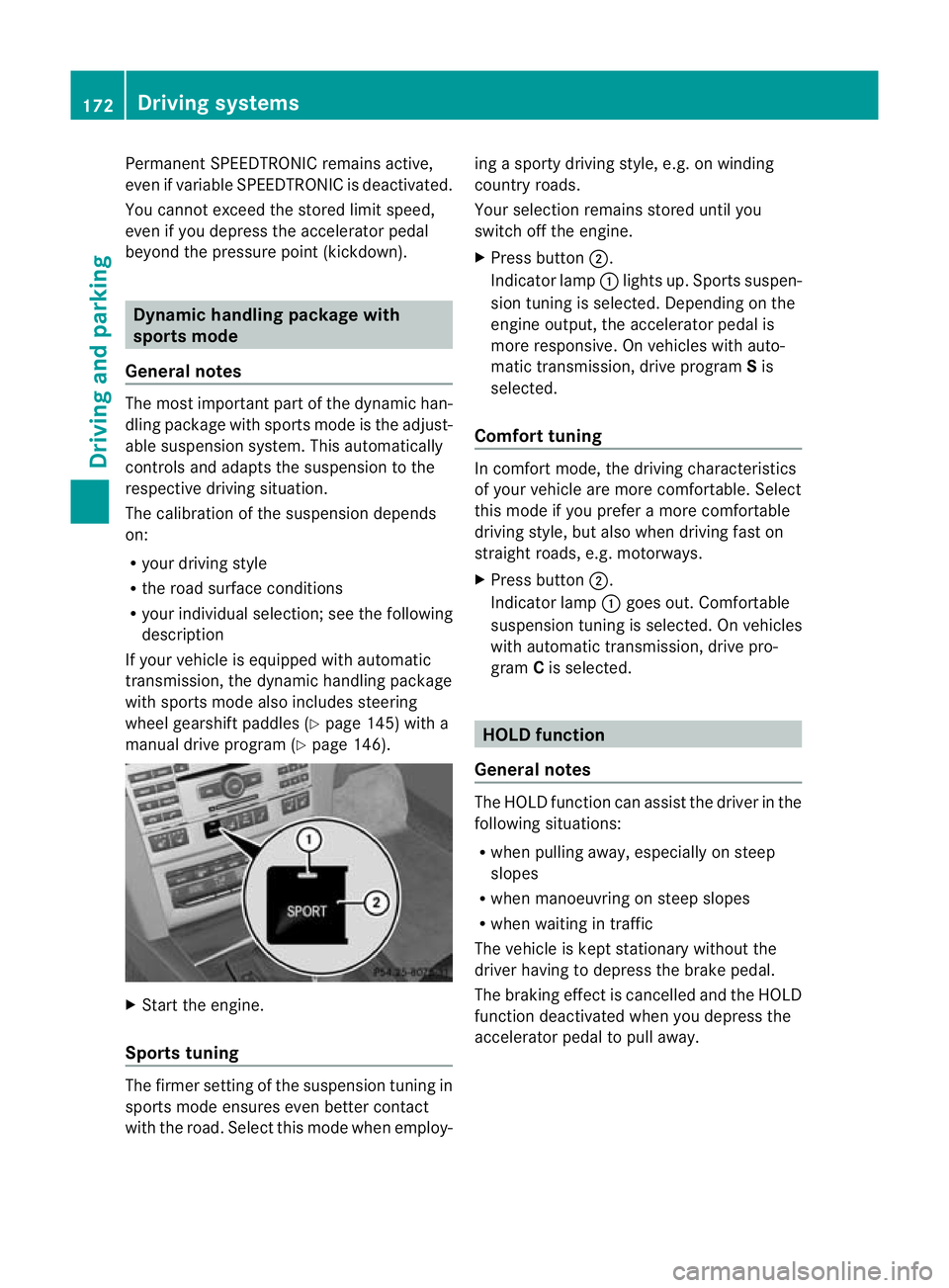
Start the engine.
Sports tuning Th
ef irmer settin gofthe suspension tuning in
sports mod eensure seven better contact
with the road. Select this mode whe nemploy- ing
asport ydriving style ,e.g. on winding
country roads.
You rselection remains stored until you
switc hoff th eengine.
X Pres sbutton ;.
Indicator lamp :lights up. Sport ssuspen-
sion tunin gisselected. Depending on the
engin eoutput, the accelerator pedal is
more responsive. On vehicles with auto-
matic transmission, drive program Sis
selected.
Comfort tuning In comfort mode, the driving characteristics
of your vehicle are more comfortable. Select
this mode if you prefer
amore com fortable
driving style ,but also when driving fast on
straight roads, e.g. motorways.
X Press button ;.
Indicator lamp :goes out. Comfortable
suspensio ntunin giss elected. On vehicles
with automatic transmission ,drive pro-
gram Cis selected. HOL
Dfunction
Gen eral notes Th
eH OLD function ca nassist the driver in the
foll owing situations:
R when pulling away, especially on steep
slopes
R when manoeuvrin gonsteep slopes
R when waiting in traffic
The vehicle is kept stationary without the
driver having to depress the brake pedal.
The braking effect is cancelled and the HOLD
function deactivated when you depress the
accelerator peda ltop ull away. 172
Driving systemsDrivin
gand pa rking
BA 20 7ECE ÄJ 2010 /1a;1;2,e n-GB
mkalafa Version: 3.0.2.11 2010-01-26T13:03:22+01:00-Seite 172