wheel MERCEDES-BENZ E-CLASS CABRIOLET 2010 Workshop Manual
[x] Cancel search | Manufacturer: MERCEDES-BENZ, Model Year: 2010, Model line: E-CLASS CABRIOLET, Model: MERCEDES-BENZ E-CLASS CABRIOLET 2010Pages: 333, PDF Size: 7.64 MB
Page 181 of 333
might therefore issu
esteering instructions
too soon. Thi smay lea dtoac ollision. For this
reason, you should avoid using Parking Guid-
anc eins uch situations. G
Risk of injury
Make sure that no persons or animals are in
the manoeuvring range. Otherwise, they
could be injured.
Whe nPARKTRONIC is deactivated, Parking
Guidance is als ounavailable.
Use Parking Guidance for parking spaces:
R that are paralle ltothe direction of travel
R that ar eonstraight roads, not bends
R that are on the same leve lasthe road, i.e.
not on the pav ement
Parking tips:
R On narrow roads, driv easclose to the park-
ing space as possible.
R Parking spaces which are littered, over-
grown or partially occupied by trailer draw-
bars might be identified incorrectly or not
at all.
R Snowfa ll or heav yrain may lea dtoaparking
space being measured inaccurately.
R Pay attention to the PARKTRONIC warning
messages during the parking procedure
(Y pag e175).
R When transporting aload which protru des
from you rvehicle, you must not use Parking
Guidance.
R Never use Parkin gGuidance with snow
chains or an emergenc yspare wheel fit ted.
R The way your vehicle is positioned in the
parkin gspace after parkin gisdependent
on various factors. These include the posi-
tion and shape of the vehicles parked in
front and behind it and the conditions of the
location. In some cases, Parking Guidance
may guide you too far or not far enough into
ap arking space. In some cases, it may also
lead you across or onto the kerb. If neces-
sary, cancel the parking procedure with
Parking Guidance. !
If unavoidable, you should drive over
obstacles such as kerbs slowly and not at
as har pangle .Otherwise, you may damage
the wheels or tyres.
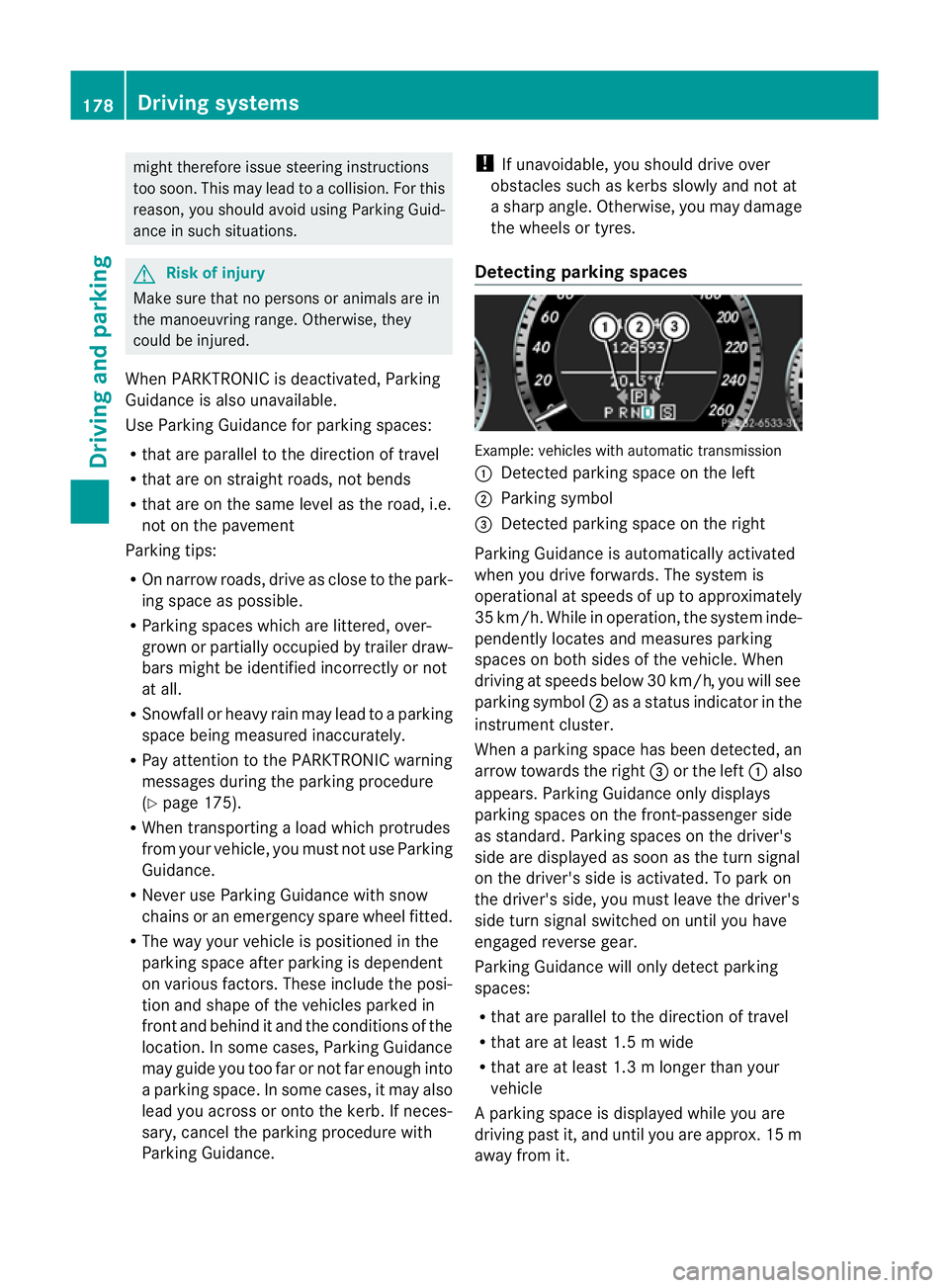
Detecting parking spaces Example: vehicles with automatic transmission
:
Detected parking space on the left
; Parking symbol
= Detected parking space on the right
Parking Guidance is automaticall yactivated
whe nyou drive forwards. The system is
operational at speeds of up to approximately
35 km/h. While in operation ,the system inde-
pendently locates and measures parking
spaces on both sides of the vehicle. When
drivin gatspeeds below 30 km/ h,you will see
parking symbol ;asastatus indicato rinthe
instrumen tcluster.
When aparking space has been detected, an
arrow towards the right =or the left :also
appears. Parking Guidance only displ ays
parking spaces on the front-passenger side
as standard. Parking spaces on the driver's
side are displayed as soon as the tur nsignal
on the driver's side is activated. To park on
the driver's side, you must leave the driver's
side turn signal switched on until you have
engaged reverse gear.
Parking Guidance will only detect parking
spaces:
R that are parallel to the direction of travel
R that are at least 1.5 mwide
R that are at least 1.3 mlonger than your
vehicle
Ap arking space is displayed while you are
driving past it, and until you are approx .15m
away from it. 178
Driving systemsDrivin
gand parking
BA 20 7ECE ÄJ 2010/1a; 1; 2, en-GB
mkalafa Version:3.0.2.11
2010-01-26T13:03:22+01:00
-Seite 178
Page 182 of 333
Parking
G
Ris
kofa ccident
PARKTRONIC and Parking Guidance are
merely parking aids and may not detect all
obstacles .They do not reliev eyou of the
responsibilit yofpaying attention.
You are always responsible for safety and
must continue to pay attention to your imme-
diate surroundings when parking and
manoeuvring. You could otherwise endanger
yourself and others.
X Stop the vehicle when the parking space
symbol shows the desired parking space in
the instrumen tcluster.
X Vehicles with manual transmission: shift to
reverse gear.
Vehicles with automatic transmission: shift
into position R.
The multifunction display shows the
Chec kvehicle surroundings Con‐
firm with OK message.
X Press aon themultifunction steering
wheel to confirm.
The multifunction display switches to Park-
ing Guidance.
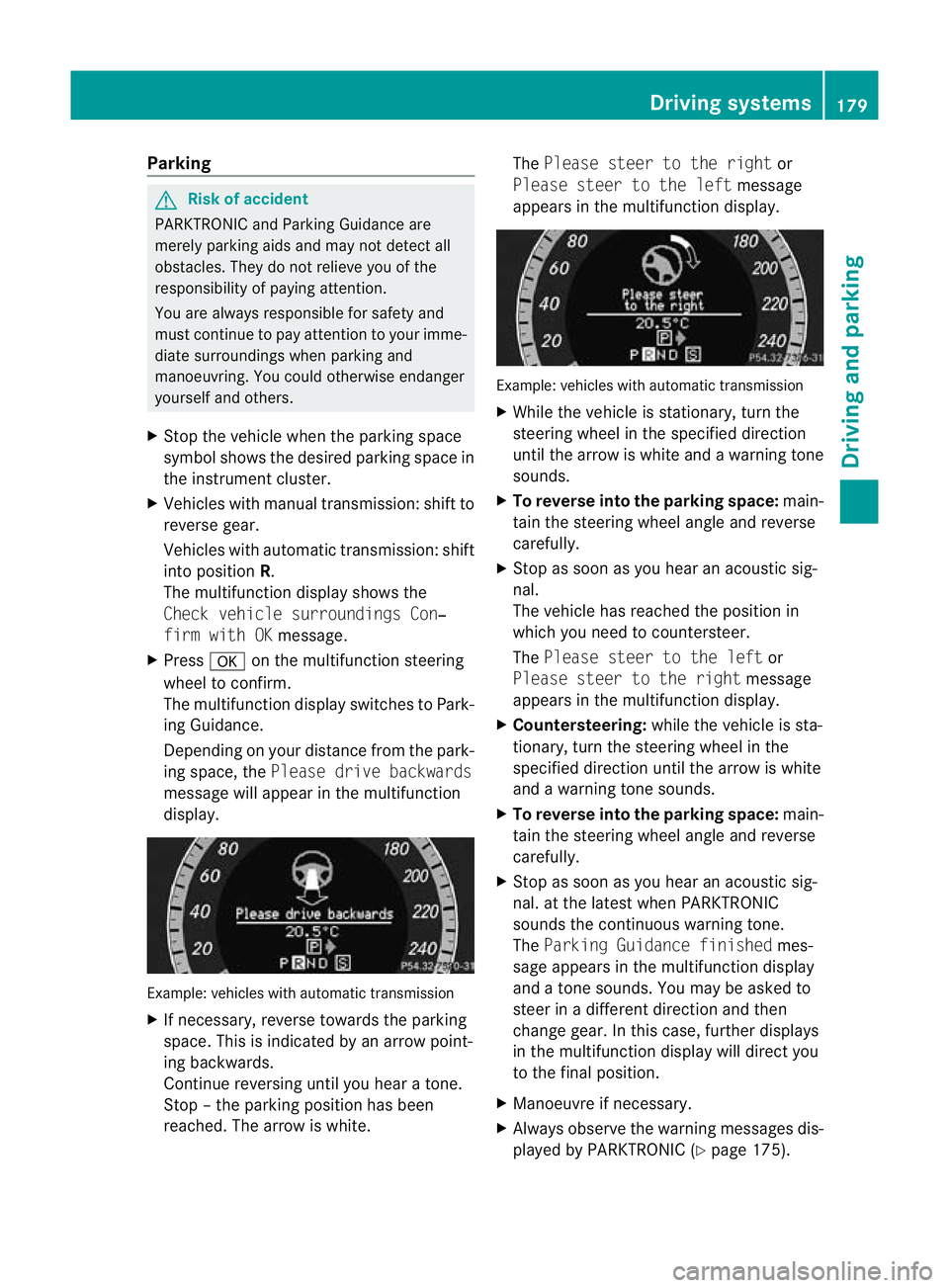
Depending on your distance from the park-
ing space, the Please drivebackwards
message will appear in th emultifunction
display. Example: vehicles with automatic transmission
X
If necessary, reverse towards the parking
space. This is indicated by an arrow point-
ing backwards.
Continue reversing until you hear atone.
Stop –the parkin gposition has been
reached. The arrow is white. The
Please stee rtothe right or
Please steer to the left message
appe arsint he multifunction display. Example: vehicles wit
hautomatic transmission
X Whil ethe vehicle is stationary ,turn the
steering wheel in the specified direction
until the arrow is white and awarning tone
sounds.
X To reverse into the parking space: main-
tain the steering wheel angle and reverse
carefully.
X Stop as soon as you hear an acoustic sig-
nal.
The vehicle has reached the position in
which you need to countersteer.
The Please stee rtothe left or
Please steer to the right message
appe arsint he multifunction display.
X Countersteering: while the vehicle is sta-
tionary, tur nthe steering wheel in the
specifie ddirection until the arrow is white
and awarning tone sounds.
X To reverse into the parking space: main-
tain the steering wheel angle and reverse
carefully.
X Stop as soon as you hear an acoustic sig-
nal. at the latest when PARKTRONIC
sounds the continuous warning tone.
The Parkin gGuidance finished mes-
sage appe arsint he multifunction display
and atone sounds. You ma ybeasked to
steer in adifferent direction and then
change gear. In this case, further displays
in the multifunction displa ywill direct you
to the final position.
X Manoeuvr eifnecessary.
X Alway sobserv ethe warnin gmessages dis-
played by PARKTRONI C(Ypage 175). Driving systems
179Driving and parking
BA 207ECE ÄJ 2010 /1a;1;2,e n-GB
mkalafa Version: 3.0.2.11 2010-01-26T13:03:22+01:00-Seite 179 Z
Page 189 of 333
unavailable See Owner's Manual
mes-
sage appe arsint he multifunction display. Trailer towing
Folding out th
eball coupling
Before you can tow atrailer wit hyour vehicle,
you must fold out the ball coupling.
The release wheel is located behind the left-
hand side trim panel in the boot. G
Risk of accident
Make sur ethat the ball coupling is engaged,
either in its folded-ou torfolded-i nposition,
and that the indicator lam pisoff.
Do not turn the releas ewheel when atrailer
is coupled up. Otherwise, th etrailer might
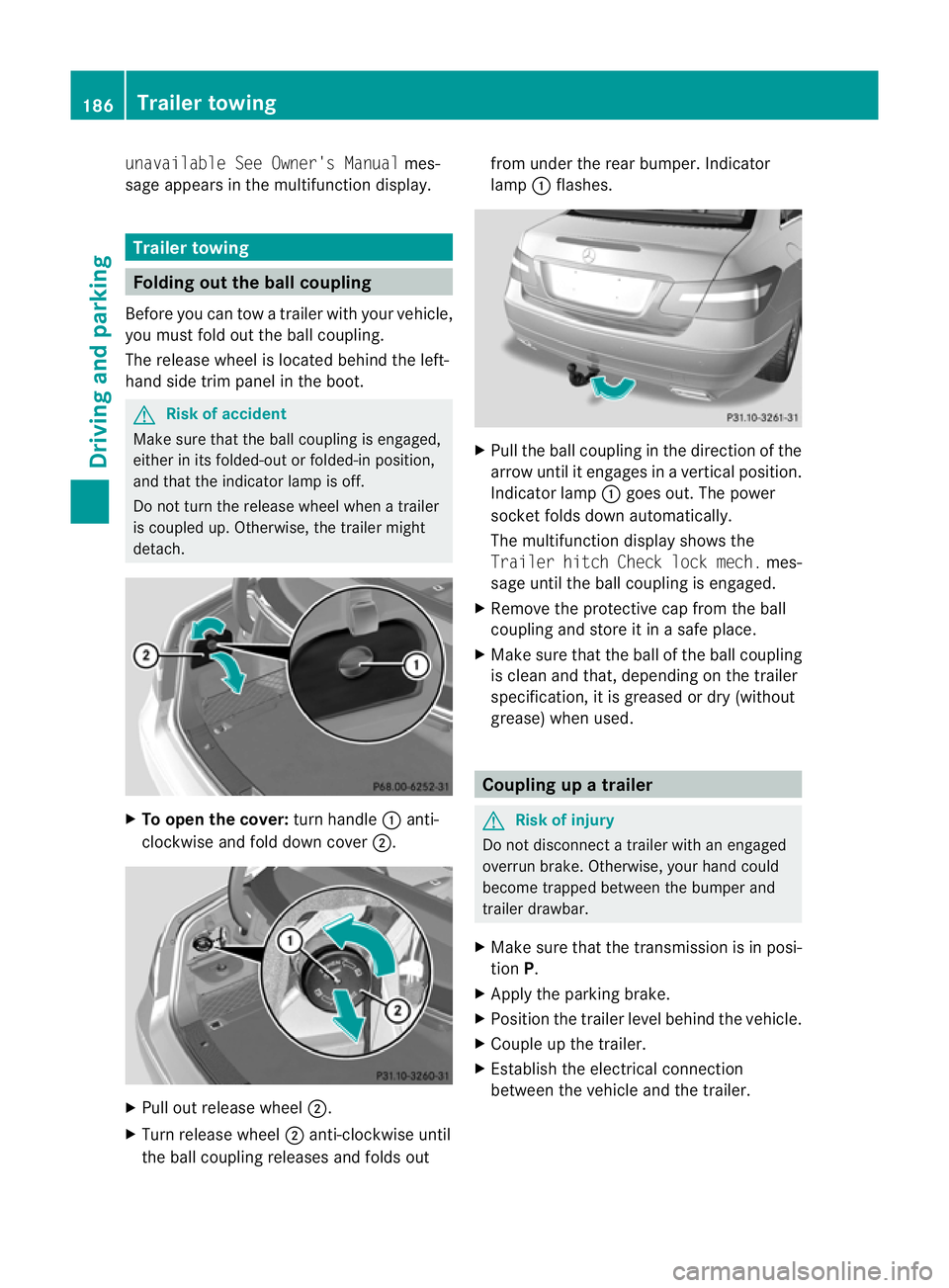
detach. X
To ope nthe cov er:turn handle :anti-
clockwis eand fold dow ncover ;. X
Pull out release wheel ;.
X Tur nrelease wheel ;anti-clockwise until
the ball couplin greleases and folds out from under the rear bumper
.Indicator
lamp :flashes. X
Pull the ball coupling in the direction of the
arrow until it engages in avertical position.
Indicator lamp :goes out. The power
socket folds down automatically.
The multifunction display shows the
Traile rhitch Check lock mech. mes-
sage until th eball coupling is engaged.
X Remove the protective cap from the ball
coupling and store it in asafe place.
X Make sure that the ball of the ball coupling
is clean and that, depending on the trailer
specification, it is greased or dry (without
grease) when used. Coupling up
atrailer G
Risk of injury
Do not disconnect atrailer wit hanengaged
overrun brake. Otherwise, your hand could
become trappe dbetween the bumper and
trailer drawbar.
X Make sure that the transmission is in posi-
tion P.
X Apply the parking brake.
X Position the trailer level behind the vehicle.
X Couple up the trailer.
X Establish the electrical connection
between the vehicl eand the trailer. 186
Trailer towingDriving and parking
BA 207 ECE ÄJ 2010/1a; 1; 2, en-GB
mkalafa
Version: 3.0.2.11
2010-01-26T13:03:22+01:00
-Seite 186
Page 190 of 333
Uncoupling
atrailer G
Ris
kofi njury
As soon as yo uraise the trailer drawbar, the
unladen vehicl erises slightly .The vehicl ethen
lowers to driving level.
Make sure that nobody is in the vicinity of the
wheel arch or the underbody. You coul doth-
erwise trap yoursel forothers. G
Risk of injury
The vehicle is lowered as soo nasyou discon-
nec tthe trailer cable. Make sur ethat nobody
is in the vicinit yofthe wheel arch or the
underbody. You coul dotherwis etrap yourself
or others.
As soon as you decoupl ethe trailer ,the unla-
den vehicle rise sslightly. Make sure that you
or others are not injured in the process.
! Do not uncouple atrailer wit hoverrun
brake between th ebumper and drawbar,
otherwis eyour vehicle coul dbedamaged
by the spring action of the overrun brake.
X Make sure that the transmission is in posi-
tion P.
X Apply the parking brake.
X Secure the trailer against rolling away.
X Remove the trailer cable and decouple the
trailer. Notes on towing
atrailer
Important safety instructions G
Ris
kofa ccident
When reversing the vehicle towards the
trailer, mak esure there is nobody between
the trailer and the vehicle.
Couple and uncouple the trailer carefully. If
you do not couple the trailer to the towing
vehicle correctly, the trailer could become
detached.
Make sure that the following values are not
exceeded: R
the permissible trailer drawbar noseweight
R the permissible trailer load
R the permissible rear axle load of the towing
vehicle
R the maximu mpermissible gross vehicle
weight of both the towing vehicle and the
trailer
You will fin dthe applicable permissible val-
ues, whic hmust not be exceeded ,inthe vehi-
cle documen ts.
You will find the values approved by the man-
ufacturer on the vehicle identification plates
and those for the towing vehicle in the "Tech-
nical data" section. G
Risk of accident
If the Checktrailer hitch locking
mechanism message appears in th emulti-
function display while the vehicle is in motion,
pull over immediately and check whethe rthe
ball coupling is correctly engaged. G
Risk of accident
Always observ ethe maximum speed permit-
ted in Germany for vehicle/ trailer combina-
tions, even in countries where higher speeds
are permitted. This lowers the risk of an acci-
dent. G
Risk of accident
Never depress the brake pedal continuously
while the vehicle is in motion ,e.g. never cause
the brakes to rub by appl yingc onstant slight
pedal pressure. This causes the brake system
to overheat, increases the brakin gdistance
and can lead to the brakes failing completely. G
Risk of accident
On no account should you attempt to draw the
vehicle/trailer combination out by increasing
speed. Trailer towing
187Driving and parking
BA 207 ECE ÄJ 2010/1a; 1; 2, en-GB
mkalafa Version: 3.0.2.11
2010-01-26T13:03:22+01:00
-Seite 187 Z
Page 192 of 333
level. When drivin
ginmountainous areas,
not ethat the power output of the engine,
and consequently the vehi cle's gradient-
climbing capability, decrease with increas-
ing altitude.
If the trailer swing sfrom side to side:
X Do not accelerate.
X Do not cou nter-steer.
X Brake if necessary. Folding in th
eball coupling
i Foldthe ball couplin gback in if you are
not using the trailer tow hitch. G
Risk of injury
Make sure that no persons or animals are in
the pivoting rang eofthe ball coupling. Other-
wise, the ycould be injured.
X Place the protective cap on the ball cou-
pling.
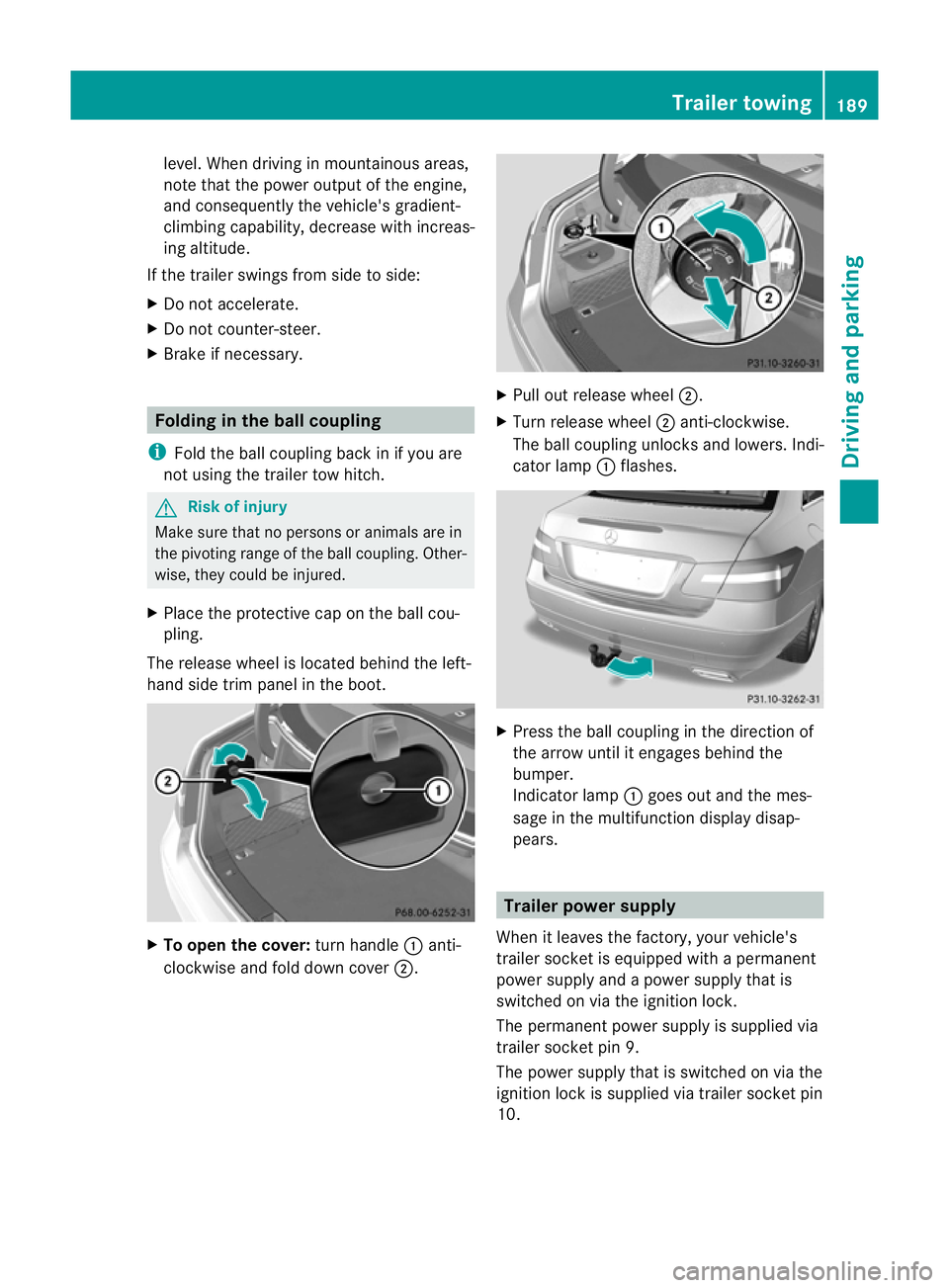
The release wheel is located behin dthe lef t-
hand side trim pane linthe boot. X
To ope nthe cover: turnh andle :anti-
cloc kwise and fold down cover ;. X
Pull out release wheel ;.
X Turn release wheel ;anti-clockwise.
The ball couplin gunlock sand lowe rs.Ind i-
cator lamp :flashes. X
Press th eball couplin gint he direction of
th ea rrow until it engage sbehin dthe
bumper.
Indicato rlamp :goes out and the mes-
sage in the multifunction display disap-
pears. Trailer power supply
When it leaves the factory, your vehicle's
trailer socket is equipped wit hapermanent
power supply and apower supply that is
switched on via the ignition lock.
The permanen tpower supply is supplied via
trailer socket pin 9.
The power supply that is switched on via the
ignition lock is supplied via trailer socket pin
10. Trailer towing
189Driving and parking
BA 20 7ECE ÄJ 2010/1a; 1; 2, en-GB
mkalafa Version: 3.0.2.11 2010-01-26T13:03:22+01:00-Seite 189 Z
Page 196 of 333
Outsid
etemperature display
The outside temperature display is in the mul-
tifunction display. G
Risk of accident
At temperatures just above freezing point ,the
str eetm ay be icy, especially in woode dareas
or on bridges .Ifyou do not adapt your driving
style to the conditions, th evehicle could skid.
For this reason ,adapt your driving style and
speed to the weather conditions.
Changes in the outside temperatur eare dis-
played afte rashort delay. Speedomete
rwith segments
The segments in the speedometer indicate
which speed range is available.
Cruise control mode:
The segments light up from the stored speed
to the maximum speed.
Variable SPEEDTRONI Cmode:
The segments light up from the star tofthe
scal etot he selected limit speed.
DI ST RONIC PLUS mode:
One or two segments around the stored
speed ligh tup. Opera
ting th eon-board computer
The on-board computer is activated as soon
as you tur nthe key to position 1in the ignition
lock.
You can con trolthe multifunction display and
the setti ngsint he on-boar dcomputer using
the buttons on the multifunction steering
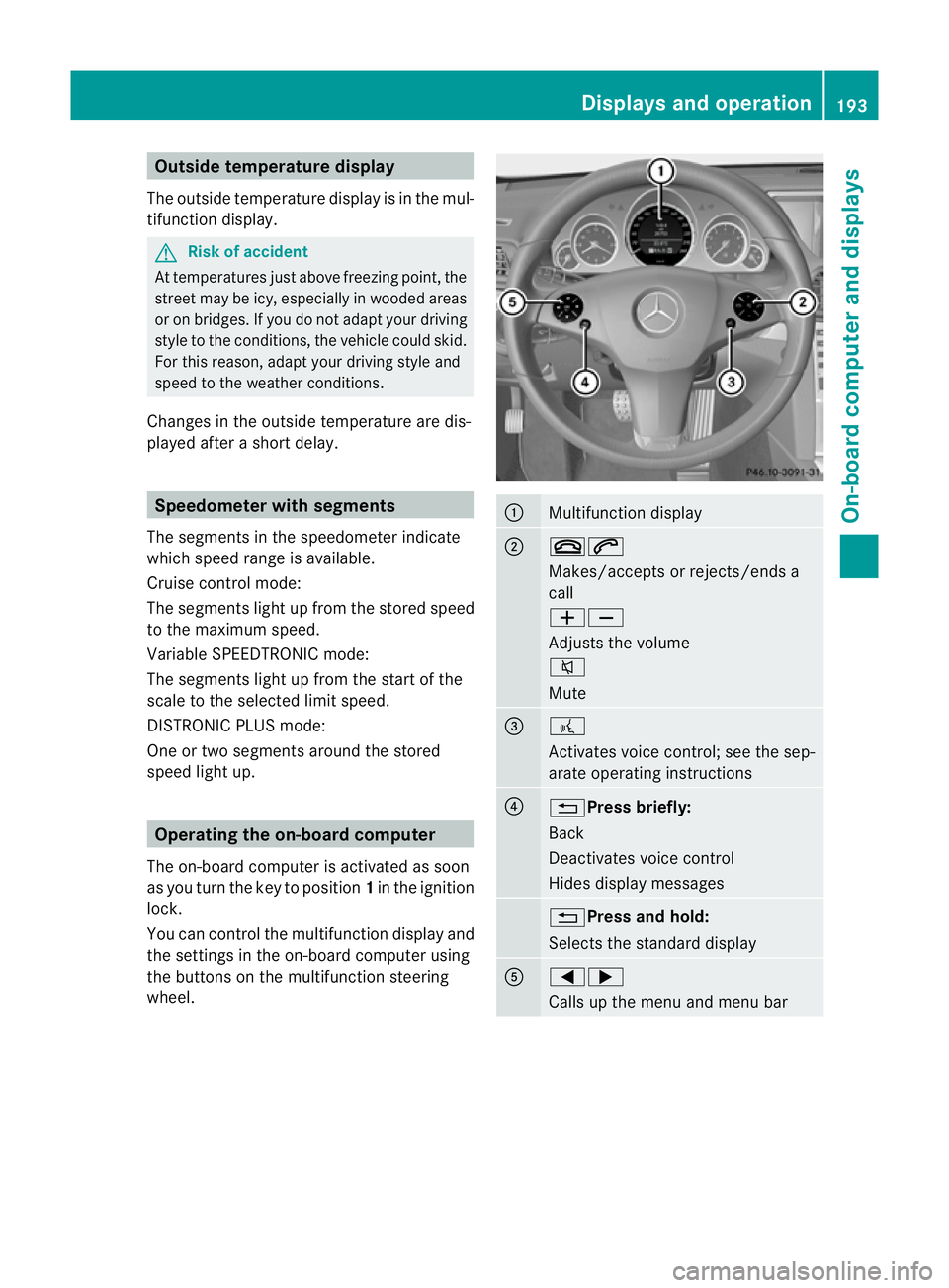
wheel. :
Multifunction display
;
~6
Makes/accepts or rejects/ends a
call
WX
Adjusts the volume
8
Mute
=
?
Activates voic
econtrol; see the sep-
arate operatin ginstructions ?
%Press briefly:
Back
Deactivate
svoice con trol
Hide sdispla ymessages %Press and hold:
Selects the standard display
A
=;
Calls up the men
uand menu bar Displays and operation
193On-board computer and displays
BA 207 ECE ÄJ 2010/1a; 1; 2, en-GB
mkalafa Version: 3.0.2.11 2010-01-26T13:03:22+01:00 -Seite 193 Z
Page 197 of 333
9:Pres
sbriefly:
Selects the submenu or scrolls
throug hlists
In the Audio menu: selects astored
station, an audi otrack or avideo
scene
In the Tel(telephone) menu:
switches to the phone book and
selects aname or telephone number 9:
Press and hold:
In the Audio menu: selects the pre-
vious/next station or selects an
audi otrack or avideo scene using
rapid scrolling.
In the Tel(telephone) menu: starts
rapid scrolling through the phone
book a
Confirms selections and hides dis-
play messages
In the
Tel(telephone) menu:
switches to the phone book and
starts dialling Multifunction display
To activate the multifunction display:
R switch on the ignition.
R switch on the lights.
R open the driver's door.
Values and settings as well as displa ymes-
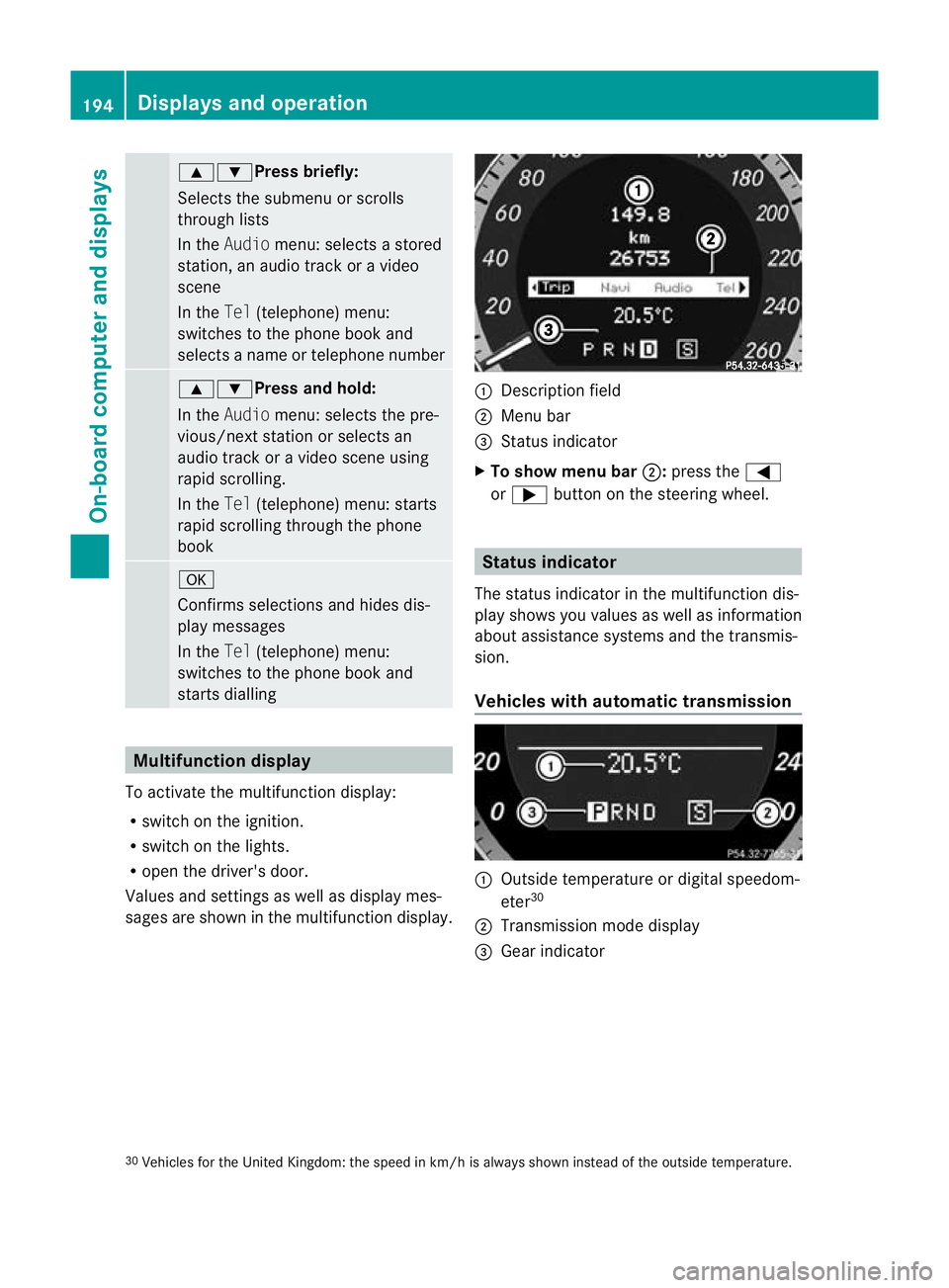
sages are shown in the multifunction display. :
Description field
; Menu bar
= Status indicator
X To show menu bar ;:press the =
or ; button on the steerin gwheel. Statu
sindicator
The status indicator in the multifunction dis-
play shows you values as well as information
about assistanc esystems and the transmis-
sion.
Vehicle swith automatic transmission :
Outside temperatur eordigital speedom-
eter 30
; Transmission mode display
= Gear indicator
30 Vehicles for the United Kingdom: the speed in km/ hisalways shown instead of the outside temperature. 194
Displays and operationOn-board computer and displays
BA 207 ECE ÄJ 2010/1a; 1; 2, en-GB
mkalafa
Version:3.0.2.11
2010-01-26T13:03:22+01:0
0-Seite 194
Page 200 of 333
Trip menu
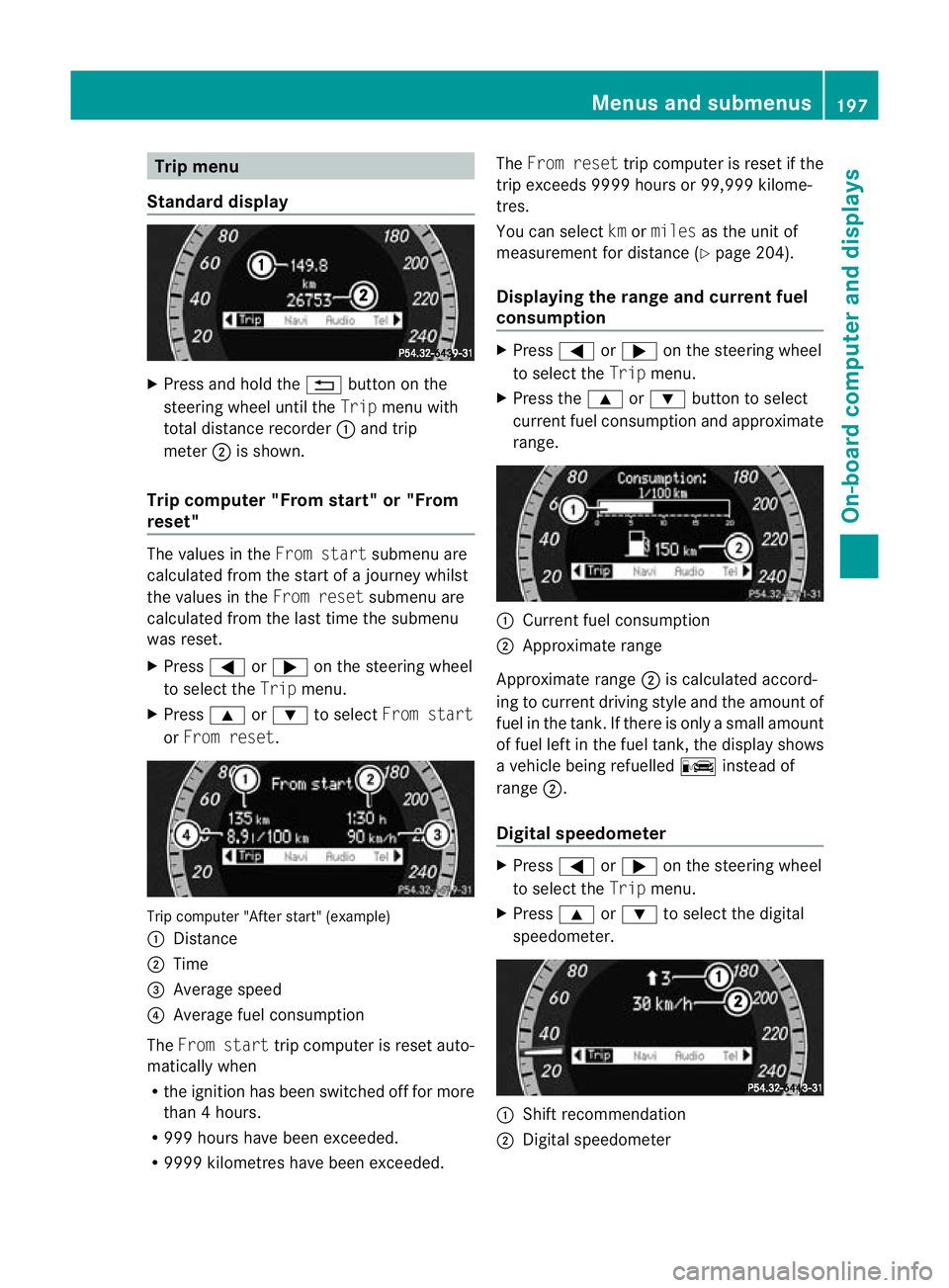
Standard display X
Press and hol dthe % button on the
steering whee lunti lthe Trip menuwith
tota ldistance recorder :and trip
meter ;is shown.
Trip computer "Fro mstart" or "From
reset" The val
uesint heFrom start submenu are
calculate dfromt he star tofajourney whilst
the values in the Fromreset submenu are
calculated fro mthe last tim ethe submenu
was reset.
X Press =or; on the steering wheel
to selec tthe Trip menu.
X Press 9or: to select From start
or From reset. Tri
pc omputer "After start" (example)
: Distan ce
; Time
= Average speed
? Average fue lconsumption
The From start trip computer is reset auto-
matically when
R the ignition has been switched off for more
than 4hours.
R 99 9h our shave been exceeded.
R 999 9kilometres have been exceeded. The
From reset trip computer is reset if the
trip exceeds 999 9hour sor99,999 kilome-
tres.
Yo uc an select kmormiles as the unit of
measurement for distance (Y page 204).
Displaying the range and current fuel
consumption X
Press =or; on the steering wheel
to select the Tripmenu.
X Press the 9or: button to select
current fuel consumption and approximate
range. :
Current fuel consumption
; Approximate range
Approximate range ;is calculated accord-
ing to current driving style and the amount of
fuel in the tank .Ifthere is only asmall amount
of fue lleft in the fuel tank ,the display shows
av ehicle being refuelled Cinstead of
range ;.
Digital speedometer X
Press =or; on the steerin gwheel
to selec tthe Trip menu.
X Press 9or: to selec tthe digital
speedometer. :
Shif trecommendation
; Digita lspeedometer Menus and submenus
197On-board computer and displays
BA 207ECE ÄJ 2010 /1a;1;2,e n-GB
mkalafa Version: 3.0.2.11 2010-01-26T13:03:22+01:00-Seite 197 Z
Page 201 of 333
i
If th egearshift recommendation is shown
in the multif unctio ndisplay ,itisn ot shown
in the status bar.
Further information on gearshift recommen-
dation s(Ypage 142).
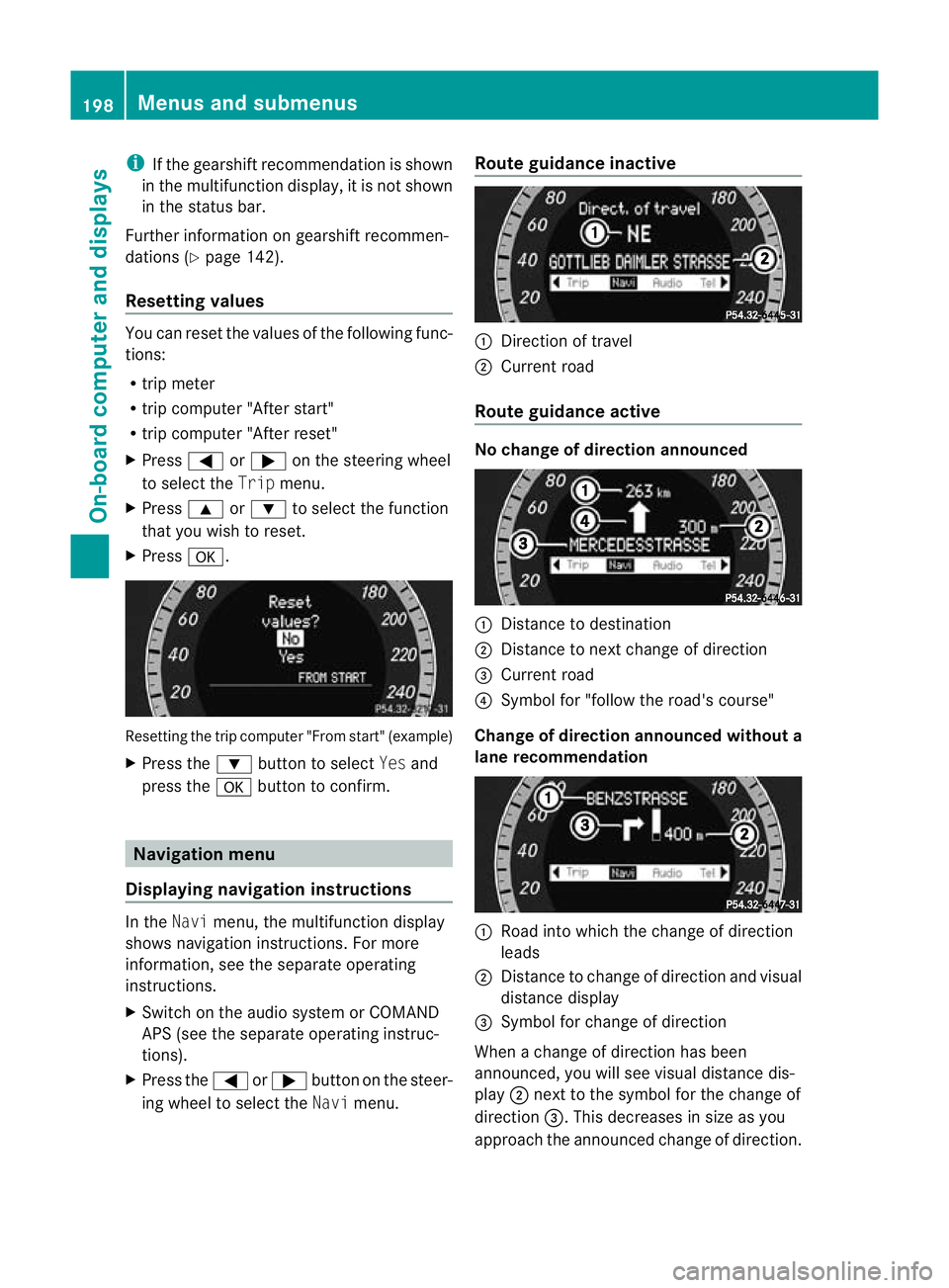
Resetting values You can reset the values of the following func-
tions:
R tripm eter
R trip computer "After start"
R trip computer "After reset"
X Press =or; on the steerin gwheel
to selec tthe Trip menu.
X Press 9or: to selec tthe function
that you wish to reset.
X Press a. Resetting the trip computer "From start" (example)
X Press the :button to select Yesand
press the abutton to confirm. Navigation menu
Displaying navigation instructions In the
Navimenu, the multifunction display
shows navigation instructions. For more
information, see the separat eoperating
instructions.
X Switch on the audio system or COMAND
APS (see the separat eoperating instruc-
tions).
X Press the =or; button on the steer-
ing whee ltoselect the Navimenu. Route guidance inactive :
Direction of travel
; Curren troad
Route guidance active No change of direction announced
:
Distanc etodestination
; Distance to next change of direction
= Curren troad
? Symbol for "follow the road's course"
Change of direction announced without a
lane recommendation :
Road int owhich the change of direction
leads
; Distanc etochange of direction and visu al
distanc edisplay
= Symbol for change of direction
When achange of direction has been
announced, you will see visu al distancedis-
play ;nex ttot he symbol for the change of
direction =.This decreases in size as you
approach the announced change of direction. 198
Menu
sand submenusOn-board computer and displays
BA 20 7ECE ÄJ 2010 /1a;1;2,e n-GB
mkalafa Version: 3.0.2.11 2010-01-26T13:03:22+01:00-Seite 198
Page 202 of 333
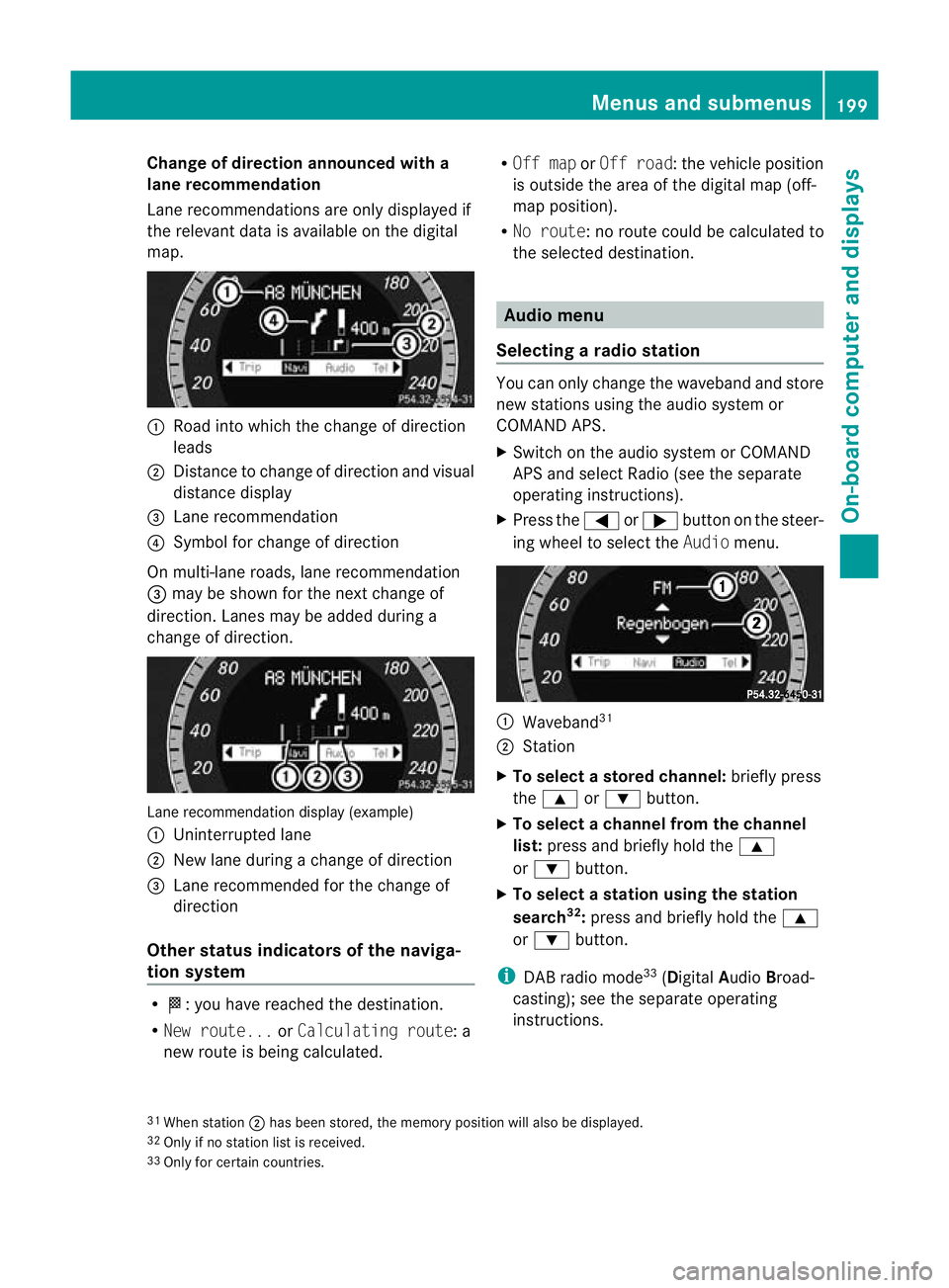
Change of direction announced with a
lane recommend
ation
Lan erecommendations are only displaye dif
the relevan tdata is available on thed igital
map. :
Road into which the change of direction
leads
; Distanc etochange of direction and visual
distanc edisplay
= Lane recommendation
? Symbol for change of direction
On multi-lane roads, lane recommendation
= may be shown for the next change of
direction. Lanes may be added during a
change of direction. Lan
erecommendation display (example)
: Uninterrupted lane
; New lane durin gachange of direction
= Lane recommended for the change of
direction
Other sta tusindicators of the naviga-
tion system R
O:y ou have reached the destination.
R Ne wr oute... orCalculating route:a
new route is being calculated. R
Off map orOff road :the vehicle position
is outside the area of the digital ma p(off-
ma pp osition).
R No route :noroute coul dbecalculated to
the selected destination. Audio menu
Selectin garadio station Yo
uc an only change the waveband and store
new stations using the audio system or
COMAND APS.
X Switch on the audio system or COMAND
APS and select Radio (se ethe separate
operating instructions).
X Press the =or; button on the steer-
ing wheel to select the Audiomenu. :
Wav eband 31
; Station
X To selec tastoredchann el:briefly press
the 9 or: button.
X To select achann elfrom the chan nel
list: press and briefly hold the 9
or : button.
X To select astatio nusing th estation
search 32
:press and briefl yholdt he 9
or : button.
i DAB radio mode 33
(Digit alAudio Broad-
castin g);s ee the separate operating
instructions.
31 Whe nstation ;hasb eens tored ,the memor yposition will also be displayed.
32 Only if no statio nlist is received.
33 Only for certain countries. Menus and submenus
199On-boardcomputer and displays
BA 20 7ECE ÄJ 2010/1a; 1; 2, en-GB
mkalaf aV ersion: 3.0.2.11
2010-01-26T13:03:22+01:00
-Seite 199 Z