brake MERCEDES-BENZ E-CLASS COUPE 2009 Owner's Manual
[x] Cancel search | Manufacturer: MERCEDES-BENZ, Model Year: 2009, Model line: E-CLASS COUPE, Model: MERCEDES-BENZ E-CLASS COUPE 2009Pages: 313, PDF Size: 7.76 MB
Page 69 of 313
004B
Ignition (power supply for all consumers)
and drive position
004C To start the engine
i Even if the key is not for the vehicle in
question, it wills till turn in the ignition lock.
The ignition is not switched on. The engine
cannot be started. KEYLESS-GO*
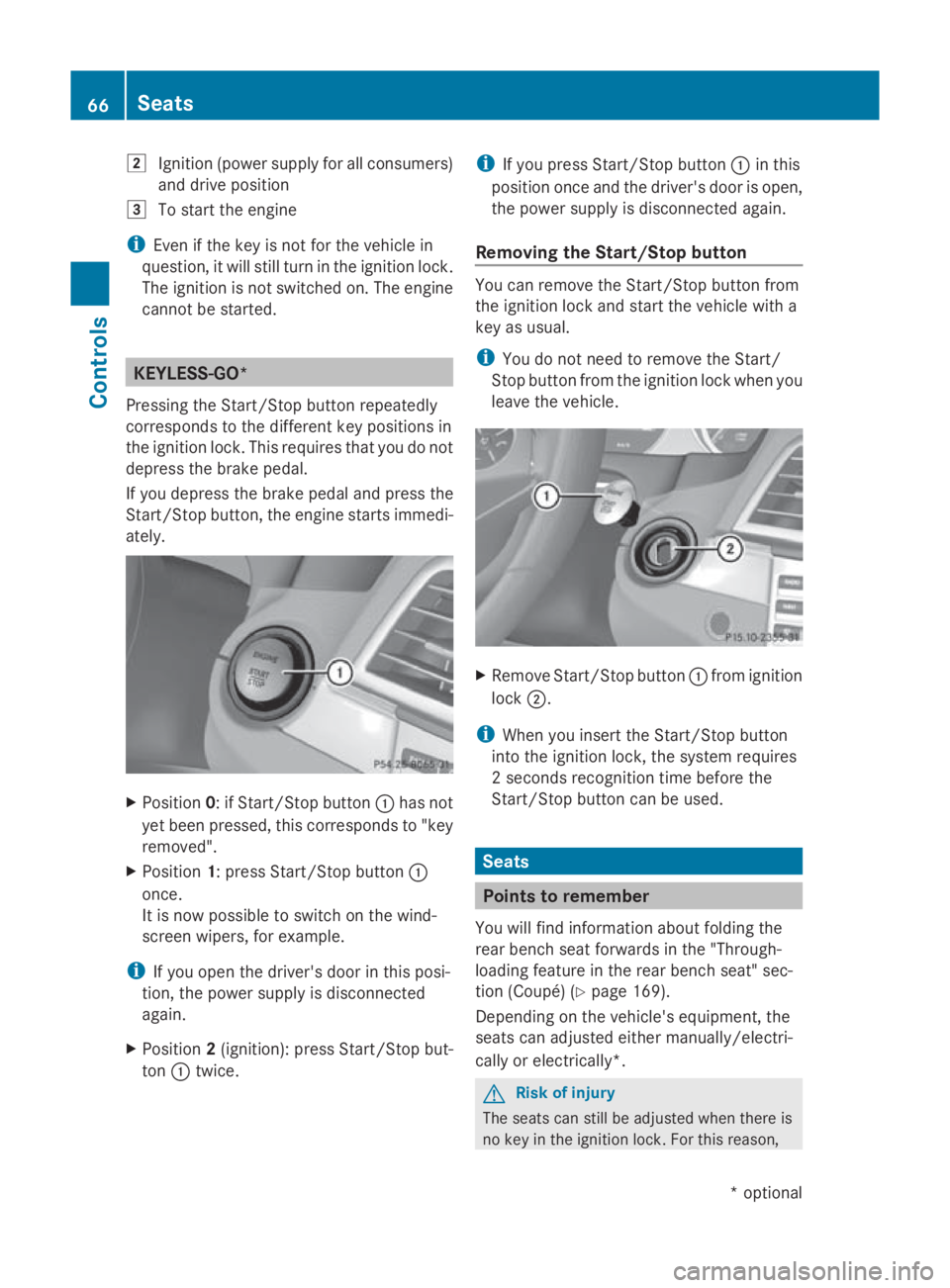
Pressing the Start/Stop button repeatedly
corresponds to the different key positions in
the ignition lock. This requires that you do not
depres sthe brake pedal.
If you depres sthe brake pedala nd press the
Start/Stop button, the engine starts immedi-
ately. X
Position 0:ifStart/Stop button 0046has not
yet been pressed ,this corresponds to "key
removed".
X Position 1:press Start/Stop button 0046
once.
It is now possible to switch on the wind-
screen wipers, for example.
i If you open the driver's door in this posi-
tion, the powers upply is disconnected
again.
X Position 2(ignition): press Start/Stop but-
ton 0046twice. i
If you press Start/Stop button 0046in this
positio nonce and the driver's door is open,
the powers upply is disconnected again.
Removing the Start/Stop button You can remove the Start/Stop button from
the ignition lock and start the vehicle with a
key as usual.
i
You do not need to remove the Start/
Stop button from the ignition lock when you
leave the vehicle. X
Remove Start/Stop button 0046from ignition
lock 0047.
i When you insert the Start/Stop button
into the ignition lock, the system requires
2s econds recognition time before the
Start/Stop button can be used. Seats
Points to remember
You willf ind information aboutf olding the
rear bench seat forward sinthe "Through-
loading feature in the rear bench seat" sec-
tion (Coupé) (Y page 169).
Depending on the vehicle's equipment, the
seats can adjusted either manually/electri-
cally or electrically*. G
Risk of injury
The seats can still be adjusted when there is
no key in the ignition lock. For this reason, 66
SeatsControls
*o
ptional
207_AKB; 2; 3, en-GB
mkalafa
,V ersion: 2.11.8.1
2009-07-23T10:23:49+02:00
-Seite 66
Page 88 of 313
The hazard warning lamps automatically
switch on if:
R
an airbag is deployed.
R you brake sharply and bring the vehicle to
ah alt from aspeed of more than
70 km/h.
The hazard warning lamps still operate if the
ignition is switched off.
X To switch on: press button0046.
All turn signals flash.
X To switch off: press button0046.
X To switch off the hazard warning lamps
using the combination switch: if the haz-
ard warning lamps are on, push the combi-
nation switch in the direction of arrow 0071
or 0073 beyond the pressure point
(Y page 82).
The indicator lamp on the corresponding
side of the vehicle flashes.
The hazard warning lamp switches off auto-
matically after full brake application if the
vehicle then reaches aspeed of over
10 km/ha gain.
Intelligent Light System* (bi-xenon
headlamps*) The Intelligent Light System is
asystem which
adjusts the headlamps automatically to suit
the prevailing driving and weather conditions.
The bi-xenon headlamps offer enhanced func-
tions to improve illumination of the road sur-
face, e.g. depending on the vehicle speed or
weather conditions. The system includes the
active light function, cornering light function,
motorway mode and extended range fog-
lamps. The system is only active when it is
dark.
You can activat eordeactivate the "Intelligent
Light System" using the on-board computer
(Y page 119). Active light function
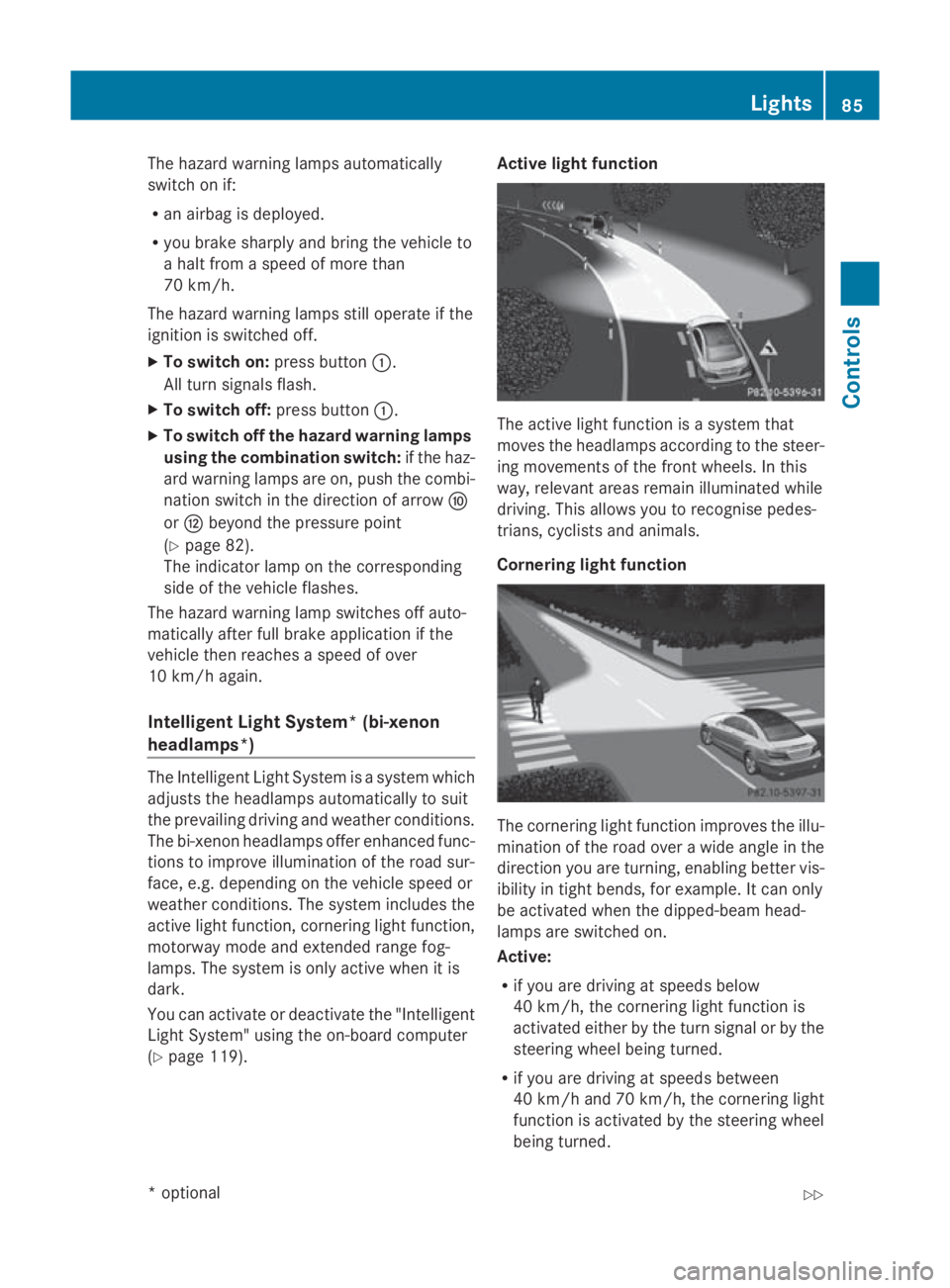
The active light function is
asystem that
moves the headlamps accordin gtothe steer-
ing movements of the frontw heels. In this
way, relevant areas remain illuminated while
driving. This allows you to recognise pedes-
trians, cyclists and animals.
Cornering light function The cornering light function improves the illu-
mination of the road over
awide angle in the
direction you are turning, enabling better vis-
ibility in tight bends, for example. It can only
be activated when the dipped-beam head-
lamps are switched on.
Active:
R if you are driving at speeds below
40 km/h, the cornering light function is
activated either by the turn signal or by the
steerin gwheel being turned.
R if you are driving at speeds between
40 km/ha nd 70 km/h ,the cornerin glight
function is activated by th esteering wheel
bein gturned. Lights
85Controls
*optional
207_AKB
;2;3,en-GB
mkalafa ,V ersion: 2.11.8.1
2009-07-23T10:23:49+02:00
-Seite 85 Z
Page 94 of 313
Turn signals
X
To indicate briefly: press the combination
switch briefl yinthe direction of arrow 0070
or 0072 (Ypage 88).
The corresponding tur nsigna lflashe sthree
times.
X To indicate: push the combinatio nswitch
beyond the pressure point in the direction
of arrow 0070or0072 (Ypage 88).
The corresponding tur nsigna lindicator
lamp 0024 or0026 in the instrument clus-
ter flashes.
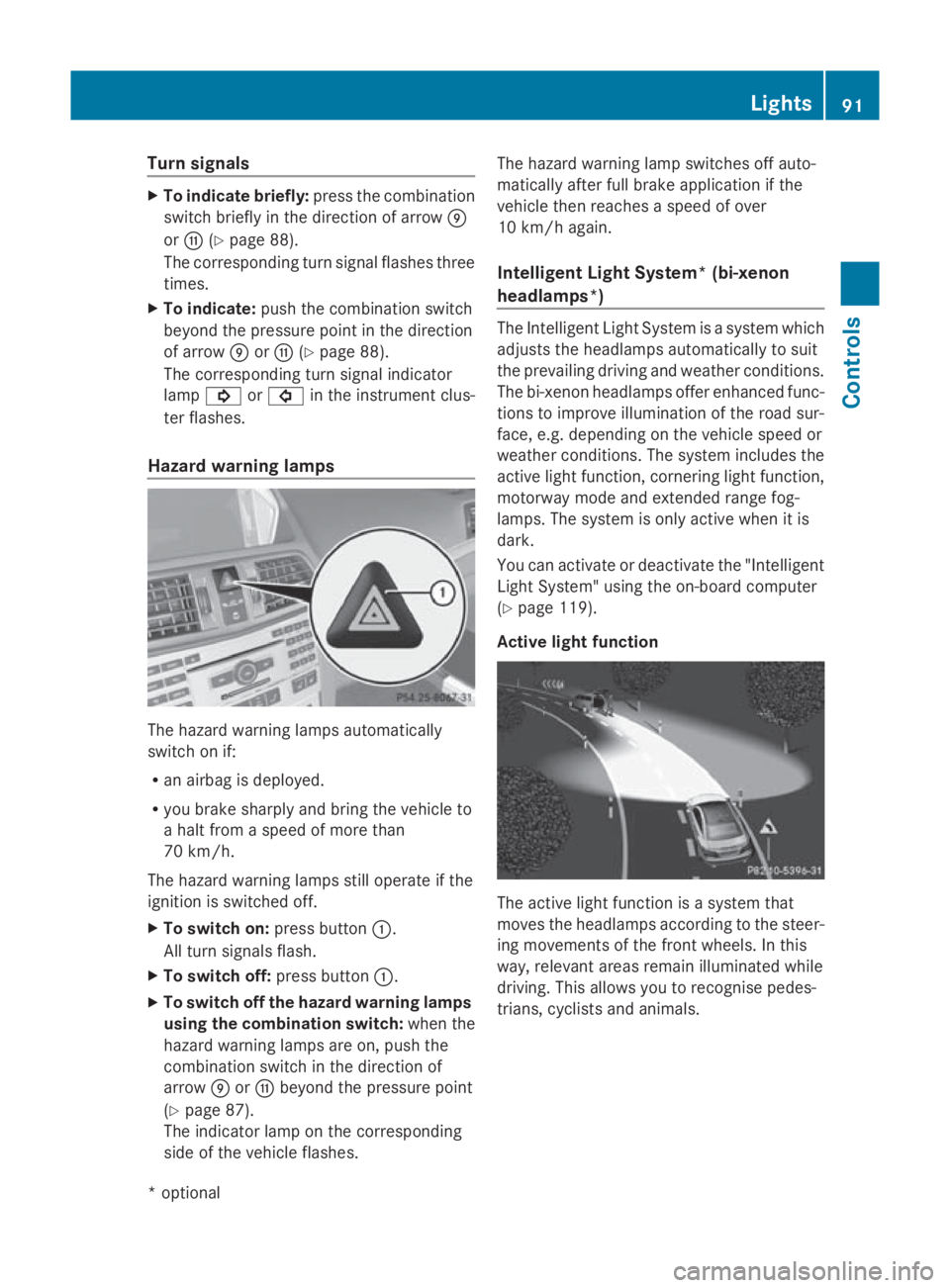
Hazard warning lamps The hazar
dwarnin glam ps automatically
switch on if:
R an airba gisdeployed.
R yo ub rake sharpl yand bring the vehicl eto
ah altf romas peed of mor ethan
70 km/h.
The hazar dwarnin glam ps still operate if the
ignition is switched off.
X To switc hon:press button 0046.
All tur nsignals flash.
X To switc hoff:press button 0046.
X To switc hoffthe hazard warning lamps
using the combination switch: when the
hazar dwarnin glam ps ar eon, push the
combinatio nswitch in the direction of
arrow 0070or0072 beyond the pressure point
(Y page 87).
The indicator lamp on the corresponding
side of the vehicl eflashes. The hazar
dwarnin glam pswitches off auto-
maticall yafter full brake applicatio nifthe
vehicl ethenr eache saspeed of over
10 km/h again.
Intelligent Light System* (bi-xenon
headlamps*) The Intelligent Light System is
asystem which
adjusts the headlamps automaticall ytosuit
the prevailing driving and weather conditions.
The bi-xeno nheadlam ps offer enhance dfun c-
tions to improv eillum ination of the roa dsur-
face, e.g .depen ding on the vehicl espeed or
weather conditions. The system includes the
active light function, cornering light function,
motorway mod eand extende drange fog-
lamps .The system is onl yactive when it is
dark.
Yo uc an activate or deactivate the "Intelligent
Light System" using the on-board computer
(Y page 119).
Activ elight function The active light functio
nisas ystem that
moves the headlamps according to the steer-
ing movements of the front wheels .Inthis
way, relevant area sremai nillum inate dwhile
driving .Thisa llow syou to recognise pedes-
trians, cyclists and animals. Lights
91Controls
*optional
207_AKB; 2; 3, en-GB
mkalafa
,V ersion: 2.11.8.1
2009-07-23T10:23:49+02:00
-Seite 91 Z
Page 101 of 313
Drivin
gand parking Starting th
eengine G
Risk of accident
Do no tplac ea ny objects in th edriver's foot-
well. If you use afloormat or carpet in the
driver's footwell, mak esuret hatitisc orrectly
secure dand that there is sufficien tclearance
fo rt he pedals.
Do no tplac es evera lfloormat sontopof one
another.
Loose objects or th efloormat scould other-
wise get caught between th epedals if you
accelerat eorbrake suddenly. You will then
no tbea ble to brake ,declutch or accelerate
as intended. Thi scould lead to accidents and
injury. G
Risk of poisoning
Never leav ethe engin erunning in enclosed
spaces. The exhaus tgases contain carbon
monoxide. Inhaling exhaus tfumes consti-
tute sah ealth hazard and could lead to loss
of consciousness or eve ndeath.
! Do no tdepress th eaccelerator pedal
when startin gthe engine.
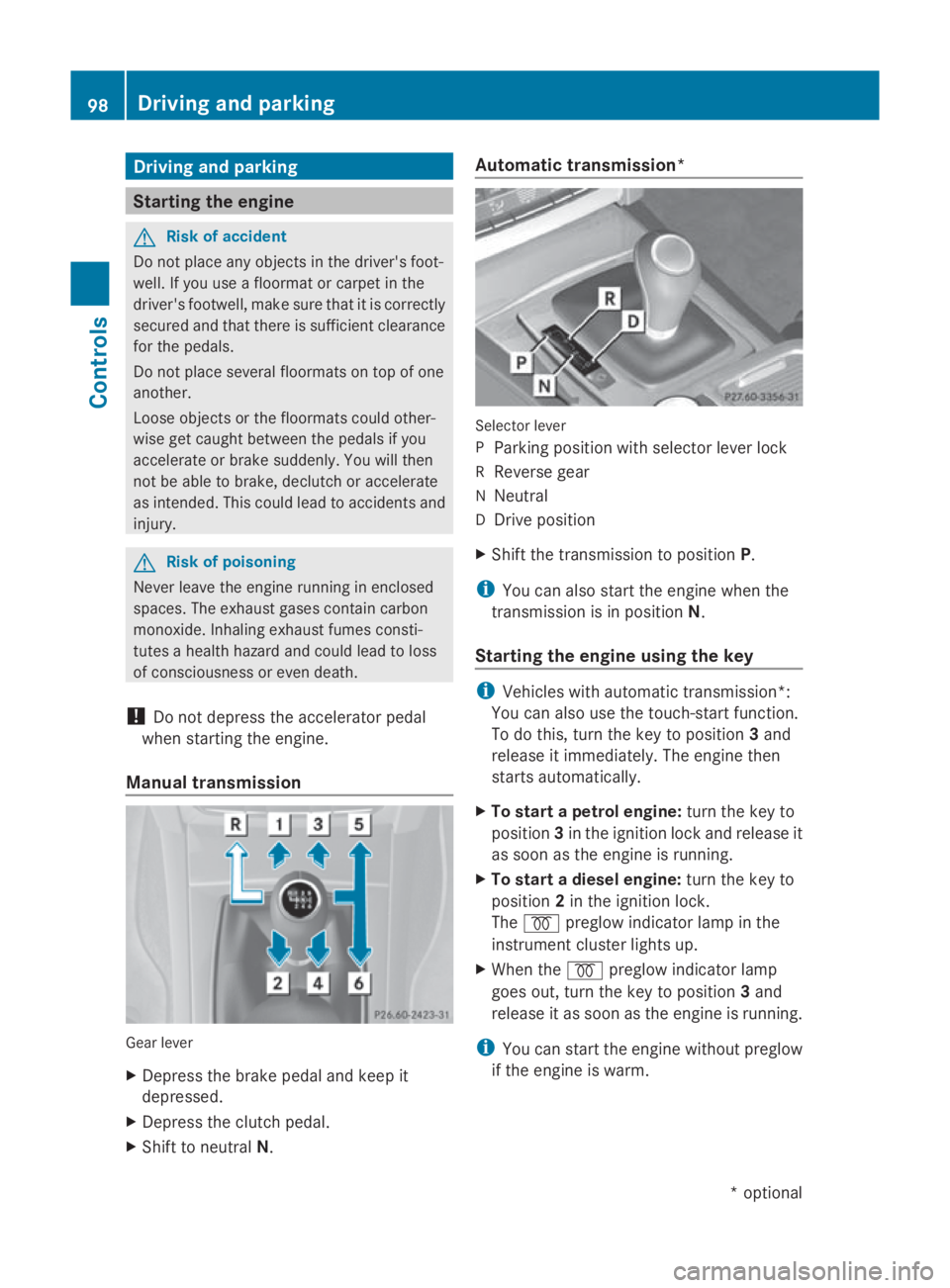
Manual transmission Gear lever
X
Depress th ebrake peda land keep it
depressed.
X Depress th eclutc hpedal.
X Shift to neutral N. Automatic transmission*
Selecto
rlever
P Parking position wit hselecto rlever lock
R Revers egear
N Neutral
D Drive position
X Shift th etransmissio ntoposition P.
i You can also start th eenginew hen the
transmissio nisinpositionN.
Starting th eengin eusing th ekey i
Vehicles wit hautomatic transmission*:
You can also use th etouch-start function.
To do this, turn th ekeyto position 3and
release it immediately. The engin ethen
start sautomatically.
X To star tapetrolengine: turn thekeyto
position 3in th eignition loc kand release it
as soo nastheengin eisrunning.
X To star tadiesel engine: turn thekeyto
position 2in th eignition lock.
The 0028 preglo windicator lamp in the
instrumen tcluster lights up.
X Whe nthe 0028 preglo windicator lamp
goe sout,tur nt he keyt op osition 3and
release it as soo nastheengin eisrunning.
i You can start th eenginew ithout preglow
if th eengineisw arm. 98
Driving an
dpark ingCont rols
*optio nal
207_AKB; 2; 3, en-GB
mkalafa
,V ersion: 2.11.8.1
2009-07-23T10:23:49+02:00
-Seite 98
Page 102 of 313
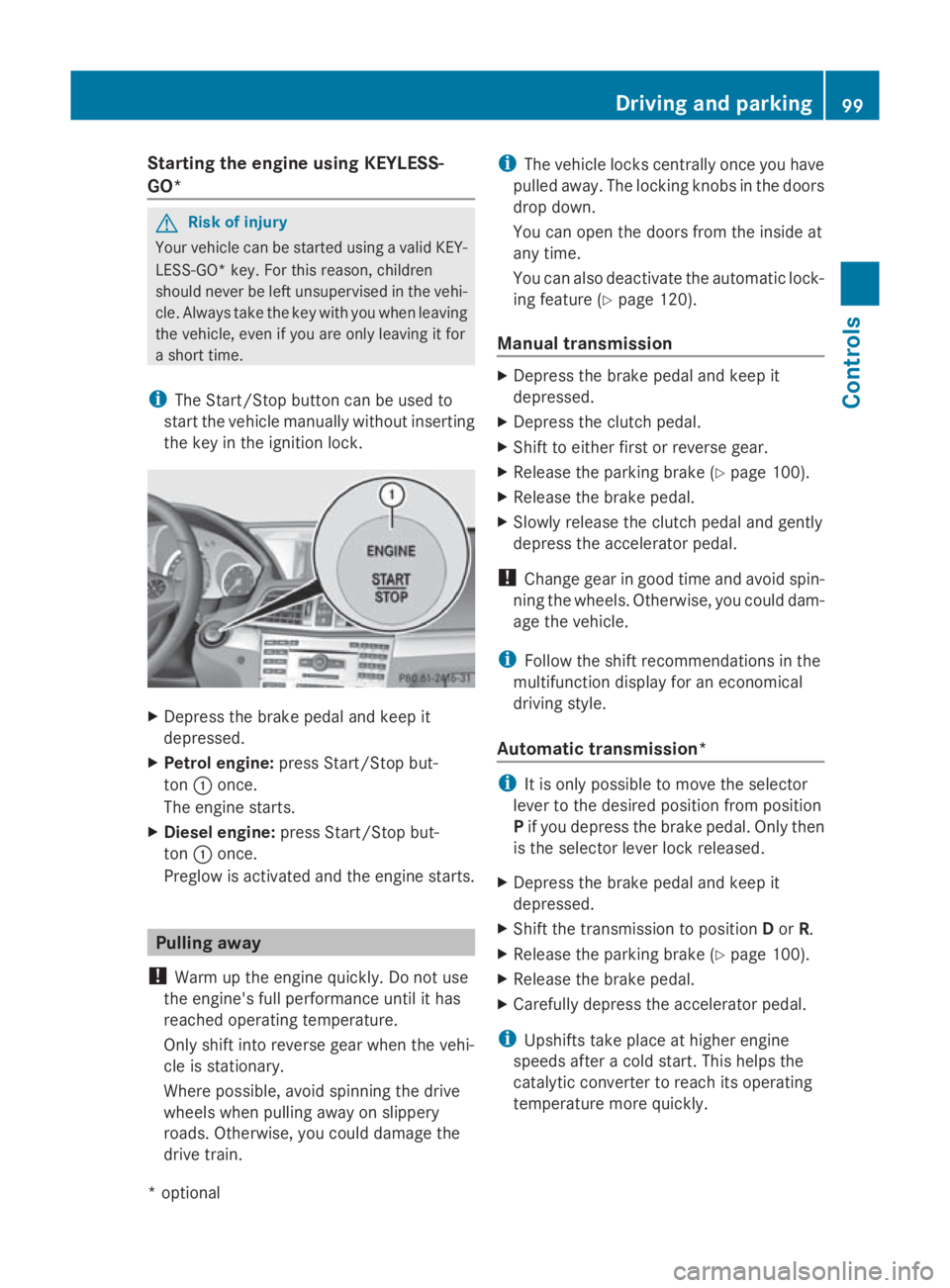
Starting the engine using KEYLESS-
GO* G
Risk of injury
Your vehicle can be started using avalid KEY-
LESS-GO* key. For this reason, children
should never be left unsupervised in the vehi-
cle. Always take the key with you when leaving
the vehicle, even if you are only leaving it for
as hort time.
i The Start/Stop button can be used to
start the vehicle manually without inserting
the key in the ignition lock. X
Depress the brake pedal and keep it
depressed.
X Petrol engine: press Start/Stop but-
ton 0046once.
The engine starts.
X Diesele ngine:press Start/Stop but-
ton 0046once.
Preglow is activated and the engine starts. Pulling away
! Warm up the engine quickly. Do not use
the engine's full performanc euntil it has
reached operating temperature.
Only shift into reverse gear when the vehi-
cle is stationary.
Where possible, avoid spinning the drive
wheels when pulling away on slippery
roads. Otherwise, you could damage the
drive train. i
The vehicle locks centrally once you have
pulleda way.The locking knobs in the doors
drop down.
You can open the doors from the inside at
any time.
You can also deactivate the automatic lock-
ing feature (Y page 120).
Manual transmission X
Depress the brake pedal and keep it
depressed.
X Depress the clutch pedal.
X Shift to either first or reverse gear.
X Release the parking brake (Y page 100).
X Release the brake pedal.
X Slowly release the clutch pedal and gently
depress the accelerator pedal.
! Change gear in good time and avoid spin-
ning the wheels. Otherwise, you could dam-
age the vehicle.
i Follow the shift recommendations in the
multifunction display for an economical
driving style.
Automatic transmission* i
It is only possible to move the selector
lever to the desired position from position
P if you depress the brake pedal. Only then
is the selector lever lock released.
X Depress the brake pedal and keep it
depressed.
X Shift the transmission to position Dor R.
X Release the parking brake (Y page 100).
X Release the brake pedal.
X Carefull ydepress the accelerator pedal.
i Upshifts take place at higher engine
speeds after acold start. This helps the
catalytic converter to reach its operating
temperature more quickly. Driving and parking
99Controls
*optional
207_AKB; 2; 3, en-GB
mkalafa,
Version: 2.11.8.1 2009-07-23T10:23:49+02:00-Seite 99 Z
Page 103 of 313
Hill start assist
Hill start assist help
syou when pulling away
forwards or in reverse on an uphill gradient.
It hold sthe vehicl efor as hort time after you
have removed yourf oot from the brake pedal.
This gives you time to move yourf oot from
the brake peda ltothe accelerator peda land
depress it before the vehicl ebegins to roll. G
Risk of accident
Never leave the vehicl ewhen it is held by hill
start assist. After approximately one second,
hil lstart assist wil lnolonger brake yourv ehi-
cle and it coul droll away.
X Take yourf oot off the brake pedal.
i Once you have taken yourf oot off the
brake pedal, the vehicl eisheld for around
one second.
X Pulla way.
Hill start assist willn ot function if:
R you are pulling away on aleve lroad or a
downhill gradient.
R on vehicles with automatic transmission*,
the transmission is in position N.
R the vehicl eissecure dwith the parking
brake.
R ESP ®
is malfunctioning. Parking
G
Risk of accident
Only remove the key from the ignitio nlock
when the vehicl eisstationary, as you cannot
steer the vehicl ewhen the key is removed.
Never leave children unsupervised in the vehi-
cle. They coul drelease the parking brake. This
coul dleadtoas erious or fatal accident. G
Risk of fire
Make sure that the exhaust system does not
under any circumstances come into contact
with easily ignitable material such as dry grass or petrol
.Otherwise, the flammable material
may ignite and set the vehicl eonfire.
To ensure that the vehicl eissecure dagainst
rolling away unintentionally:
R the parking brake must be applied
R on vehicles with manua ltransmission,
engag efirst gearorr everse gear
R on vehicles with automatic transmission*,
the transmission must be in position Pand
the key must be removed from the ignition
lock
R on steep uphill or downhill gradients, turn
the front wheels toward sthe kerb
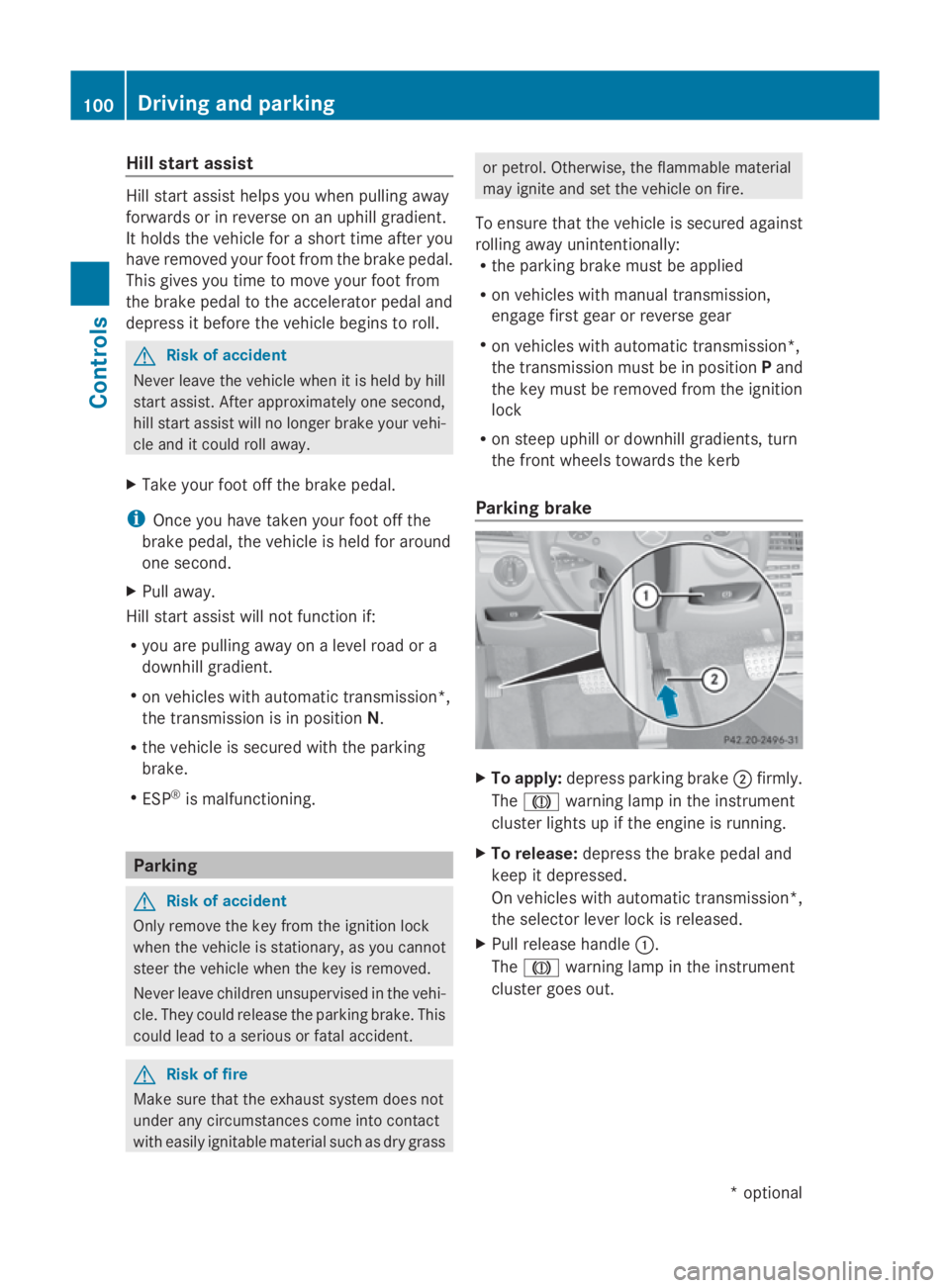
Parking brake X
To apply: depress parking brake 0047firmly.
The 004D warning lampint he instrument
cluster lights up if the engine is running.
X To release: depress the brake peda land
keep it depressed.
On vehicles with automatic transmission*,
the selector leve rlock is released.
X Pullr elease handle 0046.
The 004D warning lampint he instrument
cluster goes out. 100
Driving and parkingControls
*o
ptional
207_AKB; 2; 3, en-GB
mkalafa,
Version: 2.11.8.1 2009-07-23T10:23:49+02:00-Seite 100
Page 104 of 313
Switching off the engine
G
Risk of accident
If the engine is not running, there is no power
assistance for the steering and brakes. Steer-
ing and braking will then require significantly
greater effort.
As aresult, you might lose control of the vehi-
cle, cause an accident and injure yourself and
others.
Therefore, do not switch off the engine while
you are driving.
Vehicles with manualt ransmission X
Shift to either first or reverse gear.
X Turn the key to position 0in the ignition
lock and remove it.
The immobiliser is activated.
Vehicles with automatic transmission* X
Shift the transmission to position P.
Using the key
X Turn the key to position 0in the ignition
lock and remove it.
The immobiliser is activated.
i The key can only be removed when the
selector lever is in position P.
Using KEYLESS GO*
X Press the Start/Stop button (Y page 66).
The engine stops and all the indicator
lamps in the instrumen tcluster go out
(Y page 25).
i The engine can be turned off while the
vehicle is in motion by pressing and holding
the Start/Stop button for three seconds. Transmission
Notes on the transmission
G
Risk of accident
The movement of the pedals must not be
impaired in any way. Do not keep any objects
in the driver's footwell. Make sure that floor-
mats or carpets are correctly secured and
that there is sufficient clearance for the ped-
als.
Do not place several floormats on top of one
another. G
Risk of accident
Do not change down for additional engine
braking on aslippery road surface. This could
cause the drive wheels to lose their grip and
the vehicle could skid. This could cause you
to lose control of your vehicle and cause an
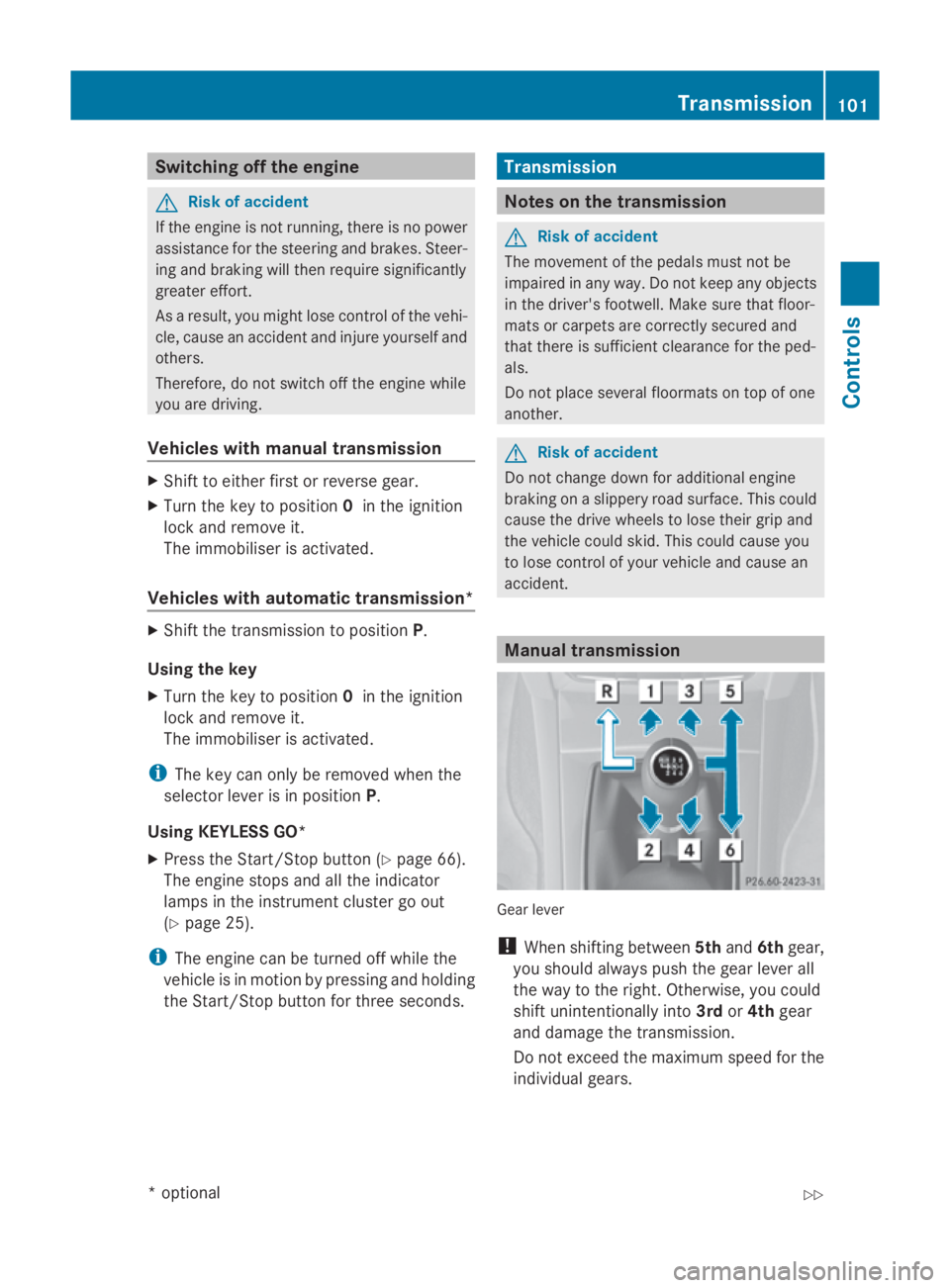
accident. Manual transmission
Gear lever
!
When shifting between 5thand 6thgear,
you should always push the gear lever all
the way to the right. Otherwise, you could
shift unintentionally into 3rdor4th gear
and damage the transmission.
Do not exceed the maximum speed for the
individual gears. Transmission
101Controls
*optional
207_AKB; 2; 3, en-GB
mkalafa,
Version: 2.11.8.1 2009-07-23T10:23:49+02:00-Seite 101 Z
Page 106 of 313
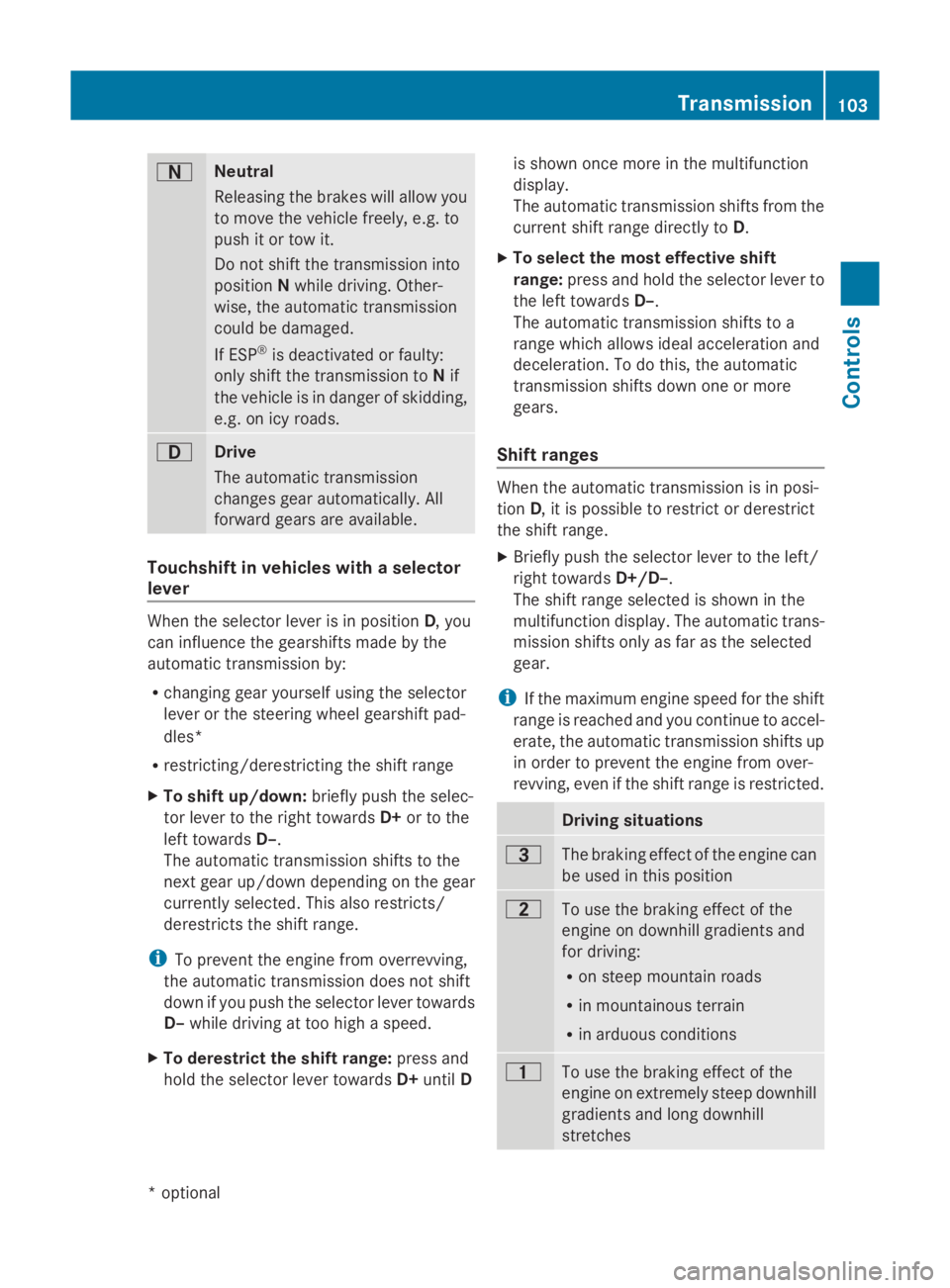
0044
Neutral
Releasing the brakes will allo
wyou
to mov ethe vehicl efreely, e.g .to
push it or tow it.
Do not shift the transmission into
position Nwhil edriving. Other-
wise ,the automatic transmission
could be damaged.
If ESP ®
is deactivated or faulty:
onl yshift the transmission to Nif
the vehicl eisindangerofs kidding,
e.g .oni cy roads. 003A
Drive
Th
ea utomatic transmission
change sgeara utomatically. All
forward gear sareavailable. Touchshift in vehicle
swithas elector
lever When the selector lever is in position
D,you
can influence the gearshifts made by the
automatic transmission by:
R changing gear yourself using the selector
lever or the steering whee lgears hift pad-
dles*
R restricting/derestricting the shift range
X To shift up/down: brieflypusht he selec-
tor lever to the right towards D+or to the
left towards D–.
Th ea utomatic transmission shifts to the
next gear up/down depending on the gear
currentl yselect ed.Thisa lsor estricts/
derestricts the shift range.
i To prevent the engine fro moverrevving,
the automatic transmission does not shift
down if yo upusht he selector lever towards
D– whil edrivin gatt oo high aspeed.
X To derestrict the shift range: press and
hol dthe selector lever towards D+until D is shown once mor
einthe multifunction
display.
Th ea utomatic transmission shifts fro mthe
current shift range directl ytoD.
X To select the mos teffec tive shift
range: press and hol dthe selector lever to
the left towards D–.
Th ea utomatic transmission shifts to a
range which allows idea lacceleratio nand
deceleration. To do this, the automatic
transmission shifts down one or more
gears.
Shift ranges When the automatic transmission is in posi-
tion
D,itisp ossibl etor estric torderestrict
the shift range.
X Briefl ypusht he selector lever to the left/
right towards D+/D–.
Th es hift range selected is shown in the
multifunctio ndisplay .The automatic trans-
mission shifts onl yasfaras the selected
gear.
i If the maximum engine spee dfor the shift
range is reache dand yo ucontinue to accel-
erate, the automatic transmission shifts up
in order to prevent the engine fro mover-
revving, eve nifthe shift range is restricted. Driving situations
0040
Th
eb raking effect of the engine can
be used in thi sposit ion 0038
To us
ethe braking effect of the
engine on downhil lgradients and
for driving:
R on steep mountai nroads
R in mountainou sterrain
R in arduou sconditions 0037
To us
ethe braking effect of the
engine on extremel ysteep downhill
gradients and long downhill
stretches Transmission
103Controls
*optional
207_AKB; 2; 3, en-GB
mkalafa
,V ersion: 2.11.8.1
2009-07-23T10:23:49+02:00
-Seite 103 Z
Page 118 of 313
Accepting
acall If someon
ecallsy ou and you are in the Tel
menu, adisplay message appear sinthe
multi-function display, for example: X
Press 006Aon thesteering whee ltoa ccept
an incoming call.
You can accept acall eve nifyou are no tin
the Telmenu.
Rejecting or ending acall X
Press the 007Fbuttonont hesteering
wheel.
You can en dorrejectacall eve nifyou are not
in the Telmenu.
Dialling anumber from th ephone book If your mobile phone is able to receiv
ecalls,
you can search for and dial anumber from the
phone book in th eaudio system or COMAND
APS* at any time.
X Copy th ephone book of your mobile phone
to th eaudio system or COMAND APS* ;see
th es eparat eoperating instruction sfor the
audio system or COMAND APS*.
X Press the 0040or003E buttononthesteer-
ing whee ltos elect the Telmenu.
X Press the 003C,003Dor0064 buttontocall
up th ephone book.
X Press the 003Cor003D buttontoselect the
desired name.
To scrol lrapidly, press and hold the 003C
or 003D buttonfor longer than on esecond.
Afte ras hort time, th erapi dscrolls peeds
up.
Rapid scrollin gstops when you release the
butto norr eachthe endoft helist. X
If only one telephone number is stored
for aname: press the 006Aor0064 button
to start dialling.
or
X If there is mor ethano ne number for a
particular name: press the006Aor0064
butto ntod isplay th enumbers.
X Press the 003Cor003D buttontoselect the
number you want to dial.
X Press the 006Aor0064 buttontostart dial-
ling.
or
X If you do not want to make acall: press
the 007F button.
Redialling The on-board computer saves th
elast names
or number sdialle dint heredial memory.
X Press the 0040or003E buttononthesteer-
ing whee ltos elect the Telmenu.
X Press the 006Abuttontos witch to the
redial memory.
X Press the 003Cor003D buttontoselect the
desired nam eornumber.
X Press the 006Aor0064 buttontostart dial-
ling. Assistance menu
R display Speed Limit Assist* (Y page 116)
R sho wthe distanc edisplay* ( Ypage 116)
R activate/deactivat ePRE-SAFE ®
Brake*
(Y page 116)
R activate/deactivat eATTEN TION ASSIST
(Y page 116)
Speed Limit Assist* In the
Speed Lim .Asst. function ,adetec-
te ds pee dlimi tisd isplayed under certain
conditions. You can set Speed Limit Assis tto
display adetecte dspee dlimi tautomatically On-boar
dcomputer
115Controls
*optio nal
207_AKB; 2; 3, en-GB
mkalafa
,V ersion: 2.11.8.1
2009-07-23T10:23:49+02:00
-Seite 115 Z
Page 119 of 313
for five seconds. Other messages in the multi-
function displayw
illbef adedout for this
length of time.
When Speed Limi tAssist is operational and
the message function is activated, the multi-
function displays howsthe 00BA symbol
whe nthe ignition is switched on.
Displaying Spee dLimi tAssist
X Press 0040or003E on the steering wheel
to select the Assist.menu.
X Press 003Cor003D to select Speed Lim.
Asst.
X Press the 0064button.
Speed Limi tAssist appears in the multi-
function display.
When aspee dlimi tisd etected, this
appears in the multi-function displayu ntil:
R the spee dlimi tcease stoa pply.
R you pas scity limits.
R the type of road changes ,e.g. motorway
or country road.
R the spee dlimi tisn ot detected anymore
after acertain distance.
Activating/deactivating the Spee dLimit
Assist messag efunction
X Press 0040or003E on the steering wheel
to select the Assist.menu.
X Press 003Cor003D to select Speed Lim.
Asst.
X Press the 0064button.
Speed Limi tAssist appears in the multi-
function display.
X Press the 003Dbutton.
The current selection is displayed.
X To activate or deactivate: press0064.
Ad etected spee dlimi tappears automati-
call yfor five seconds.
Showing the distanc edisplay* This function is only available with Distronic
Plus*. X
Press 0040or003E on the steering wheel
to select the Assist.menu.
X Press the 003Cor003D button to select
Distance display.
X Press the 0064button.
The Distronic Plus* distance display
appears in the multi-function display.
Activating/deactivating PRE-SAFE ®
Brake* This function is only available with Distronic
Plus*.
X
Press 0040or003E on the steering wheel
to select the Assist.menu.
X Press 003Cor003D to select PRE-SAFE
Brake.
X Press 0064.
The current selection is displayed.
X To activate or deactivate: press0064
again.
When PRE-SAFE ®
Brake is activated, the
multi-function displays howsthe 00C7 sym-
bol.
Activating/deactivating ATTENTION
ASSIST X
Press 0040or003E on the steering wheel
to select the Assist.menu.
X Press 003Cor003D to select the Atten‐
tion Asst. menu.
X Press 0064.
The current selection is displayed.
X To activate or deactivate: press0064
again.
When ATTENTION ASSIST is activated, the
00AF symbol appears in the multi-function
displayw hent he ignition is on. 116
On-board computerControls
*o
ptional
207_AKB; 2; 3, en-GB
mkalafa,
Version: 2.11.8.1 2009-07-23T10:23:49+02:00-Seite 116