display MERCEDES-BENZ E-CLASS ESTATE 2017 User Guide
[x] Cancel search | Manufacturer: MERCEDES-BENZ, Model Year: 2017, Model line: E-CLASS ESTATE, Model: MERCEDES-BENZ E-CLASS ESTATE 2017Pages: 585, PDF Size: 11.8 MB
Page 113 of 585
Using
them emor yfunction &
WARNING Risk of an accident if memo ry
function is use dwhile driving
If yo uu sethem emor yfunction on thed riv‐
er's side while driving, youc ould lose cont rol
of thev ehicle as aresult of thea djustments
being made. #
Onlyusethem emor yfunction on the
driver's side when thev ehicle is station‐
ar y. &
WARNING Risk of entrapment whe nset‐
ting thes eat wit hthe memor yfunction
If yo uu sethem emor yfunction tosetthe
seat or thes teering wheel, youa nd other
ve hicle occupants, especially children, could
be ent rapped. #
During thes etting procedur eofthe
memor yfunction, ensur ethat no body
parts ar einthe sweep of thes eat or
th es teering wheel. #
If somebody becomes trapped, immedi‐
atel yrelease them emor yfunction posi‐
tion button.
The adjustmen tprocess is stopped. &
WARNING Risk of entrapment if the
memor yfunction is activated bychildren
Children could becom etrapped if they acti‐
va te them emor yfunction ,particularly when
unattended. #
Neverlea ve children unat tende dint he
ve hicle. #
When leaving thev ehicle, alw ayst ake
th ek eywit hyou and loc kthe vehicle.
This also applies tomobil ephones if the
"Digital Car Keyint he smartphone"
function is activated via theM ercedes
connect me weba pp. The memor
yfunction can be used when thei gni‐
tion is switched off. St
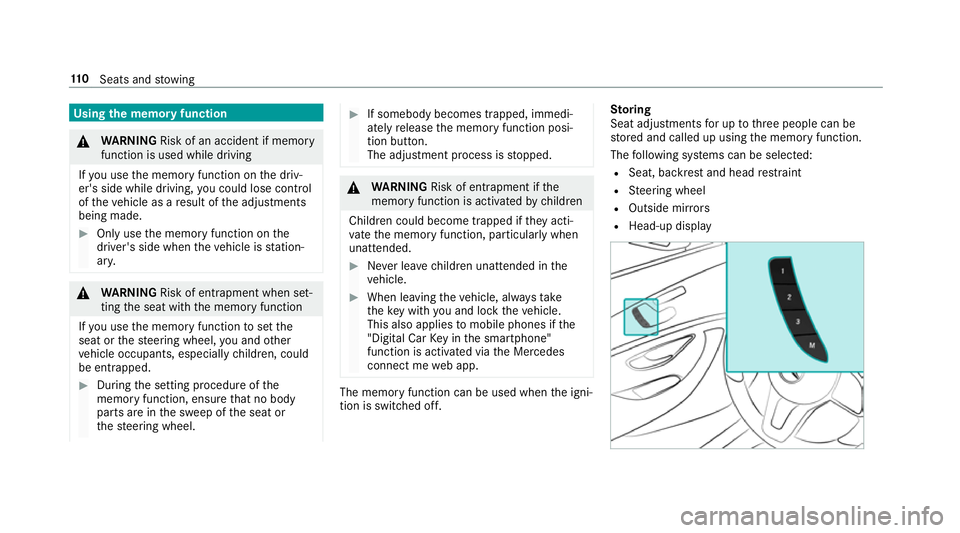
oring
Seat adjustment sfor up tothre ep eople can be
st ored and called up using them emor yfunction.
The following sy stems can be selected:
R Seat, backres tand head restra int
R Steering wheel
R Outside mir rors
R Head-up display 11 0
Seats and stowing
Page 117 of 585
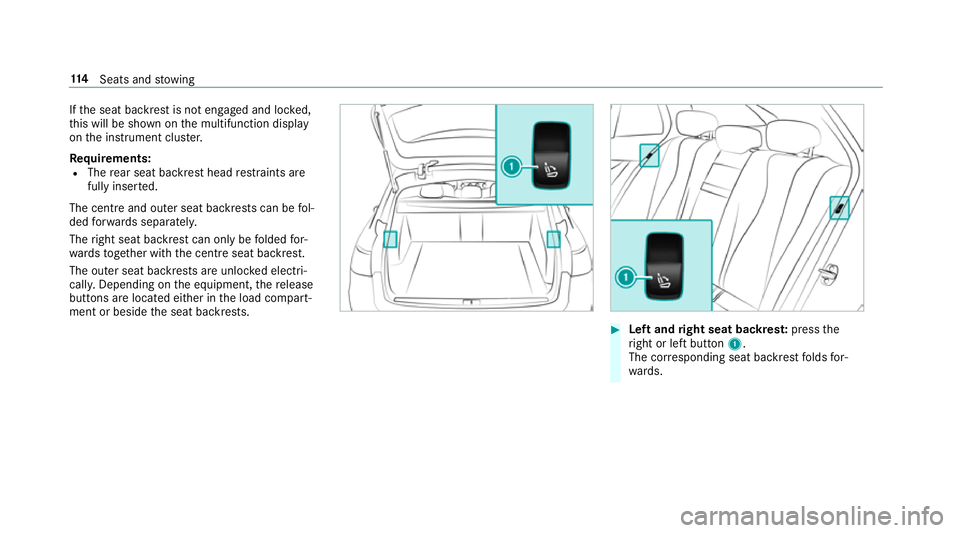
If
th es eat backres tisnotengaged and loc ked,
th is will be shown on them ultifunction display
on thei nstrument clus ter.
Re quirements:
R The rear seat backres thead restra int sa re
full yinse rted.
The cent reand outer seat backrests can be fol‐
ded forw ards separatel y.
The right seat backres tcan onl ybefolded for‐
wa rdst ogether wit hthe centre seat backrest.
The outer seat backrests ar eunloc kede lect ri‐
cally .Depending on thee quipment, ther elease
buttons ar elocated either in thel oad compart‐
ment or beside thes eat backrests. #
Leftand right seat backres t:press the
ri ght or lef tbutton 1.
The cor responding seat backres tfolds for‐
wa rds. 11 4
Seats and stowing
Page 136 of 585
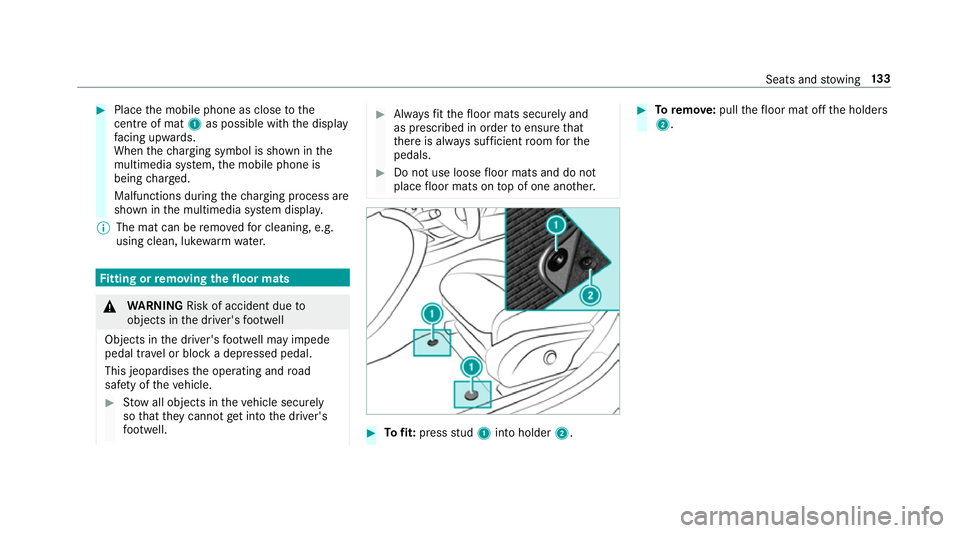
#
Place them obile phone as close tothe
centr eofm at1 as possible wi th thedisplay
fa cing up wards.
When thec harging symbol is shown in the
multimedia sy stem, them obile phone is
being charge d.
Malfunctions during thec harging process are
shown in them ultimedia sy stem displa y.
% The mat can be remo vedf or cleaning, e.g.
using clean, luk ewarmwate r. Fi
ttin gorr emovin gthe floor mats &
WARNING Risk of accident du eto
object sinthe driver's foot we ll
Object sinthe driver's foot we ll ma yimp ede
pedal tr avel or bloc kadepressed pedal.
This jeopardises theo perating and road
saf etyoft hevehicle. #
Stow all object sinthevehicle securely
so that they canno tget intot he driver's
fo ot we ll. #
Alw aysf itth ef loor mats securel yand
as prescribed in order toensur ethat
th er eisa lway ss ufficient room fort he
pedals. #
Do no tuse loose floor mats and do not
place floor mats on topofo ne ano ther. #
Tofit: press stud 1 intoh older 2. #
Toremo ve: pull thef loor mat of fthe holders
2. Seats and
stowing 13 3
Page 146 of 585
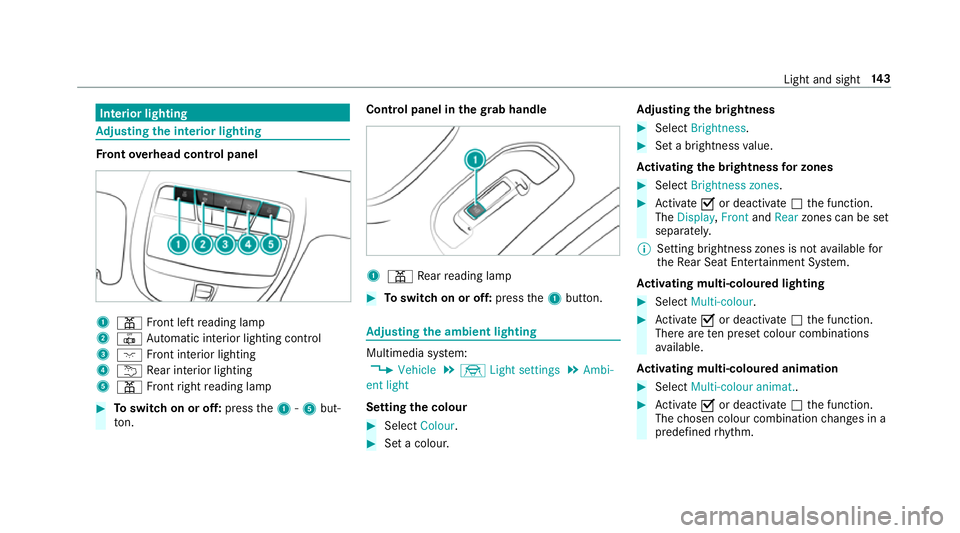
Interior lighting
Ad
justin gthe in terior lighting Fr
ont overhead control panel 1
p Front lef treading lamp
2 | Automatic interior lighting control
3 c Front interior lighting
4 u Rear interior lighting
5 p Front right readin glamp #
Toswitc honoro ff:press the1-5 but‐
to n. Control pane
linthegrab handle 1
p Rear readin glamp #
Toswitc honoro ff:press the1button. Ad
justin gthe ambien tlighting Multimedia sy
stem:
, Vehicle .
÷ Light settings .
Ambi-
ent light
Setting thec olour #
Select Colour. #
Setac olour. Ad
justin gthe brightness #
Select Brightness . #
Setab righ tness value.
Ac tivatin gthe brightness forz ones #
Select Brightness zones . #
Activate Oor deacti vate ª thef unction.
The Display ,Front andRear zones can be set
separately.
% Setting brightness zones is no tavailable for
th eR ear Seat Ente rtainment Sy stem.
Ac tivatin gmulti-coloured lighting #
Select Multi-colour. #
Activate Oor deacti vate ª thef unction.
Ther earetenp rese tc olou rcombinations
av ailable.
Ac tivatin gmulti-coloured animation #
Select Multi-colou ranimat.. #
Activate Oor deacti vate ª thef unction.
The chosen colour combination changes in a
predefine drhythm. Light and sight
14 3
Page 151 of 585
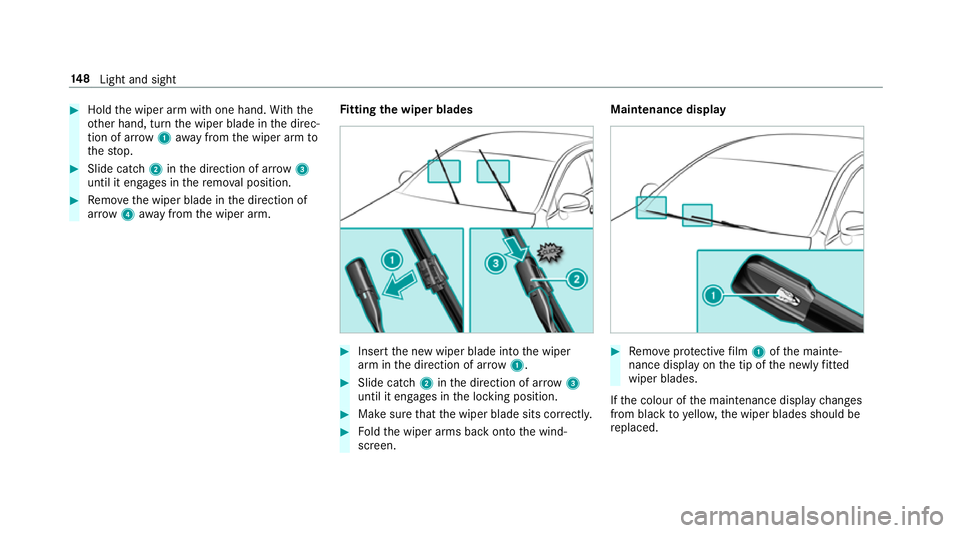
#
Hold thew iper ar mwitho ne hand. With the
ot her hand, tur nthe wiper blade in thed irec‐
tion of ar row1away from thew iper ar mto
th es top. #
Slide catch 2inthed irection of ar row3
until it engages in ther emo valp osition. #
Remo vethew iper blade in thed irection of
ar row 4away from thew iper arm. Fi
ttin gthe wiper blades #
Inse rtthen ew wiper blade int othe wiper
ar mint he direction of ar row1. #
Slide catch 2inthed irection of ar row3
until it engages in thel ocking position. #
Mak esuret hat thew iper blade sits cor rectly. #
Foldthew iper arms bac kontot he wind‐
screen. Maintenance display
#
Remo veprotectiv efilm 1ofthem ainte‐
nanc edispla yont he tip of then ewlyfitted
wipe rblades.
If th ec olour of them aintenanc edispla ychanges
from blac ktoyello w, thew iper blades should be
re placed. 14 8
Light and sight
Page 158 of 585
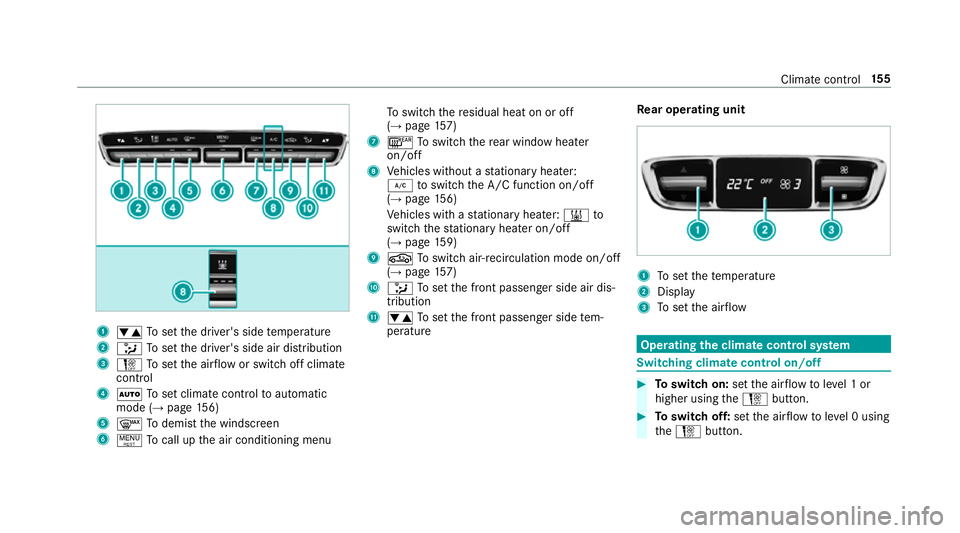
1
w Tosetthe driver's side temp erature
2 _ Tosetthe driver's side air distribution
3 H Tosetthe air flow or switc hoffclimate
control
4 Ã Tosetc limat econtro ltoautomatic
mode (→ page156)
5 ¬ Todemis tthe windscreen
6 ! Tocal lupt he air conditionin gmenu To
switc hthe residualh eat on or off
(→ pag e157)
7 ¤ Toswitc hthe rear wind owheater
on/off
8 Vehicles without astationar yheater:
¿ toswitc hthe A/C function on/off
(→ pag e156)
Ve hicles wit hastationar yheater: &to
switc hthe stationar yheater on/off
(→ pag e159)
9 g Toswitc hair-recirculation mode on/off
(→ pag e157)
A _ Tosetthe front passenger side air dis‐
tribution
B w Tosetthe front passenger side tem‐
perature Re
ar operating unit 1
Tosetthe temp erature
2 Display
3 Tosetthe air flow Operating
thec lima tecont rols ystem Switching clima
tecont rolo n/off #
Toswitc hon:setthe air flow toleve l1or
higher using theH button. #
Toswitc hoff:setthe air flow toleve l0u sing
the H button. Climat
econtrol 15 5
Page 171 of 585
th
em obile phone is in them arke ds pace
(→ pag e168). #
Shif tthe transmission toposition jori. #
Depress theb rake pedal and push button 1
once. #
Ifth ev ehicle does no tstart:s witc hoffnon-
essential consumer sand press button 1
once. #
Ifth ev ehicle still does no tstart and the
Place the key in the marked space See Own-
er's Manual displaymessag ealso appear sin
th em ultifunction display: star tt he vehicle in
emer gency operation mode.
Yo uc an swit chofft he engine while driving by
pressing button 1fora bout thre es econds. Be
sur etoo bservethes afet yn otes under "Driving
tips".
St arting avehicle using amobilep hone
Re quirements:
R thev ehicle is equipped wit hthe "Digital Car
Ke y" function. R
the" Digital Car Key" function is activated via
th eM ercedes me connect weba pp: http://
www.mercedes.me.
R suitable mobile phone wit hNFC aerial (Near
Field Communication) and Secur eElement.
R sufficient charge leve loft he mobile
phone. On somemobile phones, thef unction
is also available when theb atter yisd is‐
ch arge d.
% Youc an checkt he suitability of your mobile
phon ebye ntering thep hone number at
http://www.mercedes.me.
Information about suitable mobile phones
can be obtained from your Mercedes-Benz
servic ecentr eorath ttp://www.mercedes-
benz.com/connect.
% Mercedes-Ben zrecommends that youc arry
th ee mer gency keyinc aseoff unction
re strictions.
% The function is only available in combination
wit hM ercedes me connec tand on lyin cer‐
ta in countries. %
Protectiv ecases around them obile phone
can impair thef unctionality. #
Mak esuret hat thec har geleve loft he mobile
phone is suf ficient. If necessar y,ch arge the
mobil ephone befor estarti ngthej ourne y.
St arting thev ehicle fort he firs tt ime af ter
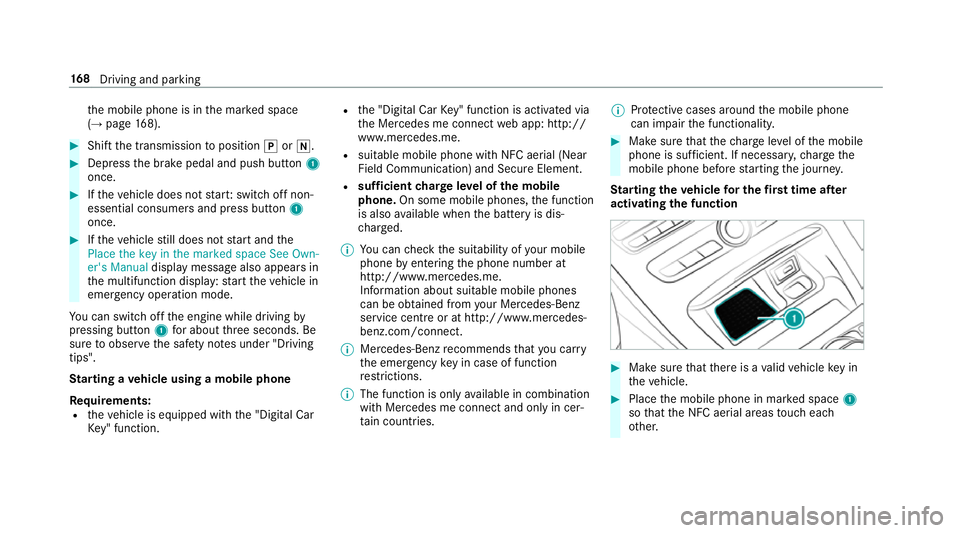
activating the function #
Mak esuret hat ther eisav alidvehicle keyin
th ev ehicle. #
Place them obile phone in mar keds pace 1
so that theN FC aerial areas touc he ach
ot her. 16 8
Driving and pa rking
Page 177 of 585
Switch off the ignition before exiting
displaymes‐
sag ealsoa ppear sinthe multifunction displa y.If
yo udon otswit chofft he ignition, thei gnition is
automaticall yswitched of fafter one minu te.
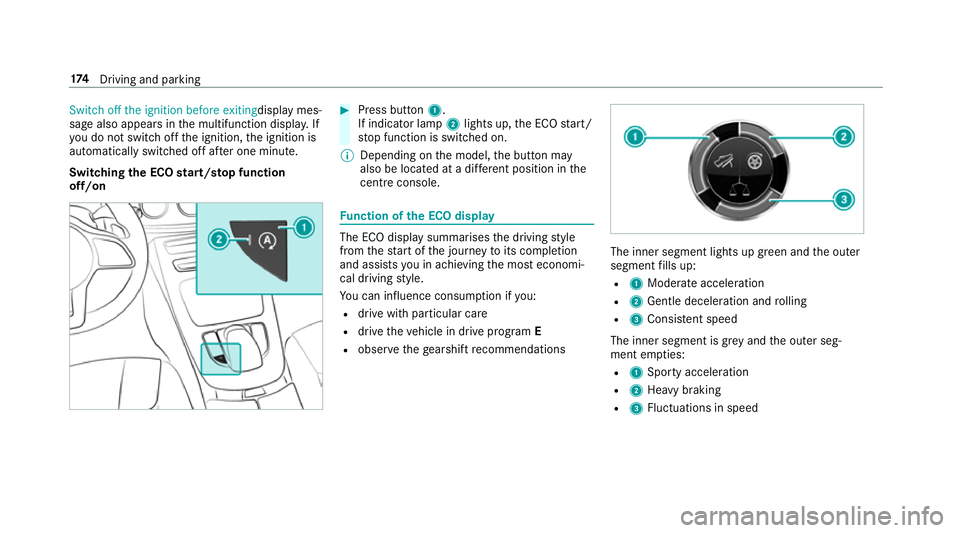
Switching theE CO start/s topf unction
off/on #
Press button 1.
If indicator la mp2light sup,theE CO start/
st op function is switched on.
% Depending on them odel, theb utton may
also be located at adiffe re nt positio ninthe
centr econsole. Fu
nction of theE CO display The EC
Odispla ysummarises thed riving style
from thes tart of thej ourne ytoits completion
and assists youina chievin gthe mos teconomi‐
cal driving style.
Yo uc an influence consum ption if you:
R driv ewithp articular care
R driv ethe vehicle in driv eprogram E
R obser vetheg earshif trecommendations The inner segment light
supgreen and theo uter
segment fills up:
R 1 Moderat eacceleration
R 2 Gentle decele ratio na nd rolling
R 3 Consis tent speed
The inne rsegment is gr eyand theo uter seg‐
ment em pties:
R 1 Sporty acceleration
R 2 Heavy braking
R 3 Fluctuation sinspeed 174
Driving and pa rking
Page 179 of 585
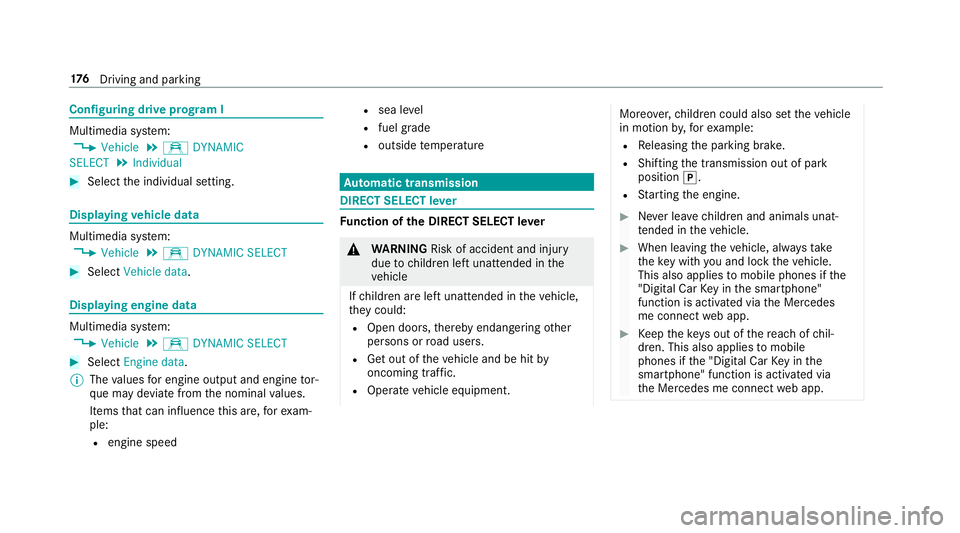
Configuring driv
eprogram I Multimedia sy
stem:
, Vehicle .
e DYNAMIC
SELECT .
Individual #
Select thei ndividual setting. Displaying
vehicl edata Multimedi
asystem:
, Vehicle .
e DYNAMIC SELECT #
Select Vehicle data. Displaying engine data
Multimedia sy
stem:
, Vehicle .
e DYNAMIC SELECT #
Select Engine data.
% The values fore ngine outpu tand engine tor‐
qu em aydeviat efromt he nominal values.
Items that can influence this are, fore xam‐
ple:
R engine speed R
sea le vel
R fuel grade
R outside temp erature Au
tomatic transmission DIREC
TSELECT lever Fu
nction of theD IRECT SELECT le ver &
WARNING Risk of accident and inju ry
due tochildren lef tunat tende dint he
ve hicle
If ch ildren ar eleftu nat tende dint hevehicle,
th ey could:
R Ope ndoors,t hereb yendangering other
persons or road users.
R Getout of thev ehicle and be hit by
oncoming traf fic.
R Ope rate ve hicle equipment. Moreo
ver,ch ildren could also se tthe vehicle
in motion by,for example:
R Releasing thep arking brake.
R Shifting thet ransmission out of park
position j.
R Startin gthe engine. #
Neverlea ve children and animals unat‐
te nde dint hevehicle. #
When leaving thev ehicle, alw ayst ake
th ek eywit hyou and loc kthe vehicle.
This also applies tomobil ephones if the
"Digital Car Keyint he smartphone"
function is activated via theM ercedes
me connect weba pp. #
Keep thek eyso ut of ther eac hofc hil‐
dren. This also applies tomobile
phones if the" Digital Car Keyint he
smartphone" function is activated via
th eM ercedes me connect weba pp. 176
Driving and pa rking
Page 212 of 585
%
Ifyo up erform akickdown, thev ariable lim‐
iter is swit ched topassiv emode. The varia‐
ble limiter is operational again once the
speed drops belo wthe stored speed.
% Ifyo ub rake ,d eactivat eESP®
or if ESP ®
inter venes, cruise control is deacti vated. The
va riable limiter is no tdeactivated.
When yous wit ch offt he vehicle, thel ast
speed stored is cleared.
Pe rm anen tlimi ter
If th ev ehicle should ne vere xceed aspecific
speed (e.g. ford riving in winter tyr emode) ,you
can se tthis speed wit hthe permanent limiter.
Yo udot hisbylimiting thes peed toav alue
between 160k m/h and 240k m/h in them ulti‐
media sy stem (→ page209).
Shortl ybefor ethe se tspeed is reached, it
appear sinthe multifunction displa y.When you
confir mthe messag ewith%,d isplaymes‐
sages no longer appear until yous wit ch offt he
ve hicle. The speed will onl ybedisplayeda gain
onc ethe vehicle has been restar ted. The permanen
tlimiter does no tswitc htop as‐
siv em ode evendurin gkickdown and thed riven
speed remains belo wthe se tspeed.
Setting thes peed limitation forw inte rt yres
Multimedia sy stem:
, Vehicle .
î Vehicle settings .
Win-
ter tyres limit #
Select aspeed or deactivat ethe function. Ac
tiv eD ista nce Assis tDISTR ON IC Fu
nction of Activ eD ista nce Assist
DISTRO NIC
Ac tiveD ista nce Assi stDISTRONIC
R Maintains thes etspeed and accelera tesor
decelerates thev ehicle if thed istan ce from
th ev ehicle in front permits.
R Assists youinm aintainin gthe dis tance from
th ev ehicle in front and can bring your vehi‐
cle toas tandstil lifnecessar y.
R Brakes your vehicle wit hupto50%oft he
maximum possible braking po wer.If greater
decele ratio np erform ance is requ ired, avis‐ ual and acoustic
warning is given and you
mus tthen inter vene yourself.
R Vehicles with Drivin gAssistanc ePack‐
age, Activ eP arking Assis tand COMAND
Online: when driving in stop-s tart traf fic, the
driver is suppor tedbye xtended automatic
re -sta rt in traf ficj ams.
R Vehicles with Drivin gAssistanc ePack‐
age: responds tostationar yvehicles in urban
speed ranges (e xcep tb icycles, mo torcyc les
and pedestrians) if condition saresuf ficient
to enable de tection.
If yo uf ail toadap tyour driving style, Ac tiveD is‐
ta nce Assi stDISTRONI Ccan nei ther reduce the
ri sk of an accident nor override thel aws of ph ys‐
ics. It canno ttak ei ntoa ccount road, weather or
traf ficc onditions .Activ eDistan ce Assi st
DISTRONI Cisonly an aid. Youa re re sponsible
fo rt he dis tance tothev ehicle in front, forv ehi‐
cle speed, forb raking in good time and fors tay‐
ing in lane.
If all activation condition saremet, youc an acti‐
va te ActiveD ista nce Assi stDISTRONI Cdurin ga
jou rney or while stationar y.When ActiveD is‐ Driving and pa
rking 209