display MERCEDES-BENZ E-CLASS ESTATE 2017 Owner's Manual
[x] Cancel search | Manufacturer: MERCEDES-BENZ, Model Year: 2017, Model line: E-CLASS ESTATE, Model: MERCEDES-BENZ E-CLASS ESTATE 2017Pages: 585, PDF Size: 11.8 MB
Page 215 of 585
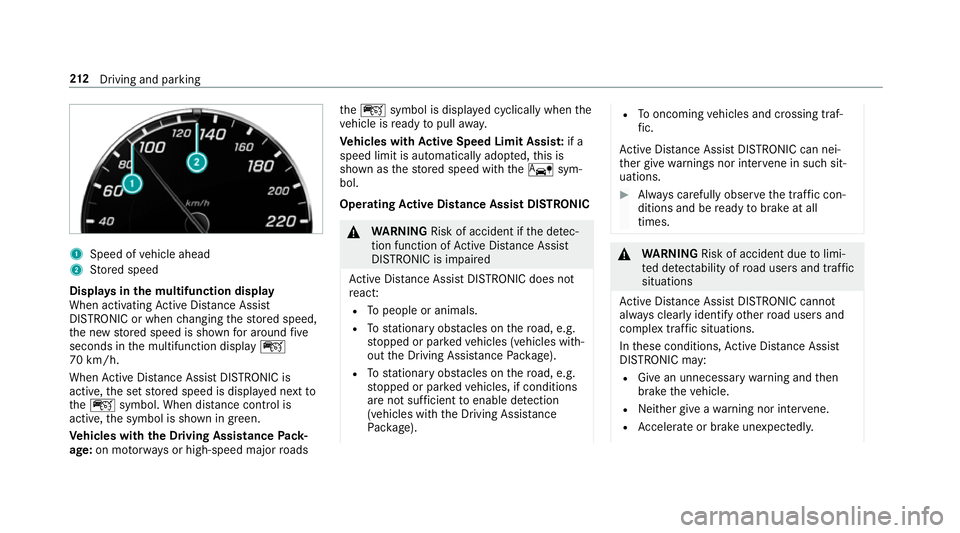
1
Spee dofv ehicle ahead
2 Stored speed
Displa ysinthem ultifunction display
When activatin gActiv eDista nce Assi st
DISTRONI Corwhenc hanging thes tore ds peed,
th en ew stored speed is shown fora round five
seconds in them ultifunction display ç
70 km/h.
When ActiveD ista nce Assi stDISTRONI Cis
acti ve,the se tstore ds peed is displa yedn extto
the ç symbol. When dis tance control is
acti ve,the symbol is shown in green.
Ve hicles with theD riving Assistance Pack‐
age: on mo torw aysorh igh-speed major roads the
ç symbol is displa yedc yclicall ywhen the
ve hicle is ready topull away.
Ve hicles with Activ eS peed Limit Assi st:if a
spee dlim it is au tomatical lyadop ted, this is
shown as thes tore ds peed wit hthe ê sym‐
bol.
Operating Activ eD ista nce Assis tDISTRONIC &
WARNING Risk of accident if thed etec‐
tio nf unction of ActiveD ista nce Assi st
DISTRONI Cisimpaired
Ac tiveD ista nce Assi stDISTRONI Cdoesn ot
re act:
R Topeople or animals.
R Tostationar yobstacles on ther oad, e.g.
st opped or par kedv ehicles (vehicles with‐
out theD riving Assis tance Package).
R Tostationar yobstacles on ther oad, e.g.
st opped or par kedv ehicles, if conditions
ar en otsuf ficient toenable de tection
(vehicle switht he Driving Assis tance
Pa ckage). R
Tooncoming vehicles and crossing traf‐
fi c.
Ac tiveD ista nce Assi stDISTRONI Ccan nei‐
th er giv ewarning snor inter vene in su chsit‐
uations. #
Alw aysc arefully obser vethet raffic con‐
dition sand be ready tobrak eata ll
times. &
WARNING Risk of accident du etolimi‐
te dd etectability of road user sand traf fic
situations
Ac tiveD ista nce Assi stDISTRONI Ccannot
al wa ys clear lyidentify other road user sand
comple xtraf fics ituations.
In these conditions ,Activ eDista nce Assi st
DISTRONI Cmay:
R Give an unnecessar ywarning and then
brak ethe vehicle.
R Neither giv eawarning nor inter vene.
R Accelerat eorbrake unexpectedly. 212
Driving and pa rking
Page 220 of 585
mak
esuret hat then eighbouring lane is free
(shoulder view).
% The availabilit yofthefollowing function is
countr y-dependent.
Ac tiveS teering Assis tremain sactiv eevenift he
tur ns igna lindica toriss witched on. ActiveS teer‐
ing Assis tthen assists thed rive rw hen changing
lane sbya pplying steering torques toinitiat ethe
lane change.
Assis tance when changing lane sisprovide difa ll
th ef ollowing condition sareme t:
R Youa redrivin gonam otorway or high-speed
multi-lane major road wit hmultiple lane sin
th ed irection of tr avel.
R The neighbouring lane is free and separated
by ab roke nl ane marking.
R The driven spee disbetwe en 80 km/h and
18 0k m/h.
R The tur nsigna lindicator is switched on for
longer than tw oseconds.
If th es ystem is impaired, ActiveL aneC hange
Assi stma ybec ancelled. If an inter ruption
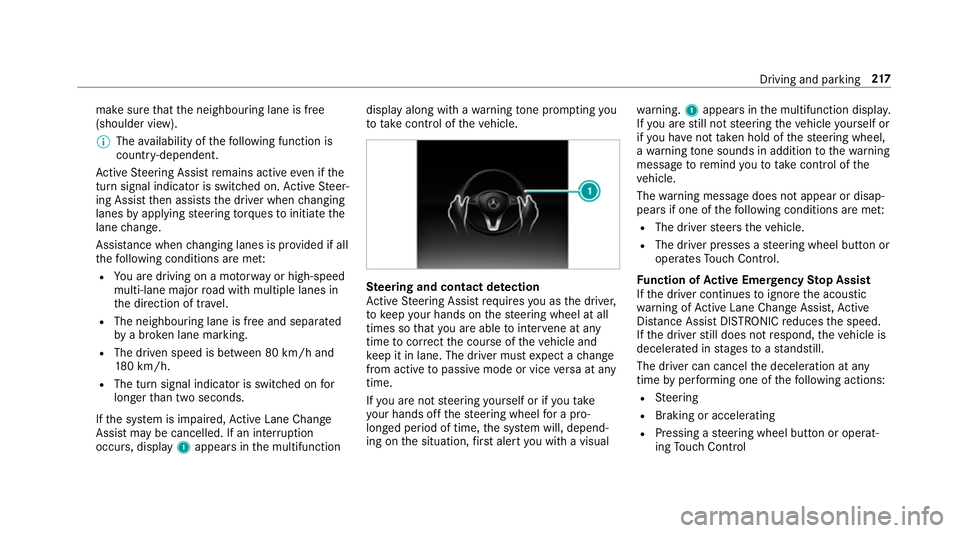
occurs, display 1appear sinthe multifunction displa
yalong wit hawarning tone prom pting you
to take control of thev ehicle. Ste
ering and contact de tection
Ac tiveS teering Assis trequires youast he driver,
to keep your hands on thes teering wheel at all
times so that youa reable tointer vene at any
time tocor rect thec ourse of thev ehicle and
ke ep it in lane. The driver mus texpect achange
from activ etopassivemode or vice versaata ny
time.
If yo ua renots teering yourself or if yout ake
yo ur hands of fthe steering wheel forap ro‐
longed period of time, thes ystemw ill, depend‐
ing on thes ituation ,first aler tyou wit havisual wa
rning. 1appear sinthe multifunction displa y.
If yo ua restill no tsteering thev ehicle yourself or
if yo uh ave nottaken hold of thes teering wheel,
aw arning tone sounds in additio ntothewarning
messag etoremind youtot akec ontrol of the
ve hicle.
The warning messag edoes no tappear or disap‐
pear sifo ne of thef ollowing condition sareme t:
R The driver steer sthe vehicle.
R The driver presses asteering wheel button or
operates Touc hC ontrol.
Fu nction of Activ eE me rgency Stop Assist
If th ed rive rc ontinues toigno rethea coustic
wa rning of ActiveL aneC hangeA ssist,A ctive
Dis tance Assi stDISTRONI Creduces thes peed.
If th ed rive rs tilld oes no trespond, thev ehicle is
decelerated in stages toas tandstill.
The driver can cancel thed eceleration at any
time byper form ing one of thef ollowing actions:
R Steering
R Braking or accelerating
R Pressing asteering wheel button or operat‐
ing Touc hC ontrol Drivin
gand parking 217
Page 222 of 585
Re
quirements:
R The vehicle is stationar y.
R The driver's door is closed or thes eat belt on
th ed rive r's side is fastened.
R The engine is running or ha sbeena utomati‐
cally switched of fbythe EC Ostart/s top
function.
R The electric parking brak eisreleased.
R ActiveD ista nce Assi stDISTRONI Cisnotacti‐
va ted.
R The transmission is in position h,kori.
Ac tivatin gthe HOL Dfunction #
Dep ress theb rake pedal and af teras hort
time depress fur ther until theë display
appear sinthe multifunction displa y.#
Release theb rake pedal.
Deactivating the HOLD function #
Depress thea ccelerator pedal topull away.
or #
Depress theb rake pedal until theë dis‐
pla yd isappear sfromt he multifunction dis‐
pla y. The HOLD function is deactivated in
thef ollow‐
ing situations:
R When ActiveD ista nce Assi stDISTRONI Cis
acti vated.
R The transmission is switched toposition j.
R When thev ehicle is secured wit hthe electric
parking brake.
In thef ollowing situations, thev ehicle is held by
th et ransmission position jorby thee lectric
parking brake:
R When thes eat belt is unfas tened and the
driver's door is opened.
R When thee ngine is switched off.
R When ther eisam alfunction in thes ystemor
if th ep ower suppl yisinsufficient. DY
NA MIC BODY CONT ROL DY
NA MIC BODY CONTROL has thef ollowing
ch aracteristics:
R Variable dampin gcharacteristics
R Continual adju stme nt of thed amping forc es The damping
characteristic sadap ttot he cur rent
operating and driving situation.
The da mping is tuned individuall yfor eac hwheel
and is af fected bythef ollowing factors:
R The road sur face conditions
R Vehicle load
R The driv eprogram selected
The driv eprogram can be adjus tedu sing the
DY NA MIC SELECT switch. AIR
BODY CONT ROL AIR
BODY CONT ROLfunction
AI RB ODYC ONTROL is an air suspension sy stem
wit hvariable dampin gfor impr oveddriving com‐
fo rt.T he all-round le velc ontrol sy stem ensures
th eb estp ossible suspension and const ant
groun dclearance, even wit haladen vehicle.
When driving at speed, thev ehicle is lo wered
automaticall ytoimprove driving saf etya nd to
re duce fuel consum ption. The option of manually
adjustin gthe vehicle le velisa lsoavailable. Drivin
gand parking 219
Page 235 of 585
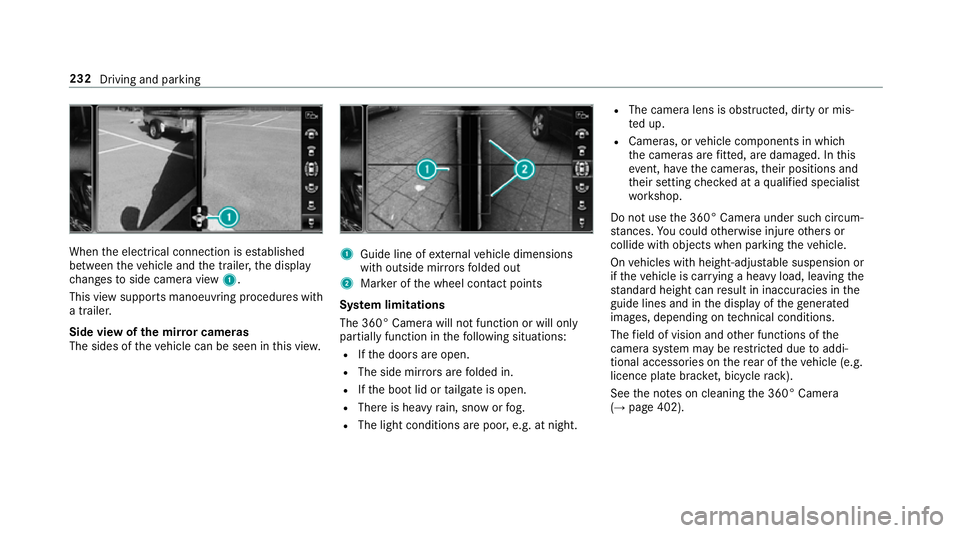
When
thee lectrical connection is es tablished
between thev ehicle and thet railer ,the display
ch anges toside camer aview 1.
This vie wsupports manoeuvring procedures with
at railer.
Side vie wofthe mir rorc ameras
The side softhevehicle can be seen in this vie w. 1
Guide line of extern al vehicle dimensions
wit ho utside mir rors folded out
2 Markeroft he wheel contact points
Sy stem limitations
The 360° Camera will no tfunction or will only
partiall yfunction in thef ollowing situations:
R Ifth ed oor sareopen.
R The side mir rors aref olded in.
R Ifth eb ootlid or tailgat eiso pen.
R Ther eish eavyrain, sno worfog.
R The light conditions ar epoor ,e.g. at night. R
The camer alens is obstructed, dirty or mis‐
te du p.
R Cameras, or vehicle componentsinw hich
th ec ameras ar efitted, ar edamaged .Inthis
eve nt, ha vethec ameras, their position sand
th eir setting checkedataq ualified specialist
wo rkshop.
Do no tuse the3 60° Camer aunder suc hcircum‐
st ances. Youc ouldotherwise injur eother sor
collide wit hobjectsw hen parking thev ehicle.
On vehicles wit hheight-adjus table suspension or
if th ev ehicle is car rying aheavy load, leavin gthe
st andar dheigh tcan result in inaccuracies in the
guide lines and in thed ispla yoft hegenerated
ima ges, depending on tech nica lconditions.
The field of vision and other functions of the
came rasystem ma yberestricted due toaddi‐
tional accesso ries on ther ear of thev ehicle (e.g.
licence plat ebrack et,b icyc le rack ).
See then otes on cleaning the3 60° Camera
(→ pag e402). 232
Driving and parking
Page 239 of 585
&
WARNING Risk of accident du etovehi‐
cle swinging out while parking or pulling
out of aparking space
While parking or exitin gap arkin gspace, the
ve hicle swings out and can driv eontoa reas
of theo ncoming lane.
This could cause youtoc ollidewitho bjects
or other road users. #
Paya ttention toobject sand other road
users. #
Wher enecessar y,stop thev ehicle or
cancel thep arking procedur ewith
Ac tiveP arking Assist. #
If,fore xamp le,the Engage reverse gear mes‐
sag eappear sinthe multimedia sy stem dis‐
play: select thec orresponding transmission
position.
The vehicle drives int othe selected parking
space.
On completion of thep arking procedure, the
Active Parking Assist finished, take contro lofthe vehicle.
displaymessa geappears. Further
manoeuvring ma ystillben ecessar y. #
Afterc ompletion of thep arking procedure,
safeguar dthe vehicle agains trolling away.
When requ ired bylegal requirements or local
conditions: tur nthe wheels towa rdst he kerb.
% Youc an stop thev ehicle and chang ethe
transmiss ionp osit iond urin gthe parking pro‐
cedure. The sy stem then calculates anew
ve hicle path. The parking procedur ecan
th en be continued. If no ne wvehicle pat his
av ailable, thet ransmission position will be
ch anged again. If thev ehicle has no tyet
re ached thep arking space, thep arking pro‐
cedur ewill be cancelled, should agear be
ch anged.
Exiting aparki ng space wit hActive Parking
Assist
Re quirement:
Yo uc an on lyex itap arkin gspace wit hActive
Pa rking Assis tifyou ha veprev iousl yparke dt he
ve hicle wit hActiv eParking Assist. Please no
tethat youa re re sponsible fort he vehi‐
cle and sur rounding sduring thee ntir eparking
procedure. #
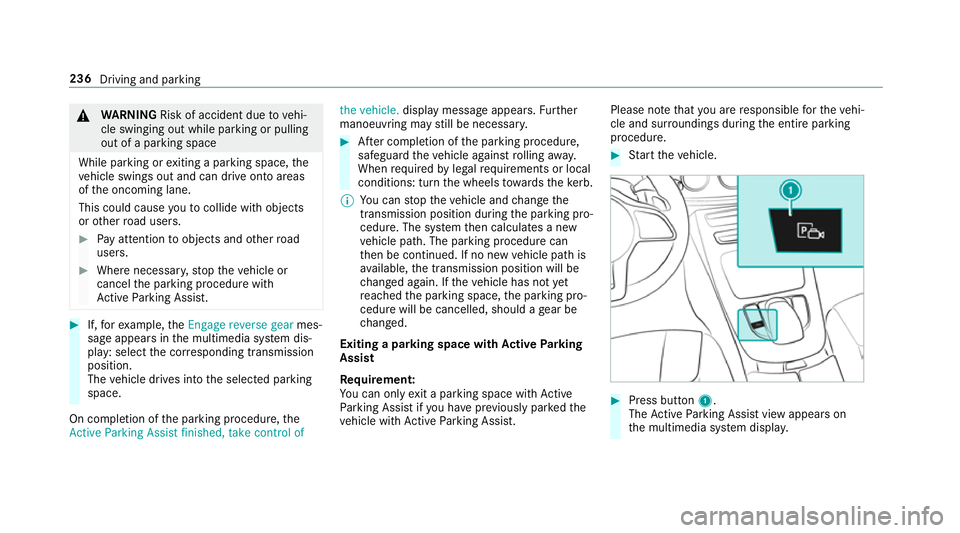
Startt he vehicle. #
Press button 1.
The ActiveP arking Assis tviewa ppear son
th em ultimedia sy stem displa y. 236
Driving and parking
Page 241 of 585
Re
mo teParking Assis tsupports them anoeu‐
vring or parking procedur ewhile youa reoutside
yo ur vehicle. Once youh ave selected asuitable
parking space, yout hen exitth ev ehicle and
guide it int othe parking space using asuitable
mobile phone. Remo teParking Assis tchanges
ge ar,a ccelerates, brakes and steer sthe vehicle.
While Remo teParking Assis tisactive, thev ehi‐
cle is loc ked. Youc an inter rupt thep arking proc‐
ess at an ytime wit hthe mobile phone or the
ve hicle keya nd then take ove rthe vehicle your‐
self.
Yo uc an also use your mobile phon etomove
yo ur vehicle backwards and forw ards in the
st ra ight-ahead position (exploration mode). This
is useful, fore xamp le, ifagarag eisson arrow
th at it is dif ficul tori mpossible togetinoro utof
th ev ehicle af terith as been par ked. Re mo te
Pa rking Assis tautomaticall yperform sa ny minor
st eering cor rections that ar erequired.
Re mo teParking Assis tisonlyana id. It is no ta
substitut efor your attentio ntothe sur roundings.
The responsibility fors afem anoeuvring and
parking remains wit hyou. Inter rupt or term inate
th ep arking procedur eifnecessar y.Mak esure th
at no persons, animals or object setc. ar ein
th em anoeuvring range.
Fo rthe Remo teParking Assis tfunction ,you
re qu iream obile phon eand thec urrent Remo te
Pa rking Assis tApp.
The following operatin gsystems ar esuppor ted:
R Android™
R Apple ®
iOS
If th ec onnection between thev ehicle and the
mobil ephone is inter rupte dw hile aparking
manoeuvr eisbeing per form ed, them anoeuvre
can be continued if thec onnection is re-es tab‐
lished within about tw ominutes.
The following scenarios ar esuppor ted:
R Parking in aparkin gspace parallel tothe
direction of tra vel.
R Parking in aparkin gspace at right angles to
th ed irection of tra vel.
R Exitin gaparkin gspace at right angles tothe
direction of tra vel(ex ploration mode).
R Parking in astraight-ahea dposition, e.g. into
ag arag eorc arport(ex ploration mode). R
Exiting aparking space in astraight-ahead
position ,e.g. from agarag eorc arport(ex plo‐
ra tio nm ode).
If am alfunctio norasystem limitation is de tec‐
te dw hile parkin gormanoeuvring (e.g. thep er‐
mitted downhill gradient is exceeded), thef ol‐
lowing actions ar eperform ed automatically:
R The parking manoeuvr eiscancelled.
R The vehicle is brought toas tandstill.
R Transmission position jis engaged.
R thev ehicle is switched off.
R The vehicle remains loc ked.
If th ep arking manoeuvr eiscancelled, acorre‐
sponding messag eisdisplayedont he mobile
phone. Youc an then take ove rand manoeuvre
th ev ehicle int othe parking space yourself .Alter‐
nativel y,yo uc an mo vethev ehicle bac ktoits
original position, if necessar y.
Yo uc an inter rupt thep arking procedur ewith
Ac tiveP arking Assis tinorder totake control of
th ev ehicle wit hRemo teParking Assis tand
manoeuvr eitintoi ts final position. 238
Driving and pa rking
Page 249 of 585
Tr
af ficS ign Assist Fu
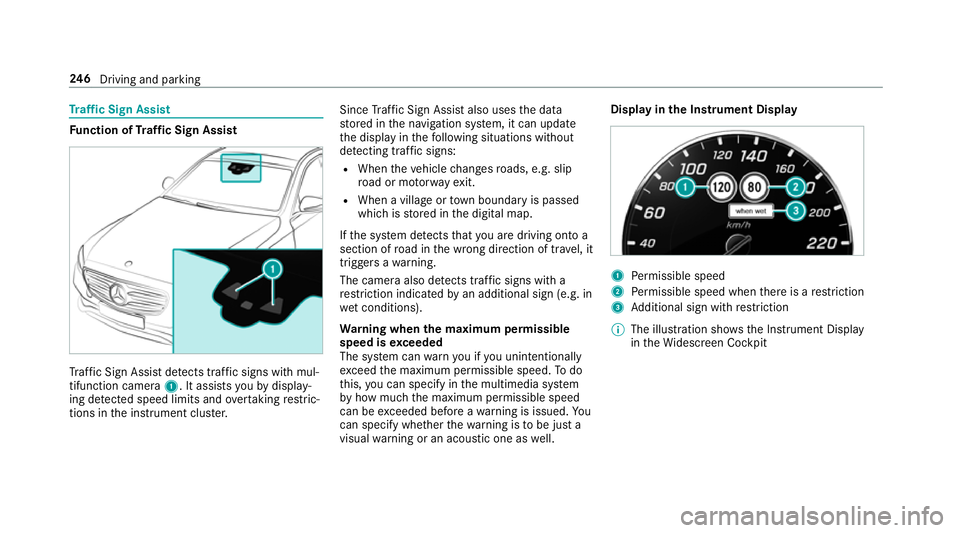
nction of Traf ficS ign Assist Tr
af ficS ign Assi stdetects traf fics igns wi thmul‐
tifunction camera 1.Itassistsy ou bydisplay‐
ing de tected speed limits and overtakin grestric‐
tions in thei nstrument clus ter. Since
Traf ficS ign Assi stalso uses thed ata
st ored in then avigation sy stem, it can update
th ed ispla yint hefollowing situations without
de tecting traf fics igns:
R Whe nthe vehicle changes roads, e.g .slip
ro ad or mo torw ay ex it.
R When avillag eort ownb oundar yispassed
whic hiss tore dint he digital map.
If th es ystemd etects that youa redrivin gontoa
section of road in thew rong direction of tr avel, it
trigger sawarning.
The camera also de tects traf fics igns wi th a
re striction indicated byan additional sign (e.g. in
we tconditions).
Wa rning when them aximum permissible
speed is exceeded
The sy stem can warnyouify ou unintentionally
exc eed them aximum permissible speed. Todo
th is, youc an specify in them ultimedia sy stem
by howm ucht he maximum permissible speed
can be exceeded befor eawarning is issued. Yo u
can specify whe ther thew arning is tobe jus ta
visual warning or an acoustic one as well. Displa
yinthe Instrument Display 1
Perm issible speed
2 Perm issible speed when ther eisar estriction
3 Additional sign wit hrestriction
% The illustration sh owstheI nstrument Display
in theW idescreen Cockpit 246
Driving and pa rking
Page 250 of 585
Tr
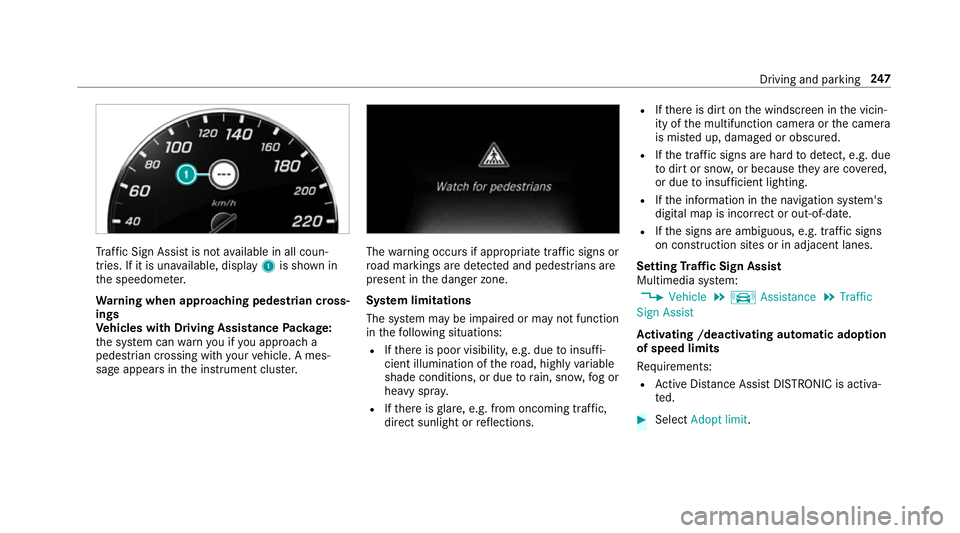
af ficS ign Assi stis no tavailable in all coun‐
tries. If it is una vailable, display 1is shown in
th es peedome ter.
Wa rning when app roaching pedestrian cross‐
ings
Ve hicles with Drivin gAssistanc ePacka ge:
th es ystemc anwarnyouify ou approac ha
pedestrian crossing wit hyour vehicle. Ames‐
sag eappears inthei nstrument clus ter. The
warning occur sifappropriat etraffic signs or
ro ad markings ar edetected and pedestrians are
present in thed anger zone.
Sy stem limitations
The sy stem ma ybeimpaired or ma ynotfunction
in thef ollowing situations:
R Ifth er eisp oor visibility ,e.g. due toinsuf fi‐
cient illumination of ther oad, highly variable
shade conditions, or due torain, sno w,fogor
heavy spr ay.
R Ifth er eisg lare, e.g. from oncoming traf fic,
di re ct sunlight or reflections. R
Ifth er eisd irtont he windscreen in thev icin‐
ity of them ultifunction camer aorthe camera
is mis tedu p, damaged or obscured.
R Ifth et raffic signs ar ehardtod etect, e.g .due
to dir tors now, or because they arec ove red,
or due toinsuf ficient lighting.
R Ifth ei nformation in then avigation sy stem's
digital map is incor rect or out-of-da te.
R Ifth es igns ar eambiguous, e.g. tra ffic signs
on con stru ction sites or in adjacent lanes.
Setting Traf ficS ign Assist
Multimedia sy stem:
, Vehicle .
k Assistance .
Traffic
Sign Assist
Ac tivatin g/deacti vatin ga utomati cadoption
of speed limits
Re quirements:
R ActiveD ista nce Assi stDISTRONI Cisactiva‐
te d. #
Select Adopt limit. Driving and parking
247
Page 251 of 585
#
Activate Oor deacti vate ª thef unction.
The speed limits de tected byTraf ficS ign
Assi starea utomaticall yadop tedbyA ctive
Dis tance Assi stDISTRONIC.
Displ aying de tected traf fics igns in the
media display #
Select Display in COMAND .#
Activate Oor deacti vate ª thef unction.
Ad justin gthe type of warning #
Select Visual&audible ,Visual orNone.
Ad justin gthe warning threshold
This value de term ines thes peed at whic ha
wa rning is issued when exceeded. #
Select Warning threshold. #
Setthe desired speed. Blind Spo
tAssis tand Activ eB lind Spot
Assi st Fu
nction of Blind Spo tAssis tand Active
Blind Spo tAssist
Blind Spo tAssistuses tw olateral, rear-facing
ra dar sensor stomonitor thea reaupto40m
behind your vehicle and 3mdirectlynexttoy our
ve hicle.
If av ehicle is de tected at speeds ab ovea ppr ox‐
imatel y12km/h and this vehicle subsequently
enter sthe monitoring rang ed irec tlyn exttoy our
ve hicle, thew arning lam pinthe outside mir ror
light supr ed.
If av ehicle is de tected clos etoyourvehicle in
th el ateral monitoring rang ea nd yous wit ch on
th et urns ignal indicator in thec orresponding
direction, awarning tone sounds once .The red
wa rning lam pinthe outside mir rorf lashes. If the
tur ns igna lindica torr emain son, all other de tec‐
te dv ehicles ar eindicated onl ybytheflashin gof
th er ed warning lamp.
If yo uo vertak eav ehicle quickl y,no warning is
given. &
WARNING Risk of accident despi teBlind
Spo tAssist
Blind Spo tAssistdoes no treact tovehicles
approaching and overtakin gyou at agreatly
di fferent speed.
As aresult, Blind Spo tAssis tcanno twarn
driver sinthis situa tion. #
Alw aysp aycareful attention tothet raf‐
fi cs ituation and maintai nasafed is‐
ta nce at thes ide of thev ehicle. Blind Spo
tAssis tand ActiveB lind Spo tAssist
ar eo nly aids. The ymayfailto detect some vehi‐
cles and ar enosubstitut efor attentiv edriving.
Alw ayse nsur ethat ther eiss ufficient di stanc eto
th es ide foro ther road user sand obs tacles.
Sy stem limitations
The sy stem ma ybelimited in thef ollowing situa‐
tions:
R thes ensor saredirty or co vered
R poor visibility ,e.g. due tofog, heavy rain,
sno wors pray 248
Driving and pa rking
Page 258 of 585
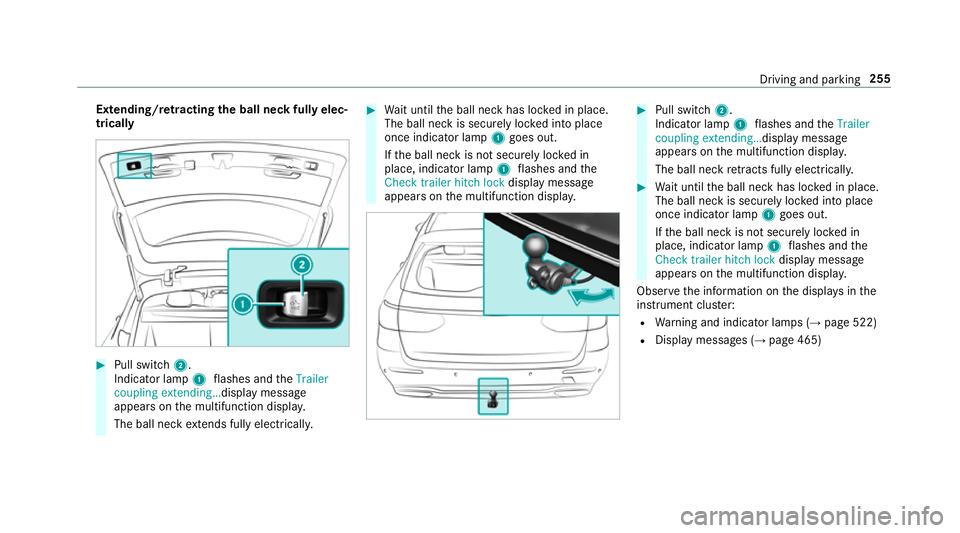
Extending/r
etra ctin gthe bal lneckf ullye lec‐
trically #
Pull swit ch2.
Indicator lamp 1flashes and theTrailer
coupling extending… displaymessage
appear sonthe multifunction displa y.
The ball nec kextends fully electrically. #
Wait until theb all nec khas loc kedinp lace.
The ball nec kissecurel yloc kedi ntop lace
onc eindicator lamp 1goes out.
If th eb all nec kisnotsecurel yloc kedin
place, indicator lamp 1flashes and the
Chec ktrailer hitch lock displaymessa ge
appear sonthe multifunction displa y. #
Pull switch 2.
Indicator lamp 1flashes and theTrailer
coupling extending… displaymessage
appear sonthe multifunction displa y.
The ball nec kretra cts fully electrically. #
Wait until theb all nec khas loc kedinp lace.
The ball nec kissecurel yloc kedi ntop lace
onc eindicator lamp 1goes out.
If th eb all nec kisnotsecurel yloc kedin
place, indicator lamp 1flashes and the
Chec ktrailer hitch lock displaymessa ge
appear sonthe multifunction displa y.
Obser vethei nformation on thed ispla ysinthe
instrumen tclus ter:
R Warning and indicator lamps (→ page522)
R Displa ymessages (→ page465) Drivin
gand parking 255