display MERCEDES-BENZ E-CLASS ESTATE 2017 Owner's Guide
[x] Cancel search | Manufacturer: MERCEDES-BENZ, Model Year: 2017, Model line: E-CLASS ESTATE, Model: MERCEDES-BENZ E-CLASS ESTATE 2017Pages: 585, PDF Size: 11.8 MB
Page 264 of 585
Instrument displa
yoverview
Mercedes-AMG vehicles: be suretoobserve
th en otes in theS upplement .Otherwise, you
ma yfail torecognise dangers. &
WARNING Risk of accident du etoan
instrumen tdispla ymalfunction
If th ei nstrument displa yhasfailed or mal‐
functioned, youm aynotrecognise function
re strictions applying tosaf etyr ele vant sys‐
te ms.
The operating saf etyofy ourvehicle ma ybe
impaired. #
Driv eonc arefull y. #
Have thev ehicle checkedi mmediately
at aq ualified specialis tworks hop. If
th eo perating saf etyofy ourvehicle is
impaired, par kthe vehicle safel yassoon as pos‐
sible. Contact aqualified specialis tworks hop. Instrument displa
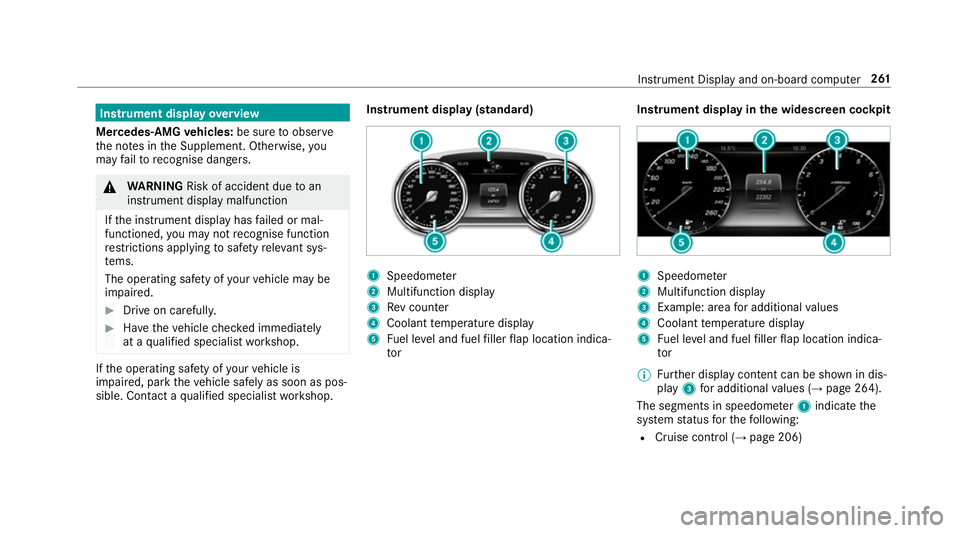
y(standard) 1
Speedome ter
2 Multifunction display
3 Revc ounter
4 Coolant temp eratur edisplay
5 Fuel le vela nd fuel filler flap locatio nindica‐
tor Instrument displa
yinthe widesc reen cockpit 1
Speedome ter
2 Multifunction display
3 Example: area fora dditional values
4 Coolant temp eratur edisplay
5 Fuel le vela nd fuel filler flap locatio nindica‐
tor
% Further displa ycontent can be shown in dis‐
play 3fora dditional values (→ page264).
The segment sinspeedom eter 1 indicat ethe
sy stem status fort he following:
R Cruise control (→ page206) Instrumen
tDispla yand on-boar dcomputer 261
Page 265 of 585
R
Limiter (→ page206)
R ActiveD ista nce Assi stDISTRONIC
(→ page 209)
* NO
TEEngine dama gedue toexc essively
high engine speeds The engine will be damaged if
youd rive with
th ee ngine in theo verrev ving range. #
Do no tdrive with th eengine in theo ver‐
re vving range. The fue
lsuppl yisi nterrupted toprotect the
engine when ther ed band in revc ounter 3
(o ve rrev ving range) is reached.
During no rmal operatin gconditions, coolant
te mp eratur edisplay 4mayrise to120° C. &
WARNING Danger of bu rnsw hen open‐
ing theb onnet
If yo uo pen thee ngine bonn etwhen the
engine has overheated or during afireint he
engine compartment, youc ould come into
contact wit hhotgases or other escaping
operating fluids. #
Befor eopening theb onnet ,allowt he
engine tocool down. #
Inthee vent of afireint he engine com‐
partment, keep thee ngine bonn et
closed and cal lthe fire service. Overvie
wofthe buttons on thes teering
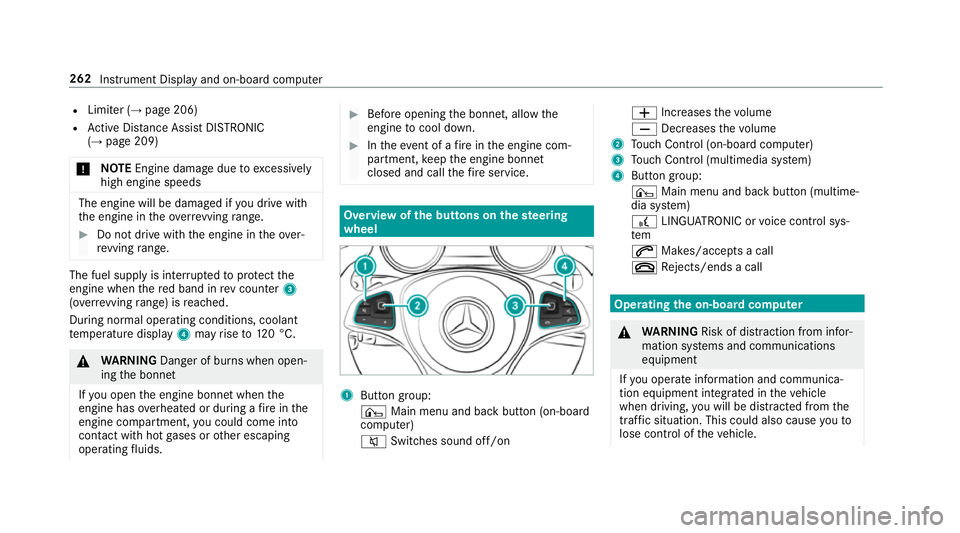
wheel 1
Buttong roup:
¤ Main menu and ba ckbutton (on-board
computer)
8 Switches sound off/on W
Increases thev olume
X Decreases thev olume
2 Touc hC ontrol (on-boar dcompu ter)
3 Touc hC ontrol (multimedia sy stem)
4 Button group:
¤ Main menu and bac kbutton (multime‐
dia sy stem)
£ LINGU ATRO NIC or voice control sys‐
tem
6 Makes/accepts acall
~ Rejects/end sacall Ope
ratin gthe on-boar dcom puter &
WARNING Risk of di stra ction from infor‐
mation sy stems and communications
equipment
If yo uo perat einformation and communica‐
tio ne quipment integ ratedint hevehicle
when driving, youw ill be distracted from the
traf fics ituation. Thi scould also cause youto
lose control of thev ehicle. 262
Instrument Displa yand on-boar dcomputer
Page 267 of 585
#
Toexitas ubmenu: presstheb ackb utton
on thel eft 1.
If yo ua rebrows ingasubmen uand youp ress
and hold theb ackb utton on thel eft 1,t he
menu bar appears. Setting
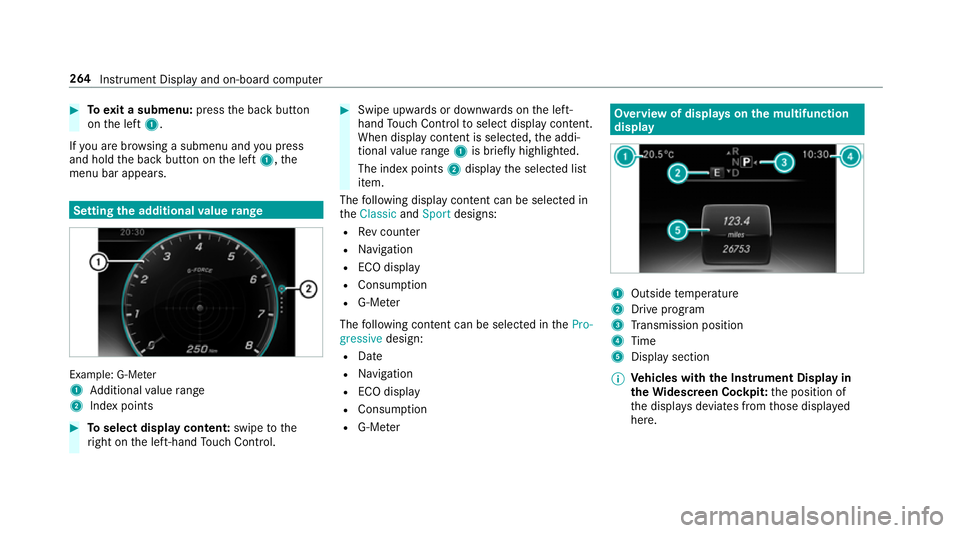
thea dditional value range Example: G-Me
ter
1 Additional value range
2 Inde xpoints #
Toselect displa ycontent: swipetothe
ri ght on thel eft-hand Touc hC ontrol. #
Swip eupwards or down wardsont he left-
hand Touc hC ontrol toselect displa ycontent.
When displa ycontent is selected, thea ddi‐
tional value range 1is brie flyh ighligh ted.
The inde xpoints 2displa ythe selected list
item.
The following displa ycontent can be selected in
the Classic andSport designs:
R Revc ounter
R Navigation
R ECOd isplay
R Consu mption
R G-M eter
The following con tent can be selected in thePro-
gressive design:
R Date
R Navigation
R ECOd isplay
R Consu mption
R G-M eter Overvie
wofdisplayson them ultifunction
display 1
Outside temp erature
2 Driv eprogram
3 Transmission position
4 Time
5 Displa ysection
% Ve
hicles with theI nstrument Displa yin
th eW idescreen Cockpit: thep osition of
th ed ispla ysdeviates from those displa yed
here. 264
Instrument Displa yand on-boar dcomputer
Page 268 of 585
Fu
rther displa yson them ultifunction display:
Z Gearshif
trecommendatio n(→pa ge179)
ë ActiveP arking Assis tactivated
(→ pag e235)
é Parking Assis tPARKTRONIC deactivated
(→ page 225)
¯ Cruise control (→
page206)
È Limiter (→
page206)
ç ActiveD ista nce Assi stDISTRONIC
(→ page 209)
è ActiveS teering Assis t(→ pag e215 )
è EC
Os tart/s topf unction (→ page173)
ë HOLD function (→
page218)
_ Ad
aptiv eHighbeam Assis t(→pag e139)
Ad aptiv eHighbeam Assis tPlus
(→ pag e141 )
ð Maximum permissible spee
dexceeded
(for cer tain countries only)
Ve hicles with Traf ficS ign Assis t:de tected
instructions and traf fics igns (→ page 246). Ad
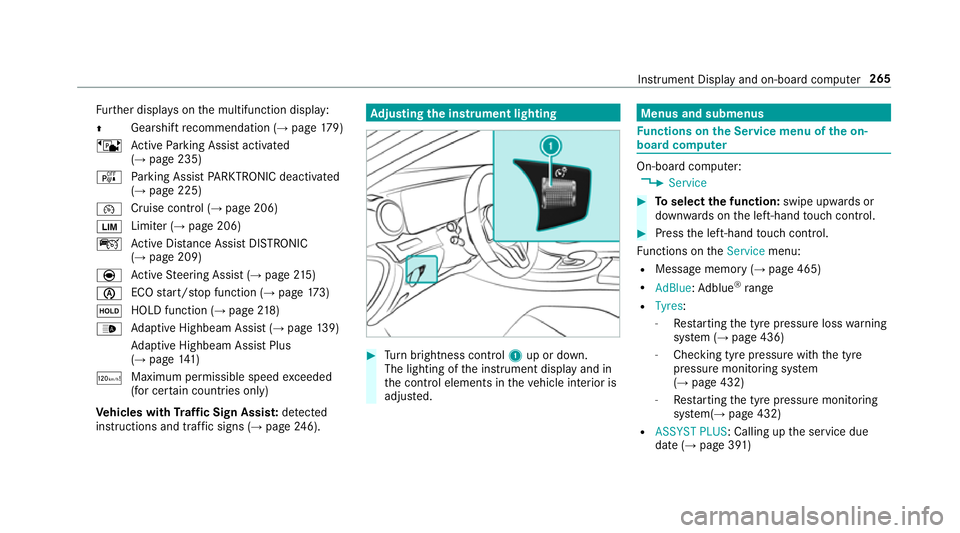
justin gthe in stru men tlighting #
Turn brightness control 1up or down.
The lightin gofthe instrument displa yand in
th ec ontrol element sinthevehicle interior is
adjus ted. Menus and submenus
Fu
nctions on theS ervice menu of theo n-
boar dcompu ter On-boar
dcomputer:
, Service #
Toselect thef unction: swipe upwards or
down wardsont he left-hand touc hc ontrol. #
Pres sthe left-hand touc hc ontrol.
Fu nctions on theService menu:
R Messag ememor y(→pag e465)
R AdBlue :Adblue ®
ra nge
R Tyres:
- Restartin gthe tyr epressur eloss warning
sy stem (→ page436)
- Checking tyr epressur ewitht he tyre
pressur emonitoring sy stem
(→ pag e432)
- Restartin gthe tyr epressur emonitoring
sy stem(→ page432)
R ASSYST PLUS:C alling upthes ervice due
dat e(→pag e391 ) Instrument Displa
yand on-boar dcomputer 265
Page 269 of 585
R
Engine oi llevel Callin
gupthe assistan tdisplay On-boar
dcomputer:
, Assistance
% Ve
hicles with thei nstrument displa yin
th ew idescreen cockpit: whenyouh ave
th ed esign se ttoProgressive ,you can view
th ea ssis tant displ ayinthel eft-hand portion
of thei nstrument displa y.
The following displa ysarea vailable from the
assis tant displ aymenu:
R Assis tant displ ay
R Attentio nleve l(→ pag e244) #
Toswitc hbetwe en thed ispla ys:swipe
upwards or down wardsont he left-hand
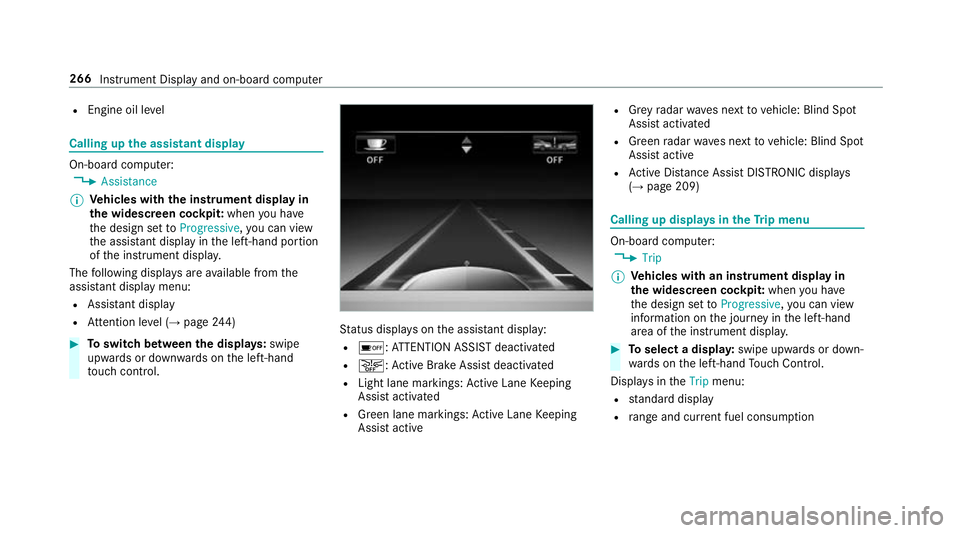
to uc hc ontrol. St
atus displa yson thea ssis tant displ ay:
R é :ATTENTION ASSIS Tdeactivated
R æ:A ctiveBrake Assi stdeactivated
R Light lane markings: ActiveL aneK eeping
Assis tactivated
R Green lane markings :Activ eLaneK eeping
Assis tactive R
Grey radar waves next tovehicle: Blind Spot
Assis tactivated
R Green radar waves next tovehicle: Blind Spot
Assis tactive
R ActiveD ista nce Assi stDISTRONI Cdispl ays
( → pag e209) Calling up displa
ysintheT ripm enu On-boar
dcomputer:
, Trip
% Ve
hicles with an instrument displa yin
th ew idescreen cockpit: whenyouh ave
th ed esign se ttoProgressive ,you can view
information on thej ourne yinthe left-hand
area of thei nstrument displa y. #
Toselect adispla y:swipe upwards or down‐
wa rdsont he left-hand Touc hC ontrol.
Displa ysinthe Trip menu:
R standar ddisplay
R rang ea nd cur rent fue lconsu mption 266
Instrument Displ ayand on-boar dcomputer
Page 270 of 585
When
gliding mode is activ e(→pag e179),
Gliding mode is displayedi nstead of thec ur‐
re nt fue lconsu mption.
Ar ecuperation displa yisalsoavailable for
cer tain engines. If ther eiso nlyas mall
amount of fuel lef tinthe fuel tank ,the dis‐
pla yshows avehicle being refuelled ins tead
of ther ange.
R ECOd ispl ay ( →pag e174 )
R Trip computer Froms tart and Fromr eset
R Digital speedom eter
% Ve
hicles with an Instrument Displa yin
th eW idescreen Cockpit: thed igital speed‐
ome tero nly appear sintheClassic andSport
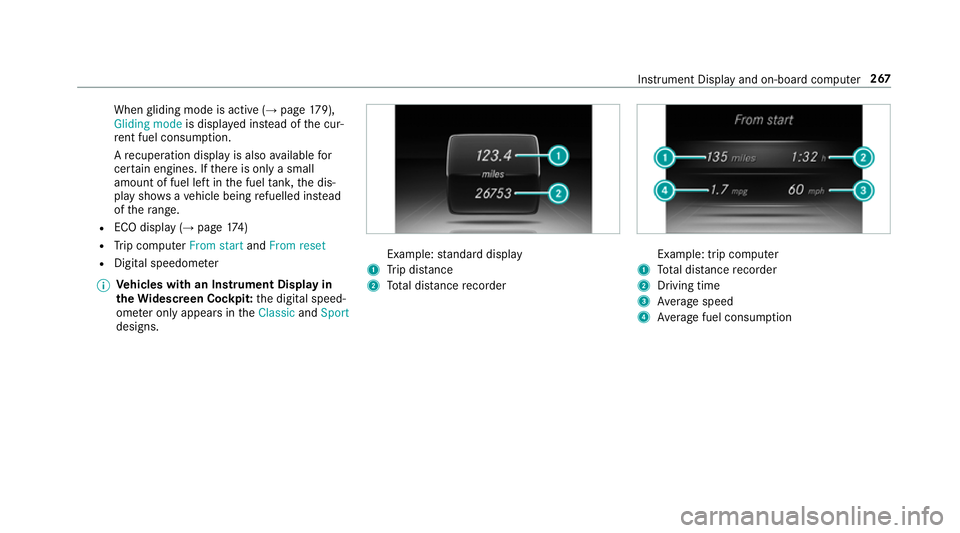
designs. Example:
standar ddisplay
1 Trip dis tance
2 Totald ista nce recorder Example: trip compu
ter
1 Totald ista nce recorder
2 Driving time
3 Averag espeed
4 Averag efuel consum ption Instrumen
tDispla yand on-boar dcomputer 267
Page 271 of 585
Re
setting values on theT ripm enu of theo n-
boar dcompu ter On-boar
dcomputer:
, Trip
% The spelling ma ydiffe rint he main menu dis‐
pla yed. Therefore, obser vethem enu over‐
vie wf orthei nstrument display
(→ pag e262).
Yo uc an rese tthe values of thef ollowing func‐
tions:
R Trip dis tance
R Trip computer Froms tart and Fromr eset
R ECOd ispla y(→ pag e174 ) #
Toselect thef unction tobe rese t:swipe
upwards or down wardsont he left-hand
to uc hc ontrol. #
Pres sthe left-hand touc hc ontrol. #
Select Yes. #
Pres sthe left-hand touc hc ontrol.
If yo up ress and hold thel eft-hand touc hc ontrol,
th ef unction will be rese timmediately. Calling up navigation instructions in
theo n-
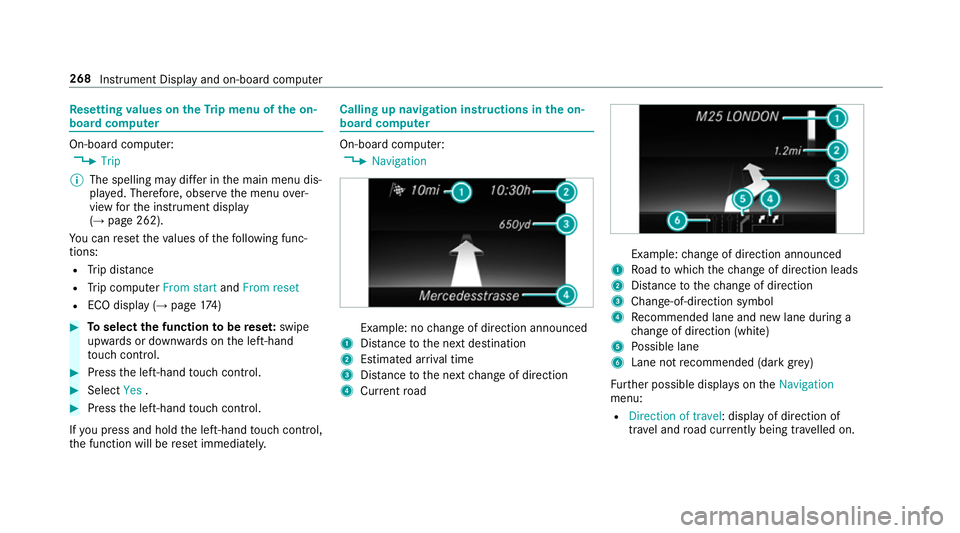
boar dcompu ter On-boar
dcomputer:
, Navigation Example: no
chang eofd irection announced
1 Distance tothen extd estination
2 Estimated ar riva ltime
3 Distance tothen extc hang eofd irection
4 Current road Example:
chang eofd irection announced
1 Road towhic hthe chang eofd irection leads
2 Distance tothec hang eofd irection
3 Chan ge-of-direction symbol
4 Recommended lane and ne wlaned urin ga
ch ang eofd irection (white)
5 Possible lane
6 Lane no trecommende d(dark grey)
Fu rther possible displa yson the Navigation
menu:
R Direction of travel:d isplayofd irection of
tra vela nd road cur rentl yb eing tr avelled on. 268
Instrumen tDispla yand on-boar dcomputer
Page 274 of 585
#
Onlyoperat ethis equipment when the
traf fics ituation permits. #
Ifyo uc anno tbes ureoft his,stop the
ve hicle whils tpaying attention toroad
and traf ficc onditions and ope rate the
equipment wit hthe vehicle stationar y. When
telephoning, youm usto bse rvet he legal
re qu irements fort he countr yinwhichyou are
cur rentl yd riving.
Ve hicles with theC OMAN DOnline multime‐
dia sy stem: them ostrecen ttelephone connec‐
tion s(dialled, recei veda nd missed calls) ar edis‐
pla yedont heTelephone menu. #
Select an entr y:swipe upwards or down‐
wa rdsont he left-hand touc hc ontrol. #
Pres sthe left-hand touc hc ontrol.
If ther eisonlyo ne telephone number
sa ve dtoane ntry:thet elephone number is
selected. #
Ifth erea remultiple telephone numbers
sa ve dtoane ntry:swipe upwards or down‐
wa rdsont he left-hand touc hc ontrol to
select thed esired telephon enumber. #
Press thel eft-hand touc hc ontrol.
Th et elephone number is dialled.
The following displa ysma yappear ins tead of the
te lephon enumber sdialled:
R Please wait... :the applicationiss tarting.
When aBluetooth ®
connection tothem obile
phone is no testablished, them enu for
authorisin gand connectin gamobile phon eis
displa yedint he multimedia sy stem
(→ pag e337)(→pag e338).
R Updating data...:t he call listisbeing upda‐
te d.
R Importing contacts... :the contacts from the
mobil ephone or from astorage medium are
being impor ted.
Ac cepting/rejecting acall
When your eceiv eacall,the Incoming call mes‐
sag eappear sonthe head-up displa y. #
Swipe up wardsord ownw ards on thel eft-
hand touc hc ontrol an dselect 6 (Accept)
or ~ (Reject). #
Press thel eft-hand touc hc ontrol. Th
ec all ma ybea ccepted/rejec tedu sing the
6 or~ buttons on thes teering wheel. Ad
justin gthe head-up displa ysettings via
the on-boar dcom puter On-boar
dcomputer:
, HUD
The following head-up displa ysettings can be
adjus ted:
R Position
R Brightness
R Display content #
Toselect asetting: swipe upwards or down‐
wa rdsont he left-hand touc hc ontrol. #
Pres sthe left-hand touc hc ontrol. #
Toadjus tavalue: swipe upwards or down‐
wa rdsont he left-hand touc hc ontrol. #
Pres sthe left-hand touc hc ontrol. In
stru men tDispla yand on-boar dcomputer 271
Page 275 of 585
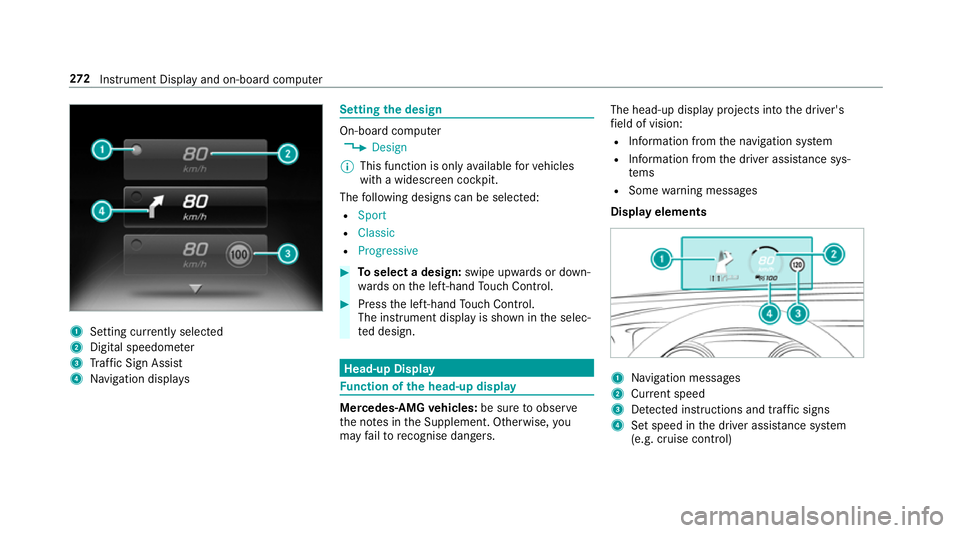
1
Setting cur rently selected
2 Digital speedome ter
3 Traf ficS ign Assi st
4 Navigation displa ys Setting
thed esign On-boar
dcomputer
, Design
% This function is onl yavailable forv ehicles
wit haw idescreen cockpit.
The following design scan be selec ted:
R Sport
R Classic
R Progressive #
Toselect adesign: swipe upwards or down‐
wa rdsont he left-hand Touc hC ontrol. #
Press thel eft-hand Touc hC ontrol.
The instrumen tdispl ayis shown in thes elec‐
te dd esign. Head-up Display
Fu
nction of theh ead-up display Mercedes-AMG
vehicles: be suretoobserve
th en otes in theS upplement .Otherwise, you
ma yfail torecognise dangers. The head-u
pdispl ay projects int othe driver's
fi eld of vision:
R Information from then avigation sy stem
R Information from thed rive ra ssis tance sys‐
te ms
R Some warning messages
Displa yelements 1
Navigation messa ges
2 Current speed
3 Detected instructions and traf fics igns
4 Setspeed in thed rive ra ssis tance sy stem
(e.g. cruise control) 272
Instrument Displa yand on-boar dcomputer
Page 280 of 585
Vo
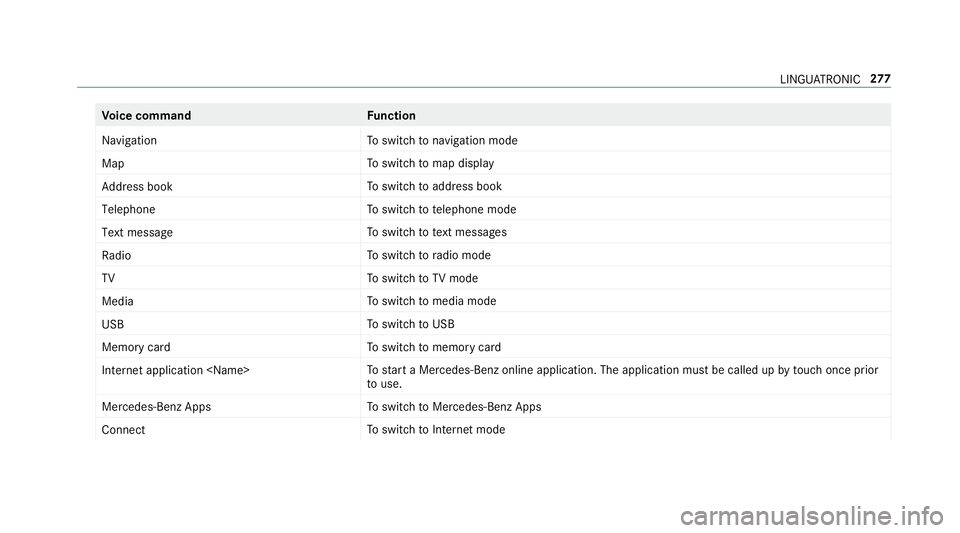
ice command Function
Navigation To
switc hton avigation mode
Map To
switc htom ap display
Address book To
switc htoa ddress book
Telephone To
switc htot elephone mode
Text message To
switc htot extm essa ges
Radio To
switc htor adio mode
TV To
switc htoTVm ode
Media To
switc htom edia mode
USB To
switc htoU SB
Memory card To
switc htom emorycard
Internet application
star taM ercedes-Ben zonline application. The applicatio nmustbec alledupbyt ouchoncep rior
to use.
Mercedes-Ben zApps To
switc htoM ercedes-BenzA pps
Connect To
switc htoInterne tmode LINGU
ATRO NIC 277