stop start MERCEDES-BENZ E-CLASS SALOON 2009 User Guide
[x] Cancel search | Manufacturer: MERCEDES-BENZ, Model Year: 2009, Model line: E-CLASS SALOON, Model: MERCEDES-BENZ E-CLASS SALOON 2009Pages: 373, PDF Size: 12.37 MB
Page 108 of 373
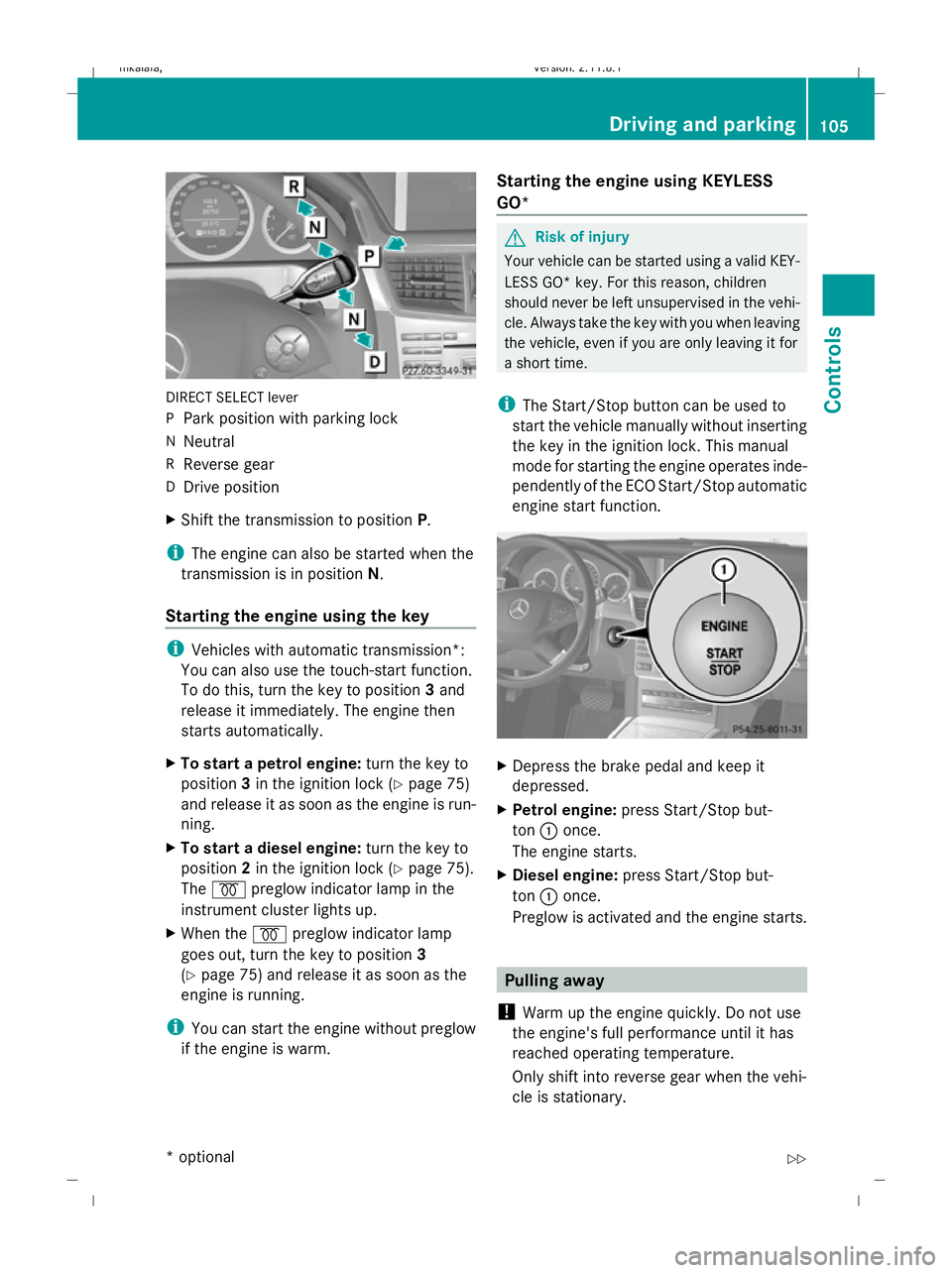
DIRECT SELECT lever
P
Park position with parking lock
N Neutral
R Reverse gear
D Drive position
X Shift the transmission to position P.
i The engine can also be started when the
transmission is in position N.
Starting the engine using the key i
Vehicles with automatic transmission*:
You can also use the touch-start function.
To do this, turn the key to position 3and
release it immediately. The engine then
starts automatically.
X To start a petrol engine: turn the key to
position 3in the ignition lock (Y page 75)
and release it as soon as the engine is run-
ning.
X To start a diesel engine: turn the key to
position 2in the ignition lock (Y page 75).
The % preglow indicator lamp in the
instrument cluster lights up.
X When the %preglow indicator lamp
goes out, turn the key to position 3
(Y page 75) and release it as soon as the
engine is running.
i You can start the engine without preglow
if the engine is warm. Starting the engine using KEYLESS
GO* G
Risk of injury
Your vehicle can be started using a valid KEY-
LESS GO* key. For this reason, children
should never be left unsupervised in the vehi-
cle. Always take the key with you when leaving
the vehicle, even if you are only leaving it for
a short time.
i The Start/Stop button can be used to
start the vehicle manually without inserting
the key in the ignition lock. This manual
mode for starting the engine operates inde-
pendently of the ECO Start/Stop automatic
engine start function. X
Depress the brake pedal and keep it
depressed.
X Petrol engine: press Start/Stop but-
ton :once.
The engine starts.
X Diesel engine: press Start/Stop but-
ton :once.
Preglow is activated and the engine starts. Pulling away
! Warm up the engine quickly. Do not use
the engine's full performance until it has
reached operating temperature.
Only shift into reverse gear when the vehi-
cle is stationary. Driving and parking
105Controls
* optional
212_AKB; 2; 4, en-GB
mkalafa,
Version: 2.11.8.1 2009-05-05T14:17:16+02:00 - Seite 105 Z
Dateiname: 6515346702_buchblock.pdf; erzeugt am 07. May 2009 14:16:04; WK
Page 111 of 373
Using the key
X
Turn the key to position 0(Y page 75) in
the ignition lock and remove it.
The immobiliser is activated.
i Vehicles with a selector lever: you can
only remove the key if the transmission is
in position P.
i Vehicles with a DIRECT SELECT lever:
if you switch off the engine with the trans-
mission in position Ror D, the automatic
transmission automatically shifts to N.
If you then open the driver's door or the
front-passenger door or remove the key
from the ignition, the automatic transmis-
sion shifts to P.
If you shift the automatic transmission to
N before switching off the engine, the auto-
matic transmission remains in Neven when
a door is opened.
Using KEYLESS GO*
X Press the Start/Stop button (Y page 75).
The engine stops and all the indicator
lamps in the instrument cluster go out
(Y page 27).
i Vehicles with a DIRECT SELECT lever:
if you switch off the engine using the Start/
Stop button, the automatic transmission
automatically shifts to N. If you open the
driver's or front-passenger door, the auto-
matic transmission shifts to P.
i The engine can be turned off while the
vehicle is in motion by pressing and holding
the Start/Stop button for three seconds.
This function operates independently from
the ECO Start/Stop automatic engine
switch-off function. ECO start/stop function
i The ECO Start/Stop function is only avail-
able for the A 200 CGI model with manual
transmission. The ECO Start/Stop function ensures that the
engine is switched off automatically under
certain conditions when the vehicle is moving
slowly.
The engine starts automatically when you pull
away again.
The ECO Start/Stop function thereby helps
you to reduce the fuel consumption and emis-
sions of your vehicle.
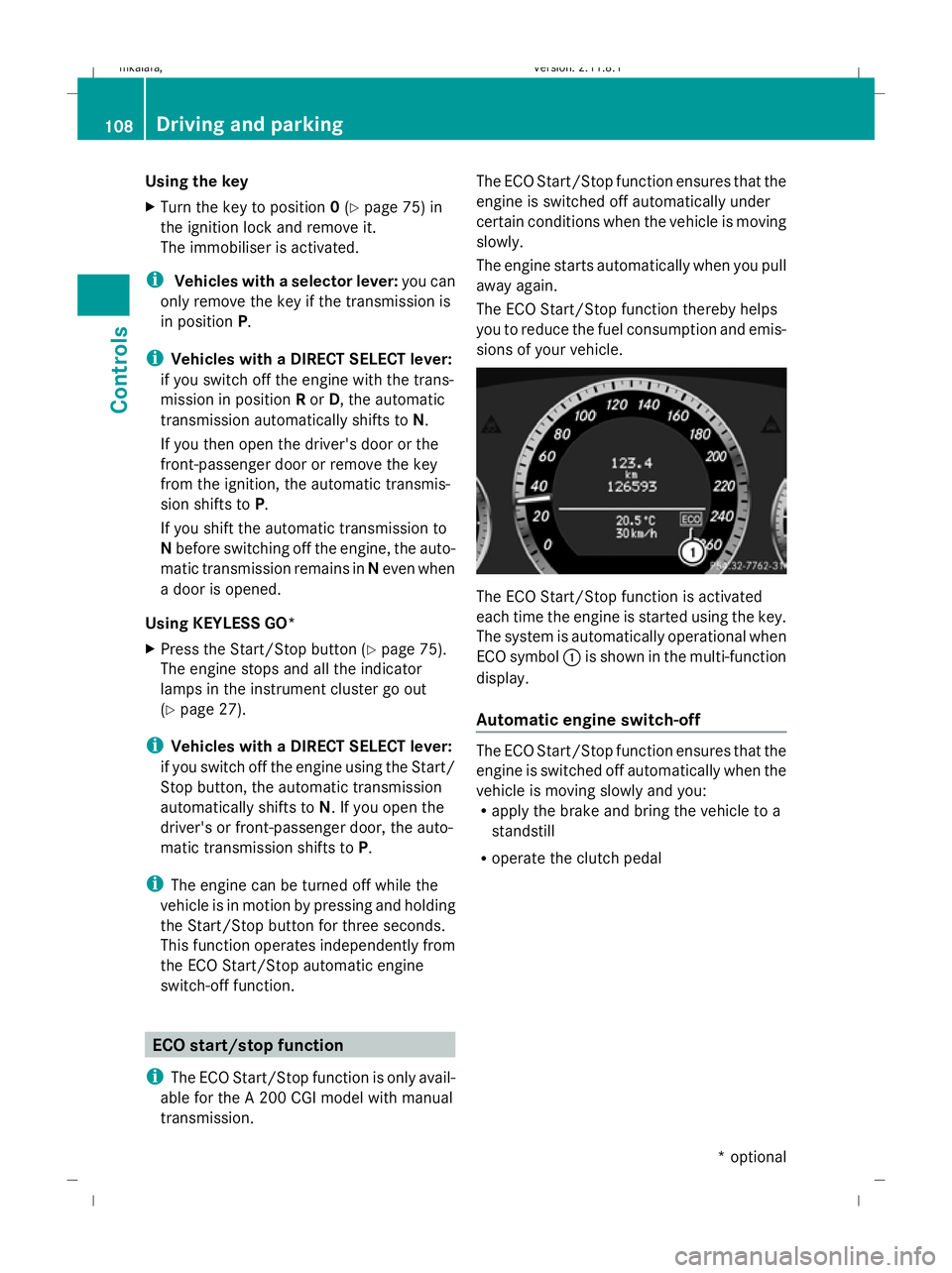
The ECO Start/Stop function is activated
each time the engine is started using the key.
The system is automatically operational when
ECO symbol
:is shown in the multi-function
display.
Automatic engine switch-off The ECO Start/Stop function ensures that the
engine is switched off automatically when the
vehicle is moving slowly and you:
R
apply the brake and bring the vehicle to a
standstill
R operate the clutch pedal 108
Driving and parkingControls
* optional
212_AKB; 2; 4, en-GB
mkalafa,
Version: 2.11.8.1 2009-05-05T14:17:16+02:00 - Seite 108
Dateiname: 6515346702_buchblock.pdf; erzeugt am 07. May 2009 14:16:05; WK
Page 112 of 373
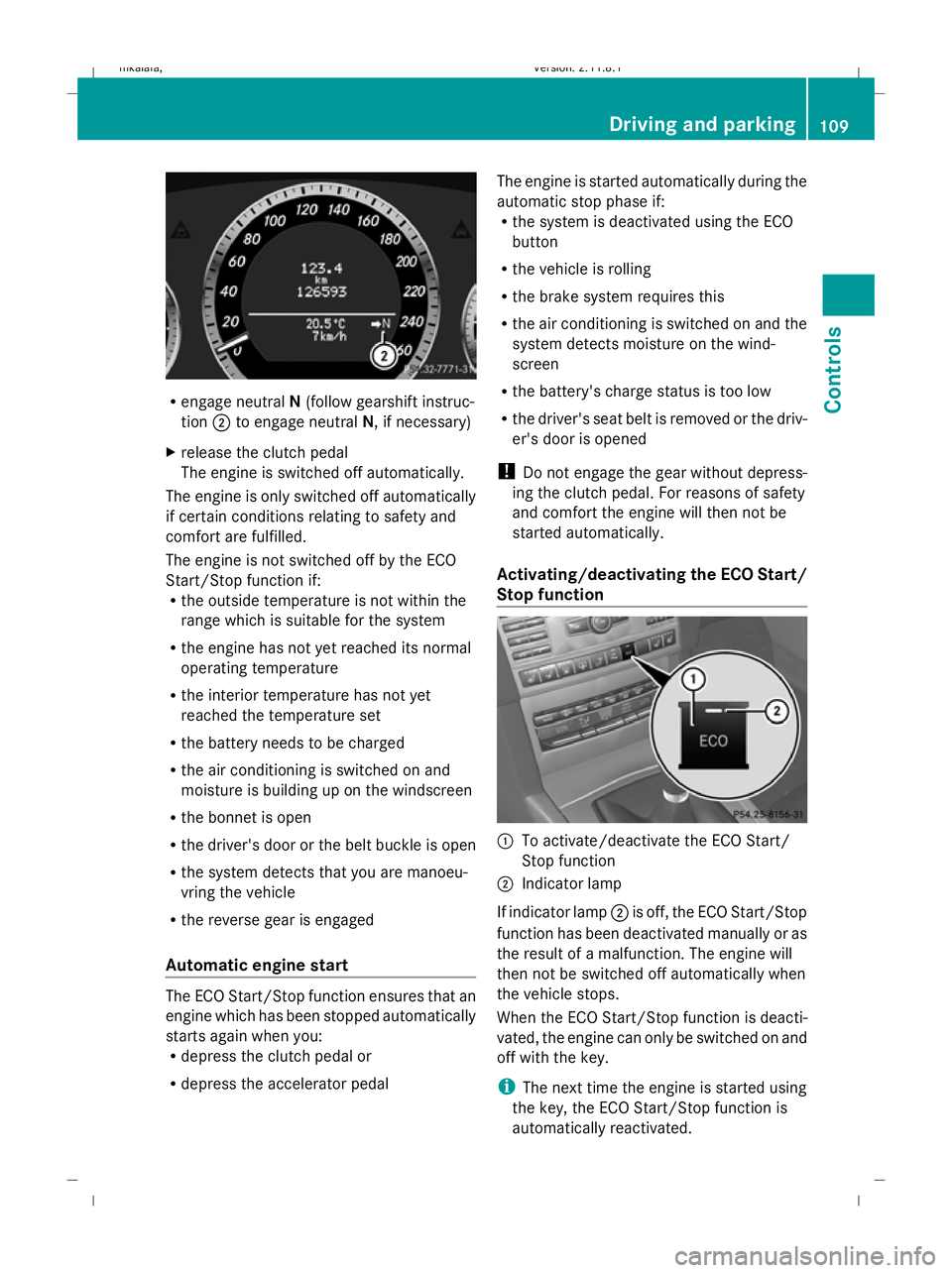
R
engage neutral N(follow gearshift instruc-
tion ;to engage neutral N, if necessary)
X release the clutch pedal
The engine is switched off automatically.
The engine is only switched off automatically
if certain conditions relating to safety and
comfort are fulfilled.
The engine is not switched off by the ECO
Start/Stop function if:
R the outside temperature is not within the
range which is suitable for the system
R the engine has not yet reached its normal
operating temperature
R the interior temperature has not yet
reached the temperature set
R the battery needs to be charged
R the air conditioning is switched on and
moisture is building up on the windscreen
R the bonnet is open
R the driver's door or the belt buckle is open
R the system detects that you are manoeu-
vring the vehicle
R the reverse gear is engaged
Automatic engine start The ECO Start/Stop function ensures that an
engine which has been stopped automatically
starts again when you:
R
depress the clutch pedal or
R depress the accelerator pedal The engine is started automatically during the
automatic stop phase if:
R
the system is deactivated using the ECO
button
R the vehicle is rolling
R the brake system requires this
R the air conditioning is switched on and the
system detects moisture on the wind-
screen
R the battery's charge status is too low
R the driver's seat belt is removed or the driv-
er's door is opened
! Do not engage the gear without depress-
ing the clutch pedal. For reasons of safety
and comfort the engine will then not be
started automatically.
Activating/deactivating the ECO Start/
Stop function :
To activate/deactivate the ECO Start/
Stop function
; Indicator lamp
If indicator lamp ;is off, the ECO Start/Stop
function has been deactivated manually or as
the result of a malfunction. The engine will
then not be switched off automatically when
the vehicle stops.
When the ECO Start/Stop function is deacti-
vated, the engine can only be switched on and
off with the key.
i The next time the engine is started using
the key, the ECO Start/Stop function is
automatically reactivated. Driving and parking
109Controls
212_AKB; 2; 4, en-GB
mkalafa, Version: 2.11.8.1 2009-05-05T14:17:16+02:00 - Seite 109 Z
Dateiname: 6515346702_buchblock.pdf; erzeugt am 07. May 2009 14:16:06; WK
Page 113 of 373
Transmission
Notes on the transmission
G
Risk of accident
The movement of the pedals must not be
impaired in any way. Do not keep any objects
in the driver's footwell. Make sure that floor-
mats or carpets are correctly secured and
that there is sufficient clearance for the ped-
als.
Do not place several floormats on top of one
another. G
Risk of accident
Do not change down for additional engine
braking on a slippery road surface. This could
cause the drive wheels to lose their grip and
the vehicle could skid. This could cause you
to lose control of your vehicle and cause an
accident. Manual transmission
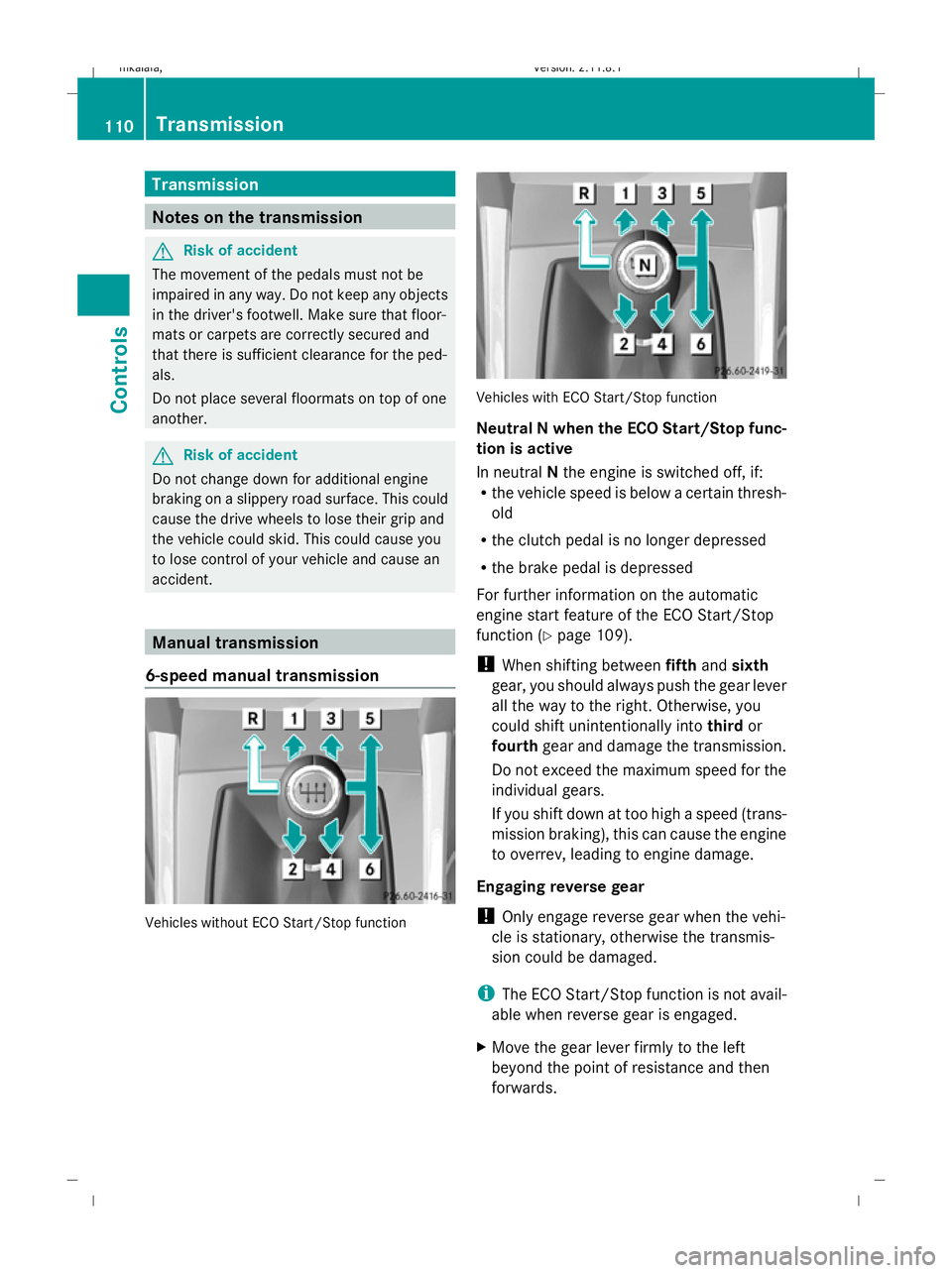
6-speed manual transmission Vehicles without ECO Start/Stop function Vehicles with ECO Start/Stop function
Neutral
Nwhen the ECO Start/Stop func-
tion is active
In neutral Nthe engine is switched off, if:
R the vehicle speed is below a certain thresh-
old
R the clutch pedal is no longer depressed
R the brake pedal is depressed
For further information on the automatic
engine start feature of the ECO Start/Stop
function ( Ypage 109).
! When shifting between fifthandsixth
gear, you should always push the gear lever
all the way to the right. Otherwise, you
could shift unintentionally into thirdor
fourth gear and damage the transmission.
Do not exceed the maximum speed for the
individual gears.
If you shift down at too high a speed (trans-
mission braking), this can cause the engine
to overrev, leading to engine damage.
Engaging reverse gear
! Only engage reverse gear when the vehi-
cle is stationary, otherwise the transmis-
sion could be damaged.
i The ECO Start/Stop function is not avail-
able when reverse gear is engaged.
X Move the gear lever firmly to the left
beyond the point of resistance and then
forwards. 110
TransmissionControls
212_AKB; 2; 4, en-GB
mkalafa,
Version: 2.11.8.1 2009-05-05T14:17:16+02:00 - Seite 110
Dateiname: 6515346702_buchblock.pdf; erzeugt am 07. May 2009 14:16:06; WK
Page 123 of 373
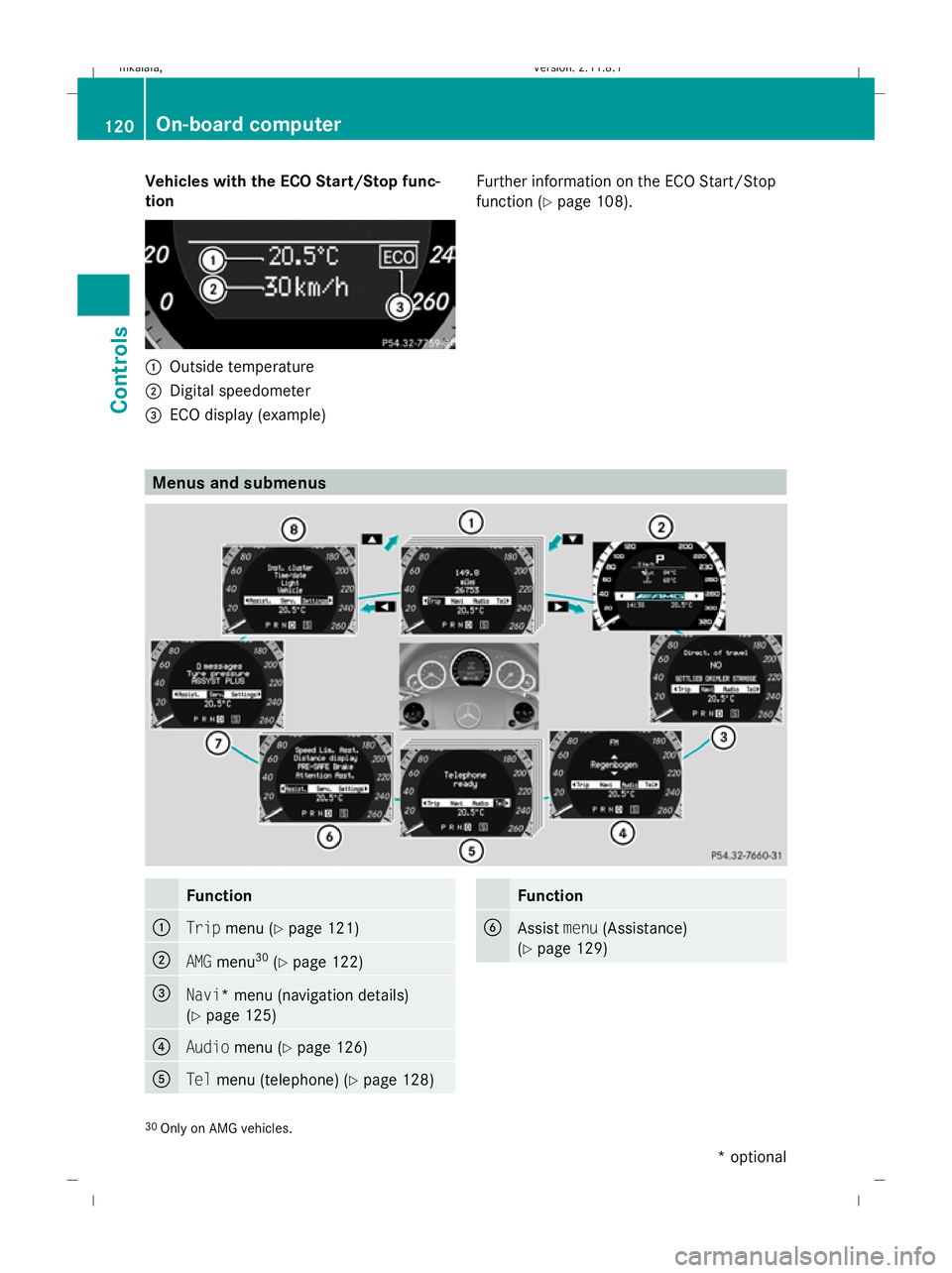
Vehicles with the ECO Start/Stop func-
tion :
Outside temperature
; Digital speedometer
= ECO display (example) Further information on the ECO Start/Stop
function (
Ypage 108). Menus and submenus
Function
:
Trip
menu (Y page 121) ;
AMG
menu 30
(Y page 122) =
Navi* menu (navigation details)
(Y
page 125) ?
Audio
menu (Y page 126) A
Tel
menu (telephone) (Y page 128) Function
B
Assist
menu(Assistance)
(Y page 129) 30
Only on AMG vehicles. 120
On-board computerControls
* optional
212_AKB; 2; 4, en-GB
mkalafa
,V ersion: 2.11.8.1
2009-05-05T14:17:16+02:00 - Seite 120
Dateiname: 6515346702_buchblock.pdf; erzeugt am 07. May 2009 14:16:11; WK
Page 126 of 373
=
Upshift instruction
? Engine oil temperature
A Coolant temperature
Shift UPinstruction =indicates that the
engine has reached the overrevving range.
Shift UPinstruction =blocks other mes-
sages in the multi-function display until you
have shifted up.
When the engine oil temperature is below
80 †, the oil temperature gauge flashes.
Avoid driving at full engine output during this
time.
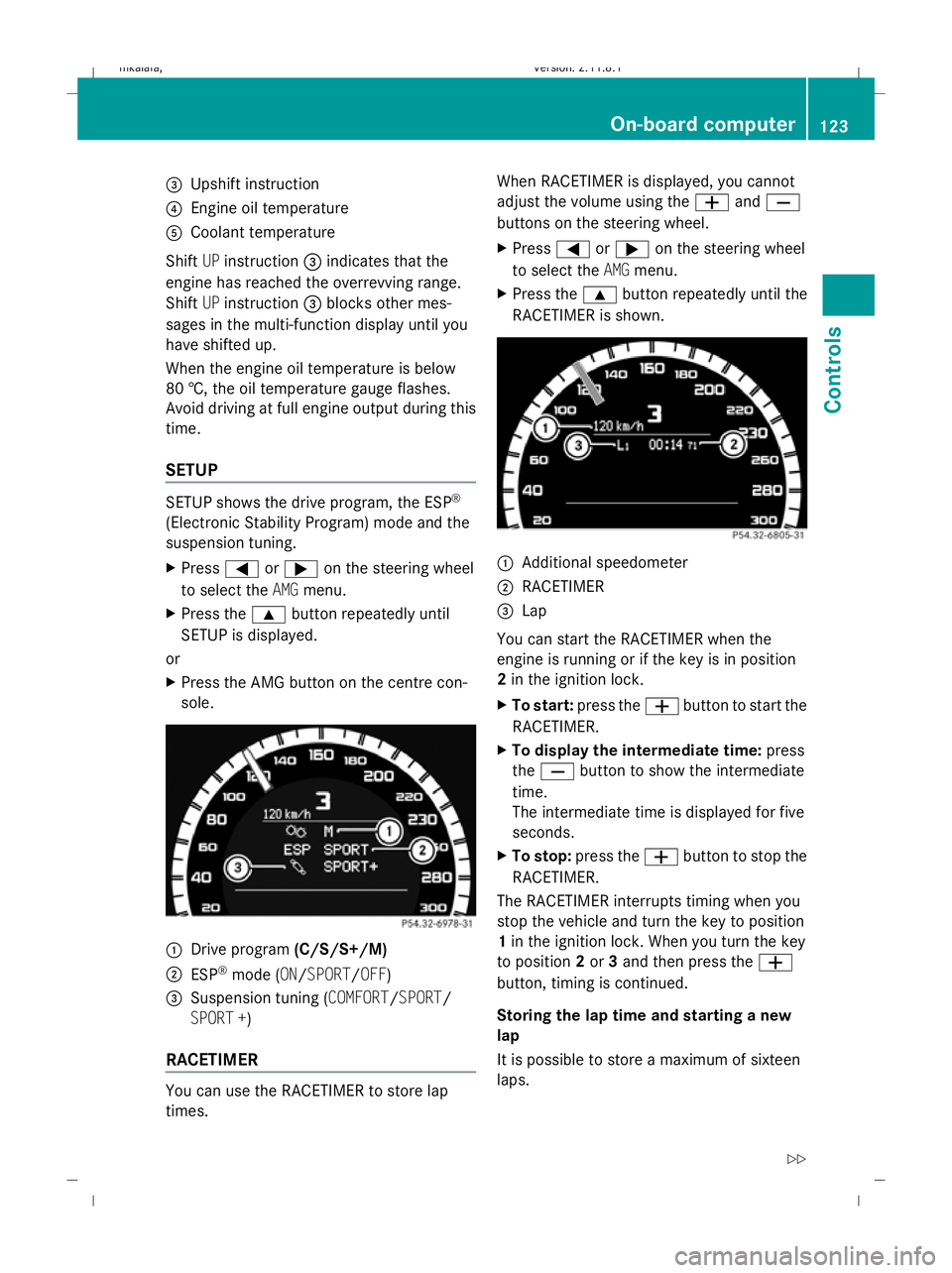
SETUP SETUP shows the drive program, the ESP
®
(Electronic Stability Program) mode and the
suspension tuning.
X Press =or; on the steering wheel
to select the AMGmenu.
X Press the 9button repeatedly until
SETUP is displayed.
or
X Press the AMG button on the centre con-
sole. :
Drive program (C/S/S+/M)
; ESP ®
mode (ON/SPORT/OFF)
3 Suspension tuning (COMFORT/SPORT/
SPORT +)
RACETIMER You can use the RACETIMER to store lap
times. When RACETIMER is displayed, you cannot
adjust the volume using the
WandX
buttons on the steering wheel.
X Press =or; on the steering wheel
to select the AMGmenu.
X Press the 9button repeatedly until the
RACETIMER is shown. :
Additional speedometer
; RACETIMER
= Lap
You can start the RACETIMER when the
engine is running or if the key is in position
2 in the ignition lock.
X To start: press the Wbutton to start the
RACETIMER.
X To display the intermediate time: press
the X button to show the intermediate
time.
The intermediate time is displayed for five
seconds.
X To stop: press the Wbutton to stop the
RACETIMER.
The RACETIMER interrupts timing when you
stop the vehicle and turn the key to position
1 in the ignition lock. When you turn the key
to position 2or 3and then press the W
button, timing is continued.
Storing the lap time and starting a new
lap
It is possible to store a maximum of sixteen
laps. On-board computer
123Controls
212_AKB; 2; 4, en-GB
mkalafa, Version: 2.11.8.1 2009-05-05T14:17:16+02:00 - Seite 123 Z
Dateiname: 6515346702_buchblock.pdf; erzeugt am 07. May 2009 14:16:12; WK
Page 127 of 373
X
Press the Xbutton on the steering
wheel to show the intermediate time during
timing.
The intermediate time is displayed for five
seconds.
X Press the Xbutton again within five
seconds.
The displayed intermediate time is stored
as a lap time.
Timing starts for a new lap. The new lap is
timed from when the intermediate time is
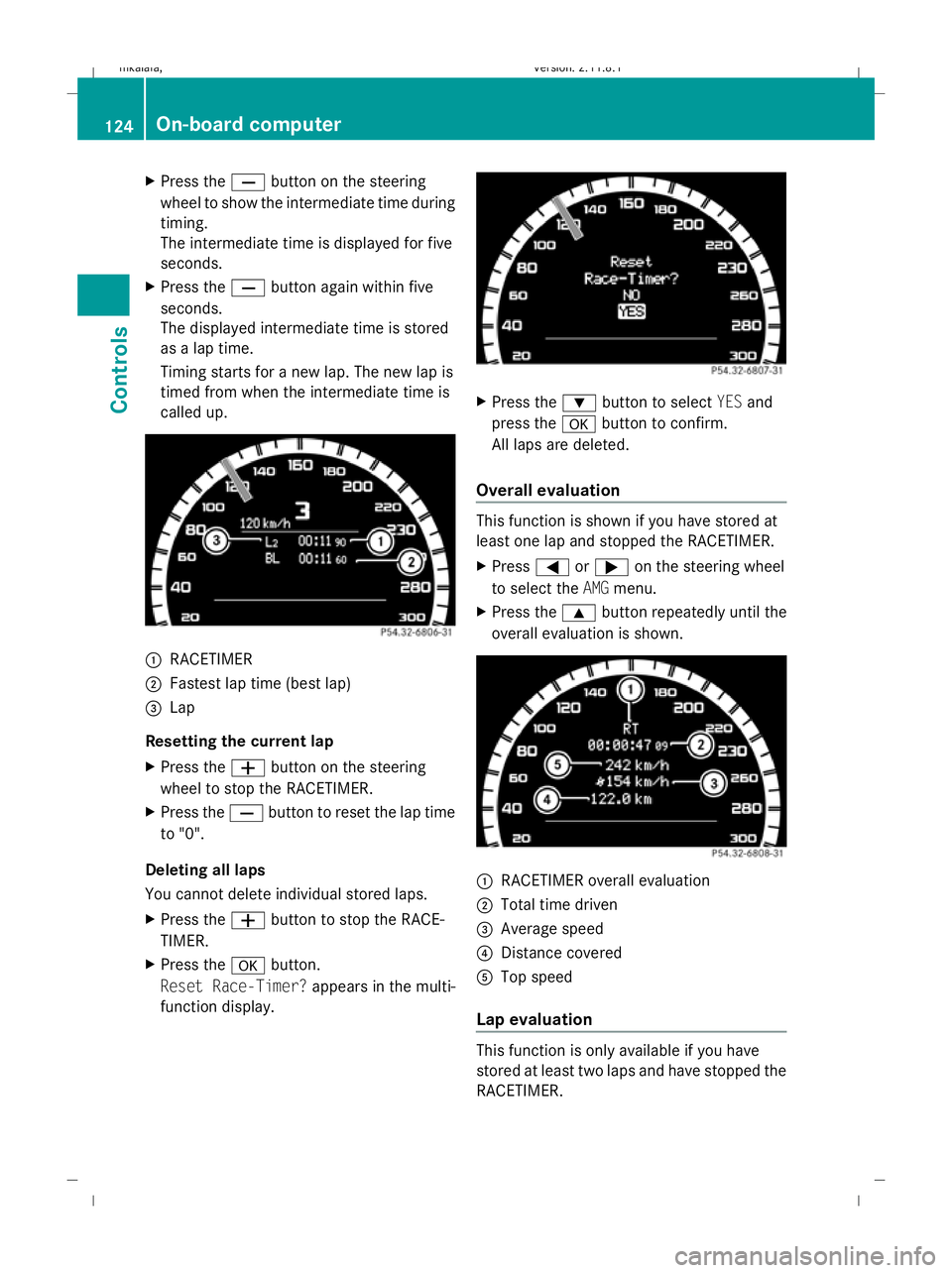
called up. :
RACETIMER
; Fastest lap time (best lap)
= Lap
Resetting the current lap
X Press the Wbutton on the steering
wheel to stop the RACETIMER.
X Press the Xbutton to reset the lap time
to "0".
Deleting all laps
You cannot delete individual stored laps.
X Press the Wbutton to stop the RACE-
TIMER.
X Press the abutton.
Reset Race-Timer? appears in the multi-
function display. X
Press the :button to select YESand
press the abutton to confirm.
All laps are deleted.
Overall evaluation This function is shown if you have stored at
least one lap and stopped the RACETIMER.
X
Press =or; on the steering wheel
to select the AMGmenu.
X Press the 9button repeatedly until the
overall evaluation is shown. :
RACETIMER overall evaluation
; Total time driven
= Average speed
? Distance covered
A Top speed
Lap evaluation This function is only available if you have
stored at least two laps and have stopped the
RACETIMER.124
On-board computerControls
212_AKB; 2; 4, en-GB
mkalafa,
Version: 2.11.8.1 2009-05-05T14:17:16+02:00 - Seite 124
Dateiname: 6515346702_buchblock.pdf; erzeugt am 07. May 2009 14:16:13; WK
Page 146 of 373
Pulling away
X
If the vehicle in front pulls away: remove
your foot from the brake pedal.
X Briefly pull the cruise control lever towards
you ?.
or
X Accelerate briefly.
Your vehicle pulls away and adapts its
speed to that of the vehicle in front.
Driving
If there is no vehicle in front, Distronic Plus
operates in the same way as cruise control.
If a slower-moving vehicle is detected in front,
Distronic Plus causes your vehicle to brake
and maintain a preset distance to the vehicle
in front.
If Distronic Plus detects a faster-moving vehi-
cle in front, it increases the driving speed, but
only up to the stored speed. G
Risk of accident
If you depress the brake, Distronic Plus is
deactivated unless your vehicle is stationary.
Distronic Plus then no longer brakes your
vehicle. The driver is fully responsible for the
vehicle's distance from other vehicles, its
speed and for braking in good time.
Stopping G
Risk of accident
The Distronic Plus braking effect is cancelled
and the vehicle can start moving if:
R Distronic Plus is deactivated using the
cruise control lever
R you accelerate
R the system or the power supply is disrup-
ted, e.g. due to battery failure
R the electrical system in the engine com-
partment or the fuses have been tampered
with
R the battery is disconnected G
Risk of accident
Never get out of the vehicle when Distronic
Plus is activated.
Distronic Plus must never be operated or
deactivated by a passenger or from outside
the vehicle.
Distronic Plus does not replace the parking
brake and must not be used for parking.
If you wish to leave the vehicle or park it,
deactivate Distronic Plus and secure the vehi-
cle against rolling away.
If Distronic Plus detects that the vehicle in
front is stopping, it brakes your vehicle until
it is stationary.
Once your vehicle is stationary, it remains
stationary and you do not need to depress the
brake.
i Depending on the specified minimum dis-
tance, your vehicle will come to a standstill
at a sufficient distance behind the vehicle
in front. The specified minimum distance is
set using the thumbwheel on the cruise-
control lever.
Vehicles with automatic transmission
with selector lever
When Distronic Plus is activated and the vehi-
cle is at a standstill, a warning message
appears in the multi-function display if:
R the driver's door is opened and you release
the seat belt.
R the engine is switched off, unless it is auto-
matically switched off by the ECO Start/
Stop function.
R the bonnet is opened.
Select Park (P)
X Move the selector lever to Pto prevent the
vehicle from rolling away.
Distronic Plus is deactivated. The warning
message in the multi-function display dis-
appears. Driving systems
143Controls
212_AKB; 2; 4, en-GB
mkalafa, Version: 2.11.8.1 2009-05-05T14:17:16+02:00 - Seite 143 Z
Dateiname: 6515346702_buchblock.pdf; erzeugt am 07. May 2009 14:16:18; WK
Page 147 of 373
The horn will also sound at regular intervals if
Distronic Plus is activated and you:
R
switch off the engine, open the driver's
door and remove your seat belt.
R open the bonnet.
The sounding of the horn alerts you to the fact
that the vehicle has been parked while Dis-
tronic Plus is still activated. The sound
becomes louder if you attempt to lock the
vehicle. The vehicle is not locked until Dis-
tronic Plus is deactivated.
i If the ignition has been switched off, the
engine cannot be started again until Dis-
tronic Plus has been deactivated.
If Distronic Plus is activated and a fault occurs
in the system or there is a disruption in the
power supply while the vehicle is stationary,
the Brake immediately message is shown
in the multi-function display. Immediately
depress the brake firmly until the warning
message in the multi-function display goes
out or move the selector lever to P. Distronic
Plus is deactivated.
Vehicles with automatic transmission
with the DIRECT SELECT lever*
When the vehicle is stationary and Distronic
Plus is switched on, Pis automatically selec-
ted if:
R the driver's door is opened and you release
the seat belt.
R the engine is switched off, unless it is auto-
matically switched off by the ECO Start/
Stop function.
R the bonnet is opened.
R a system fault occurs.
R the power supply is not sufficient. Setting a speed X
Press the cruise control lever to the pres-
sure point, up :for a higher speed or
down Afor a lower speed.
X Keep the cruise control lever pressed until
the desired speed is reached.
X Release the cruise control lever.
The new speed is stored. Distronic Plus is
activated and adjusts the vehicle's speed
to the new speed stored.
Making adjustments in 1 km/h incre-
ments X
Briefly press the cruise control lever to the
pressure point, up :for a higher speed or
down Afor a lower speed.
The last speed stored is increased or
reduced.
Making adjustments in 10 km/h incre-
ments X
Briefly press the cruise control lever
beyond the pressure point, up :for a
higher speed or down Afor a lower speed.
The last speed stored is increased or
reduced.
Storing the current speed or calling up
the last stored speed G
Risk of accident
Only select a stored speed if you know what
that speed is and whether it is suitable for the
current situation. Otherwise, sudden acceler-
ation or braking could endanger you or others.
X Briefly pull the cruise control lever towards
you ?.
X Remove your foot from the accelerator
pedal.
Distronic Plus is activated. The first time it
is activated, the current speed is stored.
Otherwise, it sets the vehicle cruise speed
to the previously stored value. 144
Driving systemsControls
* optional
212_AKB; 2; 4, en-GB
mkalafa,
Version: 2.11.8.1 2009-05-05T14:17:16+02:00 - Seite 144
Dateiname: 6515346702_buchblock.pdf; erzeugt am 07. May 2009 14:16:18; WK
Page 154 of 373
X
Press the :or9 button to set per-
manent Speedtronic in increments of ten
(240 km/h to 160 km/h). Permanent
Speedtronic is deactivated with the Off
setting.
X Press ato save the entry. HOLD function
The HOLD function can assist the driver in the
following situations:
R when pulling away, especially on steep
slopes
R when manoeuvring on steep slopes
R when waiting in traffic
The vehicle is kept stationary without the
driver having to depress the brake pedal.
The braking effect is cancelled and the HOLD
function deactivated when you depress the
accelerator pedal to pull away.
Activation conditions You can activate the HOLD function if:
R
the vehicle is stationary.
R the engine is running or was automatically
switched off by the ECO Start/Stop func-
tion.
R the driver's door is closed or your seat belt
is fastened.
R the parking brake is not applied.
R the bonnet is closed.
R on vehicles with automatic transmission*,
D, Ror Nis selected.
R Distronic Plus* is deactivated
Activating the HOLD function X
Make sure that the activation conditions
are met.
X Depress the brake. Vehicles with automatic transmission* with a
selector lever (example)
X
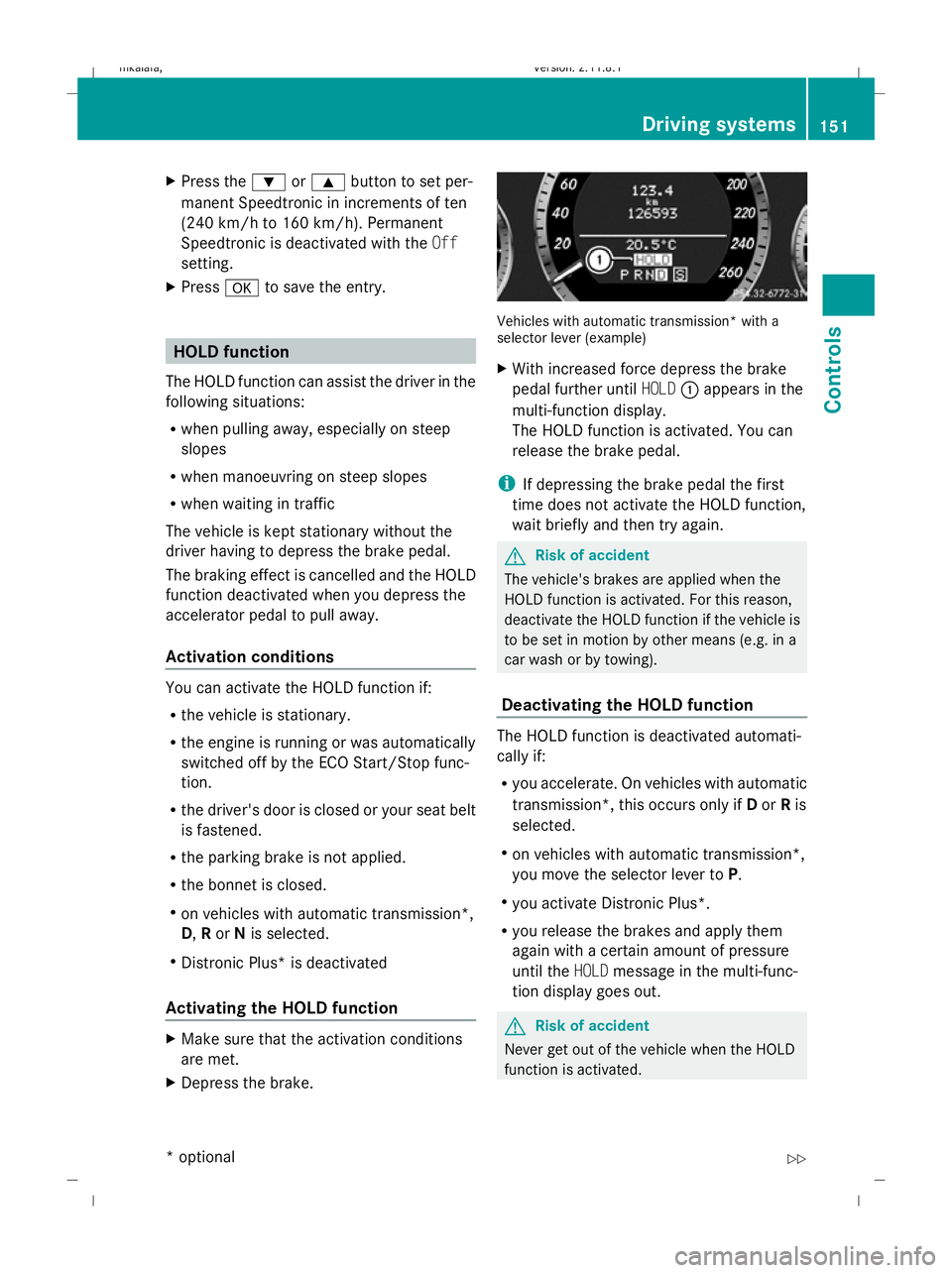
With increased force depress the brake
pedal further until HOLD:appears in the
multi-function display.
The HOLD function is activated. You can
release the brake pedal.
i If depressing the brake pedal the first
time does not activate the HOLD function,
wait briefly and then try again. G
Risk of accident
The vehicle's brakes are applied when the
HOLD function is activated. For this reason,
deactivate the HOLD function if the vehicle is
to be set in motion by other means (e.g. in a
car wash or by towing).
Deactivating the HOLD function The HOLD function is deactivated automati-
cally if:
R
you accelerate. On vehicles with automatic
transmission*, this occurs only if Dor Ris
selected.
R on vehicles with automatic transmission*,
you move the selector lever to P.
R you activate Distronic Plus*.
R you release the brakes and apply them
again with a certain amount of pressure
until the HOLDmessage in the multi-func-
tion display goes out. G
Risk of accident
Never get out of the vehicle when the HOLD
function is activated. Driving systems
151Controls
* optional
212_AKB; 2; 4, en-GB
mkalafa,
Version: 2.11.8.1 2009-05-05T14:17:16+02:00 - Seite 151 Z
Dateiname: 6515346702_buchblock.pdf; erzeugt am 07. May 2009 14:16:21; WK