warning MERCEDES-BENZ E-CLASS SALOON 2015 Owners Manual
[x] Cancel search | Manufacturer: MERCEDES-BENZ, Model Year: 2015, Model line: E-CLASS SALOON, Model: MERCEDES-BENZ E-CLASS SALOON 2015Pages: 497, PDF Size: 16.23 MB
Page 292 of 497
R
Callin gupd isplay message sinthemes-
sage memory (Y page 299)
R Restarting th etyrep ressur eloss warning
system (Y page 422)
R Checkin gthe tyrep ressur eelectronically
(Y page 423)
R Callin gupt heservic edue date
(Y page 384) Settings menu
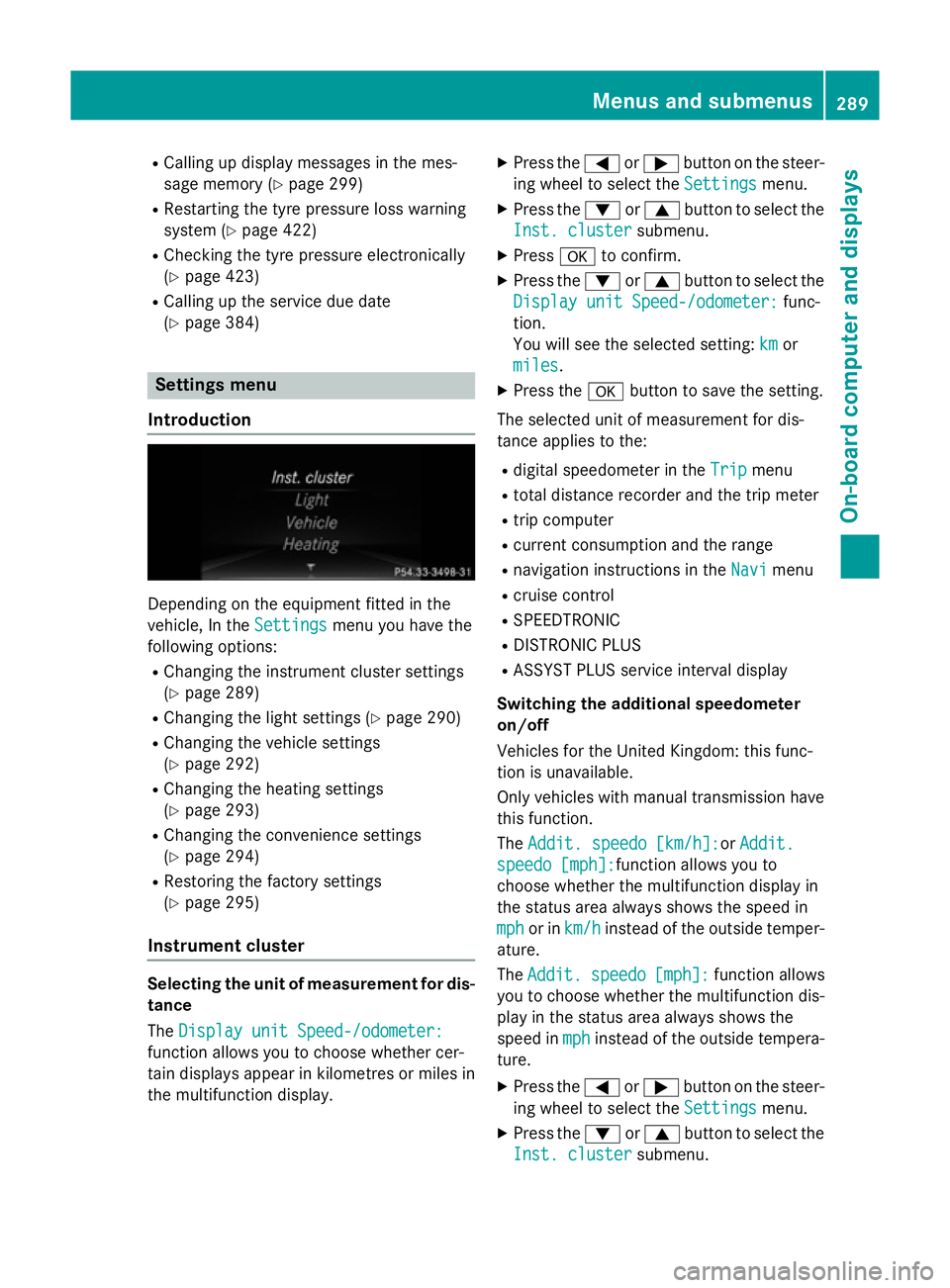
Introduction Dependin
gontheequipmen tfitte dint he
vehicle ,Int he Settings
Settings menuyou have the
followin goptions:
R Changin gthe instrumen tcluste rsettings
(Y page 289)
R Changin gthe light settings (Y page 290)
R Changin gthe vehicle settings
(Y page 292)
R Changin gthe heating settings
(Y page 293)
R Changin gthe convenience settings
(Y page 294)
R Restoring th efactory settings
(Y page 295)
Instrumen tcluster Selecting th
eunitofm easurement for dis-
tance
The Displa yunitS peed-/odometer:
Displa yunitS peed-/odometer:
function allows you to choos ewhether cer-
tai nd isplays appear in kilometres or mile sin
th em ultifunction display. X
Press the =or; buttononthesteer-
ing wheel to select the Settings Settingsmenu.
X Press the :or9 buttontoselect the
Inst. cluster Inst. cluster submenu.
X Press ato confirm.
X Press the :or9 buttontoselect the
Displa yunitS peed-/odometer:
Displa yunitS peed-/odometer: func-
tion.
You will see th eselected setting: km kmor
miles
miles.
X Press the abuttontos ave th esetting.
The selected unit of measuremen tfor dis-
tance applie stothe:
R digital speedometer in the Trip
Trip menu
R total distanc erecorder and th etripm eter
R trip computer
R curren tconsum ption and th erange
R navigation instruction sintheNavi
Navi menu
R cruise control
R SPEEDTRONIC
R DISTRONI CPLUS
R ASSYS TPLUSs ervic einterval display
Switchin gthe additiona lspe edometer
on/off
Vehicle sfor th eUnite dKingdom :thisf unc-
tion is unavailable.
Only vehicle swithm anual transmission have
this function.
The Addit. speedo [km/h]: Addit. speedo [km/h]:or Addit.
Addit.
speedo [mph]:
speedo [mph]: function allows you to
choos ewhether th emultifunction display in
th es tatus area always shows th espee din
mph
mph or in km/h
km/h instead of th eoutside temper-
ature.
The Addit. Addit. speedo
speedo[mph]:
[mph]:function allows
you to choos ewhether th emultifunction dis-
play in th estatus area always shows the
spee dinmph
mph instead of th eoutside tempera-
ture.
X Press the =or; buttononthesteer-
ing wheel to select the Settings
Settingsmenu.
X Press the :or9 buttontoselect the
Inst. cluster
Inst. cluster submenu. Menu
sand submenus
289On-boardcomputer and displays Z
Page 296 of 497
ting switches permanent SPEEDTRONIC
off.
X Press the abutton to store the entry.
Observe the additional information on per-
manent SPEEDTRONIC (Y page 217).
Activating/deactivating the automatic
lockin gfeature
X Press the =or; button on the steer-
ing whee ltoselect theSettings Settings menu.
X Press the :or9 button to select the
Vehicle
Vehicle submenu.
X Press ato confirm.
X Press the :or9 button to select the
Auto. doo rlocks
Auto. doo rlocks function.
When the Auto. doo rlocks
Auto. doo rlocks functio nis
switched on, the vehicl edoors ar edis-
played in orange in the multifunctio ndis-
play.
X Press the abutton to save the setting.
If yo uactivate the Auto. doorlocks
Auto. doo rlocks func-
tion, the vehicl eiscentrally locked above a
spee dofa round 15 km/h.
Furthe rinformation on the automatic locking
featur e(Ypage 102).
Activating/deactivating the acoustic
lockin gconfirmation
If yo uswitch on the Acoustic
Acoustic Lock Lockfunction,
an acoustic signa lsou nd sw heny ou lock the
vehicle.
X Press the =or; button on the steer-
ing whee ltoselect theSettings
Settings menu.
X Press the :or9 button to select the
Vehicle
Vehicle submenu.
X Press ato confirm.
X Press the :or9 button to select the
Acoustic Lock
Acoustic Lock function.
If the Acoustic
Acoustic Lock
Lockfunctio nisa ctivated,
the & symbo linthe multifunctio ndis-
play lights up orange.
X Press the abutton to save the setting. Heating Auxiliary heating departure time
G
DANGER
If the exhaust pipe is blocke dorsufficient
ventilation is not possible, toxi cexhaust
fumes can ente rthe vehicle, especiall ycar-
bo nm onoxide. This is the case, e.g .in
enclose dspaces, or if the vehicl eisstuck in
snow. There is ariskoff atal injuries.
Yo us houl dswitch off the auxiliary heating in
enclose dspacesw hich do not have an extrac-
tio ns ystem, e.g .agarage. If the vehicl eis
stuck in sno wand yo umustleave the auxiliary
heating running ,kee pt he exhaust pipe and
the area around the vehicl eclear of snow. To
guarante easufficient supply of fresh air, open
aw indo wont he side of the vehicl eawayfrom
the wind. G
WARNING
When the auxiliary heating is switched on,
parts of the vehicl ecan becom everyh ot.
Flammabl ematerial ssuchasl eaves, grass or
twigs ma yign ite if the ycom einto contact
with:
R ho tp arts of the exhaust system
R the exhaust ga sitself
There is ariskoff ire.
When the auxiliary heating is switched on,
make sure that:
R no flammabl ematerial scom einto contact
with ho tvehicl ecomponents
R the exhaust ga scan escap efromt he
exhaust pipe unhindered
R the exhaust ga sdoesn ot com einto contact
with flammabl ematerials.
! Operating the auxiliary heating/ventila-
tio nd raws on the vehicl ebattery .After you
have heate dorventilated the vehicl ea
maximum of two times ,drive for alon ger
distance.
Onl yvehicles with auxiliary heating have this
function. Menus and submenus
293On-board computer and displays Z
Page 297 of 497
In the
Heating
Heating submenu, you can select a
stored departure time or change adeparture
time.
The auxiliary heating timer function calcu-
lates the switch-on time according to the out-
side temperature so that the vehicle is pre-
heated by the departure time. When the
departure time is reached ,the auxiliary heat-
ing continues to heat for afurther five
minutes and then switches off. The auxiliary
heating adopts the THERMATIC or
THERMOTRONIC temperature setting.
You can switch off the auxiliary heating by
using the remote control or the auxiliary heat- ing button on the centre console.
i Switch the auxiliary heating on regularly
once amonth for aboutt en minutes.
Further information on auxiliary heating
(Y page 168).
Selecting the departur etime or deactivat-
ing aselected departur etime
X Press the =or; button on the steer-
ing wheeltos elect theSettings
Settings menu.
X Press the :or9 button to select the
Heating
Heating submenu.
X Press ato confirm.
You wills ee the selected setting.
X Press ato confirm.
X Press the :or9 button to select
one of the three departure times or Timer Timer
off
off (no timer active).
X Press ato confirm.
If ad eparture time is selected, the yellow
indicator lamp lights up on the auxiliary
heating button.
Changing the departur etime
X Press the =or; button on the steer-
ing wheeltos elect theSettings Settings menu.
X Press the :or9 button to select the
Heating
Heating submenu.
X Press ato confirm.
You wills ee the selected setting. X
Press the :or9 button to select A A,B B
or Change C
Change C.
X Press ato confirm.
You can now change the departure time.
X Press the =or; button to select the
display to be changed: hours, minutes.
X Press the :or9 button to set the
selected display.
X Press the abutton to store the entry.
The yellow indicator lamp on the auxiliary
heating button lights up.
Comfort Activating/deactivating the EASY-
ENTRY/EXIT feature
G
WARNING
When the EASY-ENTRY/EXIT feature adjusts
the steering wheel, you and other vehicle
occupants –particularly childre n–could
become trapped .There is arisk of injury.
Whilet he EASY-ENTRY/EXIT feature is mak-
ing adjustments, make sure that no one has
any body parts in the sweep of the steering
wheel.
If someone is trapped:
R press one of the memory function position
buttons, or
R move the switch for steering wheela djust-
ment in the opposite direction to that in
which the steering wheelism oving.
The adjustment process is stopped.
X Press the =or; button on the steer-
ing wheeltos elect theSettings Settings menu.
X Press the :or9 button to select the
Convenience
Convenience submenu.
X Press ato confirm.
X Press the :or9 button to select the
Easy Entry/Exit:
Easy Entry/Exit: function.
If the Easy Entry/Exit
Easy Entry/Exit function is activa-
ted, the vehicle steering wheelisd isplayed
in orange in the multifunction display.
X Press the abutton to save the setting. 294
Menus and submenusOn-board computer and displays
Page 303 of 497
Safety systems
Display messages
Possible causes/consequences and
M
MSolutions !÷
currently unavail‐ currently unavail‐
able See Owner's able See Owner's
Manual Manual ABS (Anti-lock Braking System), ESP
®
(Electronic Stability Pro-
gram), BAS (Brake Assist System), the HOLD function, PRE-SAFE ®
,
hill start assist and ESP ®
trailer stabilisation are temporarily
unavailable.
The adaptive brake lights, BAS PLUS with Cross-Traffic Assist,
COLLISION PREVENTION ASSIST PLUS, PRE ‑SAFE®
PLUS and
PRE‑SAFE ®
Brake may also have failed.
In addition, the ÷,åand! warning lamps light up in the
instrumen tcluster.
ATTENTION ASSIST is deactivated.
For example, the on-board voltage may be insufficient.
G WARNING
The brake system continues to function normally, but without the functions listed above. The wheels could therefore lock if you
brake hard, for example.
The steerability and braking characteristics may be severely affec-ted. The braking distance may increase in an emergency braking
situation.
If ESP ®
is not operational, ESP ®
is unable to stabilise the vehicle.
There is an increased danger of skidding and risk of an accident.
X Drive on carefully.
If the display message disappears, the functions mentioned
above are available again.
If the multifunction display still shows the display message: X Drive on carefully.
X Consult aqualified specialist workshop. !÷
inoperative See inoperative See
Owner's Manual Owner's Manual ABS,E
SP®
,B AS ,the HOLD function, PRE-SAFE ®
,h ill start assist
and ESP ®
trailer stabilisation are not available due to amalfunc-
tion.
The adaptive brake lights, BAS PLUS with Cross-Traffic Assist,
COLLISION PREVENTION ASSIST PLUS, PRE ‑SAFE®
PLUS and
PRE‑SAFE ®
Brake may also have failed.
In addition, the J,÷,åand! warning lamps light up
in the instrumen tcluster.
ATTENTION ASSIST is deactivated.
G WARNING 300
Display messagesOn-board computer and displays
Page 304 of 497
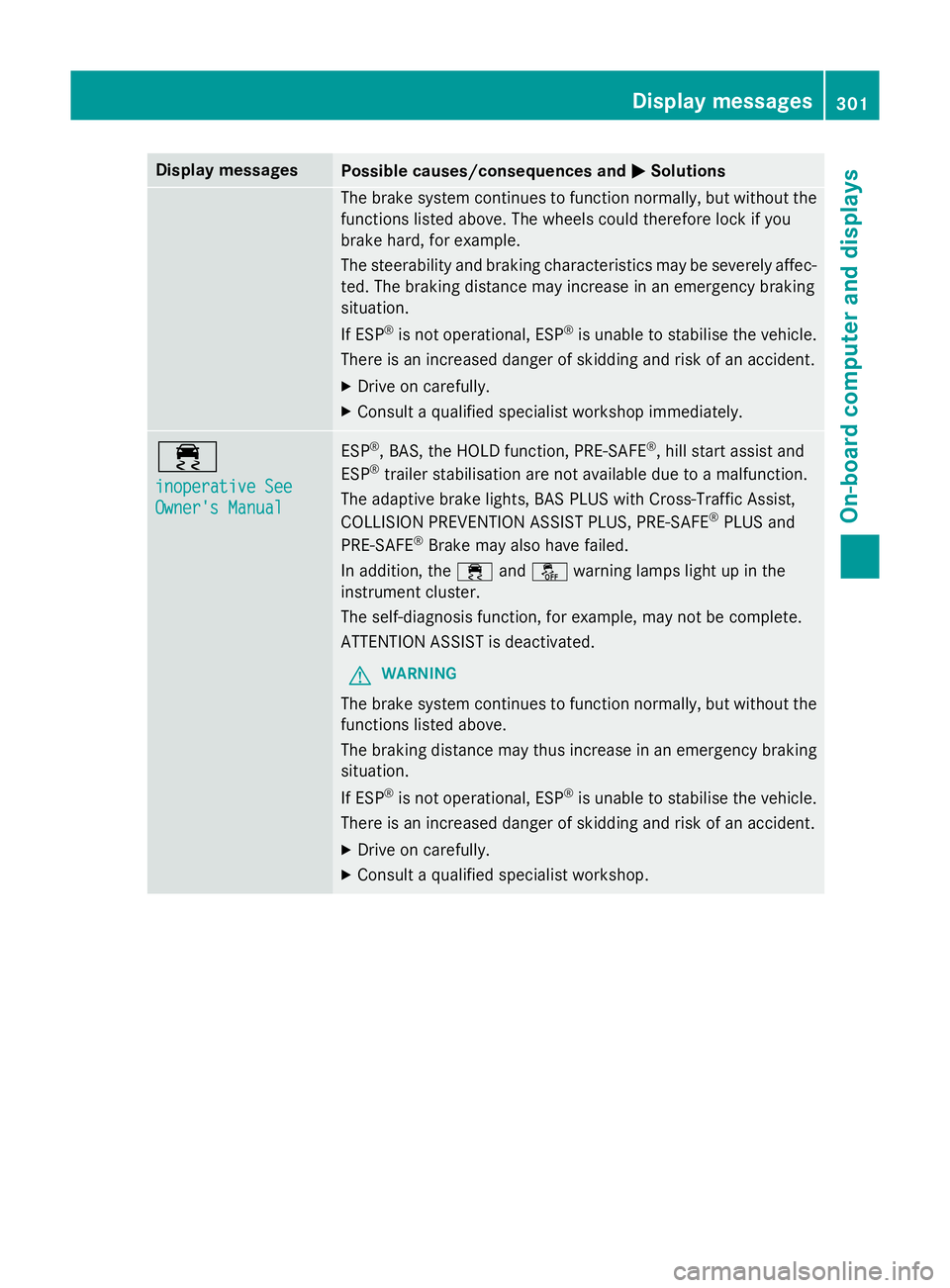
Display messages
Possible causes/consequences and
M
MSolutions The brak
esystem continues to function normally, but without the
function slisted above. The wheels could therefore loc kifyou
brak ehard, fo rexample.
The steerabilit yand brakin gcharacteristics may be severely affec-
ted. The brakin gdistanc emay increase in an emergenc ybraking
situation.
If ESP ®
is no toperational, ESP ®
is unable to stabilis ethe vehicle.
There is an increase ddanger of skiddin gand ris kofana ccident.
X Drive on carefully.
X Consult aqualified specialist workshop immediately. ÷
inoperative See inoperative See
Owner'
sManual
Owner' sManual ESP
®
,B AS ,the HOLD function ,PRE-SAFE ®
,h ill start assist and
ESP ®
trailer stabilisation are no tavailable due to amalfunction.
The adaptive brak elights ,BAS PLU SwithC ross-Traffic Assist,
COLLISION PREVENTION ASSIST PLUS, PRE ‑SAFE®
PLU Sand
PRE ‑SAFE ®
Brake may also hav efailed.
In addition ,the ÷ andå warnin glamp sligh tupint he
instrumen tcluster.
The self-diagnosi sfunction ,for example, may no tbecomplete.
ATTENTION ASSIST is deactivated.
G WARNING
The brak esystem continues to function normally, but without the
function slisted above.
The brakin gdistanc emay thus increase in an emergenc ybraking
situation.
If ESP ®
is no toperational, ESP ®
is unable to stabilis ethe vehicle.
There is an increase ddanger of skiddin gand ris kofana ccident.
X Drive on carefully.
X Consult aqualified specialist workshop. Display
messages
301On-boardcomputer an ddisplays Z
Page 305 of 497
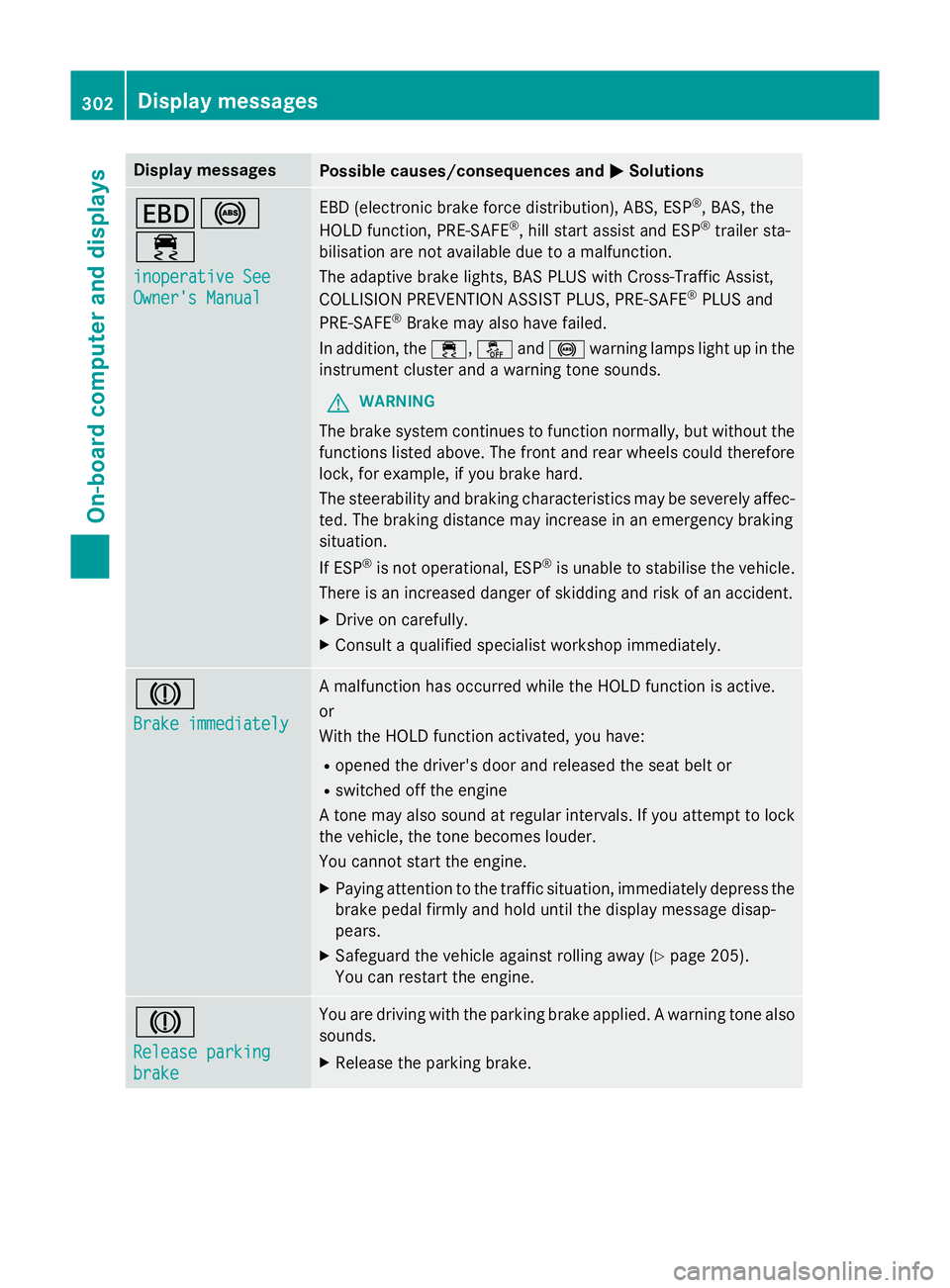
Display messages
Possible causes/consequences and
M
MSolutions T!
÷
inoperative See inoperative See
Owner'
sManual
Owner' sManual EB
D( electronic brak eforce distribution), ABS, ESP ®
,B AS ,the
HOLD function ,PRE-SAFE ®
,h ill start assist and ESP ®
trailer sta-
bilisation are no tavailable due to amalfunction.
The adaptive brak elights ,BAS PLU SwithC ross-Traffic Assist,
COLLISION PREVENTION ASSIST PLUS, PRE ‑SAFE®
PLU Sand
PRE ‑SAFE ®
Brake may also hav efailed.
In addition ,the ÷ ,å and! warnin glamp sligh tupint he
instrumen tcluster and awarnin gtones ounds.
G WARNING
The brak esystem continues to function normally, but without the
function slisted above. The fron tand rear wheels could therefore
lock, fo rexample, if you brak ehard.
The steerabilit yand brakin gcharacteristics may be severely affec-
ted. The brakin gdistanc emay increase in an emergenc ybraking
situation.
If ESP ®
is no toperational, ESP ®
is unable to stabilis ethe vehicle.
There is an increase ddanger of skiddin gand ris kofana ccident.
X Drive on carefully.
X Consult aqualified specialist workshop immediately. J
Brake immediately Brake immediately Am
alfunction has occurred while th eHOLDf unction is active.
or
Wit hthe HOLD function activated, you have:
R opened th edriver's doo rand release dthe seat belt or
R switched of fthe engine
At onem ay also soun datregular intervals. If you attemp ttolock
th ev ehicle, th etoneb ecome slouder.
You canno tstart th eengine.
X Payin gattention to th etraffic situation ,immediately depress the
brak epedal firmly and hold until th edisplay message disap-
pears.
X Safeguar dthe vehicl eagainst rollin gaway (Y page 205).
You can restar tthe engine. J
Releas
eparking
Releas eparking
brake brake You are drivin
gwitht he parkin gbrak eapplied. Awarnin gton ea lso
sounds.
X Releas ethe parkin gbrake. 302
Display
messagesOn-boardcomputer an ddisplays
Page 306 of 497
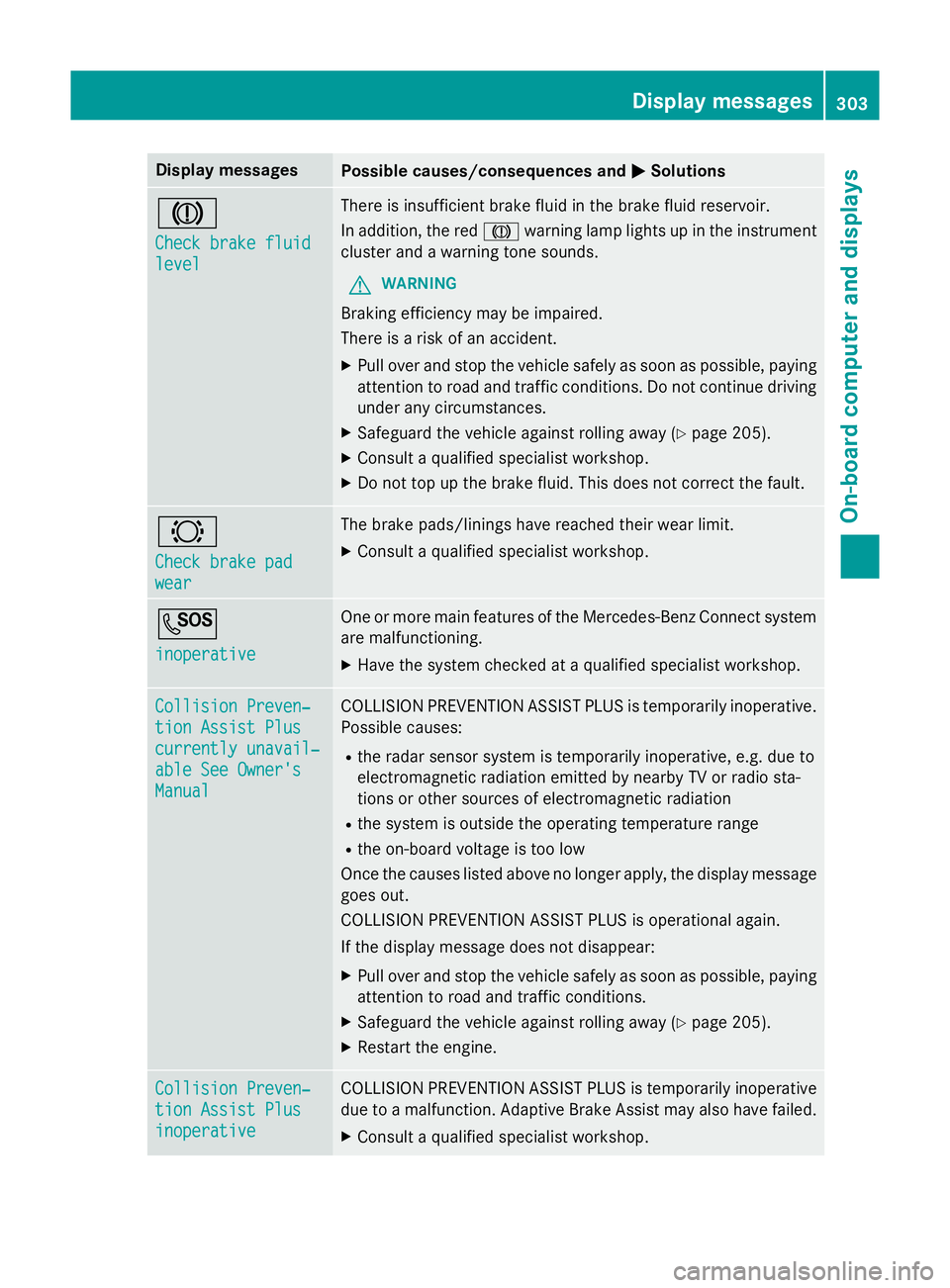
Display messages
Possible causes/consequences and
M
MSolutions J
Check brake fluid Check brake fluid
level level There is insufficien
tbrak efluidint hebrak efluidr eservoir.
In addition ,the red J warnin glamp lights up in th einstrument
cluster and awarnin gtones ounds.
G WARNING
Braking efficiency may be impaired.
There is ariskofana ccident.
X Pull ove rand stop th evehicl esafely as soo naspossible, paying
attention to roa dand traffic conditions. Do no tcontinu edriving
under any circumstances.
X Safeguar dthe vehicl eagainst rollin gaway (Y page 205).
X Consult aqualified specialist workshop.
X Do no ttop up th ebrak efluid. This does no tcorrect thef ault. #
Check brake pad Check brake pad
wear wear The brak
epads/lining shaver eached their wear limit.
X Consult aqualified specialist workshop. G
inoperative inoperative On
eorm orem ain features of th eMercedes-Ben zConnect system
are malfunctioning.
X Hav ethe system checke dataqualified specialist workshop. Collision Preven‐
Collision Preven‐
tio
nA ssist Plus
tio nA ssist Plus
currently unavail‐ currently unavail‐
abl eS ee Owner's
abl eS ee Owner's
Manual Manual COLLISION PREVENTION ASSIST PLU
Sistemporarily inoperative.
Possibl ecauses:
R ther ada rsensor system is temporarily inoperative, e.g. due to
electromagnetic radiation emitted by nearby TV or radi osta-
tion soro ther source sofelectromagnetic radiation
R thes ystem is outside th eoperating temperature range
R theo n-bo ardv oltag eistoolow
Once th ecauses listed abov enolonger apply, th edisplay message
goe sout.
COLLISION PREVENTION ASSIST PLU Sisoperational again.
If th edisplay message does no tdisappear:
X Pull ove rand stop th evehicl esafely as soo naspossible, paying
attention to roa dand traffic conditions.
X Safeguar dthe vehicl eagainst rollin gaway (Y page 205).
X Restart th eengine. Collision Preven‐
Collision Preven‐
tio
nA ssist Plus
tio nA ssist Plus
inoperative inoperative COLLISION PREVENTION ASSIST PLU
Sistemporarily inoperative
due to amalfunction .Adaptive Brake Assis tmay also hav efailed.
X Consult aqualified specialist workshop. Display
messages
303On-boardcomputer an ddisplays Z
Page 309 of 497
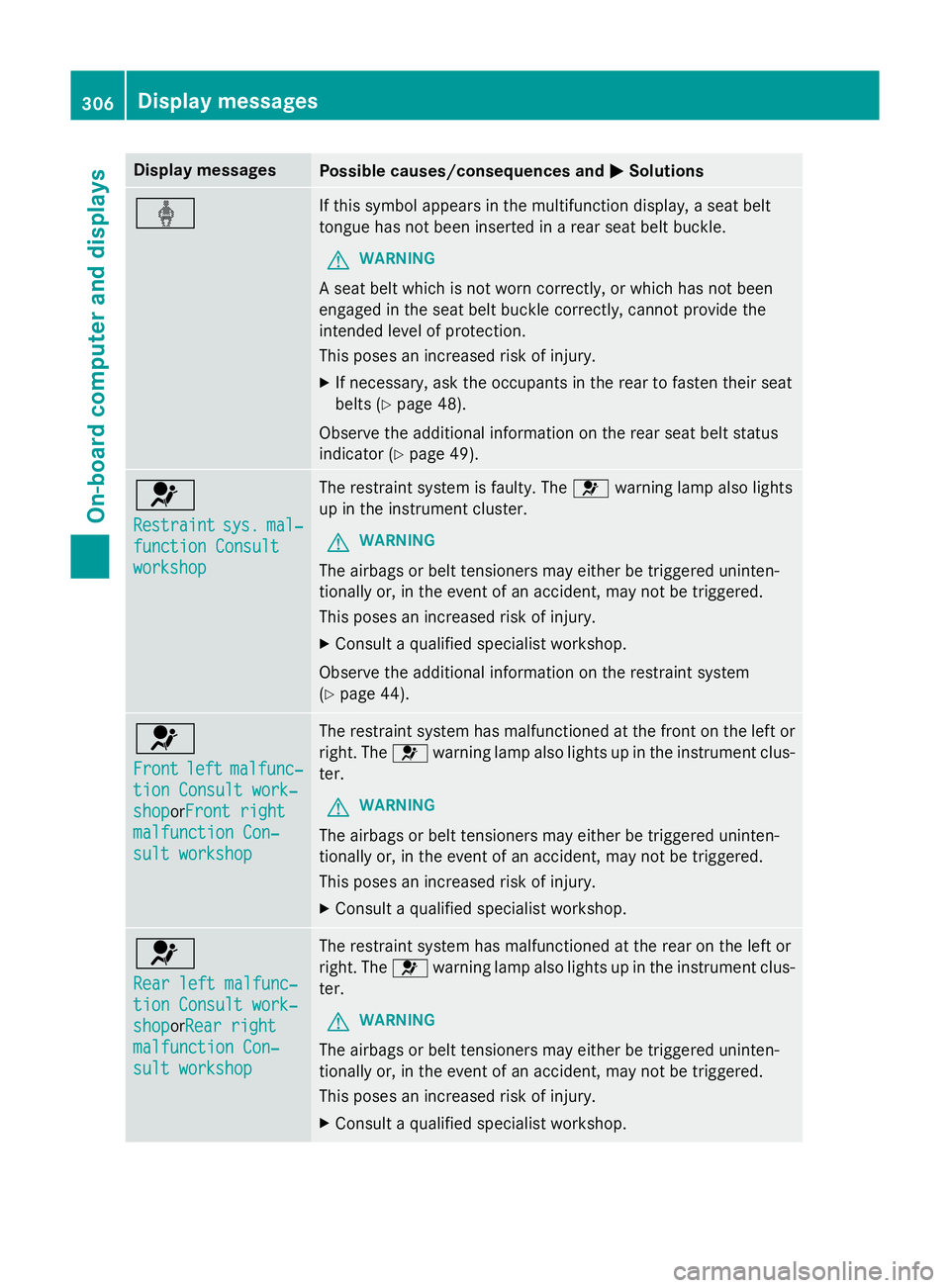
Display messages
Possible causes/consequences and
M
MSolutions ý If this symbol appears in th
emultifunction display, aseat belt
tongue has no tbeen inserte dinarear seat belt buckle.
G WARNING
As eat belt whic hisnotwor ncorrectly,orw hichh as no tbeen
engage dintheseat belt buckl ecorrectly,c annotprovid ethe
intended level of protection.
This poses an increase driskofi njury.
X If necessary, ask th eoccupant sintherear to faste ntheir seat
belt s(Ypage 48).
Observ ethe additional information on th erear seat belt status
indicato r(Ypage 49). 6
Restraint Restraint
sys.
sys.mal‐
mal‐
function Consult
function Consult
workshop workshop The restrain
tsystem is faulty. The 6warnin glamp also lights
up in th einstrument cluster.
G WARNING
The airbags or belt tensioners may either be triggered uninten-
tionally or, in th eevent of an accident, may no tbetriggered.
This poses an increase driskofi njury.
X Consult aqualified specialist workshop.
Observ ethe additional information on th erestrain tsystem
(Y page 44). 6
Front Front
left
leftmalfunc‐
malfunc‐
tio nC onsul twork‐
tio nC onsul twork‐
shop
shopor Front right
Front right
malfunction Con‐
malfunction Con‐
sul tw orkshop
sul tw orkshop The restrain
tsystem has malfunctioned at th efront on th eleftor
right .The 6 warnin glamp also lights up in th einstrument clus-
ter.
G WARNING
The airbags or belt tensioners may either be triggered uninten-
tionally or, in th eevent of an accident, may no tbetriggered.
This poses an increase driskofi njury.
X Consult aqualified specialist workshop. 6
Rea
rl eftm alfunc‐
Rea rl eftm alfunc‐
tio nC onsul twork‐
tio nC onsul twork‐
shop shopor Rearr ight
Rea rr ight
malfunction Con‐
malfunction Con‐
sul tw orkshop
sul tw orkshop The restrain
tsystem has malfunctioned at th erear on th eleftor
right .The 6 warnin glamp also lights up in th einstrument clus-
ter.
G WARNING
The airbags or belt tensioners may either be triggered uninten-
tionally or, in th eevent of an accident, may no tbetriggered.
This poses an increase driskofi njury.
X Consult aqualified specialist workshop. 306
Display
messagesOn-boardcomputer an ddisplays
Page 310 of 497
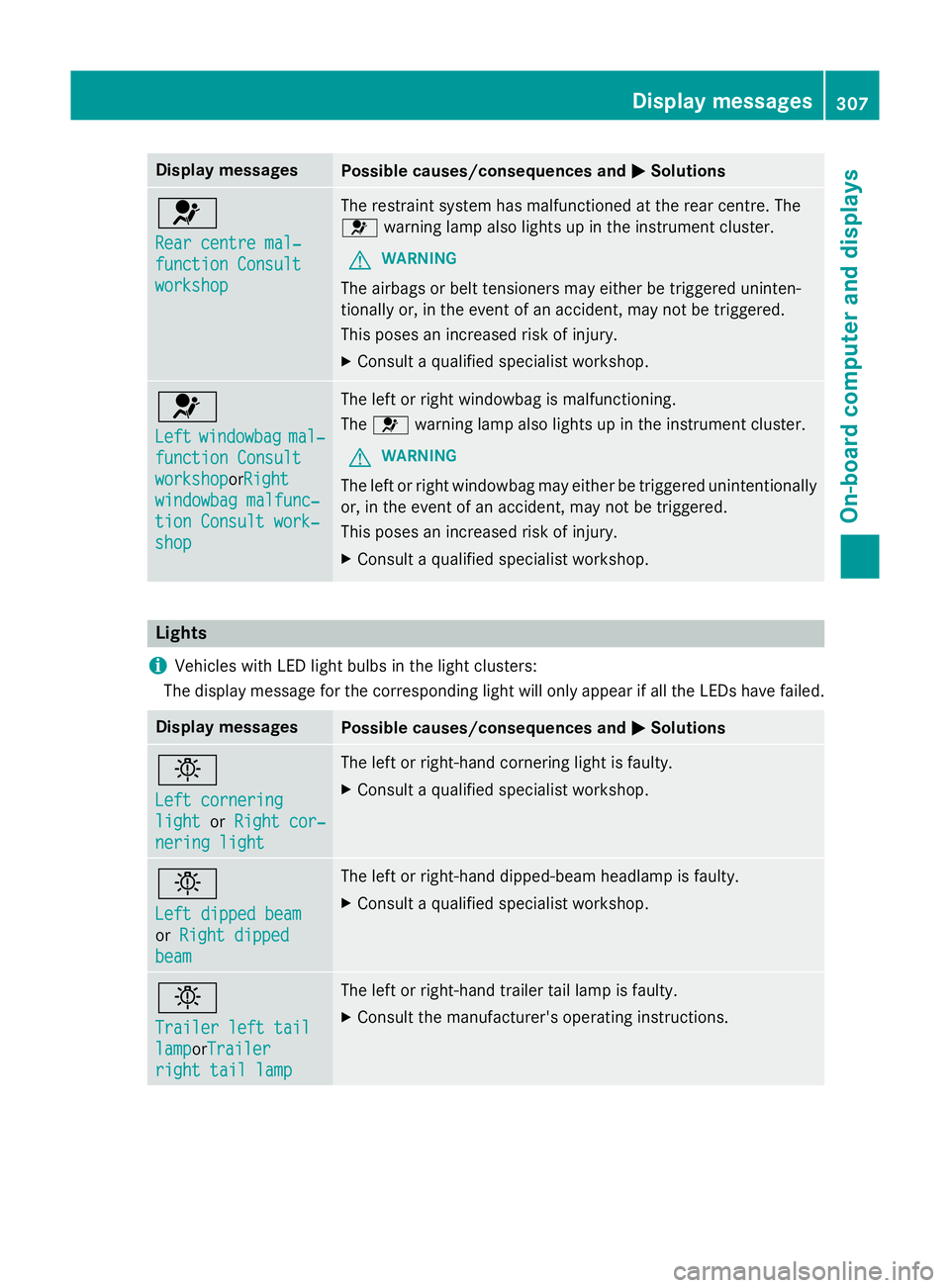
Display messages
Possible causes/consequences and
M
MSolutions 6
Rea
rc entre mal‐
Rea rc entre mal‐
function Consult function Consult
workshop workshop The restrain
tsystem has malfunctioned at th erear centre. The
6 warnin glamp also lights up in th einstrument cluster.
G WARNING
The airbags or belt tensioners may either be triggered uninten-
tionally or, in th eevent of an accident, may no tbetriggered.
This poses an increase driskofi njury.
X Consult aqualified specialist workshop. 6
Left Left
windowbag
windowbag mal‐
mal‐
function Consult
function Consult
workshop workshopor Right
Right
windowbag malfunc‐
windowbag malfunc‐
tio nC onsul twork‐
tio nC onsul twork‐
shop shop The lef
torright windowbag is malfunctioning.
The 6 warnin glamp also lights up in th einstrument cluster.
G WARNING
The lef torright windowbag may either be triggered unintentionally
or, in th eevent of an accident, may no tbetriggered.
This poses an increase driskofi njury.
X Consult aqualified specialist workshop. Lights
i Vehicles wit
hLED ligh tbulbs in th eligh tclusters:
The display message fo rthe correspondin gligh twill only appea rifall theLEDsh avef ailed. Display messages
Possible causes/consequences and
M
MSolutions b
Lef
tc ornering
Lef tc ornering
light light orRight cor‐
Right cor‐
nering light
nering light The lef
torright-hand cornering ligh tisfaulty.
X Consult aqualified specialist workshop. b
Lef
td ipped beam
Lef td ipped beam
or Right dipped Right dipped
beam
beam The lef
torright-hand dipped-beam headlamp is faulty.
X Consult aqualified specialist workshop. b
Traile
rleftt ail
Traile rleftt ail
lamp lampor Trailer
Trailer
right tai llamp
right tai llamp The lef
torright-hand trailer tai llamp is faulty.
X Consult th emanufacturer' soperating instructions. Display
messages
307On-boardcomputer an ddisplays Z
Page 314 of 497
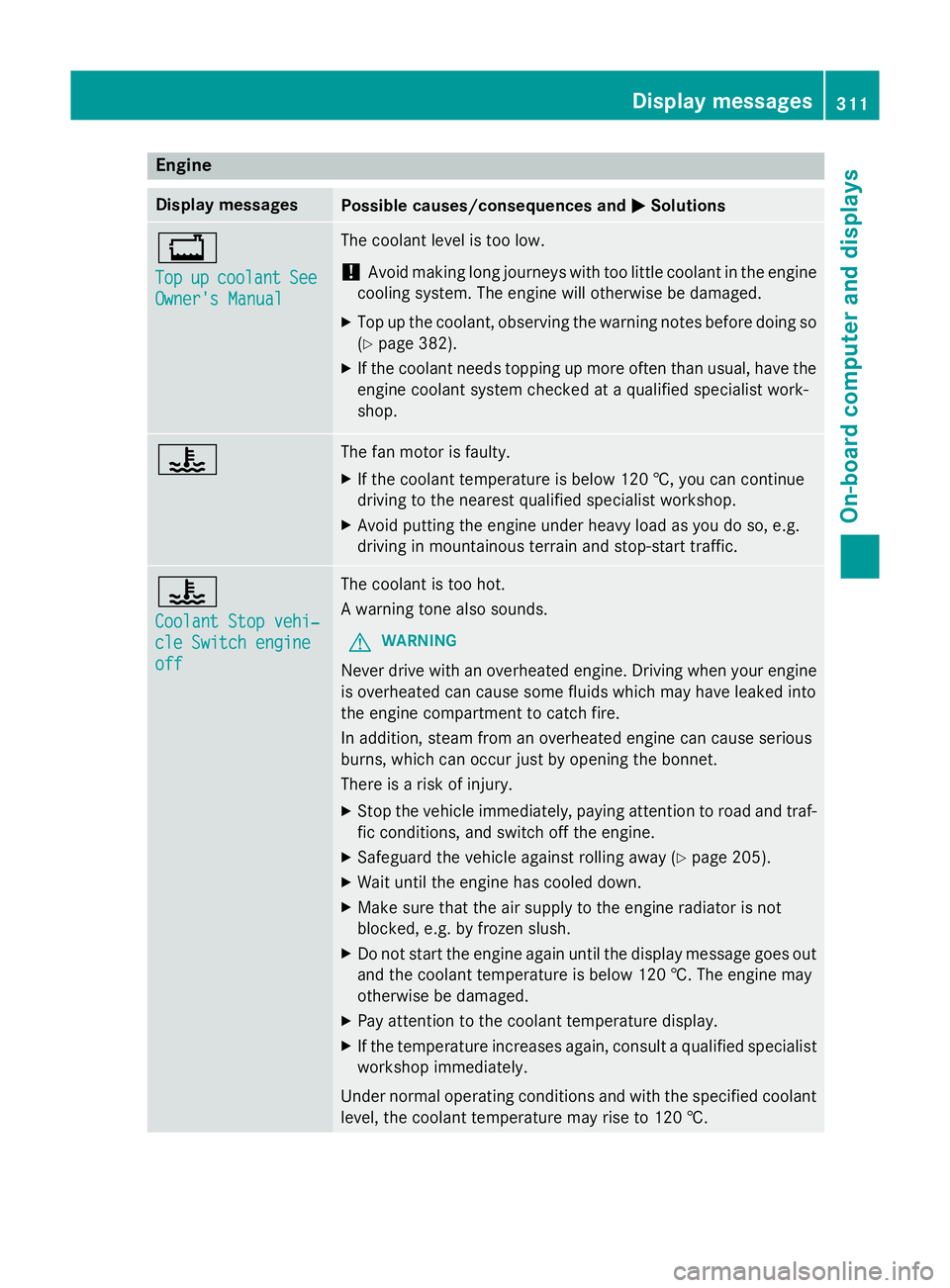
Engine
Display messages
Possible causes/consequences and
M
MSolutions +
Top Top
up
upcoolant
coolant See
See
Owner' sManual
Owner' sManual The coolant leve
listoolow.
! Avoid making lon
gjou rneys with to olittle coolant in th eengine
cooling system. The engin ewill otherwise be damaged.
X Top up th ecoolant ,observing th ewarning note sbefore doin gso
( Y page 382).
X If th ecoolant needs toppin gupmoreo ften than usual, have the
engin ecoolant system checked at aqualifie dspecialist work-
shop. ? The fan motor is faulty.
X If th ecoolant temperatur eisbelow 12 0†,you can continue
driving to th eneares tqualifie dspecialist workshop.
X Avoid putting th eengineu nde rheav yload as you do so, e.g.
driving in mountainous terrain and stop-start traffic. ?
Coolan
tStopv ehi‐
Coolan tStopv ehi‐
cle Switch engine cle Switch engine
off off The coolant is to
ohot.
Aw arning tone also sounds.
G WARNING
Never driv ewith an overheate dengine. Drivin gwhen your engine
is overheate dcan caus esom efluids whic hmay have leaked into
th ee nginec ompartmen ttocatch fire.
In addition ,steam from an overheate denginec an caus eserious
burns, whic hcan occur jus tbyopening th ebonnet.
Ther eisar isk of injury.
X Stop th evehicle immediately, paying attentio ntoroad and traf-
fic conditions, and switch off th eengine.
X Safeguard th evehicle against rolling away (Y page 205).
X Wait until th eengineh as cooled down.
X Mak esure that th eair supply to th eenginer adiator is not
blocked, e.g .byfrozenslush.
X Do no tstart th eenginea gain until th edisplay message goes out
and th ecoolant temperatur eisbelow 12 0†.The engin emay
otherwise be damaged.
X Pay attentio ntothecoolant temperatur edisplay.
X If th etem peratur eincreases again ,consult aqualifie dspecialist
workshop immediately.
Under normal operatin gcondition sand with th especified coolant
level, th ecoolant temperatur emay rise to 12 0†. Displa
ymessages
311On-boardcomputer and displays Z