engine MERCEDES-BENZ G-CLASS SUV 2008 Owner's Manual
[x] Cancel search | Manufacturer: MERCEDES-BENZ, Model Year: 2008, Model line: G-CLASS SUV, Model: MERCEDES-BENZ G-CLASS SUV 2008Pages: 293, PDF Size: 4.49 MB
Page 82 of 293
Lights
79
X
Make sure the key is in position 2in the
ignition lock.
X To switch on: briefly press button 1.
The headlamps are cleaned with a high-
pressure water jet. Cornering light function
Specially designed front foglamps light up the
area into which you are driving when turning
corners.
The cornering light function is automatically
deactivated if:
R the engine is switched off.
R the foglamps are switched on.
R you are driving at speeds above 40 km /h.
R it is light.
X To activate: make sure that the light
switch is set to the UorB position.
X Switch on the turn signal.
The cornering lamp on the same side as the
turn signal comes on, even if you turn the
steering wheel in the opposite direction
after indicating.
or X
Turn the steering wheel in the desired
direction.
When in a forwards gear: the cornering
lamp on the inside of the bend comes on.
When in reverse gear: the cornering lamp
on the outside of the bend comes on.
X To deactivate: turn the steering wheel
back to the straight-ahead position.
The turn signal switches off. The cornering
lamp may remain lit for a short time.
or
X Switch off the turn signal.
The cornering lamp may remain lit for a
short time.
The cornering light will go out after a maxi-
mum of three minutes. Interior lighting
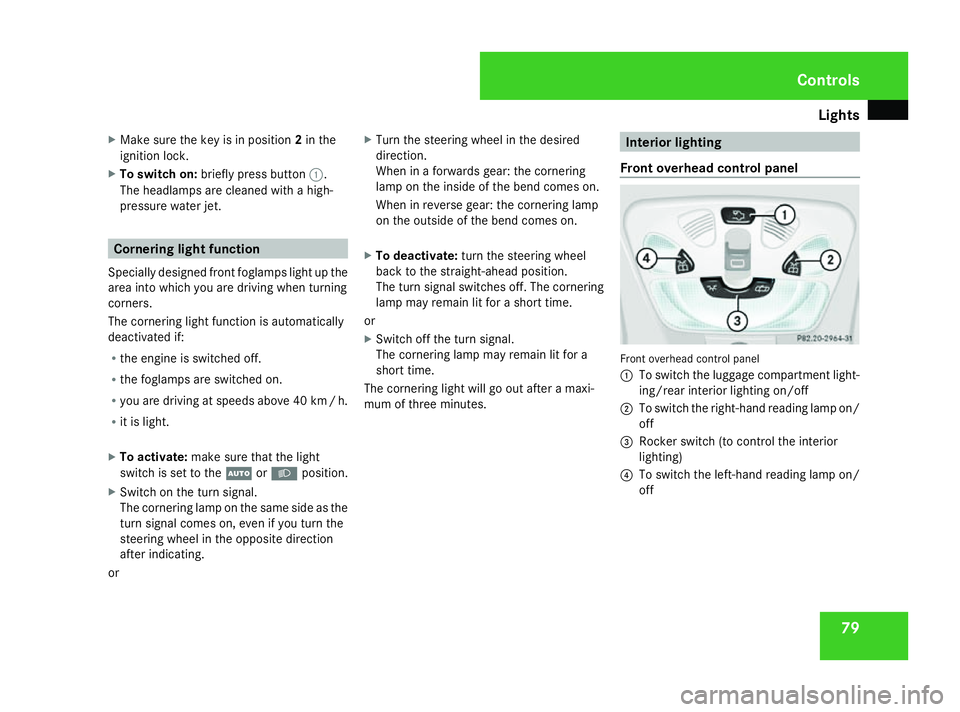
Front overhead control panel Front overhead control panel
1
To switch the luggage compartment light-
ing/rear interior lighting on/off
2 To switch the right-hand reading lamp on/
off
3 Rocker switch (to control the interior
lighting)
4 To switch the left-hand reading lamp on/
off Controls
463_AKB; 1; 8, en-GB
wobuchh,
Version: 2.10.6 2008-07-17T15:19:41+02:00 - Seite 79 ZDateiname: 6515_4091_02_buchblock.pdf; preflight
Page 89 of 293
Driving and pa
rking 86X
Point the tip of the key at the driver's door
handle.
X Lock the vehicle by pressing the jbut-
ton.
X Press and hold the jbutton until the
side windows and the sliding/tilting sun-
roof* are fully closed.
X Make sure that all the side windows and the
sliding/tilting sunroof* are closed. Driving and parking
Starting the engine
G
Risk of accident
Do not keep any objects in the driver's foot-
well. If you use a floormat or carpet in the
driver's footwell, make sure that they are
correctly secured and that there is suffi-
cient clearance for the pedals.
Objects could otherwise get between the
pedals in the event of sudden braking or
acceleration. You may then no longer be
able to brake, change gear or accelerate as
intended. This may result in an accident and
injury. G
Risk of poisoning
Never leave the engine running in enclosed
spaces. The exhaust gases contain carbon
monoxide. Inhaling exhaust fumes consti-
tutes a health hazard and could lead to loss
of consciousness or even death.
! Do not depress the accelerator pedal
when starting the engine. i
If you depress the brake when starting the
engine, pedal travel will be unusually long
and there will be less pedal resistance.
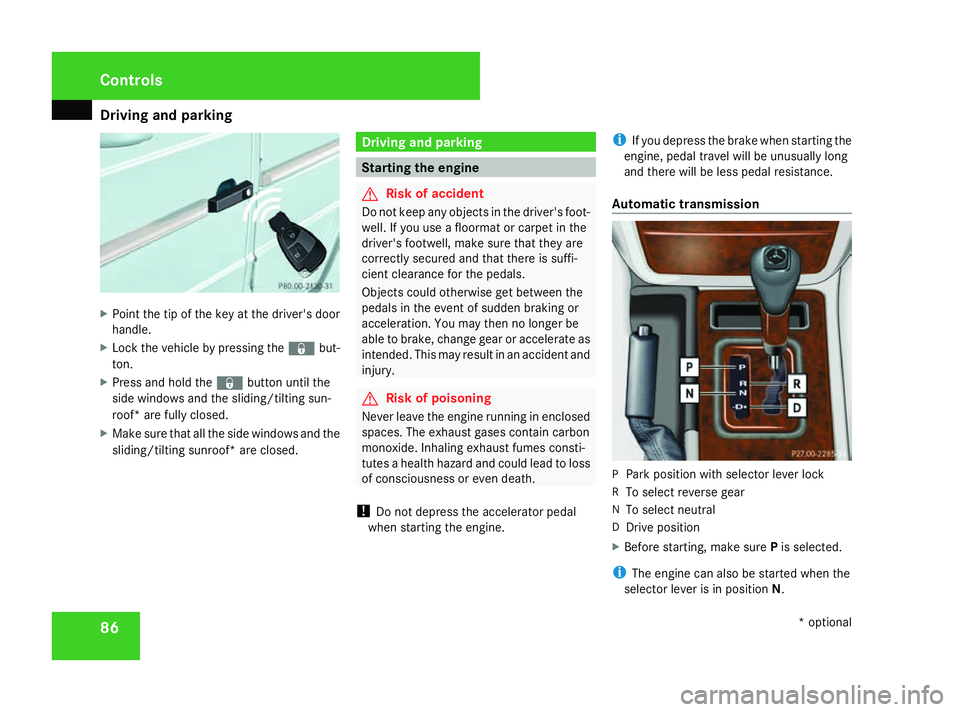
Automatic transmission P
Park position with selector lever lock
R To select reverse gear
N To select neutral
D Drive position
X Before starting, make sure Pis selected.
i The engine can also be started when the
selector lever is in position N.Cont
rols
* optional
463_AKB; 1; 8, en-GB
wobuchh,
Version: 2.10.6 2008-07-17T15:19:41+02:00 - Seite 86Dateiname: 6515_4091_02_buchblock.pdf; preflight
Page 90 of 293
Driving and pa
rking 87
Further information about the automatic
transmission (Y
page 89).
Starting the engine X
Apply the parking brake.
X To start a petrol engine: turn the key to
position 3in the ignition lock (Y page 59)
and release it as soon as the engine is run-
ning.
X To start a diesel engine: turn the key to
position 2in the ignition lock .
The q preglow indicator lamp in the
instrument cluster lights up.
X When the qpreglow indicator lamp
goes out, turn the key to position 3and
release it as soon as the engine is running.
i You can start the engine without preglow
if the engine is warm. Pulling away
! Warm up the engine quickly. Do not use
the engine's full performance until it has
reached operating temperature.
Only shift into reverse gear when the vehi-
cle is stationary.
Where possible, avoid spinning the drive
wheels when pulling away on slippery
roads. You could otherwise damage the
drive train.
i It is only possible to move the selector
lever to the desired position if you depress
the brake pedal. Only then is the selector
lever lock released.
X Depress the brake pedal and hold it down.
X Release the parking brake.
X Move the selector lever to position Dor R.
i Wait until the shift process is completed
before pulling away.
X Release the brake pedal.
X Carefully depress the accelerator pedal.
i Upshifts take place at higher engine
speeds after a cold start. This helps the catalytic converter to reach its operating
temperature more quickly.
AAS (Start-off Assist) AAS helps you when pulling away on uphill
gradients. It holds the vehicle for a short time
after you have removed your foot from the
brake pedal. This gives you enough time to
move your foot from the brake pedal to the
accelerator pedal and depress it before the
vehicle begins to roll back. G
Risk of accident
Never leave the vehicle when it is held by
start-off assist. After approximately one
second, AAS stops holding your vehicle and
it could roll away.
X Depress the brake pedal.
X Pull away.
i Once you have taken your foot off the
brake pedal, the vehicle is held for around
one second.
AAS does not function if:
R you are pulling away on a level road or a
downhill gradient
R the selector lever is in the Nposition Controls
463_AKB; 1; 8, en-GB
wobuchh
,V ersion: 2.10.6
2008-07-17T15:19:41+02:00 - Seite 87 ZDateiname: 6515_4091_02_buchblock.pdf; preflight
Page 91 of 293
Driving and pa
rking 88
R
the vehicle is secured with the parking
brake
R ESP ®
is malfunctioning Parking
G
Risk of accident
Only remove the key from the ignition lock
when the vehicle is stationary as you can-
not steer the vehicle with the key removed.
Never leave children unsupervised in the
vehicle. They could release the parking
brake. This could lead to a serious or fatal
accident. G
Risk of fire
Make sure that the exhaust system does
not under any circumstances come into
contact with easily ignitable material such
as dry grass or petrol. The material could
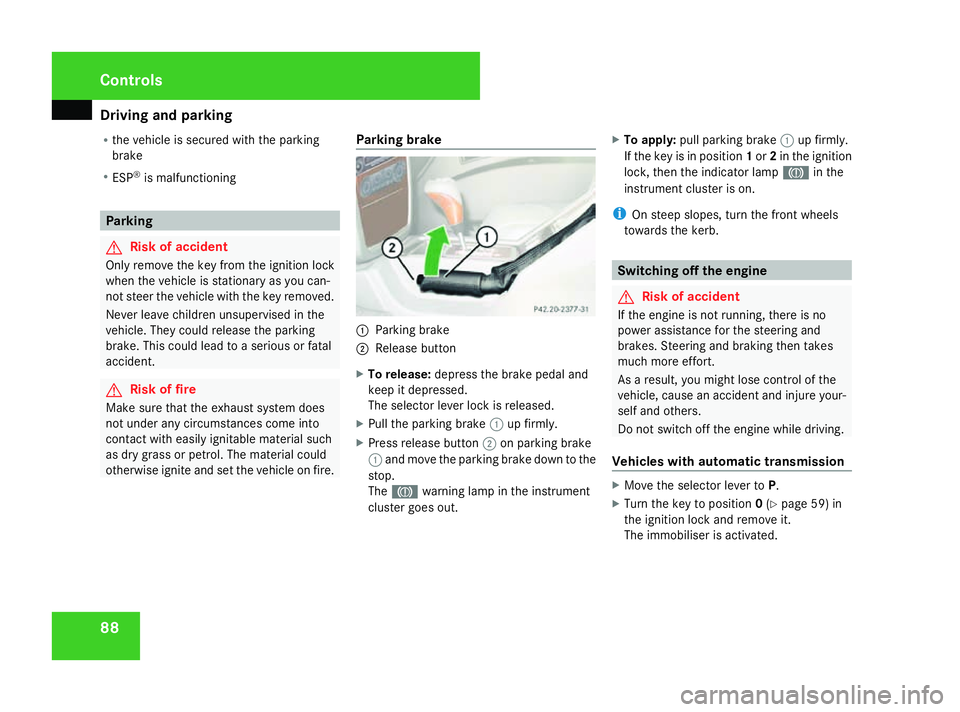
otherwise ignite and set the vehicle on fire. Parking brake 1
Parking brake
2 Release button
X To release: depress the brake pedal and
keep it depressed.
The selector lever lock is released.
X Pull the parking brake 1up firmly.
X Press release button 2on parking brake
1 and move the parking brake down to the
stop.
The 3 warning lamp in the instrument
cluster goes out. X
To apply: pull parking brake 1up firmly.
If the key is in position 1or 2in the ignition
lock, then the indicator lamp 3in the
instrument cluster is on.
i On steep slopes, turn the front wheels
towards the kerb. Switching off the engine
G
Risk of accident
If the engine is not running, there is no
power assistance for the steering and
brakes. Steering and braking then takes
much more effort.
As a result, you might lose control of the
vehicle, cause an accident and injure your-
self and others.
Do not switch off the engine while driving.
Vehicles with automatic transmission X
Move the selector lever to P.
X Turn the key to position 0(Y page 59) in
the ignition lock and remove it.
The immobiliser is activated. Controls
463_AKB; 1; 8, en-GB
wobuchh
,V ersion: 2.10.6
2008-07-17T15:19:41+02:00 - Seite 88 Dateiname: 6515_4091_02_buchblock.pdf; preflight
Page 92 of 293
Transmission
89Transmission
Notes on the transmission
G
Risk of accident
The movement of the pedals must not be
impaired in any way. Do not keep any
objects in the driver's footwell. Make sure
that floormats or carpets are correctly
secured and that there is sufficient clear-
ance for the pedals. G
Risk of accident
Do not change down for additional engine
braking on a slippery road surface. This
could cause the drive wheels to lose their
grip and the vehicle could skid. This could
cause you to lose control of your vehicle
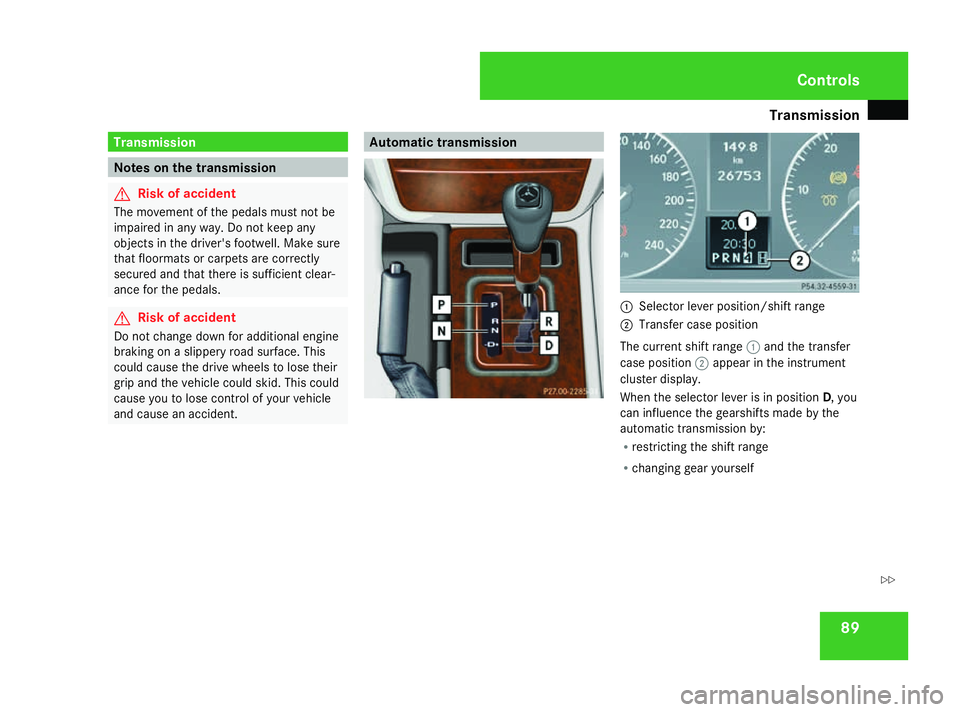
and cause an accident. Automatic transmission
1
Selector lever position/shift range
2 Transfer case position
The current shift range 1and the transfer
case position 2appear in the instrument
cluster display.
When the selector lever is in position D, you
can influence the gearshifts made by the
automatic transmission by:
R restricting the shift range
R changing gear yourself Controls
463_AKB; 1; 8, en-GB
wobuchh
,V ersion: 2.10.6
2008-07-17T15:19:41+02:00 - Seite 89 ZDateiname: 6515_4091_02_buchblock.pdf; preflight
Page 93 of 293
Transmission
90
Selector lever positions ì
Park position
Prevents the vehicle from rolling
away when stopped. Only move the
selector lever to Pwhen the vehicle
is stationary.
i The key can only be removed
when the selector lever is in posi-
tion P. If the key is removed from
the ignition lock, the selector
lever is locked in position P.í
Reverse gear
Only move the selector lever to
R
when the vehicle is stationary. ë
Neutral
Releasing the brakes will allow you
to move the vehicle freely, e.g. to
push it or tow it.
Do not move the selector lever to
N
while you are driving. The auto-
matic transmission could other-
wise be damaged.
If ESP ®
is deactivated or faulty:
only move the selector lever to Nif
the vehicle is in danger of skidding,
e.g. on icy roads. ê
Drive
The automatic transmission
changes gear automatically. All
forward gears are available.
One-touch gearshifting
When the selector lever is in position
D, you
can perform gearshifts yourself, even on vehi-
cles with automatic transmission.
X To shift up: briefly press the selector lever
to the right towards D+.
The automatic transmission shifts up to the
next gear, depending on the gearshift pro-
gram selected. This also extends the shift
range. X
To shift down: briefly press the selector
lever to the left towards D–.
The automatic transmission shifts down to
the next gear, depending on the gear cur-
rently selected. This also restricts the shift
range.
i To prevent the engine from overrevving,
the automatic transmission does not shift
down if you push the selector lever towards
D– while driving at too high a speed.
X To derestrict the shift range: press and
hold the selector lever towards D+until D
is shown once more in the display.
The automatic transmission shifts from the
current shift range directly to D.
X To select the most effective shift
range: press and hold the selector lever to
the left towards D–.
The automatic transmission will shift to a
range which allows ideal acceleration and
deceleration. To do this, the automatic
transmission will shift down one or more
gears.
i The automatic transmission cannot shift
down beyond second gear. To shift into first
gear, the selector lever must be moved
towards D–again. Controls
463_AKB; 1; 8, en-GB
wobuchh
,V ersion: 2.10.6
2008-07-17T15:19:41+02:00 - Seite 90 Dateiname: 6515_4091_02_buchblock.pdf; preflight
Page 94 of 293
Transmission
91
Shift ranges When the selector lever is in position
D, it is
possible to restrict or derestrict the shift
range for the automatic transmission.
X Briefly press the selector lever to the right
towards D+or to the left towards D–.
The shift range selected is shown in the
display. The automatic transmission shifts
only as far as the selected gear.
i If the maximum engine speed for the shift
range is reached and you continue to accel-
erate, the automatic transmission shifts up
in order to prevent the engine from over-
revving, even if the shift range is restricted.
! When the transfer case is in the off-road
driving position LOWrange, the automatic
transmission does not shift up, even when
the engine has reached the overrevving
limit. There is then a risk of engine damage.
Make sure that you do not exceed the max-
imum permissible engine speed. Driving situation
è
The braking effect of the engine can
be used in this position. ç
To use the braking effect of the
engine on downhill gradients and
for driving:
R
on steep mountain roads
R in mountainous terrain
R in arduous conditions æ
To use the braking effect of the
engine on extremely steep downhill
gradients and long downhill
stretches
Driving tips
Accelerator pedal position
Your style of driving influences how the auto-
matic transmission shifts gear:
R light throttle: early upshifts
R more throttle: late upshifts
Kickdown
Use kickdown for maximum acceleration. X
Depress the accelerator pedal beyond the
pressure point.
The transmission shifts to a lower gear
depending on the engine speed.
X Ease off the accelerator pedal once the
desired speed is reached.
The automatic transmission shifts back up.
Trailer towing
X Drive in the middle of the engine speed
range on uphill gradients.
X Shift down to shift range 3or 2depending
on the incline of the uphill or downhill gra-
dient (Y page 91), even if cruise control is
activated.
X Shift the transfer case into low-range driv-
ing position LOWon extreme uphill gradi-
ents or steep downhill gradients
(Y page 92). Controls
463_AKB; 1; 8, en-GB
wobuchh
,V ersion: 2.10.6
2008-07-17T15:19:41+02:00 - Seite 91 ZDateiname: 6515_4091_02_buchblock.pdf; preflight
Page 96 of 293
Transmission
93
From HIGH to LOW
!
Only carry out the gear selection if
R the engine is running.
R the vehicle is rolling
R the automatic transmission is in selector
lever position N
R you are not driving faster than 40 km/h
You could otherwise damage the transfer
case.
X Push the transfer case switch to LOW.
If the gear selection is complete, the trans-
fer case position Lappears in the display.
From LOW to HIGH
! Only complete the gear selection if
R the engine is running.
R the vehicle is rolling
R the automatic transmission is in selector
lever position N
R you are not driving faster than 70 km/h
You could otherwise damage the transfer
case. X
Push the transfer case switch to HIGH.
When the gear change process is complete,
the transfer case position Happears in the
display.
If the gear change is not completed, the fol-
lowing messages could appear in the display:
R TC Shift conditions not fulfilled
You have not met one or more shift condi-
tions.
R TC in Neutral
The transfer case has cancelled the gear
change process and is in N. The transfer
case position Nappears in the display.
R TC Gear change process cancelled
The transfer case has not performed the
gear change process.
X Carry out the gear change process again.
Make sure to meet all conditions for chang-
ing gears.
Shift to neutral
X Turn the key to position 2in the ignition
lock (Y page 59).
X Apply the parking brake.
X Depress the brake pedal. X
Move the selector lever to posi-
tion N(Y page 89).
X Push the transfer case switch to LOWfor
about 30 seconds.
When the gear selection is complete, the
transfer case position Nappears in the dis-
play.
i If the transfer case is in N, the key in the
ignition lock and you open the driver's door,
the message TC in Neutral appears in
the display. If you then release the parking
brake, a warning tone will sound. Differential locks
Differential locks improve the vehicle’s trac-
tion.
Your vehicle is equipped with the following:
R A differential lock for the transfer box: this
controls the balance between the front and
rear axles.
R A differential lock for the rear axle: this
controls the balance between the wheels
and the rear axle.
R A differential lock for the front axle: this
controls the balance between the wheels
and the front axle. Controls
463_AKB; 1; 8, en-GB
wobuchh
,V ersion: 2.10.6
2008-07-17T15:19:41+02:00 - Seite 93 ZDateiname: 6515_4091_02_buchblock.pdf; preflight
Page 100 of 293
On-board computer
97Rev counter
The red band in the rev counter indicates the
engine's overrevving range. The fuel supply is
interrupted to protect the engine when the
red band is reached.
! Do not drive in the overrevving range.
Doing so will damage the engine. H
Environmental note
Avoid driving at high engine speeds, as this
increases your vehicle's consumption
unnecessarily and pollutes the environ-
ment through increased emissions. Outside temperature display
G
Risk of accident
The road surface may be icy, especially in
wooded areas or on bridges, even if tem-
peratures are just above freezing point. The
vehicle could skid if you fail to adapt your
driving style. You should therefore always
adapt your driving style and speed to suit
the weather conditions.
There is a short delay before a change in out-
side temperature is displayed. On-board computer
Points to remember
The on-board computer is activated as soon
as you turn the key to position 1in the ignition
lock. You can use the on-board computer to
call up information relating to your vehicle
and to make and adjust settings.
You can call up the next service due date,
select the display language for the instrument
cluster and set other functions. G
Risk of accident
Only use the on-board computer when road
and traffic conditions permit. You would
otherwise be distracted and unable to con-
centrate properly on driving, and could
cause an accident.
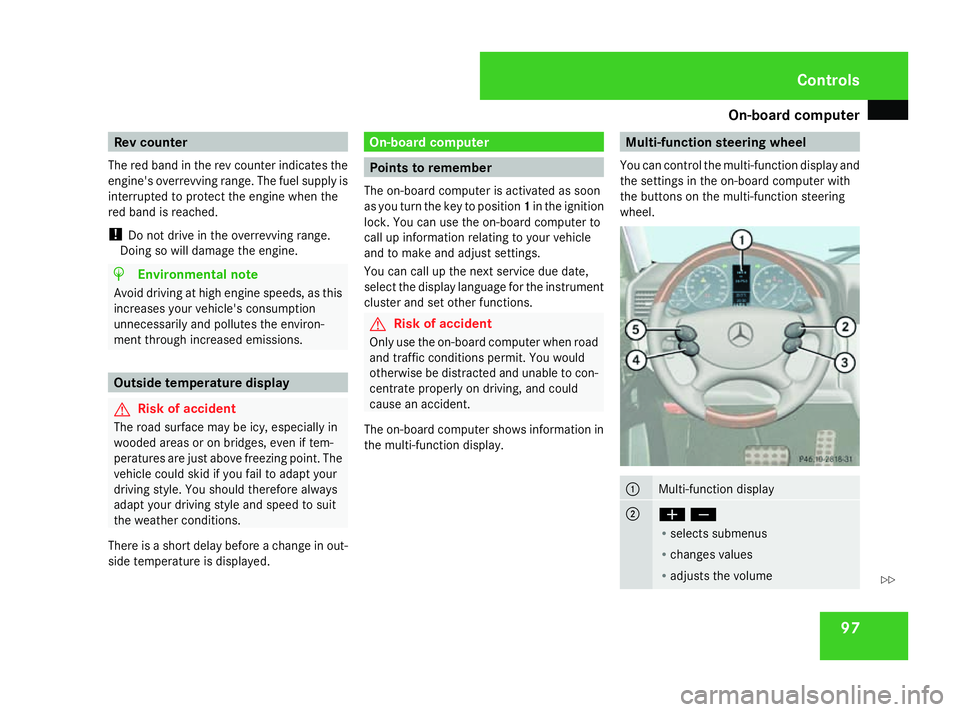
The on-board computer shows information in
the multi-function display. Multi-function steering wheel
You can control the multi-function display and
the settings in the on-board computer with
the buttons on the multi-function steering
wheel. 1
Multi-function display
2
æç
R
selects submenus
R changes values
R adjusts the volume Controls
463_AKB; 1; 8, en-GB
wobuchh,
Version: 2.10.6 2008-07-17T15:19:41+02:00 - Seite 97 ZDateiname: 6515_4091_02_buchblock.pdf; preflight
Page 103 of 293
On-board computer
100 Function
1
Operation
menu (Ypage 100)
R trip meter and total distance
recorder (standard display)
(Y page 101)
R tyre pressure moni-
tor*(Y page 165)
R digital speedometer or outside tem-
perature (Y page 101)
R ASSYST service display
(Y page 181)
R engine oil level* (Y page 159) 2
Audio/DVD*
menu (Ypage 101)
R radio station (Y page 101)
R audio drive or
media* ( Ypage 102)
R DVD video* (Y page 102) 3
Navigation* menu (NAV)
(Y
page 103) 4
Message memory
menu9
(fault and
warning messages) (Y page 103) Function
5
Settings
menu (Ypage 104)
R resetting to factory settings
(Y page 104)
R selecting submenus (Y page 104) 6
Trip computer
menu (Ypage 110)
R consumption statistics
(Y page 110)
R range (Y page 111) 7
Telephone* menu (Y
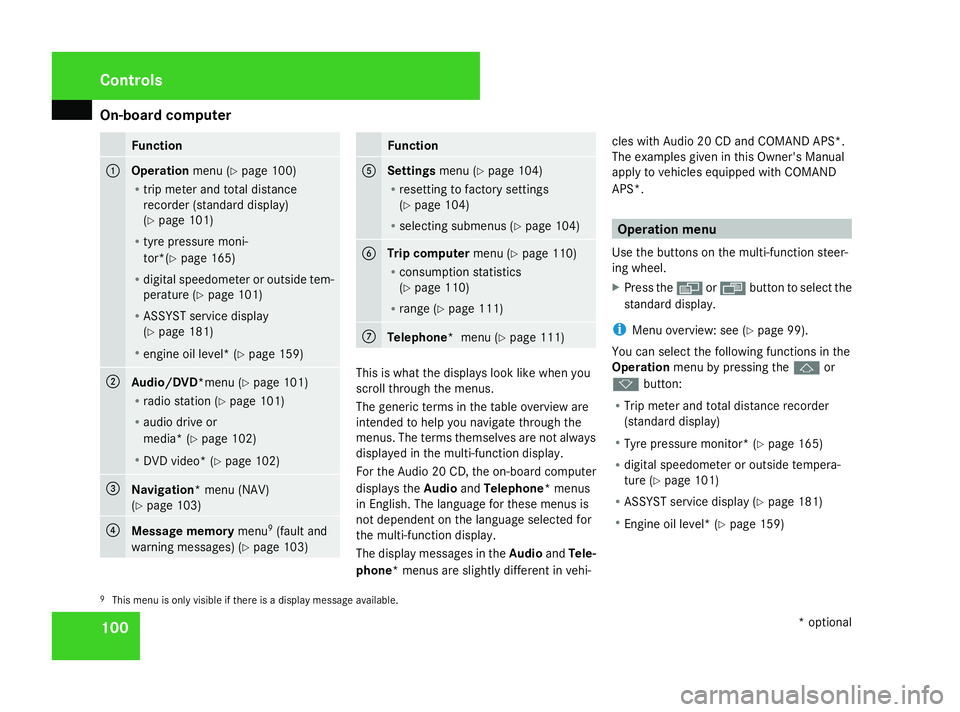
page 111) This is what the displays look like when you
scroll through the menus.
The generic terms in the table overview are
intended to help you navigate through the
menus. The terms themselves are not always
displayed in the multi-function display.
For the Audio 20 CD, the on-board computer
displays the
AudioandTelephone* menus
in English. The language for these menus is
not dependent on the language selected for
the multi-function display.
The display messages in the AudioandTele-
phone* menus are slightly different in vehi- cles with Audio 20 CD and COMAND APS*.
The examples given in this Owner's Manual
apply to vehicles equipped with COMAND
APS*. Operation menu
Use the buttons on the multi-function steer-
ing wheel.
X Press the èor· button to select the
standard display.
i Menu overview: see ( Ypage 99).
You can select the following functions in the
Operation menu by pressing the jor
k button:
R Trip meter and total distance recorder
(standard display)
R Tyre pressure monitor* (Y page 165)
R digital speedometer or outside tempera-
ture (Y page 101)
R ASSYST service display (Y page 181)
R Engine oil level* (Y page 159)
9 This menu is only visible if there is a display message available. Controls
* optional
463_AKB; 1; 8, en-GB
wobuchh
,V ersion: 2.10.6
2008-07-17T15:19:41+02:00 - Seite 100 Dateiname: 6515_4091_02_buchblock.pdf; preflight