display MERCEDES-BENZ G-CLASS SUV 2016 Owner's Manual
[x] Cancel search | Manufacturer: MERCEDES-BENZ, Model Year: 2016, Model line: G-CLASS SUV, Model: MERCEDES-BENZ G-CLASS SUV 2016Pages: 261, PDF Size: 6.01 MB
Page 82 of 261
the xeno
nbulbs carrie doutataq uali fied spe-
cialist workshop. G
WARNING
Bulbs, lamp sand plugc onnectors can
become very hot during use. When replacing a bulb, you coul dburn yourself on these com-
ponents. There is arisk of injury.
Allow these components to cool downb efore
replacing the bulb.
Do not use abulbifith as been dropped or if its
glass has been scratched.
The bulbm ay explode if:
R you touch it
R it is hot
R you drop it
R you scratch it
Use bulbs only in closed lamp sthat have been
designed for this purpose. Fit only spar ebulbs of
the same type and the specified voltage.
Marks on the glass reduce the service life of the bulbs. Do not touch the glass tube with your
bare hands. If necessary, clea nthe glass tube
when cold with alcohol or spiri tand rub it off
with alint-free cloth.
Protect bulbs from moisture during operation.
Do not allow bulbs to come into contact with
liquids.
Xeno nbulbs and LED modules: you cannot
replace xenon bulbs or LED modules yourself.
Have the following bulbs replaced at aqualified
specialist workshop:
R third brake lamp
R side lamps/parking lamp s(front)
R main-beam/dipped-beam headlamps (xenon
headlamps)
R daytime driving lights
R licence plate lamp
i Individuals
egments of the licence plate
lamp LEDs may fail without adisplay message
appearing in the multifunction display.R egu-
larl ycheck the licence plate lighting. If nec-
essary, visit aqualified specialist workshop.
You can replace the following bulbs: R turn signa llamp (front)
R brake/tai llamp
R turn signa llamp (rear) R
tail lamp/parking lamp
R reversing light
R rear foglamp
Replace only the bulb sliste d( Ypage 79).
Hav ethe bulb stha tyou cannot change yourself
replaced at aquali fied specialis tworkshop.
If yo urequire assistance replacing bulbs, con-
sult aquali fied specialis tworkshop.
If the new bulb still does not light up ,consul ta
qualified specialis tworkshop.
Headlamps and lights ar eanimportant aspect of
vehicl esafety .You must therefore make sure
tha tthese functio ncorrectl yatalltimes .Have
the headlamp setting verified regularly. Overview of bulb types
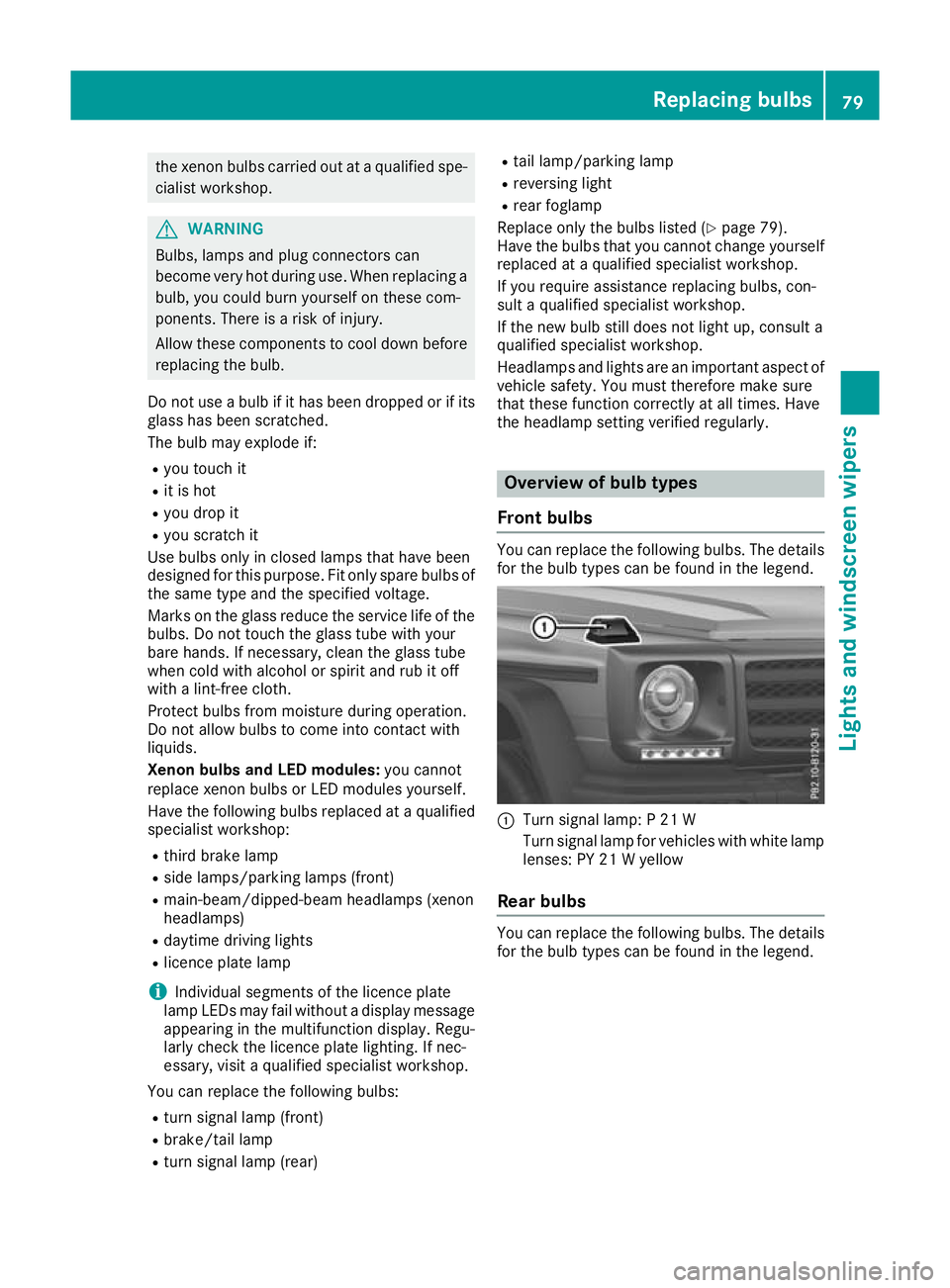
Fron tbulbs You can replace the following bulbs. The details
for the bulb types can be found in the legend. :
Turn signal lamp: P21W
Turn signal lamp for vehicles with white lamp lenses: PY 21 Wyellow
Rear bulbs You can replace the following
bulbs. The details
for the bulb types can be foun dinthe legend. Replacing bulbs
79Lights and windscreen wipers Z
Page 88 of 261
H
Display
I To set climate contro ltoautomatic mod e(Ypage 86) Information on using THERMATIC
automatic climate control
Optimum us eofautomatic climat econ-
trol The followin
gcontains notes and recommenda-
tions on how best to use THERMATIC automatic
climate control.
R Activate climate control using the Ãand
Á buttons. The indicator lamps in the
à andÁ button slight up.
R Set the temperature to 22 †.
R Use the "Windscreen demisting" function only
briefly until the windscreen is clear again.
R Use the "Air-recirculation mode" function only
briefly, e.g. if there are unpleasant outside
odours or when in atunnel. The windows
could otherwise mist up as no fresh air is
drawn into the vehicle in air-recirculation
mode.
R Use the ZONE function to adopt the temper-
ature settings on the driver's side for the
front-passenger side as well. The indicator
lamp in the ábutton goes out.
ECO start/stop function During automatic engine switch-off, th
eclimate
contro lope rates onl yatareducedcapacity. If yo
ur equire th efull climat econtro loutput ,you
can switch off th eECO start/sto pfunction by
pressing th eECO butto n(Ypage 98). Oper
ating the climat econtrol system Switching the climate control on/off
General notes When climate control is switched off, the air
supply and air circulation are also switched off.
The windows could mist up. Therefore, switch
off climate control only briefly.
Switc honc limate control primarily using the
à button (Y page 86).
Activating/deactivating X
Turn the key to position 2(Ypage 96) in
the ignition lock.
X To switch on: press theÃbutton.
The indicator lamp in the Ãbutton lights
up. Airflow and air distribution are set to auto-
matic mode.
X To switch off: press the^button.
The indicator lamp in the ^button lights
up. Activating/deactivating cooling with air dehumidification
General notes If you deactivate the "Cooling with dehumidification
"function, the air inside the vehicle willn ot be
cooled during warm weather. The air inside the vehicle willa lso not be dehumidified. The windows
can mist up more quickly. Therefore, only deactivate the "Cooling with air dehumidification" function briefly.
The "Cooling with dehumidification" function is available only when the engine is running.
The air inside the vehicle is cooled and dehumidified according to the temperature selected.
Condensation may drip from the underside of the vehicle when cooling mode is active. This is normal
and not asign that there is amalfunction. Operating the climate control system
85Climate control
Page 90 of 261
Settings
X
Turn the key to position 2(Ypage 96) in
the ignition lock.
X Press the _button repeatedly until the
desired symbol appears in the display. Setting the airflow
X Turn the key to position 2(Ypage 96) in
the ignition lock.
X To increase: press theKbutton.
X To reduce: press theIbutton.
i The airflow from the rear-compartment
ventsa nd the centre ventsist he same.Switching the ZONE function on/off
X To switch on: press theábutton.
The indicator lamp in the ábutton lights
up.
The temperature settingf or the driver's side
is not adopted for the front-passenger side
and the rear compartment. The temperature
for the front-passenger side and the rear com-
partment is set separately.
X To switch off: press theábutton.
The indicator lamp in the ábutton goes
out.
The temperature settingf or the driver's side
is adopted for the front-passenger side and
the rear compartment. Demisti
ng thewindscreen
General notes You can use this function to defrost the wind-
screen or to demis
tthe inside of the windscreen
and the side windows.
Switch off the "Windscreen demisting" function as soon as the windscreen is clear again. Switching on/off X
Turn the key to position 2(Ypage 96) in
the ignitio nlock.
X To switch on: press the¬button.
The indicator lamp in the ¬button lights
up.
The climate control system switches to the
following functions:
R cooling with air dehumidification
R high airflow
R high temperature
R air distribution to the windscreen and front
side windows
R air-recirculation mode off
X To switch off: press the¬button.
The indicator lamp in the ¬button goes
out. The previous settings are reactivated.
The cooling with air dehumidification function remains on. Air-recirculation mode remains
deactivated.
or
X Press the Ãbutton.
The indicator lamp in the ¬button goes
out. Airflow and air distribution are set to
automatic mode.
or
X Turn control :orB clockwise or anti-clock-
wise (Y page 84).
or
X Press the KorI button. Demisting the windo
ws
Windows misted up on th einside X
Activate the Ácoolin gwitha irdehumidi-
ficatio nfunction.
X Activate the Ãautomatic mode.
X If the windows continue to mis tup,activate
the "Windscreen demisting "fun ction
(Y page 87).
i Yo
us houl donlys elect thi ssetting unti lthe
windscree nisc lear again. Operatin
gthe climat econtrol system
87Climatecont rol
Page 91 of 261
Windows misted up on the outside
X
Switch on the windscreen wiper s(Ypage 81).
X Press the _button repeatedl yuntilthe
P orO symbo lapp ears in the display.
i You shoul
donly select this setting unti lthe
windscreen is clear again.
i If yo
uclean the window sregularly, they do
not mis tupasq uickly. Switching windscree
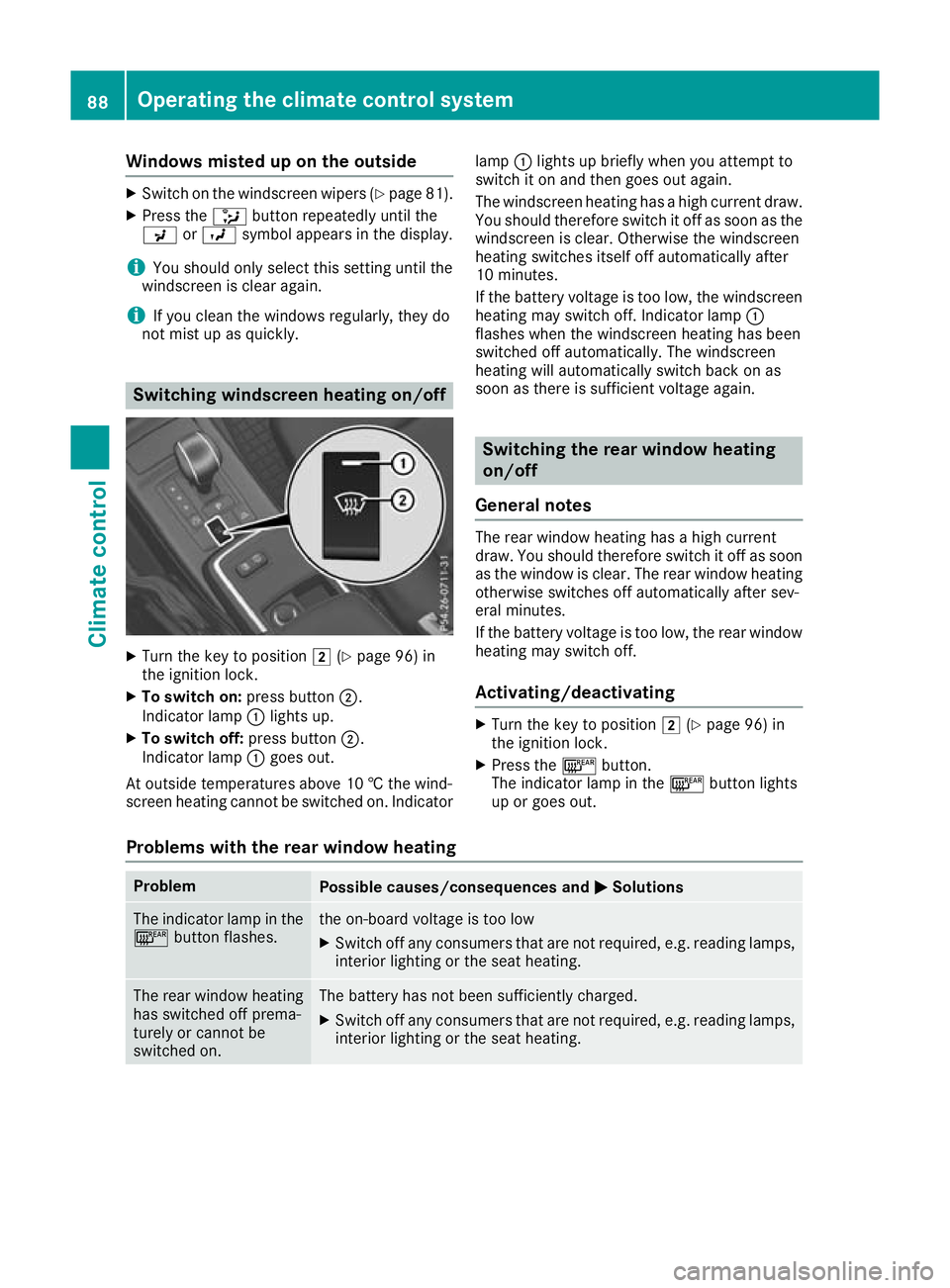
nheating on/off X
Turn the key to position 2(Ypage 96) in
the ignition lock.
X To switch on: press button;.
Indicator lamp :lights up.
X To switch off: press button;.
Indicator lamp :goes out.
At outside temperatures above 10 †the wind-
screen heating cannot be switched on. Indicator lamp
:lights up briefly when you attempt to
switch it on and then goes out again.
The windscreen heating has ahigh current draw.
You should therefore switc hitoff as soon as the
windscreen is clear. Otherwise the windscreen
heatin gswitches itself off automatically after
10 minutes.
If the battery voltage is too low, the windscreen heatin gmay switc hoff.I ndicator lamp :
flashes when the windscreen heatin ghas been
switched off automatically. The windscreen
heatin gwill automatically switc hback on as
soon as there is sufficient voltage again. Switching the rear windo
wheating
on/off
General notes The rear window heating has
ahigh current
draw. You should therefor eswitch it off as soon
as the window is clear. The rear window heating otherwise switches off automatically after sev-
eral minutes.
If the battery voltage is too low, the rear window
heating may switch off.
Activating/deactivating X
Turn the key to position 2(Ypage 96) in
the ignition lock.
X Press the ¤button.
The indicator lamp in the ¤button lights
up or goes out.
Problems with the rear window heating Problem
Possible causes/consequences and
M MSolutions The indicator lamp in the
¤ button flashes. th
eo n-board voltag eistoo low
X Switch off any consumers tha tare not required ,e.g.r eading lamps,
interio rlighting or the seat heating. Th
er ear window heating
has switched off prema-
turely or cannot be
switched on. The battery has not been sufficiently charged.
X Switch off any consumer sthat are not required, e.g. reading lamps,
interior lighting or the seat heating. 88
Operating the climate control systemClimate
control
Page 94 of 261
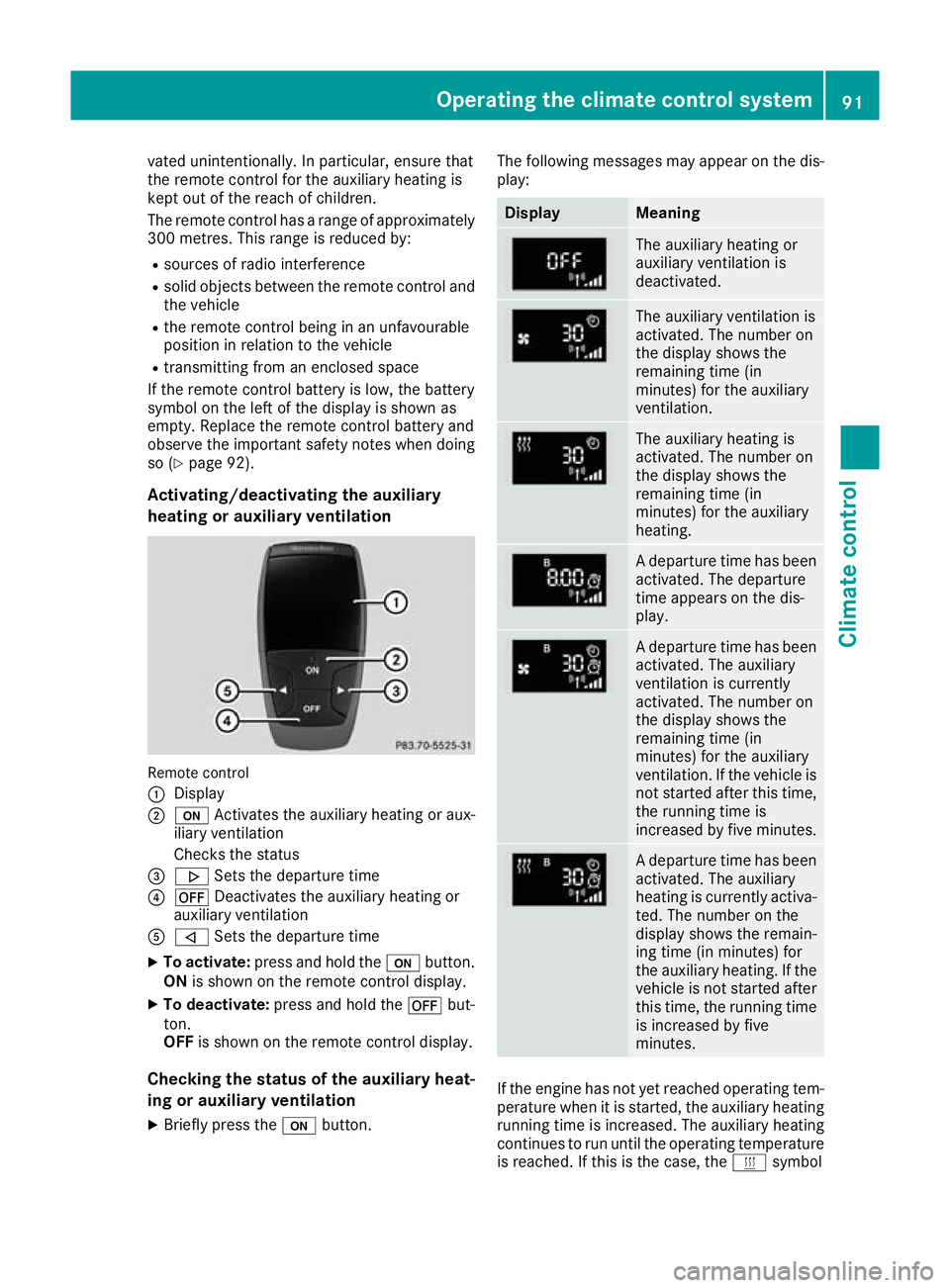
vated unintentionally. In particular, ensure that
the remote control for the auxiliary heating is
kept out of the reach of children.
The remote control has
arange of approximately
300 metres .This range is reduced by:
R source sofradioi nterference
R soli dobjects between the remote control and
the vehicle
R the remote control being in an unfavourable
position in relation to the vehicle
R transmitting from an enclosed space
If the remote control battery is low,t he battery
symbol on the left of the display is show nas
empty. Replace the remote control battery and
observe the important safety notes when doing so (Y page9 2).
Activating/deactivating the auxiliary
heating or auxiliary ventilation Remote control
: Display
; u Activates the auxiliaryh eating or aux-
iliary ventilation
Checks th estatus
= . Setsthe departur etime
? ^ Deactivates th eauxiliary heating or
auxiliary ventilation
A , Setsthe departur etime
X To activate: press and hold the ubutton.
ON is shown on th eremot econtro ldisplay.
X To deactivate: press and hold the ^but-
ton.
OFF is shown on th eremot econtro ldisplay.
Checking th estatus of theauxiliary heat-
ing or auxiliary ventilation
X Briefl ypress the ubutton. The followin
gmessages may appear on the dis-
play: Display Meaning
The auxiliary heating or
auxiliary ventilation is
deactivated.
The auxiliary ventilation is
activated. The number on
the display shows the
remaining time (in
minutes) for the auxiliary
ventilation.
The auxiliary heating is
activated. The number on
the display shows the
remaining time (in
minutes) for the auxiliary
heating.
Ad
epart uret ime ha sbeen
activated .The departure
time appear sonthe dis-
play. Ad
epart uret ime ha sbeen
activated .The auxiliary
ventilatio nisc urrently
activated .The numbe ron
the display shows the
remaining time (in
minutes) for the auxiliary
ventilation. If the vehicl eis
not started afte rthist ime,
the running time is
increased by fiv eminutes. Ad
epart uret ime ha sbeen
activated .The auxiliary
heating is currentl yactiva-
ted .The numbe ronthe
display shows the remain-
ing time (i nminutes) for
the auxiliary heating .Ifthe
vehicl eisnot started after
thi stime ,the running time
is increased by five
minutes. If the engine has not yet reached oper
ating tem-
perature when it is started, the auxiliary heating running time is increased .The auxiliary heating
continues to run until the operating temperature
is reached .Ifthis is the case, the ysymbol Operating the climate control system
91Climate control Z
Page 95 of 261
appear
sontheremot econtrol display and the
runnin gtimeisz erom inutes.
Settin gthe departure time
Mak esure that th etimes et in th evehicle is
correc tbefore settin gthe departur etime.O th-
erwise, th eauxiliary heating may activat eatthe
wron gtimea nd at an unsuitable location. When
settin gthe departur etime, also observ ethe
important safety note s(Ypage 89).
X Briefly pres sthe u button.
X Pres sthe , or. button repeatedly
until th etimetobec hanged appear sonthe
display.
X Pres sthe u and^ button satthesame
time.
The Îsymbo lontheremot econtrol display
flashes.
X Pres sthe , or. button to set the
desired departur etime.
i The longer you pres
sthe , or. but-
ton, th efaster th etimec hanges.
X Pres sthe u and^ button satthesame
time.
The new departur etimeiss tored.
Activating th eset departure time
X Briefly pres sthe u button.
X Pres sthe , or. button repeatedly
until th edesired departur etimea ppear son
th ed isplay.
X Pres sthe u button.
The Ísymbol, th edepartur etimea nd,
dependin gontheselecte ddepartur etime,
th el etter A, BorCappear sonthedisplay.
Deactivatin gthe set departure time
X Briefly pres sthe u button.
The status of th eauxiliary heating is show non
th ed isplay.
X Pres sthe . button.
The first departur etim es toreda ppear sonthe
display.
X Pres sthe ^ button.
OFF is show nontheremot econtrol display. Replacing th
ebatterie sinthe remote
control Importan
tsafety notes G
WARNING
Batterie scontain toxic and corrosive substan-
ces. If batterie sare swallowed,itc an result in
severe health problems. There is arisk of fatal
injury.
Keep batterie sout of the reach of children. If
ab attery is swallowed,s eek medical attention
immediately. H
Environmental note Batteries contain pollutants.
It is illegal to dispose of them
with the household rubbish.
They must be collected sep-
arately and disposed of in anenvironmentall yresponsible
recycling system. Dispose of batteries in an
environmentall
yresponsible
manner. Take discharged
batteries to aquali fied spe-
cialist workshop or to acol-
lectio npoint for used batter-
ies.
Replacin gthe battery AC
R2450 lithium battery is required when
replacing the battery.
X Press apointe dobject into recess ;.
X Slide battery cover :backwards in the direc-
tio noft he arrow. 92
Operatin
gthe climat econtrol systemClimat econt rol
Page 96 of 261
X
Insert new battery =with the lettering facing
upwards. X
Slide battery cover :onto the remote con-
trol in the opposite direction to the arrow until it engages.
X Use the remote control to check the vehicle's
auxiliary heating functions.
Problems with the auxiliary heating/ventilation Problem
Possible causes/con
sequences andM
MSolutions FAIL
¨ The signal transmission between the transmitter and the vehicle is
faulty.
X
Change your position in relation to the vehicle, moving closer if
necessary. FAIL The auxiliary heating or auxiliary ventilation cannot be switched on or
has switched itself off.
The starter battery is not sufficiently charged.
X Charge the starter battery. The fuel level has dropped into the reserve range.
X Refuel at the nearest filling station. The auxiliary heating or auxiliary ventilation is faulty.
X Have the auxiliary heating or auxiliary ventilation checked at a
qualified specialist workshop. The auxiliary heating or auxiliary ventilation was started more than
twice when the engine was switched off.
X Switch on the engine and let it run for more than 10 seconds. The battery symbol on
the left of the remote
control display is shown
as empty. The remote control battery is discharged.
X Replace the remote control battery (Y page 92).Air ven
ts Important safety notes
G
WARNING
Very ho torvery cold air can flow from the air
vents. This coul dresult in burns or frostbite in
the immediate vicinity of the air vents. There
is ar isk of injury.
Make sure that all vehicl eoccupants always
maintai nasufficient distance to the air out-
lets. If necessary, redirect the airflow to
another area of the vehicl einterior. In order to ensure the direct flow of fresh air
through the air vents into the vehicle interior,
please observe the following notes:
R keep the air inlet betwee nthe windscree nand
the bonnet free of blockages, such as ice,
snow or leaves
R never cover the vents or ventilation grilles in
the vehicle interior
i For virtually draught-free ventilation, adjust
the sliders of the air vents to the centre posi- tion.
i If the automatic climate control regularly
deviates from the selected temperature or is Airv
ents
93Climatecont rol Z
Page 98 of 261
Running-i
nnotes Importan
tsafety notes
In certain driving and driving safet ysystems ,the
sensor sadjust automatically while acertai ndis-
tance is bein gdriven after th evehicl ehas been
delivere dorafter repairs .Full system effective-
ness is no treached until th eend of this teach-in
process.
Brake pads/lining sand disc stha teither are new
or have been replace dachiev eoptimum braking
effec tonlya fter several hundre dkilometres of
driving .Compensat efor th ereduce dbraking
effec tbya pplyin ggreate rforce to th ebrake
pedal. Th
ef irs t1 500km
The mor eyou trea tthe engine with sufficient
car eatt he start, the mor esatisfie dyou will be
with the engine performance later on.
R Driv eatv aryingvehicl espeeds and engine
speeds for the first 1500 km
R Avoi doverstraining the vehicl eduringt his
period, e.g .drivin gatf ullt hrottle
R When shifting gear smanually, shift up in good
time ,befor et he rev counter needl ereaches
Ô of the wa ytothe red area of the rev counter
display
R Do not shift down agearm anuall yino rder to
brake
R Try to avoi ddepressing the accelerator pedal
beyond the pressure point (kickdown)
After 1500 km ,you maygradually bring the
vehicl euptof ullr oa da nd engine speeds.
Yo us houl dalsoo bserve these note sonrunning-
in if the engine or parts of the drive train on your vehicl ehaveb eenr eplaced.
Alway sobserve the maximum permissible
speed. Driving
Importan
tsafety notes G
WARNING
Objectsint he driver's footwel lcan impede
peda ltravel or block apeda lwhich is depressed. This jeopardises safe operatio
nof
the vehicle. There is arisk of an accident.
Stow all objects in the vehicle safely, so that
they cannot reach the driver' sfootwell. Make
sure the floormat sand carpet sare properly
secured so that they cannot slip and obstruct the pedals. Do not lay several floormat sor
carpet sontop of one another. G
WARNING
Unsuitable footwear can hinder correct usage of the pedals, e.g.:
R shoe swith thick soles
R shoes with high heels
R slippers
There is arisk of an accident.
Wears uitable footwea rtoensure correct
usage of the pedals. G
WARNING
If you switch off the ignitio nwhile driving,
safety-relevant functions are only available
with limitations, or not at all.T his couldaffect,
for example, the power steering and the brake
boosting effect. You willr equire considerably
more effort to steer and brake. There is arisk
of an accident.
Do not switch off the ignitio nwhile driving. G
WARNING
If the parking brake has not been fully
released when driving, the parking brake can:
R overheat and caus eafire
R lose its hold function.
There is arisk of fire and an accident. Release
the parking brake full ybefore driving off.
! Warm up the engine quickly. Do not use the
engine's full performance until it has reached operating temperature.
Only set the automatic transmission to the
respective drive positions when the vehicl eis
stationary.
Where possible,a voids pinning the drive
wheels when pulling awayons lippery roads.
Otherwise, you coul ddamage the drive train. Driving
95Drivingand parking Z
Page 100 of 261
and release it as soon as th
eengine is run-
ning.
You can start th eengine without preglow if the
engine is warm.
You can also use th etouch-start function .Todo
this, tur nthe keytop osition 3(Ypage 96) and
release it immediately. The engine then starts
automatically. Pulling away
General notes G
WARNING
If th eengine spee disabove the idling speed
and you engag etransmission position Dor R,
the vehicl ecouldp ulla wa ysuddenly .There is
ar isk of an accident.
When engaging transmission position Dor R,
alwaysf irmly depress the brake peda land do
not simultaneously accelerate.
! If
aw arning tone sound sand the Release Release
park. brake
park. brake message appears in the multi-
functio ndisplay, the parking brake is still
applied. Release the parking brake.
Depress the accelerator carefully when pulling
away.
You can open the doors from the inside at any
time.
You can also deactivate the automatic locking
feature (Y page 139).
It is possible to shift the transmission from posi-
tion jto the desired position only if you
depress the brake pedal.O nly then is the selec-
tor lever lock released.
i Upshifts take place at higher engine speeds
after acold start. This helps the catalytic con-
verter to reach its operating temperature
more quickly.
Pulling away with atrailer To ensure that you do not roll backwards when
pulling away on an uphill slope, apply the park-
ing brake. X
Depress the brake pedal and keep it
depressed.
X Shift the automatic transmission to position
h ork.
i Alwaysw
aitu ntilthe shifting proces sis
complete befor edrivin goff.
X Releas ethe parkin gbrake (Y page 114).
X Releas ethe brake pedal.
X Carefully depress the accelerator pedal. EC
Os tart/st op function
Important safety notes G
WARNING
If th eengine is switched off automatically and
you exit the vehicle, the engine is restarted
automatically.T he vehiclemay begi nmoving.
There is arisk of accident and injury.
If you wishtoe xit the vehicle, alwayst urn off
the ignitio nand secure the vehicl eagainst
rolling away.
General notes The ECO start/stop function switches the
engin
eoff automatically if the vehicle stops
moving.
When the vehicle pulls away again, the engine
start sautomatically. The ECO start/stopf unc-
tion thereby helps you to reduce the fuel con-
sumption and emissions of your vehicle.
The ECO start/stopf unction is activated each
time the engine is switched on.
The ECO start/stopf unction is only available in
drive program E.
The system is operational if all conditions for
automatic engine switch-off have been fulfilled
(Y page 98) and the èECO symbol is
shown in green in the multifunction display.
If the conditions for automatic engine switch-off
(Y page 98) are not all fulfilled, the èECO
symbol is shown in yellow in the multifunction
display.
If the ECO start/stopf unction has been man-
ually deactivated (Y page 98) oramalfunction
has caused the system to be deactivated, the
è ECO symbol is not displayed. Driving
97Driving and parking Z
Page 101 of 261
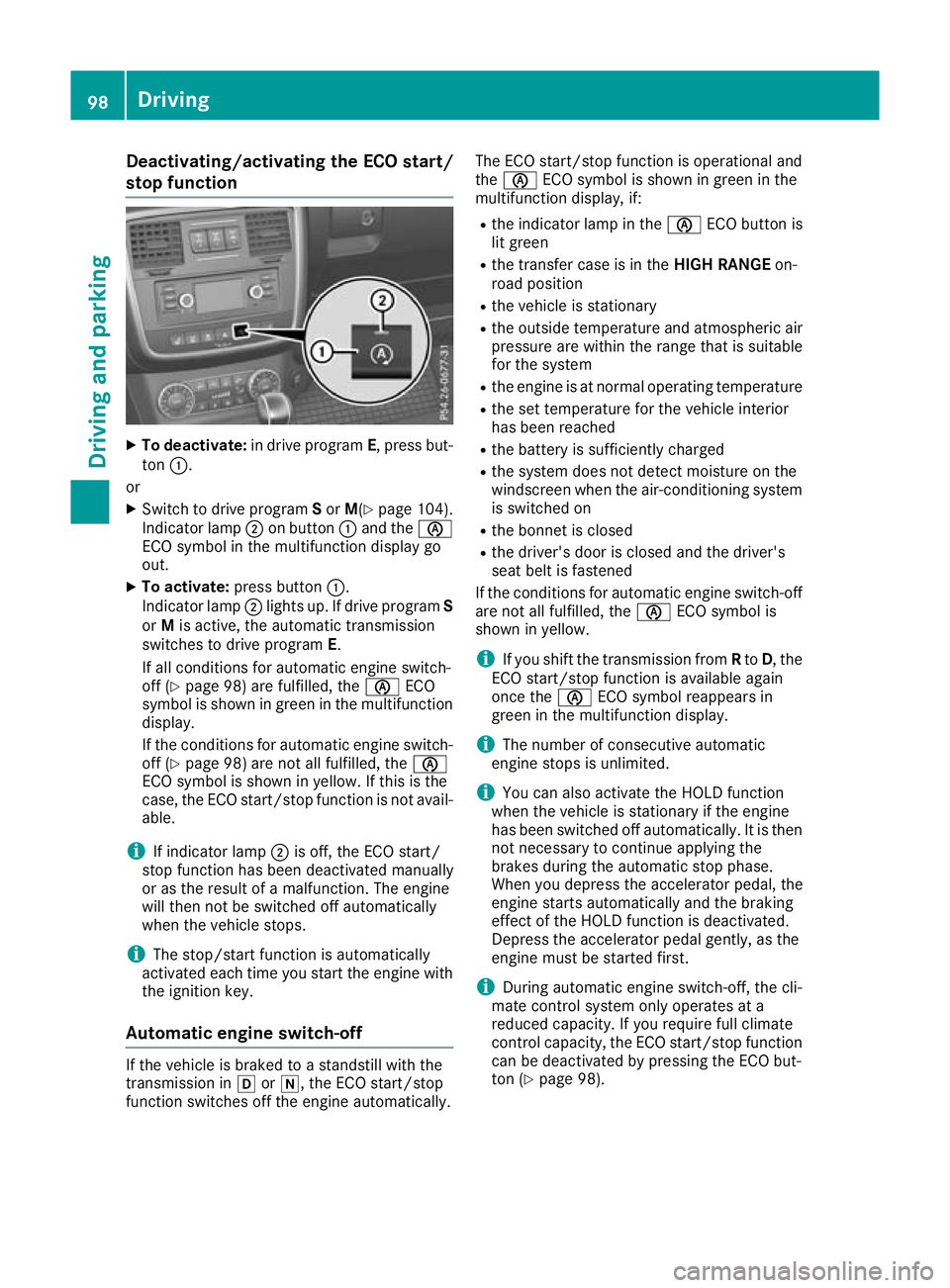
Deactivating/activating th
eECO start/
stop function X
To deactivate: in drive program E,press but-
ton :.
or
X Switch to drive program Sor M(Y page 104).
Indicato rlamp ;on button :and the è
ECO symbo linthe multifunctio ndisplay go
out.
X To activate: press button :.
Indicato rlamp ;lights up .Ifdrive program S
or Mis active, the automatic transmission
switches to drive program E.
If al lconditions for automatic engine switch-
off (Y page 98) are fulfilled, the èECO
symbo lisshown in green in the multifunction
display.
If the conditions for automatic engine switch-
off (Y page 98 )are not al lfulfilled, the è
ECO symbo lisshown in yellow .Ifthisist he
case, the ECO start/sto pfunctio nisn ot avail-
able.
i If indicator lamp
;is off, the ECO start/
stop functio nhasbeen deactivate dmanually
or as the resul tofamalfunction. The engine
will then not be switched off automatically
when the vehicl estops.
i The stop/start functio
nisa utomatically
activate deacht ime yo ustart the engine with
the ignition key.
Automati cengin eswitch-off If the vehicle is braked to
astandstill with the
transmission in hori,t he ECO start/stop
function switches off the engine automatically. The ECO start/stop function is operational and
the
è ECO symbol is shown in green in the
multifunction display, if:
R the indicator lamp in the èECO button is
lit green
R the transfer case is in the HIGH RANGEon-
road position
R the vehicle is stationary
R the outside temperature and atmospheric air
pressure are within the range that is suitable
for the system
R the engine is at normal operating temperature
R the set temperature for the vehicle interior
has been reached
R the battery is sufficiently charged
R the system does not detect moisture on the
windscreen when the air-conditioning system
is switched on
R the bonnet is closed
R the driver's door is closed and the driver's
seat belt is fastened
If the conditions for automatic engine switch-off are not all fulfilled, the èECO symbol is
shown in yellow.
i If you shift the transmission from
Rto D,t he
ECO start/stopf unction is availabl eagain
once the èECO symbol reappears in
green in the multifunction display.
i The number of consecutive automatic
engine stops is unlimited.
i You can also activate the HOLD function
when the vehicle is stationary if the engine
has been switched off automatically. It is then
not necessary to continue applying the
brakes during the automatic stop phase.
When you depress the accelerator pedal, the
engine start sautomatically and the braking
effect of the HOLD function is deactivated.
Depress the accelerator pedal gently, as the
engine must be started first.
i During automatic engine switch-off, the cli-
mate control system only operates at a
reduced capacity. If you require full climate
control capacity, the ECO start/stopf unction
can be deactivated by pressing the ECO but-
ton (Y page 98). 98
DrivingDriving and parking