ESP MERCEDES-BENZ GL SUV 2012 Owners Manual
[x] Cancel search | Manufacturer: MERCEDES-BENZ, Model Year: 2012, Model line: GL SUV, Model: MERCEDES-BENZ GL SUV 2012Pages: 441, PDF Size: 10.66 MB
Page 259 of 441
Mes
sages in the multifunction display
If ag ear change process has not been successful, the following messages may be displayed
in the multifunction display: Display messages Possibl
ecauses/ consequence sand M Solutions
LO
WR ANGE max. speed 40 km/h Yo
uh ave been driving faster than 40 km/h .Additionally, the indi-
cato rlamp on the button in the centre console blinks.
X Driv emore slowly to carry out the gear chan ge process. LOW RANGE Shift to
position
Nbriefly Th
et ransmission is in position Dand yo uare driving at below
40 km/h.
X Shift th etransmission to Nto comple tethe gear change proc-
ess. LOW RANGE Shifting
cancelled Please
reactivate The gear change process was not carried out.
X
Maintain all gear change conditions and carry out the gear
change process again. LOW RANGE Stop
Apply parking brake Aw
arning ton ealso sounds. The gear chang eprocess has not been
comple ted. LOW RANGE is in the neutral position .There is no
con nectio nbetween the engine and the driv ewheels.
! Do not drive any further. You could otherwise damage the
vehicle’ sdrive train.
X Sto pthe vehicle. Take int oaccount the road and traffic condi-
tions whe ndoing so.
X Apply the electric parkin gbrake (Y page 182).
X Repe atthe gear change process.
If th egear change process has been carried out, the LOW RANGE
Stop Appl
yparking brake message disapp
ears. ONOFFROAD men
uint he COMAND dis-
play (vehicles wit hthe ON&OFFROAD
package) Yo
uc an displ ay some driving systems ,driving
programs and additional information in the
COMAND display.
X Make sure that th ekey is in position 2in
the ignition lock.
X Make sure that COMAN DOnline is activa-
ted, see the separate COMAND operating
instructions.
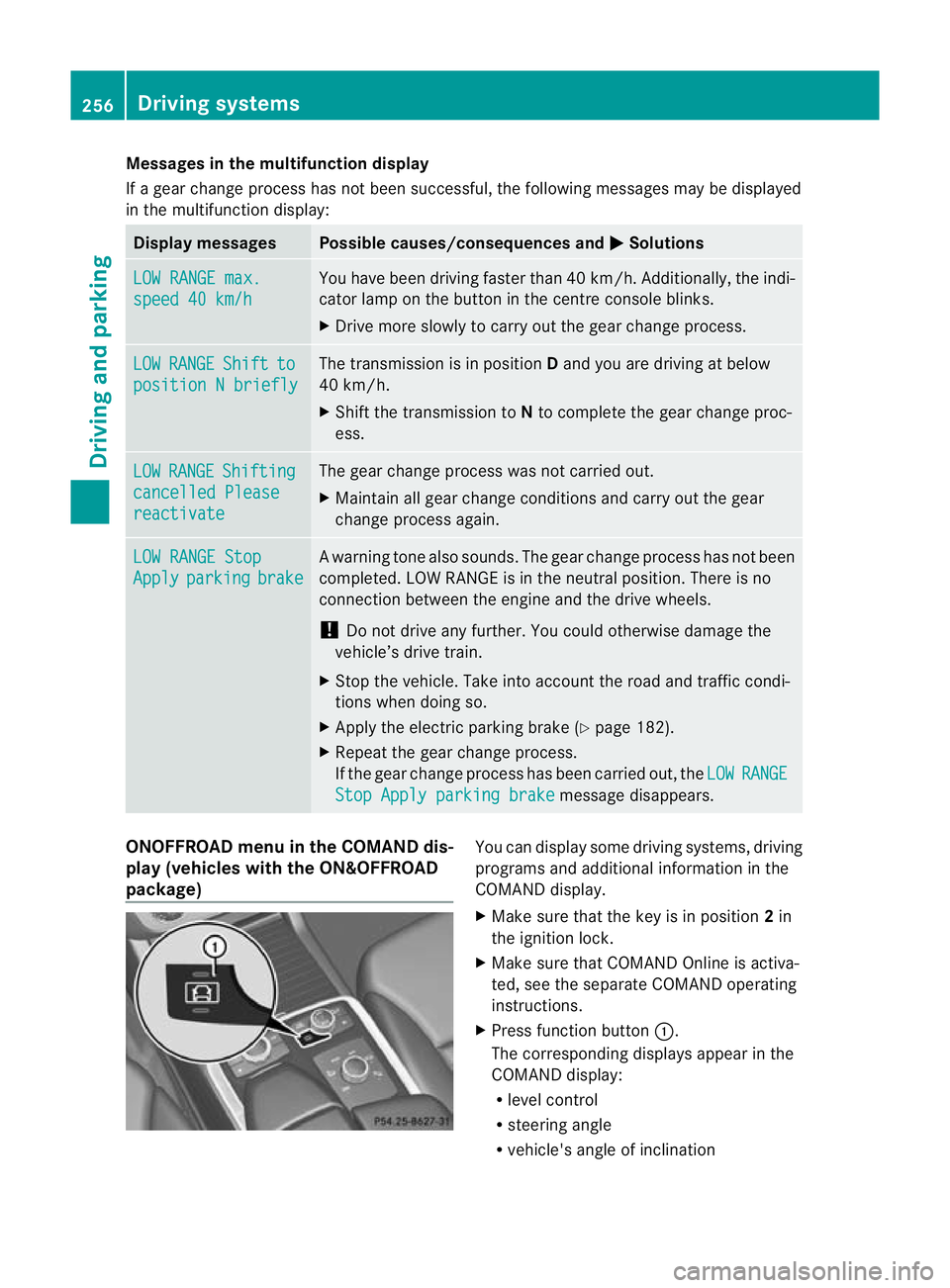
X Pres sfunction button :.
The corresponding displays appea rinthe
COMAN Ddisplay:
R level control
R steering angle
R vehicle' sangle of inclination 256
Drivin
gsystemsDrivin gand pa rking
Page 261 of 441
Make sur
ethat the followin gvalues are not
exceeded:
R the permissible trailer drawba rnoseweight
R the permissible trailer load
R the permissible rea raxle load of the towing
vehicle
R the maximum permissible gros svehicle
weight of both the towing vehicle and the
trailer
The applicable permissible values, which
must not be exceeded, can be found:
R in the vehicle documents
R on the identification plates of the trailer tow
hitch, the trailer and the vehicle
If the values differ, the lowest value applies.
You will fin dthe values approved by the man-
ufacturer on the vehicle identification plates
and those for the towing vehicle under "Tech-
nical data "(Ypage 433).
When towing atrailer, your vehicle's handling
characteristics wil lbedifferent in comparison
to when drivin gwithout atrailer.
Th ev ehicle/ trailer combination:
R is heavier
R is restricted in its acceleration and gradi-
ent-climbin gcapability
R has an increased braking distance
R is affected more by stron gcrosswinds
R demand smore sensitive steering
R has alarger turnin gcircle
This could impair the handling charac teris-
tics. Adapt your styl eofdriving accordingly.
Maintain asafe distance. Drive carefully.
When towing atrailer, alw aysa djust your
speed to the current road and weather con-
ditions. Do not exceed the maximum permis-
sible speed for your vehicle/trailer combina-
tion.
General notes !
Use adrawbar noseweigh tasc lose as
possible to the maximum permissible nose-
weight. Do not use anoseweight of less than 50kg, otherwise the trailer ma
ycome
loose.
Not ethat the payload and the rea raxle load
are reduce dbythe actual payload.
i Chec kthe tyr epressures when towin ga
trailer. You will find the values in the tyre
pressure table in the fuel filler flap of the
vehicle (Y page 399).
You will find installation dimensions and loads
in the "Technical data" section
(Y page 432).
The maximum permissible trailer drawbar
noseweight on the ball coupling is 140 kg.
However, the actual noseweight must not
exceed the value given on the trailer tow hitch
or trailer identification plates .The lowest
weight applies.
Please not ethat when towing atrailer, PARK-
TRONIC (Y page 216) and Blind Spo tAssist
(Y page 238) ar eonly available with limita-
tions ,orn ot at all.
Driving tips i
Observ ethe information on ESP ®
trailer
stabilisation (Y page 67)and on pulling
away with atrailer. (Y page 162).
Vehicle swith the ON&OFFROAD pack-
age: select the trailer program (Y page 250)
with the off- road program selector wheel in
the centre console.
The maximum permissible spee dfor vehicle/
trailer combina tions depends on the type of
trailer .Befor ebeginning the journey, check
the trailer's document stosee what the max-
imu mpermitted speed is. Observ ethe legally
prescribed maximum speed in the relevant
country.
For cer tain Mercedes-Benz vehicles, the max-
imum permissible rear axle load is increased
when towing atrailer. See "Technica ldata" to
find out whethe rthis applies to your vehicle
(Y page 433). If you utilise any of the added
maximum rea raxle load whe ntowing atrailer,
th ev ehicle/ trailer combination may not
exceed amaximum spee dof100 km/h for 258
Towin
gatrailerDriving an dparking
Page 266 of 441
to position
2or 0respective ly
( Y page 159). Bulb fa
ilure indicato rfor LEDl amps
i If LED lamps ar efitted in the trai ler, an
error message ma yappea rinthe multi-
function display eve nifthere is no fault .The
reason for the err or message could be that
the curren thas fallen below the minimum
of 50 mA.
To ensur ereliable operation of the bulb failure
indicator, each LE Dchain in the trailer lighting
must be guaranteed aminimum curren tof
50 mA. Trailer wit
h7-pin connector
General notes Trailers with 7-pi
nconnector: you can
make aconnection to the 13 -pin connector
on the ball coupling using an adapter plug or,
if necessary, an adapter cable. Bot hcan be
obtained in aqualified specialist workshop.
Fitting the adapter !
Make sure that there is sufficien tcable
play so that the cable cannot become
detached when cor nering.
! Remove th einstalled adapter cable
before folding in the ball coupling. Other-
wise, damage may occur to the rear
bumpe rand the adapter cable. X
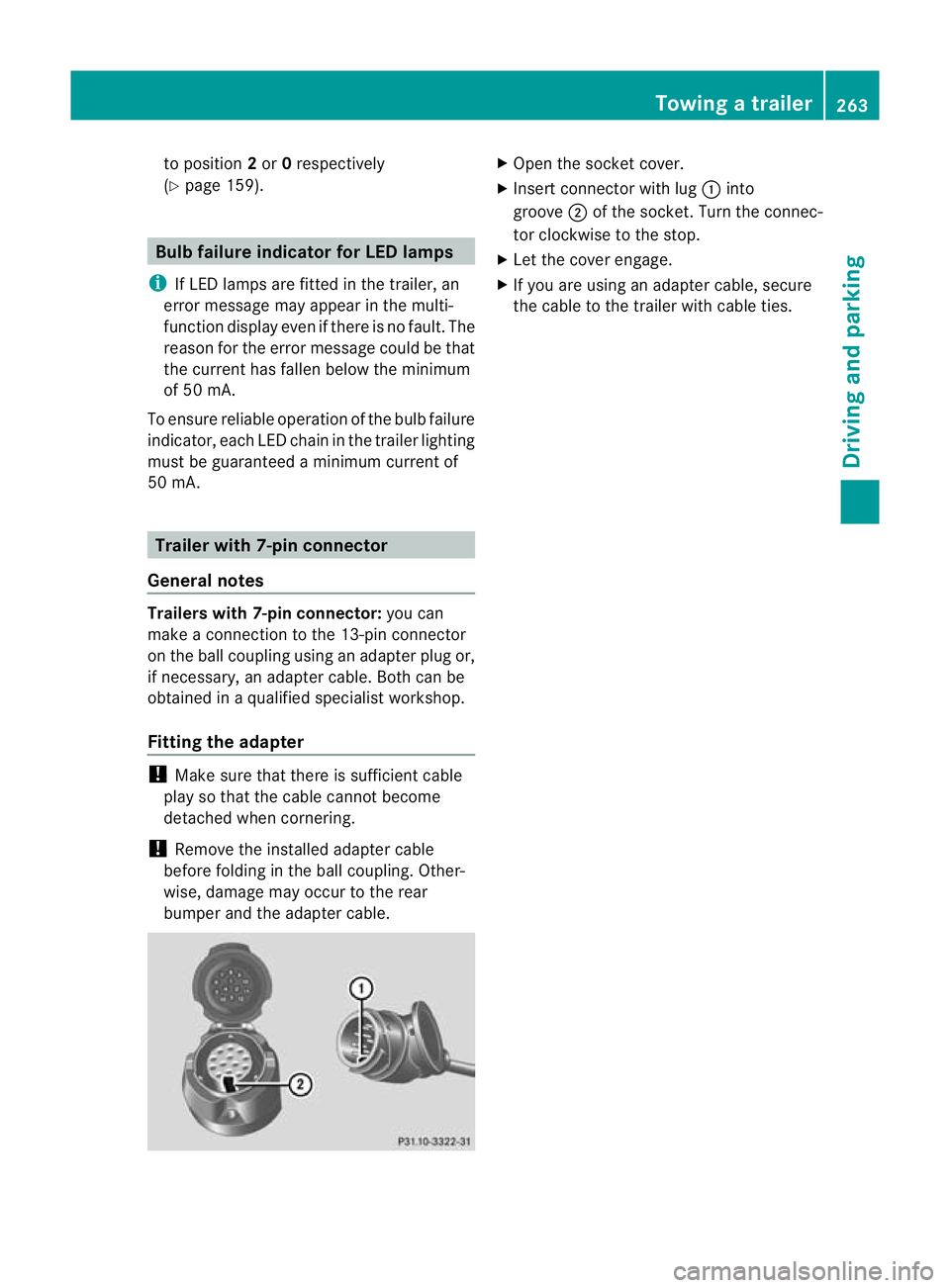
Ope nthe socket cover.
X Inser tconnector with lug :into
groove ;of the socket. Tur nthe connec-
tor cloc kwise to the stop.
X Let the cover engage.
X If you are using an adapter cable, secure
the cable to the trailer with cable ties. Towing
atrailer
263Driving an dparking Z
Page 271 of 441
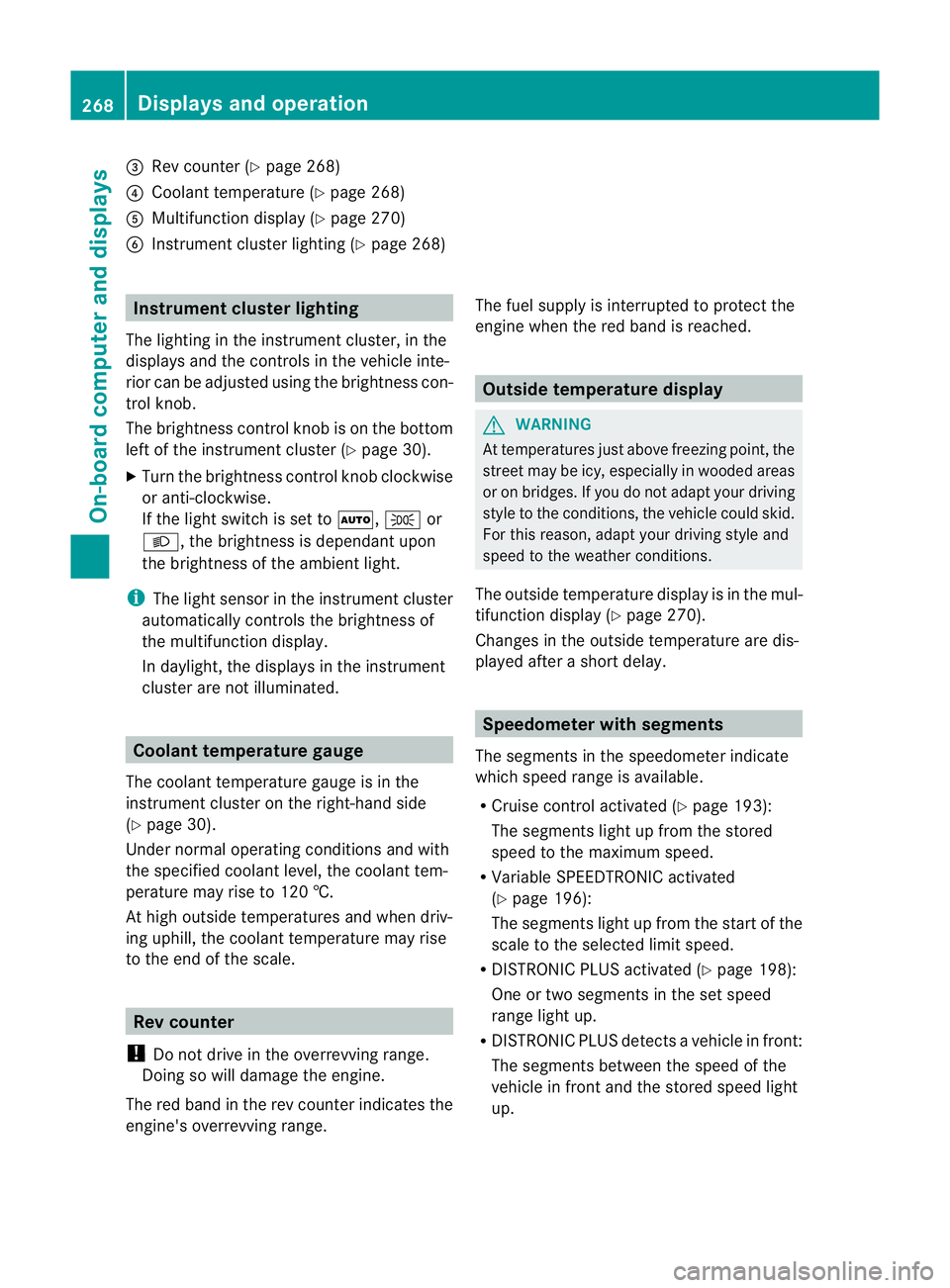
=
Rev coun ter( Ypage 268)
? Coolan ttemperatur e(Ypage 26 8)
A Multifunction displa y(Ypage 27 0)
B Instrumen tcluster lighting (Y page 268) Instrument cluster lighting
The lighting in the instrument cluster ,inthe
displays and the controls in the vehicle inte-
rior can be adjusted usin gthe brightness con-
trol knob.
The brightness control knob is on the bottom
lef toft he instrumen tcluster (Y page 30).
X Turn the brightness control knob clockwise
or anti-clockwise.
If the light switch is set to Ã,Tor
L,t he brightness is dependant upon
the brightness of the ambient light.
i The light sensor in the instrumen tcluster
automatically controls the brightness of
the multifunction display.
In daylight, the displays in the instrument
cluster are not illuminated. Coolant temperature gauge
The coolant temperature gauge is in the
instrument cluster on the right-hand side
(Y page 30).
Under normal operatin gcondition sand with
the specified coolant level ,the coolant tem-
perature ma yrise to 120 †.
At high outside temperatures and when driv-
ing uphill, the coolant temperature may rise
to the end of the scale. Rev counter
! Do not drive in the overrevving range.
Doin gsow ill damage the engine.
The red band in the rev counter indicates the
engine's overrevving range. The fuel supply is interrupted to protec
tthe
engin ewhen the red band is reached. Outside tem
perature display G
WARNING
At temperatures just above freezing point, the
street may be icy, especially in wooded areas
or on bridges. If you do not adapt your driving
style to the conditio ns,the vehicle coul dskid.
For this reason, adapt your driving style and
speed to the weather conditions.
The outside temperature displa yisinthe mul-
tifunc tion display (Y page 270).
Changes in the outside temperatur eare dis-
played afte rashort delay. Speedomete
rwith segments
The segments in the speedometer indicate
which speed range is avai lable.
R Cruise control activated (Y page 193):
The segment slight up from the stored
speed to the maximum speed.
R Variabl eSPEEDTRONIC activated
(Y page 196):
The segments light up from the star tofthe
scal etot he selected limit speed.
R DISTRONI CPLUS activate d(Ypage 198):
One or two segment sinthe set speed
range light up.
R DISTRONI CPLUS detects avehicle in front:
The segments between the speed of the
vehicle in fron tand the store dspeed light
up. 268
Display
sand operationOn-board computer and displays
Page 274 of 441
Ä
PRE-SAFE®
Brake (Y page68)
120 km/h! Maximum permissibl
espeed
exceeded (only for cer tain coun-
tries) Menus and submenus
Menu overview
Press the =or; button on the steer-
ing wheel to call up the menu bar and select
am enu.
Operating the on-board computer
(Y page 269).
Dependin gonthe equipment fit tedint he
vehicle, you can cal lupthe followin gmenus:
R Trip men
u(Ypage 271)
R Navi menu (navigation details)
(Y page 272)
R Audio menu (Y
page 274)
R Tel menu (telephone) (Y
page 275)
R Assist. menu (assistance) (Y
page 277)
R Serv. menu (Y
page 279)
R Sett. menu (Y
page 279)
R ON&OFFRO AD menu (Y
page 286)
R AMG menu in AM
Gvehicles (Y page 286)
The Audio ,
Navi and
Tel menus differ slightly
in vehicles with an audio system and in vehi-
cles with COMAN DOnline. The examples
given in this Owner's Manual appl ytov ehicles
equipped with COMAN DOnline. Trip menu
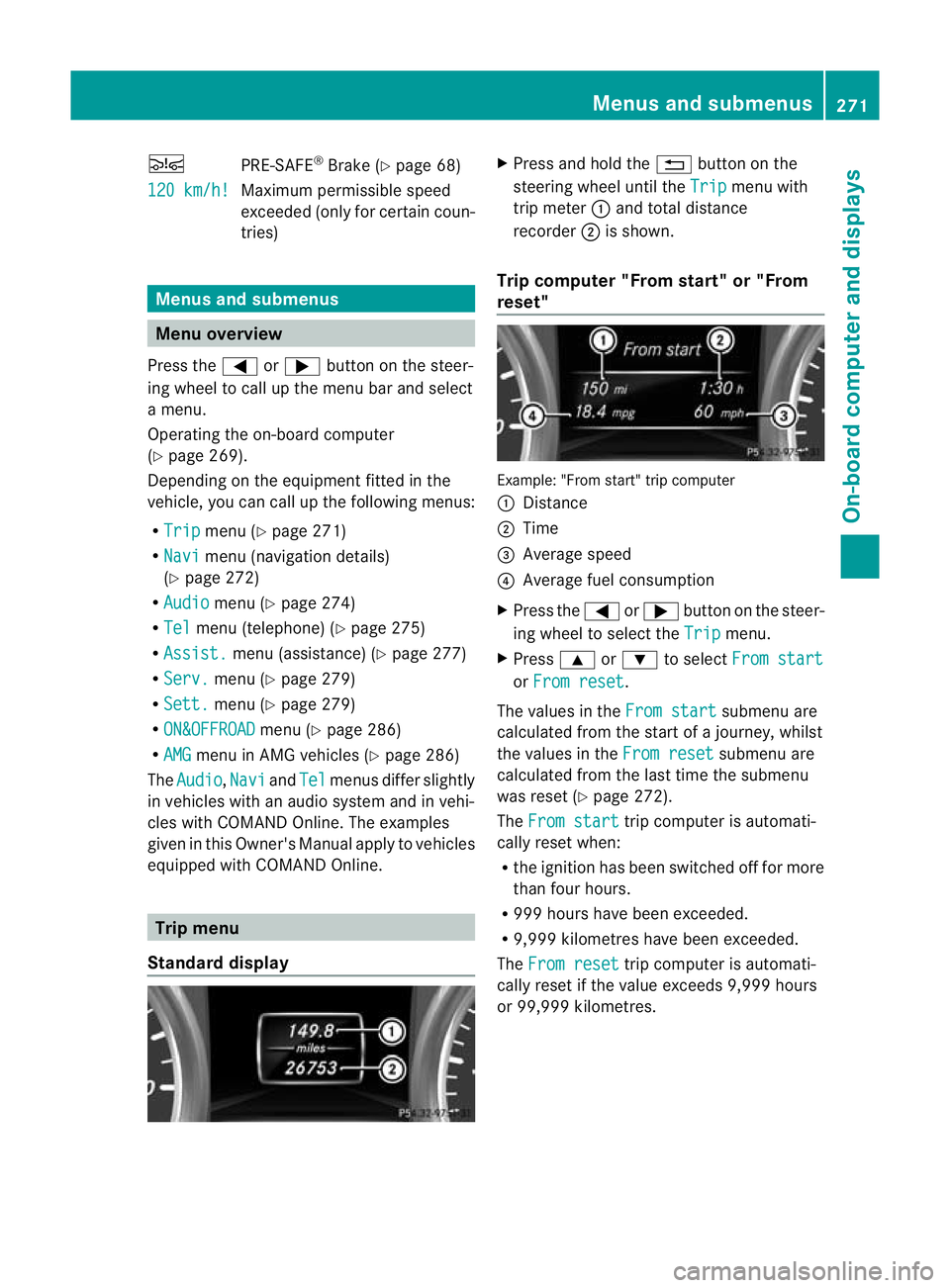
Standard display X
Pres sand hol dthe % button on the
steerin gwheel until the Trip men
uwith
trip meter :and total distance
recorder ;is shown.
Trip compu ter" From start" or "From
reset" Example: "From start
"trip computer
: Distance
; Time
= Averag espeed
? Average fuel consumption
X Press the =or; button on the steer-
ing wheel to select the Trip menu.
X Press 9or: to select From start or
From reset .
The values in the From start submen
uare
calculate dfrom th estart of ajour ney, whilst
the values in the Fromreset submenu are
calculated fro mthe last tim ethe submenu
was reset (Y page 272).
The From start trip compute
risa utomati-
cally reset when:
R the ignition has been switched off for more
than four hours.
R 999 hours have been exceeded.
R 9,999 kilometres have been exceeded.
The From reset trip computer is automati-
cally reset if the value exceeds 9,999 hours
or 99,99 9kilometres. Menus and submenus
271On-board computer and displays Z
Page 280 of 441
X
Press the 6ora button to star tdial-
ling.
or
X To exit the redia lmemory: press the
~ or% button. Assistance menu
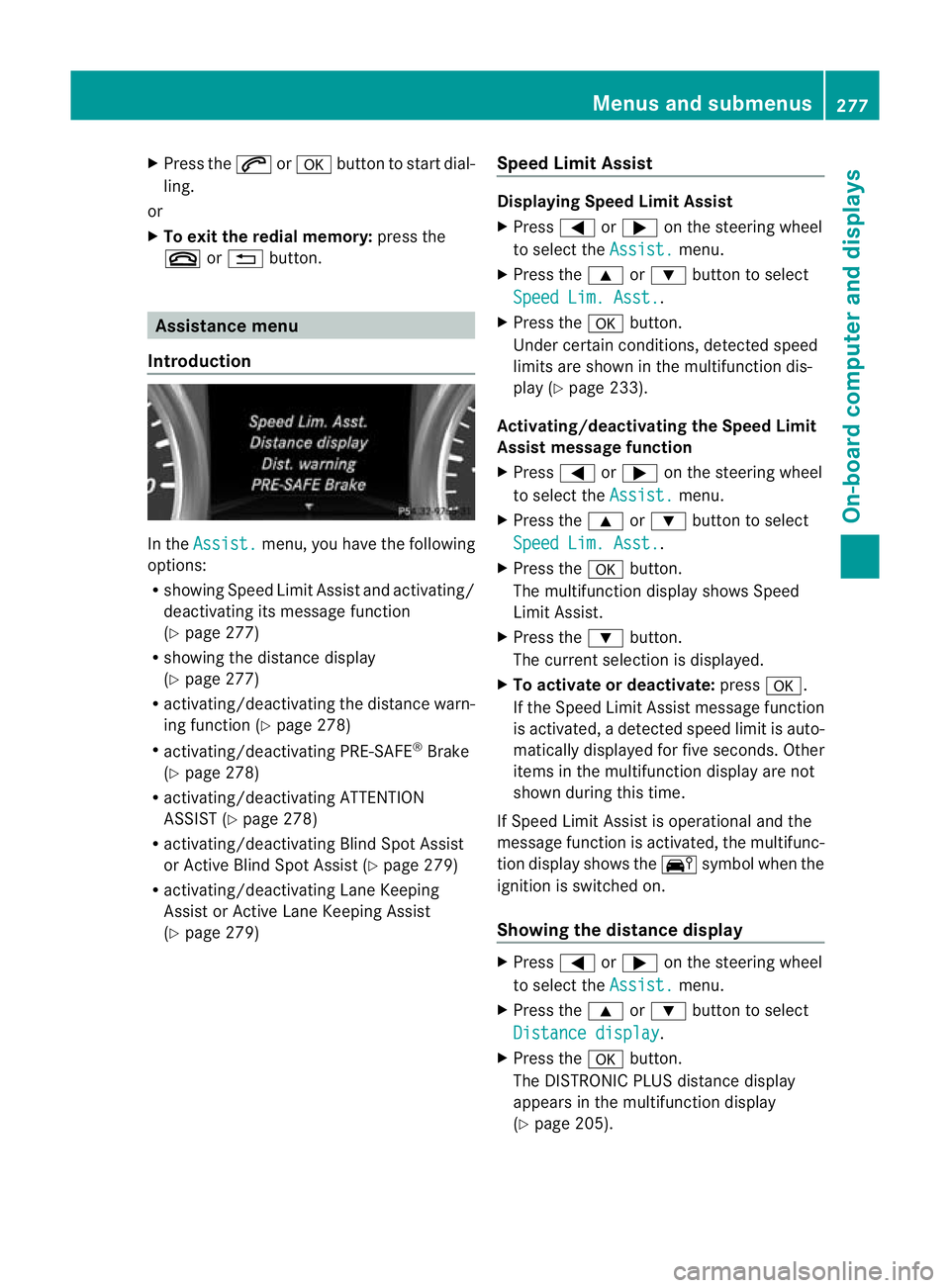
Introduction In the
Assist. menu, you have the following
options:
R showing Speed Limit Assist and activa ting/
deactivating its message function
(Y pag e277)
R showing the distance display
(Y pag e277)
R activating/deac tivating th edistanc ewarn-
ing function (Y page 278)
R activating/deactivating PRE-SAFE ®
Brake
(Y page 278)
R activating/deactivating ATTENTION
ASSIST (Y page 278)
R activating/deactivating Blind Spot Assist
or Active Blind Spot Assis t(Y page 279)
R activating/deactivating Lan eKeeping
Assist or Active Lan eKeeping Assist
(Y page 279) Speed Limit Assist Displaying Speed Limit Assist
X
Press =or; on the steerin gwheel
to selec tthe Assist. menu.
X Press the 9or: button to select
Spee dLim. Asst. .
X Press the abutton.
Under certain conditions ,detected speed
limits are shown in the multifunction dis-
play (Y page 233).
Activating/deac tivating th eSpeed Limit
Assist message function
X Press =or; on the steering wheel
to select the Assist. menu.
X Pres sthe 9 or: button to select
Spee dLim. Asst. .
X Press the abutton.
Th em ultifunction display shows Speed
Limit Assis t.
X Press the :button.
The curren tselection is displayed.
X To activate or deactivate: pressa.
If the Speed Limit Assist message fun ction
is activated, adetected speed limi tisauto-
matically displayed for five seconds. Other
items in the multifunction display are not
shown during this time.
If Speed Limit Assis tiso perational and the
message fun ction is activated, the multifunc-
tion display shows the Äsymbol when the
ignition is switched on.
Showing the distance display X
Press =or; on the steering wheel
to select the Assist. menu.
X Press the 9or: button to select
Distan cedisplay .
X Press the abutton.
The DI STRONIC PLUS distance display
appears in the multifunction display
(Y page 205). Menus and submenus
277On-board computer and displays Z
Page 290 of 441
Avoi
dusing the ful loutpu toft he engin edur-
ing this time.
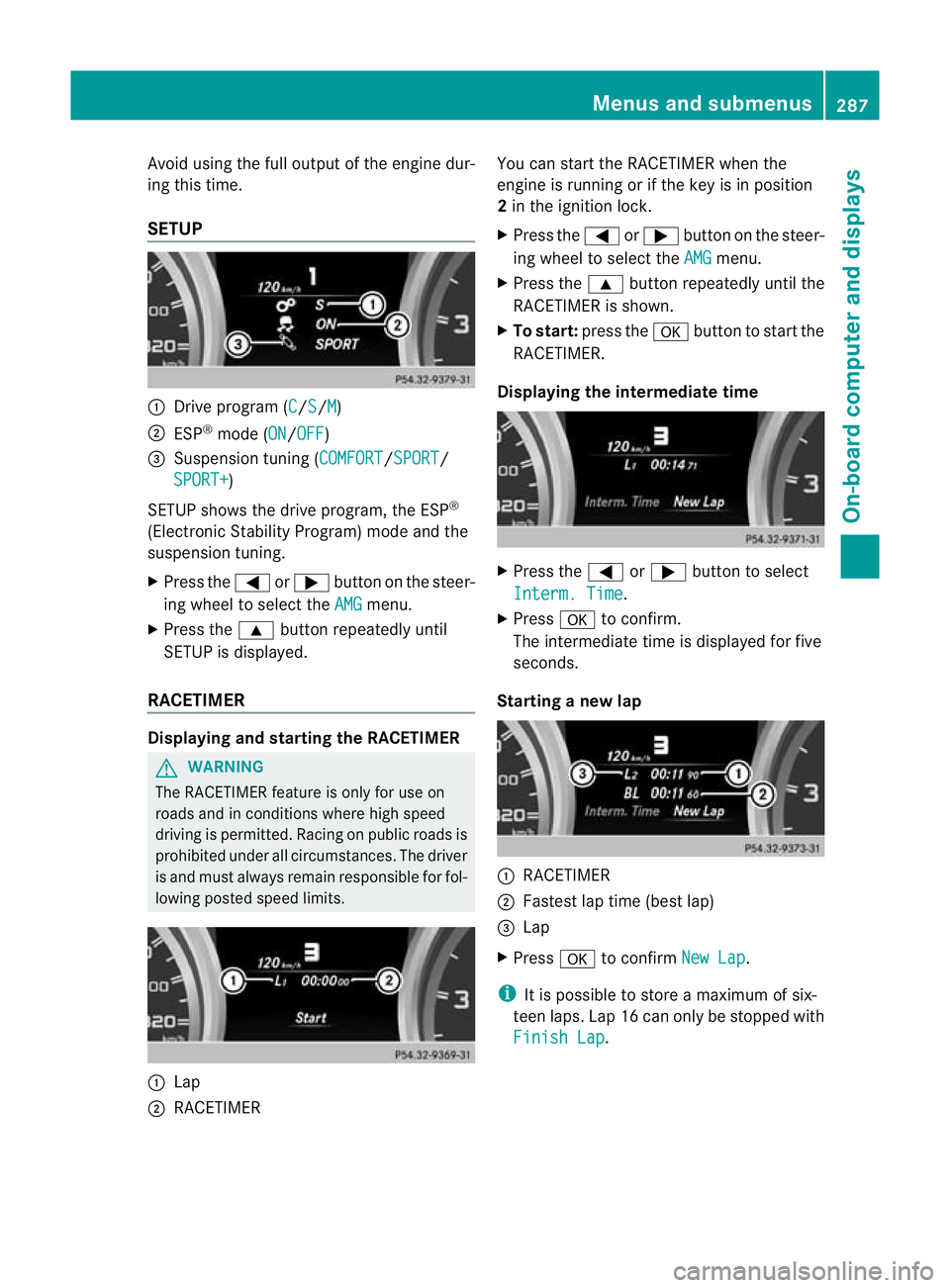
SETUP :
Drive program (C /S /M )
; ESP ®
mode (ON /OFF )
= Suspension tuning (COMFORT /SPORT /
SPORT+ )
SETUP shows the drive program, the ESP ®
(Electronic Stability Program) mode and the
suspensio ntuning.
X Press the =or; button on the steer-
ing wheel to select the AMG menu.
X Press the 9button repeatedly until
SETUP is displayed.
RACETIMER Displaying and starting the RACETIMER
G
WARNING
The RACETIMER feature is only for use on
roads and in conditions where high speed
driving is permitted. Racing on publi croads is
prohibited under all circumstances. The driver
is and must always remain responsible for fol-
lowin gposted speed limits. :
Lap
; RACETIMER You can star
tthe RACETIME Rwhen the
engin eisrunnin gorift he key is in position
2 in the ignition lock.
X Press the =or; button on the steer-
ing wheel to selec tthe AMG menu.
X Press the 9button repeatedly until the
RACETIME Risshown.
X To sta rt:press the abutton to start the
RACETIMER.
Displaying the intermediate time X
Press the =or; button to select
Interm .Time .
X Press ato confirm.
Th eintermediate time is displayed for five
seconds.
Starting anew lap :
RACETIMER
; Fastest lap time (best lap)
= Lap
X Press ato confirm NewL ap .
i It is possible to store amaximum of six-
teen laps. Lap 16 can only be stopped with
Finish Lap .Menus and submenus
287On-board computer and displays Z
Page 293 of 441
Displa
ymessages Introduction
General notes Display message
sappear in th emultifunction display.
Display messages with graphic symbols are simplified in the Owner's Manual and may differ
fro mt he symbols in the multifunction display.
Please respond in accordanc ewith the displa ymessages and follow the additional notes in
this Owner's Manual.
Certain display messages are accompanied by an audible warning tone or acontinuou stone.
When you stop and par kthe vehicle, please observe the notes on:
R HOL Dfunction (Y page 211)
R Parking (Y page 181)
Hiding display messages X
Press the aor% button on the steering wheel to hide the displa ymessage.
The display message is cleared.
The multifunction display shows high-priorit ydispla ymessages in red. Som ehigh-priority dis-
play messages cannot be hidden.
The multifunction displa yshows these messages con tinuously until the cause sfor the mes-
sages have been remedied.
Message memory The on-boar
dcomputer save scertain display messages in the message memory.You can
cal lupt he displa ymessages:
X Press the =or; button on the steerin gwheel to selec tthe Serv. menu.
If ther eare display messages, th emultifunction display shows 2messages ,f
or example.
X Press the 9or: button to select the entry, e.g. 2messages .
X Press ato confirm.
X Press the 9or: buttontos croll through the displa ymessages.
When the ignition is switched off ,all display messages are deleted apart from some high-
priority display messages. Once the causes of the high-priority display messages have been
rectified, the correspondin gdisplay messages are also deleted. 290
Display messagesOn-board computer and displays
Page 294 of 441
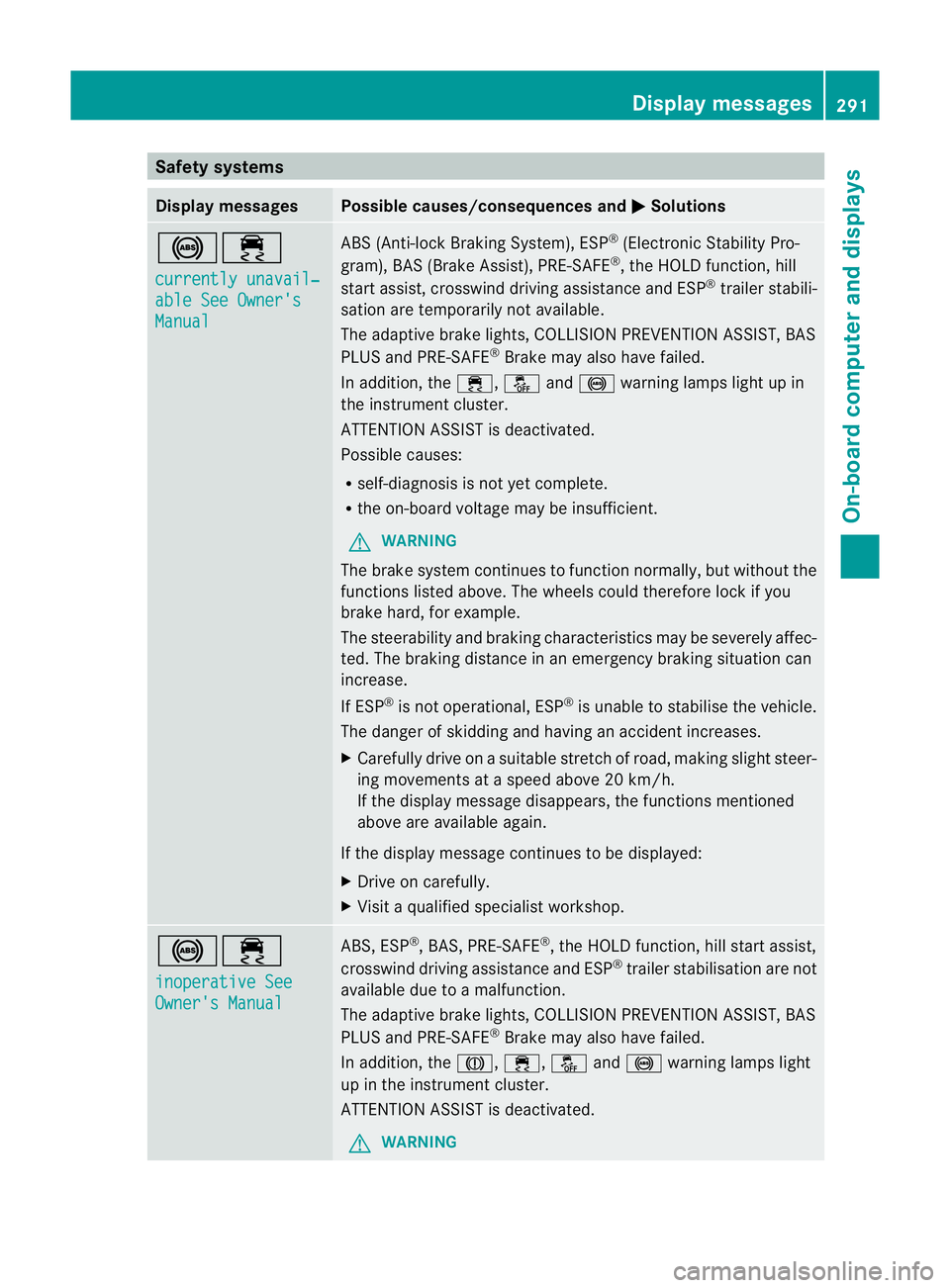
Safety systems
Display messages Possible causes/consequences and
M Solutions
!÷
currentl
yunavail‐ able See Owner's
Manual ABS (Anti-loc
kBraking System) ,ESP ®
(Electronic Stability Pro-
gram), BAS (Brake Assist), PRE-SAFE ®
,t he HOL Dfunction, hill
start assist, crosswind driving assistance and ESP ®
trailer stabili-
sation are temporarily not available.
The adaptive brake lights ,COLLISION PREVENTION AS SIST, BAS
PLUS and PRE-SAFE ®
Brake may als ohave failed.
In addition, the ÷,åand! warning lamps light up in
the instrumen tcluster.
ATTENTION ASSIST is deactivated.
Possible causes:
R self-diagnosis is not yet complete.
R the on-board voltage may be insufficient.
G WARNING
The brake system continues to func tion normally, but withou tthe
func tions listed above. The wheels coul dtherefore lock if you
brake hard, for example.
The steerability and brakin gcharacteristics ma ybeseverely affec-
ted. The braking distance in an emergency braking situation can
increase.
If ESP ®
is not operational, ESP ®
is unabl etos tabilise the vehicle.
The dange rofskidding and having an accident increases.
X Carefull ydrive on asuitable stretch of road, making slight steer-
ing movement sataspeed above 20 km/h.
If the display message disappears, the functions mentioned
above are available again.
If the display message continues to be displayed:
X Drive on carefully.
X Visit aqualified specialist workshop. !÷
inoperativ
eSee Owner's Manual ABS, ESP
®
,B AS ,PRE-SAFE ®
,t he HOL Dfunction, hill start assist,
crosswind driving assistance and ESP ®
trailer stabilisation are not
available due to amalfunction.
The adaptive brake lights ,COLLISION PREVENTION AS SIST, BAS
PLUS and PRE-SAFE ®
Brake may als ohave failed.
In addition, the J,÷,åand! warning lamps light
up in the instrumen tcluster.
ATTENTION ASSIST is deactivated.
G WARNING Display messages
291On-board computer and displays Z
Page 295 of 441
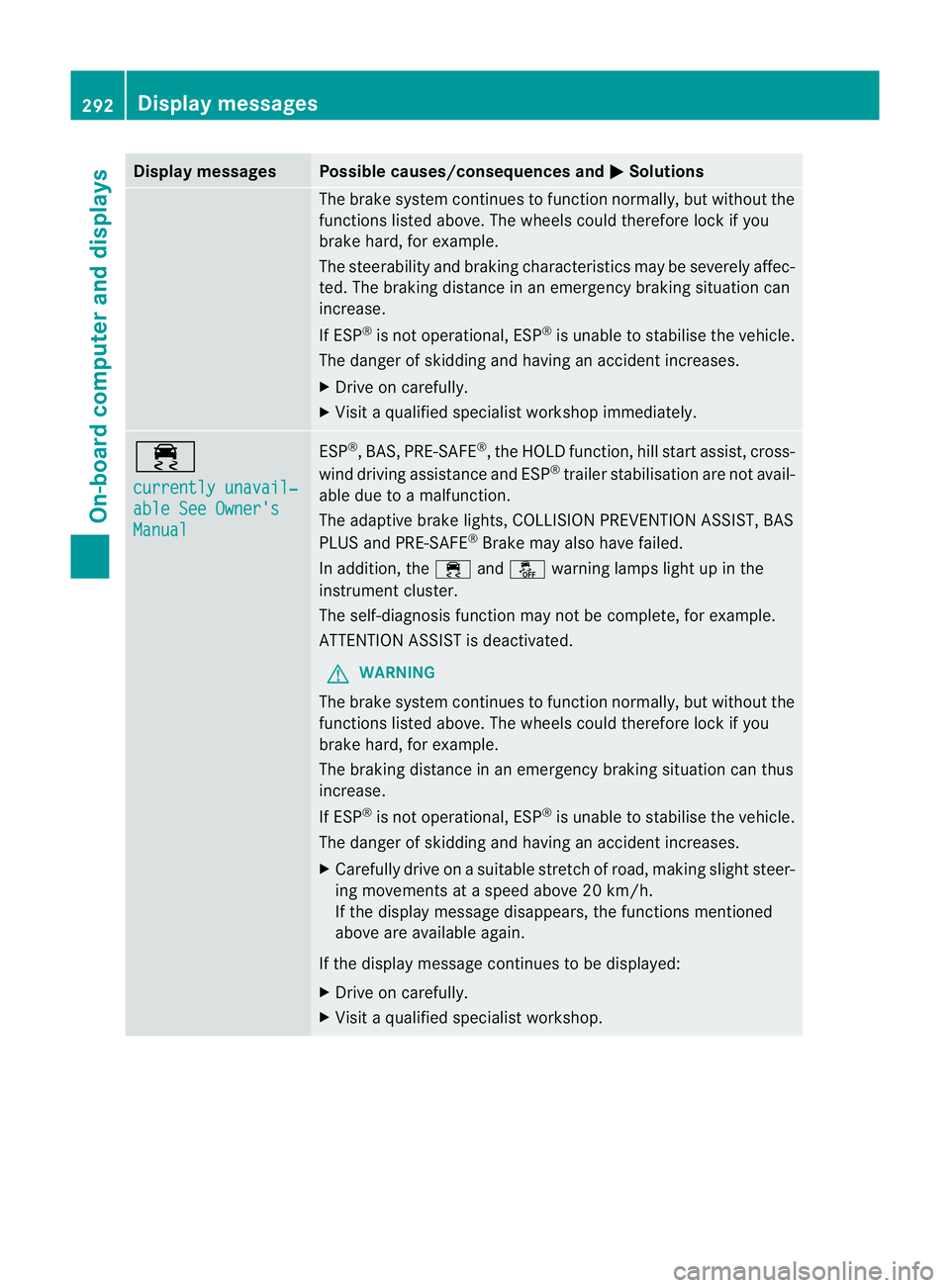
Displa
ymessages Possible causes/consequences and
M Solutions
The brak
esystem con tinues to function normally, but without the
function slisted above. The wheels could therefore loc kifyou
brake hard ,for example.
The steerabilit yand braking characteristics may be severely affec-
ted. The braking distance in an emergenc ybraking situatio ncan
increase.
If ESP ®
is not operational, ESP ®
is unable to stabilis ethe vehicle.
The danger of skidding and having an accident increases.
X Drive on carefully.
X Visit aqualified specialist worksho pimmediately. ÷
currentl
yunavail‐ able See Owner's
Manual ESP
®
,B AS, PRE-SAFE ®
,t he HOL Dfunction, hill start assist, cross-
wind driving assistance and ESP ®
trailer stabilisatio nare not avail-
ab ledue to amalfunction.
The adaptive brake lights, COLLISION PREVENTION ASSIST, BAS
PLUS and PRE-SAFE ®
Brake may als ohave failed.
In addition, the ÷andå warning lamp slight up in the
instrument cluster.
The self-diagnosi sfunction may not be complete, for example.
ATTENTION ASSIS Tisd eactivated.
G WARNING
The brak esystem continues to function normally, but witho utthe
functions listed above. Th ewheels could therefor elock if you
brake hard ,for example.
The brakin gdistance in an emergenc ybraking situatio ncan thus
increase.
If ESP ®
is not operational, ESP ®
is unable to stabilis ethe vehicle.
The danger of skidding and having an accident increases.
X Carefully drive on asuitable stretc hofroad, makin gslight steer-
ing movement sataspeed above 20 km/h.
If the display message disappears, the functions mentioned
above are available again.
If the display message continues to be displayed:
X Drive on carefully.
X Visit aqualified specialist workshop. 292
Display messagesOn-board computer and displays