mirror MERCEDES-BENZ GL SUV 2012 Service Manual
[x] Cancel search | Manufacturer: MERCEDES-BENZ, Model Year: 2012, Model line: GL SUV, Model: MERCEDES-BENZ GL SUV 2012Pages: 441, PDF Size: 10.66 MB
Page 247 of 441
The yellow indicator lam
pgoes out if reverse
gear is engaged. Active Blin dSpot Assist is
then no longer active.
The brightness of the indicator/warning
lamps is adjusted automatically accordin gto
the ambient light.
Visual and acoustic collision warning Whe
nyou switc honthe tur nsignals to
change lanes and avehicle is detected in the
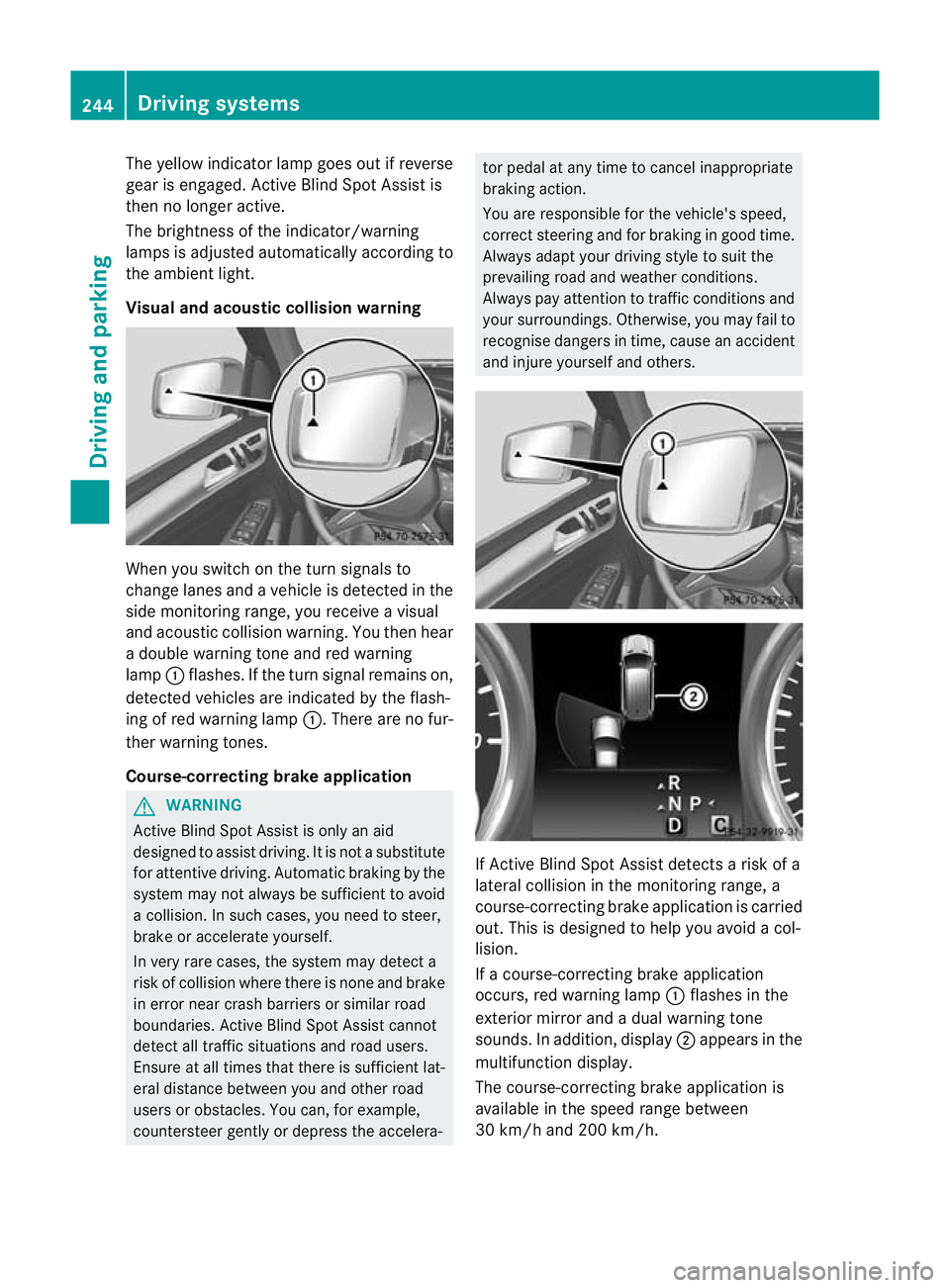
side monitorin grange, you receive avisual
and acoustic collision warning. You then hear
ad ouble warnin gtonea nd red warning
lamp :flashes. If the turn signal remains on,
detected vehicles are indicated by the flash-
ing of red warning lamp :.There ar enofur-
ther warning tones.
Course-correcting brake application G
WARNING
Active Blind Spot Assis tiso nly an aid
designe dtoassist driving. It is not asubstitute
for attentive driving. Automatic braking by the
system may not always be sufficient to avoid
ac ollision .Insuch cases, you need to steer,
brake or accelerate yourself.
In very rare cases, the system may detect a
risk of collision where there is none and brake
in error near crash barriers or similar road
boundaries .Active Blind Spot Assist cannot
detect all traffic situations and road users.
Ensure at all times that there is sufficient lat-
eral distance betwee nyou and other road
users or obstacles. You can ,for example,
countersteer gentl yordepress the accelera- tor pedal at any tim
etocancel inappropriate
braking action.
You are responsible for the vehicle's speed,
correct steering and for braking in good time.
Always adapt your driving style to suit the
prevailing road and weather conditions.
Always pay attention to traffic conditions and
your surroundings. Otherwise ,you may fai lto
recognise dangers in time ,cause an accident
and injure yourself and others. If Active Blind Spot Assis
tdetect sarisk of a
lateral collision in the monitorin grange, a
course-correcting brake application is carried
out. This is designed to help you avoid acol-
lision.
If ac ourse-cor recting brake application
occurs ,red warning lamp :flashes in the
exterior mirror and adual warning tone
sounds .Inaddition, display ;appears in the
multifunction display.
The course-cor recting brake applicatio nis
available in the spee drange between
30 km/h and 200 km/h. 244
Driving systemsDriving and parking
Page 248 of 441
No course-correctin
gbrake applicatio nor
brak eapplication adapted to the driving con-
ditions occurs if:
R there are vehicles or obstacles, e.g. crash
barriers, on both sides of your vehicle.
R av ehicle approaches too closely on the
side.
R you have adopted asport ydriving style with
high cornerin gspeeds.
R you brak eoraccelerat edecisively.
R ad riving safety system intervenes, such as
ESP ®
or PRE-SAFE ®
Brake.
R ESP ®
is deactivated.
R theO ff-roa dprogram is activated (vehicles
without th eON&O FFROAD package).
R Off-road program 1or2isactivated (vehi-
cles with the ON&OFFROAD package).
R the LOW RANGE off-road gear is activated
(vehicle swith the ON&OFFROAD package).
R al oss of tyr epressure or adefec tive tyre is
detected.
Activatin gActive Blind Spot Assist X
Make sure that the radar senso rsystem
(Y page 283 )and Active Blind Spot Assist
(Y pag e279)are activate dint he on-board
computer.
X Tur nthe key to position 2in the ignition
lock.
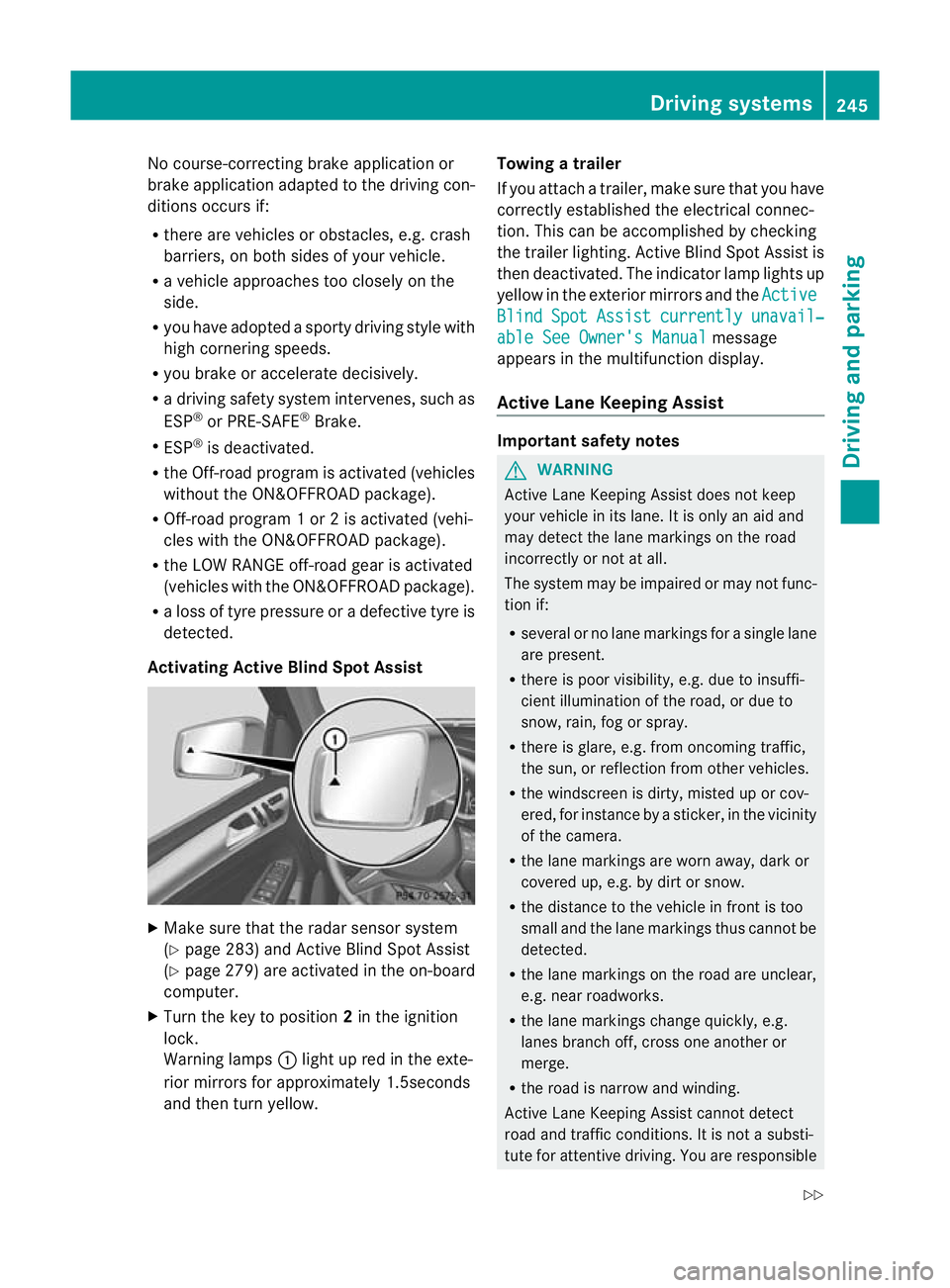
Warnin glamps :light up red in the exte-
rior mirrors for approximately 1.5seconds
and then tur nyellow. Towin
gatrailer
If yo uattach atrailer, make sure th at you have
corre ctly established the electrical connec-
tion. This can be accomplished by checking
the trailer lighting. Active Blind Spot Assist is
then deactivated. The indicator lamp lights up
yellow in the exterior mirrors and the Active Blind Spot Assist currently unavail‐
able Se
eOwner's Manual message
appears in th emultifunction display.
Active Lane Keeping Assist Important safety notes
G
WARNING
Active Lane Keeping Assis tdoes not keep
your vehicle in its lane. It is only an aid and
may detec tthe lan emarkings on the road
incorrectly or not at all.
The system may be impaired or may not func-
tion if:
R several or no lane markings for asingle lane
are present.
R there is poor visibility, e.g. due to insuffi-
cient illumination of the road, or due to
snow, rain, fog or spray.
R there is glare, e.g. from oncoming traffic,
the sun, or reflec tion from other vehicles.
R the windscreen is dirty, misted up or cov-
ered, for insta ncebyasticker, in the vicinity
of the camera.
R the lane markings are worn away ,dark or
covered up, e.g. by dirt or snow.
R the distance to the vehicle in front is too
small and the lane markings thus cannot be
detected.
R the lane markings on the road are unclear,
e.g. near roadworks.
R the lane markings change quickly, e.g.
lanes branch off, cross one another or
merge.
R the road is narrow and winding.
Active Lane Keeping Assis tcannot detect
road and traffic conditions. It is not asubsti-
tute for attentive driving. You are responsible Driving systems
245Drivingand pa rking
Z
Page 285 of 441
X
Press ato confirm.
X Press the :or9 button to select the
Amb. ligh t+/- function.
Yo uw ill see the selected setting.
X Press ato confirm.
X Press the :or9 button to adjust the
brightness to any level from Off to
Level 5 (bright).
X Press the aor% button to save the
setting.
Setting the ambient lighting colour
X Press the =or; button on the steer-
ing wheel to select the Settings menu.
X Press the :or9 button to select the
Light submenu.
X Press ato confirm.
X Press the :or9 button to select the
Ambien tlight colour function.
X Press ato confirm.
X Press the :or9 buttontos et the
colour to SOLAR ,
NEUTRAL or
POLAR .
X Press the aor% button to save the
setting.
Surround lighting and exterior lighting
delayed switch-off
X Press the =or; button on the steer-
ing wheel to select the Settings menu.
X Press the :or9 button to select the
Light submenu.
X Press ato confirm.
X Press :or9 to select the Sur‐ roun
dlighting function.
When the Surround lighting function is
activated, th elight cone and the area
around the vehicle are displaye dinred in
the multifunction display.
X Press the abutton to save the setting. Deac
tivating delayed switch -off of th eexte-
rior lighting tempo rarily:
X Befor eleaving the vehicle, tur nthe key to
position 0in the ignition lock.
X Tur nthe key to position 2in the ignition
lock.
The exterior lighting delayed switch-off is
deactivated.
Delayed switch-off of the exterior lighting is
reactivated the nex ttime you start the
engine.
If you have activated the Surround light‐ ing func
tion and the light switc hisset to
Ã,t he followin gfunctions are activated
when it is dark:
R Surround lighting: the exterior lighting
remains lit for 40 seconds after unlocking
with the key. If you start the engine, the
surround lighting is switched off and the
automatic headlamp mode is activated
(Y page 119).
R Exterior lighting delayed switch-off: the
exterior lighting remains lit for
60 seconds after the engine is switched off.
If you close all the doors and the tailgate,
the exterior lighting goes off after
5s econds.
i Depending on your vehicle's equipment,
when the surround lighting and delayed
switch-off exterior lighting are on, the fol-
lowing light up:
R side lamps
R daytime driving lights
R surround lighting in the exterior mirrors
Activating/deactivating th einterior light-
ing delayed switch-off
If you activa tethe Lighti ngdelayed sw.- off function, th
einterior lighting remains on
for 20seconds after you remove the key from
the ignition lock. 282
Menus and submenusOn-boar
dcomputer and displays
Page 288 of 441
X
Press the :or9 button to select A ,
B or
Change C .
X Press ato confirm.
You can now change the departur etime.
X Press the =or; button to select the
display to be changed: hours, minutes.
X Press the :or9 button to set the
selected display.
X Press the abutton to store the entry.
The yellow indicator lamp on the auxiliary
heating button lights up.
Convenience submenu Activating/deactivating the EASY-
ENTRY/EXIT feature
G
WARNING
The steerin gwheel moves when the EASY-
ENTRY/ EXIT feature is active. There is arisk
of occupant sbecoming trapped. Before acti-
vating the EASY-ENTRY/EXI Tfeature, make
sure that nobody can becom etrapped.
Do not leave children unsupervised in the
vehicle, eve nifthey ar esecured in achild
rest raint system. The children could open the
driver's door and thereby unintentionally acti-
vate the EASY-ENTRY/EXIT featur eand
become trapped.
X Pres sthe = or; button on the steer-
ing wheel to selec tthe Settings menu.
X Press the :or9 button to selec tthe
Convenie nce submenu.
X Press ato con firm.
X Press :or9 to select the Easy Entry/Ex
it function.
If the Easy Entry/Exit function is activa-
ted ,the vehicle steerin gwheel is displayed
in red in the multifunction display.
X Press the abutton to sav ethe setting.
Further information on the EASY- ENTRY/EXIT
feature (Y page 111). Switching the belt adjustment on/off
X
Press the =or; button on the steer-
ing whee ltoselect the Settings menu.
X Press the :or9 button to select the
Convenie nce submenu.
X Press ato con firm.
X Press the :or9 buttontos elect the
Belt adjustme nt function.
When the Belt adjustment function is
activated, th evehicle seat belt is displayed
in red in the multifunction display.
X Press the abutton to save the setting.
For further information on belt adjustment,
see (Y page 48).
Switching th eFold in mirrors when lock-
ing function on/off
This func tion is only available on vehicles with
Memor yFunction (Y page 115).
When you activat ethe Auto. fold-in mir‐
rors func
tion, the exterior mirror sare folded
in when th evehicle is locked. When you
unloc kthe vehicle and then open adoor, the
exterior mirror sfold out again.
X Press the =or; button on the steer-
ing wheel to select the Settings menu.
X Press the :or9 button to select the
Convenie nce submenu.
X Press ato con firm.
X Press :or9 to select the Auto. fold-in mirrors function.
If the Auto. fold-in mirrors function is
activated, th evehicle' sexterior mirror is
displaye dinred in the multifunction dis-
play.
X Press the abutton to save the setting. Menus and submenus
285On-board computera nd displays Z
Page 289 of 441
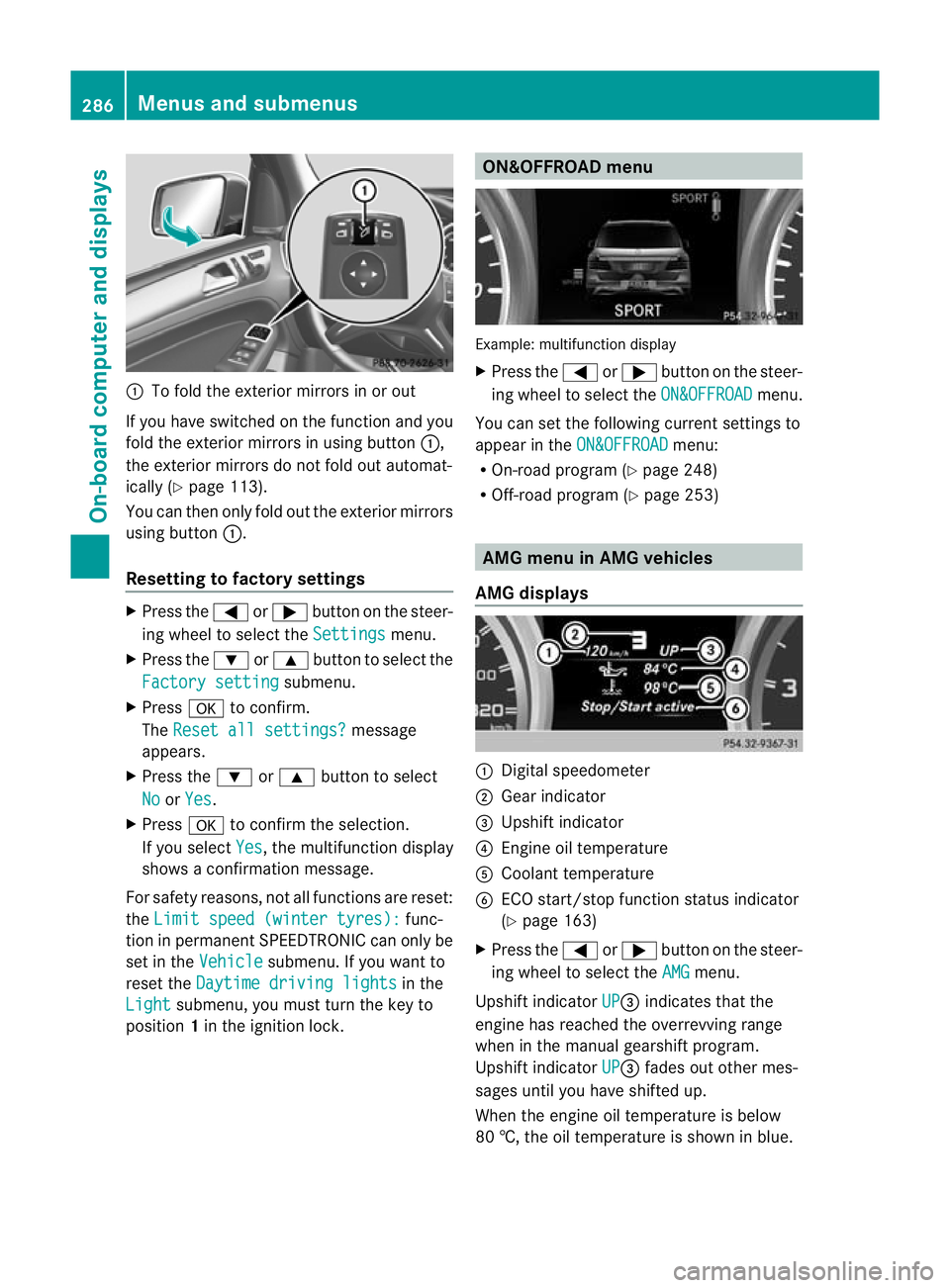
:
To fold the exterior mirror sinorout
If you have switched on the function and you
fold the exterior mirrors in using button :,
the exterior mirrors do not fold out automat-
ically (Y page 113).
You can then only fold out the exterior mirrors
using button :.
Resetting to factor ysettings X
Pres sthe = or; button on th esteer-
ing wheel to selec tthe Settings menu.
X Press the :or9 button to selec tthe
Factor ysetting submenu.
X Press ato confirm.
The Reset all settings? message
appe ars.
X Pres sthe : or9 button to select
No or
Yes .
X Press ato confir mthe selection.
If you select Yes ,t
he multifunction display
shows aconfirmation message.
For safet yreasons, not all functions are reset:
the Limi tspeed (winter tyres): func-
tion in permanen tSPEEDTRONIC can only be
set in the Vehicle submenu. If you want to
reset the Daytimedriving lights in the
Light submenu, yo
umust turn the key to
position 1in the ignition lock. ON&OFFROAD menu
Example: multifunction display
X
Press the =or; button on the steer-
ing wheel to select the ON&OFFROAD menu.
You can set the following current settings to
appea rintheON&OFFROAD menu:
R On-road program (Y page 248)
R Off-road program (Y page 253) AM
Gm enu in AMG vehicles
AMG displays :
Digital speedometer
; Gear indicator
= Upshift indicator
? Engin eoil temperature
A Coolant temperature
B ECO start/stop func tion status indicator
(Y page 163)
X Press the =or; button on the steer-
ing wheel to select the AMG menu.
Upshift indicator UP =
indicates that the
engin ehas reached the overrevving range
when in the manual gearshift program.
Upshift indicator UP =
fades out other mes-
sages until you have shifted up.
When the engine oil temperature is below
80 †, the oil temperature is shown in blue. 286
Menus and submenusOn-board computer and displays
Page 304 of 441
Displa
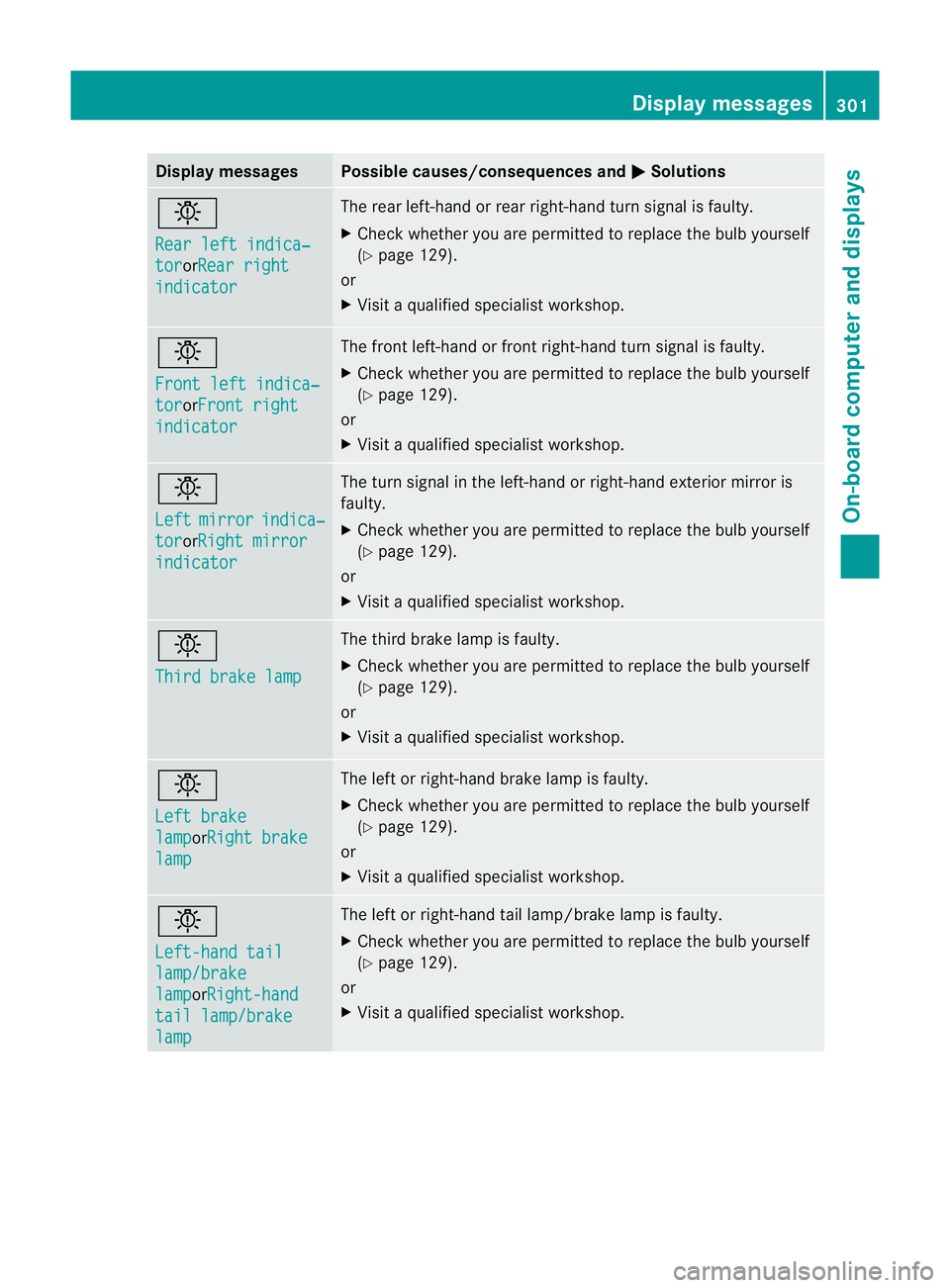
ymessages Possible causes/consequences and
M Solutions
b
Re
ar lef ti ndica‐ tor or
Re ar right indicator Th
er ear left-han dorrear right-hand tur nsignal is faulty.
X Check whether you are permitted to replac ethe bulb yourself
(Y page 12 9).
or
X Visit aqualified specialist workshop. b
Fron
tleft indica‐ tor or
Front right indicator Th
ef ront left-hand or front right-hand turn signal is faulty.
X Check whethe ryou ar epermitted to repla cethe bulb yourself
(Y page 129).
or
X Visit aqualified specialist workshop. b
Left
mirror indica‐
tor orRigh
tmirror indicator Th
et urns ignal in the left-han dorright-han dexterior mirror is
faulty.
X Check whether you are permitted to repla cethe bulb yourself
(Y page 129).
or
X Visit aqualified specialist workshop. b
Thir
dbrakel amp Th
et hirdb rake lamp is faulty.
X Check whethe ryou ar epermitted to repla cethe bulb yourself
(Y page 129).
or
X Visit aqualified specialist workshop. b
Left brake
lamp orRigh
tbrake lamp Th
eleft or right-han dbrake lamp is faulty.
X Check whethe ryou ar epermitted to repla cethe bulb yourself
(Y page 129).
or
X Visit aqualified specialist workshop. b
Left-han
dtail lamp/brake
lamp or
Right-hand tail lamp/brake
lamp Th
eleft or right-han dtail lamp/brak elamp is faulty.
X Check whether you are permitted to replac ethe bulb yourself
(Y page 12 9).
or
X Visit aqualified specialist workshop. Display mess
ages
301On-board computer and displays Z
Page 313 of 441
Displa
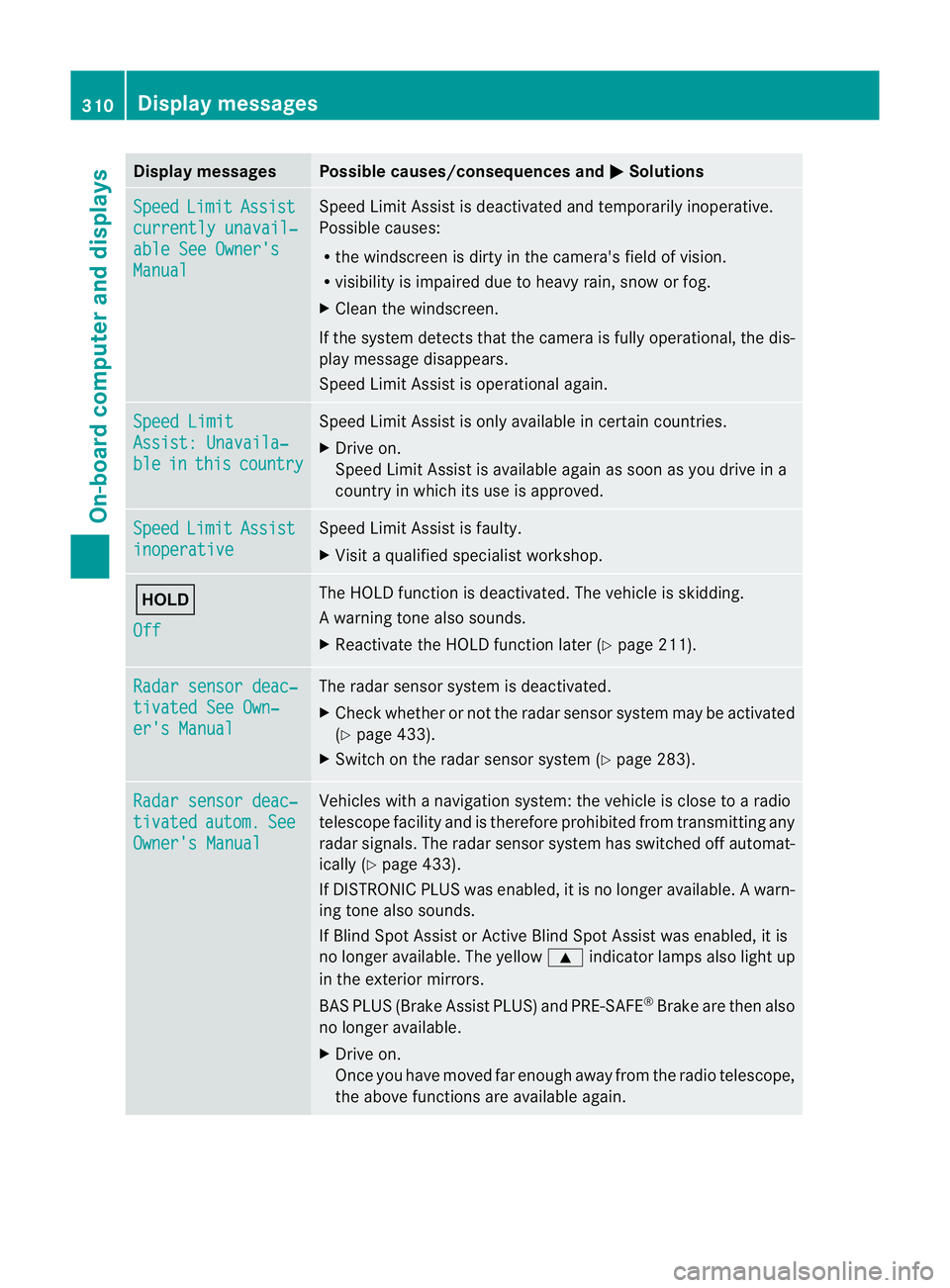
ymessages Possible causes/consequences and
M Solutions
Sp
eed Limit Assist
currently unavail‐
abl
eS ee Owner's Manual Spee
dLimit Assist is deactivated an dtemporarily inoperative.
Possible causes:
R the windscreen is dirt yinthe camera's field of vision.
R visibility is impaired due to heav yrain, snow or fog.
X Clea nthe windscreen.
If the system detec tsthat the camera is fully operational, the dis-
play message disappears.
Speed Limit Assist is operational again. Speed Limit
Assist
:Unavaila‐ ble in this country Spee
dLimit Assist is only available in certain countries.
X Driv eon.
Spee dLimit Assist is available again as soon as you drive in a
countr yinwhich its use is approved. Speed Limit Assist
inoperative Speed Limi
tAssist is faulty.
X Visit aqualified specialist workshop. ë
Off The HOLD function is deactivated. The vehicle is skidding.
Aw
arning ton ealso sounds.
X Reactivat ethe HOL Dfunction later (Y page 211). Ra
dars ensor deac‐ tivate
dSee Own‐ er'
sM anual Th
er adar sensor system is deactivated.
X Check whether or not the radar sensor system ma ybeactivated
(Y pag e433).
X Switch on the rada rsensor system (Y page 283). Rada
rsensor deac‐ tivated autom. See
Owner's Manual Vehicles with
anavigation system: the vehicle is close to aradio
telescop efacility and is therefore prohibite dfrom transmitting any
radar signals .The radar sensor system has switched off automat-
ically (Y page 433).
If DI STRONIC PLUS was enabled, it is no longe ravail able. Aw arn-
ing ton ealso sounds.
If Blin dSpotA ssist or Ac tiveBlind Spo tAssist was enabled, it is
no longe ravailable .The yellow 9indicator lamps also light up
in the exterior mirrors.
BA SP LUS (Brake Assist PLUS) and PRE-SAFE ®
Brak eare then also
no longe ravailable.
X Drive on.
Once yo uhave moved far enough awa yfrom th eradio telescope,
the above function sare avai lable again. 310
Display messagesOn-board computer and displays
Page 350 of 441
You can remove the rubber mat of the cup
holder to clean it. Clean it with clean
,luke-
warm water only.
Temperature-controlled cup holder in
th ef ront-compartment centr econsole G
WARNING
When you use the warmin gfunction ,the metal
insert of thecup holder is heated. Therefore,
do not touch the cup holder inser t.Otherwise,
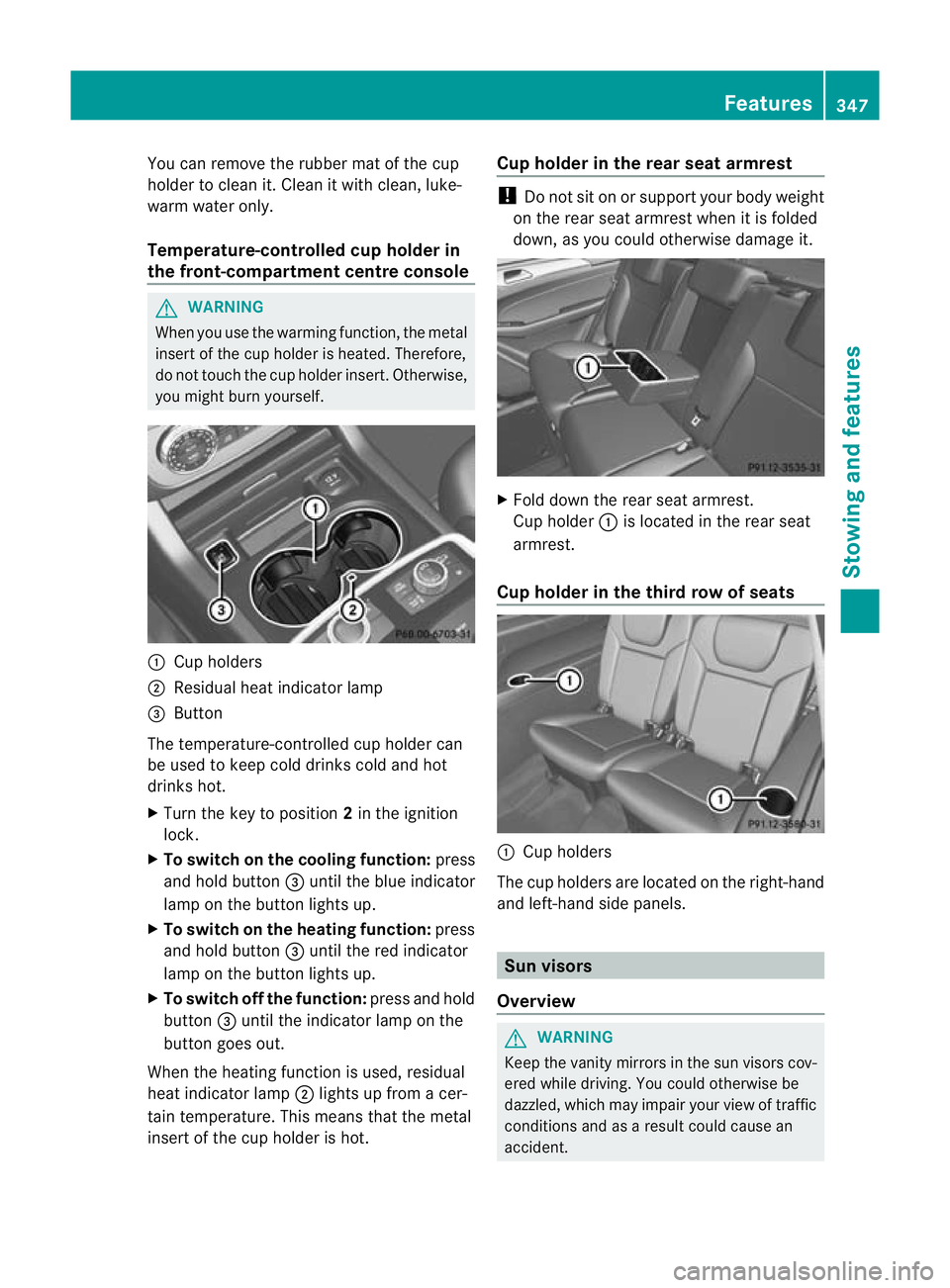
you migh tburny oursel f. :
Cuph olders
; Residual heat indicator lamp
= Button
Th et emperature-c ontrolle dcup holde rcan
be used to keep cold drinks cold and hot
drinks hot.
X Turn the key to position 2in the ignition
lock.
X To switch on th ecooling function: press
and hold button =until th eblue indicator
lamp on th ebutton lights up.
X To switch on th eheating function: press
and hold button =until the red indicator
lamp on the button lights up.
X To switch off th efunc tion: press and hold
button =until the indicator lamp on the
button goes out.
When the heatin gfunction is used, residual
heat indicator lamp ;lights up fro macer-
tain temperature. This mean sthat the metal
insert of the cup holder is hot. Cu
ph older in th erears eat armrest !
Do not sit on or support your body weight
on the rear seat arm rest when it is folded
down ,asy ou coul dotherwise damage it. X
Fold down the rear seat armrest.
Cup holder :is located in the rear seat
armrest.
Cup holder in th ethird row of seats :
Cup holders
The cup holders are located on the right-hand
and left-han dside panels. Sun visors
Overview G
WAR
NING
Keep the vanity mirrors in the sun visors cov-
ered whil edriving.Y ou coul dotherwise be
dazzled, which may impair your view of traffic
conditions and as aresult could cause an
accident. Features
347Stowing and features Z
Page 351 of 441
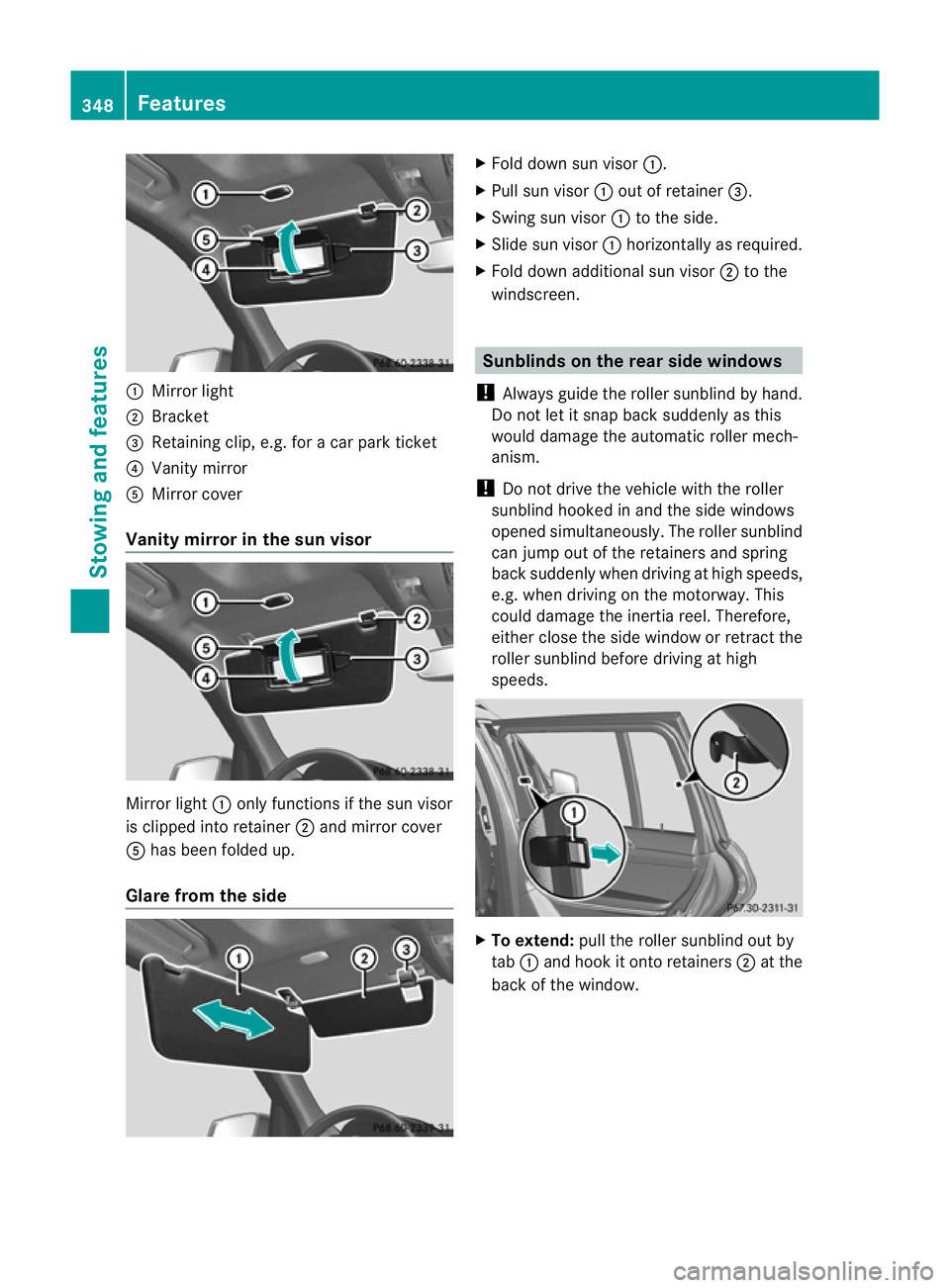
:
Mirror light
; Bracket
= Retainin gclip, e.g. for acar park ticket
? Vanity mirror
A Mirror cover
Vanity mirror in the sun visor Mirror light
:only functions if the sun visor
is clipped into retainer ;and mirror cover
A has been folded up.
Glare from the side X
Fold down sun visor :.
X Pull sun visor :out of retainer =.
X Swing sun visor :to the side.
X Slide sun visor :horizontally as required.
X Fold down additional sun visor ;to the
windscreen. Sunblinds on the rear side windows
! Always guide the roller sunblind by hand.
Do not let it snap back suddenly as this
would damage the automatic roller mech-
anism.
! Do not drive the vehicle with the roller
sunblind hooke dinand the sid ewindows
opened simultaneously. The roller sunblind
can jump out of the retainers and spring
back suddenly when drivin gathigh speeds,
e.g. when drivin gonthe motorway. This
could damage the inertia reel .Therefore,
either close the side window or retract the
roller sunblind before driving at high
speeds. X
To extend: pull the roller sunblind out by
tab :and hook it ont oretainers ;at the
back of the window. 348
FeaturesStowing and features
Page 355 of 441
i
On some mobile phone brackets, you first
hav etoc onnect the mobile phone via Blue-
tooth ®
to the mobile phone bracke t(see
the separate operating instructions for the
mobile phone bracket).
If this is the case, the mobile phone does
not hav etobei nsertedinto the bracket for
you to be able to use the telephone func-
tions .However, the charging function and
aerial function ar enot available.
Operating th emobile phone You can operate the telephone using the
6
and~ buttons on the multifunction
steering wheel. You can operate other mobile
phone functions via the on-board computer
(Y page 275).
When you remov ethe key from the ignition
lock ,the mobile phone stay sswitched on.
However, you can no longer use the hands-
free system.
If you have an active call and woul dlike to
take the key out of the ignition lock, first
remov ethe mobile phone from the bracket.
i When usin gabracke tconnected to the
mobile phone via Bluetooth ®
and you wish
to proceed with acall:
Switch to private mode before removing
the key from the ignition lock. Otherwise, it
may take up to 20 seconds before the
mobile phone separates from the system.
Only then can the telephone call continue.
Information on the necessary steps for set-
ting up "private mode" can be found in the
separate mobile phone operating instruc-
tions.
i Not all mobile phones support "private
mode". Garage door opener
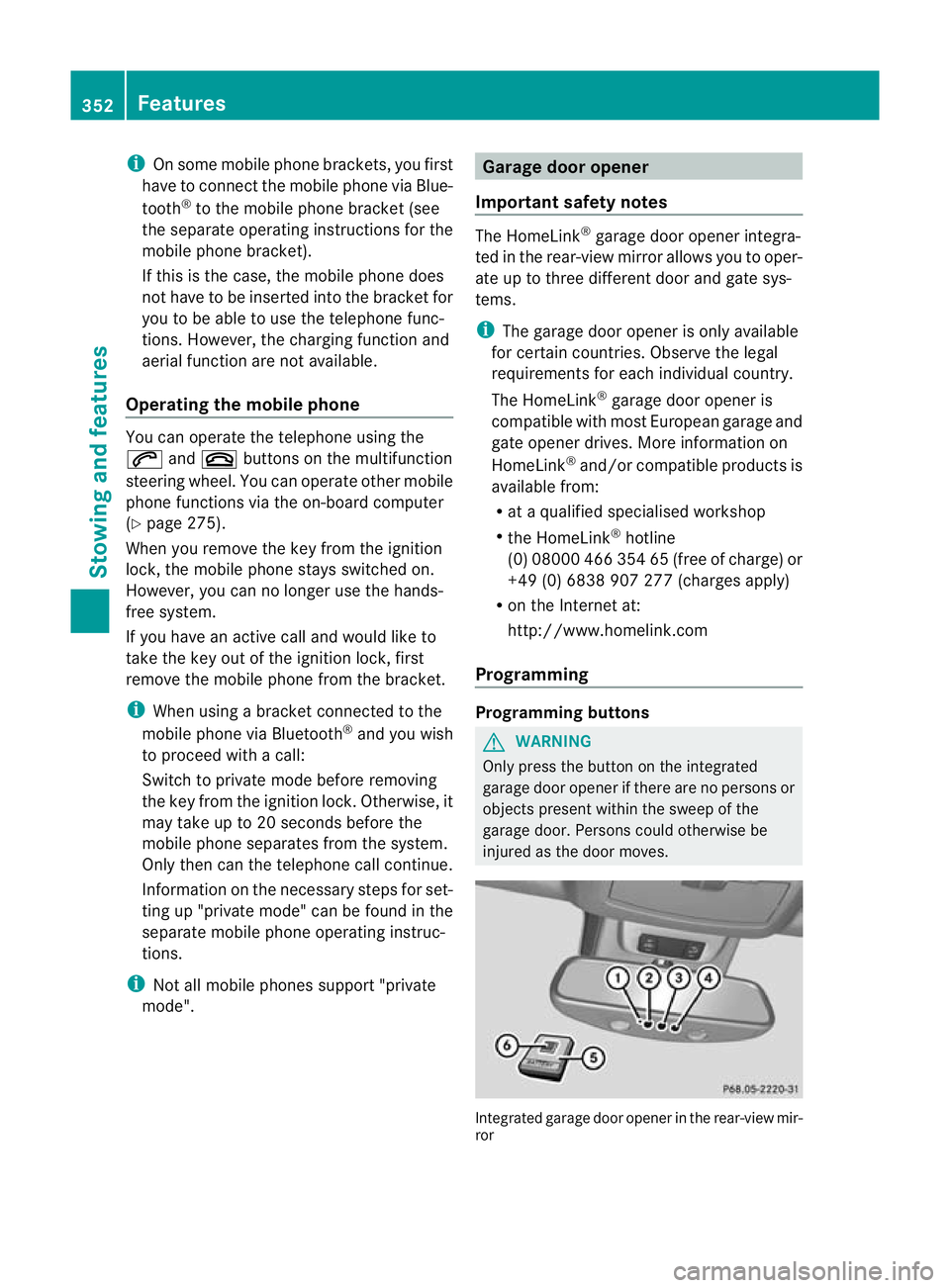
Important safety notes The HomeLink
®
garage door opener integra-
ted in the rear-view mirror allows you to oper-
ate up to three different door and gate sys-
tems.
i The garage door opener is only available
for certain countries. Observe the legal
requirements for each individual country.
The HomeLink ®
garage door opener is
compatible with most European garage and
gate opener drives. More information on
HomeLink ®
and/or compatible products is
available from:
R at aq ualified specialised workshop
R the HomeLink ®
hotline
(0) 08000 466 354 65 (free of charge) or
+49 (0) 683 8907 277 (charge sapply)
R on the Internet at:
http://www.homelink.com
Progra mming Programming buttons
G
WARNING
Only press the button on the integrated
garage door opener if there are no persons or
object spresent withi nthe sweep of the
garage door. Person scould otherwise be
injure dasthe door moves. Integrated garage door opene
rinthe rear-view mir-
ror 352
FeaturesStowin
gand features