sensor MERCEDES-BENZ GL SUV 2012 Workshop Manual
[x] Cancel search | Manufacturer: MERCEDES-BENZ, Model Year: 2012, Model line: GL SUV, Model: MERCEDES-BENZ GL SUV 2012Pages: 441, PDF Size: 10.66 MB
Page 301 of 441
Displa
ymessages Possible causes/consequences and
M Solutions
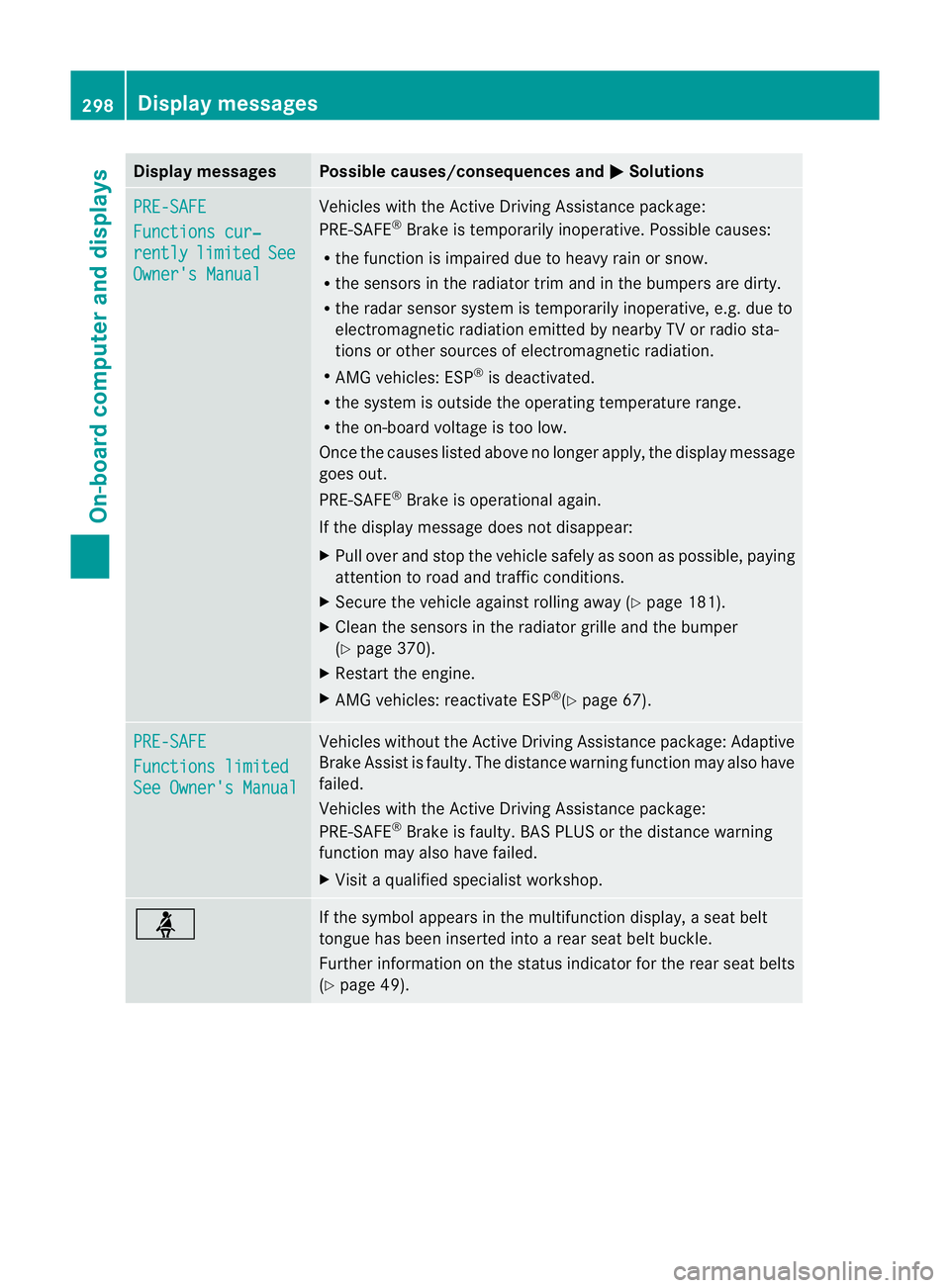
PR
E-SAFE Functions cur‐
rently limited See
Owner'
sManual Vehicles with the Active Driving Assistance package:
PRE-SAFE
®
Brake is tempora rily inoperative. Possibl ecauses:
R thef unction is impaire ddue to heav yrain or snow.
R thes ensor sint he ra diatortrim and in th ebumpers are dirty.
R the rada rsensor system is temporarily inoperative, e.g. due to
electromagnetic radiation emit tedbyn earby TV or radi osta-
tions or othe rsources of elect romagnetic radiation.
R AM Gvehicles: ESP ®
is deactiva ted.
R the system is outside the operatin gtemperatur erange.
R the on-board voltage is too low.
Onc ethe causes listed abov enolonger apply ,the displa ymessage
goes out.
PRE- SAFE ®
Brake is operational again.
If the displa ymessage does not disappear:
X Pull over and stop the vehicle safely as soon as possible, paying
attention to road and traffic conditions.
X Secure the vehicle against rollin gaway (Y page 181).
X Clean the sensors in the radiator grille and the bumper
(Y page 370).
X Restart the engine.
X AMG vehicles: reactivate ESP ®
(Y page 67). PRE-SA
FE Functions limited
See Owner's Manual Vehicles withou
tthe Activ eDriving Assistance package: Adapti ve
Brake Assis tisf aulty. The distanc ewarning function may also have
failed.
Vehicles with the Active Driving Assis tance package:
PRE-SAFE ®
Brak eisf aulty. BA SPLUS or th edistanc ewarning
function may also have failed.
X Visit aqualified specialist workshop. ü If the symbol appears in the multifunction display,
aseat belt
tongue has been inser tedi nto arear seat belt buckle.
Fur ther information on the status indicator for the rear seat belts
(Y page 49). 298
Display messagesOn-boar
dcomputer and displays
Page 313 of 441
Displa
ymessages Possible causes/consequences and
M Solutions
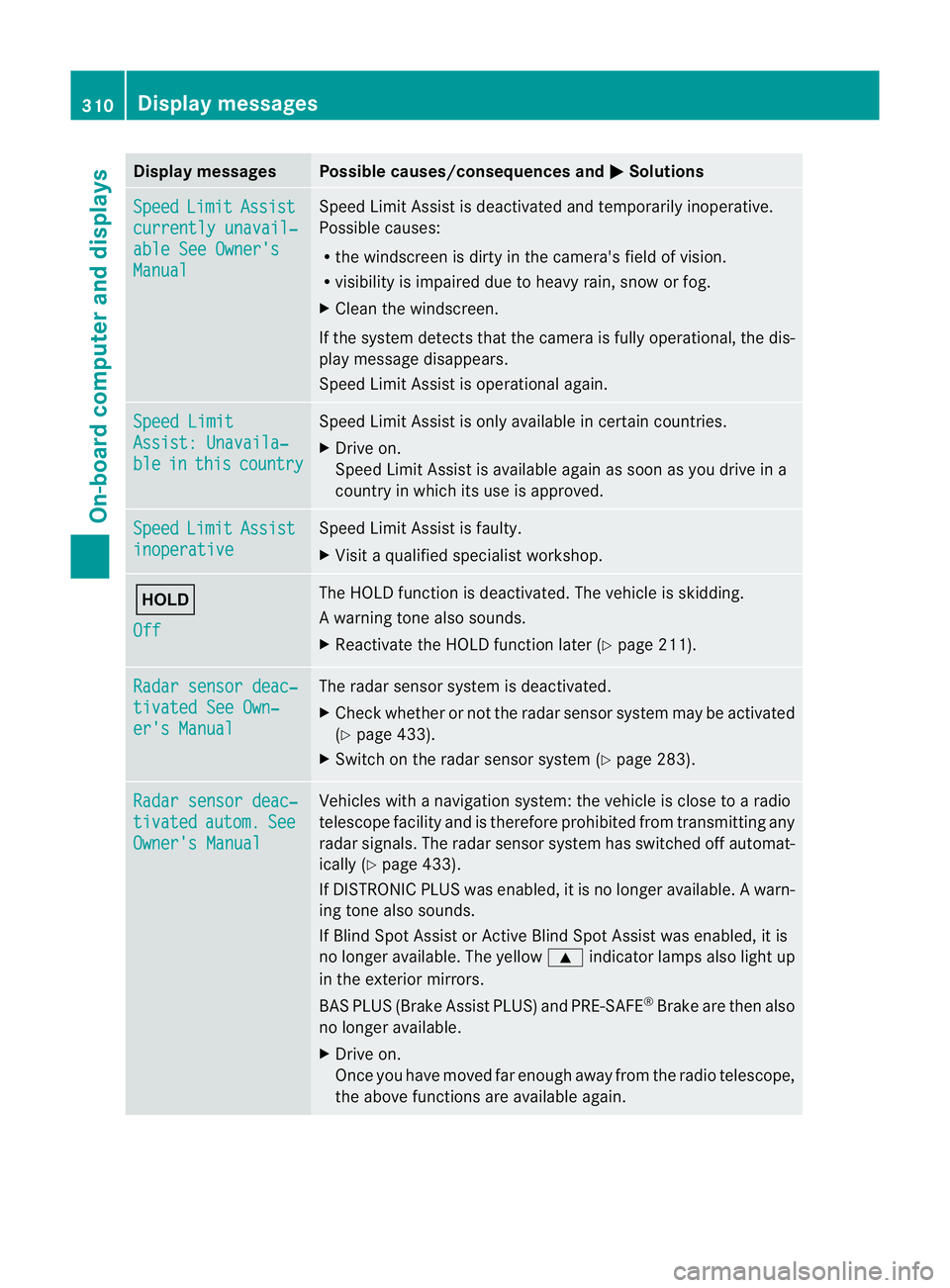
Sp
eed Limit Assist
currently unavail‐
abl
eS ee Owner's Manual Spee
dLimit Assist is deactivated an dtemporarily inoperative.
Possible causes:
R the windscreen is dirt yinthe camera's field of vision.
R visibility is impaired due to heav yrain, snow or fog.
X Clea nthe windscreen.
If the system detec tsthat the camera is fully operational, the dis-
play message disappears.
Speed Limit Assist is operational again. Speed Limit
Assist
:Unavaila‐ ble in this country Spee
dLimit Assist is only available in certain countries.
X Driv eon.
Spee dLimit Assist is available again as soon as you drive in a
countr yinwhich its use is approved. Speed Limit Assist
inoperative Speed Limi
tAssist is faulty.
X Visit aqualified specialist workshop. ë
Off The HOLD function is deactivated. The vehicle is skidding.
Aw
arning ton ealso sounds.
X Reactivat ethe HOL Dfunction later (Y page 211). Ra
dars ensor deac‐ tivate
dSee Own‐ er'
sM anual Th
er adar sensor system is deactivated.
X Check whether or not the radar sensor system ma ybeactivated
(Y pag e433).
X Switch on the rada rsensor system (Y page 283). Rada
rsensor deac‐ tivated autom. See
Owner's Manual Vehicles with
anavigation system: the vehicle is close to aradio
telescop efacility and is therefore prohibite dfrom transmitting any
radar signals .The radar sensor system has switched off automat-
ically (Y page 433).
If DI STRONIC PLUS was enabled, it is no longe ravail able. Aw arn-
ing ton ealso sounds.
If Blin dSpotA ssist or Ac tiveBlind Spo tAssist was enabled, it is
no longe ravailable .The yellow 9indicator lamps also light up
in the exterior mirrors.
BA SP LUS (Brake Assist PLUS) and PRE-SAFE ®
Brak eare then also
no longe ravailable.
X Drive on.
Once yo uhave moved far enough awa yfrom th eradio telescope,
the above function sare avai lable again. 310
Display messagesOn-board computer and displays
Page 314 of 441
Displa
ymessages Possible causes/consequences and
M Solutions
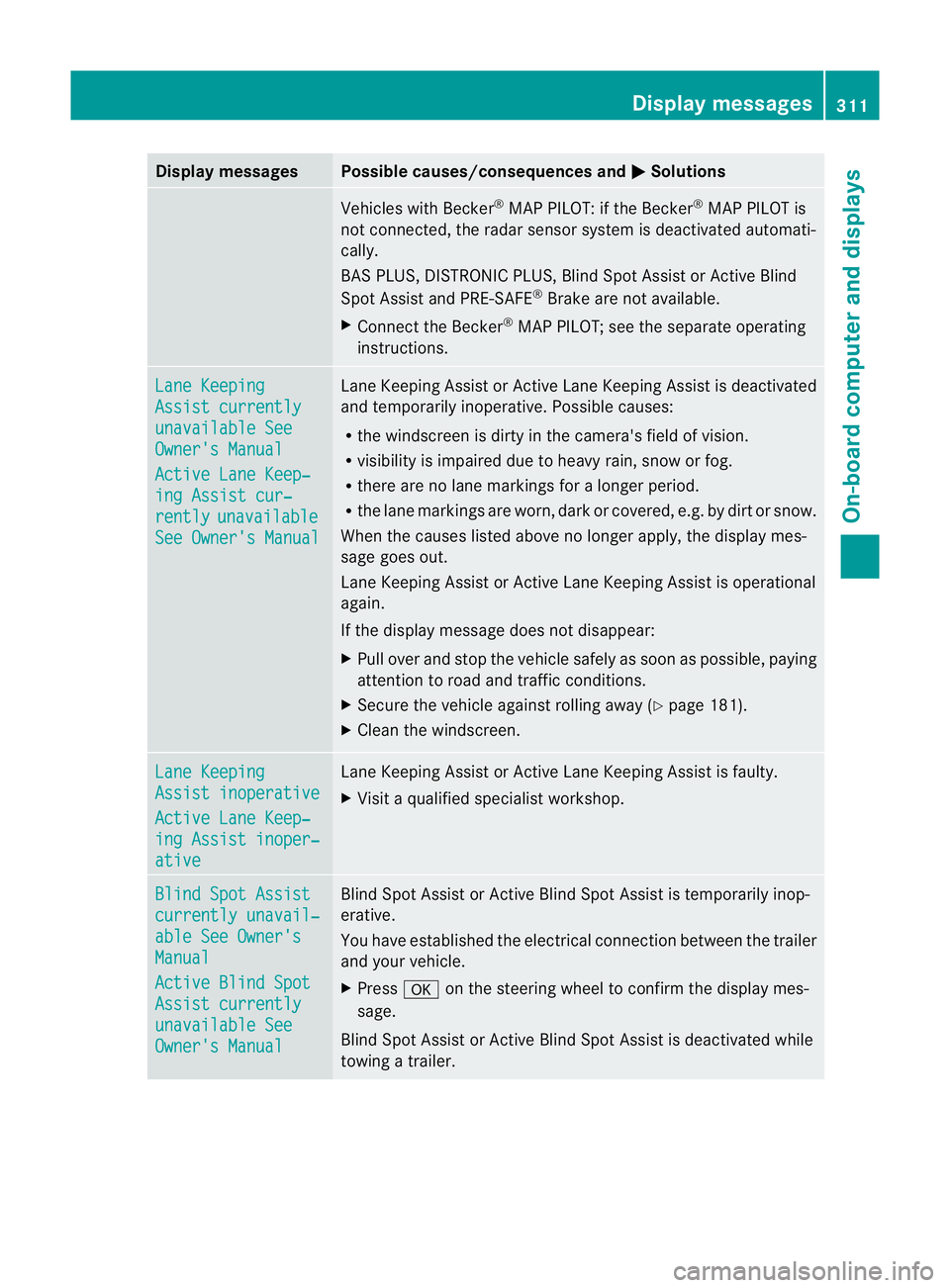
Vehicles wit
hBecker ®
MA PPILOT :ifthe Becker ®
MA PPILOT is
not connected, the radar sensor syste misdeactivated automati-
cally.
BAS PLUS, DI STRONIC PLUS, Blind Spot Assis torActive Blind
Spo tAssist and PRE-SAFE ®
Brake ar enot available.
X Connect the Bec ker®
MAP PILOT; see the separate operating
inst ructions. Lane Keeping
Assist currently
unavailable See
Owner's Manual
Active Lane Keep‐
ing Assist cur‐
rently unavailable
See Owner's Manual Lane Keeping Assist or Active Lane Keeping Assist is deactivated
and temporarily inoperative. Possibl
ecauses:
R the windscreen is dirty in the camera' sfield of vision.
R visibility is impaired due to heavy rain, snow or fog.
R there are no lane markings for alonger period.
R the lane markings ar eworn ,dark or covered, e.g. by dirt or snow.
When the causes listed above no longer apply ,the displa ymes-
sage goes out.
Lan eKeeping Assist or Active Lan eKeeping Assist is operational
again.
If the display message does not disappear:
X Pull over and stop the vehicle safely as soon as possible, paying
attention to road and traffic conditions.
X Secure the vehicle against rollin gaway (Y page 181).
X Clean the windscreen. Lane Keeping
Assist inoperative
Active Lane Keep‐
in
gA ssist inoper‐ ative Lan
eKeeping Assist or Active Lan eKeeping Assist is faulty.
X Visit aqualified specialist workshop. Blin
dSpot Assist currently unavail‐
able See Owner's
Manual
Active Blind Spot
Assist currently
unavailable See
Owner's Manual Blind Spot Assist or Active Blind Spot Assist is temporarily inop-
erative.
Yo uh ave established the electrical connection between the trailer
and your vehicle.
X Press aon the steering wheel to confirm the display mes-
sage.
Blind Spot Assis torActive Blind Spo tAssist is deactivate dwhile
towing atrailer. Display messages
311On-boardcompu tera nd displays Z
Page 315 of 441
Displa
ymessages Possible causes/consequences and
M Solutions
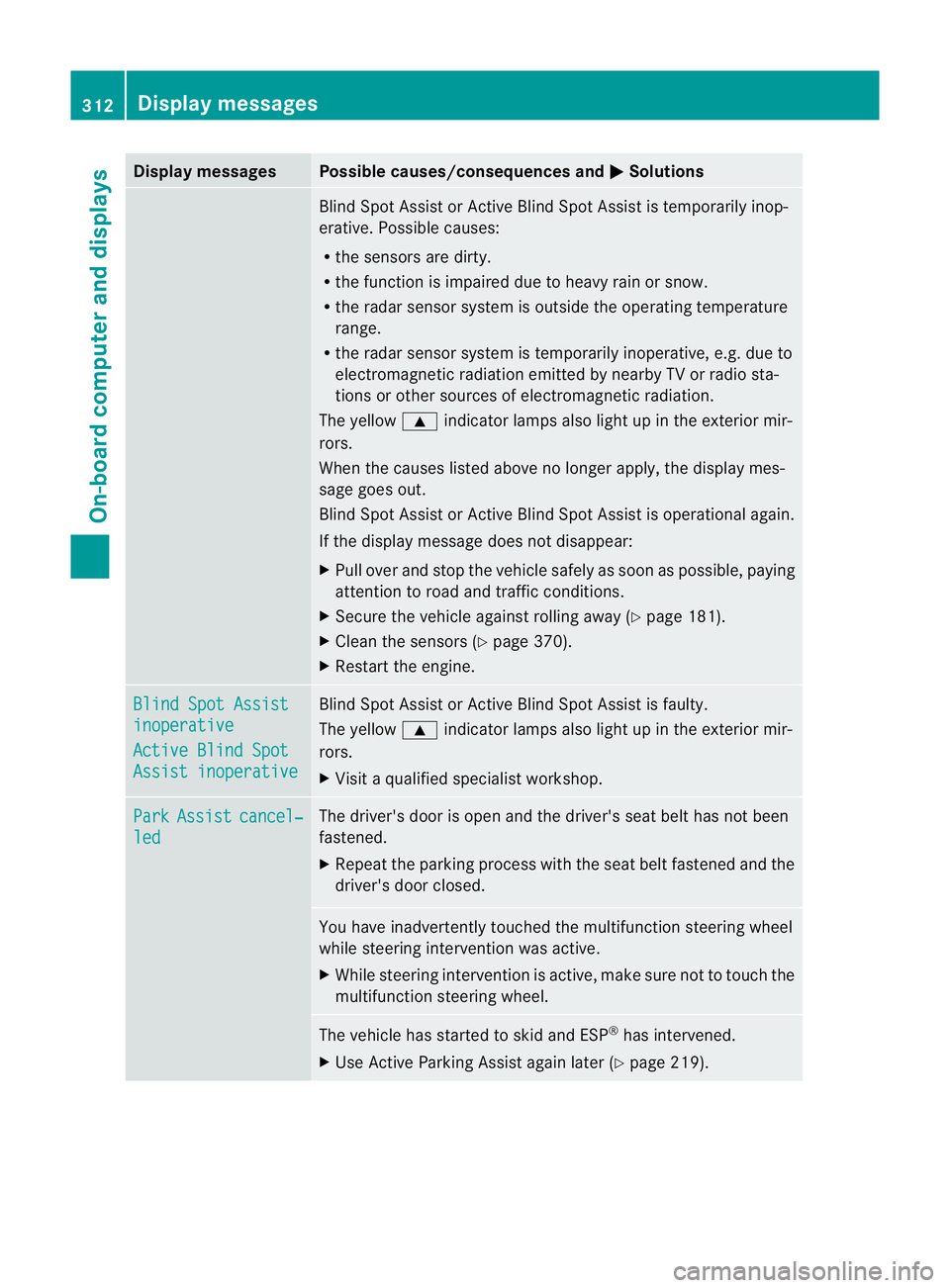
Blind Spot Assis
torActive Blind Spo tAssist is temporarily inop-
erative. Possible causes:
R the sensors are dirty.
R the function is impaired due to heavy rain or snow.
R the radar senso rsystem is outside the operating temperature
range.
R the radar sensor syste mistemporarily inoperative, e.g. due to
electromagneti cradiation emitted by nearby TV or radio sta-
tions or other sources of electromagnetic radiation.
The yellow 9indicator lamps also light up in the exterior mir-
rors.
When the causes listed above no longer apply ,the displa ymes-
sage goes out.
Blin dSpot Assist or Active Blin dSpot Assist is operational again.
If the display message does not disappear:
X Pull over and stop the vehicle safely as soon as possible, paying
attention to road and traffic conditions.
X Secure the vehicle against rollin gaway (Y page 181).
X Clean the sensors (Y page 370).
X Restart the engine. Blin
dSpot Assist inoperative
Active Blind Spot
Assist inoperative Blind Spot Assist or Active Blind Spot Assist is faulty.
Th
ey ellow 9indicator lamps also light up in the exterior mir-
rors.
X Visit aqualified specialist workshop. Park Assist cancel‐
led The driver'
sdoor is open and the driver's seat belt has not been
fastened.
X Repeat the parkin gprocess wit hthe seat belt fastened and the
driver's door closed. You hav
einadvertently touched the multifunction steerin gwheel
while steerin gintervention was active.
X While steerin gintervention is active, make sure not to touch the
multifunction steerin gwheel. The vehicle has star
tedtos kid and ESP ®
has intervened.
X Use Active Parking Assist again later (Y page 219).312
Display messagesOn-board computer and displays
Page 316 of 441
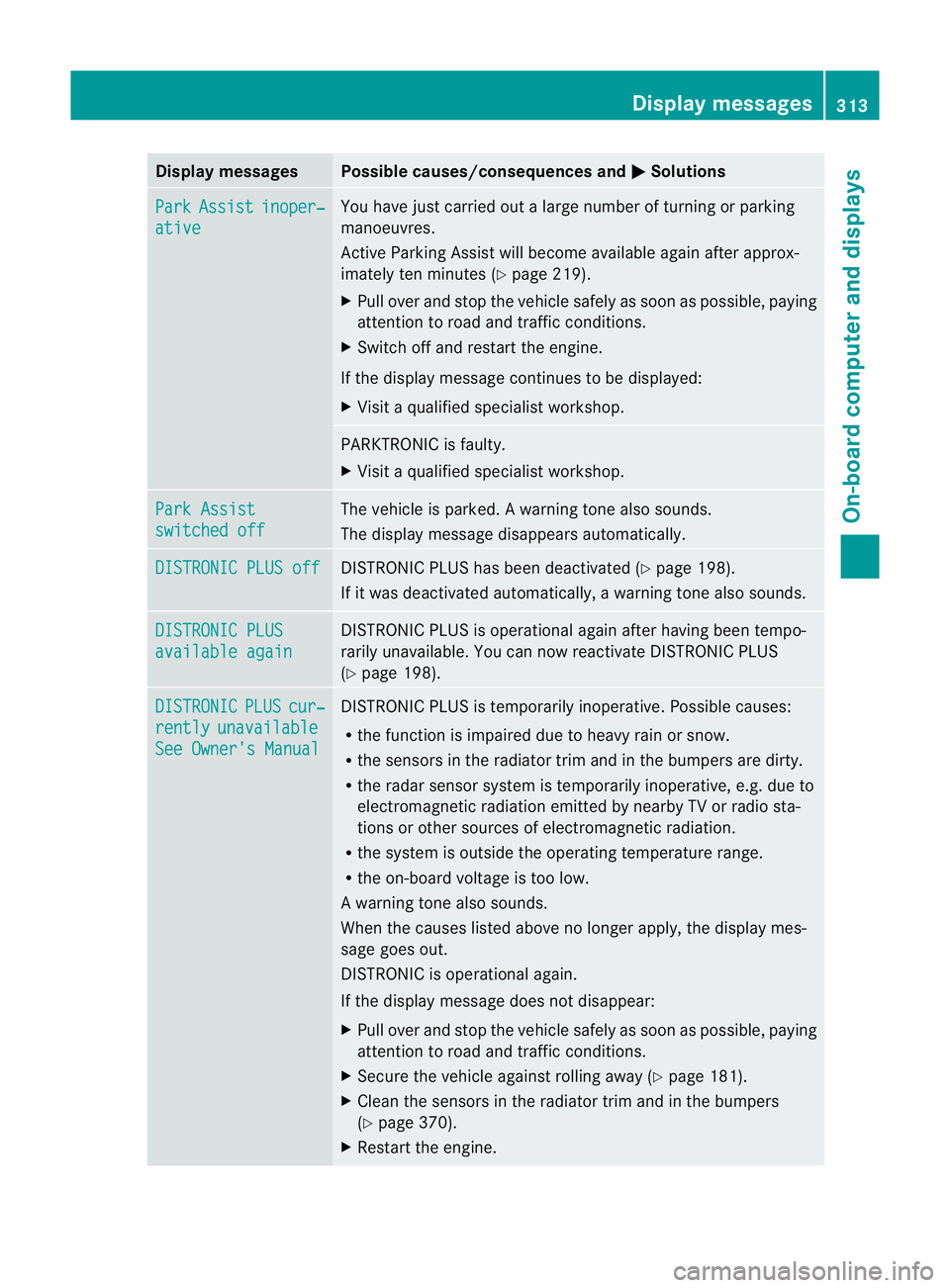
Displa
ymessages Possible causes/consequences and
M Solutions
Pa
rk Assist inoper‐
ative Yo
uh avej ustc arrie doutalarg enumber of turning or parking
manoeuvres.
Active Parking Assist will become available again after approx-
imately ten minutes (Y page 219).
X Pull over and stop the vehicle safel yassoon as possible ,paying
attention to road and traffic conditions.
X Switch off and restart the engine.
If the display message continues to be displayed:
X Visit aqualified specialist workshop. PARKTRONI
Cisfaulty.
X Visit aqualified specialist workshop. Park Assist
switched off The vehicle is parked.
Awarning ton ealso sounds.
The display message disappear sautomatically. DI
STRONIC PLU Soff DISTRONIC PLUS ha
sbeen deactivate d(Ypage 198).
If it was deactivate dautomatically, awarning ton ealso sounds. DI
STRONIC PLUS available again DISTRONIC PLUS is operational agai
nafter having been tempo-
rarily unavailabl e. Youcan now reactivat eDISTRONIC PLUS
(Y page 198). DISTRONIC PLUS cur‐
rently unavailable
See Owner's Manual DISTRONIC PLUS is temporarily inoperative. Possible causes:
R thef unction is impaired due to heavy rain or snow.
R the sensors in the radiator trim and in the bumpers are dirty.
R the radar senso rsystem is temporarily inoperative, e.g. due to
electromagnetic radiation emitted by nearby TV or radio sta-
tions or othe rsources of electromagnetic radiation.
R the system is outside the operatin gtemperature range.
R the on-boar dvoltage is too low.
Aw arning ton ealso sounds.
When th ecauses listed above no longer apply, the display mes-
sage goes out.
DISTRONI Cisoperational again.
If th edisplay message does no tdisappear:
X Pull over and stop the vehicle safely as soon as possible, paying
attention to road and traffic conditions.
X Secure the vehicle against rollin gaway (Y page 181).
X Clean the sensors in the radiator trim and in the bumpers
(Y page 370).
X Restar tthe engine. Displa
ymessages
313On-board compu tera nd displays Z
Page 319 of 441
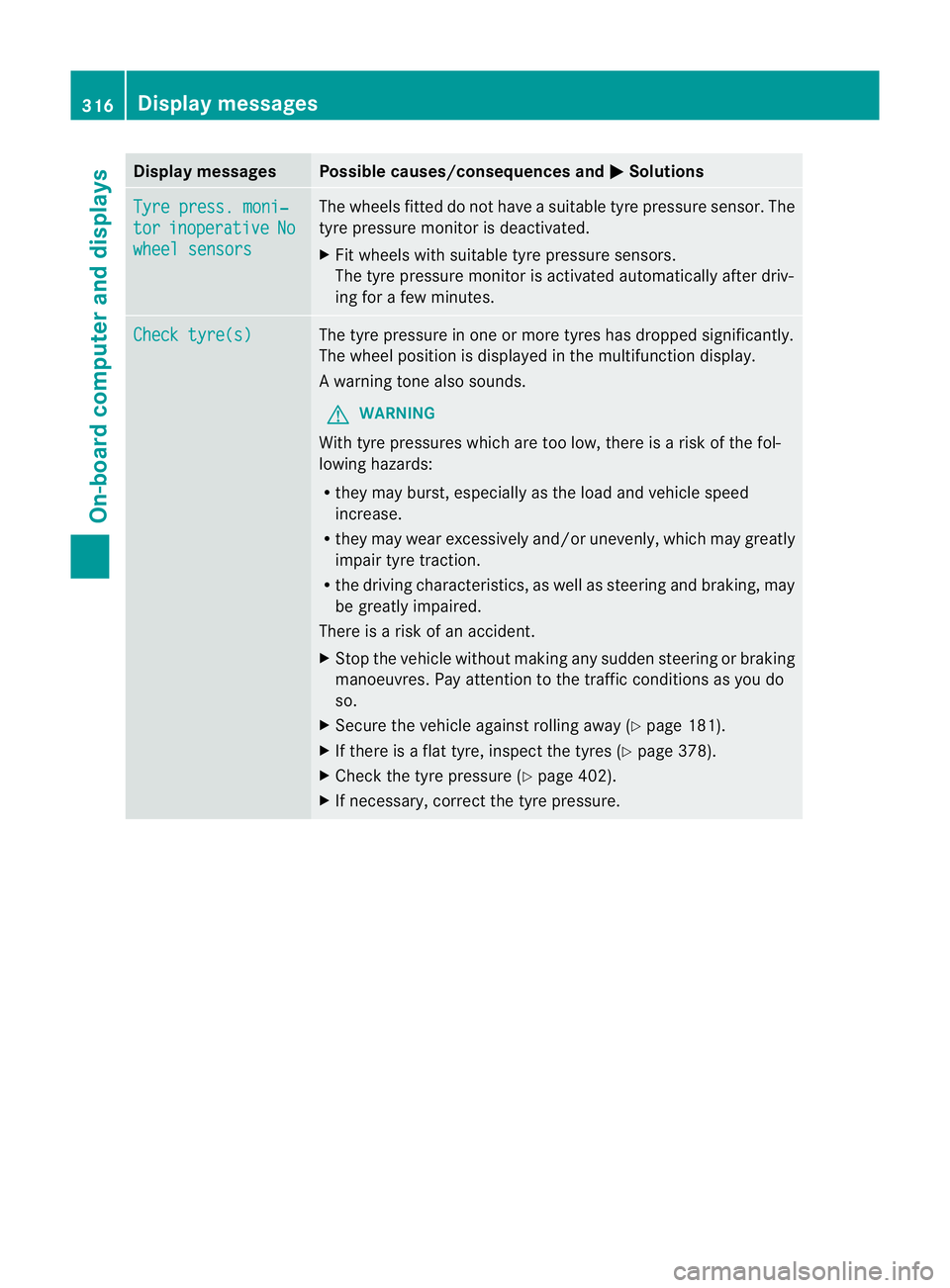
Displa
ymessages Possible causes/consequences and
M Solutions
Ty
re press. moni‐ tor inoperative No
wheel sensors Th
ew heels fitte ddonot have asuitable tyr epressure se nsor.T he
tyr ep ressure monito risd eactivated.
X Fit wheels with suitable tyr epressure sensors.
Th et yre pressure monitor is activated automatically after driv-
ing for afew minutes. Chec
ktyre(s) Th
et yre pressure in one or more tyres has droppe dsignificantly.
The wheel position is displayed in the multifunction display.
Aw arning ton ealso sounds.
G WARNING
Wit htyrep ressures which are too low, there is arisk of the fol-
lowing hazards:
R they ma yburst, especiall yasthe load and vehicle speed
increase.
R they ma ywear excessively and/or unevenly, which may greatly
impair tyr etraction.
R thed riving characteristics, as well as steering and braking, may
be greatl yimpaired.
There is arisk of an accident.
X Stop the vehicle without makin gany sudden steering or braking
manoeuvres .Pay attention to the traffic conditions as you do
so.
X Secure the vehicle against rolling away (Y page 181).
X If there is aflat tyre, inspect the tyres (Y page 378).
X Check the tyre pressure (Y page 402).
X If necessary, correct the tyre pressure. 316
Display messagesOn-board computer and displays
Page 320 of 441
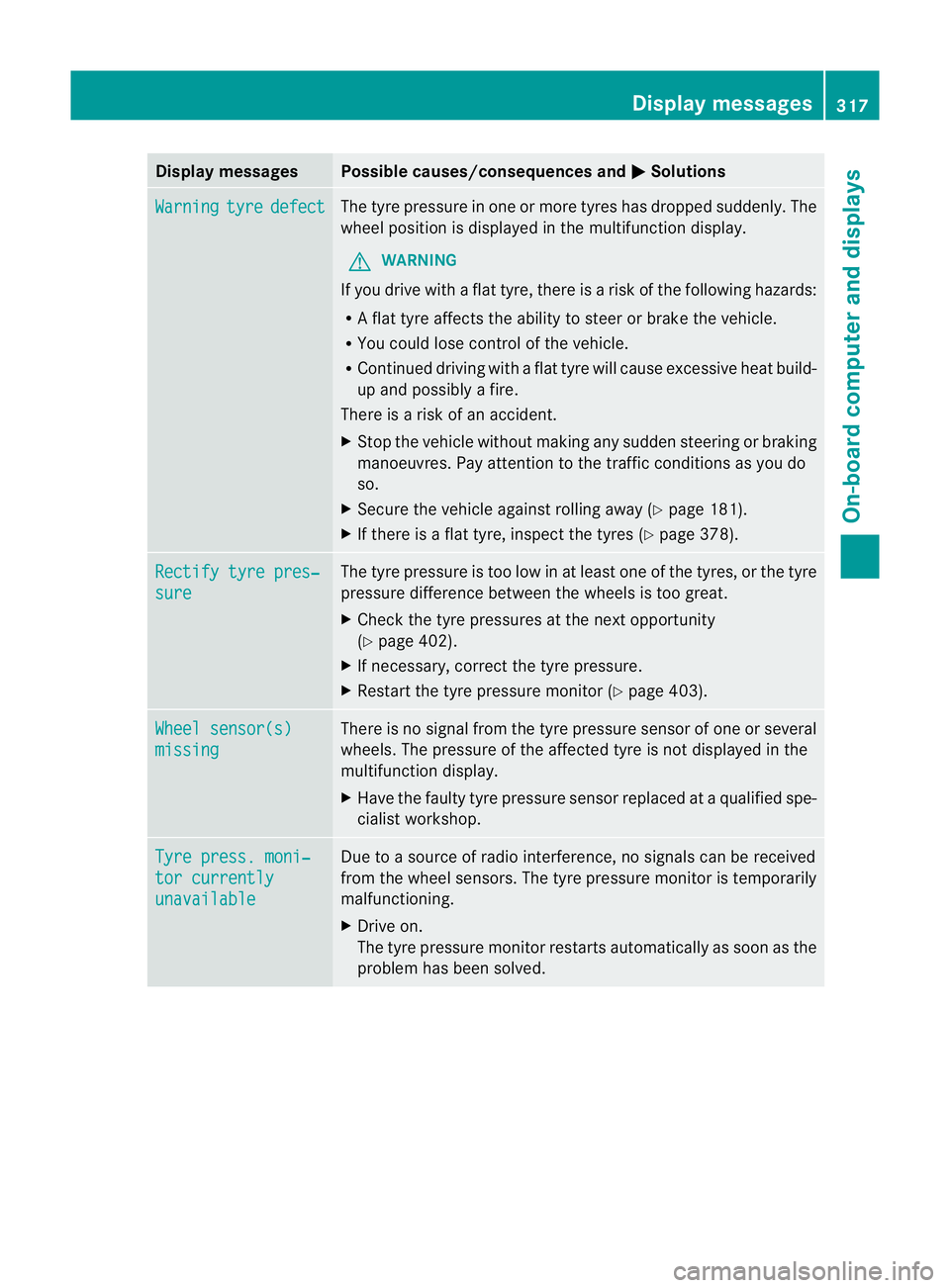
Displa
ymessages Possible causes/consequences and
M Solutions
Wa
rning tyre defect Th
et yrep ressur eino neormore tyre shas dropped suddenly. The
wheel position is displayed in the multifunc tion display.
G WARNING
If you drive with aflat tyre, there is arisk of the following hazards:
R Af lat tyre affect sthe ability to steer or brake the vehicle.
R You could lose con trol of the vehicle.
R Continue ddriving wit haflat tyre will cause excessive heat build-
up and possibly afire.
There is arisk of an accident.
X Stop the vehicle without makin gany sudden steerin gorbraking
manoeuvres .Pay attention to the traffic conditions as you do
so.
X Secure the vehicle against rolling away (Y page 181).
X If there is aflat tyre, inspect the tyres (Y page 378).Rectif
ytyre pres‐ sure Th
et yre pressure is too low in at leas tone of the tyres, or the tyre
pressure difference between the wheels is too great.
X Check the tyre pressures at the next opportunity
(Y pag e402).
X If necessary, corre ctthe tyre pressure.
X Restart the tyre pressure monitor (Y page 403).Wheel sensor(s)
missing There is no signal from the tyre pressure sensor of one or several
wheels. The pressure of the affected tyre is not displayed in the
multifunction display.
X
Have the faulty tyre pressure sensor replaced at aqualified spe-
cialist workshop. Tyre press. moni‐
to
rc urrently unavailable Due to
asource of radio interference, no signal scan be received
from the wheel sensors. The tyre pressure monitor is temporarily
malfunc tioning.
X Drive on.
The tyr epressure monitor restarts automaticall yassoon as the
problem has been solved. Displa
ymessages
317On-board compu tera nd displays Z
Page 373 of 441
X
Clean the plastic lenses of the exterior
lighting using awet sponge and amild
cleanin gagent, e.g. Mercedes-Ben zcar
shampoo or cleanin gcloths.
Mirror turn signal !
Only use cleanin gagents or cleaning
cloth sthat ar esuitable for plastic lenses.
Unsuitable cleanin gagents or cleaning
cloth scoul dscratch or damag ethe plastic
lenses of th emirror tur nsignals.
X Clean the plastic lenses of the mir rort urn
signals in the exterior mirror housin gusing
aw et sponge and mild cleaning agent ,e.g.
Mercedes -Ben zc ar shampoo or cleaning
cloths.
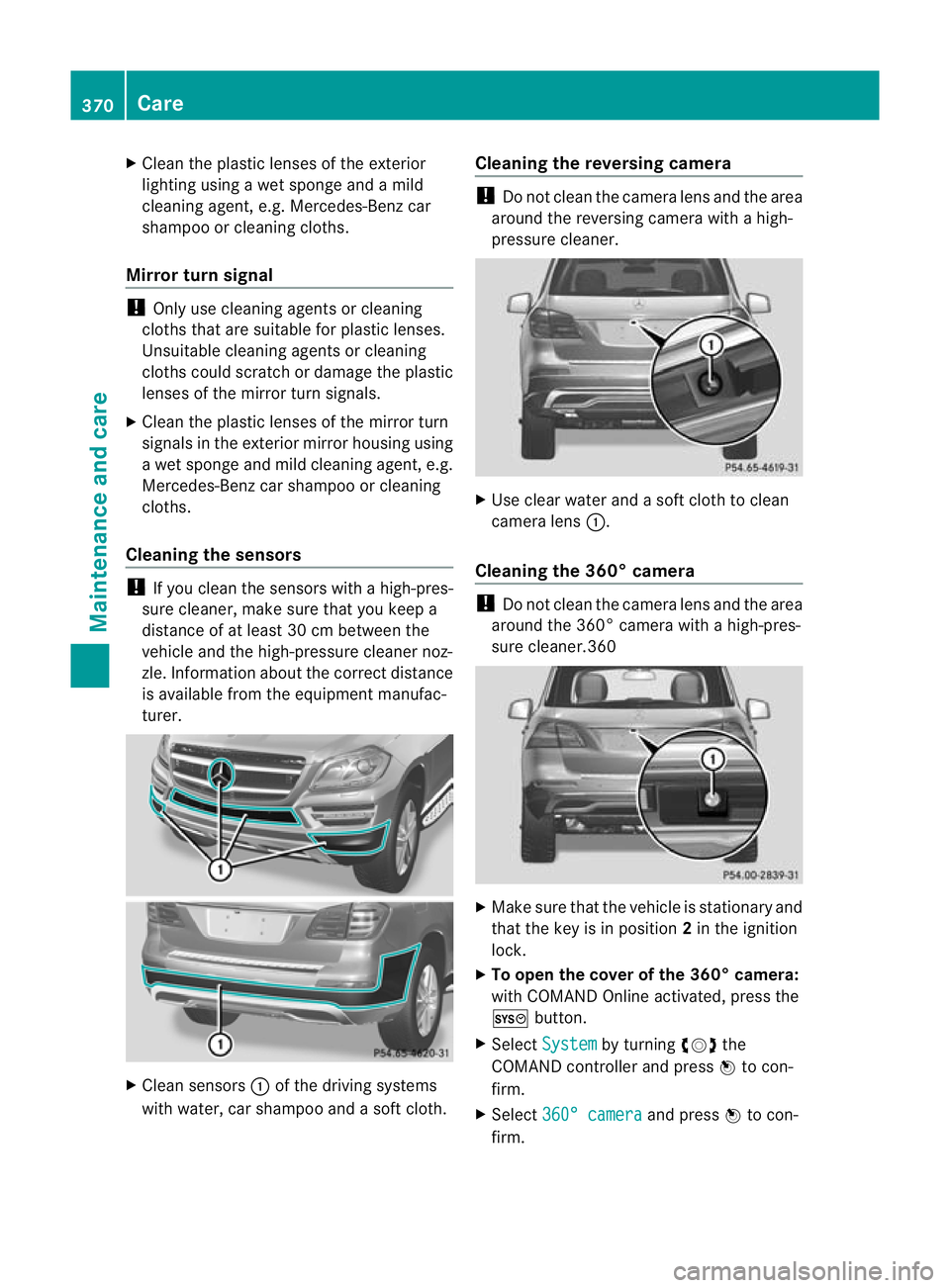
Cleaning th esensors !
If you clean th esensor swithah igh-pres-
sure cleaner, mak esure that you keep a
distanc eofatl east 30 cm between the
vehicle and th ehigh-pressure cleane rnoz-
zle. Information about the correc tdistance
is available from the equipment manufac-
turer. X
Clean sensors :of the drivin gsystems
with water, car shampo oand asoft cloth. Cleaning th
ereversing camera !
Do not clean the camer alens and the area
around the reversin gcamera with ahigh-
pressure cleaner. X
Use clear water and asoft clot htoclean
camera lens :.
Cleaning the 360° camera !
Do not clean the camera lens and the area
around the 360 °camera with ahigh-pres-
sure cleaner.360 X
Make sure that the vehicle is stationary and
that the key is in position 2in the ignition
lock.
X To open the cover of the 360° camer a:
with COMAND Online activated, press the
W button.
X Select System by turning
cVdthe
COMAND controller and press Wto con-
firm.
X Select 360° camera and press
Wto con-
firm. 370
CareMaintenanc
eand care
Page 405 of 441
After
ateach-in period ,the tyr epressure
loss warning system wil lmonitor the set
tyr ep ressures of all fou rtyres.
If you wish to cancel the restart:
X Press the %button.
or
X If the Tyrepress. now OK? message
appears ,use the 9or: button to
select Cancel .
X Press the abutton.
The tyr epressure values stored at th elast
restar twill continue to be monitored. Tyr
epressur emonitor
Important safet ynotes It is the driver's responsibility to set the tyre
pressure to the recommended cold tyre pres-
sure suitable for the operatin
gsituation
(Y page 399). Note that the correct tyre pres-
sure for the curren toperatin gsituation must
first be taught-in to the tyre pressure monitor.
If ther eisas ubstantial loss of pressure, the
warning threshold for the warning messag eis
aligned to the referenc evalues taught-in.
Restart the tyre pressure monitor after
adjustin gtothe cold tyr epressure
(Y page 403). Th ecurren tpressures are
saved as new referenc evalues. This will
ensure that awarning mess agewillonly
appear if the tyre pressure drops significantly.
The tyre pressure monitor doe snot warn you
of an incorrectly set tyr epressure. Observe
th en otes on the recommended tyr epressure
(Y page 399).
Th et yre press urem onitor is not able to warn
you of asudden loss of pressure, e.g. if the
tyre is penetrated by aforeign object. In the
even tofas udden loss of pressure, bring the
vehicl etoah altbyb raking carefully. Avoid
abrupt stee ringmanoeuvres.
If at yrep ressur emonitor system is fitted, the
vehicle's wheels hav esensor sfitte dthat
mo nito rthe tyre pressures in all four tyres. The tyr
epressur emonitor war nsyou if the
pressur edrops in one or more of the tyres.
Th et yrep ressur emonitor only fu nctionsif
the cor respondin gsensor sare fitte dtoall
wheels.
Information on tyr epressures is displayed in
the multifunctio ndisplay .After afew minutes
of driv ing, the curren ttyre pressure of each
tyre is sho wn inthe multifunction display.
Th et yre pressure values indicated by the on-
board computer may differ from thos emeas-
ured at afilling station using apressure
gauge. Th etyre pressures shown by the on-
board computer refer to thos emeasured at
sea level. At high altitudes, the tyr epressure
values indicated by apressure gaug eare
higher than thos eshown by the on-board
computer. In this case ,donot reduce the tyre
pressures.
The operation of the tyr epressure monitor
can be affecte dbyinterference from radio
transmitting equipment (e.g .radio head-
phones ,two-way radios) that may be being
operated in or near the vehicle.
Checking tyr epressure electronically X
Make sure that the key is in posi-
tion 2(Ypage 159) in the ignitio nlock.
X Press the =or; button on the steer-
ing wheel to select the Serv. menu.
X Press the 9or: button to select
Tyre pressure .
X Press the abutton.
The curren ttyre pressure for each wheel
will be displayed in the multifunction dis-
play.
If the vehicle has been parked for longe rthan
20 minutes ,the Tyre pressures will be
displaye
dafter afew minutes of driving message appe
ars.
After ateach-in period, the tyr epressure
monito rautomatically recognises new
wheel sornew sensors. As long as aclear
allocation of the tyre pressure values to the
individual wheels is not possible ,the Tyre 402
Ty
re pressureWheel sand ty res
Page 412 of 441
Lowering th
evehicle G
WARNING
The wheels could work loose if th ewheel nuts
and bolt sare not tightened to the specified
tightening torque. There is arisk of accident.
Have the tightening torque immediately
checked at aqualified specialist workshop
after awheel is changed. X
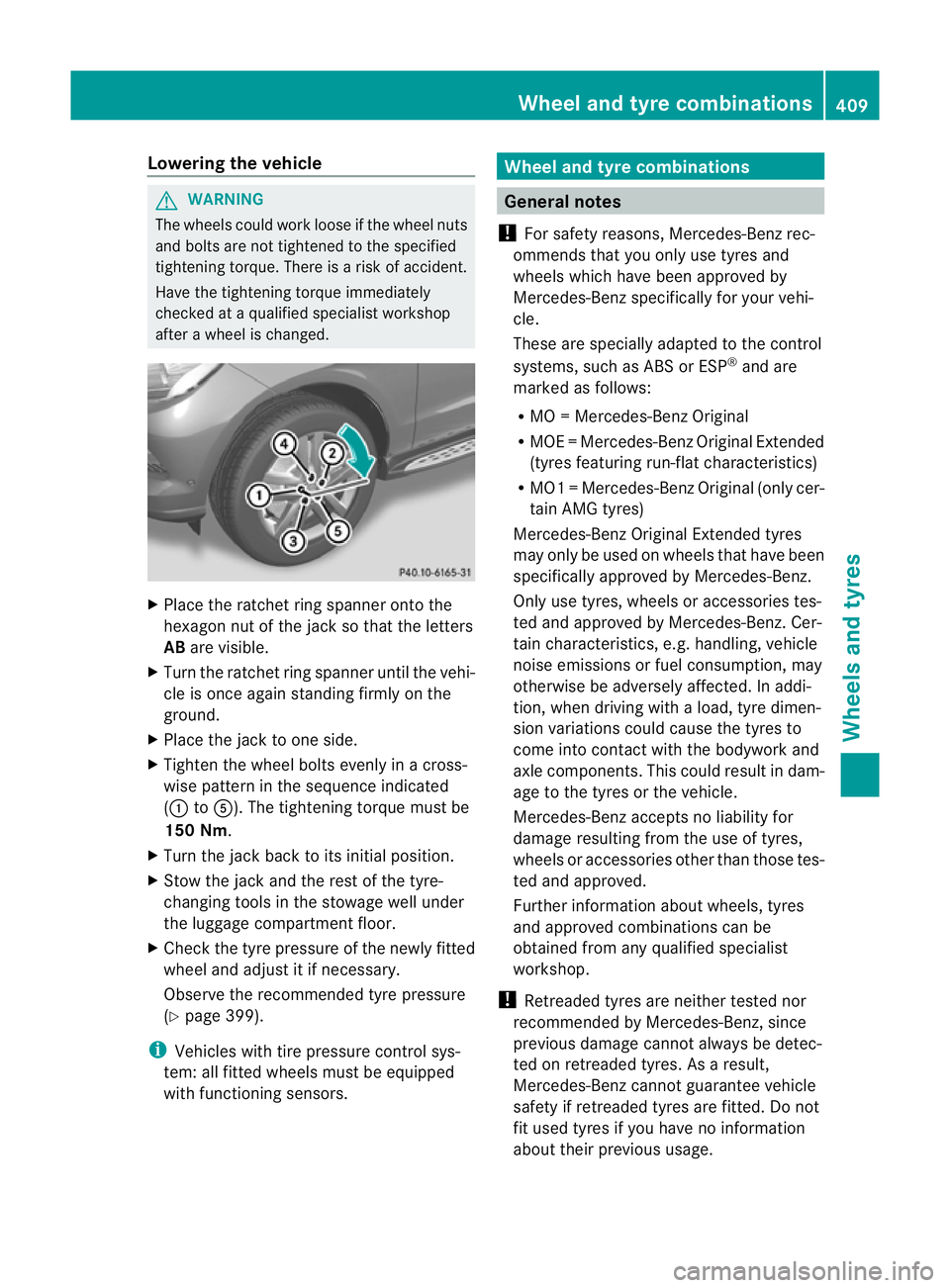
Plac ethe ratchet ring spanner ont othe
hexagon nut of the jac ksothat the letters
AB arev isible.
X Turn the ratchet ring spanner until the vehi-
cle is once again standing firmly on the
ground.
X Place the jack to one side.
X Tighten the wheel bolts evenly in across-
wis epattern in the sequence indicated
(: toA). The tightening torque must be
150 Nm.
X Turn the jack back to its initial position.
X Stow the jack and the rest of the tyre-
changing tools in the stowage well under
the luggag ecompart ment floor.
X Check the tyre pressure of the newly fitted
wheel and adjus titifnecessary.
Observ ethe recommended tyr epressure
(Y page 399).
i Vehicles wit htire pressure control sys-
tem: all fitted wheels must be equipped
with func tionin gsensors. Wheel and ty
recombinations General notes
! For safety reasons, Mercedes-Benz rec-
ommends that you only use tyres and
wheels which have been approved by
Mercedes-Benz specifically for your vehi-
cle.
Thes eare speciall yadapted to the control
systems, such as ABS or ESP ®
and are
marked as follows:
R MO =Mercedes-Ben zOriginal
R MOE =Mercedes-Ben zOriginal Extended
(tyres featuring run-flat characteristics)
R MO1 =Mercedes-Ben zOriginal (only cer-
tain AMG tyres)
Mercedes-Benz Original Extended tyres
may only be use donwheels that hav ebeen
specifically approved by Mercedes-Benz.
Only use tyres, wheels or accessories tes-
ted and approved by Mercedes-Benz. Cer-
tain characteristics, e.g. handling, vehic le
nois eemis sions or fuel consumption, may
otherwise be adv ersely affected. In addi-
tion, when driving with aload, tyr edimen-
sion variations could cause the tyres to
come into contact with the bodywork and
axle components .This could result in dam-
age to the tyres or the vehicle.
Mercedes-Ben zaccept snoliability for
damag eresulting from the use of tyr es,
wheel soraccess orieso the rthan those tes-
ted and approved.
Further information about wheels, tyres
and approved combination scan be
obtained from any qualified specialist
workshop.
! Retreaded tyres are neither tested nor
recommended by Mercedes-Benz, since
previous damage cannot always be detec-
ted on retreaded tyres. As aresult,
Mercedes-Ben zcannot guarantee vehicle
safet yifretreade dtyres are fitted. Do not
fit used tyres if you have no information
about their previous usage. Wheel and tyre combinations
409Wheelsand tyres Z