service MERCEDES-BENZ GLA 2019 User Guide
[x] Cancel search | Manufacturer: MERCEDES-BENZ, Model Year: 2019, Model line: GLA, Model: MERCEDES-BENZ GLA 2019Pages: 346, PDF Size: 16.66 MB
Page 30 of 346
Information about the REACH decree
The REACH regulation (Regulation (EC) no.1907/2006, Article 33) lays down an informa-tion obligation for substances of very high con-cern (SVHC).
Daimler AG acts in good faith to avoid usingthese SVHCs and to allow the customer tohandle these substances safely. In accordancewith supplier information and internal productinformation from Daimler AG, SVHCs thataccount for more than 0.1 percent by weightof individual products in this vehicle areknown.
More detailed information can be found at thefollowing addresses:
Rhttp://www.daimler.com/reach(Germanversion)
Rhttp://www.daimler.com/reach/en(English version)
Problems with your vehicle
If you should experience a problem with yourvehicle, particularly one that you believe mayaffect its safe operation, we urge you to con-tact an authorized Mercedes-Benz Centerimmediately to have the problem diagnosedand rectified. If the problem is not resolved toyour satisfaction, please discuss the problemagain with an authorized Mercedes-Benz Cen-ter or, if necessary, contact us at one of thefollowing addresses.
In the USA
Mercedes-Benz USA, LLC
Customer Assistance Center
One Mercedes-Benz Drive
Sandy Springs, GA 30328
In Canada
Mercedes-Benz Canada, Inc.
Customer Relations Department
98 Vanderhoof Avenue
Toronto, Ontario M4G 4C9
Limited Warranty
!Observe the notes in this Operator's Man-ual regarding the correct operation of yourvehicle and possible damage to the vehicle.Damage to the vehicle which is caused by
violation of these notes is not covered bythe Mercedes-Benz implied warranty or thenew or used-vehicle warranty.
QR code for rescue card
The QR codes are secured in the fuel filler flapand on the opposite side on the B-pillar. In theevent of an accident, rescue services can usethe QR code to quickly find the appropriaterescue card for your vehicle. The current res-cue card contains the most important informa-tion about your vehicle in a compact form, e.g.the routing of the electric cables.
You can find more information underwww.mercedes-benz.de/qr-code.
Data storage
Data storage
A wide range of electronic components in yourvehicle contain data memories.
These data memories temporarily or perma-nently store technical information about:
Rthe vehicle's operating state
Rincidents
Rmalfunctions
In general, this technical information docu-ments the state of a component, a module, asystem or the surroundings.
These include, for example:
Roperating conditions of system components.For example, fluid levels
Rthe vehicle's status messages and those ofits individual components, e.g. number ofwheel revolutions/speed, deceleration inmovement, lateral acceleration, acceleratorpedal position
Rmalfunctions and defects in important sys-tem components, e.g. lights, brakes
Rvehicle reactions and operating conditionsin special driving situations, e.g. air bagdeployment, intervention of stability controlsystems
Rambient conditions, e.g. outside tempera-ture
28Data storage
Int roduction
Page 31 of 346
This data is of an exclusively technical natureand can be used to:
Rassist in recognizing and rectifying malfunc-tions and defects
Ranalyze vehicle functions, e.g. after an acci-dent
Roptimize vehicle functions
The data cannot be used to trace the vehicle'smovements.
When your vehicle is serviced, technical infor-mation can be read from the event data mem-ory and malfunction data memory.
Services include, for example:
Rrepair services
Rservice processes
Rwarranties
Rquality assurance
The vehicle is read out by employees of theservice network (including the manufacturer)using special diagnostic testers. More detailedinformation is obtained from it, if required.
After a malfunction has been rectified, theinformation is deleted from the malfunctionmemory or is continually overwritten.
When operating the vehicle, situations areconceivable in which this technical data, inconnection with other information (if neces-sary, under consultation with an authorizedexpert), could be traced to a person.
Examples include:
Raccident reports
Rdamage to the vehicle
Rwitness statements
Further additional functions that have beencontractually agreed upon with the customerallow certain vehicle data to be conveyed bythe vehicle as well. The additional functionsinclude, for example, vehicle location in caseof an emergency.
COMAND/Mercedes me connect
(Canada: TELEAID)
If the vehicle is equipped with COMAND orMercedes me connect, additional data aboutthe vehicle's operation, the use of the vehiclein certain situations, and the location of thevehicle is compiled through COMAND or theMercedes me connect system.
For additional information, please refer to theCOMAND User Manual or Digital Operator'sManual and/or the Mercedes me connectTerms and Conditions.
Event data recorders
USA only:
This vehicle is equipped with an event datarecorder (EDR). This vehicle is equipped withan event data recorder (EDR). The main pur-pose of an EDR is to record, in certain crash ornear crash-like situations, such as an air bagdeployment or hitting a road obstacle, datathat will assist in understanding how a vehi-cle's systems performed. The EDR is designedto record data relating to vehicle dynamicsand safety systems for a short period of time,typically 30 seconds or less.
The EDR in this vehicle is designed to recordsuch data as:
RHow various systems in your vehicle wereoperating
RWhether or not the driver and passengersafety belts were buckled/fastened
RHow far (if at all) the driver was depressingthe accelerator and/or brake pedal; and,
RHow fast the vehicle was traveling
These data can help provide a better under-standing of the circumstances in whichcrashes and injuries occur. NOTE: EDR dataare recorded by your vehicle only if a non-triv-ial crash situation occurs; no data are recor-ded by the EDR under normal driving condi-tions and no personal data (e.g. name, gender,age and crash location) are recorded. How-ever, other parties, such as law enforcementcould combine the EDR data with the type ofpersonally identifying data routinely acquiredduring a crash investigation.
Access to the vehicle and/or the EDR is nee-ded to read data that is recorded by an EDR,and special equipment is required. In additionto the vehicle manufacturer, other parties thathave the special equipment, such as lawenforcement, can read the information byaccessing the vehicle or the EDR.
EDR data may be used in civil and criminalmatters as a tool in accident reconstruction,accident claims and vehicle safety. Since theCrash Data Retrieval CDR tool that is used toextract data from the EDR is commercially
Data storage29
Introduction
Z
Page 70 of 346
the system is not operational. Contact anauthorized Mercedes-Benz Center or call1-800-FOR-MERCedes (in the USA) or1-800-387-0100 (in Canada).
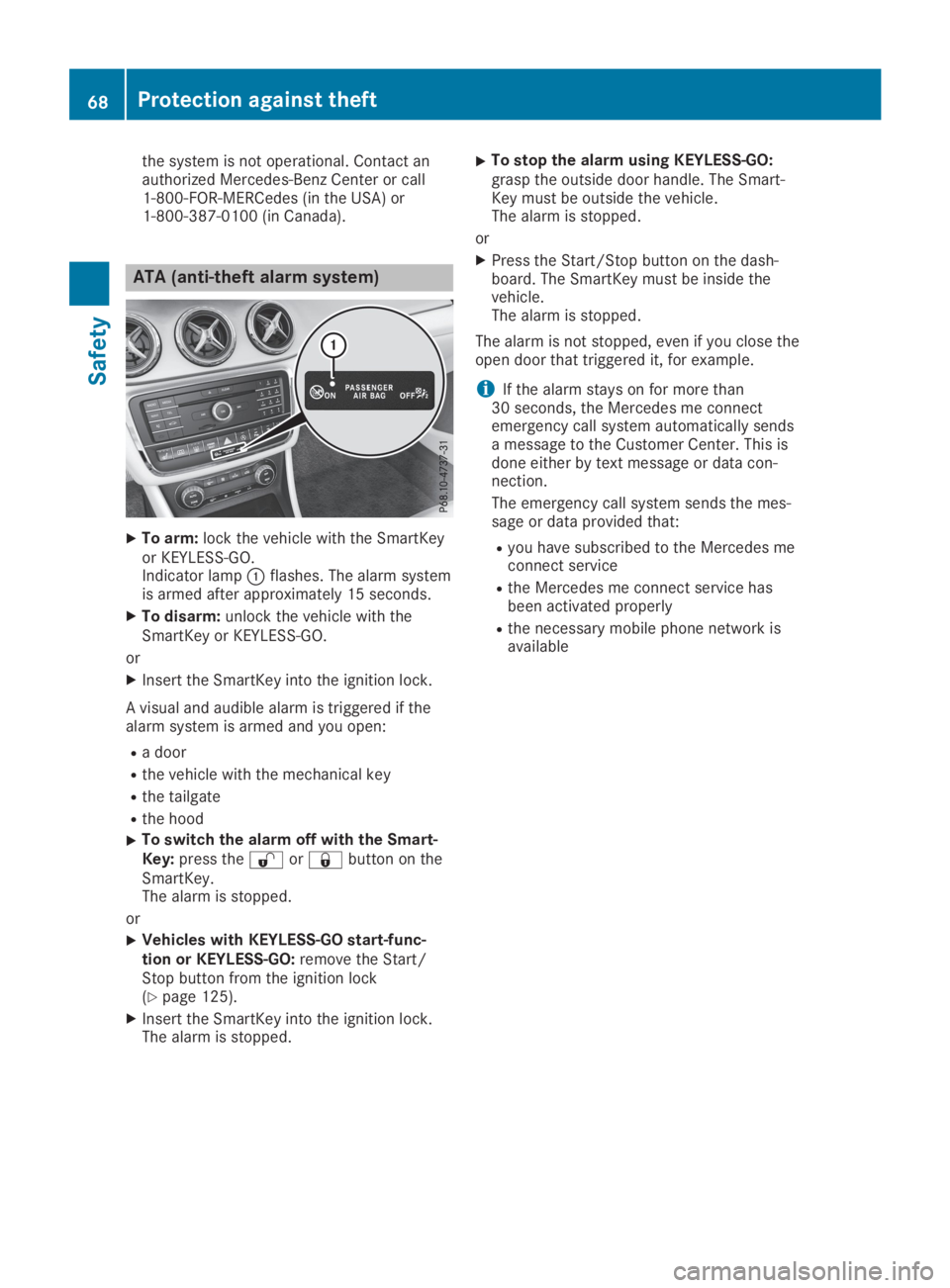
ATA (anti-theft alarm system)
XTo arm:lock the vehicle with the SmartKeyor KEYLESS-GO.Indicator lampCflashes. The alarm systemis armed after approximately 15 seconds.
XTo disarm:unlock the vehicle with theSmartKey or KEYLESS-GO.
or
XInsert the SmartKey into the ignition lock.
A visual and audible alarm is triggered if thealarm system is armed and you open:
Ra door
Rthe vehicle with the mechanical key
Rthe tailgate
Rthe hood
XTo switch the alarm off with the Smart-Key:press the6or7button on theSmartKey.The alarm is stopped.
or
XVehicles with KEYLESS-GO start-func-tion or KEYLESS-GO:remove the Start/Stop button from the ignition lock(Ypage 125).
XInsert the SmartKey into the ignition lock.The alarm is stopped.
XTo stop the alarm using KEYLESS-GO:grasp the outside door handle. The Smart-Key must be outside the vehicle.The alarm is stopped.
or
XPress the Start/Stop button on the dash-board. The SmartKey must be inside thevehicle.The alarm is stopped.
The alarm is not stopped, even if you close theopen door that triggered it, for example.
iIf the alarm stays on for more than30 seconds, the Mercedes me connectemergency call system automatically sendsa message to the Customer Center. This isdone either by text message or data con-nection.
The emergency call system sends the mes-sage or data provided that:
Ryou have subscribed to the Mercedes meconnect service
Rthe Mercedes me connect service hasbeen activated properly
Rthe necessary mobile phone network isavailable
68Protection against theft
Safety
Page 151 of 346
Bear in mind that at a speed of only 30 mph(approximately 50 km/h), the vehicle covers adistance of 44 ft (approximately 14 m) persecond.
Drive sensibly – save fuel
Observe the following tips to save fuel:
RThe tires should always be inflated to therecommended tire pressure.
RRemove unnecessary loads.
RRemove roof racks when they are not nee-ded.
RWarm up the engine at low engine speeds.
RAvoid frequent acceleration or braking.
RHave all maintenance work carried out asindicated by the service intervals in theMaintenance Booklet or by the service inter-val display.
Fuel consumption also increases when drivingin cold weather, in stop-start traffic and in hillyterrain.
Drinking and driving
GWARNING
Drinking and driving and/or taking drugs
and driving are very dangerous combina-
tions. Even a small amount of alcohol or
drugs can affect your reflexes, perceptions
and judgment.
The possibility of a serious or even fatal
accident is greatly increased when you drink
or take drugs and drive.
Do not drink or take drugs and drive or allow
anyone to drive who has been drinking or
taking drugs.
Emission control
GDANGER
Combustion engines emit poisonous
exhaust gases such as carbon monoxide.
Inhaling these exhaust gases is hazardous to
health and can result in poisoning. There is a
risk of fatal injury. Therefore, never leave the
engine running an enclosed space without
adequate ventilation.
Certain engine systems are designed to keepthe level of poisonous components in exhaustfumes within legal limits.
These systems only work at peak efficiency ifthey are serviced exactly in accordance withthe manufacturer's specifications. Always havework on the engine carried out at a qualifiedspecialist workshop. Mercedes-Benz recom-mends that you use an authorized Mercedes-Benz Center for this purpose. In particular,work relevant to safety or on safety-relatedsystems must be carried out at a qualified spe-cialist workshop.
The engine settings must not be changedunder any circumstances. Furthermore, allspecific service work must be carried out atregular intervals and in accordance with theMercedes-Benz service requirements. Detailscan be found in the Maintenance Booklet.
ECO display
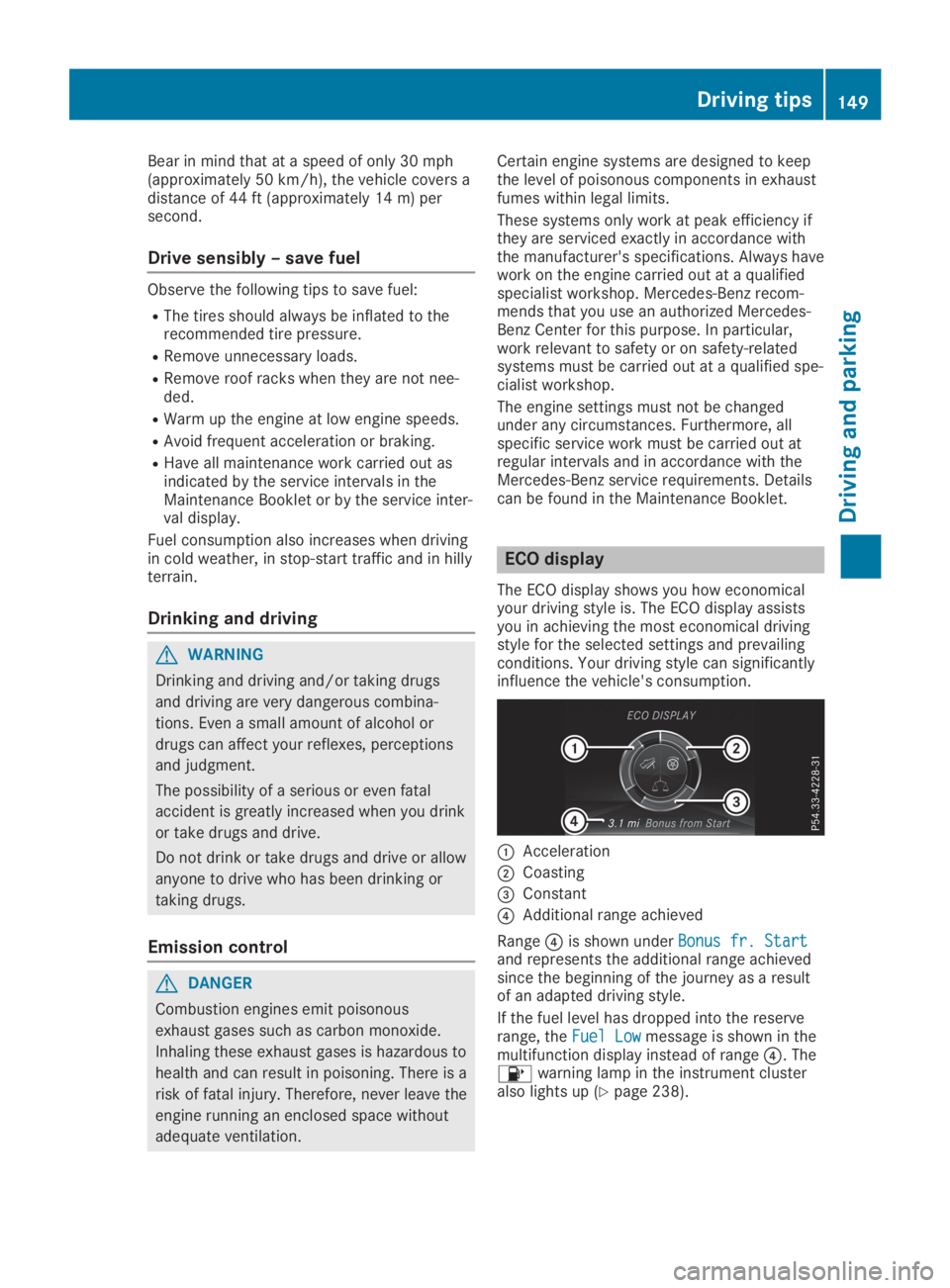
The ECO display shows you how economicalyour driving style is. The ECO display assistsyou in achieving the most economical drivingstyle for the selected settings and prevailingconditions. Your driving style can significantlyinfluence the vehicle's consumption.
CAcceleration
DCoasting
Page 156 of 346
GWARNING
Flammable material such as leaves, grass or
twigs may ignite if they come into contact
with hot parts of the exhaust system. There
is a risk of fire.
When driving on an unpaved road or off-
road, check the vehicle underside regularly.
In particular, remove trapped plant parts or
other flammable material. Contact a quali-
fied specialist workshop immediately if dam-
age is detected.
!There is a risk of damage to the vehicle if:
Rthe vehicle becomes stuck, e.g. on a highcurb or an unpaved road
Ryou drive too fast over an obstacle, e.g. acurb, a speed bump or a pothole in theroad
Ra heavy object strikes the underbody orparts of the chassis
In situations like this, the body, the under-body, chassis parts, wheels or tires could bedamaged without the damage being visible.Components damaged in this way can unex-pectedly fail or, in the case of an accident,no longer withstand the loads they aredesigned to.
If the underbody paneling is damaged, com-bustible materials such as leaves, grass ortwigs can gather between the underbodyand the underbody paneling. If these materi-als come in contact with hot parts of theexhaust system, they can catch fire.
In such situations, have the vehicle checkedand repaired immediately at a qualified spe-cialist workshop. If on continuing your jour-ney you notice that driving safety isimpaired, pull over and stop the vehicleimmediately, paying attention to road andtraffic conditions. In such cases, consult aqualified specialist workshop.
The vehicle is only designed for easily negotia-ble off-road terrain and poor road surfaces.
When driving off-road, substances such assand, mud and water or water mixed with oilmay get into the brakes. This could result in areduced braking effect or in total brake failureand also in increased wear and tear. The brak-ing characteristics change depending on thematerial entering the brakes. Clean the brakesafter driving off-road. If you detect a reduced
braking effect or grinding noises, have thebrake system checked in a qualified specialistworkshop as soon as possible. Adapt yourdriving style to the different braking character-istics.
Driving off-road increases the likelihood ofdamage to the vehicle, which, in turn, can leadto failure of the mechanical assembly or sys-tems. Adapt your driving style to suit the ter-rain conditions. Drive carefully. Have damageto the vehicle rectified immediately at a quali-fied specialist workshop.
Do not shift into transmission position\\when driving off-road. You could lose controlof the vehicle if you attempt to brake the vehi-cle using the service brake. If the gradient istoo steep for your vehicle, drive back down inreverse gear.
General notes
HEnvironmental note
Protection of the environment is of primary
importance. Treat nature with respect.
Observe all prohibiting signs.
Read this section carefully before driving yourvehicle off-road.
Off-road driving is only possible with theON&OFFROAD package.
The following driving systems are speciallyadapted for driving over easily negotiable off-road terrain:
ROff-road program (Ypage 170)
ROff-road ABS (Ypage 60)
ROff-road 4ETS (Ypage 64)
ROff-road ESP®(Ypage 66)
RDSR (Downhill Speed Regulation)(Ypage 169)
Observe the following notes:
RStop the vehicle before starting to drivealong an off-road route. If necessary, acti-vate the off-road program (Ypage 132).
RTo avoid damaging the vehicle, make surethere is always sufficient ground clearance.
RCheck that items of luggage and loads arestowed safely and are well secured(Ypage 255).
RAlways keep the engine running and in gearwhen driving on a downhill gradient. Acti-vate DSR (Ypage 169).
154Driving tips
Driving and parking
Page 158 of 346
RDrive quickly to overcome the rolling resist-ance. Otherwise the vehicle's wheels couldbecome stuck in loose ground.
RDrive in the tracks of other vehicles if possi-ble. Make sure that:
-the tire ruts are not too deep.
-the sand is sufficiently firm.
-the ground clearance of the vehicle is suf-ficient.
Tire ruts and gravel roads
!Check that the ruts are not too deep andthat your vehicle has sufficient clearance.Otherwise, your vehicle could be damagedor bottom out and get stuck.
Observe the following rules when driving alongruts in off-road terrain or on roads with loosegravel:
RActivate the off-road program (Ypage 132).
RAvoid high engine speeds.
RShift to a lower gear using the left-handsteering wheel paddle shifter.
RDrive slowly.
RWhere ruts are too deep, drive with thewheels of one side on the center grassyarea, if possible.
Traveling uphill
Approach/departure angle
GWARNING
If you drive on a steep incline at an angle or
turn when driving on an incline, the vehicle
could slip sideways, tip and rollover. There is
a risk of an accident.
Always drive on a steep incline in the line of
fall (straight up or down) and do not turn the
vehicle.
RObserve the warnings for off-road driving(Ypage 153).
RFollow the line of fall when driving on slopesand steep inclines.
RBefore driving on extreme uphill and down-hill gradients, select the off-road program(Ypage 132).
RDrive slowly.
RAccelerate gently and make sure that thewheels are gripping.
RAvoid high engine speeds, except when driv-ing on sandy and muddy routes with highdriving resistance.
RUse the left-hand steering wheel paddleshifter to shift to a lower gear appropriate tothe gradient.
RUse the left-hand steering wheel paddleshifter to shift into a lower gear in good timeon long and steep downhill gradients.
Hill start assist will aid you when pulling awayon a hill. For further information about hillstart assist, see (Ypage 128).
Do not shift into transmission position\\when driving off-road. You could lose controlof the vehicle if you attempt to brake the vehi-cle using the service brake. If the gradient istoo steep for your vehicle, drive back down inreverse gear.
Always observe the approach/departure anglevalues (Ypage 340).
Maximum gradient-climbing capability
Always observe the maximum gradient climb-ing ability values (Ypage 340).
Hilltops
When driving up an uphill gradient, slightlyreduce pressure on the accelerator immedi-ately before reaching the brow of the hill.Make use of the vehicle's own impetus totravel over the brow.
This style of driving prevents:
Rthe vehicle from lifting off the ground on thebrow of a hill
Rthe vehicle from traveling too quickly downthe other side
Driving downhill
RDrive slowly.
RDo not drive at an angle down steepinclines. Steer into the line of fall and drivewith the front wheels aligned straight. Oth-erwise, the vehicle could slip sideways, tipand rollover.
RShift to a lower gear using the left-handsteering wheel paddle shifter before tacklingsteep downhill gradients.
156Drivingtips
Driving an d parking
Page 164 of 346
Selecting the drive program
Active Distance Assist DISTRONIC supports asporty driving style when you select theS+drive program (Ypage 138) or the manualdrive program (Ypage 140). Accelerationbehind the vehicle in front or to the set speedis then noticeably more dynamic. If you haveselected theE(Mercedes-AMG vehicles:C)drive program, the vehicle accelerates moregently. This setting is recommended in stop-and-start traffic.
Changing lanes
If you want to change to the overtaking laneon multi-lane roads, Active Distance AssistDISTRONIC supports you if:
Ryou are driving faster than 45 mph(70 km/h)
RActive Distance Assist DISTRONIC is main-taining the distance to a vehicle in front
Ryou switch on the appropriate turn signal
RActive Distance Assist DISTRONIC does notcurrently detect a danger of collision
If these conditions are fulfilled, your vehicle isaccelerated. Acceleration will be interrupted ifchanging lanes takes too long or if the dis-tance between your vehicle and the vehicle infront becomes too small.
Stopping
If Active Distance Assist DISTRONIC detectsthat the vehicle in front is stopping, it brakesyour vehicle until it is stationary.
Once your vehicle is stationary, it remains sta-tionary and you do not need to depress thebrake.
iAfter a time, the electric parking brakesecures the vehicle and relieves the servicebrake.
iDepending on the specified minimum dis-tance, your vehicle will come to a standstillat a sufficient distance behind the vehicle infront. The specified minimum distance is setusing the control on the cruise control lever.
When Active Distance Assist DISTRONIC isactivated, the transmission is shifted automati-cally to position]if:
Rthe driver's seat belt is not fastened and thedriver's door is open.
Rthe engine is switched off, unless it is auto-matically switched off by the ECO start/stop function.
The electric parking brake is applied automati-cally if Active Distance Assist DISTRONIC isactive when the vehicle is stationary and:
Ra system malfunction occurs.
Rthe power supply is insufficient.
If a malfunction occurs, the transmission mayalso shift to position]automatically.
Setting a speed
Keep in mind that it may take a brief momentuntil the vehicle has accelerated or braked tothe speed set.
XPress the cruise control lever upCfor ahigher speed or downDfor a lower speed.
XTo adjust the set speed in 1 mph incre-ments (1 km/h increments):briefly pushthe cruise control lever upCor downDtothe pressure point.The last stored speed increases or decrea-ses in 1 mph (1 km/h) increments.
XTo adjust the set speed in 5 mph incre-ments (10 km/h increments):briefly pushthe cruise control lever upCor downDbeyond the pressure point.The last stored speed increases or decrea-ses in 5 mph (10 km/h) increments.
iActive Distance Assist DISTRONIC is notdeactivated if you depress the acceleratorpedal. If you accelerate to overtake, ActiveDistance Assist DISTRONIC adjusts the vehi-cle's speed to the last speed stored, afteryou have finished overtaking.
Setting a specified minimum distance
You can set the specified minimum distancefor Active Distance Assist DISTRONIC by vary-ing the time span between one and two sec-onds. This determines the distance that ActiveDistance Assist DISTRONIC is to maintain fromthe vehicle in front, depending on the roadspeed. You can see this distance in the multi-function display (Ypage 164).
162Driving systems
Driving and parking
Page 168 of 346
Activating the HOLD function
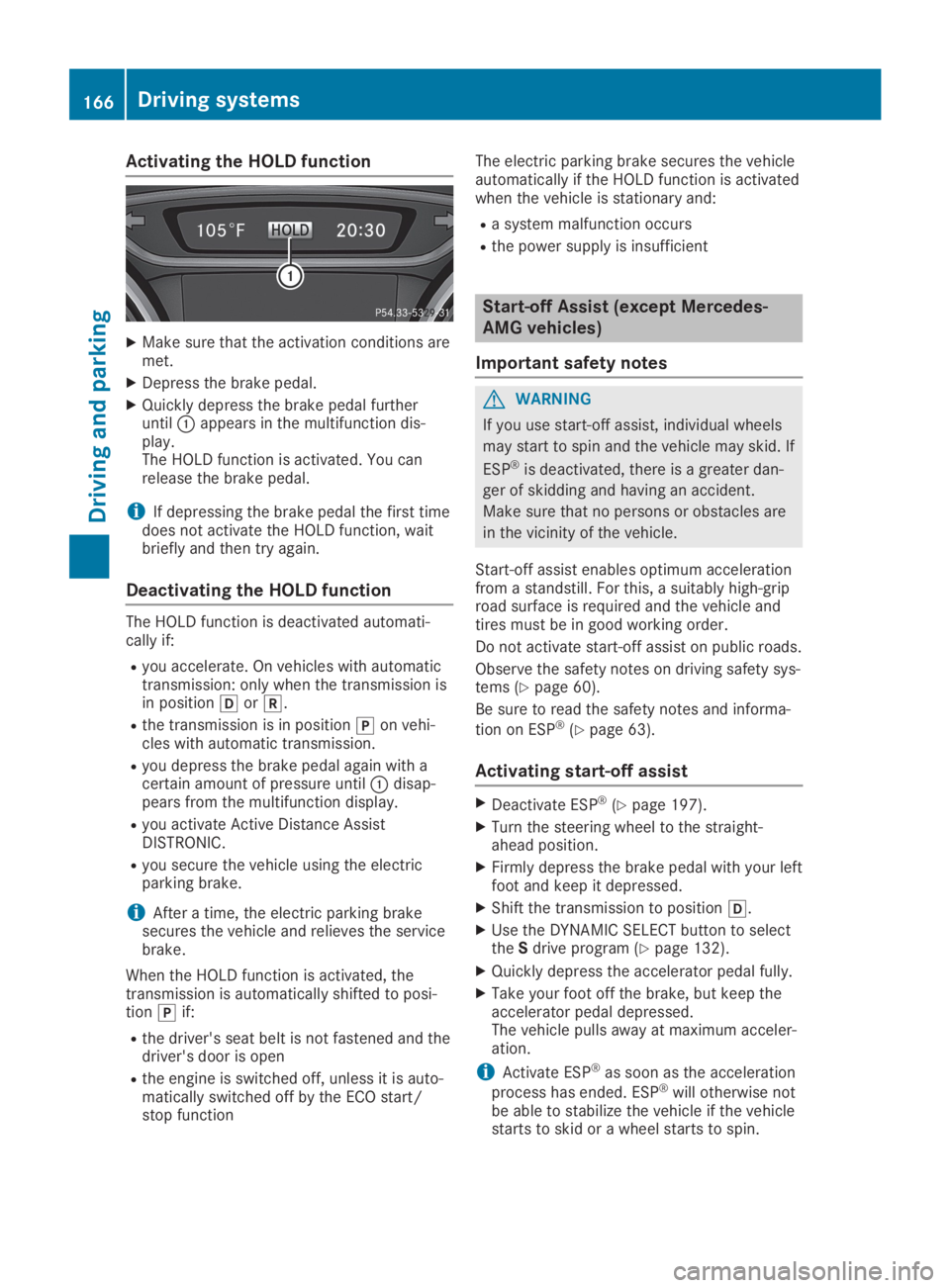
XMake sure that the activation conditions aremet.
XDepress the brake pedal.
XQuickly depress the brake pedal furtheruntilCappears in the multifunction dis-play.The HOLD function is activated. You canrelease the brake pedal.
iIf depressing the brake pedal the first timedoes not activate the HOLD function, waitbriefly and then try again.
Deactivating the HOLD function
The HOLD function is deactivated automati-cally if:
Ryou accelerate. On vehicles with automatictransmission: only when the transmission isin position[or^.
Rthe transmission is in position]on vehi-cles with automatic transmission.
Ryou depress the brake pedal again with acertain amount of pressure untilCdisap-pears from the multifunction display.
Ryou activate Active Distance AssistDISTRONIC.
Ryou secure the vehicle using the electricparking brake.
iAfter a time, the electric parking brakesecures the vehicle and relieves the servicebrake.
When the HOLD function is activated, thetransmission is automatically shifted to posi-tion]if:
Rthe driver's seat belt is not fastened and thedriver's door is open
Rthe engine is switched off, unless it is auto-matically switched off by the ECO start/stop function
The electric parking brake secures the vehicleautomatically if the HOLD function is activatedwhen the vehicle is stationary and:
Ra system malfunction occurs
Rthe power supply is insufficient
Start-off Assist (except Mercedes-
AMG vehicles)
Important safety notes
GWARNING
If you use start-off assist, individual wheels
may start to spin and the vehicle may skid. If
ESP®is deactivated, there is a greater dan-
ger of skidding and having an accident.
Make sure that no persons or obstacles are
in the vicinity of the vehicle.
Start-off assist enables optimum accelerationfrom a standstill. For this, a suitably high-griproad surface is required and the vehicle andtires must be in good working order.
Do not activate start-off assist on public roads.
Observe the safety notes on driving safety sys-tems (Ypage 60).
Be sure to read the safety notes and informa-
tion on ESP®(Ypage 63).
Activating start-off assist
XDeactivate ESP®(Ypage 197).
XTurn the steering wheel to the straight-ahead position.
XFirmly depress the brake pedal with your leftfoot and keep it depressed.
XShift the transmission to position[.
XUse the DYNAMIC SELECT button to selecttheSdrive program (Ypage 132).
XQuickly depress the accelerator pedal fully.
XTake your foot off the brake, but keep theaccelerator pedal depressed.The vehicle pulls away at maximum acceler-ation.
iActivate ESP®as soon as the acceleration
process has ended. ESP®will otherwise notbe able to stabilize the vehicle if the vehiclestarts to skid or a wheel starts to spin.
166Driving systems
Driving and pa rking
Page 187 of 346
still detects increasing lapses in concentra-tion, you will be warned again after 15 minutesat the earliest. This will only happen if ATTEN-TION ASSIST still detects typical indicators offatigue or increasing lapses in concentration.
Vehicles with the COMAND multimediasystem:if a warning is output in the multi-function display, a service station search isperformed in the multimedia system. You canselect a service station and navigation to thisservice station will then begin. This functioncan be activated or deactivated in the multi-media system; see the Digital Operator's Man-ual.
Lane Tracking package
General notes
The Lane Tracking package consists of BlindSpot Assist (Ypage 185) and Lane KeepingAssist (Ypage 186).
Blind Spot Assist
General notes
Blind Spot Assist monitors the areas on eitherside of the vehicle that are not visible to thedriver with two lateral, rear-facing radar sen-sors. A warning display in the exterior mirrorsdraws your attention to vehicles detected inthe monitored area. If you then switch on thecorresponding turn signal to change lane, youwill also receive an optical and audible warn-ing.
Blind Spot Assist supports you from a speed ofapproximately 20 mph (30 km/h).
Important safety notes
GWARNING
Blind Spot Assist does not react to:
Rvehicles overtaken too closely on the side,
placing them in the blind spot area
Rvehicles which approach with a large
speed differential and overtake your vehi-
cle
As a result, Blind Spot Assist may not give
warnings in such situations. There is a risk
of an accident.
Always observe the traffic conditions care-
fully, and maintain a safe lateral distance.
Blind Spot Assist is only an aid. It may fail todetect some vehicles and is no substitute forattentive driving. Always ensure that there issufficient distance to the side for other roadusers and obstacles.
iUSA only:
This device has been approved by the FCCas a "Vehicular Radar System". The radarsensor is intended for use in an automotiveradar system only. Removing, tamperingwith, or altering the device will void any war-ranties, and is not permitted by the FCC. Donot tamper with, alter, or use in any non-approved way.
Any unauthorized modification to this devicecould void the user’s authority to operatethe equipment.
Radar sensors
The radar sensors for Blind Spot Assist areintegrated into the rear bumper. Make surethat the bumpers are free from dirt, ice orslush. The sensors must not be covered, forexample by cycle racks or overhanging loads.Following a severe impact or in the event ofdamage to the bumpers, have the function ofthe radar sensors checked at a qualified spe-cialist workshop. Blind Spot Assist may no lon-ger work properly.
Monitoring range of the sensors
In particular, the detection of obstacles can beimpaired if:
Rthere is dirt on the sensors or anything elsecovering the sensors
Rthere is poor visibility, e.g. due to fog, heavyrain or snow
Ra narrow vehicle traveling in front, e.g. amotorbike or bicycle
Rthe road has very wide lanes
Rthe road has narrow lanes
Ryou are not driving in the middle of the lane
Rthere are barriers or other road boundaries
Vehicles in the monitoring range are then notindicated.
Blind Spot Assist monitors the area up to 10 ft(3 m) behind your vehicle and directly next toit.
Driving systems185
Driving and parking
Z
Page 191 of 346
The outside temperature display is in the mul-tifunction display (Ypage 191).
There is a short delay before a change in out-side temperature appears in the multifunctiondisplay.
Coolant temperature gauge
GWARNING
Opening the hood when the engine is over-
heated or when there is a fire in the engine
compartment could expose you to hot gases
or other service products. There is a risk of
injury.
Let an overheated engine cool down before
opening the hood. If there is a fire in the
engine compartment, keep the hood closed
and contact the fire department.
!A display message is shown if the coolanttemperature is too high.
If the coolant temperature is over 248 ‡(120 †), do not continue driving. Theengine will otherwise be damaged.
The coolant temperature gage is in the instru-ment cluster on the right-hand side(Ypage 32).
TheHmarking in the coolant temperaturegauge corresponds to a coolant temperatureof approximately 248 ‡ (120 †).
Under normal operating conditions and at thecorrect coolant level, the coolant temperaturegauge may rise to theHmarking.
Operating the on-board computer
Overview
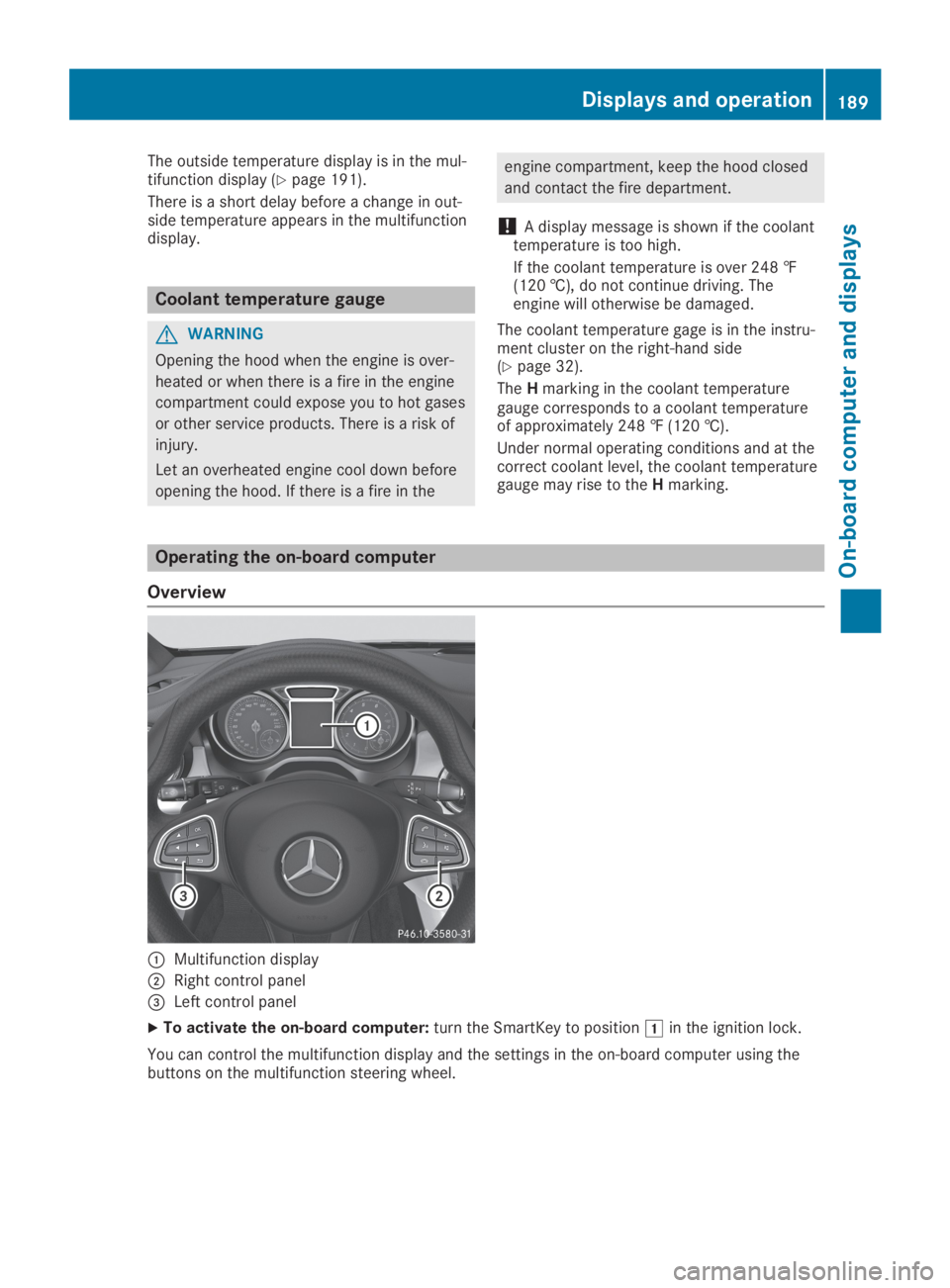
CMultifunction display
DRight control panel