phone MERCEDES-BENZ GLB SUV 2019 Workshop Manual
[x] Cancel search | Manufacturer: MERCEDES-BENZ, Model Year: 2019, Model line: GLB SUV, Model: MERCEDES-BENZ GLB SUV 2019Pages: 689, PDF Size: 11.39 MB
Page 410 of 689
R
Cause of the tra ffic incident, e.g. con‐
st ru ction work
R Warning message (highligh tedre d) #
Toselect a traf fic incident symbol: select
q orr. #
Toselect a map section: tap on the
to uchsc reen.
or #
Press theTo uch Control or theto uchpad. #
Movethe map. #
Toreturn tothe navigation map: tapon
G.
or #
Press theG button on theTo uch Control
or on theto uchpad.
Swit ching the traf fic information display on
Multimedia sy stem:
4 © 5
Navigation 5
Z #
Activate Traffic.
The display button is acti vated. Ac
tivating Incidents, Free Flow and Delay #
Select Advanced. #
Select View. #
Select Map elements. #
IntheTRAFFIC category,activate theTraffic
incidents, Free-flowing traffic andDelay
entri es.
The display buttons are activated.
If tra ffic information has been recei ved, then
tra ffic incidents such as roadwor ks,ro ad
bloc ks, local area reports (e.g. fog) and warn‐
ing messages are displa yed.
The tra ffic delay is displa yedfo rth e cur rent
ro ute. Traf fic del ays lasting one minute or
longer are take n into conside ration.
Showing local area messages
Multimedia sy stem:
4 © 5
Navigation 5
¡ 5
Traffic #
Select Area announcements .
Local area messages are shown, forex ample
fo g or heavy rain. #
Select a local area message.
The de tails are displa yed. Car-to-X-Communication
Car-to-X-Communication
overview
The following requ irements apply for using Car-
to -X-Communication:
R The vehicle is equipped with a multimedia
sy stem featuring navigation and a communi‐
cation module with an activated, integ rated
SIM card.
R Car-to -X-Communication is acti vated.
% Car-to-X-Communication is available in
selec ted count ries.
The communication module automatically es tab‐
lishes an Internet connection once the ignition is
switched on. If there are any hazard warnings,
th ey will be pr ovided shortly thereaf ter.Depend‐
ing on the mobile phone connection, the pr ovi‐
sion take s place from within a second up to
about a minute. MBUX multimedia sy
stem 407
Page 423 of 689
R
Telephone number #
Calculate thero ute (/ page 388).
The following functions can also be selec ted (if
av ailable):
R Sear chfor POIs in the vicinit y.
R Save the destination.
R Place a call at the destination.
R Share the destination using NFC or QR code.
R Call up thewe b address.
R Show the destination on the map.
Displaying parking options on the map
Requ irements:
R The navigation services option is available,
subsc ribed toand activated in the Mercedes
me por tal.
R The parking service is within the scope of the
navigation service. Multimedia sy
stem:
4 © 5
Navigation 5
Z #
Activate Parking.
The display button is acti vated. The parking
options within the vicinity of the cur rent vehi‐
cle position are shown.
Pa ying parking charges
Re quirements:
R The navigation services option is available
and activated in the Mercedes me por tal.
The parking service is within the scope of the
navigation service.
R You ha veregis tere d with your payment
de tails forth e payment of parking in the
Mercedes me por tal with Mercedes Pay and
th ere spective contra ct partner.
R Parking is activated (/ page 420).
Multimedia sy stem:
4 © 5
Navigation
This option is not available in all countries. #
Select a parking option on the map. #
If a car park that can be paid for has been
selected, scroll down in the parking de tails. #
Select Pay.
or #
Once theve hicle has reached a parking posi‐
tion with payment function and the ignition is
switched off, a message appears.
Using this message you can pay from the
ve hicle and start the payment process. #
Tostart the payment process: confirm the
messa ge. #
Please no tethe maximum parking period dis‐
pla yed and any existing additional limitations.
If re qu ired, a message will inform you about
th e necessity of displaying information con‐
fi rm ing the online payment forth e parking
space. #
Select Start the payment process. #
Ifre qu ired, enter the personalised PIN. #
Press atoconfirm.
The successful start of your parking transac‐
tion is shown. #
Comple tethe booking with OK.420
MBUX multimedia sy stem
Page 426 of 689
Multimedia sy
stem:
4 © 5
Mercedes me & Apps
5 Dashcam #
Select thep symbol.
The RECORDINGS menu appears. #
Select Vfor a video file. #
Select Delete. #
Select Yes. #
Todel ete all video files: select Ä. #
Select Delete all entries.
Configuring dashcam settings
Re quirements:
R A USB device is connec ted with the multime‐
dia sy stem (/ page472).
Mul timedia sy stem:
4 © 5
Mercedes me & Apps
5 Dashcam #
Select Z. #
Toshow messages af ter passing a
national bo rder: swit chon National border
alert.
The display button is activated.
A message appears in thefo llowing situa‐
tions:
R A video is being recorded.
R The vehicle has passed a national border.
% This function is not available in all countries. #
Tostart automatic video recording: select
Automatic video recording . #
Activate Automatic video recording .
The display button is acti vated. When the
ve hicle is star ted, video recording starts
automaticall y.
% This function is not available in all countries. Te
lephone Te
lephony Note
s ontelephony &
WARNING Risk of di stra ction from oper‐
ating integrated communication equip‐
ment while theve hicle is in motion
If yo u operate communication equipment
integrated in theve hicle when driving, you
will be distracted from the tra ffic situation.
This could also cause youto lose control of
th eve hicle. #
Only operate this equipment when the
traf fic situation permits. #
Ifyo u cannot be sure of this, stop the
ve hicle whilst paying attention toroad
and traf fic conditions and ope rate the
equipment with theve hicle stationar y. MBUX multimedia sy
stem 423
Page 427 of 689
&
WARNING Risk of an accident from
ope rating mobile communication equip‐
ment while theve hicle is in motion
Mobile communications devices distract the
driver from the traf fic situation. This could
also cause the driver tolose control of the
ve hicle. #
Asthe driver, only operate mobile com‐
munications devices when theve hicle is
st ationar y. #
As a vehicle occupant, only use mobile
communications devices in the areas
intended forth is purpose, e.g. in the
re ar passenger compartment. Yo
u must obse rveth e legal requirements forthe
country in whi chyou are cur rently driving when
operating mobile communication equipment in
th eve hicle. &
WARNING Risk of inju rydue toobjects
being stowed incor rectly
If objects in theve hicle interior are stowed
incor rectly, they can slide or be thrown
around and hit vehicle occupants. In addi‐
tion, cup holders, open stowage spaces and
mobile phone recep tacles cannot al ways
re tain all objects they contain.
The reis a risk of injur y,particularly in the
ev ent of sudden braking or a sudden change
in direction. #
Alw aysstow objects so that they can‐
not be throw n around in su chsitua‐
tions. #
Alw ays make sure that objects do not
pr otru de from stowage spaces, luggage
nets or stowage nets. #
Close the loc kable stow age spaces
before starting a journe y. #
Alw aysstow and secure heavy, hard,
poin ted, sharp-edged, fragile or bulky
objects in the boot/load compartment. Obser
vethe additional information on stowing
mobile communications devices cor rectly:
R Loading theve hicle (/ page126)
R Stow ing and securing the mobile phone
(/ page 152)
Fu rther information can be obtained from a
Mercedes-Benz service centre or at: https://
www.mercedes-benz-mobile.com/ 424
MBUX multimedia sy stem
Page 428 of 689
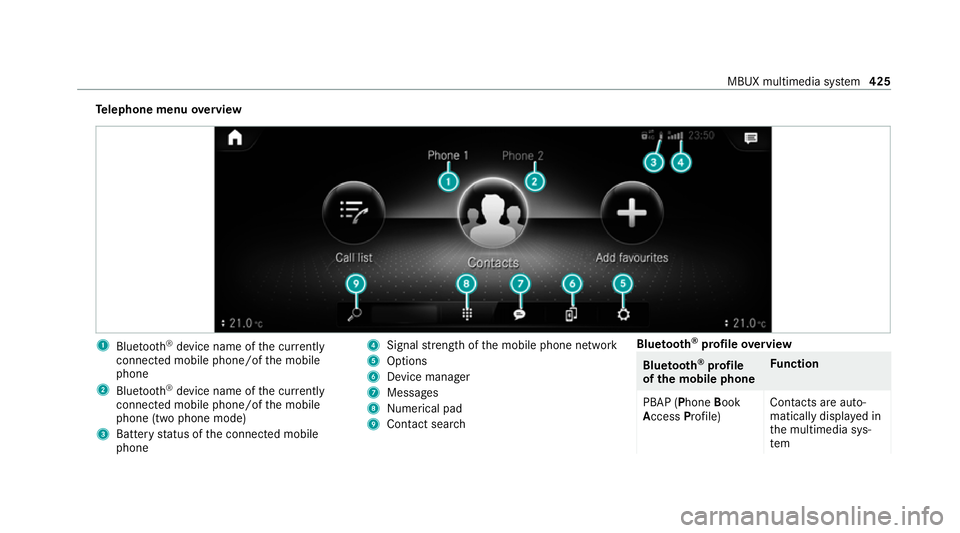
Te
lephone menu overview 1
Blue tooth ®
device name of the cur rently
connected mobile phone/of the mobile
phone
2 Blue tooth ®
device name of the cur rently
connected mobile phone/of the mobile
phone (two phone mode)
3 Battery status of the connected mobile
phone 4
Signal stre ngth of the mobile phone network
5 Options
6 Device manager
7 Messages
8 Nume rical pad
9 Contact sea rch Blue
tooth ®
profile overview Blue
tooth ®
profile
of the mobile phone Fu
nction
PBAP (Phone Book
Access Profile) Contacts are auto‐
matically displa
yed in
th e multimedia sys‐
tem MBUX multimedia sy
stem 425
Page 429 of 689
Blue
tooth ®
profile
of the mobile phone Fu
nction
MAP (Message
Access Profile) Message functions
can be used Te
lephony operating modes overview
Depending on your equipment, thefo llowing tel‐
ephony operating modes are available:
R A mobile phone is connec tedto the multime‐
dia sy stem via Blue tooth®
(/ page 426).
R Two mobile phones are connected with the
multimedia sy stem via Blue tooth®
(two
phone mode) (/ page 427).
- You can use all the functions of the multi‐
media sy stem with the mobile phone in
th efo re ground.
- You can recei veincoming calls and mes‐
sages with the mobile phone in the back‐
ground.
Yo u can inter change the mobile phone in
th efo re ground and bac kground any time
(/ page 427). %
Irre spective of this, Blue tooth®
audio func‐
tionality can byused with any mobile phone
(/ page 472).
Infor mation on telephony
The following situations can lead tothe call
being disconnected while theve hicle is in
motion:
R there is insuf ficient network co verage inthe
area
R you mo vefrom one transmission/reception
st ation toano ther and no communication
ch annels are free
R the SIM card used is not compatible with the
network available
R a mobile phone with "Twincard" is logged into
th e network with the second SIM card at the
same time
The multimedia sy stem supports calls in HD
Vo ice ®
for impr oved speech qualit y.Arequ ire‐
ment forth is is that the mobile phone and the
mobile phone network pr ovider of the person
yo u are calling suppo rtHD Voice ®
. Depending on
thequ ality of the connection, the
vo ice quality may fluctuate.
Connecting a mobile phone
Requ irements:
R Blue tooth ®
is activated on the mobile phone
(see the manufacturer's operating instruc‐
tions).
R Blue tooth ®
is activated on the multimedia
sy stem (/ page 366).
Multimedia sy stem:
4 © 5
Phone
Sear ching for a mobile phone #
Select í. #
Select Connect new device .
Connecting a mobile phone (authorisation
using Secu reSimple Pairing) #
Select a mobile phone. #
A code is displa yed in the multimedia sy stem
and on the mobile phone. #
Ifth e codes match: confirm the code on
th e mobile phone. 426
MBUX multimedia sy stem
Page 430 of 689
%
For older mobile phone models, enter a one
to sixteen-digit number code on the mobile
phone and on the multimedia sy stem for
authorisation.
% Upto15 mobile phones can be auth orised
on the multimedia sy stem.
Auth orised mobile phones are reconnected
au tomatical ly.
% The connected mobile phone can also be
used as Blue tooth®
audio equipment
(/ page 472).
Connec ting a second mobile phone (two
phone mode)
Requ irements:
R Atleast one mobile phone is already connec‐
te dto the multimedia sy stem via Blue tooth®
.
Multimedia sy stem:
4 © 5
Phone #
Select í. #
Select Connect new device. #
Select the mobile phone. #
Select Device name 1 + Device name 2 .
The selected mobile phone is connected to
th e multimedia sy stem.
Inter changing mobile phones (two phone
mode)
Multimedia sy stem:
4 © 5
Phone
Bo th mobile phones are shown individually in
sepa rate tabs. #
Select theta b with the desired mobile
phone.
The mobile phone in the selected tab is the
mobile phone in thefo re ground.
Wi th th eexc eption of telephone settings, the
submenus in thete lephone menu relate to
th e mobile phone in thefo re ground. In the
te lephone settings, settings can be made for
bo th mobile phones.
Changing the function of a mobile phone
Re quirements:
R Atleast one mobile phone is connec tedto
th e multimedia sy stem via Blue tooth®
( / page 426). Multimedia sy
stem:
4 © 5
Phone
Ac tivating a function #
Select theí device manager. #
Select a gr eysymbol in the line of a mobile
phone.
The cor responding function is activated.
Deactivating a function #
Select theí device manager. #
One function is active: selectthe coloured
symbol in the line of a mobile phone.
The mobile phone is disconnected from the
multimedia sy stem. #
Several functions are active: select a col‐
oured symbol in the line of a mobile phone.
The cor responding function is deactivated.
Re placing mobile phones
Multimedia sy stem:
4 © 5
Phone #
Select í. MBUX multimedia sy
stem 427
Page 431 of 689
#
No authorised mobile phone available:
select Connect new device .#
Select a mobile phone. #
Newly authorised mobile phone: confirm
th e number code on the mobile phone.
Using in single telephone mode #
Select Device name.
A newly authorised mobile phone is connec‐
te d in single telephone mode.
If th e mobile phone has already been author‐
ised and connected in single telephone
mode, it is connec ted again in single tele‐
phone mode.
If a mobile phone has already been author‐
ised and connec ted in two phone mode with
ano ther mobile phone, it will be connected in
future in single telephone mode.
Using in two phone mode #
Select Device name 1 + Device name 2 .
A newly authorised mobile phone is connec‐
te d with the selected mobile phone in two
phone mode. If
th e mobile phone has already been author‐
ised and connected in single telephone
mode, it will be connec ted in future with the
selected mobile phone in two phone mode.
If th e mobile phone was pr eviously connec‐
te d with ano ther mobile phone, this connec‐
tion is cancelled.
Disconnecting/de-au thorising a mobile
phone
Multimedia sy stem:
4 © 5
Phone #
Select í. #
Select Äinthe line of the mobile phone. #
Todisconnect: selectDisconnect .
If applicable, the mobile phone will be auto‐
matically reconnected when theve hicle is
next star ted. #
Tode-authorise: selectDeauthorise.
In fo rm ation on NearField Communication
(NFC)
NFC enables short- range wi reless data transfer
or (re)connection of a mobile phone with the
multimedia sy stem. The
following functions are available without
having authorised a mobile phone:
R Trans ferring a URL or a con tact to be vie wed
in the multimedia sy stem (see the manufac‐
turer's operating instructions).
R Setting up theve hicle's Wi-Fi access da tavia
th e sy stem settings (/ page 368).
Fu rther information can be obtained at: https://
www.mercedes-benz-mobile.com/
Using the mobile phone with NearField Com‐
munication (NFC)
Re quirements:
R NFC is activated on the mobile phone (see
th e manufacturer's operating instructions)
R The mobile phone's screen is switched on
and unloc ked (see the manufacturer's oper‐
ating instructions) 428
MBUX multimedia sy stem
Page 432 of 689
#
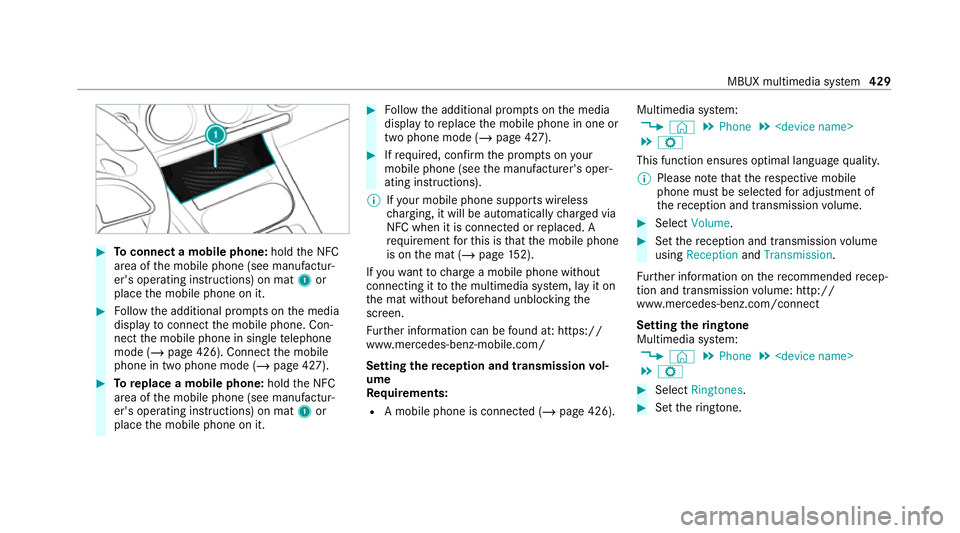
Toconnect a mobile phone: holdthe NFC
area of the mobile phone (see manufactur‐
er's operating instructions) on mat 1or
place the mobile phone on it. #
Follow the additional prom pts on the media
display toconnect the mobile phone. Con‐
nect the mobile phone in single telephone
mode (/ page 426). Connect the mobile
phone in two phone mode (/ page 427).#
Toreplace a mobile phone: holdthe NFC
area of the mobile phone (see manufactur‐
er's operating instructions) on mat 1or
place the mobile phone on it. #
Follow the additional prom pts on the media
display toreplace the mobile phone in one or
two phone mode (/ page 427). #
Ifre qu ired, con firm the prom pts on your
mobile phone (see the manufacturer's oper‐
ating instructions).
% Ifyo ur mobile phone suppo rts wireless
ch arging, it will be automatically charge d via
NFC when it is connec ted or replaced. A
re qu irement forth is is that the mobile phone
is on the mat (/ page152).
If yo uwa nttocharge a mobile phone without
connecting it tothe multimedia sy stem, lay it on
th e mat without beforehand unblocking the
screen.
Fu rther information can be found at: https://
www.mercedes-benz-mobile.com/
Setting there ception and transmission vol‐
ume
Requ irements:
R A mobile phone is connec ted (/ page 426). Multimedia sy
stem:
4 © 5
Phone 5
5 Z
This function ensures optimal language qualit y.
% Please no tethat there spective mobile
phone must be selected for adju stment of
th ere ception and transmission volume. #
Select Volume. #
Set there ception and transmission volume
using Reception andTransmission.
Fu rther information on there commended recep‐
tion and transmission volume: http://
www.me rcedes-benz.com/connect
Setting theringtone
Multimedia sy stem:
4 © 5
Phone 5
5 Z #
Select Ringtones. #
Set theringtone. MBUX multimedia sy
stem 429
Page 433 of 689
%
Ifth e mobile phone supports the transfer of
th eringtone, you will hear theringtone of
th e mobile phone ins tead of that of theve hi‐
cle audio sy stem.
St arting/ stopping mobile phone voice recog‐
nition
Re quirements:
R The mobile phone in thefo re ground is con‐
nected with the multimedia sy stem
(/ page 426).
St arting mobile phone voice recognition #
Press and hold the£ button on the multi‐
function steering wheel for more than one
second.
Yo u can use mobile phone voice recognition.
St opping mobile phone voice recognition #
Press the8 or~ button on the multi‐
function steering wheel.
% If a mobile phone is connected via Smart‐
phone Integration, thevo ice recognition of
th is mobile phone is star ted or stopped. Calls
Te
lephone operation
Multimedia sy stem:
4 © 5
Phone
Making a call byentering the numbers #
Select _. #
Enter a number. #
Select R.
The call is made.
Ac cepting a call #
Select RAccept .
Re jecting a call #
Select kReject .
Ending a call #
Select k.
Ac tivating functions during a call
The following functions are available during a
call:
k End call m
Microphone off
_ Numerical keypad (showtosend DTMF
to nes)
W Add call
h Transfer to phone (an activecall in hands-
free mode is transfer redove rto thete le‐
phone) #
Select a function.
Conducting calls with se veral participants
Re quirements:
R There is an active call (/ page 430).
R Another call is being made.
Switching between calls #
Select the conta ct.
The selected call is acti ve. The other call is
on hold.
Ac tivating a call on hold #
Select the conta ct ofthe call on hold. 430
MBUX multimedia sy stem