ECU MERCEDES-BENZ GLC-Class 2016 X253 Owner's Guide
[x] Cancel search | Manufacturer: MERCEDES-BENZ, Model Year: 2016, Model line: GLC-Class, Model: MERCEDES-BENZ GLC-Class 2016 X253Pages: 418, PDF Size: 9.23 MB
Page 94 of 418
XMake sure that the doors and the tailgate
are locked.
XCarefully press the protective cap onto the
lock cylinder until it engages and is seated
firmly. Do not pull the door handle when
doing so.
If you lock the vehicle as described above, the
fuel filler flap is not locked. The anti-theft
alarm system is not armed.
Cargo compartment
Important safety notes
GWARNING
Combustion engines emit poisonous exhaust
gases such as carbon monoxide. If the tailgate
is open when the engine is running, particu-
larly if the vehicle is moving, exhaust fumes
could enter the passenger compartment.
There is a risk of poisoning.
Turn off the engine before opening the tail-
gate. Never drive with the tailgate open.
GWARNING
If objects, luggage or loads are not secured or
not secured sufficiently, they could slip, tip
over or be flung around and thereby hit vehicle
occupants. There is a risk of injury, particu-
larly in the event of sudden braking or a sud-
den change in direction.
Always store objects so that they cannot be
flung around. Secure objects, luggage or
loads against slipping or tipping before the
journey.
!The tailgate swings upwards and to the
rear when opened. Therefore, make sure
that there is sufficient clearance above and
behind the tailgate.
The opening dimensions of the tailgate can be
found in the "Vehicle data" section
(
Ypage 415).
You can limit the opening angle of the tailgate
(
Ypage 97). Do not leave the SmartKey in the cargo com-
partment. You could otherwise lock yourself
out.
You should preferably place luggage or loads
in the cargo compartment. Observe the load-
ing guidelines (
Ypage 306).
Tailgate obstruction detection with
reversing feature
Vehicles with remote tailgate closing fea-
ture: the tailgate is equipped with automatic
obstacle recognition with reversing feature. If
a solid object blocks or restricts the tailgate
when automatically opening, this procedure
is stopped. If a solid object blocks or restricts
the tailgate when automatically closing, the
trunk lid automatically opens again slightly.
The automatic obstacle recognition with
reversing feature is only an aid. It is not a
substitute for your attentiveness when open-
ing and closing the tailgate.
GWARNING
The reversing feature does not react:
Rto soft, light and thin objects, e.g. small fin-
gers
Rover the last 1/3 in (8 mm) of the closing
movement
This means that the reversing feature cannot
prevent someone being trapped in these sit-
uations. There is a risk of injury.
Make sure that no body parts are in close
proximity during the closing procedure.
If somebody becomes trapped:
Rpress the Fbutton on the SmartKey, or
Rpull or press the remote operating switch
on the driver's door or
Rpress the closing or locking button on the
tailgate or
Rpull the handle on the tailgate
Vehicles with HANDS-FREE ACCESS: it is
also possible to stop the closing process by
92Cargo compartment
Opening and closing
Page 144 of 418
DYNAMIC SELECT switch
You can choosebetween various drive pro -
grams wit hth eDYNAMI CSELECT switch
(
Ypage 161).
If you hav eselecte ddrive program E:
Rth ecoolin goutput is reduce dwhen coolin g
Rwhen heating, th eelectrical heater booster
is deactivated and heat output is reduce d
as aresult
Rth erea rwindow defroster running time is
reduce d
If you hav eselecte ddrive program C,Sor S+ ,
th ecurren tclimat esetting sare maintained.
ECO start/stop function
Durin gautomatic engin eswitch-off ,th ecli-
mat econtro lsystem only operates at a
reduce dcapacity. If you require th efull cli-
mat econtro loutput ,you can switch of fth e
EC Ostart/sto pfunction by pressing th eEC O
butto n (
Ypage 159).
Operating th eclimat econtro lsys -
tems
Activating/deactivating climat econ-
trol
General notes
Whe nth eclimat econtro lis switched off, th e
air supply and air circulation are also
switched off. The windows could fo gup.
Therefore, switch of fclimat econtro lonly
briefly
Switc hon climat econtro lprimarily usin gth e
à rocker switch (
Ypage 144).
Activating or deactivating
XTurnth eSmartKey to position 2in th eigni-
tion loc k (
Ypage 153).
XTo switch on: press thet or!
rocker switch up or down .
The Audio 20 or COMAN Dclimat econtro l
men uopens .
XSwitchon th eclimat econtro lvia th eair-
conditionin gfunction bar ,see th eseparat e
operatin ginstructions.
or
XSe tth eairflow to level 1or higher usin gth e
H rocker switch .
XTo switch off :press th et or!
rocker switch up or down .
The Audio 20 or COMAN Dclimat econtro l
men uopens .
XSwitchof fth eclimat econtro lvia th eair-
conditionin gfunction bar ,see th eseparat e
operatin ginstructions.
or
XSe tth eairflow to level 0usin gth eH
rocker switch .
Switchingcoolin gwit hair dehumidi-
fication on/of f
General notes
If you deactivat eth e"Coolin gwit hair-dehu-
midification "function ,th eair insid eth evehi-
cl e will no tbe cooled .The air insid eth evehi-
cl e will also no tbe dehumidified. The win -
dows can fo gup more quickly. Therefore,
deactivat eth ecoolin gwit hair-dehumidifica-
tion function only briefly.
The "Coolin gwit hair dehumidification "func-
tion is only available when th eengin eis run -
ning .The air insid eth evehicle is cooled and
dehumidified accordin gto th etemperature
selected.
Condensation may dri pfrom th eunderside of
th evehicle when it is in coolin gmode. Thi sis
normal and no t asignthat there is amalfunc -
tion .
142Operating the climate control systems
Climate control
Page 154 of 418
Useful information
i
This Operator's Manual describes all
models and all standard and optional equip-
ment of your vehicle available at the time of
publication of the Operator's Manual.
Country-specific differences are possible.
Please note that your vehicle may not be
equipped with all features described. This
also applies to safety-related systems and
functions.
iRead the information on qualified special-
ist workshops (
Ypage 27).
Notes on breaking-in a new vehicle
Important safety notes
The sensor system of some driving and driv-
ing safety systems adjusts automatically
while a certain distance is being driven after
the vehicle has been delivered or after
repairs. Full system effectiveness is not
reached until the end of this teach-in proce-
dure.
New and replaced brake pads and discs only
reach their optimum braking effect after sev-
eral hundred kilometers of driving. Compen-
sate for this by applying greater force to the
brake pedal.
The first 1000 miles (1500 km)
The more you look after the engine when it is
new, the more satisfied you will be with its
performance in the future.
RYou should therefore drive at varying vehi-
cle and engine speeds for the first
1000 miles (1500 km).
RAvoid heavy loads, e.g. driving at full throt-
tle, during this period.
RWhen changing gears manually, change up
in good time, before the tachometer needle
reaches Ôof the way to the red area of the
tachometer.
RDo not manually shift to a lower gear to
brake the vehicle.
RTry to avoid depressing the accelerator
pedal beyond the point of resistance (kick-
down).
RIdeally, for the first 1,000 miles (1,500 km),
drive in program E.
After 1000 miles (1500 km), you can increase
the engine speed gradually and accelerate
the vehicle to full speed.
You should also observe these notes on
breaking in if the engine or parts of the drive
train on your vehicle have been replaced.
Always observe the maximum permissible
speed.
Driving
Important safety notes
GWARNING
Objects in the driver's footwell can restrict the pedal travel or obstruct a depressed pedal.
The operating and road safety of the vehicle is
jeopardized. There is a risk of an accident.
Make sure that all objects in the vehicle are
stowed correctly, and that they cannot enter
the driver's footwell. Install the floormats
securely and as specified in order to ensure
sufficient clearance for the pedals. Do not use
loose floormats and do not place floormats on
top of one another.
GWARNING
Unsuitable footwear can hinder correct usage of the pedals, e.g.:
Rshoes with thick soles
Rshoes with high heels
Rslippers
There is a risk of an accident.
Wear suitable footwear to ensure correct
usage of the pedals.
152Driving
Driving and parking
Page 158 of 418
If the engine will not start:
XRemove the SmartKey from the ignition
lock.
XReinsert the SmartKey into the ignition lock
after a short waiting period.
XTurn the SmartKey to position2in the igni-
tion lock (
Ypage 153).
The indicator lamps in the instrument clus-
ter light up (
Ypage 291).
XTurn the SmartKey to position 3
(
Ypage 153) in the ignition lock and release
it as soon as the engine is running.
Starting procedure with the Start/Stop
button
The Start/Stop button is only available on
vehicles with KEYLESS-GO or the KEYLESS-
GO start function.
The Start/Stop button can be used to start
the vehicle manually without inserting the
SmartKey into the ignition lock. The Start/
Stop button must be inserted in the ignition
lock and the SmartKey must be in the vehicle.
This mode for starting the engine operates
independently of the ECO start/stop auto-
matic engine start function.
You can start the engine if a valid SmartKey is
in the vehicle. Switch off the engine and
always take the SmartKey with you when
leaving the vehicle, even if you only leave it for
a short time. Pay attention to the important
safety notes.
XDepress the brake pedal and keep it
depressed.
XPress the Start/Stop button once
(
Ypage 153).
The engine starts.
Starting procedure via smartphone
Observe the important safety notes on start-
ing the engine (
Ypage 155).
You can also start your engine via your smart-
phone from outside the vehicle. In this case,
the previously selected climate control set- ting is activated. In this way you can cool or
heat the interior of the vehicle before starting
the journey.
Only start the engine via your smartphone if it
is safe to start and run the engine where your
vehicle is parked.
Observe the legal stipulations in the area
where your vehicle is parked. Engine start via
smartphone may be limited to certain coun-
tries or regions.
You can execute a maximum of two consec-
utive starting attempts via your smartphone.
If you insert the key into the ignition lock, you
can carry out two more starting attempts.
Once you have started the engine, you can
switch the engine off via your smartphone at
any time.
You can only start the engine via your smart- phone if:
Rthe key is in the ignition lock
Rpark position Pis selected
Rthe accelerator pedal is not depressed
Rthe anti-theft alarm system is not activated
Rthe panic alarm is not activated
Rthe hazard warning lamps are switched off
Rthe hood is closed.
Rthe doors are closed and locked
Rthe windows and sliding sunroof are closed
Also make sure that:
Rthe fuel tank is sufficiently filled
Rthe starter battery is sufficiently charged
GWARNING
Limbs could be crushed or trapped if the
engine is started unintentionally during ser-
vice or maintenance work. There is a risk of
injury.
Always secure the engine against uninten-
tional starting before carrying out mainte-
nance or repair work.
156Driving
Driving and parking
Page 160 of 418
GWARNING
After a short time, hill start assist will no lon-
ger brake your vehicle and it could roll away.
There is a risk of an accident and injury.
Therefore, quickly move your foot from the
brake pedal to the accelerator pedal. Never
leave the vehicle when it is held by hill start
assist.
Hill start assist is not active if:
Ryou are pulling away on a level road or on a downhill gradient.
Rthe transmission is in position N.
Rthe electric parking brake is applied.
RESP®is malfunctioning.
ECO start/stop function
Introduction
The ECO start/stop function switches the
engine off automatically if the vehicle is stop-
ped under certain conditions.
The engine starts automatically when the
driver wants to pull away again. The ECO
start/stop function thereby helps you to
reduce the fuel consumption and emissions
of your vehicle.
Important safety notes
GWARNING
If the engine is switched off automatically and
you exit the vehicle, the engine is restarted
automatically. The vehicle may begin moving.
There is a risk of accident and injury.
If you wish to exit the vehicle, always turn off
the ignition and secure the vehicle against
rolling away.
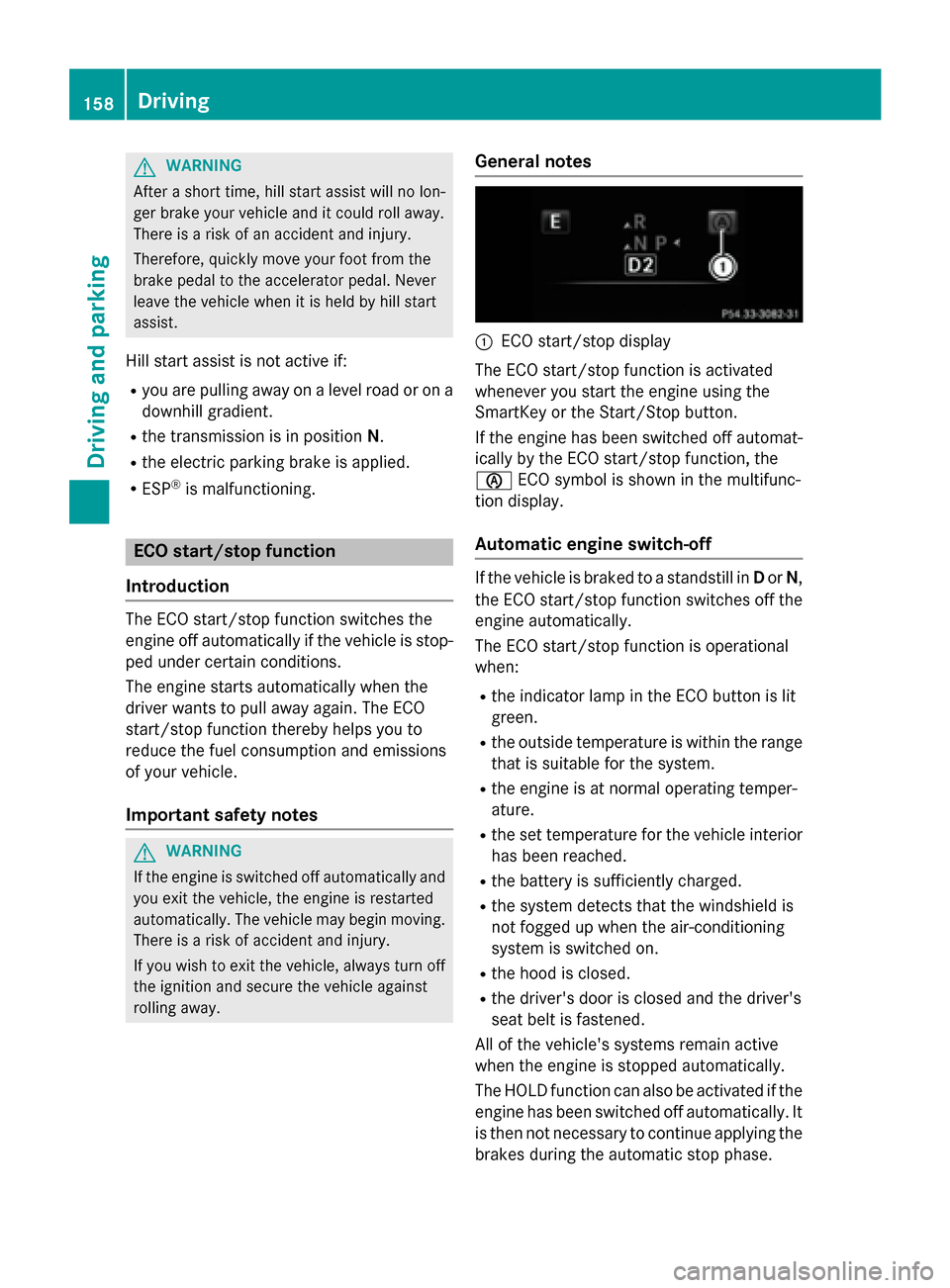
General notes
:ECO start/stop display
The ECO start/stop function is activated
whenever you start the engine using the
SmartKey or the Start/Stop button.
If the engine has been switched off automat-
ically by the ECO start/stop function, the
è ECO symbol is shown in the multifunc-
tion display.
Automatic engine switch-off
If the vehicle is braked to a standstill in Dor N,
the ECO start/stop function switches off the
engine automatically.
The ECO start/stop function is operational
when:
Rthe indicator lamp in the ECO button is lit
green.
Rthe outside temperature is within the range that is suitable for the system.
Rthe engine is at normal operating temper-
ature.
Rthe set temperature for the vehicle interior
has been reached.
Rthe battery is sufficiently charged.
Rthe system detects that the windshield is
not fogged up when the air-conditioning
system is switched on.
Rthe hood is closed.
Rthe driver's door is closed and the driver's
seat belt is fastened.
All of the vehicle's systems remain active
when the engine is stopped automatically.
The HOLD function can also be activated if the
engine has been switched off automatically. It
is then not necessary to continue applying the
brakes during the automatic stop phase.
158Driving
Driving and parking
Page 163 of 418
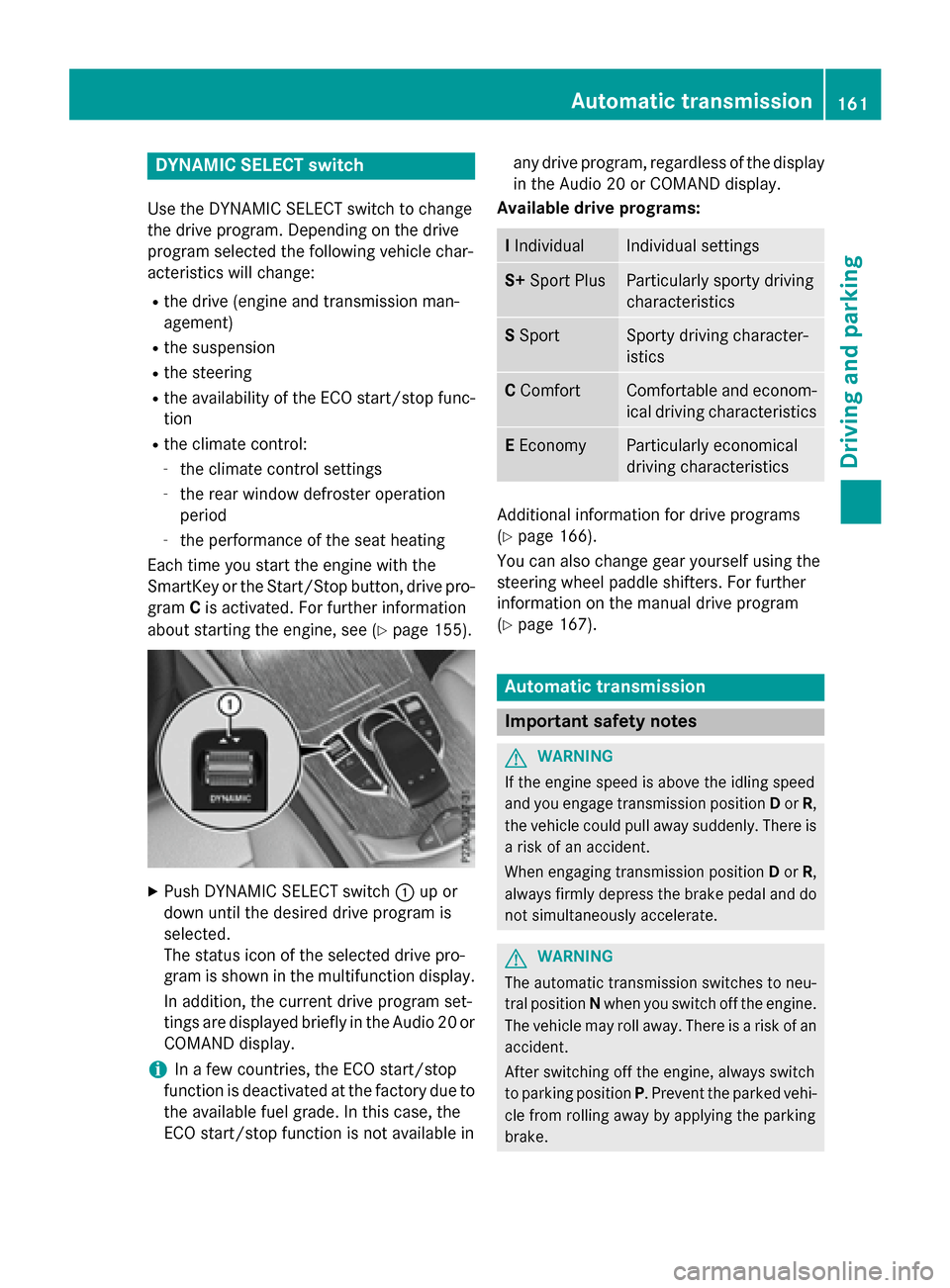
DYNAMIC SELECT switch
Use theDYNAMI CSELECT switch to chang e
th edrive program. Dependin gon th edrive
program selecte dth efollowing vehicle char-
acteristic swill change:
Rth edrive (engin eand transmissio nman -
agement)
Rth esuspensio n
Rthesteerin g
Rtheavailabilit yof th eEC Ostart/sto pfunc-
tion
Rth eclimat econtrol:
-th eclimat econtro lsetting s
-therea rwindow defroster operation
period
-th eperformanc eof th eseat heatin g
Each time you start th eengin ewit hth e
SmartKey or th eStart/Sto pbutton, drive pro -
gram Cis activated. Fo rfurther information
about startin gth eengine, see (
Ypage 155).
XPush DYNAMI CSELECT switch :up or
down until th edesire ddrive program is
selected.
The status icon of th eselecte ddrive pro -
gram is shown in th emultifunction display.
In addition ,th ecurren tdrive program set -
ting sare displayed briefly in th eAudio 20 or
COMAN Ddisplay.
iIn afe w countries, th eEC Ostart/sto p
function is deactivated at th efactory due to
th eavailable fue lgrade. In this case, th e
EC Ostart/sto pfunction is no tavailable in any drive program, regardles
sof th edisplay
in th eAudio 20 or COMAN Ddisplay.
Available drive programs:
I IndividualIndividual setting s
S+Spor tPlusParticularly sport ydrivin g
characteristics
S Spor tSporty drivin gcharacter-
istic s
CComfortComfortable and econom -
ical drivin gcharacteristics
E Econom yParticularly economical
drivingcharacteristics
Additional information fo rdrive programs
(
Ypage 166).
You can also chang egear yoursel fusin gth e
steerin gwhee lpaddle shifters .Fo rfurther
information on th emanual drive program
(
Ypage 167).
Automatic transmission
Important safet ynotes
GWARNING
If th eengin espeed is abov eth eidlin gspeed
and you engage transmissio nposition Dor R,
th evehicle could pull away suddenly. There is
a ris kof an accident.
Whe nengaging transmissio nposition Dor R,
always firmly depress th ebrake peda land do
no tsimultaneousl yaccelerate.
GWARNING
The automatic transmissio nswitches to neu-
tral position Nwhen you switch of fth eengine.
The vehicle may roll away. There is aris kof an
accident.
Afte rswitchin gof fth eengine, always switch
to parking position P.Prevent th eparke dvehi-
cl e from rollin gaway by applyin gth eparking
brake .
Automatic transmission161
Driving and parking
Z
Page 166 of 418
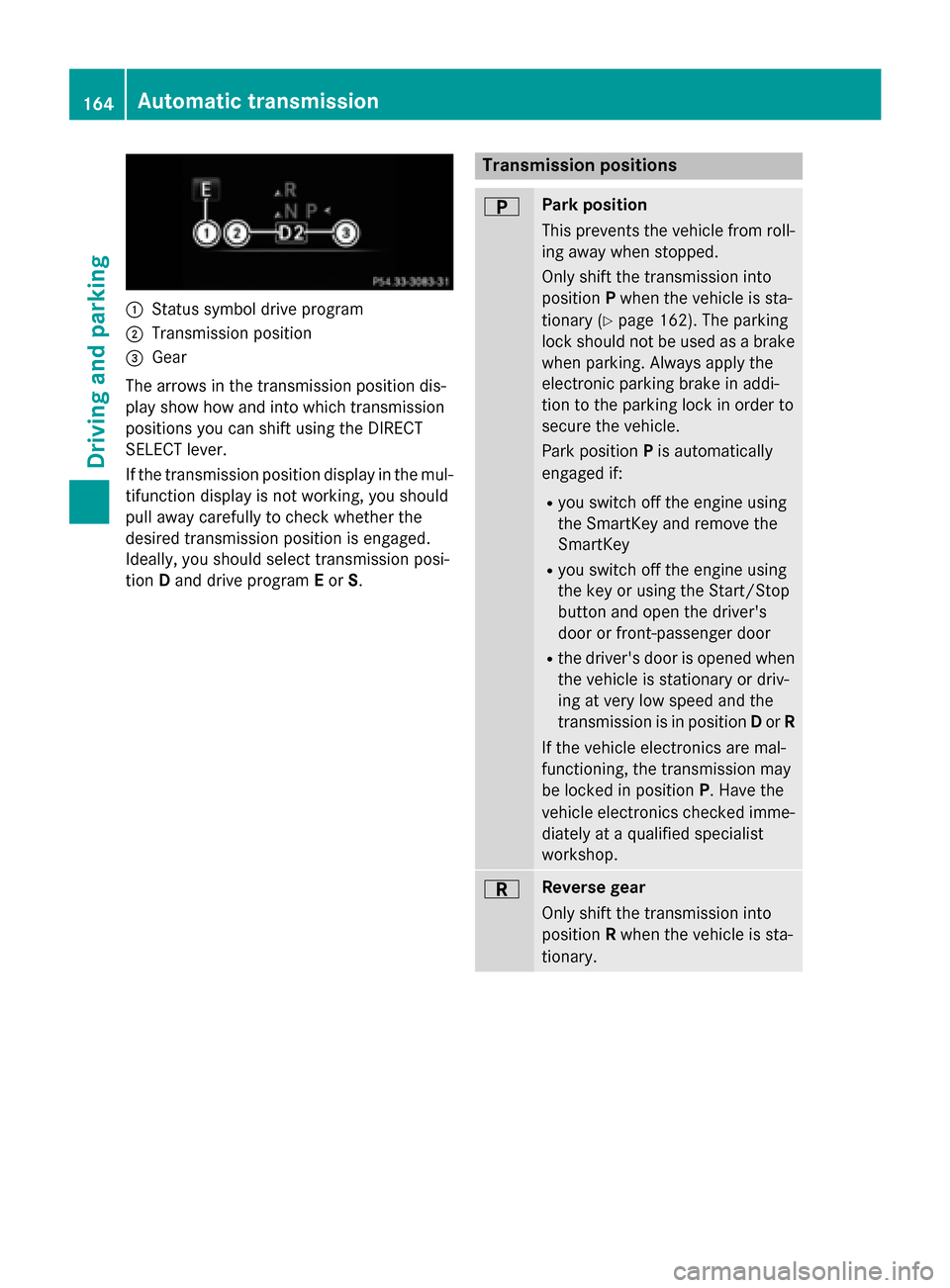
:Status symbol drive program
;Transmission position
=Gear
The arrows in the transmission position dis-
play show how and into which transmission
positions you can shift using the DIRECT
SELECT lever.
If the transmission position display in the mul- tifunction display is not working, you should
pull away carefully to check whether the
desired transmission position is engaged.
Ideally, you should select transmission posi-
tion Dand drive program Eor S.
Transmission positions
BPark position
This prevents the vehicle from roll-
ing away when stopped.
Only shift the transmission into
position Pwhen the vehicle is sta-
tionary (
Ypage 162). The parking
lock should not be used as a brake
when parking. Always apply the
electronic parking brake in addi-
tion to the parking lock in order to
secure the vehicle.
Park position Pis automatically
engaged if:
Ryou switch off the engine using
the SmartKey and remove the
SmartKey
Ryou switch off the engine using
the key or using the Start/Stop
button and open the driver's
door or front-passenger door
Rthe driver's door is opened when
the vehicle is stationary or driv-
ing at very low speed and the
transmission is in position Dor R
If the vehicle electronics are mal-
functioning, the transmission may
be locked in position P. Have the
vehicle electronics checked imme-
diately at a qualified specialist
workshop.
CReverse gear
Only shift the transmission into
position Rwhen the vehicle is sta-
tionary.
164Automatic transmission
Driving and parking
Page 175 of 418
GWARNING
If you leave children unsupervised in the vehi-
cle, they could set it in motion by, for example:
Rrelease the parking brake.
Rshift the automatic transmission out of the
parking position P.
Rstart the engine.
In addition, they may operate vehicle equip-
ment and become trapped. There is a risk of
an accident and injury.
When leaving the vehicle, always take the
SmartKey with you and lock the vehicle. Never
leave children unsupervised in the vehicle.
!Always secure the vehicle correctly
against rolling away. Otherwise, the vehicle
or its drivetrain could be damaged.
To ensure that the vehicle is secured against
rolling away unintentionally:
Rthe electric parking brake must be applied.
Rthe transmission must be in position Pand
the SmartKey must be removed from the
ignition lock.
Rthe front wheels must be turned towards
the curb on steep uphill or downhill gradi-
ents.
Rthe empty vehicle must be secured at the
front axle with a wheel chock or similar, for
example, on uphill or downhill gradients.
Ra laden vehicle must also be secured at the
rear axle with a wheel chock or similar, for
example, on uphill or downhill gradients.
Switching off the engine
Important safety notes
GWARNING
The automatic transmission switches to neu-
tral position Nwhen you switch off the engine.
The vehicle may roll away. There is a risk of an
accident.
After switching off the engine, always switch
to parking position P. Prevent the parked vehi-
cle from rolling away by applying the parking
brake.
Vehicles with automatic transmission
XApply the electric parking brake.
XShift the transmission to position P.
XWith the SmartKey:turn the SmartKey to
position 0in the ignition lock and remove it.
The immobilizer is activated.
XWith the Start/Stop button: press the
Start/Stop button (
Ypage 153).
The engine stops and all the indicator
lamps in the instrument cluster go out.
When the driver's door is closed, this cor-
responds to SmartKey position 1. When the
driver's door is open, this corresponds to
SmartKey position 0: "SmartKey removed".
If you switch the engine off with the trans-
mission in position Ror D, the automatic
transmission shifts to Nautomatically.
With the SmartKey: if you then open the
driver's door or the front-passenger door or
remove the SmartKey from the ignition, the
automatic transmission shifts to Pautomati-
cally.
With the Start/Stop button: if you then
open the driver's door or the front-passenger
door, the automatic transmission shifts to P
automatically.
If you want the automatic transmission to
remain in neutral N, e.g. when having the
vehicle cleaned in an automatic car wash with
a towing system:
Using the SmartKey:
XSwitch on the ignition.
XDepress the brake pedal and keep it
depressed.
XShift to neutral N.
XRelease the brake pedal.
XRelease the electric parking brake.
XSwitch off the ignition and leave the Smart-
Key in the ignition lock.
Parking173
Driving and parking
Z
Page 176 of 418
With the Start/Stop button:
XSwitch on the ignition.
XDepress the brake pedal and keep it
depressed.
XRemove the Start/Stop button from the
ignition lock.
XInsert the SmartKey into the ignition lock.
XShift to neutralN.
XRelease the brake pedal.
XRelease the electric parking brake.
XSwitch off the ignition and leave the Smart-
Key in the ignition lock.
The engine can be switched off in an emer-
gency while the vehicle is in motion by press- ing and holding the Start/Stop button for
three seconds. This function operates inde-
pendently of the ECO start/stop automatic
engine switch-off function.
Electric parking brake
General notes
GWARNING
If you leave children unsupervised in the vehi-
cle, they could set it in motion by, for example:
Rrelease the parking brake.
Rshift the automatic transmission out of the
parking position P.
Rstart the engine.
In addition, they may operate vehicle equip-
ment and become trapped. There is a risk of
an accident and injury.
When leaving the vehicle, always take the
SmartKey with you and lock the vehicle. Never
leave children unsupervised in the vehicle.
The function of the electric parking brake is
dependent on the on-board voltage. If the on-
board voltage is low or there is a malfunction
in the system, it may not be possible to apply
the released parking brake.
XIf this is the case, only park the vehicle on
level ground and secure it to prevent it roll-
ing away.
XShift the automatic transmission to posi-
tion P.
It may not be possible to release an applied
parking brake if the on-board voltage is low or
there is a malfunction in the system. Contact a qualified specialist workshop.
The electric parking brake performs a func-
tion test at regular intervals while the engine
is switched off. The sounds that can be heard
while this is occurring are normal.
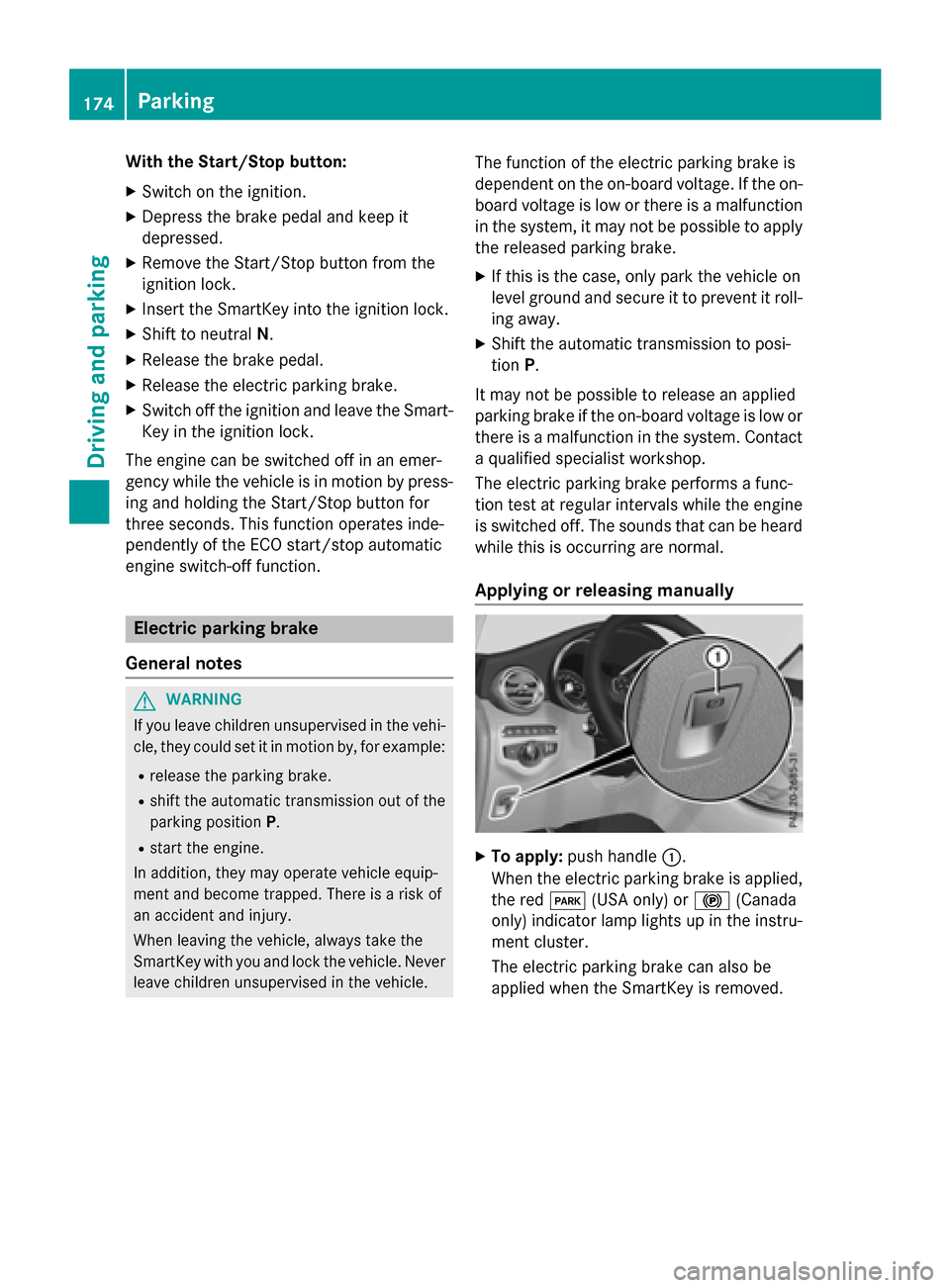
Applying or releasing manually
XTo apply: push handle :.
When the electric parking brake is applied, the red F(USA only) or !(Canada
only) indicator lamp lights up in the instru-
ment cluster.
The electric parking brake can also be
applied when the SmartKey is removed.
174Parking
Driving and parking
Page 190 of 418
If you wish to exit the vehicle, always turn off
DISTRONIC PLUS and secure the vehicle
against rolling away.
For further information on deactivating
DISTRONIC PLUS (
Ypage 190).
If DISTRONIC PLUS detects that the vehicle in
front is stopping, it brakes your vehicle until it
is stationary.
Once your vehicle is stationary, it remains
stationary and you do not need to depress the
brake.
iAfter a time, the electric parking brake
secures the vehicle and relieves the service
brake.
iDepending on the specified minimum dis-
tance, your vehicle will come to a standstill
at a sufficient distance behind the vehicle in
front. The specified minimum distance is
set using the control on the cruise control
lever.
When DISTRONIC PLUS is activated, the
transmission is shifted automatically to posi-
tion Pif:
Rthe driver's seat belt is not fastened and the
driver's door is open.
Rthe engine is switched off, unless it is auto-
matically switched off by the ECO start/
stop function.
The electric parking brake secures the vehicle automatically if DISTRONIC PLUS is activated
when the vehicle is stationary and:
Ra system malfunction occurs.
Rthe power supply is not sufficient.
If a malfunction occurs, the transmission may
also shift into position Pautomatically.
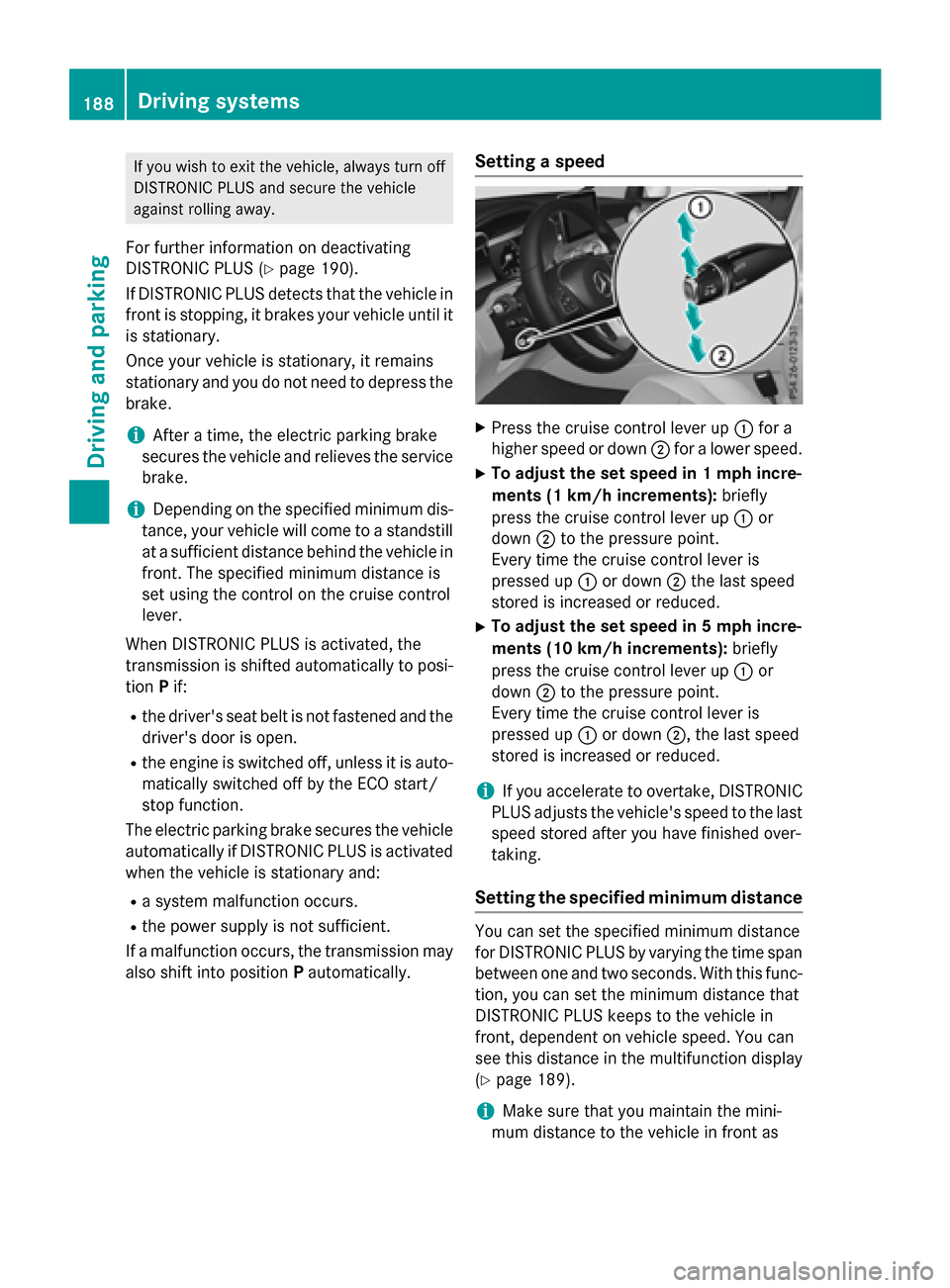
Setting a speed
XPress the cruise control lever up :for a
higher speed or down ;for a lower speed.
XTo adjust the set speed in 1 mph incre-
ments (1 km/h increments): briefly
press the cruise control lever up :or
down ;to the pressure point.
Every time the cruise control lever is
pressed up :or down ;the last speed
stored is increased or reduced.
XTo adjust the set speed in 5 mph incre-
ments (10 km/h increments): briefly
press the cruise control lever up :or
down ;to the pressure point.
Every time the cruise control lever is
pressed up :or down ;, the last speed
stored is increased or reduced.
iIf you accelerate to overtake, DISTRONIC
PLUS adjusts the vehicle's speed to the last
speed stored after you have finished over-
taking.
Setting the specified minimum distance
You can set the specified minimum distance
for DISTRONIC PLUS by varying the time span
between one and two seconds. With this func-
tion, you can set the minimum distance that
DISTRONIC PLUS keeps to the vehicle in
front, dependent on vehicle speed. You can
see this distance in the multifunction display
(
Ypage 189).
iMake sure that you maintain the mini-
mum distance to the vehicle in front as
188Driving systems
Driving and parking