display MERCEDES-BENZ GLC SUV 2015 Repair Manual
[x] Cancel search | Manufacturer: MERCEDES-BENZ, Model Year: 2015, Model line: GLC SUV, Model: MERCEDES-BENZ GLC SUV 2015Pages: 497, PDF Size: 15.27 MB
Page 216 of 497
Reset the building's circuit breaker. Other-
wise, the charging process cannot be contin- ued.
General information on the charging
process Observe the "Important safety notes"
(Y page 210).
The vehicle socket is located in the rear
bumper on the right below the tail lamp.
The charge socket flap and the vehicle are
centrally locked or unlocked simultaneously. Charging the high-voltage battery via
the mains socket
Charging cable for mains sockets Important safety notes
! Only use the charging cable to charge the
high-voltage battery. Do not use the charg-
ing cable for other purposes. It may other-
wise be damaged.
The vehicle is supplied with a charging cable
for connection to a mains socket. Only use
the charging cable supplied with the vehicle
or a charging cable approved for the vehicle.
i The charging process can vary depending
on the mains power supply. Therefore,
always observe the local information.
i For short charge times (charging with 16
A), connect the fast-charging cable to the
wallbox or charging station. You can also
use the optionally available charging cable
with the CE plug.
Information about charging from a wallbox
can be found at (Y page 216).
Information about charging at a charging sta-
tion can be found at (Y page 217).
Stowing the charging cable
The charging cable can be stowed in the bag
supplied in the luggage compartment of the vehicle and held in place with the Velcro fas-
tener.
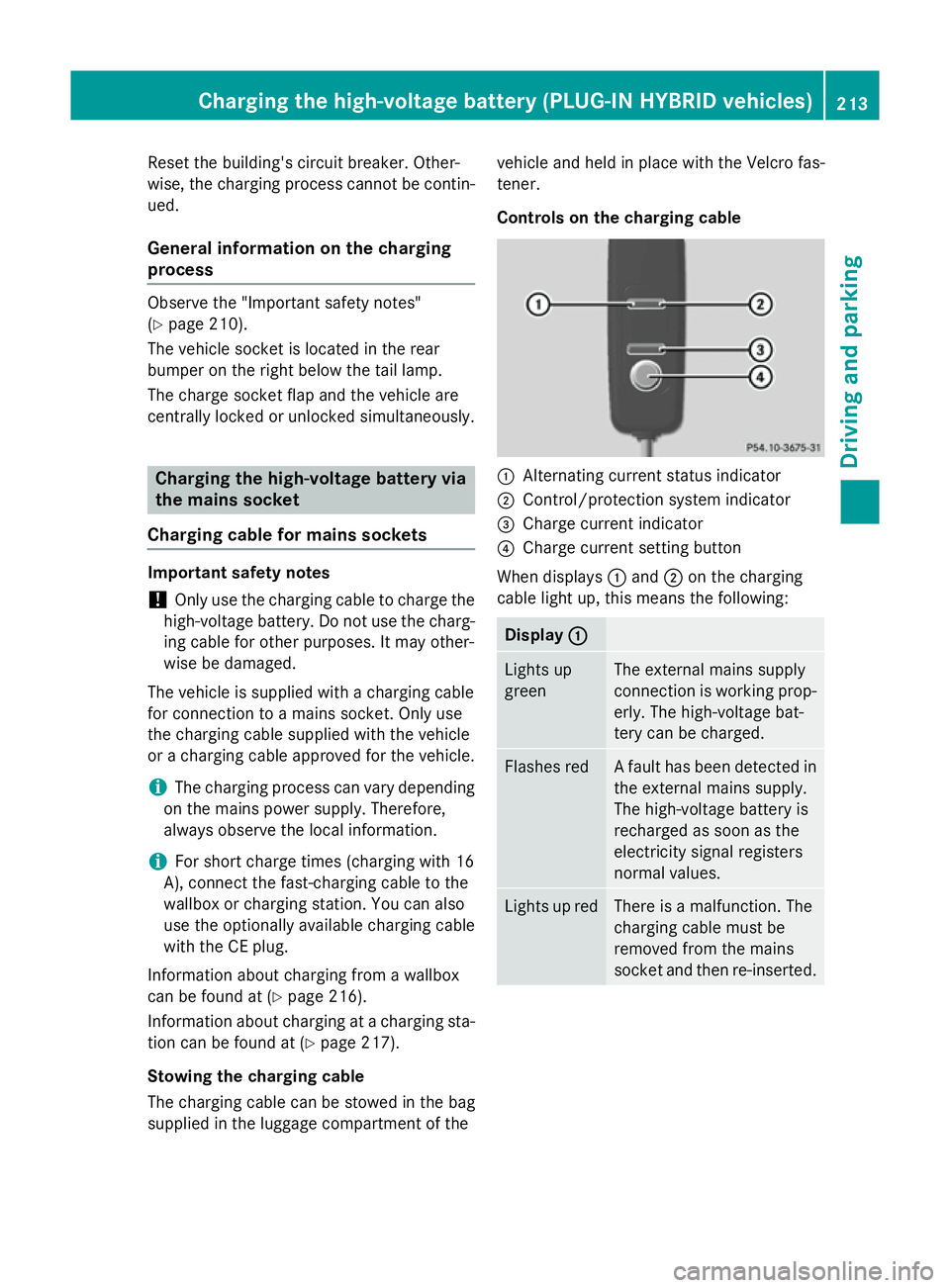
Controls on the charging cable
:
Alternating current status indicator
; Control/protection system indicator
= Charge current indicator
? Charge current setting button
When displays :and ;on the charging
cable light up, this means the following: Display
:
: Lights up
green The external mains supply
connection is working prop-
erly. The high-voltage bat-
tery can be charged. Flashes red A fault has been detected in
the external mains supply.
The high-voltage battery is
recharged as soon as the
electricity signal registers
normal values. Lights up red There is a malfunction. The
charging cable must be
removed from the mains
socket and then re-inserted.Cha
rging the high-voltage battery (PLUG-IN HYBRI D vehicles)
213Driving and parking Z
Page 217 of 497
Display
;
; Lights up
green There are no faults. The
high-voltage battery can be
charged.
Lights up red An impermissible current is
being supplied to the con-
trol unit. The high-voltage
battery cannot be charged.
i
Information on problems relating to the
charging process (Y page 218).
Setting the maximum charge current G
WARNING
If the charge current draw via a mains socket is too high during the charging process, the
external mains supply may overheat. There is a risk of fire.
Before charging, check the maximum permis-
sible charge current available at the location.
If necessary, contact a qualified specialist
company for assistance.
Adjust your vehicle's settings, if necessary.
! If the charge current is too high, the fuse
could be tripped or the external mains sup-
ply could overheat. Check if the external
mains supply is equipped to handle the pro- grammed charge current. If necessary,
reduce the programmed charge current or
use a different mains socket.
You can set a limit for the values of the charge
current used in charging the high-voltage bat- tery. This acts as a means of preventing the
mains supply from overloading. You can set
this limit by using the controls on the charging
cable or in the on-board computer's menu.
Only set the maximum charge current in the
on-board computer menu if there are no
charge current settings on the charging
cable.
The default value in the vehicle corresponds
to the maximum charge value.
The default value on the charging cable is the
minimum setting. This corresponds to the minimum available charge current from the
mains supply. The value on the charging cable
can be increased and is described below.
i The value of the maximum setting and the
adjustment value may vary depending on
the country.
Before charging the high-voltage battery,
check the maximum permissible charge cur-
rent for the relevant power socket.
X To adjust the setting: press button?
repeatedly until the desired setting is selec- ted in display =.
R Two LEDs are flashing: minimum setting
R All LEDs are flashing: maximum setting
If, after the charging process, the charging
cable is:
R left connected to the power socket, the
currently selected values will be used for
the next charging process.
R removed from the power socket, the values
will be reset to the minimum setting for the next charging process. You may then need
to reset the values of the maximum charge current.
i If the vehicle requires more time than
usual when charging, check the maximum
charge current settings using the controls
on the charging cable or in the on-board
computer's menu.
Indicator lamps on the vehicle socket
When the indicator lamps on the vehicle
socket light up, this means the following: Left indica-
tor lamp
Ì Ì
Lights up
white The charging cable can be
removed or connected.
Flashes
white The charging cable connec-
tor has been connected
incorrectly. 214
Cha
rging the high-voltage battery (PLUG-IN HYBRI D vehicles)Driving and parking
Page 218 of 497
Right indi-
cator lamp
Ý Ý
Flashes
orange The connection between
the vehicle and the current
source is being established
before charging begins.
Flashes
green The high-voltage battery is
charging.
Flashes red A malfunction has occurred
while charging.
The indicator lamp goes out
after approximately
90 seconds. Lights up
orange Charging of the high-voltage
battery has been tempora-
rily interrupted.
The indicator lamp goes out
after approximately
90 seconds. Lights up
green The high-voltage battery is
fully charged.
The indicator lamp goes out
after approximately
90 seconds. i
If the indicator lamps are off, lock or
unlock the vehicle. The indicator lamps will then display the current status of the charg-ing process again. Connecting the charging cable
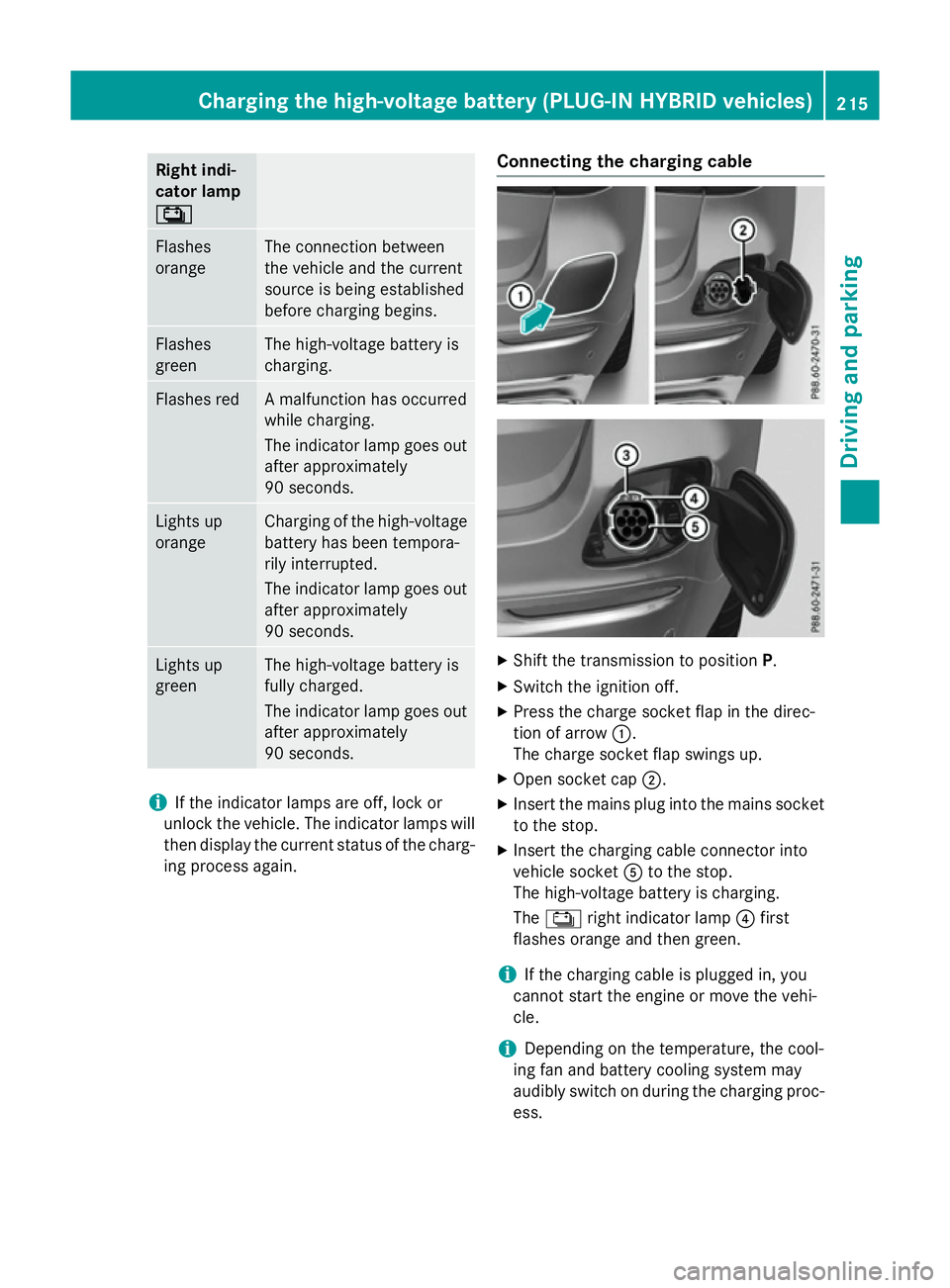
X
Shift the transmission to position P.
X Switch the ignition off.
X Press the charge socket flap in the direc-
tion of arrow :.
The charge socket flap swings up.
X Open socket cap ;.
X Insert the mains plug into the mains socket
to the stop.
X Insert the charging cable connector into
vehicle socket Ato the stop.
The high-voltage battery is charging.
The Ý right indicator lamp ?first
flashes orange and then green.
i If the charging cable is plugged in, you
cannot start the engine or move the vehi-
cle.
i Depending on the temperature, the cool-
ing fan and battery cooling system may
audibly switch on during the charging proc- ess. Charging the high-voltage battery (PLUG-IN HYBRID vehicles)
215Driving and parking Z
Page 219 of 497
Removing the charging cable
The high-voltage battery is fully charged
when:
R the charge level display reaches 100% in
the multifunction display
R the indicator lamp in the vehicle socket
lights up green after unlocking or locking
the vehicle
You can find information on the charge status indicator in the multifunction display in
"PLUG-IN HYBRID operation", section
"Menus and submenus" under "Energy flow
display" (Y page 291).
i After the charging cable has been discon-
nected, the indicator lamps in the vehicle
socket remain lit for some time before
switching off.
X Unlock the vehicle.
X Remove the charging cable from vehicle
socket Awithin 30 seconds. Otherwise,
the vehicle will relock.
X Close socket cap ;.
X Close charge socket flap :.
X Remove the charging cable from the mains
socket.
X Stow the charging cable safely in the vehi-
cle (Y page 213). Charging the high-voltage battery
from the wallbox
General notes It is recommended that you charge your vehi-
cle using a wallbox or at a charging station.
Use the optionally available fast-charging
cable when charging your vehicle from a wall- box. The charging cable is stored in a bag in
the luggage compartment.
Only use charging cables that have been tes-ted and approved by the manufacturer for
charging the high-voltage battery in an elec-
tric vehicle. Observe the "Important safety notes"
(Y
page 210).
Connecting the charging cable X
Shift the transmission to position P.
X Switch the ignition off.
X Press the charge socket flap in the direc-
tion of arrow :.
The charge socket flap swings up.
X Open socket cap ;.
X Insert the charging cable connector into
vehicle socket Ato the stop.
X Wallbox without a preinstalled cable: insert
the charging cable connector into the
power socket of the wallbox to the stop.
The high-voltage battery is charging.
The Ý right indicator lamp ?first
flashes orange and then green.
i If the charging cable is plugged in, you
cannot start the engine or move the vehi-
cle.
i Depending on the temperature, the cool-
ing fan and battery cooling system may 216
Charging the high-voltage battery (PLUG-IN HYBRID vehicles)Driving and parking
Page 220 of 497
audibly switch on during the charging proc-
ess.
Removing the charging cable The high-voltage battery is fully charged
when:
R the charge level display reaches 100% in
the multifunction display
R the indicator lamp in the vehicle socket
lights up green after unlocking or locking
the vehicle
You can find information on the charge status indicator in the multifunction display in
"PLUG-IN HYBRID operation", section
"Menus and submenus" under "Energy flow
display" (Y page 291).
i After the charging cable has been discon-
nected, the indicator lamps in the vehicle
socket remain lit for some time before
switching off.
X Unlock the vehicle.
X Remove the charging cable from vehicle
socket Awithin 30 seconds. Otherwise,
the vehicle will relock.
X Close socket cap ;.
X Close charge socket flap :.
X Wallbox without a preinstalled cable: where
necessary, remove the charging cable from the wallbox and stow it safely in the vehicle. Charging the high-voltage battery at
the charging station
Before beginning the charging process at a
charging station without communication
capabilities, you must first activate the sta-
tion, e.g. using an RFID card. Observe the on- site operator instructions for the charging
station.
Connecting the vehicle to a charging station
is identical to connecting it to a wallbox
(Y page 216). Charging the high-voltage battery (PLUG-IN HYBRID vehicles)
217Driving and parking Z
Page 225 of 497
Releasing automatically
The electric parking brake of your vehicle is
released automatically when all of the follow-
ing conditions are fulfilled:
R the engine is running
R the transmission is in position Dor R
R the seat belt is fastened
R you depress the accelerator pedal
If the transmission is in position R, the boot lid
must be closed.
If your seat belt is not fastened, the following conditions must be fulfilled to automatically
release the electric parking brake:
R the driver's door is closed
R you have shifted out of transmission posi-
tion Por you have previously driven faster
than 3 km/h
Ensure that you do not depress the acceler-
ator pedal unintentionally. Otherwise, the
parking brake will be released and the vehicle will start to move.
Emergency braking The vehicle can also be braked during an
emergency by using the electric parking
brake.
X While driving, push handle :of the electric
parking brake (Y page 220).
The vehicle is braked as long as you keep
handle :of the electric parking brake
depressed. The longer electric parking
brake handle :is depressed, the greater
the braking force.
During braking:
R a warning tone sounds
R the Release
Release parking parkingbrake
brakedisplay mes-
sage appears
R the red !indicator lamp in the instru-
ment cluster flashes
When the vehicle has been braked to a stand- still, the electric parking brake is applied. Parking up the vehicle
If you leave the vehicle parked up for longer
than four weeks, the battery may be damaged
by exhaustive discharging.
If you leave the vehicle parked up for longer
than six weeks, it may suffer from lack of use.
X Contact a qualified specialist workshop
and seek advice.
i You can obtain information about trickle
chargers from a qualified specialist work-
shop.
PLUG-IN HYBRID vehicles: observe the
important safety notes for the high-voltage
battery (Y page 440). Driving tips
General driving tips
Important safety notes G
WARNING
If you switch off the ignition while driving,
safety-relevant functions are only available
with limitations, or not at all. This could affect, for example, the power steering and the brake
boosting effect. You will require considerably
more effort to steer and brake. There is a risk of an accident.
Do not switch off the ignition while driving.
Drive sensibly – save fuel Observe the following tips to save fuel:
X The tyres should always be inflated to the
recommended tyre pressure.
X Remove unnecessary loads.
X Remove roof racks when they are not nee-
ded.
X Warm up the engine at low engine speeds.
X Avoid frequent acceleration or braking.
X Have all maintenance work carried out as
indicated by the service intervals in the 222
Driving tipsDriving and parking
Page 226 of 497
Service Booklet or by the service interval
display.
Fuel consumption also increases when driv-
ing in cold weather, in stop-start traffic, on
short journeys and in hilly terrain. ECO display
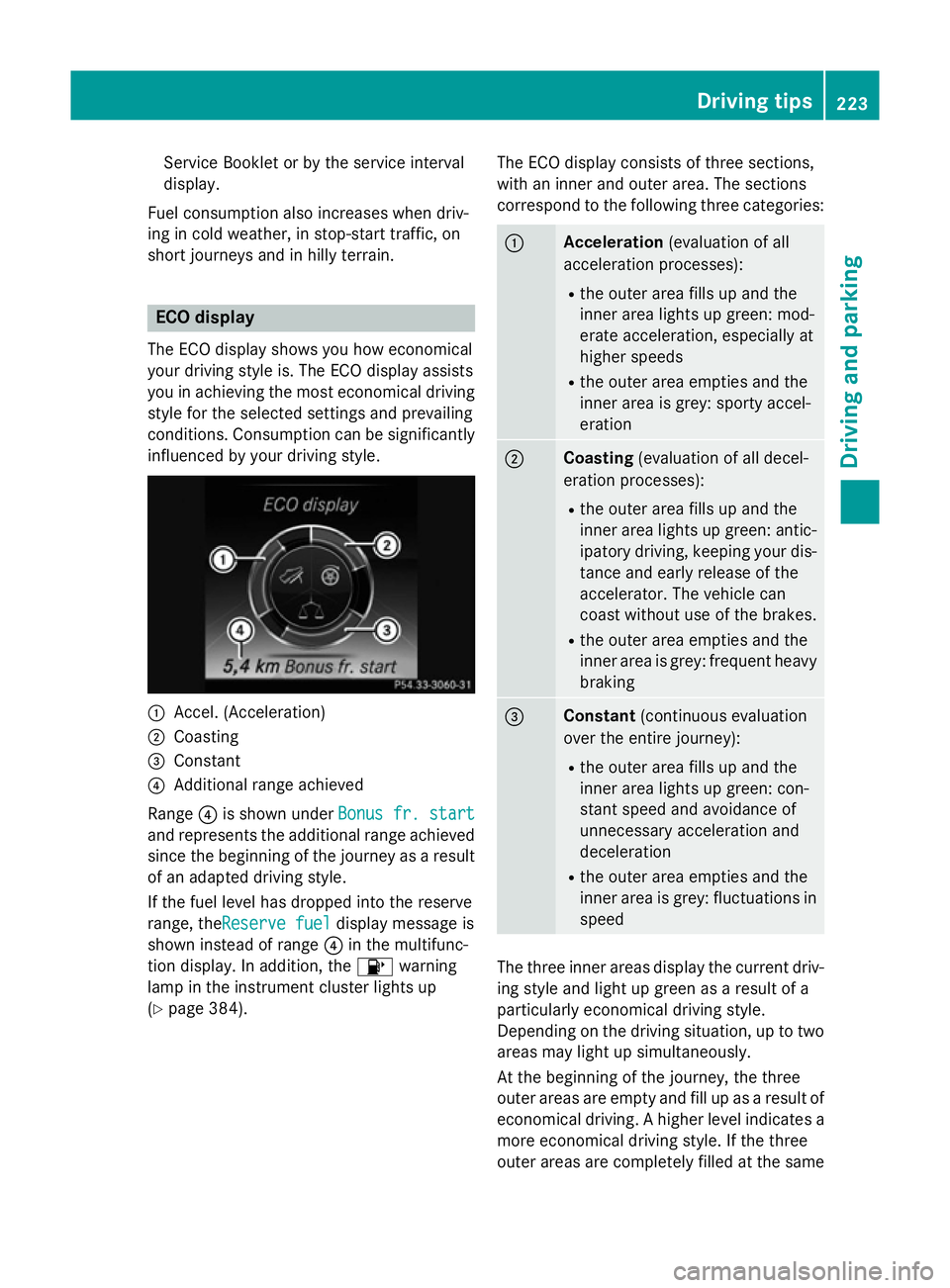
The ECO display shows you how economical
your driving style is. The ECO display assists
you in achieving the most economical driving
style for the selected settings and prevailing
conditions. Consumption can be significantly
influenced by your driving style. :
Accel. (Acceleration)
; Coasting
= Constant
? Additional range achieved
Range ?is shown under Bonus fr. start Bonus fr. start
and represents the additional range achieved since the beginning of the journey as a resultof an adapted driving style.
If the fuel level has dropped into the reserve
range, theReserve fuel Reserve fuel display message is
shown instead of range ?in the multifunc-
tion display. In addition, the 8warning
lamp in the instrument cluster lights up
(Y page 384). The ECO display consists of three sections,
with an inner and outer area. The sections
correspond to the following three categories: :
Acceleration
(evaluation of all
acceleration processes):
R the outer area fills up and the
inner area lights up green: mod-
erate acceleration, especially at
higher speeds
R the outer area empties and the
inner area is grey: sporty accel-
eration ;
Coasting
(evaluation of all decel-
eration processes):
R the outer area fills up and the
inner area lights up green: antic-
ipatory driving, keeping your dis- tance and early release of the
accelerator. The vehicle can
coast without use of the brakes.
R the outer area empties and the
inner area is grey: frequent heavy
braking =
Constant
(continuous evaluation
over the entire journey):
R the outer area fills up and the
inner area lights up green: con-
stant speed and avoidance of
unnecessary acceleration and
deceleration
R the outer area empties and the
inner area is grey: fluctuations in
speed The three inner areas display the current driv-
ing style and light up green as a result of a
particularly economical driving style.
Depending on the driving situation, up to two
areas may light up simultaneously.
At the beginning of the journey, the three
outer areas are empty and fill up as a result of economical driving. A higher level indicates a more economical driving style. If the three
outer areas are completely filled at the same Driving tips
223Driving and parking Z
Page 227 of 497
time, the driver has adopted the most eco-
nomical driving style for the selected settings
and prevailing conditions. The ECO display
border lights up.
The ECO display does not indicate the actual fuel consumption. The additionally achieved
range displayed under Bonus fr. start
Bonus fr. start
does not indicate a fixed consumption reduc-
tion.
In addition to driving style, the actual con-
sumption is affected by other factors, such
as:
R load
R tyre pressure
R cold start
R choice of route
R the use of electrical consumers
These factors are not included in the ECO dis-
play.
An economical driving style involves driving at a moderate engine speed.
To achieve a higher value in the categories
"acceleration" and "smooth driving":
R observe the gearshift recommendation
R drive the vehicle in drive program E
On long journeys at a constant speed, e.g. on the motorway, only the outer area for "con-
stant" will change.
The ECO display summarises the driving style
from the start of the journey to its completion. Therefore, there are more marked changes in
the outer areas at the start of a journey. Dur- ing a prolonged driving time, these changes
are smaller. For more marked changes, per-
form a manual reset (Y page 319).
Further information on the ECO display
(Y page 318). Brakes
Important safety notes G
WARNING
If you shift down on a slippery road surface in an attempt to increase the engine's braking
effect, the drive wheels could lose their grip.
This increases the risk of skidding and having
an accident.
Do not shift down for additional engine brak-
ing on a slippery road surface.
Downhill gradients Change into a lower gear in good time on long
and steep downhill gradients. Take particular note of this when driving a laden vehicle and
when towing a trailer.
This also applies if cruise control, DISTRONIC
PLUS or SPEEDTRONIC are activated.
This will use the braking effect of the engine,
so less braking will be required to maintain
vehicle speed. This relieves the load on the
brake system and prevents the brakes from
overheating and wearing too quickly.
Heavy and light loads G
WARNING
The braking system can overheat if you leave your foot on the brake pedal while driving.
This increases the braking distance and could
even cause the braking system to fail. There is
a risk of an accident.
Never use the brake pedal as a footrest. Do
not simultaneously depress both the brake
pedal and the accelerator pedal while driving.
! Depressing the brake pedal constantly
results in excessive and premature wear to
the brake pads.
If heavy demands are made on the brakes, do not park the vehicle immediately. Drive on for
a short while. This allows the airflow to cool
the brakes more quickly. 224
Driving
tipsDriving an d parking
Page 234 of 497
Important safety notes
If you fail to adapt your driving style, cruise
control can neither reduce the risk of an acci-
dent nor override the laws of physics. Cruise
control cannot take into account road,
weather or traffic conditions. Cruise control is only an aid. You are responsible for the dis-
tance to the vehicle in front, for vehicle speed,
for braking in good time, and for staying in
lane.
Do not use cruise control:
R in road and traffic conditions which do not
allow you to maintain a constant speed, e.g.
in heavy traffic or on winding roads
R on smooth or slippery roads. Braking or
accelerating can cause the drive wheels to lose traction and the vehicle could then
skid
R when there is poor visibility, e.g. due to fog,
heavy rain or snow
If there is a change of drivers, advise the new
driver of the speed stored.
i The speed indicated in the speedometer
may differ slightly from the speed stored.
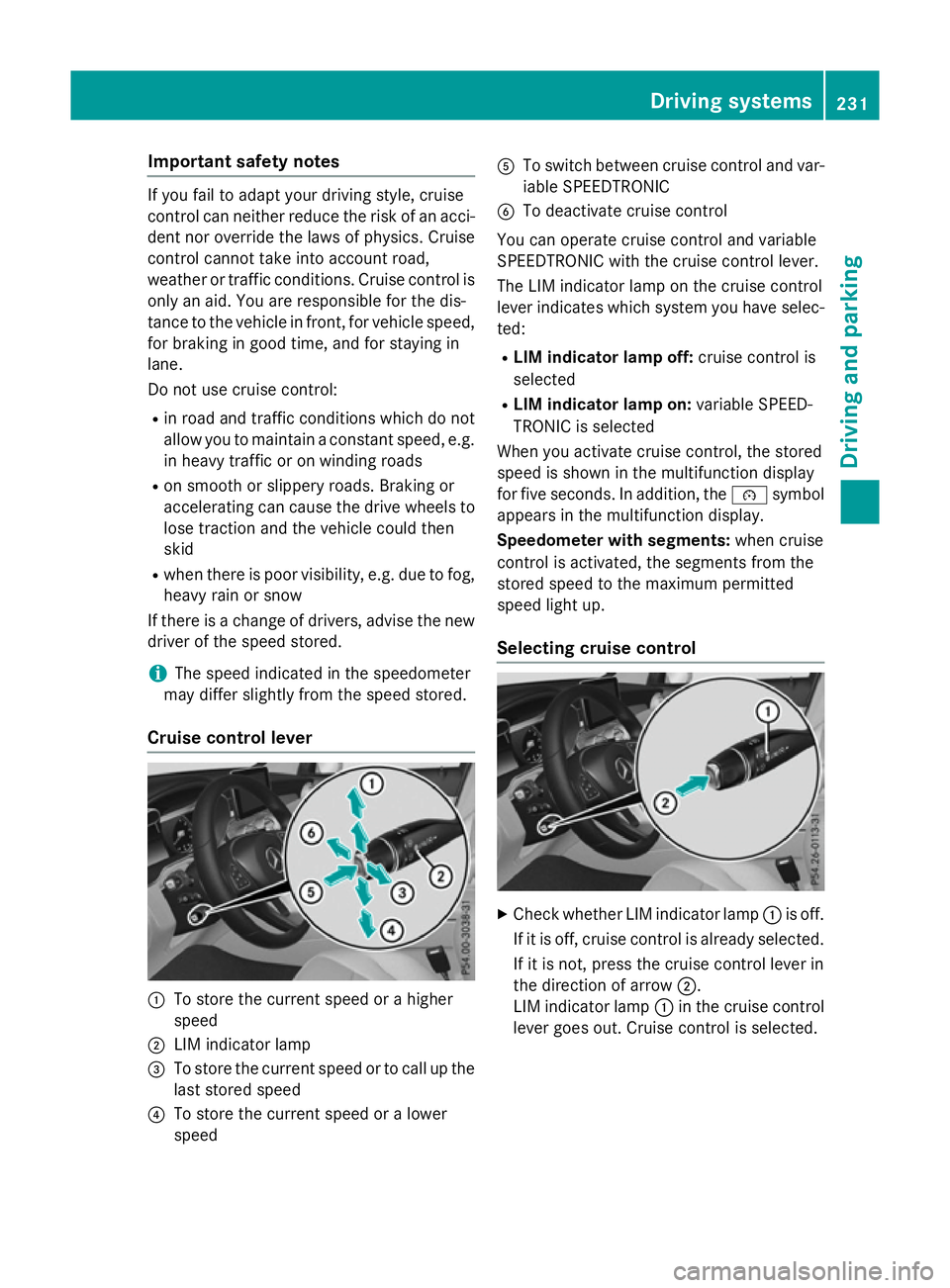
Cruise control lever :
To store the current speed or a higher
speed
; LIM indicator lamp
= To store the current speed or to call up the
last stored speed
? To store the current speed or a lower
speed A
To switch between cruise control and var-
iable SPEEDTRONIC
B To deactivate cruise control
You can operate cruise control and variable
SPEEDTRONIC with the cruise control lever.
The LIM indicator lamp on the cruise control
lever indicates which system you have selec-
ted:
R LIM indicator lamp off: cruise control is
selected
R LIM indicator lamp on: variable SPEED-
TRONIC is selected
When you activate cruise control, the stored
speed is shown in the multifunction display
for five seconds. In addition, the ésymbol
appears in the multifunction display.
Speedometer with segments: when cruise
control is activated, the segments from the
stored speed to the maximum permitted
speed light up.
Selecting cruise control X
Check whether LIM indicator lamp :is off.
If it is off, cruise control is already selected. If it is not, press the cruise control lever in
the direction of arrow ;.
LIM indicator lamp :in the cruise control
lever goes out. Cruise control is selected. Driving systems
231Driving and parking Z
Page 237 of 497
i
The speed indicated in the speedometer
may differ slightly from the limit speed
stored.
Variable SPEEDTRONIC General notes
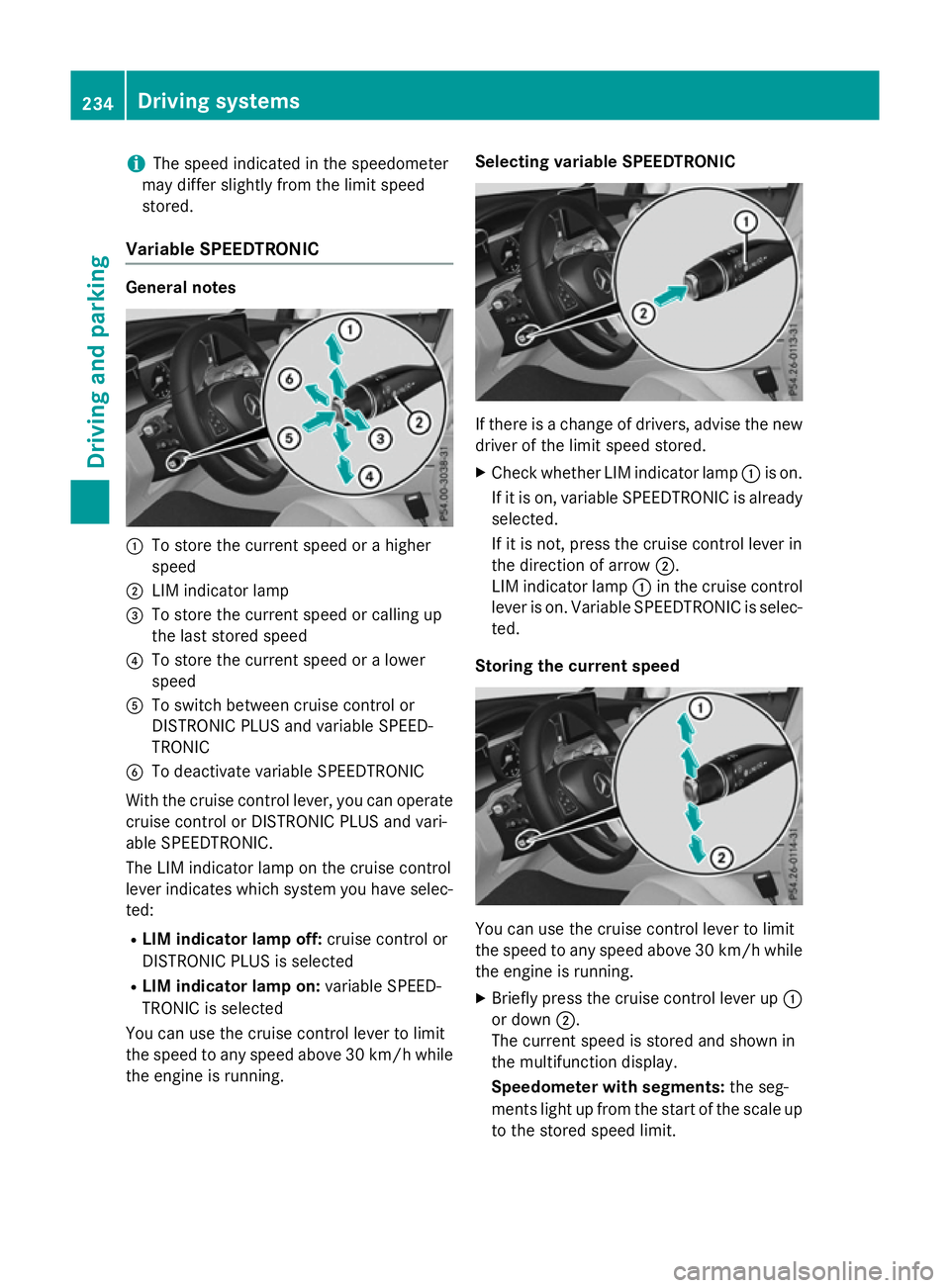
:
To store the current speed or a higher
speed
; LIM indicator lamp
= To store the current speed or calling up
the last stored speed
? To store the current speed or a lower
speed
A To switch between cruise control or
DISTRONIC PLUS and variable SPEED-
TRONIC
B To deactivate variable SPEEDTRONIC
With the cruise control lever, you can operate
cruise control or DISTRONIC PLUS and vari-
able SPEEDTRONIC.
The LIM indicator lamp on the cruise control
lever indicates which system you have selec- ted:
R LIM indicator lamp off: cruise control or
DISTRONIC PLUS is selected
R LIM indicator lamp on: variable SPEED-
TRONIC is selected
You can use the cruise control lever to limit
the speed to any speed above 30 km/hw hile
the engine is running. Selecting variable SPEEDTRONIC
If there is a change of drivers, advise the new
driver of the limit speed stored.
X Check whether LIM indicator lamp :is on.
If it is on, variable SPEEDTRONIC is already
selected.
If it is not, press the cruise control lever in
the direction of arrow ;.
LIM indicator lamp :in the cruise control
lever is on. Variable SPEEDTRONIC is selec-
ted.
Storing the current speed You can use the cruise control lever to limit
the speed to any speed above 30 km/h while
the engine is running.
X Briefly press the cruise control lever up :
or down ;.
The current speed is stored and shown in
the multifunction display.
Speedometer with segments: the seg-
ments light up from the start of the scale up
to the stored speed limit. 234
Driving systemsDriving and parking