tailgate MERCEDES-BENZ GLC SUV 2015 Owner's Manual
[x] Cancel search | Manufacturer: MERCEDES-BENZ, Model Year: 2015, Model line: GLC SUV, Model: MERCEDES-BENZ GLC SUV 2015Pages: 497, PDF Size: 15.27 MB
Page 266 of 497
Activating/deactivating the reversing
camera X
To activate: make sure that the key is in
position 2in the ignition lock.
X Make sure that the Activation by R
Activation by R
gear
gear function is selected in Audio 20 or
COMAND Online (see the Digital Owner's
Manual).
X Engage reverse gear.
The reversing camera flap opens. The area
behind the vehicle is shown with guide lines
in the Audio 20 or COMAND Online display.
The image from the reversing camera is
available throughout the manoeuvring
process.
X To change the function mode for vehi-
cles with trailer tow hitch: using the
Audio 20 or COMAND Online controller,
select symbol :for the "Reverse parking"
function or symbol ;for "Coupling up a
trailer".
The symbol of the selected function is high-
lighted.
To deactivate: the reversing camera deacti-
vates if you shift the transmission to Por after
driving forwards a short distance. Messages in the Audio 20 or COMAND
Online display The reversing camera may show a distorted
view of obstacles or show them incorrectly or
not at all. Obstacles are not shown by the
reversing camera in the following locations:
R very close to the rear bumper
R under the rear bumper
R in the area immediately above the boot lid
handle or tailgate handle
! Objects not at ground level may appear to
be further away than they actually are, e.g.:
R the bumper of a parked vehicle
R the drawbar of a trailer
R the ball coupling of a trailer tow hitch
R the rear section of an HGV
R a slanted post
Use the guidelines only for orientation.
Approach objects no further than the bot-
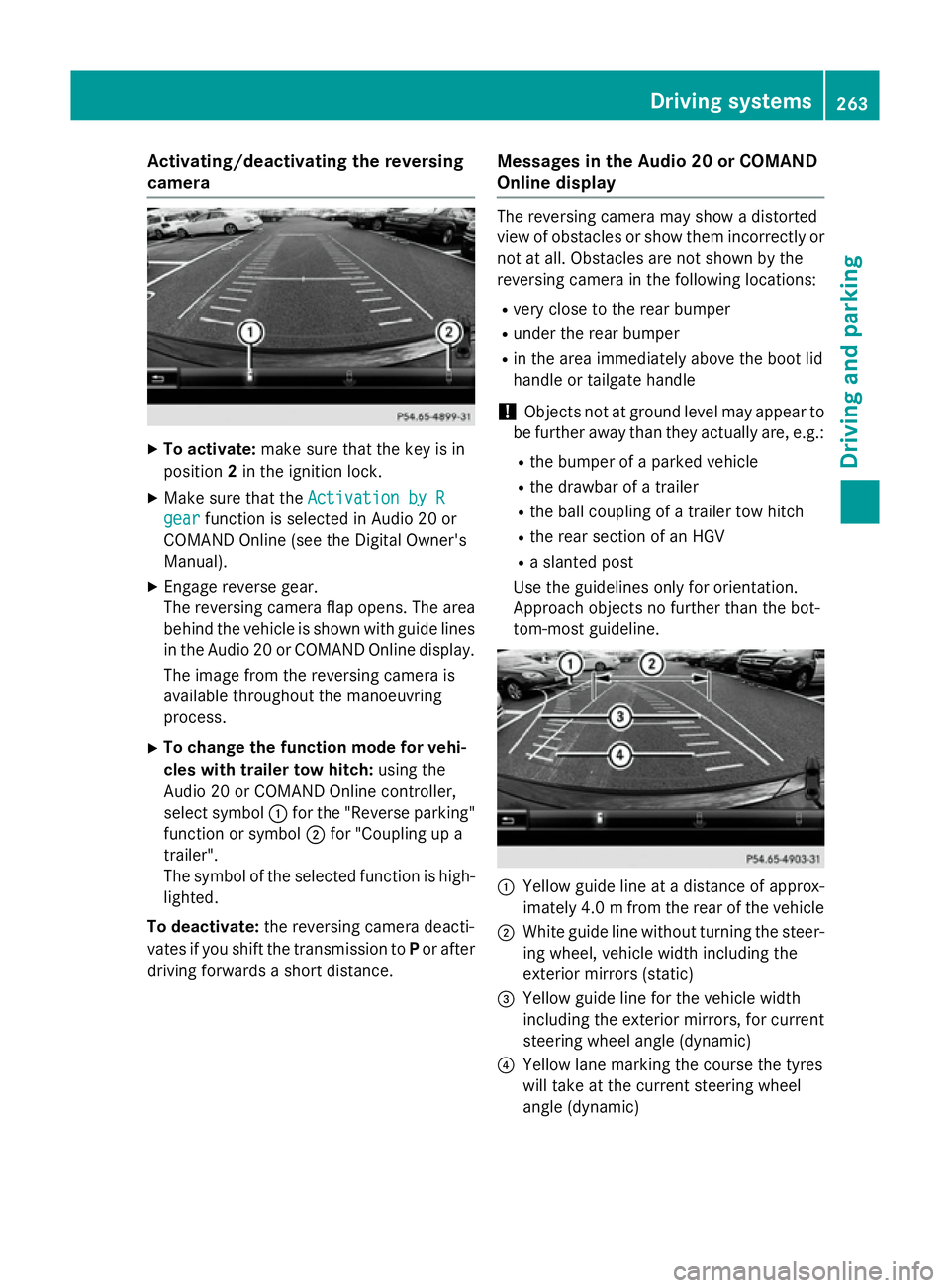
tom-most guideline. :
Yellow guide line at a distance of approx-
imately 4.0 mfrom the rear of the vehicle
; White guide line without turning the steer-
ing wheel, vehicle width including the
exterior mirrors (static)
= Yellow guide line for the vehicle width
including the exterior mirrors, for current
steering wheel angle (dynamic)
? Yellow lane marking the course the tyres
will take at the current steering wheel
angle (dynamic) Driving systems
263Driving and parking Z
Page 271 of 497
applies to the areas behind, in front of and
beside the vehicle. You could otherwise
endanger yourself and others.
The 360° camera will not function or will
function only in a limited manner:
R if the doors are open
R if the exterior mirrors are folded in
R if the boot lid or tailgate is open
R in heavy rain, snow or fog
R at night or in very dark places
R if the cameras are exposed to very bright
light
R if the area is lit by fluorescent bulbs or LED
lighting (the display may flicker)
R if the camera lenses mist up, e.g. when
driving into a heated garage in winter, caus- ing a rapid change in temperature
R if the camera lenses are dirty or covered
R if the vehicle components in which the
cameras are fitted are damaged. In this
event, have the camera position and setting
checked at a qualified specialist workshop.
Do not use the 360° camera under such cir-
cumstances. You could otherwise injure oth-
ers or damage objects when parking the vehi- cle.
The guide lines in the COMAND display show
the distances to your vehicle. The distances
only apply to road level.
In trailer mode, the guide lines are shown at
the level of the trailer tow hitch.
The camera in the rear area is protected by
means of a flap. This flap opens when the
360° camera is activated. Observe the notes on cleaning (Y page 425). For technical rea-
sons, the flap may remain open briefly after
the 360° camera has been deactivated.
On vehicles with height-adjustable suspen-
sion, due to the technical conditions, leaving
the standard height can result in:
R inaccuracies in the guide lines
R inaccuracies in the display of generated
images (top view) Activation conditions The 360° camera image can be displayed if:
R Audio 20 or COMAND Online is switched on
(see the Digital Owner's Manual)
R the 360° camera 360° camera function is switched on
i If you are driving faster than at a moderate
speed and switch on the 360° camera, a
warning message appears.
The warning message disappears if:
R you are again driving at a moderate
speed. The 360° camera is then activa-
ted.
R the message is confirmed with the %
button.
Switching the 360° camera on/off
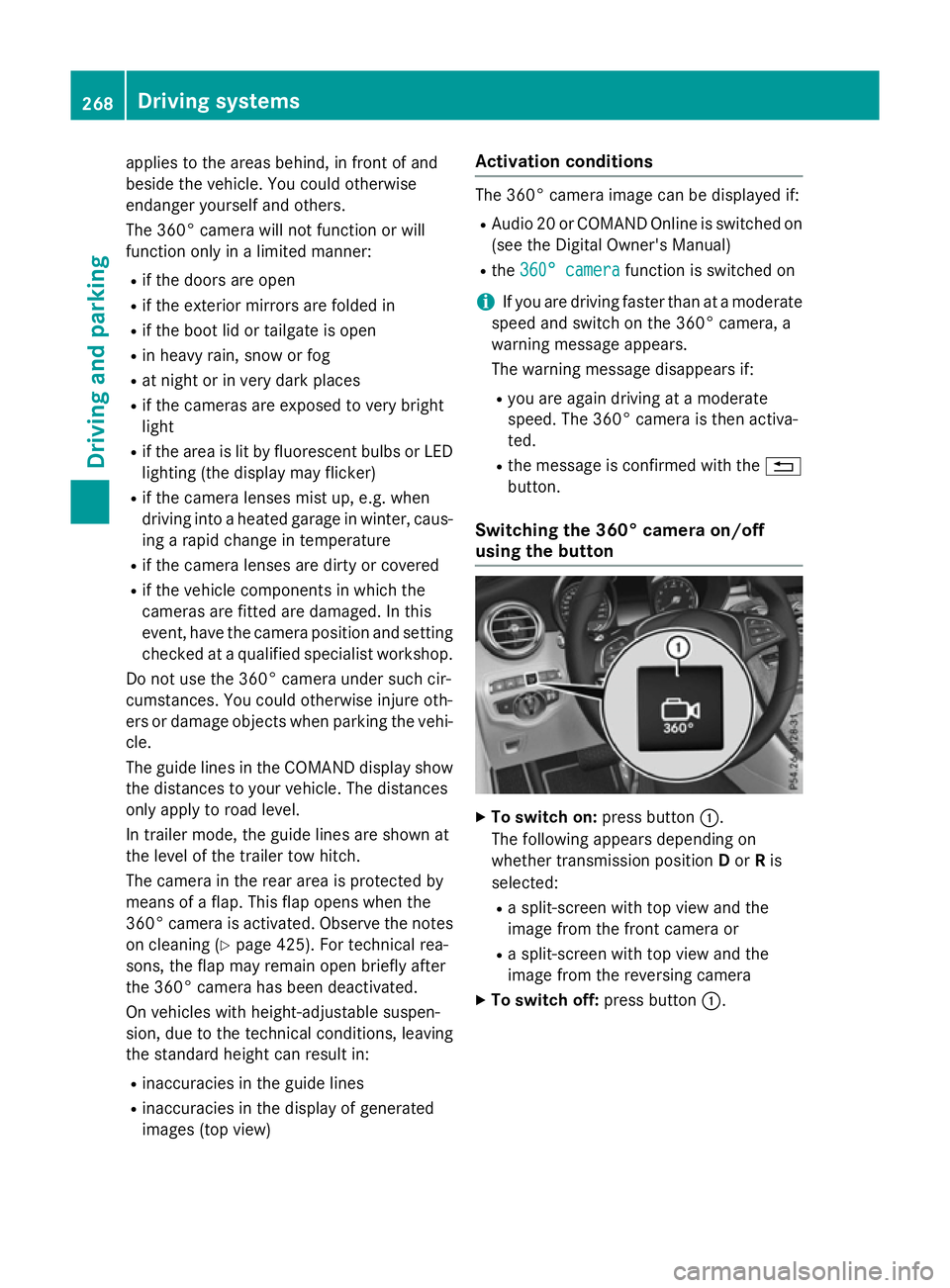
using the button X
To switch on: press button:.
The following appears depending on
whether transmission position Dor Ris
selected:
R a split-screen with top view and the
image from the front camera or
R a split-screen with top view and the
image from the reversing camera
X To switch off: press button:.268
Driving systemsDriving and parking
Page 272 of 497
Switching on the 360° camera using
Audio 20 or COMAND Online X
To select 360° camera
360° camera in the vehicle car-
ousel: turn and press the controller.
The following appears depending on
whether transmission position Dor Ris
selected:
R a split-screen with top view and the
image from the front camera or
R a split-screen with top view and the
image from the reversing camera
Activating the 360° camera using
reverse gear You can show images from the 360° camera
automatically by engaging reverse gear.
X Make sure that the key is in position 2in the
ignition lock.
X Make sure that the Activation by R Activation by R
gear
gear function is selected in Audio 20 or
COMAND Online (see the Digital Owner's
Manual).
X To show the 360° camera image: engage
reverse gear.
The area behind the vehicle is shown in the
Audio 20 or COMAND display in split-
screen mode. You see the top view of the
vehicle and the image from the reversing
camera.
Selecting the split-screen view or full
screen mode Switching between split screen views:
X To switch to the line with the vehicle icons:
slide 5the controller.
X To select a vehicle icon: turn the controller.
Switching to full screen mode:
X 180° view
180° view Turn and press the controller. i
The full screen option is only available in
the following views:
R Top view with image from the reversing
camera
R Top view with image from the front cam-
era
Displays in the Audio 20 or COMAND
display Important safety notes
The camera system may show a distorted
view of obstacles or show them incorrectly or
not at all. Obstacles are not shown by the
system in the following locations:
R under the front and rear bumpers
R very close to the front and rear bumpers
R in the area immediately above the boot lid
handle or tailgate handle
R very close to the exterior mirrors
R in the transitional areas between the vari-
ous cameras in the virtual top view
! Objects not at ground level may appear to
be further away than they actually are, e.g.:
R the bumper of a parked vehicle
R the drawbar of a trailer
R the ball coupling of a trailer tow hitch
R the rear section of an HGV
R a slanted post
Use the guidelines only for orientation.
Approach objects no further than the bot-
tom-most guideline. Driving systems
269Driving and parking Z
Page 307 of 497
of the added maximum rear axle load when
towing a trailer, the vehicle/trailer combina-
tion may not exceed a maximum speed of
100 km/h for reasons concerning the oper-
ating permit. This also applies in countries in
which the permissible maximum speed for
vehicle/trailer combinations is above
100 km/h.
When towing a trailer, your vehicle's handling characteristics will be different in comparison
to when driving without a trailer and it will
consume more fuel.
Change into a lower gear in good time on long
and steep downhill gradients.
This also applies if cruise control, DISTRONIC PLUS or SPEEDTRONIC are activated.
This will use the braking effect of the engine,
so less braking will be required to maintain
vehicle speed. This relieves the load on the
brake system and prevents the brakes from
overheating and wearing too quickly. If you
need additional braking, depress the brake
pedal repeatedly rather than continuously.
Driving tips If the trailer swings from side to side:
X Do not accelerate.
X Do not countersteer.
X Brake if necessary.
R Maintain a greater distance to the vehicle in
front than when driving without a trailer.
R Avoid braking abruptly. If possible, brake
gently at first to allow the trailer to run on.
Then, increase the braking force rapidly.
R The values given for gradient-climbing
capabilities from a standstill refer to sea
level. When driving in mountainous areas,
note that the power output of the engine,
and consequently the vehicle's gradient-
climbing capability, decrease with increas-
ing altitude. Swinging out the ball coupling
G
WARNING
If the ball coupling is not engaged, the trailer
may come loose. There is a risk of an accident.
Make sure that the ball coupling is securely
engaged and locked in position.
! Do not attempt to speed the up the swing-
out procedure by applying additional pres-
sure with your foot. The system could oth-
erwise be mechanically damaged.
In order to tow a trailer with your vehicle, you
must swing out the ball coupling using the
switch in the driver's door or in the tailgate.
The trailer power socket is integrated in the
ball coupling and swivels out with it.
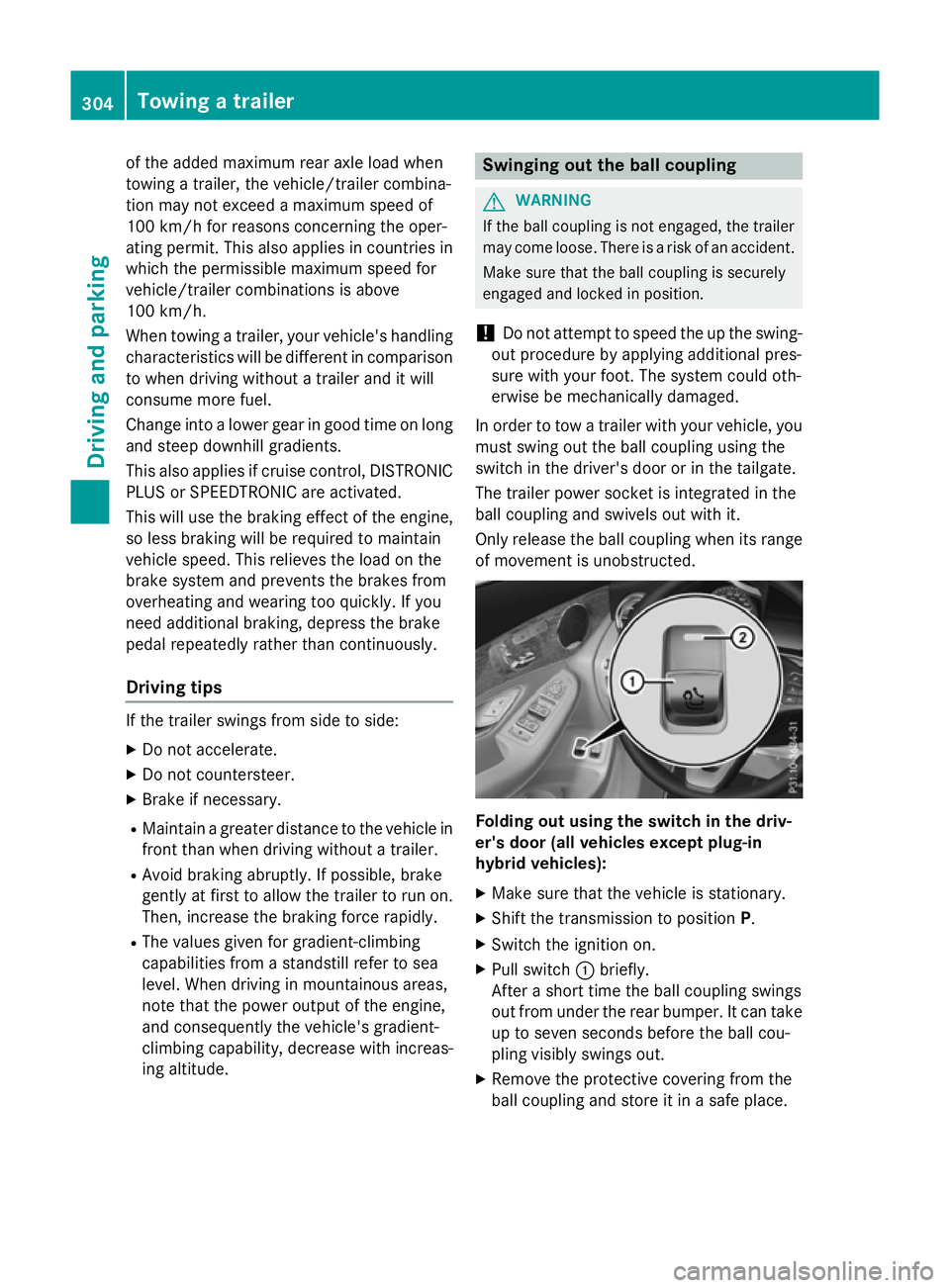
Only release the ball coupling when its range of movement is unobstructed. Folding out using the switch in the driv-
er's door (all vehicles except plug-in
hybrid vehicles):
X Make sure that the vehicle is stationary.
X Shift the transmission to position P.
X Switch the ignition on.
X Pull switch :briefly.
After a short time the ball coupling swings
out from under the rear bumper. It can take
up to seven seconds before the ball cou-
pling visibly swings out.
X Remove the protective covering from the
ball coupling and store it in a safe place. 304
Towing a trailerDriving and parking
Page 308 of 497
Until the ball coupling securely engages and
locks in a vertical position:
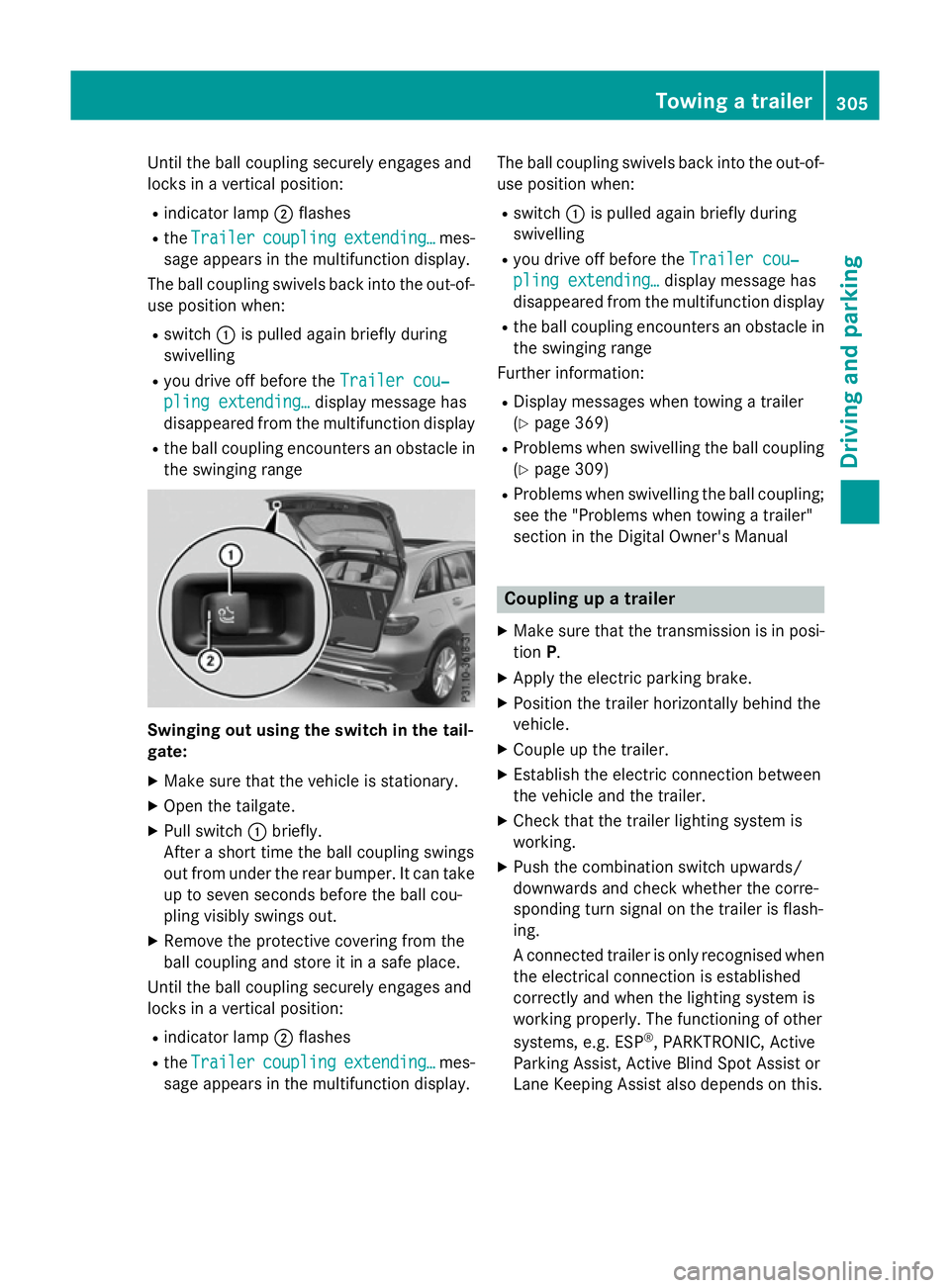
R indicator lamp ;flashes
R the Trailer
Trailer coupling
coupling extending…
extending… mes-
sage appears in the multifunction display.
The ball coupling swivels back into the out-of- use position when:
R switch :is pulled again briefly during
swivelling
R you drive off before the Trailer cou‐
Trailer cou‐
pling extending…
pling extending… display message has
disappeared from the multifunction display
R the ball coupling encounters an obstacle in
the swinging range Swinging out using the switch in the tail-
gate:
X Make sure that the vehicle is stationary.
X Open the tailgate.
X Pull switch :briefly.
After a short time the ball coupling swings
out from under the rear bumper. It can take
up to seven seconds before the ball cou-
pling visibly swings out.
X Remove the protective covering from the
ball coupling and store it in a safe place.
Until the ball coupling securely engages and
locks in a vertical position:
R indicator lamp ;flashes
R the Trailer
Trailer coupling coupling extending…
extending… mes-
sage appears in the multifunction display. The ball coupling swivels back into the out-of-
use position when:
R switch :is pulled again briefly during
swivelling
R you drive off before the Trailer cou‐
Trailer cou‐
pling extending…
pling extending… display message has
disappeared from the multifunction display
R the ball coupling encounters an obstacle in
the swinging range
Further information:
R Display messages when towing a trailer
(Y page 369)
R Problems when swivelling the ball coupling
(Y page 309)
R Problems when swivelling the ball coupling;
see the "Problems when towing a trailer"
section in the Digital Owner's Manual Coupling up a trailer
X Make sure that the transmission is in posi-
tion P.
X Apply the electric parking brake.
X Position the trailer horizontally behind the
vehicle.
X Couple up the trailer.
X Establish the electric connection between
the vehicle and the trailer.
X Check that the trailer lighting system is
working.
X Push the combination switch upwards/
downwards and check whether the corre-
sponding turn signal on the trailer is flash-
ing.
A connected trailer is only recognised when
the electrical connection is established
correctly and when the lighting system is
working properly. The functioning of other
systems, e.g. ESP ®
, PARKTRONIC, Active
Parking Assist, Active Blind Spot Assist or
Lane Keeping Assist also depends on this. Towing a trailer
305Driving and parking Z
Page 309 of 497
Uncoupling a trailer
G
WARNING
If you uncouple a trailer with an engaged over- run brake, you could trap your hand between
the vehicle and the trailer drawbar. This poses a risk of injury.
Do not uncouple a trailer with an engaged
overrun brake. G
WARNING
Vehicles with level control:
If you disconnect the trailer cable, the vehicle is lowered. This can cause you or others to
become trapped between the vehicle body
and tyres, or underneath the vehicle. This
poses a risk of injury.
Make sure that no-one is in the immediate
vicinity of the wheel arch or underneath the
vehicle when disconnecting the trailer cable.
! Do not disconnect a trailer with an
engaged overrun brake. Otherwise, your
vehicle could be damaged by the rebound- ing of the overrun brake.
! Remove the installed adapter cable
before folding in the ball coupling. Other-
wise, damage may occur to the rear
bumper and the adapter cable.
X Make sure that the transmission is in posi-
tion P.
X Apply the electric parking brake.
X Secure the trailer against rolling away.
X Remove the trailer cable and decouple the
trailer. Swinging the ball coupling in
! Do not attempt to speed the up the swing-
out procedure by applying additional pres-
sure with your foot. The system could oth-
erwise be mechanically damaged.
Swing the ball coupling back in using the
switch on the driver's door or tailgate, if you
are not using the trailer tow hitch. Only release the ball coupling when its range
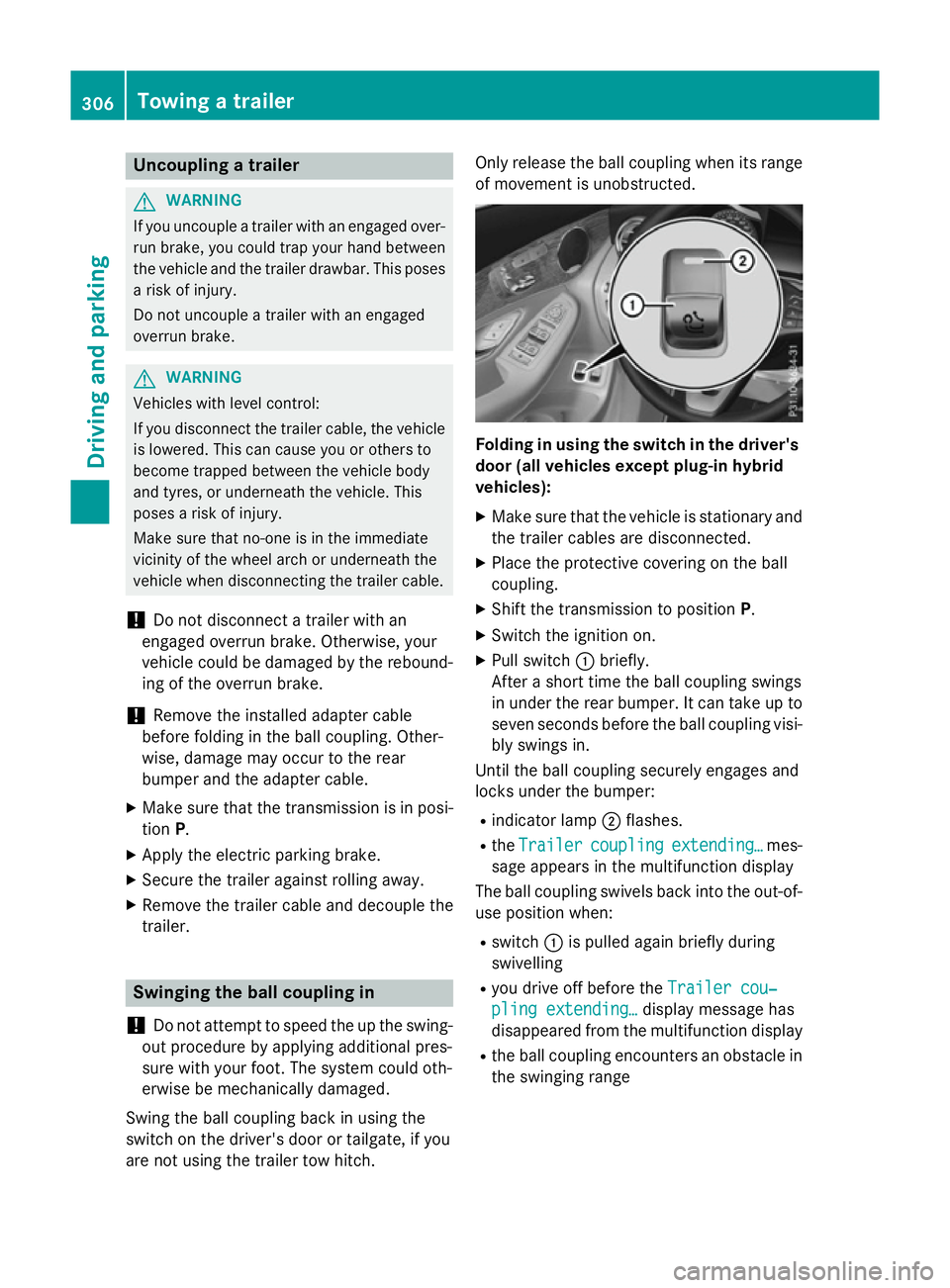
of movement is unobstructed. Folding in using the switch in the driver's
door (all vehicles except plug-in hybrid
vehicles):
X Make sure that the vehicle is stationary and
the trailer cables are disconnected.
X Place the protective covering on the ball
coupling.
X Shift the transmission to position P.
X Switch the ignition on.
X Pull switch :briefly.
After a short time the ball coupling swings
in under the rear bumper. It can take up to seven seconds before the ball coupling visi-bly swings in.
Until the ball coupling securely engages and
locks under the bumper:
R indicator lamp ;flashes.
R the Trailer
Trailer coupling coupling extending…
extending… mes-
sage appears in the multifunction display
The ball coupling swivels back into the out-of-
use position when:
R switch :is pulled again briefly during
swivelling
R you drive off before the Trailer cou‐
Trailer cou‐
pling extending…
pling extending… display message has
disappeared from the multifunction display
R the ball coupling encounters an obstacle in
the swinging range 306
Towing a trailerDriving and parking
Page 310 of 497
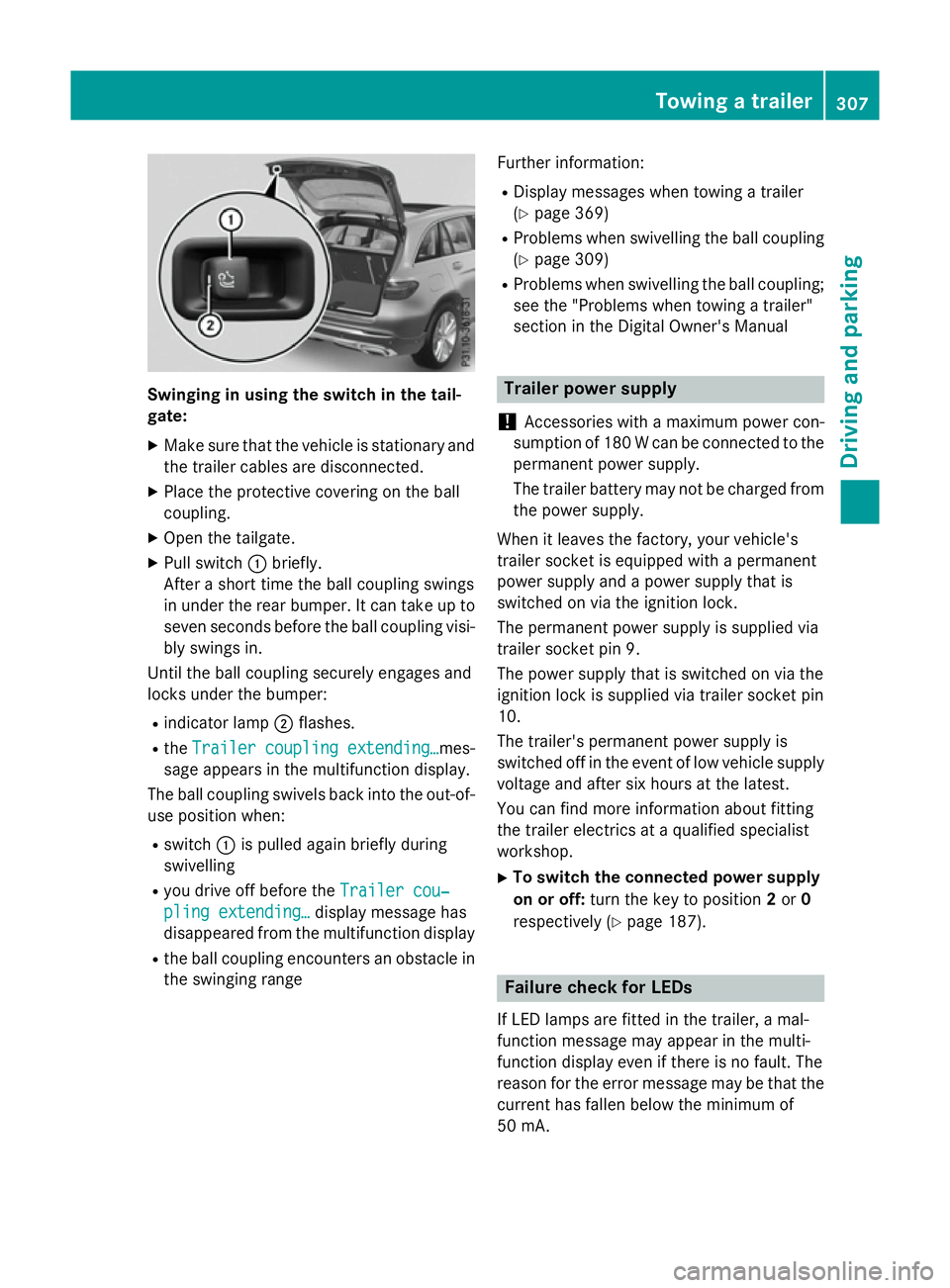
Swinging in using the switch in the tail-
gate:
X Make sure that the vehicle is stationary and
the trailer cables are disconnected.
X Place the protective covering on the ball
coupling.
X Open the tailgate.
X Pull switch :briefly.
After a short time the ball coupling swings
in under the rear bumper. It can take up to
seven seconds before the ball coupling visi- bly swings in.
Until the ball coupling securely engages and
locks under the bumper:
R indicator lamp ;flashes.
R the Trailer coupling extending…
Trailer coupling extending… mes-
sage appears in the multifunction display.
The ball coupling swivels back into the out-of- use position when:
R switch :is pulled again briefly during
swivelling
R you drive off before the Trailer cou‐ Trailer cou‐
pling extending…
pling extending… display message has
disappeared from the multifunction display
R the ball coupling encounters an obstacle in
the swinging range Further information:
R Display messages when towing a trailer
(Y page 369)
R Problems when swivelling the ball coupling
(Y page 309)
R Problems when swivelling the ball coupling;
see the "Problems when towing a trailer"
section in the Digital Owner's Manual Trailer power supply
! Accessories with a maximum power con-
sumption of 180 W can be connected to the
permanent power supply.
The trailer battery may not be charged from the power supply.
When it leaves the factory, your vehicle's
trailer socket is equipped with a permanent
power supply and a power supply that is
switched on via the ignition lock.
The permanent power supply is supplied via
trailer socket pin 9.
The power supply that is switched on via the
ignition lock is supplied via trailer socket pin
10.
The trailer's permanent power supply is
switched off in the event of low vehicle supply
voltage and after six hours at the latest.
You can find more information about fitting
the trailer electrics at a qualified specialist
workshop.
X To switch the connected power supply
on or off: turn the key to position 2or 0
respectively (Y page 187). Failure check for LEDs
If LED lamps are fitted in the trailer, a mal-
function message may appear in the multi-
function display even if there is no fault. The
reason for the error message may be that the
current has fallen below the minimum of
50 mA. Towing a trailer
307Driving and parking Z
Page 312 of 497
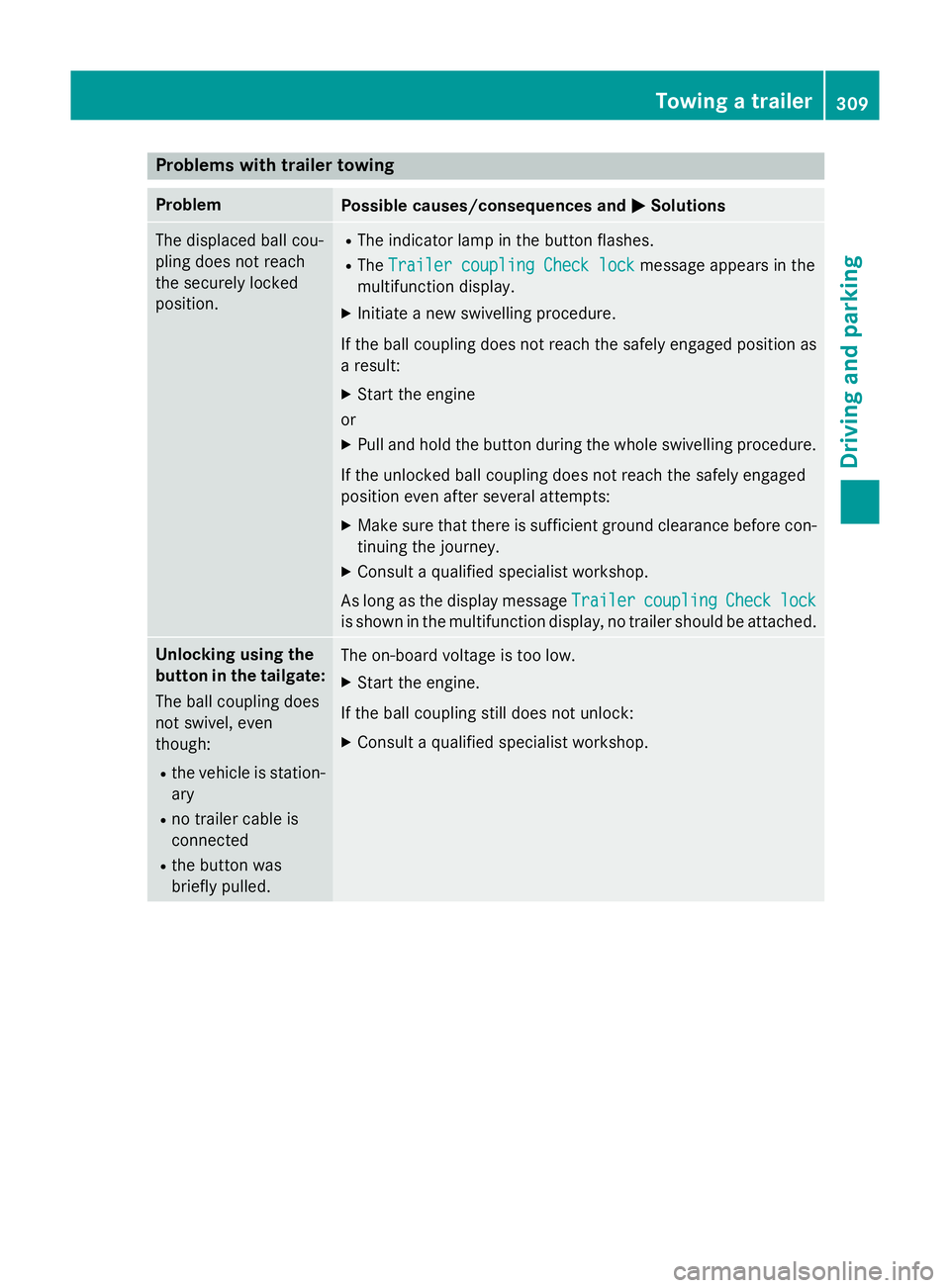
Problems with trailer towing
Problem
Possible causes/consequences and
M
MSolutions The displaced ball cou-
pling does not reach
the securely locked
position. R
The indicator lamp in the button flashes.
R The Trailer coupling Check lock Trailer coupling Check lock message appears in the
multifunction display.
X Initiate a new swivelling procedure.
If the ball coupling does not reach the safely engaged position as
a result:
X Start the engine
or
X Pull and hold the button during the whole swivelling procedure.
If the unlocked ball coupling does not reach the safely engaged
position even after several attempts:
X Make sure that there is sufficient ground clearance before con-
tinuing the journey.
X Consult a qualified specialist workshop.
As long as the display message Trailer
Trailercoupling
coupling Check
Checklock
lock
is shown in the multifunction display, no trailer should be attached. Unlocking using the
button in the tailgate:
The ball coupling does
not swivel, even
though:
R the vehicle is station-
ary
R no trailer cable is
connected
R the button was
briefly pulled. The on-board voltage is too low.
X Start the engine.
If the ball coupling still does not unlock:
X Consult a qualified specialist workshop. Towing a trailer
309Driving and parking Z
Page 313 of 497
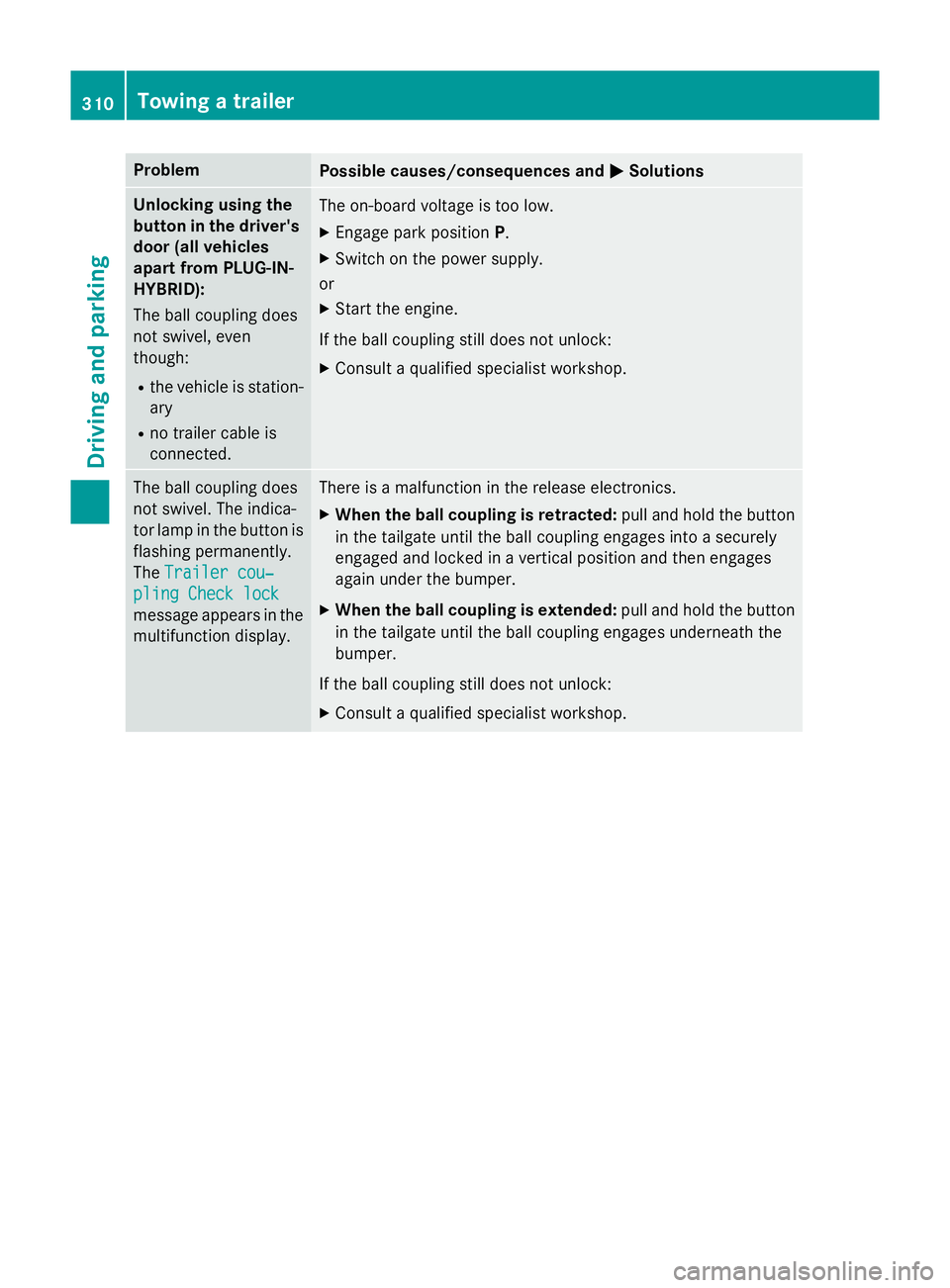
Problem
Possible causes/consequences and
M
MSolutions Unlocking using the
button in the driver's door (all vehicles
apart from PLUG-IN-
HYBRID):
The ball coupling does
not swivel, even
though:
R the vehicle is station-
ary
R no trailer cable is
connected. The on-board voltage is too low.
X Engage park position P.
X Switch on the power supply.
or
X Start the engine.
If the ball coupling still does not unlock:
X Consult a qualified specialist workshop. The ball coupling does
not swivel. The indica-
tor lamp in the button is flashing permanently.
The Trailer cou‐ Trailer cou‐
pling Check lock
pling Check lock
message appears in the
multifunction display. There is a malfunction in the release electronics.
X When the ball coupling is retracted: pull and hold the button
in the tailgate until the ball coupling engages into a securely
engaged and locked in a vertical position and then engages
again under the bumper.
X When the ball coupling is extended: pull and hold the button
in the tailgate until the ball coupling engages underneath the
bumper.
If the ball coupling still does not unlock:
X Consult a qualified specialist workshop. 310
Towing a trailerDriving and parking
Page 374 of 497
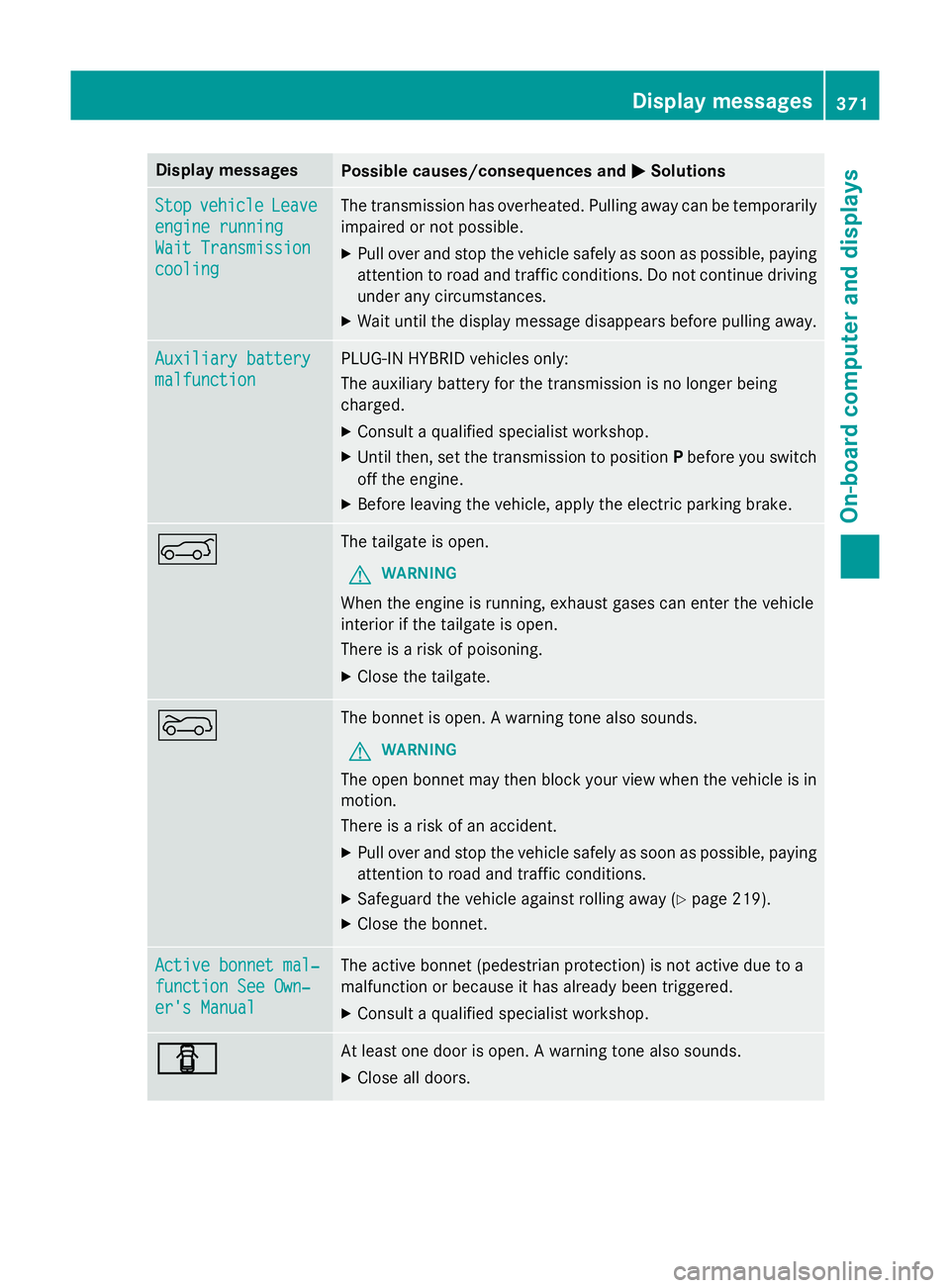
Display messages
Possible causes/consequences and
M
MSolutions Stop
Stop
vehicle
vehicle Leave
Leave
engine running
engine running
Wait Transmission Wait Transmission
cooling cooling The transmission has overheated. Pulling away can be temporarily
impaired or not possible.
X Pull over and stop the vehicle safely as soon as possible, paying
attention to road and traffic conditions. Do not continue driving
under any circumstances.
X Wait until the display message disappears before pulling away. Auxiliary battery
Auxiliary battery
malfunction malfunction PLUG-IN HYBRID vehicles only:
The auxiliary battery for the transmission is no longer being
charged.
X Consult a qualified specialist workshop.
X Until then, set the transmission to position Pbefore you switch
off the engine.
X Before leaving the vehicle, apply the electric parking brake. A The tailgate is open.
G WARNING
When the engine is running, exhaust gases can enter the vehicle
interior if the tailgate is open.
There is a risk of poisoning.
X Close the tailgate. ? The bonnet is open. A warning tone also sounds.
G WARNING
The open bonnet may then block your view when the vehicle is in
motion.
There is a risk of an accident.
X Pull over and stop the vehicle safely as soon as possible, paying
attention to road and traffic conditions.
X Safeguard the vehicle against rolling away (Y page 219).
X Close the bonnet. Active bonnet mal‐ Active bonnet mal‐
function See Own‐ function See Own‐
er's Manual er's Manual The active bonnet (pedestrian protection) is not active due to a
malfunction or because it has already been triggered.
X Consult a qualified specialist workshop. C C At least one door is open. A warning tone also sounds.
X Close all doors. Display
messages
371On-board computer and displays Z