display MERCEDES-BENZ GLK-Class 2012 X204 Comand Manual
[x] Cancel search | Manufacturer: MERCEDES-BENZ, Model Year: 2012, Model line: GLK-Class, Model: MERCEDES-BENZ GLK-Class 2012 X204Pages: 182, PDF Size: 4.89 MB
Page 123 of 182
=
Sou ndsetti ngs
? Wea ther Band switche don
A AM radio
B FM radio
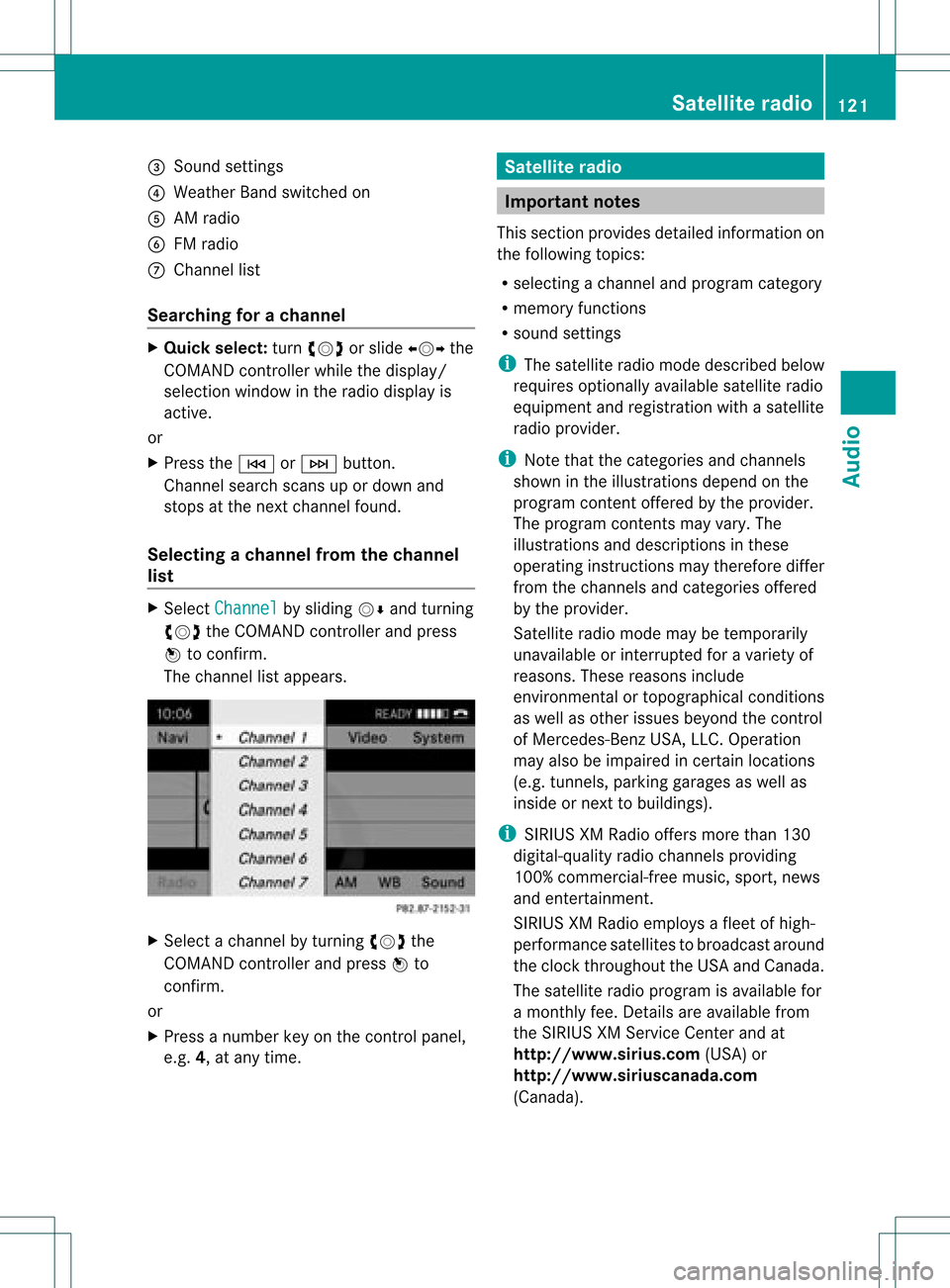
C Channe llist
Se archi ngfor achanne l X
Quic kselect: turncVd orslide XVY the
COMA NDcontroller while thed isplay/
selec tionwindow inthe radio display is
act ive.
or
X Press theE orF button.
Chann elsearc hscan sup ordown and
st ops atthe nextchan nelfoun d.
Selecting achanne lfrom thechann el
lis t X
Select Channe l by
sliding VÆandturning
cVd theCOMAND controllerand press
W toconfirm.
The channel lista ppears. X
Select achann elby turn ingcVd the
COMAND controller and press Wto
con firm.
or
X Press anumber keyonthe controlpanel,
e.g. 4,atany time. Sat
ellite radio Impor
tantnotes
This sectionprovides detailedinformation on
the following topics:
R select ingachann eland program category
R memor yfunc tions
R sound settings
i The satellite radiomode describedbelow
requires optionallyavailable satelliteradio
equipment andregist ration withasatellite
radio provider.
i Note thatthecateg ories andchann els
shown inthe illustration sdepend onthe
program contentoffer edbythe provider.
The program contentsmay vary. The
illustration sand descr iption sin these
operatin ginst ruct ions may therefore differ
from thechann elsand categ ories offered
by the provider.
Satellit eradio mode maybetempo rarily
unavailable orinterrupt edfor avariety of
reasons .These reasons include
environm entalortopographical conditions
as well asother issues beyond thecont rol
of Mercedes-Ben zUSA, LLC.Operation
may alsobeimpaired incertain locations
(e.g. tunnels,parking garages aswell as
inside ornext tobuild ings).
i SIRIUS XMRadi ooffers morethan130
digital-qua lityradio channels providing
100% commerc ial-freemusic,sport,news
and entert ainment.
SIRIUS XMRadi oemploys afleet ofhigh-
performance satellitestobroadcast around
the clock throughout theUSA andCanada .
The satellite radioprogram isavaila blefor
a mont hlyfee. Details areavaila blefrom
the SIRIUS XMService Centerandat
htt <0010002C00210021001700170017002000130009001200090015001300200003
000F000DB (USA)or
htt <0010002C00210021001700170017002000130009001200090015001300030001
000E00010004000100200003000F000DB
(Canada ). Satellite
radio
121Audio
Page 124 of 182
Reg
isteri ngsate llite radio
X Swi tch onsatell ite rad iomod e
(Y page 122).
The satell ite rad iomai nm enu appears
showing theweather channel.You cann ot
select anyother stations.
X Select SatRadio in
the lower menu bar
and press Wtocon firm.
X Select Service and
press Wtocon firm.
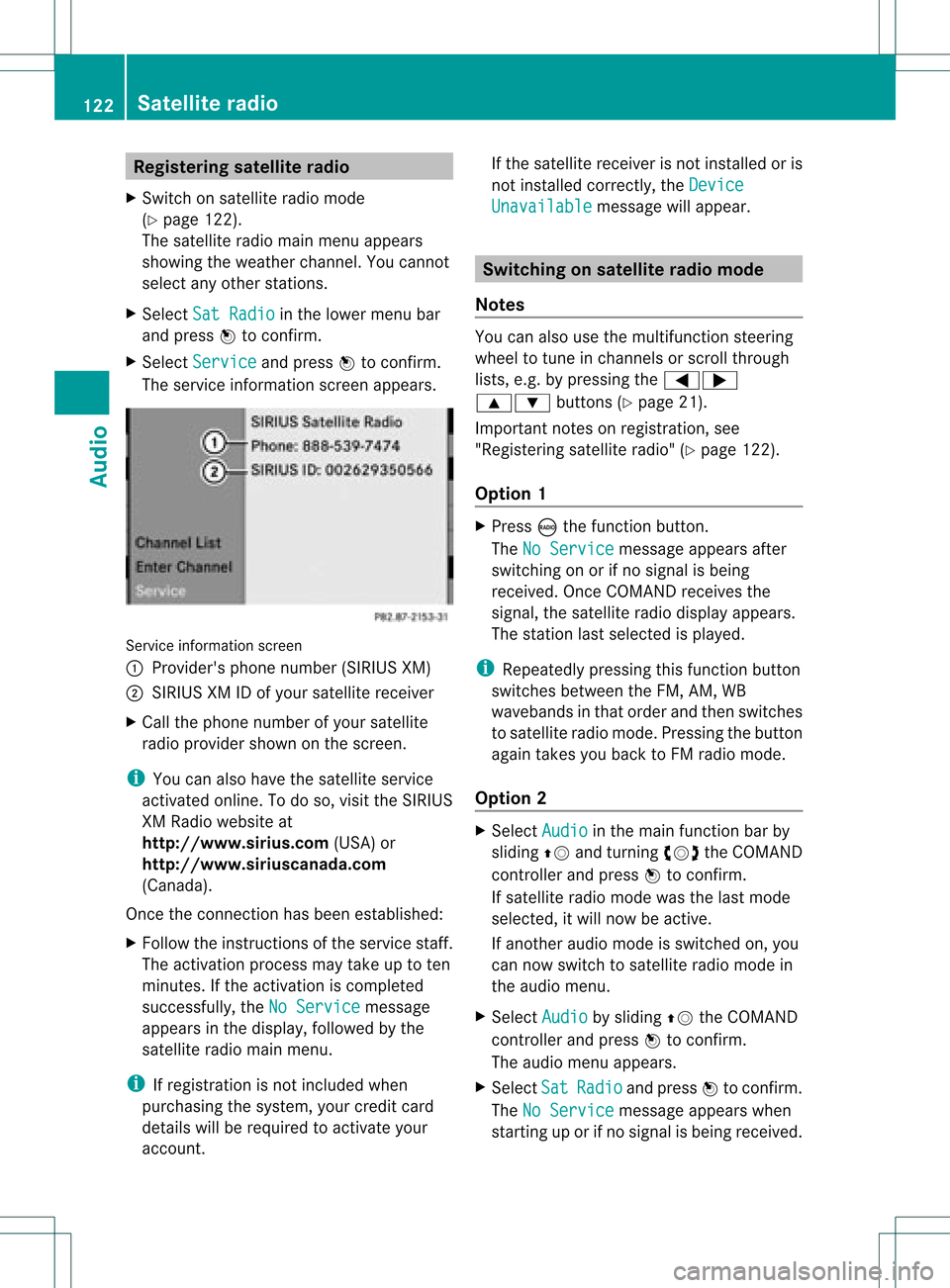
The servic einfor mation screenappears. Serv
iceinfor mation screen
1 Provider's phonenumber (SIRIUSXM)
2 SIRIUS XMIDofyour satellite receiver
X Call thephone number ofyour satellite
radio provider shownonthe screen .
i You canalso have thesatellite service
activat edonline. Todo so, visit theSIRIUS
XM Radio website at
htt p://ww w.siriu s.com(USA)or
htt p://ww w.siriu scanada .com
(Canada).
Onc ethe connection hasbeen established:
X Follow theinstruct ions ofthe servic estaff .
The activat ionprocess maytake uptoten
minut es.Ifthe activat ioniscomplet ed
success fully,theNoService message
appears inthe display, followed bythe
satellite radiomainmenu.
i Ifregistr ationisnot included when
purchasing thesystem, yourcredit card
details willberequired toactivat eyour
accoun t. If
the satellite receiver isnot installed oris
not installed correctly,the Device Unavail
able message
willappear. Switching
onsatellit erad iomode
Notes You
canalso usethemultifunc tionsteer ing
wheel totune inchann elsorscroll through
lists, e.g.bypressing the=;
9: buttons(Y page 21).
Import antnoteson registr ation,see
"Registering satelliteradio"(Y page 122).
Opt ion 1 X
Press óthe func tion button .
The NoService message
appearsafter
switch ingonorifno signal isbeing
received. OnceCOMAND receivesthe
signal, thesatellite radiodisplay appears.
The stationlast select edisplayed.
i Repeatedly pressingthisfunc tion button
switch esbetween theFM, AM, WB
wavebands inthat order andthen switch es
to satellite radiomode. Pressin gthe button
again takes youback toFM radio mode.
Opt ion 2 X
Select Audio in
the main function barby
sliding ZVandturningcVd theCOMAND
con troller andpress Wtocon firm.
If satellite radiomode wasthelast mode
select ed,itwill now beactive .
If anoth eraudio mode isswitch edon, you
can now switch tosatellite radiomode in
the audio menu.
X Select Audio by
sliding ZVtheCOMAND
con troller andpress Wtocon firm.
The audio menu appears.
X Select Sat Radio and
press Wtocon firm.
The NoService message
appearswhen
start inguporifno signal isbeing received. 122
Sat
ellite radioAudio
Page 125 of 182
If
the satell itereceiver isnot install edoris
not install edcorrectly, theDevice Unavailable messag
ewil lapp ear. Once
COMAND receivesthesignal ,the
satell iteradi odisp layapp ears. Thestation
last selected ispla yed . Satelli
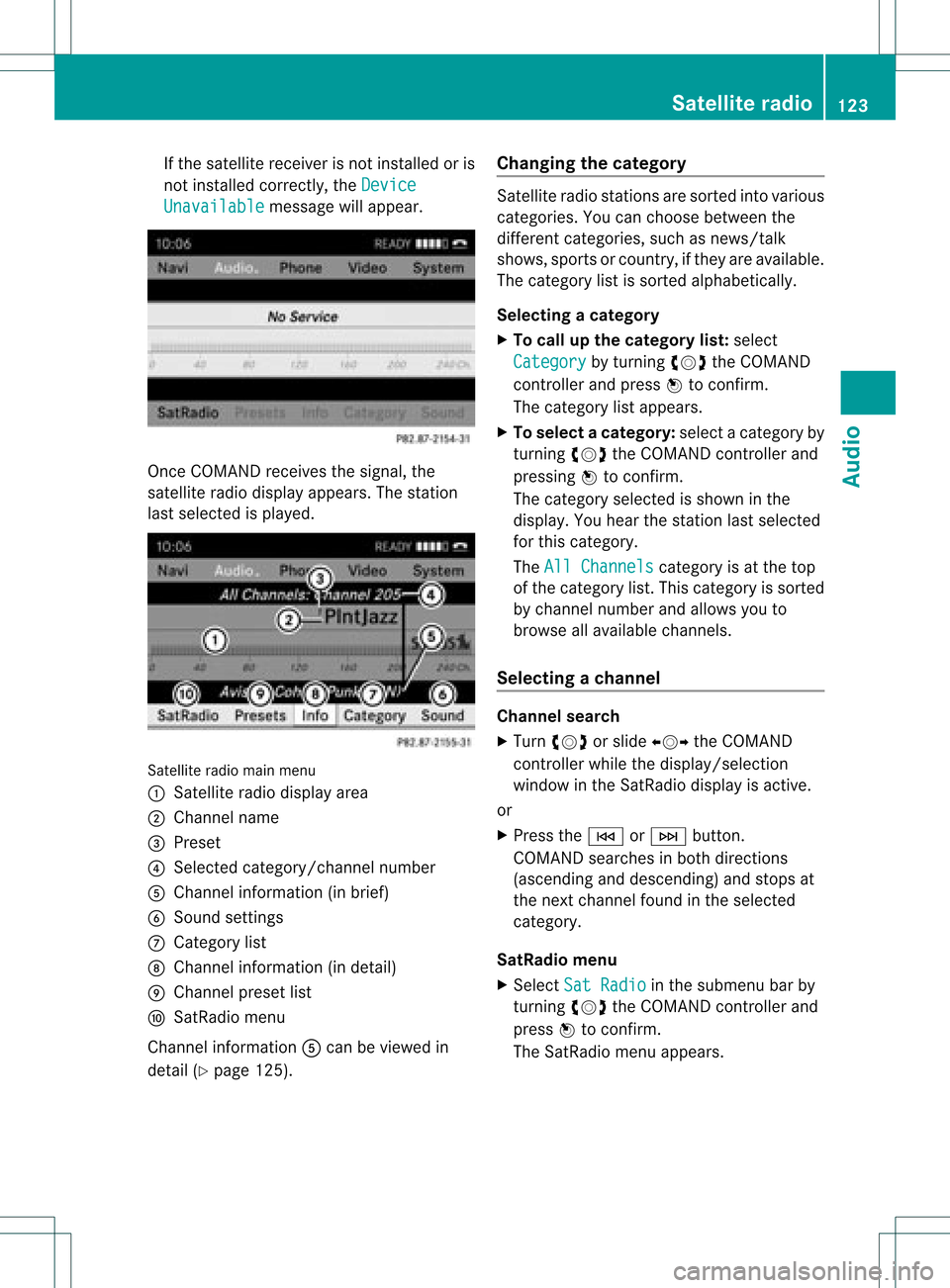
teradio mainmenu
1 Satelli teradi odisp layarea
2 Cha nnel name
3 Preset
4 Selected category/channel number
5 Cha nnel information (inbrief)
6 Sound settings
7 Categ orylist
8 Cha nnel information (indetail )
9 Cha nnel preset list
a SatRad iomenu
Cha nnel information Acan beviewe din
detai l(Y page 125). Changi
ngthe catego ry Satelli
teradi ostations aresorted intovariou s
categorie s.You canchoose betweenthe
different categories, suchasnews/talk
shows, sportsorcountr y,ifthey areavaila ble.
The category listissorted alphabetically.
Selec tingacatego ry
X To callup the categ orylist:sel ect
Catego ry by
turning cVdtheCOM AND
controlle rand pre ssW toconfi rm.
The cate gorylist appe ars.
X To select ac atego ry:select acatego ryby
turning cVdtheCOM AND controll erand
pres sing Wtoconfirm.
The catego rysel ected isshow nint he
displa y.You hear thestation lastselected
for this category.
The All Channels category
isat the top
of the category list.This category issorted
by channel numberandallow syou to
browse allavaila blechannels.
Selec tingachanne l Chann
elsearc h
X Turn cVd orslide XVY theCOMAND
controlle rwhile thedispla y/selection
window inthe SatRadio displayisactive.
or
X Press theE orF button.
COMAND searchesinboth directions
(ascending anddescending) andstops at
the next channel foundinthe selected
category.
SatRa diomenu
X Select SatRadio in
the submenu barby
turning cVdtheCOMAND controller and
press Wtoconfirm.
The SatRadio menuappears. Satellite
radio
123Audio
Page 126 of 182
Ente
ringcha nnel numbersdir ectly
Opt ion 1
X Pres sth eõ butt on.
An inputmen uappear s.
Opt ion 2
X Sele ctSat Radio in
thesubme nubar by
tur nin gcVd theCOMA NDcontroller and
pres sW tocon firm.
X Sele ctEnt erChannel and
pres sW to
con firm.
An inputmen uappear s.
X To ent erac hanne l:irresp ective ofthe
optio n,press thecorrespo ndingnumbe r
keys onthe control paneloneafter the
other.
COMAND setsthesele cted channel.
i You canonly selectcurrently permitted
dig its.
Sel ecting achann elfrom theSatRadio
chann ellist
X Select SatRadio in
the submenu barby
turning cVdtheCOMAND controllerand
press Wtoconfirm.
X Select Channel List and
press Wto
confirm.
The channel lista ppears.
X Select achann elby turn ingcVd the
COMAND controller and press Wto
con firm. Memor
yfunct ions Stor
ingchannels
i There areten preset savailable.
X Press Wthe COMAND controller when the
display/select ionwindow isactiv e.
or
X Select Preset s in
the submenu barby
turn ingcVd theCOMAND controller and
press Wtocon firm.
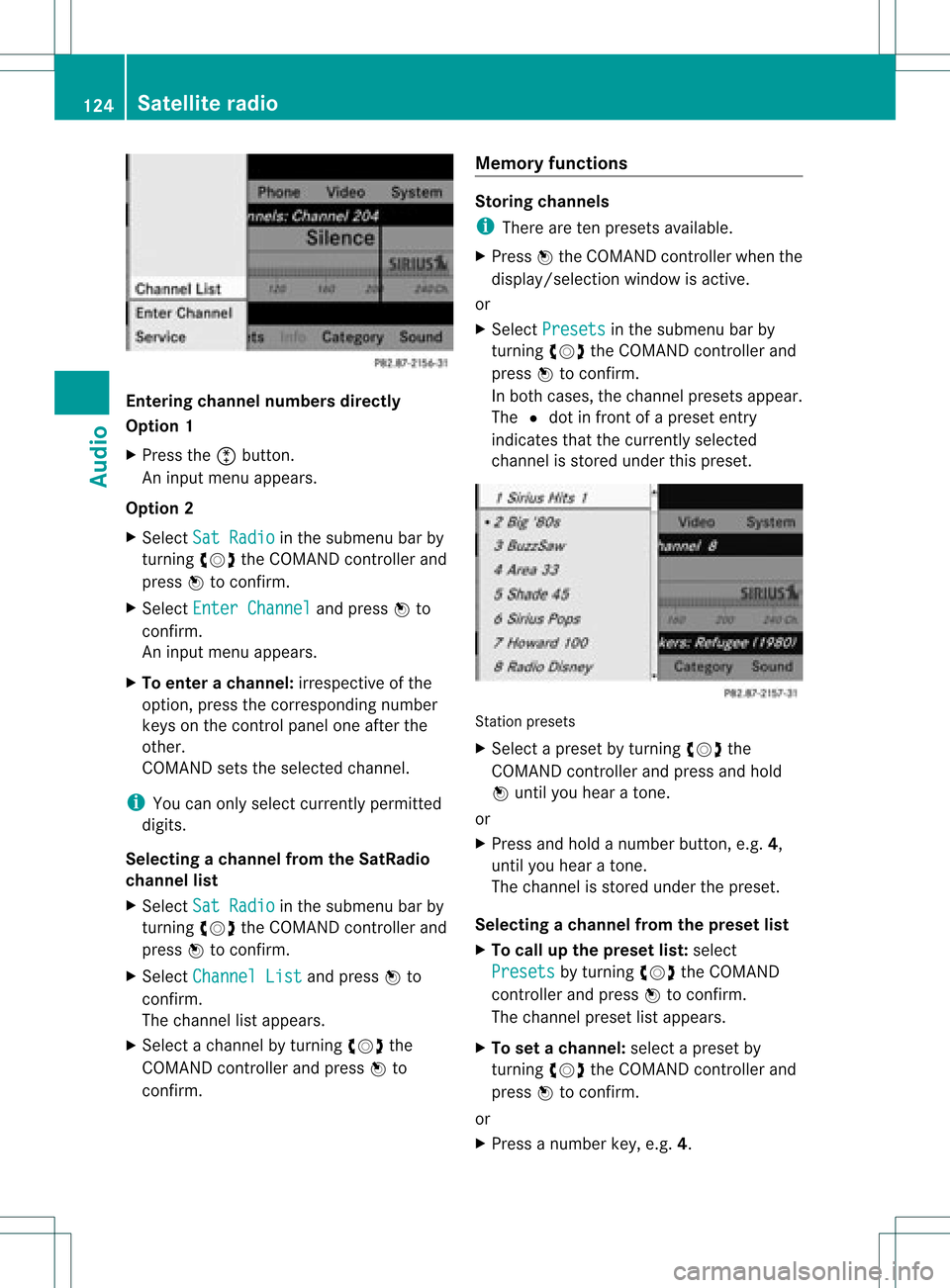
In both cases, thechann elpreset sappear.
The Rdot infron tof apreset entry
indicat esthat thecurren tlyselect ed
chann elisstor edunder thispreset . St
ation preset s
X Select apreset byturn ingcVd the
COMAND controller and press andhold
W until youhear aton e.
or
X Press andhold anumber button,e.g. 4,
until youhear aton e.
The chann elisstor edunder thepreset .
Selecting achanne lfrom thepreset list
X To call upthe preset list:sele ct
Presets by
turning cVdtheCOMAND
controlle rand pre ssW toconfi rm.
The channel preset list appe ars.
X To setac hanne l:sele ctaprese tby
tur ning cVd theCOMAND controllerand
pre ssW toconf irm.
or
X Pre ssanum berk ey, e.g. 4. 124
Sat
ellite radioAudio
Page 127 of 182
Disp
laying informa tion X
Se lec tInf o in
thesubm enubar byturn ing
cVd theCOM ANDco ntro ller and press
W toconfirm .
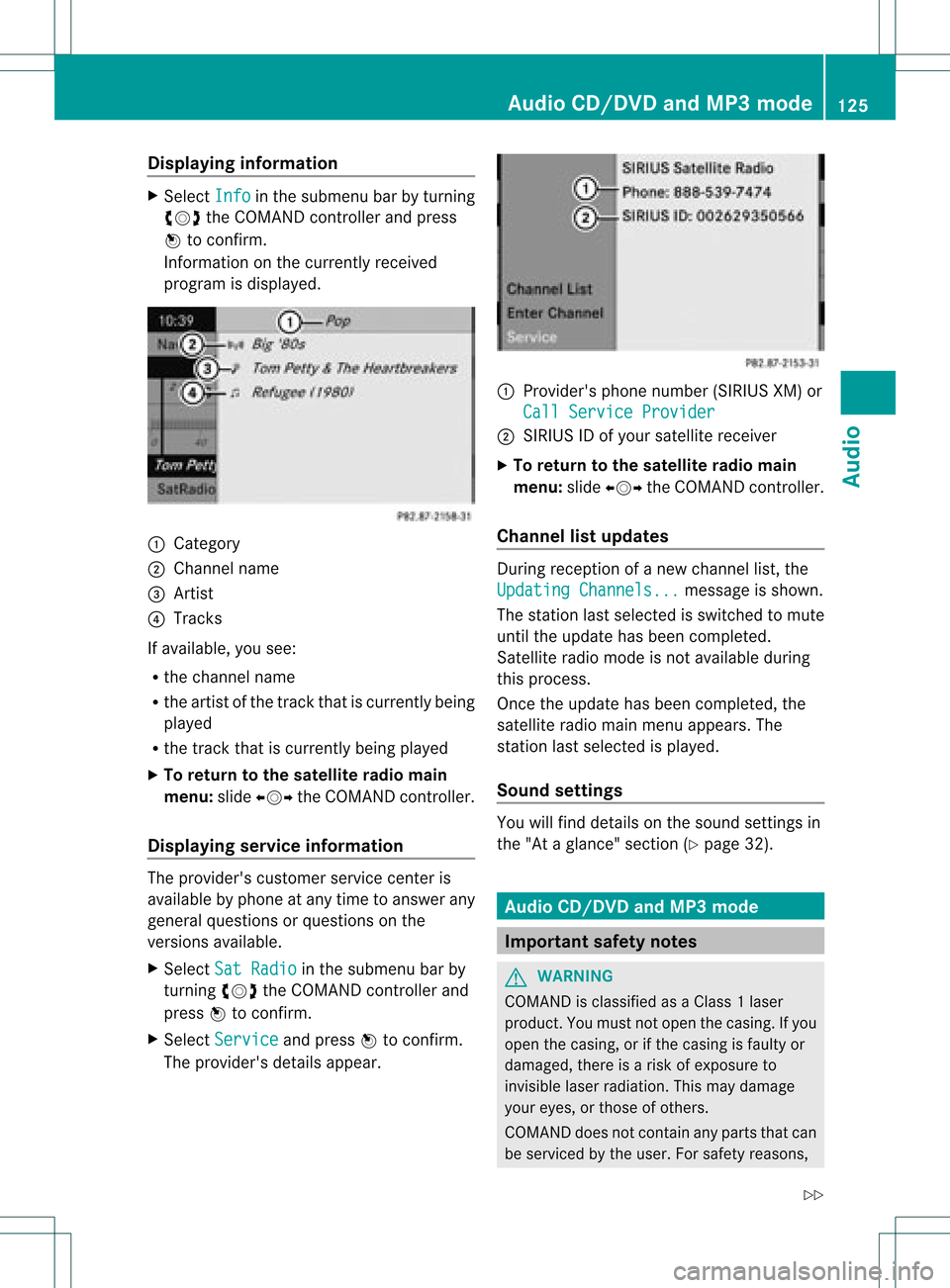
In fo rm ation onthecur ren tly rec eived
pro gram isdis played . 1
Catego ry
2 Chan nelnam e
3 Artist
4 Track s
If avai lable ,you see:
R thech ann elnam e
R theart ist ofthetrack that iscur ren tly bein g
played
R thetrack that iscur ren tly bein gplayed
X To retu rn tothesa tellit era dioma in
me nu:slid eXVY theCOM ANDc ont roller.
Displaying serviceinformation The
provider's customerservicecenteris
availa blebyphone atany time toanswer any
general questions orquestions onthe
versions available.
X Select SatRadio in
the submenu barby
turnin gcVd theCOMAND controller and
press Wtoconf irm.
X Select Service and
press Wtoconf irm.
The provider's detailsappear. 1
Provider's phonenumber (SIRIUSXM)or
Call Service Provider 2
SIRIUS IDofyour satellite receiver
X To retu rntothe satellite radiomain
menu: slideXVY theCOMAND controller.
Channel listupd ates During
reception ofanew chann ellist, the
Updating Channels... message
isshown.
The station lastselected isswitched tomute
until theupdate hasbeen completed.
Satellite radiomode isnot availa bleduring
this process.
Once theupdate hasbeen completed, the
satellite radiomainmenu appears. The
station lastselected isplaye d.
Sound settings You
willfind details onthe sound settings in
the "Ataglance" section(Ypage 32). Audio
CD/DVDand MP3 mode Import
antsafety notes G
WARNIN
G
COMAND isclassified asaClass 1laser
prod uct.You must notopen thecasing. Ifyou
open thecasing, orifthe casing isfaulty or
damaged, thereisarisk ofexposure to
invisible laserradiation. Thismay damage
your eyes, orthose ofothers.
COMAND doesnotcont ainany parts thatcan
be serviced bythe user. Forsafety reasons, Audio
CD/DVD andMP3 mode
125Audio
Z
Page 129 of 182
The
DVD changer loadsthedisc intothe
selected magazine tray.Themessage
Loading Disc
i Itmay take some timeforthe disc tobe
loaded, depending onthe type ofdisc. Ifno
disc isinsert edfor approximately 20
seconds, thedisplay returnstothe
magazine menu.
The DVD changer playsthedisc if:
R ithas been insert edcorrec tly.
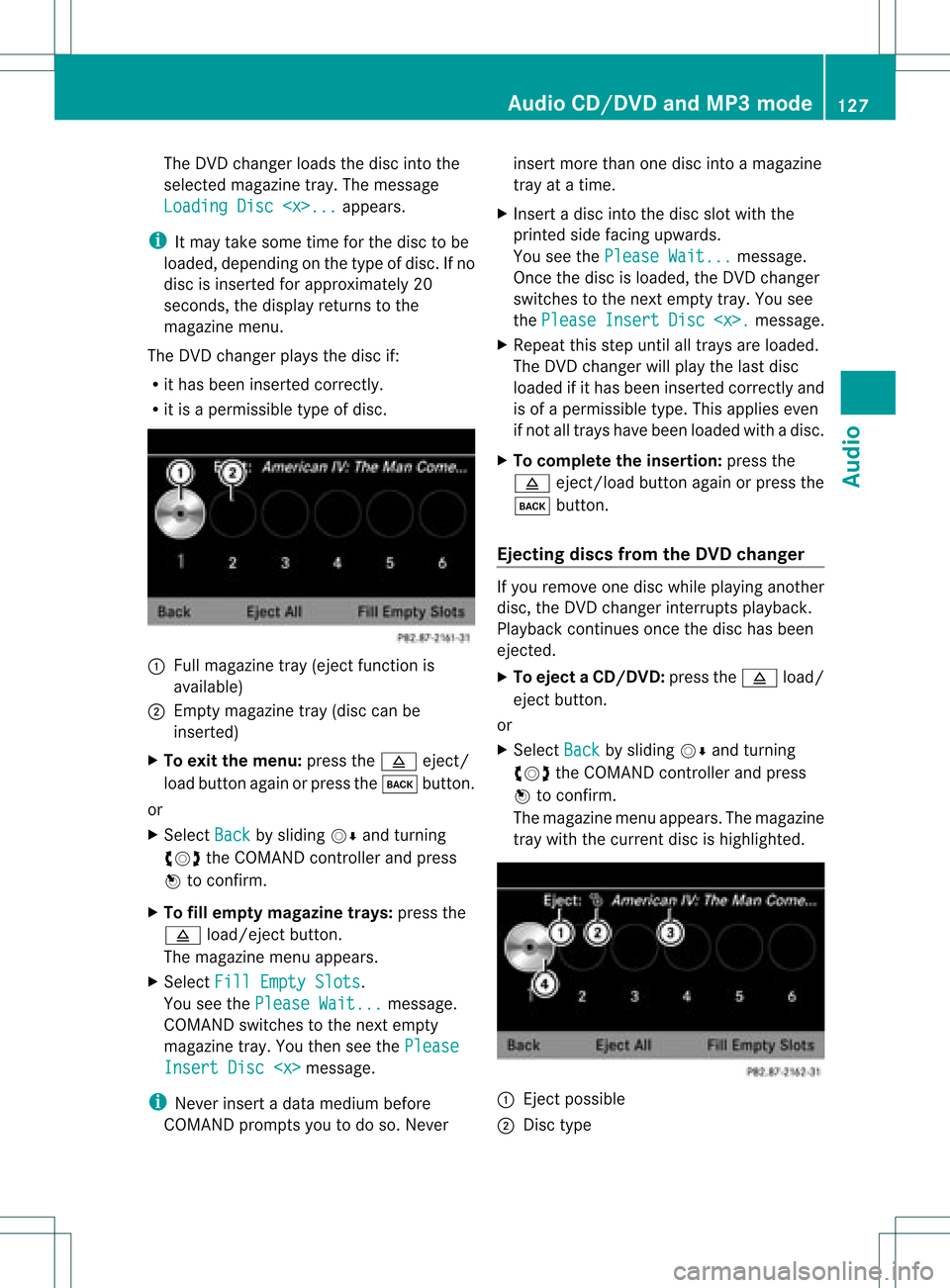
R itis apermissible typeofdisc. :
Full magazine tray(eject functionis
availa ble)
; Empt ymagazine tray(disc canbe
insert ed)
X To exit themenu: pressthe8 eject/
load button againorpress thek button .
or
X Select Back by
sliding VÆandturnin g
cVd theCOMAND controller andpress
W toconf irm.
X To fill empt ymagaz inetrays: press the
8 load/eject button.
The magazine menuappears.
X Select FillEmpty Slots .
You seethePlease Wait... message.
COMAND switchestothe next empty
magazine tray.Youthen seethePlease Insert
Disc
i Never insertadata medium before
COMAND promptsyoutodo so. Never insert
morethanonedisc intoamagazine
tray atatime.
X Insert adisc intothedisc slotwith the
printed sidefacing upwards.
You seethePlease Wait... message.
Once thedisc isloaded, theDVD changer
switches tothe next empty tray.Yousee
the Please Insert Disc
X Repeat thisstep until alltrays areloaded.
The DVD changer willplay thelast disc
loaded ifit has been insert edcorrec tlyand
is of apermissible type.Thisapplies even
if not alltrays havebeen loaded withadisc.
X To complete theinsertion: pressthe
8 eject/load button againorpress the
k button .
Ejecting discsfromtheDVD changer If
you remove onedisc while playinganother
disc, theDVD changer interruptsplayb ack.
Playba ckcont inues oncethedisc hasbeen
eject ed.
X To eject aCD/DVD: pressthe8 load/
ej ec tbut ton.
or
X Se lec tBac k by
slid ing VÆ andturning
cVd theCOMA NDcontrol ler and press
W toconfirm .
The mag azine men uappea rs.T he magazine
tray with thecurrent discishighlighted. :
Ejec tpossible
; Disc type Audio
CD/DVD andMP3 mode
127Audio Z
Page 132 of 182
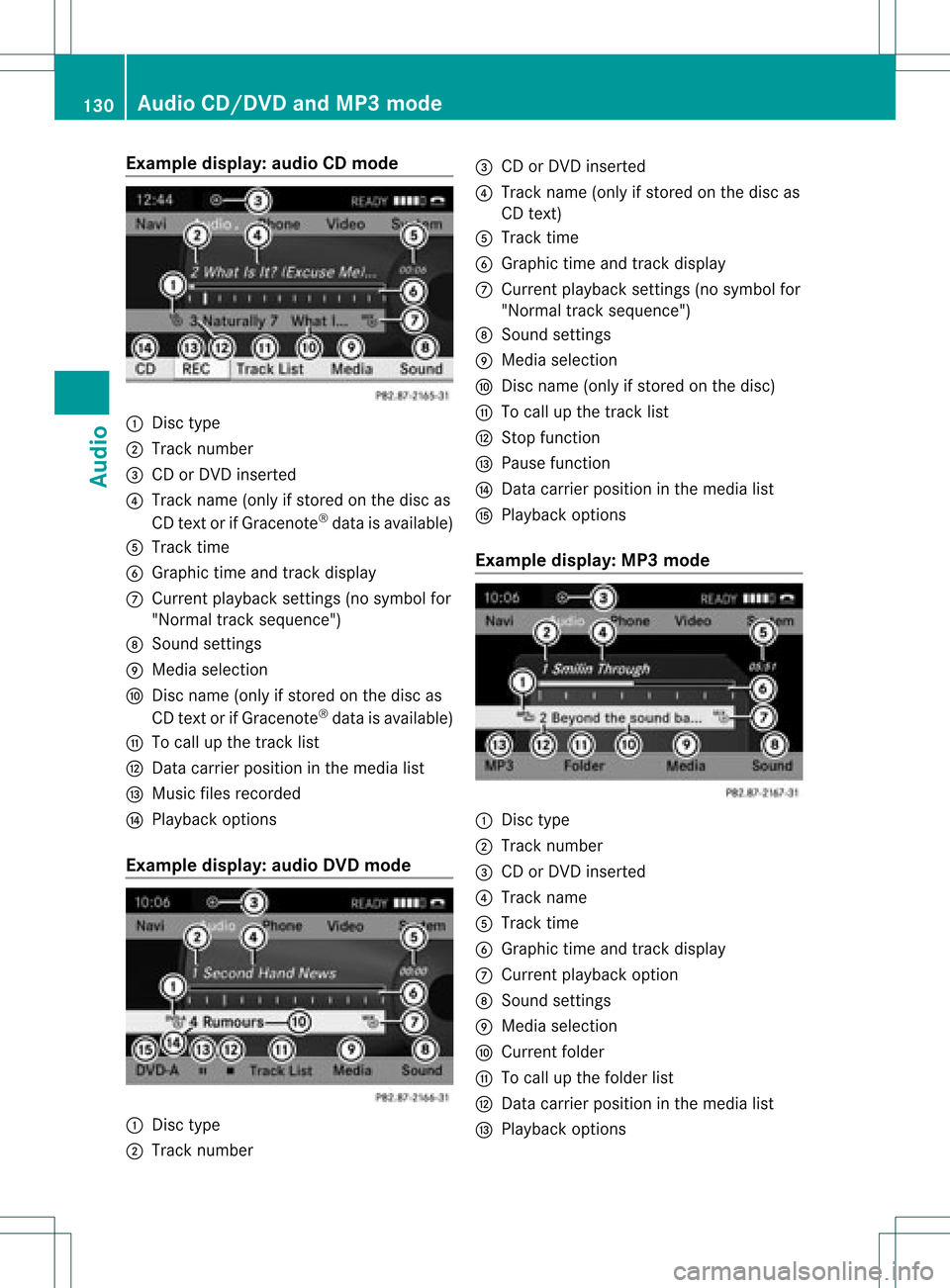
Exam
pledispla y:au dio CDmod e :
Disctype
; Tracknum ber
= CD orDV Dinser ted
? Tracknam e(on lyifstor ed on thedisc as
CD text or ifGrac enote®
dat ais avail able)
A Tracktime
B Grap hictime and track disp lay
C Curr entp layback settings (no symbol for
"Norm altrack sequen ce")
D Soun dset tings
E Media selection
F Disc name (onlyifstored onthe disc as
CD textor ifGracen ote®
data isavailable)
G Tocall upthe track list
H Datacarr ierposit ioninthe media list
I Music filesrecorded
J Playback options
Exam pledisp lay:audioDVD mode :
Disc type
; Trac knumb er =
CD orDV Dinse rted
? Trac kname (onlyifstore don thedisc as
CD text)
A Trac ktim e
B Graph ictim eand track displ ay
C Curr entp layback settings (no symbol for
"Norm altrack sequen ce")
D Soun dset tings
E Media selection
F Disc name (onlyifsto red onthe disc)
G Tocall upthe track list
H Stop func tion
I Pause function
J Datacarr ierposit ioninthe media list
K Playback options
Exam pledisp lay:MP3 mode :
Disc type
; Trac knumb er
= CD orDV Dinse rted
? Trac kname
A Trac ktim e
B Graphic timeand track display
C Curren tplayback option
D Soun dset tings
E Media selection
F Curren tfolder
G Tocall upthe folder list
H Data carrier position inthe media list
I Playba ckoptions 130
Audio
CD/DVD andMP3 modeAudio
Page 133 of 182
Pause
function
In audio CD/DVD andMP3 mode X
To pause playback: brieflypresstheB
button.
The , symbol appears atthe top leftin
the status bar.
X To continue playback: brieflypressthe
B button again.
The , symbol disappea rs.
Only inaudio DVDmode X
To pause playback: switchonaudi oDVD
mode (Ypage 129).
X Select Ëbysliding VÆandturnin g
cVd theCOMAND controller andpress
W toconf irm.
The Ë display changes toÌ.
X To continue playback: selectÌand
press Wtoconf irm.
Play back continues fromthepoint where it
was interr upted. TheÌ display changes
to Ë. Stop
function
This funct ionisonly availa bleinaudi oDVD
mode.
X Switch onaudi oDVD mode (Ypage 129).
X To interru ptplayback: selectÉby
sliding VÆandturnin gcVd theCOMAND
cont roller andpress Wtoconf irm.
The Ë display changes toÌ. É
remains highlighted.
X To continue playback: selectÌand
press Wtoconf irm.
Play back continues fromthepoint where it
was interr upted. X
To stop playback: whileplayback is
interr upted, selectÉagain andpress
W toconf irm.
or
X Select Éandconf irmbypressing W
twice inrapid succession.
Ì ishighlighted.
X To restar tplayback: selectÌand
press Wtoconf irm.
Play back starts atthe beginning ofthe
DVD . Selec
tingaudio CD/DVD/MP3 discs
Selec tingviathe media list X
In audio CD/DVD andMP3 mode: select
Media by
sliding VÆorturnin gcVd the
COMAND controller andpress Wto
conf irm.
or
X In audio CD/DVD mode only:press W
the COMAND controller when thedisplay /
selection windowisactive.
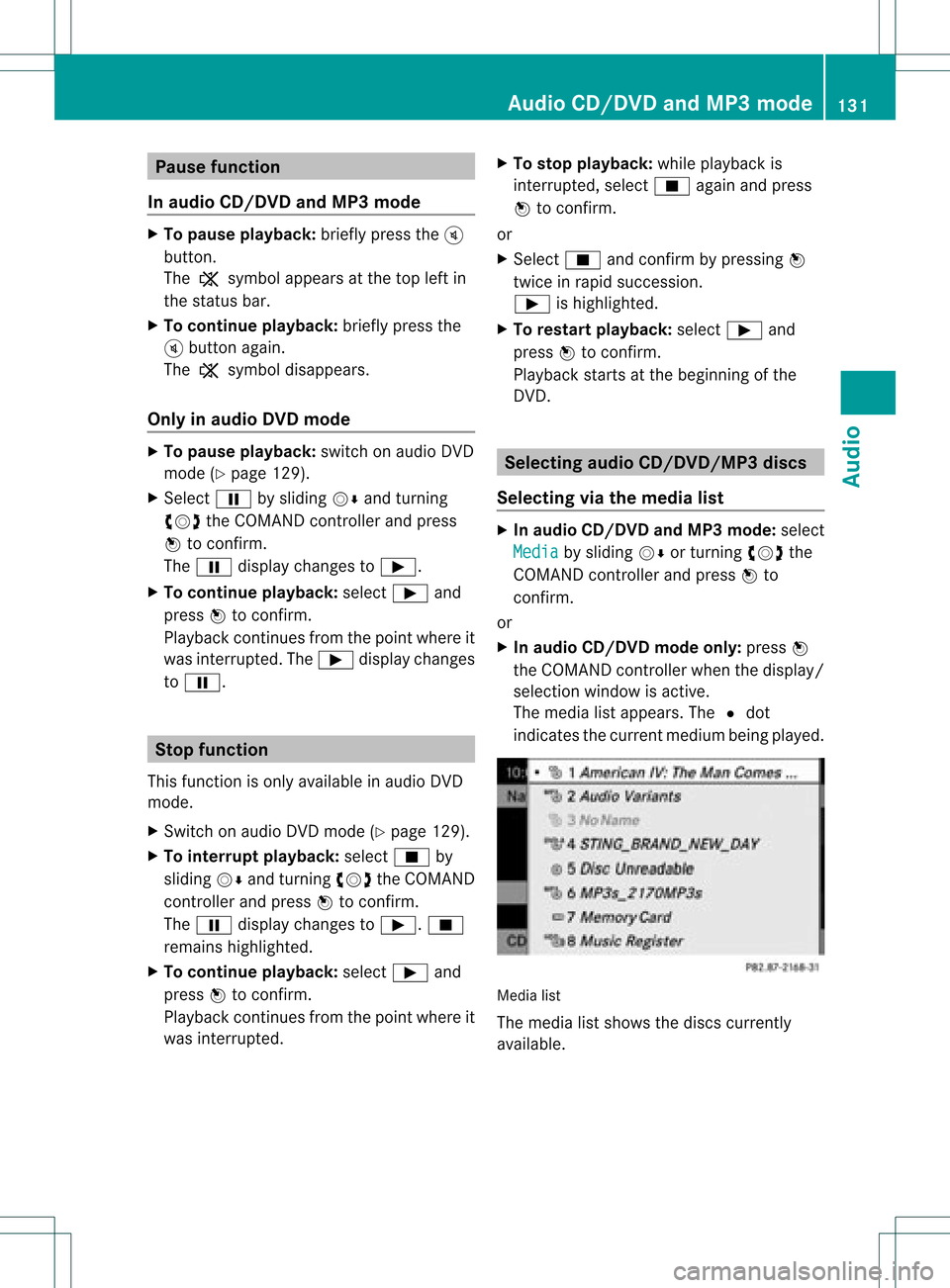
The media listappears. The#dot
indicates thecurrent medium beingplayed. Media
list
The media listshows thediscs current ly
availa ble. Audio
CD/DVD andMP3 mode
131Audio Z
Page 134 of 182
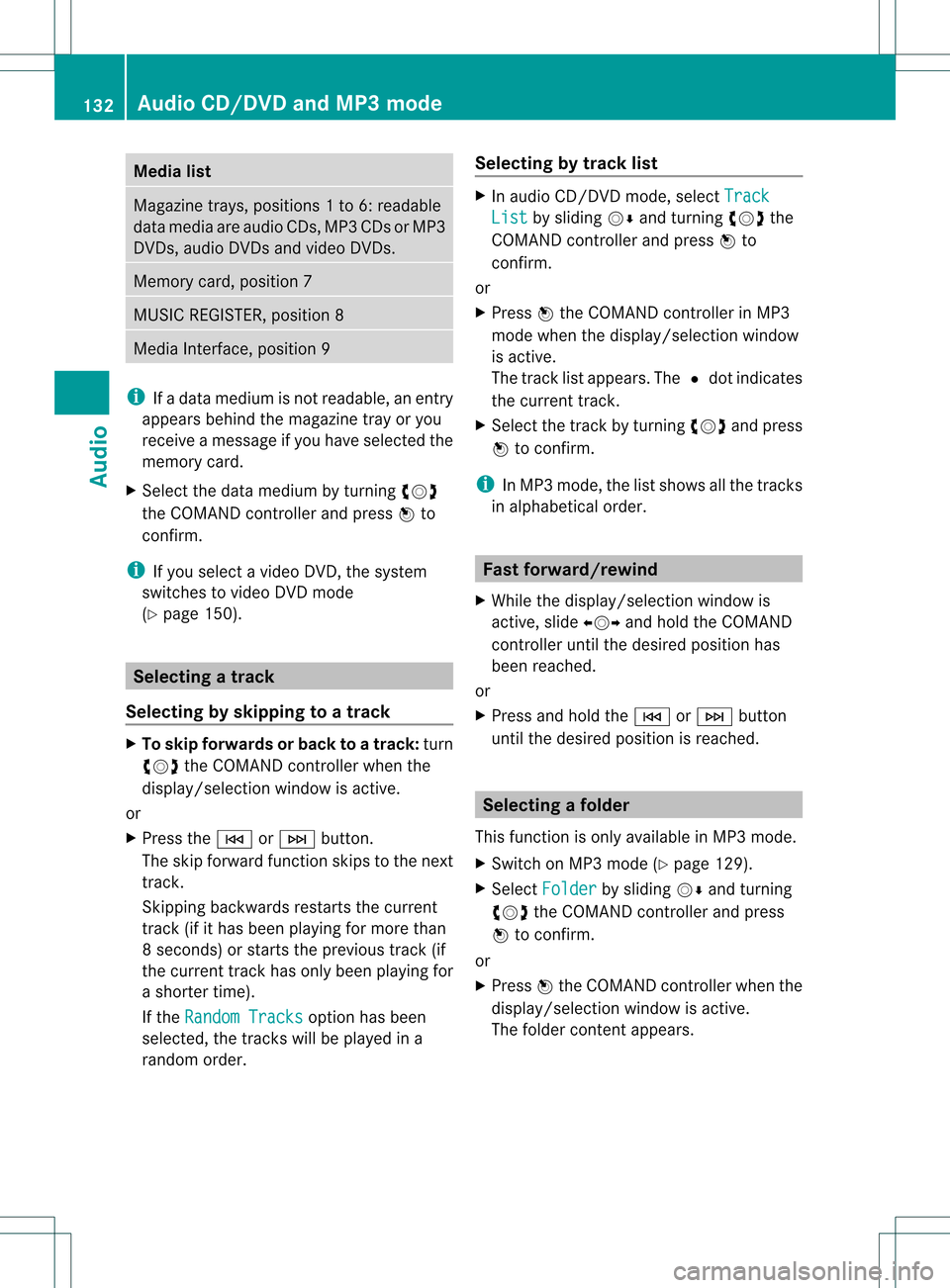
Media
list Maga
zinetrays ,posi tions 1to6: readable
data media areaudio CDs,MP3CDsorMP3
DVD s,audio DVDsand video DVDs. Memory
card,position 7 MUSIC
REGISTER, position8 Media
Interface, position 9 i
Ifadata medium isnot readable, anentr y
appears behindthemagazine trayoryou
receive amessage ifyou have selected the
memory card.
X Select thedata medium byturnin gcVd
the COMAND controller andpress Wto
conf irm.
i Ifyou select avideo DVD,the system
switches tovideo DVDmode
(Y page 150). Selecting
atrac k
Se lecti ng byskippin gto atrac k X
To ski pfo rwa rdsorbac kto atrac k:tur n
cVd theCOMAND controllerwh en the
di sp lay/ selectio nwindow isact ive.
or
X Press theE orF button.
The skip forward function skipsto the next
tr ack .
Sk ipping backwards restartsthe curr ent
tr ack (ifithas been playing formor ethan
8s econ ds)orstart sthe previous track(if
the curr enttrack hasonly been playing for
a shor tertime).
If the Rand omTrac ks opt
ion has been
selec ted,thetrack swill beplayed ina
rand omorder . Selecting
bytrack list X
In audio CD/DVDm ode, select Track List by
sliding VÆandturnin gcVd the
COMAND controller andpress Wto
conf irm.
or
X Press Wthe COMAND controller inMP3
mode whenthedisplay /select ionwindow
is active.
The track listappears. The#dot indicates
the current track.
X Select thetrack byturnin gcVd andpress
W toconf irm.
i InMP3 mode, thelistshows allthe track s
in alphabetical order. Fast
forward /rewind
X While thedisplay /select ionwindow is
active, slideXVY andhold theCOMAND
cont roller untilthedesired position has
been reached.
or
X Press andhold theE orF button
until thedesired position isreached. Selecting
afolder
This function ison lyavailable inMP3 mode .
X Swit chon MP3 mode (Ypage 129).
X Sele ctFol der by
slidin gVÆ andturnin g
cVd theCOMA NDcontroller andpres s
W tocon firm.
or
X Pres sW theCOMA NDcontroller when the
display/ selectionw indow isact ive.
The folder contentappears. 132
Audio
CD/DVDand MP3 modeAudio
Page 135 of 182
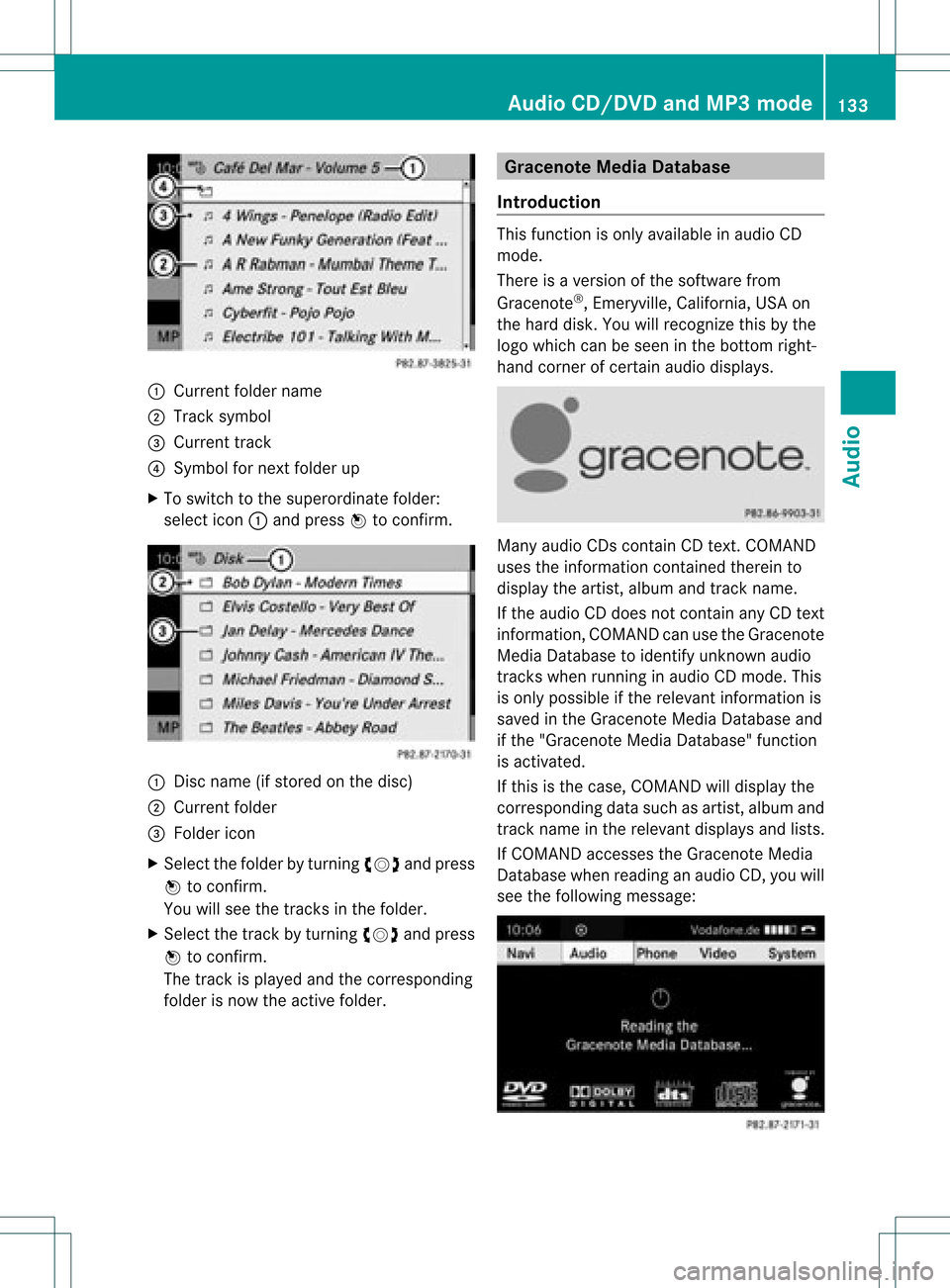
:
Curr entfol der nam e
; Trac ksymbo l
= Curr enttr ack
? Sym bolforne xt folder up
X To swit chtothesupe rordi nat efo lder :
sele ctico n: and pressW toconfirm . :
Disc nam e(if stor ed on thedisc )
; Curr entfolder
= Folder icon
X Select thefolder byturnin gcVd andpress
W toconf irm.
You willsee thetrack sin the folder.
X Select thetrack byturnin gcVd andpress
W toconf irm.
The track isplaye dand thecorrespon ding
folder isnow theactive folder. Gra
cenote MediaDatabase
Introdu ction This
funct ionisonly availa bleinaudio CD
mode.
There isaversion ofthe software from
Gracenote ®
,Emeryville, California, USAon
the hard disk. Youwillrecogn izethis bythe
logo which canbeseen inthe bottom right-
hand cornerofcert ainaudio display s. Many
audio CDscontainCD text .COMAND
uses theinform ationcontained therein to
display theartist, album andtrack name.
If the audio CDdoes notcont ainany CDtext
inform ation,COMAND canusetheGracenote
Media Database toidentify unknownaudio
track swhen runnin gin audio CDmode. This
is only possible ifthe relevant informationis
saved inthe Gracenote MediaDatabase and
if the "Gracenote MediaDatabase" function
is activated.
If this isthe case, COMAND willdisplay the
correspon dingdata such asartist, album and
track name inthe relevant displaysand lists.
If COMAND accessestheGracenote Media
Database whenreading anaudio CD,youwill
see thefollowing message: Audio
CD/DVD andMP3 mode
133Audio Z