display MERCEDES-BENZ GLK-Class 2012 X204 Comand Manual
[x] Cancel search | Manufacturer: MERCEDES-BENZ, Model Year: 2012, Model line: GLK-Class, Model: MERCEDES-BENZ GLK-Class 2012 X204Pages: 182, PDF Size: 4.89 MB
Page 95 of 182
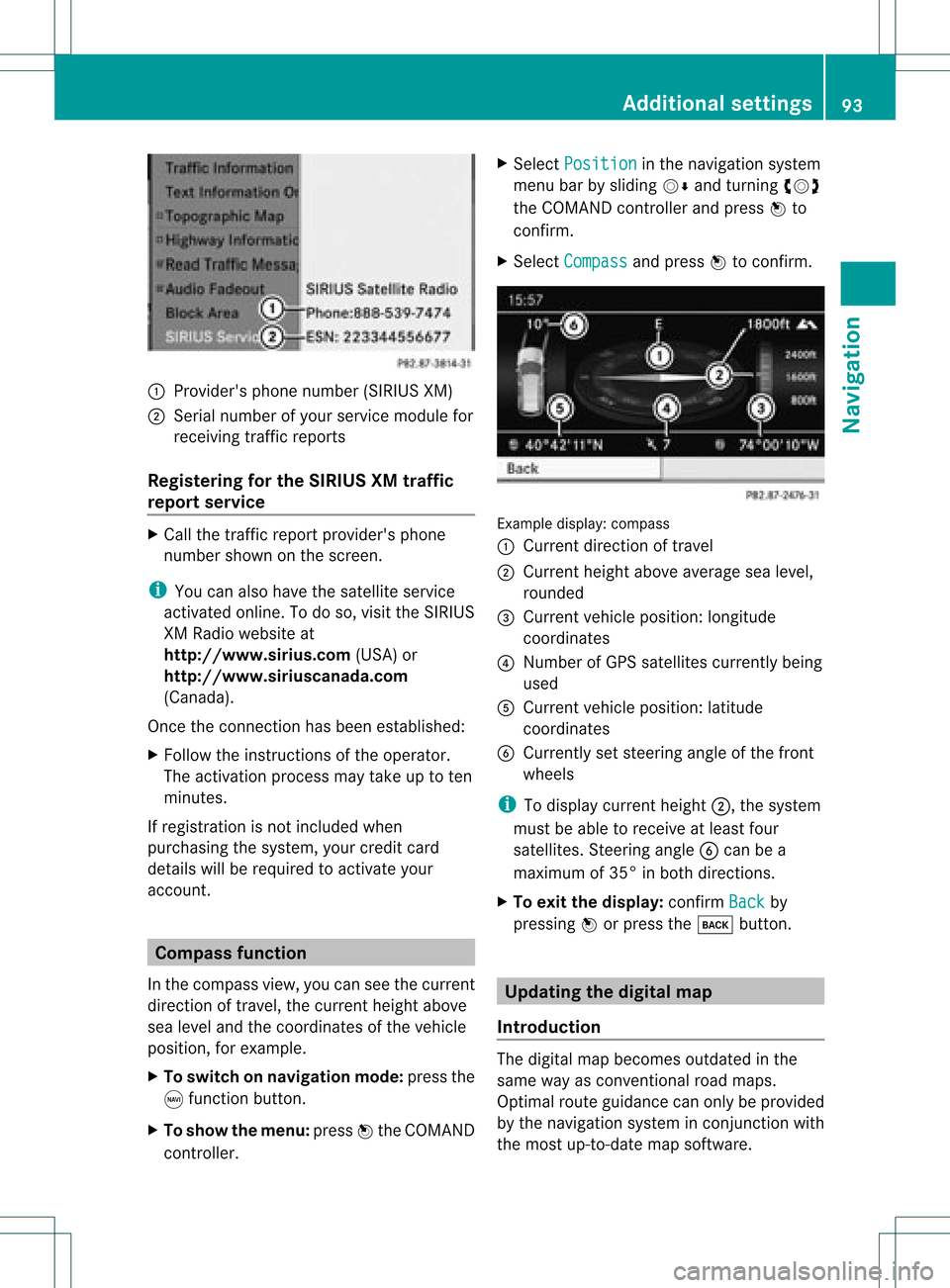
1
Provider's phonenumber (SIRIUSXM)
2 Serial number ofyour service module for
receivin gtraff icreport s
Registering forthe SIRIUS XMtraffic
repor tserv ice X
Call thetraff icrepo rtprov ider' sphon e
num bershown onthesc reen .
i You canalso have thesat ellit eser vice
act ivat edonline .Todo so, visit theSIRIUS
XM Radio website at
htt <0010002C00210021001700170017002000130009001200090015001300200003
000F000DB (USA)or
htt <0010002C00210021001700170017002000130009001200090015001300030001
000E000100040001B .com
(Canada) .
Once theconn ection hasbeen established:
X Follow theinstr uctions ofthe operator.
The activation processmaytake uptoten
minutes.
If registrat ionisnot included when
purchasing thesystem, yourcredit card
details willberequired toactivate your
account . Compass
function
In the compass view,youcan seethecurrent
direction oftravel, thecurrent heightabove
sea level andthecoordinat esofthe vehicle
position, forexample.
X To switch onnavigation mode:pressthe
g funct ionbutton .
X To show themenu: pressWthe COMAND
cont roller. X
Select Position in
the navigation system
menu barbysliding VÆandturnin gcVd
the COMAND controller andpress Wto
conf irm.
X Select Compass and
press Wtoconf irm. Example
display:compass
: Current direction oftravel
; Current heightaboveaverage sealevel,
rounded
= Current vehicleposition: longitude
coordinat es
? Number ofGPS satellites currentlybeing
used
A Current vehicleposition: latitude
coordinat es
B Currently setsteerin gangle ofthe front
wheels
i Todisplay current height;,thesystem
must beable toreceive atleast four
satellites. Steeringangle Bcan bea
maximum of35° inboth direction s.
X To exit thedisplay: confirmBack by
pressing Worpress thek button . Upda
tingthedigital map
Introdu ction The
digital mapbecomes outdatedinthe
same wayasconv ention alroad maps.
Optimal routeguidance canonly beprovided
by the navigation systeminconj unct ionwith
the most up-to- datemapsoftware. Additional
settings
93Navigation Z
Page 96 of 182
Information
aboutnew version sof the digital
map canbeobtained fromanauthoriz ed
Mercedes- BenzCenter .You canhave the
digital mapupdated atthe centerwith aDVD ,
or you can update themap yourself.
i The update process cantake along time
(over anhour), depending onthe size ofthe
digital map.Duringthis time, youwillonly
be able toswitch onradio mode andto
accept incomingcalls. Theupdate willbe
complet edmore quickly ifthe vehicle is
stat ionary.
If you carry outtheupdate withtheengin e
switch edoff and thestart erbatter yhas
insuffic ientpower, COMAND may
automatic allyswitch offduring theprocess
in order toprotec tthe batter y.Ifthis
occur s,rest artthe update withtheengin e
runn ing. G
WARN
ING
Never leavetheengin erunn inginan enclos ed
space. Theexhaust gasescontain carbon
monox ide.Inhaling exhaustgasesconstitutes
a health hazard andcould leadtoloss of
con sciousnes sor even death.
Upda tingprocess X
Inser tthe DVD intothe DVD changer
(Y page 126).
The update begins. COMAND checks
whether thedigital maponthe DVD is
compat iblewith thenavigation systemand
system software.
If this isthe case andtheDVD 'smap data
has notalready beeninstalled, COMAND
start supdating thedigital map.
If the map data hasalready beeninstalled,
the display showsversion dataanda
message tothis effec t.
X To confirm themessage: pressWthe
COMAND controller.
X Take theDVD outofthe slot.
While theupdate isrunn ing,youwillsee a
message tothis effec tand apro gressbar.The nav
igati on system isnot opera tional unti lthe
up date iscomp lete.
i Youcanno teje ctthe DVD during the
up date. Ifyo usw itch offCOMAND during
the update, the update isinte rrupte d.It
then continuesfrom where itwa s
inte rrupte dwh en the system isres tarte d.
CO MAND maypro mpt youto cha nge theDVD
du ring theupdate.
X Pre ssthe 8 load /eje ctbutton.
X Ta ke the DVD outof the slot.
X Inse rtthe requested DVD.
Once theupdate hasbe en succes sfully
comp leted ,yo uwi llsee ames sage tothis
eff ect.
X To confi rm the mes sage:pre ssW the
CO MAND controller.
X Ta ke the DVD outof the slot.
The update iscomp lete.
If the updateisnot succes sfully comp leted ,
yo uwi llsee ames sage tha tthe map update
is not possible.
X To confirm themessage: pressWthe
COMAND controller.
X Take theDVD outofthe slot. 94
Additional
settingsNavigation
Page 97 of 182

Problems
withthenavigation system Problem Possible
causes/co nsequences andM Solutions
COMAND
isunable to
cont inue route
guida nceafter the
journey hasbeen
interr upted. Route
guidanceiscanceled ifyou interr uptthejourney formore
than twohours.
"Interr upting thejourney" referstostopping thevehicle and
switching offCOMAND.
"Continuing routeguidance"refers toswitching COMAND backon
and driving on.
X Continue routeguidance(Ypage 70).
COMAND determines thevehicle's position.Depending onthe
driving situation, thismay take some time.
Route guidancemay berestric tedduring thedeterminat ionof
the vehicle's position.
When positioning iscomplete, routeguidanceisresumed with
navigation announcementsandroute guidancedisplay s. Problem Possible
causes/co nsequences andM Solutions
COMAND
isunable to
determine thevehicle's
position. COMAND
hastoredetermine theposition ofthe vehicle ifthe
vehicle hasbeen transport ed(e.g. byferry, bymotorail orafter
towing).
X Start thevehicle andpullaway .
COMAND determines thevehicle's position.Depending onthe
driving situation, thismay take some time.
Route guidancemay berestric tedduring thedeterminat ionof
the vehicle's position.
When positioning iscomplete, routeguidanceisresumed with
navigation announcementsandroute guidancedisplay s. Problems
withthenavigation system
95Navigation Z
Page 101 of 182
slide
XVY orZVÆ.
press W.
R pressing theKorI button andusing the
telephone keypadonCOMAND
R pressing the6 or~ button onthe
multifunction steeringwheel
R using Voice Control (seetheseparate Voice
Control System instructions)
Unless statedotherwise, thedescriptions and
illu strations inthis section refertoCOMAND. Function
restrictions
The telephone isnot ready foruse inthe
followi ngsituations:
R the telephone automaticall ytries tolog on
to anetwork. Ifno network isavail able, you
will notbeable tomake a"911" emergency
call. Ifyou attempt tomake anoutgoing
call, theNoService message
willappea r
for ashort while. 911
emergency call G
WARNING
The 911 emergency callsystem isapubli c
service. Usingitwithout duecause isa
criminal offense.
The followi ngrequirements mustbefulfill ed
for a911 emergency call:
R the mobile phonemustbeswitched on.
R anetwork mustbeavail able.
R avalid andoperational SIMcard must be
inserted inthe mobile phone.
R the mobile phoneisconn ected toCOMAND
via Bluetooth ®
.
If you cannot makeanemergency call,you
must arrange rescuemeasures yourself. X
Ent ernumbers onCOMAND (Ypage 104).
X Press theKbutton.
The telephone makestheconn ection.
X Wait forthe emergency callcent erto
respond andthen describe theemergency. Telephony
viathe Bluetooth ®
interface Condition
s
On the mobile phone For
telephony viaCOMAND's Bluetooth®
interface, aBluetooth ®
-capable mobile
phone isrequired.
i Not allmobile phones available onthe
market areequa llysuitabl e.More detailed
information onsuitabl emobile phones and
on conn ecting Bluetooth ®
-capable mobile
phones withCOMAND canbefound onthe
Intern etat
htt p://www .mbusa-mobile.com.O rcall
th eMer cedes-Ben zCust ome rAssistance
Center at
1-80 0-FOR-ME RCedes(1-800- 367-6372)
(for theUSA) orCustomer Relations at
1-80 0-387-0100(for Canada ).
The battery ofthe mobile phoneshould
alwa ysbe kept sufficiently chargedinorder
to prevent malfunctions.
In preparation fortelephoning viathe
Bluetooth ®
interface, youshould checkthe
followi ngitems onyour mobile phone(seethe
mobile phoneoperating instructions):
X Hands-Fr eeProfile
The mobile phonemustsupport Hands-
Free Profile 1.0orabove.
i Some displays(e.g. thesignal strengt h)
depend onthe supported versionofthe
Hands-Fr eeProfile.
X Bluetooth ®
visibil ity
On certain mobilephones, thedevice itself
must bemade "visible"for other devices,
as well asactivating theBluetooth ® Telephony
viathe Bluetooth ®
interface 99Telephone Z
Page 102 of 182

function
(seethemobi lephone operating
instructio ns).
X Blue tooth ®
devi cename
Every Bluetooth ®
devi cehas itsown
Blue tooth ®
devi cename. Thisdevicename
is freel ydefi nabl e,but can beidentical for
al ldevi cesfrom thesame manufa cturer.It
is therefore recommende dthat youchange
this name sothat youcan easilyrecognize
you rmobile phone (seethemobile phone
operating instructions).
X Switch onthe mobile phoneandenter the
PIN when prompted todo so(see the
mobile phoneoperating instructions).
X Act ivate Bluetooth ®
funct ionsand, where
necessary, Bluetooth®
visibility onthe
mobile phone(seethemobile phone
operating instructions).
On COMAND X
Act ivate theBluetooth ®
funct ionin
COMAND (Ypage 42). Connec
tingamobile phone
Gener alinfor mation Bef
ore usin gyour mobilephon ewith
COMA NDforthefir st tim e,you willneedto
con nectit.
When youauth orizeanew mobi lephon e,itis
con nectedautom atically.
Conn ecting com prises:
R sear ching for aBluet ooth®
-c apable mobile
phon e
R subse quentlyauth orizing it
You canconnectupto ten mobile phones.
Search ingforam obile phone X
Pres sth e÷ function butt oninCOMA ND.
X Sele ctPho ne in
thete lepho nebasic menu
by slidin gVÆ andturnin gcVd the COMA
NDcontroller andpres sW to
con firm.
X Sele ctBlu etooth Pho
nes and
pres sW to
con firm.
X Sele ctUpd ate and
pres sW tocon firm.
COMA NDsearc hesforBluet ooth®
te lepho neswith inran geand adds them to
th eBluet ooth®
telepho nelist.
The durat ionofthesearc hdepends onthe
number ofBluetoot h®
telephon eswithin
range andtheir charact eristics. Ex
ample ofdisplay: Bluetoot h®
telephon eslist
: Current lycon nected #and authoriz ed
mobile phoneY
; Mobile phonenotwithin rangebut
previously authorized(L appears ingray)
= Newly detectedmobile phonewithin
range butnot yetauthoriz ed(no icon yet
Y)
The Bluetoot h®
telephon eslist shows all
mobile phones withinrangeandallpreviously
authoriz edmobile phones, whether ornot
they areinrange.
i Ifthe Bluetoot h®
telephon eslist isfull,
you willberequested tode-author izea
mobile phone(Y page 102).IfCOMAND
does notfind your mobile phone, external
authoriz ation(Ypage 101)may be
nec essary.
i When called upagain, thetelephon elist
may nolonger showallmobile phones
because, forexample, amobile phonehas
been removed fromthevehicle inthe 100
Telephony viatheBluet ooth®
interf aceTelephone
Page 103 of 182
meantime.
Inthis case, startanew search
to upd ate the Blue tooth ®
teleph onelist.
Authorizin g(regi stering )am obile
ph one X
In theBluet ooth®
te lepho neslist,selec tthe
not yetauthorized mobilephonebyturning
cVd theCOMAND controller.
X Select Options by
sliding VYthe
COMAND controller andpress Wto
confirm .
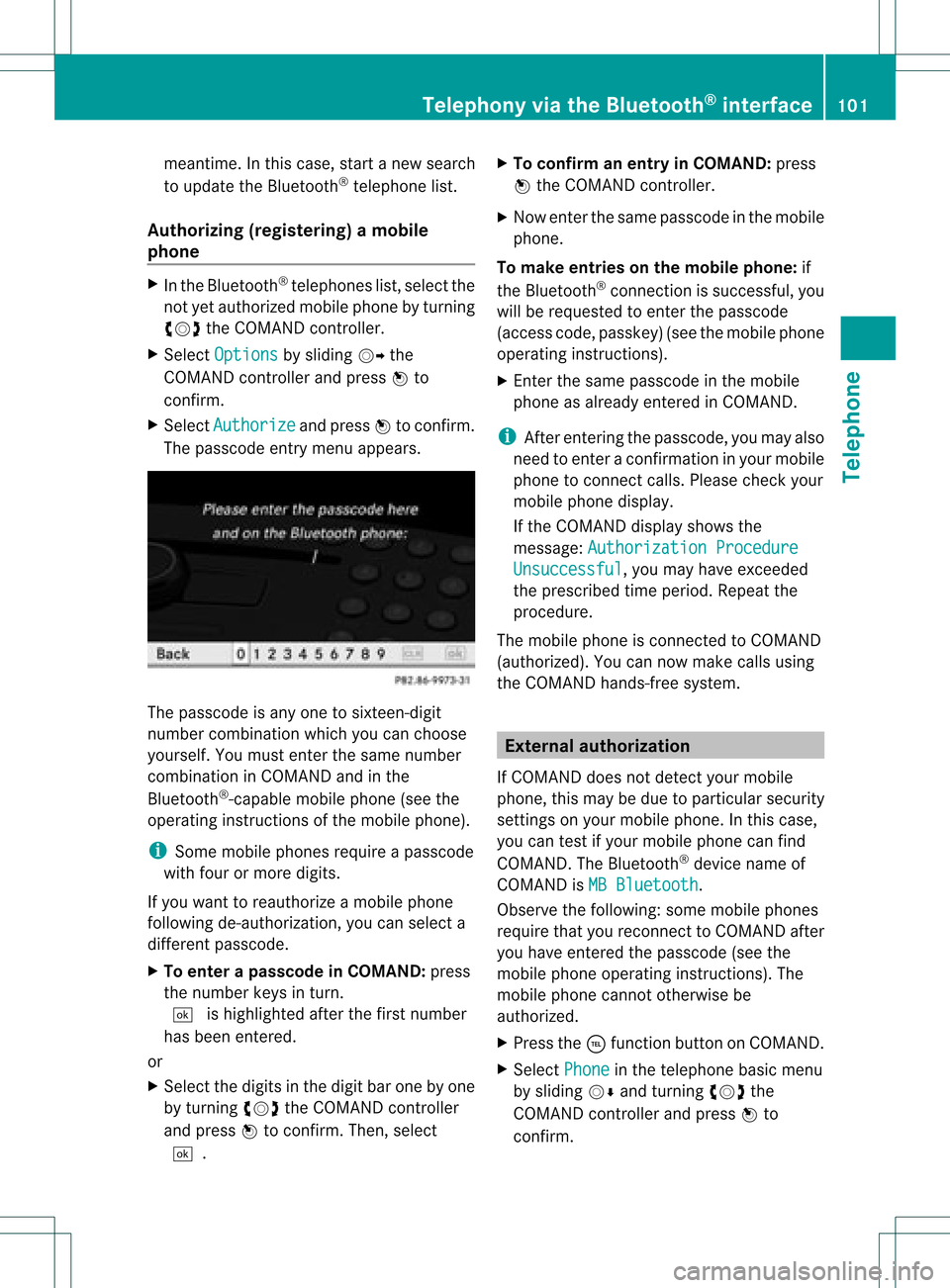
X Select Authorize and
press Wtoconfirm .
The passcode entrymenu appears. The
passcode isany one tosixteen- digit
number combination whichyoucan choose
yourself. Youmust enter thesame number
combination inCOMAND andinthe
Bluetooth ®
-capable mobilephone(seethe
operating instructionsofthe mobile phone).
i Some mobile phones requireapasscode
with fourormore digits.
If you want toreauthorize amobile phone
following <0004000500250001001500140008000F00120009001C000100140009000F000E
0032V youcan select a
different passcode.
X To enter apassc odeinCOMA ND:press
the numbe rkeys inturn.
¬ ishigh lighted after thefirst numbe r
has beenentere d.
or
X Sel ect the digits inthe digitb aroneby one
by turnin gcVd theCOMA NDcontroll er
and pres sW toconfirm .Then ,selec t
¬. X
To confir man ent ryinCOMAN D:pres s
W theCOMA NDcontroll er.
X Now enterthe same passcode inthe mobile
phone.
To make entries onthe mobile phone:if
the Bluetooth ®
conn ection issuccessful, you
will berequested toenter thepasscode
(access code,passkey) (seethemobile phone
operating instructions).
X Ent erthe same passcode inthe mobile
phone asalready entered inCOMAND.
i Afterenterin gthe passcode, youmay also
need toenter aconfirm ationinyour mobile
phone toconn ectcalls. Please checkyour
mobile phonedisplay.
If the COMAND displayshows the
message: Authorization Procedure Unsuccessful ,
you may have exceeded
the prescribed timeperiod. Repeatthe
procedure.
The mobile phoneisconn ected toCOMAND
(authorized). Youcannow make callsusing
the COMAND hands-free system. External
authorizat ion
If COMAND doesnotdetect yourmobile
phone, thismay bedue toparticular security
settin gson your mobile phone. Inthis case,
you can test ifyour mobile phonecanfind
COMAND. TheBluetooth ®
device nameof
COMAND isMB Bluetooth .
Observe thefollowing: somemobile phones
require thatyoureconn ecttoCOMAND after
you have entered thepasscode (seethe
mobile phoneoperating instructions).The
mobile phonecannot otherwise be
authorized.
X Press the÷funct ionbutton onCOMAND.
X Select Phone in
the telephone basicmenu
by sliding VÆandturning cVdthe
COMAND controller andpress Wto
confirm . Telephony
viathe Bluetooth ®
interface 101Telephone Z
Page 104 of 182

X
Sel ect Blu etooth Pho
nes and
pressW to
confi rm.
X Sel ect Update .
X Sel ect Options by
sliding VY the
CO MAND controllera nd pre ssing W to
confi rm.
X Sel ect ExternalAuthorization and
pre ssW toconfi rm.
X Star tthe Bluetoo th®
sea rch onthe mob ile
ph one (see the mob ile ph one opera ting
ins tructio ns).
X Sel ect COMAND (MB Bluetooth )
on the
mob ile ph one .
X Enter thepassco deon the mob ile ph one
wh en req uested toand then enteritin
COMA ND. Connect
inganot hermob ilephone
If you have authorizedmor eth an onemob ile
phon e,you can swit chbet ween theind ivid ual
phon es.
i You canonlyswit chtoano ther auth orized
phon eif you arenotcurr ently mak ingacall .
X Se lec tthe mobile phoneinthe Bluetooth ®
telephones listbyturning cVdthe
COMAND controller andpress Wto
confirm .
The selected mobilephoneissearched for
and conn ected ifit is within Bluetooth ®
range andifBluetooth ®
is activated.
Only onemobile phonecanbeconn ected
at any one time. Thecurrent lyconn ected
mobile phoneisindicated bythe #dot in
the Bluetooth ®
telephones list
(Y page 100). Displaying
details
X Press the÷funct ionbutton onCOMAND.
X Select Phone in
the telephone basicmenu
by sliding VÆandturning cVdthe COMAND
controller andpress Wto
confirm .
X Select Bluetooth Phones and
press Wto
confirm .
X Select thedesired mobilephoneinthe
Bluetooth ®
telephones list.
X Select Options by
sliding VYandpress
W toconfirm .
X Select Details and
press Wtoconfirm .
The following information concerning the
selected mobilephoneisshown:
R Bluetooth ®
name
R Bluetooth ®
address
R availa bilitystatus (isshown afteranew
search)
R authorization status
X To close thedetailed view:turncVd or
slide XVY theCOMAND controller. De-registering
(de-authorizing) a
mobile phone
Mercedes-Ben zUSA, LLCrecommen dsde-
authorization onboth COMAND andonthe
mobile phone. Subsequent authorization may
otherwise fail.
X Press the÷funct ionbutton onCOMAND.
X Select Phone in
the telephone basicmenu
by sliding VÆandturning cVdthe
COMAND controller andpress Wto
confirm .
X Select Bluetooth Phones and
press Wto
confirm .
X Select thedesired mobilephoneinthe
Bluetooth ®
telephones list.102
Telephony viathe Bluetooth ®
interfaceTelephone
Page 105 of 182
X
Sel ect Option s by
sliding VY andpress
W toconfi rm.
X Sel ect De-Aut horize and
pressW to
confi rm.
Ap rompt appears asking whethe ryou
really wishtode-authorize thisdevice.
X Select Yes or
No .
If you select Yes ,
the device willbedeleted
from theBluetooth ®
telephones list.
If you select No ,
the process willbeaborted.
i Before re-authoriz ingthe mobile phone,
you should alsodelete thedevice nameMB Bluetooth from
yourmobile phone's
Bluetooth ®
list. Telephone
basicmenu (Bluetooth ®
interfa ce)
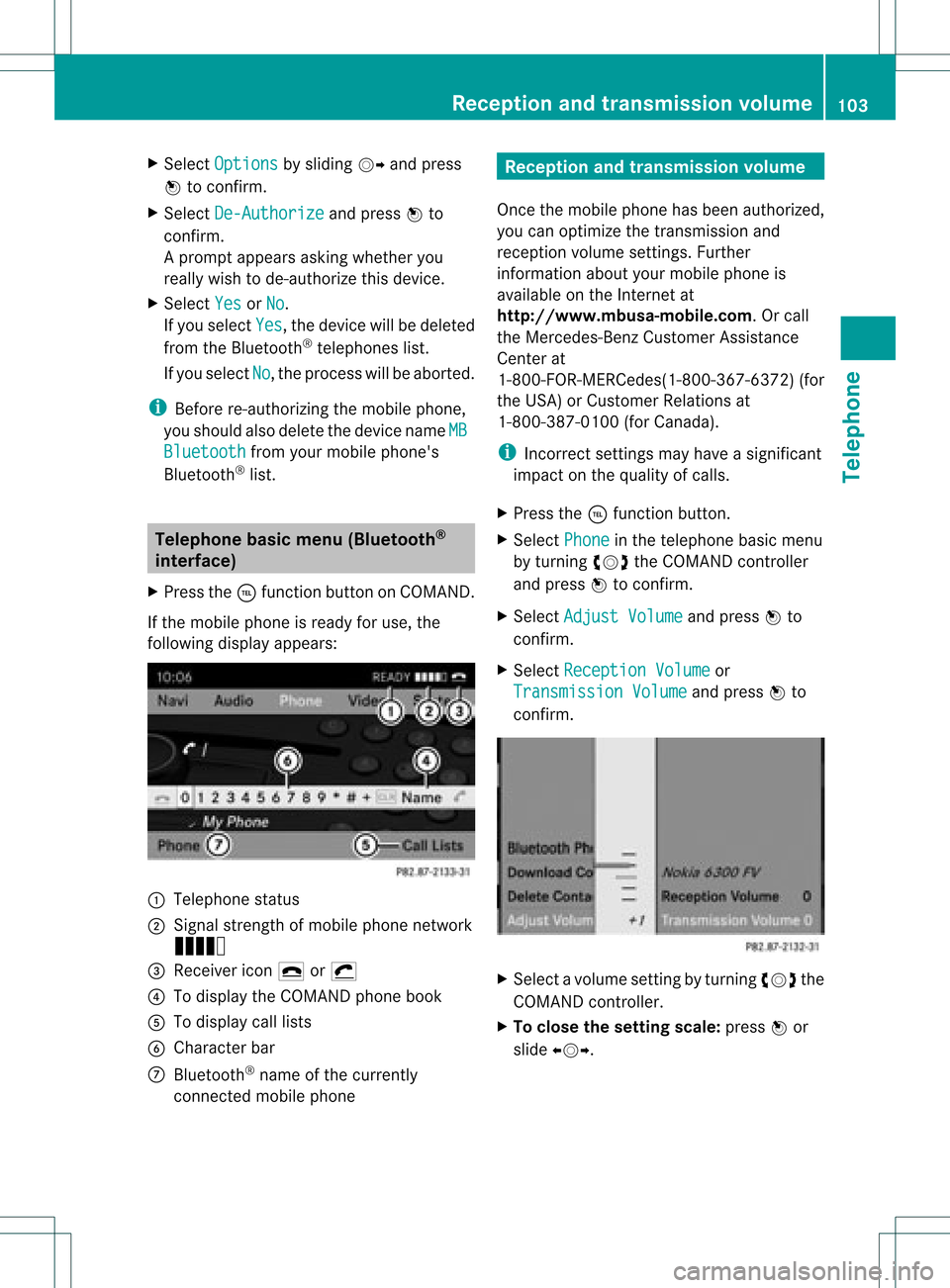
X Press the÷funct ionbutton onCOMAND.
If the mobile phoneisready foruse, the
following displayappears: :
Telephone status
; Signal strengthofmobile phonenetwork
Ä
= Receiver icon¢or¡
? Todisplay theCOMAND phonebook
A Todisplay calllists
B Character bar
C Bluetooth ®
name ofthe current ly
conn ected mobile phone Reception
andtransmission volume
Once themobile phonehasbeen authorized,
you can optimize thetrans mission and
reception volumesettings. Further
inform ationabout yourmobile phoneis
availa bleonthe Internet at
htt p://www.mbusa- mobile.com.Orcall
the Mercedes-B enzCustomer Assistance
Center at
1-8 00-FOR-ME RCedes(1-800- 367-6372 )(for
the USA )or Custom erRelation sat
1- 800 -387- 010 0(for Canada).
i Incorrec tsett ings may have asignif icant
impact onthe quality ofcalls.
X Press the÷func tion button.
X Selec tPhone in
the teleph onebasic menu
by turn ingcVd theCOMAN Dcon troller
and press Wtocon firm .
X Selec tAdjus tVolum e and
press Wto
con firm .
X Selec tRecep tionVolume or
Trans missionVolum e and
press Wto
con firm . X
Selec tavolume setting byturning cVdthe
COMAND controller.
X To clo sethe setting scale:press Wor
sli de XVY. Rece
ption andtransmissio nvol ume
103Telephone Z
Page 107 of 182
Connect
ingacall toan entry inac all list
or inthe COM AND phone book X
Open acall lista nd select anentry
(Y page 109) .
or
X Ca llup the COMAND phone book and
sel ect anentry (Ypage 106) .
X To conn ectac all:press Wthe COM AND
controll eror the Kbutton. Func
tionsavail able during acall
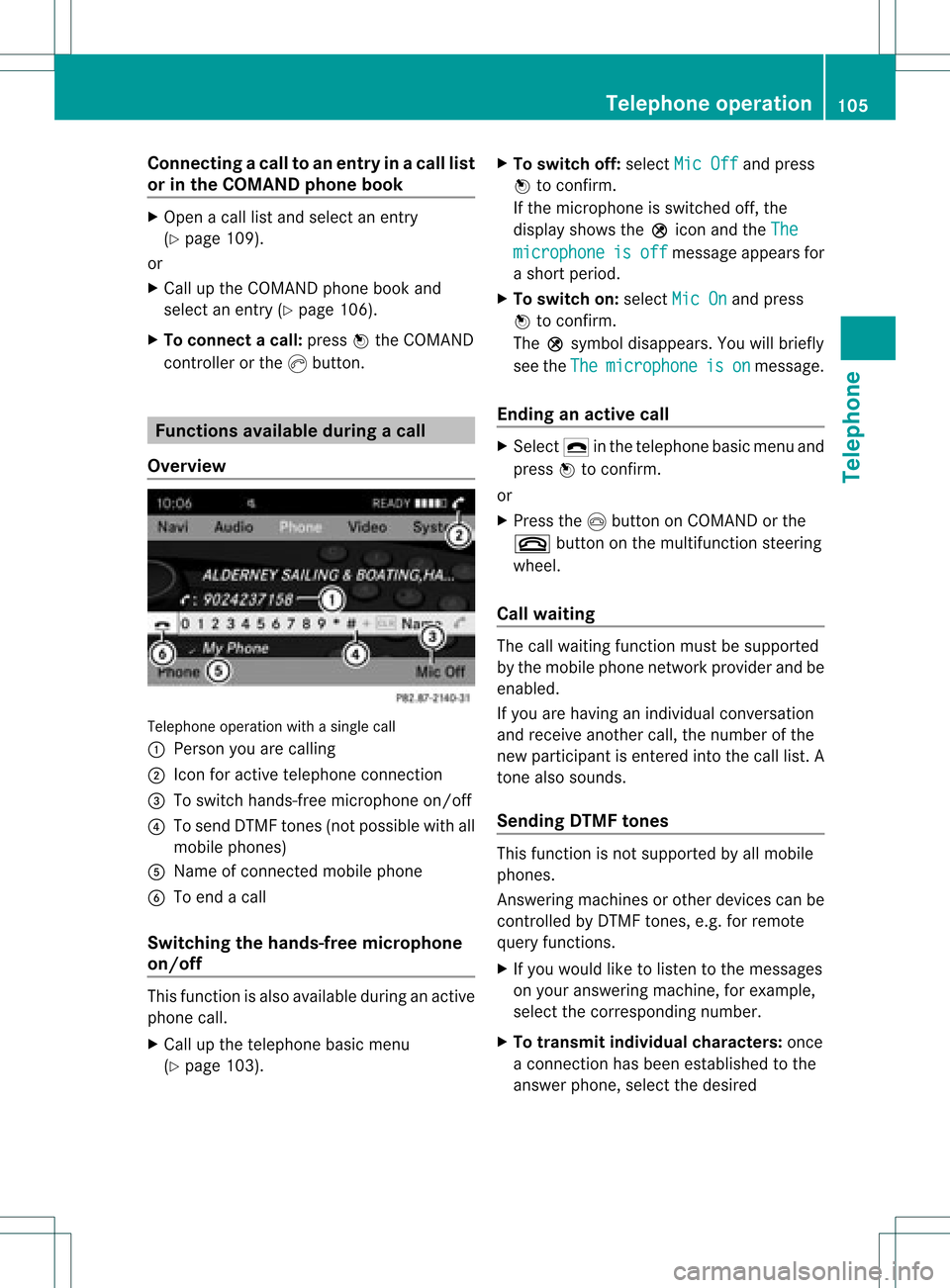
Ove rview Tel
epho neoper ationwithasing lecall
: Perso nyou are calling
; Icon foractive telephone connection
= Toswitch hands-fr eemicrophon eon/of f
? Tosend DTMF tones(not possible withall
mobile phones)
A Name ofconn ected mobile phone
B Toend acall
Switching thehands- freemicroph one
on/off This
funct ionisalso availa bleduring anactive
phone call.
X Call upthe telephone basicmenu
(Y page 103). X
To switch off:select MicOff and
press
W toconf irm.
If the microphon eis switched off,the
display showstheQicon andtheThe microphone is off message
appearsfor
a short period.
X To switch on:select MicOn and
press
W toconf irm.
The Qsymbol disappea rs.You willbriefly
see theThe microphone is on message.
Ending anactive call X
Select ¢inthe telephone basicmenu and
press Wtoconf irm.
or
X Press theIbutton onCOMAND orthe
~ button onthe multifunct ionsteerin g
wheel.
Call waiting The
callwaiting functionmust besupported
by the mobile phonenetwork provider andbe
enabled.
If you arehaving anindividual conversation
and receive another call,thenumber ofthe
new participant isenter edinto thecall list. A
ton ealso sounds.
Sending DTMFtones This
funct ionisnot supported byallmobile
phones.
Ans wering machines orother devices canbe
cont rolled byDTMF tones, e.g. forremote
query functions.
X Ifyou would liketolisten tothe messages
on your answering machine,forexample,
select thecorrespon dingnumber.
X To transmit individual characters: once
a conn ection hasbeen established tothe
answer phone,selectthedesired Telephone
operation
105Telephone Z
Page 108 of 182
cha
racte rsinthe characte rba rand press
W toconfi rm.
or
X Pre ssthe corre sponding key onthe
CO MAND numberkey pad.
Every characte rselected willbe
tran smitt edimmediately.
X To send aphone bookentry asaDTMF
sequence: selectName by
turn ingcVd the
COMAND controller andpress Wto
con firm.
X Select thedesired phonebookentryand
press Wtocon firm.
The entryissent asaDTMF charact er
str ing.
X To retu rntothe call displa y:select
Back and
press Wtocon firm. Using
thephone book Introd
uction
The phone bookdisplays thenames and
phone numbers ofall ofthe address book
ent ries saved inthe COMAND addressbook.
If an address bookentrydoes nothave a
telephon enumber, itdoes notappear inthe
phone book. Calling
upthe phone book
Overview X
Select Name in
the telephon ebasic menu
by sliding VÆandturningcVd the
COMAND controller andpress Wto
con firm.
If the phone bookcontains entries, they will
be displayed inalphabetical order.
Character bar=isactive.
The charact erbar serves toreduce the
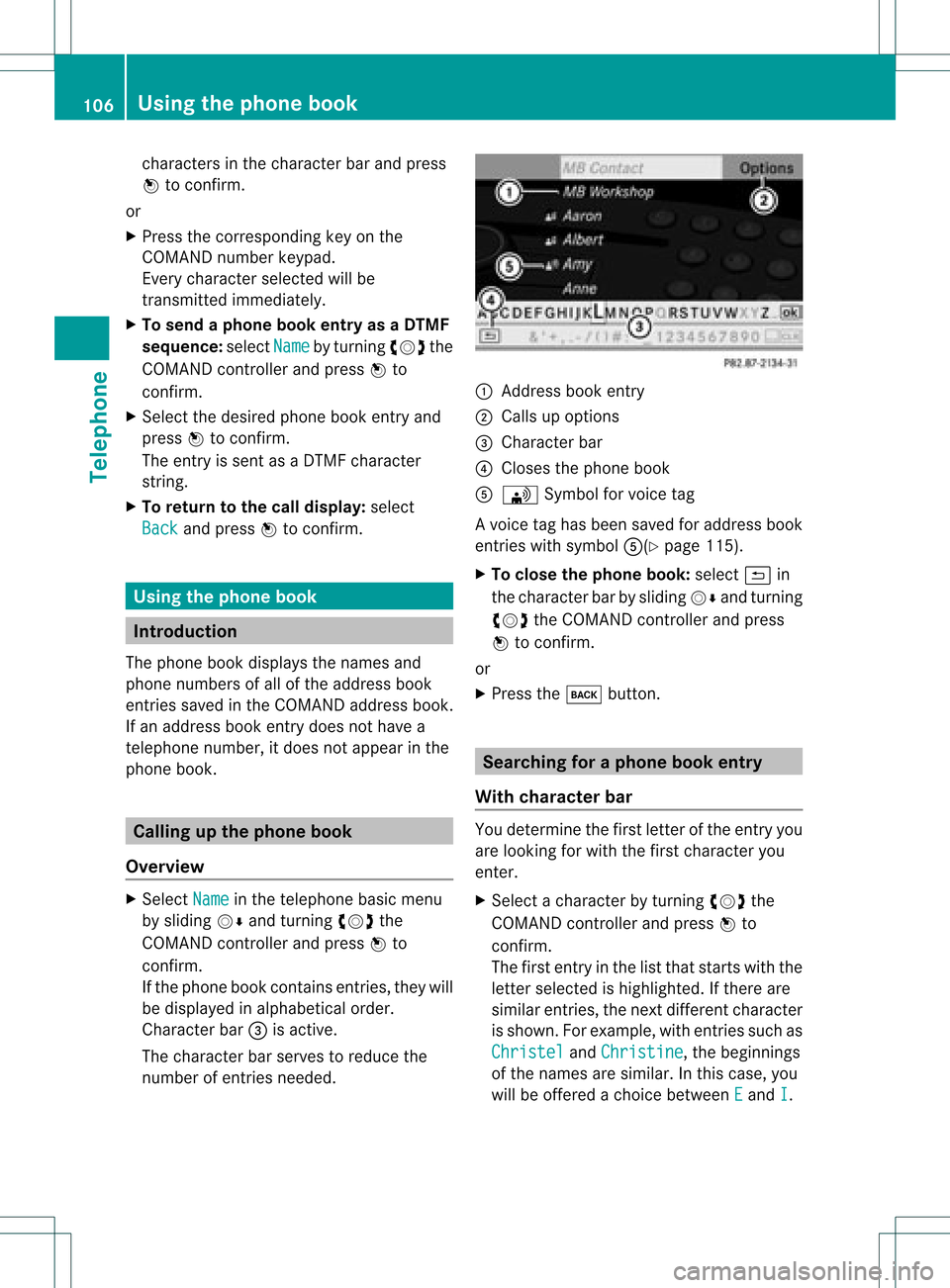
number ofent ries needed. :
Address bookentry
; Calls upoption s
= Character bar
? Closes thephone book
A \ Symbol forvoice tag
Av oice taghas been saved foraddress book
entr ieswith symbol A(Ypage115).
X To close thephone book:select &in
the charact erbar bysliding VÆandturnin g
cVd theCOMAND controller andpress
W toconf irm.
or
X Press thek button . Searching
foraphone bookentry
With chara cterbar You
determin ethe first letter ofthe entr yyou
are looking forwith thefirst charact eryou
enter .
X Select acharact erby turnin gcVd the
COMAND controller andpress Wto
conf irm.
The first entryin the listthat start swith the
letter selected ishighlighted. Ifthere are
similar entries,thenext different character
is shown. Forexample, withentriessuch as
Christel and
Christine ,
the beginnings
of the names aresimilar. Inthis case, you
will beoffered achoice between E and
I .106
Using
thephone bookTelephone