display MERCEDES-BENZ GLK-Class 2012 X204 Comand Manual
[x] Cancel search | Manufacturer: MERCEDES-BENZ, Model Year: 2012, Model line: GLK-Class, Model: MERCEDES-BENZ GLK-Class 2012 X204Pages: 182, PDF Size: 4.89 MB
Page 136 of 182
Switching
theGracenote ®
dat adisplay
on/off X
Switch onaudi oCD mode (Ypage 129).
X Select CD by
sliding VÆandturnin gcVd
the COMAND controller andpress Wto
conf irm.
X Select ReadCDDatabase by
turnin g
cVd andpress Wtoconf irm.
Switch thefunct iononO oroff ª.
Updat ingGracenote ®
music
recognition technologyandthe
Gracenote MediaDatabase The
digital dataonthe Gracenote Media
Database becomesobsoleteduetothe
release ofnew CDs. Optimum functionality
can only beattained withup-to-date
Gracenote ®
music recognit iontechn ology.
Infor mation aboutnewversions canbe
obtained fromanauthorized Mercedes-B enz
Center.
You canhave yourmusic recognit ion
software updatedtherewithaDVD, oryou
can upda teityou rself.
i The Gracenote MediaDatabase is
upda tedinconjunc tionwith thenavigation
system's digitalmap(Ypage 93). Setting
theaudio format
You canonly setthe audioformat inaud io
DVD mode. Thenumber ofaud ioformats
avai labledepends onthe DVD. Theconten tof
an audio DVDiscalled an"album", andthis
can bedivided intouptonine groups. Agroup
can contain musicind iffe ren tsound qualities
(stereo andmultichann elformats ,for
example), orbonus tracks.Each group can
cont ainupto99 track s.Ifan audio DVDonly
cont ains oneaudio format, the"Group" menu
item(s) cannotbe selected. X
Switch onaudio DVDmode (Ypage 129).
X Select DVD-A by
sliding VÆandturnin g
cVd theCOMAND controller andpress
W toconf irm.
X Select Group by
turnin gcVd andpress
W toconf irm.
The listofavaila bleaudio formats appears.
The #dot indicates theformat current ly
selected.
X Select theaudio format byturnin gcVd
and press Wtoconf irm.
X To exit themenu: slideXVY theCOMAND
cont roller orpress thek button . Playback
options
The following optionsareavaila bletoyou:
R Normal TrackSequence The
track sare playe din the normal order
(e.g. track 1,2,3, etc. ).
In MP3 mode, thetrack order isdetermin ed
by the order inwhich thetrack sare written
to the MP3 datacarrier whenitis created.
Alphabetical orderisthe most common .
Once allthe track sin afolder havebeen
playe d,the track sin the next folder are
playe d.
R Random Tracks All
the track son the medium areplaye din
random order(e.g.track 3,8, 5etc. ).
R Random Folder (only
inMP3 mode)
The track sin the current lyactive folderare
playe din random order. 134
Audio
CD/DVD andMP3 modeAudio
Page 137 of 182
X
To select opti ons:sw itch onaudio CD/
DVD orMP3 mode(Y pa ge 129) .
X Sel ect CD ,
DVD -A or
MP3 by
slid ing VÆ and
tur ning cVd theCOMAND controller and
pre ssW toconfi rm.
The optio ns list appe ars. The #dot
ind icates the optio ns elected.
X Select anoption byturn ingcVd andpress
W tocon firm.
The option isswitch edon. For alloption s
exc ept "Normal tracksequence", youwill
see acorr espondin gdisplay inthe display/
select ionwindow. Seetheexample ofthe
display inaudio CDmode (Ypage 130).
i The "Normal tracksequence" optionis
automatic allyselect edwhen youchange
the medium youarecurren tlylisten ingto
or when youselect adifferen tmedium. If
an option isselect ed,itremains selected
after COMAND isswitch edon oroff. Notes
onMP3 mode
Perm issible discs R
CD-R andCD-RW
R DVD -Rand DVD -RW
R DVD +Rand DVD +RW
R PCMCIA memorycard
Perm issible filesystem s R
ISO 9660/Joliet standard forCDs
R UDF foraudio andvideo DVDs
R FA T16 orFA T32 forPCMCIA memorycards
with storage medium
Mult isession CDs For
multisession CDs,thecontentofthe first
session determines howCOMAND will
process theCD. COMAND playsonly one
session andgives priority tothe audi oCD
session.
If possible, useCOMAND toplay only CDs
which havebeen written inone session. File
structure ofadat acarrier When
youcreate adisc with compressed
music files,thetrack scan beorganized in
folders. Afolder mayalsocontainsubfolders.
A disc cancont ainam axim umof25 5fold ers.
Eac hfold ercan contain amax imum of
25 5track sand 255subf older s.
The disc may contain nomor eth an eigh t
dire ctory leve ls.File sbeyon dth eeight hleve l
will notb erecogn izedbythe system.
Tr ack and filenames When
youcreat eadisc with compr essed
music files,youcan assign names tothe
trac ksand folders.
COMAND usesthese names accordingly for
the display. Folderswhichcontain data other
than MP3 orWMA tracksare not displayed by
COMAND .
If MP3 orWMA filesarestor edinthe root
direct oryitself, theroot direct orywill also be
treat edasafolder. COMAND willthen show
the name ofthe root direct oryasthe folder
name.
You must observe thefollowing when
assigning tracknames :
R track nam esmust haveatleast 1
ch arac ter.
R track nam esmust havetheex tens ion
"mp3 "or "wma".
R there must beafull stop bet ween thetrack
nam eand theex tens ion .
Ex ample ofaco rrect track nam e:
Trac k1.m p3
i COMA NDdoes notsuppor tID3 tags.
Pe rmis sibl efo rmats CO
MAND supp orts thefollowi ng forma ts:
R MP EG1 AudioLayer3( MP3)
R Microsoft WindowsMediaAudioV2,V7,V8
and V9(WMA) Audio
CD/DVD andMP3 mode
135Audio Z
Page 140 of 182
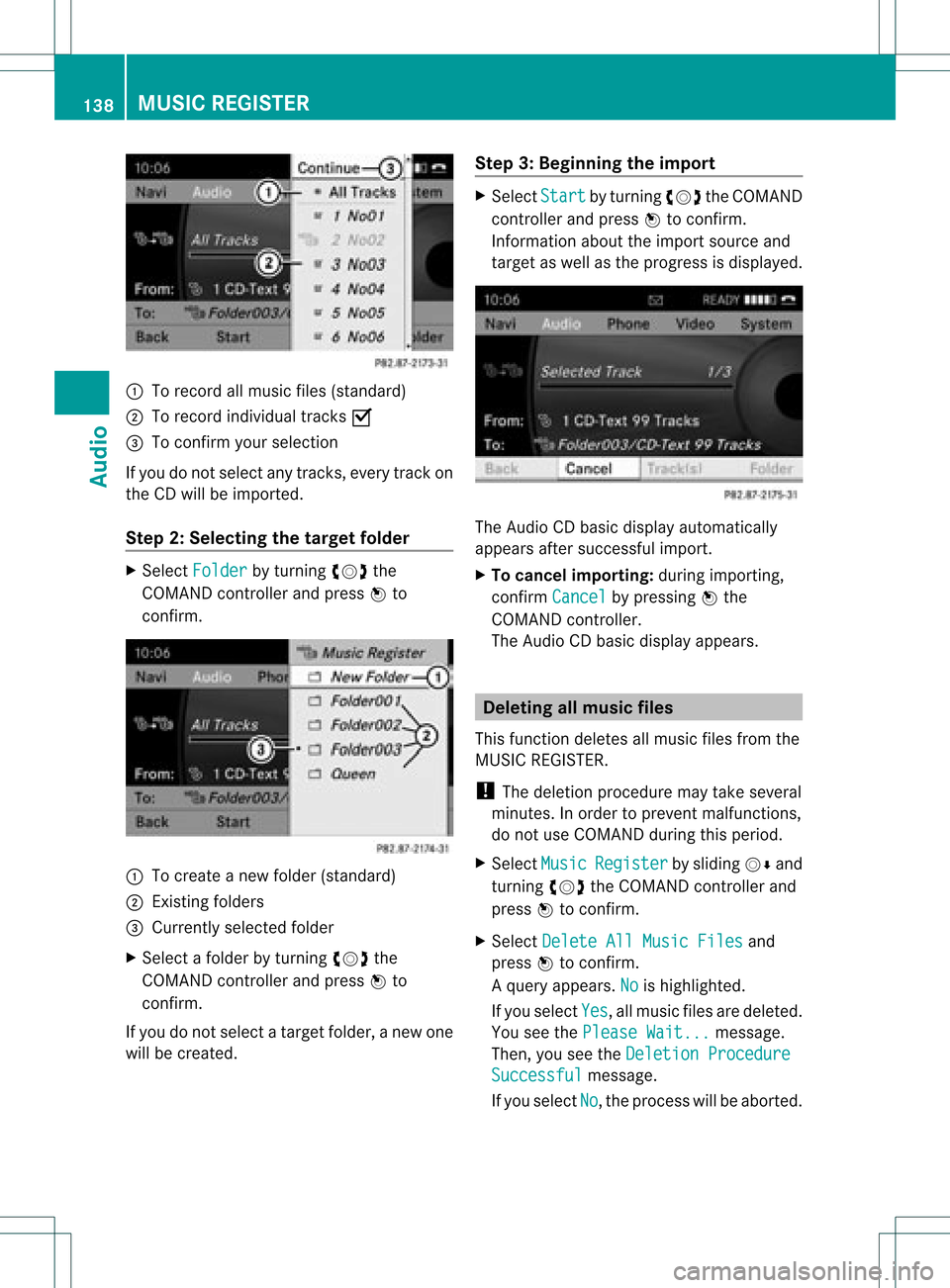
:
Torecord allmusic files(standard)
; Torecord individual tracksO
= Toconf irmyour selection
If you donot select anytrack s,every trackon
the CDwill beimported.
Step 2:Selecting thetarget folder X
Select Folder by
turnin gcVd the
COMAND controller andpress Wto
conf irm. :
Tocreate anew folder (standard)
; Existing folders
= Currently selectedfolder
X Select afolder byturnin gcVd the
COMAND controller andpress Wto
conf irm.
If you donot select atarget folder, anew one
will becreated. Step
3:Beginning theimpor t X
Select Start by
turnin gcVd theCOMAND
cont roller andpress Wtoconf irm.
Infor mation abouttheimport source and
target aswell asthe progress isdisplay ed. The
Audio CDbasic display automatically
appears aftersuccessf ulimport.
X To cancel importing:during importin g,
conf irmCancel by
pressing Wthe
COMAND controller.
The Audio CDbasic display appears. Dele
ting allmusic files
This funct iondeletes allmusic filesfrom the
MUSIC REGISTE R.
! The deletion procedure maytake several
minutes. Inorder toprevent malfunct ions,
do not use COMAND duringthisperiod.
X Select Music Register by
sliding VÆand
turnin gcVd theCOMAND controller and
press Wtoconf irm.
X Select Delete AllMusic Files and
press Wtoconf irm.
Aq uery appear s.No is
high light ed.
If you sele ctYes ,
all musi cfiles aredelet ed.
You seethePlea seWait ... mess
age.
Then ,you seetheDele tion Procedure Succ
essful mess
age.
If you selec tNo ,
the proc esswillbeabort ed. 138
MUSIC
REGISTERAudio
Page 143 of 182
Never
connect morethanonedevice ata
time. Youwillotherwise notbeableto pla y
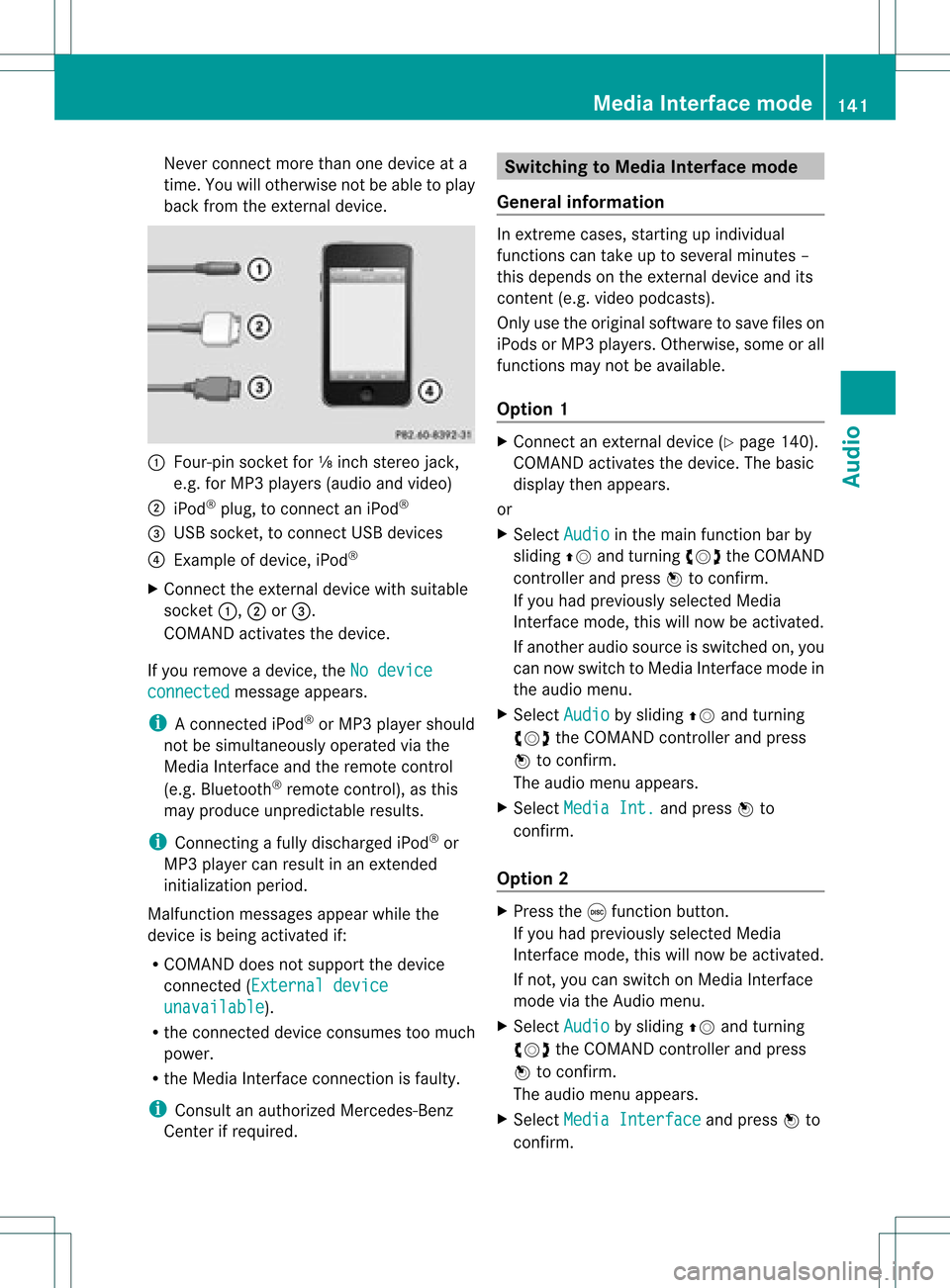
back fromtheexternal device. :
Four-pin socketfor⅛inch stereo jack,
e.g. forMP3 players (audio and video)
; iPod ®
plu g,to connect aniPod ®
= USB socket, toconnect USBdevices
? Example ofdevice, iPod®
X Connect theexternal devicewithsuitab le
socket :,;or=.
COMAND activatesthedevice.
If you remove adevice, theNodevice connected message
appears.
i Aconnect ediPod ®
or MP3 player shoul d
not besimul taneously operatedviathe
Media Interface andtheremote control
(e.g. Bluetooth ®
remote control), asthis
may produ ceunpredi ctableresults.
i Connecting afull ydischarg ediPod ®
or
MP3 player can resul tina ne xtend ed
ini tia lizati onperio d.
Ma lfunctio nmessages appearwhilethe
device isbeing activat edif:
R COMAND doesnotsupport thedevice
con nected (Externa ldevice unavail
able ).
R the connected device consumes toomuch
power.
R the Media Interface connection isfaulty.
i Consult anauthoriz edMercedes- Benz
Center ifrequired. Switching
toMedia Interfacemode
General information In
ext reme cases, startingupindividual
func tionscan take uptoseveral minutes–
this depends onthe external device andits
con tent(e.g. video podcasts ).
Only usetheoriginal software tosave fileson
iPods orMP3 players. Otherwise, some orall
func tionsmay notbeavailable.
Opt ion 1 X
Connec tan ext ernal device (Ypage 140).
COMAND activates thedevice. Thebasic
display thenappears.
or
X Select Audio in
the main function barby
sliding ZVandturningcVd theCOMAND
con troller andpress Wtocon firm.
If you had previously selectedMedia
Int erface mode,thiswillnow beactiv ated.
If anoth eraudio source isswitch edon, you
can now switch toMedia Interface modein
the audio menu.
X Select Audio by
sliding ZVandturning
cVd theCOMAND controller andpress
W tocon firm.
The audio menu appears.
X Select Media Int. and
press Wto
con firm.
Opt ion 2 X
Press theefunc tion button .
If you had previously selectedMedia
Int erface mode,thiswillnow beactiv ated.
If not ,you can switch onMedia Interface
mode viathe Audio menu.
X Select Audio by
sliding ZVandturning
cVd theCOMAND controller andpress
W tocon firm.
The audio menu appears.
X Select Media Interfa ce and
press Wto
con firm. Media
Interfacemod e
141Audio Z
Page 144 of 182
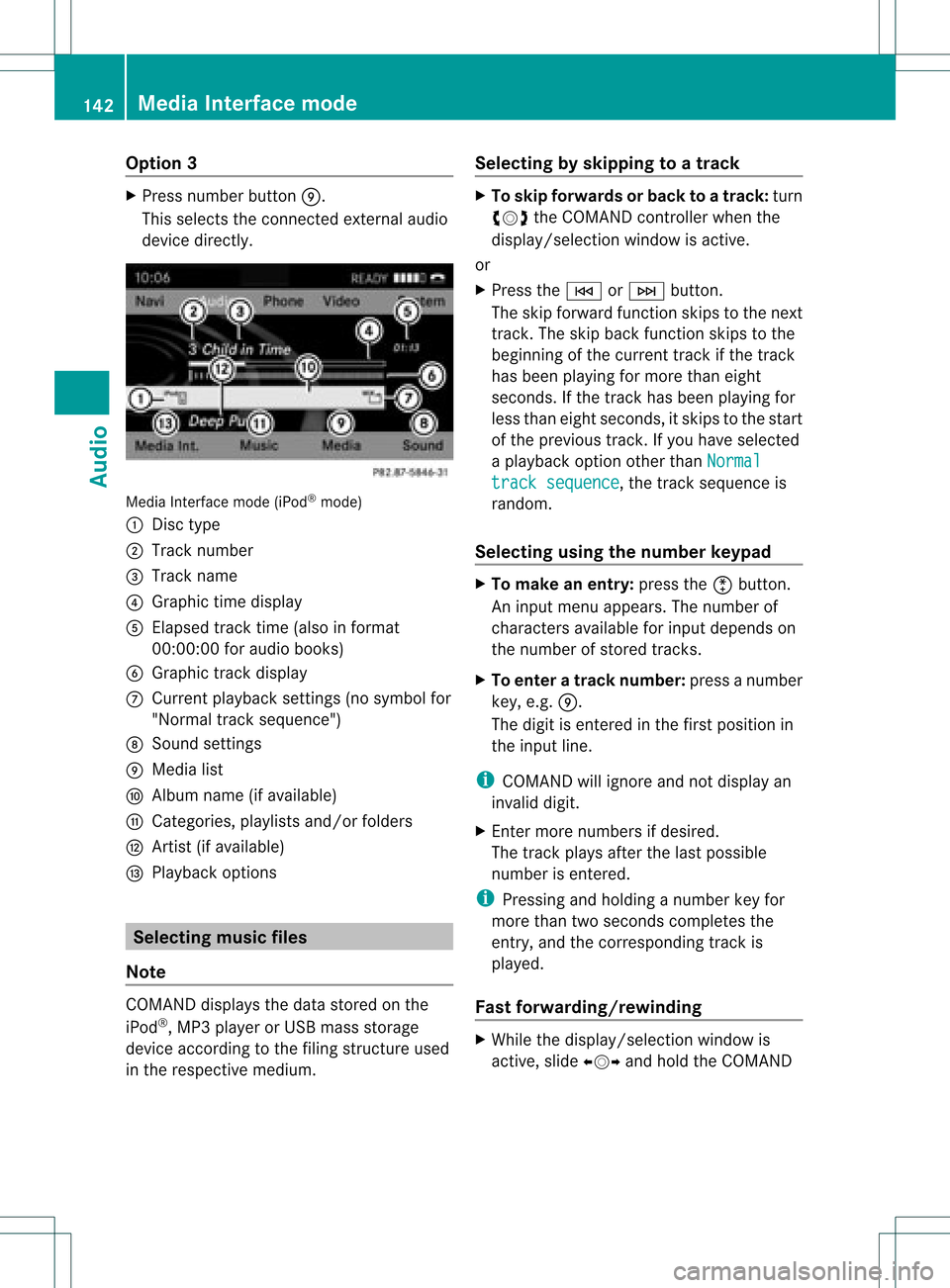
Opt
ion 3 X
Press number buttonE.
This select sthe connected external audio
device directly. Media
Interface mode(iPod®
mode)
: Disc type
; Track number
= Track name
? Graphic timedisplay
A Elapsed tracktime (also infor mat
00: 00:00for audio books)
B Graphic track display
C Curren tplayback settings (no symbol for
"Norm altrack sequen ce")
D Soun dset tings
E Media list
F Album name(ifavailable)
G Catego ries,playlists and/orfolder s
H Artis t(ifavailable)
I Playback options Selecting
music files
Not e COMA
NDdisplays thedata stored onthe
iPod ®
,MP3 player orUSB mass storage
devic eacc ordin gto the filingst ruct ureused
in the respe ctive medium. Selecting
byskip ping toatrac k X
To ski pfo rwa rdsorbac kto atrac k:tur n
cVd theCOMAND controllerwh en the
di sp lay/ selectio nwindow isact ive.
or
X Press theE orF button.
The skip forward function skipsto the next
tr ack .The skip back function skipsto the
begin ningof the curr enttrack ifthe track
has been playing formor ethan eight
seco nds.Ift he track hasbeen playingfor
less than eight seconds, itskips tothe start
of the previous track.Ify ou have selected
a playb ackoption otherthanNormal track
sequence ,
the track sequence is
random.
Selecting usingthenumber keypad X
To mak ean entry: presstheõbutton .
An input menu appears. Thenumber of
charact ersavaila bleforinput depends on
the number ofstored tracks.
X To enter atr ack number: pressanumber
key, e.g.E.
The digit isenter edinthe first position in
the input line.
i COMAND willignore andnotdisplay an
invalid digit.
X En ter more numbers ifdesired.
The track plays afterthelast possible
number isenter ed.
i Pressing andholding anumber keyfor
more thantwoseconds completes the
entr y,and thecorrespon dingtrack is
playe d.
Fast forward ing/rewinding X
While thedisplay /select ionwindow is
active, slideXVY andhold theCOMAND 142
Media
Interface modeAudio
Page 145 of 182
control
leru ntil the desired positio nh as
been reached.
or
X Pre ssand hold theF orE button
unt ilth edesir edposi tionisreached.
i OnaniPod ®
,fast rewind onlyfunction s
within thecurrent track. Selec
tingacatego ry/playl ist/folder
iPo d®
and certain MP3playe rs For
aniPo d®
or MP3 player,you can select
tracks using catego riesorfold ers.
Depend ingonthe devi ceconnected, the
foll owi ngcatego riesmay beava ilable ,for
examp le:
R Curre nttrack list R
Playl ists (e.g.
All )
R Artis ts R
Album s R
Track s R
Podca sts R
Genre s R
Compo sers R
Audio books i
Some playback catego riescontain the
entry All .I
ft his entr yhas been selected,
the entire contentofthe category selected
will beplay ed.
USB devices For
USB mass storage devices, youcan select
both folders aswell asany existing playlists.
COMAND canalso displa ythe albu mname
and artist (met adata)durin gplaybac k,ifth is
inf orm ationhasbeen entered intoth e
syst em.
Playlist sare indicat edinthedispl ayby a
spec ialico n.When youopen theplaylist ,th e
co rrespo nding track sare open edand
playbac kbegins. Youcannow select Random categor
ies inst
ead ofRandom folder as
a
playback option.
For USB mass storage devices, youcan
choose todisplay themetadata contained in
the tags ofthe encoded music data,orto
display thefileand direct orynames during
playback.
X To displa ythe album andartist name:
select Media Interfa ce in
the basic
display bysliding VÆandturningcVd the
COMAND controller andpress Wto
con firm.
X Select Display Metadat
a and
press Wto
con firm.
Selecting acatego ryand open inga
fol der X
Press Wthe COM AND controll erwhe nthe
displa y/selection windowisactive.
or
X Select Music in
the basic displa yby sliding
VÆ andturning cVdtheCOMAND
cont roller andpress Wtoconfirm .
You willsee theavaila blecategories orthe
folder content(e.g. other folders). The
displa y'sstatus barshows theselected
category orthe folder name.
i The Music menu
itemisnot availa bleuntil
the device hasbeen activated. Example
display:categ orylist
: Dev iceicon anddevic enam e
; Sele ctable categor ies Med
iaInter face mod e
143Aud io Z
Page 146 of 182
X
Sel ect the cate gory/folde rb ytur ning
cVd theCOMA NDcontro ller and press
W toconfirm .
You willsee theco nten to fthe selected
category orselected folder.
i Ifthe data needs tobe read from the
conn ected device, thePlease wait... message
appears.
X Ifnecessary, repeatthisstep until the
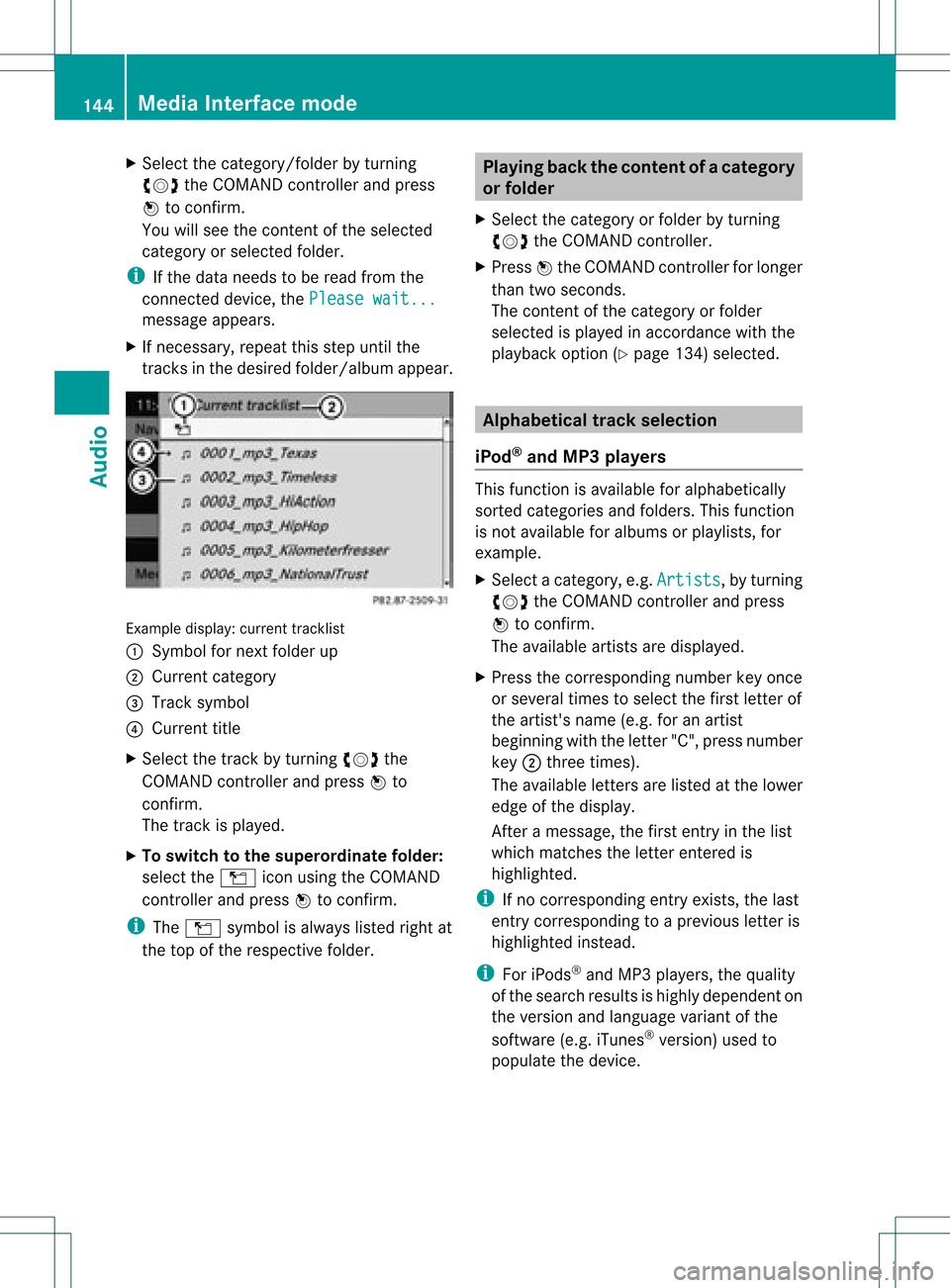
track sin the desired folder/album appear. Example
display:curr ent track list
: Sym bolfornex tfold erup
; Curre ntcat egor y
= Trac ksymbo l
? Curr enttitle
X Se lec tth etrack byturning cVd the
COMA NDcontro ller and pressW to
co nfirm .
The track isplayed .
X To swit chtothesup eror dina te fold er:
sele cttheÒ iconu sing theCOMAND
cont roller andpress Wtoconfirm.
i The Ò symbol isalwa yslisted rightat
the top ofthe respective folder. Playing
backthecontent ofac atego ry
or folder
X Sele ctthe catego ryor fold erby turning
cVd theCOM AND controll er.
X Press Wthe COM ANDcontroll erfor longe r
than twoseconds .
The content ofthe catego ryor fold er
sel ected ispla yedin accord ancewith the
pla yback optio n(Ypage 134)select ed. Alphabet
icaltrack selection
iPod ®
and MP3 players This
function isavailable foralphabetically
sort edcateg ories andfolders. Thisfunction
is not available foralbums orplaylists, for
example.
X Select acateg ory,e.g.Artist s ,
by turn ing
cVd theCOMAND controller and press
W tocon firm.
The available artistsare displayed.
X Press thecorr espondin gnumber keyonce
or several timestoselect thefirst letterof
the artist 'sname (e.g.foranartist
beginn ingwith theletter"C", press number
key ;three times ).
The available letters are listed atthe lower
edge ofthe display.
Aft eramessage, thefirst entryinthe list
which matchestheletterent ered is
highlighted.
i Ifno corr espondin gent ryexist s,the last
ent rycorr espondin gto ap reviou sletter is
high lighted instead .
i For iPod s®
and MP3 players ,the quality
of the search resultsishigh lydepe ndent on
the versio nand langu ageva ria nt ofthe
sof twa re(e.g. iTune s®
ver sion) used to
po pulate the devic e. 14
4 Me
dia Interfac emodeAu dio
Page 147 of 182
USB
massstor age device This
function isavailable foralphabetically
sort eddirect ories. Thisfunction isnot
available foralbums orplaylists, forexample.
X In adirect ory,press thecorr espondin g
number keyonceor several timestoselect
the first letterofthe artist 'sname (e.g.for
an artist beginn ingwith theletter"C", press
number key;three times ).
The available letters are listed atthe lower
edge ofthe display.
If the direct oryonly contains folders,
COMAND searchesfor folders. Aftera
message, thefirst entrywhich matchesthe
lett erent ered isshown atthe top ofthe list.
If no ent rymatc hestheentered letter,the
first item inthe lististhe last entryto
corr espond toaselect ion. Selecting
anactive partition (USB
ma ssstor age devices only)
You canselect thisfunc tion forUSB mass
stor age devices whenthestor age device is
partit ioned. Uptofour partit ions(primary or
logical; FATform at)are support ed.
i The Windows ®
form atting program
support sFA Tpartit ioningup to32 GB as
stan dard.
X Selec tMedia Interface in
the basic
display bysliding VÆandturningcVd the
COMAND controller and press Wto
con firm.
X Selec tSelect activepartition and
press Wtocon firm. Playba
ckoptions
The following optionsare available:
R Normal tracksequence Norm
altrac ksequence: youhear the
trac ksintheir norm alorder (e.g.numeric al
or alphabetical).
R Random tracks All
the trac kson the medium areplayed in
random order.
R Random categories or
Random folder (in
the case ofUSB devices whenFolder has
been select ed):
The tracksinthe curren tlyactive categor y
or folder, including anysubfolders, are
played inrandom order.
i For USB devices, therandom playlists
offer amaximum of300 trackschosen at
random.
X To select aplayba ckoption: select
Media Interfa ce in
the basic display by
sliding VÆandturningcVd theCOMAND
con troller andpress Wtocon firm.
The option slist appears. The#dot
indicat esthe option selected.
X Select anoption andpress Wtocon firm. Notes
onUSB devices
Data formats The
following dataformat sare supported:
R MP3: fixedandvariable bitrates upto
320 kbit/s
R WMA: fixedandvariable bitrates upto
320 kbit/s
Notes onUSB devices R
In order tokeep theinitializat iontime toa
minimum, storeonly music dataonaUSB
device.
R Up toeight direct orylevels withupto100 0
trac ksper direct oryare supported.
R Do not use USB extension leadsor
adapters. Theycanimpair functionality.
R Abackgr oundsearch ofthe USB device is
perform edand anyplaylists foundare Media
Interfacemod e
145Audio Z
Page 153 of 182
Note
sabo utdis cs
Pl ay ba ck pro blems mayoccu rwhen playing
copied discs.Therearealarge variety of
discs, DVDauthoring software,writing
software andwriters available.This variety
means thatthere isno guarantee thatthe
system willbeable toplay discs thatyouhave
copied yourself.
! Donot affix stick ersorlabel sto the discs,
as they could peeloffand damage
COMAND. Stickers cancause thedisc to
bend, which canresult inread errors and
disc recognit ionproblems.
! COMAND isdesigned toaccommodate
discs which comply withtheEN60908
standard. Youcantherefore onlyusediscs
with amaximum thickness of1.3 mm.
If you insert thickerdiscs, e.g.those that
cont aindata onboth sides (DVD onone
side andaudiodata onthe other), they
cannot beeject edand candamage
COMAND.
Use round discswithadiameter of12 cm.
Do not use discs withadiameter of8cm,
even withanadapter. DVD
playback conditions
If video DVDsdon otconf orm tothe NTSC or
PAL TVstandards, theymaycreate picture,
sound orother problems duringplayback.
COMAND canplay back video DVDs
produced according tothe following
standards:
R region code1orregion code0(no reg ion
cod e)
i Ifyo uins ert avid eo DVD with adi ffe rent
reg ionc ode, youwillsee amessage tothis
effect .
R PAL orNTSC standard
You willgenerally findtherelevant details
either onthe DVD itself oron the DVD case. i
COMAND isset toregion code1at the
factor y.This settingcan bechanged atan
authorized Mercedes-B enzCenter. Thiswill
allow youtoplay video DVDswith a
different regioncode,provided thatthey
are produced inaccordanc ewith thePAL
or NTSC standard. Theregion codecanbe
changed uptofive times. Function
restrictions
Dependin gon the DVD ,it is possible that
cert ainfunct ionsoractions willbe
temporarily blockedormay notfunct ionatall.
As soon asyou trytoactivate thesefunctions
or actions ,you willsee theKsymbol inthe
display . Inserting
andremoving DVDs
X Proceed asdescribed inthe "Insert ingand
eject ingCDs andDVD s"section
(Y page 126). Activating
videoDVDmode
Option 1 X
Insert avideo DVD.
COMAND loadsthemedium insertedand
start sto play it.
X To display thepictur e:press thee
button .
Option 2 X
Press theefunct ionbutton .
COMAND switchestothe previous disc
operating mode.
If video DVDmode wasthelast mode
selected, itwill now beactive. Video
DVDmode
151Video Z
Page 154 of 182
If
not, youcan switch onvideo DVDmode
as follo ws:
X Select Media by
slid ing VÆ andturning
cVd theCOMAND controller andpress
W toconfirm.
X Select aý video DVDinthe media listby
turning cVdtheCOMAND controller and
press Wtoconfirm.
Option 3 X
Select Video in
the main function barby
slid ing ZV andturning cVdtheCOMAND
controller andpress Wtoconfirm.
Video DVDmode isswitched on. Hiding/
showingthe navigatio nmenu
X To show :turn cVd orslid eZVÆ the
COMAND controller.
i This function isnot avai lablewhil ethe
DVD's ownmenu (Ypage 154)isbeing
disp layed.
X To hide: slideZVÆ theCOMAND
controller.
or
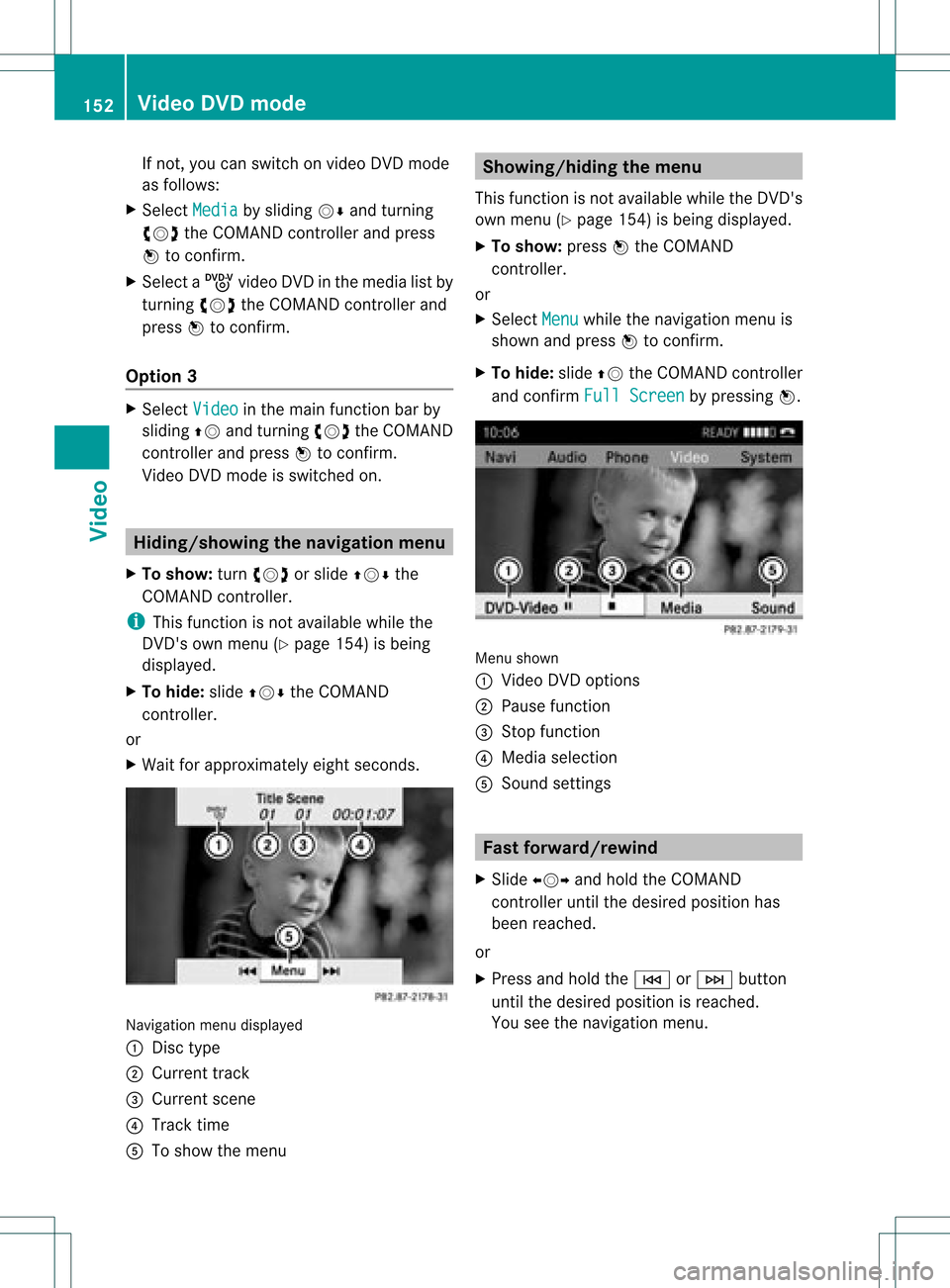
X Wai tfor approximately eightseconds. Navigation
menudisplaye d
: Disc type
; Current track
= Current scene
? Track time
A Toshow themenu Showing/hiding
themenu
This funct ionisnot availa blewhile theDVD 's
own menu (Ypage 154)isbeing display ed.
X To show: pressWthe COMAND
cont roller.
or
X Select Menu while
thenavigation menuis
shown andpress Wtoconf irm.
X To hide: slideZVtheCOMAND controller
and conf irmFull Screen by
pressing W. Menu
shown
: Video DVDoptions
; Pause function
= Stop function
? Media selection
A Sound settings Fast
forward /rewind
X Slide XVY andhold theCOMAND
cont roller untilthedesired position has
been reached.
or
X Press andhold theE orF button
until thedesired position isreached.
You seethenavigation menu. 152
Video
DVDmodeVideo