button MERCEDES-BENZ GLK-Class 2013 X204 Service Manual
[x] Cancel search | Manufacturer: MERCEDES-BENZ, Model Year: 2013, Model line: GLK-Class, Model: MERCEDES-BENZ GLK-Class 2013 X204Pages: 378, PDF Size: 5.03 MB
Page 114 of 378

with the parking lamps and low-beam
headlamps.
X
To switch on the front fog lamps: turn
the SmartKey in the ignitio nlock to position
2 or start the engine.
X Turn the light switch to 000Cor0004.
X Press the 000Dbutton.
The green 000Dindicator lamp in the
instrument cluster lights up.
X To switch off the front fog lamps: press
the 000D button.
The green 000Dindicator lamp in the
instrument cluster goes out.
Only vehicles with front fog lamps have the
fog lamps function.
Rear fog lamp
The rear fog lamp improves visibility of your
vehicle for the traffic behind in the event of
thick fog. Please take note of the country-
specific regulations for the use of rear fog
lamps.
X To switch on the rear fog lamps: turn the
SmartKey in the ignition lock to position 2
or start the engine.
X Turn the light switch to 000Cor0004.
X Press the 0010button.
The yellow 0010indicator lamp in the
instrument cluster lights up.
X To switch off the rear fog lamp: press the
0010 button.
The yellow 0010indicator lamp in the
instrument cluster goes out.
Parking lamps
! If the battery has been excessively
discharged, the parking lamps or standing
lamps are automatically switched off to
enable the next engine start.A lways park
your vehicle safely and sufficiently lit
according to legal standards. Avoid the
continuous use of the 0016parking lamps
for several hours. If possible, switch on the
0013 right or the 0011left standing lamp. X
To switch on: turn the light switch to
0016.
Depending on the equipmen tlevel, the
green indicator lamp or the scale
illumination in the instrument cluster light
up.
Standing lamps
Switching on the standing lamps ensures the
corresponding side of the vehicle is
illuminated.
X To switch on the standing lamps: the
SmartKey is not in the ignition lock or it is
in position 0.
X Turn the light switch to 0011(left-hand side
of the vehicle) or 0013(right-hand side of
the vehicle). Combination switch
Turn signal 0002
High-beam headlamps
0003 Turn signal, right
0021 High-beam flasher
0020 Turn signal, left
X To indicate briefly: press the combination
switch briefly to the pressure point in the
direction of arrow 0003or0020.
The corresponding turn signal flashes three
times.
X To indicate: press the combination switch
beyond the pressure point in the direction
of arrow 0003or0020. 112
Exterior lightingLights and windshield wipers
Page 115 of 378
High-beam headlamps
X
To switch on the high-beam headlamps:
turn the SmartKey in the ignition lock to
position 2or start the engine.
X Turn the light switch to 000Cor0004.
X Press the combination switch beyond the
pressure point in the direction of
arrow 0002.
In the 0004position, the high-beam
headlamps are only switched on when it is
dark and the engine is running.
The 000B indicator lamp in the instrument
cluster lights up when the high-beam
headlamps are switched on.
X To switch off the high-beam
headlamps: move the combination switch
back to its normal position.
The 000B indicator lamp in the instrument
cluster goes out.
High-beam flasher X
To switch on: turn the SmartKey in the
ignitio nlock to position 1or 2or start the
engine.
X Pull the combination switch in the direction
of arrow 0021. Hazard warning lamps The hazard warning lamps automatically
switch on if:
R
an air bag is deployed.
R the vehicle is slowed down rapidly from a
speed of over 45 mph (70 km/h) and
comes to a halt.
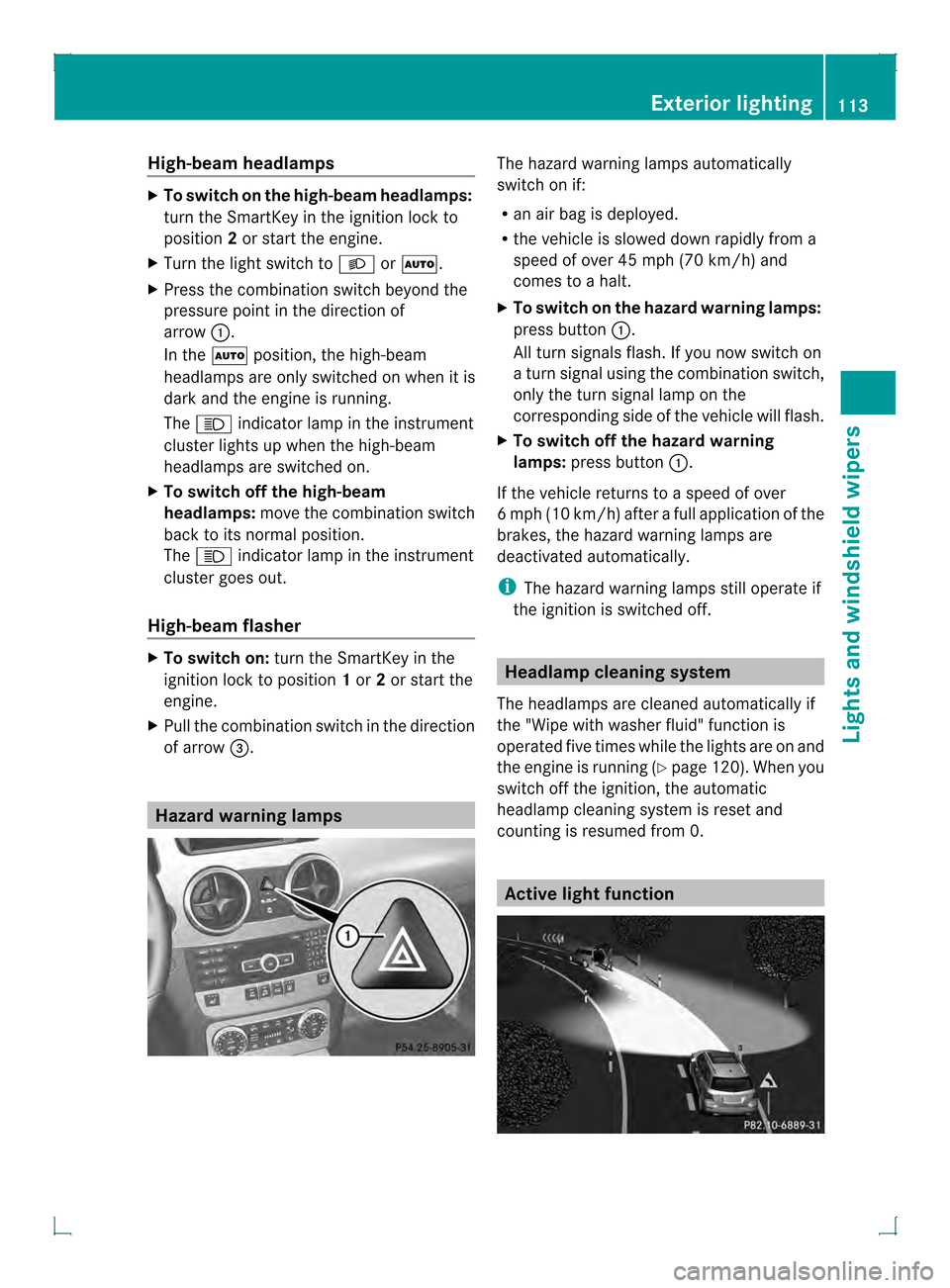
X To switch on the hazard warning lamps:
press button 0002.
All turn signals flash. If you now switch on
a turn signal using the combination switch,
only the turn signal lamp on the
corresponding side of the vehicle will flash.
X To switch off the hazard warning
lamps: press button 0002.
If the vehicle returns to a speed of over
6m ph (10 km/h) after a full application of the
brakes, the hazard warning lamps are
deactivated automatically.
i The hazard warning lamps still operate if
the ignition is switched off. Headlamp cleaning system
The headlamps are cleaned automatically if
the "Wipe with washer fluid" function is
operated five times while the lights are on and
the engine is running (Y page 120). When you
switch off the ignition, the automatic
headlamp cleaning system is reset and
counting is resumed from 0. Active light function Exterior lighting
113Lights and windshield wipers Z
Page 118 of 378
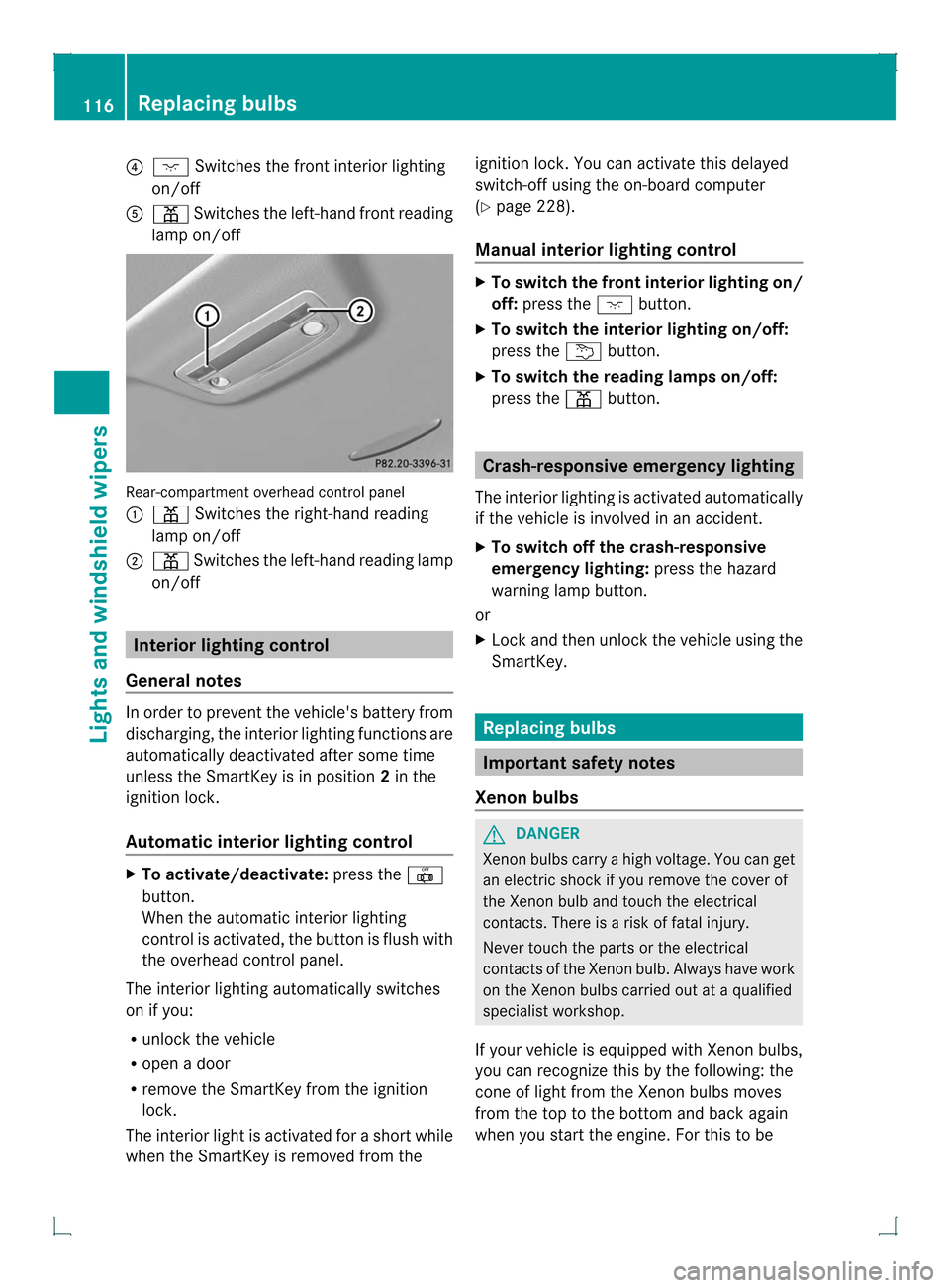
0020
0005 Switches the front interior lighting
on/off
001E 0015 Switches the left-hand front reading
lamp on/off Rear-compartment overhead control panel
0002
0015 Switches the right-hand reading
lamp on/off
0003 0015 Switches the left-hand reading lamp
on/off Interior lighting control
General notes In order to prevent the vehicle's battery from
discharging, the interio
rlighting functions are
automatically deactivated after some time
unless the SmartKey is in position 2in the
ignition lock.
Automatic interior lighting control X
To activate/deactivate: press the001E
button.
When the automatic interior lighting
control is activated, the button is flush with
the overhead control panel.
The interior lighting automatically switches
on if you:
R unloc kthe vehicle
R open a door
R remove the SmartKey from the ignition
lock.
The interior light is activated for a short while
when the SmartKey is removed from the ignition lock. You can activate this delayed
switch-off using the on-board computer
(Y
page 228).
Manual interior lighting control X
To switch the front interior lighting on/
off: press the 0005button.
X To switch the interior lighting on/off:
press the 0002button.
X To switch the reading lamps on/off:
press the 0015button. Crash-responsive emergency lighting
The interior lighting is activated automatically
if the vehicle is involved in an accident.
X To switch off the crash-responsive
emergency lighting: press the hazard
warning lamp button.
or
X Lock and then unlock the vehicle using the
SmartKey. Replacing bulbs
Important safety notes
Xenon bulbs G
DANGER
Xenon bulbs carry a high voltage. You can get
an electric shock if you remove the cover of
the Xenon bulb and touch the electrical
contacts. There is a risk of fatal injury.
Never touch the parts or the electrical
contacts of the Xenon bulb. Always have work
on the Xenon bulbs carried out at a qualified
specialist workshop.
If your vehicle is equipped with Xenon bulbs,
you can recognize this by the following: the
cone of light from the Xenon bulbs moves
from the top to the bottom and back again
when you start the engine. For this to be 116
Replacing bulbsLights and windshield wipers
Page 124 of 378

Never fold a windshield wipera
rm without
a wiper blade back onto the windshield/
rear window.
Hold the windshield wiper arm firmly when
you change the wiper blade. If you release
the wiper arm without a wiper blade and it
falls onto the windshield/rear window, the
windshield/rear window may be damaged
by the force of the impact.
Mercedes-Benz recommends that you have
the wiper blades changed at aqualified
specialist workshop.
! To avoid damaging the wiper blades,
make sure that you touch only the wiper
arm of the wiper.
Changing the windshield wiper blades Moving the wiper blades to
avertical
position
! Before changing the wiper blades, always
set the wiper arms to a vertical position
using the combination switch. There is
otherwise a risk of damagin gthe hood.
Vehicles without KEYLESS-GO
X Turn the SmartKey to position 1or 2in the
ignition lock.
X Set the windshield wipers to
position 0018.
X When the wiper arms have reached a
vertical position, turn the SmartKey to
position 0and remove it from the ignition
lock.
Vehicles with KEYLESS-GO
X Switch off the engine.
X Remove your foot from the brake pedal.
X Set the windshield wipers to
position 0018.
X Press the Start/Stop button repeatedly
until the windshield wipers start.
X When the wiper arms have reached a
vertical position, press the Start/Stop
button. Removing the wiper blades
X
Fold the wiper arm away from the
windshield until it engages.
X Set the wiper blade at right angles to the
wiper arm. X
Remove the wiper blade from the retaining
pin on the wiper arm in the direction of the
arrow.
Installing the wiper blades
X Push the new wiper blade onto the
retaining pin on the wiper arm in the
opposite direction to the arrow.
Make sure that the wiper blade slides fully
onto the retaining pin on the wiper arm.
X Turn the wiper blade parallel to the wiper
arm.
X Fold the wiper arm back onto the
windshield.
Replacing the rear window wiper blade Removing the wiper blades122
Windshield wipersLights and windshield wipers
Page 126 of 378
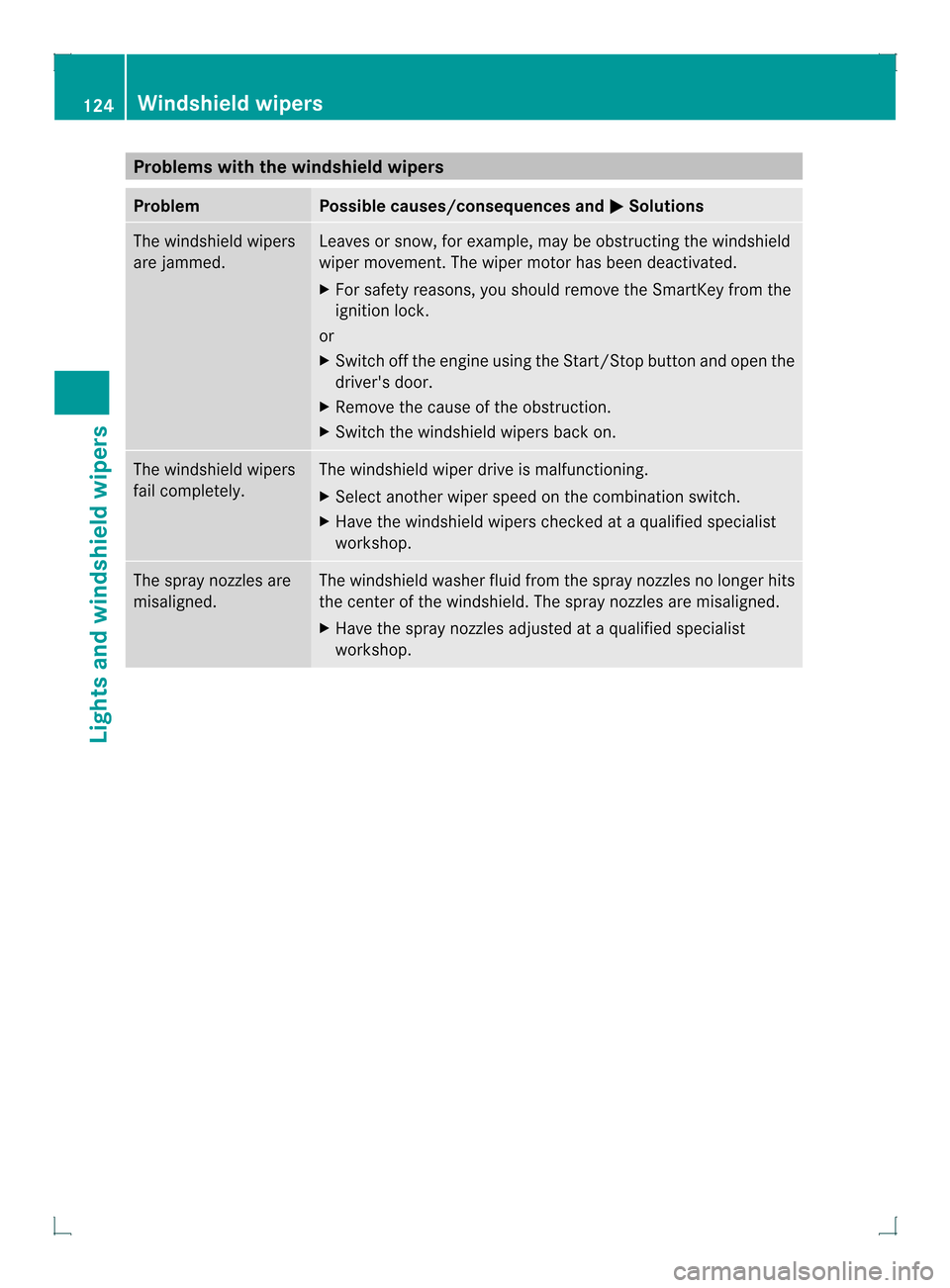
Problems with the windshield wipers
Problem Possible causes/consequences and
0001 Solutions
The windshield wipers
are jammed. Leaves or snow, for example, may be obstructing the windshield
wiper movement.T
he wiper motor has been deactivated.
X For safety reasons, you should remove the SmartKey from the
ignition lock.
or
X Switch off the engine using the Start/Stop button and open the
driver's door.
X Remove the cause of the obstruction.
X Switch the windshield wipers back on. The windshield wipers
fail completely. The windshield wiper drive is malfunctioning.
X
Select another wiper speed on the combination switch.
X Have the windshield wipers checked at a qualified specialist
workshop. The spray nozzles are
misaligned. The windshield washer fluid from the spray nozzles no longer hits
the center of the windshield. The spray nozzles are misaligned.
X
Have the spray nozzles adjusted at a qualified specialist
workshop. 124
Windshield wipersLights and windshield wipers
Page 130 of 378
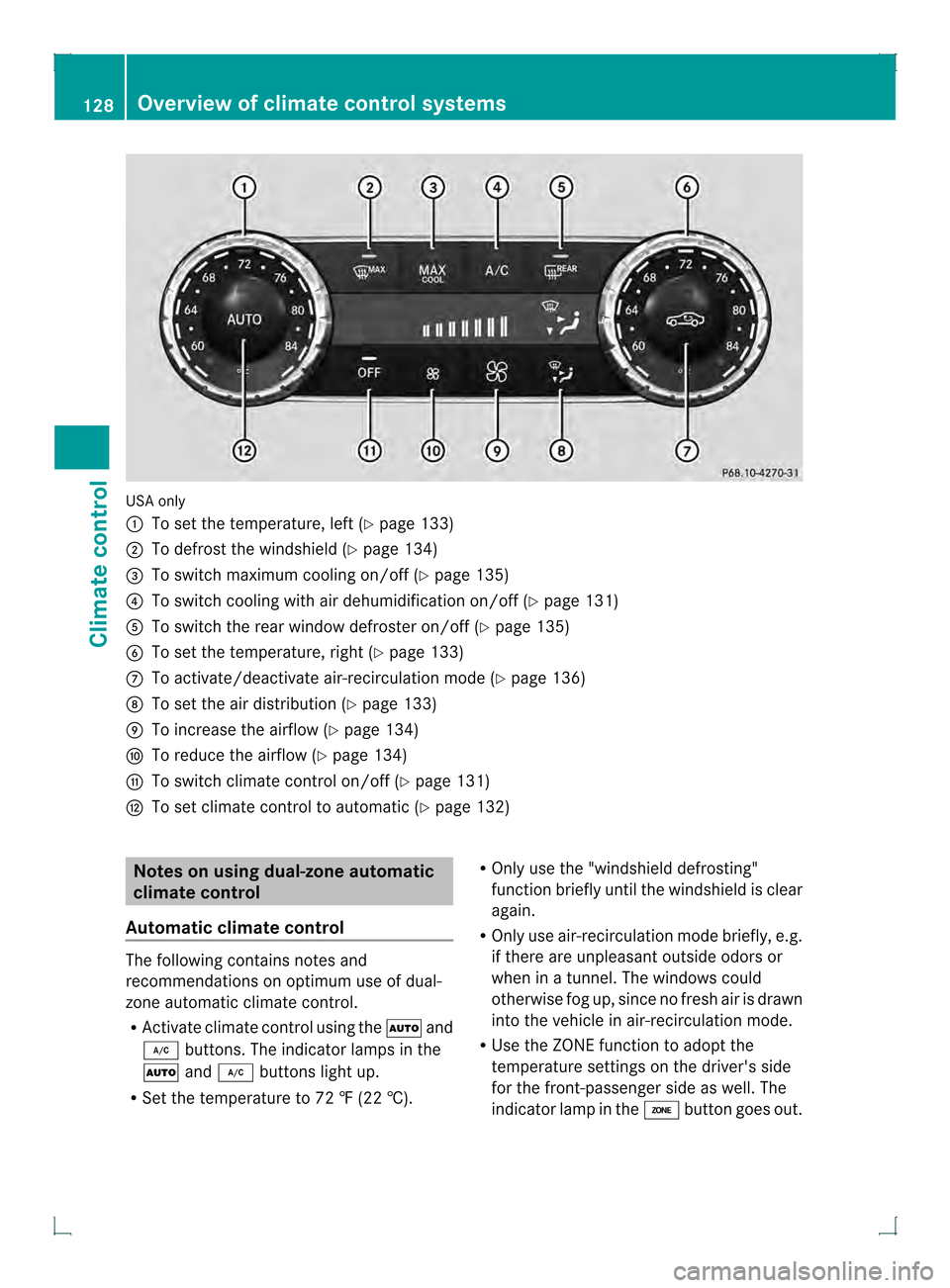
USA only
0002
To set the temperature, left (Y page 133)
0003 To defrost the windshield (Y page 134)
0021 To switch maximum cooling on/off (Y page 135)
0020 To switch cooling with air dehumidification on/off (Y page 131)
001E To switch the rear window defroster on/off (Y page 135)
001F To set the temperature, right (Y page 133)
0011 To activate/deactivate air-recirculation mode (Y page 136)
0012 To set the air distribution (Y page 133)
0013 To increase the airflow (Y page 134)
0014 To reduce the airflow (Y page 134)
0015 To switch climate control on/off (Y page 131)
0017 To set climate control to automatic (Y page 132)Notes on using dual-zone automatic
climate control
Automatic climate control The following contains notes and
recommendations on optimum use of dual-
zone automatic climate control.
R
Activate climate control using the 0004and
0005 buttons. The indicator lamps in the
0004 and0005 buttons light up.
R Set the temperature to 72 ‡ (22 †). R
Only use the "windshield defrosting"
function briefly until the windshield is clear
again.
R Only use air-recirculation mode briefly, e.g.
if there are unpleasant outside odors or
when in a tunnel. The windows could
otherwise fog up, since no fresh air is drawn
into the vehicle in air-recirculation mode.
R Use the ZONE function to adopt the
temperature settings on the driver's side
for the front-passenger side as well.T he
indicator lamp in the 0003button goes out. 128
Overview of climate control systemsClimate control
Page 131 of 378
ECO start/stop function
During automatic engine switch-off, the ECO
start/stop function only operates at a
reduced capacity. If you require the full
climate control output, you can switch off the
ECO start/stop function by pressing the ECO
button (Y page 146). Overview of climate control systems
129Climate control
Page 133 of 378
Notes on using 3-zone automatic
climate control
Automatic climate control The following contains instructions and
recommendations to enable you to ge tthe
most out of your automatic climate control.
R Activate climate control using the 0004and
0005 buttons. The indicator lamps in the
0004 and0005 buttons light up.
R In automatic mode, you can also use the
000A button to adjust airflow (FOCUS/
MEDIUM/DIFFUSE). The MEDIUM level is
recommended.
R Set the temperature to 72 ‡ (22 †).
R Only use the "windshield defrosting"
function briefly until the windshield is clear
again.
R Only use air-recirculation mode briefly, e.g.
if there are unpleasant outside odors or
when in a tunnel. The windows could
otherwise fog up, since no fresh air is drawn
into the vehicle in air-recirculation mode.
R Use the ZONE function to adopt the
temperature settings on the driver's side
for the front-passenger side and the rear
compartmenta s well.The indicator lamp in
the 0003 button goes out.
R Use the residual heat function if you want
to heat or ventilate the vehicle interior
when the ignition is switched off. The
residual heat function can only be activated
or deactivated with the ignition switched
off.
ECO start/stop function During automatic engine switch-off, the ECO
start/stop function only operates at a
reduced capacity. If you require the full
climate control output, you can switch off the
ECO start/stop function by pressing the ECO
button (Y page 146). Operating the climate control
systems
Switching climate control on/off
Points to observe before use When the climate control is switched off, the
air supply and air circulation are also
switched off. Only use this setting for a brief
period. The windows could otherwise fog up.
Only switch off climate control briefly to
prevent the windows from fogging up.
i
Switch on climate control primarily using
the 0004 button (Y page 132).
Activating/deactivating X
Turn the SmartKey to position 2in the
ignition lock (Y page 141).
X To activate: press the0004button.
The indicator lamp in the 0004button lights
up. Airflow and air distribution are set to
automatic mode.
or
X Press the 000Cbutton.
The indicator lamp in the 000Cbutton goes
out. The previously selected settings are
restored.
X To deactivate: press the000Cbutton.
The indicator lamp in the 000Cbutton lights
up. Activating/deactivating cooling with
air dehumidification
Points to observe before use If you switch off the cooling function, the
vehicle will not be cooled when weather
conditions are warm. The windows can fog up
more quickly. Only deactivate the cooling
with air dehumidification function for a short
time to prevent the windows from fogging up.
The cooling with air dehumidification function
is only available when the engine is running.
The air inside the vehicle is cooled andOperating the climate control systems
131Climate control
Page 134 of 378
dehumidified according to the temperature
selected.
Condensation may drip from the underside of
the vehicle when it is in cooling mode. This is
normal and not a sign that there is a
malfunction.
Activating/deactivating
X
To activate: press the0005button.
The indicator lamp in the 0005button lights
up.
i When the "Cooling with air
dehumidification" function is activated,
one of the indicator lamps on the auxiliary
heating button will light up on vehicles with
auxiliary heating.
X To deactivate: press the0005button.
The indicator lamp in the 0005button goes
out. The "Cooling with air dehumidification"
function has a delayed switch-of ffeature.
Problems with the "Cooling with air
dehumidification" function When you press the
0005button, the
indicator lamp in the button flashes three
times or remains off. You can no longer switch
on the cooling with air dehumidification
function.
X Visit a qualified specialist workshop. Setting the climate control to
automatic
In automatic mode, the set temperature is
maintained automatically at a constan tlevel.
The system automatically regulates the
temperature of the dispensed air, the airflow
and the air distribution.
The automatic mode functions optimally
when the "Cooling with air dehumidification"
function is activated. If necessary, cooling
with air dehumidification can be deactivated.
If you switch off the cooling function, the
vehicle will not be cooled when weather conditions are warm. The windows can fog up
more quickly. Only deactivate the cooling
with air dehumidification function for a short
time to preven
tthe windows from fogging up.
X Turn the SmartKey to position 2in the
ignition lock (Y page 141).
X Set the desired temperature.
X To activate: press the0004button.
The indicator lamp in the 0004button lights
up. Automatic air distribution and airflow
are activated.
3-zone automatic climate control: when
automatic mode is activated, you can adjust
airflow (Y page 132).
X To selectm anually:press the 0015
button.
or
X Press the 0017or0016 button.
The indicator lamp in the 0004button goes
out. Automatic aird istribution and airflow
are deactivated. Adjusting airflow
This function is only available with 3-zone
automatic climate control.
In automatic mode you can select the
following airflow settings:
FOCUS high airflow that is set slightly cooler
MEDIUM medium airflow, standard setting
DIFFUSE low airflow that is set slightly warmer and with less draft
X Turn the SmartKey to position 2in the
ignition lock (Y page 141).
X Press the 0004button.
X Press the 000Abutton repeatedly until the
required airflow setting appears in the
display. 132
Operating the climate control systemsClimate control
Page 135 of 378
Setting the temperature
Dual-zone automatic climate control Different temperatures can be set for the
driver's and front-passenger sides.
X Turn the SmartKey to position 2in the
ignition lock (Y page 141).
X To increase/reduce: turn control0002or
001F clockwise or counter-clockwise
(Y page 127).
Only change the temperature setting in
small increments. Start at 72 ‡ (22 †).
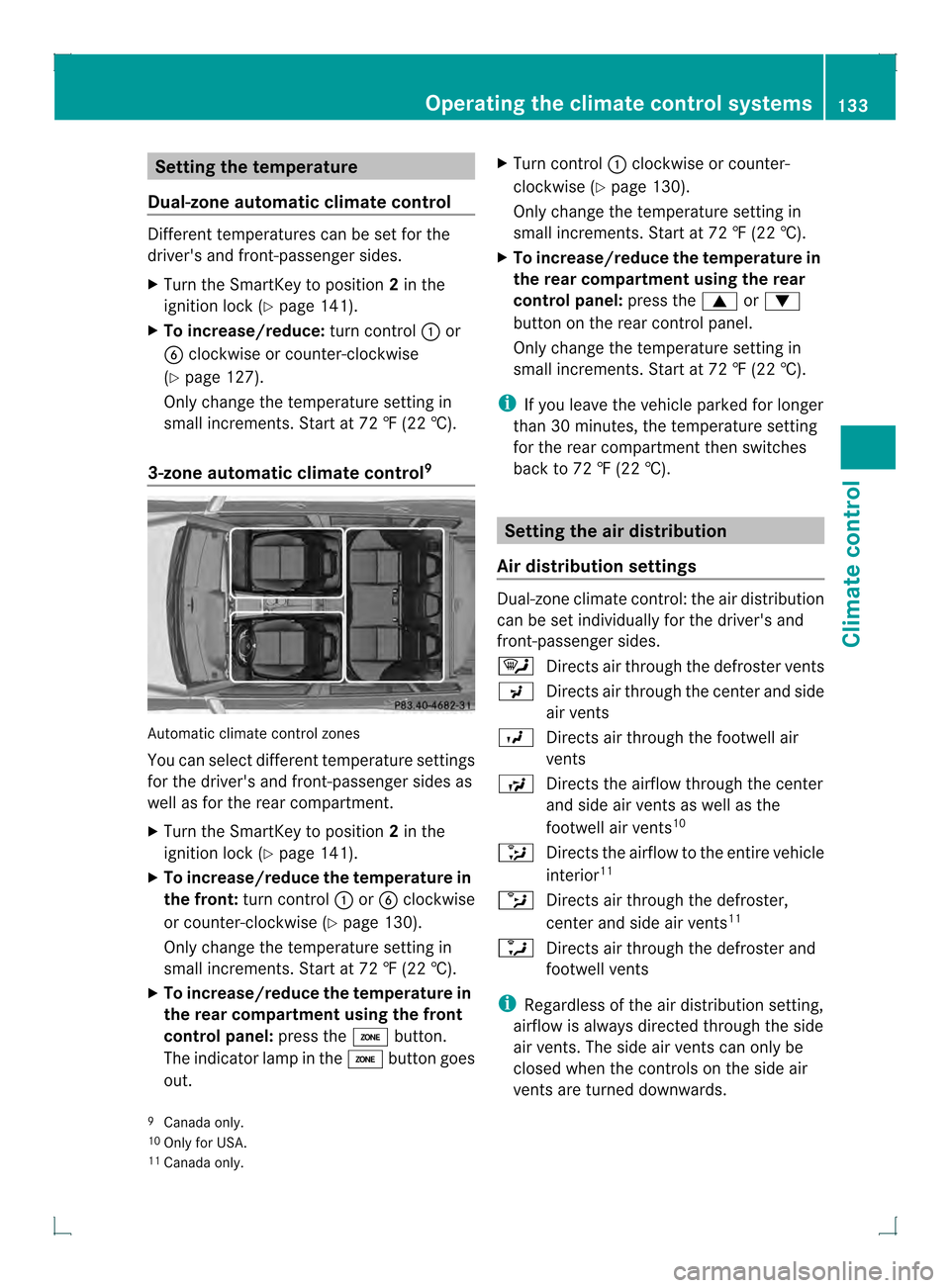
3-zone automatic climate control 9Automatic climate control zones
You can select different temperature settings
for the driver's and front-passenger sides as
well as for the rear compartment.
X Turn the SmartKey to position 2in the
ignition lock (Y page 141).
X To increase/reduce the temperature in
the front: turn control 0002or001F clockwise
or counter-clockwise (Y page 130).
Only change the temperature setting in
small increments. Start at 72 ‡ (22 †).
X To increase/reduce the temperature in
the rear compartment using the front
control panel: press the0003button.
The indicator lamp in the 0003button goes
out. X
Turn control 0002clockwise or counter-
clockwise (Y page 130).
Only change the temperature setting in
small increments. Start at 72 ‡ (22 †).
X To increase/reduce the temperature in
the rear compartment using the rear
control panel: press the0003or0004
button on the rear control panel.
Only change the temperature setting in
small increments. Start at 72 ‡ (22 †).
i If you leave the vehicle parked for longer
than 30 minutes, the temperature setting
for the rear compartment then switches
back to 72 ‡ (22 †). Setting the air distribution
Air distribution settings Dual-zone climate control: the air distribution
can be set individually for the driver's and
front-passenger sides.
0006
Directs air through the defroster vents
0019 Directs air through the center and side
air vents
0018 Directs air through the footwell air
vents
001A Directs the airflow through the center
and side air vents as well as the
footwell air vents 10
0015 Directs the airflow to the entire vehicle
interior 11
0014 Directs air through the defroster,
center and side air vents 11
0013 Directs air through the defroster and
footwell vents
i Regardless of the air distribution setting,
airflow is always directed through the side
air vents. The side air vents can only be
closed when the controls on the side air
vents are turned downwards.
9 Canada only.
10 Only for USA.
11 Canada only. Operating the climate control systems
133Climate control