ESP MERCEDES-BENZ M-CLASS SUV 2011 Owners Manual
[x] Cancel search | Manufacturer: MERCEDES-BENZ, Model Year: 2011, Model line: M-CLASS SUV, Model: MERCEDES-BENZ M-CLASS SUV 2011Pages: 389, PDF Size: 9.22 MB
Page 291 of 389
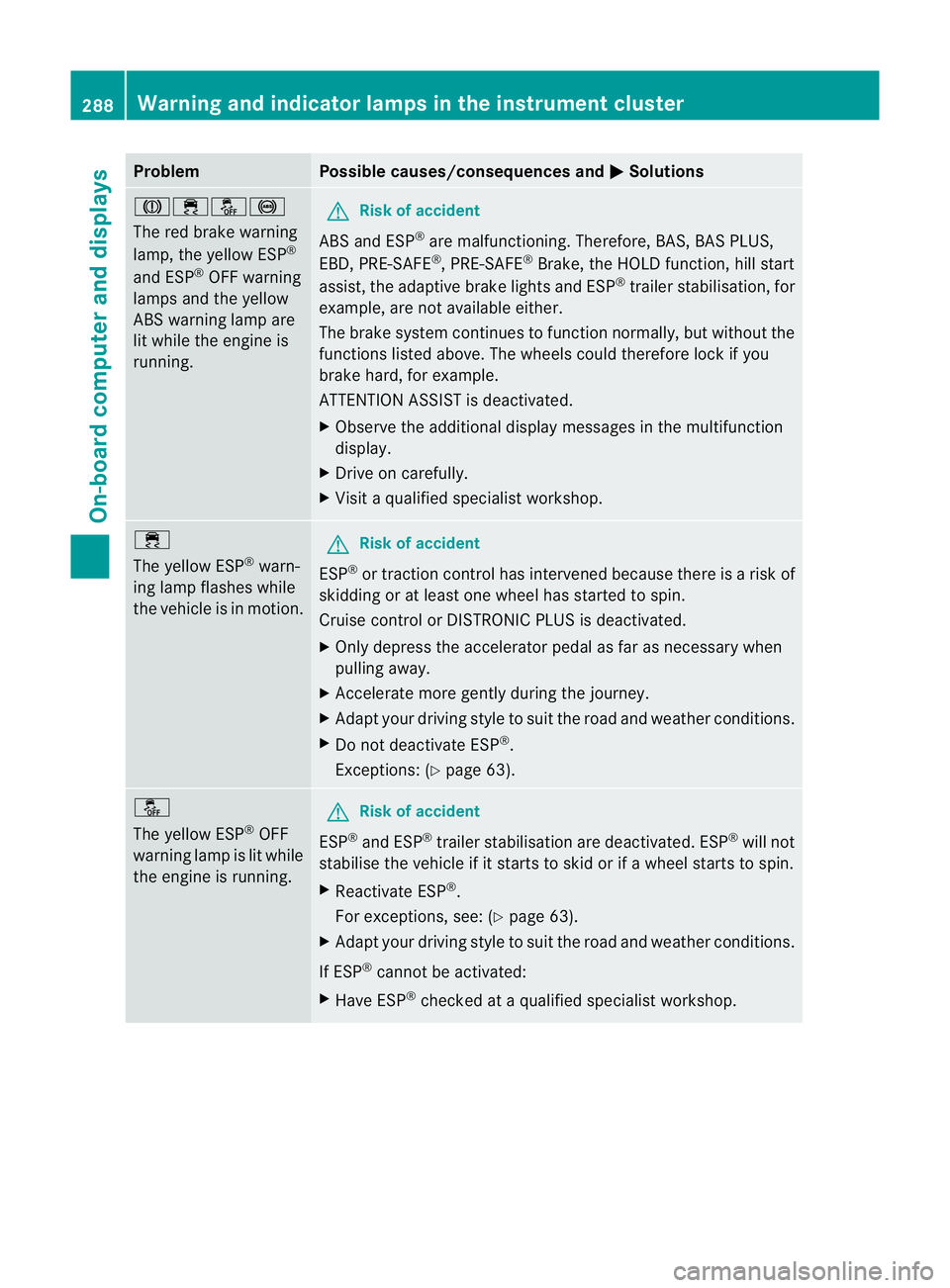
Problem Possible causes/consequences and
M Solutions
J֌!
The red brake warning
lamp, the yellow ESP
®
and ESP ®
OFF warning
lamps and the yellow
AB Sw arning lamp are
lit while the engine is
running. G
Risk of accident
ABS and ESP ®
are malfunctioning. Therefore, BAS ,BAS PLUS,
EBD ,PRE-SAFE ®
,P RE-SAFE ®
Brake, the HOLD function, hill start
assist, the adaptive brake lights and ESP ®
trailer stabilisation, for
example, are not available either.
The brake syste mcontinue stofunction normally, but without the
functions listed above. The wheel scould therefor elock if you
brake hard ,for example.
ATTENTION ASSIS Tisdeactivated.
X Observ ethe additiona ldisplay messages in the multifunction
display.
X Driv eonc arefully.
X Visit aqualified specialist workshop. ÷
The yello
wESP®
warn-
ing lamp flashes while
the vehicle is in motion. G
Risk of accident
ESP ®
or traction control has intervened because there is arisk of
skidding or at least one wheel has started to spin.
Cruise control or DISTRONIC PLU Sisd eactivated.
X Only depress the accelerator pedal as far as necessar ywhen
pulling away.
X Ac celerate more gently during the journey.
X Adapt your drivin gstyle to suit the road and weather conditio ns.
X Do not deactivate ESP ®
.
Exceptions: (Y page 63). å
The yello
wESP®
OFF
warning lamp is lit while
the engine is running. G
Risk of accident
ESP ®
and ESP ®
traile rstabilisatio nare deactivated. ESP ®
will not
stabilis ethe vehicle if it starts to skid or if awheel starts to spin.
X Reactivate ESP ®
.
For exceptions, see: (Y page 63).
X Adap tyour drivin gstyle to suit the road and weather conditio ns.
If ESP ®
cannot be activated:
X Have ESP ®
checked at aqualified specialist workshop. 288
Warnin
gand indicator lam psin the instru ment clusterOn-board computer and displays
Page 292 of 389
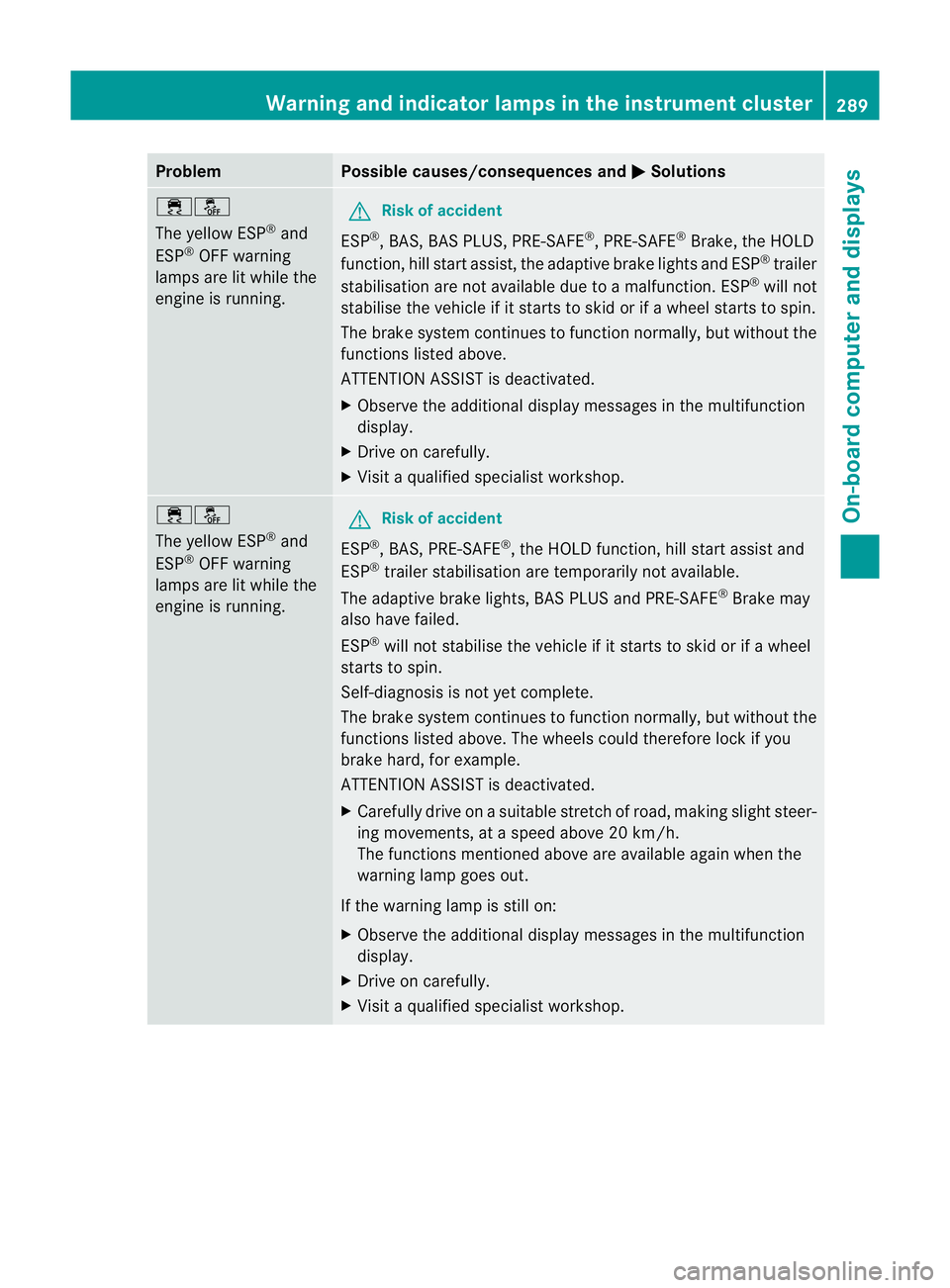
Problem Possible causes/consequences and
M Solutions
֌
The yellow ESP
®
and
ESP ®
OFF warning
lamps ar elit while the
engine is running. G
Risk of accident
ESP ®
,B AS ,BAS PLUS, PRE-SAFE ®
,P RE-SAFE ®
Brake, the HOLD
function, hill start assist, the adaptive brake lights and ESP ®
trailer
stabilisatio nare not availabl edue to amalfunction .ESP ®
will not
stabilise the vehicl eifitstarts to skid or if awheel starts to spin.
The brake system con tinues to function normally, but without the
functions listed above.
ATTENTION ASSIST is deactivated.
X Observe the additional displa ymessages in the multifunction
display.
X Drive on carefully.
X Visit aqualified specialist workshop. ֌
The yellow ESP
®
and
ESP ®
OFF warning
lamps are lit while the
engine is running. G
Risk of accident
ESP ®
,B AS ,PRE-SAFE ®
,t he HOL Dfunction, hill start assis tand
ESP ®
trailer stabilisation are temporarily not available.
The adaptive brake lights ,BAS PLUS and PRE-SAFE ®
Brake may
also have failed.
ESP ®
will not stabilis ethe vehicle if it starts to skid or if awheel
starts to spin.
Self-diagnosis is not yet complete.
The brake system con tinues to function normally, but without the
functions listed above .The wheels could therefor elock if you
brake hard ,for example.
ATTENTIO NASSIST is deactivated.
X Carefully drive on asuitable stretc hofroad, makin gslight steer-
ing movements, at aspeed above 20 km/h.
The functions mentioned above are available again when the
warning lamp goes out.
If the warning lamp is still on:
X Observe the additional display messages in the multifunction
display.
X Drive on carefully.
X Visit aqualified specialist workshop. Warnin
gand indicator lam psin the instru ment cluster
289On-boardcomput er anddisplays Z
Page 301 of 389
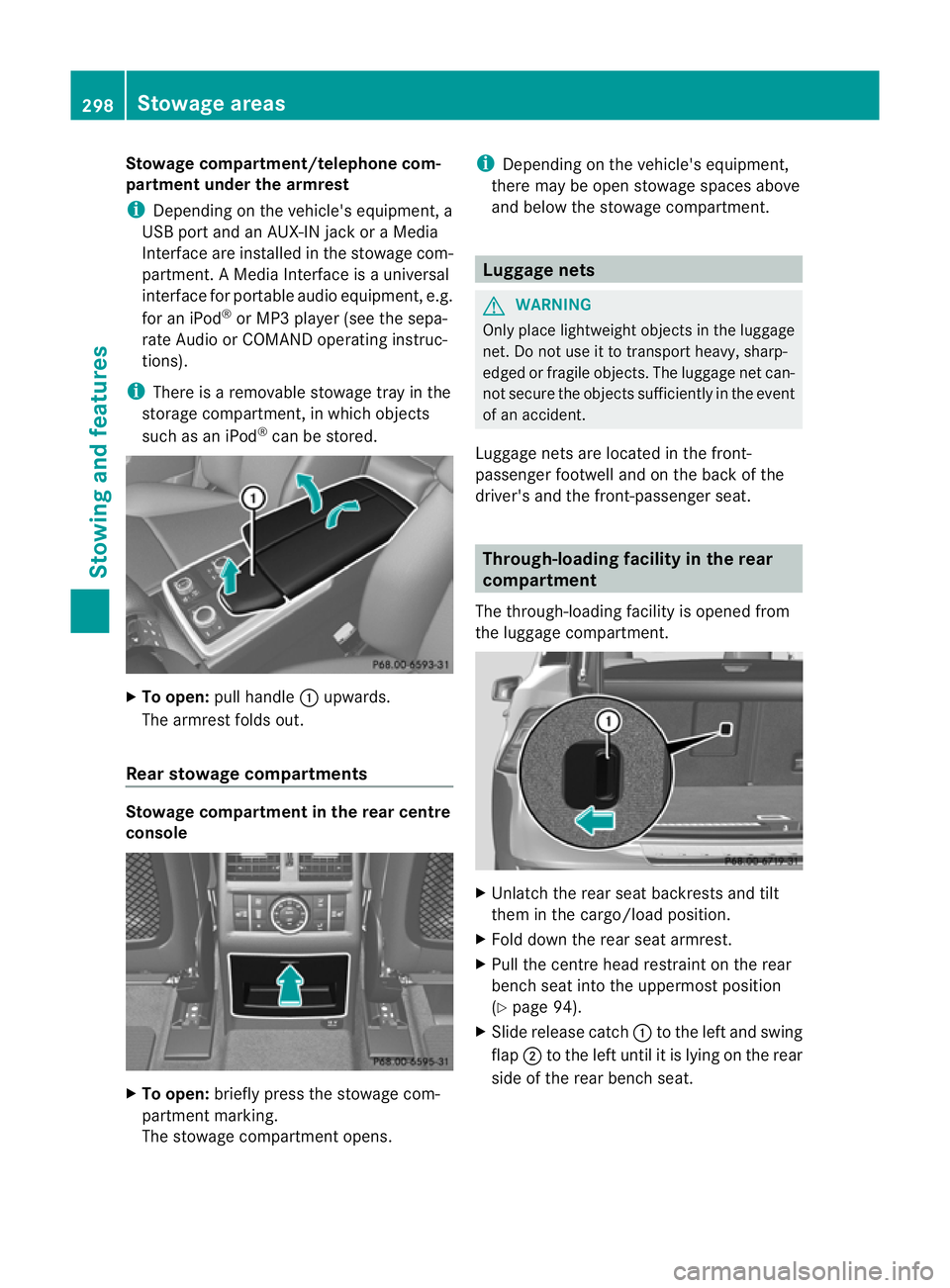
Stowage compa
rtment/telephone com-
partment under the armrest
i Depending on the vehicle's equipment, a
USB port and an AUX-I Njack or aMedia
In terf ace are installed in the stowage com-
partment .AMedia In terface is auniversal
interface for portable audi oequipment, e.g.
for an iPod ®
or MP3 player (see the sepa-
rat eA udio or COMAND operating instruc-
tions).
i There is aremovable stowage tray in the
storage compartment, in which objects
such as an iPod ®
can be stored. X
To open: pull handle :upwards.
The armrest folds out.
Rea rstowage compartments Stowage compartment in the rear centre
cons ole X
To open: briefly pres sthe stowage com-
partment marking.
The stowage compartmen topens. i
Depending on the vehicle's equipmen t,
there may be ope nstowag espaces above
and below the stowage compartment. Luggage nets
G
WAR
NING
Only place lightweight obje ctsint he luggage
net .Don ot use it to transport heavy ,sharp-
edged or fragile objects. The luggag enet can-
not secur ethe objects sufficiently in the event
of an accident.
Luggage net sare locate dinthe front-
passenger footwell and on the bac kofthe
driver 'sand the front-passenger seat. Through-loading facility in the rear
compartment
The through-loading facility is opened from
the luggag ecompartmen t. X
Unlatch th erear seat back rests and tilt
them in the cargo/load position.
X Fold down the rea rseat armrest.
X Pull the centr ehead restraint on the rear
benc hseat int othe uppermost position
(Y page 94).
X Slide release cat ch: to the left and swing
flap ;to the left until it is lying on the rear
sid eoft he rea rbenc hseat. 298
Stowage areasStowing and fea
tures
Page 303 of 389
!
The backrest is heavy .Therefore, exer-
cise car ewhen folding it down. Make sure
that the head restraint sare pushed all the
way in so that th ebackrests and seat cush-
ions are not damaged.
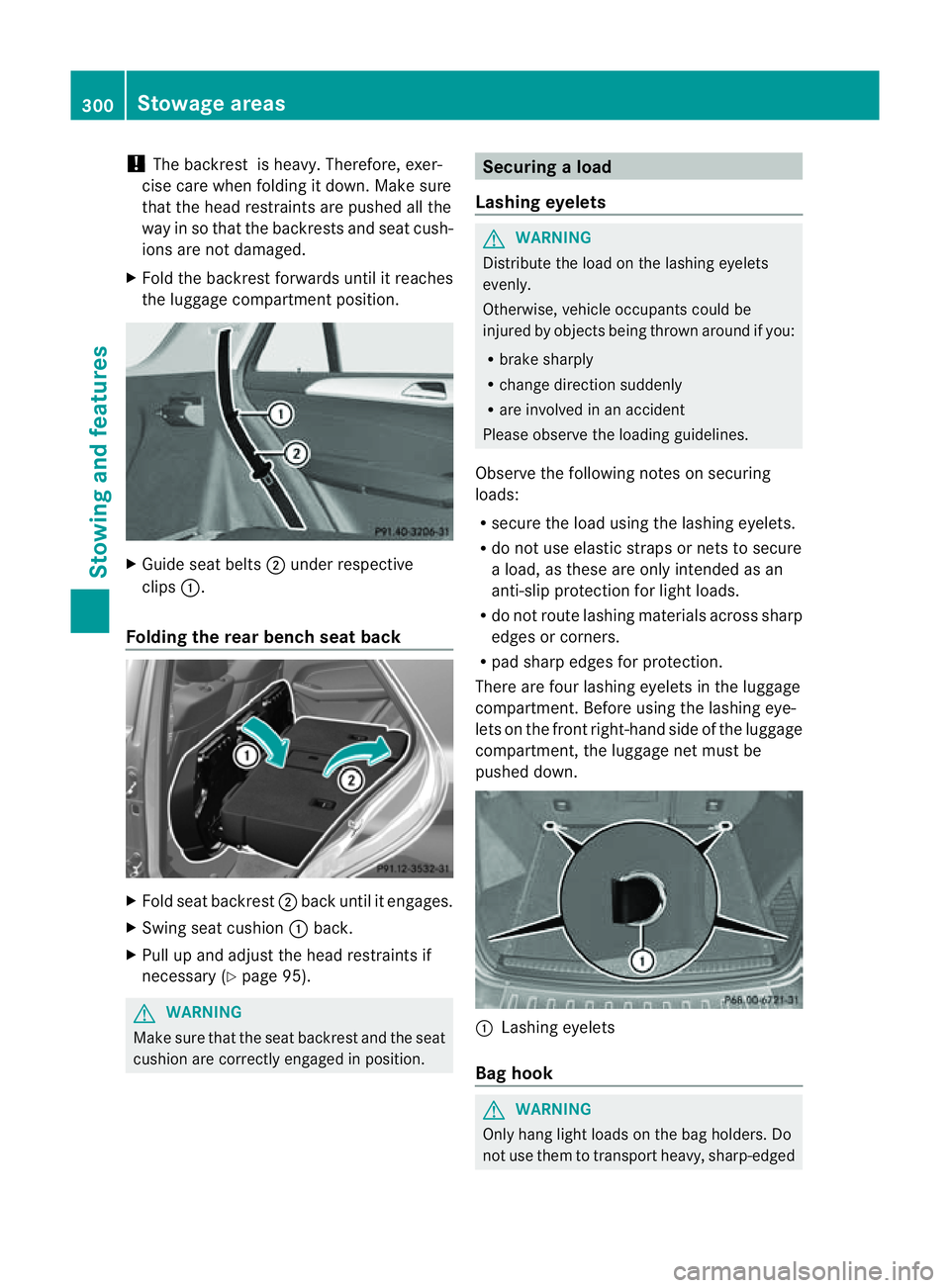
X Fold the backrest forwards until it reaches
the luggage compartment position. X
Guide seat belts ;under respective
clips :.
Folding the rear benc hseat back X
Fold seat backrest ;back until it engages.
X Swin gseat cushion :back.
X Pull up and adjus tthe head restraint sif
necessary (Y page95). G
WARNING
Mak esure that the seat backrest and the seat
cushion are correctly engage dinposition. Securing
aload
Lashing eyelets G
WARNING
Distribut ethe load on thelashing eyelets
evenly.
Otherwise, vehicle occupant scould be
injure dbyo bjectsbein gthrown ar oundify ou:
R bra kesharply
R change directio nsuddenly
R are involved in an accident
Please observ ethe loading guidelines.
Observ ethe following notes on securing
loads:
R secur ethe load using the la shingeyelets.
R do not use elasti cstraps or nets to secure
al oad, as these ar eonly intended as an
anti-slip protection for light loads.
R do not route lashing materials across sharp
edges or corners.
R pad sharp edges for protection.
There are four lashing eyelets in the lugg age
compartment. Before using th elashing eye-
lets on the fron tright-han dside of the luggage
compartment, the luggage net must be
pushed down. :
Lashin geyelets
Ba gh ook G
WARNING
Only hang light loads on the bag holders. Do
not use them to transpor theavy ,sharp-edged 300
Stowage areasStowing and features
Page 307 of 389
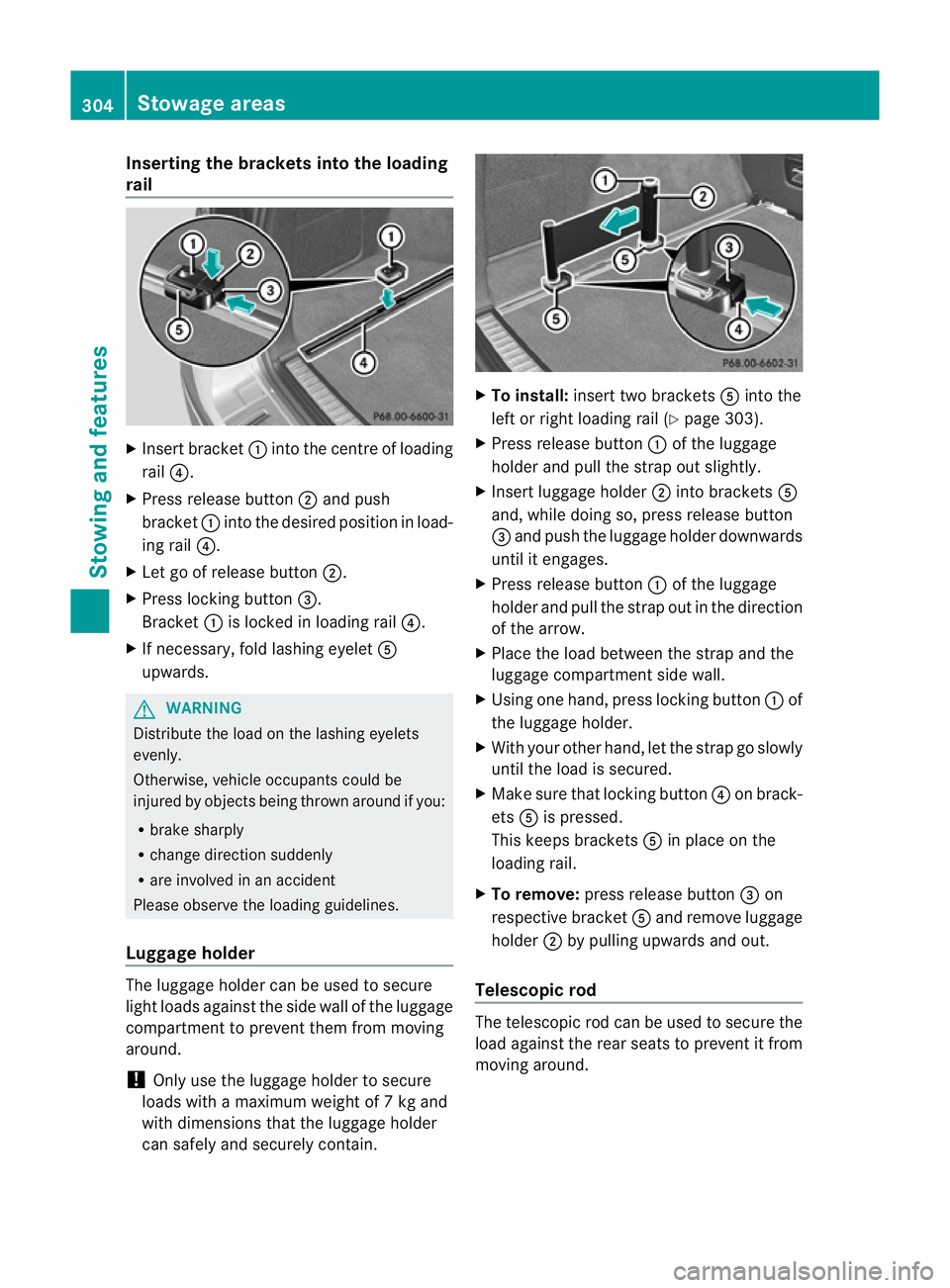
Inserting th
ebracket sintot he loading
rail X
Insert bracket :into th ecentr eofl oading
rail ?.
X Press release button ;and push
bracket :intothe desired position in load-
ing rail ?.
X Let go of rel ease button ;.
X Press locking button =.
Bracket :is locked in loading rail ?.
X If necessary, fol dlashin geyelet A
upwards. G
WARNING
Distribute the loa donthe lashing eyelets
evenly.
Otherwise, vehicle occupants could be
injured by objects being thrown around if you:
R brake shar ply
R chang edirection suddenly
R are involved in an accident
Please observe the loading guidelines.
Luggage holder The luggage holder can be use
dtosecure
ligh tloads against the side wall of the luggage
compartment to prev entthem from moving
around.
! Only use the luggage holder to secure
loads with amaximum weight of 7kgand
with dimensions that the luggage holder
can safel yand securely contain. X
To install: insert two brackets Ainto the
left or right loading rail (Y page303).
X Press releas ebutton :of the luggage
holder and pull the strap out slightly.
X Insert luggag eholder ;intob rackets A
and ,while doing so, press release button
= and push the luggage holder downwards
until it engages.
X Press release button :of the luggage
holder and pull the strap out in the direction
of the arrow.
X Plac ethe load between the strap and the
luggage compartment side wall.
X Using one hand, press locking button :of
the luggage holder.
X With your other hand, let the strap go slowly
until the load is secured.
X Make sur ethat locking button ?on brack-
ets Ais pressed.
This keeps brackets Ain plac eonthe
loading rail.
X To remove: press release button =on
respective bracket Aand remove luggage
holder ;by pulling upwards and out.
Telescopic rod The telescopic rod can be used to secure the
load against the rea
rseats to prevent it from
moving around. 304
Stowage areasStowing and features
Page 308 of 389
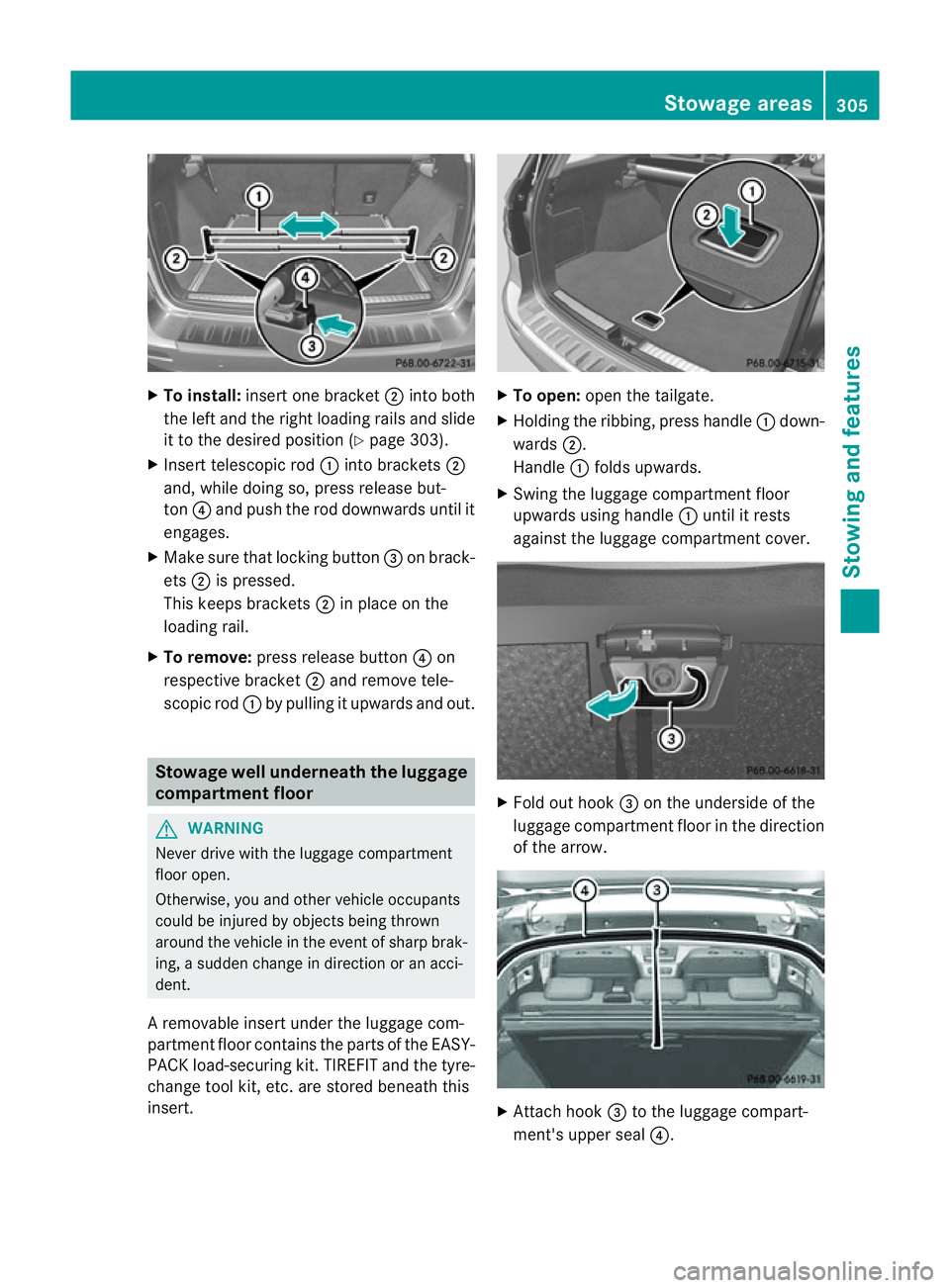
X
To install: insert one bracket ;into both
the left and the right loading rai lsand slide
it to the desired positio n(Ypage 30 3).
X Insert telescopic rod :into brackets ;
and ,while doing so, press release but-
ton ?and push the rod downwards until it
engages.
X Make sur ethat locking button =on brack-
ets ;is pressed.
This keeps brackets ;in plac eonthe
loading rail.
X To remove: press release button ?on
respe ctive bracket ;and remov etele-
scopic rod :by pullin gitupwards and out. Stowage well unde
rneath the luggage
compartment floor G
WARNING
Never drive with the luggage compar tment
floor open.
Otherwise, you and other vehicle occupants
could be injured by objects being thrown
around the vehicle in the event of sharp brak-
ing, asudden change in direction or an acci-
dent.
Ar emovable inser tunder the luggage com-
partmen tfloor contain sthe par tsof the EASY-
PACK load- securingkit.T IREFIT and th etyre-
change tool kit, etc. are stored beneath this
insert. X
To open: openthe tailgate.
X Holding the ribbing, press handle :down-
wards ;.
Handle :folds upwards.
X Swing the luggage compartment floor
upwards usin ghandle :until it rests
against the luggage compartment cover. X
Fold out hook =on the underside of the
luggage compartment floor in the direction
of the arrow. X
Attach hook =to the luggage compart-
ment' supper seal ?. Stowage areas
305Stowingandfeatures Z
Page 319 of 389
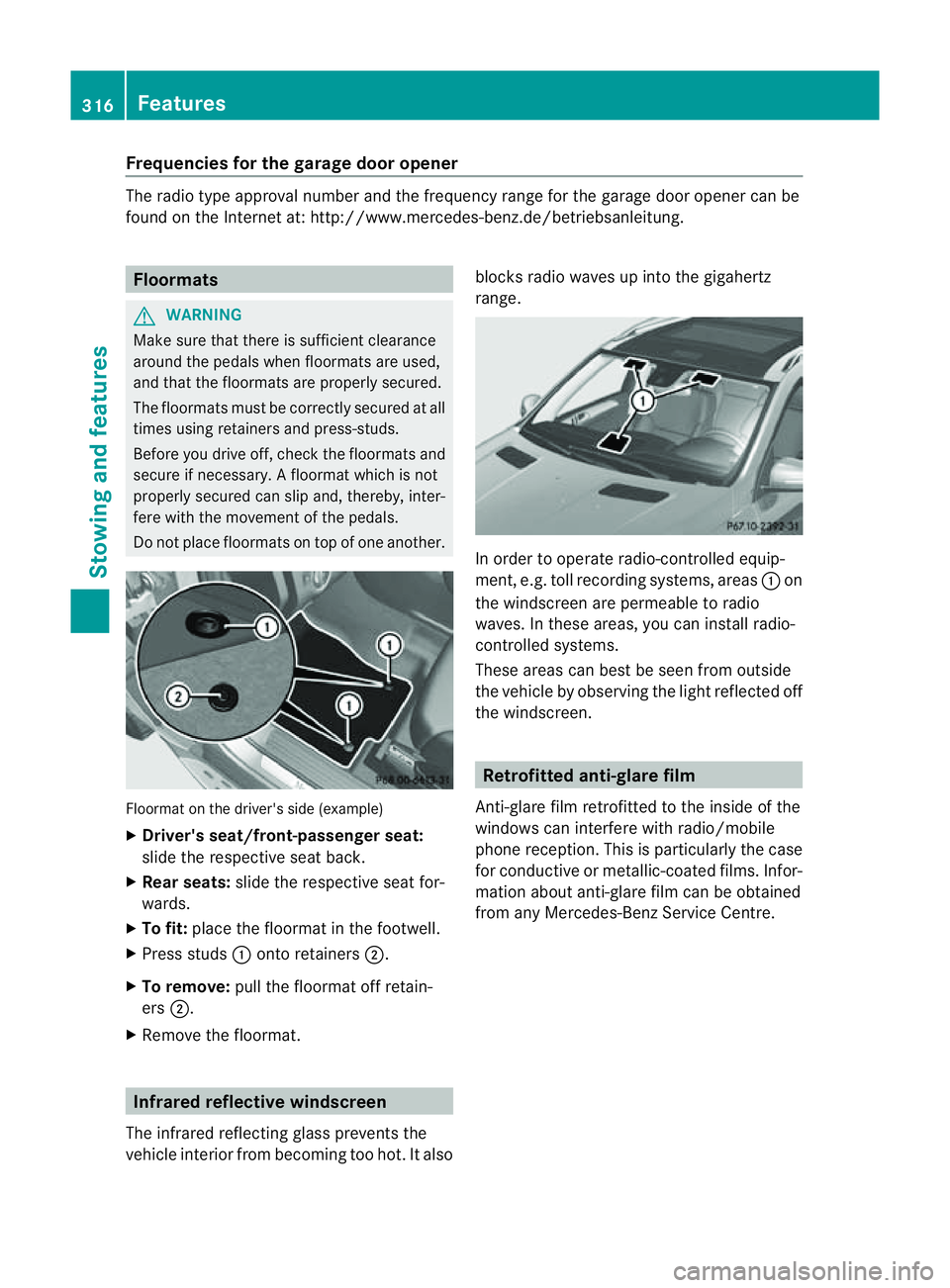
Frequencies for th
egarage doo ropener Th
er adio typ eapproval number and th efrequency range for th egarag edoor opener can be
fou ndonthe Interne tat: http://www.mercedes-benz.de/betriebsanleitung. Floormats
G
WARNING
Make sure that there is sufficient clearance
around the pedals when floormats are used,
and that the floormats are properly secured.
The floormats must be correctly secured at all
times using retainer sand press-studs.
Before you drive off ,chec kthe floormats and
secur eifnecessary. Afloormat which is not
properly secured can slip and, thereby, inter-
fere with the movemen tofthe pedals.
Do not plac efloormats on top of one another. Floormat on the driver's side (example)
X
Driver's seat/front-passenger seat:
slide the respective seat back.
X Rear seats: slide the respective seat for-
wards.
X To fit: place the floorma tinthe footwell.
X Press studs :ontoretainers ;.
X To remove: pull the floormat off retain-
ers ;.
X Remov ethe floormat. Infrared reflective windscreen
The infrared reflecting glass prevents the
vehicle interior from becoming too hot. It also blocks radio waves up int
othe gigahertz
range. In orde
rtooperateradio-controlled equip-
ment, e.g. toll recording systems, areas :on
the windscreen are permeable to radio
waves. In these areas, you can install radio-
controlled systems.
Thes earea scan best be seen from outside
the vehicle by observing the light reflected off
the windscreen. Retrofitted anti-glar
efilm
Anti-glar efilm retrofitted to the inside of the
windows can interfer ewith radio/mobile
phone reception. This is particularly the case
for conductive or metallic-coated films. Infor-
mation about anti-glar efilm can be obtained
from any Mercedes-Ben zService Centre. 316
FeaturesStowing and features
Page 323 of 389
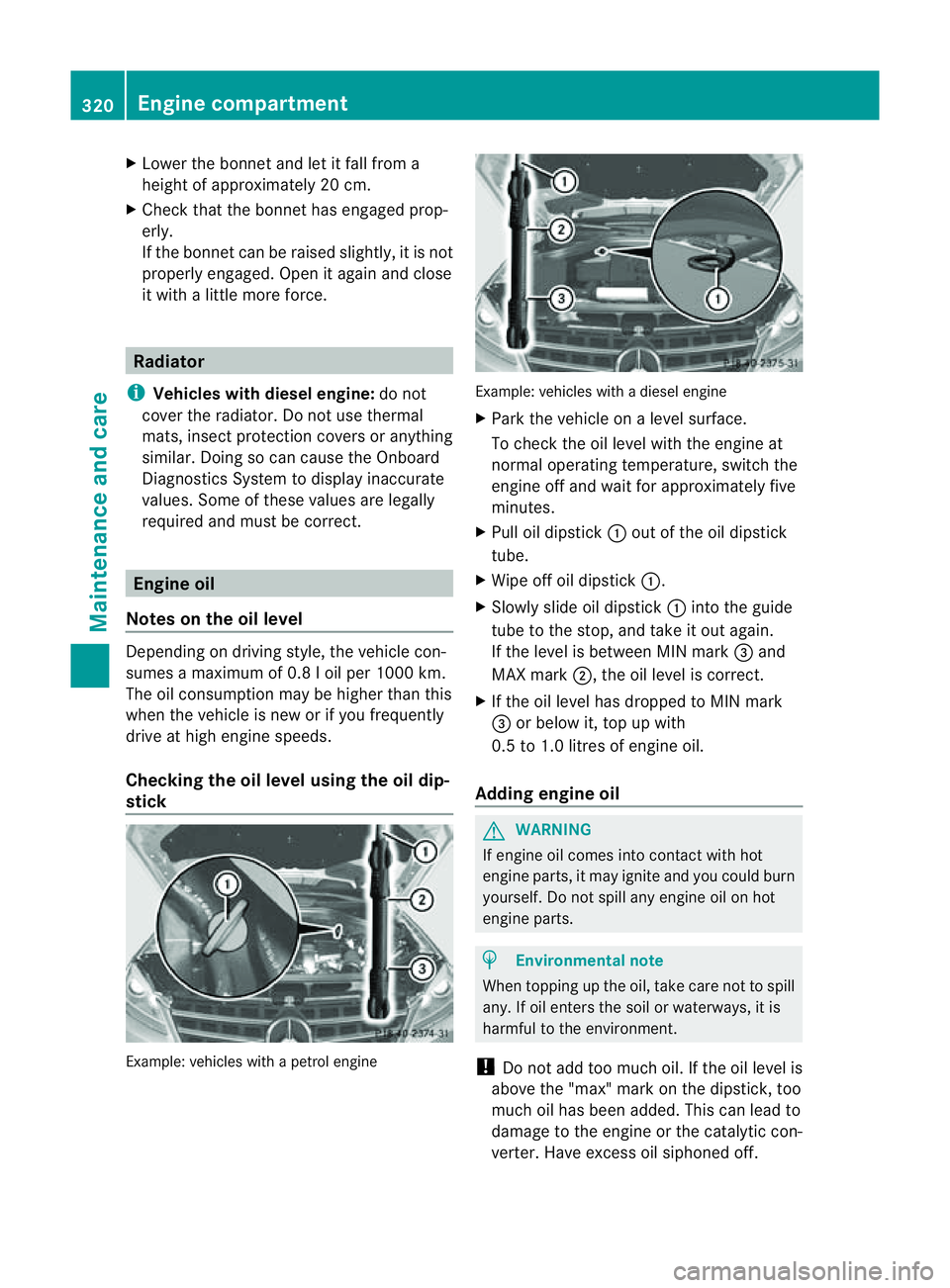
X
Lower th ebonnet and let it fal lfrom a
heig ht of approx imately 20 cm.
X Check that the bonnet has engaged prop-
erly.
If the bonnet can be raised slightly, it is not
properly engaged. Open it again and close
it with alittle more force. Radiator
i Vehicles with diesel engine: do not
cover the radiator .Don ot use thermal
mats, insec tprotectio ncover sora nything
similar. Doing so can cause the Onboard
Diagnosti csSystem to display inaccurate
values .Some of these values ar elegally
required and must be cor rect. Engine oil
Notes on the oil level Depending on driving style, the vehicle con-
sume samaximum of 0.8 loil per 100 0km.
Th eo il consumption may be higher than this
when the vehicle is new or if you frequently
drive at high engin espeeds.
Checking the oil level using the oil dip-
stick Example: vehicles with
apetro lengine Example: vehicle
swithadiesel engine
X Park the vehicle on alevel surface.
To chec kthe oil level with the engin eat
normal operating temperature, switch the
engine off and wait for approximately five
minutes.
X Pull oil dipstick :out of the oil dipstick
tube.
X Wip eoff oi ldipstick :.
X Slowly slide oil dipstick :into the guide
tube to the stop, and take it out again.
If the level is between MIN mark =and
MAX mark ;,the oil level is correc t.
X If th eoil level has dropped to MIN mark
= or below it, top up with
0.5 to 1.0 litres of engine oil.
Adding engine oil G
WARNING
If engine oil comes into contact with hot
engine parts, it may ignite and you could burn
yourself .Donot spill any engin eoil on hot
engine parts. H
Environmental note
When topping up the oil, take care not to spill
any. If oil enters the soil or waterways, it is
harmful to the environment.
! Do not add too much oil. If the oil level is
above the "max" mar konthe dipstick ,too
much oil has been added. This can lead to
damage to the engin eorthe catalytic con-
verter .Have excess oil siphoned off. 320
Eng
inecompartmentMaintenance and care
Page 327 of 389
You can obtain fur
ther information about
BlueTE Cexhaus tgas aftertreatmen tand
AdBlue ®
from any Mercedes-Benz Service
Centre. Care
Note
sonc are
Regular care of your vehicle is aconditio nfor
retaining th equalit yint he long term.
Us ec arep roducts and cleani ngagent srec-
ommended and approved by Mercedes-Benz.
! For cleanin gyour vehicle ,donot useany
of the following:
R dry ,rough or hard cloths
R abrasive cleanin gagents
R solvents
R cleanin gagents con taining solvents
Do not scrub.
Do not touch the surfaces or protective
film swith hard objects, e.g. aring or ice
scraper .You coul dotherwis escratch or
damag ethe surfaces and protective film. H
Environmenta
lnote
Dispose of empty packaging and cleaning
cloths in an environmentally responsible man-
ner.
! Do not park up the vehicle for an extended
period straight after cleaning it, particular ly
after having cleaned the wheels with wheel
cleaner. Whee lcleaners could cause
increased corrosion of the brake discs and
brake pads/linings. For this reason, you
should drive for afew minutes after clean-
ing. Brakin gheats the brak ediscs and the
brake pads/linings, thus drying them. The
vehicle can then be parked up. Care of the exterior
Automatic car wash G
WARNING
Braking efficiency is reduced after washing
the vehicle. This could cause an accident. For
this reason, following acar wash, drive with
particular care until the brakes are dry.
You can wash the vehicle in an automatic car
wash from the very start.
If the vehicle is very dirty, pre-wash it before
cleaning it in an automatic car wash.
! In car washe swithatowing mechanism,
make sure that the automatic transmission
is in transmission position N,otherwis ethe
vehicle could be damaged.
R Vehicles with akey:
do not remove the key from the ignition
lock. Do not open the driver' sdoor or
front-passenger door when the engin eis
switched off .Otherwise, the automatic
transmission selects park position P
automaticall yand locks the wheels .You
can prevent this by shifting the auto-
matic transmission to Nbeforehand.
R Vehicles with KEYLE SS-GO:
do not ope nthe driver's door or front-
passenger door when the engin eis
switched off .Otherwise, the automatic
transmission selects park position P
automaticall yand locks the wheels.
Observe the following to make sure that the
automati ctransmission stays in position N:
X Make sure th evehicle is stationary and the
ignition is switched off.
X Turn the key to position 2(Y page 139) in
the ignition lock.
Use the key instead of the Start/Stop but-
ton on vehicles with KEYLE SS-GO.
X Depres sand hol dthe brake pedal.
X Shif tthe automatic transmission to posi-
tion N.
X Release the brake pedal. 324
CareMaintenance and care
Page 331 of 389
X
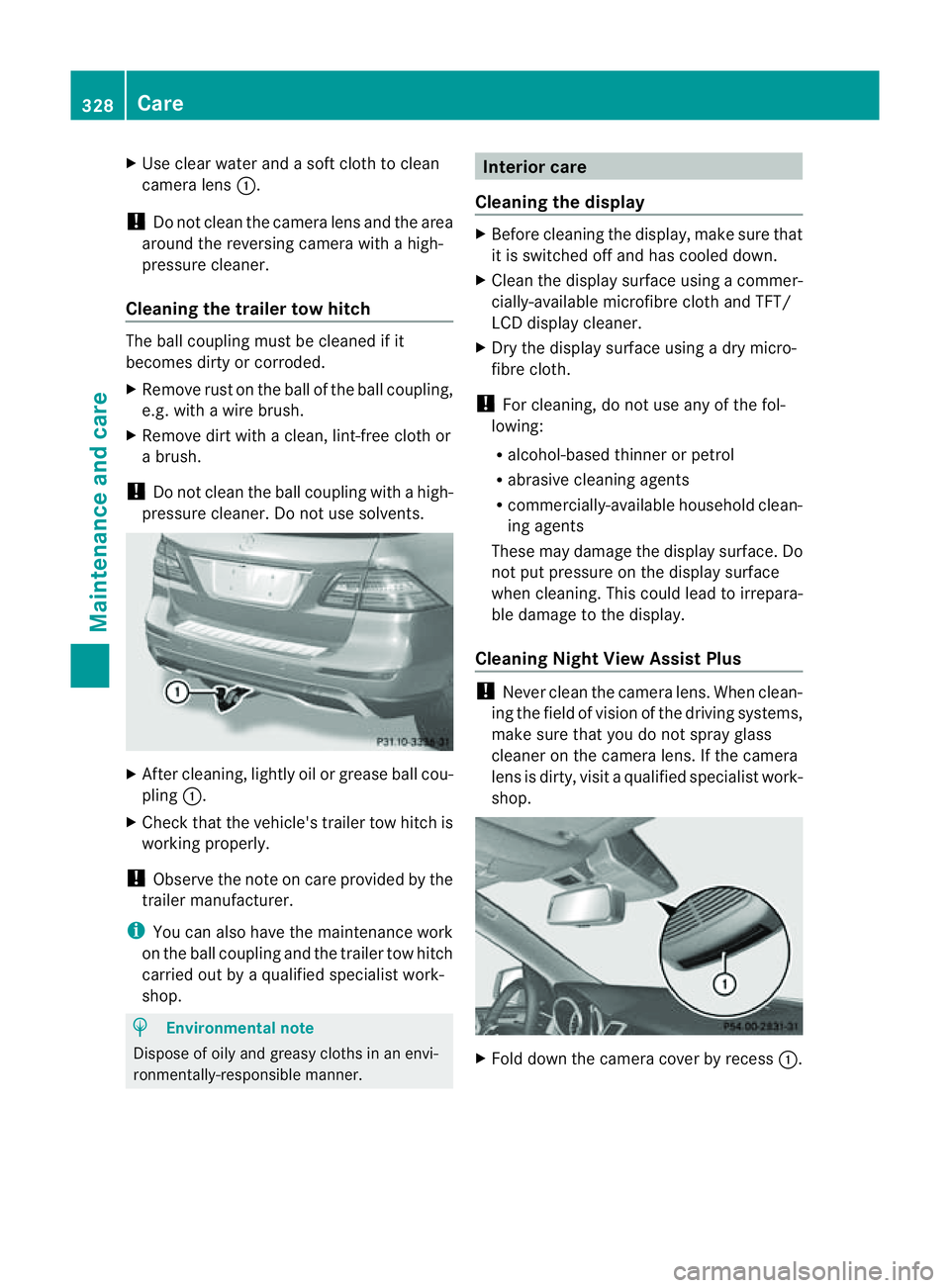
Use clear wate rand asoft clot htoclean
camera lens :.
! Do not clean the camera lens and the area
around the reversing camera with ahigh-
pressure cleaner.
Cleaning the trailer tow hitch The ball coupling must be cleaned if it
becomes dirty or corroded.
X Remove rust on the ball of the ball coupling,
e.g. with awire brush.
X Remove dirt with aclean, lint-free cloth or
ab rush.
! Do not clean th eball coupling with ahigh-
pressure cleaner .Donot use solvents. X
Afterc leaning, lightly oil or grease ball cou-
pling :.
X Check that the vehicle' strailer to whitch is
working properly.
! Observe the note on care provided by the
trailer manufacturer.
i You can also have the maintenance work
on the ball coupling and the trailer tow hitch
carried out by aqualified special istw ork-
shop. H
Environmenta
lnote
Dispose of oily and greasy cloths in an envi-
ronmentally-responsible manner. Interior care
Cleaning the display X
Before cleaning the display, make sure that
it is switched off and has cooled down.
X Clea nthe display surface usin gacommer-
cially-available microfibr ecloth and TFT/
LCD displa ycleaner.
X Dry the displa ysurface using adry micro-
fibre cloth.
! For cleaning, do not us eany of the fol-
lowing:
R alcohol-base dthinner or petrol
R abrasiv ecleaning agents
R commercially-available household clean-
ing agents
These may damage the displa ysurface. Do
not put pressure on the displa ysurface
when cleaning. This could lead to irrepara-
ble damage to the display.
Cleanin gNight View Assist Plus !
Never clean the camera lens. When clean-
ing the field of vision of the driving systems,
mak esure that you do not spray glass
cleaner on the camera lens. If the camera
lens is dirty, visit aqualified specialist work-
shop. X
Fold down the camera cover by recess :.328
CareMaintenance and care