ESP MERCEDES-BENZ M-CLASS SUV 2011 Repair Manual
[x] Cancel search | Manufacturer: MERCEDES-BENZ, Model Year: 2011, Model line: M-CLASS SUV, Model: MERCEDES-BENZ M-CLASS SUV 2011Pages: 389, PDF Size: 9.22 MB
Page 179 of 389
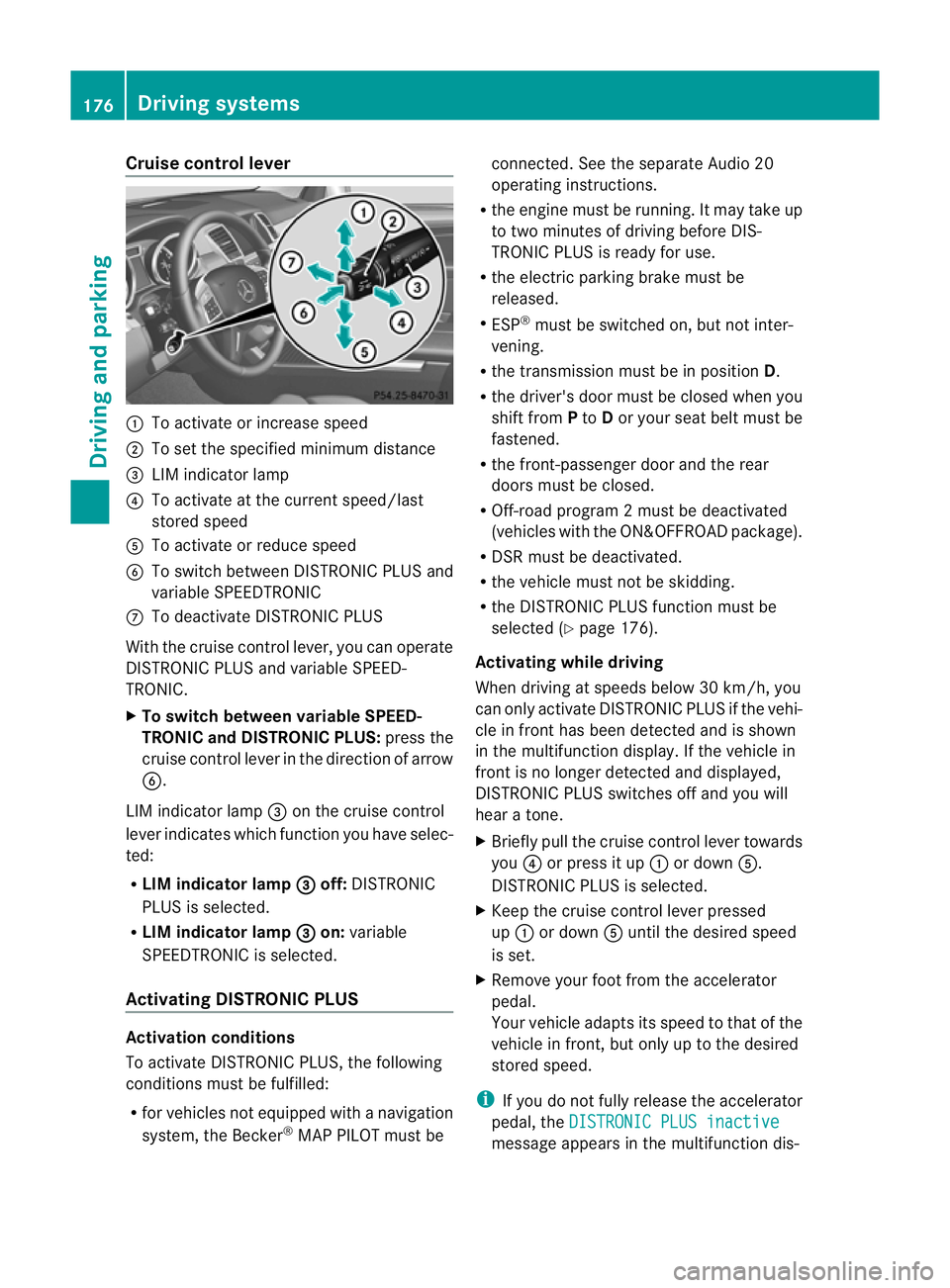
Cruise control lever
:
To activat eorincrease speed
; To set the spe cified minimum distance
= LIM indica torlamp
? To activat eatthe current speed/la st
stored speed
A To activate or reduc espeed
B To switc hbetween DI STRONIC PLUS and
variable SPEEDTRONIC
C To deactivate DISTRONIC PLUS
With the cruise contro llever ,you can operate
DI ST RONIC PLUS and variable SPEED-
TRONIC.
X To switch between variable SPEED-
TRONIC and DISTRONIC PLUS: press the
cruise contro llever in the direc tion of arrow
B.
LI Mi ndicator lamp =on the cruise control
lever indicates which function you have selec-
ted:
R LIM indicator lamp = off:
DISTRONIC
PLUS is selected.
R LIM indicator lamp = on:
variable
SPEEDTRONIC is selected.
Activating DISTRO NICP LUS Activation conditions
To activate DISTRONIC PLU S,the following
conditions must be fulfilled:
R for vehicle snot equipped with anavigation
system, the Becker ®
MAP PILOT must be connected. See the separate Audio 20
operatin
ginstructions.
R the engi ne must be running. It ma ytakeup
to two minutes of driving before DIS-
TRONIC PLUS is ready for use.
R the electric parking brake must be
released.
R ESP ®
must be switched on, but not inter-
vening.
R the transmission must be in position D.
R the driver' sdoor must be closed when you
shift from Pto Dor your seat belt must be
fastened.
R the front-passenger door and the rear
doors must be closed.
R Off -road program 2must be deactivated
(vehicles with the ON&OFFROA Dpackage).
R DS Rm ust be deactivated.
R the vehicle must not be skidding.
R the DI STRONIC PLUS function must be
selected (Y page 176).
Activating while driving
Whe ndriving at speeds belo w30km/h, you
can onl yactivate DISTRONIC PLUS if the vehi-
cle in front has been detected and is shown
in the mul tifunctio ndisplay. If th evehicle in
fron tisnol onger detected and displayed,
DISTRONIC PLU Sswitches off and you will
hear atone.
X Briefl ypull the cruise control lever towards
you ?or press it up :or down A.
DISTRONIC PLUS is selected.
X Keep the cruise control lever pressed
up : or down Auntil the desired speed
is set.
X Remove your foot from the accelerator
pedal.
Your vehicle adapts its spee dtothat of the
vehicle in front ,but only up to the desired
stored speed.
i If you do not fully release the accelerator
pedal ,the DISTRONI CPLUS inactive message appe
arsint he multifunction dis- 176
Driving systemsDriving and parking
Page 181 of 389
X
Select the Distance display function
using the on-b oard computer
(Y page 245).
i Youw ills ee the stored speed for about
five seconds when you act ivate DISTRONIC
PLUS.
Drivin gwithD ISTRONI CPLUS Pullin
gaway
X If the vehicle in fron tpullsa way: remove
you rfoot from the brake pedal.
X Briefl ypull the cruise control lever
(Y page 176 )towards you.
or
X Accelerate briefly.
Your vehicle pulls away and adapt sits
speed to that of the vehicle in front.
Driving G
WARNING
If you depres sthe brake, DI STRONIC PLUS is
deactivated unless your vehicle is stationary.
DISTRONIC PLUS then no longe rbrake syour
vehicle. In such cases, control the distance
from vehicles travelling in front with the brake
alone. You coul dotherwis ecause an accident
and thereby injure yourself and others. The
driver remains fully responsible for the vehi-
cle's distance from other vehicles, the speed
being driven and for braking in good time.
If there is no vehicle in front ,DISTRONIC
PLUS operate sinthe sam eway as cruise
control.
If DISTRONIC PLUS detect sthat the vehicle
in front has slowed down, it brakes your vehi-
cle. In this way ,the distanc eyou have selec-
ted is maintained.
If DI STRONIC PLUS detects afaster-moving
vehicle in front ,itaccelerates your vehicle,
but only up to the speed you have stored. Changing lanes
If you wis
htochange to the passin glane (in
countries where traffic drives on the right, the
passing lane is the left-hand lane), DIS-
TRONIC PLUS supports you if:
R you are driving faster than 60 km/h.
R DISTRONIC PLUS is maintainin gthe dis-
tan cetoav ehicle in front.
R you switc honthe appropriate tur nsignals.
R DISTRONIC PLU Sdoes not detec tadanger
of collision.
If these conditions are met, your vehicle is
accelerated. Acceleration will be interrupted
if changin glanes takes too long or if the dis-
tanc ebetween your vehicle and the vehicle in
front becomes too small. G
WARNING
DI ST RONIC PLUS and Active Blind Spot Assist
are only an aid designed to assist driving.
The ydon ot relieve you of the responsibility
of payin gattention. The driver remains fully
responsibl efor the vehicle' sdistance from
other vehicles, the vehicle's speed and for
braking in good time. Always pay attention to
traffic conditions and your surroundings. Oth-
erwise, you may fail to recognise dangers in
time, cause an accident and injur eyourself
and others.
Vehicles with COMAND Online
i The following function is not operational
in all coun tries.
DI ST RONIC PLUS uses additional information
from your navigation syste msothat it can
adapt to cer tain traffic situations. This is the
case if, while following avehicle, DI STRONIC
PLUS is active and you:
R approach or drive around aroundabout
R approach aTjunction
R turn off at amotorway exit
Even if the vehicle in front leaves the detec-
tion range, DI STRONIC PLUS temporarily
maintains the current driving speed and does 178
Driving systemsDrivin
gand parking
Page 184 of 389
or
X
Briefl ypres sthe cruise con trol leve rinthe
direction of arrow =.
Variable SPE EDTRONIC is selected. LIM
indicator lamp ;in the cruise control lever
lights up.
When you deactivate DI STRONIC PLUS, the
DISTRONIC PLU Soff message is show
nin
the multifunction display for approximately
five seconds.
i The last speed stored remains stored until
you switch off the engine.
i DISTRONIC PLUS is not deactivated if you
depress the accelerator pedal. If you accel-
erate to overtake, DISTRONIC PLUS
adjusts the vehicle's speed to the last
speed stored after you have finished over-
taking.
DISTRONIC PLUS is automatically deactiva-
ted if:
R you engag ethe electric parkin gbrake or if
th ev ehicle is automatically secured with
the electric parking brake.
R you are driving slower than 25 km /hand
there is no vehicle in front ,orifthe vehicle
in front is no longer detec ted.
R ESP ®
intervenes or if you deactivat eESP®
.
R the transmission is in the P,Ror Nposition.
R the vehicle is near aradio telescop efacility
(Y page 380).
R you switch off the radar senso rsystem
(Y page 249).
R you pull the cruise control lever towards
you in order to pull away and the front-
passenger doo rorone of the rear doors is
open.
R you activate DSR.
R you activate off-road program 2onvehicles
with the ON&OFFROA Dpackage.
R the vehicle has skidded.
If DISTRONIC PLUS is deactivated, you will
hear awarning tone. The DISTRONICP LUS off message is show
ninthe multifunction
displa yfor approximately fiv eseconds.
In the Assistanc emenu (Y page 24 4)of the
on-boar dcompu ter,you can select the dis-
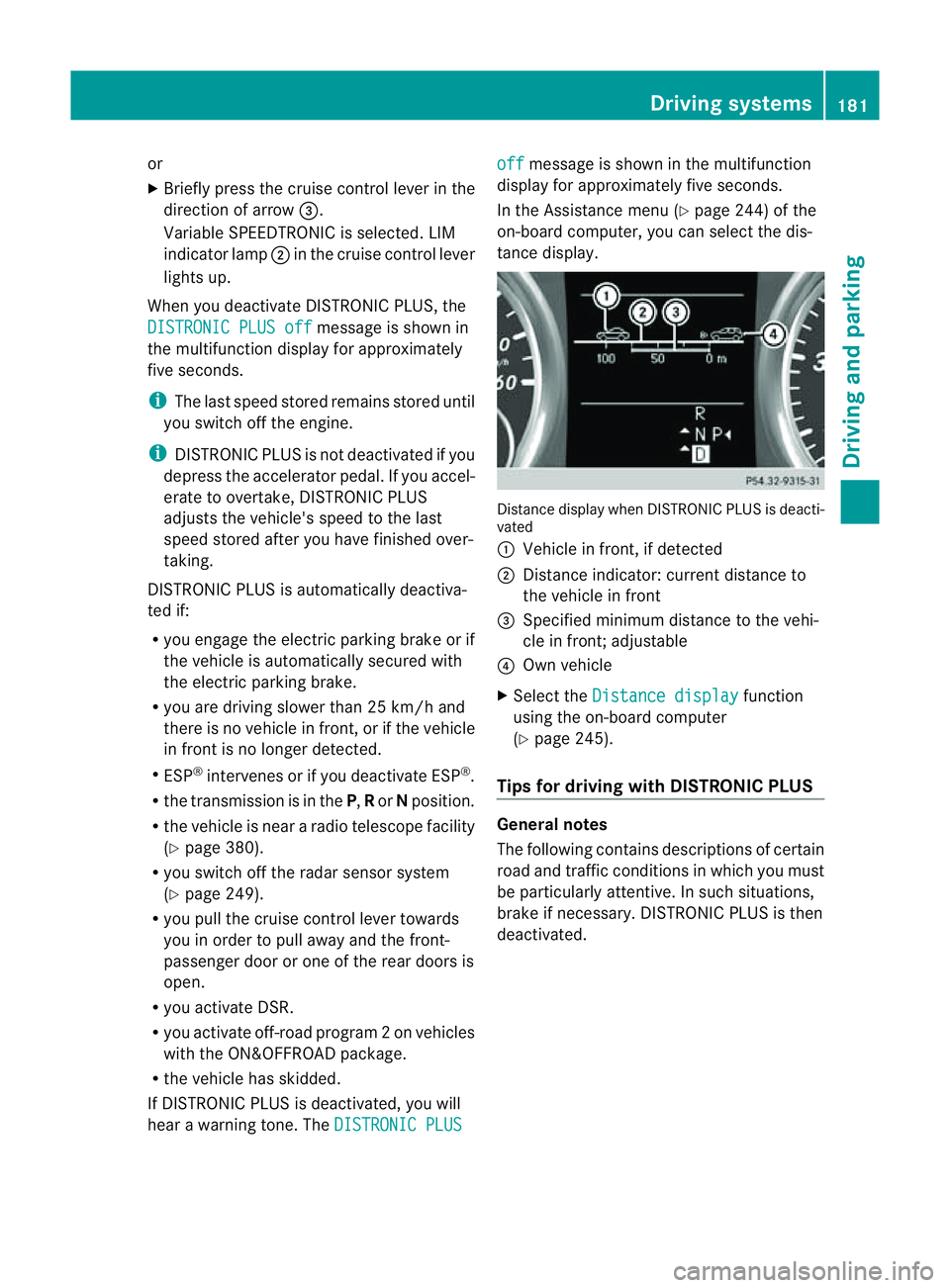
tanc edisplay. Distance display when DISTRONI
CPLUS is deacti-
vated
: Vehicl einfront, if detected
; Distance indicator: curre ntdistanc eto
the vehicle in front
= Specified minimum distanc etothe vehi-
cle in front; adjustable
? Own vehicle
X Select the Distancedisplay function
usin gthe on-boar dcompu ter
( Y page 24 5).
Tips for driving with DISTRO NICP LUS Genera
lnotes
The following contains descriptions of certain
road and traf ficc ondition sinwhich you must
be particularly attentive. In such situations,
brake if necessary. DI STRONIC PLUS is then
deactivated. Driving systems
181Drivingand park ing Z
Page 186 of 389
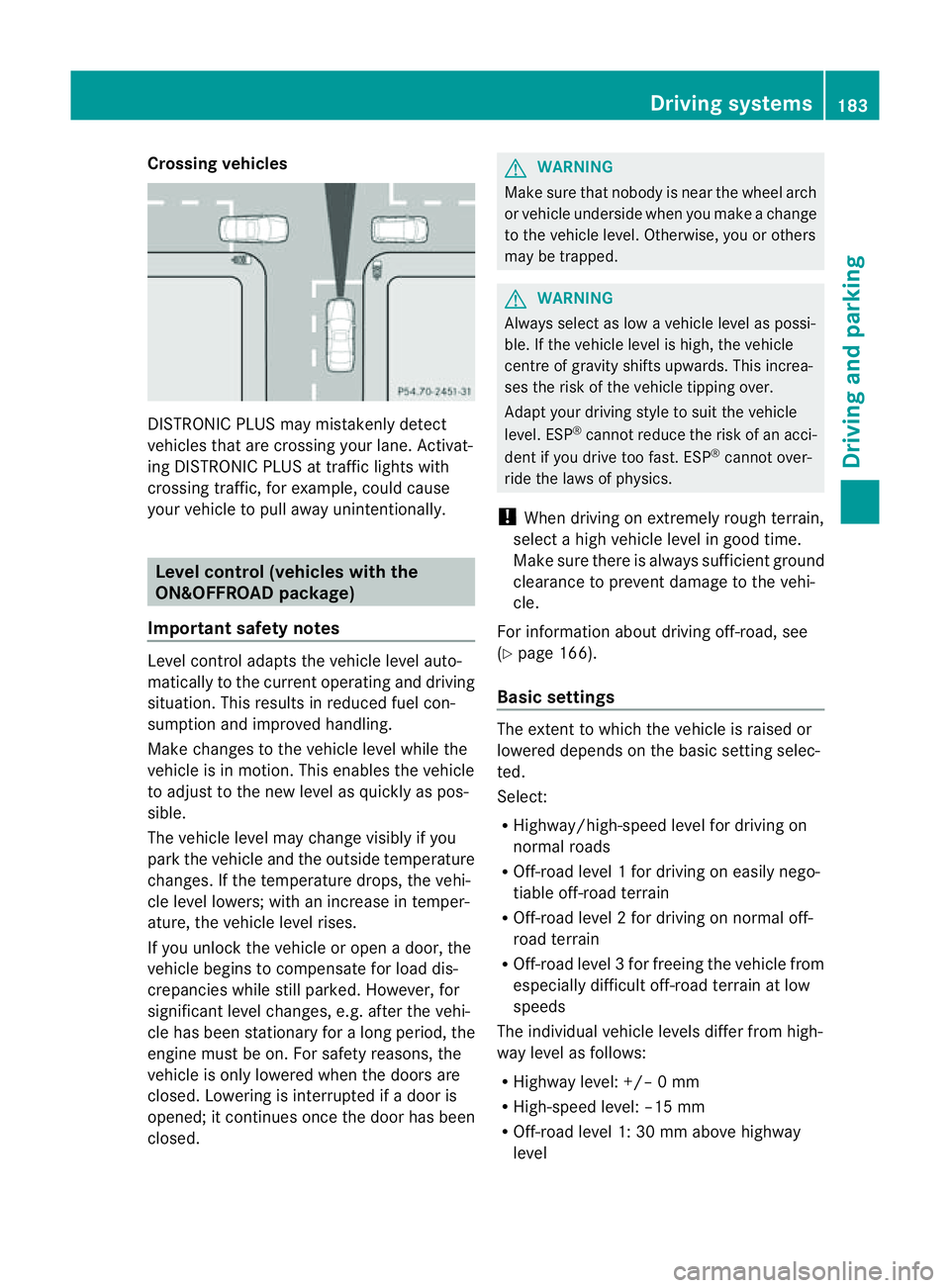
Crossing vehicles
DISTRONIC PLU
Smay mistakenly detect
vehicles that are crossin gyour lane .Activat-
ing DISTRONIC PLUS at traffi cligh ts with
crossing traffic, for example, could cause
your vehicle to pull away unintentionally. Leve
lcon trol (vehicle switht he
ON&OFFROA Dpackage)
Importan tsafety notes Leve
lcontrol adapts the vehicle level auto-
matically to the current operating and driving
situation. Thi sresults in reduced fuel con-
sumption and improved handling.
Make changes to the vehicle level whil ethe
vehicle is in motion. Thi senable sthe vehicle
to adjus ttothe new level as quickly as pos-
sible.
The vehicle level ma ychange visibly if you
par kthe vehicle and the outside temperature
changes. If the temperatur edrops, th evehi-
cle level lowers; with an increase in temper-
ature, the vehicle level rises.
If you unloc kthe vehicle or open adoor, the
vehicle begins to compensate for load dis-
crepancies while still parked. However, for
significant leve lchanges, e.g. after the vehi-
cle has been stationar yfor along period, the
engin emust be on. For safety reasons, the
vehicle is only lowered when the doors are
closed .Lowering is interrupted if adoor is
opened; it con tinues once the doo rhas been
closed. G
WARNING
Make sure that nobody is near the wheel arch
or vehicle underside when you make achange
to the vehicle level. Otherwise, you or others
ma ybet rapped. G
WARNING
Always select as lo wavehicle level as possi-
ble. If the vehicle level is high, the vehicle
centre of gravity shifts upwards. This increa-
ses the risk of the vehicle tipping over.
Adapt your driving style to suit the vehicle
level. ESP ®
can notreduce the risk of an acci-
dent if you driv etoo fast .ESP ®
cannot over-
ride the laws of physics.
! When driving on extremely roug hterrain,
select ahigh vehicle level in good time.
Make sure there is always sufficient ground
clearance to prevent damage to the vehi-
cle.
For information about drivin goff-road, see
(Y pag e166).
Basi csettings The exten
ttowhich the vehicle is raised or
lowered depend sonthe basic setting selec-
ted.
Select:
R Highway/high-spee dlevel for driving on
normal roads
R Off -road level 1for drivin goneasily nego-
tiable off-road terrain
R Off-road level 2for drivin gonnormal off-
roa dterrain
R Off -road level 3for freeing the vehicle from
especially difficult off -road terrain at low
speeds
The individual vehicle levels differ from high-
way level as follows:
R Highway level: +/– 0mm
R High-speed level: –15 mm
R Off-road leve l1:30mma bove highway
level Driving systems
183Drivingand parking Z
Page 188 of 389
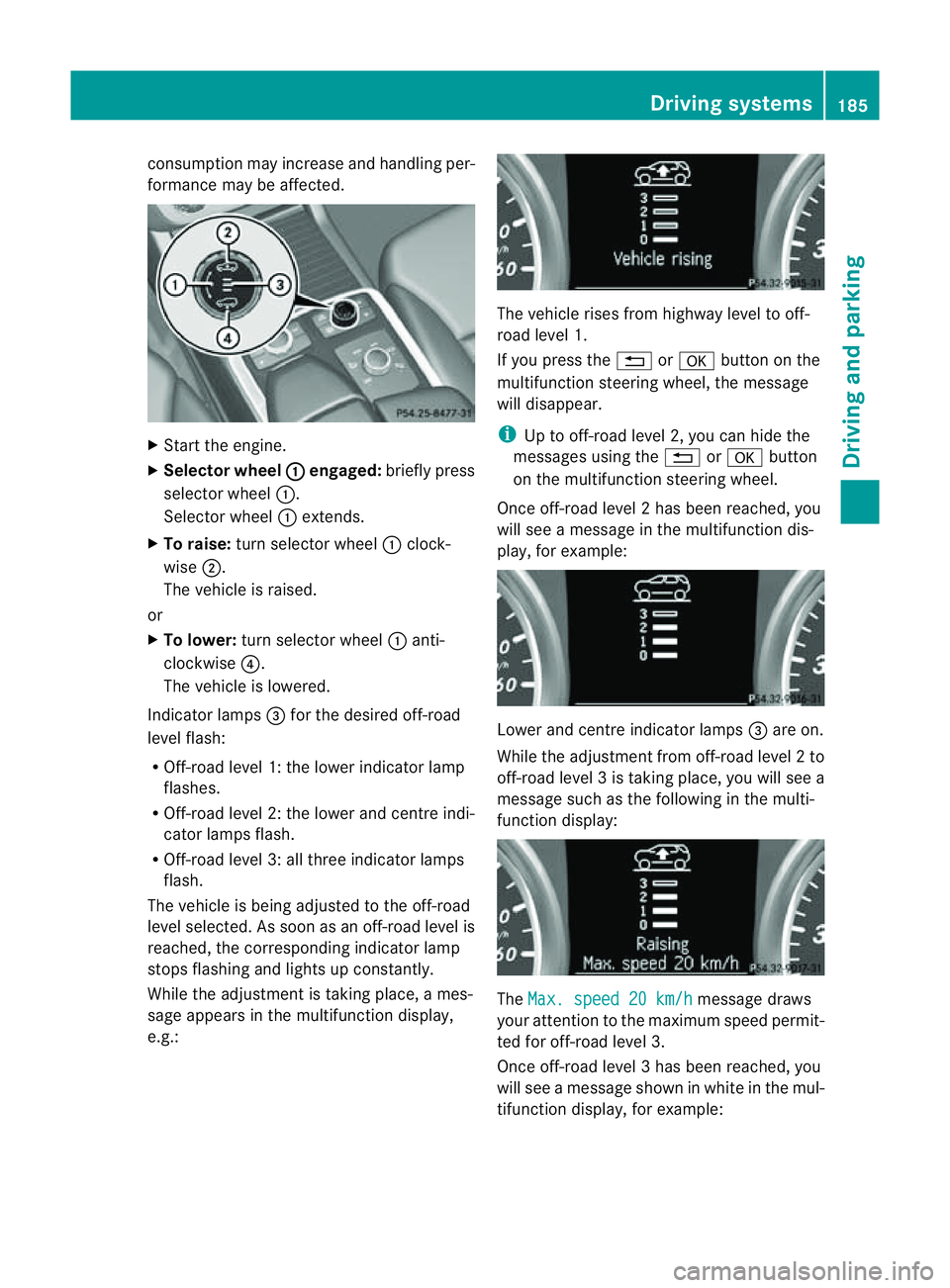
cons
umption may incr easeand handling per-
formance may be affected. X
Start the engine.
X Selecto rwheel : en
gaged: briefly press
selector wheel :.
Selector wheel :extends.
X To raise: turns elector wheel :clock-
wise ;.
The vehicle is raised.
or
X To lower: turns elector wheel :anti-
clockwise ?.
The vehicle is lowered.
Indicator lamps =for the desired off-road
level flash:
R Off-road level 1: thel ower indicator lamp
flashes.
R Off-road level 2: thel ower and centr eindi-
cator lamps flash.
R Off-road leve l3:allthree indicator lamps
flash.
The vehicle is being adjusted to the off-road
leve lselected. As soon as an off-road level is
reached, the corresponding indicator lamp
stops flashing and lights up constantly.
Whil ethe adjustment is taking place, ames-
sage appears in the multifunction display,
e.g.: The vehicle rises from highway level to off-
road level 1.
If you press the %ora button on the
multifunction stee ring wheel, the message
will disappear.
i Up to off-road level 2, you can hid ethe
messages usin gthe % ora button
on the multifunction steering wheel.
Onc eoff-roa dlevel 2has been reached, you
will see amessage in th emultifunction dis-
play, for example: Lower and
centre indicator lamps =areo n.
While the adjustment from off-ro adlevel 2to
off -ro ad level 3istaking place, you will see a
message such as the following in the multi-
function displ ay: The
Max. speed 20 km/h message draws
your attentio ntothe maximum speed permit-
ted for off-road level 3.
Onc eoff-roa dlevel 3has been reached, you
will see amessage shown in whit einthe mul-
ti fu nction display, for example: Driving systems
185Drivingand pa rking Z
Page 190 of 389
HOL
Dfunction
Gen eral notes Th
eH OLD function ca nassist the driver in the
foll owing situations:
R when pulling away, especially on steep
slopes
R when manoeuvrin gonsteep slopes
R when waiting in traffic
The vehicle is kept stationary without the
driver having to depress the brake pedal.
The braking effect is cancelled and the HOLD
function is deactivated when you depress the
accelerator peda ltop ull away.
Activation conditions You can activate the HOLD function if:
R the vehicle is stationary.
R the engine is running or if it has been auto-
matically switched off by the ECO start/
stop function.
R the driver' sdoor is closed or if your seat
belt is fastened.
R the electric parkin gbrake is released.
R thet ransmission is in position D,Ror N.
R DISTRONIC PLUS is deactivated.
Activatin gthe HOL Dfunction X
Make sure that th eactivation conditions
are met.
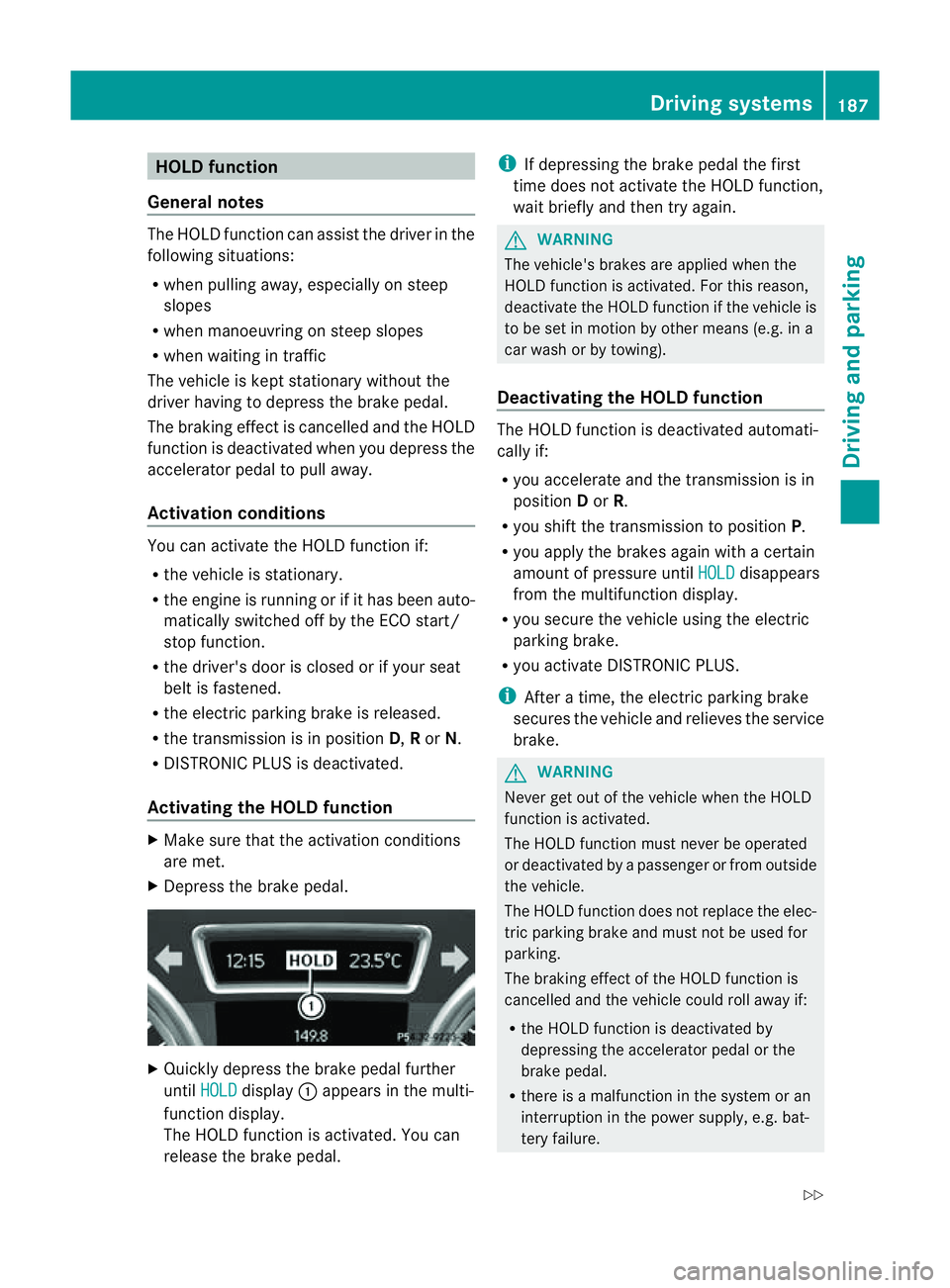
X Depress the brake pedal. X
Quickly depress the brake pedal further
until HOLD display
:appears in the multi-
function display.
Th eH OLD func tion is activated. You can
release the brake pedal. i
If depressing the brake pedal the first
tim edoes not activate the HOL Dfunction,
wait briefly and then try again. G
WARNING
The vehicle's brakes are applied when the
HOLD function is activated. For this reason,
deactivate the HOLD function if the vehicle is
to be set in motion by other means (e.g. in a
car wash or by towing).
Deactivating the HOLD function The HOLD function is deactivated automati-
cally if:
R you accelerate and the transmission is in
position Dor R.
R you shift the transmission to position P.
R you apply the brakes again with acertain
amount of pressur euntil HOLD disappears
from the multifunctio ndisplay.
R you secure the vehicle using the electric
parkin gbrake.
R yo ua ctivate DISTRONIC PLUS.
i After atime, the electric parkin gbrake
secure sthe vehicle and relieves the service
brake. G
WARNING
Never get out of the vehicle when the HOLD
func tion is activated.
The HOL Dfunction must never be operated
or deactivated by apassenger or from outside
the vehicle.
The HOLD function does not replace the elec-
tric parking brake and must not be used for
parking.
The braking effect of the HOLD function is
cancelled and the vehicle could roll away if:
R the HOLD function is deactivated by
depressing the accelerator pedal or the
brake pedal.
R there is amalfunction in the system or an
interruption in the power supply ,e.g. bat-
tery failure. Driving systems
187Drivingand parkin g
Z
Page 192 of 389
selected (Y
page 188), the Ac tiveCurve Sys-
tem also changes the setting.
If you select ADS comfort mode:
R rolling movement is reduced in the event of
changing surface undulations.
R the roll angle when cornering is reduced.
R the driving style is agile.
If you select ADS sport mode:
R the roll angle is reduced significantly.
R the driving style is even more agile.
Leve lcontrol Import
ants afety notes
Leve lcontrol adapts the vehicle leve lauto-
matically to the current operating and driving
situation. This results in reduced fuel con-
sumption and improved handling.
If you select ADS comfort mode
(Y page 188), the vehicle is lowered to high-
spee dlevel as the speed increases. As the
vehicle decelerates, the vehicle is raised back
up to highway level.
If you select ADS sport mode (Y page 188),
the vehicle skips highway level and lowers
directly to high-speed level dependin gonthe
basic setting (Y page 189).
Make changes to the vehicle level while the
vehicle is in motion. This enables the vehicle
to adjust to the new level as quickly as pos-
sible.
The vehicle level ma ychange visibly if you
par kthe vehicle and the outside temperature
changes. If the temperature drops, the vehi-
cle level lowers; with an increase in temper-
ature, the vehicle level rises.
If you unlock the vehicle or open adoor, the
vehicle begins to compensat efor load dis-
crepancies while still parked. However, for
significant leve lchanges, e.g. after the vehi-
cle has been stationary for along period, the
engin emust be on. For safety reasons, the
vehicle is only lowered when the doors are
closed .Lowering is interrupted if adoor is opened; it con
tinues once the doo rhas been
closed. G
WARNING
Make sure that nobody is near the wheel arch
or vehicle underside when you make achange
to the vehicle level. Otherwise, you or others
ma ybet rapped. G
WARNING
Always select as lo wavehicle level as possi-
ble. If the vehicle level is high, the vehicle
centre of gravity shifts upwards. This increa-
ses the risk of the vehicle tipping over.
Adapt your driving style to suit the vehicle
level. ESP ®
cannot reduc ethe risk of an acci-
dent if you drive too fast. ESP ®
cannot over-
rid ethe laws of physics.
! When driving on extremel yrough terrain,
select ahigh vehicle level in good time.
Make sure there is always sufficient ground
clearance to prevent damage to the vehi-
cle.
For information abou tdriving off-roa d, see
( Y page 166).
Basic settings
The exten ttowhich the vehicle is rai sedor
lowered depends on the basic setting selec-
ted. Select raised level for off-road driving or
highway/high-spee dlevel for normal roads.
The indiv idua lvehicle levels differ from high-
way level as follows:
R Highway level: +/ –0mm
R High-speed level: –15 mm
R Raised level: +60 mm
Raise dlevel
Only select raise dlevel if this is appropriate
for the road conditions. Otherwise, fuel con-
sumption may increase and handling may be
affected. Driving systems
189Drivingand parking Z
Page 194 of 389
PARKTRONIC
Important safety notes G
WARNING
PARKTRONI Cisonly an aid and may not
detect all obstacles .Itisnotas ubstitute for
attentive driving.
You are always responsible for safety and
must continue to pay attention to your imme-
diate surroundings when parking and
manoeuvring. You could otherwis eendanger
yourself and others. G
WARNING
Make sure that no persons or animals are in
the manoeuvring range. Otherwise, they
could be injured.
PARKTRONIC is an electronic parking aid with
ultrasonic sensors. It indicates visual lyand
audibly the distance between your vehicle
and an object.
PARKTRONIC is activated automatically if
you:
R switch on the ignition
R shift the transmissio ntoposition D,Ror N
R release the electric parkin gbrake
PARKTRONIC is deactivate datspeeds above
18 km/h. It is reactivated at lower speeds.
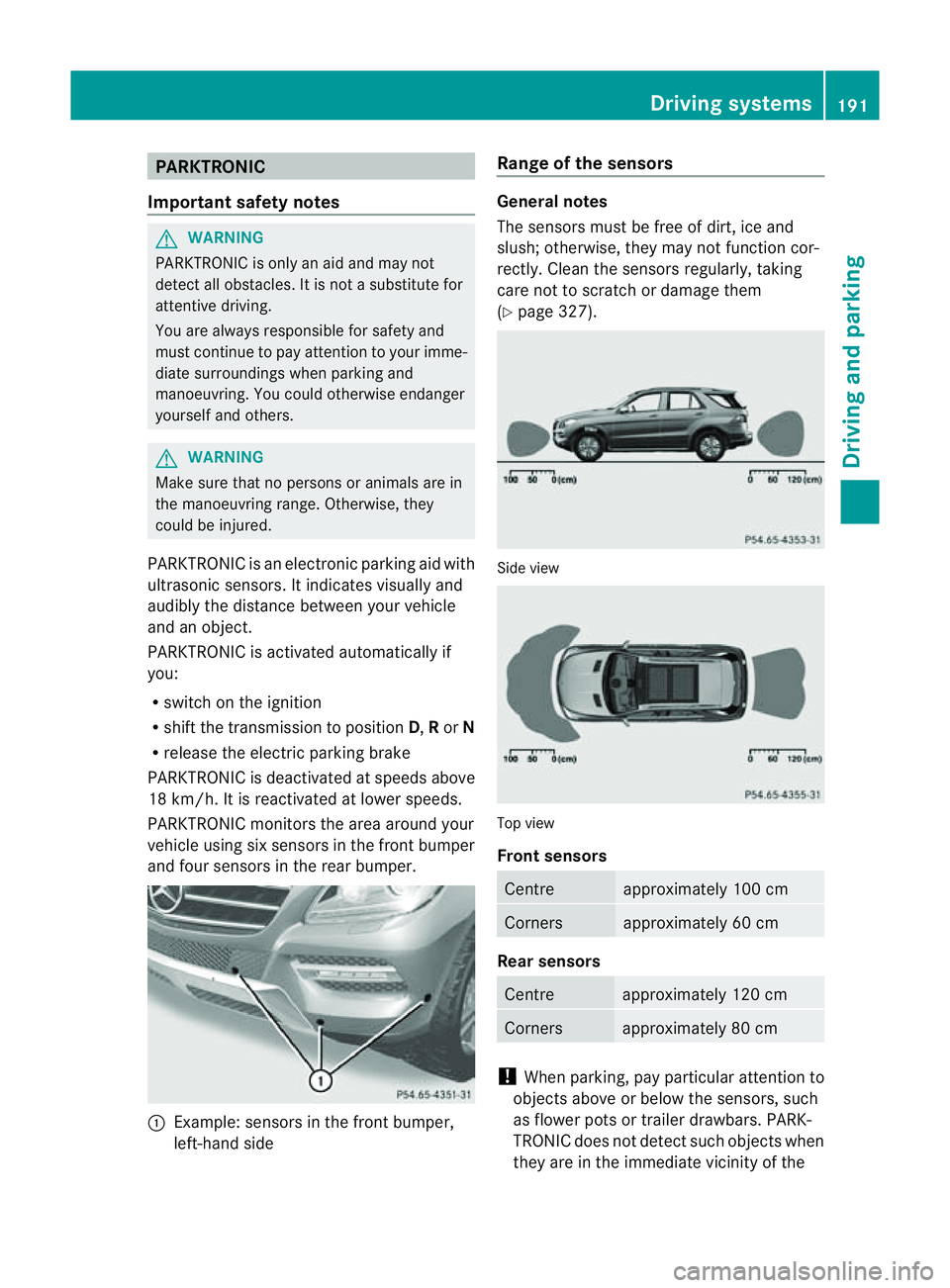
PARKTRONI Cmonitor sthe area around your
vehicle usin gsix sensors in the front bumper
and four sensors in the rear bumper. :
Example: sensors in the front bumper,
left-han dside Range of the sensors Genera
lnotes
The sensors must be free of dirt, ice and
slush; otherwise, they may not func tion cor-
rectly. Clean the sensor sregularly, taking
car enot to scratc hordamage them
(Y page 327). Side view
Top view
Front sensors
Centre approximately 100 cm
Corners approximately 60 cm
Rear sensors
Centre approximately 120 cm
Corners approximately 80 cm
!
When parking, pay particular attention to
objects above or below the sensors, such
as flower pots or trailer drawbars. PARK-
TRONIC does not detect such objects when
they are in the immediate vicinity of the Driving systems
191Drivingand parking Z
Page 197 of 389
Problems wit
hPARKTRONIC Problem Possible causes/consequences and
M Solutions
Only the red segments
in the PARKTRONIC
warning display sare lit.
Yo ua lso hear awarning
tone for approximately
two seconds.
PARKTRONIC is deacti-
vated after approx-
imately 20 seconds,
and the indicator lamp
in the PARKTRONIC
button lights up. PARKTRONIC has malfunctioned and has switched off.
X If problems persist, have PARKTRONIC checked at aqualified
specialist workshop. Only the red segments
in the PARKTRONIC
warning display sare lit.
PARKTRONIC is deacti-
vate dafter approx-
imatel y20seconds. The PARKTRONI
Csensors are dirt yorthere is interference.
X Clean the PARKTRONI Csensors (Y page 327).
X Switch the ignition back on. The problem may be caused by an exter
nalsource of radio or
ultrasoun dwaves.
X See if PARKTRONIC functions in adifferent location. Active Parking Assist
Important safet ynotes Active Parking Assist is an electronic parking
aid with ultrasound. Ultrasound is used to
measure the road on both sides of the vehicle.
As uitable parking space is indicated by the
parking symbol. Activ esteering intervention
can assis tyou during parking. You ma yalso
use PARKTRONIC (Y page 191). When PARK-
TRONIC is switched off, Active Parking Assist
is also unavailable. G
WARNING
Active Parkin gAssist is merely an aid and may
sometimes recommen dparking spaces that
are not suitable for parking. For example,
these might be spaces where parking is pro-
hibited ,driveways, unsuitabl esurfaces, etc.
Active Parking Assis tmeasures the parking
space as you driv epast it. Any later changes to the parking space are not taken into
account .For insta nce,this ma ybethe case
when the vehicle parked in front of or behind
the space changes its position or when an
obstacle is moved int othe parkin gspace.
Active Parking Assist does not reliev eyou of
the responsibilit yofpaying attention. If you
rely solel yonA ctive Parkin gAssist ,you could
cause an accident and injure yourself and oth-
ers.
You are always responsible for safet yand
must continue to pay attention to your imme-
diate surroundings whe nparking and
manoeuvring. G
WARNING
Objects located above the heigh trange of
Active Parking Assis twill not be detected
when the parking space is measured. These
are not taken into account when the parking 194
Drivin
gsystemsDrivin gand parking
Page 198 of 389
procedure is calculated, e. g. overhanging
loads, tail sections or loading ramps of goods
vehicles. In some cir
cumstances, Active Park-
ing Assist may therefore guide you into the
parking space too early. Thi smay lead to a
collision. For this reason, you shoul davoid
using Active Parking Assist in such situatio ns.G
WARNING
Th ef ront of th evehicle will veer out in the
direc tion of the oncomin gtraffic during the
parking operatio n. Insome cases the vehicle
will also take you onto section softhe oncom-
ing lan eduring the parking procedure.
You are responsible for safety at all times and
must pay attention to any road users
approaching or passing. Stop the vehicle if
necessary or cancel the Active Parking Assist
parking procedure. G
WARNING
Make sure that no persons or animals are in
the manoeuvring range. Otherwise, they
could be injured.
Use Active Parking Assis tfor parkin gspaces:
R that are parallel to the direction of travel
R that are on straight roads, not bends
R that are on the same level as the road, e.g.
not on the pavement
Parking tips:
R on narrow roads, driv easclosely as possi-
ble past the parkin gspace.
R parking spaces that are littered, overgrown
or partially occupied by trailer drawbars
might be identified incor rectly or not at all.
R snowfall or heavy rain may lea dtoap arking
space being measured inaccurately.
R pay attention to the PARKTRONIC
(Y page 192 )warning message sduring the
parking procedure.
R you can intervene in the steering procedure
to correc titatany time. Active Parking
Assist will then be cancelled. R
whe ntransporting aload which protrudes
from your vehicle, you should not use
Active Parkin gAssist.
R never use Ac tive Parkin gAssist when snow
chains or an emergenc yspare wheel are
fit ted.
R mak esure that the tyre pressures are
always correct. This has adirec tinfluence
on the parking characteristics of the vehi-
cle.
R the wa yyourv ehicle is positioned in the
parking space after parking is dependent
on various factor s. Theseinclude the posi-
tion and shape of the vehicles parked in
front and behind it and the conditions of the
location. In some cases, Active Parking
Assist may guid eyou too far int oaparking
space, or not far enough into it. In some
cases, it may also lead you across or onto
the kerb. If necessary, you should abort the
parking procedure with Active Parking
Assist.
R you can also engage forward gear prema-
turely. The vehicle redirects and does not
drive as far into the parking space. Should
ag ear be changed too earl ytoa chieve a
sensible parkin gposition ,the parkin gpro-
cedure wil lbeaborted.
! If unavoidable, you should driv eover
obstacles such as kerb sslowly and not at
as har pangle .Otherwise, you may damage
the wheels or tyres.
Detectin gparking spaces Active Parking Assis
tiss witched on automat-
ically when driving forwards. The system is
operational at speed sofuptoa pproximately
35 km/h. While in operation, the system inde-
pendently locates and measures parking
spaces on both sides of the vehicle. When
driving at speeds below 30 km/ h,you will see
the parking symbol as astatus indicato rinthe
instrumen tcluster. Activ eParking Assist only
displays parking spaces on the front-
passe nger side as standar d.Parking spaces
on the driver' sside are displayed as soon as Driving systems
195Drivingand parking Z