change wheel MERCEDES-BENZ METRIS 2019 MY19 Operator’s Manual
[x] Cancel search | Manufacturer: MERCEDES-BENZ, Model Year: 2019, Model line: METRIS, Model: MERCEDES-BENZ METRIS 2019Pages: 318, PDF Size: 5.07 MB
Page 184 of 318
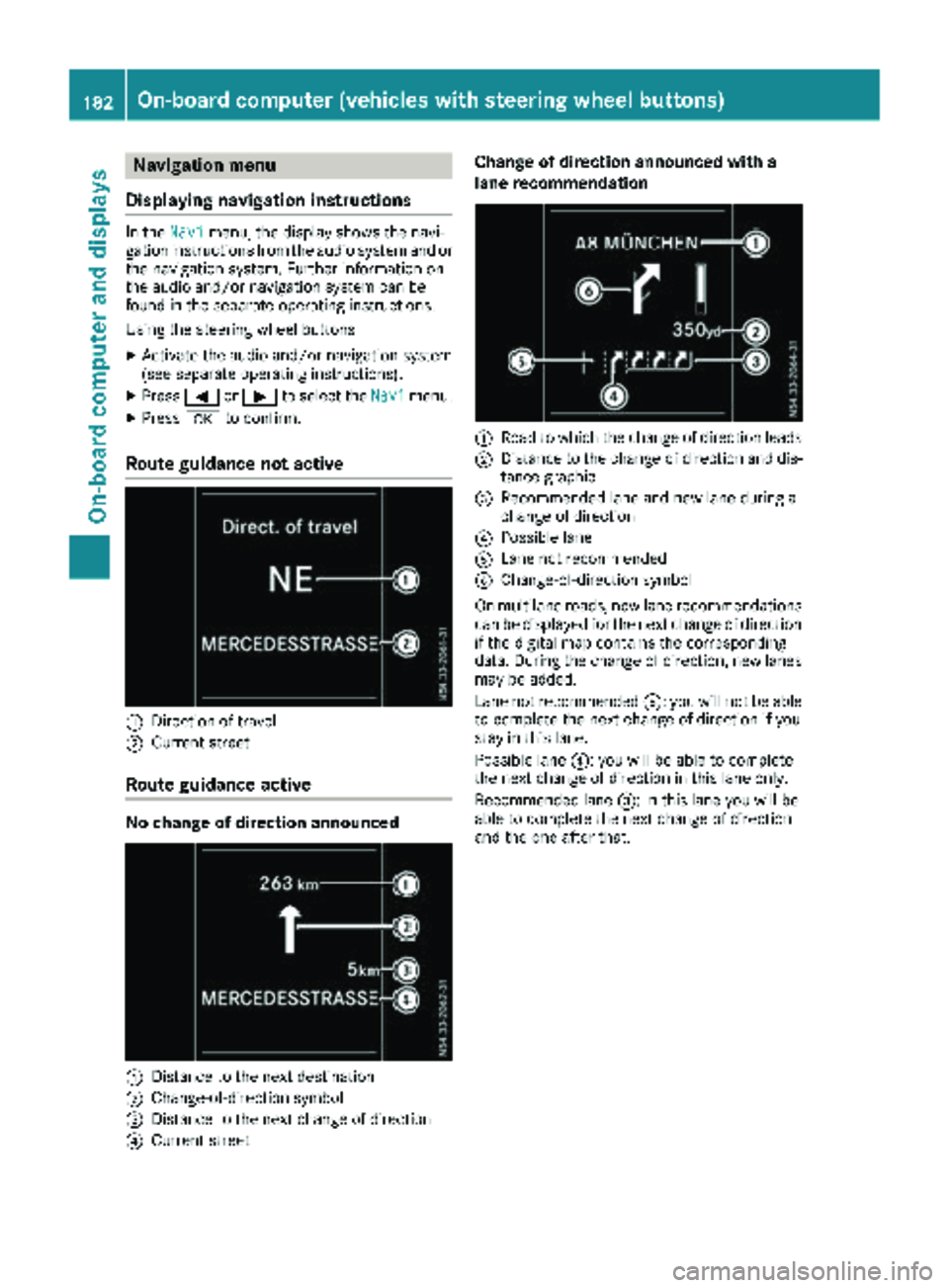
Navigation menu
Displaying navigation instructions
In the Navimenu, the display shows the navi-
gation instructions from the audio system and or the navigation system. Further information on
the audio and/or navigation system can be
found in the separate operating instructions.
Using the steering wheel buttons
XActivate the audio and/or navigation system
(see separate operating instructions).
XPress =or; to select the Navimenu.
XPressato confirm.
Route guidance not active
:Direction of travel
;Current street
Route guidance active
No change of direction announced
:Distance to the next destination
;Change-of-direction symbol
=Distance to the next change of direction
?Current street
Change of direction announced with a
lane recommendation
:Road to which the change of direction leads
;Distance to the change of direction and dis-
tance graphic
=Recommended lane and new lane during a
change of direction
?Possible lane
ALane not recommended
BChange-of-direction symbol
On multilane roads, new lane recommendations can be displayed for the next change of direction
if the digital map contains the corresponding
data. During the change of direction, new lanes
may be added.
Lane not recommended A: you will not be able
to complete the next change of direction if you
stay in this lane.
Possible lane ?: you will be able to complete
the next change of direction in this lane only.
Recommended lane =: in this lane you will be
able to complete the next change of direction
and the one after that.
182On-board computer (vehicles withsteering whee lbu ttons)
On-board computer and displays
Page 185 of 318
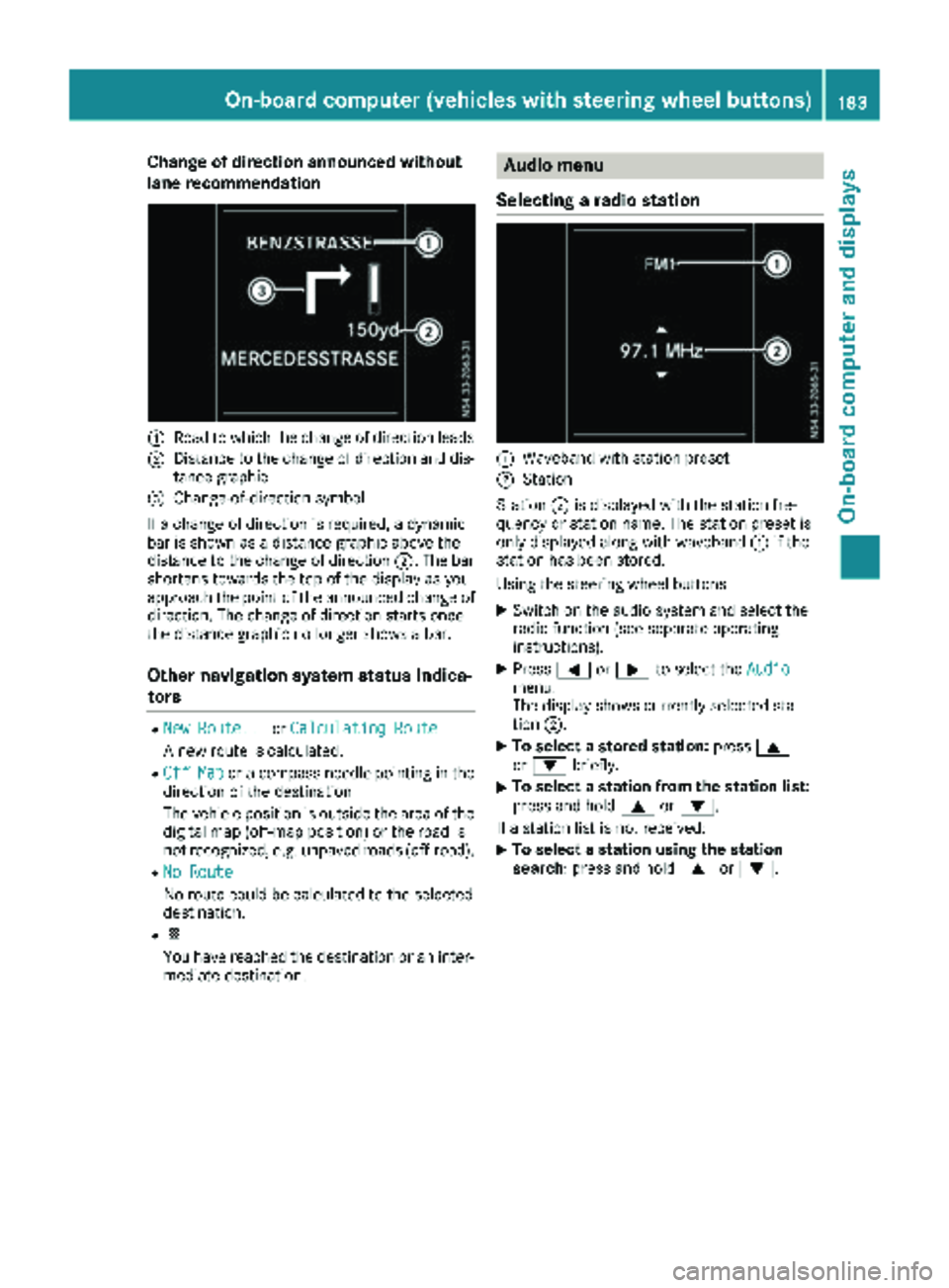
Change of direction announced without
lane recommendation
:Road to which the change of direction leads
;Distance to the change of direction and dis-
tance graphic
=Change-of-direction symbol
If a change of direction is required, a dynamic
bar is shown as a distance graphic above the
distance to the change of direction ;. The bar
shortens towards the top of the display as you
approach the point of the announced change of
direction. The change of direction starts once
the distance graphic no longer shows a bar.
Other navigation system status indica-
tors
RNew Route...or Calculating Route
A new route is calculated.
ROff Mapor a compass needle pointing in the
direction of the destination
The vehicle position is outside the area of the
digital map (off-map position) or the road is
not recognized, e.g. unpaved roads (off-road).
RNo Route
No route could be calculated to the selected
destination.
RO
You have reached the destination or an inter-
mediate destination.
Audio menu
Selecting a radio station
:Waveband with station preset
;Station
Station ;is displayed with the station fre-
quency or station name. The station preset is
only displayed along with waveband :if the
station has been stored.
Using the steering wheel buttons
XSwitch on the audio system and select the
radio function (see separate operating
instructions).
XPress =or; to select the Audiomenu.
The display shows currently selected sta-
tion;.
XTo select a stored station: press9
or : briefly.
XTo select a station from the station list:
press and hold 9or:.
If a station list is not received:
XTo select a station using the station
search: press and hold 9or:.
On-board computer (vehicles with steering wheel buttons)183
On-board computer and displays
Z
Page 189 of 318
XPressato confirm.
The current status is shown.
XTo activate/deactivate: pressaagain.
If the å warning lamp in the instrument
cluster lights up when the vehicle is ready to
drive, ESP
®is deactivated.
If the ÷ warning lamp lights up continuously,
ESP
®is not available due to a malfunction.
Observe the information on warning lamps
(
Ypage 224) and display messages
(Ypage 210).
Activating/deactivating the distance
warning function
Using the steering wheel buttons
XPress =or; to select the Assist.menu.
XPress9or: to select DistanceWarning.
XPressato confirm.
The current status is shown.
XTo activate/deactivate: press theabut-
ton again.
If the distance warning function of COLLISION
PREVENTION ASSIST is activated, the display
shows the Äsymbol in the header.
At speeds up to approx 20 mph (30 km/h),
the display in vehicles with Active Parking
Assist first shows the ístatus indicator.
Only up to a speed of about 20 mph
(30 km/h) does the display show the Ä
symbol instead of the ístatus indicator.
Further information can be found under "COL-
LISION PREVENTION ASSIST" (
Ypage 146).
Setting ATTENTION ASSIST
Using the steering wheel buttons
XPress =or; to select the Assist.menu.
XPress:or9 to select AttentionAssist.
XPressato confirm.
The current setting is displayed.
XTo change the setting: pressaagain.
XPress :or9 to set Deactivated,
Standardor Sensitive.
XPress ato confirm the choice.
If ATTENTION ASSIST is activated, the À
symbol is shown in the status area of the dis- play. The selection
Standard
orSensitivesets the sensitivity with which the system
determines the attention level.
Further information can be found under "ATTEN-
TION ASSIST" (
Ypage 152).
Activating/deactivating Blind Spot
Assist
Using the steering wheel buttons
XPress =or; to select the Assist.menu.
XPress:or9 to select Blind SpotAssist.
XPressato confirm.
The current status is shown.
XTo activate/deactivate: press theabut-
ton again.
Further information can be found under "Blind
Spot Assist" (
Ypage 148).
Setting Lane Keeping Assist
Using the steering wheel buttons
XPress =or; to select the Assist.menu.
XPress:or9 to select LaneKeepingAssist.
XPressato confirm.
The current selection StandardorAdaptiveis displayed.
XTo change the setting: pressaagain.
Further information can be found under "Lane
Keeping Assist" (
Ypage 150).
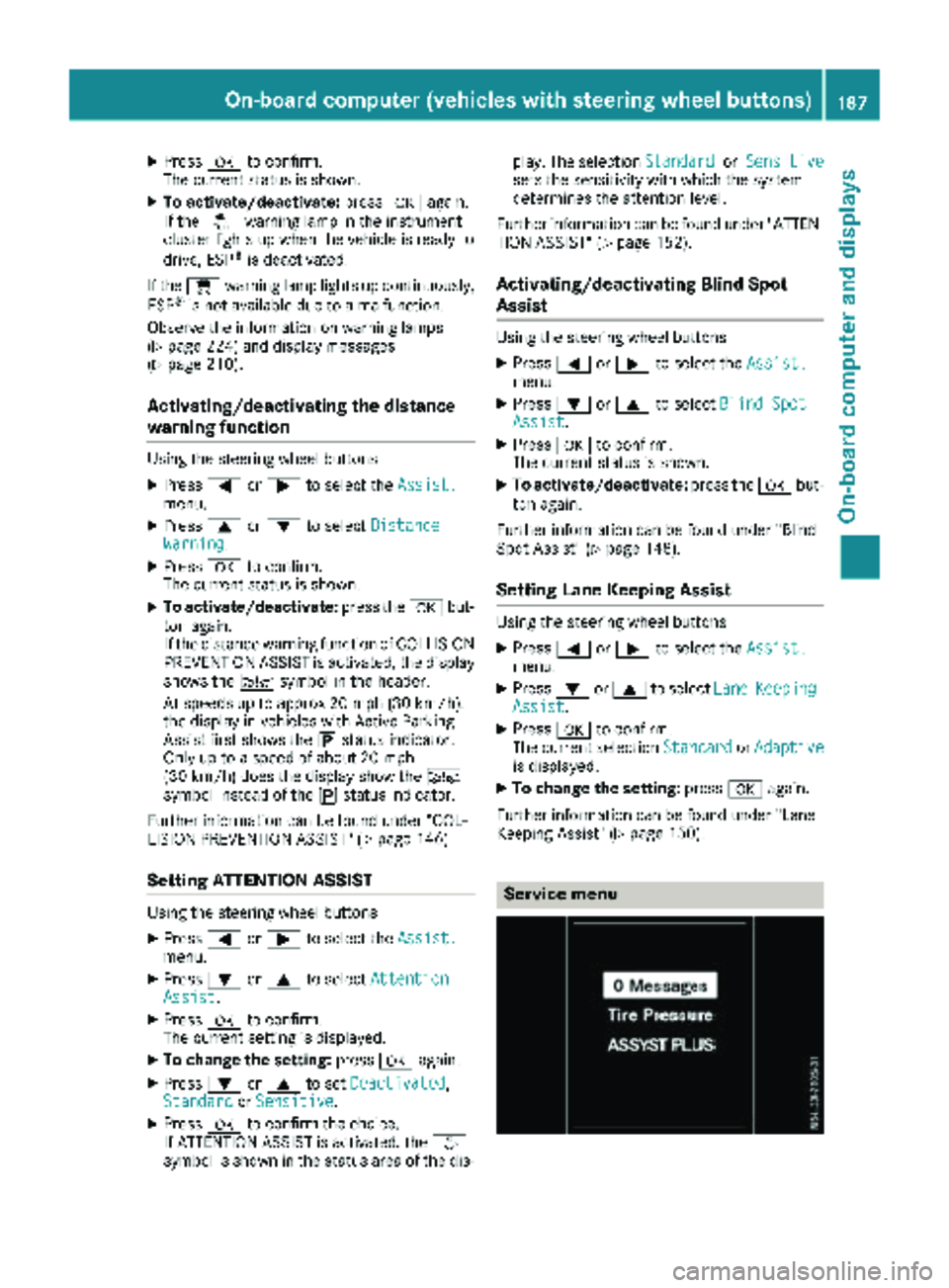
Service menu
On-board computer (vehicles with steering wheel buttons)187
On-board computer and displays
Z
Page 190 of 318
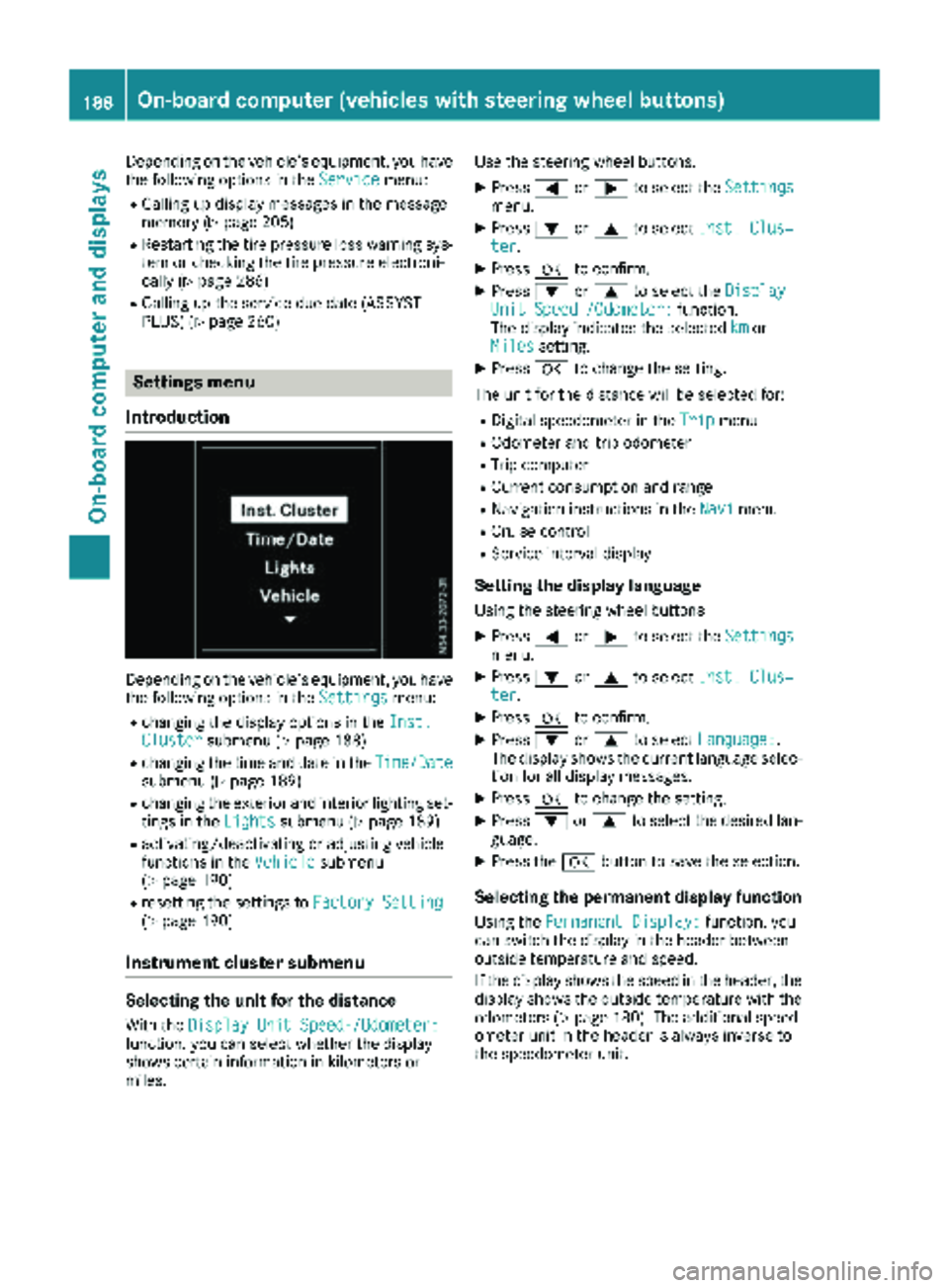
Depending on the vehicle’s equipment, you have
the following options in theServicemenu:
RCalling up display messages in the message
memory (Ypage 205)
RRestarting the tire pressure loss warning sys-
tem or checking the tire pressure electroni-
cally (
Ypage 286)
RCalling up the service due date (ASSYST
PLUS) (Ypage 260)
Settings menu
Introduction
Depending on the vehicle’s equipment, you have
the following options in the Settingsmenu:
Rchanging the display options in the Inst.Clustersubmenu (Ypage 188)
Rchanging the time and date in theTime/Datesubmenu (Ypage 189)
Rchanging the exterior and interior lighting set-
tings in theLightssubmenu (Ypage 189)
Ractivating/deactivating or adjusting vehicle
functions in the Vehiclesubmenu
(Ypage 190)
Rresetting the settings to Factory Setting(Ypage 190)
Instrument cluster submenu
Selecting the unit for the distance
With theDisplay Unit Speed-/Odometer:function, you can select whether the display
shows certain information in kilometers or
miles. Use the steering wheel buttons.
XPress
=or; to select the Settingsmenu.
XPress:or9 to select Inst. Clus‐ter.
XPressato confirm.
XPress :or9 to select the DisplayUnit Speed-/Odometer:function.
The display indicates the selected kmor
Milessetting.
XPress ato change the setting.
The unit for the distance will be selected for:
RDigital speedometer in the Tripmenu
ROdometer and trip odometer
RTrip computer
RCurrent consumption and range
RNavigation instructions in the Navimenu
RCruise control
RService interval display
Setting the display language
Using the steering wheel buttons
XPress=or; to select the Settingsmenu.
XPress:or9 to select Inst. Clus‐ter.
XPressato confirm.
XPress :or9 to select Language:.
The display shows the current language selec-
tion for all display messages.
XPress ato change the setting.
XPress :or9 to select the desired lan-
guage.
XPress the abutton to save the selection.
Selecting the permanent display function
Using the Permanent Display:function, you
can switch the display in the header between
outside temperature and speed.
If the display shows the speed in the header, the
display shows the outside temperature with the
odometers (
Ypage 180). The additional speed-
ometer unit in the header is always inverse to
the speedometer unit.
188On-board computer (vehicles withsteering whee lbu ttons)
On-board computer and displays
Page 191 of 318
Using the steering wheel buttons
XPress=or; to select the Settingsmenu.
XPress:or9 to select Inst. Clus‐ter.
XPressato confirm.
XPress :or9 to select PermanentDisplay:.
XPressato confirm.
The display shows the current selection of
Outside Temp.
or Speedom..
XPress ato change the setting.
Clock/Date submenu
Setting the time
Using the steering wheel buttons
XPress =or; to select the Settingsmenu.
XPress:or9 to select Time/Date.
XPressato confirm.
XPress :or9 to select the Time:func-
tion.
The display shows the current time.
XTo set the time: pressaagain.
XPress =or; to switch between hours
and minutes.
XPress :or9 to set the hours or
minutes.
XThen press ato confirm.
The display shows the updated time.
Setting the date
Using the steering wheel buttons
XPress =or; to select the Settingsmenu.
XPress:or9 to select Time/Date.
XPressato confirm.
XPress :or9 to select the Date:func-
tion.
The display shows the current date.
XTo set the date: pressaagain.
XPress =or; to switch between day,
month and year.
XPress :or9 to set the day, month or
year.
XThen press ato confirm.
The display shows the updated date.
Lights submenu
Activating/deactivating the surround
lighting and exterior lighting delayed
switch-off
If you activate the Locator Lightingfunction
and the light switch is turned to the Ãposi-
tion, the following functions are activated when
it is dark:
Rsurround lighting: the exterior lighting
remains on for 40 seconds after the doors are
unlocked. When you start the engine, the sur-
round lighting is deactivated and the auto-
matic headlamp feature is activated
(
Ypage 97).
Rexterior lighting delayed switch-off: the
exterior lighting remains lit for 60 seconds
after the engine is switched off. When you
close all the doors and the tailgate/rear
doors, the exterior lighting switches off after
15 seconds.
Using the steering wheel buttons
XUse the =or; button to select the
Settings.menu.
XUse : or9 to select Lights.
XPressato confirm.
XUse: or9 to select the LocatorLightingfunction.
The current status appears.
XTo switch on/off: pressaagain.
If you change the setting, conversion does not
take place until the next time the vehicle is
stationary.
Deactivating exterior lighting delayed switch-off
temporarily:
XBefore leaving the vehicle, turn the key to
position gin the ignition lock.
XTurn the key to position 2in the ignition
lock.
The exterior lighting delayed switch-off is
deactivated until the next time the engine is
started.
With surround lighting and exterior lighting
delayed switch-off, the following light up
depending on the vehicle's equipment:
RParking lamps
RFog lamps
RLow-beam headlamps
RDaytime running lamps
On-board computer (vehicles with steering wheel buttons)189
On-board computer and displays
Z
Page 200 of 318
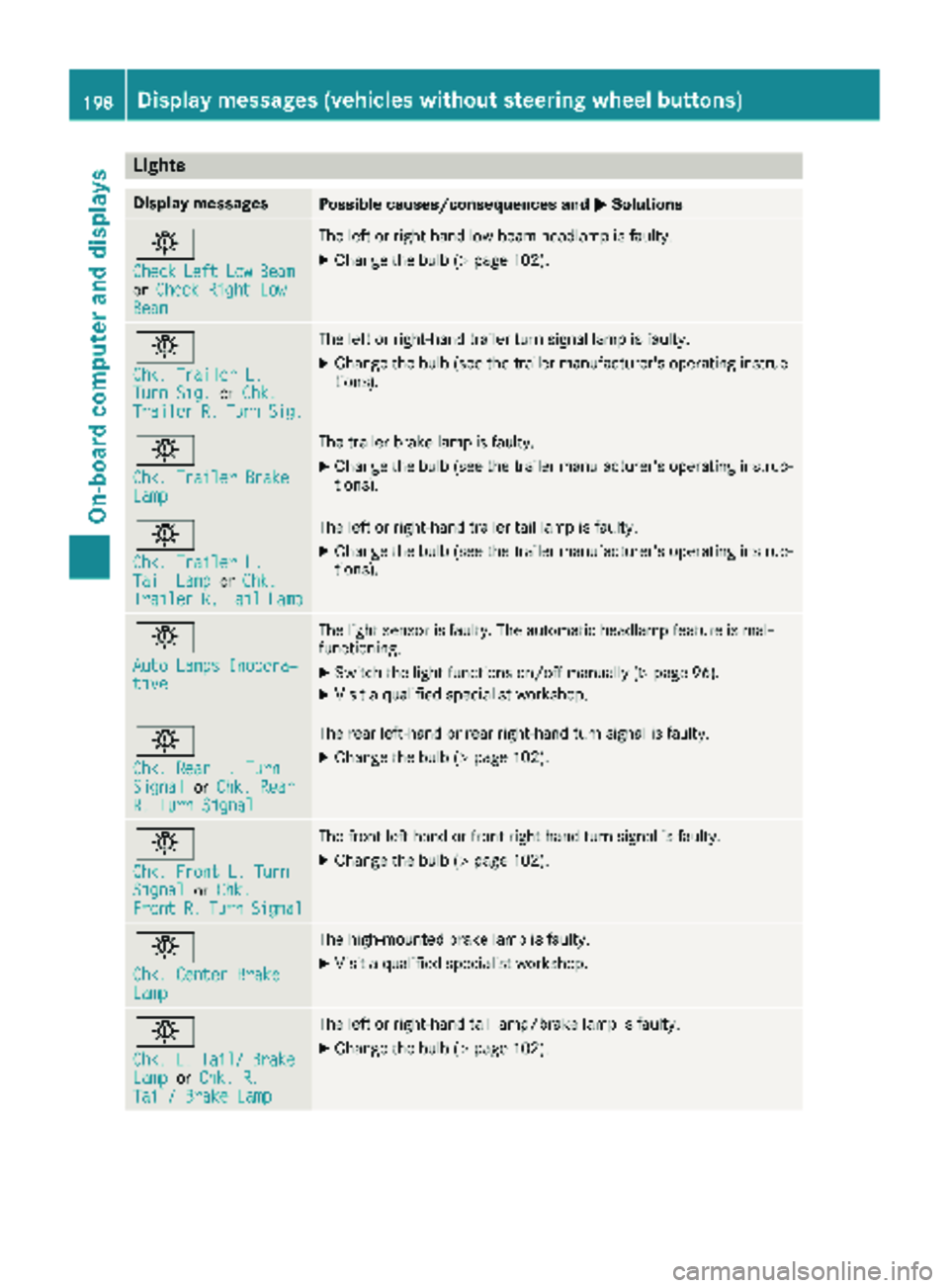
Lights
Display messagesPossible causes/consequences andMSolutions
b
CheckLeftLowBeamorCheck Right LowBeam
The left or right-hand low-beam headlamp is faulty.
XChange the bulb (Ypage 102).
b
Chk. Trailer L.Turn Sig.orChk.TrailerR.TurnSig.
The left or right-hand trailer turn signal lamp is faulty.
XChange the bulb (see the trailer manufacturer's operating instruc-
tions).
b
Chk. Trailer BrakeLamp
The trailer brake lamp is faulty.
XChange the bulb (see the trailer manufacturer's operating instruc-
tions).
b
Chk. Trailer L.Tail LamporChk.TrailerR.TailLamp
The left or right-hand trailer tail lamp is faulty.
XChange the bulb (see the trailer manufacturer's operating instruc-
tions).
b
Auto Lamps Inopera‐tive
The light sensor is faulty. The automatic headlamp feature is mal-
functioning.
XSwitch the light functions on/off manually (Ypage 96).
XVisit a qualified specialist workshop.
b
Chk. Rear L. TurnSignalorChk. RearR. Turn Signal
The rear left-hand or rear right-hand turn signal is faulty.
XChange the bulb (Ypage 102).
b
Chk. Front L. TurnSignalorChk.FrontR.TurnSignal
The front left-hand or front right-hand turn signal is faulty.
XChange the bulb (Ypage 102).
b
Chk. Center BrakeLamp
The high-mounted brake lamp is faulty.
XVisit a qualified specialist workshop.
b
Chk.L.Tail/BrakeLamporChk. R.Tail/ Brake Lamp
The left or right-hand tail lamp/brake lamp is faulty.
XChange the bulb (Ypage 102).
198Display messages (vehicles without steering wheel buttons)
On-board computer and displays
Page 201 of 318
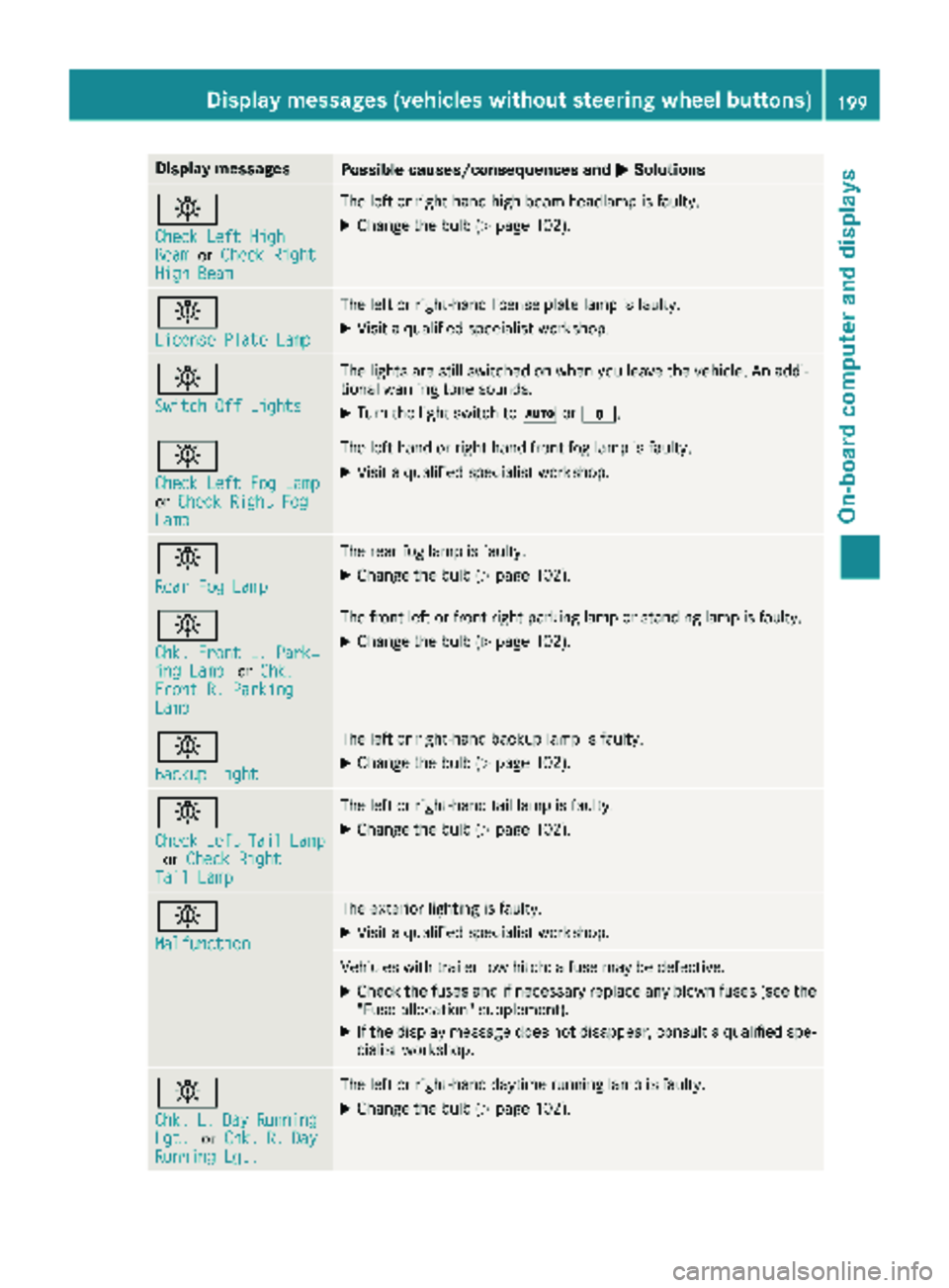
Display messagesPossible causes/consequences andMSolutions
b
Check LeftHig hBeamorCheck RightHig hBea m
The lef tor right-hand high-beam headlamp is faulty.
XChange th ebulb (Ypage 102).
b
Licens ePlate Lam p
The leftor right-hand license plat elamp is faulty.
XVisit aqualified specialist workshop .
b
Switch Off Lights
The lights are still switched on when you leav eth evehicle. An addi-
tional warning tone sounds.
XTurn th eligh tswitch to Ãor$.
b
Check Lef tFog Lam porCheck Right FogLam p
The left-han dor right-hand fron tfog lamp is faulty.
XVisit aqualified specialist workshop .
b
RearFog Lam p
The rear fog lamp is faulty.
XChange th ebulb (Ypage 102).
b
Chk.Front L. Park‐ing Lam porChk .Front R. Parkin gLamp
The fron tlef tor fron tright parking lamp or standing lamp is faulty.
XChange th ebulb (Ypage 102).
b
Backup Light
The lef tor right-hand backup lamp is faulty.
XChange th ebulb (Ypage 102).
b
CheckLeftTailLamporCheck RightTai lLam p
The lef tor right-hand tai llamp is faulty.
XChange th ebulb (Ypage 102).
b
Malfunction
The exterio rlighting is faulty.
XVisit aqualified specialist workshop .
Vehicles withtrailer to whitch : afusemay be defective.
XChec kth efuses and if necessar yreplace any blown fuses (see th e
"Fus eallocation "supplement) .
XIf thedisplay message does no tdisappear ,consult aqualified spe -
cialist workshop .
b
Chk.L.DayRunnin gLgt.orChk .R.DayRunnin gLgt .
The lef tor right-hand daytime runnin glamp is faulty.
XChange th ebulb (Ypage 102).
Display messages (vehicles without steering wheelbu ttons)199
On-board computer and displays
Z
Page 205 of 318
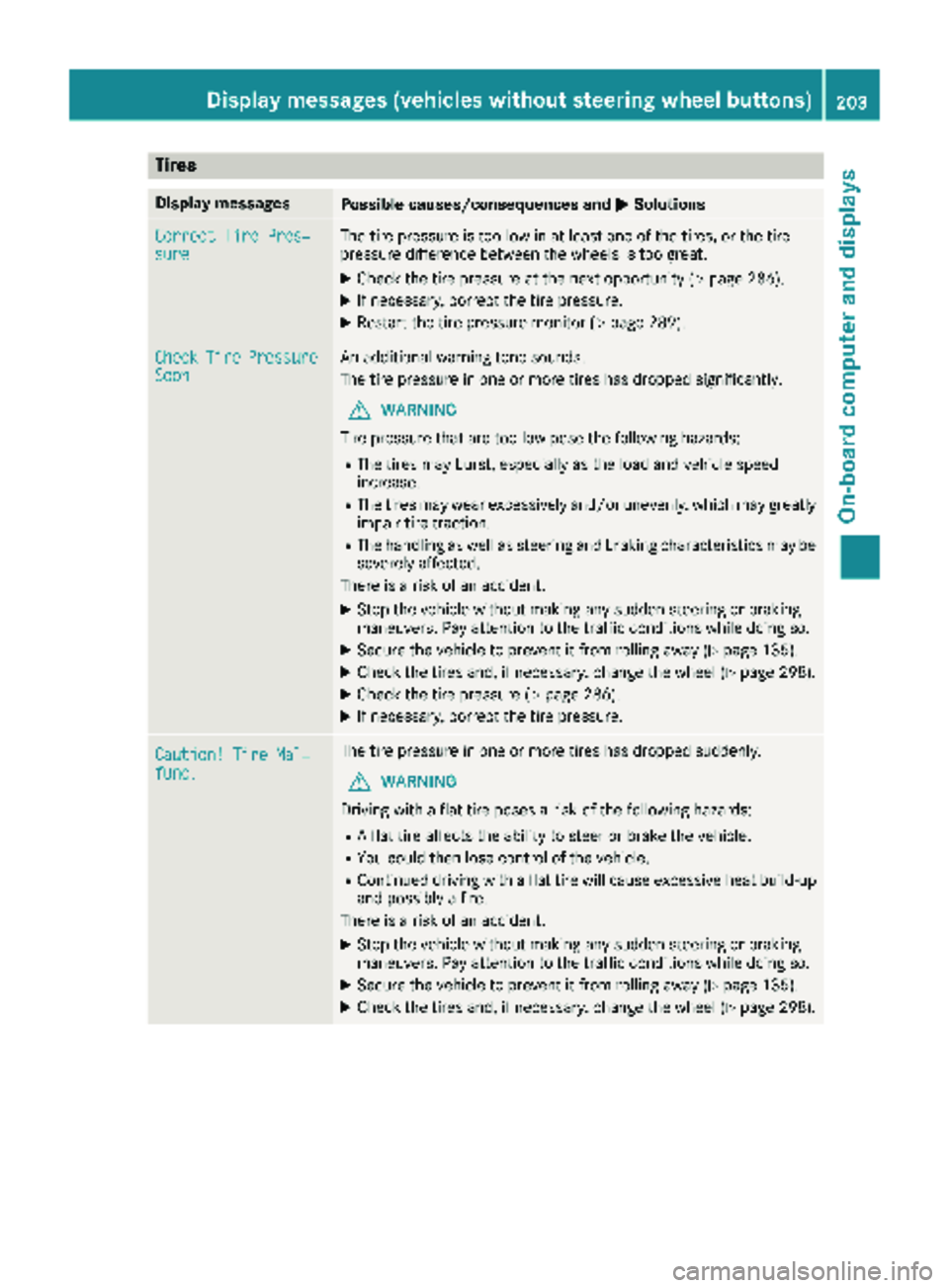
Tires
Display messagesPossible causes/consequences andMSolutions
Correct Tire Pres‐sureThe tire pressure is too low in at least one of the tires, or the tire
pressure difference between the wheels is too great.
XCheck the tire pressure at the next opportunity (Ypage 286).
XIf necessary, correct the tire pressure.
XRestart the tire pressure monitor (Ypage 289).
CheckTirePressureSoonAn additional warning tone sounds.
The tire pressure in one or more tires has dropped significantly.
GWARNING
Tire pressure that are too low pose the following hazards:
RThe tires may burst, especially as the load and vehicle speed
increase.
RThe tires may wear excessively and/or unevenly, which may greatly
impair tire traction.
RThe handling as well as steering and braking characteristics may be severely affected.
There is a risk of an accident.
XStop the vehicle without making any sudden steering or braking
maneuvers. Pay attention to the traffic conditions while doing so.
XSecure the vehicle to prevent it from rolling away (Ypage 135).
XCheck the tires and, if necessary, change the wheel (Ypage 298).
XCheck the tire pressure (Ypage 286).
XIf necessary, correct the tire pressure.
Caution! Tire Mal‐func.
The tire pressure in one or more tires has dropped suddenly.
GWARNING
Driving with a flat tire poses a risk of the following hazards:
RA flat tire affects the ability to steer or brake the vehicle.
RYou could then lose control of the vehicle.
RContinued driving with a flat tire will cause excessive heat build-up
and possibly a fire.
There is a risk of an accident.
XStop the vehicle without making any sudden steering or braking
maneuvers. Pay attention to the traffic conditions while doing so.
XSecure the vehicle to prevent it from rolling away (Ypage 135).
XCheck the tires and, if necessary, change the wheel (Ypage 298).
Displa y messages (vehicles without steering wheelbu ttons)203
On-board computer and displays
Z
Page 221 of 318
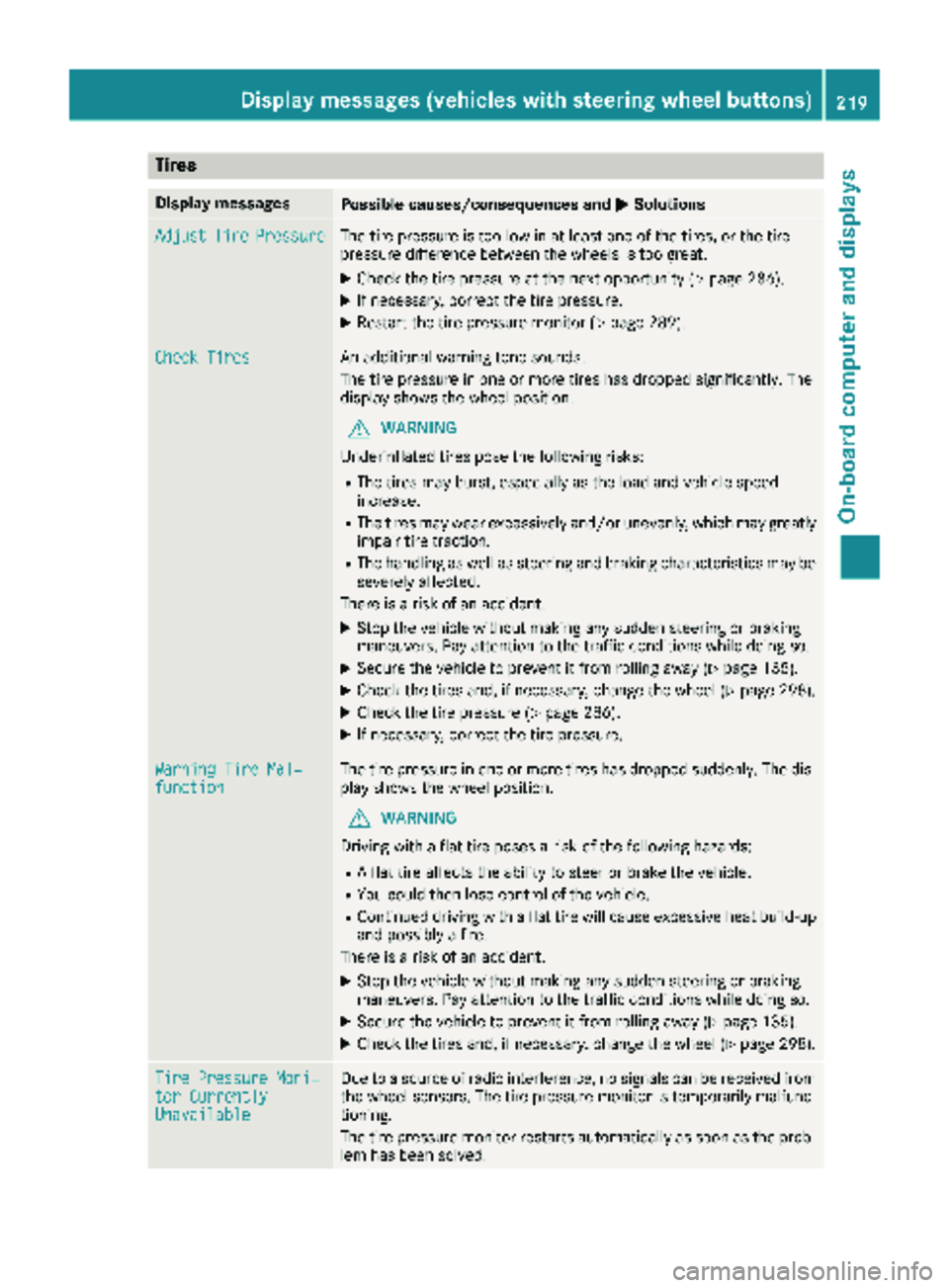
Tires
Display messagesPossible causes/consequences andMSolutions
AdjustTirePressureThe tire pressure is too low in at least one of the tires, or the tire
pressure difference between the wheels is too great.
XCheck the tire pressure at the next opportunity (Ypage 286).
XIf necessary, correct the tire pressure.
XRestart the tire pressure monitor (Ypage 289).
Check TiresAn additional warning tone sounds.
The tire pressure in one or more tires has dropped significantly. The
display shows the wheel position.
GWARNING
Underinflated tires pose the following risks:
RThe tires may burst, especially as the load and vehicle speed
increase.
RThe tires may wear excessively and/or unevenly, which may greatly
impair tire traction.
RThe handling as well as steering and braking characteristics may be
severely affected.
There is a risk of an accident.
XStop the vehicle without making any sudden steering or braking
maneuvers. Pay attention to the traffic conditions while doing so.
XSecure the vehicle to prevent it from rolling away (Ypage 135).
XCheck the tires and, if necessary, change the wheel (Ypage 298).
XCheck the tire pressure (Ypage 286).
XIf necessary, correct the tire pressure.
Warning Tire Mal‐functionThe tire pressure in one or more tires has dropped suddenly. The dis-
play shows the wheel position.
GWARNING
Driving with a flat tire poses a risk of the following hazards:
RA flat tire affects the ability to steer or brake the vehicle.
RYou could then lose control of the vehicle.
RContinued driving with a flat tire will cause excessive heat build-up
and possibly a fire.
There is a risk of an accident.
XStop the vehicle without making any sudden steering or braking
maneuvers. Pay attention to the traffic conditions while doing so.
XSecure the vehicle to prevent it from rolling away (Ypage 135).
XCheck the tires and, if necessary, change the wheel (Ypage 298).
Tire Pressure Moni‐tor CurrentlyUnavailable
Due to a source of radio interference, no signals can be received from
the wheel sensors. The tire pressure monitor is temporarily malfunc-
tioning.
The tire pressure monitor restarts automatically as soon as the prob-
lem has been solved.
Displa y messages (vehicles withsteering whee lbu ttons)219
On-board computer and displays
Z
Page 232 of 318
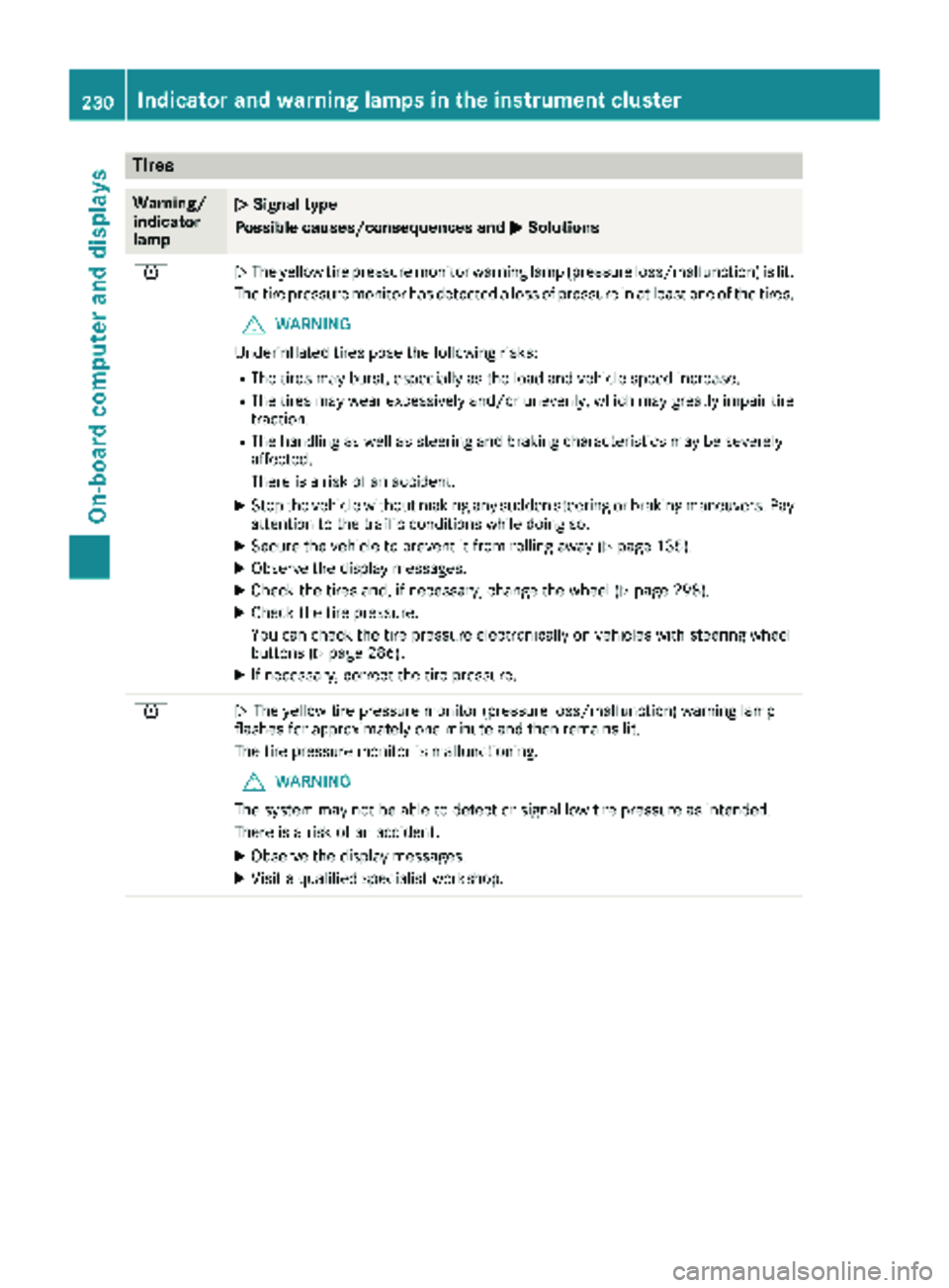
Tires
Warning/
indicator
lampNSignal type
Possible causes/consequences and M
Solutions
hNThe yellow tire pressure monitor warning lamp (pressure loss/malfunction) is lit.
The tire pressure monitor has detected a loss of pressure in at least one of the tires.
GWARNING
Underinflated tires pose the following risks:
RThe tires may burst, especially as the load and vehicle speed increase.
RThe tires may wear excessively and/or unevenly, which may greatly impair tire traction.
RThe handling as well as steering and braking characteristics may be severely
affected.
There is a risk of an accident.
XStop the vehicle without making any sudden steering or braking maneuvers. Pay
attention to the traffic conditions while doing so.
XSecure the vehicle to prevent it from rolling away (Ypage 135).
XObserve the display messages.
XCheck the tires and, if necessary, change the wheel (Ypage 298).
XCheck the tire pressure.
You can check the tire pressure electronically on vehicles with steering wheel
buttons (
Ypage 286).
XIf necessary, correct the tire pressure.
hN The yellow tire pressure monitor (pressure loss/malfunction) warning lamp
flashes for approximately one minute and then remains lit.
The tire pressure monitor is malfunctioning.
GWARNING
The system may not be able to detect or signal low tire pressure as intended.
There is a risk of an accident.
XObserve the display messages.
XVisit a qualified specialist workshop.
230Indicator and warninglamps in the instrument cluster
On-board computer and displays