warning MERCEDES-BENZ METRIS 2020 MY20 Operator’s Manual
[x] Cancel search | Manufacturer: MERCEDES-BENZ, Model Year: 2020, Model line: METRIS, Model: MERCEDES-BENZ METRIS 2020Pages: 320, PDF Size: 26.38 MB
Page 141 of 320
is an increased danger of skidding and acci-
dents.
Only use the parking brake to brake the
vehicle when the service brake is faulty. Do
not apply the parking brake too firmly. If the
wheels lock, release the parking brake until
the wheels begin turning again. The brake lamps are not illuminated when you
brake the vehicle using the parking brake.
As a rule, you may only apply the parking
brake when the vehicle is stationary.
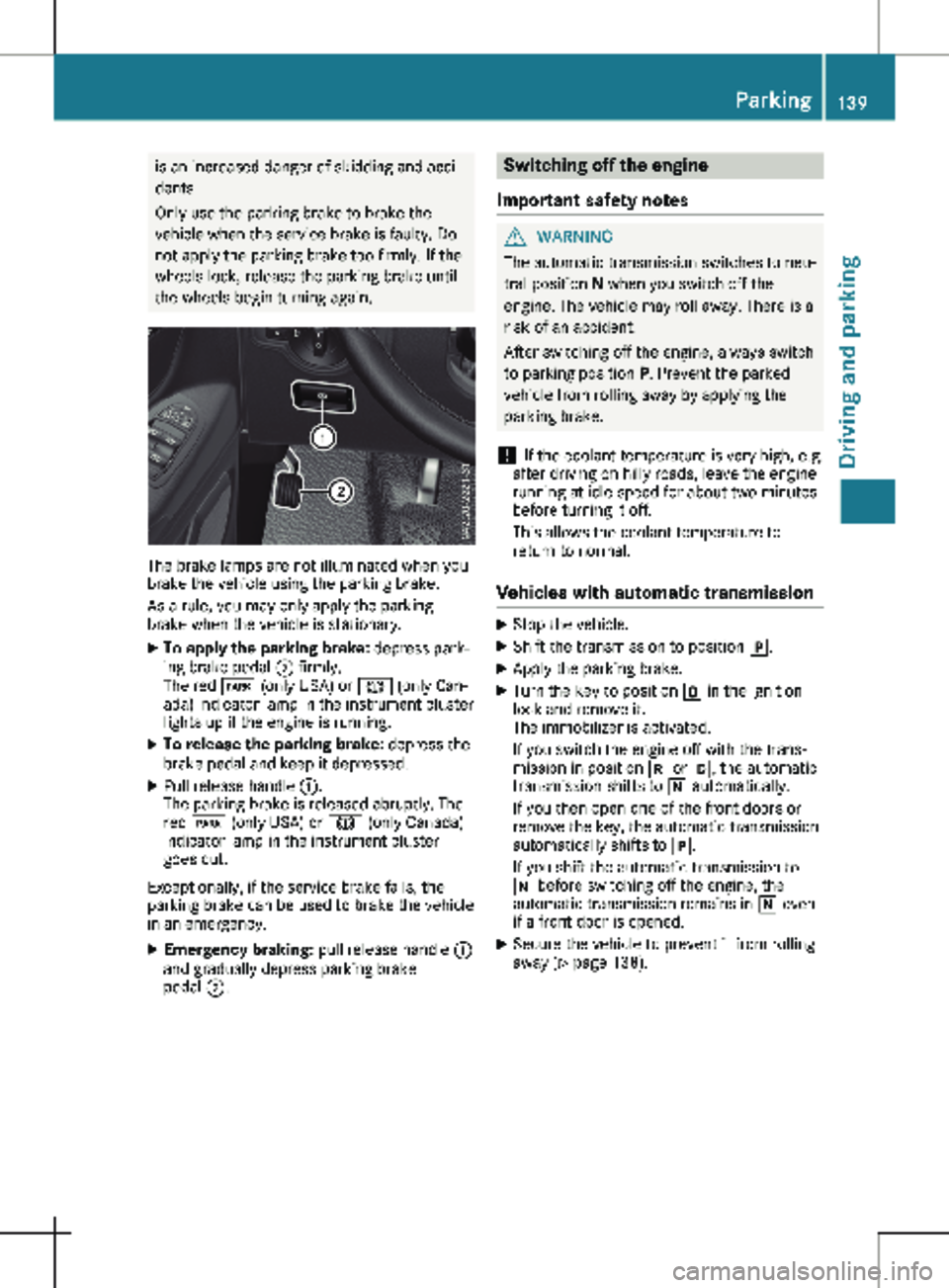
X To apply the parking brake: depress park-
ing brake pedal ; firmly.
The red F (only USA) or J (only Can-
ada) indicator lamp in the instrument cluster
lights up if the engine is running.
X To release the parking brake: depress the
brake pedal and keep it depressed.
X Pull release handle :.
The parking brake is released abruptly. The
red F (only USA) or J (only Canada)
indicator lamp in the instrument cluster
goes out.
Exceptionally, if the service brake fails, the
parking brake can be used to brake the vehicle
in an emergency.
X Emergency braking: pull release handle :
and gradually depress parking brake
pedal ;. Switching off the engine
Important safety notes G
WARNING
The automatic transmission switches to neu-
tral position N when you switch off the
engine. The vehicle may roll away. There is a
risk of an accident.
After switching off the engine, always switch
to parking position P. Prevent the parked
vehicle from rolling away by applying the
parking brake.
! If the coolant temperature is very high, e.g.
after driving on hilly roads, leave the engine
running at idle speed for about
two minutes
before turning it off.
This allows the coolant temperature to
return to normal.
Vehicles with automatic transmission X
Stop the vehicle.
X Shift the transmission to position j.
X Apply the parking brake.
X Turn the key to position u in the ignition
lock and remove it.
The immobilizer is activated.
If you switch the engine off with the trans-
mission in position k or h, the automatic
transmission shifts to i automatically.
If you then open one of the front doors or
remove the key, the automatic transmission
automatically shifts to j.
If you shift the automatic transmission to
i before switching off the engine, the
automatic transmission remains in i even
if a front door is opened.
X Secure the vehicle to prevent it from rolling
away
(Y page 138). Parking
139
Driving and parking Z
Page 142 of 320
Parking the vehicle for a long period
If you leave the vehicle parked for longer than
four weeks, the battery may be damaged by
exhaustive discharging.
X Disconnect the battery (Y page 260).
or X Connect the battery to a trickle charger.
Be sure to observe the notes on charging
the batteries
(Y page 262).
You can obtain information about trickle
chargers from a qualified specialist work-
shop.
If you leave the vehicle parked for longer than
6 weeks, the vehicle may suffer damage as a
result of lack of use.
X Visit a qualified specialist workshop and
seek advice. Driving tips
General notes
Important safety notes G
WARNING
If you switch off the ignition while driving,
safety-relevant functions are only available
with limitations, or not at all. This could
affect, for example, the power steering and
the brake boosting effect. You will require
considerably more effort to steer and brake.
There is a risk of an accident.
Do not switch off the ignition while driving. G
WARNING
Mobile communications equipment distracts
the driver from traffic conditions. In addi-
tion, the driver could lose control of the
vehicle. There is a risk of an accident.
As a driver, use mobile communications
equipment only when the vehicle is at a
standstill.
As a vehicle occupant, use mobile communi-
cations equipment only in the designated
area, e.g. the rear passenger compartment. Observe the legal requirements of the country
in which you are driving. Some jurisdictions
prohibit the driver from using a mobile phone
while driving a vehicle.
Always use the hands-free system for tele-
phoning while driving. Only use the telephone
if road traffic conditions permit. If this is not
the case, pull over to a safe location before
using the telephone.
Bear in mind that at a speed of just 30 mph
(approximately
50 km/h), your vehicle is cov-
ering a distance of 44 feet (approximately
14 m) every second.
Drive sensibly – save fuel In order to save fuel, observe the following
tips:
X The tires should always be inflated to the
recommended tire pressure.
X Remove unnecessary loads.
X Remove roof carriers when they are not nee-
ded.
X Warm up the engine at low engine speeds.
X Avoid frequent acceleration or braking.
X Have all maintenance work carried out as
indicated by the service intervals in the
Maintenance Booklet or by the service inter-
val display.
Fuel consumption also increases when driving
in cold weather, in stop-start traffic and in
mountainous terrain.
Overrun cutoff If you are in overrun mode and take your foot
off the accelerator pedal, the fuel supply is cut
off when the engine speed is out of the idle
speed control range.
Drinking and driving G
WARNING
Drinking and driving and/or taking drugs
and driving are very dangerous combina-
tions. Even a small amount of alcohol or
drugs can affect your reflexes, perceptions
and judgment.
The possibility of a serious or even fatal
accident is greatly increased when you drink
or take drugs and drive. 140
Driving tips
Driving and parking
Page 143 of 320
Do not drink or take drugs and drive or allow
anyone to drive who has been drinking or
taking drugs.
Emission control G
DANGER
Combustion engines emit poisonous
exhaust gases such as carbon monoxide.
Inhaling these exhaust gases is hazardous to
health and can result in poisoning. There is a
risk of fatal injury. Therefore, never leave the
engine running an enclosed space without
adequate ventilation.
Certain engine systems are designed to keep
the level of poisonous substances in exhaust
fumes within legal limits.
These systems only work optimally if they are
maintained exactly in accordance with the
manufacturer's specifications. Any work on
the engine should therefore be carried out by
qualified and authorized Mercedes-Benz tech-
nicians.
The engine settings must not be changed
under any circumstances. In addition, all spe-
cific maintenance work must be carried out at
regular intervals and in accordance with the
service requirements of the dealer listed here
on the inside title page. Details can be found
in the Maintenance Booklet. Speed limiter
G
WARNING
Exceeding the stated tire load-bearing capa-
city and the approved maximum speed
could lead to tire damage or the tire burst-
ing. There is a risk of accident.
Therefore, only use tire types and sizes
approved for your vehicle model. Observe
the tire load rating and speed rating
required for your vehicle.
As the driver, you must be aware of the maxi-
mum design speed of the vehicle and the max-
imum permissible speed based on the tires
(tire and tire pressure). In particular, also observe the tire approval regulations for each
country.
You must not exceed the speed limit for the
tires indicated by the speed rating. The speed
rating is stated in the tire tables (Y page
302).
You can permanently limit the permissible
maximum speed of your vehicle, e.g. for driv-
ing on winter tires.
Mercedes-Benz recommends that you have
the maximum permissible speed programed at
a Mercedes-Benz Commercial Van Center.
Before overtaking, take into consideration that
the engine speed limiter prevents the speed
increasing beyond the programmed permissi-
ble maximum speed. Driving abroad
Service An extensive network of authorized Mercedes-
Benz Centers is also at your disposal when you
are traveling abroad. Nevertheless, please
bear in mind that service facilities or replace-
ment parts may not always be immediately
available. The relevant workshop directories
are available from any Mercedes-Benz Com-
mercial Van Center.
Fuel In some countries, only fuels with a higher sul-
fur content are available.
Unsuitable fuel can cause engine damage. You
will find information about fuel under "Service
products and capacities"
(Y page 306).
Low-beam headlamps General notes
When driving in countries in which traffic
drives on the opposite side of the road to the
country where the vehicle is registered, you
must switch the headlamps to symmetrical
low beam. This prevents oncoming traffic from
being blinded. Symmetrical low beam does not
illuminate as large an area of the edge of the
road. Driving tips
141
Driving and parking Z
Page 144 of 320
Vehicles with halogen headlamps
The headlamps do not need to be switched to
symmetrical low beam. The legal requirements
of countries in which traffic drives on the
opposite side of the road to the country where
the vehicle is registered are met without the
need to convert the headlamps. Transport by rail
Transporting your vehicle by rail may be sub-
ject to certain restrictions or require special
measures to be taken in some countries due
to varying tunnel heights and loading stand-
ards.
You can obtain information on this from any
Mercedes-Benz Commercial Van Center. Braking
Important safety notes G
WARNING
If you shift down on a slippery road surface
in an attempt to increase the engine's brak-
ing effect, the drive wheels could lose their
grip. There is an increased danger of skid-
ding and accidents.
Do not shift down for additional engine brak-
ing on a slippery road surface.
Downhill gradients !
Depressing the brake pedal constantly
results in excessive and premature wear to
the brake pads.
This also applies to automatic braking if you
have activated cruise control.
On long and steep downhill gradients, you
should change down to shift range 2 or 1 in
good time
(Y page 133).
This should be observed in particular when
driving with a laden vehicle and when towing a
trailer.
You thereby make use of the braking effect of
the engine and do not have to brake as often
to maintain the speed. This relieves the load
on the service brake and prevents the brakes
from overheating and wearing too quickly. Heavy and light loads G
WARNING
If you rest your foot on the brake pedal
while driving, the braking system can over-
heat. This increases the stopping distance
and can even cause the braking system to
fail. There is a risk of an accident.
Never use the brake pedal as a footrest.
Never depress the brake pedal and the
accelerator pedal at the same time.
! Depressing the brake pedal constantly
results in excessive and premature wear to
the brake pads.
If the brakes have been subjected to a heavy
load, do not stop the vehicle immediately.
Drive on for a short while. The brakes are
cooled down more quickly in the airflow.
Wet road surfaces If you have been driving for a long time in
heavy rain without braking, there may be a
delayed response when you first apply the
brakes. This may also occur after driving
through a car wash or deep water.
You must depress the brake pedal more firmly.
Maintain a longer distance to the vehicle in
front.
While paying attention to the traffic conditions,
you should brake the vehicle firmly after driv-
ing on a wet road surface or through a car
wash. This heats the brake discs, so that they
dry more quickly, which protects them against
corrosion.
Limited braking performance on salt-
treated roads When driving on salted roads, salt may start to
build up on the brake disks and brake pads.
This can increase braking distances considera-
bly.
Maintain a greater distance to the vehicle in
front.
To remove any build-up of salt that may have
formed:
X Apply the brakes at the start of the journey,
occasionally during journey and at the end 142
Driving tips
Driving and parking
Page 145 of 320
of the journey. Make sure that you do not
endanger other road users when doing so.
Checking the brake pad thickness In addition to monitoring using the brake pad
wear sensor, regularly monitor and check all of
the brake pads by performing a visual inspec-
tion to look for pad material wear.
If you are unable to check the brake wear on
the inside of the wheels, remove the wheels
with the tools provided.
Make sure that the brake pad material thick-
ness never falls below
0.12 in (3 mm). Have
the brake pads checked and replaced at a
qualified specialist workshop, if necessary.
Do not solely rely on the brake pad wear sen-
sor.
It is strongly recommended that you have the
brake pads checked at a qualified specialist
workshop at every service displayed in the
maintenance interval indicator, prior to long
journeys and whenever the wheels are
removed.
New brake discs and brake pads/
linings New brake pads and brake discs only reach
their optimal braking effect after about
60 miles
(100 kilometers). Until then, compen-
sate for this by applying greater force to the
brake pedal.
For safety reasons, Mercedes-Benz recom-
mends only installing the following brake discs
and brake pads/linings:
R brake discs that have been approved by
Mercedes-Benz
R brake pads/linings that have been approved
by Mercedes-Benz or are of an equivalent
standard of quality
Other brake discs or brake pads/linings can
compromise the safety of your vehicle.
Always replace all brake discs or brake pads/
linings on an axle at the same time and only
have them replaced at a qualified specialist
workshop. When replacing the brake discs,
always have the brake pads/linings replaced
at the same time. Parking brake G
WARNING
If you must brake the vehicle with the park-
ing brake, the braking distance is considera-
bly longer and the wheels could lock. There
is an increased danger of skidding and acci-
dents.
Only use the parking brake to brake the
vehicle when the service brake is faulty. Do
not apply the parking brake too firmly. If the
wheels lock, release the parking brake until
the wheels begin turning again.
When driving on wet roads or dirt-covered sur-
faces, road salt and/or dirt may get into the
parking brake. This causes corrosion and a
reduction of braking force.
In order to prevent this, drive with the parking
brake lightly applied from time to time. When
doing so, drive for a distance of approximately
110 yds (100 m) at a maximum speed of
12 mph (20 km/h
).
The brake lamps are not illuminated when you
brake the vehicle using the parking brake. Driving in wet conditions
Hydroplaning G
WARNING
There is a danger of hydroplaning occurring,
even if you are driving slowly and your tires
have sufficient tread depth, depending on
the depth of water on the road. There is a
risk of an accident.
For this reason, avoid tire ruts and brake
carefully.
Therefore, in heavy rain or other conditions in
which hydroplaning can occur, drive as fol-
lows:
R reduce your speed
R avoid tire ruts
R apply the brakes with care Driving tips
143
Driving and parking Z
Page 146 of 320
Driving on flooded roads
!
Do not drive through flooded areas. Check
the depth of any water before driving
through it. Drive slowly through standing
water. Otherwise, water could enter the
vehicle interior or engine compartment. It
can then damage the engine's or automatic
transmission's electronic components. It
can also be sucked in by the engine's air
intake connection and cause engine dam-
age.
If you have to drive on stretches of road on
which water has collected, please bear in mind
that: R the water level of standing water should not
be above the lower edge of the front
bumper
R you must not drive faster than walking
speed Driving in winter
G
WARNING
If you shift down on a slippery road surface
in an attempt to increase the engine's brak-
ing effect, the drive wheels could lose their
grip. There is an increased danger of skid-
ding and accidents.
Do not shift down for additional engine brak-
ing on a slippery road surface.
! An accumulation of snow and ice, particu-
larly when frozen, caught in the area around
the air intake slots, moving parts, the axles
and the wheel arches may:
R restrict air intake
R damage vehicle parts
R cause malfunctions by restricting the
mobility intended by the design (e.g.
reduced possible steering input).
Regularly check the vehicle and remove
snow or ice when traveling in wintry condi-
tions.
If there is any damage, inform a qualified
specialist workshop.
! Vehicles with automatic transmission may
only briefly coast in neutral position N.
Extended coasting of the wheels, e.g. when
towing, results in transmission damage. Have your vehicle winterized at a qualified spe-
cialist workshop at the onset of winter.
Drive particularly carefully on slippery roads.
Avoid sudden acceleration, steering and brak-
ing maneuvers. Do not use cruise control.
If the vehicle threatens to skid or cannot be
stopped when moving at low speed:
X Shift the transmission to position i.
X Try to maintain control of the vehicle using
corrective steering.
The outside temperature indicator is not
designed to serve as an ice-warning device
and is therefore unsuitable for that purpose.
Changes in the outside temperature are dis-
played after a short delay.
Indicated temperatures just above the freezing
point do not guarantee that the road surface is
free of ice. The road may still be icy, especially
in wooded areas or on bridges. If you do not
adjust your driving style, the vehicle may start
to skid. Always adapt your driving style and
drive at a speed to suit the prevailing weather
conditions.
You should pay special attention to road con-
ditions when temperatures are around freezing
point.
You can find further information under:
R "M+S tires" ( Y page
280)
R "Snow chains" (Y page 281)
R "Driving with summer tires" (Y page 280)
Also observe the notes under "Winter opera-
tion" (Y page 280). Driving off-road
Important safety notes G
WARNING
If you drive on a steep incline at an angle or
turn when driving on an incline, the vehicle
could slip sideways, tip and rollover. There is
a risk of an accident.
Always drive on a steep incline in the line of
fall (straight up or down) and do not turn the
vehicle. 144
Driving tips
Driving and parking
Page 147 of 320
G
WARNING
When driving off-road, your body is subject
to forces from all directions, due to the
uneven surface. You could be thrown from
your seat, for instance. There is a risk of
injury.
Always wear a seat belt, even when driving
off-road. G
WARNING
If you drive over obstacles or in ruts, the
steering wheel may jerk out of your grip,
causing injury to your hands.
Always hold the steering wheel firmly with
both hands. When driving over obstacles,
you must expect steering forces to increase
briefly and suddenly. G
WARNING
Flammable material such as leaves, grass or
twigs may ignite if they come into contact
with hot parts of the exhaust system. There
is a risk of fire.
When driving on an unpaved road or off-
road, check the vehicle underside regularly.
In particular, remove trapped plant parts or
other flammable material. Contact a quali-
fied specialist workshop immediately if dam-
age is detected.
! When driving off-road or on unpaved surfa-
ces, check the underside of the vehicle as
well as the wheels and tires at regular inter-
vals. In particular, remove trapped foreign
objects, such as stones and branches.
Such foreign objects could:
R damage the chassis, the fuel tank or the
brake system
R cause imbalance and thereby vibrations
R be thrown out as you continue your jour-
ney
If there is any damage, inform a qualified
specialist workshop.
When driving off-road and on construction
sites, sand, mud and water mixed with oil, for
example, may get into the brakes. This may
lead to a reduction in braking performance or
total brake failure, also as a result of increased wear. The braking characteristics will vary
depending on the material that has got into
the system. Clean the brakes after driving off-
road. If you then notice reduced braking per-
formance or hear scraping noises, have the
brake system checked at a qualified specialist
workshop. Adjust your driving style to the
changed braking characteristics.
Driving off-road or on construction sites
increases the possibility of vehicle damage
which may in turn lead to the failure of certain
assemblies and systems. Adapt your driving
style to the off-road driving conditions. Drive
carefully. Have any vehicle damage rectified at
a qualified specialist workshop as soon as pos-
sible.
When loading your vehicle for driving off-road
or on a construction site, keep the vehicle's
center of gravity as low as possible.
Rules for driving off-road !
Always bear the vehicle's ground clear-
ance in mind and avoid obstacles, e.g. deep
ruts.
Obstacles may damage the following parts
of the vehicle:
R the chassis
R the drive train
R the fuel and supply tanks
For this reason, you should always drive
slowly when driving off-road. If you have to
drive over obstacles, have the front
passenger direct you.
i We recommend that you additionally carry
a shovel and a recovery rope with shackle in
the vehicle.
R Ensure that loads and items of luggage are
securely stowed or lashed down
(Y page
242).
R Before driving off-road, stop the vehicle and
shift to a low gear.
R If the surface requires, temporarily deacti-
vate ESP ®
when pulling away (Y page 69).
R Only drive off-road with the engine running
and a gear engaged.
R Drive slowly and smoothly. Walking pace is
necessary in many situations.
R Avoid spinning the drive wheels.
R Make sure that the wheels always remain in
contact with the ground. Driving tips
145
Driving and parking Z
Page 150 of 320
Storing and maintaining the current
speed
X
Accelerate the vehicle to the desired speed
above 20 mph (30 km/h
).
X Briefly push the cruise control lever up : or
down =.
X Release the accelerator pedal.
Cruise control is activated. The current
speed is stored and shown briefly in the dis-
play's text field.
The display also shows the V symbol and
the stored speed:
R in the header on vehicles without steering
wheel buttons (Y page
176)
R in the status area on vehicles with steer-
ing wheel buttons (Y page 183)
Resuming the stored speed G
WARNING
If you call up the stored speed and it differs
from the current speed, the vehicle acceler-
ates or decelerates. If you do not know the
stored speed, the vehicle could accelerate
or brake unexpectedly. There is a risk of an
accident.
Pay attention to the road and traffic condi-
tions before calling up the stored speed. If
you do not know the stored speed, store the
desired speed again.
X Briefly pull the cruise control lever towards
you ;.
X Release the accelerator pedal.
Cruise control is activated and resumes the
vehicle's speed to the last speed stored.
The stored speed is shown briefly in the dis-
play.
The display also shows the V symbol and
the stored speed:
R in the header on vehicles without steering
wheel buttons (Y page
176)
R in the status area on vehicles with steer-
ing wheel buttons (Y page 183)
i When you pull the cruise control lever
towards you for the first time after starting
the engine, cruise control adopts the cur-
rent speed. Setting the speed It may be a moment before the vehicle starts
to accelerate or brake to the set speed. Take
this delay into account when setting the
speed.
X
Press the cruise control lever up : to
increase the speed or down = to reduce
the speed.
The vehicle will accelerate or decelerate.
The speed is shown in the display.
X Release the cruise control lever once the
desired speed is reached.
The displayed speed is stored.
or
X Briefly press the cruise control lever as far
as the 1st pressure point up : or down =.
The last speed stored is increased/reduced
in increments of
1 mph (1 km/h).
or X Briefly press the cruise control lever beyond
the pressure point up : or down =.
The last speed stored is increased/reduced
in increments of
5 mph (10 km/h).
i Cruise control is not deactivated if you
depress the accelerator pedal. If you accel-
erate briefly to overtake, for example, cruise
control resumes the vehicle’s speed to the
last speed stored after you have finished
overtaking.
Deactivating cruise control There are various ways to deactivate cruise
control:
X Briefly press the cruise control lever for-
wards ?.
or X Apply the brakes.
The last speed set remains stored. The last
speed stored is deleted when you switch off
the engine.
Cruise control is deactivated automatically
when:
R you apply the brakes
R you apply the parking brake and the F
(only USA) or J (only Canada) indicator
lamp in the instrument cluster lights up
R you are driving slower than
20 mph
(30 km/h) 148
Driving systems
Driving and parking
Page 151 of 320
R
you shift to neutral i while the vehicle is in
motion
R ESP ®
intervenes or you deactivate ESP ®
R there is a malfunction in the ESP ®
or ABS
system
If cruise control automatically deactivates, a
warning tone sounds and the Cruise Con‐
trol Off message appears briefly in the dis-
play.
The V symbol and the display of the stored
speed in the header or in the status area of
the display are then not shown.
Problems with cruise control The speed cannot be set when cruise control
is activated.
The display is showing a message of high pri-
ority and cannot therefore show a change in
speed.
X Proceed as instructed by the message in the
display. COLLISION PREVENTION ASSIST
General notes COLLISION PREVENTION ASSIST helps you:
R to minimize the risk of a front-end collision
with a detected obstacle in the path of your
vehicle
R to reduce the consequences of a collision
with the vehicle in front
The system uses radar sensors to detect vehi-
cles in front.
COLLISION PREVENTION ASSIST consists of
the distance warning function and Adaptive
Brake Assist.
If COLLISION PREVENTION ASSIST is malfunc-
tioning, the display shows a corresponding
message
(Y page 222). Distance warning function Important safety notes
G
WARNING
The distance warning function does not
react:
R to people or animals
R to oncoming vehicles
R to crossing traffic
R when cornering
The distance warning function may not give
warnings in all critical situations. There is a
risk of an accident.
Always pay careful attention to the traffic
situation and be ready to brake.
Always adapt your speed to suit the prevail-
ing road and traffic conditions. G
WARNING
The distance warning function cannot
always clearly identify objects and complex
traffic situations.
In such cases, the distance warning function
may:
R give an unnecessary warning
R not give a warning
There is a risk of an accident.
Always pay careful attention to the traffic
situation and do not rely solely on the dis-
tance warning function.
In particular, the detection of obstacles can be
impaired in the case of: R dirt on the sensors or anything else covering
the sensors
R snow or heavy rain
R interference from other radar sources
R strong radar reflections, for example, in
parking garages
R a narrow vehicle traveling in front, e.g. a
motorbike
R a vehicle traveling in front on a different line
Due to the nature of the system, particularly
complicated but non-critical driving conditions Driving systems
149
Driving and parking Z
Page 152 of 320

may also cause the system to display a warn-
ing.
If you fail to adapt your driving style, the dis-
tance warning function can neither reduce the
risk of an accident nor override the laws of
physics. The distance warning function cannot
take into account road, weather or traffic con-
ditions. The distance warning function is only
an aid. You are responsible for the distance to
the vehicle in front, for vehicle speed, braking
in good time and for staying in your lane.
Following damage to the front end of the vehi-
cle, have the configuration and operation of
the radar sensor checked at a qualified spe-
cialist workshop. This also applies to collisions
at slow speeds where there is no visible dam-
age to the front of the vehicle.
If you change wheel size, make sure they cor-
respond to the correct wheel size category
(Y page
278). If the category is changed with-
out recoding the control units in the vehicle,
the functioning of the distance warning feature
may be impaired. COLLISION PREVENTION
ASSIST may then detect a malfunction and
switch itself off.
Operation
X To activate/deactivate: activate or deacti-
vate the distance warning function in the on-
board computer
(Y page 190).
If the distance warning function of COLLI-
SION PREVENTION ASSIST is activated, the
display shows the Ä symbol:
R in the header
R in the Status Overview of the Assist.
menu (Y page 189)
At speeds up to approx 20 mph (30 km/h)
the display in vehicles with Active Parking
Assist first shows the í status indicator.
Only from a speed of about 20 mph
(30 km/h) does the display show the
Äsymbol instead of the í status indica-
tor.
The distance warning function can help you to
minimize the risk of a front-end collision with a
vehicle ahead or reduce the effects of such a
collision. With the help of the radar sensor sys-
tem, the distance warning function can detect
obstacles that are in the path of your vehicle
for an extended period of time. If the distance
warning function detects that there is a risk of
a collision, you will be warned visually and,
where necessary, acoustically. Without your intervention, the distance warning function
cannot prevent a collision.
The distance warning function issues a warn-
ing at speeds:
R from about
4 mph (7 km/h) if you approach
a vehicle traveling in front or a stationary
vehicle too quickly. The · warning lamp
in the instrument cluster then lights up and
an intermittent warning tone also sounds.
At speeds up to about 45 mph (70 km/h),
the system also detects stationary obsta-
cles, for example stopped or parked vehi-
cles.
X Brake immediately until the distance from
the obstacle increases and the risk of a
front-end collision passes.
or X Take evasive action, provided it is safe to do
so.
Adaptive Brake Assist General notes
Adaptive Brake Assist evaluates the traffic sit-
uation with the help of the radar sensor sys-
tem and can detect obstacles which have been
in your vehicle's path for an extended period
of time. From speeds above 4 mph (7 km/h
),
Adaptive Brake Assist aids you in braking dur-
ing hazardous situations.
Up to a speed of approximately 125 mph
(200 km/h), Adaptive Brake Assist is capable
of reacting to moving obstacles that have
already been detected as such at least once
over the period of observation.
Important safety notes G
WARNING
Adaptive Brake Assist does not react:
R to people or animals
R to oncoming vehicles
R to crossing traffic
R to stationary obstacles
R when cornering
As a result, the Adaptive Brake Assist may
not intervene in all critical conditions. There
is a risk of an accident. 150
Driving systems
Driving and parking