steering MERCEDES-BENZ METRIS 2020 MY20 Operator’s Manual
[x] Cancel search | Manufacturer: MERCEDES-BENZ, Model Year: 2020, Model line: METRIS, Model: MERCEDES-BENZ METRIS 2020Pages: 320, PDF Size: 26.38 MB
Page 219 of 320
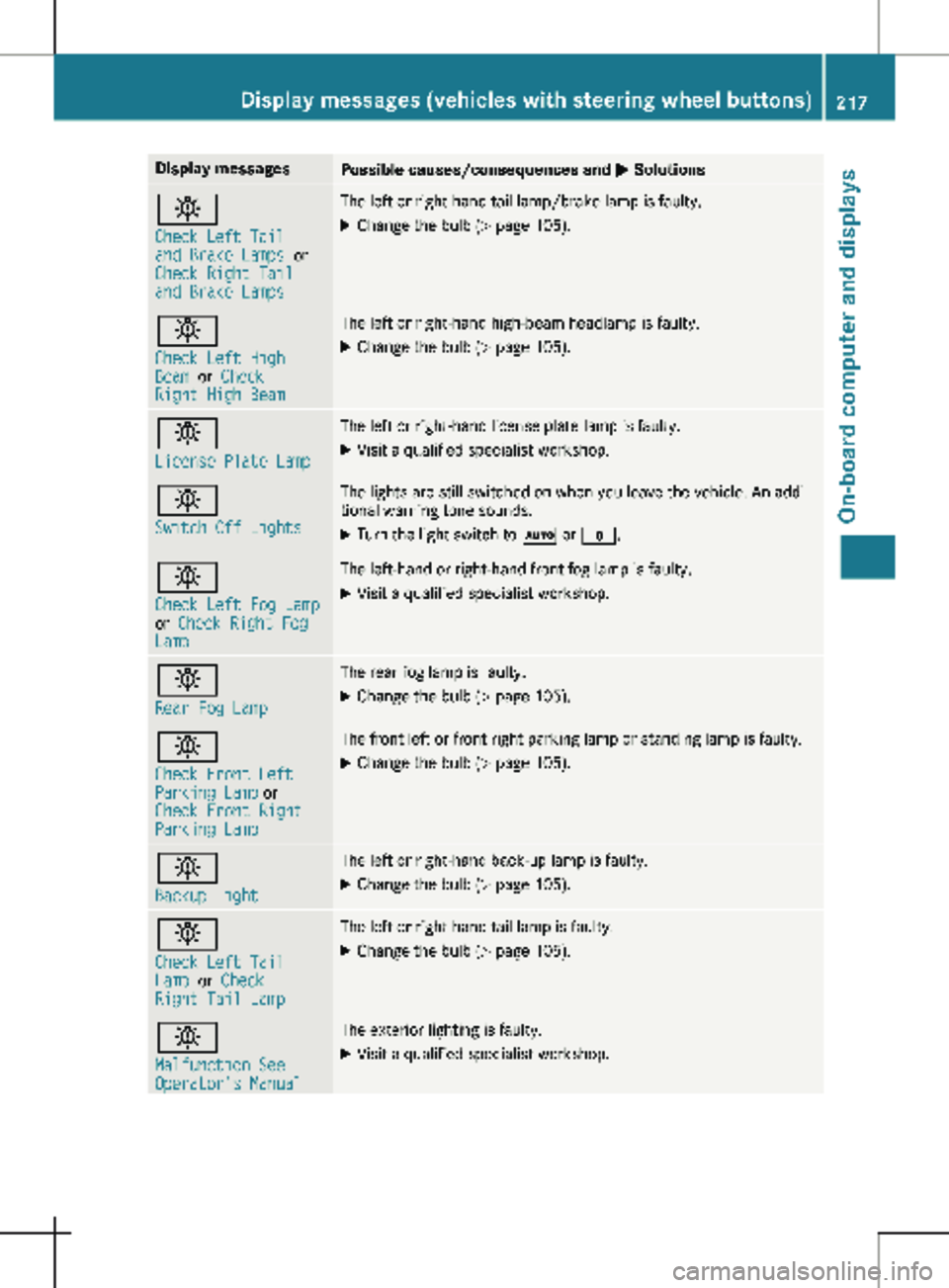
Display messages
Possible causes/consequences and
M Solutionsb
Check Left Tail
and Brake Lamps
or
Check Right Tail
and Brake Lamps The left or right-hand tail lamp/brake lamp is faulty.
X Change the bulb (Y page 105).b
Check Left High
Beam
or Check
Right High Beam The left or right-hand high-beam headlamp is faulty.
X
Change the bulb ( Y page 105).b
License Plate Lamp The left or right-hand license plate lamp is faulty.
X Visit a qualified specialist workshop. b
Switch Off Lights The lights are still switched on when you leave the vehicle. An addi-
tional warning tone sounds.
X Turn the light switch to à or $.b
Check Left Fog Lamp
or
Check Right Fog
Lamp The left-hand or right-hand front fog lamp is faulty.
X Visit a qualified specialist workshop. b
Rear Fog Lamp The rear fog lamp is faulty.
X Change the bulb (Y page
105).b
Check Front Left
Parking Lamp or
Check Front Right
Parking Lamp The front left or front right parking lamp or standing lamp is faulty.
X Change the bulb ( Y page
105).b
Backup Light The left or right-hand back-up lamp is faulty.
X Change the bulb (Y page
105).b
Check Left Tail
Lamp
or Check
Right Tail Lamp The left or right-hand tail lamp is faulty.
X Change the bulb (Y page 105).b
Malfunction See
Operator's Manual The exterior lighting is faulty.
X Visit a qualified specialist workshop. Display messages (vehicles with steering wheel buttons)
217
On-board computer and displays Z
Page 220 of 320
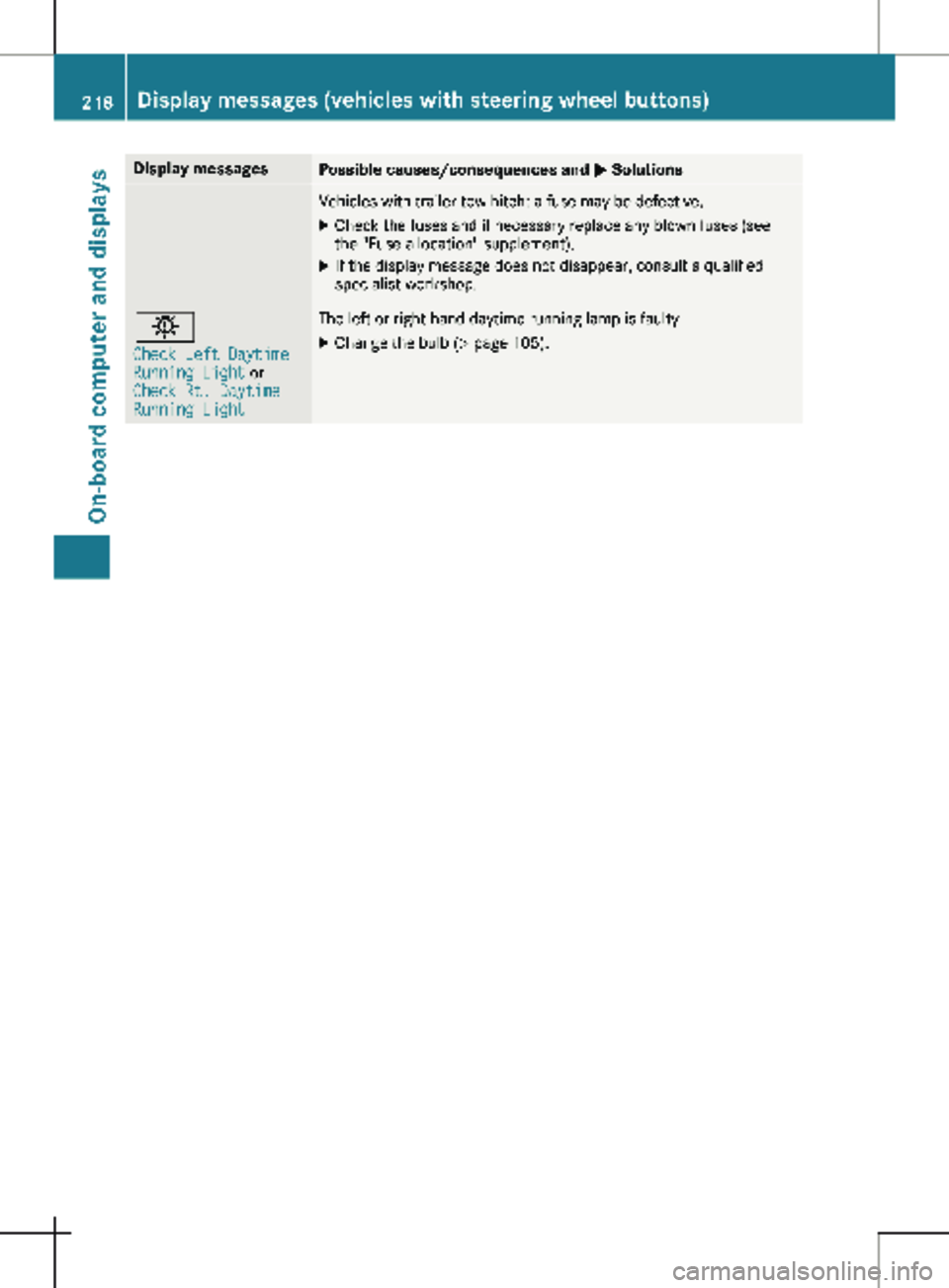
Display messages
Possible causes/consequences and
M SolutionsVehicles with trailer tow hitch: a fuse may be defective.
X Check the fuses and if necessary replace any blown fuses (see
the "Fuse allocation" supplement).
X If the display message does not disappear, consult a qualified
specialist workshop. b
Check Left Daytime
Running Light or
Check Rt. Daytime
Running Light The left or right-hand daytime running lamp is faulty.
X Change the bulb (Y page 105).218
Display messages (vehicles with steering wheel buttons)
On-board computer and displays
Page 221 of 320
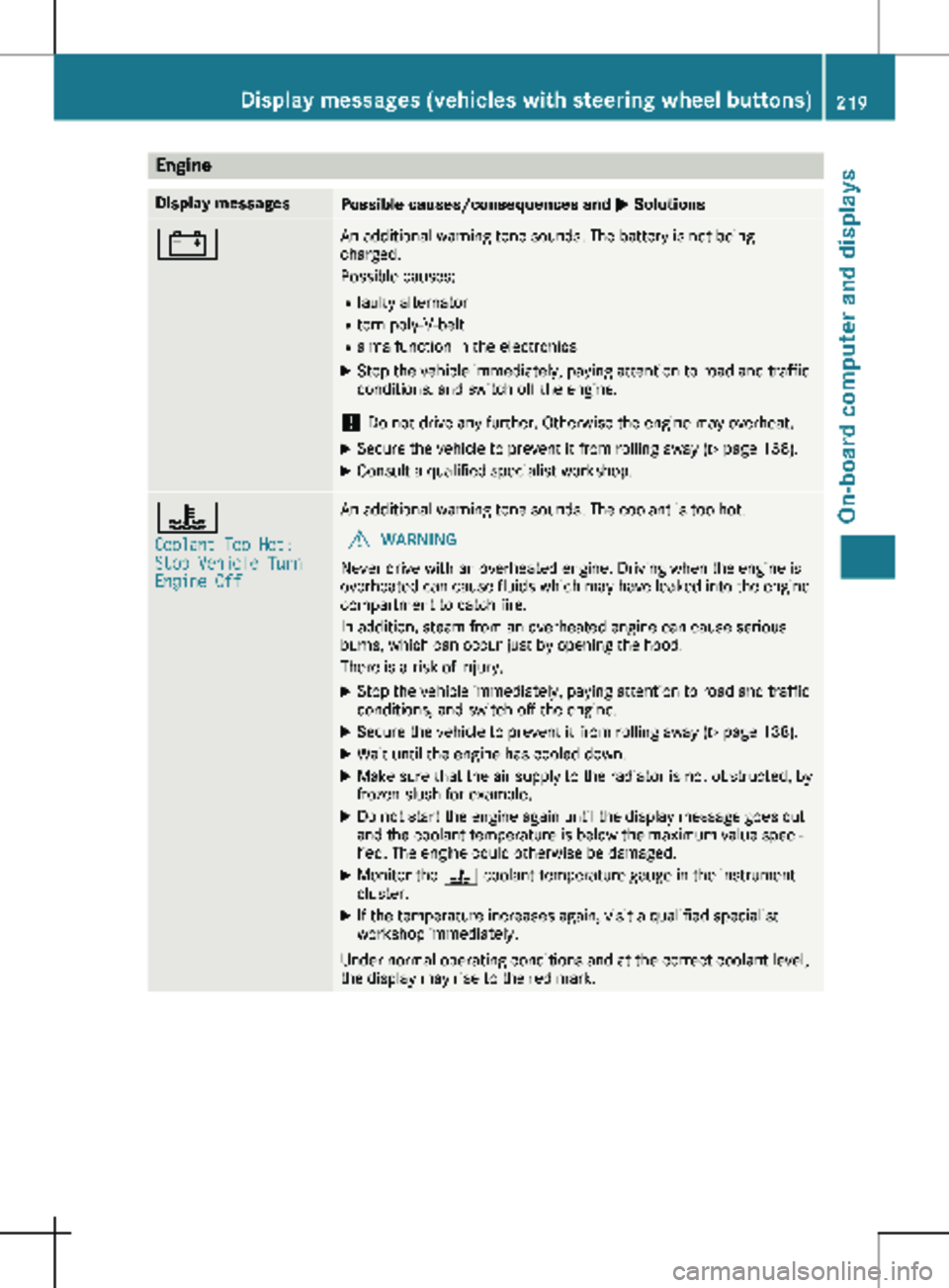
Engine
Display messages
Possible causes/consequences and
M Solutions# An additional warning tone sounds. The battery is not being
charged.
Possible causes:
R faulty alternator
R torn poly-V-belt
R a malfunction in the electronics
X Stop the vehicle immediately, paying attention to road and traffic
conditions, and switch off the engine.
! Do not drive any further. Otherwise the engine may overheat.
X Secure the vehicle to prevent it from rolling away ( Y page 138).
X Consult a qualified specialist workshop. ?
Coolant Too Hot:
Stop Vehicle Turn
Engine Off An additional warning tone sounds. The coolant is too hot.
G WARNING
Never drive with an overheated engine. Driving when the engine is
overheated can cause fluids which may have leaked into the engine
compartment to catch fire.
In addition, steam from an overheated engine can cause serious
burns, which can occur just by opening the hood.
There is a risk of injury.
X Stop the vehicle immediately, paying attention to road and traffic
conditions, and switch off the engine.
X Secure the vehicle to prevent it from rolling away ( Y page
138).
X Wait until the engine has cooled down.
X Make sure that the air supply to the radiator is not obstructed, by
frozen slush for example.
X Do not start the engine again until the display message goes out
and the coolant temperature is below the maximum value speci-
fied. The engine could otherwise be damaged.
X Monitor the ? coolant temperature gauge in the instrument
cluster.
X If the temperature increases again, visit a qualified specialist
workshop immediately.
Under normal operating conditions and at the correct coolant level,
the display may rise to the red mark. Display messages (vehicles with steering wheel buttons)
219
On-board computer and displays Z
Page 222 of 320
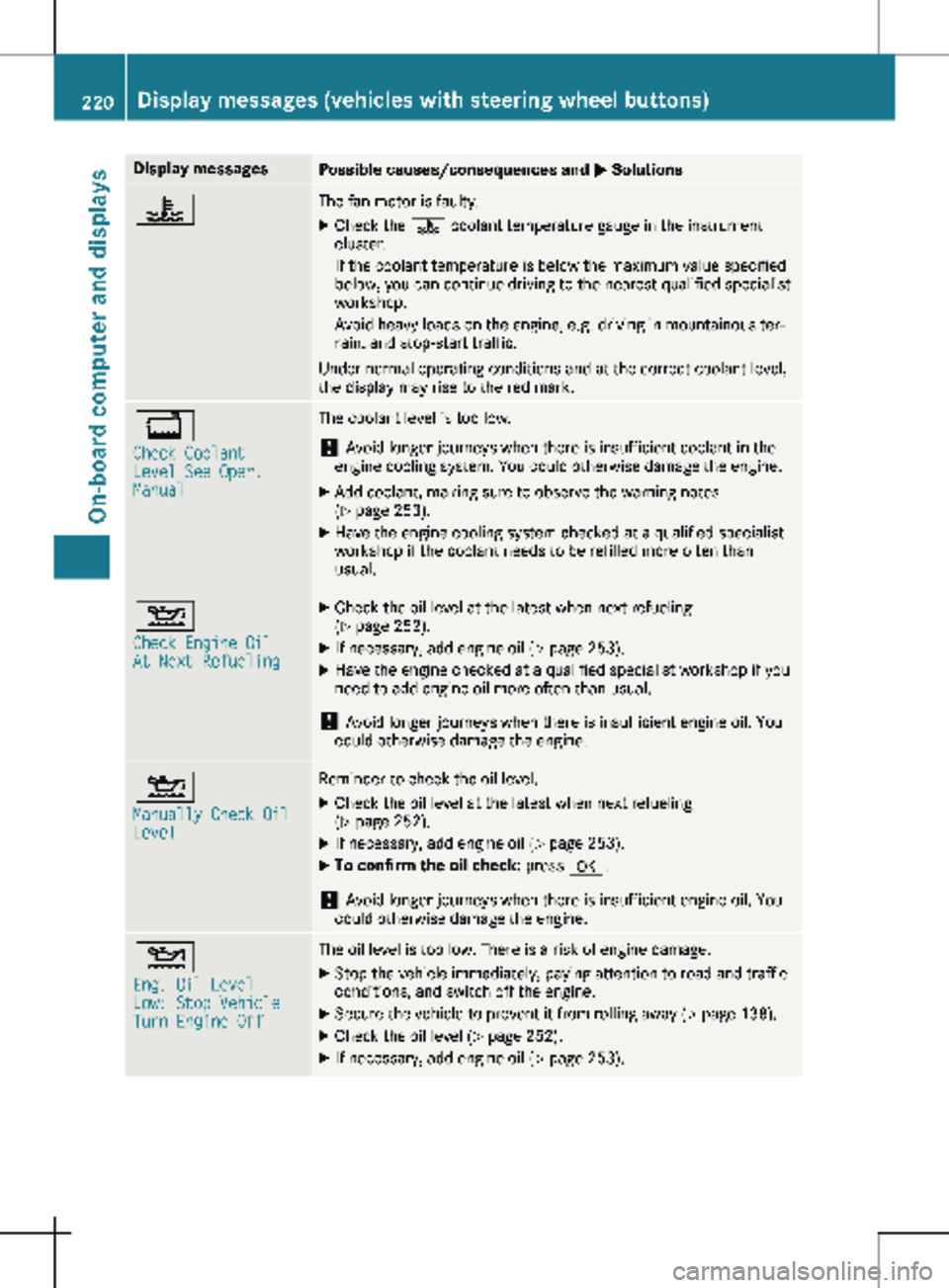
Display messages
Possible causes/consequences and
M Solutions? The fan motor is faulty.
X Check the ? coolant temperature gauge in the instrument
cluster.
If the coolant temperature is below the maximum value specified
below, you can continue driving to the nearest qualified specialist
workshop.
Avoid heavy loads on the engine, e.g. driving in mountainous ter-
rain, and stop-start traffic.
Under normal operating conditions and at the correct coolant level,
the display may rise to the red mark. +
Check Coolant
Level See Oper.
Manual The coolant level is too low.
! Avoid longer journeys when there is insufficient coolant in the
engine cooling system. You could otherwise damage the engine.
X Add coolant, making sure to observe the warning notes
(Y page 253).
X Have the engine cooling system checked at a qualified specialist
workshop if the coolant needs to be refilled more often than
usual. 4
Check Engine Oil
At Next Refueling X
Check the oil level at the latest when next refueling
(Y page
252).
X If necessary, add engine oil (Y page
253).
X Have the engine checked at a qualified specialist workshop if you
need to add engine oil more often than usual.
! Avoid longer journeys when there is insufficient engine oil. You
could otherwise damage the engine. 4
Manually Check Oil
Level Reminder to check the oil level.
X Check the oil level at the latest when next refueling
(Y page
252).
X If necessary, add engine oil (Y page
253).
X To confirm the oil check: press a.
! Avoid longer journeys when there is insufficient engine oil. You
could otherwise damage the engine. 4
Eng. Oil Level
Low: Stop Vehicle
Turn Engine Off The oil level is too low. There is a risk of engine damage.
X Stop the vehicle immediately, paying attention to road and traffic
conditions, and switch off the engine.
X Secure the vehicle to prevent it from rolling away ( Y page
138).
X Check the oil level ( Y page
252).
X If necessary, add engine oil (Y page
253).220
Display messages (vehicles with steering wheel buttons)
On-board computer and displays
Page 223 of 320
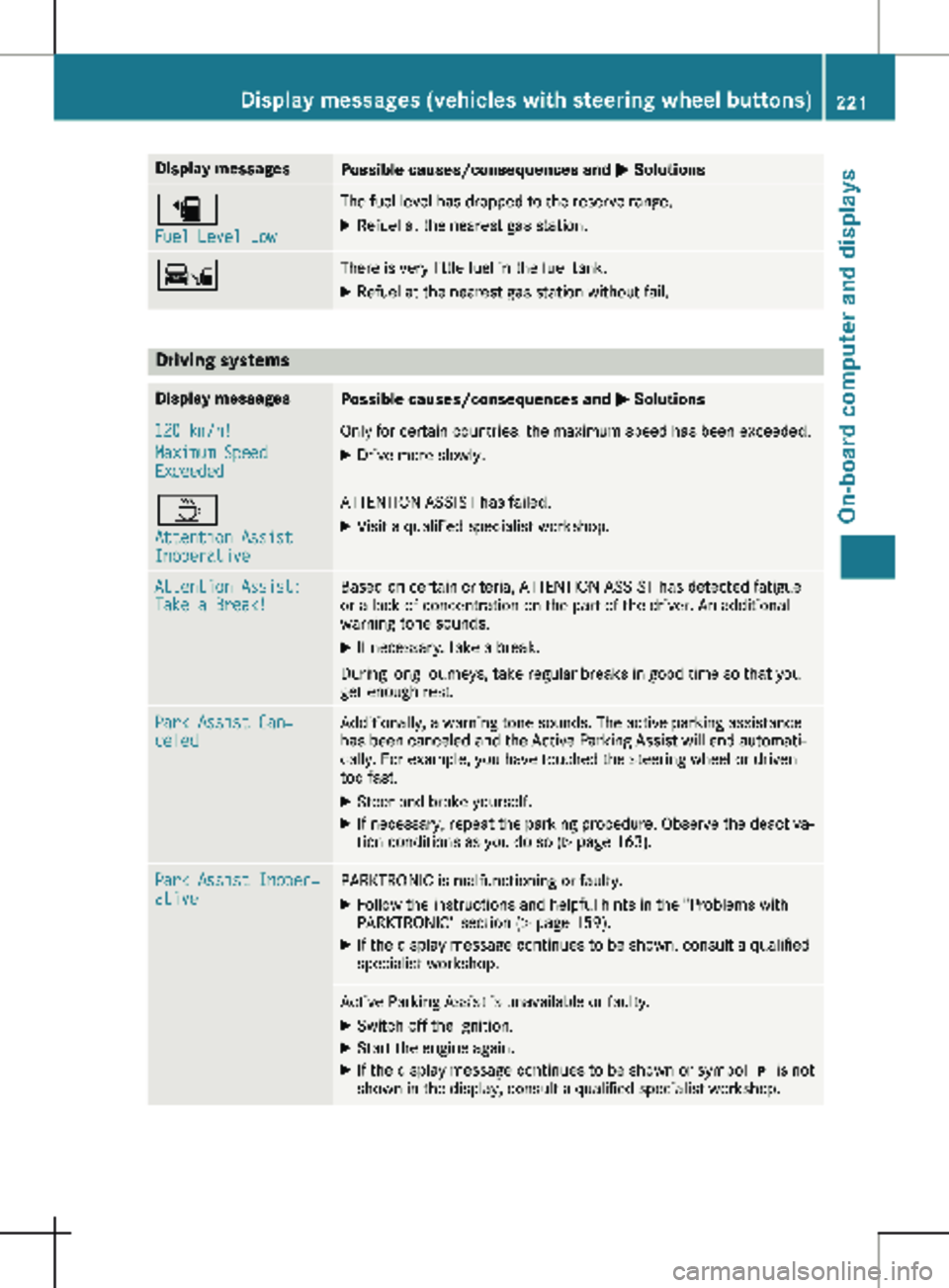
Display messages
Possible causes/consequences and
M Solutionsæ
Fuel Level Low The fuel level has dropped to the reserve range.
X Refuel at the nearest gas station. Ï There is very little fuel in the fuel tank.
X Refuel at the nearest gas station without fail. Driving systems
Display messages
Possible causes/consequences and
M Solutions120 km/h!
Maximum Speed
Exceeded Only for certain countries: the maximum speed has been exceeded.
X Drive more slowly. À
Attention Assist
Inoperative ATTENTION ASSIST has failed.
X Visit a qualified specialist workshop. Attention Assist:
Take a Break! Based on certain criteria, ATTENTION ASSIST has detected fatigue
or a lack of concentration on the part of the driver. An additional
warning tone sounds.
X If necessary, take a break.
During long journeys, take regular breaks in good time so that you
get enough rest. Park Assist Can‐
celed Additionally, a warning tone sounds. The active parking assistance
has been canceled and the Active Parking Assist will end automati-
cally. For example, you have touched the steering wheel or driven
too fast.
X Steer and brake yourself.
X If necessary, repeat the parking procedure. Observe the deactiva-
tion conditions as you do so ( Y page
163).Park Assist Inoper‐
ative PARKTRONIC is malfunctioning or faulty.
X Follow the instructions and helpful hints in the "Problems with
PARKTRONIC" section
(Y page 159).
X If the display message continues to be shown, consult a qualified
specialist workshop. Active Parking Assist is unavailable or faulty.
X Switch off the ignition.
X Start the engine again.
X If the display message continues to be shown or symbol j is not
shown in the display, consult a qualified specialist workshop. Display messages (vehicles with steering wheel buttons)
221
On-board computer and displays Z
Page 224 of 320

Display messages
Possible causes/consequences and
M SolutionsCollision Preven‐
tion Assist Inoper‐
ative COLLISION PREVENTION ASSIST PLUS is not available due to a mal-
function.
X Visit a qualified specialist workshop. Collision Preven‐
tion Assist Cur‐
rently Unavail.
See Oper. Manual COLLISION PREVENTION ASSIST PLUS is temporarily inoperative.
Possible causes:
R The sensors in the front bumper are dirty.
R The function is impaired due to heavy rain or snow.
R The radar sensor system is temporarily inoperative, e.g. due to
electromagnetic radiation emitted by nearby TV or radio stations
or other sources of electromagnetic radiation.
R The system is outside the operating temperature range.
R The on-board voltage is too low.
Once the causes listed above no longer apply, the display message
goes out and COLLISION PREVENTION ASSIST is operational again.
If the display message does not disappear:
X Pull over and stop the vehicle, paying attention to road and traffic
conditions.
X Secure the vehicle to prevent it from rolling away (Y page 138).
X Switch off the engine.
X Clean the sensors in the front bumper (Y page
267).
X Restart the engine. Lane Keeping
Assist Inoperative Lane Keeping Assist is faulty.
X Visit a qualified specialist workshop. Lane Keeping
Assist Currently
Unavail. See Oper.
Manual Lane Keeping Assist is deactivated and temporarily inoperative.
Possible causes:
R The windshield is dirty in the camera's field of vision.
R Visibility is impaired due to heavy rain, snow or fog.
R There are no lane markings for an extended period.
R The lane markings are worn away, dark or covered, e.g. by dirt or
snow.
Once the causes listed above no longer apply, the display message
goes out and Lane Keeping Assist is operational again.
If the display message does not disappear:
X Pull over and stop the vehicle, paying attention to road and traffic
conditions.
X Secure the vehicle to prevent it from rolling away (Y page
138).
X Clean the windshield.222
Display messages (vehicles with steering wheel buttons)
On-board computer and displays
Page 225 of 320

Display messages
Possible causes/consequences and
M SolutionsCruise Control
- - - mph A condition for activating cruise control has not been met.
You have tried to store a speed below
20 mph (30 km/h) for exam-
ple.
X If conditions permit, drive faster than 20 mph (30 km/h) and
store the speed.
X Check the activation conditions for cruise control (Y page
147).Blind Spot Assist
Inoperative Blind Spot Assist is faulty.
X Visit a qualified specialist workshop. Blind Spot Assist
Currently Unavail.
See Operator's Man‐
ual Blind Spot Assist is temporarily inoperative. Possible causes:
R You have attached a trailer.
R The sensors in the rear bumper are dirty.
R The function is impaired due to heavy rain or snow.
R The radar sensor system is temporarily inoperative, e.g. due to
electromagnetic radiation emitted by nearby TV or radio stations
or other sources of electromagnetic radiation.
R The system is outside the operating temperature range.
Once the causes listed above no longer apply, the display message
goes out and Blind Spot Assist is operational again.
If the display message does not disappear:
X Pull over and stop the vehicle, paying attention to road and traffic
conditions.
X Secure the vehicle to prevent it from rolling away ( Y page
138).
X Switch off the engine.
X Clean the sensors in the rear bumper (Y page
267).
X Restart the engine. Display messages (vehicles with steering wheel buttons)
223
On-board computer and displays Z
Page 226 of 320
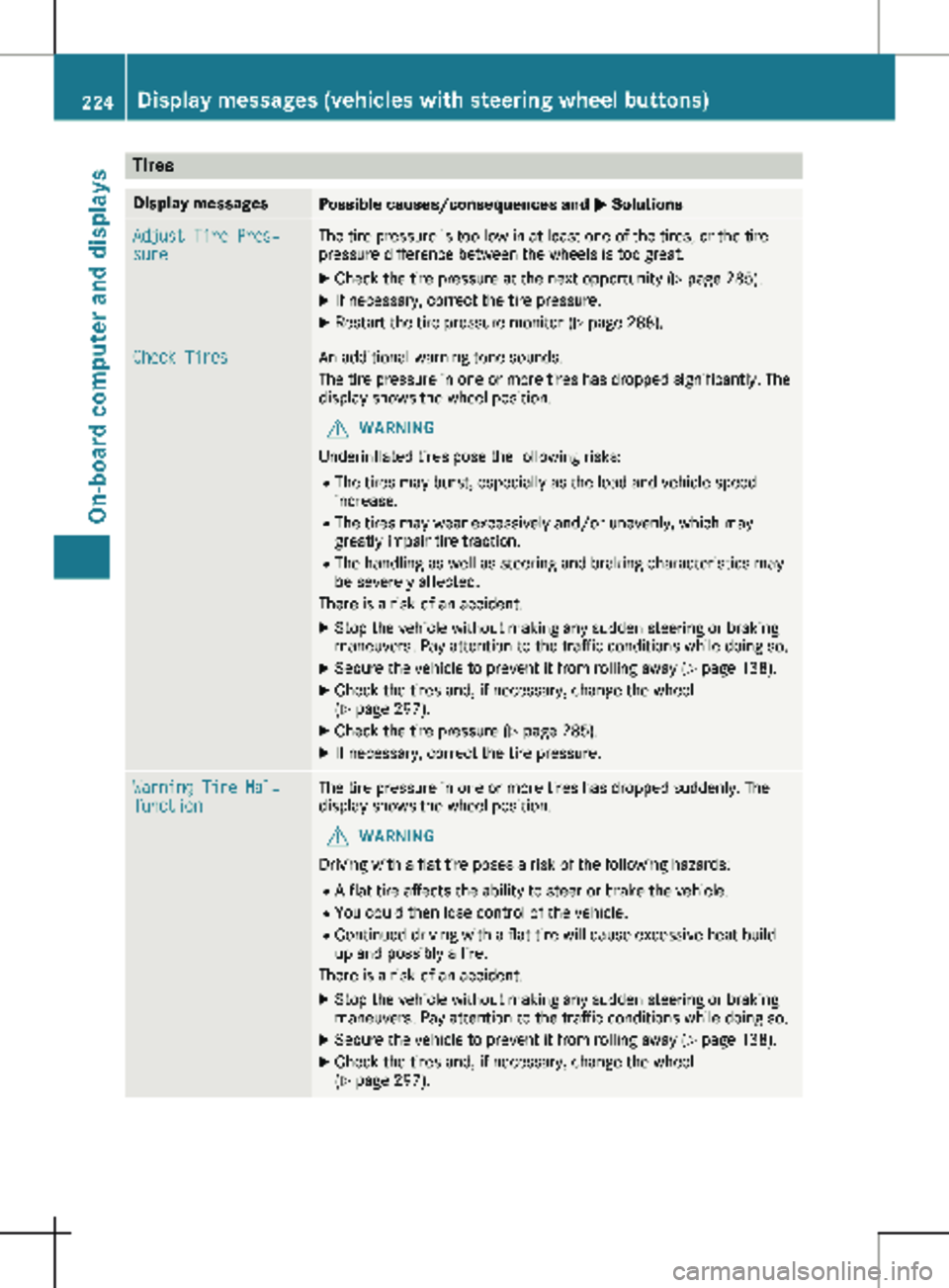
Tires
Display messages
Possible causes/consequences and
M SolutionsAdjust Tire Pres‐
sure The tire pressure is too low in at least one of the tires, or the tire
pressure difference between the wheels is too great.
X Check the tire pressure at the next opportunity (Y page 285).
X If necessary, correct the tire pressure.
X Restart the tire pressure monitor ( Y page
288).Check Tires An additional warning tone sounds.
The tire pressure in one or more tires has dropped significantly. The
display shows the wheel position.
G WARNING
Underinflated tires pose the following risks:
R The tires may burst, especially as the load and vehicle speed
increase.
R The tires may wear excessively and/or unevenly, which may
greatly impair tire traction.
R The handling as well as steering and braking characteristics may
be severely affected.
There is a risk of an accident.
X Stop the vehicle without making any sudden steering or braking
maneuvers. Pay attention to the traffic conditions while doing so.
X Secure the vehicle to prevent it from rolling away (Y page
138).
X Check the tires and, if necessary, change the wheel
(Y page
297).
X Check the tire pressure (Y page
285).
X If necessary, correct the tire pressure. Warning Tire Mal‐
function The tire pressure in one or more tires has dropped suddenly. The
display shows the wheel position.
G WARNING
Driving with a flat tire poses a risk of the following hazards: R A flat tire affects the ability to steer or brake the vehicle.
R You could then lose control of the vehicle.
R Continued driving with a flat tire will cause excessive heat build-
up and possibly a fire.
There is a risk of an accident.
X Stop the vehicle without making any sudden steering or braking
maneuvers. Pay attention to the traffic conditions while doing so.
X Secure the vehicle to prevent it from rolling away (Y page
138).
X Check the tires and, if necessary, change the wheel
(Y page
297).224
Display messages (vehicles with steering wheel buttons)
On-board computer and displays
Page 227 of 320

Display messages
Possible causes/consequences and
M SolutionsTire Pressure Moni‐
tor Currently
Unavailable Due to a source of radio interference, no signals can be received
from the wheel sensors. The tire pressure monitor is temporarily
malfunctioning.
The tire pressure monitor restarts automatically as soon as the
problem has been solved. Wheel Sensor(s)
Missing There is no signal from the tire pressure sensor of one or several
wheels. The pressure of the affected tire is not shown in the display.
X Have the faulty tire pressure sensor replaced at a qualified spe-
cialist workshop. Tire Pressure Moni‐
tor Inoperative No
Wheel Sensors The wheels installed do not have suitable tire pressure sensors. The
tire pressure monitor is deactivated.
X Install wheels with suitable tire pressure sensors.
The tire pressure monitor is activated automatically after driving
for a few minutes. Tire Press. Moni‐
tor Inoperative The tire pressure monitor is malfunctioning.
X Visit a qualified specialist workshop. Vehicle
Display messages
Possible causes/consequences and
M SolutionsShift to 'P' or
'N' to Start Engine You have attempted to start the engine in transmission position
k
or h.
X Shift the transmission to position j or i.Auxiliary Battery
Malfunction The auxiliary battery for the transmission is no longer being
charged.
X Visit a qualified specialist workshop. Apply Brake to
Shift from 'P' You attempted to shift the transmission to position
h, k or i
without depressing the brake pedal.
X Depress the brake pedal. Perm. N Activated
Risk of Rolling An additional warning tone sounds. The transmission has been shif-
ted to position i when the vehicle is coasting or being driven.
X Stop the vehicle by depressing the brake pedal and when the
vehicle is stationary shift the transmission to position j.
X Continue driving by shifting the transmission to position h or
k. Risk of Rolling:
Transmission Not
in P An additional warning tone sounds. The driver's door is open and
the transmission is in position k, i or h.
X Shift the transmission to position j.
X Secure the vehicle to prevent it from rolling away ( Y page 138).Display messages (vehicles with steering wheel buttons)
225
On-board computer and displays Z
Page 228 of 320
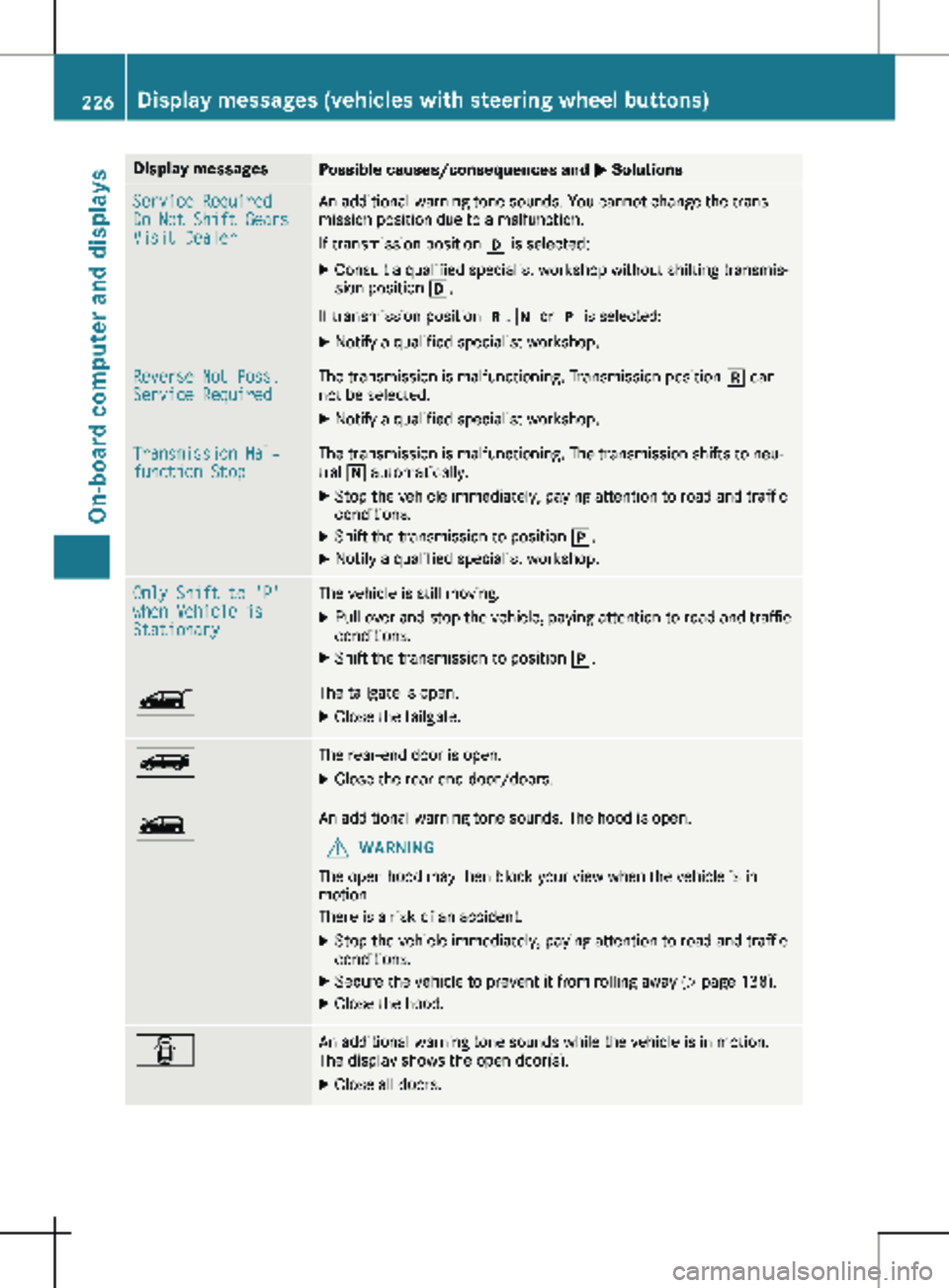
Display messages
Possible causes/consequences and
M SolutionsService Required
Do Not Shift Gears
Visit Dealer An additional warning tone sounds. You cannot change the trans-
mission position due to a malfunction.
If transmission position h is selected:
X Consult a qualified specialist workshop without shifting transmis-
sion position h.
If transmission position k, i or j is selected:
X Notify a qualified specialist workshop. Reverse Not Poss.
Service Required The transmission is malfunctioning. Transmission position k can-
not be selected.
X Notify a qualified specialist workshop. Transmission Mal‐
function Stop The transmission is malfunctioning. The transmission shifts to neu-
tral i automatically.
X Stop the vehicle immediately, paying attention to road and traffic
conditions.
X Shift the transmission to position j.
X Notify a qualified specialist workshop. Only Shift to 'P'
when Vehicle is
Stationary The vehicle is still moving.
X Pull over and stop the vehicle, paying attention to road and traffic
conditions.
X Shift the transmission to position j.Ò The tailgate is open.
X Close the tailgate. Ñ The rear-end door is open.
X Close the rear-end door/doors. Ó An additional warning tone sounds. The hood is open.
G WARNING
The open hood may then block your view when the vehicle is in
motion.
There is a risk of an accident.
X Stop the vehicle immediately, paying attention to road and traffic
conditions.
X Secure the vehicle to prevent it from rolling away (Y page 138).
X Close the hood. C An additional warning tone sounds while the vehicle is in motion.
The display shows the open door(s).
X Close all doors.226
Display messages (vehicles with steering wheel buttons)
On-board computer and displays