key MERCEDES-BENZ METRIS 2020 MY20 Operator’s Manual
[x] Cancel search | Manufacturer: MERCEDES-BENZ, Model Year: 2020, Model line: METRIS, Model: MERCEDES-BENZ METRIS 2020Pages: 320, PDF Size: 26.38 MB
Page 74 of 320
X
To unlock the sliding doors and the tail-
gate or rear-end door only
: press the 5
button.
The turn signals flash once.
i If you do not open the vehicle within
approximately 40 seconds of unlocking, the
vehicle will lock again. The anti-theft protec-
tion is activated again.
X To lock centrally: press the & button.
The indicator lamps flash three times if:
R the anti-theft protection is armed.
R all the doors and the liftgate or rear-end
door are closed
X Check the locking knobs on all the doors.
The locking knobs must all be in the lowered
position.
The key's factory setting enables you to cen-
trally lock and unlock the following:
R the driver's door and co-driver's door
R the sliding doors
R the tailgate or rear-end door
In an emergency, the driver's door can also be
unlocked manually using the mechanical key
(Y page
72).
You can also set an audible signal to confirm
that the vehicle has been locked. The audible
locking-verification signal can be switched on/
off:
R using the on-board computer on vehicles
with steering wheel buttons ( Y page 194)
R at a specialist qualified workshop for vehi-
cles without steering wheel buttons
After unlocking using the remote control, the
surround lighting also goes on in the dark. For
vehicles with steering wheel buttons, the sur-
round lighting can be activated and deactiva-
ted in the on-board computer ( Y page 193).Changing the settings of the locking
system
You can change the settings of the locking
system. Press the % button to unlock:
R the driver's and co-driver's door (Cargo Van)
or
R the driver's door (Passenger Van)
X To change the setting: press and hold
down the % and & buttons simultane- ously until the indicator lamp flashes twice
(Y page
71).
If the setting of the locking system is changed
within the signal range of the vehicle, press
the & or % button to:
R lock or
R unlock the vehicle
The key now functions as follows:
X To unlock the driver's door or front
doors: press the % button once.
X To unlock centrally: briefly press the %
button twice.
X To lock centrally: press the & button.
X To restore factory settings: press and
hold down the % and & buttons
simultaneously until the indicator lamp
flashes twice ( Y page
71).
The key unlocks the vehicle centrally again. Mechanical key
General notes If the vehicle can no longer be locked or
unlocked with the key, use the mechanical
key.
The anti-theft alarm system (ATA) is triggered
when you unlock and open the vehicle using
the mechanical key
(Y page 70).
The alarm can be stopped in the following two
ways:
X Press the % or & button on the key.
or X Insert the key into the ignition lock.
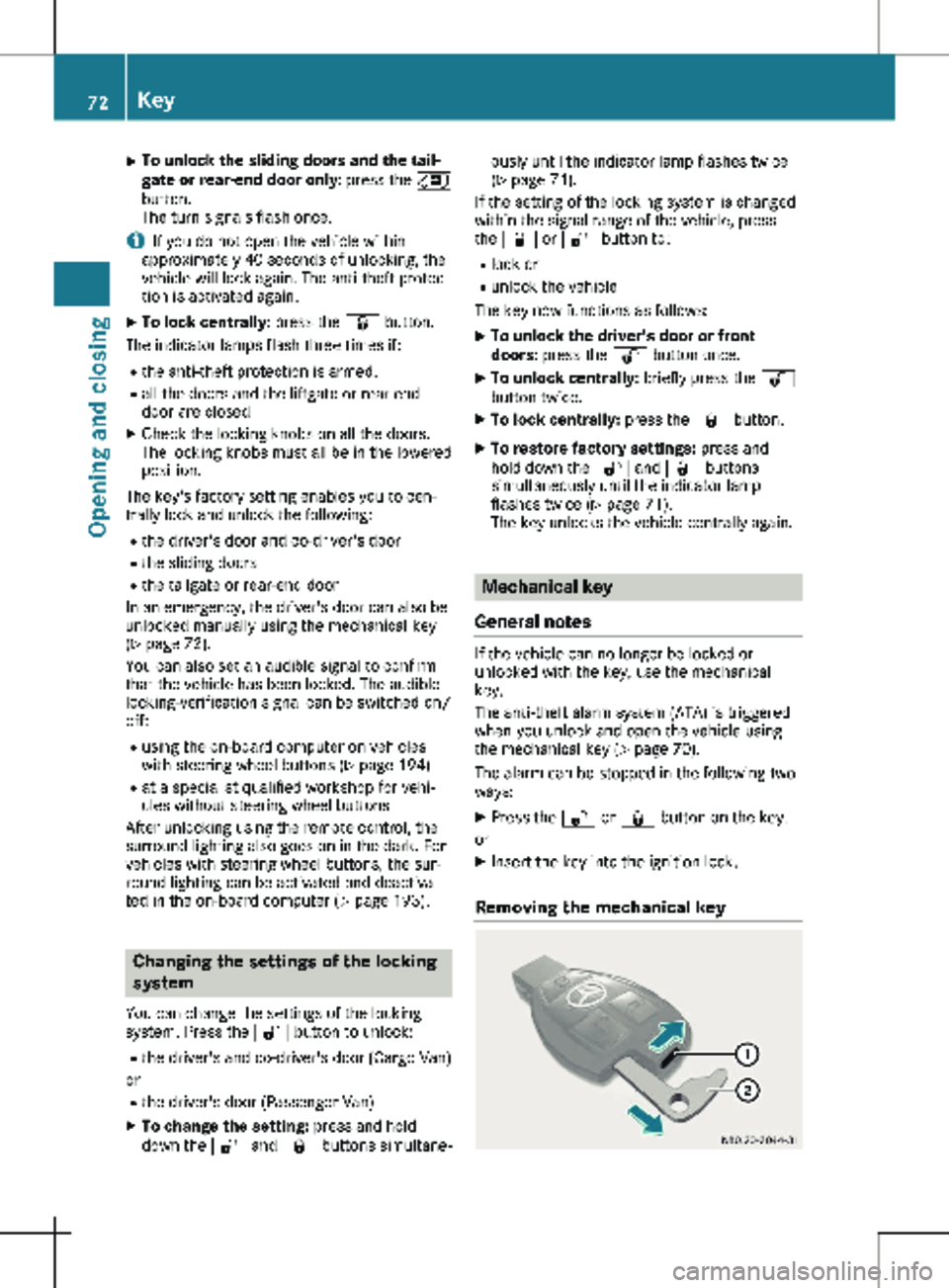
Removing the mechanical key 72
Key
Opening and closing
Page 75 of 320
X
Slide release catch : in the direction of the
arrow and, at the same time, remove
mechanical key ; from the key completely.
Inserting the mechanical key X
Push mechanical key ; completely into the
key until it engages and release catch : is
back in its basic position.
Unlocking/locking the vehicle using
the mechanical key The door lock for unlocking in an emergency is
on the driver’s door.
X To unlock the driver's door: insert the
mechanical key fully into the driver's door
lock and turn it counter-clockwise.
The driver’s door is unlocked.
X To lock the vehicle: lock all doors except
the driver's door from the inside. To do this,
push down the door-locking knobs.
X Insert the mechanical key fully into the driv-
er's door lock and turn it clockwise.
The driver's door is locked. Battery of the key
Important safety notes G
WARNING
Batteries contain toxic and corrosive sub-
stances. If batteries are swallowed, it can
result in severe health problems. There is a
risk of fatal injury.
Keep batteries out of the reach of children.
If a battery is swallowed, seek medical
attention immediately. H
Environmental note Batteries contain pollutants.
It is illegal to dispose of
them with the household
rubbish. They must be col-
lected separately and dis-
posed of in an environmen- tally responsible recycling
system. Dispose of batteries in an
environmentally responsible
manner. Take discharged
batteries to a qualified spe-
cialist workshop or to a col-
lection point for used bat-
teries.
Mercedes-Benz recommends that you have
the battery changed at a qualified specialist
workshop.
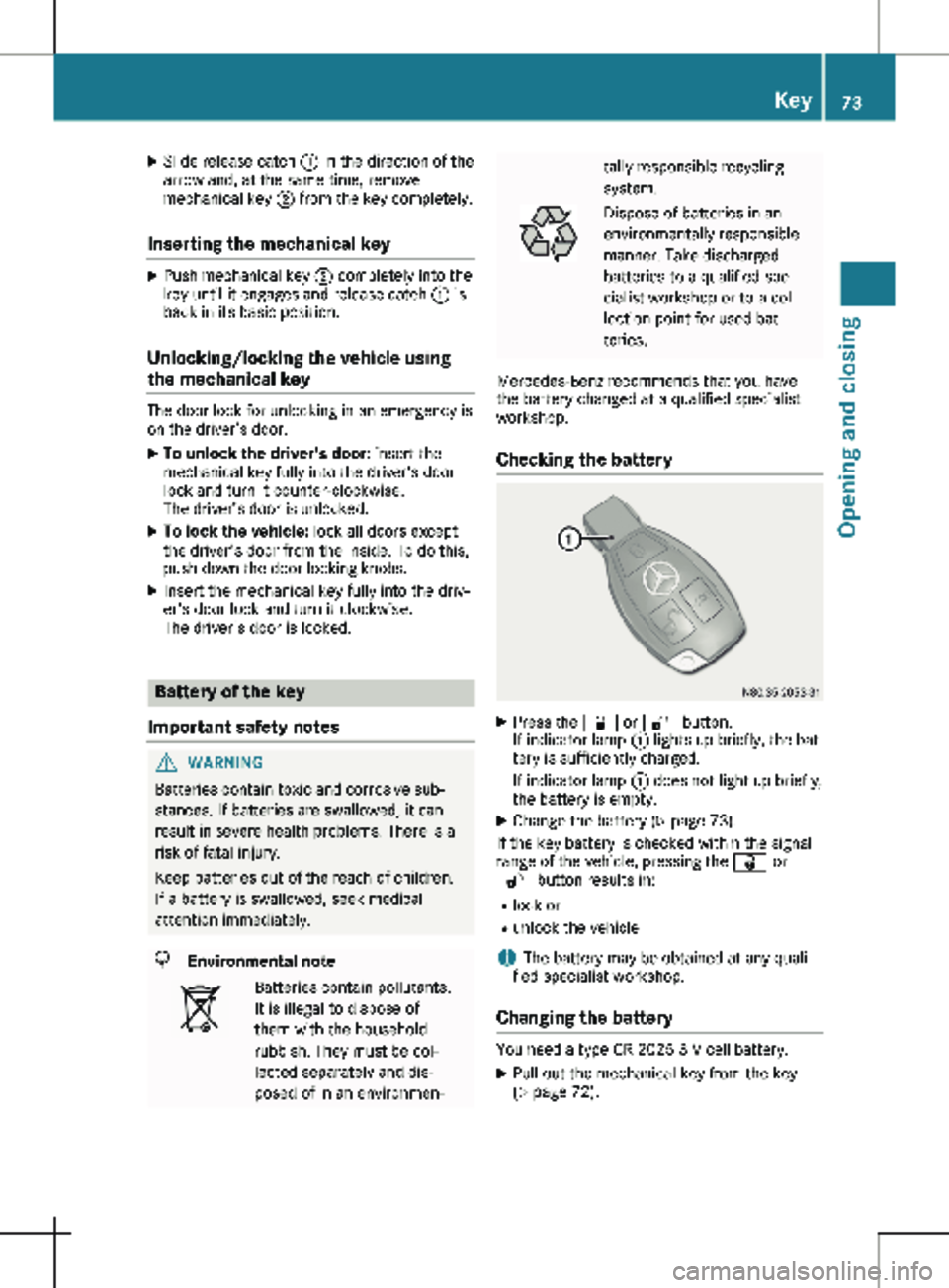
Checking the battery X
Press the & or % button.
If indicator lamp : lights up briefly, the bat-
tery is sufficiently charged.
If indicator lamp : does not light up briefly,
the battery is empty.
X Change the battery ( Y page 73).
If the key battery is checked within the signal
range of the vehicle, pressing the & or
% button results in:
R lock or
R unlock the vehicle
i The battery may be obtained at any quali-
fied specialist workshop.
Changing the battery You need a type CR 2025 3 V cell battery.
X Pull out the mechanical key from the key
(Y page
72). Key
73
Opening and closing Z
Page 76 of 320
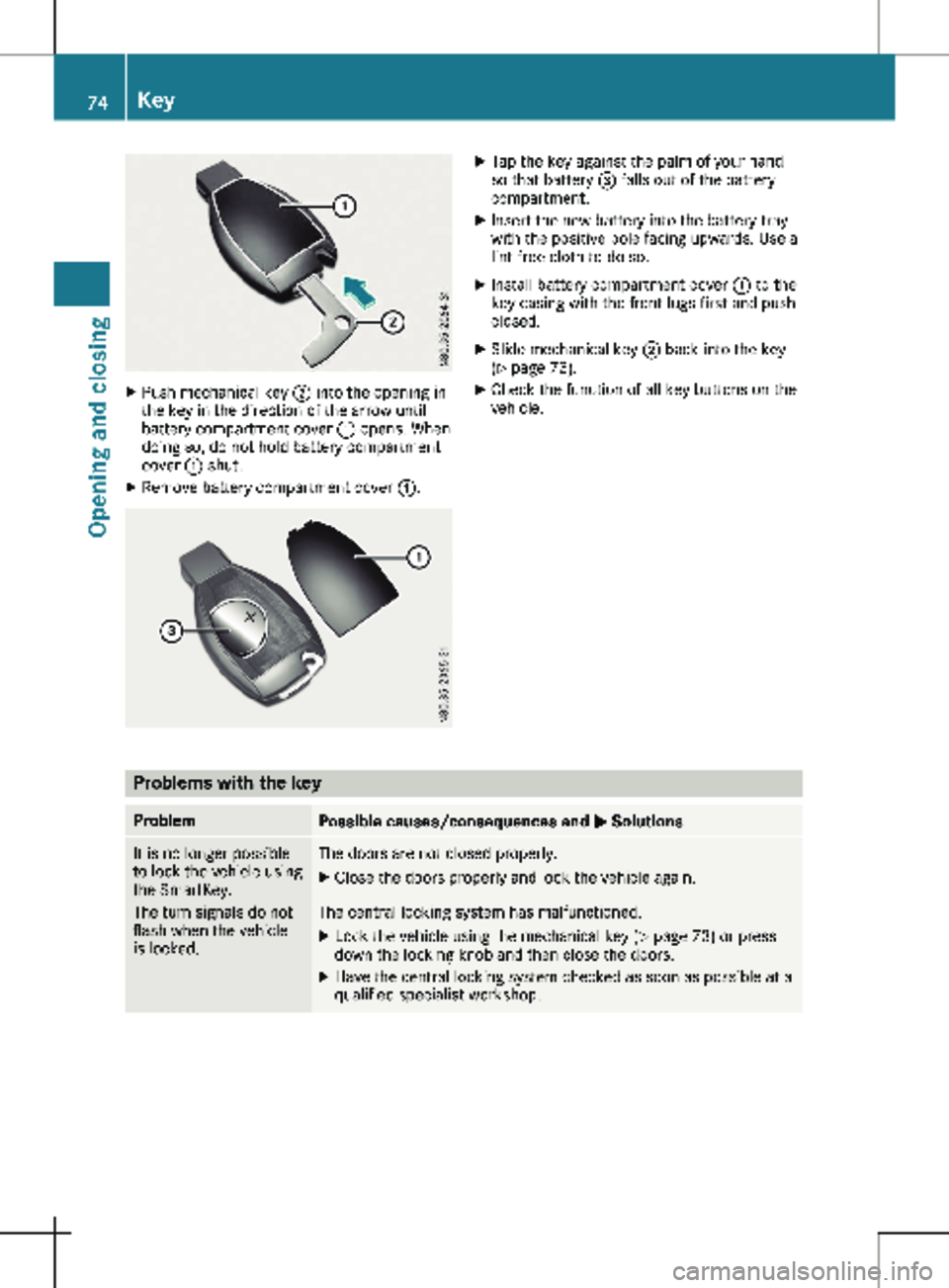
X
Push mechanical key ; into the opening in
the key in the direction of the arrow until
battery compartment cover : opens. When
doing so, do not hold battery compartment
cover : shut.
X Remove battery compartment cover :. X
Tap the key against the palm of your hand
so that battery = falls out of the battery
compartment.
X Insert the new battery into the battery tray
with the positive pole facing upwards. Use a
lint-free cloth to do so.
X Install battery compartment cover : to the
key casing with the front lugs first and push
closed.
X Slide mechanical key ; back into the key
( Y page
73).
X Check the function of all key buttons on the
vehicle. Problems with the key
Problem
Possible causes/consequences and
M SolutionsIt is no longer possible
to lock the vehicle using
the SmartKey.
The turn signals do not
flash when the vehicle
is locked. The doors are not closed properly.
X Close the doors properly and lock the vehicle again. The central locking system has malfunctioned.
X Lock the vehicle using the mechanical key (Y page
73) or press
down the locking knob and then close the doors.
X Have the central locking system checked as soon as possible at a
qualified specialist workshop.74
Key
Opening and closing
Page 77 of 320
Problem
Possible causes/consequences and
M SolutionsIt is no longer possible
to lock or unlock the
vehicle using the Smart-
Key. The SmartKey battery is weak or discharged.
X Point the tip of the SmartKey at the driver's door handle from
very close range and press the % or & button.
If this does not work:
X Replace the SmartKey battery ( Y page 73).
or
X Lock or unlock the vehicle using the mechanical key ( Y page
73).The SmartKey is faulty.
X Lock the vehicle with the mechanical key (Y page
73).
X Have the SmartKey checked at a qualified specialist workshop. The engine cannot be
started using the Smart-
Key. The on-board voltage is too low.
X Switch off all non-essential consumers, such as interior lighting,
and try to start the engine again.
If this does not work:
X Check the starter battery and charge it if necessary
(Y page
262).
or
X Jump-start the vehicle ( Y page
272).
or
X Consult a qualified specialist workshop. You have lost a Smart-
Key. X
Have the SmartKey deactivated at a qualified specialist work-
shop.
X Report the loss immediately to the vehicle insurers.
X If necessary, have the mechanical locks replaced. You have lost the
mechanical key. X
Report the loss immediately to the vehicle insurers.
X If necessary, have the mechanical locks replaced. Central locking
Important safety notes
G
WARNING
If children are left unsupervised in the vehi-
cle, they could, in particular:
R open doors, thereby endangering other
persons or road users.
R get out and be struck by oncoming traffic.
R operate vehicle equipment and become
trapped, for example. In addition, children could set the vehicle in
motion, for example, if they:
R release the parking brake.
R change the transmission position.
R start the vehicle.
There is a risk of accident and injury.
Never leave children unsupervised in the
vehicle.
When leaving the vehicle, always take the
SmartKey with you and lock the vehicle.
Keep the SmartKey out of the reach of chil-
dren. Central locking
75
Opening and closing Z
Page 78 of 320
G
WARNING
If persons, particularly children are subjec-
ted to prolonged exposure to extreme heat
or cold, there is a risk of injury, possibly
even fatal. Never leave children unattended
in the vehicle.
You can open a locked door from the inside at
any time. For the sliding doors, the child-proof
locks must be deactivated. Centrally locking and unlocking the
vehicle from the inside
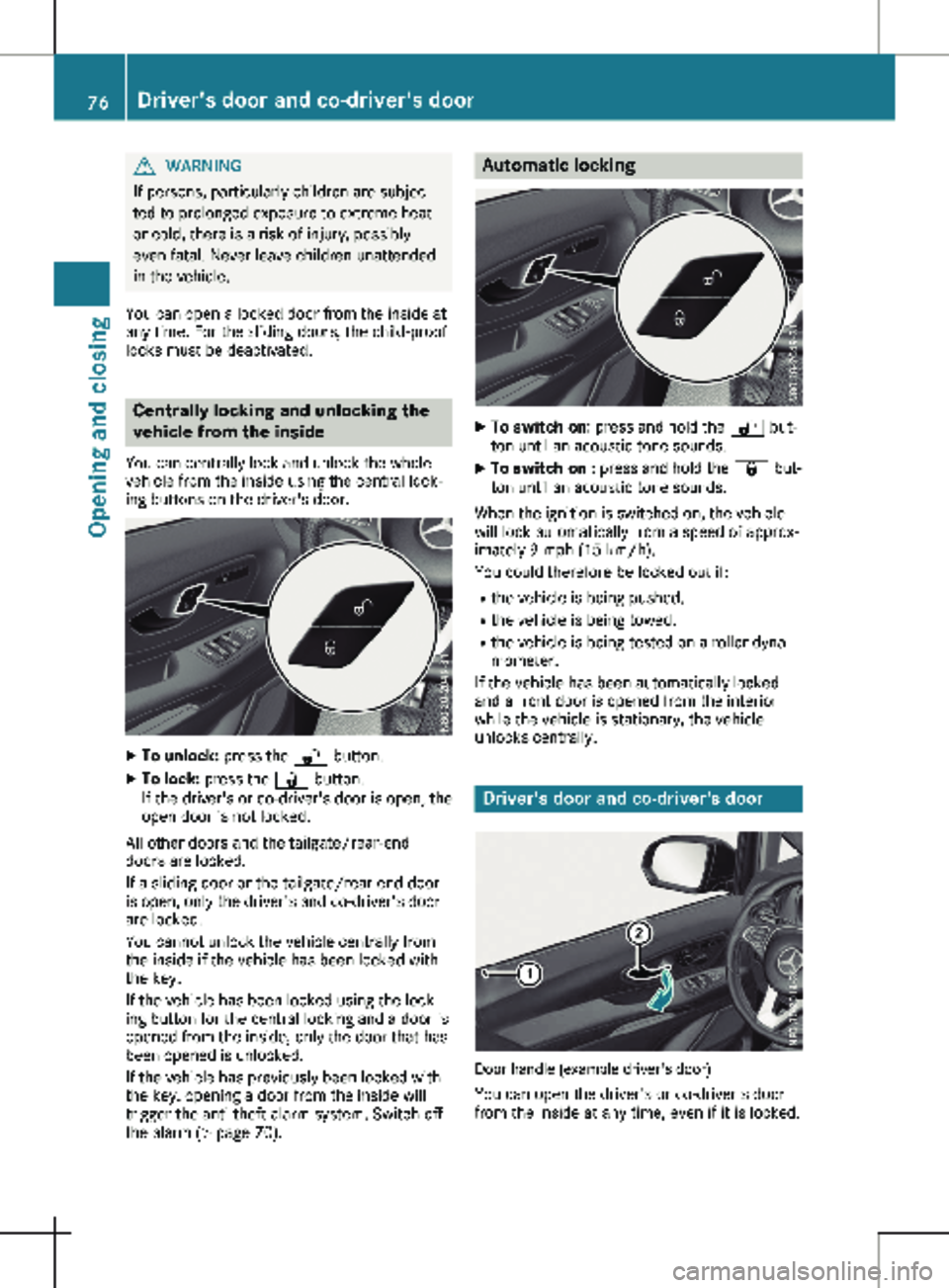
You can centrally lock and unlock the whole
vehicle from the inside using the central lock-
ing buttons on the driver's door. X
To unlock: press the % button.
X To lock: press the & button.
If the driver's or co-driver's door is open, the
open door is not locked.
All other doors and the tailgate/rear-end
doors are locked.
If a sliding door or the tailgate/rear-end door
is open, only the driver's and co-driver's door
are locked.
You cannot unlock the vehicle centrally from
the inside if the vehicle has been locked with
the key.
If the vehicle has been locked using the lock-
ing button for the central locking and a door is
opened from the inside, only the door that has
been opened is unlocked.
If the vehicle has previously been locked with
the key, opening a door from the inside will
trigger the anti-theft alarm system. Switch off
the alarm
(Y page 70). Automatic locking
X
To switch on: press and hold the % but-
ton until an acoustic tone sounds.
X To switch on : press and hold the & but-
ton until an acoustic tone sounds.
When the ignition is switched on, the vehicle
will lock automatically from a speed of approx-
imately
9 mph (15 km/h).
You could therefore be locked out if:
R the vehicle is being pushed.
R the vehicle is being towed.
R the vehicle is being tested on a roller dyna-
mometer.
If the vehicle has been automatically locked
and a front door is opened from the interior
while the vehicle is stationary, the vehicle
unlocks centrally. Driver's door and co-driver's door
Door handle (example driver's door)
You can open the driver's or co-driver's door
from the inside at any time, even if it is locked. 76
Driver's door and co-driver's door
Opening and closing
Page 80 of 320
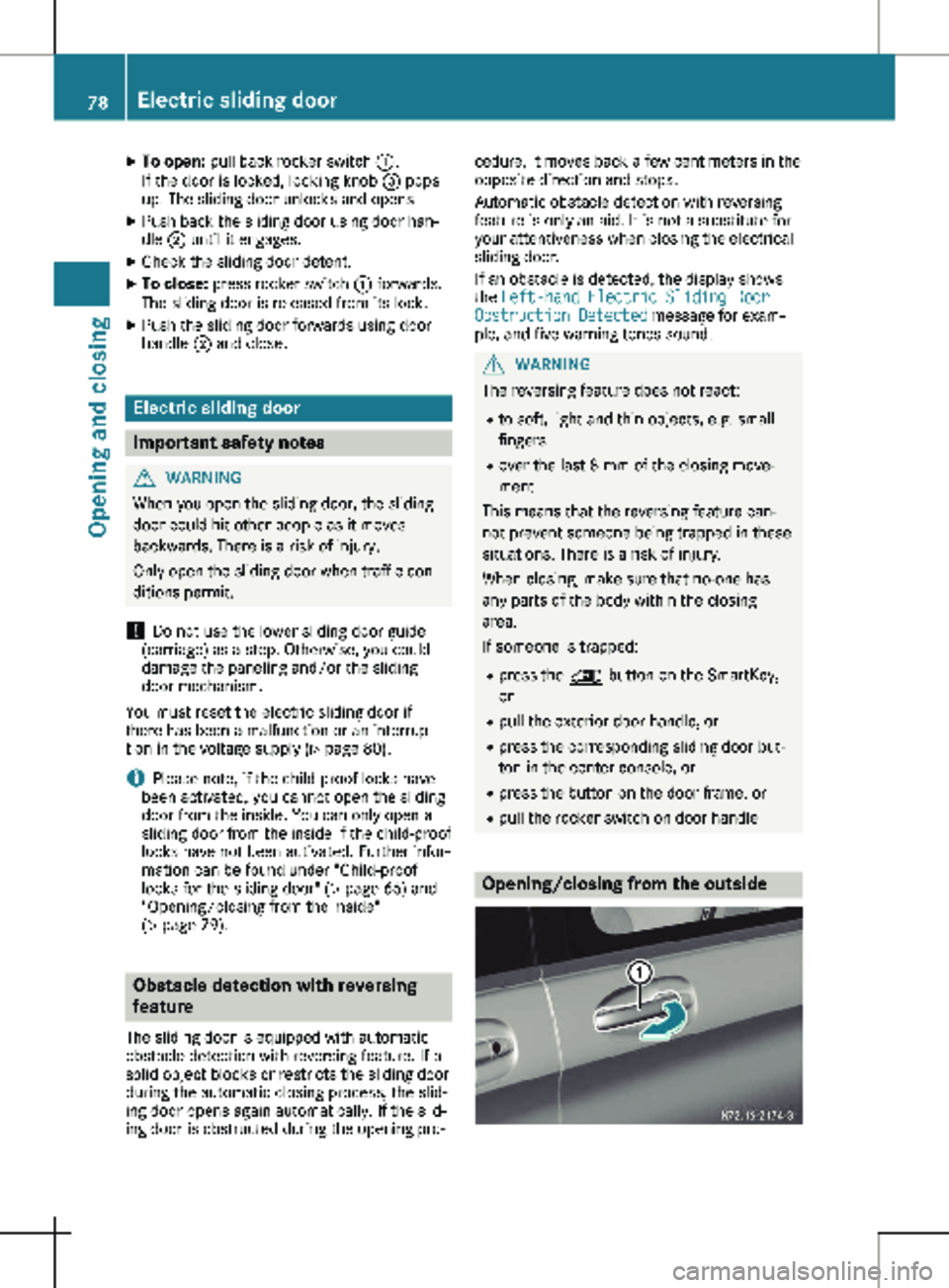
X
To open: pull back rocker switch :.
If the door is locked, locking knob = pops
up. The sliding door unlocks and opens.
X Push back the sliding door using door han-
dle ; until it engages.
X Check the sliding door detent.
X To close: press rocker switch : forwards.
The sliding door is released from its lock.
X Push the sliding door forwards using door
handle ; and close. Electric sliding door
Important safety notes
G
WARNING
When you open the sliding door, the sliding
door could hit other people as it moves
backwards. There is a risk of injury.
Only open the sliding door when traffic con-
ditions permit.
! Do not use the lower sliding door guide
(carriage) as a step. Otherwise, you could
damage the paneling and/or the sliding
door mechanism.
You must reset the electric sliding door if
there has been a malfunction or an interrup-
tion in the voltage supply
(Y page 80).
i Please note, if the child-proof locks have
been activated, you cannot open the sliding
door from the inside. You can only open a
sliding door from the inside if the child-proof
locks have not been activated. Further infor-
mation can be found under "Child-proof
locks for the sliding door" (Y page 66) and
"Opening/closing from the inside"
(Y page 79). Obstacle detection with reversing
feature
The sliding door is equipped with automatic
obstacle detection with reversing feature. If a
solid object blocks or restricts the sliding door
during the automatic closing process, the slid-
ing door opens again automatically. If the slid-
ing door is obstructed during the opening pro- cedure, it moves back a few centimeters in the
opposite direction and stops.
Automatic obstacle detection with reversing
feature is only an aid. It is not a substitute for
your attentiveness when closing the electrical
sliding door.
If an obstacle is detected, the display shows
the Left-hand Electric Sliding Door
Obstruction Detected message for exam-
ple, and five warning tones sound. G
WARNING
The reversing feature does not react:
R to soft, light and thin objects, e.g. small
fingers
R over the last 8 mm of the closing move-
ment
This means that the reversing feature can-
not prevent someone being trapped in these
situations. There is a risk of injury.
When closing, make sure that no-one has
any parts of the body within the closing
area.
If someone is trapped:
R press the 5 button on the SmartKey,
or
R pull the exterior door handle, or
R press the corresponding sliding door but-
ton in the center console, or
R press the button on the door frame, or
R pull the rocker switch on door handle Opening/closing from the outside78
Electric sliding door
Opening and closing
Page 81 of 320
The sliding door is equipped with an active
retainer, which engages the door at the end
stop when opened.
If the vehicle is equipped with two electric slid-
ing doors; the 5 button on the SmartKey
can only be used to open or close one of the
two sliding doors
(Y page 80).
X To open: pull door handle : in the direc-
tion of the arrow.
or X Press the 5 button on the SmartKey for
longer than
0.5 seconds.
The sliding door unlocks, automatic opera-
tion is started and the sliding door opens. In
addition, you will hear two warning signals.
X To close: pull door handle : in the direc-
tion of the arrow.
or X Press the 5 button on the SmartKey for
longer than
0.5 seconds.
The sliding door is released from its lock
and automatic operation is started. The slid-
ing door closes.
If you press the 5 button on the Smart-
Key, you will hear two warning signals while
the doors close.
X To interrupt automatic operation: pull
door handle : again.
or
X Press the 5 button on the SmartKey
again.
i In unfavorable operating conditions, e.g.
frost, ice or heavy soiling, you can press and
hold the relevant sliding door button. The
electric sliding door moves with increased
force. Observe that, in such circumstances,
the obstacle detection is less sensitive. To
stop the movement, release the sliding door
button. Opening/closing from the inside
If the sliding door is unlocked, you can open
and close the sliding door from the inside with
these controls:
R the Å or Æ sliding door button in the
front on the lower center console
R the sliding door button on the B-pillar next
to the door sill
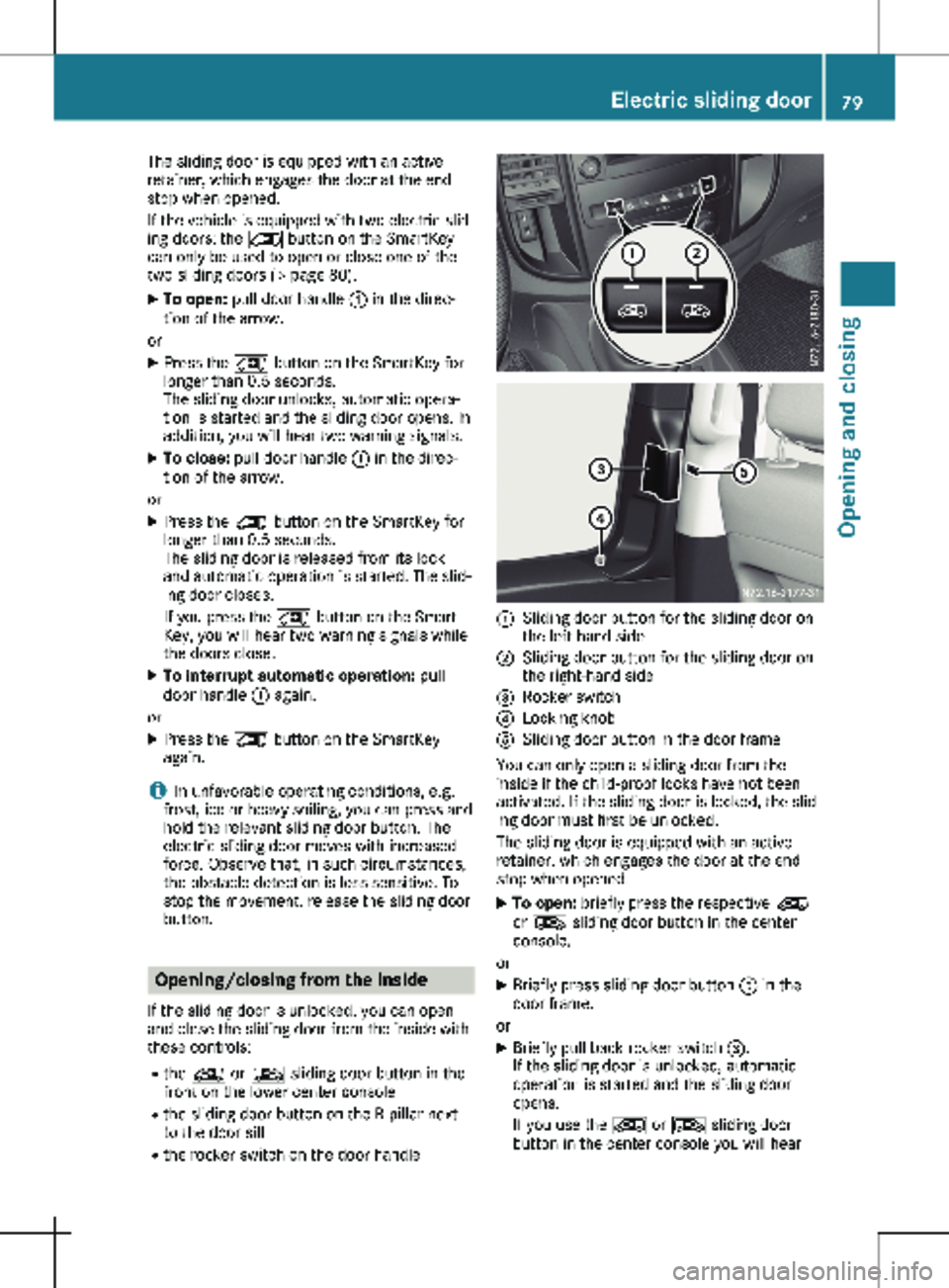
R the rocker switch on the door handle :
Sliding door button for the sliding door on
the left-hand side
; Sliding door button for the sliding door on
the right-hand side
= Rocker switch
? Locking knob
A Sliding door button in the door frame
You can only open a sliding door from the
inside if the child-proof locks have not been
activated. If the sliding door is locked, the slid-
ing door must first be unlocked.
The sliding door is equipped with an active
retainer, which engages the door at the end
stop when opened. X To open: briefly press the respective Å
or Æ sliding door button in the center
console.
or X Briefly press sliding door button A in the
door frame.
or X Briefly pull back rocker switch =.
If the sliding door is unlocked, automatic
operation is started and the sliding door
opens.
If you use the Å or Æ sliding door
button in the center console you will hear Electric sliding door
79Opening and closing Z
Page 82 of 320
two warning signals during the opening pro-
cedure.
The indicator lamp in the
Å or Æ slid-
ing door button in the center console
flashes for the duration of automatic opera-
tion.
The indicator lamp in the Å or Æ slid-
ing door button in the center console is lit
whenever the respective sliding door is
open. Depending on the vehicle equipment,
the display can also show the Sliding
Door Open message.
X To close: briefly press the respective Å
or Æ sliding door button in the center
console.
or
X Briefly press sliding door button A in the
door frame.
or X Briefly press rocker switch = forward.
The sliding door is released from its lock
and automatic operation is started. The slid-
ing door closes.
If you use the Å or Æ sliding door
button in the center console you will hear
two warning signals during the closing pro-
cedure.
The indicator lamp in the respective Å or
Æ sliding door button in the center con-
sole goes out whenever the sliding door is
closed.
X To interrupt automatic operation: press
the respective Å or Æ sliding door
button in the center console again.
or X Press sliding door button in the door frame
A.
or X Briefly pull back rocker switch =.
i In unfavorable operating conditions, e.g.
frost, ice or heavy soiling, you can press and
hold the relevant sliding door button. The
electric sliding door moves with increased
force. Observe that, in such circumstances,
the obstacle detection is less sensitive. To
stop the movement, release the sliding door
button. Programing the key button for the
sliding door
If the vehicle is equipped with two electric slid-
ing doors, the 5 sliding door button on the
key can only be program for one of the two
sliding doors. You can then open or close the
selected sliding door with the 5 button on
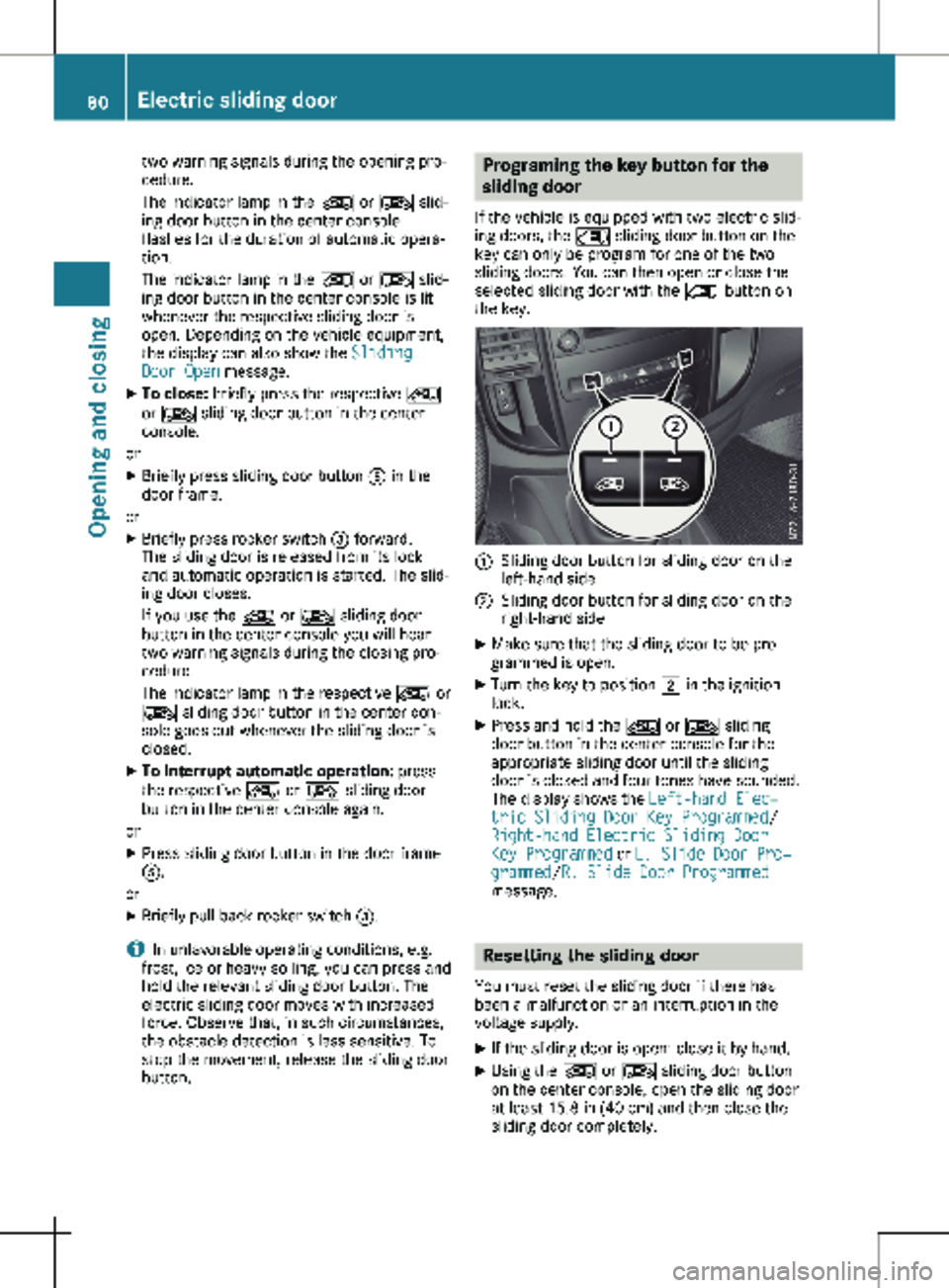
the key. :
Sliding door button for sliding door on the
left-hand side
; Sliding door button for sliding door on the
right-hand side
X Make sure that the sliding door to be pro-
grammed is open.
X Turn the key to position 2 in the ignition
lock.
X Press and hold the Å or Æ sliding
door button in the center console for the
appropriate sliding door until the sliding
door is closed and four tones have sounded.
The display shows the Left-hand Elec‐
tric Sliding Door Key Programmed/
Right-hand Electric Sliding Door
Key Programmed or L. Slide Door Pro‐
grammed/ R. Slide Door Programmed
message. Resetting the sliding door
You must reset the sliding door if there has
been a malfunction or an interruption in the
voltage supply. X If the sliding door is open: close it by hand.
X Using the Å or Æ sliding door button
on the center console, open the sliding door
at least 15.8 in
(40 cm) and then close the
sliding door completely. 80
Electric sliding door
Opening and closing
Page 86 of 320
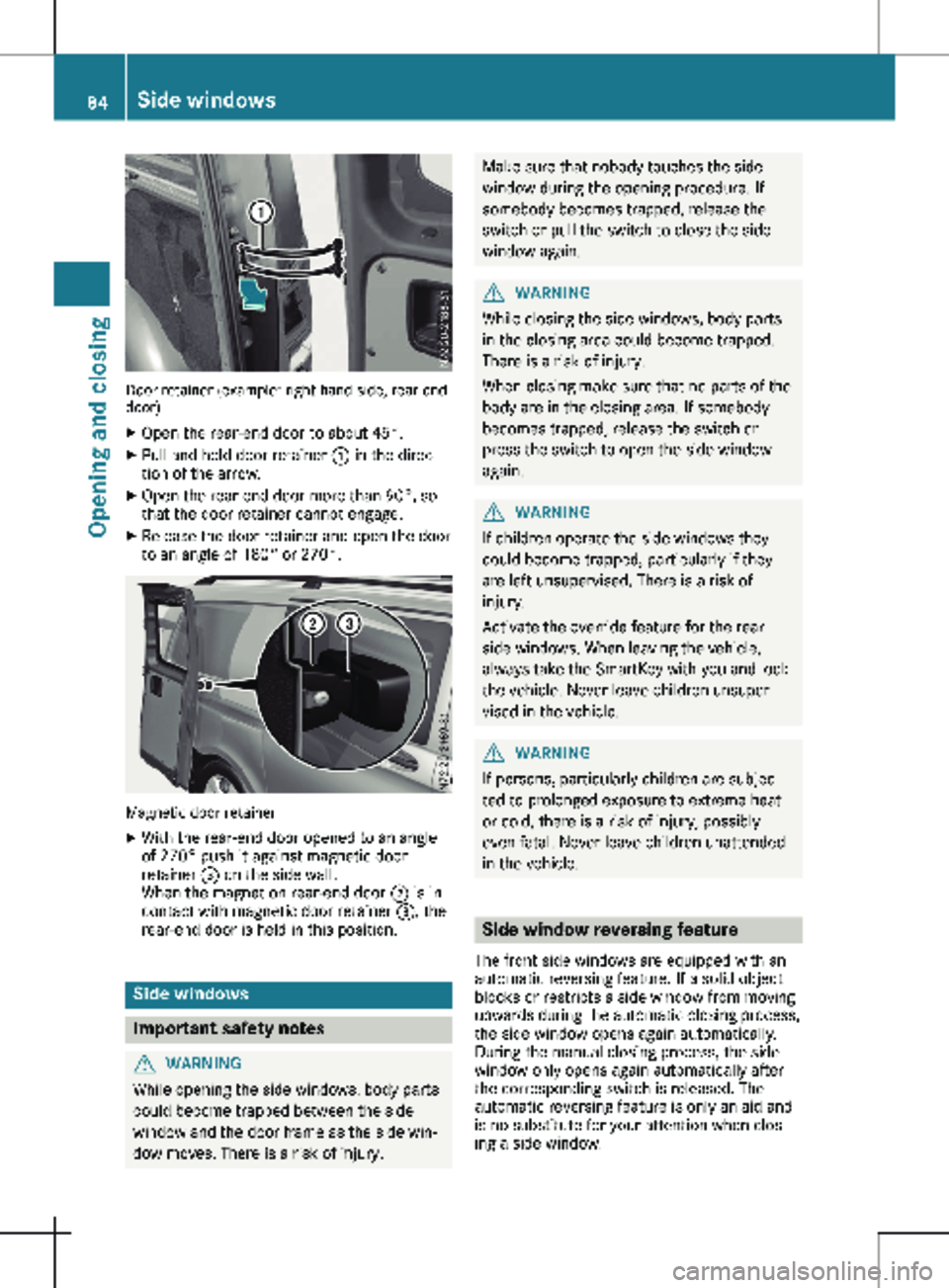
Door retainer (example: right-hand side, rear-end
door)
X Open the rear-end door to about 45°.
X Pull and hold door retainer : in the direc-
tion of the arrow.
X Open the rear-end door more than 90°, so
that the door retainer cannot engage.
X Release the door retainer and open the door
to an angle of 180° or 270°.Magnetic door retainer
X With the rear-end door opened to an angle
of
270° push it against magnetic door
retainer = on the side wall.
When the magnet on rear-end door ; is in
contact with magnetic door retainer =, the
rear-end door is held in this position. Side windows
Important safety notes
G
WARNING
While opening the side windows, body parts
could become trapped between the side
window and the door frame as the side win-
dow moves. There is a risk of injury. Make sure that nobody touches the side
window during the opening procedure. If
somebody becomes trapped, release the
switch or pull the switch to close the side
window again. G
WARNING
While closing the side windows, body parts
in the closing area could become trapped.
There is a risk of injury.
When closing make sure that no parts of the
body are in the closing area. If somebody
becomes trapped, release the switch or
press the switch to open the side window
again. G
WARNING
If children operate the side windows they
could become trapped, particularly if they
are left unsupervised. There is a risk of
injury.
Activate the override feature for the rear
side windows. When leaving the vehicle,
always take the SmartKey with you and lock
the vehicle. Never leave children unsuper-
vised in the vehicle. G
WARNING
If persons, particularly children are subjec-
ted to prolonged exposure to extreme heat
or cold, there is a risk of injury, possibly
even fatal. Never leave children unattended
in the vehicle. Side window reversing feature
The front side windows are equipped with an
automatic reversing feature. If a solid object
blocks or restricts a side window from moving
upwards during the automatic closing process,
the side window opens again automatically.
During the manual closing process, the side
window only opens again automatically after
the corresponding switch is released. The
automatic reversing feature is only an aid and
is no substitute for your attention when clos-
ing a side window. 84
Side windows
Opening and closing
Page 87 of 320
G
WARNING
The reversing feature does not react:
R to soft, light and thin objects, e.g. fingers
R while adjusting
This means that the reversing feature can-
not prevent someone being trapped in these
situations. There is a risk of injury.
Make sure that no body parts are in close
proximity during the closing procedure. If
someone becomes trapped, press the W
button to open the side window again. Opening and closing the side win-
dows
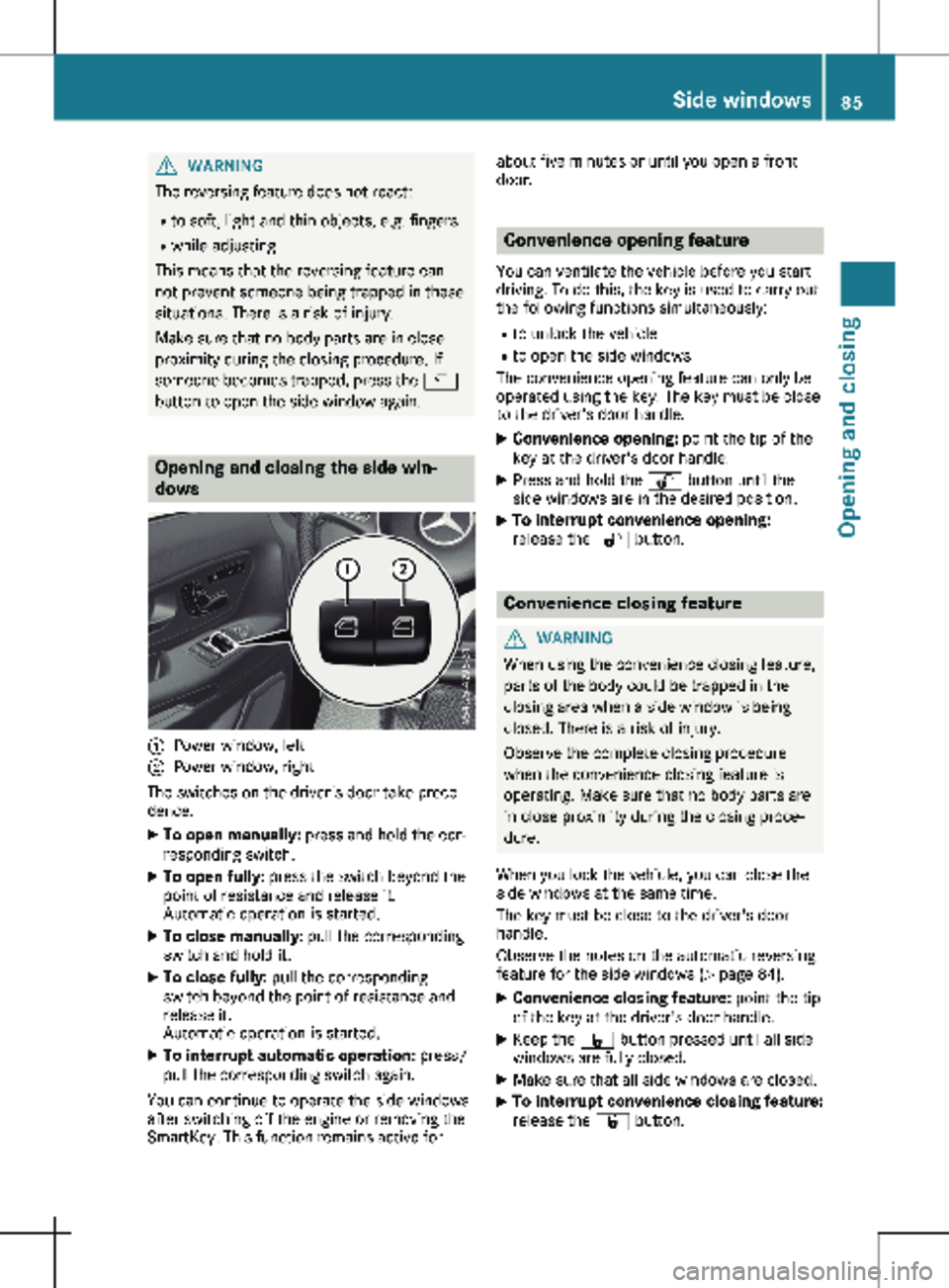
:
Power window, left
; Power window, right
The switches on the driver's door take prece-
dence.
X To open manually: press and hold the cor-
responding switch.
X To open fully: press the switch beyond the
point of resistance and release it.
Automatic operation is started.
X To close manually: pull the corresponding
switch and hold it.
X To close fully: pull the corresponding
switch beyond the point of resistance and
release it.
Automatic operation is started.
X To interrupt automatic operation: press/
pull the corresponding switch again.
You can continue to operate the side windows
after switching off the engine or removing the
SmartKey. This function remains active for about five minutes or until you open a front
door.
Convenience opening feature
You can ventilate the vehicle before you start
driving. To do this, the key is used to carry out
the following functions simultaneously: R to unlock the vehicle
R to open the side windows
The convenience opening feature can only be
operated using the key. The key must be close
to the driver's door handle.
X Convenience opening: point the tip of the
key at the driver's door handle.
X Press and hold the % button until the
side windows are in the desired position.
X To interrupt convenience opening:
release the
% button. Convenience closing feature
G
WARNING
When using the convenience closing feature,
parts of the body could be trapped in the
closing area when a side window is being
closed. There is a risk of injury.
Observe the complete closing procedure
when the convenience closing feature is
operating. Make sure that no body parts are
in close proximity during the closing proce-
dure.
When you lock the vehicle, you can close the
side windows at the same time.
The key must be close to the driver's door
handle.
Observe the notes on the automatic reversing
feature for the side windows
(Y page 84).
X Convenience closing feature: point the tip
of the key at the driver's door handle.
X Keep the & button pressed until all side
windows are fully closed.
X Make sure that all side windows are closed.
X To interrupt convenience closing feature:
release the
& button. Side windows
85
Opening and closing Z