change wheel MERCEDES-BENZ METRIS 2020 MY20 Operator’s Manual
[x] Cancel search | Manufacturer: MERCEDES-BENZ, Model Year: 2020, Model line: METRIS, Model: MERCEDES-BENZ METRIS 2020Pages: 320, PDF Size: 26.38 MB
Page 183 of 320
The vehicle must be stationary. Use the but-
tons in the instrument cluster.
X Press È to select the Settings menu.
X Press 3 to select the Distance Unit:
submenu.
The display indicates the selected setting of
km or Miles.
X Change the setting by pressing f or g.
X Press 3 to confirm.
The display shows the next submenu or the
Settings menu again.
The selected distance units are used for the
displays:
R Digital speedometer
R Odometer and trip odometer
R Trip computer
R Range
R Current consumption
R Cruise control
R Service intervals
Setting the time and date The vehicle must be stationary. Use the but-
tons in the instrument cluster.
X Press È to select the Settings menu.
X Press 3 to select the time and date display.
X Press f or g to set the hours and press
3 to confirm.
X Press f or g to set the minutes and press
3 to confirm.
X Press f or g to set the day and press 3
to confirm.
X Press f or g to set the month and press
3 to confirm.
X Press f or g to set the year and press 3
to confirm.
The display shows the Settings menu
again. On-board computer (vehicles with
steering wheel buttons)
Operating the on-board computer
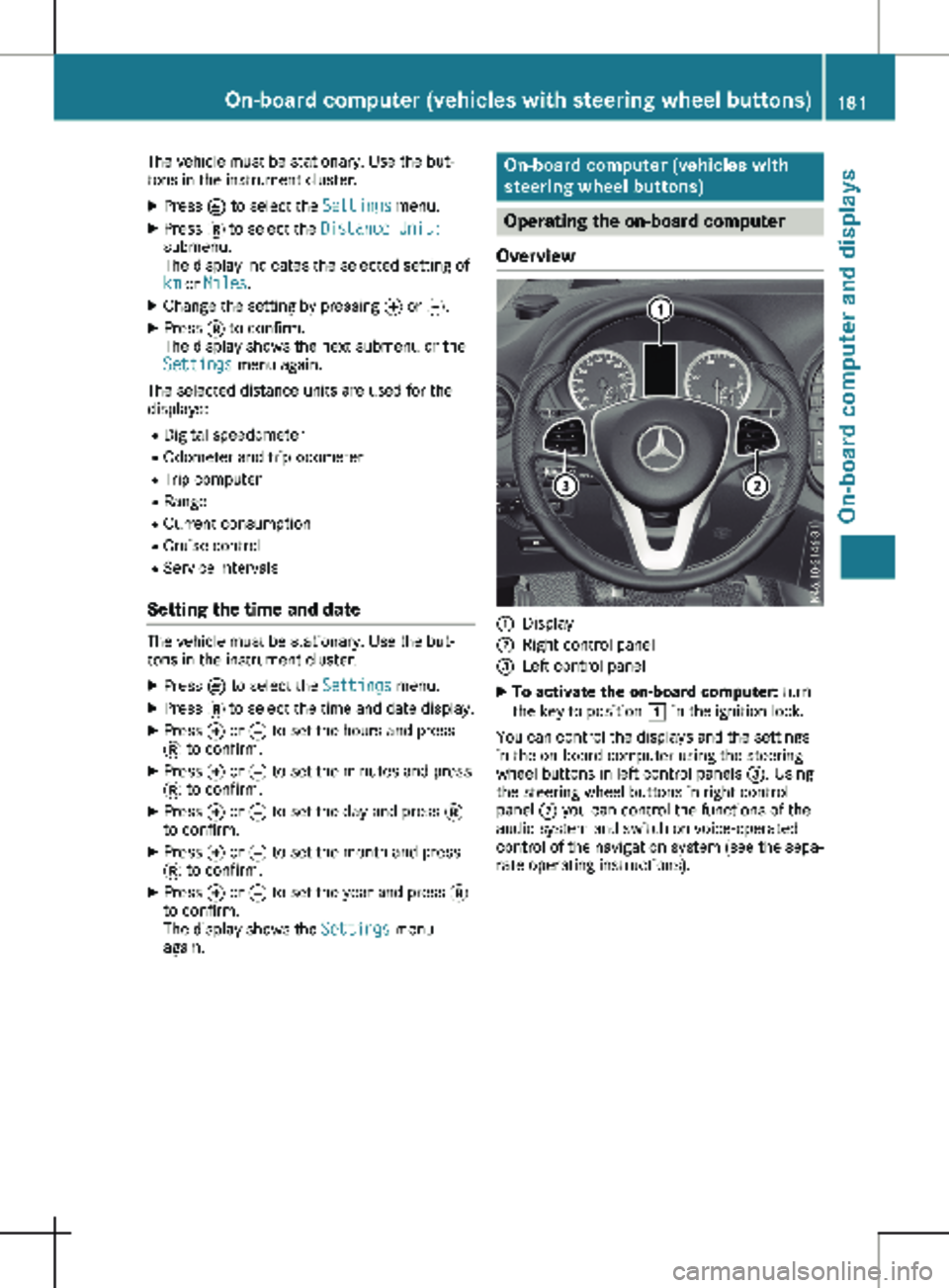
Overview :
Display
; Right control panel
= Left control panel
X To activate the on-board computer: turn
the key to position 1 in the ignition lock.
You can control the displays and the settings
in the on-board computer using the steering
wheel buttons in left control panels =. Using
the steering wheel buttons in right control
panel ; you can control the functions of the
audio system and switch on voice-operated
control of the navigation system (see the sepa-
rate operating instructions). On-board computer (vehicles with steering wheel buttons)
181On-board computer and displays Z
Page 188 of 320
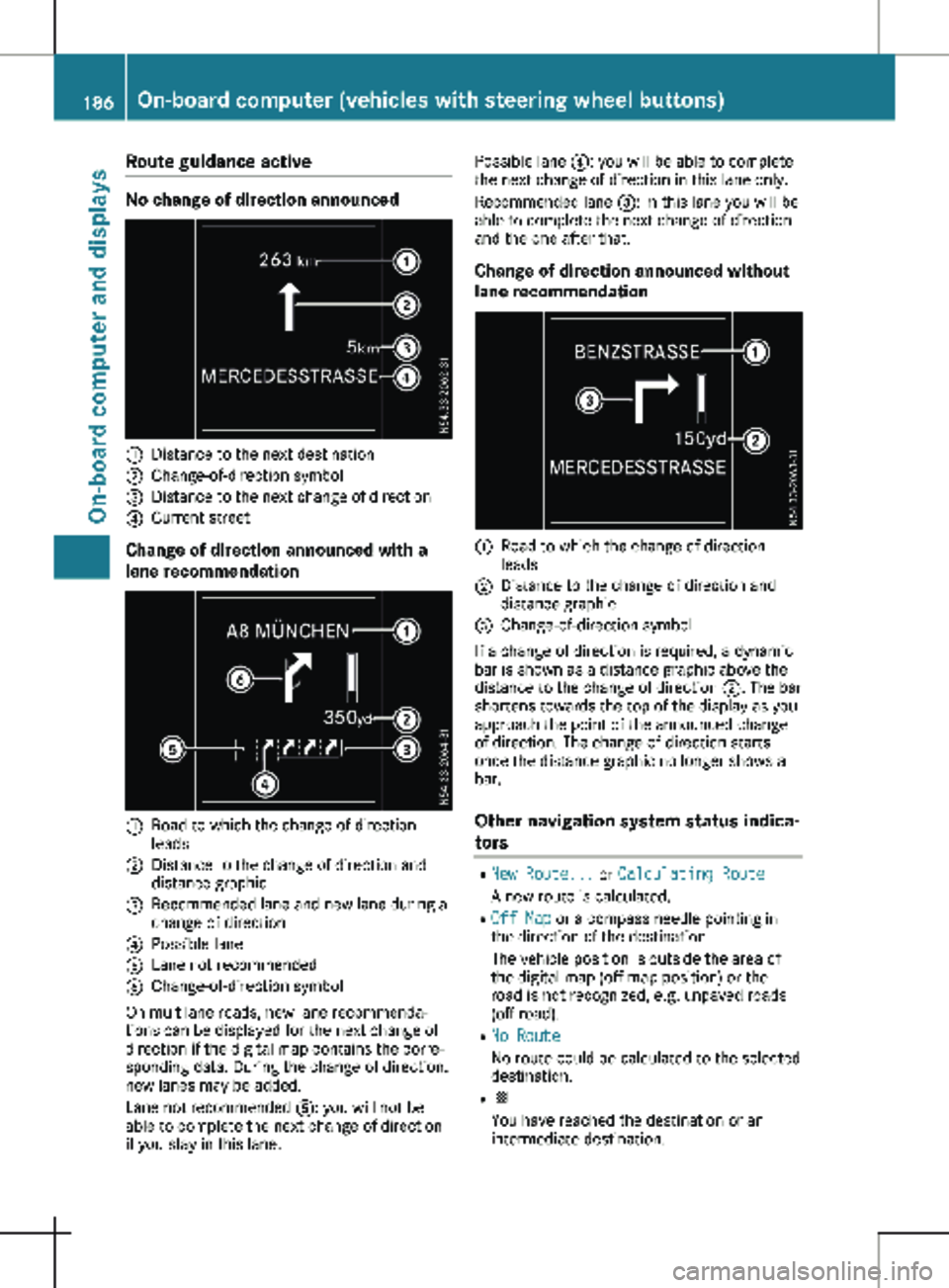
Route guidance active
No change of direction announced
:
Distance to the next destination
; Change-of-direction symbol
= Distance to the next change of direction
? Current street
Change of direction announced with a
lane recommendation :
Road to which the change of direction
leads
; Distance to the change of direction and
distance graphic
= Recommended lane and new lane during a
change of direction
? Possible lane
A Lane not recommended
B Change-of-direction symbol
On multilane roads, new lane recommenda-
tions can be displayed for the next change of
direction if the digital map contains the corre-
sponding data. During the change of direction,
new lanes may be added.
Lane not recommended A: you will not be
able to complete the next change of direction
if you stay in this lane. Possible lane
?: you will be able to complete
the next change of direction in this lane only.
Recommended lane =: in this lane you will be
able to complete the next change of direction
and the one after that.
Change of direction announced without
lane recommendation :
Road to which the change of direction
leads
; Distance to the change of direction and
distance graphic
= Change-of-direction symbol
If a change of direction is required, a dynamic
bar is shown as a distance graphic above the
distance to the change of direction ;. The bar
shortens towards the top of the display as you
approach the point of the announced change
of direction. The change of direction starts
once the distance graphic no longer shows a
bar.
Other navigation system status indica-
tors R
New Route... or Calculating Route
A new route is calculated.
R Off Map or a compass needle pointing in
the direction of the destination
The vehicle position is outside the area of
the digital map (off-map position) or the
road is not recognized, e.g. unpaved roads
(off-road).
R No Route
No route could be calculated to the selected
destination.
R O
You have reached the destination or an
intermediate destination.186
On-board computer (vehicles with steering wheel buttons)On-board computer and displays
Page 193 of 320
X
Press a to confirm.
The current setting is displayed.
X To change the setting: press a again.
X Press : or 9 to set Deactivated,
Standard or Sensitive.
X Press a to confirm the choice.
If ATTENTION ASSIST is activated, the À
symbol is shown in the status area of the
display. The selection Standard
or Sensi‐
tive sets the sensitivity with which the sys-
tem determines the attention level.
Further information can be found under
"ATTENTION ASSIST"
(Y page 155).
Activating/deactivating Blind Spot
Assist Using the steering wheel buttons
X Press = or ; to select the Assist.
menu.
X Press : or 9 to select Blind Spot
Assist.
X Press a to confirm.
The current status is shown.
X To activate/deactivate: press the a
button again.
Further information can be found under "Blind
Spot Assist"
(Y page 151).
Setting Lane Keeping Assist Using the steering wheel buttons
X Press = or ; to select the Assist.
menu.
X Press : or 9 to select Lane Keep‐
ing Assist.
X Press a to confirm.
The current selection Standard or Adap‐
tive is displayed.
X To change the setting: press a again.
Further information can be found under "Lane
Keeping Assist" (Y page
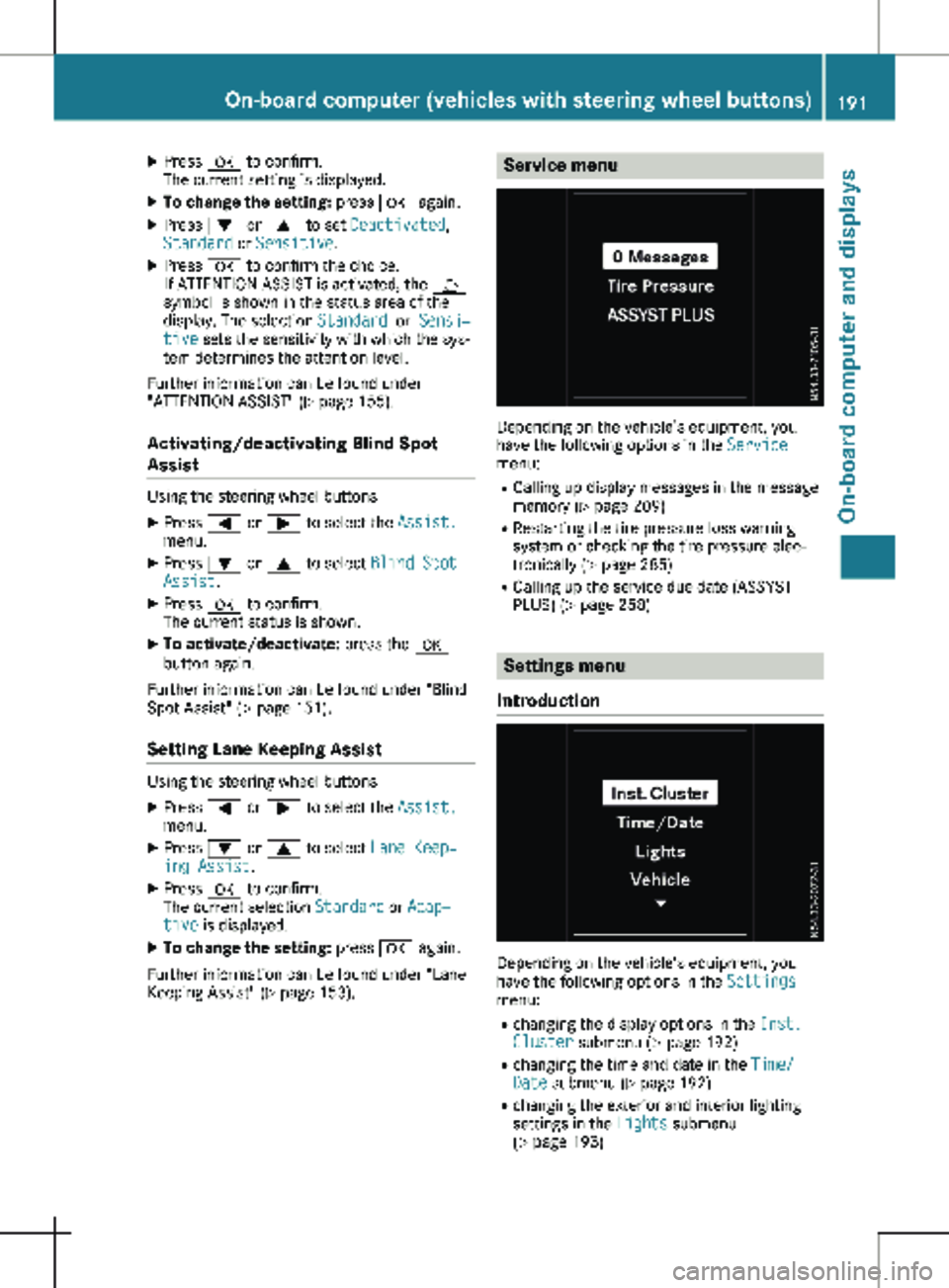
153). Service menu
Depending on the vehicle’s equipment, you
have the following options in the
Service
menu:
R Calling up display messages in the message
memory ( Y page
209)
R Restarting the tire pressure loss warning
system or checking the tire pressure elec-
tronically ( Y page 285)
R Calling up the service due date (ASSYST
PLUS) (Y page 258) Settings menu
Introduction Depending on the vehicle’s equipment, you
have the following options in the
Settings
menu:
R changing the display options in the Inst.
Cluster submenu
(Y page 192)
R changing the time and date in the Time/
Date submenu (Y page 192)
R changing the exterior and interior lighting
settings in the Lights submenu
(Y page 193) On-board computer (vehicles with steering wheel buttons)
191
On-board computer and displays Z
Page 194 of 320
R
activating/deactivating or adjusting vehicle
functions in the Vehicle submenu
(Y page
193)
R resetting the settings to Factory Setting
( Y page 194)
Instrument cluster submenu Selecting the unit for the distance
With the Display Unit Speed-/Odometer:
function, you can select whether the display
shows certain information in kilometers or
miles.
Using the steering wheel buttons
X Press = or ; to select the Settings
menu.
X Press : or 9 to select Inst. Clus‐
ter.
X Press a to confirm.
X Press : or 9 to select the Display
Unit Speed-/Odometer: function.
The display indicates the selected km or
Miles setting.
X Press a to change the setting.
The unit for the distance will be selected for:
R Digital speedometer in the Trip menu
R Odometer and trip odometer
R Trip computer
R Current consumption and range
R Navigation instructions in the Navi menu
R Cruise control
R Service interval display
Setting the display language Using the steering wheel buttons
X Press = or ; to select the Settings
menu.
X Press : or 9 to select Inst. Clus‐
ter.
X Press a to confirm.
X Press : or 9 to select Language:.
The display shows the current language
selection for all display messages.
X Press a to change the setting.
X Press : or 9 to select the desired
language.
X Press the a button to save the selection. Selecting the permanent display func-
tion
Using the Permanent Display: function, you
can switch the display in the header between
outside temperature and speed.
If the display shows the speed in the header,
the display shows the outside temperature
with the odometers (Y page
183). The addi-
tional speedometer unit in the header is
always inverse to the speedometer unit.
Using the steering wheel buttons
X Press = or ; to select the Settings
menu.
X Press : or 9 to select Inst. Clus‐
ter.
X Press a to confirm.
X Press : or 9 to select Permanent
Display:.
X Press a to confirm.
The display shows the current selection of
Outside Temp. or Speedom..
X Press a to change the setting.
Clock/Date submenu Setting the time
Using the steering wheel buttons
X Press = or ; to select the Settings
menu.
X Press : or 9 to select Time/Date.
X Press a to confirm.
X Press : or 9 to select the Time:
function.
The display shows the current time.
X To set the time: press a again.
X Press = or ; to switch between
hours and minutes.
X Press : or 9 to set the hours or
minutes.
X Then press a to confirm.
The display shows the updated time.
Setting the date Using the steering wheel buttons
X Press = or ; to select the Settings
menu.
X Press : or 9 to select Time/Date.
X Press a to confirm.192
On-board computer (vehicles with steering wheel buttons)
On-board computer and displays
Page 195 of 320

X
Press : or 9 to select the Date:
function.
The display shows the current date.
X To set the date: press a again.
X Press = or ; to switch between day,
month and year.
X Press : or 9 to set the day, month or
year.
X Then press a to confirm.
The display shows the updated date.
Lights submenu Activating/deactivating the surround
lighting and exterior lighting delayed
switch-off
If you activate the Locator Lighting func-
tion and the light switch is turned to the Ã
position, the following functions are activated
when it is dark:
R surround lighting: the exterior lighting
remains on for
40 seconds after the doors
are unlocked. When you start the engine,
the surround lighting is deactivated and the
automatic headlamp feature is activated
(Y page 100).
R exterior lighting delayed switch-off: the
exterior lighting remains lit for 60 seconds
after the engine is switched off. When you
close all the doors and the tailgate/rear
doors, the exterior lighting switches off after
15 seconds.
Using the steering wheel buttons
X Use the = or ; button to select the
Settings. menu.
X Use : or 9 to select Lights.
X Press a to confirm.
X Use : or 9 to select the Locator
Lighting function.
The current status appears.
X To switch on/off: press a again.
If you change the setting, conversion does
not take place until the next time the vehicle
is stationary. Deactivating exterior lighting delayed switch-
off temporarily:
X Before leaving the vehicle, turn the key to
position g in the ignition lock.
X Turn the key to position 2 in the ignition
lock.
The exterior lighting delayed switch-off is
deactivated until the next time the engine is
started.
With surround lighting and exterior lighting
delayed switch-off, the following light up
depending on the vehicle's equipment:
R Parking lamps
R Fog lamps
R Low-beam headlamps
R Daytime running lamps
Activating/deactivating interior lighting
delayed switch-off If you activate the Interior Lighting
Delay: function, the interior lighting remains
lit for a further 20 seconds.
Using the steering wheel buttons
X Use the = or ; button to select the
Settings. menu.
X Use : or 9 to select Lights.
X Press a to confirm.
X Use : or 9 to select the Interior
Lighting Delay function.
The current status appears.
X To switch on/off: press a again.
Vehicle submenu Setting the sensitivity of the rain sensor
Using the steering wheel buttons
X Press = or ; to select the Settings
menu.
X Press : or 9 to select Vehicle.
X Press a to confirm.
X Press : or 9 to select the Rain
Sensor Sensitivity function.
The display shows the current setting.
X Press a to change the setting.
X Press : or 9 to select the High,
Standard or Low setting. This setting con-
trols the rain sensor's sensitivity to precipi-
tation. The windshield wiper then wipes On-board computer (vehicles with steering wheel buttons)
193
On-board computer and displays Z
Page 204 of 320
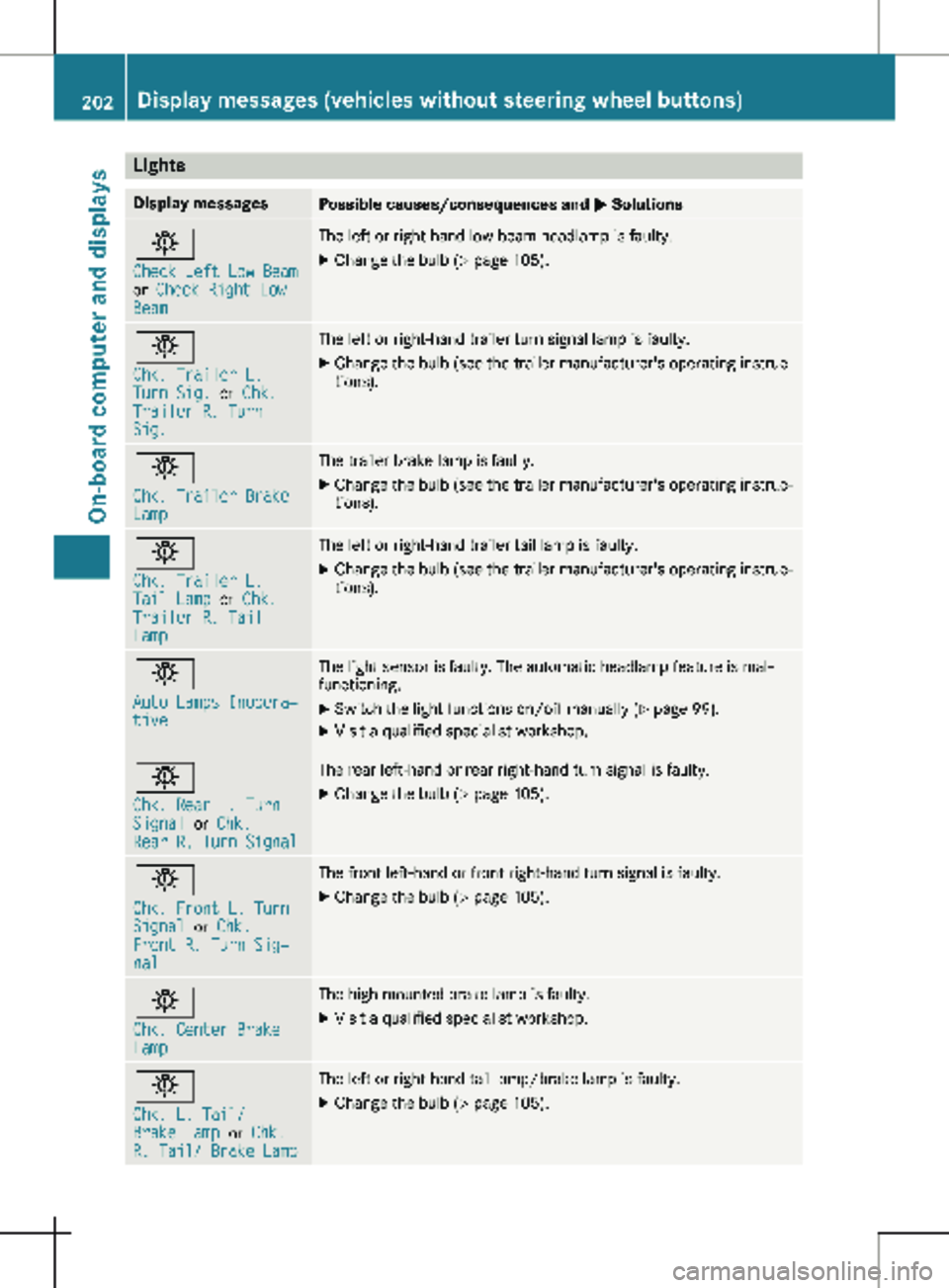
Lights
Display messages
Possible causes/consequences and
M Solutionsb
Check Left Low Beam
or
Check Right Low
Beam The left or right-hand low-beam headlamp is faulty.
X
Change the bulb ( Y page 105).b
Chk. Trailer L.
Turn Sig.
or Chk.
Trailer R. Turn
Sig. The left or right-hand trailer turn signal lamp is faulty.
X
Change the bulb (see the trailer manufacturer's operating instruc-
tions). b
Chk. Trailer Brake
Lamp The trailer brake lamp is faulty.
X Change the bulb (see the trailer manufacturer's operating instruc-
tions). b
Chk. Trailer L.
Tail Lamp
or Chk.
Trailer R. Tail
Lamp The left or right-hand trailer tail lamp is faulty.
X Change the bulb (see the trailer manufacturer's operating instruc-
tions). b
Auto Lamps Inopera‐
tive The light sensor is faulty. The automatic headlamp feature is mal-
functioning.
X
Switch the light functions on/off manually (Y page
99).
X Visit a qualified specialist workshop. b
Chk. Rear L. Turn
Signal
or Chk.
Rear R. Turn Signal The rear left-hand or rear right-hand turn signal is faulty.
X Change the bulb (Y page 105).b
Chk. Front L. Turn
Signal
or Chk.
Front R. Turn Sig‐
nal The front left-hand or front right-hand turn signal is faulty.
X Change the bulb (Y page 105).b
Chk. Center Brake
Lamp The high-mounted brake lamp is faulty.
X
Visit a qualified specialist workshop. b
Chk. L. Tail/
Brake Lamp
or Chk.
R. Tail/ Brake Lamp The left or right-hand tail lamp/brake lamp is faulty.
X Change the bulb (Y page 105).202
Display messages (vehicles without steering wheel buttons)
On-board computer and displays
Page 205 of 320
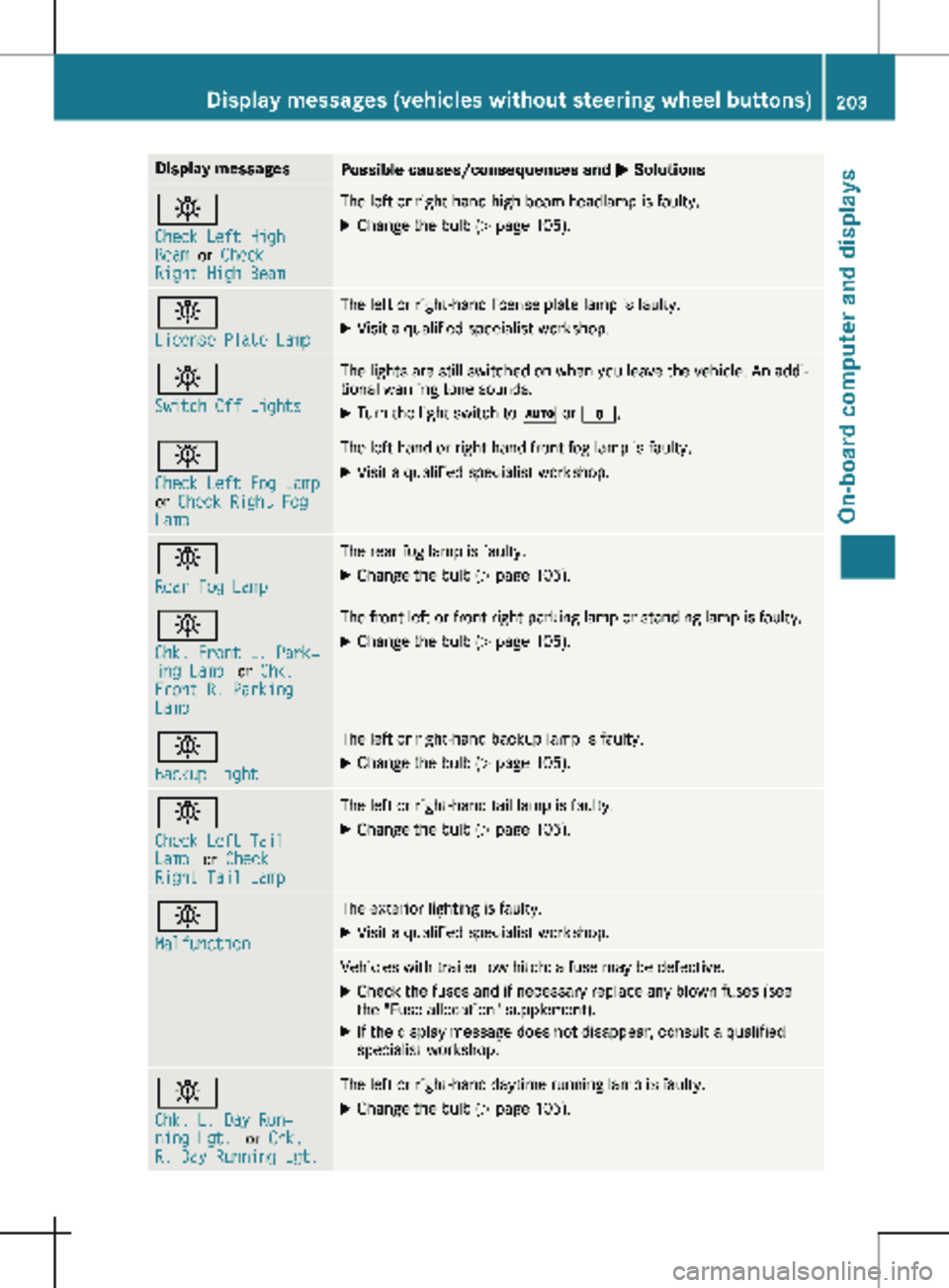
Display messages
Possible causes/consequences and
M Solutionsb
Check Left High
Beam
or Check
Right High Beam The left or right-hand high-beam headlamp is faulty.
X
Change the bulb ( Y page 105).b
License Plate Lamp The left or right-hand license plate lamp is faulty.
X Visit a qualified specialist workshop. b
Switch Off Lights The lights are still switched on when you leave the vehicle. An addi-
tional warning tone sounds.
X Turn the light switch to à or $.b
Check Left Fog Lamp
or
Check Right Fog
Lamp The left-hand or right-hand front fog lamp is faulty.
X Visit a qualified specialist workshop. b
Rear Fog Lamp The rear fog lamp is faulty.
X Change the bulb (Y page
105).b
Chk. Front L. Park‐
ing Lamp
or Chk.
Front R. Parking
Lamp The front left or front right parking lamp or standing lamp is faulty.
X Change the bulb ( Y page 105).b
Backup Light The left or right-hand backup lamp is faulty.
X Change the bulb (Y page
105).b
Check Left Tail
Lamp
or Check
Right Tail Lamp The left or right-hand tail lamp is faulty.
X Change the bulb (Y page 105).b
Malfunction The exterior lighting is faulty.
X Visit a qualified specialist workshop. Vehicles with trailer tow hitch: a fuse may be defective.
X Check the fuses and if necessary replace any blown fuses (see
the "Fuse allocation" supplement).
X If the display message does not disappear, consult a qualified
specialist workshop. b
Chk. L. Day Run‐
ning Lgt.
or Chk.
R. Day Running Lgt. The left or right-hand daytime running lamp is faulty.
X Change the bulb (Y page 105).Display messages (vehicles without steering wheel buttons)
203
On-board computer and displays Z
Page 209 of 320
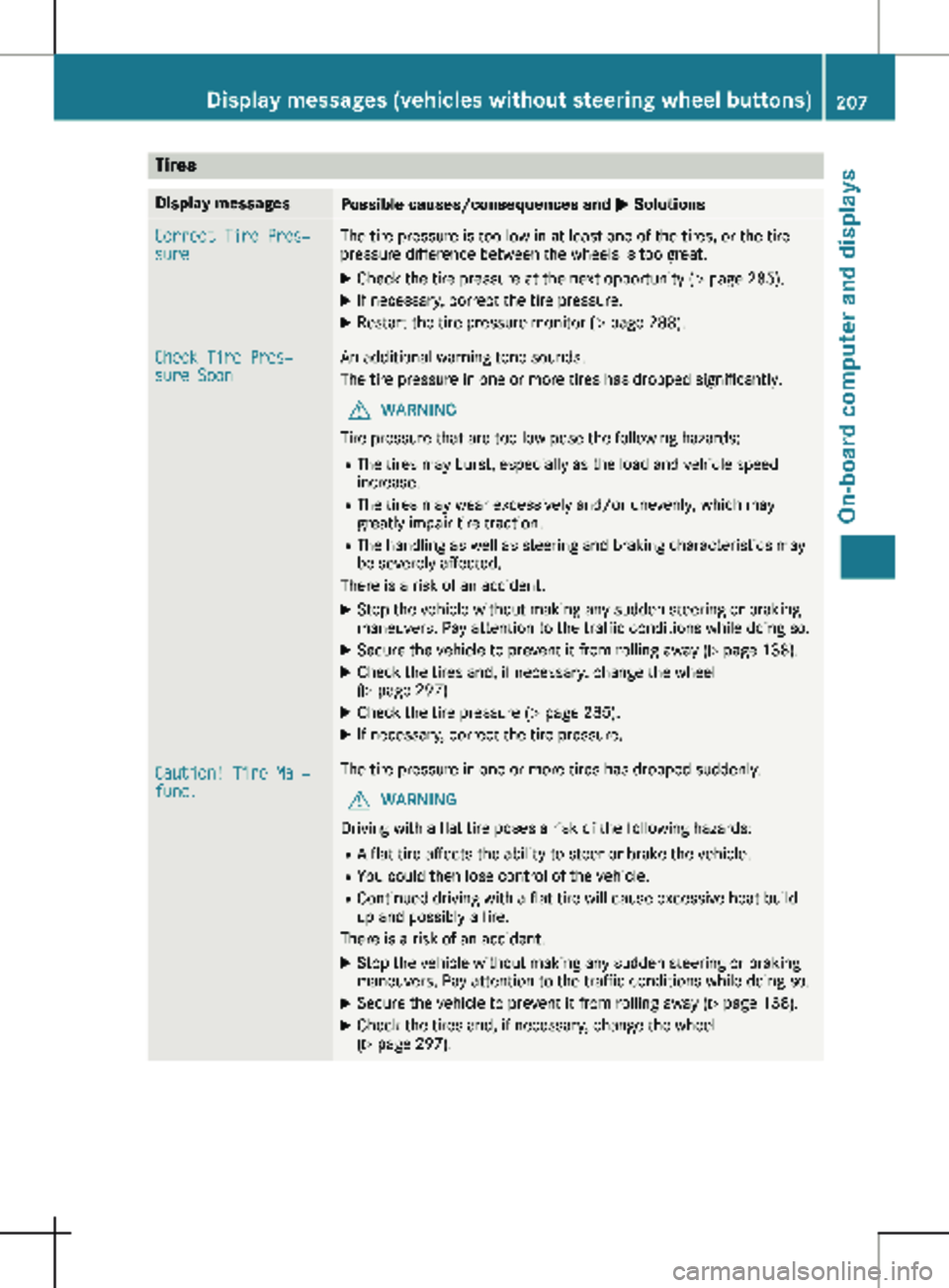
Tires
Display messages
Possible causes/consequences and
M SolutionsCorrect Tire Pres‐
sure The tire pressure is too low in at least one of the tires, or the tire
pressure difference between the wheels is too great.
X Check the tire pressure at the next opportunity (Y page 285).
X If necessary, correct the tire pressure.
X Restart the tire pressure monitor ( Y page
288).Check Tire Pres‐
sure Soon An additional warning tone sounds.
The tire pressure in one or more tires has dropped significantly.
G WARNING
Tire pressure that are too low pose the following hazards: R The tires may burst, especially as the load and vehicle speed
increase.
R The tires may wear excessively and/or unevenly, which may
greatly impair tire traction.
R The handling as well as steering and braking characteristics may
be severely affected.
There is a risk of an accident.
X Stop the vehicle without making any sudden steering or braking
maneuvers. Pay attention to the traffic conditions while doing so.
X Secure the vehicle to prevent it from rolling away (Y page
138).
X Check the tires and, if necessary, change the wheel
(Y page
297).
X Check the tire pressure (Y page
285).
X If necessary, correct the tire pressure. Caution! Tire Mal‐
func. The tire pressure in one or more tires has dropped suddenly.
G WARNING
Driving with a flat tire poses a risk of the following hazards: R A flat tire affects the ability to steer or brake the vehicle.
R You could then lose control of the vehicle.
R Continued driving with a flat tire will cause excessive heat build-
up and possibly a fire.
There is a risk of an accident.
X Stop the vehicle without making any sudden steering or braking
maneuvers. Pay attention to the traffic conditions while doing so.
X Secure the vehicle to prevent it from rolling away (Y page
138).
X Check the tires and, if necessary, change the wheel
(Y page
297). Display messages (vehicles without steering wheel buttons)
207
On-board computer and displays Z
Page 218 of 320

Lights
Display messages
Possible causes/consequences and
M Solutionsb
Check Left Low Beam
or
Check Right Low
Beam The left or right-hand low-beam headlamp is faulty.
X
Change the bulb ( Y page 105).b
Check Trailer Left
Turn Signal
or
Check Trailer
Right Turn Signal The left or right-hand trailer turn signal lamp is faulty.
X
Change the bulb (see the trailer manufacturer's operating instruc-
tions). b
Check Trailer
Brake Lamp The trailer brake lamp is faulty.
X Change the bulb (see the trailer manufacturer's operating instruc-
tions). b
Check Trailer Left
Tail Lamp
or Check
Trailer Right Tail
Lamp The left or right-hand trailer tail lamp is faulty.
X Change the bulb (see the trailer manufacturer's operating instruc-
tions). b
Auto Lamp Function
Inoperative The light sensor is faulty. The automatic headlamp feature is mal-
functioning.
X
Switch the light functions on/off manually (Y page
99).
X Visit a qualified specialist workshop. b
Check Rear Left
Turn Signal
or
Check Rear Right
Turn Signal The rear left-hand or rear right-hand turn signal is faulty.
X Change the bulb (Y page 105).b
Check Front Left
Turn Signal
or
Check Front Right
Turn Signal The front left-hand or front right-hand turn signal is faulty.
X Change the bulb (Y page 105).b
Check Center Brake
Lamp The high-mounted brake lamp is faulty.
X
Visit a qualified specialist workshop.216
Display messages (vehicles with steering wheel buttons)
On-board computer and displays
Page 219 of 320
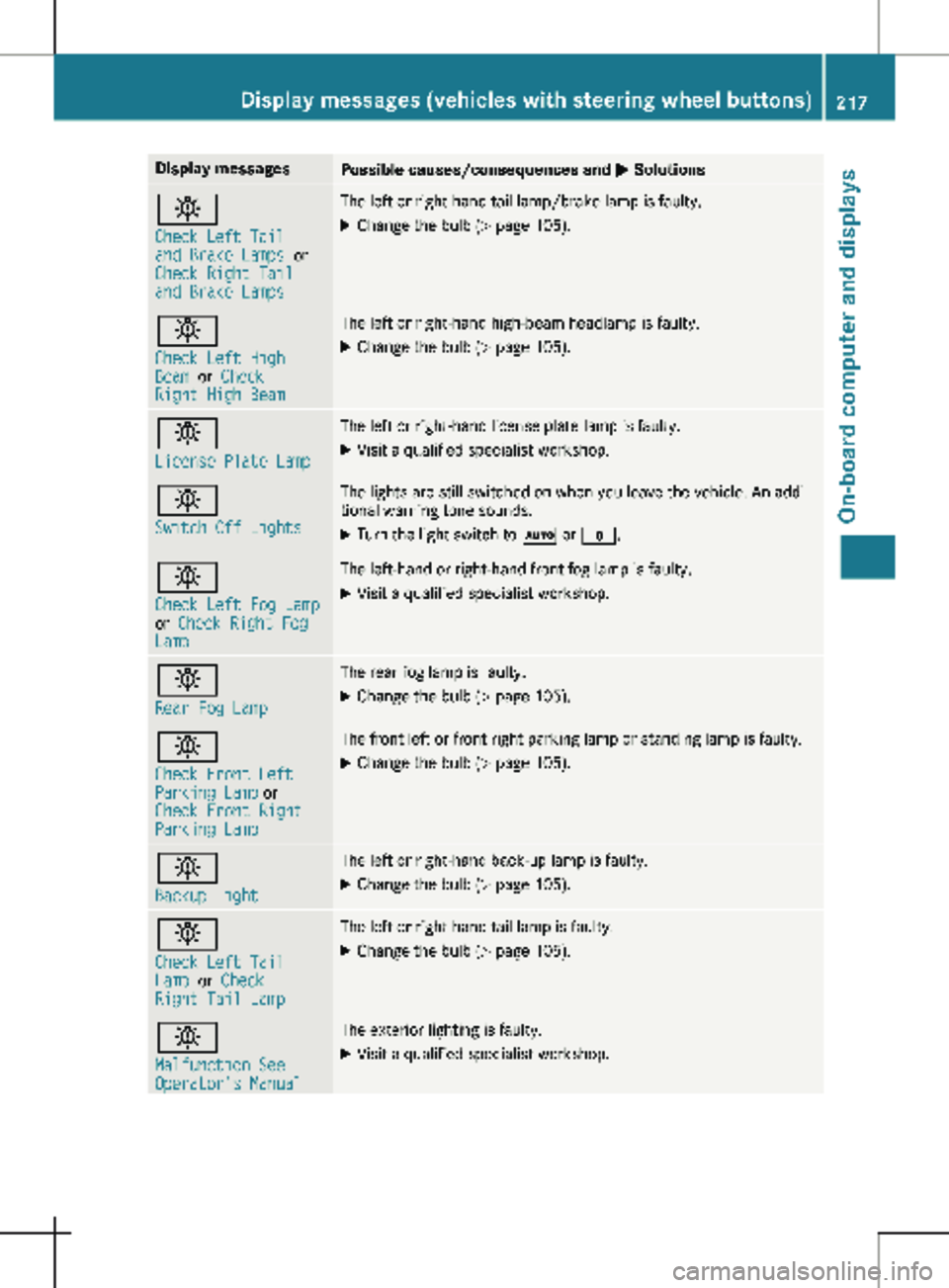
Display messages
Possible causes/consequences and
M Solutionsb
Check Left Tail
and Brake Lamps
or
Check Right Tail
and Brake Lamps The left or right-hand tail lamp/brake lamp is faulty.
X Change the bulb (Y page 105).b
Check Left High
Beam
or Check
Right High Beam The left or right-hand high-beam headlamp is faulty.
X
Change the bulb ( Y page 105).b
License Plate Lamp The left or right-hand license plate lamp is faulty.
X Visit a qualified specialist workshop. b
Switch Off Lights The lights are still switched on when you leave the vehicle. An addi-
tional warning tone sounds.
X Turn the light switch to à or $.b
Check Left Fog Lamp
or
Check Right Fog
Lamp The left-hand or right-hand front fog lamp is faulty.
X Visit a qualified specialist workshop. b
Rear Fog Lamp The rear fog lamp is faulty.
X Change the bulb (Y page
105).b
Check Front Left
Parking Lamp or
Check Front Right
Parking Lamp The front left or front right parking lamp or standing lamp is faulty.
X Change the bulb ( Y page
105).b
Backup Light The left or right-hand back-up lamp is faulty.
X Change the bulb (Y page
105).b
Check Left Tail
Lamp
or Check
Right Tail Lamp The left or right-hand tail lamp is faulty.
X Change the bulb (Y page 105).b
Malfunction See
Operator's Manual The exterior lighting is faulty.
X Visit a qualified specialist workshop. Display messages (vehicles with steering wheel buttons)
217
On-board computer and displays Z