buttons MERCEDES-BENZ METRIS 2020 MY20 Operator’s Manual
[x] Cancel search | Manufacturer: MERCEDES-BENZ, Model Year: 2020, Model line: METRIS, Model: MERCEDES-BENZ METRIS 2020Pages: 320, PDF Size: 26.38 MB
Page 78 of 320
G
WARNING
If persons, particularly children are subjec-
ted to prolonged exposure to extreme heat
or cold, there is a risk of injury, possibly
even fatal. Never leave children unattended
in the vehicle.
You can open a locked door from the inside at
any time. For the sliding doors, the child-proof
locks must be deactivated. Centrally locking and unlocking the
vehicle from the inside
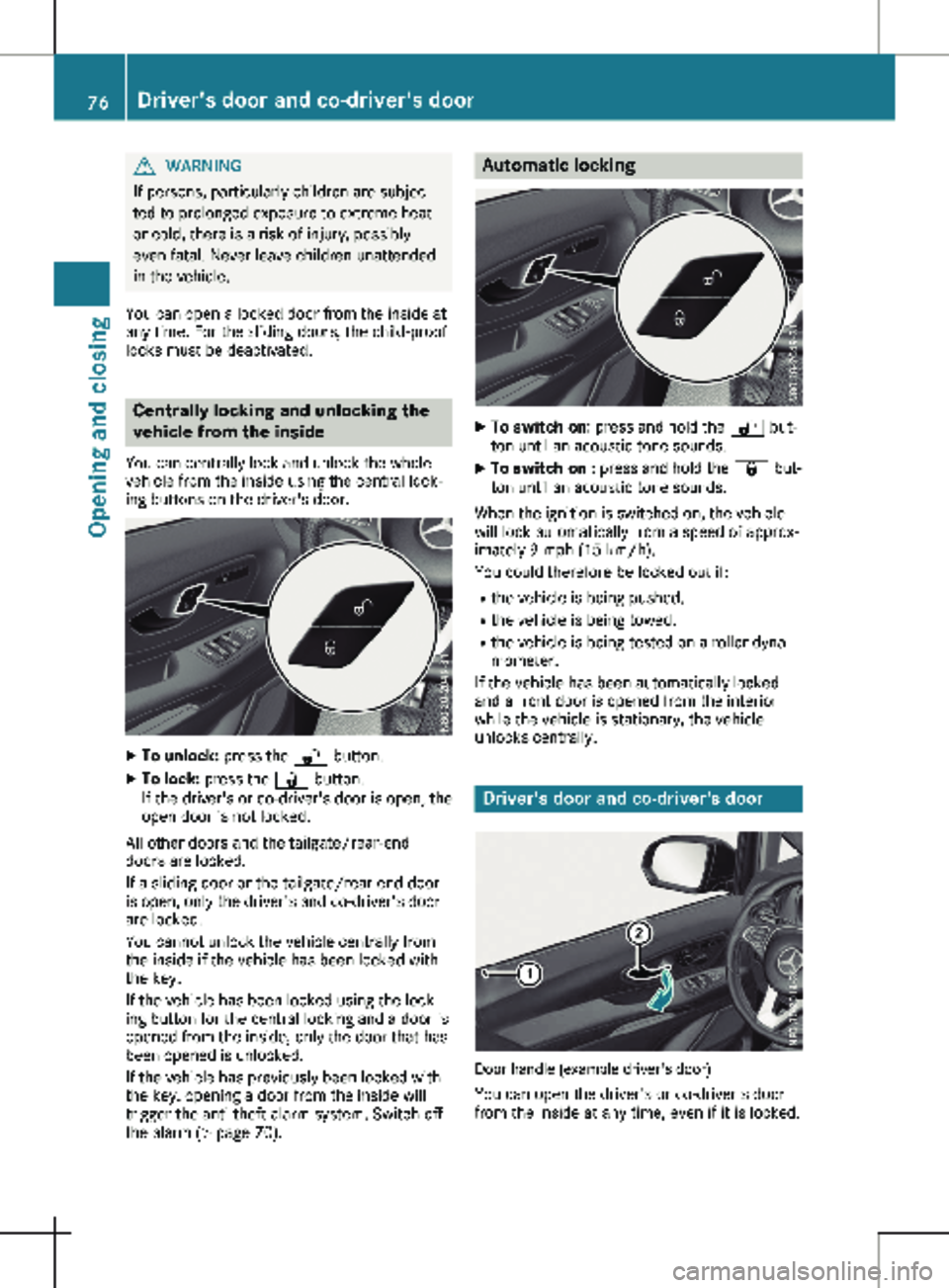
You can centrally lock and unlock the whole
vehicle from the inside using the central lock-
ing buttons on the driver's door. X
To unlock: press the % button.
X To lock: press the & button.
If the driver's or co-driver's door is open, the
open door is not locked.
All other doors and the tailgate/rear-end
doors are locked.
If a sliding door or the tailgate/rear-end door
is open, only the driver's and co-driver's door
are locked.
You cannot unlock the vehicle centrally from
the inside if the vehicle has been locked with
the key.
If the vehicle has been locked using the lock-
ing button for the central locking and a door is
opened from the inside, only the door that has
been opened is unlocked.
If the vehicle has previously been locked with
the key, opening a door from the inside will
trigger the anti-theft alarm system. Switch off
the alarm
(Y page 70). Automatic locking
X
To switch on: press and hold the % but-
ton until an acoustic tone sounds.
X To switch on : press and hold the & but-
ton until an acoustic tone sounds.
When the ignition is switched on, the vehicle
will lock automatically from a speed of approx-
imately
9 mph (15 km/h).
You could therefore be locked out if:
R the vehicle is being pushed.
R the vehicle is being towed.
R the vehicle is being tested on a roller dyna-
mometer.
If the vehicle has been automatically locked
and a front door is opened from the interior
while the vehicle is stationary, the vehicle
unlocks centrally. Driver's door and co-driver's door
Door handle (example driver's door)
You can open the driver's or co-driver's door
from the inside at any time, even if it is locked. 76
Driver's door and co-driver's door
Opening and closing
Page 91 of 320
Never leave children unsupervised in the
vehicle.
The seats can be adjusted when the key is
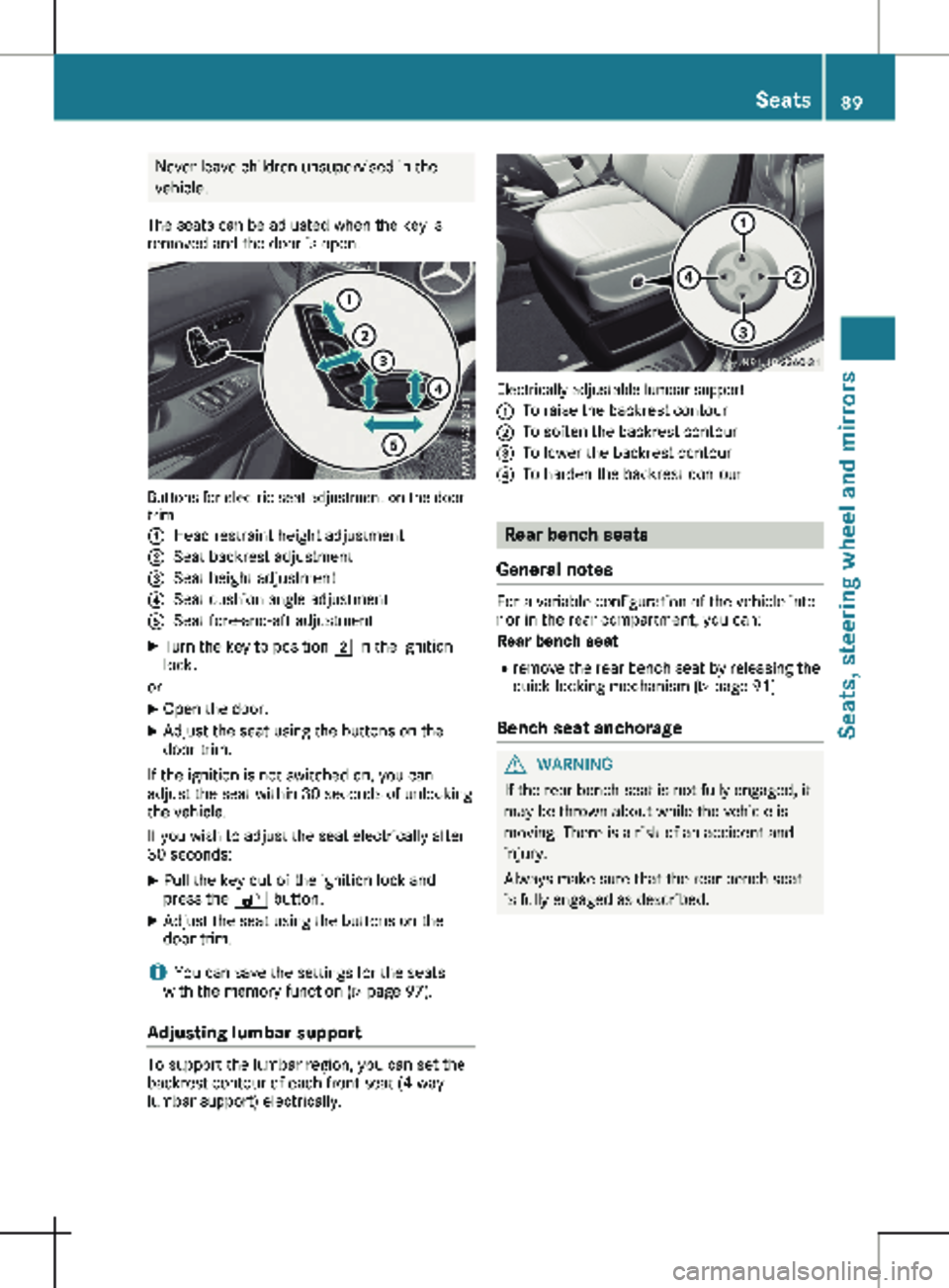
removed and the door is open. Buttons for electric seat adjustment on the door
trim
:
Head restraint height adjustment
; Seat backrest adjustment
= Seat height adjustment
? Seat cushion angle adjustment
A Seat fore-and-aft adjustment
X Turn the key to position 2 in the ignition
lock.
or X Open the door.
X Adjust the seat using the buttons on the
door trim.
If the ignition is not switched on, you can
adjust the seat within 30 seconds of unlocking
the vehicle.
If you wish to adjust the seat electrically after
30 seconds:
X Pull the key out of the ignition lock and
press the % button.
X Adjust the seat using the buttons on the
door trim.
i You can save the settings for the seats
with the memory function (Y page
97).
Adjusting lumbar support To support the lumbar region, you can set the
backrest contour of each front seat (4-way
lumbar support) electrically. Electrically adjustable lumbar support
:
To raise the backrest contour
; To soften the backrest contour
= To lower the backrest contour
? To harden the backrest contour Rear bench seats
General notes For a variable configuration of the vehicle inte-
rior in the rear compartment, you can:
Rear bench seat
R remove the rear bench seat by releasing the
quick-locking mechanism (Y page
91)
Bench seat anchorage G
WARNING
If the rear bench seat is not fully engaged, it
may be thrown about while the vehicle is
moving. There is a risk of an accident and
injury.
Always make sure that the rear bench seat
is fully engaged as described. Seats
89
Seats, steering wheel and mirrors Z
Page 100 of 320
While the memory function is making adjust-
ments, make sure that no one has any body
parts in the sweep of the seat. If somebody
becomes trapped, immediately release the
memory function position button. The
adjustment process is stopped. G
WARNING
Children could become trapped if they acti-
vate the memory function, particularly when
unattended. There is a risk of injury.
When leaving the vehicle, always take the
SmartKey with you and lock the vehicle.
Never leave children unsupervised in the
vehicle.
The memory function can be used at any time,
for example even when the key has been
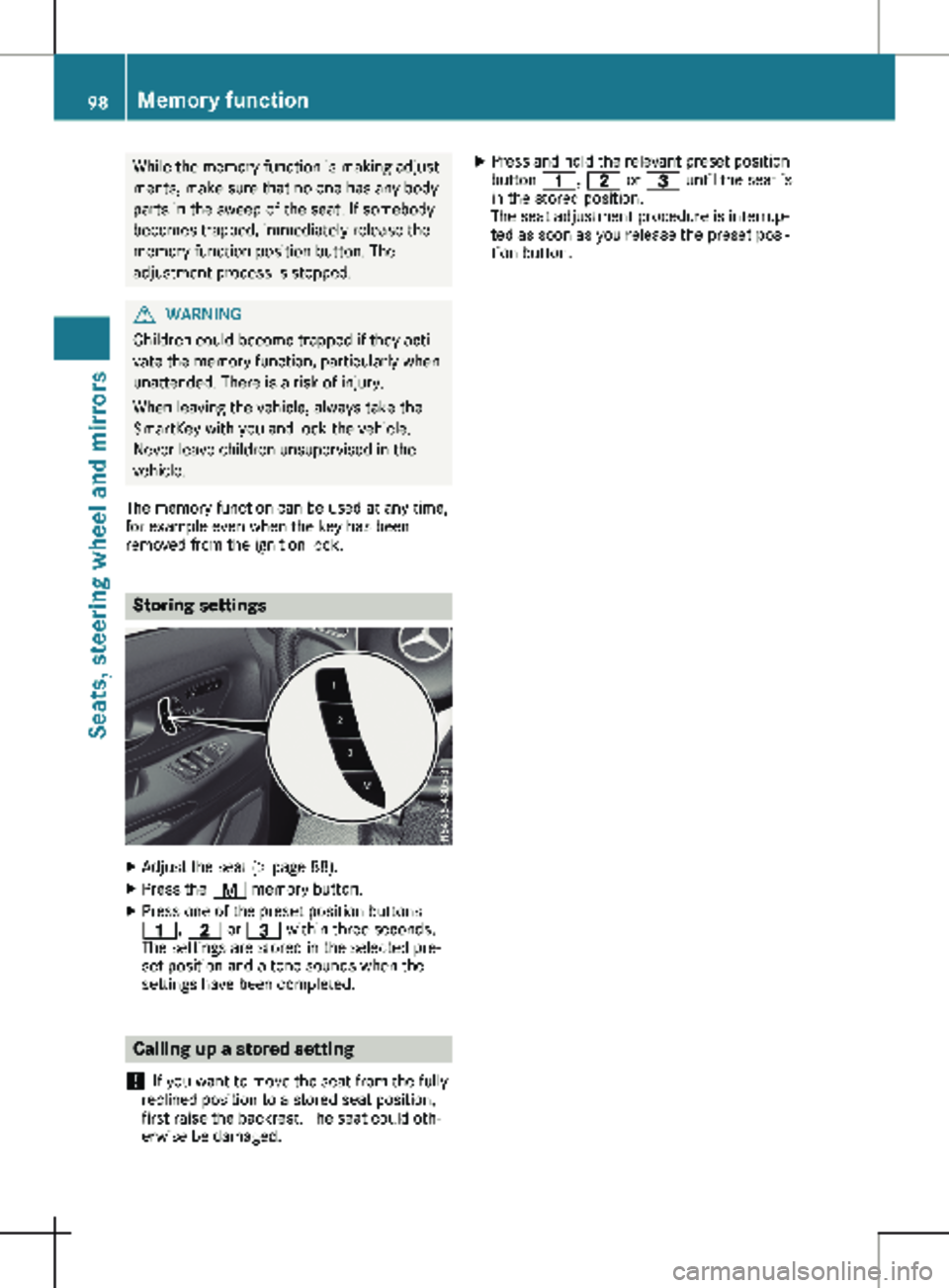
removed from the ignition lock. Storing settings
X
Adjust the seat (Y page 88).
X Press the r memory button.
X Press one of the preset position buttons
4, 5 or = within three seconds.
The settings are stored in the selected pre-
set position and a tone sounds when the
settings have been completed. Calling up a stored setting
! If you want to move the seat from the fully
reclined position to a stored seat position,
first raise the backrest. The seat could oth-
erwise be damaged. X
Press and hold the relevant preset position
button 4, 5 or = until the seat is
in the stored position.
The seat adjustment procedure is interrup-
ted as soon as you release the preset posi-
tion button. 98
Memory function
Seats, steering wheel and mirrors
Page 104 of 320
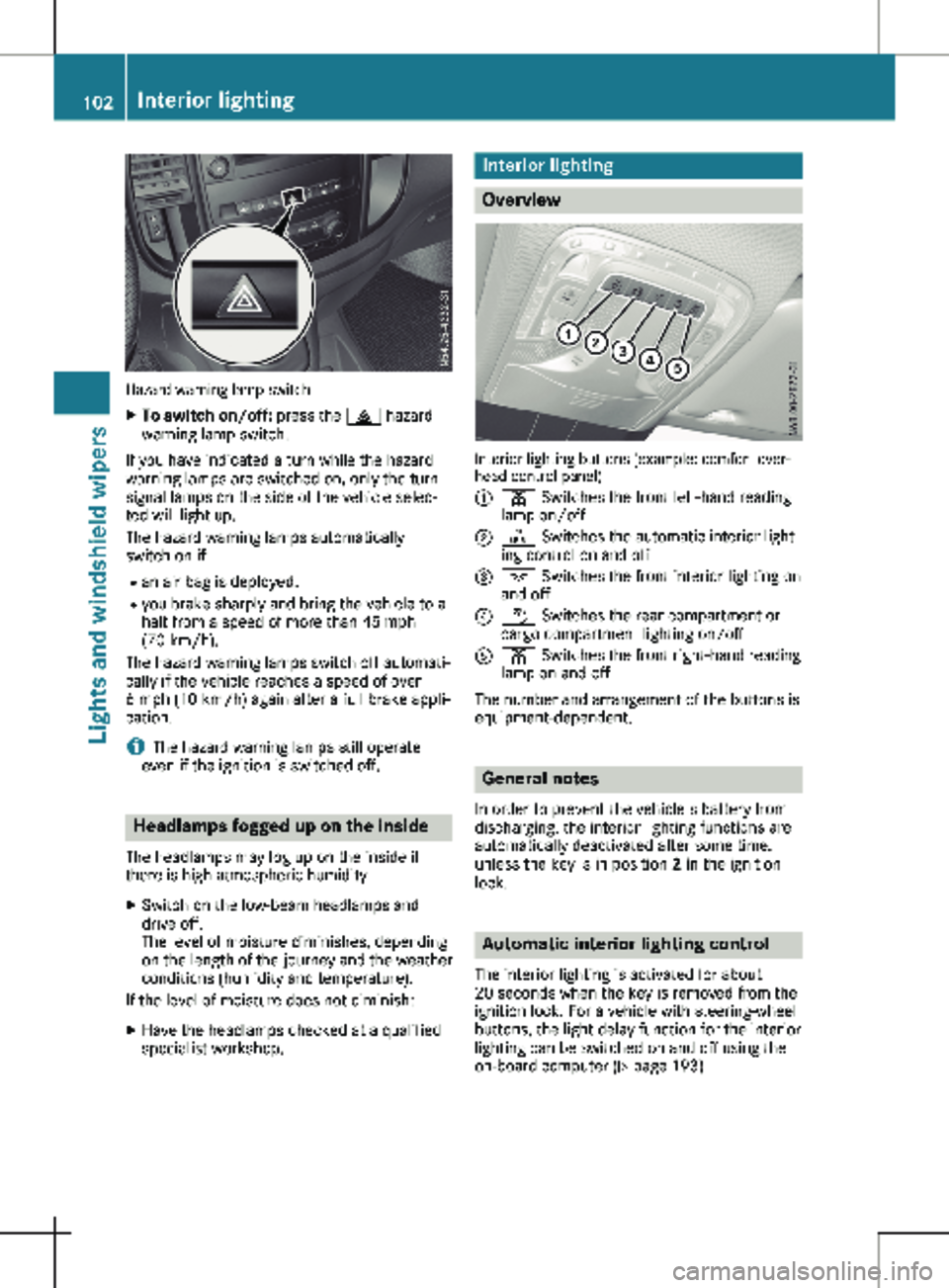
Hazard warning lamp switch
X
To switch on/off: press the £ hazard
warning lamp switch.
If you have indicated a turn while the hazard
warning lamps are switched on, only the turn
signal lamps on the side of the vehicle selec-
ted will light up.
The hazard warning lamps automatically
switch on if: R an air bag is deployed.
R you brake sharply and bring the vehicle to a
halt from a speed of more than 45 mph
(70 km/h
).
The hazard warning lamps switch off automati-
cally if the vehicle reaches a speed of over
6 mph (10 km/h) again after a full brake appli-
cation.
i The hazard warning lamps still operate
even if the ignition is switched off. Headlamps fogged up on the inside
The headlamps may fog up on the inside if
there is high atmospheric humidity.
X Switch on the low-beam headlamps and
drive off.
The level of moisture diminishes, depending
on the length of the journey and the weather
conditions (humidity and temperature).
If the level of moisture does not diminish:
X Have the headlamps checked at a qualified
specialist workshop. Interior lighting
Overview
Interior lighting buttons (example: comfort over-
head control panel)
:
p Switches the front left-hand reading
lamp on/off
; | Switches the automatic interior light-
ing control on and off
= c Switches the front interior lighting on
and off
? w Switches the rear compartment or
cargo compartment lighting on/off
A p Switches the front right-hand reading
lamp on and off
The number and arrangement of the buttons is
equipment-dependent. General notes
In order to prevent the vehicle's battery from
discharging, the interior lighting functions are
automatically deactivated after some time,
unless the key is in position 2 in the ignition
lock. Automatic interior lighting control
The interior lighting is activated for about
20 seconds
when the key is removed from the
ignition lock. For a vehicle with steering-wheel
buttons, the light delay function for the interior
lighting can be switched on and off using the
on-board computer ( Y page 193)102
Interior lighting
Lights and windshield wipers
Page 112 of 320

Switching the rear window wiper
on/off
1
b To wipe with washer fluid
2 ° Intermittent wipe
3 $ Rear window wiper off
4 b To wipe with washer fluid
X Turn the key to position 1 or 2 in the igni-
tion lock.
X Move the è switch to the corresponding
position.
If the rear window wiper is activated, the
è symbol is shown in the status area of
the display.
The Status Overview in the Assist.
menu then also shows the è symbol for
vehicles with steering wheel buttons
(Y page
189).
X To wipe with washer fluid: press the è
switch beyond the current position as far as
it will go to 1 or press and hold 4.
When you release the è switch, the rear
window wiper continues to wipe for about
another five seconds. The rear window
wiper then wipes according to the original
position 2 or 3.
The rear window wiper switches on automati-
cally if you engage reverse gear and the wind-
shield wipers are on.
If the vehicle is stationary and you open the
tailgate or rear-end door, the rear window
wiper will stop automatically. The rear window
wiper will only resume wiping again when the
tailgate and rear-end door are closed and you
pull away again.
The rear window will no longer be wiped prop-
erly if the wiper blade is worn. This may pre-
vent you from observing the traffic conditions.
Information on replacing the wiper blade can be found under "Replacing wiper blades"
(
Y page
110). Replacing the wiper blades
Important safety notes G
WARNING
If the windshield wipers begin to move while
you are changing the wiper blades, you
could be trapped by the wiper arm. There is
a risk of injury.
Always switch off the windshield wipers and
ignition before changing the wiper blades.
! Never open the hood/tailgate or rear
doors if a windshield wiper arm has been
folded away from the windshield/rear win-
dow.
Never fold a windshield wiper arm without a
wiper blade back onto the windshield/rear
window.
Hold the windshield wiper arm firmly when
you change the wiper blade. If you release
the windshield wiper arm without a wiper
blade and it falls onto the windshield/rear
window, the windshield/rear window may
be damaged by the force of the impact.
Mercedes-Benz recommends that you have
the wiper blades changed at a qualified spe-
cialist workshop.
! Only hold the wiper blade by the wiper
arm. You could otherwise damage the wiper
rubber.
Wiper blades are wear parts. The windshield
will no longer be wiped properly if the wiper
blades are worn. This may prevent you from
observing the traffic conditions.
Please observe the service indicator after
changing the wiper blades of the windshield
wiper.
Service indicator Replacement wiper blades for the windshield
wiper have a service indicator on the tip of the
wiper blade.
Depending on the amount of use, the service
indicator will change color from black to yel-
low.110
Windshield wipers
Lights and windshield wipers
Page 123 of 320
i
If the airflow is set when in automatic
mode, automatic control is deactivated. The
indicator lamp in the à button then goes
out. The air distribution continues to be
adjusted automatically, however.
Rear-compartment air-conditioning
system Vehicles with air-conditioning system
X Switch on climate control (Y page 117).
The air conditioning settings for tempera-
ture, airflow and, for rear-compartment air
conditioning, also the setting for air distribu-
tion are also applied to the rear-compart-
ment climate control.
Vehicles with dual-zone automatic cli-
mate control
X Switch on climate control (Y page
117).
X To increase or decrease: press the /
button on the control panel of the automatic
climate control.
The indicator lamp in the / button
flashes. The control panel display shows the
second menu level for the temperature and
airflow setting of the rear compartment air
conditioning.
X Press the K or I button.
The control panel display shows the rear-
compartment airflow control setting as a bar
display.
If you do not make any more settings for
approximately ten seconds, the control
panel display shows menu level 1 again for
the automatic climate control settings. The
indicator lamp in the / button remains
lit. Activating/deactivating the synchro-
nization function
General notes Dual-zone automatic climate control can be
set centrally using the synchronization func-
tion. The temperature setting for the driver's
side is then adopted for the front-passenger
side and, on vehicles with rear-compartment
air conditioning, the rear compartment too. Dual-zone automatic climate control X
Switch on climate control ( Y page
117).
X Press the 0 button.
If the indicator lamp in the 0 button
lights up, the function is switched on. The
display then shows the temperature set on
the driver's side for the front-passenger
side.
The synchronization function switches off if
the temperature setting for the front-
passenger side or for the rear compartment
is altered. The indicator lamp on the 0
button then goes out. Defrosting the windshield
General notes You can use the following settings to defrost
the windshield or to defrost the inside of the
windshield and the front side windows.
Only use the following settings until the wind-
shield is clear.
Air-conditioning system X
Switch on climate control (Y page
117).
X Turn temperature control : and airflow
control A clockwise to the z setting
(Y page
115).
X Select the ¯ air distribution setting
(Y page
120).
Only the indicator lamp in the ¯ button
lights up. The indicator lamps on the P
and O buttons are off.
Dual-zone automatic climate control X
Switch on climate control ( Y page
117).
X To activate/deactivate the windshield
defrosting function: press the ¬ but-
ton.
The indicator lamp in the ¬ button
comes on when the windshield defrosting
function is switched on. Temperature, air-
flow and air distribution are automatically
set to the optimum defrosting effect. Air-
recirculation mode is deactivated.
When you activate automatic mode, the
windshield defrosting function is automati-
cally deactivated. Operating the climate control system
121
Climate control
Page 149 of 320
Use cruise control if road and traffic condi-
tions make it appropriate to maintain a steady
speed for a prolonged period. You can set any
speed from 30 km/h
upwards in increments of
1 km/h and 10 km/h.
If you have set Miles as the unit for the digital
speedometer , you can set any speed above
20 mph in increments of 1 mph and 5 mph.
Changing the display unit for the digital speed-
ometer and the distance:
R on vehicles without steering wheel buttons
(Y page 180)
R on vehicles with steering wheel buttons
(Y page 192)
Cruise control should not be activated when
driving off-road or on construction sites.
Cruise control may be unable to maintain the
stored speed on uphill gradients. The stored
speed is resumed if the uphill gradient evens
out and the vehicle's speed does not fall below
20 mph (30 km/h). Cruise control maintains
the stored speed on downhill gradients by
automatically applying the brakes. Observe the
additional driving tips (Y page 142).
Important safety notes Observe the notes on braking (Y page
142).
If you fail to adapt your driving style or if you
are inattentive, cruise control can neither
reduce the risk of an accident nor override the
laws of physics. Cruise control cannot take
road, weather and traffic conditions into
account. Cruise control is only an aid. You are
responsible for the distance to the vehicle in
front, for vehicle speed, for braking in good
time and for staying in lane.
If you change wheel size, make sure they cor-
respond to the correct wheel size category
(Y page 278). If the category is changed with- out recoding the control units in the vehicle,
the functioning of cruise control may be
impaired.
Do not use cruise control:
R in traffic conditions that are unsuitable for
driving at a constant speed, e.g. in heavy
traffic, on winding roads or off-road.
R on slippery roads. Braking or accelerating
may cause the drive wheels to lose traction
and the vehicle could then skid.
R when there is poor visibility, e.g. due to fog,
heavy rain or snow. If there is a change of drivers, make sure that
you inform the new driver about the set cruise
speed.
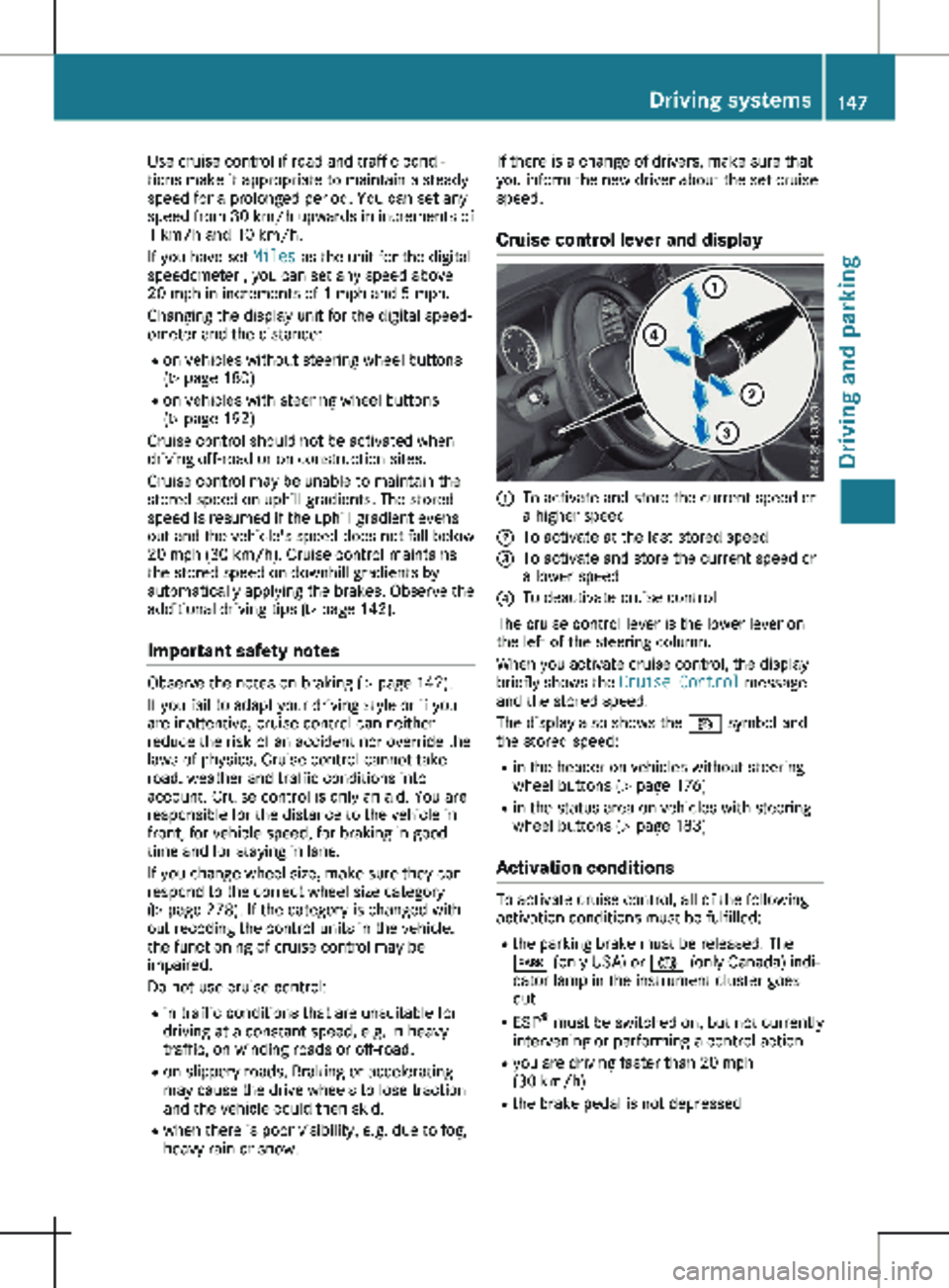
Cruise control lever and display :
To activate and store the current speed or
a higher speed
; To activate at the last stored speed
= To activate and store the current speed or
a lower speed
? To deactivate cruise control
The cruise control lever is the lower lever on
the left of the steering column.
When you activate cruise control, the display
briefly shows the Cruise Control message
and the stored speed.
The display also shows the V symbol and
the stored speed:
R in the header on vehicles without steering
wheel buttons (Y page
176)
R in the status area on vehicles with steering
wheel buttons (Y page 183)
Activation conditions To activate cruise control, all of the following
activation conditions must be fulfilled:
R the parking brake must be released. The
F (only USA) or J (only Canada) indi-
cator lamp in the instrument cluster goes
out
R ESP ®
must be switched on, but not currently
intervening or performing a control action
R you are driving faster than
20 mph
(30 km/h)
R the brake pedal is not depressed Driving systems
147
Driving and parking Z
Page 150 of 320
Storing and maintaining the current
speed
X
Accelerate the vehicle to the desired speed
above 20 mph (30 km/h
).
X Briefly push the cruise control lever up : or
down =.
X Release the accelerator pedal.
Cruise control is activated. The current
speed is stored and shown briefly in the dis-
play's text field.
The display also shows the V symbol and
the stored speed:
R in the header on vehicles without steering
wheel buttons (Y page
176)
R in the status area on vehicles with steer-
ing wheel buttons (Y page 183)
Resuming the stored speed G
WARNING
If you call up the stored speed and it differs
from the current speed, the vehicle acceler-
ates or decelerates. If you do not know the
stored speed, the vehicle could accelerate
or brake unexpectedly. There is a risk of an
accident.
Pay attention to the road and traffic condi-
tions before calling up the stored speed. If
you do not know the stored speed, store the
desired speed again.
X Briefly pull the cruise control lever towards
you ;.
X Release the accelerator pedal.
Cruise control is activated and resumes the
vehicle's speed to the last speed stored.
The stored speed is shown briefly in the dis-
play.
The display also shows the V symbol and
the stored speed:
R in the header on vehicles without steering
wheel buttons (Y page
176)
R in the status area on vehicles with steer-
ing wheel buttons (Y page 183)
i When you pull the cruise control lever
towards you for the first time after starting
the engine, cruise control adopts the cur-
rent speed. Setting the speed It may be a moment before the vehicle starts
to accelerate or brake to the set speed. Take
this delay into account when setting the
speed.
X
Press the cruise control lever up : to
increase the speed or down = to reduce
the speed.
The vehicle will accelerate or decelerate.
The speed is shown in the display.
X Release the cruise control lever once the
desired speed is reached.
The displayed speed is stored.
or
X Briefly press the cruise control lever as far
as the 1st pressure point up : or down =.
The last speed stored is increased/reduced
in increments of
1 mph (1 km/h).
or X Briefly press the cruise control lever beyond
the pressure point up : or down =.
The last speed stored is increased/reduced
in increments of
5 mph (10 km/h).
i Cruise control is not deactivated if you
depress the accelerator pedal. If you accel-
erate briefly to overtake, for example, cruise
control resumes the vehicle’s speed to the
last speed stored after you have finished
overtaking.
Deactivating cruise control There are various ways to deactivate cruise
control:
X Briefly press the cruise control lever for-
wards ?.
or X Apply the brakes.
The last speed set remains stored. The last
speed stored is deleted when you switch off
the engine.
Cruise control is deactivated automatically
when:
R you apply the brakes
R you apply the parking brake and the F
(only USA) or J (only Canada) indicator
lamp in the instrument cluster lights up
R you are driving slower than
20 mph
(30 km/h) 148
Driving systems
Driving and parking
Page 158 of 320
For vehicles with steering wheel buttons you
can have the current ATTENTION ASSIST
(Attention Level) assessment displayed.
X Select Status Overview in the Assist.
menu and display the attention level
(Y page
189).
The following information is displayed: R the length of the journey since the last
break.
R the attention level determined by ATTEN-
TION ASSIST, displayed in a bar display in
five levels from low to high.
R if ATTENTION ASSIST is unable to calculate
the attention level and cannot output a
warning, the System Passive message
appears in the display. The bar display is
then dimmed. This is the case, for example,
if you are predominantly driving at a speed
below
40 mph (60 km/h) or above 125 mph
(200 km/h).
Activating ATTENTION ASSIST X
Activating ATTENTION ASSIST with the on-
board computer:
R on vehicles without steering wheel but-
tons
(Y page 180)
R on vehicles with steering wheel buttons
(Y page 190)
For vehicles with steering wheel buttons,
the system determines the attention level of
the driver depending on the setting selec-
ted:
Standard: the sensitivity with which the
system determines the attention level is set
to normal.
Sensitive: the sensitivity is set higher. The
driver is warned earlier.
When ATTENTION ASSIST is switched on and
the vehicle engine is running: R on vehicles without steering wheel buttons,
the À indicator lamp in the instrument
cluster lights up
R on vehicles with steering-wheel buttons, the
display shows the À symbol:
- in the status area
- in the Status Overview of the Assist.
menu (Y page
189)
For vehicles with steering wheel buttons, if you
deactivate ATTENTION ASSIST, the system is
automatically re-activated when you start the engine. The system sensitivity then corre-
sponds to the last selection activated – stand-
ard or sensitive.
If you switch off ATTENTION ASSIST in a vehi-
cle without steering wheel buttons, the system
remains switched off even after you start the
engine. The status of the system after switch-
ing on the engine always corresponds to the
status last selected.
Warning in the display If the system detects tiredness or increasing
lapses in concentration, the warning
Atten‐
tion Assist: Take a Break! or Attent.
Asst: Take Break!is shown in the display.
An additional warning tone sounds.
X If necessary, take a break.
X Confirm the message by pressing the a
button on the steering wheel.
On long journeys, take regular breaks in good
time to allow yourself to rest. If you do not
take a break and ATTENTION ASSIST contin-
ues to detect increasing lapses in concentra-
tion, you will be warned again after
15 minutes
at the earliest. This will only happen if ATTEN-
TION ASSIST still detects typical indicators of
fatigue or increasing lapses in concentration. PARKTRONIC
General notes PARKTRONIC is an electronic parking aid. The
system is equipped with ultrasonic sensors in
the front and rear bumpers to monitor the area
around your vehicle. PARKTRONIC indicates
visually and audibly the distance between your
vehicle and an object.
Your vehicle features two separate sound
emitters with different frequencies for the
warning tones. The warning ranges in front of
and behind the vehicle are indicated by differ-
ent warning tones.
PARKTRONIC is activated automatically when
you:
R turn the key to position 2 in the ignition lock
R release the parking brake and
R move the selector lever to position D, N or R156
Driving systems
Driving and parking
Page 176 of 320
Useful information
This Operator's Manual describes all models
as well as standard and optional equipment of
your vehicle that were available at the time of
going to print. Country-specific variations are
possible. Note that your vehicle may not be
equipped with all of the described functions.
This also applies to systems and functions rel-
evant to safety.
Read the information on qualified specialist
workshops (Y page
32).Important safety notes
G
WARNING
If you operate information systems and com-
munication equipment integrated in the
vehicle when driving, you may be distracted
from the traffic situation. You could also
lose control of the vehicle. There is a risk of
an accident.
Only operate this equipment when the traffic
situation permits. If you are not sure that
this is possible, park the vehicle paying
attention to traffic conditions and operate
the equipment when the vehicle is station-
ary. G
WARNING
If you are driving and reach through the
steering wheel to operate the adjustment
knob, you could lose control of the vehicle.
There is a risk of an accident and injury.
Only operate the adjustment knobs when
the vehicle is stationary. Do not reach
through the steering wheel when driving.
You must observe the legal requirements for
the country in which you are currently driving
when operating the on-board computer. G
WARNING
If the instrument cluster has failed or mal-
functioned, you may not recognize function
restrictions in systems relevant to safety. The operating safety of your vehicle may be
impaired. There is a risk of an accident.
Drive on carefully. Have the vehicle checked
at a qualified specialist workshop immedi-
ately.
The on-board computer display only shows
messages and warnings from certain systems.
You should therefore make sure your vehicle is
operating safely at all times. If the operating
safety of your vehicle is impaired, stop the
vehicle as soon as possible, paying attention
to road and traffic conditions. Then consult a
qualified specialist workshop.
The accuracy of the speedometer and odome-
ter displays is legally prescribed. Determining
the speed is dependent on the wheel size or
the rolling circumference of the wheels. If you
change the wheel size on your vehicle, make
sure it is assigned to the correct wheel size
category ( Y page
278). If you change wheel
size category without recoding the control
unit, the speedometer indication will be inac-
curate. Driving safety and driving systems may
be impaired or detect a malfunction and shut
down.
An overview of the instrument cluster can be
found under "Instrument cluster":
R for vehicles without steering wheel buttons
(Y page 38)
R for vehicles with steering wheel buttons
(Y page 40) Display and operation
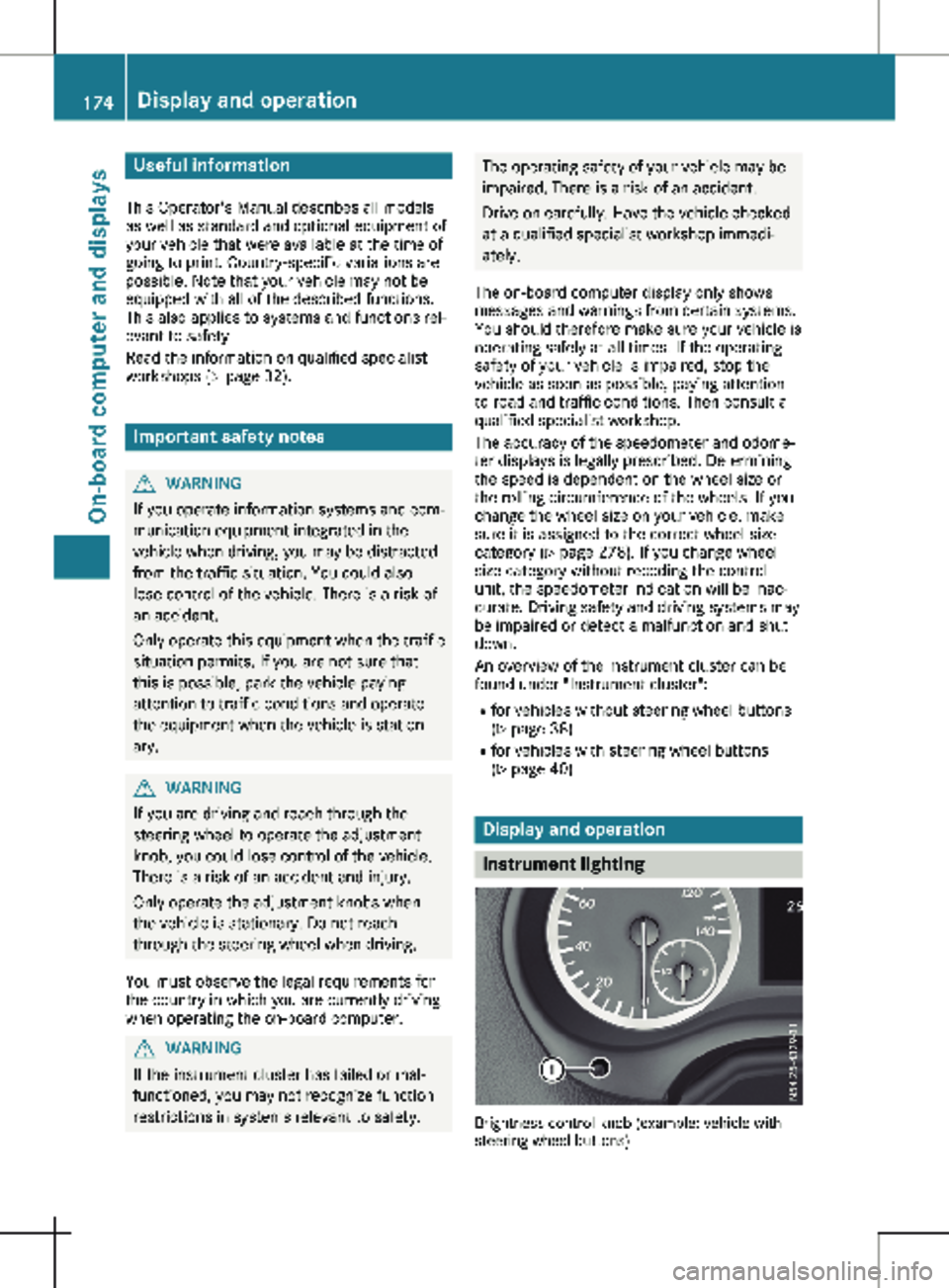
Instrument lighting
Brightness control knob (example: vehicle with
steering wheel buttons)174
Display and operation
On-board computer and displays