light MERCEDES-BENZ METRIS 2020 MY20 Operator’s Manual
[x] Cancel search | Manufacturer: MERCEDES-BENZ, Model Year: 2020, Model line: METRIS, Model: MERCEDES-BENZ METRIS 2020Pages: 320, PDF Size: 26.38 MB
Page 121 of 320
Regulating climate control automati-
cally
General notes When dual-zone automatic climate control is in
automatic mode, the set temperature is auto-
matically kept constant. The system automati-
cally regulates the temperature of the dis-
pensed air, the airflow and the air distribution.
Automatic mode will achieve optimal operation
if the cooling with air dehumidification func-
tion is also activated. If desired, the cooling
with air dehumidification function can be deac-
tivated (
Y page 118).
Dual-zone automatic climate control Automatic mode for automatic climate control
settings can only be activated or deactivated
on the first menu level. If you do not set a new
value for the rear-compartment climate control
in the second menu level within approx. ten
seconds, the control panel display goes back
to the first menu level.
X Switch on climate control ( Y page 117).
X Set temperature for the driver's and front-
passenger side and, for vehicles with rear-
compartment air conditioning, for the rear
compartment, too
(Y page 119).
X To switch automatic mode on or off:
press the à button.
If the indicator lamp in the
à button
lights up, automatic mode is activated. The
airflow and air distribution are controlled
automatically and the windshield defrosting
function is deactivated.
If you deactivate automatic mode, the auto-
matic climate control system saves the current
settings.
In automatic mode, if you adjust the airflow or
air distribution manually, the indicator lamp
above the à button goes out. The function
which has not been changed manually, how-
ever, continues to be controlled automatically. Setting the temperature
Air-conditioning system X
Switch on climate control ( Y page
117).
X To increase or reduce: turn temperature
control : clockwise or counter-clockwise.
When doing so, only change the tempera-
ture in small increments, and start in the
center position or at
72 ‡ (22 †)
( Y page 115).
Dual-zone automatic climate control You can set the temperature separately for the
driver's and co-driver's side. In vehicles with
rear-compartment air conditioning, the tem-
perature for the rear compartment can be set
additionally. Each set temperature is automati-
cally maintained at a constant level.
X Switch on climate control (Y page
117).
X To increase or reduce: turn temperature
control : or E clockwise or counter-clock-
wise ( Y page
116). When doing so, only
change the temperature in small increments
starting at 72 ‡ (22 †).
The control panel display shows the set
temperature for the left and right side at the
respective edge of the display.
Rear-compartment air-conditioning
system Vehicles with air-conditioning system
X Switch on climate control ( Y page
117).
The air conditioning settings for tempera-
ture, airflow and, for rear-compartment air
conditioning, also the setting for air distribu-
tion are also applied to the rear-compart-
ment climate control.
Vehicles with dual-zone automatic cli-
mate control X Switch on climate control ( Y page
117).
X To increase or decrease: press the /
button on the control panel of the automatic
climate control.
The indicator lamp in the / button
flashes. The control panel display shows the
second menu level for the temperature and Operating the climate control system
119
Climate control
Page 122 of 320
airflow setting of the rear-compartment air
conditioning.
X Turn temperature control : or E counter-
clockwise or clockwise (Y page 116). When
doing so, only change the temperature in
small increments starting at 72 ‡ (22 †).
The control panel display shows the temper-
ature set for the rear compartment.
If you do not make any more settings for
approximately ten seconds, the control
panel display shows menu level 1 again for
the automatic climate control settings. The
indicator lamp in the / button remains
lit. Setting the air distribution
Air-conditioning system Air distribution settings
¯ Directs air through the defroster vents
P Directs air through the center and side
air vents
O Directs air through the footwell vents
Regardless of the air distribution selected, air
is always directed to the side air vents. You
can adjust this airflow by opening or closing
the side air vents ( Y page
124).
Setting the air distribution
X Switch on climate control (Y page
117).
X Press the P, O and/or ¯ button.
If the indicator lamp in a button lights up,
the air is directed to the corresponding air
vents.
X Adjust the air vents if necessary
(Y page
124).
Dual-zone automatic climate control Air distribution settings
¯ Directs air through the defroster vents
b Directs air through the defroster, center
and side air vents
_ Directs air through the defroster, cen-
ter, side and footwell vents
a Directs air through the defroster and
footwell vents
P Directs air through the center and side
air vents N
Directs air through the center, side and
footwell vents
O Directs air through the footwell vents
Regardless of the air distribution selected, air
is always directed to the side air vents. You
can adjust this airflow by opening or closing
the side air vents ( Y page
124).
Setting the air distribution
X Switch on climate control (Y page
117).
X Press the É or Ë button to set the air
distribution.
The control panel display shows the corre-
sponding air distribution symbol.
X Adjust the air vents if necessary
(Y page
124).
i If the air distribution is set when dual-zone
automatic climate control is in automatic
mode, automatic control is deactivated. The
indicator lamp on the à button then
goes out. The airflow continues to be adjus-
ted automatically, however.
Rear-compartment air-conditioning
system When the rear-compartment air conditioning is
switched on, the air distribution setting on the
control panel also applies to the rear-compart-
ment air conditioning.
This also applies to the automatic mode of
dual-zone automatic climate control. The air is
then automatically directed to the footwell or
the headroom of the rear compartment. Setting the airflow
Air-conditioning system X
Switch on climate control (Y page
117).
X To increase or reduce: turn airflow control
A counter-clockwise or clockwise to the
desired level
(Y page 115).
Dual-zone automatic climate control X
Switch on climate control ( Y page
117).
X To increase or reduce: press the K or
I button.
The control panel display shows the airflow
control setting as a bar display. 120
Operating the climate control system
Climate control
Page 123 of 320
i
If the airflow is set when in automatic
mode, automatic control is deactivated. The
indicator lamp in the à button then goes
out. The air distribution continues to be
adjusted automatically, however.
Rear-compartment air-conditioning
system Vehicles with air-conditioning system
X Switch on climate control (Y page 117).
The air conditioning settings for tempera-
ture, airflow and, for rear-compartment air
conditioning, also the setting for air distribu-
tion are also applied to the rear-compart-
ment climate control.
Vehicles with dual-zone automatic cli-
mate control
X Switch on climate control (Y page
117).
X To increase or decrease: press the /
button on the control panel of the automatic
climate control.
The indicator lamp in the / button
flashes. The control panel display shows the
second menu level for the temperature and
airflow setting of the rear compartment air
conditioning.
X Press the K or I button.
The control panel display shows the rear-
compartment airflow control setting as a bar
display.
If you do not make any more settings for
approximately ten seconds, the control
panel display shows menu level 1 again for
the automatic climate control settings. The
indicator lamp in the / button remains
lit. Activating/deactivating the synchro-
nization function
General notes Dual-zone automatic climate control can be
set centrally using the synchronization func-
tion. The temperature setting for the driver's
side is then adopted for the front-passenger
side and, on vehicles with rear-compartment
air conditioning, the rear compartment too. Dual-zone automatic climate control X
Switch on climate control ( Y page
117).
X Press the 0 button.
If the indicator lamp in the 0 button
lights up, the function is switched on. The
display then shows the temperature set on
the driver's side for the front-passenger
side.
The synchronization function switches off if
the temperature setting for the front-
passenger side or for the rear compartment
is altered. The indicator lamp on the 0
button then goes out. Defrosting the windshield
General notes You can use the following settings to defrost
the windshield or to defrost the inside of the
windshield and the front side windows.
Only use the following settings until the wind-
shield is clear.
Air-conditioning system X
Switch on climate control (Y page
117).
X Turn temperature control : and airflow
control A clockwise to the z setting
(Y page
115).
X Select the ¯ air distribution setting
(Y page
120).
Only the indicator lamp in the ¯ button
lights up. The indicator lamps on the P
and O buttons are off.
Dual-zone automatic climate control X
Switch on climate control ( Y page
117).
X To activate/deactivate the windshield
defrosting function: press the ¬ but-
ton.
The indicator lamp in the ¬ button
comes on when the windshield defrosting
function is switched on. Temperature, air-
flow and air distribution are automatically
set to the optimum defrosting effect. Air-
recirculation mode is deactivated.
When you activate automatic mode, the
windshield defrosting function is automati-
cally deactivated. Operating the climate control system
121
Climate control
Page 124 of 320
When you deactivate the windshield defrosting
function, the previous automatic climate con-
trol settings are reactivated with the exception
of air-recirculation mode. Air-recirculation
mode remains deactivated. Clearing condensation from the win-
dows
Windows fogged up on the inside Air-conditioning system
You should only select this setting until the
windows are clear again.
X Switch on the rear window defroster if nec-
essary
(Y page 122).
X Switch on climate control (Y page
117).
X Switch off air-recirculation mode
(Y page
123).
X Turn temperature control : clockwise to a
higher temperature and air flow control A
to a blower speed between 3 and 6
( Y page
115).
X If possible, only select the ¯ setting of
the air distribution
(Y page 120).
Only the indicator lamp in the ¯ button
lights up.
X Switch on the cooling with air dehumidifica-
tion function
(Y page 118).
X If the windows still fog up, set the climate
control functions as described for defrosting
of the windshield
(Y page 121).
Dual-zone automatic climate control You should only select this setting until the
windows are clear again.
X Switch on the rear window defroster if nec-
essary
(Y page 122).
X Switch on climate control (Y page
117).
X Switch off air-recirculation mode
(Y page
123).
X Switch on the cooling with air dehumidifica-
tion function
(Y page 118).
X Switch on automatic mode ( Y page
119).
X If the windows continue to fog up, switch on
the windshield defrosting function
( Y page
121). Windows fogged up on the outside You should only select this setting until the
windshield is clear again.
X Switch on the windshield wipers
(Y page
109).
X Switch on climate control (Y page
117).
X In warm and damp weather, do not allow
cold air to flow onto the windows. Close the
side air vents if required
(Y page 124). Switching the rear window defroster
on/off
General notes The rear window defroster consumes a lot of
power. You should therefore switch off the
rear window defroster as soon as the rear win-
dow is clear.
X Turn the key to position 2 in the ignition
lock.
X Press the ¤ button on the control panel.
If the indicator lamp in the ¤ button
lights up, the rear window defroster is
switched on.
The rear window defroster switches off auto-
matically after a few minutes.
Problems with the rear window
defroster The rear window defroster has switched off
prematurely or cannot be activated.
The vehicle starter battery is not sufficiently
charged.
X Switch off any consumers that are not
required, e.g. reading lamps, interior lighting
or seat heating.
When the battery is sufficiently charged, the
rear window defroster can be activated
again.122
Operating the climate control system
Climate control
Page 125 of 320
Switching air-recirculation mode
on/off
Important safety notes You can deactivate the intake of fresh air if
unpleasant odors enter the vehicle from out-
side. The air inside the vehicle is then circula-
ted.
When you switch on air-recirculation mode,
the side windows and windows could fog up
more quickly, in particular at low outside tem-
peratures. Only switch on air-recirculation
mode for a short time.
Air-conditioning system or dual-zone
automatic climate control X
Switch on climate control ( Y page 117).
X Press the h button.
If the indicator lamp in the h button
lights up, air-recirculation mode is activated.
Air-recirculation mode switches on automati-
cally: R at high outside temperatures
R while driving in a tunnel (only vehicles with a
navigation system)
The indicator lamp in the h button is then
not lit up. Outside air is added automatically
after about
30 minutes.
Air-recirculation mode is deactivated automati-
cally:
R after approximately five minutes at outside
temperatures below about 45 ‡ (7 †)
R after approximately five minutes when the
cooling with air-dehumidification function is
deactivated
R after approximately 30 minutes at outside
temperatures above about 45 ‡ (7 †) and
when the cooling with air-dehumidification
function is active Convenience opening/pre-entry cli-
mate control
G
WARNING
During convenience opening, body parts
could be drawn in or become trapped
between the side window and the door
frame. There is a risk of injury. Monitor the entire opening procedure when
using convenience opening. When opening,
make sure that nobody touches the side
window. Release the % switch immedi-
ately if somebody becomes trapped, to
interrupt the opening procedure.
X Pre-entry climate control and conveni-
ence opening with the key:
press and hold
the % button on the key.
The side windows open automatically and
the blower of the climate control system is
activated.
X Release the % button.
i At high interior temperatures, the blower is
also switched on when a door is opened.
This means that slightly cooled air enters
the vehicle interior after the engine is star-
ted, to cool the vehicle more rapidly. Switching the residual heat function
on/off
General notes Only vehicles with dual-zone automatic climate
control have the residual heat function.
Once the engine is switched off, it is possible
to make use of the residual heat of the engine
to continue heating or ventilating the front
compartment of the vehicle for approximately
30 minutes. The heating or ventilation time
depends on the set interior temperature.
Switching the function on/off X
Turn the key to position 0 in the ignition
lock or remove it.
X Press the Ì button.
If the residual heat function is activated, the
indicator lamp in the Ì button comes on.
The blower will run at a low speed regard-
less of the airflow setting.
If you activate the residual heat function at
high temperatures, only the auxiliary ventila-
tion will be activated. The blower then runs
at medium speed. Operating the climate control system
123
Climate control Z
Page 129 of 320
Key positions
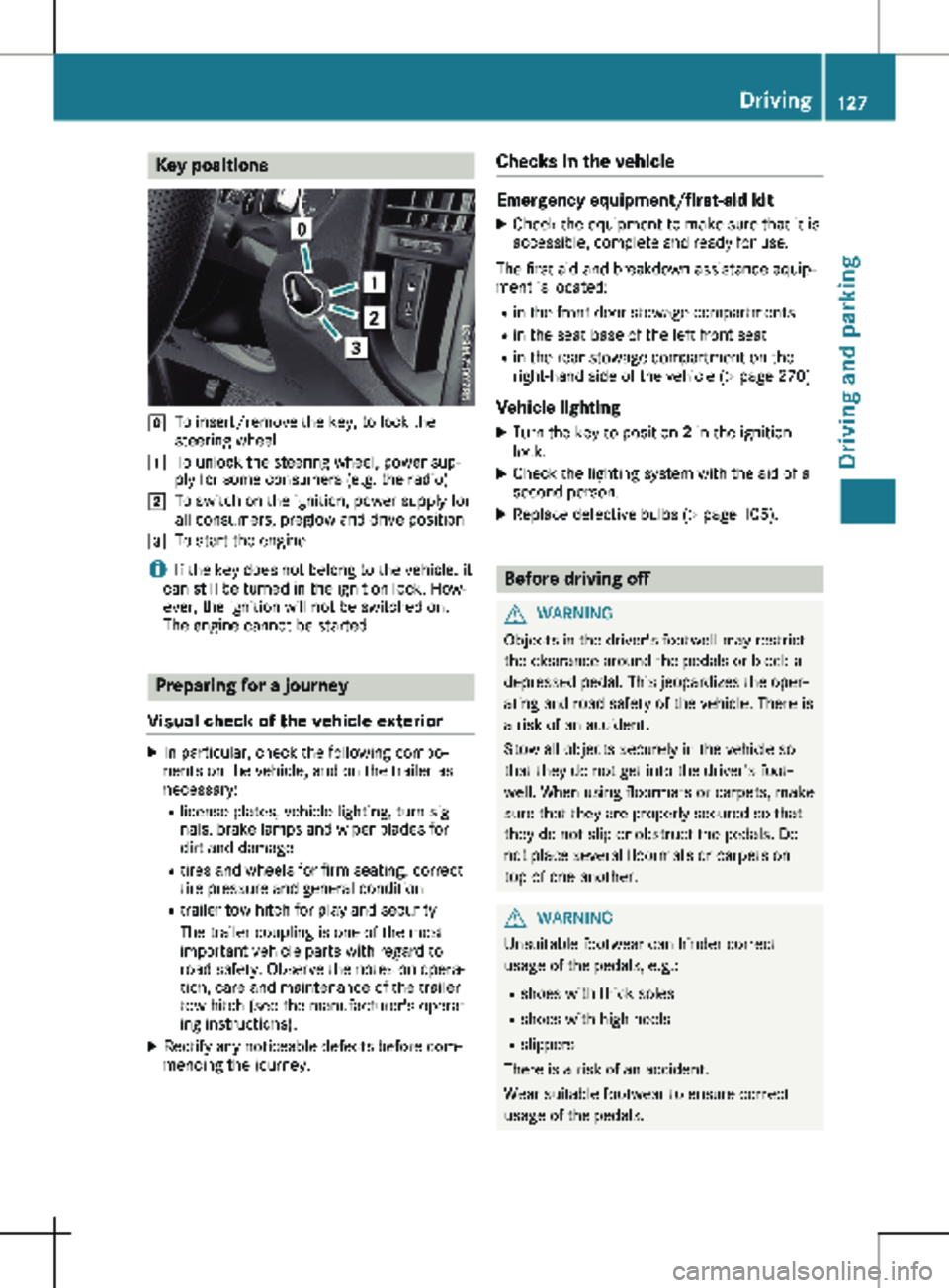
g
To insert/remove the key, to lock the
steering wheel
1 To unlock the steering wheel, power sup-
ply for some consumers (e.g. the radio)
2 To switch on the ignition, power supply for
all consumers, preglow and drive position
3 To start the engine
i If the key does not belong to the vehicle, it
can still be turned in the ignition lock. How-
ever, the ignition will not be switched on.
The engine cannot be started. Preparing for a journey
Visual check of the vehicle exterior X
In particular, check the following compo-
nents on the vehicle, and on the trailer as
necessary:
R
license plates, vehicle lighting, turn sig-
nals, brake lamps and wiper blades for
dirt and damage
R tires and wheels for firm seating, correct
tire pressure and general condition
R trailer tow hitch for play and security
The trailer coupling is one of the most
important vehicle parts with regard to
road safety. Observe the notes on opera-
tion, care and maintenance of the trailer
tow hitch (see the manufacturer's operat-
ing instructions).
X Rectify any noticeable defects before com-
mencing the journey. Checks in the vehicle Emergency equipment/first-aid kit
X Check the equipment to make sure that it is
accessible, complete and ready for use.
The first aid and breakdown assistance equip-
ment is located:
R in the front door stowage compartments
R in the seat base of the left front seat
R in the rear stowage compartment on the
right-hand side of the vehicle
(Y page 270)
Vehicle lighting
X Turn the key to position 2 in the ignition
lock.
X Check the lighting system with the aid of a
second person.
X Replace defective bulbs (Y page
105). Before driving off
G
WARNING
Objects in the driver's footwell may restrict
the clearance around the pedals or block a
depressed pedal. This jeopardizes the oper-
ating and road safety of the vehicle. There is
a risk of an accident.
Stow all objects securely in the vehicle so
that they do not get into the driver's foot-
well. When using floormats or carpets, make
sure that they are properly secured so that
they do not slip or obstruct the pedals. Do
not place several floormats or carpets on
top of one another. G
WARNING
Unsuitable footwear can hinder correct
usage of the pedals, e.g.:
R shoes with thick soles
R shoes with high heels
R slippers
There is a risk of an accident.
Wear suitable footwear to ensure correct
usage of the pedals. Driving
127
Driving and parking Z
Page 132 of 320
Problems with the engine
Problem
Possible causes/consequences and
M SolutionsThe engine does not
start.
The starter motor can
be heard. There is a malfunction in the fuel supply.
X
Turn the key back to position g in the ignition lock before
attempting to start the engine again.
X Start the engine again.
Please bear in mind that lengthy and frequent starting attempts
will drain the battery.
If the engine does not start after several attempts: X Consult a qualified specialist workshop. The engine does not
start.
The starter motor can
be heard. The reserve
fuel warning lamp is lit
and the fuel gauge is at
0. The fuel tank has been run dry.
X Refuel the vehicle. The engine does not
start.
The starter motor can-
not be heard. The on-board voltage is too low. The battery is too weak or dis-
charged.
X Jump-start the vehicle ( Y page 272).
If the engine cannot be jump-started, the starter motor is faulty.
X Consult a qualified specialist workshop. The engine does not
start.
The starter motor can-
not be heard. The battery is discharged or faulty.
X
Check the battery for damage.
X Charge the battery (Y page
262).The engine is not run-
ning smoothly and is
misfiring. There is a malfunction in the engine electronics or a mechanical
component of the engine management system.
X Only depress the accelerator pedal slightly.
Unburnt fuel may otherwise get into the catalytic converter and
damage it.
X Have the cause rectified immediately at a qualified specialist
workshop. Automatic transmission
Important safety notes
G
WARNING
The vehicle can suddenly accelerate if the
engine speed is above the engine idling
speed and you then select transmission position h or k. There is a risk of an acci-
dent.
When engaging transmission position
h or
k at a standstill, always keep the brake
pedal depressed firmly and do not depress
the accelerator pedal at the same time. 130
Automatic transmission
Driving and parking
Page 134 of 320
Transmission positions
B Park position
This prevents the vehicle from roll-
ing away when stopped. Only shift
the transmission to
j when the
vehicle is stationary.
The automatic transmission shifts
to j automatically in the following
situations:
R if you pull out the key.
R if you open the driver's door
when the vehicle is stationary or
when driving at a very low speed
and the transmission is in posi-
tion h or k.
The parking lock should not be used
as a brake when parking. Always
apply the parking brake as well
once you have parked the vehicle. C Reverse gear
Only shift the transmission to
k
when the vehicle is stationary. A Neutral
No power is transmitted from the
engine to the drive wheels. Releas-
ing the brakes will allow you to
move the vehicle freely, e.g. by
pushing or towing.
If ESP
®
is deactivated or faulty: shift
the transmission to position i if
the vehicle is in danger of skidding,
e.g. on icy roads.
When you switch off the engine, the
automatic transmission automati-
cally shifts into neutral i.
! When the engine is switched
off, rolling in idle i can damage
the power transmission and
result in transmission damage. 7 Drive
The automatic transmission
changes gear itself. All forward
gears are available.
You can influence gearshifts with
your choice of drive program. You
can also restrict the shift range. Transmission position and drive pro-
gram display
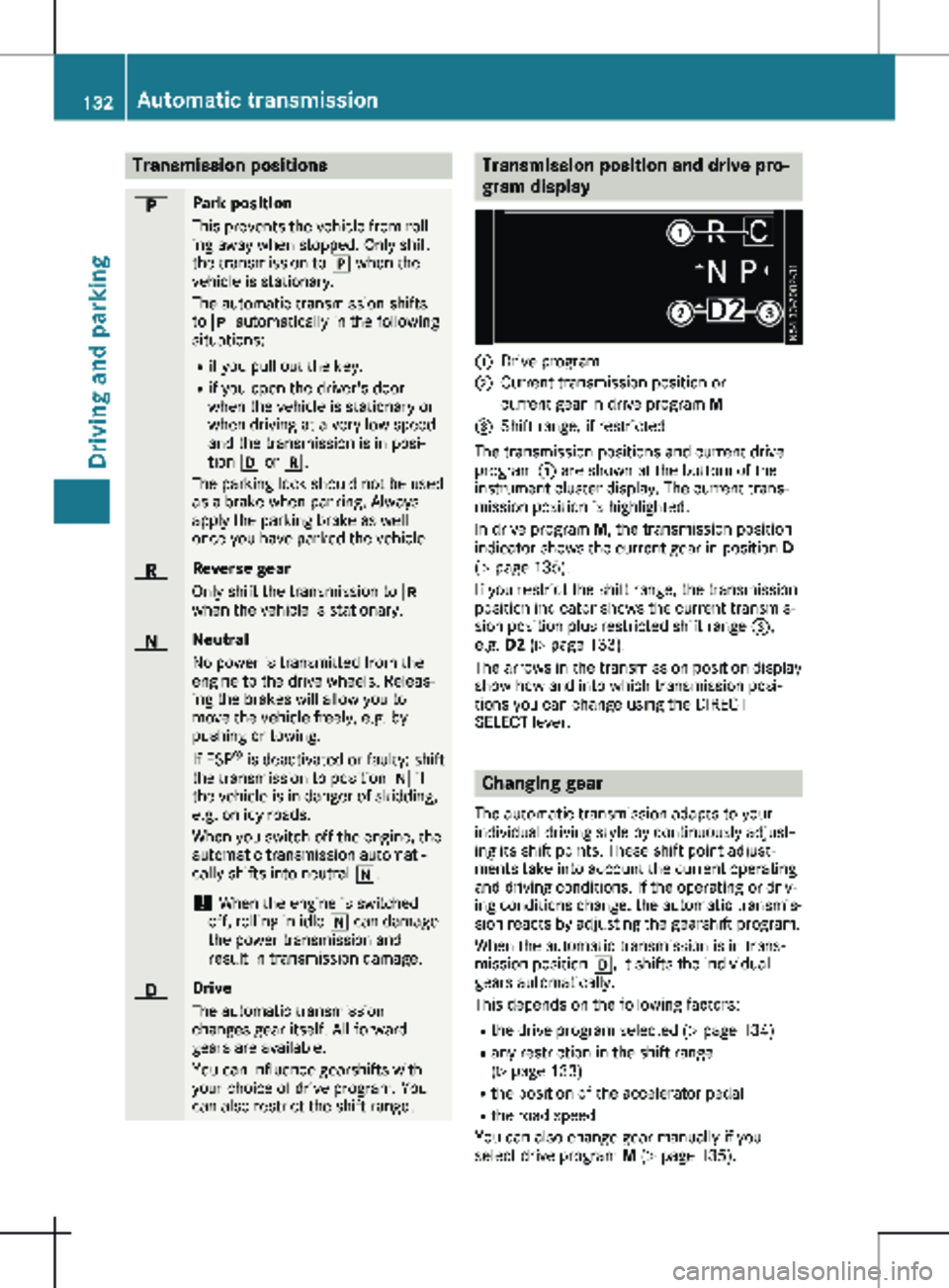
:
Drive program
; Current transmission position or
current gear in drive program M
= Shift range, if restricted
The transmission positions and current drive
program : are shown at the bottom of the
instrument cluster display. The current trans-
mission position is highlighted.
In drive program M, the transmission position
indicator shows the current gear in position D
( Y page
135).
If you restrict the shift range, the transmission
position indicator shows the current transmis-
sion position plus restricted shift range =,
e.g. D2 ( Y page 133).
The arrows in the transmission position display
show how and into which transmission posi-
tions you can change using the DIRECT
SELECT lever. Changing gear
The automatic transmission adapts to your
individual driving style by continuously adjust-
ing its shift points. These shift point adjust-
ments take into account the current operating
and driving conditions. If the operating or driv-
ing conditions change, the automatic transmis-
sion reacts by adjusting the gearshift program.
When the automatic transmission is in trans-
mission position h, it shifts the individual
gears automatically.
This depends on the following factors:
R the drive program selected ( Y page 134)
R any restriction in the shift range
(Y page
133)
R the position of the accelerator pedal
R the road speed
You can also change gear manually if you
select drive program M (Y page 135).132
Automatic transmission
Driving and parking
Page 141 of 320
is an increased danger of skidding and acci-
dents.
Only use the parking brake to brake the
vehicle when the service brake is faulty. Do
not apply the parking brake too firmly. If the
wheels lock, release the parking brake until
the wheels begin turning again. The brake lamps are not illuminated when you
brake the vehicle using the parking brake.
As a rule, you may only apply the parking
brake when the vehicle is stationary.
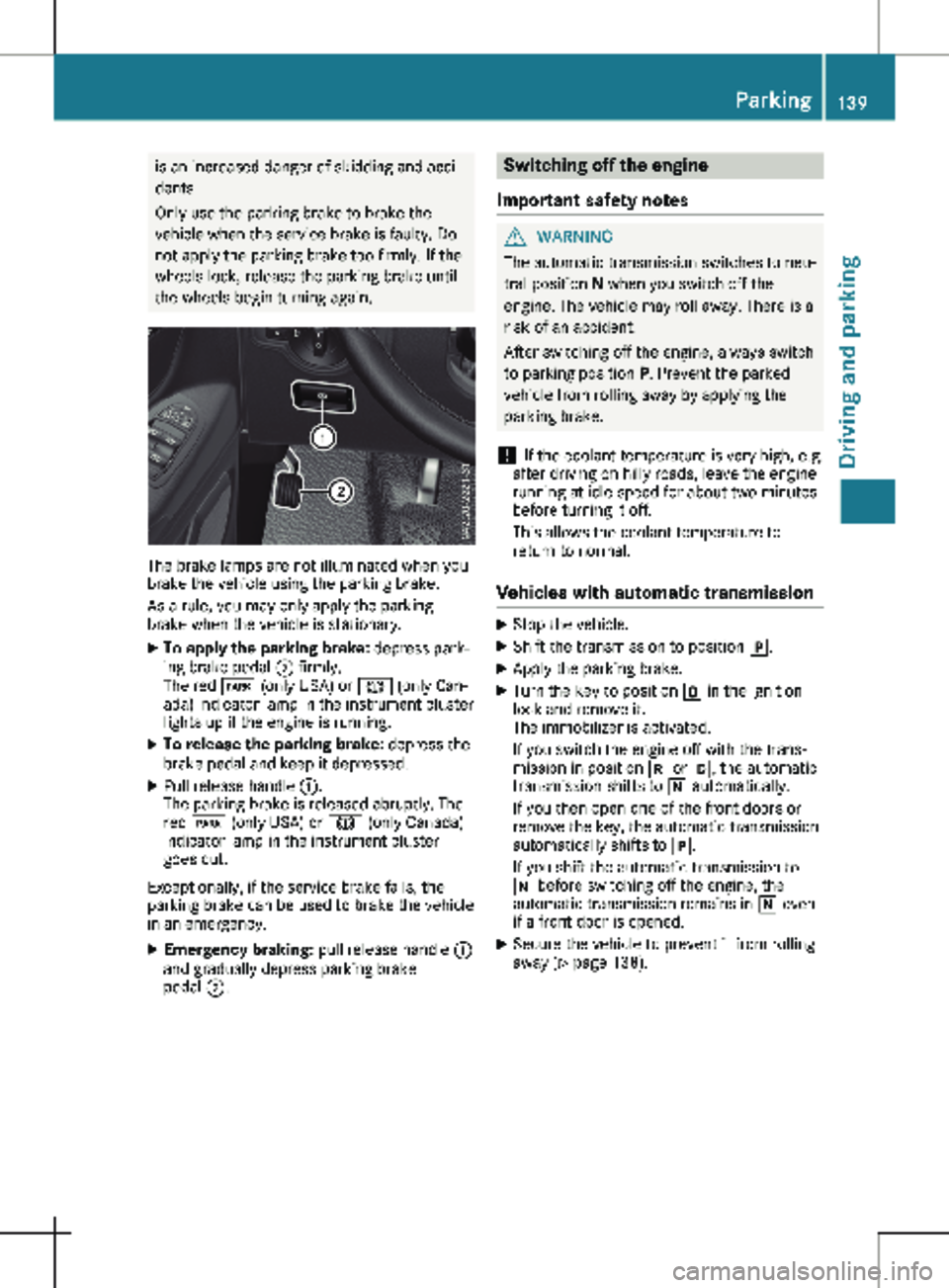
X To apply the parking brake: depress park-
ing brake pedal ; firmly.
The red F (only USA) or J (only Can-
ada) indicator lamp in the instrument cluster
lights up if the engine is running.
X To release the parking brake: depress the
brake pedal and keep it depressed.
X Pull release handle :.
The parking brake is released abruptly. The
red F (only USA) or J (only Canada)
indicator lamp in the instrument cluster
goes out.
Exceptionally, if the service brake fails, the
parking brake can be used to brake the vehicle
in an emergency.
X Emergency braking: pull release handle :
and gradually depress parking brake
pedal ;. Switching off the engine
Important safety notes G
WARNING
The automatic transmission switches to neu-
tral position N when you switch off the
engine. The vehicle may roll away. There is a
risk of an accident.
After switching off the engine, always switch
to parking position P. Prevent the parked
vehicle from rolling away by applying the
parking brake.
! If the coolant temperature is very high, e.g.
after driving on hilly roads, leave the engine
running at idle speed for about
two minutes
before turning it off.
This allows the coolant temperature to
return to normal.
Vehicles with automatic transmission X
Stop the vehicle.
X Shift the transmission to position j.
X Apply the parking brake.
X Turn the key to position u in the ignition
lock and remove it.
The immobilizer is activated.
If you switch the engine off with the trans-
mission in position k or h, the automatic
transmission shifts to i automatically.
If you then open one of the front doors or
remove the key, the automatic transmission
automatically shifts to j.
If you shift the automatic transmission to
i before switching off the engine, the
automatic transmission remains in i even
if a front door is opened.
X Secure the vehicle to prevent it from rolling
away
(Y page 138). Parking
139
Driving and parking Z
Page 144 of 320
Vehicles with halogen headlamps
The headlamps do not need to be switched to
symmetrical low beam. The legal requirements
of countries in which traffic drives on the
opposite side of the road to the country where
the vehicle is registered are met without the
need to convert the headlamps. Transport by rail
Transporting your vehicle by rail may be sub-
ject to certain restrictions or require special
measures to be taken in some countries due
to varying tunnel heights and loading stand-
ards.
You can obtain information on this from any
Mercedes-Benz Commercial Van Center. Braking
Important safety notes G
WARNING
If you shift down on a slippery road surface
in an attempt to increase the engine's brak-
ing effect, the drive wheels could lose their
grip. There is an increased danger of skid-
ding and accidents.
Do not shift down for additional engine brak-
ing on a slippery road surface.
Downhill gradients !
Depressing the brake pedal constantly
results in excessive and premature wear to
the brake pads.
This also applies to automatic braking if you
have activated cruise control.
On long and steep downhill gradients, you
should change down to shift range 2 or 1 in
good time
(Y page 133).
This should be observed in particular when
driving with a laden vehicle and when towing a
trailer.
You thereby make use of the braking effect of
the engine and do not have to brake as often
to maintain the speed. This relieves the load
on the service brake and prevents the brakes
from overheating and wearing too quickly. Heavy and light loads G
WARNING
If you rest your foot on the brake pedal
while driving, the braking system can over-
heat. This increases the stopping distance
and can even cause the braking system to
fail. There is a risk of an accident.
Never use the brake pedal as a footrest.
Never depress the brake pedal and the
accelerator pedal at the same time.
! Depressing the brake pedal constantly
results in excessive and premature wear to
the brake pads.
If the brakes have been subjected to a heavy
load, do not stop the vehicle immediately.
Drive on for a short while. The brakes are
cooled down more quickly in the airflow.
Wet road surfaces If you have been driving for a long time in
heavy rain without braking, there may be a
delayed response when you first apply the
brakes. This may also occur after driving
through a car wash or deep water.
You must depress the brake pedal more firmly.
Maintain a longer distance to the vehicle in
front.
While paying attention to the traffic conditions,
you should brake the vehicle firmly after driv-
ing on a wet road surface or through a car
wash. This heats the brake discs, so that they
dry more quickly, which protects them against
corrosion.
Limited braking performance on salt-
treated roads When driving on salted roads, salt may start to
build up on the brake disks and brake pads.
This can increase braking distances considera-
bly.
Maintain a greater distance to the vehicle in
front.
To remove any build-up of salt that may have
formed:
X Apply the brakes at the start of the journey,
occasionally during journey and at the end 142
Driving tips
Driving and parking