ESP MERCEDES-BENZ ML SUV 2008 Service Manual
[x] Cancel search | Manufacturer: MERCEDES-BENZ, Model Year: 2008, Model line: ML SUV, Model: MERCEDES-BENZ ML SUV 2008Pages: 381, PDF Size: 7.18 MB
Page 150 of 381
Driving sys
tems 147
X
Briefly pull the cruise control lever towards
you 3.
X Remove your foot from the accelerator
pedal.
The first time cruise control is activated it
stores the current speed or regulates the
speed of the vehicle to the previously
stored speed.
Setting a speed X
Press the cruise control lever to the pres-
sure point, up 1for a higher speed or
down 4for a lower speed.
X Keep the cruise control lever pressed until
the desired speed is reached.
X Release the cruise control lever.
The new speed is stored.
i Cruise control is not deactivated if you
depress the accelerator pedal. For exam-
ple, if you accelerate briefly to overtake,
cruise control adjusts the vehicle's speed
to the last speed stored after you have fin-
ished overtaking. Making fine adjustments in 1 km/h
increments X
Briefly press the cruise control lever to the
pressure point, up 1for a higher speed or
down 4for a lower speed.
The last speed stored is increased or
reduced.
Making adjustments in 10 km/h incre-
ments X
Briefly press the cruise control lever
beyond the pressure point, up 1for a
higher speed or down 4for a lower speed.
The last speed stored is increased or
reduced.
Deactivating cruise control There are several ways to deactivate cruise
control:
X Briefly press the cruise control lever for-
wards 6.
or
X Brake.
or X
Briefly press the cruise control lever in the
direction of arrow 5.
Variable Speedtronic is selected. LIM indi-
cator lamp 2in the cruise control lever
lights up.
Cruise control is automatically deactivated if,
for example:
R you depress the parking brake
R you are driving at less than 30 km/h
R ESP ®
is intervening or you deactivate
ESP ®
.
R you shift the automatic transmission to N
while driving
If cruise control is deactivated, you will hear
a warning tone. You will see the Cruise con-
trol Off message in the multi-function dis-
play for approximately five seconds.
i The last speed stored is cleared when you
switch off the engine. Controls
164_AKB; 5; 5, en-GB
wobuchh
,V ersion: 2.10.6
2008-05-11T11:55:12+02:00 - Seite 147 ZDateiname: 6515_4293_02_buchblock.pdf; preflight
Page 151 of 381
Driving sys
tems 148 Distronic*
i Distronic is only available for certain
countries.
Distronic regulates the speed and automati-
cally maintains the distance to the vehicle in
front. It brakes automatically in order to avoid
exceeding the set speed. On long and steep
downhill gradients, especially if the vehicle is
laden or towing a trailer, you must select shift
range 1,2or 3in good time. By doing so you
will make use of the braking effect of the
engine, which relieves the load on the brake
system and prevents the brakes from over-
heating and wearing too quickly. G
Risk of accident
The brake pedal is retracted when Distronic
brakes. Do not restrict the movement of the
pedal in any way.
R Do not put any objects in the footwell.
R Ensure that floor mats and carpets are
fixed securely.
R Do not place your foot under the brake
pedal as it could become trapped.
You could otherwise cause an accident and
injure yourself and others. G
Risk of accident
Do not change down for additional engine
braking on a slippery road surface. This
could cause the drive wheels to lose their
grip and the vehicle could skid. G
Risk of accident
Distronic is only an aid designed to assist
driving. The driver remains fully responsible
for the vehicle's distance to other vehicles,
the vehicle's speed and braking in good
time.
Distronic does not react to:
R pedestrians
R stationary obstacles on the road, e.g. sta-
tionary or parked vehicles
R oncoming and crossing traffic
Distronic may not detect narrow vehicles
driving in front, e.g. motorcycles, or vehi-
cles driving on a different line. Therefore,
always pay attention to traffic conditions
even when Distronic is activated. Other-
wise, you may fail to recognise danger in
time, could cause an accident and injure
yourself and others.
If a slower-moving vehicle is detected in front,
Distronic causes your vehicle to brake and maintain the preset distance to the vehicle in
front that you have set. G
Risk of accident
Distronic cannot take account of road and
traffic conditions. Deactivate, or do not
activate, Distronic if it does not detect the
vehicle in front, or if it no longer detects it.
This is especially the case:
R before corners
R on filter lanes
R when changing to a lane with faster mov-
ing traffic
R in complex driving situations or where
the lanes are diverted, e.g. at motorway/
roadway construction sites
Otherwise, Distronic maintains the current
speed or accelerates to the set speed.
Distronic cannot take account of weather
conditions. Deactivate, or do not activate,
Distronic:
R if the roads are slippery, snow-covered or
icy. The wheels could lose their grip Controls
* optional
164_AKB; 5; 5, en-GB
wobuchh
,V ersion: 2.10.6
2008-05-11T11:55:12+02:00 - Seite 148 Dateiname: 6515_4293_02_buchblock.pdf; preflight
Page 152 of 381
Driving sys
tems 149under braking or acceleration. The vehi-
cle could start to skid.
R if the sensors are dirty or there is poor
visibility, e.g. due to snow, rain or fog.
Distance control may be impaired.
Always pay attention to traffic conditions
even when Distronic is activated. Other-
wise, you may fail to recognise danger in
time, could cause an accident and injure
yourself and others.
If there is no vehicle in front, Distronic oper-
ates in the same way as cruise control. Dis-
tronic functions in the 30 km/h to
180 km/h range. G
Risk of accident
Distronic brakes your vehicle at a maximum
of 2 m/s 2
, depending on its speed. This
corresponds to approximately 20% of your
vehicle's maximum braking power. You
must also apply the brakes yourself if this
braking power is not sufficient.
If Distronic detects a risk of collision with a
vehicle in front, an intermittent warning
tone sounds. In addition, the ldistance
warning lamp in the instrument cluster
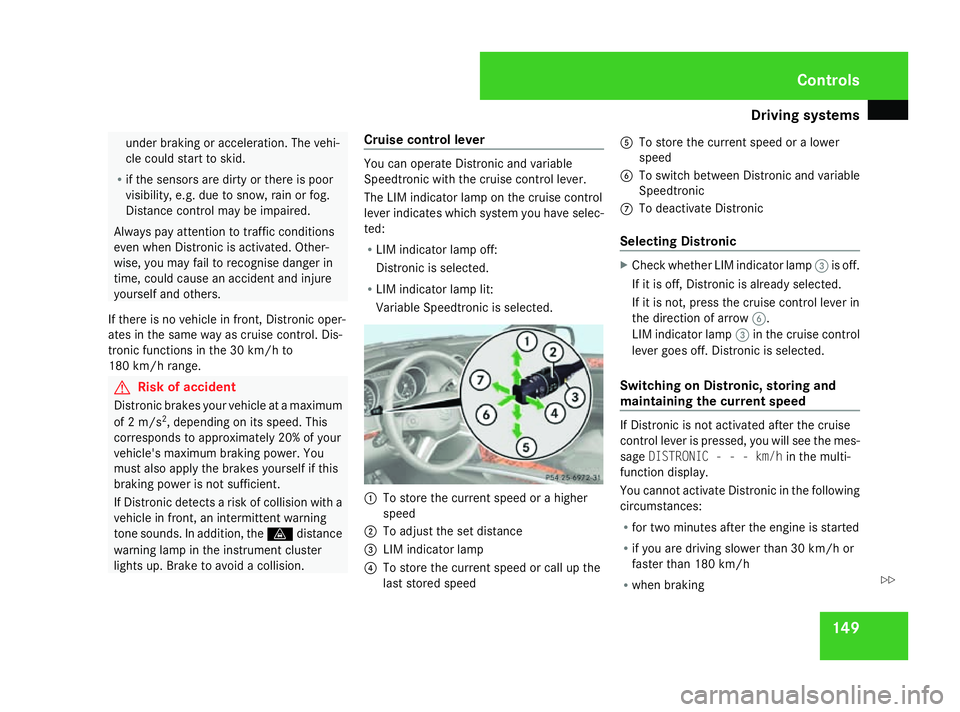
lights up. Brake to avoid a collision. Cruise control lever You can operate Distronic and variable
Speedtronic with the cruise control lever.
The LIM indicator lamp on the cruise control
lever indicates which system you have selec-
ted:
R LIM indicator lamp off:
Distronic is selected.
R LIM indicator lamp lit:
Variable Speedtronic is selected. 1
To store the current speed or a higher
speed
2 To adjust the set distance
3 LIM indicator lamp
4 To store the current speed or call up the
last stored speed 5
To store the current speed or a lower
speed
6 To switch between Distronic and variable
Speedtronic
7 To deactivate Distronic
Selecting Distronic X
Check whether LIM indicator lamp 3is off.
If it is off, Distronic is already selected.
If it is not, press the cruise control lever in
the direction of arrow 6.
LIM indicator lamp 3in the cruise control
lever goes off. Distronic is selected.
Switching on Distronic, storing and
maintaining the current speed If Distronic is not activated after the cruise
control lever is pressed, you will see the mes-
sage
DISTRONIC - - - km/h in the multi-
function display.
You cannot activate Distronic in the following
circumstances:
R for two minutes after the engine is started
R if you are driving slower than 30 km/h or
faster than 180 km/h
R when braking Controls
164_AKB; 5; 5, en-GB
wobuchh
,V ersion: 2.10.6
2008-05-11T11:55:12+02:00 - Seite 149 ZDateiname: 6515_4293_02_buchblock.pdf; preflight
Page 153 of 381
Driving sys
tems 150
R
when the parking brake is applied
R if ESP ®
is deactivated (Y page 58)
R when the automatic transmission is in posi-
tion P,Ror N
X Accelerate the vehicle to the desired
speed.
X Briefly press the cruise control lever up
1 or down 5to the pressure point.
X Remove your foot from the accelerator
pedal.
Distronic is activated. The vehicle main-
tains the stored speed until the distance to
the vehicle in front becomes too small.
i If you do not fully release the accelerator
pedal, the DISTRONIC Override message
appears in the multi-function display. The
distance to a slower-moving vehicle in front
will then not be governed. You will be driv-
ing at the speed you determine with the
accelerator pedal. Setting a speed X
Press the cruise control lever to the pres-
sure point, up 1for a higher speed or
down 5for a lower speed.
X Keep the cruise control lever pressed until
the desired speed is reached.
X Release the cruise control lever.
The new speed is stored.
i Deceleration of the vehicle by means of
the cruise control lever is assisted by auto-
matic application of the brakes. On long
downhill gradients, the automatic trans-
mission also shifts down.
Making adjustments in 1 km/h incre-
ments X
Briefly press the cruise control lever to the
pressure point, up 1for a higher speed or
down 5for a lower speed.
The last speed stored is increased or
reduced. Making adjustments in 10 km/h incre-
ments X
Briefly press the cruise control lever to the
pressure point, up 1for a higher speed or
down 5for a lower speed.
The last speed stored is increased or
reduced.
Storing the current speed or calling up
the last stored speed G
Risk of accident
Only select a stored speed if you know what
that speed is and whether it is suitable for
the current situation. Otherwise, sudden
acceleration or braking could endanger you
or others.
X Briefly pull the cruise control lever towards
you 4.
X Remove your foot from the accelerator
pedal.
Distronic is activated and accepts the cur-
rent speed if it is activated for the first time,
or adjusts the vehicle's speed to the last
speed stored. Controls
164_AKB; 5; 5, en-GB
wobuchh
,V ersion: 2.10.6
2008-05-11T11:55:12+02:00 - Seite 150 Dateiname: 6515_4293_02_buchblock.pdf; preflight
Page 156 of 381
Driving sys
tems 153
R
ESP ®
is intervening or you deactivate
ESP ®
.
R you shift the automatic transmission to N
while the vehicle is in motion
If Distronic is deactivated, you will hear a
warning tone. You will see the DISTRONIC
Off message in the multi-function display for
approximately five seconds.
Tips for driving with Distronic The following contains descriptions of certain
road and traffic conditions in which you must
be particularly attentive. In such situations,
brake if necessary. Distronic is then deacti-
vated.
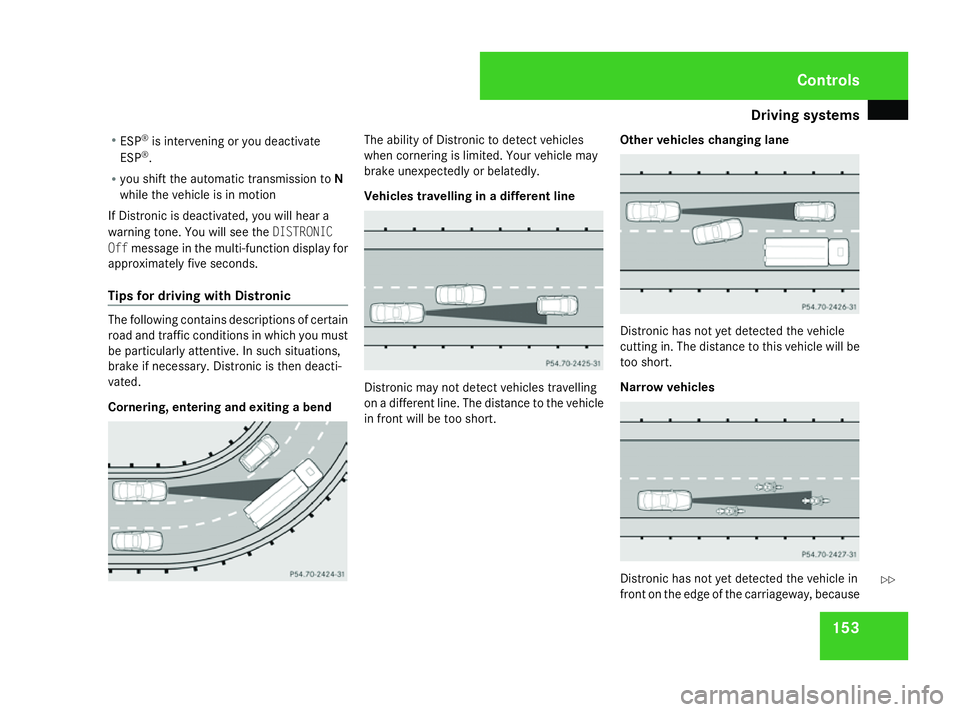
Cornering, entering and exiting a bend The ability of Distronic to detect vehicles
when cornering is limited. Your vehicle may
brake unexpectedly or belatedly.
Vehicles travelling in a different line
Distronic may not detect vehicles travelling
on a different line. The distance to the vehicle
in front will be too short.
Other vehicles changing lane Distronic has not yet detected the vehicle
cutting in. The distance to this vehicle will be
too short.
Narrow vehicles Distronic has not yet detected the vehicle in
front on the edge of the carriageway, because Controls
164_AKB; 5; 5, en-GB
wobuchh
,V ersion: 2.10.6
2008-05-11T11:55:12+02:00 - Seite 153 ZDateiname: 6515_4293_02_buchblock.pdf; preflight
Page 157 of 381
Driving sys
tems 154
of its narrow width. The distance to the vehi-
cle in front will be too short. Speedtronic
Speedtronic brakes automatically so that you
do not exceed the set speed. On long and
steep downhill gradients, especially if the
vehicle is laden or towing a trailer, you must
select shift range 1,2or 3in good time. By
doing so you will make use of the braking
effect of the engine, which relieves the load
on the brake system and prevents the brakes
from overheating and wearing too quickly. If
you need additional braking, depress the
brake pedal repeatedly rather than continu-
ously. G
Risk of accident
Never depress the brake pedal continu-
ously while the vehicle is in motion, e.g.
never cause the brakes to rub by applying
constant slight pedal pressure. This causes
the brake system to overheat, increases
the braking distance and can lead to the
brakes failing completely. G
Risk of accident
Do not change down for additional engine
braking on a slippery road surface. This could cause the drive wheels to lose their
grip and the vehicle could skid.
You can set a variable or permanent limit
speed:
R variable for speed limits, e.g. in built-up
areas
R permanent for long-term speed restric-
tions, e.g. for driving on winter tyres
(Y page 156) G
Risk of accident
Speedtronic is only an aid designed to
assist driving. You are responsible for the
vehicle's speed and for braking in good
time.
i The speed indicated in the speedometer
may differ slightly from the limit speed
stored.
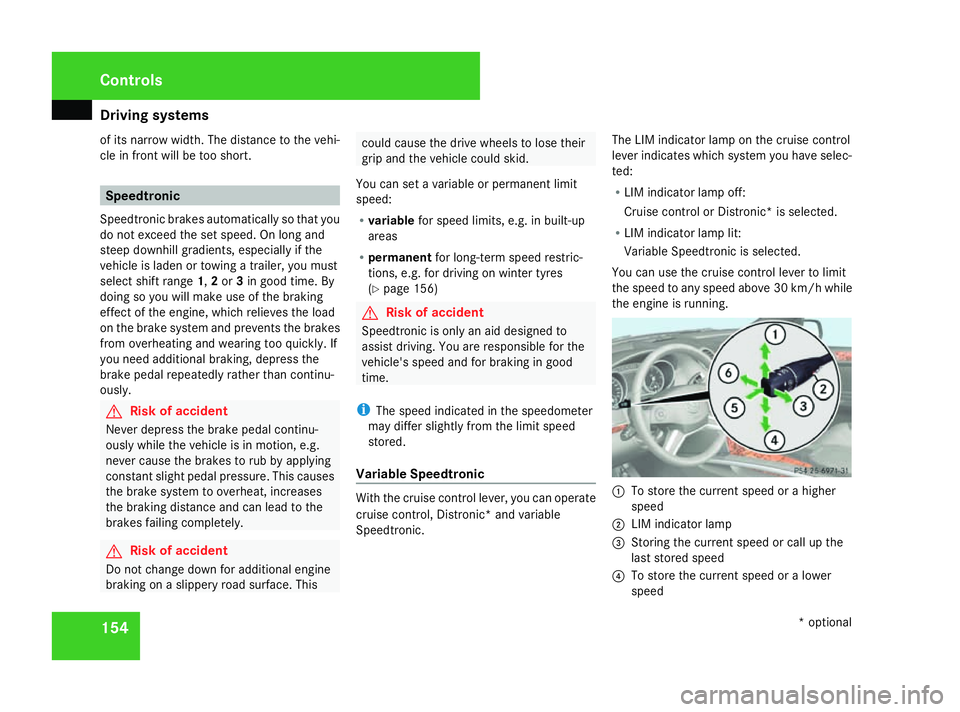
Variable Speedtronic With the cruise control lever, you can operate
cruise control, Distronic* and variable
Speedtronic.The LIM indicator lamp on the cruise control
lever indicates which system you have selec-
ted:
R
LIM indicator lamp off:
Cruise control or Distronic* is selected.
R LIM indicator lamp lit:
Variable Speedtronic is selected.
You can use the cruise control lever to limit
the speed to any speed above 30 km/h while
the engine is running. 1
To store the current speed or a higher
speed
2 LIM indicator lamp
3 Storing the current speed or call up the
last stored speed
4 To store the current speed or a lower
speed Controls
* optional
164_AKB; 5; 5, en-GB
wobuchh
,V ersion: 2.10.6
2008-05-11T11:55:12+02:00 - Seite 154 Dateiname: 6515_4293_02_buchblock.pdf; preflight
Page 161 of 381
Driving sys
tems 158 Level control*
The level control adapts the vehicle level
automatically to the current operating and
driving situation. This results in reduced fuel
consumption and improved handling.
When you are driving in ADS* COMFor
AUTO (Ypage 157), the vehicle is lowered to
the high-speed level as the speed increases.
As the vehicle decelerates, the vehicle is
raised back up to highway level.
In ADS* SPORT(Ypage 157), the vehicle
skips highway level and lowers directly to the
high-speed level depending on the basic set-
ting (Y page 158) or (Y page 160).
Make changes to the vehicle level while the
vehicle is in motion. This enables the vehicle
to adjust to the new level as quickly as pos-
sible.
The vehicle level may change visibly when you
park the vehicle and the outside temperature
changes. When the temperature drops, the
vehicle level is lower; with an increase in tem-
perature, the vehicle level rises.
When you unlock the vehicle or open a door,
the vehicle begins to balance the load dis-
crepancies while still parked. However, for
significant level changes, e.g. after the vehi-
cle has been stationary for a long period, the engine must be on. For safety reasons, the
vehicle is only lowered when the doors are
closed. Lowering is interrupted if a door is
opened and continues when the door has
been closed. G
Risk of injury
Make sure that nobody is in the vicinity of
the wheel arch or the underbody when you
begin a level change. You could otherwise
trap yourself or others. G
Risk of accident
Always select as low a vehicle level as pos-
sible. If the vehicle level is high, the vehicle
centre of gravity shifts upwards. This
increases the risk of the vehicle tipping
over.
Adapt your driving style to suit the vehicle
level. ESP ®
cannot reduce the risk of an
accident if you drive too fast. ESP ®
cannot
override the laws of physics.
! When driving on extremely rough terrain,
select a high vehicle level in good time.
Make sure there is always sufficient ground
clearance to prevent damage to the vehi-
cle. You will find information about driving off-
road in the "Operation" section
(Y
page 235).
Vehicles with AIRMATIC package* Basic settings, excluding ML 63 AMG
The extent to which the vehicle is raised or
lowered depends on the basic setting selec-
ted. Select raised level for off-road driving or
highway/high-speed level for normal roads.
The individual vehicle levels are:
R
Raised level: 60 mm above highway level
R Highway level: +/- 0 mm
R High-speed level: 15 mm below highway
level
Basic settings for the ML 63 AMG
The extent to which the vehicle is raised or
lowered depends on the ADS setting selec-
ted. Select raised level for off-road driving or
highway/high-speed level for normal roads.
With AUTO ADS, the vehicle is 73 mm higher
when in raised level than it is in highway level.
Raised level
Only select the raised level when this is appro-
priate for the road conditions. Otherwise, fuel Controls
* optional
164_AKB; 5; 5, en-GB
wobuchh
,V ersion: 2.10.6
2008-05-11T11:55:12+02:00 - Seite 158 Dateiname: 6515_4293_02_buchblock.pdf; preflight
Page 164 of 381
Driving sys
tems 161R
Avoid sudden major steering move-
ments.
R Take account of the altered handling
characteristics.
If you are driving too fast in off-road level 3,
the Bring speed below 20 km/h message
appears in the multi-function display. You
additionally hear a warning tone. The vehicle
is lowered.
i You cannot clear these messages.
Only select an off-road level when this is
appropriate for the road conditions. Other-
wise, fuel consumption increases and han-
dling performance may be affected.
Your selection remains stored even if you
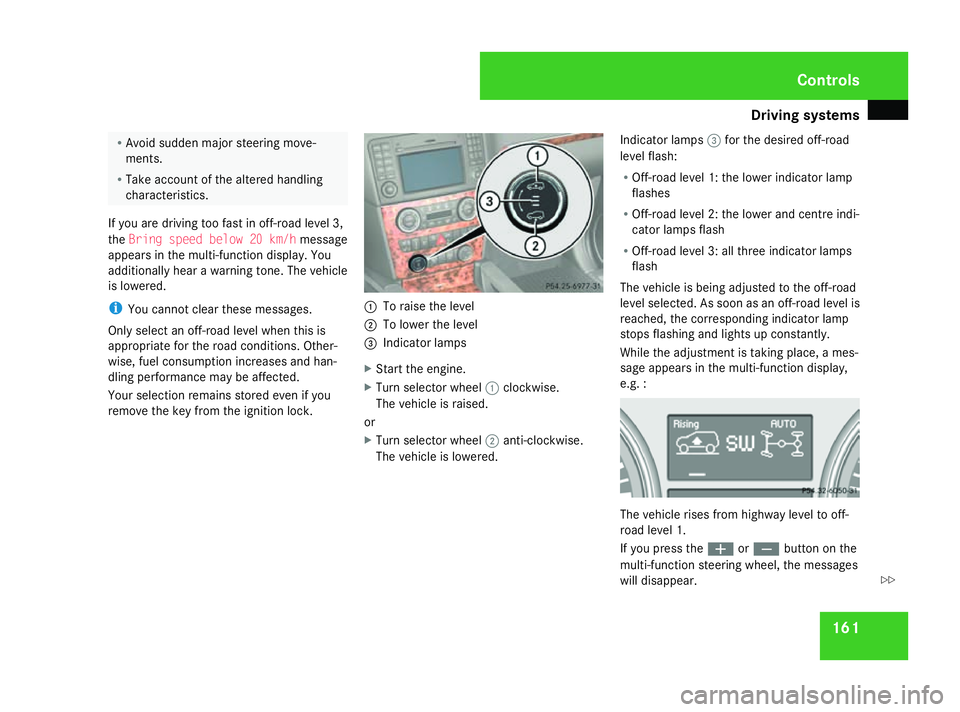
remove the key from the ignition lock. 1
To raise the level
2 To lower the level
3 Indicator lamps
X Start the engine.
X Turn selector wheel 1clockwise.
The vehicle is raised.
or
X Turn selector wheel 2anti-clockwise.
The vehicle is lowered. Indicator lamps
3for the desired off-road
level flash:
R Off-road level 1: the lower indicator lamp
flashes
R Off-road level 2: the lower and centre indi-
cator lamps flash
R Off-road level 3: all three indicator lamps
flash
The vehicle is being adjusted to the off-road
level selected. As soon as an off-road level is
reached, the corresponding indicator lamp
stops flashing and lights up constantly.
While the adjustment is taking place, a mes-
sage appears in the multi-function display,
e.g. : The vehicle rises from highway level to off-
road level 1.
If you press the
æorç button on the
multi-function steering wheel, the messages
will disappear. Controls
164_AKB; 5; 5, en-GB
wobuchh
,V ersion: 2.10.6
2008-05-11T11:55:12+02:00 - Seite 161 ZDateiname: 6515_4293_02_buchblock.pdf; preflight
Page 167 of 381
Driving sys
tems 164
While the adjustment is taking place, a mes-
sage appears in the multi-function display,
e.g. : If you press the
æorç button on the
multi-function steering wheel, the messages
will disappear.
Once highway level has been reached, all indi-
cator lamps 3go out. You will see a message
in the multi-function display, for example: If you have not previously selected the off-
road menu (Y page 126) in the on-board
computer, the message disappears after
about five seconds.
The vehicle automatically selects highway
level if you are driving at a speed above 115 km/h or if you drive at between
100 km/h and 115 km/h for around 20 sec-
onds. At high speeds, the vehicle is lowered
to high-speed level in accordance with the
ADS basic setting (Y
page 157). Parktronic*
G
Risk of accident
Parktronic is only an aid and may not detect
all obstacles. It is not a substitute for atten-
tive driving.
You are always responsible for safety and
must continue to pay attention to your
immediate surroundings when parking and
manoeuvring. You could otherwise endan-
ger yourself and others. G
Risk of injury
Make sure that no persons or animals are
in the manoeuvring range. Otherwise, they
could be injured.
Parktronic is an electronic parking aid. It indi-
cates visually and audibly the distance
between your vehicle and an object. Parktronic is activated automatically when
you:
R
switch on the ignition
R release the parking brake
R shift the automatic transmission to D,Ror
N
Parktronic is deactivated at speeds above
18 km/h. It is reactivated at lower speeds.
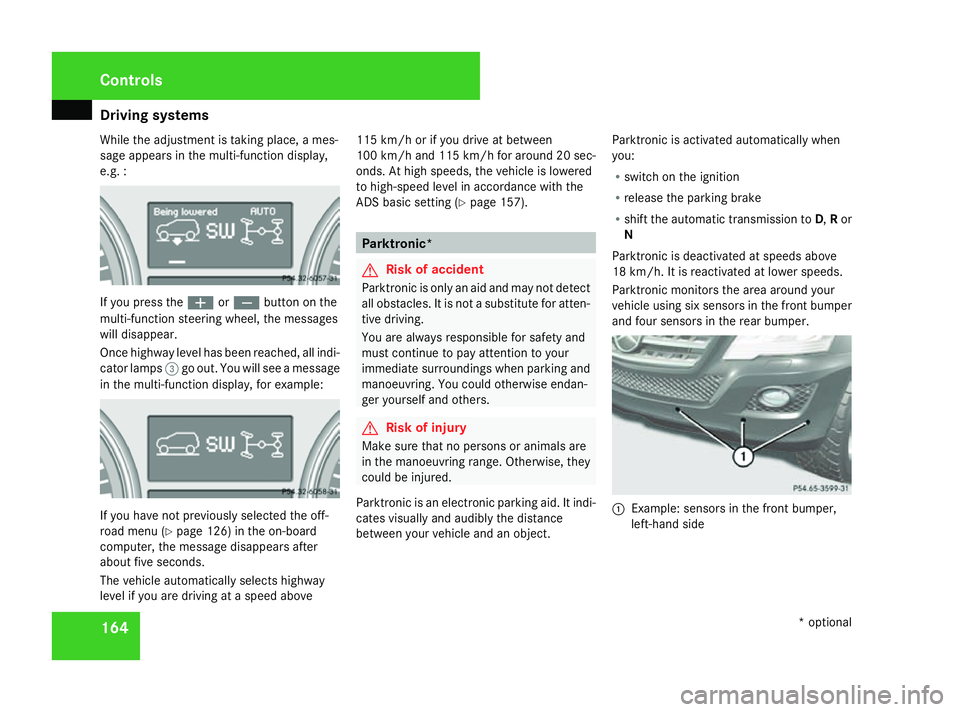
Parktronic monitors the area around your
vehicle using six sensors in the front bumper
and four sensors in the rear bumper. 1
Example: sensors in the front bumper,
left-hand side Controls
* optional
164_AKB; 5; 5, en-GB
wobuchh
,V ersion: 2.10.6
2008-05-11T11:55:12+02:00 - Seite 164 Dateiname: 6515_4293_02_buchblock.pdf; preflight
Page 170 of 381
Driving sys
tems 167
i
Vehicles without the Off-Road Pro engi-
neering package *that, in addition to Park-
tronic, are also fitted with auxiliary heat-
ing* do not have a Parktronic button.
If Parktronic is activated and you come so
close to an obstacle that three or more indi-
cator segments light up, you will see the
following message in the display: X
To deactivate: press theæorç
button.
The message disappears automatically within
ten seconds. If six segments light up, the
message remains on the display. You see the
message until the èor· buttons are
pressed, or the clearance is increased and
only two segments are then lit. If you come
close to the obstacle again, the message
reappears. Trailer towing* Parktronic is deactivated for the rear area
when you establish an electrical connection
between your vehicle and a trailer.
!
Remove the detachable trailer coupling if
it is no longer required. Parktronic meas-
ures the minimum detection range to an
obstacle from the bumper, not the ball cou-
pling. Reversing camera*
The reversing camera is an optical aid. It
shows the area behind your vehicle in the
COMAND APS display. G
Risk of injury
Make sure that no persons or animals are
in the manoeuvring range. Otherwise, they
could be injured.
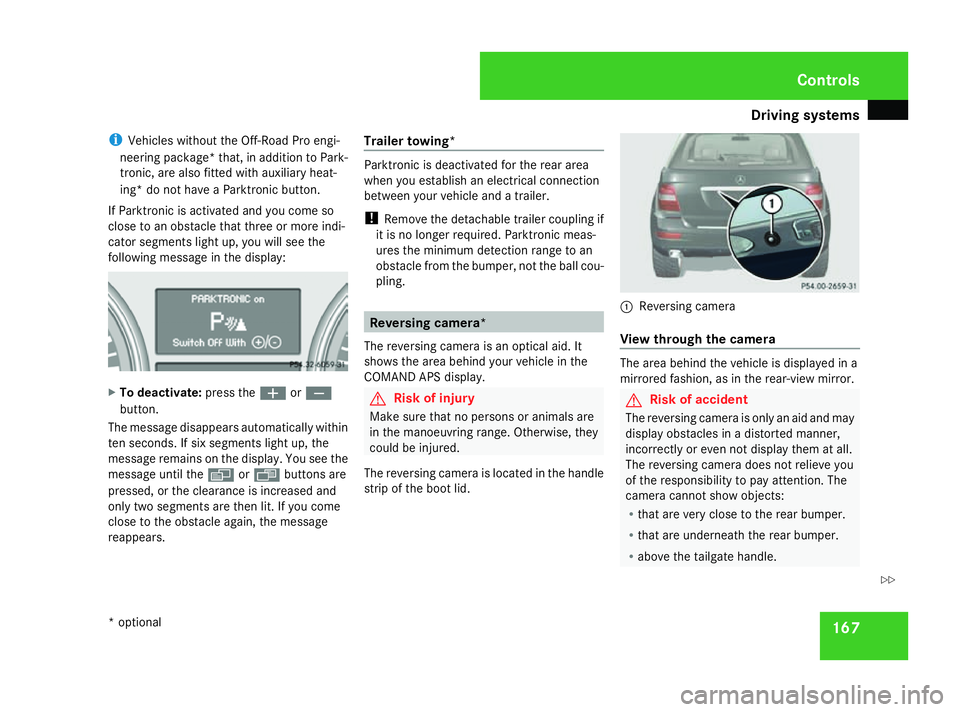
The reversing camera is located in the handle
strip of the boot lid. 1
Reversing camera
View through the camera The area behind the vehicle is displayed in a
mirrored fashion, as in the rear-view mirror.
G
Risk of accident
The reversing camera is only an aid and may
display obstacles in a distorted manner,
incorrectly or even not display them at all.
The reversing camera does not relieve you
of the responsibility to pay attention. The
camera cannot show objects:
R that are very close to the rear bumper.
R that are underneath the rear bumper.
R above the tailgate handle. Controls
* optional
164_AKB; 5; 5, en-GB
wobuchh,
Version: 2.10.6 2008-05-11T11:55:12+02:00 - Seite 167 ZDateiname: 6515_4293_02_buchblock.pdf; preflight