ESP MERCEDES-BENZ ML SUV 2008 Owner's Guide
[x] Cancel search | Manufacturer: MERCEDES-BENZ, Model Year: 2008, Model line: ML SUV, Model: MERCEDES-BENZ ML SUV 2008Pages: 381, PDF Size: 7.18 MB
Page 113 of 381
Transmission
1101
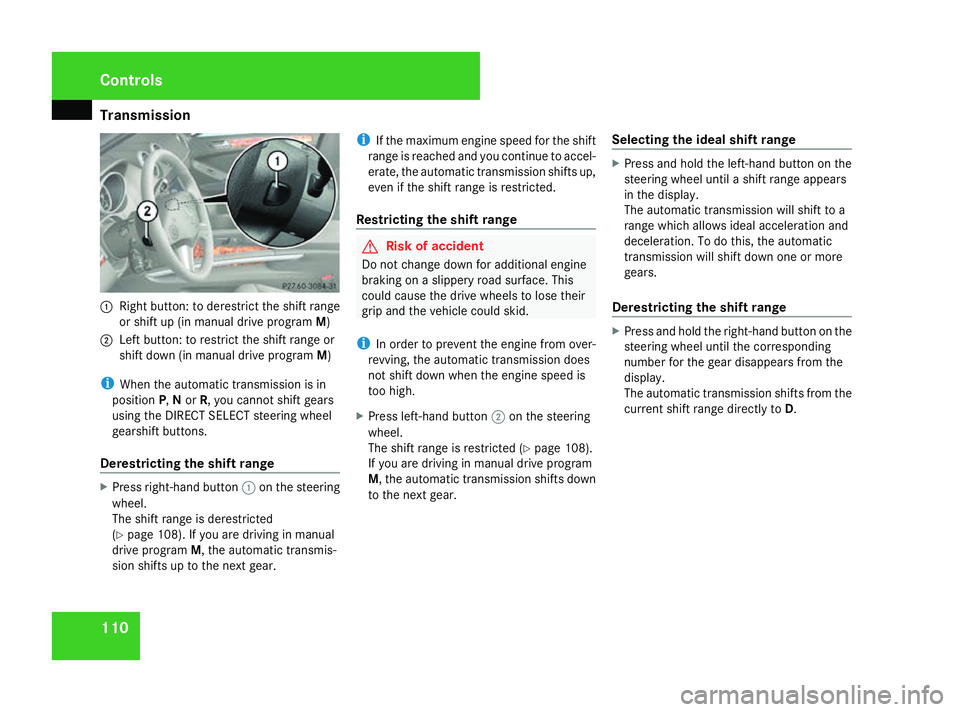
Right button: to derestrict the shift range
or shift up (in manual drive program M)
2 Left button: to restrict the shift range or
shift down (in manual drive program M)
i When the automatic transmission is in
position P,Nor R, you cannot shift gears
using the DIRECT SELECT steering wheel
gearshift buttons.
Derestricting the shift range X
Press right-hand button 1on the steering
wheel.
The shift range is derestricted
(Y page 108). If you are driving in manual
drive program M, the automatic transmis-
sion shifts up to the next gear. i
If the maximum engine speed for the shift
range is reached and you continue to accel-
erate, the automatic transmission shifts up,
even if the shift range is restricted.
Restricting the shift range G
Risk of accident
Do not change down for additional engine
braking on a slippery road surface. This
could cause the drive wheels to lose their
grip and the vehicle could skid.
i In order to prevent the engine from over-
revving, the automatic transmission does
not shift down when the engine speed is
too high.
X Press left-hand button 2on the steering
wheel.
The shift range is restricted (Y page 108).
If you are driving in manual drive program
M, the automatic transmission shifts down
to the next gear. Selecting the ideal shift range X
Press and hold the left-hand button on the
steering wheel until a shift range appears
in the display.
The automatic transmission will shift to a
range which allows ideal acceleration and
deceleration. To do this, the automatic
transmission will shift down one or more
gears.
Derestricting the shift range X
Press and hold the right-hand button on the
steering wheel until the corresponding
number for the gear disappears from the
display.
The automatic transmission shifts from the
current shift range directly to D.Controls
164_AKB; 5; 5, en-GB
wobuchh
,V ersion: 2.10.6
2008-05-11T11:55:12+02:00 - Seite 110 Dateiname: 6515_4293_02_buchblock.pdf; preflight
Page 118 of 381
On-board computer
115Outside temperature display
G
Risk of accident
The road surface may be icy, especially in
wooded areas or on bridges, even if tem-
peratures are just above freezing point. The
vehicle could skid if you fail to adapt your
driving style. You should therefore always
adapt your driving style and speed to suit
the weather conditions.
There is a short delay before a change in out-
side temperature is displayed. On-board computer
Points to remember
The on-board computer is activated as soon
as you turn the key to position 1in the ignition
lock. You can use the on-board computer to
call up information relating to your vehicle
and to make and adjust settings.
You can call up the next service due date,
select the display language for the instrument
cluster and set other functions. G
Risk of accident
Only use the on-board computer when road
and traffic conditions permit. You would
otherwise be distracted and unable to con-
centrate properly on driving, and could
cause an accident.
The on-board computer shows information in
the multi-function display. Multi-function steering wheel
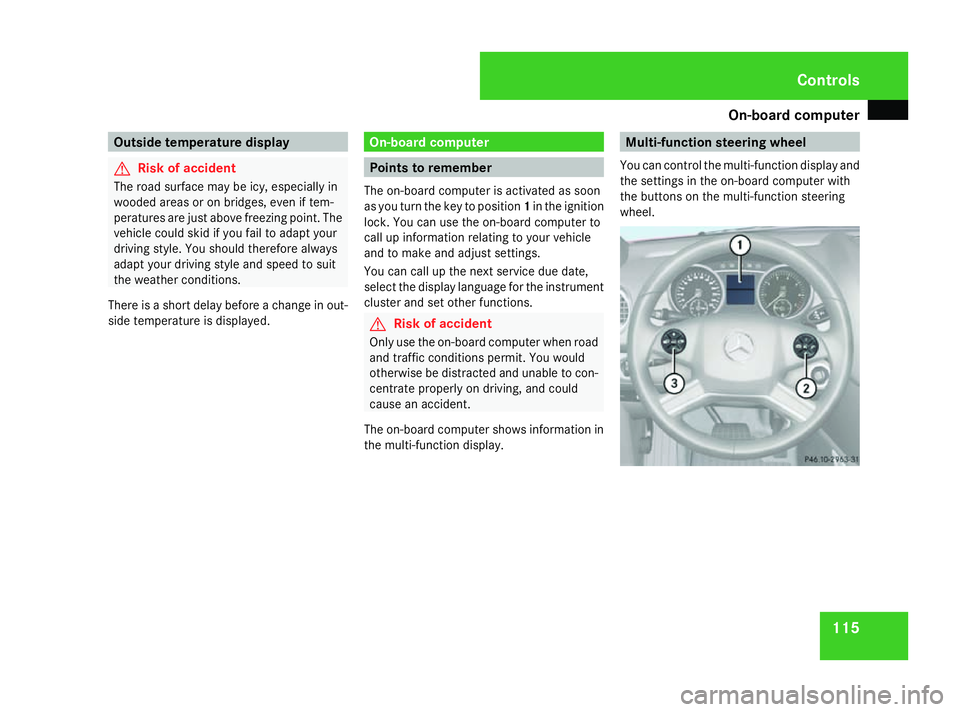
You can control the multi-function display and
the settings in the on-board computer with
the buttons on the multi-function steering
wheel. Controls
164_AKB; 5; 5, en-GB
wobuchh,
Version: 2.10.6 2008-05-11T11:55:12+02:00 - Seite 115 ZDateiname: 6515_4293_02_buchblock.pdf; preflight
Page 133 of 381
On-board computer
130
X
Press èor· to select the Set-
tings menu.
X Press the jbutton to call up the selec-
tion of submenus.
X Press the æorç button to select the
Time/Date submenu.
Setting the time
X Press the jbutton to select Clock Set
hour (orClock Set minute).
X Press the æorç button to set a
value.
Setting the date
X Press the jbutton to select Set date
Day (orSet date Month orSet date
Year).
X Press the æorç button to set the
values.
X Press the j,èorÿ button to
select a different display.
Setting constant headlamp mode If you have set constant headlamp mode and
the light switch is in position MorU,
the side lamps, dipped-beam headlamps and
licence plate lighting are switched on auto- matically when the engine is running. Turning
the light switch to a different position
switches on the corresponding lights. Make
sure the light switch is set to
BorU if
you switch off the constant headlamp mode
while driving at night.
In countries in which constant headlamp
mode is a legal requirement, Constantis the
factory setting.
X Press èor· to select the Set-
tings menu.
X Press the jbutton to call up the selec-
tion of submenus.
X Press the æorç button to select the
Lighting submenu.
X Press the jbutton to select Headlamp
mode.
X Press the æorç button to set the
switch-on mode for the headlamps to Man-
ual orConstant (constant headlamp
mode).
X Press the j,èorÿ button to
select a different display. Switching the surround lighting on or
off If the surround lighting is switched on, the
following lights will be switched on automat-
ically in the dark after you have unlocked the
vehicle using the key:
R
the side lamps
R the tail lamps
R the licence plate lighting
R the front foglamps
The surround lighting switches off automati-
cally if you open the driver's door or after 40
seconds.
X Press èor· to select the Set-
tings menu.
X Press the jbutton to call up the selec-
tion of submenus.
X Press the æorç button to select the
Lighting submenu.
X Press the jbutton to select the Sur-
round lighting function. Controls
164_AKB; 5; 5, en-GB
wobuchh,
Version: 2.10.6 2008-05-11T11:55:12+02:00 - Seite 130Dateiname: 6515_4293_02_buchblock.pdf; preflight
Page 141 of 381
Off-road driving
138
X
Press the èor· button to select the
Telephone menu.
X Press the sbutton to call up the most
recently dialled number in the redial mem-
ory.
X Press the jork button to select the
desired name or number.
X Press the sbutton to start dialling. Off-road driving
Overview of off-road driving systems
The systems which are relevant for off-road
driving are explained on the following pages:
R 4MATIC (permanent four-wheel drive), for
optimum traction
R DSR (Downhill Speed Regulation), which
assists you when driving downhill
R Off-road drive program, which assists you
when driving off-road
R LOW RANGE* off-road gear for better trac-
tion off-road
R Differential locks for increased traction off-
road
You will find further information about driving
off-road in the "Operation" section
(Y page 235). 4MATIC (permanent four-wheel drive)
4MATIC ensures that all four wheels are per-
manently driven. Together with ESP ®
and
4ETS, it improves the traction of your vehicle
whenever a drive wheel spins due to insuffi-
cient grip. G
Risk of accident
4MATIC cannot reduce the risk of an acci-
dent if you drive too fast.
If a drive wheel spins due to insufficient
grip:
R Only depress the accelerator pedal as far
as necessary when pulling away.
R Accelerate less when driving.
R Adapt your driving style to suit road and
traffic conditions.
i In wintry driving conditions, the maximum
effect of 4MATIC can only be achieved if
you use winter tyres (M+S tyres), with snow
chains if necessary.
! When testing the parking brake, operate
the vehicle only briefly (for a maximum of
ten seconds) on a brake dynamometer.
When doing this, turn the key to position
0 or 1in the ignition. Failure to do this can Controls
* optional
164_AKB; 5; 5, en-GB
wobuchh,
Version: 2.10.6 2008-05-11T11:55:12+02:00 - Seite 138Dateiname: 6515_4293_02_buchblock.pdf; preflight
Page 142 of 381
Off-road driving
139
cause damage to the drive train or the
brake system.
! A function or performance test should
only be carried out on a twin-axle dyna-
mometer. If you wish to operate the vehicle
on such a dynamometer, please consult a
Mercedes-Benz Service Centre in advance.
You could otherwise damage the drive train
or the brake system. DSR (Downhill Speed Regulation)
You will find information about driving off-
road in the "Operation" section
(Y page 235).
DSR is an aid to assist you when driving down-
hill. It keeps the speed of travel at the speed
set on the on-board computer (Y page 134).
The steeper the downhill gradient, the greater
the DSR braking effect on the vehicle. When
driving on flat stretches of road or on an uphill
gradient, the DSR braking effect is minimal or
non-existent. G
Risk of accident
DSR is only an aid designed to assist you
when driving downhill. You are responsible
for keeping control of the vehicle and for assessing whether the downhill gradient
can be managed.
When activating DSR the vehicle may brake
suddenly due to DSR intervening. This is
dependent on the downhill gradient and the
difference between the current speed and
the speed set. DSR may not always be able
to keep to the set speed, depending on road
surface and tyre conditions. You could lose
control of the vehicle and cause an acci-
dent.
Select a set speed suitable for the prevail-
ing conditions and when necessary, apply
the brakes manually.
DSR controls the vehicle's speed when
DIRECT SELECT selector lever positions D,
R and Nare selected. You can drive at a
higher or a lower speed than that set on the
on-board computer at any time by braking or
accelerating. G
Risk of accident
If you depress the accelerator pedal with
DSR activated, then the set speed can be
exceeded. Drive downhill with special care
and always keep in mind that DSR brakes
the vehicle as soon as you remove your foot
from the accelerator pedal. The vehicle may
be heavily braked by DSR depending on the gradient and the difference between the
vehicle's road speed and the set speed. You
could lose control of the vehicle and cause
an accident.
The speed is set to 6 km/h at the factory.
Activating/deactivating DSR Activating
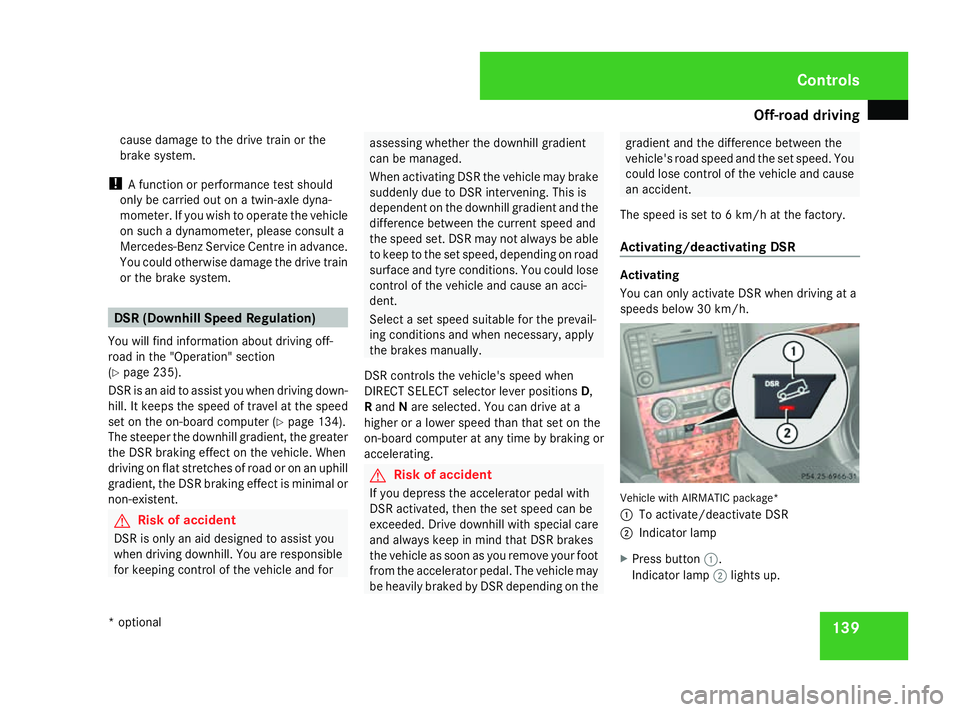
You can only activate DSR when driving at a
speeds below 30 km/h.
Vehicle with AIRMATIC package*
1
To activate/deactivate DSR
2 Indicator lamp
X Press button 1.
Indicator lamp 2lights up. Controls
* optional
164_AKB; 5; 5, en-GB
wobuchh,
Version: 2.10.6 2008-05-11T11:55:12+02:00 - Seite 139 ZDateiname: 6515_4293_02_buchblock.pdf; preflight
Page 143 of 381
Off-road driving
140
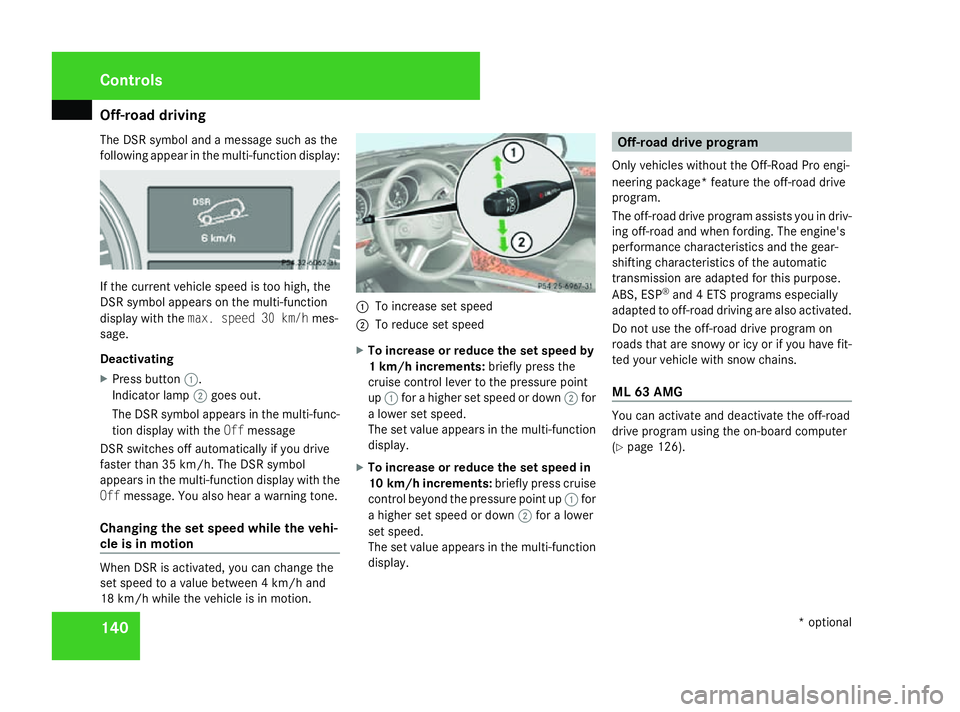
The DSR symbol and a message such as the
following appear in the multi-function display: If the current vehicle speed is too high, the
DSR symbol appears on the multi-function
display with the max. speed 30 km/h mes-
sage.
Deactivating
X Press button 1.
Indicator lamp 2goes out.
The DSR symbol appears in the multi-func-
tion display with the Offmessage
DSR switches off automatically if you drive
faster than 35 km/h. The DSR symbol
appears in the multi-function display with the
Off message. You also hear a warning tone.
Changing the set speed while the vehi-
cle is in motion When DSR is activated, you can change the
set speed to a value between 4 km/h and
18 km/h while the vehicle is in motion. 1
To increase set speed
2 To reduce set speed
X To increase or reduce the set speed by
1 km/h increments: briefly press the
cruise control lever to the pressure point
up 1 for a higher set speed or down 2for
a lower set speed.
The set value appears in the multi-function
display.
X To increase or reduce the set speed in
10 km/h increments: briefly press cruise
control beyond the pressure point up 1for
a higher set speed or down 2for a lower
set speed.
The set value appears in the multi-function
display. Off-road drive program
Only vehicles without the Off-Road Pro engi-
neering package* feature the off-road drive
program.
The off-road drive program assists you in driv-
ing off-road and when fording. The engine's
performance characteristics and the gear-
shifting characteristics of the automatic
transmission are adapted for this purpose.
ABS, ESP ®
and 4 ETS programs especially
adapted to off-road driving are also activated.
Do not use the off-road drive program on
roads that are snowy or icy or if you have fit-
ted your vehicle with snow chains.
ML 63 AMG You can activate and deactivate the off-road
drive program using the on-board computer
(Y
page 126). Controls
* optional
164_AKB; 5; 5, en-GB
wobuchh,
Version: 2.10.6 2008-05-11T11:55:12+02:00 - Seite 140Dateiname: 6515_4293_02_buchblock.pdf; preflight
Page 144 of 381
Off-road driving
141
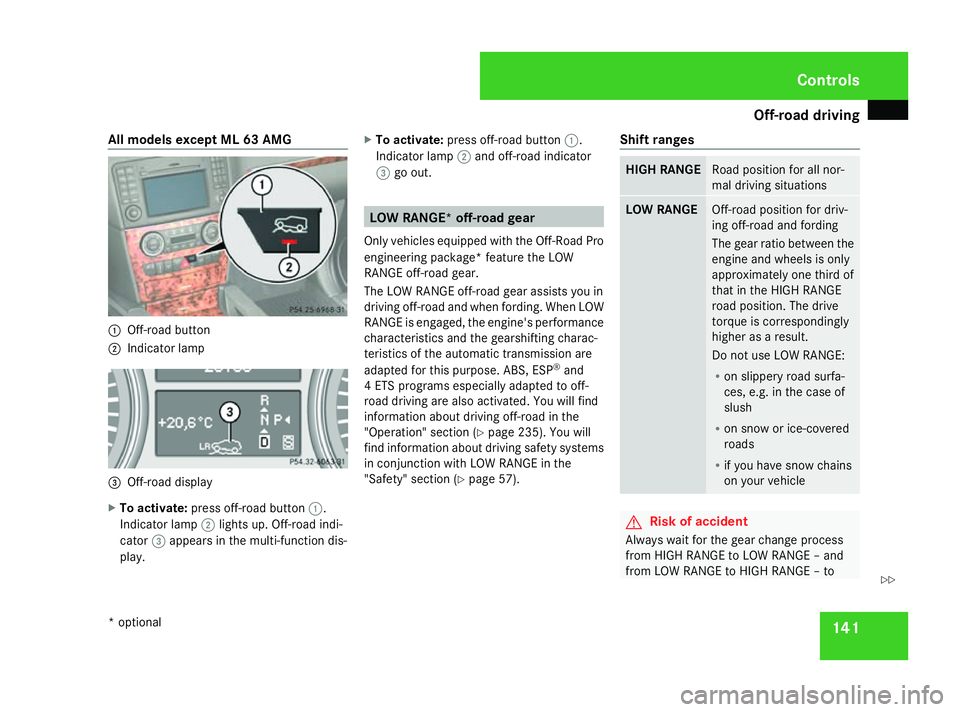
All models except ML 63 AMG
1
Off-road button
2 Indicator lamp 3
Off-road display
X To activate: press off-road button 1.
Indicator lamp 2lights up. Off-road indi-
cator 3appears in the multi-function dis-
play. X
To activate: press off-road button 1.
Indicator lamp 2and off-road indicator
3 go out. LOW RANGE* off-road gear
Only vehicles equipped with the Off-Road Pro
engineering package* feature the LOW
RANGE off-road gear.
The LOW RANGE off-road gear assists you in
driving off-road and when fording. When LOW
RANGE is engaged, the engine's performance
characteristics and the gearshifting charac-
teristics of the automatic transmission are
adapted for this purpose. ABS, ESP ®
and
4 ETS programs especially adapted to off-
road driving are also activated. You will find
information about driving off-road in the
"Operation" section (Y page 235). You will
find information about driving safety systems
in conjunction with LOW RANGE in the
"Safety" section (Y page 57). Shift ranges HIGH RANGE Road position for all nor-
mal driving situations
LOW RANGE Off-road position for driv-
ing off-road and fording
The gear ratio between the
engine and wheels is only
approximately one third of
that in the HIGH RANGE
road position. The drive
torque is correspondingly
higher as a result.
Do not use LOW RANGE:
R
on slippery road surfa-
ces, e.g. in the case of
slush
R on snow or ice-covered
roads
R if you have snow chains
on your vehicle G
Risk of accident
Always wait for the gear change process
from HIGH RANGE to LOW RANGE – and
from LOW RANGE to HIGH RANGE – to Controls
* optional
164_AKB; 5; 5, en-GB
wobuchh,
Version: 2.10.6 2008-05-11T11:55:12+02:00 - Seite 141 ZDateiname: 6515_4293_02_buchblock.pdf; preflight
Page 147 of 381
Off-road driving
144
X
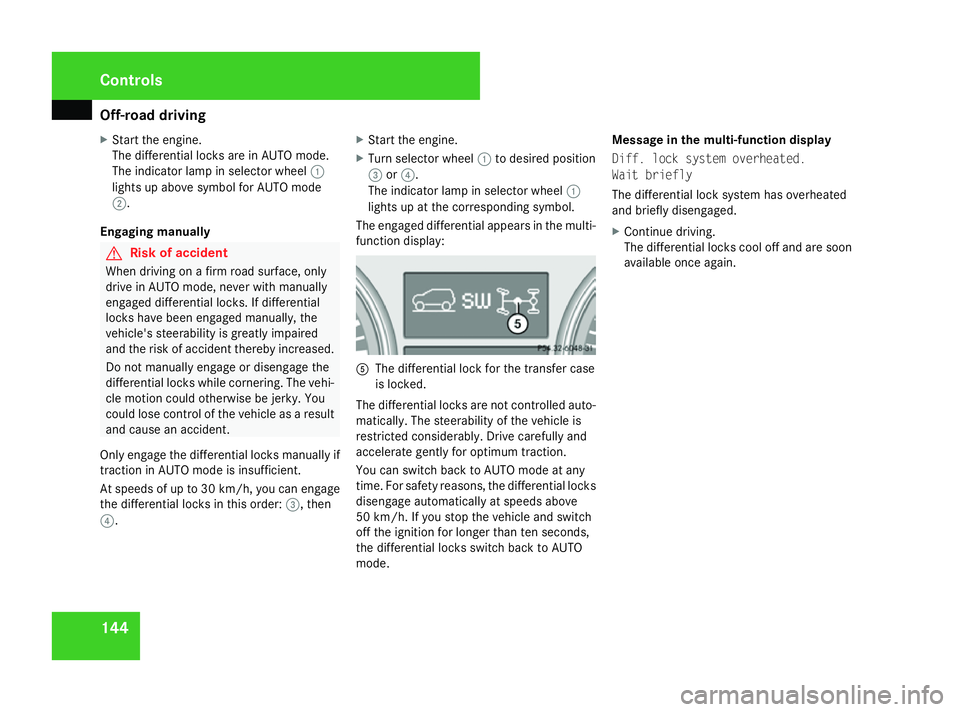
Start the engine.
The differential locks are in AUTO mode.
The indicator lamp in selector wheel 1
lights up above symbol for AUTO mode
2.
Engaging manually G
Risk of accident
When driving on a firm road surface, only
drive in AUTO mode, never with manually
engaged differential locks. If differential
locks have been engaged manually, the
vehicle's steerability is greatly impaired
and the risk of accident thereby increased.
Do not manually engage or disengage the
differential locks while cornering. The vehi-
cle motion could otherwise be jerky. You
could lose control of the vehicle as a result
and cause an accident.
Only engage the differential locks manually if
traction in AUTO mode is insufficient.
At speeds of up to 30 km/ h,you can engage
the differential locks in this order: 3, then
4. X
Start the engine.
X Turn selector wheel 1to desired position
3 or4.
The indicator lamp in selector wheel 1
lights up at the corresponding symbol.
The engaged differential appears in the multi-
function display: 5
The differential lock for the transfer case
is locked.
The differential locks are not controlled auto-
matically. The steerability of the vehicle is
restricted considerably. Drive carefully and
accelerate gently for optimum traction.
You can switch back to AUTO mode at any
time. For safety reasons, the differential locks
disengage automatically at speeds above
50 km/h. If you stop the vehicle and switch
off the ignition for longer than ten seconds,
the differential locks switch back to AUTO
mode. Message in the multi-function display
Diff. lock system overheated.
Wait briefly
The differential lock system has overheated
and briefly disengaged.
X
Continue driving.
The differential locks cool off and are soon
available once again. Cont
rols
164_AKB; 5; 5, en-GB
wobuchh
,V ersion: 2.10.6
2008-05-11T11:55:12+02:00 - Seite 144 Dateiname: 6515_4293_02_buchblock.pdf; preflight
Page 148 of 381
Driving sys
tems 145Driving systems
Overview of driving systems
The vehicle's driving systems are described
on the following pages:
R Cruise control, Distronic* and Speedtronic,
which are used to control the speed of the
vehicle
R AIRMATIC package*, consisting of level
control* for individual adjustment of
ground clearance and ADS* (Adaptive
Damping System), for individual adjust-
ment of suspension tuning
R Parktronic*, which assists you in parking
and manoeuvring
R Reversing camera*, which assists you
when parking and manoeuvring
The ABS, BAS, ESP ®
, EBV and 4-ETS vehicle
safety systems and the distance warning sys-
tem* are described in the "Safety" section
(Y page 57). Cruise control
Cruise control maintains a constant road
speed for you. It brakes automatically in order
to avoid exceeding the set speed. On long and
steep downhill gradients, especially if the
vehicle is laden or towing a trailer, you must
select shift range 1,2or 3in good time. By
doing so you will make use of the braking
effect of the engine, which relieves the load
on the brake system and prevents the brakes
from overheating and wearing too quickly. G
Risk of accident
Do not change down for additional engine
braking on a slippery road surface. This
could cause the drive wheels to lose their
grip and the vehicle could skid.
Use cruise control only if road and traffic con-
ditions make it appropriate to maintain a
steady speed for a prolonged period. You can
store any road speed above 30 km/h. G
Risk of accident
Cruise control cannot take account of road
and traffic conditions.
Always pay attention to traffic conditions
even when cruise control is activated.
Cruise control is only an aid designed to
assist driving. You are responsible for the vehicle's speed and for braking in good
time.
G
Risk of accident
Do not use cruise control:
R in road and traffic conditions which do
not allow you to maintain a constant
speed (e.g. heavy traffic or winding
roads). You could otherwise cause an
accident.
R on slippery roads. Braking or accelerat-
ing could cause the drive wheels to lose
traction and the vehicle could then skid.
R when there is poor visibility, e.g. due to
fog, heavy rain or snow
Cruise control lever You can operate cruise control and variable
Speedtronic with the cruise control lever.
The LIM indicator lamp on the cruise control
lever indicates which system you have selec-
ted:
R
LIM indicator lamp off:
Cruise control is selected.
R LIM indicator lamp lit:
Variable Speedtronic is selected. Controls
* optional
164_AKB; 5; 5, en-GB
wobuchh
,V ersion: 2.10.6
2008-05-11T11:55:12+02:00 - Seite 145 ZDateiname: 6515_4293_02_buchblock.pdf; preflight
Page 149 of 381
Driving sys
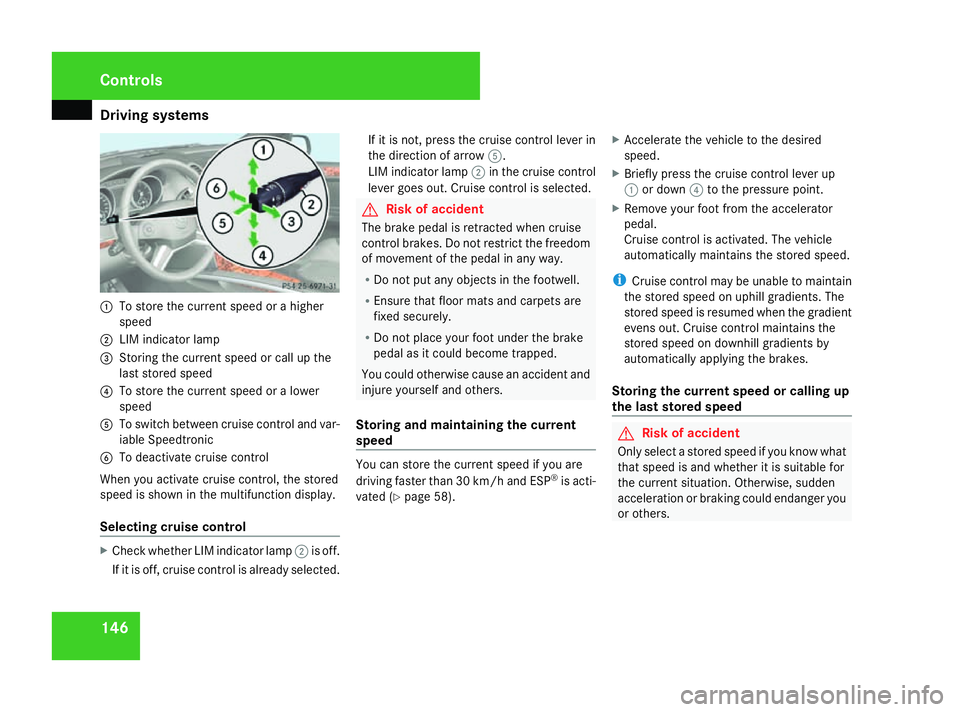
tems 1461
To store the current speed or a higher
speed
2 LIM indicator lamp
3 Storing the current speed or call up the
last stored speed
4 To store the current speed or a lower
speed
5 To switch between cruise control and var-
iable Speedtronic
6 To deactivate cruise control
When you activate cruise control, the stored
speed is shown in the multifunction display.
Selecting cruise control X
Check whether LIM indicator lamp 2is off.
If it is off, cruise control is already selected. If it is not, press the cruise control lever in
the direction of arrow
5.
LIM indicator lamp 2in the cruise control
lever goes out. Cruise control is selected. G
Risk of accident
The brake pedal is retracted when cruise
control brakes. Do not restrict the freedom
of movement of the pedal in any way.
R Do not put any objects in the footwell.
R Ensure that floor mats and carpets are
fixed securely.
R Do not place your foot under the brake
pedal as it could become trapped.
You could otherwise cause an accident and
injure yourself and others.
Storing and maintaining the current
speed You can store the current speed if you are
driving faster than 30 km/h and ESP
®
is acti-
vated (Y page 58). X
Accelerate the vehicle to the desired
speed.
X Briefly press the cruise control lever up
1 or down 4to the pressure point.
X Remove your foot from the accelerator
pedal.
Cruise control is activated. The vehicle
automatically maintains the stored speed.
i Cruise control may be unable to maintain
the stored speed on uphill gradients. The
stored speed is resumed when the gradient
evens out. Cruise control maintains the
stored speed on downhill gradients by
automatically applying the brakes.
Storing the current speed or calling up
the last stored speed G
Risk of accident
Only select a stored speed if you know what
that speed is and whether it is suitable for
the current situation. Otherwise, sudden
acceleration or braking could endanger you
or others. Controls
164_AKB; 5; 5, en-GB
wobuchh
,V ersion: 2.10.6
2008-05-11T11:55:12+02:00 - Seite 146 Dateiname: 6515_4293_02_buchblock.pdf; preflight