esp MERCEDES-BENZ S CLASS 2019 Manual PDF
[x] Cancel search | Manufacturer: MERCEDES-BENZ, Model Year: 2019, Model line: S CLASS, Model: MERCEDES-BENZ S CLASS 2019Pages: 578, PDF Size: 23.31 MB
Page 245 of 578

Display inthe assistancegraphic
1Spotlight function switched on but not oper‐ating
2Spotlight function switched on and operating
The pedestrian symbol inthe assistance graphicindicatesthestatus ofthe spotlight function. Ifthe pedestrian symbol is displayed dark1,thefunction is switched on. Ifthe symbol is dis‐
played bright2,the conditionsforthe Spotlightfunction are also fulfilled.
System limitationsThe spotlight function does notflash at animals.
The spotlight function is not active or is activeonlytoa limitedextent if:
RYou are driving in city traffic.
RThe pedestrians are located inthe area of anoncomingvehicle or avehicle in front.
Activating/deactivating the spotlight func‐tion
Requirements:RPedestrian detection is active (→page241).
RTheroadwayis not lit.
RThe speed is at least37mph (60 km/h).
RAdaptive Highbeam Assist Plus is switchedon.
If alltherequirements are fulfilled,the headlampflashesfour shortpulses at a pedestrian detec‐ted on or neartotheroadway.
Multimedia system:
,Vehicle.÷.Light Set-
tings.Spotlight
#Activatesor deactivateSthe function.
Blind Spot Assist andActive Blind SpotAssistwithexitwarning
Function of Blind Spot Assist andActiveBlind Spot AssistwithexitwarningBlind Spot Assist andActive Blind Spot Assistuse two lateral,rear-facingradar sensorstomonitorthe area upto130ft(40 m) behindyourvehicle and10ft(3 m) directly nexttoyourvehi‐cle.
If avehicle is detected at speeds above approx‐imately 8mph (12 km/h) andthisvehicle subse‐quentlyentersthe monitoringrange directly nextto yourvehicle,thewarning lamp inthe outsidemirror lights upred.
If avehicle is detected closetothe side ofyourvehicle,theredwarning lamp inthe outside mir‐rorflashes. Ifyou switchonthe turn signal indi‐cator inthe corresponding direction, awarning
Driving and parking243
Page 246 of 578
tone sounds once. Ifthe turn signal indicatorremains switched on, allother detectedvehiclesare indicated onlybytheflashing oftheredwarning lamp.
Ifyouovertake avehiclequickly,nowarning isgiven.
&WARNINGRisk of accident despiteBlindSpot Assist
Blind Spot Assistdoes notreacttovehiclesapproaching andovertakingyou at agreatlydifferent speed.
As aresult, Blind Spot Assist cannotwarndrivers inthis situation.
#Always pay careful attentiontothe traf‐fic situation and maintain a safe dis‐tance atthe side ofthevehicle.
Blind Spot Assist andActive Blind Spot Assistare onlyaids. They mayfailtodetect somevehi‐cles and are no substitutefor attentive driving.Always ensurethatthere is sufficient distancetothe sideforotherroad users and obstacles.
ExitwarningTheexitwarning is an additional function ofBlind Spot Assist and canwarnvehicle occu‐pants about approachingvehicles when leavingthevehicle whenstationary.
&WARNINGRisk of accident despiteexitwarning
Theexitwarningreacts neithertostationaryobjects nortovehicles approachingyou at agreatlydifferent speed.
As aresult,theexitwarning cannotwarndrivers inthese situations.
#Always pay particular attentiontothetraffic situation when openingthe doorsand make surethere is sufficient clear‐ance.
Ifthere is avehicle inthe monitoringrange,thisis indicated inthe outside mirror.If avehicleoccupant opensthe door onthe side withthewarning, awarningtone sounds andthewarninglamp inthe outside mirrorstartstoflash.
This additional function is onlyavailable whenBlind Spot Assist is activated and uptoa maxi‐mum ofthree minutes afterthe ignition hasbeen switched off. Theexitwarning is no longeravailable oncethewarning lamp inthe outsidemirrorflashesthree times.
Theexitwarning is only an aid and not a substi‐tuteforthe attention ofvehicle occupants. Theresponsibilityfor opening and closingthe doorsandfor leavingthevehicleremains withthevehi‐cle occupants.
System limitations
Blind Spot Assist andActive Blind Spot Assistmay be limited inthefollowing situations:
Rifthere is dirt onthe sensors orthe sensorsare obscured
Rin poor visibility, e.g. duetofog, heavyrain orsnow
Rifthere are narrowvehicles, e.g. bicycles ormotorbikes
Riftheroad hasverywide or narrowlanes
Rifvehicles are not driving inthe middle oftheir lane
244Driving and parking
Page 247 of 578
Warnings may be issued in error when drivingclosetocrash barriers or similar solid lane bor‐ders. Always make surethatthere is sufficientdistancetothe sideforother traffic or obsta‐cles.
Warnings may be interrupted when driving along‐side longvehicles,forexample trucks,for a pro‐longed time.
Blind Spot Assist is not operational whenreversegear is engaged.
Theexitwarning may be limited inthefollowingsituations:
RWhenthe sensors are coveredbyadjacentvehicles in narrowparking spaces.
RWhen people approachthevehicle.
RIntheevent ofstationary or slowly movingobjects.
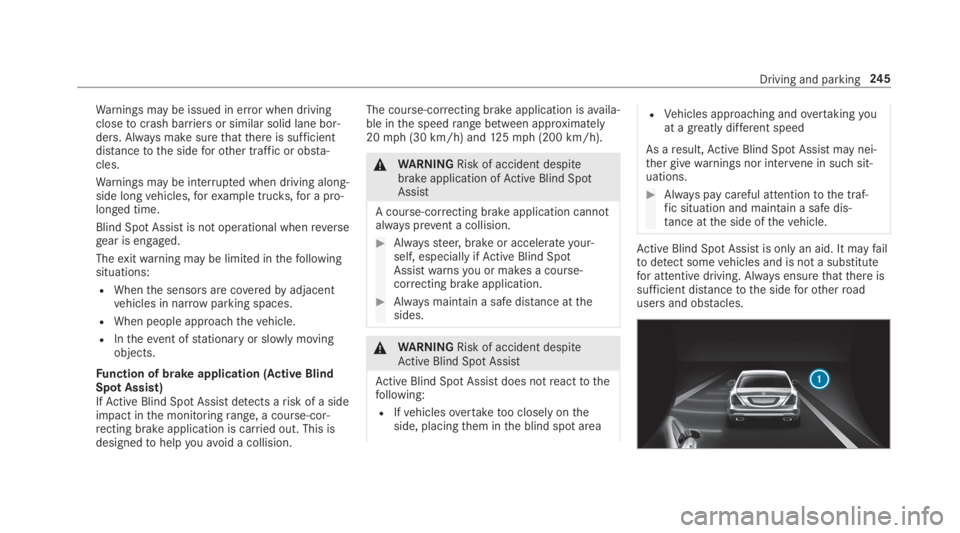
Function of brake application (Active BlindSpot Assist)IfActive Blind Spot Assistdetects arisk of a sideimpact inthe monitoringrange, a course-cor‐recting brake application is carried out. This isdesignedtohelpyouavoid a collision.
The course-correcting brake application isavaila‐ble inthe speedrange between approximately20mph (30 km/h) and125mph (200 km/h).
&WARNINGRisk of accident despitebrake application ofActive Blind SpotAssist
A course-correcting brake application cannotalways prevent a collision.
#Alwayssteer, brake or accelerateyour‐self, especially ifActive Blind SpotAssistwarnsyou or makes a course-correcting brake application.
#Always maintain a safe distance atthesides.
&WARNINGRisk of accident despiteActive Blind Spot Assist
Active Blind Spot Assistdoes notreacttothefollowing:
RIfvehiclesovertaketoo closely ontheside, placingthem inthe blind spot area
RVehicles approaching andovertakingyouat agreatly different speed
As aresult,Active Blind Spot Assistmay nei‐ther givewarnings nor intervene in suchsit‐uations.
#Always pay careful attentiontothe traf‐fic situation and maintain a safe dis‐tance atthe side ofthevehicle.
Active Blind Spot Assistis only an aid. It mayfailtodetect somevehicles and is not a substitutefor attentive driving. Always ensurethatthere issufficient distancetothe sideforotherroadusers and obstacles.
Driving and parking245
Page 248 of 578
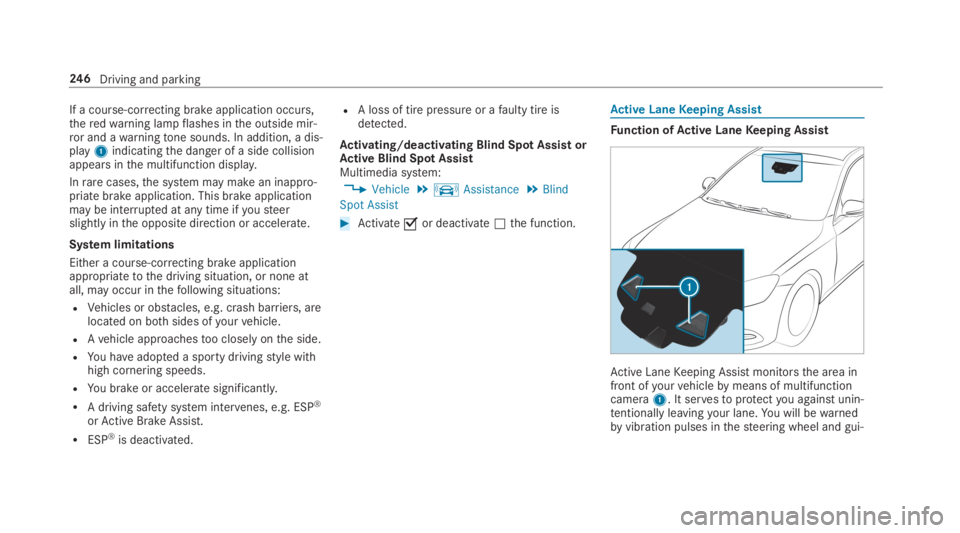
If a course-correcting brake application occurs,theredwarning lampflashes inthe outside mir‐ror and awarningtone sounds. In addition, a dis‐play1indicatingthe danger of a side collisionappears inthe multifunction display.
Inrarecases,the system may make an inappro‐priate brake application. This brake applicationmay be interrupted at any time ifyousteerslightly inthe opposite direction or accelerate.
System limitations
Either a course-correcting brake applicationappropriatetothe driving situation, or none atall, may occur inthefollowing situations:
RVehicles or obstacles, e.g. crash barriers, arelocated on bothsides ofyourvehicle.
RAvehicle approachestoo closely onthe side.
RYou haveadopted a sporty drivingstyle withhigh cornering speeds.
RYou brake or accelerate significantly.
RA driving safety system intervenes, e.g. ESP®
orActive Brake Assist.
RESP®is deactivated.
RA loss of tire pressure or afaulty tire isdetected.
Activating/deactivating Blind Spot AssistorActive Blind Spot AssistMultimedia system:
,Vehicle.kAssistance.Blind
Spot Assist
#Activatesor deactivateSthe function.
Active LaneKeeping Assist
Function ofActive LaneKeeping Assist
Active LaneKeeping Assist monitorsthe area infront ofyourvehiclebymeans of multifunctioncamera1. It servestoprotectyou against unin‐tentionallyleavingyour lane.You will bewarnedbyvibration pulses inthesteering wheel and gui‐
246Driving and parking
Page 249 of 578
dedbya course-correcting brake applicationbackintoyour lane.
You arewarnedbyvibration pulses inthesteer‐ing wheel inthefollowing circumstances:
RActive LaneKeeping Assist detects a lanemarking.
RA front wheel drivesoverthis lane marking.
You will also be guided back intoyour lanebymeans of a course-correcting brake applicationifthefollowing conditions are met:
RActive LaneKeeping Assist detects lanemarkings on bothedges ofthe lane.
RA front wheel drivesover a solid lane mark‐ing.
You can activate or deactivatetheActive LaneKeeping Assistwarning.
Active LaneKeeping Assist can neitherreducetherisk of an accident ifyoufailtoadaptyourdrivingstyle noroverridethe lawsof physics. Itcannottakeinto accountroad,weather or trafficconditions.Active LaneKeeping Assist is only anaid.You areresponsibleforthe distancetothe
vehicle in front,forvehicle speed,for braking ingood time andforstaying inyour lane.
Active LaneKeeping Assist can bringthevehicleback intothe lane with a lane-correcting brakeapplication. Inthe case of a broken lane markingbeing detected, a brake application will only bemade if avehicle has been detected inthe adja‐cent lane. Oncoming traffic can be detected.
In addition,overtakingvehicles andvehicles inadjacent lanes can be detected.
Active LaneKeeping Assist isavailable inthespeedrange between37mph (60 km/h) and124mph (200 km/h).
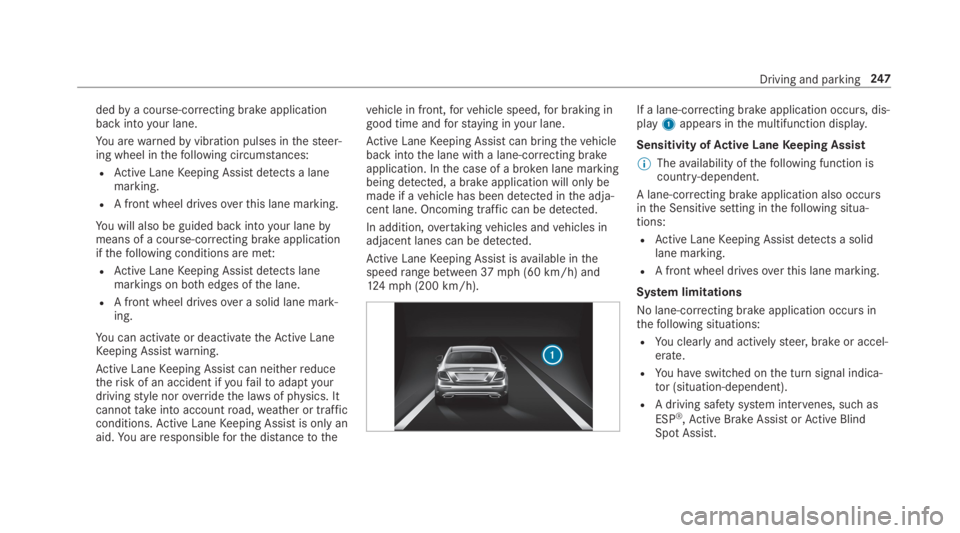
If a lane-correcting brake application occurs, dis‐play1appears inthe multifunction display.
Sensitivity ofActive LaneKeeping Assist
%Theavailability ofthefollowing function iscountry-dependent.
A lane-correcting brake application also occursinthe Sensitive setting inthefollowing situa‐tions:
RActive LaneKeeping Assist detects a solidlane marking.
RA front wheel drivesoverthis lane marking.
System limitations
No lane-correcting brake application occursinthefollowing situations:
RYou clearlyand activelysteer, brake or accel‐erate.
RYou haveswitched onthe turn signal indica‐tor (situation-dependent).
RA driving safety system intervenes, suchas
ESP®,Active Brake AssistorActive BlindSpot Assist.
Driving and parking247
Page 250 of 578
RYou haveadopted a sporty drivingstyle withhigh cornering speeds or highrates of accel‐eration.
RWhen ESP®is deactivated.
RIf a loss of tire pressure or afaulty tire hasbeen detected and displayed.
The system may be impaired or may not functioninthefollowing situations:
RIfthere is poor visibility, e.g. duetoinsuffi‐cient illumination oftheroad, ifthere arehighlyvariable shade conditions or inrain,snow,fog or heavy spray.
RIfthere isglare, e.g. from oncoming traffic,the sun orreflections.
RIfthe windshield inthe area ofthe multifunc‐tion camera is dirty, or ifthe camera isfog‐ged up, damaged or covered.
RIfthere are no lane markings, or severalunclear lane markings are presentfor onelane, e.g. aroundroadworks.
RIfthe lane markings areworn, dark or cov‐ered.
RIfthe distancetothevehicle in front istooshort andthusthe lane markings cannotbedetected.
RIfthe lane markingschangequickly,e.g.lanes branch off, cross one another ormerge.
RIftheroadwayisverynarrow and winding.
Vehicles with Driving Assistance packageorDriving Assistance Plus package:Active LaneKeeping Assist usesradar sensorstomonitorseveral areas aroundthevehicle. Iftheradarsensors intherear bumper are dirty or coveredwith snow,the system may be impaired or maynot function. If an obstacle inthe lane in whichyou are driving has been detected, no lane-cor‐recting brake application occurs.
Activating/deactivatingActive LaneKeepingAssist (vehicles withParking AssistPARKTRONIC)
&WARNINGRisk of accident despiteActive LaneKeeping Assistwarning
A lane-correcting brake application cannotalwaysbringthevehicle back intothe origi‐nal lane.
#Alwayssteer, brake or accelerateyour‐self, especially ifActive LaneKeepingAssistwarnsyou or makes a lane-cor‐recting brake application.
&WARNINGRisk of accident despiteinter‐vention ofActive LaneKeeping Assist
Active LaneKeeping Assist does not detecttraffic conditions orroad users. Inveryrarecases,the system may make an inappropri‐ate brake application, e.g. after intentionallydrivingover a solid lane marking.
The brake application can be interrupted atany time ifyousteer slightly inthe oppositedirection.
248Driving and parking
Page 251 of 578
#Always make surethatthere is suffi‐cient distancetothe sideforother traf‐fic or obstacles.
&WARNINGRisk of accident despiteLaneKeeping Assist
LaneKeeping Assist cannotalways clearlydetect lane markings.
In suchcases, LaneKeeping Assist can:
Rgive an unnecessarywarning
Rnot give awarning
#Always pay particular attentiontothetraffic situation andkeep withinthelane, especially ifActive LaneKeepingAssist alertsyou.
Be suretoobservethe system limitations ofActive LaneKeeping Assist.
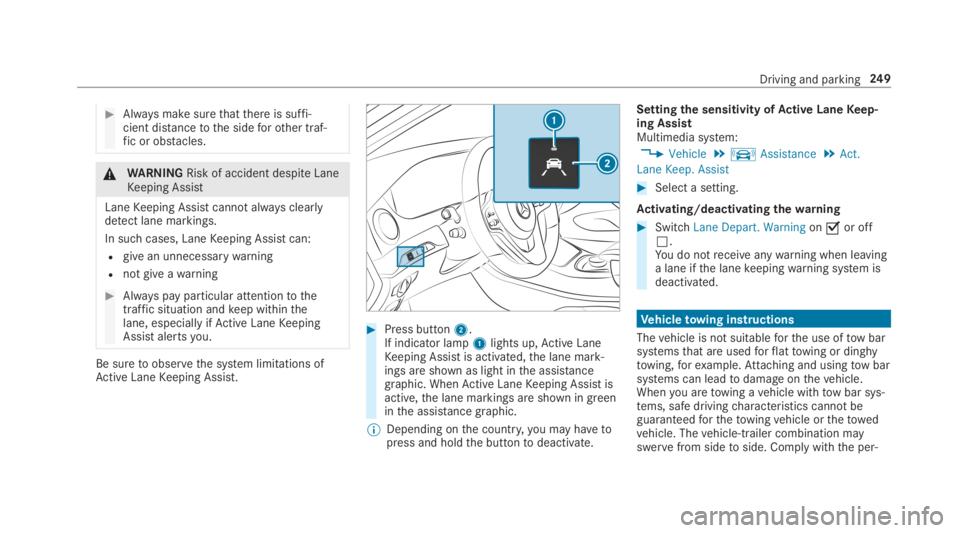
#Press button2.If indicator lamp1lights up,Active LaneKeeping Assist is activated,the lane mark‐ings are shown as light inthe assistancegraphic. WhenActive LaneKeeping Assist isactive,the lane markings are shown in greeninthe assistance graphic.
%Depending onthe country,you may havetopress and holdthe buttontodeactivate.
Settingthe sensitivity ofActive LaneKeep‐ing AssistMultimedia system:
,Vehicle.kAssistance.Act.
Lane Keep. Assist
#Select a setting.
Activating/deactivating thewarning
#SwitchLane Depart. Warningonsor offS.You do notreceiveanywarning when leavinga lane ifthe lanekeepingwarning system isdeactivated.
Vehicletowing instructions
Thevehicle is not suitableforthe use oftow barsystemsthat are usedforflattowing or dinghytowing,forexample.Attaching and usingtow barsystems can leadtodamage onthevehicle.Whenyou aretowing avehicle withtow bar sys‐tems, safe drivingcharacteristics cannot beguaranteedforthetowingvehicle orthetowedvehicle. Thevehicle-trailer combination mayswervefrom sidetoside. Comply withthe per‐
Driving and parking249
Page 253 of 578
Instrument Displayoverview
&WARNINGRisk of accident duetoaninstrument display malfunction
Ifthe Instrument Display hasfailed or mal‐functioned,you may notrecognize functionrestrictions applyingtosafetyrelevant sys‐tems.
The operating safety ofyourvehicle may beimpaired.
#Drive on carefully.
#Havethevehiclechecked immediatelyat aqualified specialistworkshop.
Mercedes‑AMGvehicles:observethe notes inthe Supplement. Otherwise,you mayfailtorec‐ognize dangers.
Plug-inhybrid:observethe notes inthe Supple‐ment. Otherwise,you mayfailtorecognize dan‐gers.
Ifthe operating safety ofyourvehicle isimpaired, parkthevehicle safely as soon as pos‐sible. Contact aqualified specialistworkshop.
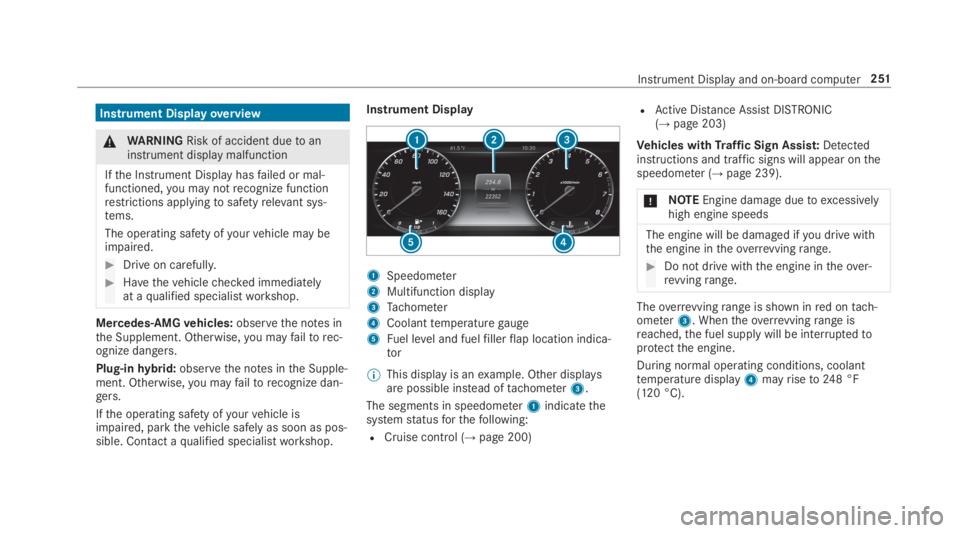
Instrument Display
1Speedometer
2Multifunction display
3Tachometer
4Coolanttemperaturegauge
5Fuel level and fuelfillerflap location indica‐tor
%This display is anexample. Other displaysare possible instead oftachometer3.
The segments in speedometer1indicatethesystemstatusforthefollowing:
RCruise control (→page 200)
RActive Distance AssistDISTRONIC(→page203)
Vehicles withTraffic Sign Assist:Detectedinstructions and traffic signs will appear onthespeedometer (→page 239).
*NOTEEngine damageduetoexcessivelyhigh engine speeds
The engine will be damaged ifyou drive withthe engine intheoverrevvingrange.
#Do not drive with the engine intheover‐revvingrange.
Theoverrevvingrange is shown inred ontach‐ometer3. Whentheoverrevvingrange isreached,the fuel supply will be interruptedtoprotectthe engine.
During normal operating conditions, coolanttemperature display4mayriseto248 °F(120 °C).
Instrument Displayand on-board computer251
Page 259 of 578
RGrayradarwaves nexttovehicle: Blind SpotAssist activated
RGreenradarwaves nexttovehicle: Blind SpotAssist active
RActive Distance AssistDISTRONIC displays(→page 203).
Calling up displaysontheTrip menu
On-board computer:
,Trip
%Whenyou havethestyle settoClassic,youcan view information onthe journey intheleft-hand area ofthe Instrument Display.
#Toselect a display:swipe upwards or down‐wards onthe left-handTouch Control.
DisplaysintheTripmenu:
RStandard display
RRange and current fuel consumption
Arecuperation displayis alsoavailableforcertain engines. Ifthere is only a smallamount of fuel left inthe fueltank,the dis‐
play showsavehicle beingrefueled insteadoftherange.
RECO display (→page174)
RTrip computerFrom StartandFrom Reset
RDigital speedometer
%The digital speedometer only appears intheSportandSupersportstyles.
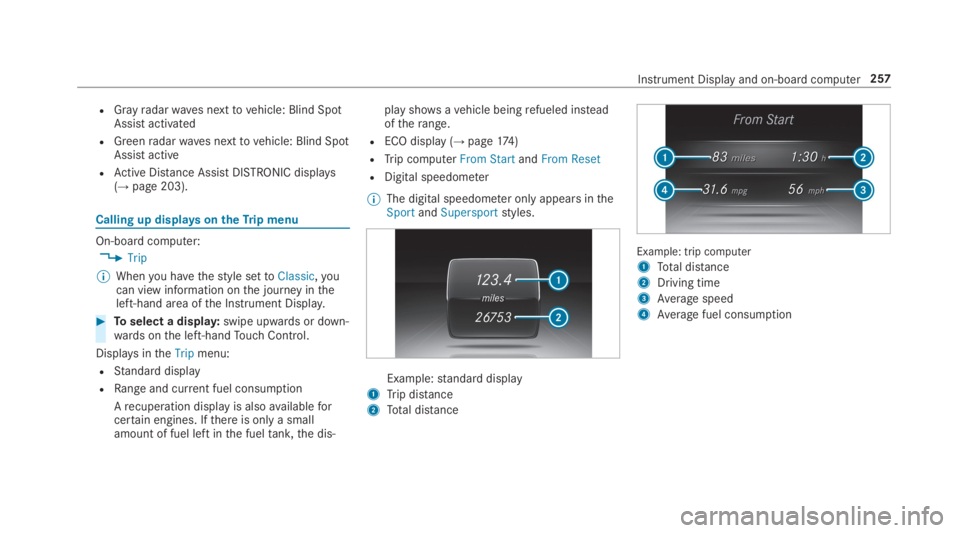
Example:standard display
1Trip distance
2Total distance
Example: trip computer
1Total distance
2Driving time
3Average speed
4Average fuel consumption
Instrument Display and on-board computer257
Page 265 of 578
Notes on operating safety
&WARNINGRisk of distraction from infor‐mation systems and communicationsequipment
Ifyou operate information and communica‐tion equipment integrated inthevehiclewhen driving,you will be distracted fromthetraffic situation. This could also causeyoutolose control ofthevehicle.
#Only operatethis equipment whenthetraffic situation permits.
#Ifyou cannot be sure ofthis,stopthevehicle whilst paying attentiontoroadand traffic conditions and operatetheequipment withthevehiclestationary.
&WARNINGRisk of distraction from oper‐ating mobile communication equipmentwhilethevehicle is in motion
Ifyou operate mobile communication equip‐ment when driving,you will be distracted
fromthe traffic situation. This could alsocauseyoutolose control ofthevehicle.
#Only operatethis equipment whenthevehicle isstationary.
Foryourown safety, alwaysobservethefollow‐ing points when operating mobile communica‐tions equipment and especiallyyourvoice con‐trol system:
RObservethe legalrequirementsforthe coun‐try in whichyou are driving.
RWhile driving, only operate mobile communi‐cations equipment andyourvoice controlsystem whenthe traffic conditions permit it.You mayotherwise be distracted fromthetraffic conditions and cause an accident,injuringyourself andothers.
RIfyou usethevoice control system in anemergencyyourvoice canchange andyourtelephone call, e.g. an emergency call, canthereby be unnecessarily delayed.
RFamiliarizeyourself withthevoice controlsystem functions beforestartingthe journey.
Operation
Overview of operation oftheVoice ControlSystem onthe multifunctionsteering wheel
TheVoice Control System is operational approx‐imatelythirty seconds afterthe ignition isswitched on.
Voice Control System263