window MERCEDES-BENZ SL-Class 2015 R131 Owner's Guide
[x] Cancel search | Manufacturer: MERCEDES-BENZ, Model Year: 2015, Model line: SL-Class, Model: MERCEDES-BENZ SL-Class 2015 R131Pages: 610, PDF Size: 12.21 MB
Page 99 of 610
When closing make sure that no parts of the
body are in the closing area. If somebody
becomes trapped, release the switch or press the switch to open the side window again. G
WARNING
If children operate the side windows they
could become trapped, particularly if they are left unsupervised. There is a risk of injury.
When leaving the vehicle, always take the
SmartKey with you and lock the vehicle. Never
leave children unsupervised in the vehicle. Side window reversing feature
The front side windows are equipped with an automatic reversing feature. If a solid object
blocks or restricts one of the front side win-
dows from traveling upwards during the auto-
matic closing process, the side window opens
again automatically. During the manual clos-
ing process, the side window only opens
again automatically after the corresponding
switch is released. However, the automatic
reversing feature is only an aid and does not
relieve you of the responsibility of paying
attention when closing a side window. G
WARNING
The reversing feature does not react:
R to soft, light and thin objects, e.g. small fin-
gers
R while resetting
This means that the reversing feature cannot
prevent someone being trapped in these sit-
uations. There is a risk of injury.
Make sure that no body parts are in close
proximity during the closing procedure. If
someone becomes trapped, press the switch
to open the side window again. Opening and closing the side win-
dows
Opening and closing the side windows
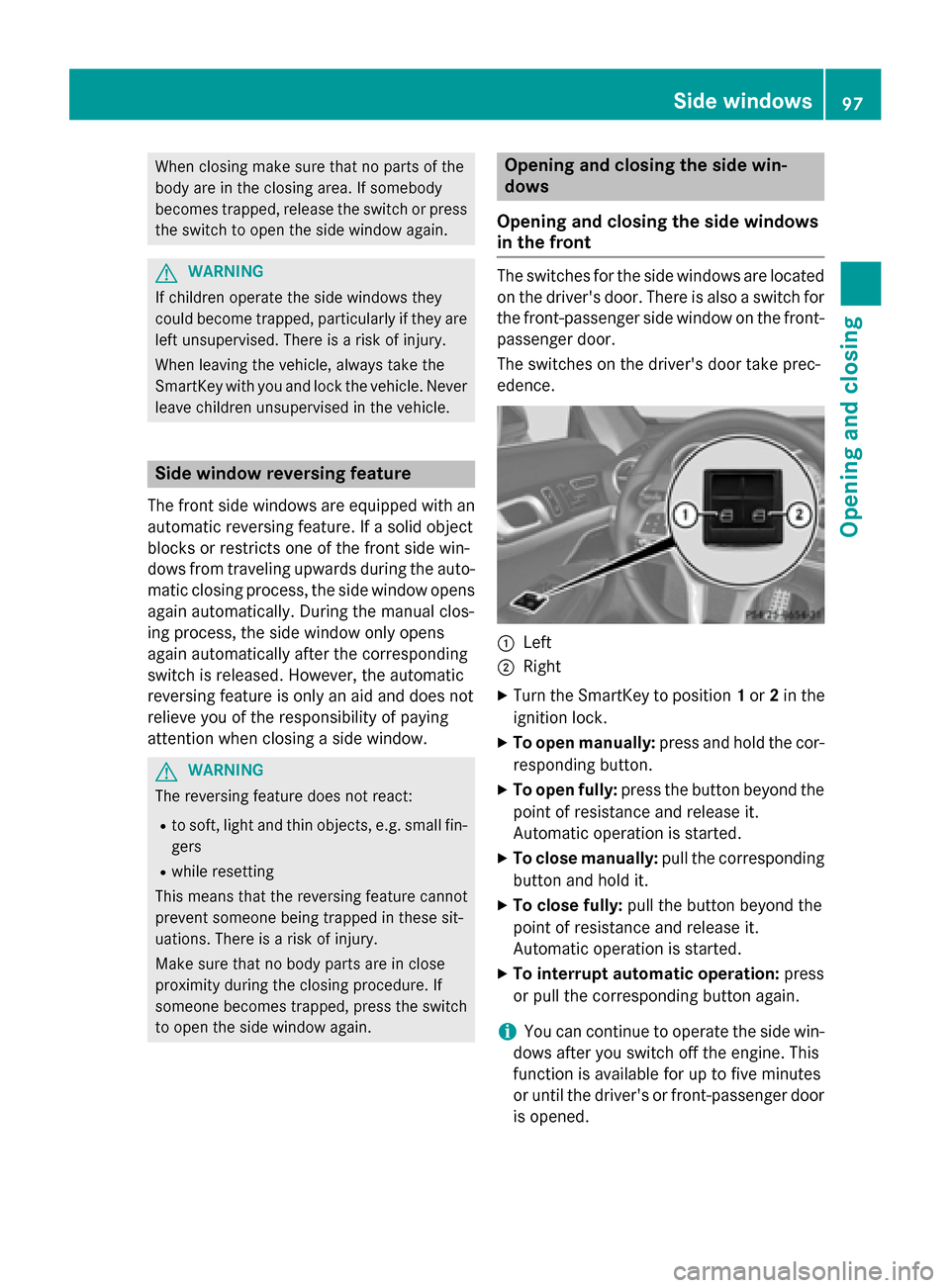
in the front The switches for the side windows are located
on the driver's door. There is also a switch for
the front-passenger side window on the front- passenger door.
The switches on the driver's door take prec-
edence. 0043
Left
0044 Right
X Turn the SmartKey to position 1or 2in the
ignition lock.
X To open manually: press and hold the cor-
responding button.
X To open fully: press the button beyond the
point of resistance and release it.
Automatic operation is started.
X To close manually: pull the corresponding
button and hold it.
X To close fully: pull the button beyond the
point of resistance and release it.
Automatic operation is started.
X To interrupt automatic operation: press
or pull the corresponding button again.
i You can continue to operate the side win-
dows after you switch off the engine. This
function is available for up to five minutes
or until the driver's or front-passenger door
is opened. Side windows
97Opening and closing Z
Page 100 of 610
Opening/closing the rear side windows
X
To open: open the front side window on the
corresponding side (Y page 97).
X Press the corresponding switch again and
release.
The corresponding rear side window opens
fully.
X To stop the rear side windows: briefly
pull the corresponding switch up and
release.
X To close: close the front side window on
the corresponding side (Y page 97).
X Pull the respective switch and hold it.
The corresponding rear side window will
continue to close until you release the
switch. Opening and closing all side windows
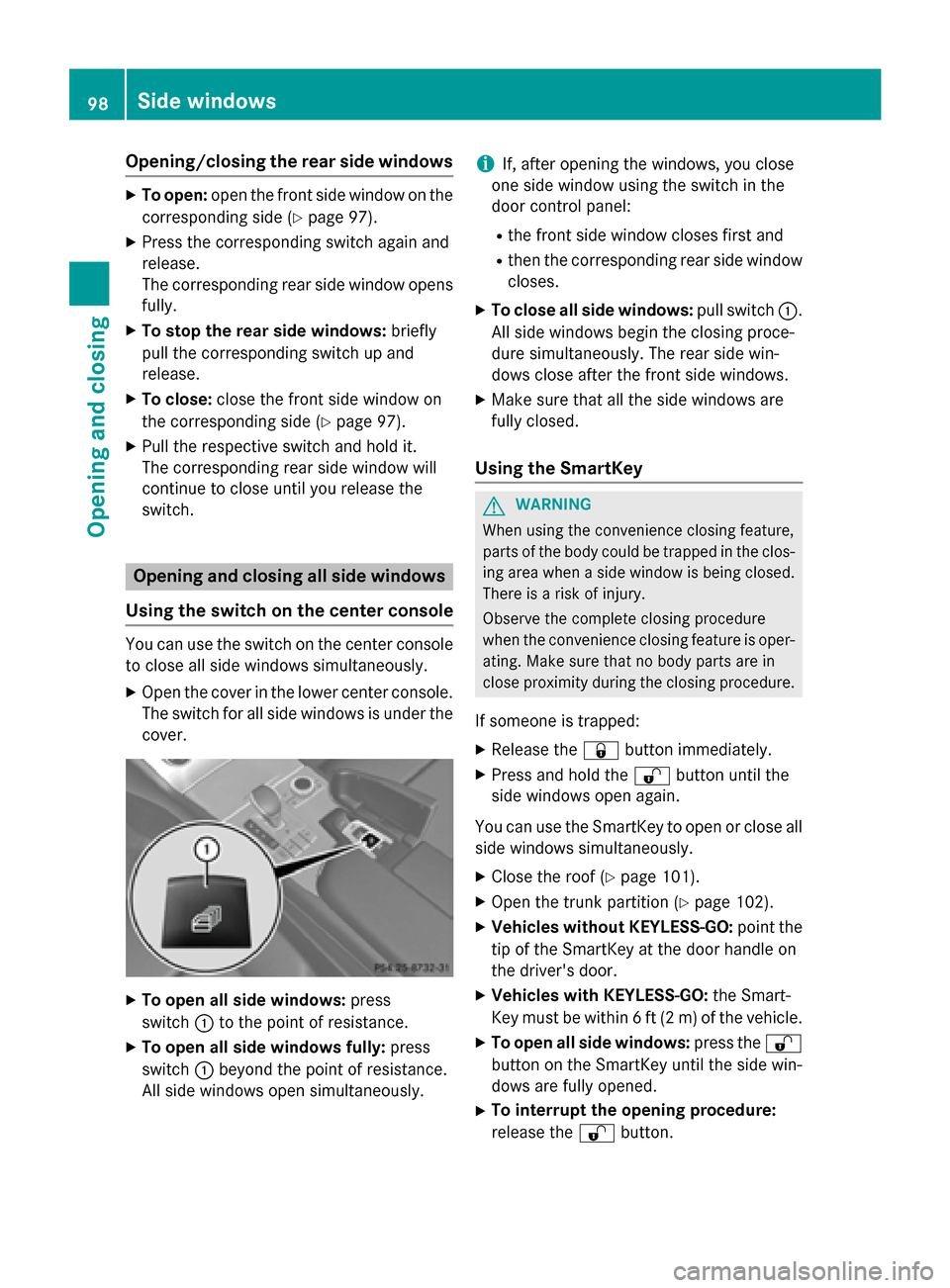
Using the switch on the center console You can use the switch on the center console
to close all side windows simultaneously.
X Open the cover in the lower center console.
The switch for all side windows is under the
cover. X
To open all side windows: press
switch 0043to the point of resistance.
X To open all side windows fully: press
switch 0043beyond the point of resistance.
All side windows open simultaneously. i
If, after opening the windows, you close
one side window using the switch in the
door control panel:
R the front side window closes first and
R then the corresponding rear side window
closes.
X To close all side windows: pull switch0043.
All side windows begin the closing proce-
dure simultaneously. The rear side win-
dows close after the front side windows.
X Make sure that all the side windows are
fully closed.
Using the SmartKey G
WARNING
When using the convenience closing feature,
parts of the body could be trapped in the clos- ing area when a side window is being closed. There is a risk of injury.
Observe the complete closing procedure
when the convenience closing feature is oper-
ating. Make sure that no body parts are in
close proximity during the closing procedure.
If someone is trapped: X Release the 0037button immediately.
X Press and hold the 0036button until the
side windows open again.
You can use the SmartKey to open or close all
side windows simultaneously.
X Close the roof (Y page 101).
X Open the trunk partition (Y page 102).
X Vehicles without KEYLESS-GO: point the
tip of the SmartKey at the door handle on
the driver's door.
X Vehicles with KEYLESS-GO: the Smart-
Key must be within 6 ft (2 m) of the vehicle.
X To open all side windows: press the0036
button on the SmartKey until the side win-
dows are fully opened.
X To interrupt the opening procedure:
release the 0036button. 98
Side windowsOpening and closing
Page 101 of 610

X
To close all side windows: press the
0037 button on the SmartKey until the side
windows are fully closed.
X To interrupt the closing procedure:
release the 0037button.
Convenience closing with KEYLESS-GO G
WARNING
When using the convenience closing feature,
parts of the body could be trapped in the clos- ing area when a side window is being closed. There is a risk of injury.
Observe the complete closing procedure
when the convenience closing feature is oper-
ating. Make sure that no body parts are in
close proximity during the closing procedure.
If someone is trapped: X Release the recessed sensor surface on the
door handle immediately.
X Pull the door handle immediately and hold
it until the side windows open again.
With KEYLESS-GO you can close all side win-
dows simultaneously. The KEYLESS-GO key
must be outside the vehicle. All the doors
must be closed. X
Touch recessed sensor surface 0043on the
door handle until the side windows are fully
closed.
i Make sure you only touch recessed sen-
sor surface 0043. X
Make sure that all the side windows are
closed.
X To interrupt convenience closing:
release recessed sensor surface 0043on the
door handle. Resetting the side windows
If a side window can no longer be closed fully, you must reset it.
X Close all the doors.
X Turn the SmartKey to position 1or 2in the
ignition lock.
X Pull the corresponding switch on the door
control panel until the side window is com- pletely closed. (Y page 97)
X Hold the switch for an additional second.
If the side window opens again slightly: X Immediately pull the corresponding switch
on the door control panel until the side win-
dow is completely closed (Y page 97).
X Hold the switch for an additional second.
X If the corresponding side window remains
closed after the button has been released,
the side window has been reset correctly. If
this is not the case, repeat the steps aboveagain. Side windows
99Opening and closing Z
Page 102 of 610

Problems with the side windows
G
WARNING
If you close a side window again immediately after it has been blocked or reset, the side window
closes with increased or maximum force. The reversing feature is then not active. Parts of the
body could be trapped in the closing area in the process. This poses an increased risk of injury or even fatal injury.
Make sure that no parts of the body are in the closing area. To stop the closing process, releasethe switch or push the switch again to reopen the side window. Problem
Possible causes/consequences and
0050 0050Solutions A side window cannot
be closed because it is
blocked by objects, e.g.
leaves in the window
guide. X
Remove the objects.
X Close the side window. A side window cannot
be closed and you can-
not see the cause. If a side window is obstructed during closing and reopens again
slightly:
X Immediately after the window blocks, pull the corresponding
switch again until the side window has closed.
The side window is closed with increased force.
If a side window is obstructed again during closing and reopens
again slightly: X Immediately after the window blocks, pull the corresponding
switch again until the side window has closed.
The side window is closed without the anti-entrapment feature. Roof
Important safety notes
G
WARNING
If you do not fully open/close the soft top, the soft-top hydraulics depressurize after a short
time. This causes the soft top to lower unex-
pectedly and may cause you or others to be
trapped. There is a risk of injury.
Always open or close the soft top completely. G
WARNING
Closing the roof manually is a complicated
and technically demanding procedure, which
requires a lot of strength. You or others can
become trapped. There is a risk of injury. Only have the soft top closed manually at a
qualified specialist workshop.
! Never sit on the rear compartment trim or
stow heavy objects there. You will other-
wise damage the roof and rear compart-
ment trim of the vehicle.
! Do not forget that the weather can
change abruptly. Make certain that the roof
is closed when you leave the vehicle. The
vehicle electronics can be damaged if
water enters the vehicle interior.
! When opening and closing the roof, make
sure that: 100
RoofOpening and closing
Page 103 of 610

R
there is sufficient clearance, as the roof
swings upwards.
R there is sufficient clearance behind the
vehicle, as the trunk lid swings back-
wards beyond the bumper.
R the trunk is only loaded to below the
trunk partition.
R the trunk partition is not pushed up by
the load.
R the trunk partition is closed.
R the trunk lid is closed.
R the outside temperature is above 5 ‡
(00F815 †).
You could otherwise damage the roof,
trunk and other parts of the vehicle.
i Vehicle dimensions when opening/clos-
ing the roof (Y page 607).
i Make sure that the roof and rear window
are clean and dry before opening the roof.
Otherwise, water or dirt could enter the
vehicle interior or trunk. Opening and closing using the roof
switch
Important safety notes G
WARNING
When opening or closing the roof, body parts could be trapped by, for example, the roof
mechanism, trunk lid or side windows. There
is a risk of injury.
When raising or lowering the roof, make sure
that no body parts are in the vicinity of moving
components. If someone becomes trapped,
release the button. Opening and closing X
Secure the vehicle against rolling away
(Y page 171).
X Close the trunk partition (Y page 103).
X Close the trunk lid.
X Turn the SmartKey to position 2in the igni-
tion lock.
X Open the cover in the lower center console.
Roof switch 0043is located under the cover.
X To open: pull roof switch 0043until the entire
roof is stowed away in the trunk.
The Vario-Roof in Operation Vario-Roof in Operation message
appears in the multifunction display. Once
the opening procedure is complete, the
message disappears and a tone will sound.
All of the side windows open.
X To close: press and hold roof switch 0043
until the roof is fully closed.
The Vario-Roof in Operation Vario-Roof in Operation message
appears in the multifunction display. Once
the opening procedure is complete, the
message disappears and a tone will sound.
All of the side windows open.
X To close all side windows, pull the switch
under the cover of the center console
(Y page 98). Roof
101Opening and closing Z
Page 104 of 610

Opening and closing using the Smart-
Key
Important safety notes G
WARNING
When opening or closing the roof, body parts could be trapped by, for example, the roof
mechanism, trunk lid or side windows. There
is a risk of injury.
When raising or lowering the roof, make sure
that no body parts are in the vicinity of moving
components. If someone becomes trapped,
release the button.
Opening and closing X
Close the trunk partition (Y page 102).
X Close the trunk lid (Y page 91).
X Vehicles without KEYLESS-GO: point the
tip of the SmartKey at the door handle on
the driver's door.
X Vehicles with KEYLESS-GO: the Smart-
Key must be within 6 ft (2 m) of the vehicle.
X To open: press and hold the 0036button
on the SmartKey until the roof is fully
opened.
The roof and the rear side windows open.
The front side windows close.
X To interrupt the opening procedure:
release the 0036button.
X To open the front side windows: press
and hold the 0036button on the SmartKey
again.
X To close: press and hold the 0037button
on the SmartKey until the roof is fully
closed.
The roof and the side windows close.
X To interrupt the closing procedure:
release the 0037button.
i When the roof is closed and the trunk par-
tition is open, the roof cannot be opened
using the SmartKey functions. Instead, all
of the side windows open or close simulta-
neously (Y page 98). Locking the roof again
Important safety notes G
WARNING
If you do not fully open/close the soft top, the soft-top hydraulics depressurize after a short
time. This causes the soft top to lower unex-
pectedly and may cause you or others to be
trapped. There is a risk of injury.
Always open or close the soft top completely.
The roof is not locked if:
R the 0059 symbol and the Vario-Roof Vario-Roofin
in
Operation
Operation message appear in the multi-
function display.
R the 0059 symbol and the Open/Close
Open/Close
Vario-Roof Completely
Vario-Roof Completely message
appear and you hear a warning tone.
R you hear a warning tone for up to 10 sec-
onds when pulling away or while driving.
Locking You can lock the roof again if it is not locked
fully.
X Pull over and stop the vehicle safely as soon
as possible, paying attention to road and
traffic conditions.
X Make sure that the SmartKey is in position
2 in the ignition lock.
X Press the roof switch (Y page 101). Trunk partition
General notes !
To avoid damaging the roof or luggage
when folding back the roof, you should:
R only load the trunk to below the trunk
partition
R not place any objects on or in front of the
trunk partition 102
RoofOpening and closing
Page 115 of 610
X
Make sure that the SmartKey is in position
1 or 2in the ignition lock.
X To switch on: press button0043repeatedly
until the desired heating level is set.
X To switch off: press button0043repeatedly
until all the indicator lamps go out.
i If the battery voltage is too low, the seat
heating may switch off.
Problems with the seat heating The seat heating has switched off prema-
turely or cannot be switched on. The vehicle's
electrical system voltage is too low because
too many electrical consumers are switched
on.
X Switch off electrical consumers that you do
not need, such as the rear window
defroster or interior lighting.
X Once the battery is sufficiently charged,
switch on the seat heating again. Switching the seat ventilation on/off
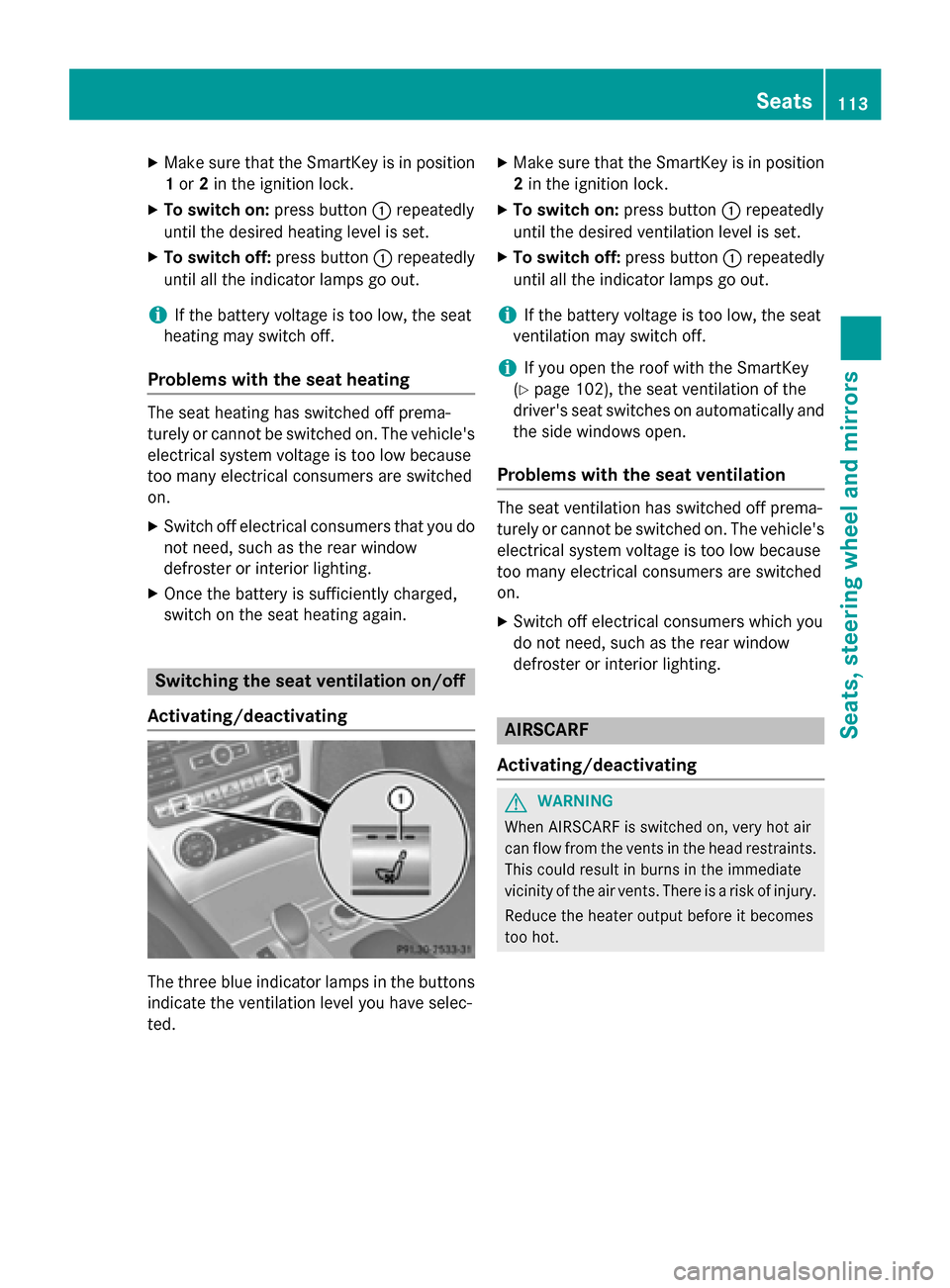
Activating/deactivating The three blue indicator lamps in the buttons
indicate the ventilation level you have selec-
ted. X
Make sure that the SmartKey is in position
2 in the ignition lock.
X To switch on: press button0043repeatedly
until the desired ventilation level is set.
X To switch off: press button0043repeatedly
until all the indicator lamps go out.
i If the battery voltage is too low, the seat
ventilation may switch off.
i If you open the roof with the SmartKey
(Y page 102), the seat ventilation of the
driver's seat switches on automatically and
the side windows open.
Problems with the seat ventilation The seat ventilation has switched off prema-
turely or cannot be switched on. The vehicle's
electrical system voltage is too low because
too many electrical consumers are switched
on.
X Switch off electrical consumers which you
do not need, such as the rear window
defroster or interior lighting. AIRSCARF
Activating/deactivating G
WARNING
When AIRSCARF is switched on, very hot air
can flow from the vents in the head restraints. This could result in burns in the immediate
vicinity of the air vents. There is a risk of injury.
Reduce the heater output before it becomes
too hot. Seats
113Seats, steering wheel and mirrors Z
Page 119 of 610
The exterior mirrors are automatically heated
after starting the vehicle if the rear window
defroster is switched on and the outside tem-
perature is low. Mirror heating lasts up to 10
minutes.
i You can also heat up the exterior mirrors
manually by switching on the rear window
defroster.
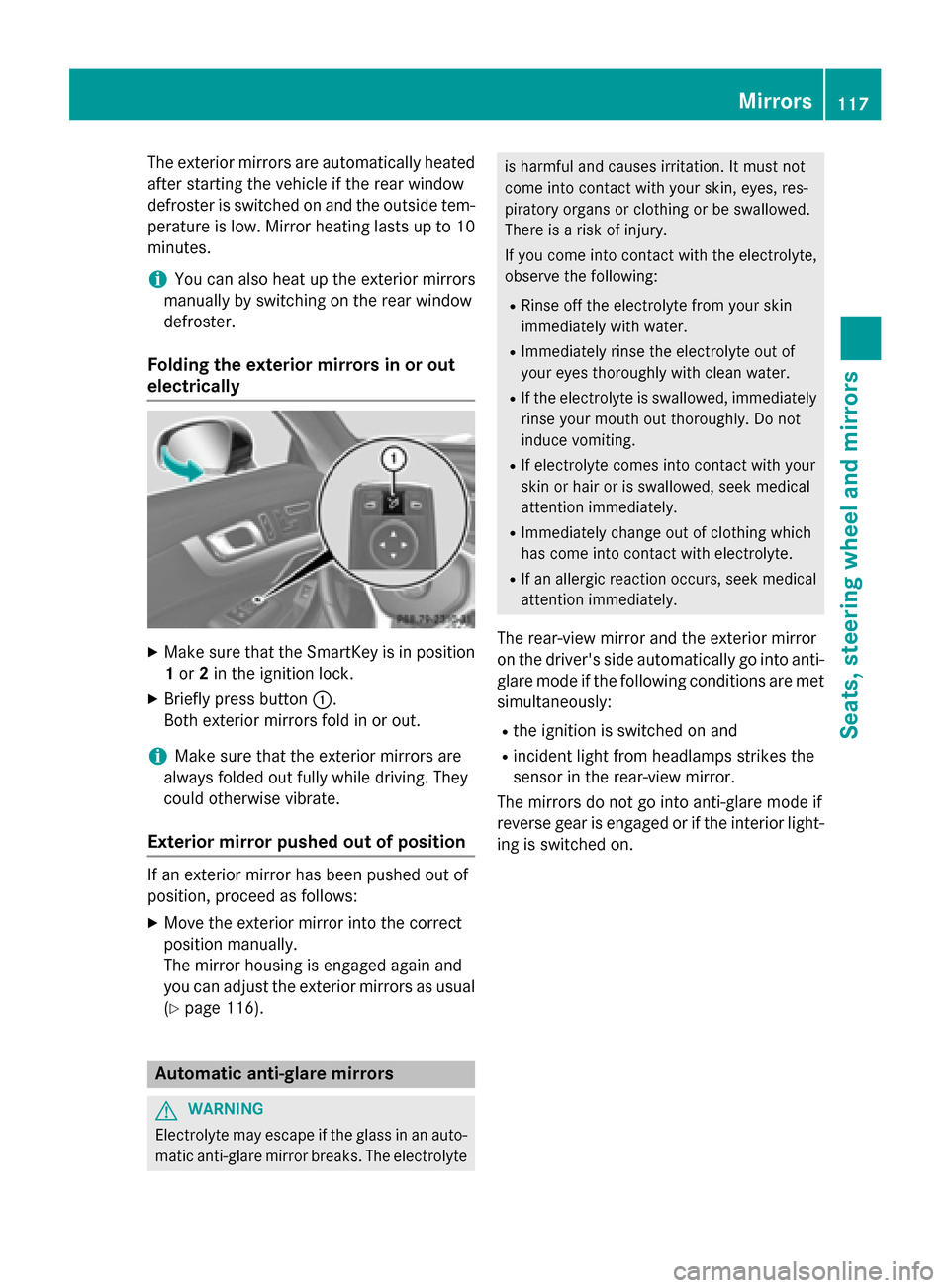
Folding the exterior mirrors in or out
electrically X
Make sure that the SmartKey is in position
1 or 2in the ignition lock.
X Briefly press button 0043.
Both exterior mirrors fold in or out.
i Make sure that the exterior mirrors are
always folded out fully while driving. They
could otherwise vibrate.
Exterior mirror pushed out of position If an exterior mirror has been pushed out of
position, proceed as follows:
X Move the exterior mirror into the correct
position manually.
The mirror housing is engaged again and
you can adjust the exterior mirrors as usual
(Y page 116). Automatic anti-glare mirrors
G
WARNING
Electrolyte may escape if the glass in an auto- matic anti-glare mirror breaks. The electrolyte is harmful and causes irritation. It must not
come into contact with your skin, eyes, res-
piratory organs or clothing or be swallowed.
There is a risk of injury.
If you come into contact with the electrolyte,
observe the following:
R Rinse off the electrolyte from your skin
immediately with water.
R Immediately rinse the electrolyte out of
your eyes thoroughly with clean water.
R If the electrolyte is swallowed, immediately
rinse your mouth out thoroughly. Do not
induce vomiting.
R If electrolyte comes into contact with your
skin or hair or is swallowed, seek medical
attention immediately.
R Immediately change out of clothing which
has come into contact with electrolyte.
R If an allergic reaction occurs, seek medical
attention immediately.
The rear-view mirror and the exterior mirror
on the driver's side automatically go into anti-
glare mode if the following conditions are met simultaneously:
R the ignition is switched on and
R incident light from headlamps strikes the
sensor in the rear-view mirror.
The mirrors do not go into anti-glare mode if
reverse gear is engaged or if the interior light-
ing is switched on. Mirrors
117Seats, steering wheel and mirrors Z
Page 138 of 610
Useful information
i This Operator's manual describes all
models and all standard and optional equip- ment of your vehicle available at the time of
publication of the Operator's manual.
Country-specific differences are possible.
Please note that your vehicle may not be
equipped with all features described. This
also applies to safety-related systems and
functions.
i Read the information on qualified special-
ist workshops (Y page 35). Overview of climate control systems
General notes
Observe the settings recommended on the
following pages. The windows could other-
wise fog up.
To prevent the windows from fogging up:
R switch off climate control only briefly
R switch on air-recirculation mode only
briefly
R switch on the cooling with air dehumidifi-
cation function
R switch on the defrost windshield function
briefly, if required
Climate control regulates the temperature
and the humidity in the vehicle interior and
filters undesirable substances out of the air.
Climate control can only be operated when
the engine is running. Optimum operation is
only achieved with the side windows and roof closed.
The residual heat function can only be acti-
vated or deactivated with the ignition
switched off (Y page 146).
i When the weather is warm, ventilate the
vehicle for a brief period. This will speed up the cooling process and the desired vehicle
interior temperature will be reached more
quickly. i
It is possible that the dehumidification
function of the climate control system may be activated automatically an hour after the
SmartKey has been removed. The vehicle is
then ventilated for 30 minutes to dry the
air-conditioning system. 136
Overview of climate control systemsClimate control
Page 139 of 610
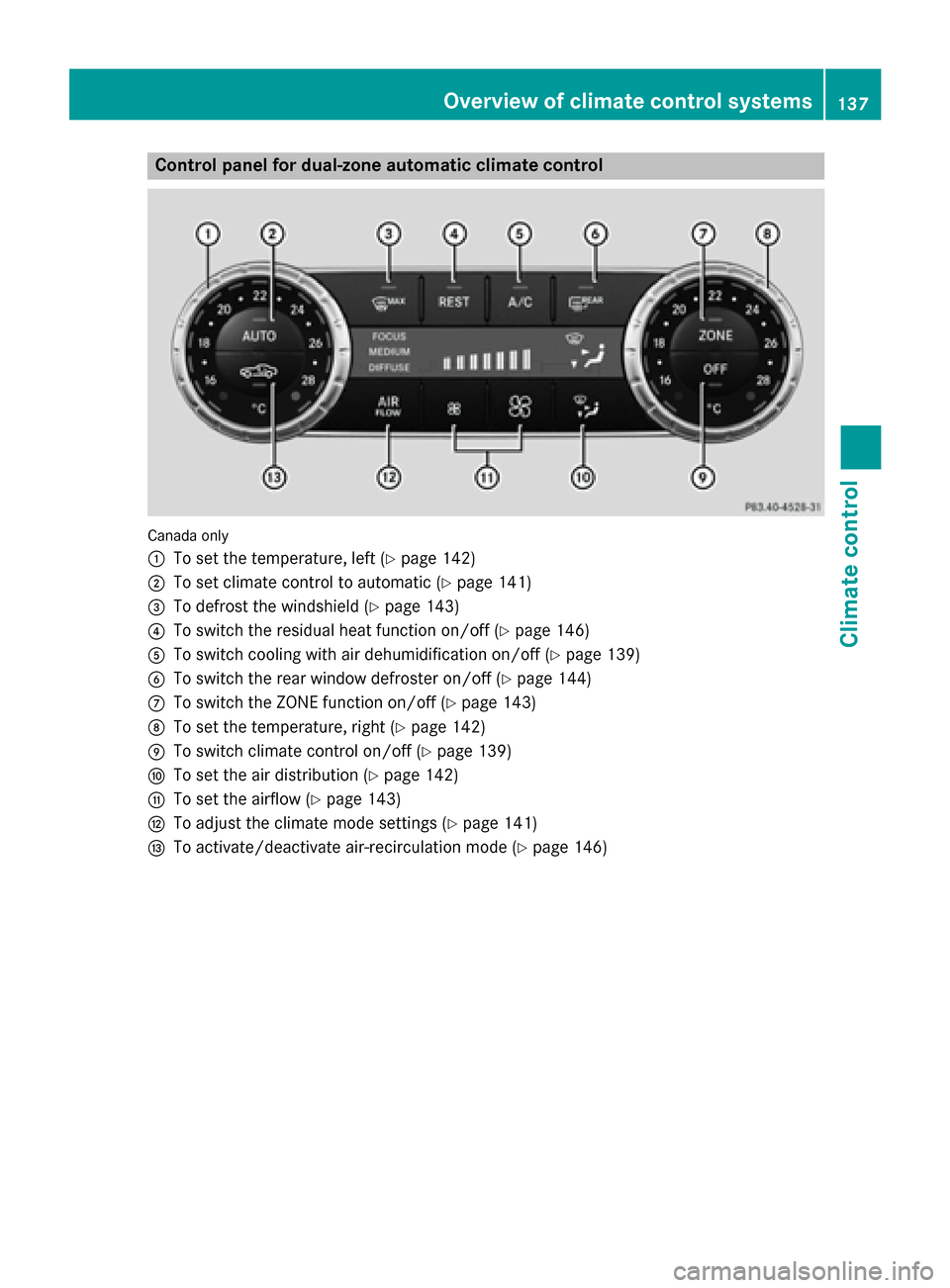
Control panel for dual-zone automatic climate control
Canada only
0043
To set the temperature, left (Y page 142)
0044 To set climate control to automatic (Y page 141)
0087 To defrost the windshield (Y page 143)
0085 To switch the residual heat function on/off (Y page 146)
0083 To switch cooling with air dehumidification on/off (Y page 139)
0084 To switch the rear window defroster on/off (Y page 144)
006B To switch the ZONE function on/off (Y page 143)
006C To set the temperature, right (Y page 142)
006D To switch climate control on/off (Y page 139)
006E To set the air distribution (Y page 142)
006F To set the airflow (Y page 143)
0070 To adjust the climate mode settings (Y page 141)
0071 To activate/deactivate air-recirculation mode (Y page 146) Overview of climate control systems
137Climate control