ECO mode MERCEDES-BENZ SL-Class 2015 R131 Owner's Manual
[x] Cancel search | Manufacturer: MERCEDES-BENZ, Model Year: 2015, Model line: SL-Class, Model: MERCEDES-BENZ SL-Class 2015 R131Pages: 610, PDF Size: 12.21 MB
Page 7 of 610
Air bags
Deployment .................................... .64
Display message ............................ 250
Front air bag (driver, front
passenger) ....................................... 57
Head bag ......................................... 58
Important safety note s.................... 56
Introduction ..................................... 56
Knee bag .......................................... 57
PASSENGER AIR BAG OFF indica-
tor lamp ........................................... 51
Side impact air ba g.......................... 57
Air-conditioning system
see Climate control
AIR FLOW ........................................... 141
AIRSCARF Switching on/of f........................... 113
AIRSCARF vents
Setting the blower output .............. 148
Air vents
Glove box ....................................... 148
Important safety notes .................. 147
Setting ........................................... 147
Setting the blower output of the
AIRSCARF vents ............................. 148
Setting the center air vents ........... 147
Setting the side air vents ............... 148
Switching AIRSCARF on/of f.......... 113
Alarm
ATA (Anti-Theft Alarm system) ......... 80
Switching off (ATA) .......................... 80
Switching the function on/off
(ATA) ................................................ 80
Alarm system
see ATA (Anti-Theft Alarm system)
Alternative Route .............................. 349
Ambient lighting Setting the brightness (on-board
computer) ...................................... 233
Setting the color (on-board com-
puter) ............................................. 233
AMG
Button for AMG menu .................... 164
SETUP ............................................ 164
AMG menu (on-board computer) ..... 236
Anti-lock braking system see ABS (Anti-lock Braking System) Anti-Theft Alarm system
see ATA (Anti-Theft Alarm system)
Ashtray ............................................... 518
Assistance display (on-board com-
puter) .................................................. 230
Assistance menu (on-board com-
puter) .................................................. 230
ASSYST PLUS Displaying a service message ........ 539
Hiding a service message .............. 538
Resetting the service interval dis-
play ................................................ 539
Service message ............................ 538
Special service requirements ......... 539
ATA (Anti-Theft Alarm system)
Activating/deactivating ................... 80
Function ........................................... 80
Switching off the alarm .................... 80
ATTENTION ASSIST
Activating/deactivating ................. 231
Display message ............................ 258
Function/note s............................. 209
Audio
Radio mod e................................... 435
Audio CD/DVD and MP3 mode
Switching to (Rear Seat Entertain-ment System) ................................ 489
Audio format, setting
Video DVD ..................................... 477
Audio menu (on-board computer) .... 228
Authorized Mercedes-Benz Center see Qualified specialist workshop
Authorized workshop
see Qualified specialist workshop
AUTO lights
Display message ............................ 253
see Lights
Automatic engine start (ECO start/
stop function) .................................... 156
Automatic engine switch-off (ECO
start/stop function) .......................... 155
Automatic headlamp mode .............. 122
Automatic transmission Accelerator pedal position ............. 162
Automatic drive program ............... 164
Changing gear ............................... 162
Display message ............................ 265 Index
5
Page 8 of 610
Driving tips .................................... 162
Emergency running mod
e.............. 168
Engaging the park position ............ 160
Kickdown ....................................... 163
Manual drive progra m.................... 165
Manual drive program (vehicles
with Sports package AMG) ............ 166
Overview ........................................ 159
Problem (malfunction) ................... 168
Program selector button ................ 163
Pulling away ................................... 154
Selector lever ................................ 159
Starting the engine ........................ 154
Steering wheel paddle shifters ...... 164
Transmission position display ........ 161
Transmission positions .................. 162
Automatic transmission emer-
gency mode ....................................... 168
Autostore ........................................... 437
AUX (audio) Notes/socket ................................ 471
Switching to ................................... 471
AUX (video)
Setting the volume and sound ....... 479
Showing/hiding the menu ............. 479
Switching to ................................... 478
AUX jacks
CD/DVD drive ............................... 483
Avoiding an area ................................ 371B
Back button ....................................... 293
Balance, adjusting ............................. 296
BAS (Brake Assist System) ................. 72
BAS PLUS (Brake Assist System
PLUS) .................................................... 72
Bass, setting ...................................... 296
Battery (SmartKey) Checking .......................................... 85
Important safety notes .................... 85
Replacing ......................................... 85
Battery (vehicle)
Charging ........................................ 555
Display message ............................ 255
Important safety notes .................. 553
Jump starting ................................. 557
Overview ........................................ 553 Belt
see Seat belts
Bird's-eye view (navigation) ............. 366
Blind Spot Assist see Active Blind Spot Assist
Bluetooth ®
Activating/deactivating ................. 308
Activating audio mode ................... 463
Conditions (telephone) .................. 380
Connecting another mobile
phone ............................................ 384
Connecting audio devices .............. 459
Device list ...................................... 460
Entering the passcode ................... 383
External authorization .................... 384
General information ....................... 308
Interface ........................................ 379
Introduction ................................... 379
Reconnecting an audio device ....... 461
Searching for a mobile phone ........ 382
Setting s......................................... 308
Telephone basic menu ................... 385
Telephony ...................................... 380
Telephony notes ............................ 379
Bluetooth ®
audio basic display ........ 463
Brake Assist see BAS (Brake Assist System)
Brake fluid
Display message ............................ 246
Notes ............................................. 604
Brake force distribution, elec-
tronic see EBD (electronic brake force
distribution)
Brake lamps
Display message ............................ 252
Brakes
ABS .................................................. 72
BAS .................................................. 72
BAS PLUS ........................................ 72
Brake fluid (notes) ......................... 604
Display message ............................ 240
EBD .................................................. 77
High-performance brake system .... 177
Important safety notes .................. 176
Maintenance .................................. 177
Parking brake ................................ 172 6
Index
Page 12 of 610
Diagnostics connection
...................... 34
Dialing a number (telephone) ...........387
Digital speedometer ......................... 226
DISC button Activating audio CD or MP3 mode .. 446
Activating Bluetooth ®
Audio .......... 463
Switching on the Media Interface .. 466
Switching to the MUSIC REGIS-
TER ................................................ 456
Display
Selecting the design ..................... .306
Displaying the arrival time ...............350
Displaying the distance to the des-
tination ............................................... 350
Displaying the track and album ....... 450
Display messages ASSYST PLUS ................................ 538
Calling up (on-board computer) ..... 239
Driving systems ............................ .257
Engine ............................................ 254
General notes ................................ 239
Hiding (on-board computer) ........... 239
KEYLESS-GO .................................. 268
Lights ............................................. 251
Safety systems .............................. 240
SmartKey ....................................... 268
Tires ............................................... 263
Vehicle .......................................... .265
Distance recorder
see Trip odometer
Distance warning (warning lamp) .... 279
DISTRONIC PLUS Cruise control lever ....................... 184
Deactivating ................................... 189
Display message ............................ 260
Displays in the multifunction dis-
pla y................................................ 189
Driving tips .................................... 190
Function/note s............................. 182
Important safety notes .................. 183
Setting the specified minimum
distance ......................................... 188
Warning lamp ................................. 279
Dolby ®
Digital .................................... 297 Doors
Automatic locking (on-board com-
puter) ............................................. 234
Automatic locking (switch) ............... 89
Central locking/unlocking
(SmartKey) ....................................... 82
Control panel ................................... 48
Display message ............................ 266
Emergency locking ........................... 90
Emergency unlocking ....................... 90
Important safety notes .................... 88
Opening (from inside) ...................... 88
Overview .......................................... 88
Power closing .................................. 90
Drinking and driving ......................... 174
Drive program Automatic ...................................... 164
Display ........................................... 161
Manual ........................................... 165
Manual (vehicles with Sports
package AMG) ............................... 166
SETUP (on-board computer) .......... 236
Drive program selector ..................... 163
Driver's door see Doors
Driving abroad
Mercedes-Benz Service ................. 539
Symmetrical low beam .................. 122
Driving on flooded roads .................. 179
Driving safety systems ABS (Anti-lock Braking System) ....... 72
ADAPTIVE BRAK E............................. 77
BAS (Brake Assist System) .............. 72
BAS PLUS (Brake Assist System
PLUS) ............................................... 72
EBD (electronic brake force distri- bution) ............................................. 77
ESP ®
(Electronic Stability Pro-
gram) ............................................... 74
ETS (Electronic Traction System) ..... 74
Important safety information ........... 71
Overview .......................................... 71
PRE-SAFE ®
Brake ............................. 77
STEER CONTROL ............................. 79 10
Index
Page 14 of 610
Engine
Check Engine warning lamp .......... .277
Display message ............................ 254
ECO start/stop function ................ 155
Engine number ............................... 601
Irregular running ............................ 158
Jump-starting ................................. 557
Starting problems .......................... 158
Starting the engine with the
SmartKey ....................................... 154
Starting with KEYLESS-GO ............. 154
Switching off .................................. 172
Tow-starting (vehicle) ..................... 562
Engine electronics
Problem (malfunction) ................... 158
Engine oil
Adding .......................................... .536
Additives ........................................ 604
Checking the oil level ..................... 535
Checking the oil level using the
dipstick .......................................... 535
Display message ............................ 256
Filling capacity ............................... 604
Notes about oil grades ................... 603
Notes on oil level/consumption .... 535
Temperature (on-board com-
puter) ............................................. 236
Viscosity ........................................ 604
Entering an intersection name ......... 325
Entering a street name ..................... 323
Entering the address (example) ....... 322
Entering the city ................................ 323
Entering the house number .............. 323
Entry Deleting ......................................... 302
Saving ............................................ 300
ESP ®
(Electronic Stability Pro-
gram) AMG menu (on-board computer) ... 236
Characteristics ................................. 75
Deactivating/activating (AMG
vehicles) .......................................... 76
Deactivating/activating (notes;
except AMG vehicles) ..................... .75
Display message ............................ 240
ETS .................................................. 74
Function/note s................................ 74 General notes .................................. 74
Important safety information ........... 74
Warning lamp ................................. 273
ETS (Electronic Traction System) ....... 74
Example display Audio CD mode .............................. 446
MUSIC REGISTER ........................... 455
Exhaust check ................................... 175
Exhaust pipe (cleaning instruc-
tions) .................................................. 544
Exterior lighting Setting options .............................. 122
see Lights
Exterior mirrors
Adjusting ....................................... 116
Dipping (automatic) ....................... 117
Folding in/out (electrically) ........... 117
Folding in when locking (on-board
computer) ...................................... 235
Out of position (troubleshooting) ... 117
Storing settings (memory func-
tion) ............................................... 119
Storing the parking position .......... 118
Eyeglasses compartment ................. 513 F
Factory setting (reset function) ....... 311
Fast forward Audio mode (CD, MP3) .................. 448
Video DVD ..................................... 475
Fast rewind
Audio mode (CD, MP3) .................. 448
Video DVD ..................................... 475
Favorites (Internet) ........................... 431
Favorites button ................................ 309
Filler cap see Fuel filler flap
Filling capacities (Technical data) ... 601
Flat tire MOExtended tire s.......................... 549
Preparing the vehicle ..................... 548
TIREFIT kit ...................................... 550
Floormats ........................................... 531
Frequencies Adjusting for radio stations ............ 437 12
Index
Page 17 of 610
L
Lamps see Warning and indicator lamps
Lane Keeping Assist
see Active Lane Keeping Assist
Lane recommendations
Explanation .................................... 346
Presentation .................................. 346
Lap time (RACETIMER) ...................... 237
License plate lamp (display mes-
sage) .................................................. .252
Light function, active Display message ............................ 253
Lights
Activating/deactivating the inte-
rior lighting delayed switch-off ....... 234
Active light function ....................... 127
Automatic headlamp mode ............ 122
Cornering light function ................. 126
Driving abroad ............................... 122
Fogged up headlamps .................... 128
Hazard warning lamps ................... 126
High beam flasher .......................... 126
High-beam headlamps ................... 125
Light switch ................................... 122
Low-beam headlamps .................... 123
Parking lamps ................................ 124
Setting the brightness of the
ambient lighting (on-board com-
puter) ............................................. 233
Setting the color of the ambient
lighting (on-board computer) ......... 233
Standing lamps .............................. 124
Switching the daytime running
lamps on/off (on-board com-
puter) ............................................. 232
Switching the exterior lighting
delayed switch-off on/off (on-
board computer) ............................ 233
Switching the spotlight on/off ....... 233
Switching the surround lighting
on/off (on-board computer) .......... 233
Turn signals ................................... 125
see Interior lighting
see Replacing bulbs
Light sensor (display message) ....... 253List of access data
New provider ................................. 413
List of mobile phone network pro-
viders
Calling up ....................................... 411
Empty ............................................ 411
With the selected provider ............. 412
Loading aid (trunk)
Raising/lowering the roof .............. 514
Locking
see Central locking
Locking (doors)
Automatic ........................................ 89
Emergency locking ........................... 90
From inside (central locking but-
ton) ................................................. .89
Locking centrally
see Central locking
Locking verification signal (on-
board computer) .............................. .234
Low-beam headlamps Display message ............................ 251
Setting for driving abroad (sym-
metrical) ........................................ 122
Switching on/off ........................... 123
Luggage cover
see Trunk partition
Lumbar support
Adjusting (COMAND) ..................... 315 M
M+S tires ............................................ 570
MAGIC SKY CONTROL ....................... 105
Malfunction message see Display messages
Map (navigation)
Adjusting the scal e........................ 365
Arrival time/distance to the des-
tination .......................................... 368
City model ..................................... 369
Geo-coordinate display .................. 368
Heading ......................................... 366
Information in the display .............. 368
Map settings .................................. 366
Moving ........................................... 365
North orientation ........................... 366 Index
15
Page 23 of 610

Reverse gear (selector lever)
........... 159
Reversing feature Side windows ................................... 97
Trunk lid ........................................... 91
Reversing lamps (display mes-
sage) ................................................... 252
Roadside Assistance (breakdown) .... 32
Roll bar Display messag e............................ 247
Operation ......................................... 63
Roller sunblind .................................. 104
Roof Display message ............................ 266
Important safety notes .................. 100
Opening/closing (with roof
switch) ........................................... 101
Opening/closing (with Smart-
Key) ............................................... 102
Overview ........................................ 100
Problem (malfunction) ................... 106
Relocking ....................................... 102
Roof lining and carpets (cleaning
guidelines) ......................................... 546
Roof switch ........................................ 101
Route Estimated time of arrival ................ 350
Route (navigation)
Calling up the "Routes" menu ........ 352
Displaying the distance to the des-tination .......................................... 350
Recording ...................................... 352
Route overview .............................. 351
Selecting an alternative route ........ 349
Setting route options (avoiding:
highways, toll roads, tunnels, fer-
ries) ............................................... 320
Setting the route type (short
route, fast route, dynamic route or
economic route) ............................ 320
Starting calculation ........................ 327
Route demonstration ........................ 351
Route guidance Canceling ....................................... 349
Continuing ..................................... 349
Destination reached ...................... 349
General notes ................................ 344
Lane recommendations ................. 346 Off-road ......................................... 354
Traffic reports ................................ 355 S
Safety Children in the vehicle ..................... 68
Child restraint systems .................... 69
Occupant Classification System
(OCS) ............................................... 59
Safety notes
Audio CD and MP3 mode ............... 444
Using the telephone ....................... 379
Video DVD mode ........................... 473
Safety system
see Driving safety systems
SatRadio
Displaying information ................... 443
Notes ............................................. 439
Registering .................................... 440
Selecting a category ...................... 441
Switching to ................................... 440
Saving the crosshair position .......... 365
Screen Selecting for remote operation ...... 482
SD memory card
Ejecting .......................................... 445
Inserting ........................................ 445
Search & Send ................................... 343
Seat belts Adjusting the driver's and front-
passenger seat belt ......................... 55
Cleaning ......................................... 546
Correct usage .................................. 54
Fastening ......................................... 54
Important safety guidelines ............. 52
Introduction ..................................... 52
Releasing ......................................... 55
Seat belt guide ............................... 111
Switching belt adjustment on/off
(on-board computer) ...................... 235
Warning lamp ................................. 269
Warning lamp (function) ................... 55
Seats
Active multicontour seat ................ 314
Adjusting (electrically) ................... 110
Adjusting the head restraint .......... 111 Index
21
Page 25 of 610
Loss .................................................87
Mechanical key ................................ 84
Opening/closing the roof .............. 102
Overview .......................................... 82
Positions (ignition lock) ................. 151
Problem (malfunction) ..................... 87
Starting the engine ........................ 154
Snow chains ...................................... 571
Sockets Front-passenger footwell ............... 519
General notes ................................ 518
Trunk ............................................. 519
Under the armrest .........................5 19
Sound
Switching on/off ........................... 295
Sound menu ....................................... 296
Sound mode ....................................... 298
Sound settings Calling up the sound menu ............ 296
Surround sound ............................ .297
Treble and bas s............................. 296
Specialist workshop ............................ 35
Special seat belt retractor .................. 69
Speed, controlling see Cruise control
Speed dial list
Storing a phone book entry in the
speed dial list ................................ 397
Speedometer
Digital ............................................ 226
In the Instrument cluster ................. 41
Segments ...................................... 223
Selecting the unit of measure-
ment .............................................. 232
SPLITVIEW ......................................... 303
SPORT handling mode Activating/deactivating (AMG
vehicles) .......................................... 76
Warning lamp ................................. 274
Standing lamps
Display message ............................ 252
Switching on/of f........................... 124
Start/stop function
see ECO start/stop function
Starting (engine) ................................ 153
Station search ................................... 436
STEER CONTROL .................................. 79 Steering (display message)
.............. 266
Steering assistant STEER CON-
TROL see STEER CONTROL
Steering wheel
Adjusting (electrically) ................... 114
Button overview ............................... 43
Buttons (on-board computer) ......... 223
Cleaning ......................................... 545
Important safety notes .................. 114
Paddle shifters ............................... 164
Storing settings (memory func-
tion) ............................................... 119
Steering wheel paddle shifters ........ 164
Stop function Video DVD ..................................... 475
Stopwatch (RACETIMER) ................... 237
Storing stations Radi o............................................. 437
Stowage areas ................................... 512
Stowage compartments Armrest (under) ............................. 513
Center console .............................. 513
Center console (rear) ..................... 514
Cup holders ................................... 516
Eyeglasses compartment ............... 513
Glove box ....................................... 512
Important safety information ......... 512
Rear ............................................... 514
Stowage net ................................... 514
Stowage net ....................................... 514
Stowage space Umbrella holde r............................. 513
Stowage well beneath the trunk
floor .................................................... 516
Street View ........................................ 331
Summer tires ..................................... 570
Sun visor ............................................ 517
Surround lighting (on-board com-
puter) .................................................. 233
Surround sound ................................. 297
Surround sound (harman/kardon ®
surround sound system) Notes ............................................. 297
Switching on/of f........................... 297 Index
23
Page 27 of 610

Text messages (SMS) .................... 398
Toggling ......................................... 390
Using the telephone ....................... 387
see Bluetooth
®
Telephone basic menu Bluetooth ®
interface ......................3 85
Telephone mode
Redialing ........................................ 388
Telephone number
Entering ......................................... 387
Temperature
Coolant .......................................... 222
Coolant (on-board computer) ......... 236
Engine oil (on-board computer) ...... 236
Outside temperature ..................... .223
Setting (climate control) ................ 142
Text messages (SMS)
Calling the sender .......................... 400
Deleting ......................................... 400
Inbox .............................................. 399
Information and requirements ....... 398
Reading .......................................... 399
Reading aloud ................................ 399
Storing sender in address book ..... 400
Storing the sender as a new
address book entry ........................ 400
Time
Setting .......................................... .307
Setting summer/standard time ..... 307
Setting the forma t......................... 306
Setting the time ............................. 306
Setting the time/date format ........ 306
Setting the time manually .............. 306
Setting the time zone ..................... 307
Timing (RACETIMER) ......................... 237
TIREFIT kit .......................................... 550
Tire pressure Calling up (on-board computer) ..... 575
Checking manually ........................ 575
Display message ............................ 263
Important safety notes .................. 575
Maximum ....................................... 574
Notes ............................................. 573
Not reached (TIREFIT) .................... 552
Reached (TIREFIT) .......................... 552
Recommended ............................... 572 Tire pressure monitor
Radio type approval for the tire
pressure monitor ........................... 578
Tire pressure monitoring system
Checking the tire pressure elec-
tronically ........................................ 577
Function/note s............................. 575
General notes ................................ 575
Important safety notes .................. 575
Restarting ...................................... 577
Warning lamp ................................. 280
Warning message .......................... 577
Tires
Aspect ratio (definition) ................. 587
Average weight of the vehicle
occupants (definition) .................... 586
Bar (definition) ............................... 586
Changing a whee l.......................... 588
Characteristics .............................. 586
Checking ........................................ 569
Curb weight (definition) ................. 587
Definition of terms ......................... 586
Direction of rotation ...................... 589
Display message ............................ 263
Distribution of the vehicle occu-
pants (definition) ............................ 588
DOT, Tire Identification Number
(TIN) ............................................... 585
DOT (Department of Transporta-
tion) (definition) ............................. 586
GAWR (Gross Axle Weight Rating)
(definition) ..................................... 587
GVW (Gross Vehicle Weight) (def-
inition) ........................................... 587
GVWR (Gross Vehicle Weight Rat-
ing) (definition) .............................. 587
Important safety notes .................. 568
Increased vehicle weight due to
optional equipment (definition) ...... 587
Kilopascal (kPa) (definition) ........... 587
Labeling (overview) ........................ 582
Load bearing index (definition) ...... 588
Load index ..................................... 585
Load index (definition) ................... 587
M+S tire s....................................... 570
Maximum loaded vehicle weight
(definition) ..................................... 587 Index
25
Page 35 of 610
the Service and Guarantee booklet or simply
call the Mercedes-Benz Customer Assistance
Center (USA) at the hotline number
1-800-FOR-MERCede s(1-800-367-6372 )or
Customer Service (Canada) at
1-800-387-0100. Vehicle operation outside the USA
and Canada
If you plan to operate your vehicle in foreign
countries, please be aware that:
R service facilities or replacement parts may
not be readily available.
R unleaded fuel for vehicles with a catalytic
converter may not be available. Leaded fuel may cause damage to the catalytic con-
verter.
R the fuel may have a considerably lower
octane rating. Unsuitable fuel can cause
engine damage.
Some Mercedes-Benz models are available
for delivery in Europe through our European
Delivery Program. For details, consult an
authorized Mercedes-Benz Center or write to
one of the following addresses.
In the USA
Mercedes-Benz USA, LLC
European Delivery Department
One Mercedes Drive
Montvale, NJ 07645-0350
In Canada
Mercedes-Benz Canada, Inc.
European Delivery Department
98 Vanderhoof Avenue
Toronto, Ontario M4G 4C9 Operating safety
Important safety notes
G
WARNING
If you do not have the prescribed service/
maintenance work or any required repairs carried out, this can result in malfunctions or
system failures. There is a risk of an accident.
Always have the prescribed service/mainte-
nance work as well as any required repairs
carried out at a qualified specialist workshop. G
WARNING
If you switch off the ignition while driving,
safety-relevant functions are only available
with limitations, or not at all. This could affect, for example, the power steering and the brake
boosting effect. You will require considerably
more effort to steer and brake. There is a risk of an accident.
Do not switch off the ignition while driving. G
WARNING
Flammable material such as leaves, grass or
twigs may ignite if they come into contact with hot parts of the exhaust system. There is a risk of fire.
When driving off road or on unpaved roads,
check the vehicle's underside regularly. In
particular, remove parts of plants or other
flammable materials which have become
trapped. In the case of damage, contact a
qualified specialist workshop. G
WARNING
Modifications to electronic components, their software as well as wiring can impair their
function and/or the function of other net-
worked components. In particular, systems
relevant to safety could also be affected. As a
result, these may no longer function as inten-
ded and/or jeopardize the operating safety of
the vehicle. There is an increased risk of an
accident and injury.
Never tamper with the wiring as well as elec-
tronic components or their software. You
should have all work to electrical and elec-
tronic equipment carried out at a qualified
specialist workshop. Introduction
33 Z
Page 52 of 610
Useful information
i This Operator's manual describes all
models and all standard and optional equip- ment of your vehicle available at the time of
publication of the Operator's manual.
Country-specific differences are possible.
Please note that your vehicle may not be
equipped with all features described. This
also applies to safety-related systems and
functions.
i Read the information on qualified special-
ist workshops (Y page 35). Panic alarm
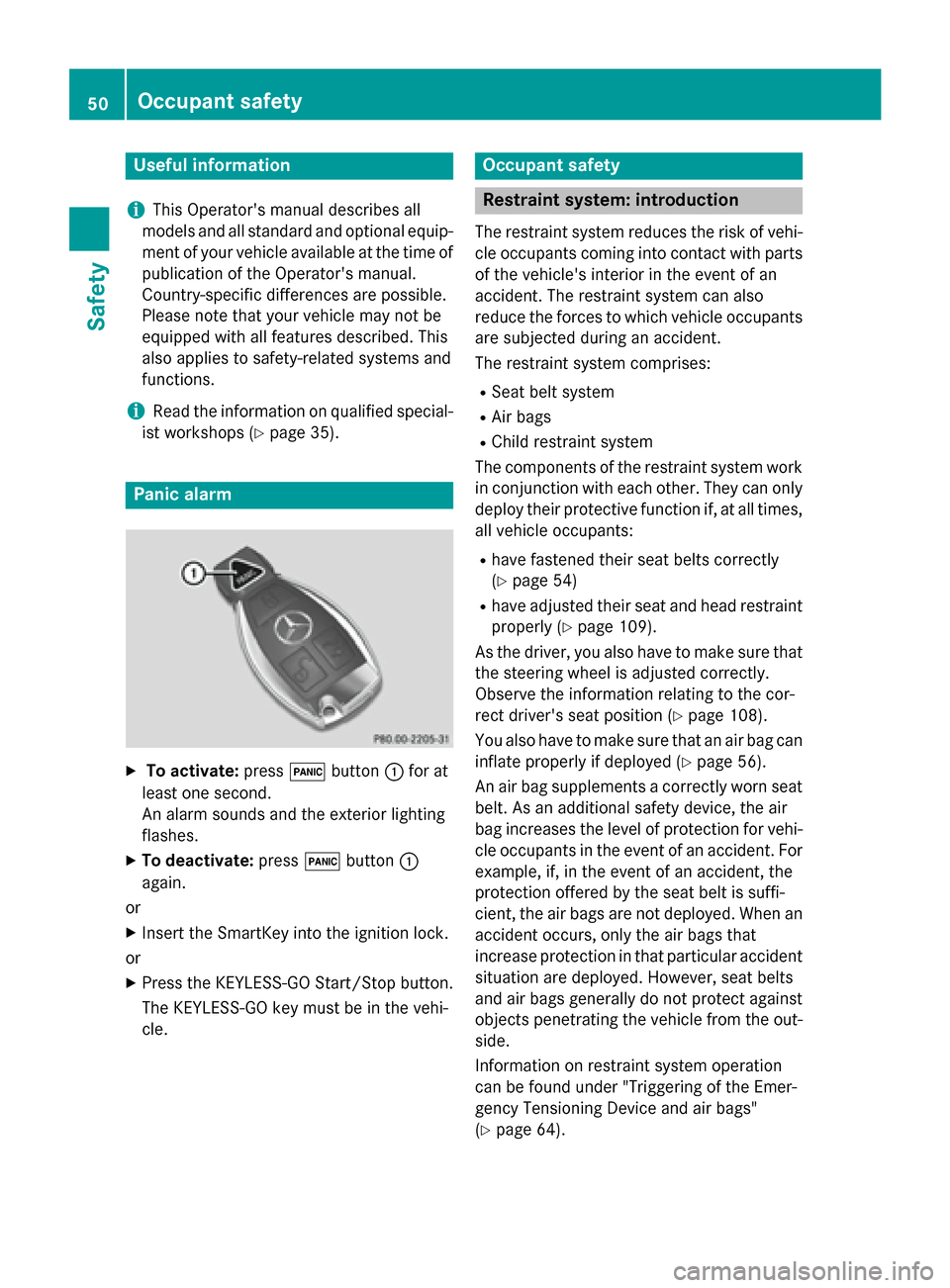
X
To activate: press0033button 0043for at
least one second.
An alarm sounds and the exterior lighting
flashes.
X To deactivate: press0033button 0043
again.
or
X Insert the SmartKey into the ignition lock.
or X Press the KEYLESS-GO Start/Stop button.
The KEYLESS-GO key must be in the vehi-
cle. Occupant safety
Restraint system: introduction
The restraint system reduces the risk of vehi-
cle occupants coming into contact with parts of the vehicle's interior in the event of an
accident. The restraint system can also
reduce the forces to which vehicle occupants
are subjected during an accident.
The restraint system comprises:
R Seat belt system
R Air bags
R Child restraint system
The components of the restraint system work
in conjunction with each other. They can only deploy their protective function if, at all times,
all vehicle occupants:
R have fastened their seat belts correctly
(Y page 54)
R have adjusted their seat and head restraint
properly (Y page 109).
As the driver, you also have to make sure that
the steering wheel is adjusted correctly.
Observe the information relating to the cor-
rect driver's seat position (Y page 108).
You also have to make sure that an air bag can
inflate properly if deployed (Y page 56).
An air bag supplements a correctly worn seat
belt. As an additional safety device, the air
bag increases the level of protection for vehi-
cle occupants in the event of an accident. For example, if, in the event of an accident, the
protection offered by the seat belt is suffi-
cient, the air bags are not deployed. When an accident occurs, only the air bags that
increase protection in that particular accident
situation are deployed. However, seat belts
and air bags generally do not protect against
objects penetrating the vehicle from the out-
side.
Information on restraint system operation
can be found under "Triggering of the Emer-
gency Tensioning Device and air bags"
(Y page 64). 50
Occupant safetySafety