engine MERCEDES-BENZ SL ROADSTER 2012 Manual Online
[x] Cancel search | Manufacturer: MERCEDES-BENZ, Model Year: 2012, Model line: SL ROADSTER, Model: MERCEDES-BENZ SL ROADSTER 2012Pages: 637, PDF Size: 20.68 MB
Page 198 of 637
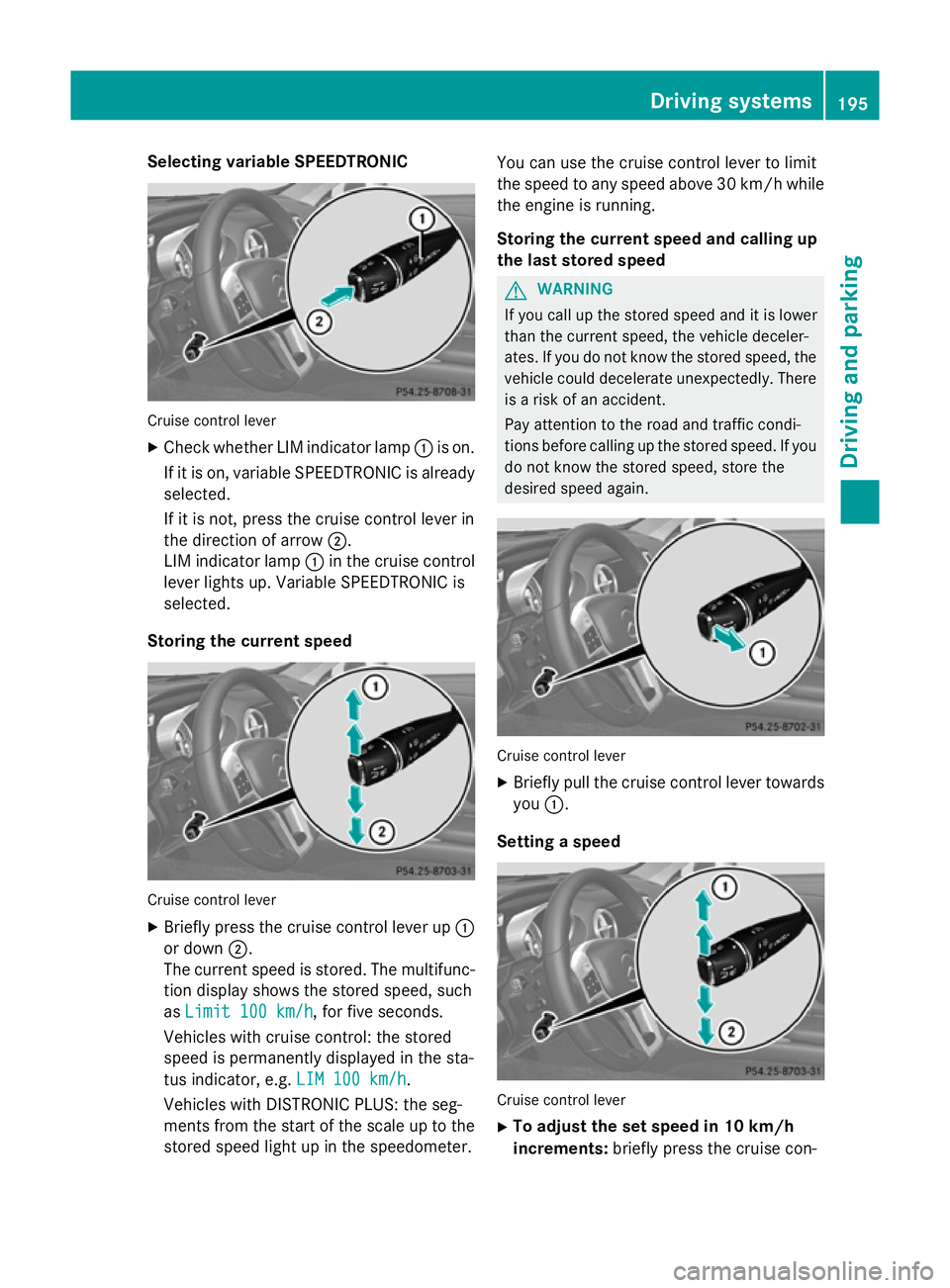
Selecting variable SPEEDTRONIC
Cruise control lever
X Check whether LIM indicator lamp :is on.
If it is on, variable SPEEDTRONIC is already selected.
If it is not, press the cruise control lever in
the direction of arrow ;.
LIM indicator lamp :in the cruise control
lever lights up. Variable SPEEDTRONIC is
selected.
Storing the current speed Cruise control lever
X Briefly press the cruise control lever up :
or down ;.
The current speed is stored. The multifunc- tion display shows the stored speed, such
as Limit 100 km/h
Limit 100 km/h, for five seconds.
Vehicles with cruise control: the stored
speed is permanently displayed in the sta-
tus indicator, e.g. LIM 100 km/h LIM 100 km/h.
Vehicles with DISTRONIC PLUS: the seg-
ments from the start of the scale up to the
stored speed light up in the speedometer. You can use the cruise control lever to limit
the speed to any speed above 30 km/hw hile
the engine is running.
Storing the current speed and calling up
the last stored speed G
WARNING
If you call up the stored speed and it is lower
than the current speed, the vehicle deceler-
ates. If you do not know the stored speed, the vehicle could decelerate unexpectedly. There
is a risk of an accident.
Pay attention to the road and traffic condi-
tions before calling up the stored speed. If you do not know the stored speed, store the
desired speed again. Cruise control lever
X Briefly pull the cruise control lever towards
you :.
Setting a speed Cruise control lever
X To adjust the set speed in 10 km/h
increments: briefly press the cruise con- Driving systems
195Driving and parking Z
Page 199 of 637
trol lever up
:past the pressure point for
a higher speed, or down ;for a lower
speed.
or X Keep the cruise control lever pressed
beyond the pressure point until the desired speed is set. Press the cruise control lever
up : for a higher speed or down ;for a
lower speed.
X To adjust the set speed in 1 km/ hincre-
ments: briefly press the cruise control
lever up :to the pressure point for a
higher speed, or down ;for a lower speed.
or X Keep the cruise control lever pressed to the
pressure point until the desired speed is
set. Press the cruise control lever up :for
a higher speed or down ;for a lower
speed.
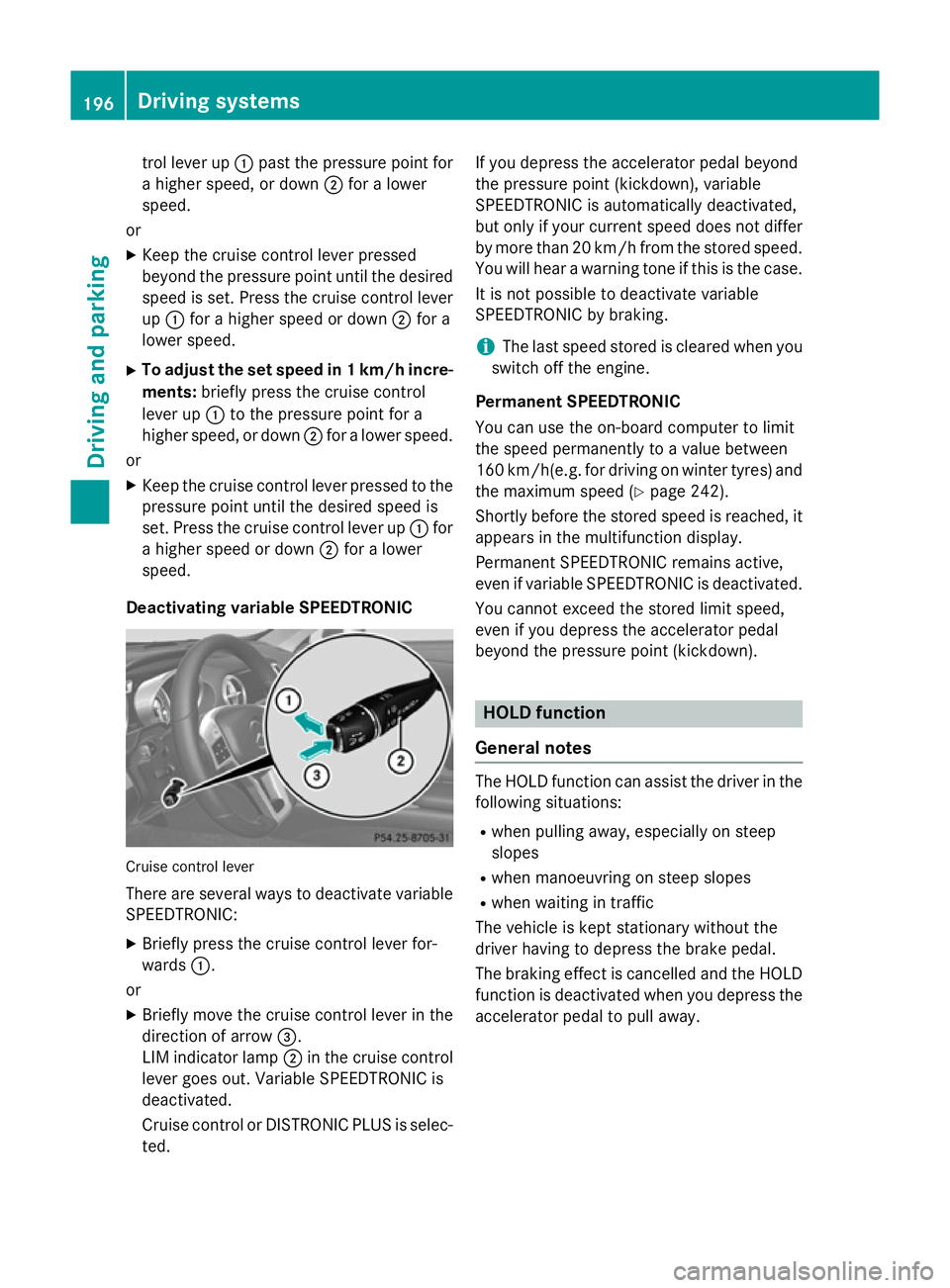
Deactivating variable SPEEDTRONIC Cruise control lever
There are several ways to deactivate variable SPEEDTRONIC:
X Briefly press the cruise control lever for-
wards :.
or
X Briefly move the cruise control lever in the
direction of arrow =.
LIM indicator lamp ;in the cruise control
lever goes out. Variable SPEEDTRONIC is
deactivated.
Cruise control or DISTRONIC PLUS is selec-
ted. If you depress the accelerator pedal beyond
the pressure point (kickdown), variable
SPEEDTRONIC is automatically deactivated,
but only if your current speed does not differ
by more than 20 km/hf rom the stored speed.
You will hear a warning tone if this is the case.
It is not possible to deactivate variable
SPEEDTRONIC by braking.
i The last speed stored is cleared when you
switch off the engine.
Permanent SPEEDTRONIC
You can use the on-board computer to limit
the speed permanently to a value between
160 km/h(e.g. for driving on winter tyres) and the maximum speed (Y page 242).
Shortly before the stored speed is reached, it
appears in the multifunction display.
Permanent SPEEDTRONIC remains active,
even if variable SPEEDTRONIC is deactivated.
You cannot exceed the stored limit speed,
even if you depress the accelerator pedal
beyond the pressure point (kickdown). HOLD function
General notes The HOLD function can assist the driver in the
following situations:
R when pulling away, especially on steep
slopes
R when manoeuvring on steep slopes
R when waiting in traffic
The vehicle is kept stationary without the
driver having to depress the brake pedal.
The braking effect is cancelled and the HOLD function is deactivated when you depress the
accelerator pedal to pull away. 196
Driving systemsDriving and parking
Page 200 of 637
Important safety notes
G
WARNING
When leaving the vehicle, it can still roll away despite being braked by the HOLD function if:
R there is a malfunction in the system or in
the voltage supply
R the HOLD function is deactivated by the
accelerator pedal being depressed, e.g. by
a vehicle occupant
R the electrical system in the engine com-
partment, the battery or the fuses are tam-
pered with
R the battery is disconnected
There is a risk of an accident.
Before leaving the vehicle, always deactivate
the HOLD function and secure the vehicle
from rolling away.
! If DISTRONIC PLUS or the HOLD function
is activated, the vehicle brakes automati-
cally in certain situations. To prevent dam-
age to the vehicle, deactivate DISTRONIC
PLUS and the HOLD function in the follow-
ing or other similar situations:
R when towing the vehicle
R in the car wash
Deactivate the HOLD function (Y page 197).
Activation conditions You can activate the HOLD function if:
R
the vehicle is stationary
R the engine is running or if it has been auto-
matically switched off by the ECO start/
stop function
R the driver's door is closed or if your seat
belt is fastened
R the electric parking brake is released
R the transmission is in position D,Ror N
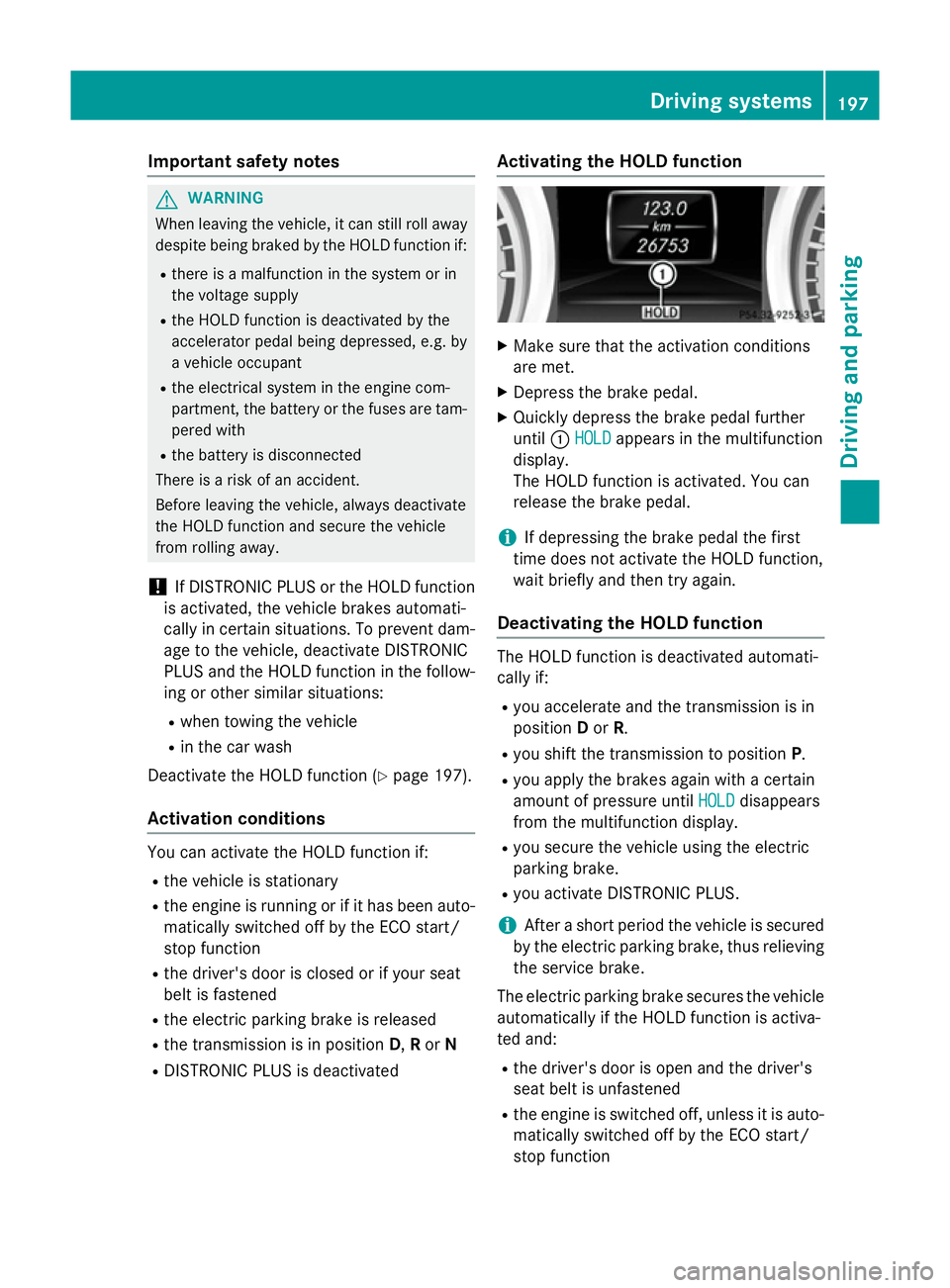
R DISTRONIC PLUS is deactivated Activating the HOLD function X
Make sure that the activation conditions
are met.
X Depress the brake pedal.
X Quickly depress the brake pedal further
until :HOLD HOLD appears in the multifunction
display.
The HOLD function is activated. You can
release the brake pedal.
i If depressing the brake pedal the first
time does not activate the HOLD function,
wait briefly and then try again.
Deactivating the HOLD function The HOLD function is deactivated automati-
cally if:
R you accelerate and the transmission is in
position Dor R.
R you shift the transmission to position P.
R you apply the brakes again with a certain
amount of pressure until HOLD HOLDdisappears
from the multifunction display.
R you secure the vehicle using the electric
parking brake.
R you activate DISTRONIC PLUS.
i After a short period the vehicle is secured
by the electric parking brake, thus relieving
the service brake.
The electric parking brake secures the vehicle
automatically if the HOLD function is activa-
ted and:
R the driver's door is open and the driver's
seat belt is unfastened
R the engine is switched off, unless it is auto-
matically switched off by the ECO start/
stop function Driving systems
197Driving and parking Z
Page 201 of 637
R
a system fault occurs
R the power supply is not sufficient
If a fault occurs, then the transmission may
also be shifted into position Pautomatically. RACE START
Important safety notes i
Observe the safety notes for the SPORT
handling mode (Y page 75).
Only activate RACE START on dedicated race circuits.
RACE START enables optimum acceleration
from a standing start. The precondition for
this is a suitable high-grip road surface.
i RACE START is only available for the
SL 63 AMG model.
Activation conditions You can activate RACE START if:
R the doors are closed
R the engine is running and it has reached an
operating temperature of approximately
80 †. This is the case when the engine oil
temperature in the multifunction display
stops flashing.
R SPORT handling mode is activated
(Y page 75)
R the steering wheel is in the straight-ahead
position
R the vehicle is stationary and the brake
pedal is depressed (left foot)
R the transmission is in position D
Activating RACE START X
Depress the brake pedal with your left foot
and keep it depressed.
X Turn the drive program selector clockwise
(Y page 168) until the RSlamp lights up.
The RACE START Confirm: Paddle UP RACE START Confirm: Paddle UP
Cancel: Paddle DOWN
Cancel: Paddle DOWN message appears
in the multifunction display. i
If the activation conditions are no longer
fulfilled, RACE START is cancelled. The mul-
tifunction display shows the RACE START
RACE START
cancelled
cancelled message.
X To cancel: pull the left steering wheel shift
paddle (Y page 169).
or X To confirm: pull the right steering wheel
shift paddle (Y page 169).
The RACE START available Depress RACE START available Depress
accelerator
accelerator message appears in the mul-
tifunction display.
i If you do not depress the accelerator
pedal fully within two seconds, RACE
START is cancelled. The RACE RACESTART
START not
not
possible
possible See
SeeOwner's
Owner's Manual
Manual message
appears in the multifunction display.
X Fully depress the accelerator pedal.
The engine speed increases to at least
3,500 rpm.
The RACE START Release brake to
RACE START Release brake to
start start message appears in the multifunc-
tion display.
i If you do not release the brake pedal
within five seconds, RACE START is cancel- led. The multifunction display shows the
RACE START cancelled
RACE START cancelled message.
X Take your foot off the brake, but keep the
accelerator pedal depressed.
The vehicle pulls away at maximum accel-
eration.
The RACE START active RACE START active appears in the
multifunction display.
RACE START is deactivated when the vehicle
reaches a speed of approximately 50 km/h.
Drive program S+is activated. SPORT han-
dling mode remains activated.
RACE START is deactivated immediately if
you release the accelerator pedal during
RACE START or if any of the activation condi-
tions are no longer fulfilled. The RACE RACESTART
START
not possible See Owner's Manual
not possible See Owner's Manual mes-
sage appears in the multifunction display. 198
Driving systemsDriving and parking
Page 202 of 637
i
After using it several times in short suc-
cession, RACE START will be unavailable
until a certain distance has been driven. Adaptive Damping System
General notes The adjustable suspension system adapts to
the particular driving conditions. Adjustment
depends on your individual selection, i.e.
sporty or comfortable. Your selection
remains stored even if you remove the key
from the ignition lock.
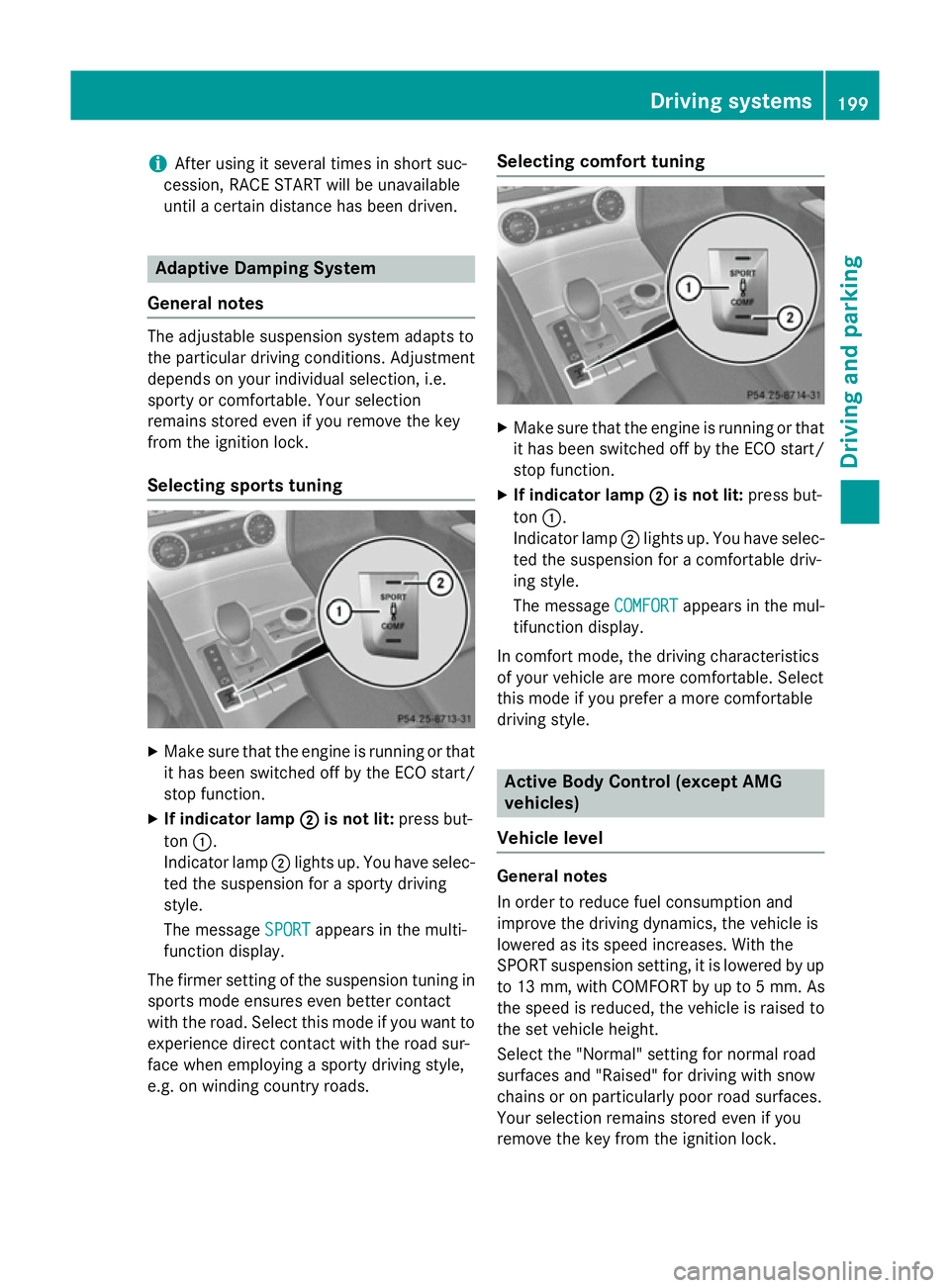
Selecting sports tuning X
Make sure that the engine is running or that
it has been switched off by the ECO start/
stop function.
X If indicator lamp ;
; is not lit: press but-
ton :.
Indicator lamp ;lights up. You have selec-
ted the suspension for a sporty driving
style.
The message SPORT
SPORT appears in the multi-
function display.
The firmer setting of the suspension tuning in
sports mode ensures even better contact
with the road. Select this mode if you want to experience direct contact with the road sur-
face when employing a sporty driving style,
e.g. on winding country roads. Selecting comfort tuning
X
Make sure that the engine is running or that
it has been switched off by the ECO start/
stop function.
X If indicator lamp ; ;is not lit: press but-
ton :.
Indicator lamp ;lights up. You have selec-
ted the suspension for a comfortable driv-
ing style.
The message COMFORT COMFORTappears in the mul-
tifunction display.
In comfort mode, the driving characteristics
of your vehicle are more comfortable. Select
this mode if you prefer a more comfortable
driving style. Active Body Control (except AMG
vehicles)
Vehicle level General notes
In order to reduce fuel consumption and
improve the driving dynamics, the vehicle is
lowered as its speed increases. With the
SPORT suspension setting, it is lowered by up
to 13 mm, with COMFORT by up to 5 mm. As the speed is reduced, the vehicle is raised to
the set vehicle height.
Select the "Normal" setting for normal road
surfaces and "Raised" for driving with snow
chains or on particularly poor road surfaces.
Your selection remains stored even if you
remove the key from the ignition lock. Driving systems
199Driving and parking Z
Page 203 of 637
Important safety notes
G
WARNING
The vehicle is slightly lowered if you:
R have selected the SPORT suspension tun-
ing at normal level and
R switch off the engine
Persons in the vicinity of the wheel arch or the underbody may thus become trapped. There
is a risk of injury.
Make sure that nobody is in the vicinity of thewheel arch or the underbody when you switch
off the engine.
! When the engine is switched off, the vehi-
cle is lowered if SPORT suspension tuning
has been selected at the normal level. The
vehicle is automatically lowered by approx- imately 10 mm. Make sure when parking
that you position your vehicle so that it
does not make contact with the kerb as the
vehicle is lowered. Your vehicle could oth-
erwise be damaged.
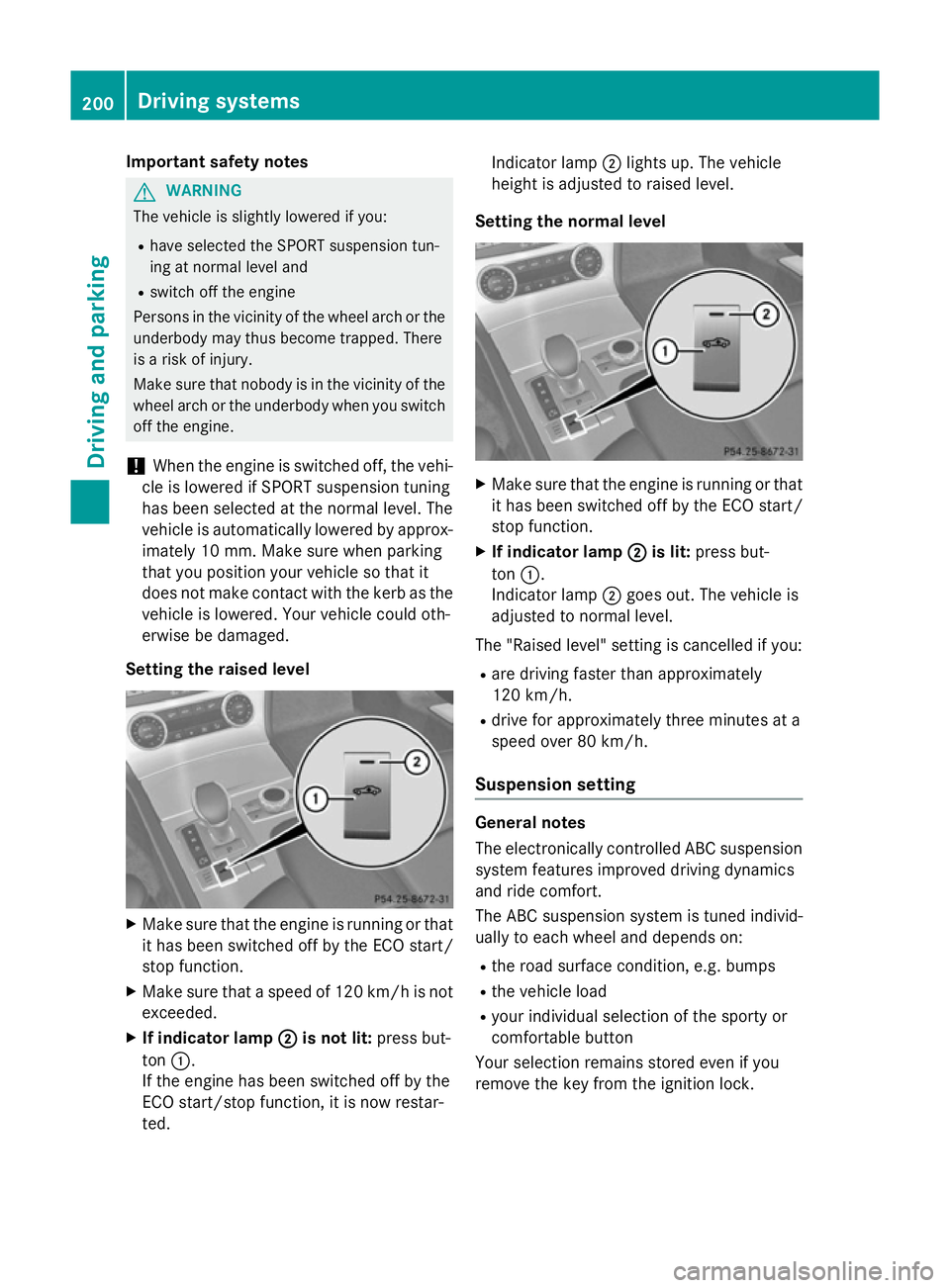
Setting the raised level X
Make sure that the engine is running or that
it has been switched off by the ECO start/
stop function.
X Make sure that a speed of 120 km/h is not
exceeded.
X If indicator lamp ;
; is not lit: press but-
ton :.
If the engine has been switched off by the
ECO start/stop function, it is now restar-
ted. Indicator lamp
;lights up. The vehicle
height is adjusted to raised level.
Setting the normal level X
Make sure that the engine is running or that
it has been switched off by the ECO start/
stop function.
X If indicator lamp ; ;is lit: press but-
ton :.
Indicator lamp ;goes out. The vehicle is
adjusted to normal level.
The "Raised level" setting is cancelled if you:
R are driving faster than approximately
120 km/h.
R drive for approximately three minutes at a
speed over 80 km/h.
Suspension setting General notes
The electronically controlled ABC suspension
system features improved driving dynamics
and ride comfort.
The ABC suspension system is tuned individ-
ually to each wheel and depends on:
R the road surface condition, e.g. bumps
R the vehicle load
R your individual selection of the sporty or
comfortable button
Your selection remains stored even if you
remove the key from the ignition lock. 200
Driving systemsDriving and pa
rking
Page 204 of 637
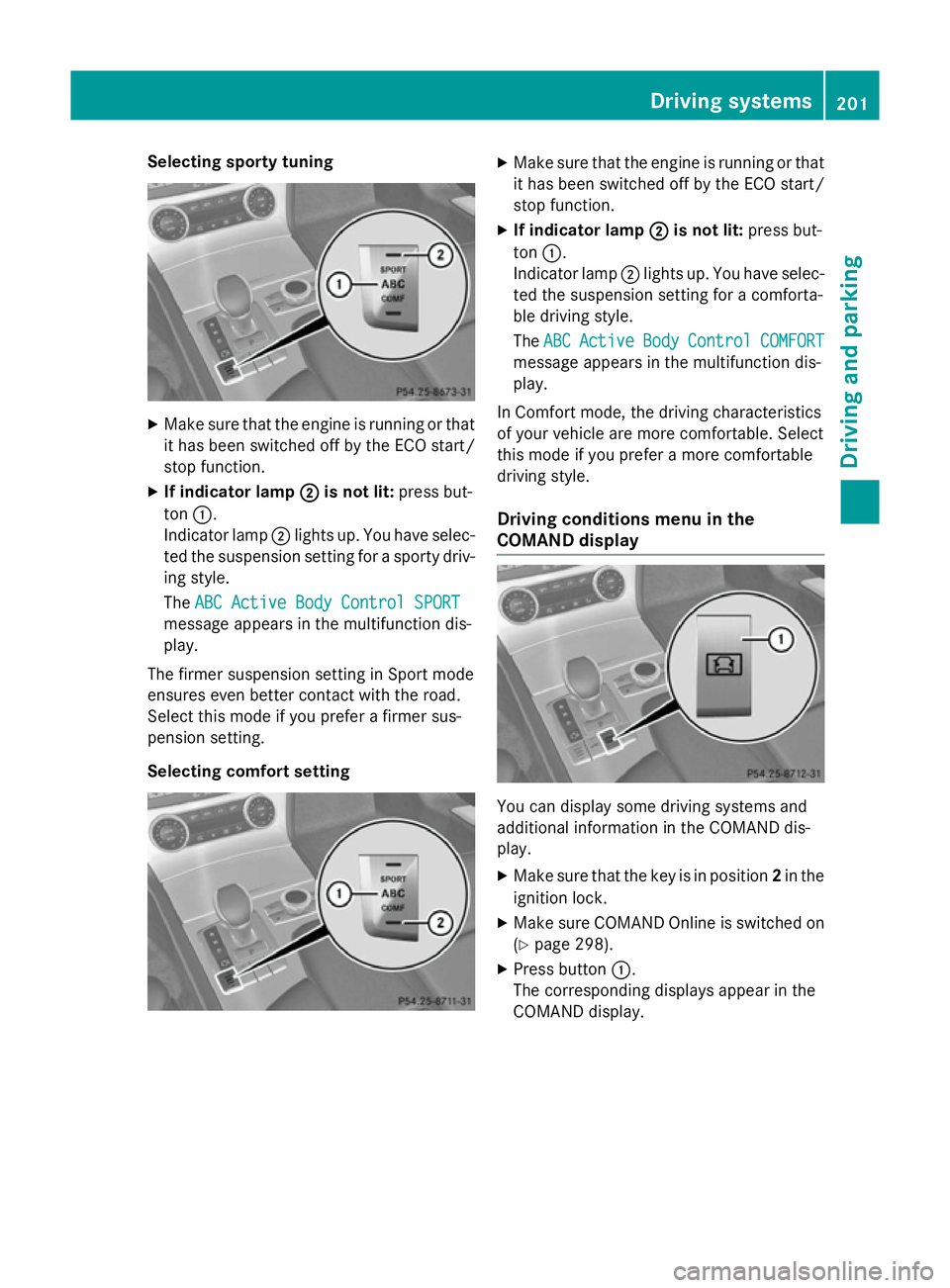
Selecting sporty tuning
X
Make sure that the engine is running or that
it has been switched off by the ECO start/
stop function.
X If indicator lamp ;
; is not lit: press but-
ton :.
Indicator lamp ;lights up. You have selec-
ted the suspension setting for a sporty driv- ing style.
The ABC Active Body Control SPORT ABC Active Body Control SPORT
message appears in the multifunction dis-
play.
The firmer suspension setting in Sport mode
ensures even better contact with the road.
Select this mode if you prefer a firmer sus-
pension setting.
Selecting comfort setting X
Make sure that the engine is running or that
it has been switched off by the ECO start/
stop function.
X If indicator lamp ; ;is not lit: press but-
ton :.
Indicator lamp ;lights up. You have selec-
ted the suspension setting for a comforta-
ble driving style.
The ABC ABC Active
Active Body
BodyControl
Control COMFORT
COMFORT
message appears in the multifunction dis-
play.
In Comfort mode, the driving characteristics
of your vehicle are more comfortable. Select
this mode if you prefer a more comfortable
driving style.
Driving conditions menu in the
COMAND display You can display some driving systems and
additional information in the COMAND dis-
play.
X Make sure that the key is in position 2in the
ignition lock.
X Make sure COMAND Online is switched on
(Y page 298).
X Press button :.
The corresponding displays appear in the
COMAND display. Driving systems
201Driving and parking Z
Page 205 of 637
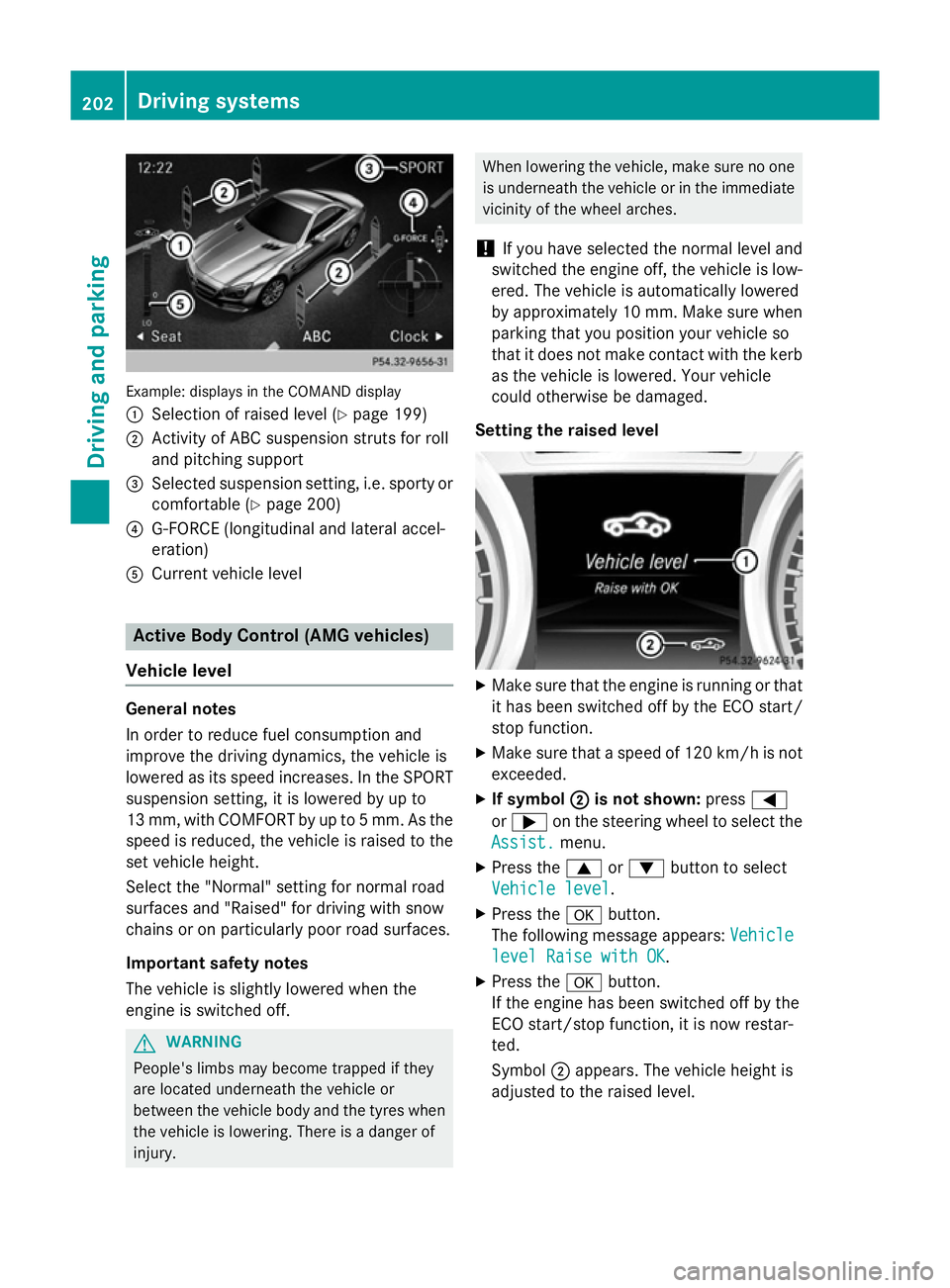
Example: displays in the COMAND display
: Selection of raised level (Y page 199)
; Activity of ABC suspension struts for roll
and pitching support
= Selected suspension setting, i.e. sporty or
comfortable (Y page 200)
? G-FORCE (longitudinal and lateral accel-
eration)
A Current vehicle level Active Body Control (AMG vehicles)
Vehicle level General notes
In order to reduce fuel consumption and
improve the driving dynamics, the vehicle is
lowered as its speed increases. In the SPORT
suspension setting, it is lowered by up to
13 mm, with COMFORT by up to 5 mm. As the
speed is reduced, the vehicle is raised to the set vehicle height.
Select the "Normal" setting for normal road
surfaces and "Raised" for driving with snow
chains or on particularly poor road surfaces.
Important safety notes
The vehicle is slightly lowered when the
engine is switched off. G
WARNING
People's limbs may become trapped if they
are located underneath the vehicle or
between the vehicle body and the tyres when the vehicle is lowering. There is a danger of
injury. When lowering the vehicle, make sure no one
is underneath the vehicle or in the immediate
vicinity of the wheel arches.
! If you have selected the normal level and
switched the engine off, the vehicle is low-
ered. The vehicle is automatically lowered
by approximately 10 mm. Make sure when
parking that you position your vehicle so
that it does not make contact with the kerb
as the vehicle is lowered. Your vehicle
could otherwise be damaged.
Setting the raised level X
Make sure that the engine is running or that
it has been switched off by the ECO start/
stop function.
X Make sure that a speed of 120 km/h is not
exceeded.
X If symbol ; ;is not shown: press=
or ; on the steering wheel to select the
Assist.
Assist. menu.
X Press the 9or: button to select
Vehicle level
Vehicle level.
X Press the abutton.
The following message appears: Vehicle
Vehicle
level Raise with OK
level Raise with OK.
X Press the abutton.
If the engine has been switched off by the
ECO start/stop function, it is now restar-
ted.
Symbol ;appears. The vehicle height is
adjusted to the raised level. 202
Driving systemsDriving an
d parking
Page 206 of 637
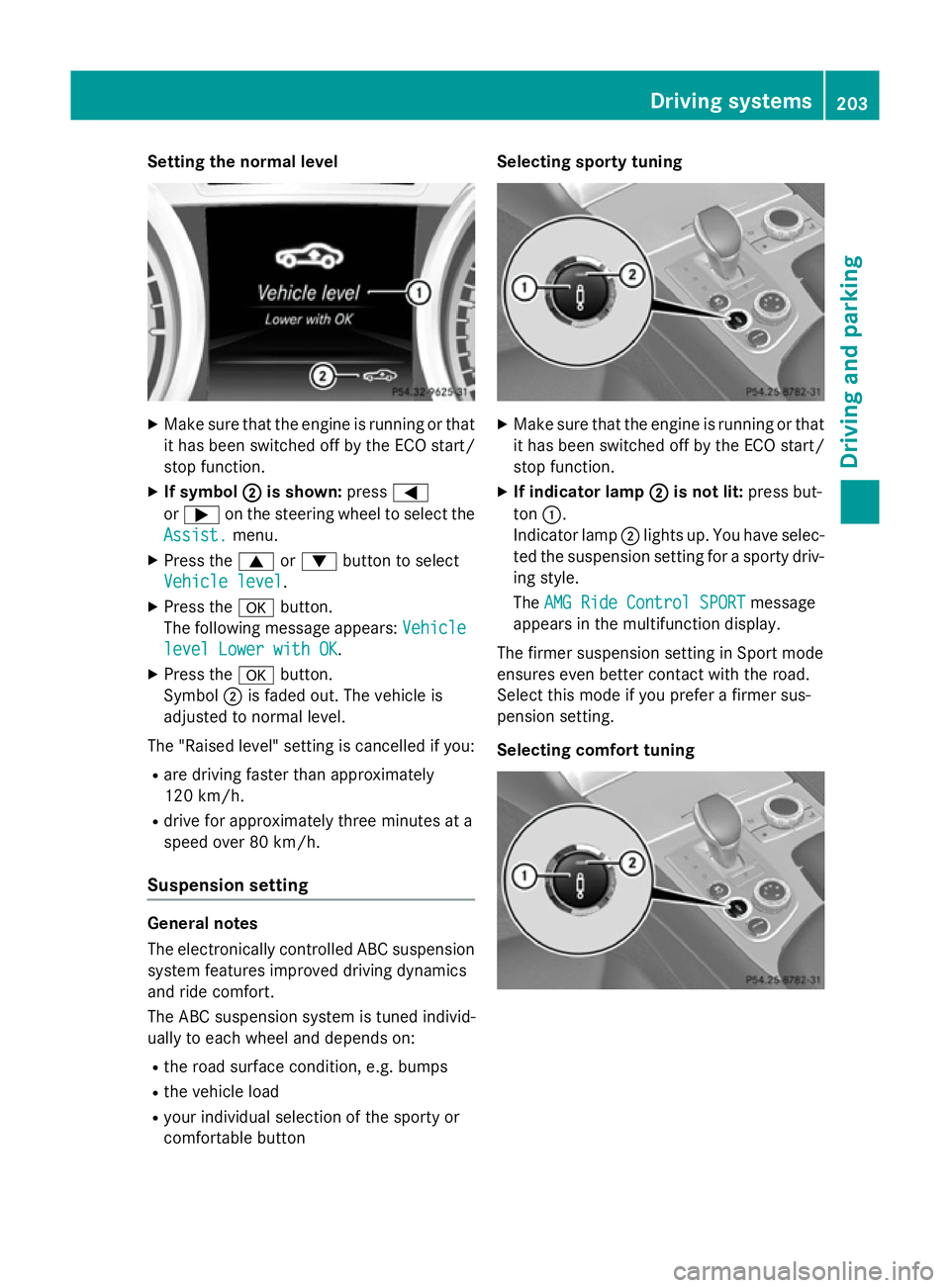
Setting the normal level
X
Make sure that the engine is running or that
it has been switched off by the ECO start/
stop function.
X If symbol ;
; is shown: press=
or ; on the steering wheel to select the
Assist.
Assist. menu.
X Press the 9or: button to select
Vehicle level
Vehicle level.
X Press the abutton.
The following message appears: Vehicle
Vehicle
level Lower with OK
level Lower with OK.
X Press the abutton.
Symbol ;is faded out. The vehicle is
adjusted to normal level.
The "Raised level" setting is cancelled if you:
R are driving faster than approximately
120 km/h.
R drive for approximately three minutes at a
speed over 80 km/h.
Suspension setting General notes
The electronically controlled ABC suspension
system features improved driving dynamics
and ride comfort.
The ABC suspension system is tuned individ-
ually to each wheel and depends on:
R the road surface condition, e.g. bumps
R the vehicle load
R your individual selection of the sporty or
comfortable button Selecting sporty tuning
X
Make sure that the engine is running or that
it has been switched off by the ECO start/
stop function.
X If indicator lamp ; ;is not lit: press but-
ton :.
Indicator lamp ;lights up. You have selec-
ted the suspension setting for a sporty driv- ing style.
The AMG Ride Control SPORT AMG Ride Control SPORT message
appears in the multifunction display.
The firmer suspension setting in Sport mode
ensures even better contact with the road.
Select this mode if you prefer a firmer sus-
pension setting.
Selecting comfort tuning Driving systems
203Driving and parking Z
Page 207 of 637
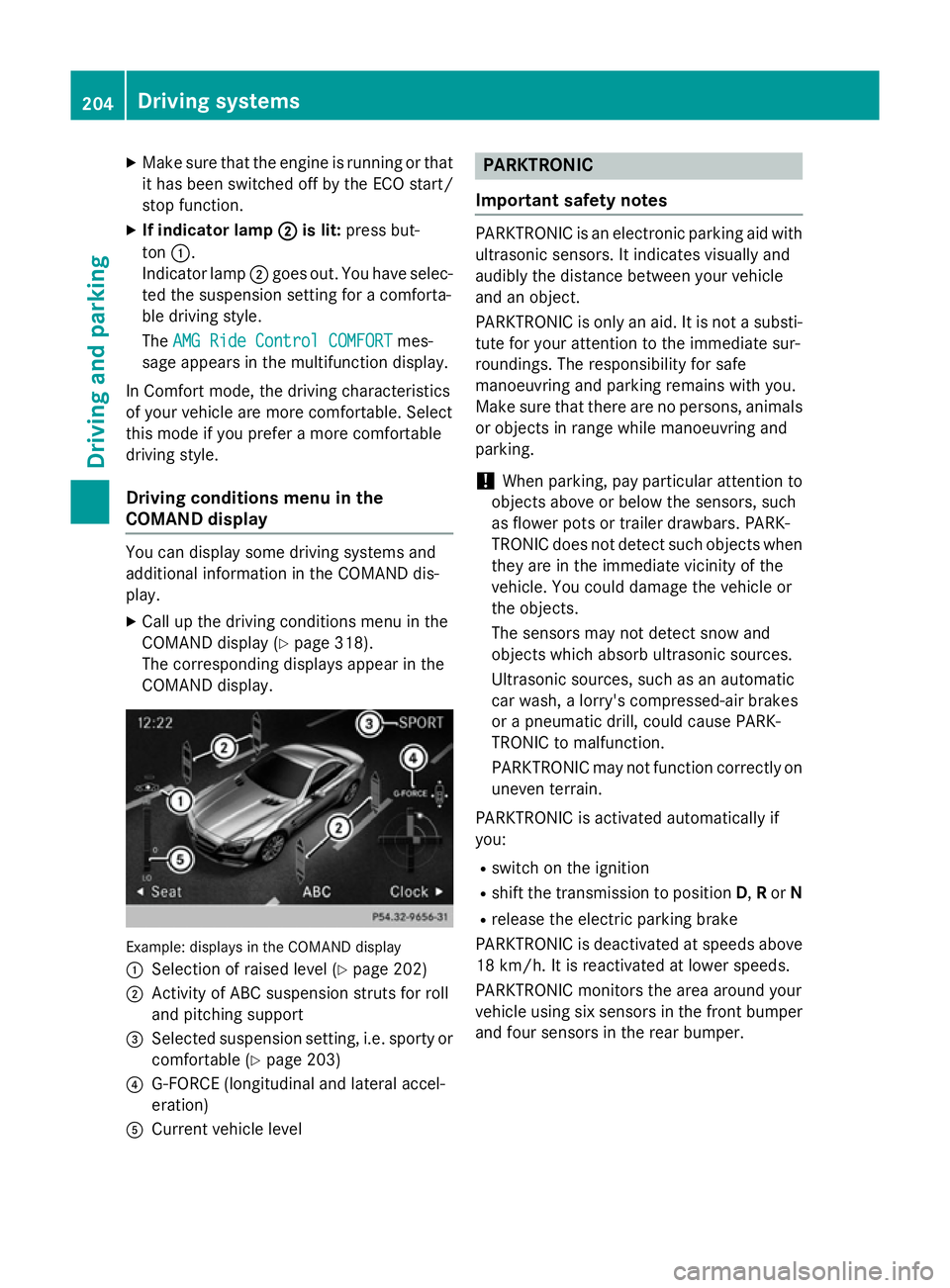
X
Make sure that the engine is running or that
it has been switched off by the ECO start/
stop function.
X If indicator lamp ;
; is lit: press but-
ton :.
Indicator lamp ;goes out. You have selec-
ted the suspension setting for a comforta-
ble driving style.
The AMG Ride Control COMFORT
AMG Ride Control COMFORT mes-
sage appears in the multifunction display.
In Comfort mode, the driving characteristics
of your vehicle are more comfortable. Select
this mode if you prefer a more comfortable
driving style.
Driving conditions menu in the
COMAND display You can display some driving systems and
additional information in the COMAND dis-
play.
X Call up the driving conditions menu in the
COMAND display (Y page 318).
The corresponding displays appear in the
COMAND display. Example: displays in the COMAND display
:
Selection of raised level (Y page 202)
; Activity of ABC suspension struts for roll
and pitching support
= Selected suspension setting, i.e. sporty or
comfortable (Y page 203)
? G-FORCE (longitudinal and lateral accel-
eration)
A Current vehicle level PARKTRONIC
Important safety notes PARKTRONIC is an electronic parking aid with
ultrasonic sensors. It indicates visually and
audibly the distance between your vehicle
and an object.
PARKTRONIC is only an aid. It is not a substi- tute for your attention to the immediate sur-
roundings. The responsibility for safe
manoeuvring and parking remains with you.
Make sure that there are no persons, animals
or objects in range while manoeuvring and
parking.
! When parking, pay particular attention to
objects above or below the sensors, such
as flower pots or trailer drawbars. PARK-
TRONIC does not detect such objects when they are in the immediate vicinity of the
vehicle. You could damage the vehicle or
the objects.
The sensors may not detect snow and
objects which absorb ultrasonic sources.
Ultrasonic sources, such as an automatic
car wash, a lorry's compressed-air brakes
or a pneumatic drill, could cause PARK-
TRONIC to malfunction.
PARKTRONIC may not function correctly on uneven terrain.
PARKTRONIC is activated automatically if
you:
R switch on the ignition
R shift the transmission to position D,Ror N
R release the electric parking brake
PARKTRONIC is deactivated at speeds above
18 km/h. It is reactivated at lower speeds.
PARKTRONIC monitors the area around your
vehicle using six sensors in the front bumper and four sensors in the rear bumper. 204
Driving systemsDriving and parking