lock MERCEDES-BENZ SLC 2017 Repair Manual
[x] Cancel search | Manufacturer: MERCEDES-BENZ, Model Year: 2017, Model line: SLC, Model: MERCEDES-BENZ SLC 2017Pages: 294, PDF Size: 9.12 MB
Page 157 of 294
Under the following circumstances, the rear
view camera will not function, or will function in
al imited manner: R
if the trunk lid is open R
in heavy rain, snow or fog R
at night or in very dark places R
if the camera is exposed to very bright light R
if the area is lit by fluorescent bulb sorL ED
lighting (the displa ym ay flicker)R
if there is as udden change in temperature,
e.g. when driving into ah eated garage in win-
ter R
if the camera lens is dirty or obstructed
Observe the notes on cleaning
( Y
page 240) R
if the rear of your vehicle is damaged. In this
event, have the camera position and setting
checked at aq ualified specialist workshop
The field of vision and other functions of the rear
view camera may be restricted due to additional
accessories on the rear of the vehicle (e.g.
license plate holder, bicycle rack).
For technical reasons, leaving the standard
height can result in inaccuracies in the guide
lines on vehicles with ah eight-adjustable chas-
sis.
i The rear view camera is protected from rain-
drops and dust by means of af lap. When the
rear view camera is activated, this flap opens.
The flap closes agai nw hen:R
you have finished the maneuvering process R
you switch off the engine R
you open the trunk
Observe the notes on cleaning ( Y
page 240).
For technical reasons, the flap may remain
open briefly after the rear view camera has
been deactivated.
Activating/deactivating the rear view
camera X
To activate: make sure that the SmartKey is
in position 2 in the ignition lock.X
Make sure that the Activation by Rg ear
function is selected in the multimedia system;
see the Digital Operator's Manual. X
Engage reverse gear.
The rear view camera flap opens. The multi-
media system shows the area behind the vehi-
cle with guide lines. The image from the rear view camera is avail-
able throughout the maneuvering process.
To deactivate: the rear view camera deacti-
vates if you shift the transmission to P or after
driving forwards as hort distance.
Displays in the multimedia system The rear view camera may show ad istorted view
of obstacles, show them incorrectly or not at all.
The rear view camera does not show objects in
the following positions: R
very close to the rear bumper R
under the rear bumper R
in close range above the handle on the trunk
lid
! Objects not at ground level may appea rt o
be further awa yt han they actually are, e.g.: R
the bumper of ap arked vehicle R
the drawba rofat railer R
the ball coupling of at railer tow hitchR
the rear section of an HGV R
as lanted post
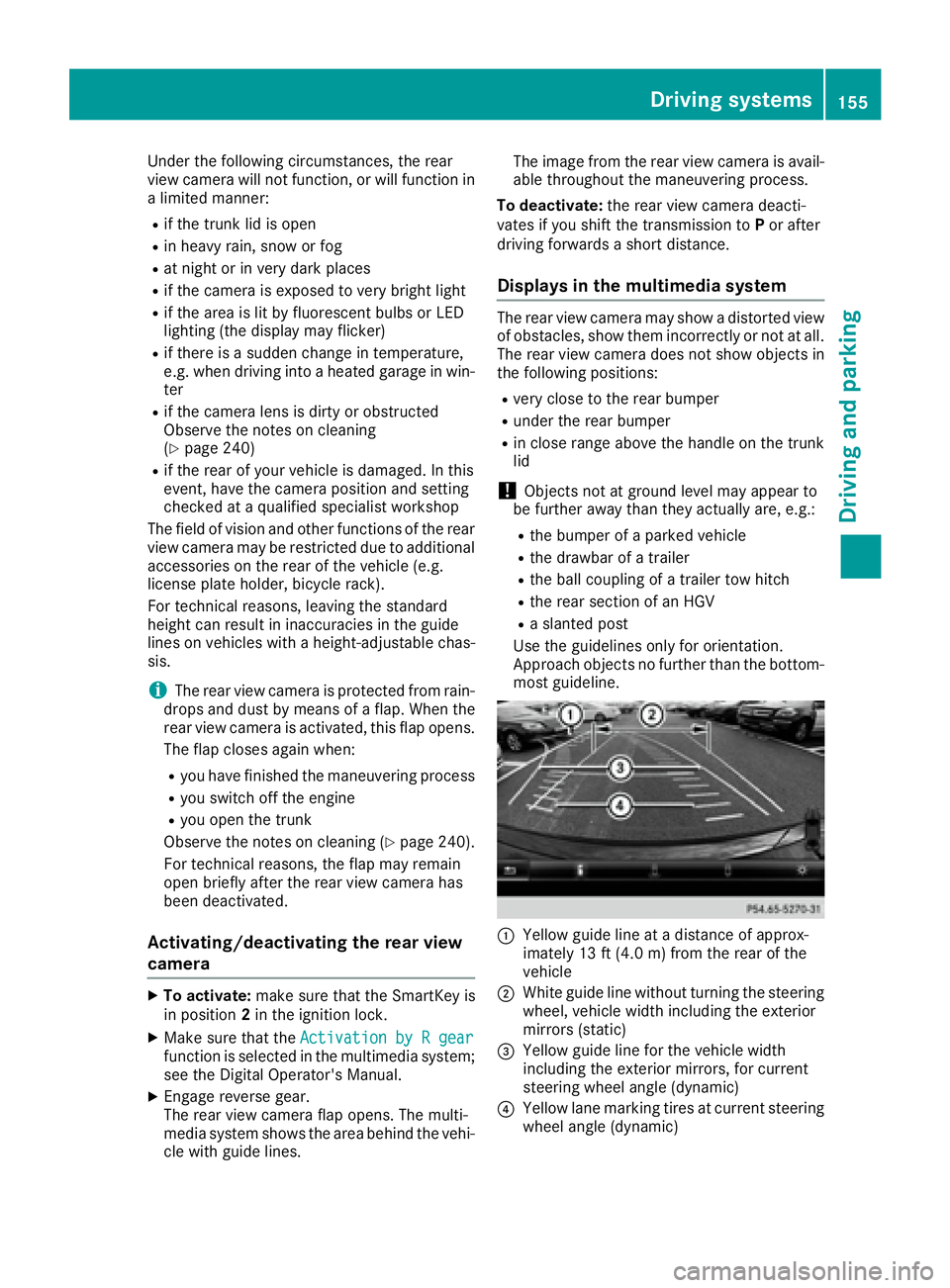
Use the guidelines only for orientation.
Approach objects no further than the bottom-
most guideline.
C
Yello wg uide line at ad istance of approx-
imately 13 ft (4.0 m) from the rear of the
vehicle
D
White guide line without turning the steering
wheel, vehicle width including the exterior
mirrors (static)
Page 162 of 294
Blind Spot Assist monitors the are aupto10f t
(3.0 m) behind your vehicle and directly nex tt o
your vehicle, as shown in the diagram. For this
purpose, Blind Spot Assist uses radar sensor si n
the rear bumper.
If the lanes are narrow, vehicles driving in the
lane beyond the lane nex ttoy our vehicle may be
indicated, especially if the vehicles are not driv-
ing in the middle of their lane. This may be the
case if ther ea re vehicles driving at the inner
edge of their lanes.
Due to the natur eoft he system:R
warning sm ay be issued in error when driving
close to crash barriers or similar solid lane
borders. R
the warning is canceled when driving for an
extended period nex ttol ong vehicles, such as
trucks.
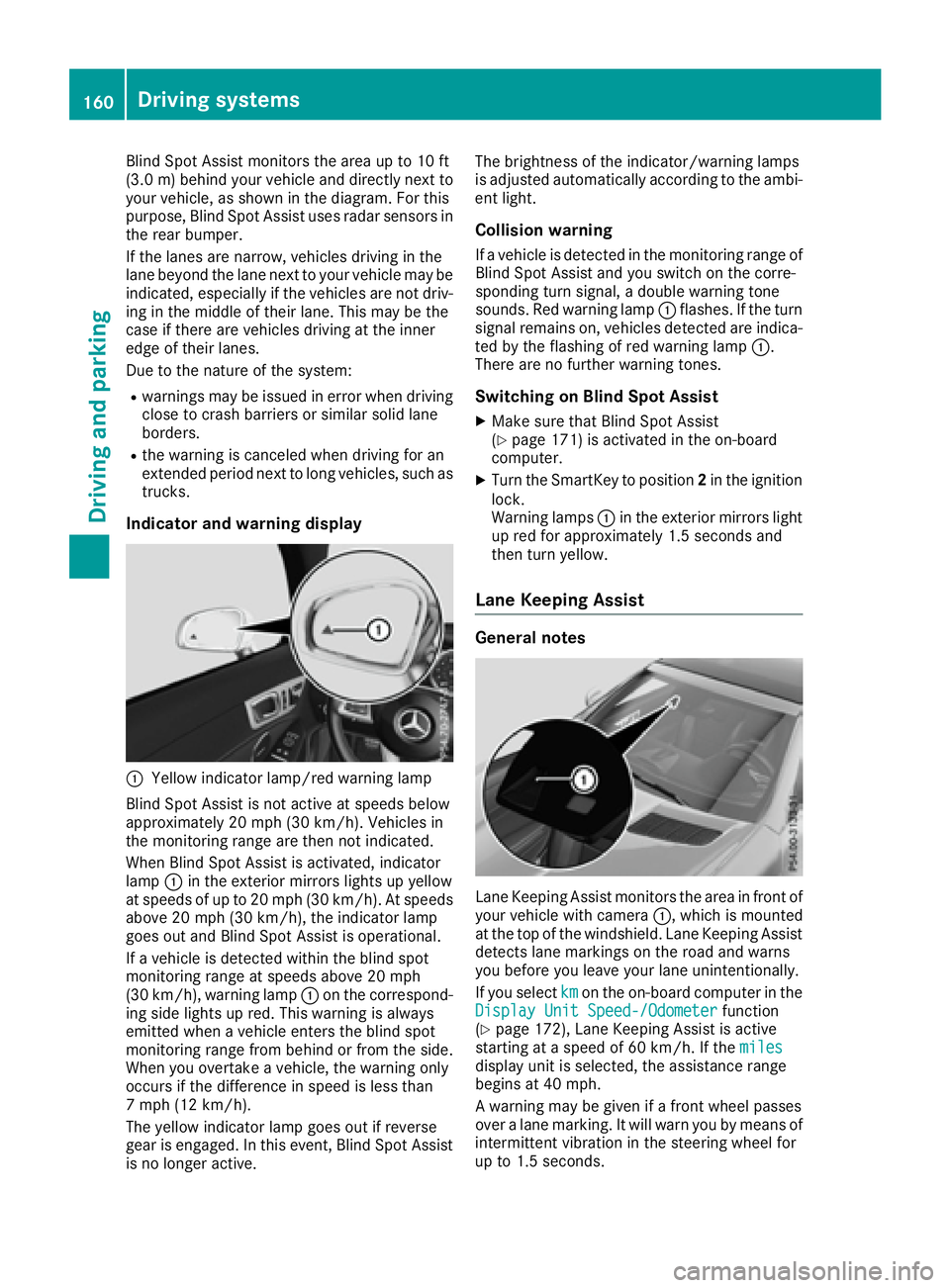
Indicator and warning display
C
Yellow indicator lamp/red warning lamp
Blind Spot Assist is not activ eats peeds below
approximately 20 mph (30 km/h). Vehicles in
the monitoring range are then not indicated.
When Blind Spot Assist is activated, indicator
lamp C in the exterior mirror sl ights up yellow
at speeds of up to 20 mph (3 0k m/ h) .Ats peeds
above 20 mph (30 km/h), the indicator lamp
goe so ut and Blind Spot Assist is operational.
If av ehicl eisd etected within the blind spot
monitoring rang eats peeds above 20 mph
(30 km/h), warning lamp C on the correspond-
ing sid el ig hts up red .T hi sw ar ning is always
emitted when av ehicl ee nter st he blind spot
monitoring rang ef rom behind or from the side.
Whe ny ou overtake av ehicle, the warning only
occurs if the difference in speed is less than
7m ph (12 km/h).
The yellow indicator lamp goe so ut if reverse
gea rise ngaged .Int his event, Blind Spot Assist
is no longer active. The brightness of the indicator/warning lamps
is adjuste da ut omaticall ya ccording to the ambi-
ent light.
Collisio nw arningIf av ehicl eisd etected in the monitoring rang eo f
Blind Spot Assist and yo us witch on the corre-
sponding turn signal ,ad oubl ew ar ning tone
sounds. Re dw ar ning lamp C flashes. If the turn
signal remains on, vehicles detected are indica-
ted by the flashing of red warning lamp C .
There are no further warning tones.
Switchin gonB lind Spo tA ssis tX
Make sure that Blind Spot Assist
( Y
page 171 )i sa ctivate dint he on-board
computer. X
Turn the SmartKey to position 2 in the ignition
lock.
Warning lamps C in the exterio rm irrors light
up red for approximately 1.5 seconds and
then turn yellow.
Lan eK ee ping Assist
General notes
Lane Keeping Assist monitors the are ainf ront of
your vehicl ew it hc amera C ,w hi ch is mounted
at the top of the windshield .L ane Keeping Assist
detects lane markings on the roa da nd warns
yo ub efore yo ul ea ve your lane unintentionally.
If yo us elect km on the on-board compute rint he
Display Unit Speed-/Odometer function
( Y
page 172), Lane Keeping Assist is active
starting at as peed of 60 km/h .Ift he miles
display uni ti ss elected ,t he assistance range
begins at 40 mph.
Aw ar ning may be given if af ront wheel passes
ove ral an em arking. It will warn yo ubym eans of
intermittent vibration in the steering wheel for
up to 1.5 seconds.160
Driving systems
Driving and parking
Page 165 of 294
Important safety notes
G WARNIN G
If you operate information systems and com-
munication equipmen ti ntegrate dint he vehi-
cle while driving ,y ou will be distracte df ro m
traffic conditions. You could also lose control
of th ev ehicle. Ther eisar is kofana ccident.
Only operate th ee quipmen tw hen th et ra ffic
situation permits. If you are no ts ur et ha tt hi s
is possible ,p ark th ev ehicl ep ayin ga ttention
to traffic condition sa nd operate th ee quip-
men tw hen th ev ehicl eiss ta tionary.
You must observ et he legal requirements for th e
country in whic hy ou are currentl yd riving when
operating th eo n-bo ard computer.
G WARNIN G
If th ei nstrumen tc luste rh as faile dorm al-
functioned, you may no tr ecognize function
restriction sins ystems relevan ttos afety. The
operating safet yofy our vehicl em ay be
impaired .T her eisar is kofana ccident.
Drive on carefully. Hav et he vehicl ec hecked
at aq ualified specialist workshop immedi-
ately.
The on-board computer only shows message so r
warning sf ro mc ertai ns ystems in th em ultifunc-
tion display. You should therefor em ak es ur e
your vehicl eiso perating safely at all times .
If th eo perating safet yofy our vehicl ei s
impaired ,p ull ove rass oo nasitiss af etodos o.
Contac taq ualified specialist workshop.
Fo rano verview, see th ei nstrumen tp anel illus-
tration ( Y
page 31).
Display sa nd operation
Instrumen tc luster lighting
The lighting in th ei nstrumen tc luster, in th ed is-
plays and th ec ontrols in th ev ehicl ei nterior can
be adjusted usin gt he brightness control knob.
The brightness control knob is locate dont he
botto ml ef toft he instrumen tc luste r
( Y
page 31). X
Turn th eb rightness control knob clockwise or
counter-clockwise.
If you tur nt he ligh ts witch ( Y
page 93 )t ot he
X , ` or X position ,t he brightness
will depend upon th eb rightness of th ea mbi -
en tl ight.
The ligh ts ensor in th ei nstrumen tc luste r
automatically control st he brightness of th e
multifunction display. In daylight, th ed isplays
in th ei nstrumen tc luste ra re no ti lluminated.
Speedometer with segments The segments in th es peedometer indicat e
whic hs pee dr ange is available. R
Cruis ec ontro la ctivated ( Y
page 138):
The segments ligh tupf ro mt he store ds pee d
to th em aximum speed. R
Distanc eP ilot DISTRONI Cisa ctivated
( Y
page 140):
On eort wo segments in th es et spee dr ange
ligh tu p. R
Distanc eP ilot DISTRONI Cd etects av ehicl ei n
fron tm oving mor es lowly than th es to re d
speed:
The segments between th es pee doft he vehi-
cle in fron ta nd th es to re ds pee dl igh tu p.
Tachometer
! Do no td riv eint he overrevving range, as this
could damag et he engine.
The red ban dint he tachometer indicates th e
engine's overrevving range.
The fuel suppl yisi nterrupted to protect th e
engin ew hen th er ed ban disr eached.
Outsid et emperatur ed isplayYou should pay special attention to road condi-
tion sw hen temperatures are aroun df re ezing
point.
Bea rinm in dt ha tt he outside temperature dis-
play indicates th et em perature measured and
does no tr ecord th er oad temperature.
The outside temperature display is in th em ulti-
function display ( Y
page 165).
Ac ha ng eint he outside temperature is shown in
th em ultifunction display after ad elay.Display sa nd operation 163
On-boar dc omputer and displays Z
Page 175 of 294
X
Press v to confirm.X
Press the d or c button to select the
Amb. Light +/- function.
The curren ts etting appears.X
Press v to confirm.X
Press the d or c button to adjust the
brightness to any level from Off to Level 5
(bright). X
Press the v or 8 button to save the
setting.
Setting the ambient lighting color X
Press the Y or e button on the steering
wheel to select the Sett. menu.X
Press the d or c button to select the
Light submenu.X
Press v to confirm.X
Press the d or c button to select the
Amb. Light Col. function.X
Press v to confirm.X
Press the d or c button to set the color
to SOLAR , SOLAR Orange or SOLAR Red .X
Press the v or 8 button to save the
setting.
Activating/deactivating surround light-
ing and exterior lighting delayed switch-
off X
Press the Y or e button on the steering
wheel to select the Sett. menu.X
Press the d or c button to select the
Light submenu.X
Press v to confirm.X
Press d or c to select the Surround
Lighting function.
If the Surround Lighting function is activa-
ted, the multifunction display shows the light
cone and the area around the vehicle in
orange. X
Press the v button to save the setting.
Deactivating delayed switch-off of the exterior
lighting temporarily: X
Before leaving the vehicle, turn the SmartKey
to position 0 in the ignition lock.X
Turn the SmartKey to position 2 in the ignition
lock.
The exterior lighting delayed switch-off is
deactivated.
Delayed switch-off of the exterior lighting is
reactivated the next time you start the engine. If you have activated the Surround lighting
function and you turn the light switch to X ,
the following functions are activated when it is
dark: R
surround lighting: the exterior lighting
remains lit for 40 seconds after unlocking
with the SmartKey. If you start the engine, the
surround lighting is switched off and auto-
matic headlamp mode is activated
( Y
page 93). R
exterior lighting delayed switch-off: the
exterior lighting remains lit for 60 seconds
after the engine is switched off. If you close all
the doors and the trunk lid, the exterior light-
ing goes off after 15 seconds.
Dependin gony our vehicle's equipment, when
the surround lighting and delayed switch-off
exterior lighting are on, the following light up: R
Parking lamps R
Low-beam headlamps R
Daytime runnin gl amps R
Side marker lamps R
Surround lighting in the exterior mirrors
Activating/deactivating the interior light-
ing delayed switch-off If you activat et he Interior Lighting Delay
function, the interior lighting remains on for
20 seconds after you remove the SmartKey from
the ignition lock. X
Press the Y or e button on the steering
wheel to select the Sett. menu.X
Press the d or c button to select the
Light submenu. X
Press v to confirm. X
Press the d or c button to select the
Interior Lighting Delay function.
When the Interior Lighting Delay func-
tion is activated, the vehicle interior is dis-
played in orange in the multifunction display. X
Press the v button to save the setting.
Vehicle
Activating/deactivating the automatic
door locking mechanism
If you activat et he Automatic Door Lock func-
tion, the vehicle is centrally locked above a
speed of approximately 9m ph (15 km/h).Menus and submenus 173
On-board computer and displays Z
Page 176 of 294
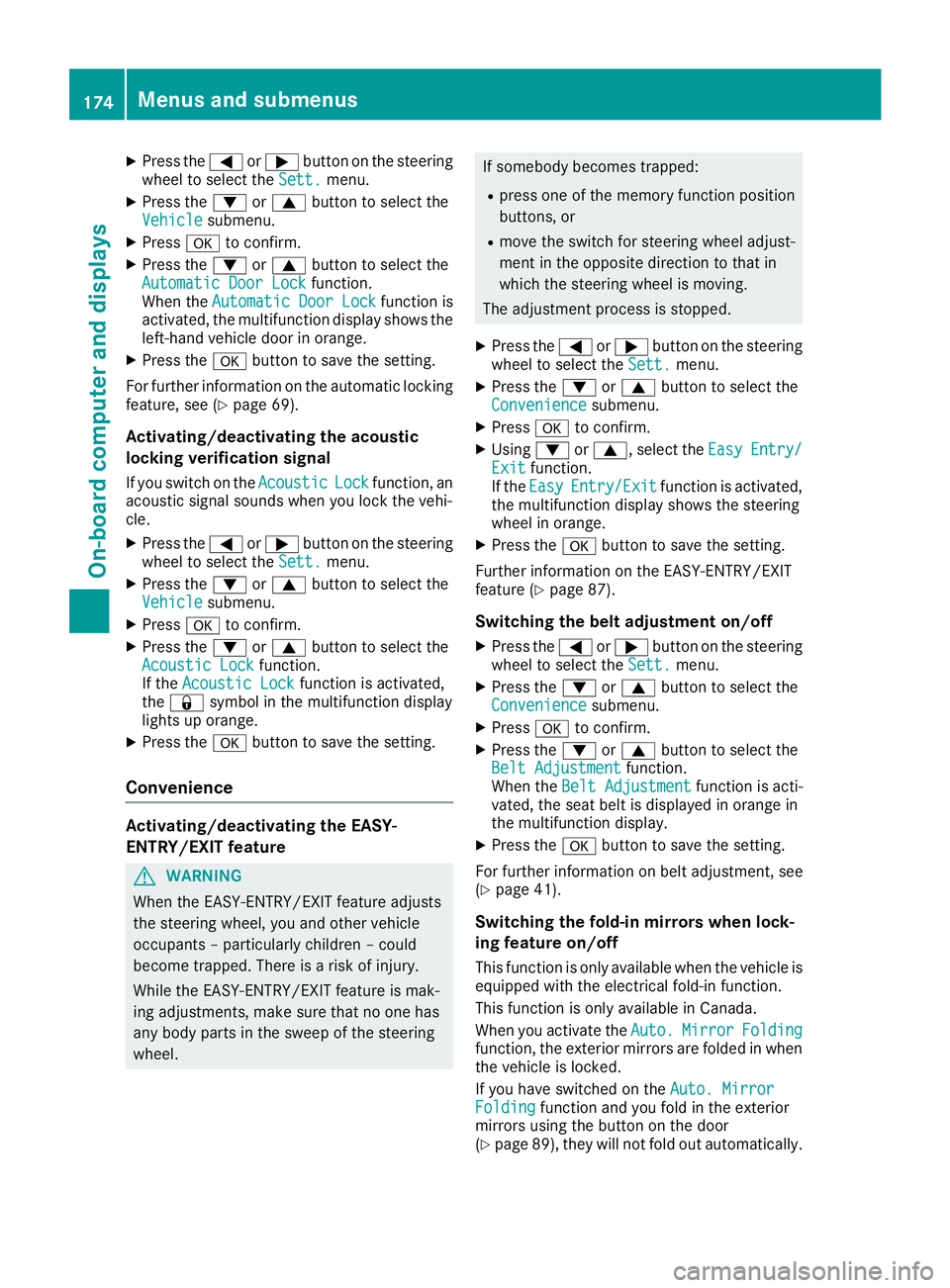
X
Press the Y or e button on the steering
wheel to select the Sett. menu.X
Press the d or c button to select the
Vehicle submenu.X
Press v to confirm.X
Press the d or c button to select the
Automatic Door Lock function.
When the Automatic Door Lock function is
activated, the multifunction display shows the
left-hand vehicle door in orange. X
Press the v button to save the setting.
For further information on the automatic locking
feature, see ( Y
page 69).
Activating/deactivating the acoustic
locking verification signal If you switch on the Acoustic Lock function, an
acoustic signal sounds when you lock the vehi-
cle. X
Press the Y or e button on the steering
wheel to select the Sett. menu.X
Press the d or c button to select the
Vehicle submenu.X
Press v to confirm.X
Press the d or c button to select the
Acoustic Lock function.
If the Acoustic Lock function is activated,
the 7 symbol in the multifunction display
lights up orange. X
Press the v button to save the setting.
Convenience
Activating/deactivating the EASY-
ENTRY/EXI Tf eature
G WARNING
When the EASY-ENTRY/EXIT feature adjusts
the steerin gw heel, you and other vehicle
occupant s–p articularly children –c ould
become trapped. There is ar isk of injury.
While the EASY-ENTRY/EXIT feature is mak-
ing adjustments, make sure that no one has
any body parts in the sweep of the steering
wheel. If somebody becomes trapped: R
press one of the memory function position
buttons, or R
move the switch for steerin gw heel adjust-
ment in the opposite direction to that in
which the steerin gw heel is moving.
The adjustmen tp rocess is stopped. X
Press the Y or e button on the steering
wheel to select the Sett. menu.X
Press the d or c button to select the
Convenience submenu. X
Press v to confirm. X
Using d or c ,s elect the Easy Entry/
Exit function.
If the Easy Entry/Exit function is activated,
the multifunction display shows the steering
wheel in orange. X
Press the v button to save the setting.
Further information on the EASY-ENTRY/EXIT
feature ( Y
page 87).
Switching the belt adjustment on/off X
Press the Y or e button on the steering
wheel to select the Sett. menu.X
Press the d or c button to select the
Convenience submenu. X
Press v to confirm. X
Press the d or c button to select the
Belt Adjustment function.
When the Belt Adjustment function is acti-
vated, the seat belt is displayed in orange in
the multifunction display. X
Press the v button to save the setting.
For further information on belt adjustment, see
( Y
page 41).
Switching the fold-in mirrors when lock-
ing feature on/off
This function is only availabl ew hen the vehicle is
equipped with the electrical fold-in function.
This function is only availabl einC anada.
When you activat et he Auto. Mirror Folding
function, the exterior mirrors are folded in when
the vehicle is locked.
If you have switched on the Auto. Mirror
Folding function and you fold in the exterior
mirrors using the button on the door
( Y
page 89), they will not fold out automatically.174
Menus and submenus
On-board computer and displays
Page 178 of 294
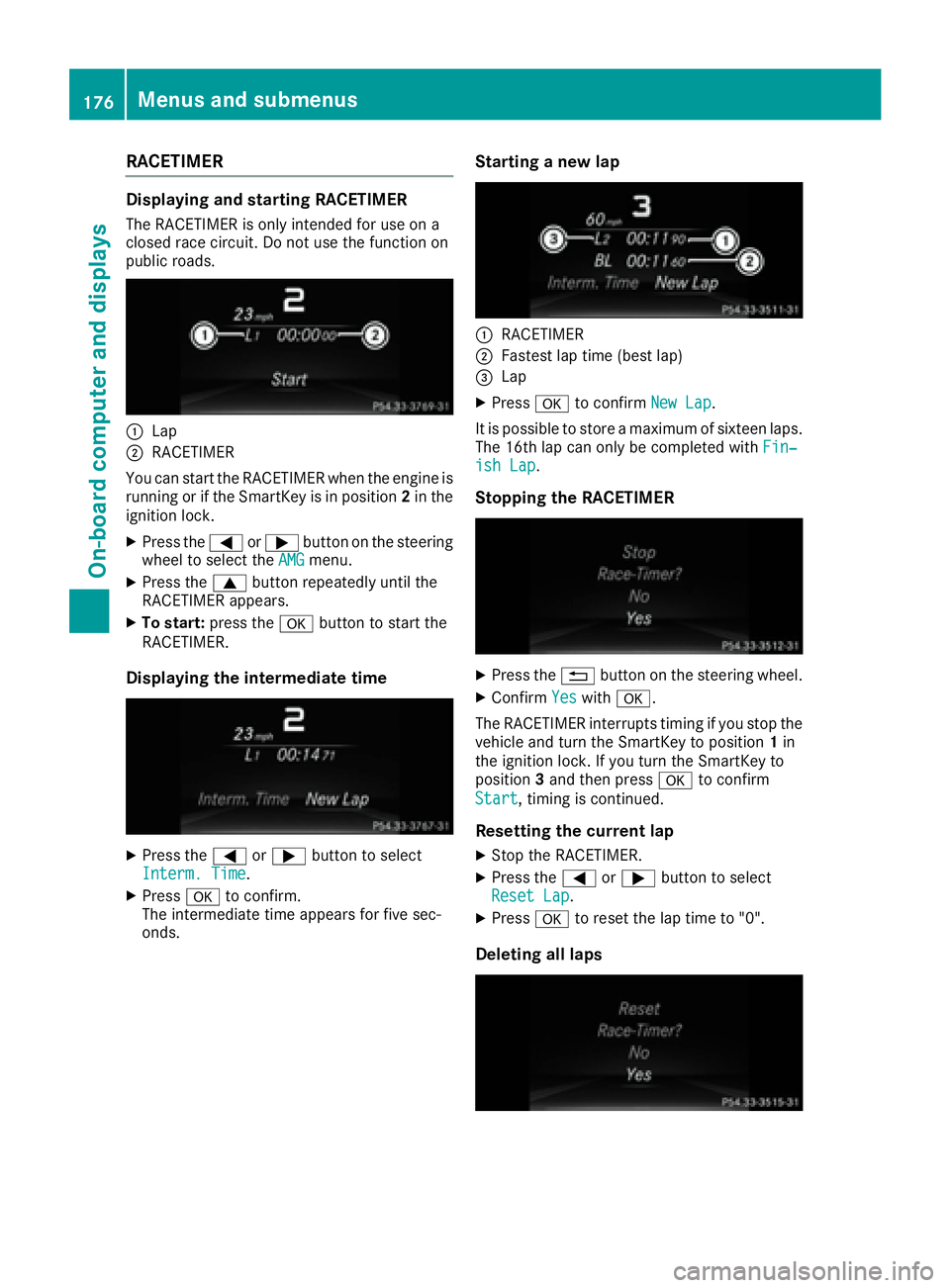
RACETIMER Displaying and startin gR ACETIMERThe RACETIMER is only intended for us eona
closed race circuit. Do not us et he function on
public roads.
C
LapD
RACETIMER
Yo uc an star tt he RACETIMER when the engine is
running or if the SmartKey is in position 2 in the
ignition lock. X
Press the Y or e button on the steering
wheel to select the AMG menu.X
Press the c button repeatedl yu nti lt he
RACETIMER appears. X
To start: press the v button to star tt he
RACETIMER.
Displaying the intermediate time
X
Press the Y or e button to select
Interm. Time .X
Press v to confirm.
The intermediate time appears for five sec-
onds. Startin gan ew lap
C
RACETIMER D
Fastest la pt ime (best lap)
Page 203 of 294
Display messages
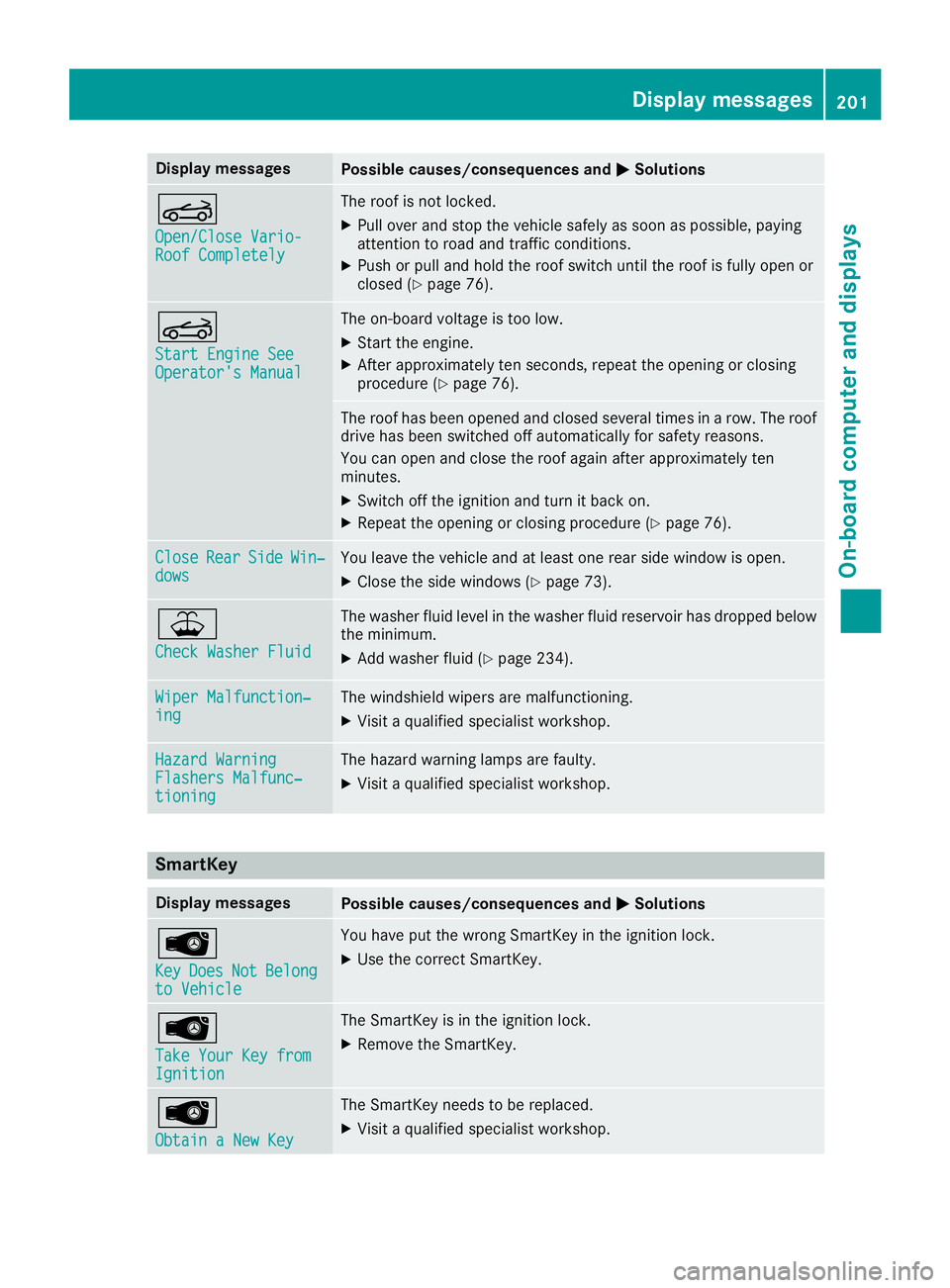
Possible causes/consequences and P Solutions
Y Open/Clos eV ario-
Roo fC ompletel y The roo fisn ot locked.X
Pull ove ra nd stop th ev ehicl es afely as soo nasp ossible, payin g
attention to roa da nd traffic conditions.X
Push or pull and hold th er oo fs witch until th er oo fisf ull yo pen or
closed ( Y
page 76) .
Y Start Engine See
Operator' sM anual The on-boar dv oltag eist oo low.X
Start th ee ng ine.X
Afte ra pproximately te ns econds, repeat th eo pening or closin g
procedure ( Y
page 76).
The roo fh as been opened and closed several times in ar ow .T he roo f
drive has been switched off automatically for safet yr easons.
You can open and close th er oo fa gain after approximately te n
minutes. X
Switc ho ff th ei gnition and tur nitb ac ko n.X
Repeat th eo pening or closin gp rocedure ( Y
page 76).
Close Rea r Sid e Win ‐
dow s You leav et he vehicl ea nd at least on er ear side window is open .X
Clos et he side windows ( Y
page 73).
Page 206 of 294
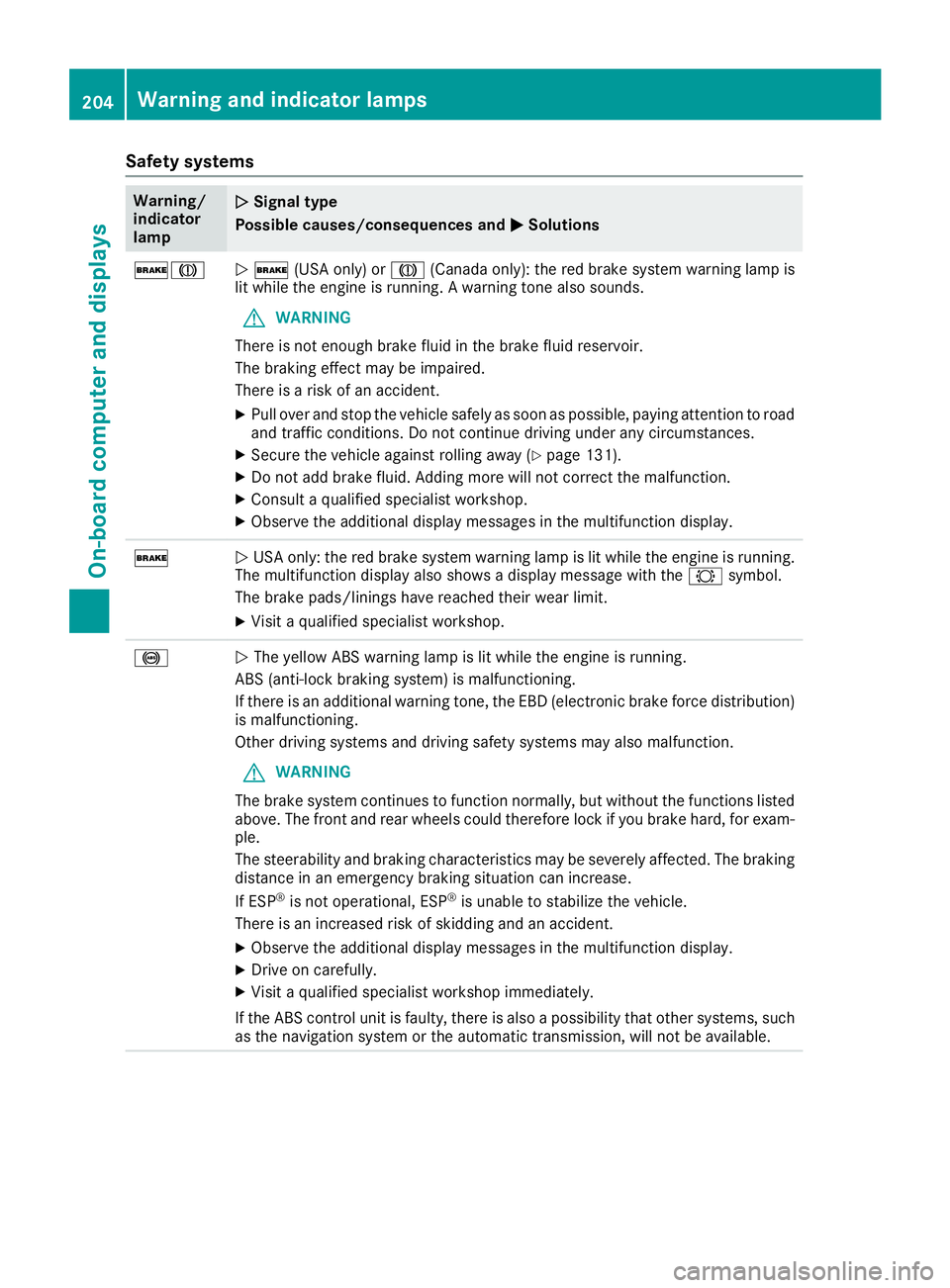
Safety systems Warning/
indicator
lamp Q Signal type
Possible causes/consequences and P Solutions
'M
Q ' (USA only) or M (Canada only): the red brake system warning lamp is
lit while the engine is running. Aw arning tone also sounds.
G WARNING
There is not enough brake fluid in the brake fluid reservoir.
The braking effect may be impaired.
There is ar isk of an accident.X
Pull over and stop the vehicle safely as soon as possible, paying attention to road
and traffic conditions. Do not continue driving under any circumstances. X
Secure the vehicle against rolling away ( Y
page 131).X
Do not add brake fluid. Adding more will not correct the malfunction. X
Consult aq ualified specialist workshop.X
Observe the additional display messages in the multifunction display.
'
Q USA only: the red brake system warning lamp is lit while the engine is running.
The multifunction display also shows ad isplay message with the & symbol.
The brake pads/linings have reached their wear limit. X
Visit aq ualified specialist workshop.
%
Q The yellow ABS warning lamp is lit while the engine is running.
ABS (anti-lock braking system) is malfunctioning.
If there is an additional warning tone, the EBD (electronic brake force distribution)
is malfunctioning.
Other driving systems and driving safety systems may also malfunction.
G WARNING
The brake system continues to function normally, but without the functions listed
above. The front and rear wheels could therefore lock if you brake hard, for exam-
ple.
The steerability and braking characteristics may be severely affected. The braking
distance in an emergency braking situation can increase.
If ESP ®
is not operational, ESP ®
is unable to stabilize the vehicle.
There is an increased risk of skidding and an accident. X
Observe the additional display messages in the multifunction display. X
Drive on carefully. X
Visit aq ualified specialist workshop immediately.
If the ABS control unit is faulty, there is also ap ossibility that other systems, such
as the navigation system or the automatic transmission, will not be available.204
Warning and indicator lamps
On-board computer and displays
Page 219 of 294
Stowage areas
Stowage spaces
Important safety notes
G WARNING
If object sint he passenger compartmen ta re
stowed incorrectly, they can slide or be
thrown around and hit vehicle occupants. In
addition, cupholders, open stowage spaces
and mobile phone brackets cannot always
retain all object st hey contain. There is ar isk
of injury, particularly in the event of sudden
braking or as udden change in direction.R
Always stow object ssot hat they cannot be
thrown around in such situations. R
Always make sure that object sdon ot pro-
trude from stowage spaces, parcel nets or
stowage nets. R
Close the lockable stowage spaces before
startin gaj ourney.R
Always stow and secure heavy, hard, poin-
ted, sharp-edged, fragile or bulky object si n
the trunk.
Glove box
X
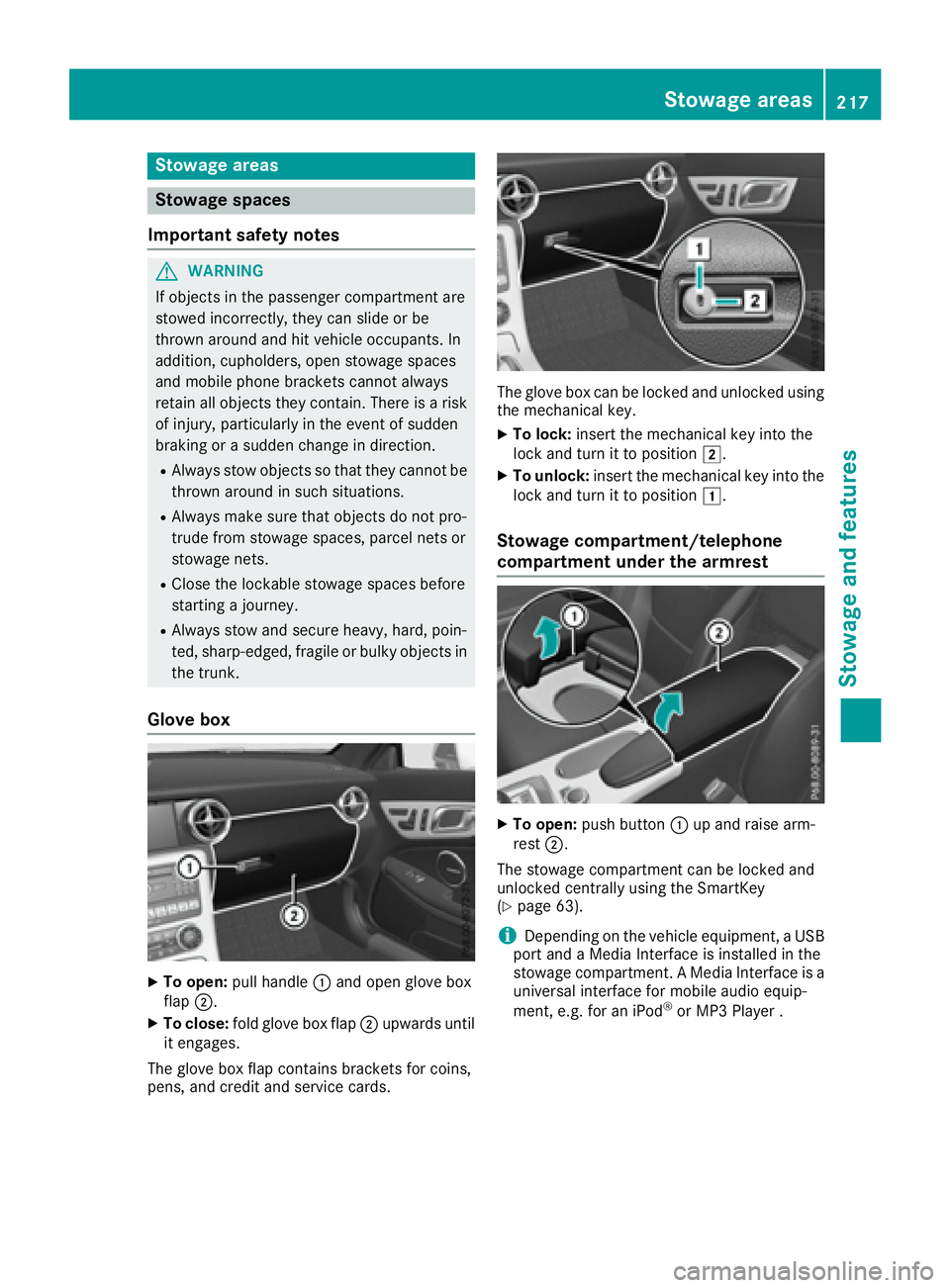
To open: pull handle C and open glove box
flap D .X
To close: fold glove box flap D upwards until
it engages.
The glove box flap contains brackets for coins,
pens, and credit and service cards. The glove box can be locked and unlocked using
the mechanical key. X
To lock: insert the mechanical key into the
lock and turn it to position H .X
To unlock: insert the mechanical key into the
lock and turn it to position G .
Stowage compartment/telephone
compartment under the armrest
X
To open: push button C up and raise arm-
rest D .
The stowage compartmen tc an be locked and
unlocked centrally using the SmartKey
( Y
page 63).
i Depending on the vehicle equipment, aU SB
port and aM edia Interface is installed in the
stowage compartment. AM edia Interface is a
universal interface for mobile audio equip-
ment ,e .g. for an iPod ®
or MP3 Playe r.Stowage areas 217
Stowage and features Z
Page 227 of 294
USA only: you can find further information on
the mbrace system under "Owners Online" at
http://www.mbusa.com.
i The system has not been able to initiate an
MB Info call, if: R
the indicator lamp in MB Info call button C
is flashing continuously. R
no voice connection to the Mercedes-Benz
Customer Assistance Center was estab-
lished.
This can occur if the relevant mobile phone
network is not available, for example.
The Call Failed message appears in the
multifunction display. X
To end ac all: press the v button on the
multifunction steering wheel.
or X
Press the corresponding multimedia system
button for ending ap hone call.
Call priority When service calls are active, e.g. Roadside
Assistance or MB Info calls, an emergency call
can still be initiated. In this case, an emergency
call will take priority and override all other active
calls.
The indicator lamp of the respective button
flashes until the call is ended.
An emergency call can only be terminated by the
Mercedes-Benz Customer Assistance Center.
All other calls can be ended by pressing: R
the v button on the multifunction steering
wheel R
the corresponding button on the audi os ys-
tem or on COMAND for ending at elephone
call
i When ac all is initiated, the audi os ystem is
muted. The mobile phone is no longer con-
nected to COMAND. However, if you want to
use your mobile phone, do so only when the
vehicle is stationary and in as afe location.
Vehicle Health Check
With the Vehicle Health Check, the Customer
Assistance Center can provide improved sup-
port for problems with your vehicle. During an
existing call, vehicle data is transferred to the
Customer Assistance Center. The customer ser-
vice representative can use the received data to decide what kind of assistance is required .Y ou
are then, for example, guide dtot he nearest
authorized Mercedes-Benz Center or ar ecovery
vehicle is called.
If vehicle data needs to be transferred during an
MB Info call or aR oadside Assistance call, this is
initiated by the Customer Assistance Center.
You will see the Roadside Assistance Con‐
nected message in the COMAND display. If the
vehicle remote malfunction diagnosis can be
started, the Request for vehicle diagno‐
sis received. Start vehicle diagnosis?
message appears in the display. X
Confirm the message with Yes .X
When the Vehicle Diagnosis Please
start ignition message appears, turn the
SmartKey to position 2 in the ignition lock
( Y
page 115). X
When the Please follow the instruc‐
tions received by phone and move
your vehicle to as afe position mes-
sage appears, follow the customer service
representative's instructions.
The message in the displa yd isappears.
If you select Cancel the remote malfunction
diagnosis is canceled completely.
The vehicle operating state check begins. You
will see the Vehicle diagnosis activated
message.
When the diagnosis is completed, the Trans‐
fer vehicle diagnostics data (Voice
connection may be interrupted during
data transfer) message appears. The vehicle
data can now be sent to the Customer Assis-
tance center. X
Press OK to confirm the message.
The voice connection with the Customer
Assistance Center is terminated.
You will see the Vehicle diagnosis:
Transferring data... message.
The vehicle data is sent to the Customer
Assistance Center.
Depending on what the customer service rep-
resentative agreed with you, the voice connec-
tion is re-established after the transfer is com-
plete. If necessary, you will be contacted at a
later time by another means, e.g. by e-mail or
phone.
Another function of the Vehicle Health Check is
the transfer of service data to the Customer
Assistance Center. If as ervice is overdue, theFeatures 225
Stowage and features Z