light MERCEDES-BENZ SLS COUPE 2010 Manual Online
[x] Cancel search | Manufacturer: MERCEDES-BENZ, Model Year: 2010, Model line: SLS COUPE, Model: MERCEDES-BENZ SLS COUPE 2010Pages: 361, PDF Size: 6.32 MB
Page 225 of 361
Applying the electric parking brake
X Push handle 0001.
The red 0009indicator lamp in the instru-
men tcluster lights up.
i The electric parking brake can also be
applied when the key is in position 0.
Releasing the electric parking brake man-
ually
X Pull handle 0001.
The red 0009indicator lamp in the instru-
men tcluster goes out.
The electric parking brake can only be
released when the ignition is switched on
using the Start/Stop button (Y page 202).
Releasing the electric parking brake auto-
matically
The electric parking brake is released auto-
matically when the following conditions are
simultaneously fulfilled:
R the engine is running.
R the transmission is in position Dor R.
R the bonnet is closed.
R your seat belt is fastened.
R you depress the accelerator pedal.
If the transmission is in position R, the boot
lid must be closed.
For the parking brake to be released auto-
matically if your seat belt is not fastened, the
following conditions must be fulfilled:
R the driver's door is closed.
R you shift out of Por you have previously
driven faster than 3 km/h.
Emergency braking with the electric park-
ing brake
The vehicle can also be braked during an
emergency using the electric parking brake.
X While driving, push the handle of the elec-
tric parking brake (Y page 221).
i The vehicle is braked as long as you keep
the handle of the electric parking brake
pressed. The longer the electric parking brake handle is depressed, the greater the
braking force.
The red 0009indicator lamp flashes in the
instrument cluster during braking. The
Release parking brake message appears
in the multifunction display and a warning
tone sounds.
When the vehicle has been braked to a stand-
still, the electric parking brake is engaged. Switching off the engine
G
Risk of accident
If the engine is not running, there is no power
assistance for the steerin gand brakes. Steer-
ing and braking then requires significantly
greater effort.
As a result, you might lose control of the vehi-
cle, cause an accident and injure yoursel fand
others.
Therefore, do not switch off the engine while
you are driving.
! Do not open the doors until the vehicle
has come to a standstill .Atlow speeds,
park position Pwill otherwise be engaged
automatically. This can damage the trans-
mission.
i Observe the display messages in the
instrument cluster.
Using KEYLESS-GO X
Use the button on the centre console to
shift the transmission to P.
X Press the Start/Stop button (Y page 202).
The engine stops and all the indicator
lamps in the instrument cluster go out
(Y page 229).
i If you switch the engine off with the trans-
mission in position Ror D, the transmission
automatically shifts to N.
If you set the selector lever to Nbefore
switching off the engine, the transmission
remains in Nfor approximately 30 minutes. 222
Driving and parkingControls
BA 197 ECE RE 2010/6a; 1; 2, en-GB
sabbaeu
Version: 3.0.3.6 2010-05-07T14:19:43+02:00 - Seite 222
Page 229 of 361
X
To store: press and hold AMG button 0001
until you hea ratone.
X To call up: press AMG button 0001.
The stored drive progra misselected.
X To display: briefly press AMG button 0001.
The multifunction display shows the SETUP
in the AMG menu (Y page 241).
RACE START RACE START facilitates optimum vehicle
acceleration from a standstill if the road sur-
face offers suitable grip. G
Risk of accident
RACE START is only available in ESP ®
Sport
mode. ESP ®
Sport only performs limited vehi-
cle stabilisation if the vehicle begins to skid
or if one of the wheels starts to spin. The vehi-
cle will therefore be more difficult to control
in extreme driving situations. This could cause
you to lose control of the vehicle and cause
an accident.
RACE START is intended solely for use on
dedicated race circuits. Always adapt your
driving style to the prevailing road and
weather conditions.
Conditions for activation
You can activate RACE START if:
R the doors are closed.
R the engine is running and the engine and
transmission are at operating temperature.
R ESP ®
Sport is activated (Y page 47).
R the steering wheel is in the straight-ahead
position.
R the vehicle is stationary and the brake
pedal is depressed (left foot).
R the transmission is set to D.Activating RACE START
X
Depress the brake pedal with your left foot
and keep it depressed.
X Turn the program selector switch clock-
wise (Y page 224)u ntil theRSindicator on
the switch lights up in red.
The RACE STARTConfirm: Paddle
UPCancel: Paddle DOWN message
appears in the multifunctio ndisplay.
i If the conditions for activation are not
met, RACE START is cancelled. The RACE
START not possible message appears in
the multifunction display.
X To cancel: pull the left-hand steering wheel
gearshift paddle (DOWN) (Y page 227).
The multifunction display shows the RACE
START cancelled message.
X To confirm: pull the right-hand steering
wheel gearshift paddle (UP) (Y page 227).
The RACE START available Depress
accelerator. message appears in the
multifunction display.
i If you do not depress the accelerator
pedal within a few seconds ,RACE START is
cancelled. The multifunctio ndisplay shows
the RACE START cancelled message.
X Fully depress the accelerator pedal.
The engine speed is increased.
The RACE START Release brake to
start. message appears in the multifunc-
tion display.
i If you do not release the brake pedal
within a few seconds, RACE START is can-
celled. The multifunction display shows the
RACE START cancelled message.
X Take your foot off the brake pedal while
keeping the accelerator pedal fully
depressed.
The vehicle pulls away at maximum accel-
eration.
The RACE START active message appears
in the multifunction display.
RACE START is deactivated once a speed of
approximately 50 km/h is reached. Drive pro- 226
AMG SPEEDSHIFT DCT 7-speed sports transmissionControls
BA 197 ECE RE 2010/6a; 1; 2, en-GB
sabbaeu
Version: 3.0.3.6 2010-05-07T14:19:43+02:00 - Seite226
Page 232 of 361
Manual drive program
In manual drive program
M, you need to
change geary ourself using the steering wheel
gearshift paddles (Y page 228). At low engine
speeds, the transmission shifts down auto-
matically.
! In manual drive program M, the transmis-
sion does not shift up automatically even
when the engine limiting speed for the cur-
rent gear is reached. When the engine lim-
iting speed is reached, the fuel supply is cut
to prevent the engine from overrevving.
Always make sure that the engine speed
does not reach the red area of the rev coun-
ter and observe the upshift indicator. There
is otherwise a risk of engine damage.
X To activate the manual drive program:
turn the program selector switch until M
appears in the instrument cluster's multi-
function display.
M lights up in red on the program selector
switch.
X To deactivate the manual drive pro-
gram: turn the selector switch and select
another drive program.
Upshift indicator
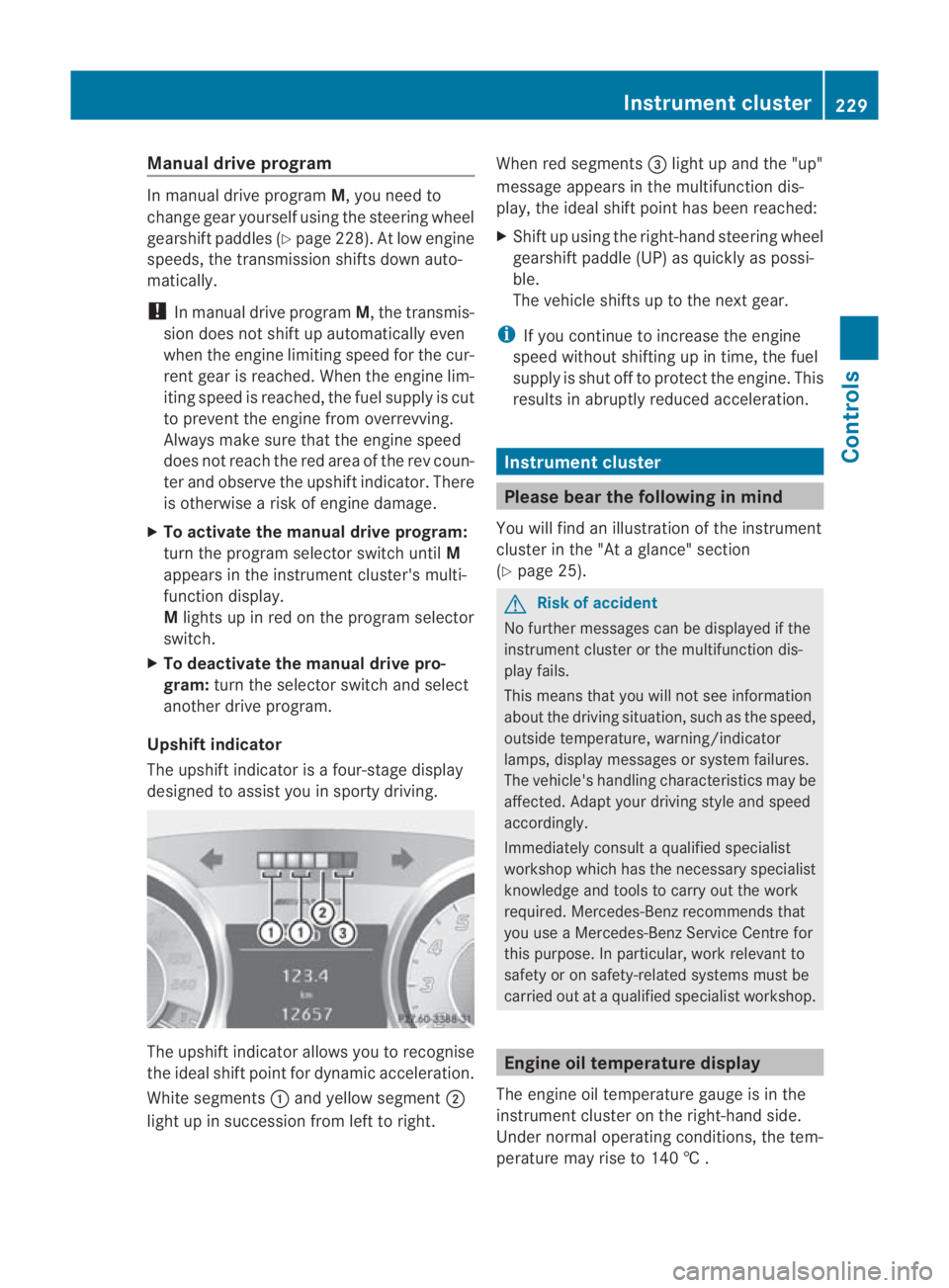
The upshift indicator is a four-stage display
designed to assist you in sporty driving. The upshift indicator allows you to recognise
the ideal shift point for dynamic acceleration.
White segments
0001and yellow segment 0002
light up in succession from left to right. When red segments
0015light up and the "up"
message appears in the multifunction dis-
play, the ideal shift point has been reached:
X Shift up using the right-hand steering wheel
gearshift paddle (UP) as quickly as possi-
ble.
The vehicle shifts up to the next gear.
i If you continue to increase the engine
speed without shifting up in time, the fuel
supply is shut off to protec tthe engine. This
results in abruptly reduced acceleration. Instrument cluster
Please bear the following in mind
You will find an illustration of the instrument
cluster in the "At a glance" section
(Y page 25). G
Risk of accident
No further messages can be displayed if the
instrument cluster or the multifunction dis-
play fails.
This means that you will not see information
about the driving situation, such as the speed,
outside temperature, warning/indicator
lamps, display messages or system failures.
The vehicle's handling characteristics may be
affected. Adapt your driving style and speed
accordingly.
Immediately consult a qualified specialist
workshop which has the necessary specialist
knowledge and tools to carry out the work
required. Mercedes-Ben zrecommends that
you use a Mercedes-Benz Service Centre for
this purpose. In particular, work relevant to
safety or on safety-related systems must be
carried out at a qualified specialist workshop. Engine oil temperature display
The engine oil temperature gauge is in the
instrument cluster on the right-hand side.
Under normal operating conditions, the tem-
perature may rise to 140 † . Instrument cluster
229Controls
BA 197 ECE RE 2010/6a; 1; 2, en-GB
sabbaeu Version: 3.0.3.6 2010-05-07T14:19:43+02:00 - Seite 229 Z
Page 241 of 361
Settings menu
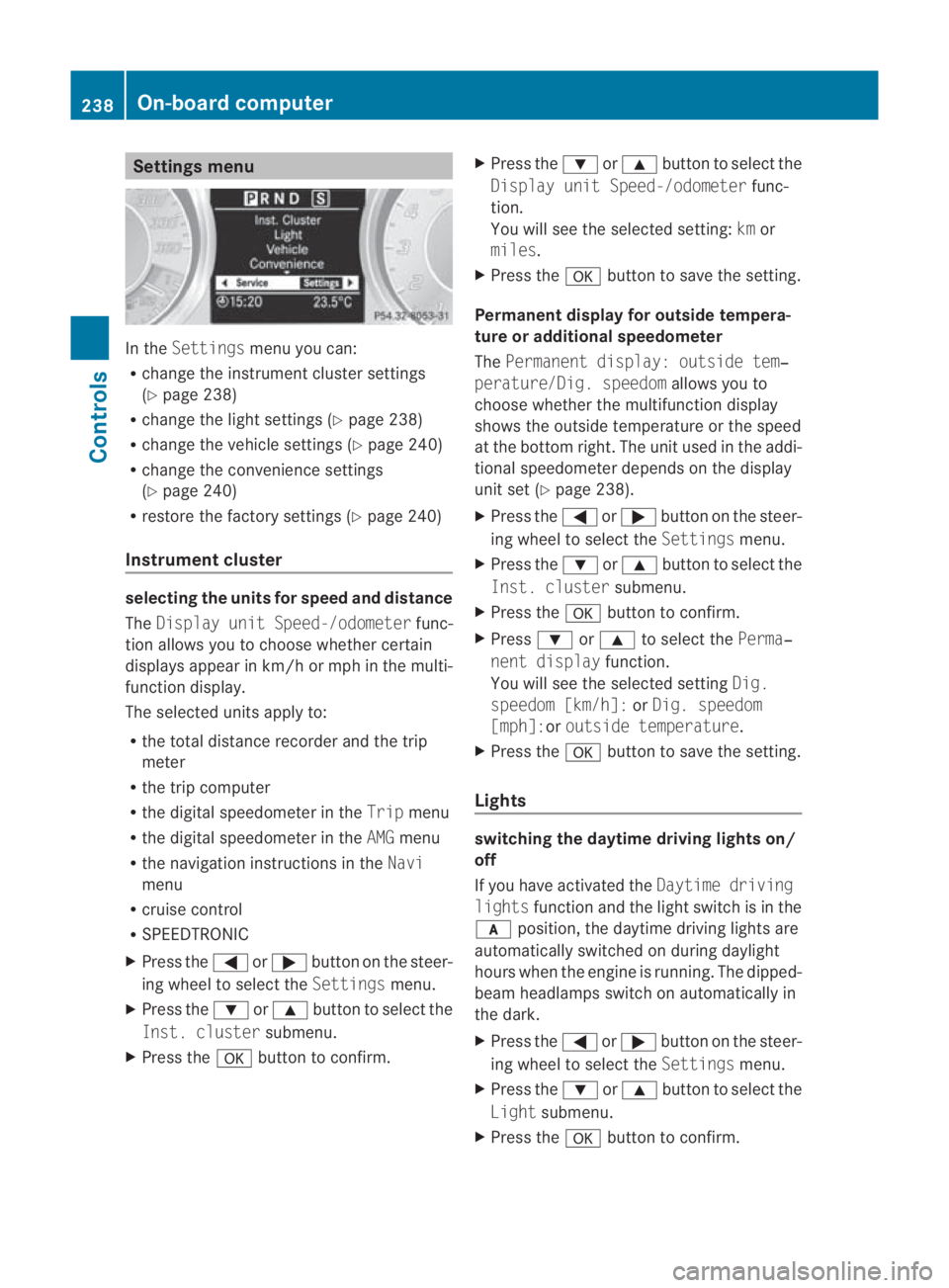
In the
Settings menu you can:
R change the instrument cluster settings
(Y page 238)
R change the light settings (Y page 238)
R change the vehicle settings (Y page 240)
R change the convenience settings
(Y page 240)
R restore the factory settings (Y page 240)
Instrument cluster selecting the units for speed and distance
The Display unit Speed-/odometer func-
tion allows you to choose whether certain
displays appear in km/h or mph in the multi-
function display.
The selected units apply to:
R the total distance recorder and the trip
meter
R the trip computer
R the digital speedometer in the Tripmenu
R the digital speedometer in the AMGmenu
R the navigation instructions in the Navi
menu
R cruise control
R SPEEDTRONIC
X Press the 0008or000E button on the steer-
ing wheel to select the Settingsmenu.
X Press the 000Cor000F button to select the
Inst. cluster submenu.
X Press the 000Abutton to confirm. X
Press the 000Cor000F button to select the
Display unit Speed-/odometer func-
tion.
You will see the selected setting: kmor
miles.
X Press the 000Abutton to save the setting.
Permanent display for outside tempera-
ture or additional speedometer
The Permanent display: outside tem‐
perature/Dig. speedom allows you to
choose whether the multifunction display
shows the outside temperature or the speed
at the bottom right. The unit used in the addi-
tional speedometer depends on the display
unit set (Y page 238).
X Press the 0008or000E button on the steer-
ing wheel to select the Settingsmenu.
X Press the 000Cor000F button to select the
Inst. cluster submenu.
X Press the 000Abutton to confirm.
X Press 000Cor000F to select the Perma‐
nent display function.
You will see the selected setting Dig.
speedom [km/h]: orDig. speedom
[mph]:or outside temperature.
X Press the 000Abutton to save the setting.
Lights switching the daytime driving lights on/
off
If you have activated the
Daytime driving
lights function and the light switch is in the
000D position, the daytime driving lights are
automatically switched on during daylight
hours when the engine is running. The dipped-
beam headlamps switch on automatically in
the dark.
X Press the 0008or000E button on the steer-
ing wheel to select the Settingsmenu.
X Press the 000Cor000F button to select the
Light submenu.
X Press the 000Abutton to confirm. 238
On-board computerControls
BA 197 ECE RE 2010/6a; 1; 2, en-GB
sabbaeu Version: 3.0.3.6 2010-05-07T14:19:43+02:00 - Seite 238
Page 242 of 361
X
Press the 000Cor000F button to select the
Daytime driving lamps function.
You will see the selected setting: onor
off.
X Press the 000Abutton to save the setting.
Setting brightness for display and
switches
You can use the Brightness display/
switches function to set the brightness of
the multifunction display and the switches in
the vehicle.
X Press the 0008or000E button on the steer-
ing wheel to select the Settingsmenu.
X Press the 000Cor000F button to select the
Light submenu.
X Press the 000Abutton to confirm.
X Press the 000Cor000F button to select the
Brightness Display/switches func-
tion.
You see the selected setting Levelwith a
value of between 0 and 100.
X Press the 000Abutton to save the setting.
X Press 000Cor000F to increase or decrease
the brightness.
Activating or deactivating the surround
lighting and exterior lighting delayed
switch-off
The Surround lighting function allows you
to set whether the exterior lighting should
come on when it is dark:
R for 40 seconds after unlocking the vehicle
with the key
The exterior lighting switches off when you
open the driver’s door.
R for 15 seconds after switching off the
engine and closing the doors
If the engine is switched off and then none
of the doors are opened, or if an open door
is not closed, the exterior lighting goes out
after 60 seconds.
If you activate the Surround lighting func-
tion, the following light up: R
the side lamps
R the dipped-beam headlamps
R the licence plate lighting
X Press the 0008or000E button on the steer-
ing wheel to select the Settingsmenu.
X Press the 000Cor000F button to select the
LIGHT submenu.
X Press the 000Abutton to confirm.
X Press the 000Cor000F button to select the
Surround lighting: function.
You will see the selected setting: onor
off.
X Press the 000Abutton to save the setting.
Deactivating the delayed switch-off tempora-
rily:
X Select key position 0with the Start/Stop
button before leaving the vehicle.
X Select key position 2and then key position
0 again with the Start/Stop button
The delayed switch-off is deactivated.
Delayed switch-off is reactivated the next
time you start the engine.
Activating/deactivating the interior light-
ing delayed switch-off
If you select key position 0with the Start/
Stop button when the Light. delayfunc-
tion is activated, the interior lighting lights up
for approximately 20 seconds if it is dark.
X Press the 0008or000E button on the steer-
ing wheel to select the Settingsmenu.
X Press the 000Cor000F button to select the
LIGHT submenu.
X Press the 000Abutton to confirm.
X Press the 000Cor000F button to select the
Interior lighting delay sw. off:
function.
You will see the selected setting: onor
off.
X Press the 000Abutton to save the setting. On-board computer
239Controls
BA 197 ECE RE 2010/6a; 1; 2, en-GB
sabbaeu Version: 3.0.3.6 2010-05-07T14:19:43+02:00 - Seite 239 Z
Page 243 of 361
Vehicle
Set permanent SPEEDTRONIC with
Limit
speed (winter tyres):(Y page 247).
Acoustic confirmation when locking and
unlocking the vehicle
You can use the Acoustic Lock function to
determine whethe rthere is an acoustic con-
firmation when locking and unlocking the
vehicle.
X Press the 0008or000E button on the steer-
ing wheel to select the Settingsmenu.
X Press the 000Cor000F button to select the
VEHICLE submenu.
X Press the 000Abutton to confirm.
X Press 000Cor000F to select the Acous‐
tic Lock function.
You will see the selected setting: onor
off.
X Press the 000Abutton to save the setting.
Convenience Activating/deactivating the EASY-
ENTRY/EXIT feature*
You can use the Easy Entry/Exit function
to activate or deactivate the easy-entry/exit
feature (Y page 207). G
Risk of injury
The steering wheel moves when the EASY-
ENTRY/EXIT feature is active. There is a risk
of occupants becoming trapped. Before acti-
vating the EASY-ENTRY/EXIT feature, make
sure that nobody can become trapped.
Do not leave children unsupervised in the
vehicle, even if they are secured in a child
restraint system. The children could open the
driver's door and thereby unintentionally acti-
vate the EASY-ENTRY/EXIT feature and
become trapped. X
Press the 0008or000E button on the steer-
ing wheel to select the Settingsmenu.
X Press the 000Cor000F button to select the
CONVENIENCE submenu.
X Press the 000Abutton to confirm.
X Press the 000Cor000F button to select the
Easy Entry/Exit feature.
You will see the selected setting: onor
off.
X Press the 000Abutton to save the setting.
Switching the fold in mirrors when lock-
ing* function on/off
If you switch on the Auto. fold infunction,
the exterior mirrors fold in when you lock the
vehicle. When you unlock the vehicle and then
open the driver's or front-passenger door, the
exterior mirrors fold out again.
If you have switched the function on and you
fold the exterior mirrors in using the button
on the door (Y page 208), they will not fold
out automatically .The exterior mirrors can
then only be folded out using the button on
the door.
X Press the 0008or000E button on the steer-
ing wheel to select the Settingsmenu.
X Press the 000Cor000F button to select the
CONVENIENCE submenu.
X Press the 000Abutton to confirm.
X Press the 000Cor000F button to select the
Auto. fold in function.
You will see the selected setting: onor
off.
X Press the 000Abutton to save the setting.
restoring the factory settings For safety reasons, not all functions are reset:
the
Limit Speed (winter tyres) function
in permanent SPEEDTRONIC can only be set
in the VEHICLE submenu. If you want to reset
the Daytime driving lights function in
the Light submenu, you have to select key
position 1with the Start/Stop button. 240
On-board computerControls
*o
ptional
BA 197 ECE RE 2010/6a; 1; 2, en-GB
sabbaeu
Version: 3.0.3.6 2010-05-07T14:19:43+02:00 - Seite 240
Page 248 of 361
Setting
aspeed X
Press the cruise control lever to the pres-
sure point up 0001for a highe rspeed or
down 0014for a lower speed.
X Keep the cruise control lever pressed until
the desired speed is reached.
X Release the cruise control lever.
The new speed is stored.
i Cruise control is not deactivated if you
depress the accelerator pedal. For exam-
ple, if you accelerate briefly to overtake,
cruise control adjusts the vehicle's speed
to the last speed stored after you have fin-
ished overtaking.
Making adjustments in 1 km/h incre-
ments X
Press the cruise control lever to the pres-
sure point, up 0001for a higher speed or
down 0014for a lower speed.
The last speed stored is increased or
reduced.
Making adjustments in 10 km/h incre-
ments X
Briefly press the cruise control lever
beyond the pressure point, up 0001for a
higher speed or down 0014for a lower speed.
The last speed stored is increased or
reduced.
Deactivating cruise control There are several ways to deactivate cruise
control:
X
Briefly press the cruise control lever for-
wards 0013.
or
X Brake or
X
Briefly press the cruise control lever in the
direction of arrow 0012.
Variable SPEEDTRONIC is selected. LIM
indicator lamp 0002in the cruise contro llever
lights up.
Cruise control is automatically deactivated if:
R you press the electric parking brake han-
dle.
R you are driving at less than 30 km/h.
R ESP ®
intervenes or you deactivate ESP ®
.
R you shift the transmission to Nwhile the
vehicle is in motion.
If cruise control is deactivated, you will hear
a warning tone. The “Cruise control
off” message is displayed in the multifunc-
tion display for approximately five seconds.
i The last speed stored is cleared when you
switch off the engine. SPEEDTRONIC
SPEEDTRONIC brakes automatically so that
you do not exceed the set speed. On long and
steep downhill gradients, especially if the
vehicle is laden, you must select shift range
1, 2or 3in good time. By doing so, you will
make use of the brakin geffect of the engine,
which relieves the load on the brake system
and prevents the brakes from overheating
and wearing too quickly. If you need addi-
tional braking, depress the brake pedal
repeatedly rather than continuously. G
Risk of accident
Never depress the brake peda lcontinuously
while the vehicle is in motion, e.g. never cause
the brakes to rub by applying constant slight
pedal pressure. This causes the brake system
to overheat, increases the braking distance
and can lead to the brakes failing completely. G
Risk of accident
Do not change down for additional engine
braking on a slippery road surface. This could Driving systems
245Controls
BA 197 ECE RE 2010/6a; 1; 2, en-GB
sabbaeu Version: 3.0.3.6 2010-05-07T14:19:43+02:00 - Seite 245 Z
Page 249 of 361
cause the drive wheels to los
etheir grip and
the vehicle could skid.
You can set a variable or permanent limit
speed:
R variable for speed limits, e.g. in built-up
areas
R permanent for long-term speed restric-
tions, e.g. when driving with winter tyres
fitted (Y page 247) G
Risk of accident
Speedtronic is only an aid designed to assist
driving. You are responsible for the vehicle's
speed and for braking in good time.
i The speed indicated in the speedometer
may differ slightly from the limit speed
stored.
Variable SPEEDTRONIC You can operate cruise control and variable
SPEEDTRONIC with the cruise control lever.
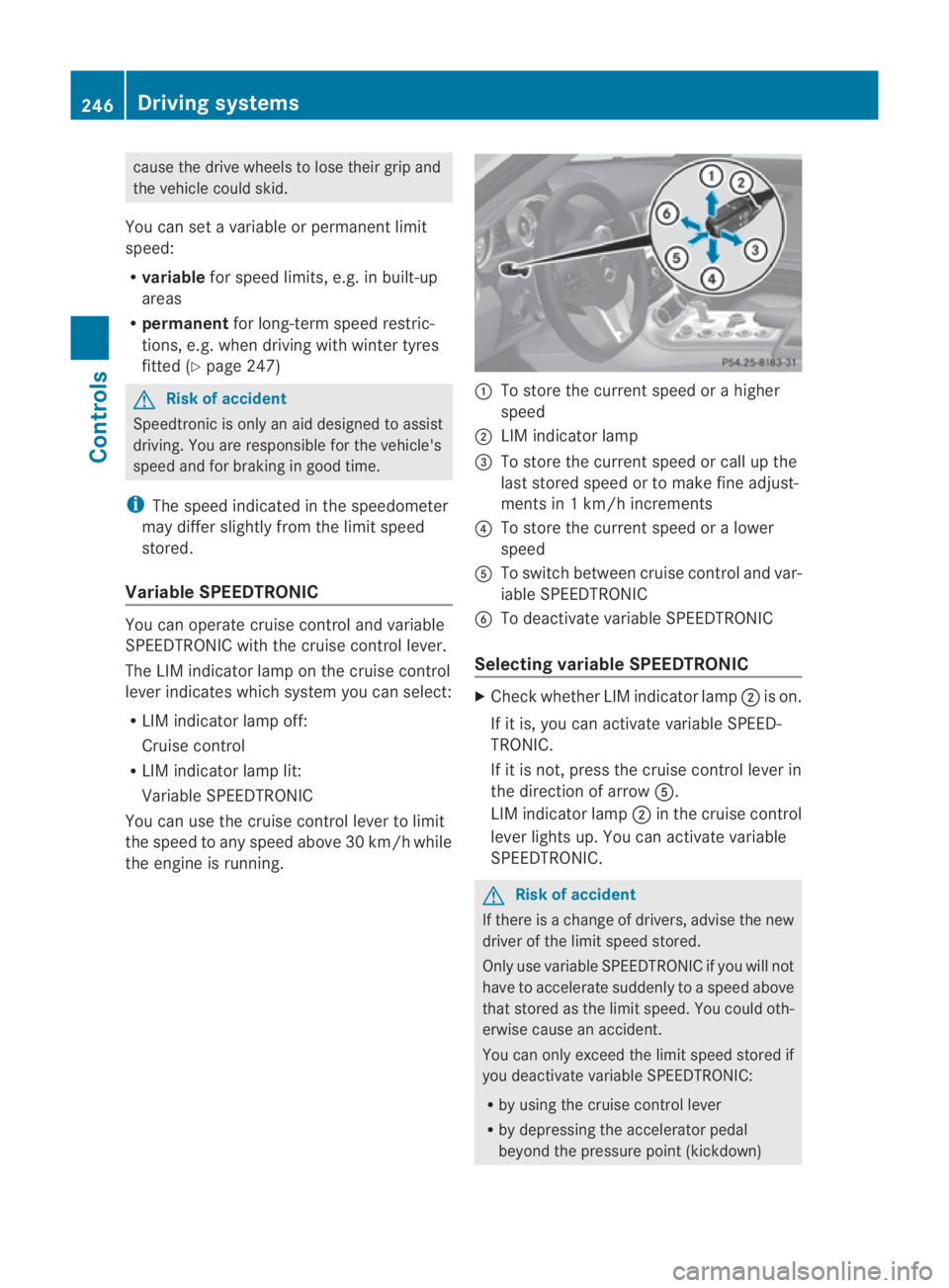
The LIM indicator lamp on the cruise control
lever indicates which system you can select:
R LIM indicator lamp off:
Cruise control
R LIM indicator lamp lit:
Variable SPEEDTRONIC
You can use the cruise control lever to limit
the speed to any speed above 30 km/h while
the engine is running. 0001
To store the current speed or a higher
speed
0002 LIM indicator lamp
0015 To store the current speed or call up the
last stored speed or to make fine adjust-
ments in 1 km/h increments
0014 To store the current speed or a lower
speed
0012 To switch between cruise control and var-
iable SPEEDTRONIC
0013 To deactivate variable SPEEDTRONIC
Selecting variable SPEEDTRONIC X
Check whether LIM indicator lamp 0002is on.
If it is, you can activate variable SPEED-
TRONIC.
If it is not, press the cruise control lever in
the direction of arrow 0012.
LIM indicator lamp 0002in the cruise control
lever lights up. You can activate variable
SPEEDTRONIC. G
Risk of accident
If there is a change of drivers, advise the new
driver of the limit speed stored.
Only use variable SPEEDTRONIC if you will not
have to accelerate suddenly to a speed above
that stored as the limit speed. You could oth-
erwise cause an accident.
You can only exceed the limit speed stored if
you deactivate variable SPEEDTRONIC:
R by using the cruise control lever
R by depressing the accelerator pedal
beyond the pressure point (kickdown) 246
Driving systemsControls
BA 197 ECE RE 2010/6a; 1; 2, en-GB
sabbaeu
Version: 3.0.3.6 2010-05-07T14:19:43+02:00 - Seite 246
Page 251 of 361
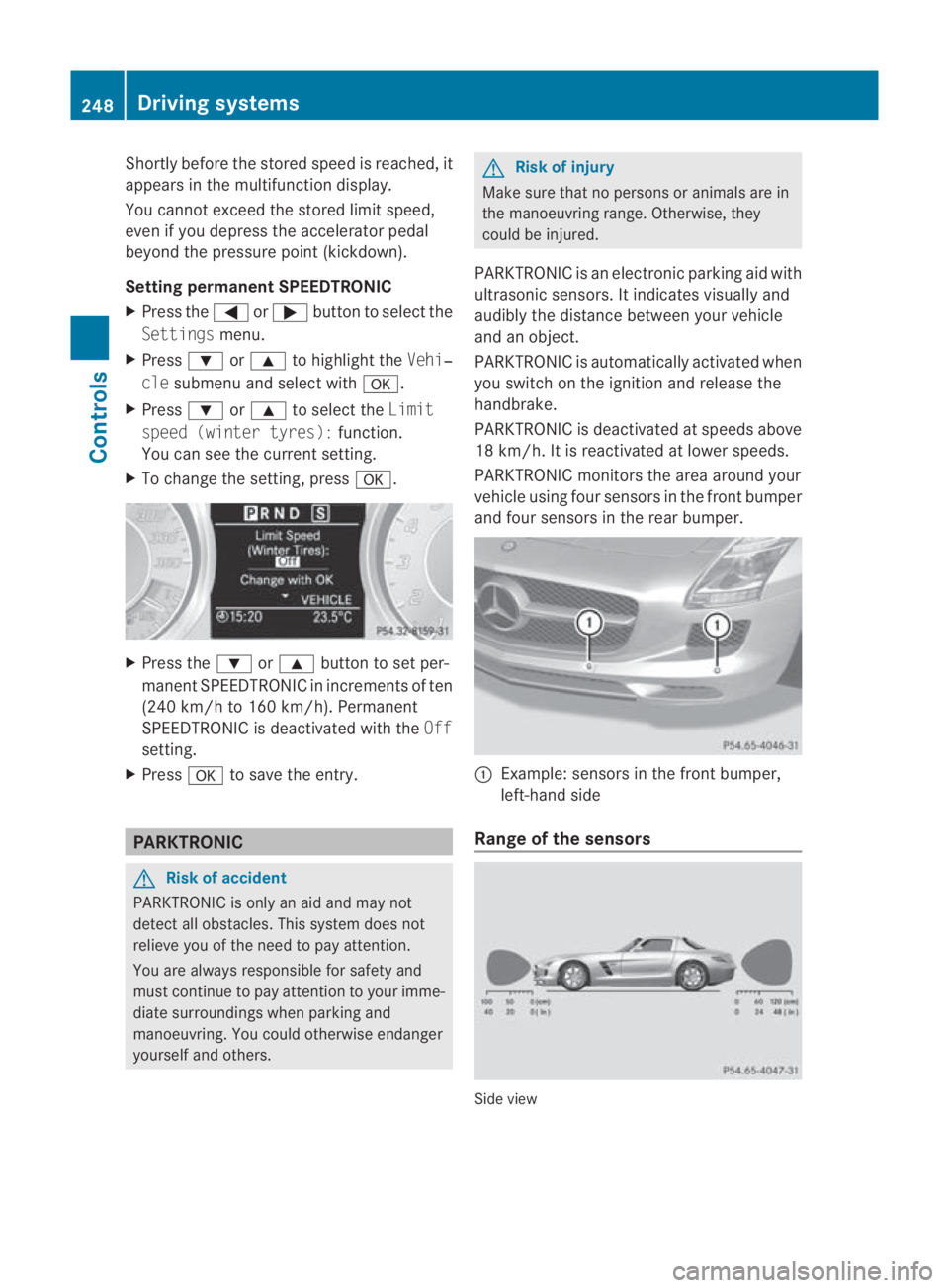
Shortly before the store
dspeed is reached, it
appears in the multifunction display.
You cannot exceed the stored limit speed,
even if you depress the accelerator pedal
beyond the pressure point (kickdown).
Setting permanent SPEEDTRONIC
X Press the 0008or000E button to select the
Settings menu.
X Press 000Cor000F to highlight the Vehi‐
cle submenu and select with 000A.
X Press 000Cor000F to select the Limit
speed (winter tyres): function.
You can see the current setting.
X To change the setting, press 000A.X
Press the 000Cor000F button to set per-
manent SPEEDTRONIC in increment sof ten
(240 km/h to 160 km/h). Permanent
SPEEDTRONIC is deactivated with the Off
setting.
X Press 000Ato save the entry. PARKTRONIC
G
Risk of accident
PARKTRONIC is only an aid and may not
detect all obstacles. This syste mdoes not
relieve you of the need to pay attention.
You are always responsible for safety and
must continue to pay attention to your imme-
diate surroundings when parking and
manoeuvring. You could otherwise endanger
yourself and others. G
Risk of injury
Make sure that no persons or animals are in
the manoeuvring range. Otherwise, they
could be injured.
PARKTRONIC is an electronic parking aid with
ultrasonic sensors. It indicates visually and
audibly the distance between your vehicle
and an object.
PARKTRONIC is automatically activated when
you switch on the ignition and release the
handbrake.
PARKTRONIC is deactivated at speeds above
18 km/h. It is reactivated at lower speeds.
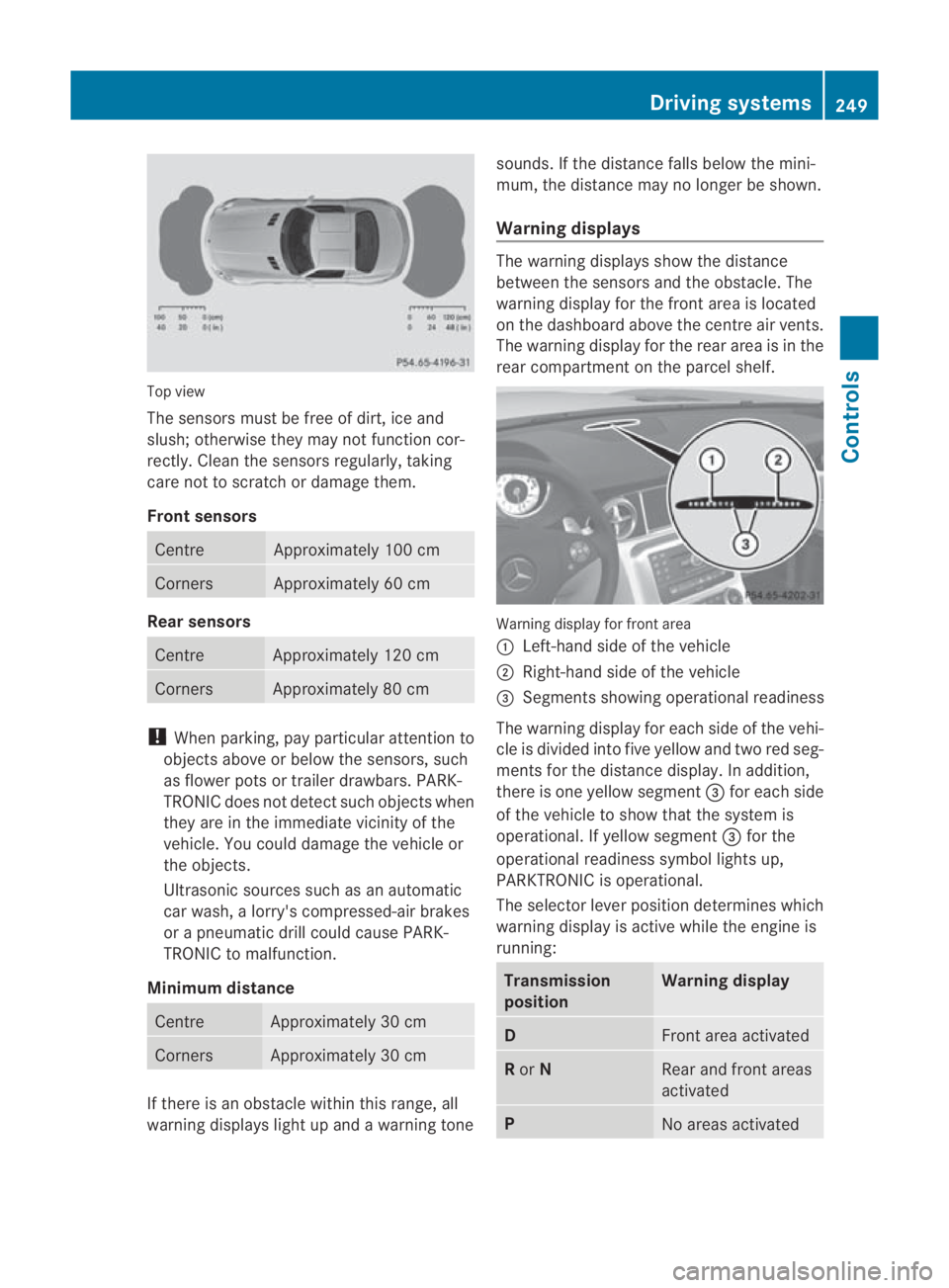
PARKTRONIC monitors the area around your
vehicle using four sensors in the front bumper
and four sensors in the rear bumper. 0001
Example: sensors in the front bumper,
left-hand side
Range of the sensors Side view248
Driving systemsControls
BA 197 ECE RE 2010/6a; 1; 2, en-GB
sabbaeu
Version: 3.0.3.6 2010-05-07T14:19:43+02:00 - Seite 248
Page 252 of 361
Top view
The sensors must be free of dirt, ice and
slush; otherwise they may not function cor-
rectly. Clean the sensors regularly, taking
care not to scratch or damage them.
Front sensors Centre Approximately 100 cm
Corners Approximately 60 cm
Rear sensors
Centre Approximately 120 cm
Corners Approximately 80 cm
!
When parking, pay particular attention to
objects above or below the sensors, such
as flower pots or trailer drawbars. PARK-
TRONIC does not detect such objects when
they are in the immediate vicinity of the
vehicle. You could damage the vehicle or
the objects.
Ultrasonic sources such as an automatic
car wash, a lorry's compressed-air brakes
or a pneumatic drill could cause PARK-
TRONIC to malfunction.
Minimum distance Centre Approximately 30 cm
Corners Approximately 30 cm
If there is an obstacle within this range, all
warning displays light up and a warning tone sounds. If the distance falls below the mini-
mum, the distance may no longer be shown.
Warning displays The warning displays show the distance
between the sensors and the obstacle. The
warning display for the front area is located
on the dashboard above the centre air vents.
The warning display for the rear area is in the
rear compartment on the parcel shelf.
Warning display for front area
0001
Left-hand side of the vehicle
0002 Right-hand side of the vehicle
0015 Segments showing operational readiness
The warning display for each side of the vehi-
cle is divided into five yellow and two red seg-
ments for the distance display .Inaddition,
there is one yellow segment 0015for each side
of the vehicle to show that the system is
operational. If yellow segment 0015for the
operational readiness symbol lights up,
PARKTRONIC is operational.
The selector lever position determines which
warning display is active while the engine is
running: Transmission
position Warning display
D
Front area activated
R
or N Rear and front areas
activated
P
No areas activatedDriving systems
249Controls
BA 197 ECE RE 2010/6a; 1; 2, en-GB
sabbaeu Version: 3.0.3.6 2010-05-07T14:19:43+02:00 - Seite 249 Z