clock MERCEDES-BENZ SPRINTER 2006 User Guide
[x] Cancel search | Manufacturer: MERCEDES-BENZ, Model Year: 2006, Model line: SPRINTER, Model: MERCEDES-BENZ SPRINTER 2006Pages: 2305, PDF Size: 48.12 MB
Page 52 of 2305
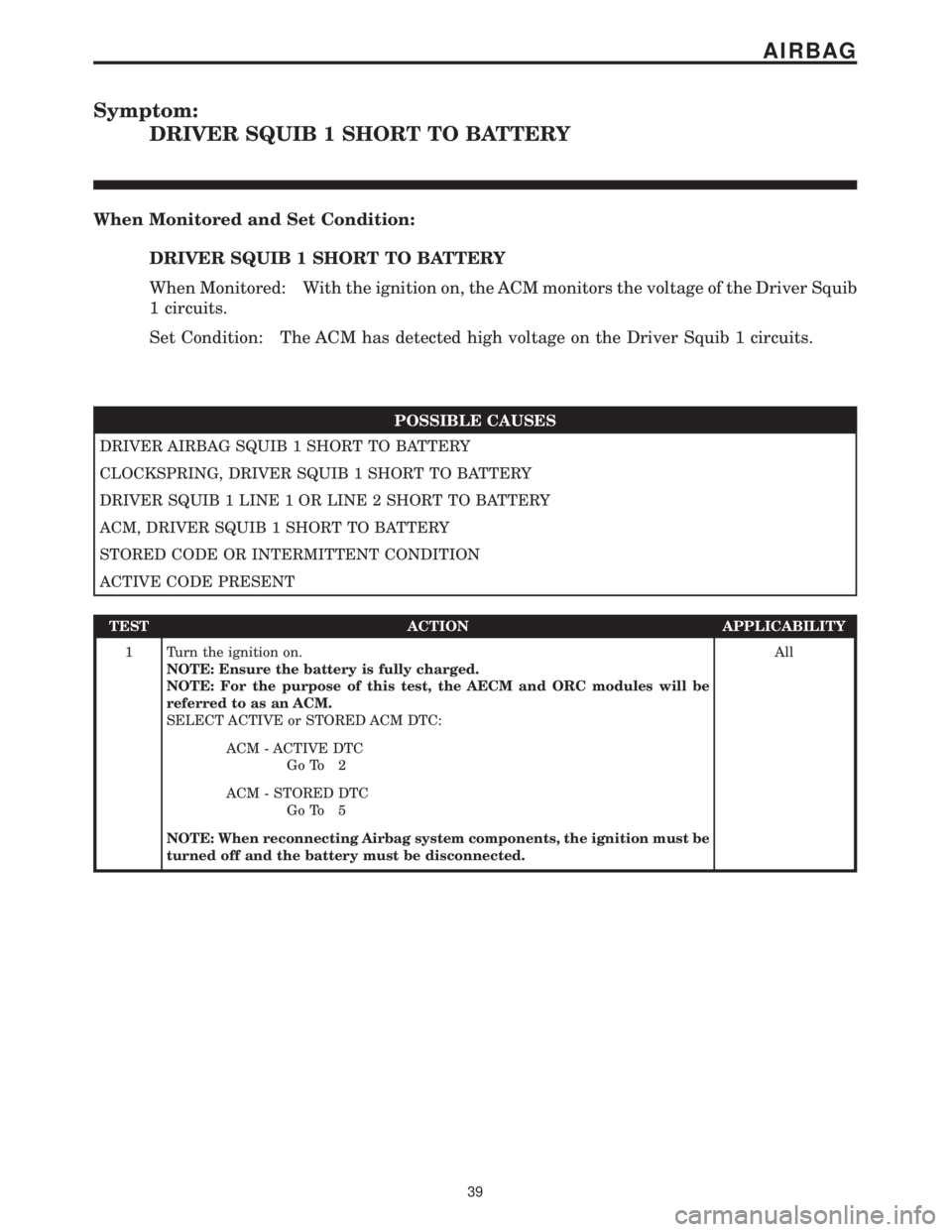
Symptom:
DRIVER SQUIB 1 SHORT TO BATTERY
When Monitored and Set Condition:
DRIVER SQUIB 1 SHORT TO BATTERY
When Monitored: With the ignition on, the ACM monitors the voltage of the Driver Squib
1 circuits.
Set Condition: The ACM has detected high voltage on the Driver Squib 1 circuits.
POSSIBLE CAUSES
DRIVER AIRBAG SQUIB 1 SHORT TO BATTERY
CLOCKSPRING, DRIVER SQUIB 1 SHORT TO BATTERY
DRIVER SQUIB 1 LINE 1 OR LINE 2 SHORT TO BATTERY
ACM, DRIVER SQUIB 1 SHORT TO BATTERY
STORED CODE OR INTERMITTENT CONDITION
ACTIVE CODE PRESENT
TEST ACTION APPLICABILITY
1 Turn the ignition on.
NOTE: Ensure the battery is fully charged.
NOTE: For the purpose of this test, the AECM and ORC modules will be
referred to as an ACM.
SELECT ACTIVE or STORED ACM DTC:All
ACM - ACTIVE DTC
Go To 2
ACM - STORED DTC
Go To 5
NOTE: When reconnecting Airbag system components, the ignition must be
turned off and the battery must be disconnected.
39
AIRBAG
Page 53 of 2305
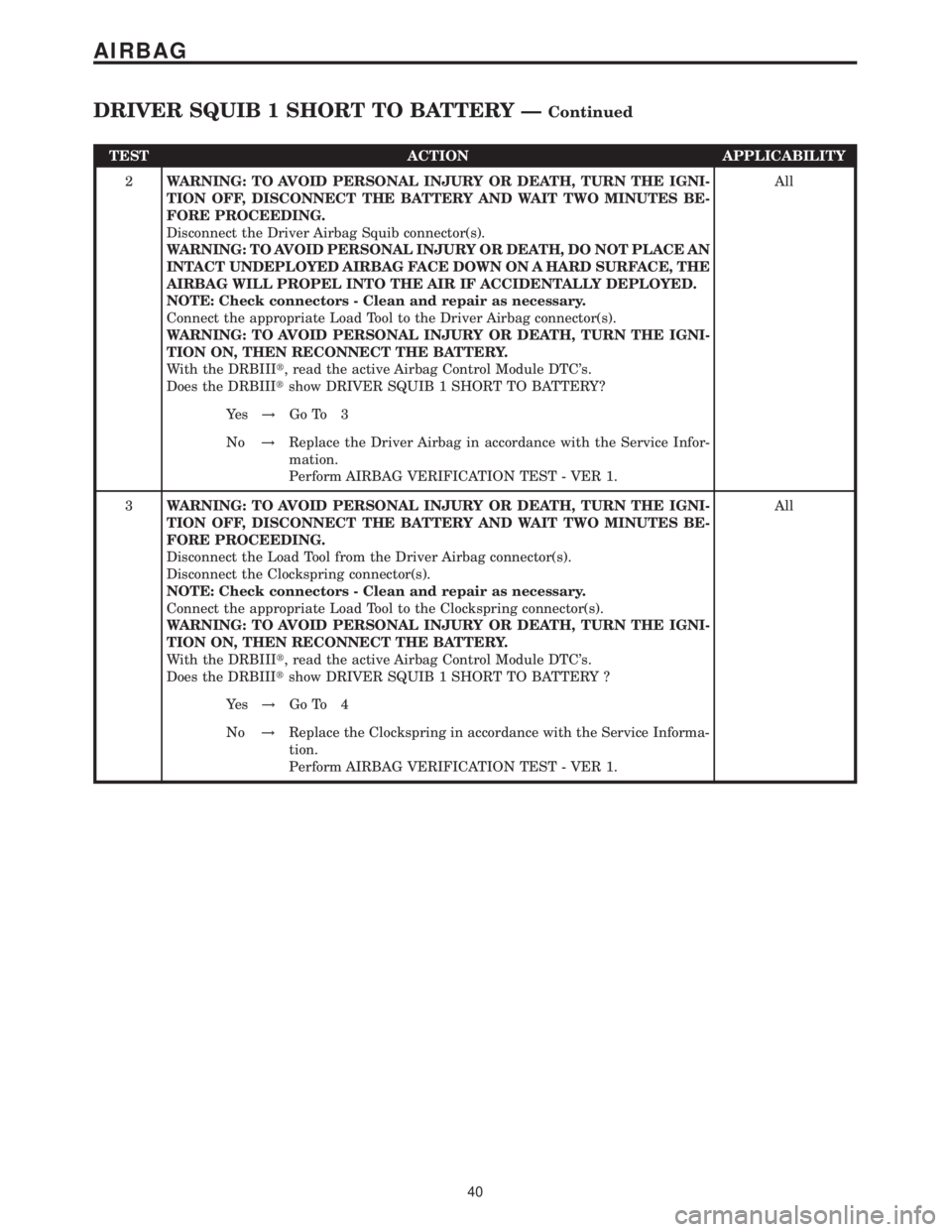
TEST ACTION APPLICABILITY
2WARNING: TO AVOID PERSONAL INJURY OR DEATH, TURN THE IGNI-
TION OFF, DISCONNECT THE BATTERY AND WAIT TWO MINUTES BE-
FORE PROCEEDING.
Disconnect the Driver Airbag Squib connector(s).
WARNING: TO AVOID PERSONAL INJURY OR DEATH, DO NOT PLACE AN
INTACT UNDEPLOYED AIRBAG FACE DOWN ON A HARD SURFACE, THE
AIRBAG WILL PROPEL INTO THE AIR IF ACCIDENTALLY DEPLOYED.
NOTE: Check connectors - Clean and repair as necessary.
Connect the appropriate Load Tool to the Driver Airbag connector(s).
WARNING: TO AVOID PERSONAL INJURY OR DEATH, TURN THE IGNI-
TION ON, THEN RECONNECT THE BATTERY.
With the DRBIIIt, read the active Airbag Control Module DTC's.
Does the DRBIIItshow DRIVER SQUIB 1 SHORT TO BATTERY?All
Ye s!Go To 3
No!Replace the Driver Airbag in accordance with the Service Infor-
mation.
Perform AIRBAG VERIFICATION TEST - VER 1.
3WARNING: TO AVOID PERSONAL INJURY OR DEATH, TURN THE IGNI-
TION OFF, DISCONNECT THE BATTERY AND WAIT TWO MINUTES BE-
FORE PROCEEDING.
Disconnect the Load Tool from the Driver Airbag connector(s).
Disconnect the Clockspring connector(s).
NOTE: Check connectors - Clean and repair as necessary.
Connect the appropriate Load Tool to the Clockspring connector(s).
WARNING: TO AVOID PERSONAL INJURY OR DEATH, TURN THE IGNI-
TION ON, THEN RECONNECT THE BATTERY.
With the DRBIIIt, read the active Airbag Control Module DTC's.
Does the DRBIIItshow DRIVER SQUIB 1 SHORT TO BATTERY ?All
Ye s!Go To 4
No!Replace the Clockspring in accordance with the Service Informa-
tion.
Perform AIRBAG VERIFICATION TEST - VER 1.
40
AIRBAG
DRIVER SQUIB 1 SHORT TO BATTERY ÐContinued
Page 54 of 2305
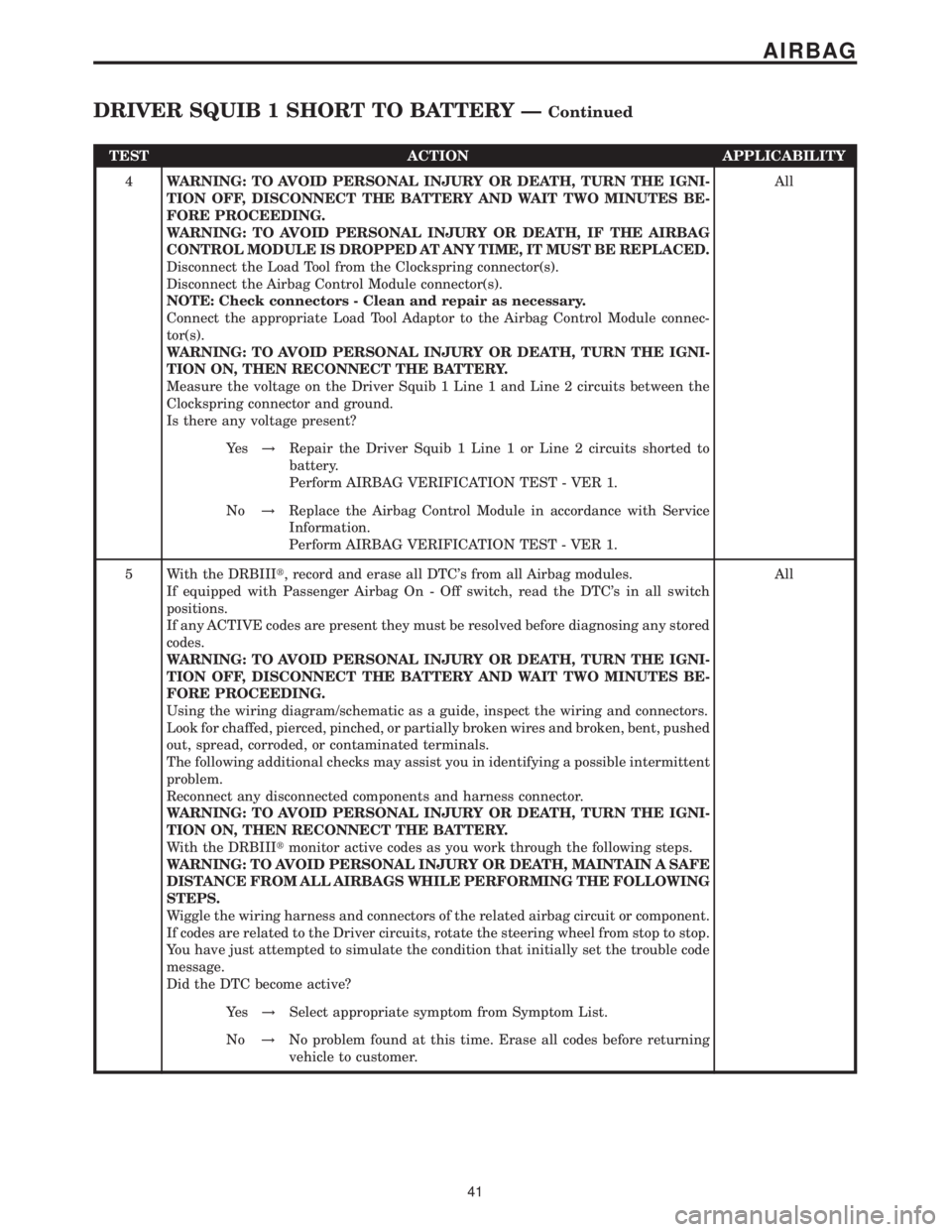
TEST ACTION APPLICABILITY
4WARNING: TO AVOID PERSONAL INJURY OR DEATH, TURN THE IGNI-
TION OFF, DISCONNECT THE BATTERY AND WAIT TWO MINUTES BE-
FORE PROCEEDING.
WARNING: TO AVOID PERSONAL INJURY OR DEATH, IF THE AIRBAG
CONTROL MODULE IS DROPPED AT ANY TIME, IT MUST BE REPLACED.
Disconnect the Load Tool from the Clockspring connector(s).
Disconnect the Airbag Control Module connector(s).
NOTE: Check connectors - Clean and repair as necessary.
Connect the appropriate Load Tool Adaptor to the Airbag Control Module connec-
tor(s).
WARNING: TO AVOID PERSONAL INJURY OR DEATH, TURN THE IGNI-
TION ON, THEN RECONNECT THE BATTERY.
Measure the voltage on the Driver Squib 1 Line 1 and Line 2 circuits between the
Clockspring connector and ground.
Is there any voltage present?All
Ye s!Repair the Driver Squib 1 Line 1 or Line 2 circuits shorted to
battery.
Perform AIRBAG VERIFICATION TEST - VER 1.
No!Replace the Airbag Control Module in accordance with Service
Information.
Perform AIRBAG VERIFICATION TEST - VER 1.
5 With the DRBIIIt, record and erase all DTC's from all Airbag modules.
If equipped with Passenger Airbag On - Off switch, read the DTC's in all switch
positions.
If any ACTIVE codes are present they must be resolved before diagnosing any stored
codes.
WARNING: TO AVOID PERSONAL INJURY OR DEATH, TURN THE IGNI-
TION OFF, DISCONNECT THE BATTERY AND WAIT TWO MINUTES BE-
FORE PROCEEDING.
Using the wiring diagram/schematic as a guide, inspect the wiring and connectors.
Look for chaffed, pierced, pinched, or partially broken wires and broken, bent, pushed
out, spread, corroded, or contaminated terminals.
The following additional checks may assist you in identifying a possible intermittent
problem.
Reconnect any disconnected components and harness connector.
WARNING: TO AVOID PERSONAL INJURY OR DEATH, TURN THE IGNI-
TION ON, THEN RECONNECT THE BATTERY.
With the DRBIIItmonitor active codes as you work through the following steps.
WARNING: TO AVOID PERSONAL INJURY OR DEATH, MAINTAIN A SAFE
DISTANCE FROM ALL AIRBAGS WHILE PERFORMING THE FOLLOWING
STEPS.
Wiggle the wiring harness and connectors of the related airbag circuit or component.
If codes are related to the Driver circuits, rotate the steering wheel from stop to stop.
You have just attempted to simulate the condition that initially set the trouble code
message.
Did the DTC become active?All
Ye s!Select appropriate symptom from Symptom List.
No!No problem found at this time. Erase all codes before returning
vehicle to customer.
41
AIRBAG
DRIVER SQUIB 1 SHORT TO BATTERY ÐContinued
Page 55 of 2305
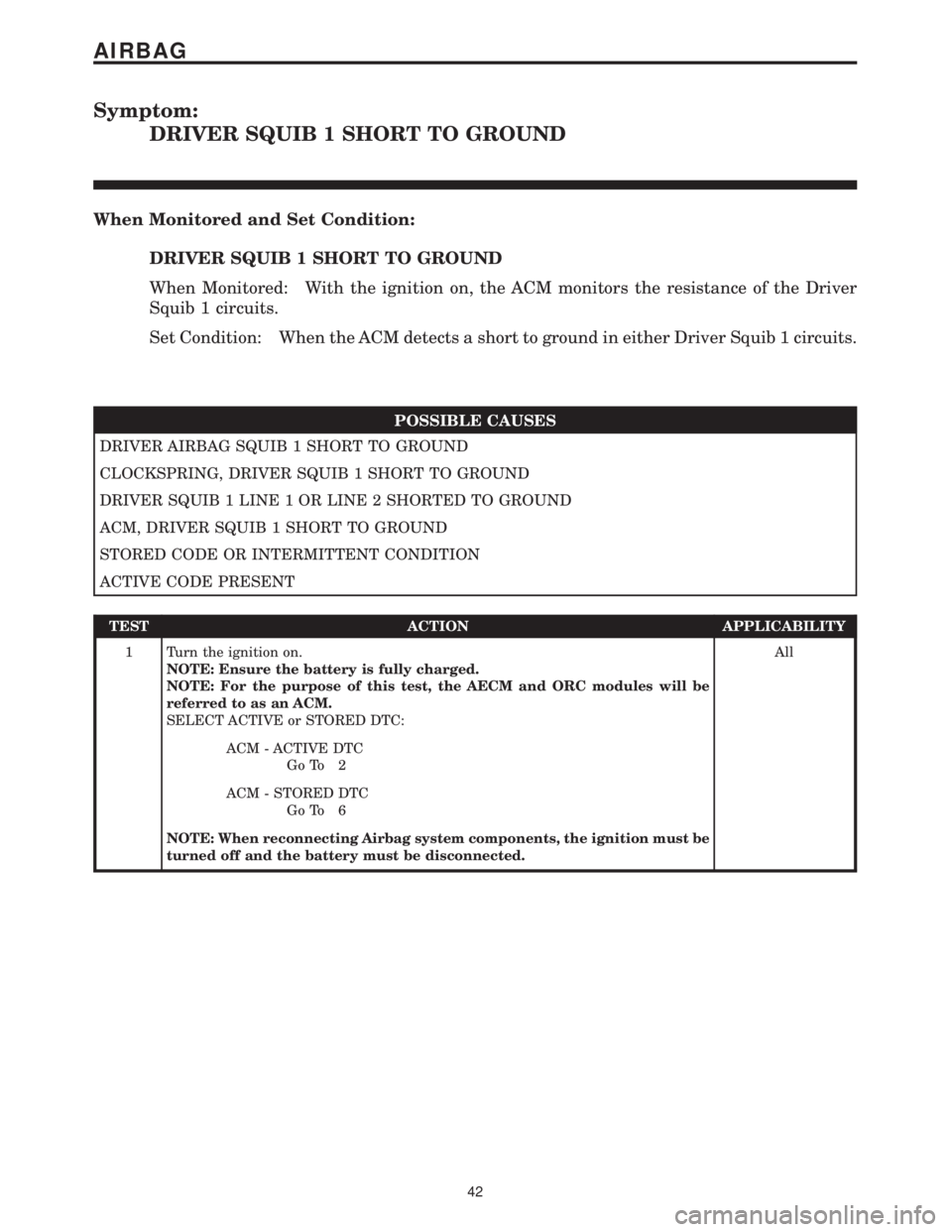
Symptom:
DRIVER SQUIB 1 SHORT TO GROUND
When Monitored and Set Condition:
DRIVER SQUIB 1 SHORT TO GROUND
When Monitored: With the ignition on, the ACM monitors the resistance of the Driver
Squib 1 circuits.
Set Condition: When the ACM detects a short to ground in either Driver Squib 1 circuits.
POSSIBLE CAUSES
DRIVER AIRBAG SQUIB 1 SHORT TO GROUND
CLOCKSPRING, DRIVER SQUIB 1 SHORT TO GROUND
DRIVER SQUIB 1 LINE 1 OR LINE 2 SHORTED TO GROUND
ACM, DRIVER SQUIB 1 SHORT TO GROUND
STORED CODE OR INTERMITTENT CONDITION
ACTIVE CODE PRESENT
TEST ACTION APPLICABILITY
1 Turn the ignition on.
NOTE: Ensure the battery is fully charged.
NOTE: For the purpose of this test, the AECM and ORC modules will be
referred to as an ACM.
SELECT ACTIVE or STORED DTC:All
ACM - ACTIVE DTC
Go To 2
ACM - STORED DTC
Go To 6
NOTE: When reconnecting Airbag system components, the ignition must be
turned off and the battery must be disconnected.
42
AIRBAG
Page 56 of 2305
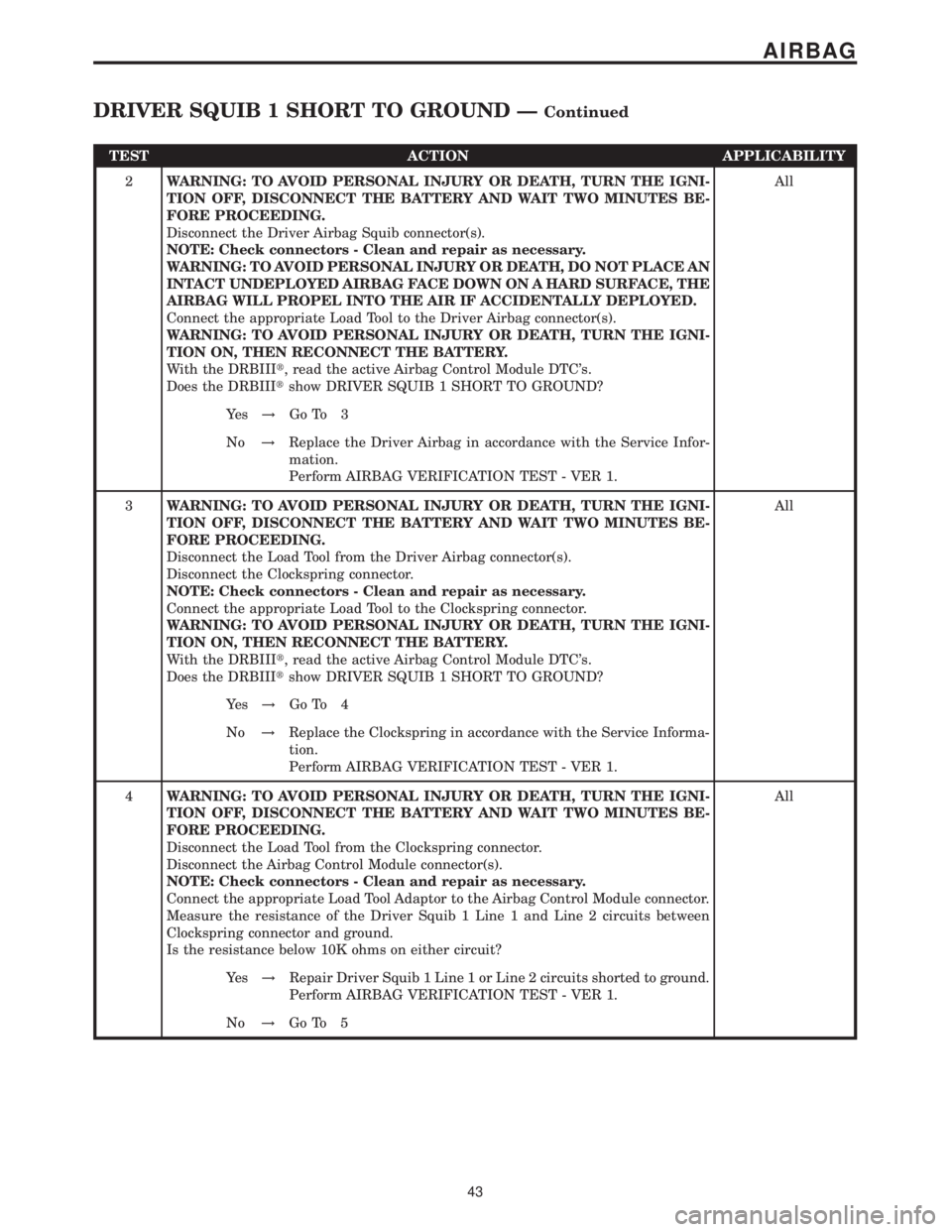
TEST ACTION APPLICABILITY
2WARNING: TO AVOID PERSONAL INJURY OR DEATH, TURN THE IGNI-
TION OFF, DISCONNECT THE BATTERY AND WAIT TWO MINUTES BE-
FORE PROCEEDING.
Disconnect the Driver Airbag Squib connector(s).
NOTE: Check connectors - Clean and repair as necessary.
WARNING: TO AVOID PERSONAL INJURY OR DEATH, DO NOT PLACE AN
INTACT UNDEPLOYED AIRBAG FACE DOWN ON A HARD SURFACE, THE
AIRBAG WILL PROPEL INTO THE AIR IF ACCIDENTALLY DEPLOYED.
Connect the appropriate Load Tool to the Driver Airbag connector(s).
WARNING: TO AVOID PERSONAL INJURY OR DEATH, TURN THE IGNI-
TION ON, THEN RECONNECT THE BATTERY.
With the DRBIIIt, read the active Airbag Control Module DTC's.
Does the DRBIIItshow DRIVER SQUIB 1 SHORT TO GROUND?All
Ye s!Go To 3
No!Replace the Driver Airbag in accordance with the Service Infor-
mation.
Perform AIRBAG VERIFICATION TEST - VER 1.
3WARNING: TO AVOID PERSONAL INJURY OR DEATH, TURN THE IGNI-
TION OFF, DISCONNECT THE BATTERY AND WAIT TWO MINUTES BE-
FORE PROCEEDING.
Disconnect the Load Tool from the Driver Airbag connector(s).
Disconnect the Clockspring connector.
NOTE: Check connectors - Clean and repair as necessary.
Connect the appropriate Load Tool to the Clockspring connector.
WARNING: TO AVOID PERSONAL INJURY OR DEATH, TURN THE IGNI-
TION ON, THEN RECONNECT THE BATTERY.
With the DRBIIIt, read the active Airbag Control Module DTC's.
Does the DRBIIItshow DRIVER SQUIB 1 SHORT TO GROUND?All
Ye s!Go To 4
No!Replace the Clockspring in accordance with the Service Informa-
tion.
Perform AIRBAG VERIFICATION TEST - VER 1.
4WARNING: TO AVOID PERSONAL INJURY OR DEATH, TURN THE IGNI-
TION OFF, DISCONNECT THE BATTERY AND WAIT TWO MINUTES BE-
FORE PROCEEDING.
Disconnect the Load Tool from the Clockspring connector.
Disconnect the Airbag Control Module connector(s).
NOTE: Check connectors - Clean and repair as necessary.
Connect the appropriate Load Tool Adaptor to the Airbag Control Module connector.
Measure the resistance of the Driver Squib 1 Line 1 and Line 2 circuits between
Clockspring connector and ground.
Is the resistance below 10K ohms on either circuit?All
Ye s!Repair Driver Squib 1 Line 1 or Line 2 circuits shorted to ground.
Perform AIRBAG VERIFICATION TEST - VER 1.
No!Go To 5
43
AIRBAG
DRIVER SQUIB 1 SHORT TO GROUND ÐContinued
Page 263 of 2305
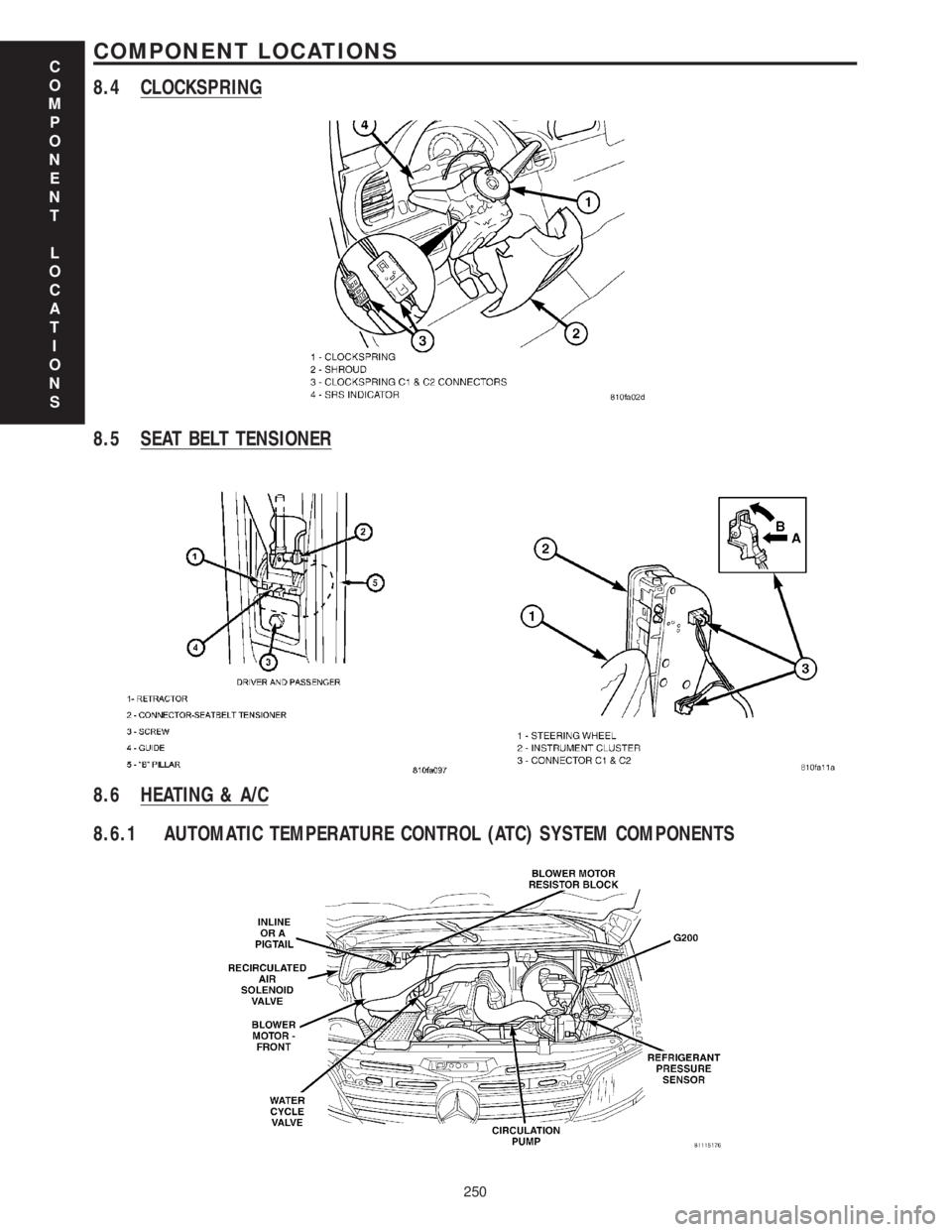
8.4 CLOCKSPRING
8.5 SEAT BELT TENSIONER
8.6 HEATING & A/C
8.6.1 AUTOMATIC TEMPERATURE CONTROL (ATC) SYSTEM COMPONENTS
C
O
M
P
O
N
E
N
T
L
O
C
A
T
I
O
N
S
250
COMPONENT LOCATIONS
Page 275 of 2305
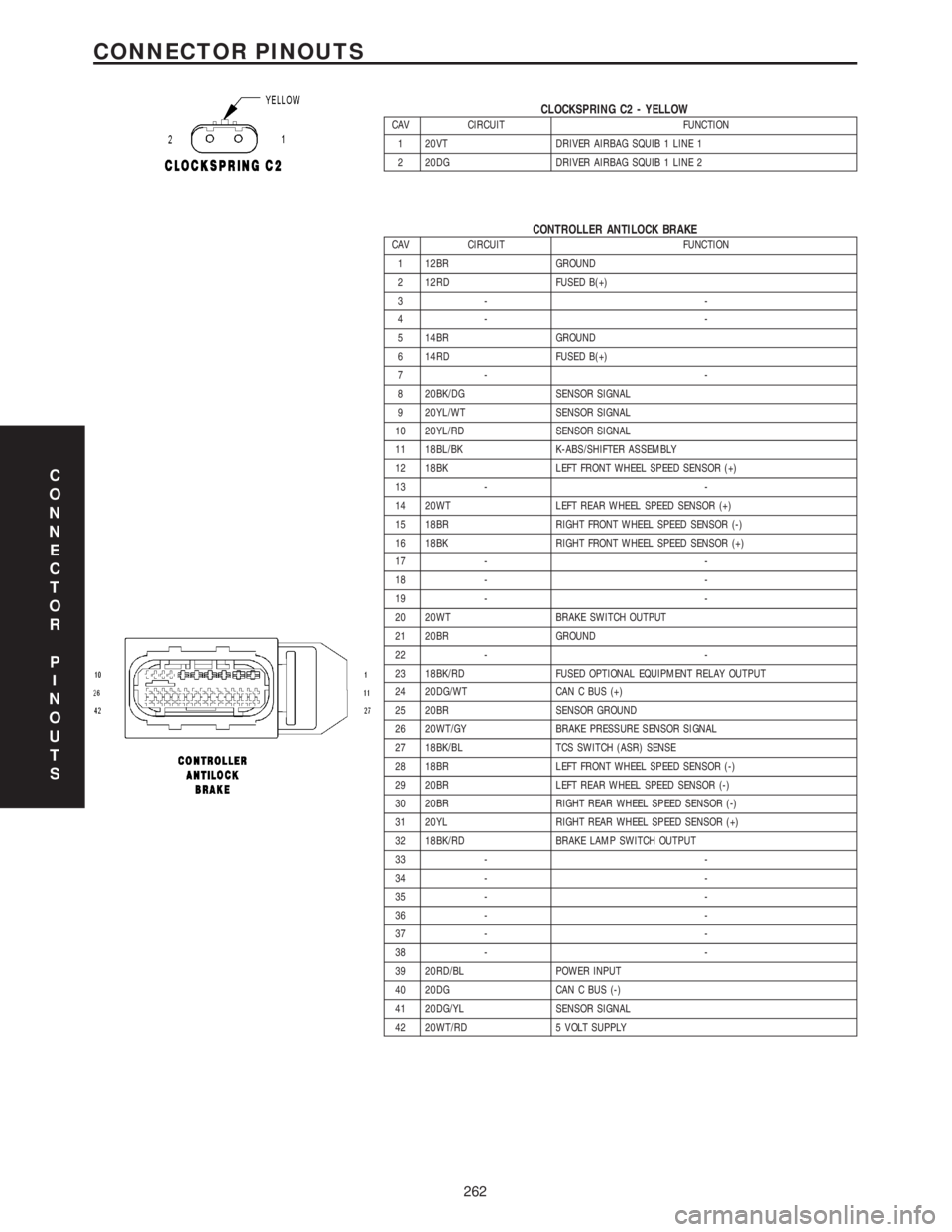
CLOCKSPRING C2 - YELLOWCAV CIRCUIT FUNCTION
1 20VT DRIVER AIRBAG SQUIB 1 LINE 1
2 20DG DRIVER AIRBAG SQUIB 1 LINE 2
CONTROLLER ANTILOCK BRAKECAV CIRCUIT FUNCTION
1 12BR GROUND
2 12RD FUSED B(+)
3- -
4- -
5 14BR GROUND
6 14RD FUSED B(+)
7- -
8 20BK/DG SENSOR SIGNAL
9 20YL/WT SENSOR SIGNAL
10 20YL/RD SENSOR SIGNAL
11 18BL/BK K-ABS/SHIFTER ASSEMBLY
12 18BK LEFT FRONT WHEEL SPEED SENSOR (+)
13 - -
14 20WT LEFT REAR WHEEL SPEED SENSOR (+)
15 18BR RIGHT FRONT WHEEL SPEED SENSOR (-)
16 18BK RIGHT FRONT WHEEL SPEED SENSOR (+)
17 - -
18 - -
19 - -
20 20WT BRAKE SWITCH OUTPUT
21 20BR GROUND
22 - -
23 18BK/RD FUSED OPTIONAL EQUIPMENT RELAY OUTPUT
24 20DG/WT CAN C BUS (+)
25 20BR SENSOR GROUND
26 20WT/GY BRAKE PRESSURE SENSOR SIGNAL
27 18BK/BL TCS SWITCH (ASR) SENSE
28 18BR LEFT FRONT WHEEL SPEED SENSOR (-)
29 20BR LEFT REAR WHEEL SPEED SENSOR (-)
30 20BR RIGHT REAR WHEEL SPEED SENSOR (-)
31 20YL RIGHT REAR WHEEL SPEED SENSOR (+)
32 18BK/RD BRAKE LAMP SWITCH OUTPUT
33 - -
34 - -
35 - -
36 - -
37 - -
38 - -
39 20RD/BL POWER INPUT
40 20DG CAN C BUS (-)
41 20DG/YL SENSOR SIGNAL
42 20WT/RD 5 VOLT SUPPLY
C
O
N
N
E
C
T
O
R
P
I
N
O
U
T
S
262
CONNECTOR PINOUTS
Page 723 of 2305
effect panels. If necessary, remove the wheels from
the lifted end of the vehicle and lower the vehicle
closer to the ground, to increase the ground clearance
at the opposite end of the vehicle. Install lug nuts on
wheel attaching studs to retain brake drums.
RAMP ANGLE
If a vehicle with flat-bed towing equipment is used,
the approach ramp angle should not exceed 15
degrees.
TOWING WHEN KEYS ARE NOT AVAILABLE
When the vehicle is locked and keys are not avail-
able, use a flat bed hauler. A Wheel-lift or Sling-type
device can be used provided all the wheels are lifted
off the ground using tow dollies.
MAINTENANCE SCHEDULES
DESCRIPTION
The use of special lubricant additives is not recom-
mended. The use of such additives may affect the
warranty rights. With regard to legal stipulations
concerning emissions control, please note that
engines have to be serviced and adjusted in accor-
dance with special instructions and using special
measuring equipment. Modifications to or interfer-
ence with the emissions control systems are not per-
missible.
MAINTENANCE - WITHOUT ASSYST MAINTE-
NANCE COMPUTER
Maintenance Intervals
²Oil service ±Normal Operationevery 10,000
miles or 16,000 km or 12 months.
²Maintenance service every 30,000 miles or
48,000 km.
Additional work must be carried out at yearly
intervals.
MAINTENANCE - WITH ASSYST MAINTENANCE
COMPUTER
ASSYST provides information on the best possible
timing for maintenance work.
When the next maintenance service is due, this
will be indicated in the multi-function display with
the wrench icon symbol displayed in km/miles or
days.
²One wrench icon showing indicates Oil Service
is necessary.
²Two wrench icons showing indicates Mainte-
nance Service is necessary ± displayed in km/miles or
days.
If the display shows the number of days, a clock
symbol will also appear in the multi-function display.You should have the maintenance performed
within the stated period/distance.
The service indicator will be reset after an oil ser-
vice and/or maintenance service has been performed.
REGULAR CHECK - UPS
To maintain the safe operation of the vehicle, it is
recommended that the following tasks be performed
on a regular basis (i.e. weekly or whenever the vehi-
cle is refueled). Check:
²Engine oil level
²Brake system - fluid level
²Battery - acid level
²Windshield washer system and headlamp clean-
ing system - fluid level
²Mechanical assemblies (e.g. engine, transmis-
sion, etc.) - check for leaks
²Condition of tires and tires pressures
²All exterior lights
SPECIAL MAINTENANCE REQUIREMENTS
If bodies built by manufacturers other than
DaimlerChrysler Corporation are fitted to the vehi-
cle, the maintenance requirements and lubrication
intervals specified by the body manufacturer must be
adhered to, in addition to all standard maintenance
requirements.
Coolant
Corrosion inhibitor/antifreeze concentration in the
coolant should be checked before the onset of winter
(once year in countries with high prevailing temper-
atures).
Replace the coolant every five years or 100,000
miles.
Dust Filter for Heating / Ventilation Replacement
The dust filter and the tailgate interior filter are to
be renewed during routine maintenance service. If
operating conditions are dusty, these filters should be
renewed more frequently.
ENGINE OIL CHANGE AND FILTER REPLACEMENT
At a minimum, change the engine oil and oil filter
once a year ± even if the vehicle mileage per year is
extremely low. For standard oil service schedules
refer to the chapter oil service and maintenance ser-
vice.
Once a Year
Select the viscosity of the engine oil (SAE classes)
according to the outside air temperature.
Only use engine oil approved by DaimlerChrysler
Corporation if following the ASSYST system guide-
lines.
0 - 8 LUBRICATION & MAINTENANCEVA
Page 815 of 2305
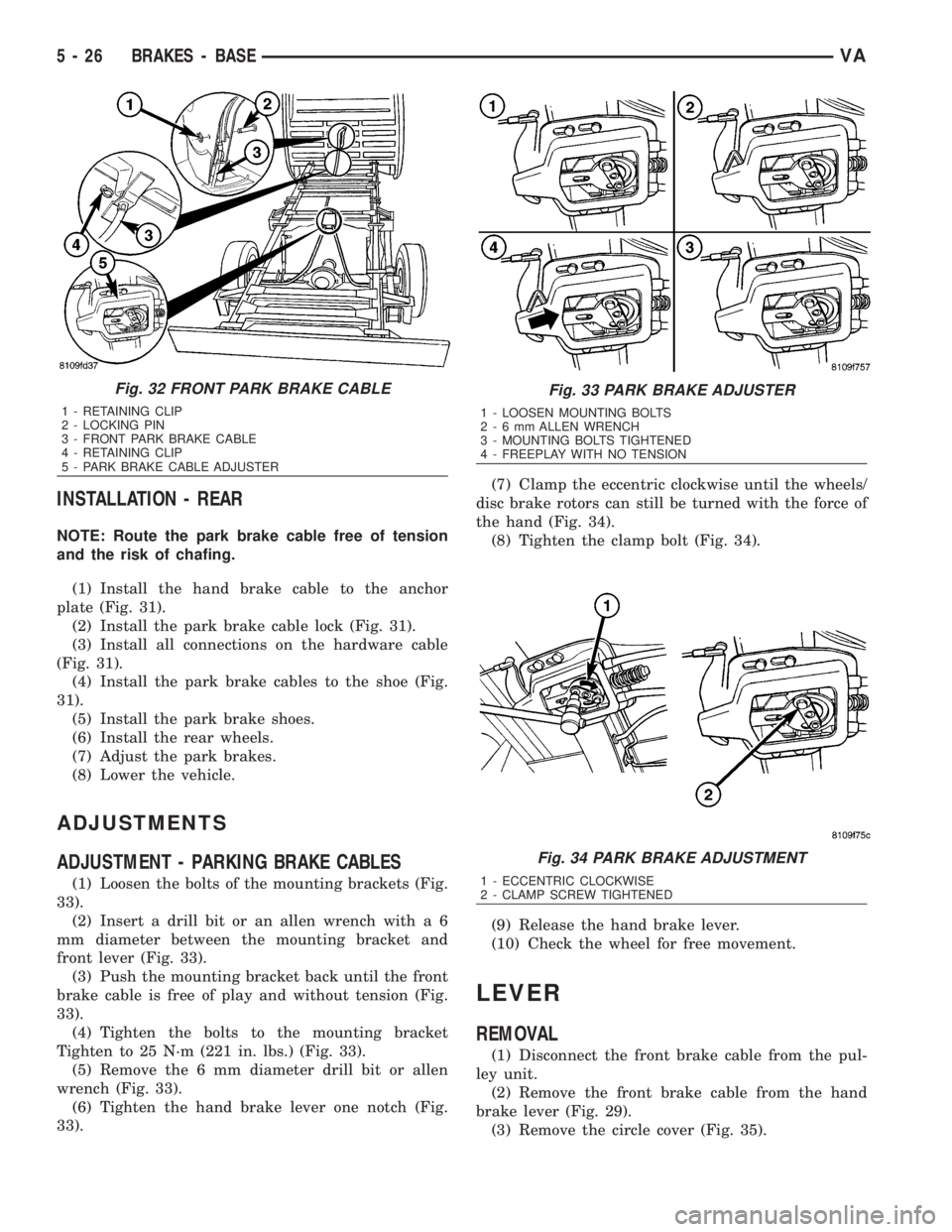
INSTALLATION - REAR
NOTE: Route the park brake cable free of tension
and the risk of chafing.
(1) Install the hand brake cable to the anchor
plate (Fig. 31).
(2) Install the park brake cable lock (Fig. 31).
(3) Install all connections on the hardware cable
(Fig. 31).
(4) Install the park brake cables to the shoe (Fig.
31).
(5) Install the park brake shoes.
(6) Install the rear wheels.
(7) Adjust the park brakes.
(8) Lower the vehicle.
ADJUSTMENTS
ADJUSTMENT - PARKING BRAKE CABLES
(1) Loosen the bolts of the mounting brackets (Fig.
33).
(2) Insert a drill bit or an allen wrench with a 6
mm diameter between the mounting bracket and
front lever (Fig. 33).
(3) Push the mounting bracket back until the front
brake cable is free of play and without tension (Fig.
33).
(4) Tighten the bolts to the mounting bracket
Tighten to 25 N´m (221 in. lbs.) (Fig. 33).
(5) Remove the 6 mm diameter drill bit or allen
wrench (Fig. 33).
(6) Tighten the hand brake lever one notch (Fig.
33).(7) Clamp the eccentric clockwise until the wheels/
disc brake rotors can still be turned with the force of
the hand (Fig. 34).
(8) Tighten the clamp bolt (Fig. 34).
(9) Release the hand brake lever.
(10) Check the wheel for free movement.
LEVER
REMOVAL
(1) Disconnect the front brake cable from the pul-
ley unit.
(2) Remove the front brake cable from the hand
brake lever (Fig. 29).
(3) Remove the circle cover (Fig. 35).
Fig. 32 FRONT PARK BRAKE CABLE
1 - RETAINING CLIP
2 - LOCKING PIN
3 - FRONT PARK BRAKE CABLE
4 - RETAINING CLIP
5 - PARK BRAKE CABLE ADJUSTER
Fig. 33 PARK BRAKE ADJUSTER
1 - LOOSEN MOUNTING BOLTS
2-6mmALLEN WRENCH
3 - MOUNTING BOLTS TIGHTENED
4 - FREEPLAY WITH NO TENSION
Fig. 34 PARK BRAKE ADJUSTMENT
1 - ECCENTRIC CLOCKWISE
2 - CLAMP SCREW TIGHTENED
5 - 26 BRAKES - BASEVA
Page 821 of 2305
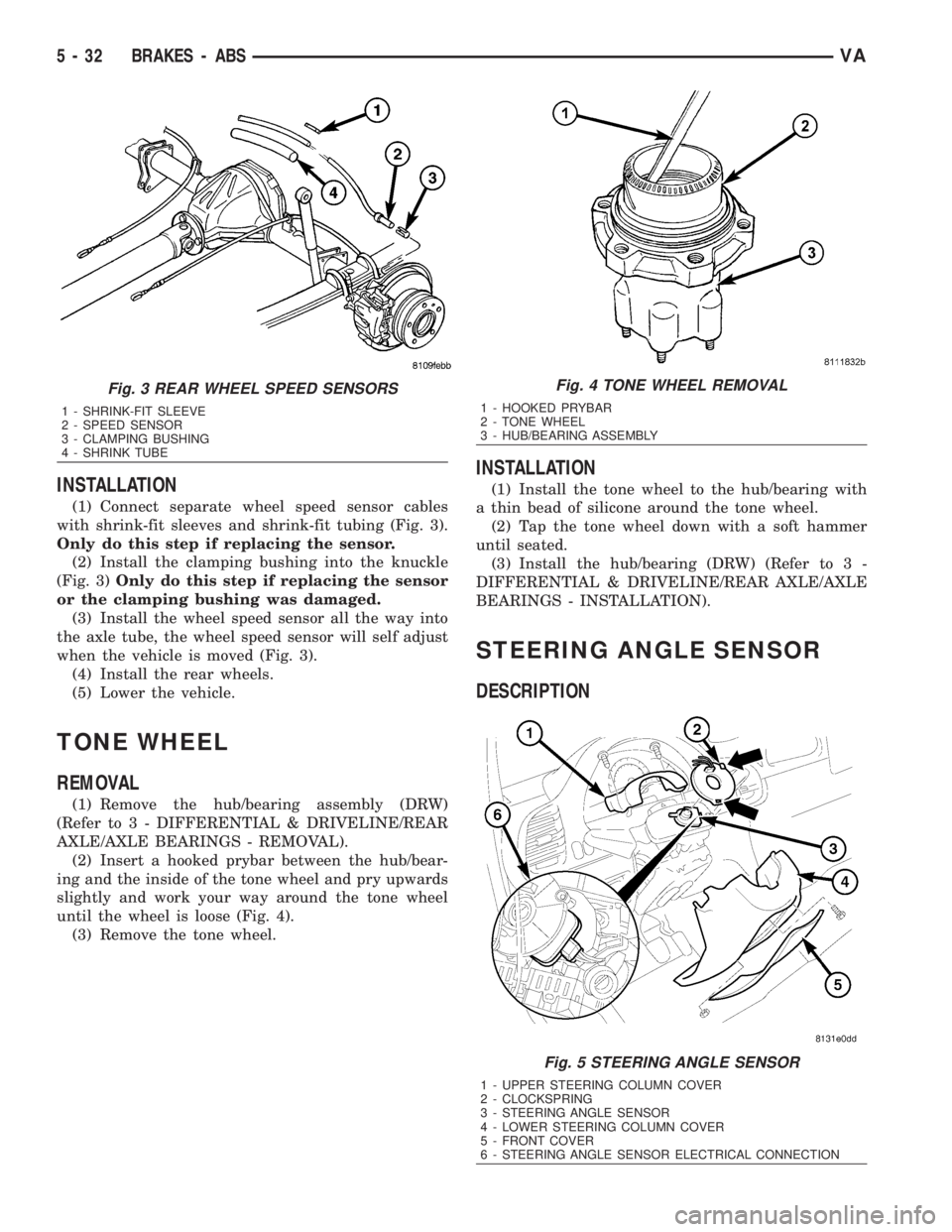
INSTALLATION
(1) Connect separate wheel speed sensor cables
with shrink-fit sleeves and shrink-fit tubing (Fig. 3).
Only do this step if replacing the sensor.
(2) Install the clamping bushing into the knuckle
(Fig. 3)Only do this step if replacing the sensor
or the clamping bushing was damaged.
(3) Install the wheel speed sensor all the way into
the axle tube, the wheel speed sensor will self adjust
when the vehicle is moved (Fig. 3).
(4) Install the rear wheels.
(5) Lower the vehicle.
TONE WHEEL
REMOVAL
(1) Remove the hub/bearing assembly (DRW)
(Refer to 3 - DIFFERENTIAL & DRIVELINE/REAR
AXLE/AXLE BEARINGS - REMOVAL).
(2) Insert a hooked prybar between the hub/bear-
ing and the inside of the tone wheel and pry upwards
slightly and work your way around the tone wheel
until the wheel is loose (Fig. 4).
(3) Remove the tone wheel.
INSTALLATION
(1) Install the tone wheel to the hub/bearing with
a thin bead of silicone around the tone wheel.
(2) Tap the tone wheel down with a soft hammer
until seated.
(3) Install the hub/bearing (DRW) (Refer to 3 -
DIFFERENTIAL & DRIVELINE/REAR AXLE/AXLE
BEARINGS - INSTALLATION).
STEERING ANGLE SENSOR
DESCRIPTION
Fig. 3 REAR WHEEL SPEED SENSORS
1 - SHRINK-FIT SLEEVE
2 - SPEED SENSOR
3 - CLAMPING BUSHING
4 - SHRINK TUBE
Fig. 4 TONE WHEEL REMOVAL
1 - HOOKED PRYBAR
2 - TONE WHEEL
3 - HUB/BEARING ASSEMBLY
Fig. 5 STEERING ANGLE SENSOR
1 - UPPER STEERING COLUMN COVER
2 - CLOCKSPRING
3 - STEERING ANGLE SENSOR
4 - LOWER STEERING COLUMN COVER
5 - FRONT COVER
6 - STEERING ANGLE SENSOR ELECTRICAL CONNECTION
5 - 32 BRAKES - ABSVA